1、安装rpm文件
yum install https://download.postgresql.org/pub/repos/yum/reporpms/EL-7-x86_64/pgdg-redhat-repo-latest.noarch.rpm
2、安装客户端
yum install postgresql10
3、安装服务端
yum install postgresql10-server
4、初始化
/usr/pgsql-10/bin/postgresql-10-setup initdb
5、设置自动启动并且启动postgresql服务
systemctl enable postgresql-10 systemctl start postgresql-10
第二部分:创建用户和数据库
1、使用postgres用户登录(PostgresSQL安装后会自动创建postgres用户,无密码)
su - postgres
2、登录postgresql数据库
输入psql
3、创建用户和数据库并授权
create user root with password 'chenjc'; // 创建用户 create database testdb owner root; // 创建数据库 grant all privileges on database testdb to root; // 授权
4、退出psql(输入 \q 再按回车键即可)
\q
第三部分:开启远程访问
1、修改/var/lib/pgsql/10/data/postgresql.conf文件,取消 listen_addresses 的注释,将参数值改为“*”
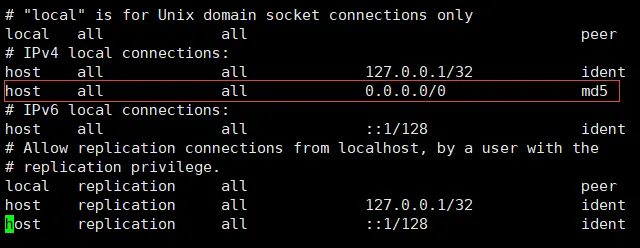
2、修改/var/lib/pgsql/10/data/pg_hba.conf文件,增加下图红框部分内容
3、切换到root用户,重启postgresql服务
systemctl restart postgresql-10.service
4.开放端口
/sbin/iptables -I INPUT -p tcp --dport 5432 -j ACCEPT