当前位置:首页>python>06 Python 爬虫

06 Python 爬虫

  • 2026-01-20 18:34:08
06 Python 爬虫

6.1 爬虫简

6.1.1 爬虫概述

网络爬虫(Web Crawler),又称网页蜘蛛或网络机器人,是一种按照一定的预设规则,自动遍历万维网,并抓取所需信息的自动化程序。其工作流程如下:

  • 模拟用户请求: 爬虫首先模拟真实用户通过浏览器发送 HTTP/HTTPS 请求到目标网站的服务器。这些请求可能包括 GET 请求获取网页内容,POST 请求提交表单数据等。
  • 接收响应并解析: 服务器接收到请求后,会返回相应的 HTML、JSON、XML 等格式的数据。爬虫接收到这些数据后,需要使用解析库如 BeautifulSoup、PyQuery、lxml 等进行解析,提取其中的有效信息。
  • 数据抓取与处理: 解析出所需的数据字段,如文章标题、作者、发布时间、正文内容等,并存储至本地数据库、CSV 文件、JSON 文件或者直接进行进一步的数据分析和挖掘。
  • 策略设计: 根据实际需求,爬虫需遵循一定的抓取策略,如深度优先搜索、广度优先搜索等,以及处理动态加载的内容、反爬机制、分布式爬取等复杂场景。
  • 道德与法律规范: 在进行网络爬虫开发时,必须遵守相关法律法规及网站的 Robots 协议,尊重网站版权,避免过度频繁的抓取导致服务器压力过大。

6.1.2 爬虫技术栈

  • Python 语言环境:Python 因其丰富的第三方库(如 requests 用于网络请求,Scrapy、pandas 用于数据处理)成为了编写爬虫的首选语言。
  • 请求库:requests 库是最常用的 HTTP 客户端库,能够方便地构造各种 HTTP 请求。解析 HTML 文档结构,提取有效信息。
  • JavaScript 渲染:对于一些采用 JavaScript 动态加载内容的网站,常规的 HTTP 请求可能无法直接获取完整数据。这时可以借助 Selenium、Puppeteer 等工具模拟浏览器执行 JavaScript,获取渲染后的页面内容。
  • 异步抓取与多线程/协程:为了提高爬取效率,常常利用异步 IO 模型(如 Python 的 asyncio 库)或多线程/多进程(如 threading、multiprocessing 库)并发发起多个请求。
  • IP 代理池与反爬策略应对:为防止被目标网站封禁,可构建 IP 代理池,通过轮换 IP 地址访问;同时,还需要对常见的反爬手段(如 User-Agent 限制、Cookie 验证、验证码识别、登录限制等)制定对应的解决策略。
  • 数据存储:爬取到的数据通常需要持久化存储,可以选择 SQLite、MySQL、MongoDB 等数据库系统,或者直接导出为 CSV、JSON、XML 等文件格式。
  • 分布式爬虫:针对大规模数据采集任务,可以设计分布式爬虫框架,如 Scrapy-Redis,将爬取任务分布到多台机器上,提升整体爬取速度。

6.2 urllib

6.2.1 概述

urllib 是 Python 标准库中用于处理 URLs 和执行 HTTP 请求的一个模块集合,主要包括以下几个子模块:

  • urllib.request:提供了用于发送 HTTP 请求的功能,包括 GET、POST 等各种 HTTP 方法,支持设置请求头、传递数据、处理 cookies 等功能。
  • urllib.error:包含了处理 HTTP 请求过程中可能出现的各种异常类,如 HTTPError、URLError 等,便于开发者进行错误处理。
  • urllib.parse:提供了一系列函数来解析、构造、合并 URLs,包括解析查询字符串、解码 URL 编码等。
  • urllib.robotparser:用于解析网站的 robots.txt 文件,判断爬虫是否被允许抓取特定网页(虽然在实际爬虫开发中,出于效率考虑,这一功能往往不被严格遵循)

在 Python 3.x 中,urllib 库进行了重构,原先 Python 2 中的 urllib、urllib2 和 urllib3 部分功能合并到了 urllib.request 和 urllib.error 模块中。

6.2.2 request 模块

发送 GET 请求

import urllib.requesturl = 'http://example.com'response = urllib.request.urlopen(url)# 获取响应内容并解码为文本content = response.read().decode('utf-8')  

发送 POST 请求

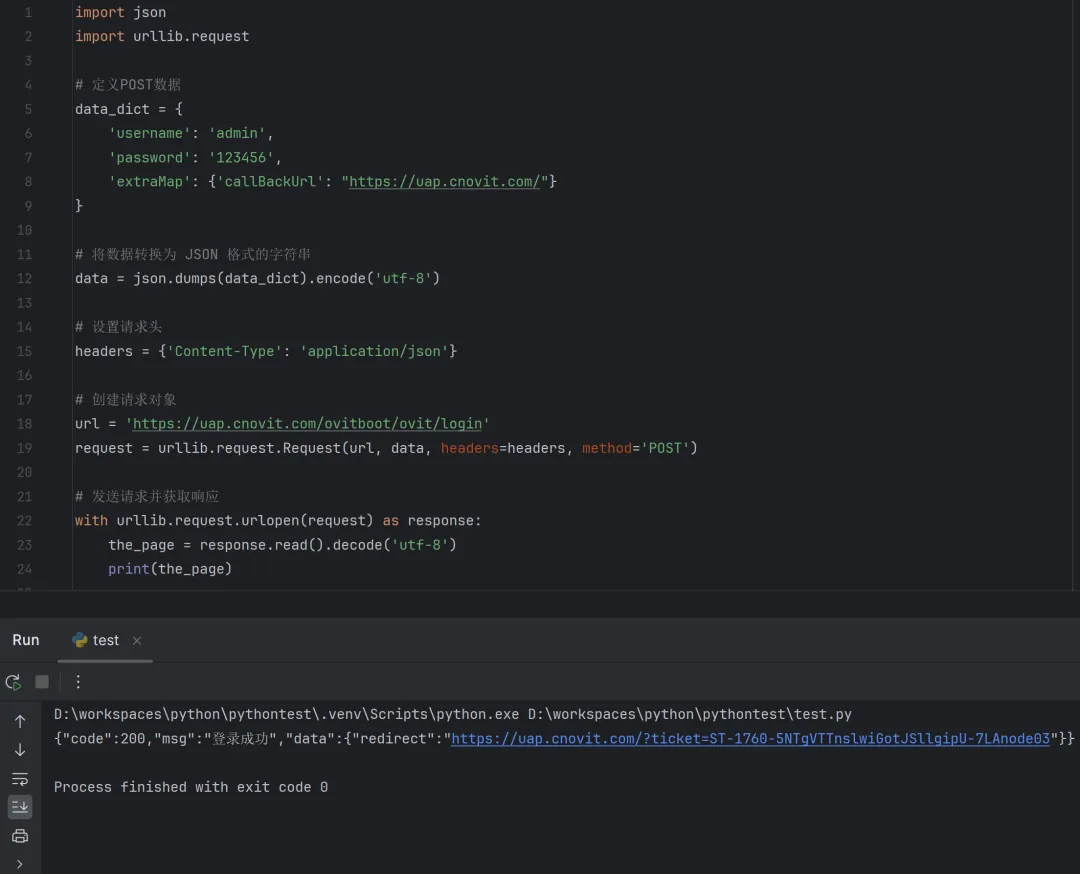
data = bytes('key=value''utf-8')req = urllib.request.Request(url, data=data, method='POST')response = urllib.request.urlopen(req)

自定义请求头

headers = {'User-Agent''Mozilla/5.0'}req = urllib.request.Request(url, headers=headers)response = urllib.request.urlopen(req)

处理 Cookie

cj = http.cookiejar.CookieJar()opener = urllib.request.build_opener(urllib.request.HTTPCookieProcessor(cj))urllib.request.install_opener(opener)# 登录并保持cookieslogin_data = urllib.parse.urlencode({'username': 'xxx', 'password': 'xxx'})login_req = urllib.request.Request(login_url, data=login_data.encode())urllib.request.urlopen(login_req)# 使用已有的cookies抓取页面page_req = urllib.request.Request(target_url)page_response = urllib.request.urlopen(page_req)

使用示例

6.2.3 error 模块

Error 模块下有三个异常类:

  • URLError:处理程序在遇到问题时会引发此异常(或其派生的异常)只有一个 reason 属性
  • HTTPError:是 URLError 的一个子类,有更多的属性,如 code, reason,headers 适用于处理特殊 HTTP 错误例如作为认证请求的时候。
  • ContentTooShortError:此异常会在 urlretrieve() 函数检测到已下载的数据量小于期待的数据量(由 Content-Length 头给定)时被引发。 content 属性中将存放已下载(可能被截断)的数据。

6.2.4 parse 模块

parse 模块定义了 url 的标准接口,实现 url 的各种抽取,解析,合并,编码,解码

参数编码

import urllib.parsedict = {    'name':'WenAn',    'age'20}params = urllib.parse.urlencode(dict)print(params)# name=WenAn&age=20

中文参数编解码

import urllib.parseparams = '中国'base_url = 'https://www.baidu.com/s?wd='# 使用 quote() 对中文编码url = base_url + urllib.parse.quote(params)print(url)# https://www.baidu.com/s?wd=%E4%B8%AD%E5%9B%BD# 使用 unquote() 对中文解码print(urllib.parse.unquote(url))# https://www.baidu.com/s?wd=中国

URL 分段

from urllib.parse import urlparsea = urlparse("https://docs.python.org/zh-cn/3/library/urllib.parse.html")print(a)# 返回一个数组,是 url 的拼接部分,可以访问具体的值# ParseResult(scheme='https', # 		netloc='docs.python.org', # 		path='/zh-cn/3/library/urllib.parse.html', # 		params='', # 		query='', #		fragment='')# scheme:表示协议print(a.scheme)# netloc:域名print(a.netloc)# path:路径print(a.path)# params:参数print(a.params)# query:查询条件,一般都是get请求的urlprint(a.query)# fragment:锚点,用于直接定位页面的下拉位置,跳转到网页的指定位置print(a.fragment)# 构造 rulurl_params = (a.scheme, a.netloc, a.path, a.params, a.query, a.fragment)url = urllib.parse.urlunparse(url_params)print(url)

6.2.5 robotparser 模块

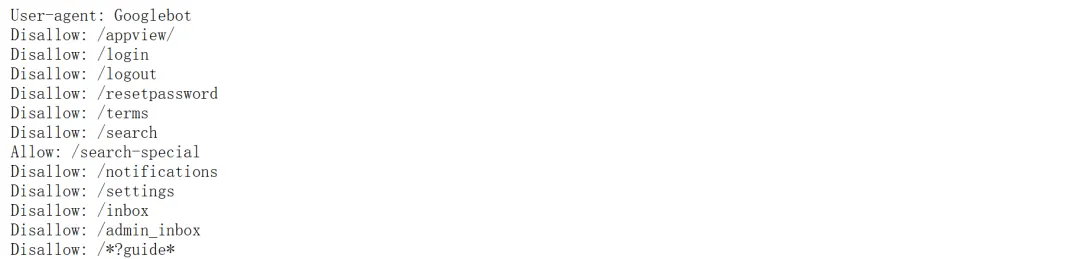
Robots 协议(也称为爬虫协议、机器人协议等)的全称是网络爬虫排除标准(Robots Exclusion Protocol),内容网站通过 Robots 协议告诉搜索引擎怎样更高效的索引到结果页并提供给用户。它规定了网站里的哪些内容可以抓取,哪些不可以抓取,大部分网站都会有一个 Robots 协议,一般存在网站的根目录下,命名为 robots.txt,robotparser 用于解析 robots.txt 文本。

Robots 协议的主要内容和格式:

  • User-agent:声明该行规则适用的爬虫或搜索引擎。例如,User-agent: *表示适用于所有类型的爬虫。
  • Disallow:指明不应该被爬取的 URL 路径。例如,Disallow: /private/意味着禁止访问 /private/ 及其子目录下的所有内容。
  • Allow(并非所有爬虫都支持):明确指出可以被访问的特定 URL 路径,即使在其父级目录已经被 Disallow 命令禁止的情况下。
  • Crawl-delay(非标准,部分搜索引擎支持):设置爬虫抓取该网站的延迟间隔,以秒为单位,用于控制爬虫访问速度。
  • Sitemap:提供网站地图文件的 URL,告诉搜索引擎去哪里查找网站的结构化数据。

6.3 网页解析

6.3.1 xpath

XPath 是一种在 XML 和 HTML 文档中查找信息的语言,常用于网页爬虫中定位和提取特定数据。在 Python 中,通常结合 lxml 库来使用 XPath 表达式。

安装 lxml 库

pip install lxml

解析 HTML/XML

from lxml import etreehtml = '<html><body><h1>Title</h1><p>Hello World!</p></body></html>'# 对于HTML文档tree = etree.HTML(html)  # 对于XML文档xml_tree = etree.fromstring(xml_data)  

使用 XPath 表达式

XPath 提供了多种表达式来定位 XML 文档中的节点,以下是一些常用的 XPath 表达式及其含义:

  • /:从根节点选取。这是一个绝对路径,表示从文档的根节点开始选择。
  • //:基于当前节点(也就是上下文节点)进行查找,不考虑它们的位置。这是一个相对路径,可以在文档的任何位置查找匹配的节点。
  • .:选取当前节点。这个表达式用于选择当前正在处理的节点。
  • ..:选取当前节点的父节点。这个表达式用于选择当前节点的上一级节点。
  • @:选取属性。这个表达式用于选择具有特定属性的节点。
  • element: 元素名称为 element 的直接子节点
  • element[@attribute='value']: 具有指定属性的元素,支持 and、or 操作
  • element[position()]: 指定位置的元素
  • element/text(): 元素的文本内容
  • element[@attribute='value']/child: 具有指定属性的元素的子节点
  • element[contains(@attribute, 'value')]: 属性包含指定值的元素

示例

# 获取所有的h1标签h1_elements = tree.xpath('//h1')title = h1_elements[0].text if h1_elements else None# 查找所有书籍的标题titles = root.findall(".//book/title")for title in titles:    print(title.text)# 查找所有作者是 'A' 的书籍books = root.findall(".//book[@author='A']")for book in books:    print(book.find("title").text)

6.3.2 JsonPath

JsonPath 是一种查询 JSON 数据的路径表达式语言,类似于 XPath 在 XML 文档中的作用。在 Python 中,我们可以使用第三方库如 jsonpath-ng 或 jsonpath-rw 来实现 JsonPath 的查询。

安装 json 库

pip install jsonpath-ng

JsonPath 表达式使用

  • $:根对象
  • .:当前对象
  • ..:父对象的后代(递归查找)
  • [index]:索引位置
  • *:匹配任意数量的对象
  • @:当前对象自身
  • .属性名:访问对象属性
  • [?(expression)]:过滤表达式,只选择满足条件的元素

示例

from jsonpath_ng import jsonpath# 示例 JSON 数据json_data = {    "store": {        "book": [            {"author""Nigel Rees""title""Sayings of the Century""price"8.95},            {"author""Evelyn Waugh""title""Sword of Honour""price"12.99}        ],        "bicycle": {"color""红色""price"19.95}    },    "expensive"10}# 使用 JsonPath 表达式查询数据# price > 10 的 bookexpr = jsonpath.JsonPath("$..book[?(@.price > 10)]")# 执行查询result = expr.find(json_data)# 输出结果for match in result:    print(match.value)

6.3.3 BeautifulSoup

官方文档:https://www.crummy.com/software/BeautifulSoup/bs4/doc.zh/

BeautifulSoup 是一个用于解析 HTML 和 XML 文档的 Python 库,它可以将复杂的 HTML 结构转化为树状结构(称为解析树或 DOM 树),使得程序员能够通过直观的方式来搜索、遍历和修改这些树形结构中的信息。

安装 BeautifulSoup 库

pip install beautifulsoup4

解析 HTML

from bs4 import BeautifulSoupimport requests  # 通常结合 requests 库发送 HTTP 请求获取网页内容url = 'https://www.example.com'response = requests.get(url)response.raise_for_status()  # 检查请求是否成功html_content = response.text# 使用 Python 内置的 HTML 解析器soup = BeautifulSoup(html_content, 'html.parser')  # 或者使用更快、更健壮的第三方解析器,如 lxml# soup = BeautifulSoup(html_content, 'lxml')

查找元素

# 查找所有<h1>标签headings = soup.find_all('h1')# 查找第一个<h1>标签first_heading = soup.find('h1')# 根据class属性查找元素elements_with_class = soup.find_all(class_='some-class')# 根据id属性查找元素element_with_id = soup.find(id='some-id')

获取元素内容

# 获取元素的文本内容text_content = first_heading.get_text()# 获取元素的属性值attr_value = element_with_id['src']

遍历和导航

for child in soup.body.children:    print(child)# 或者通过Tag对象的后代遍历for paragraph in soup.find_all('p'):    for span in paragraph.find_all('span'):        print(span.text)

修改/生成 HTML

# 修改元素内容first_heading.string.replace_with('新的标题')# 生成或输出修改后的HTMLmodified_html = str(soup)

高级用法

  • 利用 CSS 选择器:结合 select() 方法,可以像在 CSS 中那样选取元素。
paragraphs = soup.select('p.some-class')
  • 递归搜索:通过.descendants属性进行递归遍历。
  • 同级元素搜索:使用.next_sibling.previous_sibling找到元素的相邻兄弟节点。

6.4 Selenium

6.4.1 概述

Selenium 是一个用于 Web 应用程序自动化测试的工具,它允许使用 Python 编写脚本来模拟用户对 Web 浏览器的各种操作,例如点击按钮、填充表单、滚动页面以及与页面上的各种元素交互。使用以下命令安装依赖库

pip install selenium

使用时需要对应浏览器的 WebDriver,例如 ChromeDriver 或 GeckoDriver。确保将其路径添加至系统 PATH,或者在启动 WebDriver 时指定其路径。

6.4.2 Selenium 使用

初始化 Selenium

from selenium import webdriver# 使用Chrome浏览器driver = webdriver.Chrome(executable_path="path/to/chromedriver")# 或者使用Firefox浏览器# driver = webdriver.Firefox(executable_path="path/to/geckodriver")# 设置隐式等待(全局等待策略)driver.implicitly_wait(10)  # 单位秒,非强制等待,只是在查找元素前的最长等待时间# 打开网址driver.get("http://www.example.com")

页面元素定位

Selenium 提供了多种方式来定位页面元素,包括 ID、Name、Class Name、CSS Selectors、XPath 等。

# 举例:通过 CSS Selector 定位元素并点击element = driver.find_element_by_css_selector("#myElement")element.click()# 通过 XPath 定位element = driver.find_element_by_xpath("//input[@name='username']")element.send_keys("test_username")# 其他定位方式element_by_id = driver.find_element_by_id("element_id")element_by_name = driver.find_element_by_name("element_name")element_by_tag_name = driver.find_element_by_tag_name("a")

动作链与鼠标键盘交互

对于复杂交互,可以使用 ActionChains 类。

from selenium.webdriver.common.action_chains import ActionChains# 创建动作链actions = ActionChains(driver)# 示例:鼠标悬停并点击hover_element = driver.find_element_by_css_selector('.hover-element')actions.move_to_element(hover_element).click().perform()# 键盘输入及按键事件element = driver.find_element_by_id('password')actions.move_to_element(element).send_keys('secret_password', Keys.RETURN).perform()

页面截屏与窗口操作

# 截屏保存为文件driver.save_screenshot('screenshot.png')# 最大化或调整窗口大小driver.maximize_window()driver.set_window_size(width, height)

异步JavaScript执行与获取返回值

# 执行JavaScript并获取返回值result = driver.execute_script("return document.title;")# 或者执行特定函数num_elements = driver.execute_script("return document.querySelectorAll('.class-name').length;")

页面加载等待策略

除了隐式等待外,还可以使用显式等待(ExpectedConditions)确保某个条件满足后再继续执行。

from selenium.webdriver.support.ui import WebDriverWaitfrom selenium.webdriver.support import expected_conditions as EC# 显式等待直到元素可见wait = WebDriverWait(driver, 10)element = wait.until(EC.presence_of_element_located((By.ID, "myDynamicElement")))# 或等待页面加载完成wait.until(EC.visibility_of_element_located((By.TAG_NAME, "body")))

关闭浏览器与退出

# 关闭当前窗口driver.close()# 完全退出 WebDriver会话,关闭所有窗口driver.quit()

页面源码与页面元数据

# 获取页面源码page_source = driver.page_source# 获取当前URLcurrent_url = driver.current_url

处理弹窗对话框

# 接受alert确认框alert = driver.switch_to.alertalert.accept()# 拒绝alert确认框,并可能输入文本alert.dismiss()alert.send_keys("Some keys")  # 如果对话框可输入

6.5 requests

6.5.1 概述

Python requests 是一个常用的 HTTP 请求库,可以方便地向网站发送 HTTP 请求,并获取响应结果。requests 模块比 urllib 模块更简洁。要想使用 requests 需要先安装依赖库

pip install requests

6.5.2 requests 使用

GET 请求

import requests# 发送GET请求并获取响应response = requests.get('https://api.example.com/data')# 携带参数# params = {'key''value''another_key''another_value'}# response = requests.get('https://api.example.com/search', params=params)# 携带请求头# headers = {'User-Agent''My User Agent'}# response = requests.get('https://api.example.com', headers=headers)# 检查响应状态码if response.status_code == 200:    # 获取响应体内容    content = response.text    # 若响应内容是JSON格式,可以进一步解析    data = response.json()else:    print(f"请求失败,状态码:{response.status_code}")# 获取响应头部信息headers = response.headers

POST 请求

# 发送POST请求data = {'username''user''password''pass'}headers = {'Content-Type''application/x-www-form-urlencoded'}response = requests.post('https://api.example.com/login', data=data, headers=headers)# 或者发送JSON数据json_data = {'key''value''list': [123]}headers = {'Content-Type''application/json'}response = requests.post('https://api.example.com/data', json=json_data)

超时与重试

# 设置请求超时时间为5秒response = requests.get('https://api.example.com', timeout=5)# 使用RetrySession进行重试from requests.adapters import HTTPAdapterfrom requests.packages.urllib3.util.retry import Retryretry_strategy = Retry(    total=3,    status_forcelist=[429500502503504],    backoff_factor=0.3,    method_whitelist=["HEAD""GET""OPTIONS"])adapter = HTTPAdapter(max_retries=retry_strategy)session = requests.Session()session.mount("http://", adapter)session.mount("https://", adapter)response = session.get('https://api.example.com')

下载文件

response = requests.get('https://example.com/file.zip', stream=True)# 直接下载到指定文件with open('file.zip''wb'as f:    for chunk in response.iter_content(chunk_size=1024):        if chunk:            f.write(chunk)

异常处理

try:    response = requests.get('https://invalid.example.com')except requests.exceptions.RequestException as e:    print(f"请求出现错误:{e}")

代理

import requests# 定义代理服务器信息proxies = {    "http""http://proxy.example.com:8080",  # HTTP代理    "https""https://proxy.example.com:8080"  # HTTPS代理}# 发起带代理的GET请求response = requests.get('https://api.example.com', proxies=proxies)# 或者发起带代理的POST请求data = {'key''value'}response = requests.post('https://api.example.com/data'data=data, proxies=proxies)# 如果代理需要身份验证(例如,HTTP Basic Auth)proxies_auth = ("username""password")proxies_with_auth = {    "http""http://username:password@proxy.example.com:8080",    "https""https://username:password@proxy.example.com:8080"}# 使用带身份验证的代理response = requests.get('https://api.example.com', proxies=proxies_with_auth)

6.6 scrapy

6.6.1 概述

Scrapy 是一个用于爬取网站数据并提取结构化数据的 Python 框架。使用 Scrapy,可以轻松地创建爬虫来抓取网页内容,并通过 XPath 或 CSS 选择器从中提取有用的信息。需要先安装相关依赖

pip install scrapy

6.6.2 创建 Scrapy 项目

使用 Scrapy 命令行工具创建一个新的项目

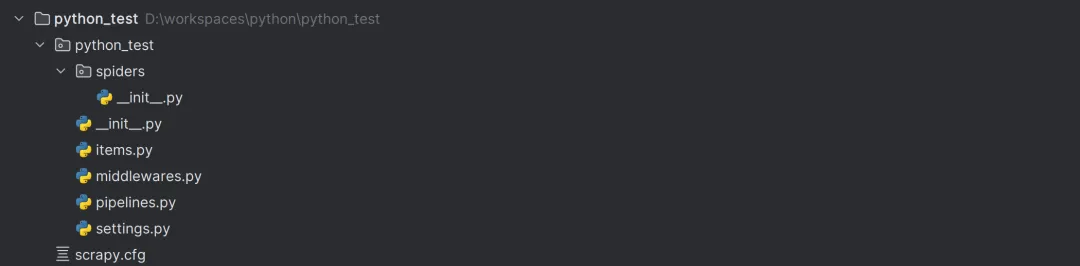
scrapy startproject ${project_name}

这将生成一个标准的 Scrapy 项目结构,包含如 settings.py(配置文件)、items.py(定义数据模型)、middlewares.py(中间件)等文件。

6.6.3 编写 Spider

Spider 是 Scrapy 中用于定义如何从网站上抓取数据的类。使用 scrapy genspider 命令可以快速地生成一个基本的 Spider

scrapy genspider myspider example.com

这将在当前目录下生成一个名为 myspider.py 的文件。在这个文件中,可以定义抓取逻辑和解析规则。

在 Spider 中,需要定义 start_urls 属性来指定初始的 URL 列表,以及 parse 方法来解析响应并提取数据。可以使用 Scrapy 提供的选择器(如 CSS 或 XPath 选择器)来定位 HTML 元素并提取数据。

import scrapy  class MySpider(scrapy.Spider):      name = 'myspider'      start_urls = ['http://example.com']      def parse(self, response):          for title in response.css('h1.title'):              yield {'title': title.get_text()}

6.6.4 运行 Spider

在项目的根目录下,使用 scrapy crawl 命令运行 Spider

scrapy crawl myspider

Scrapy 将启动一个 Twisted 异步网络引擎来执行抓取任务,并将抓取到的数据输出到控制台。
最新文章

随机文章

基本 文件 流程 错误 SQL 调试
  1. 请求信息 : 2026-02-08 09:21:18 HTTP/2.0 GET : https://f.mffb.com.cn/a/465651.html
  2. 运行时间 : 0.413451s [ 吞吐率:2.42req/s ] 内存消耗:4,953.65kb 文件加载:140
  3. 缓存信息 : 0 reads,0 writes
  4. 会话信息 : SESSION_ID=7b866a516133a29153fc6ebeca57e37b
  1. /yingpanguazai/ssd/ssd1/www/f.mffb.com.cn/public/index.php ( 0.79 KB )
  2. /yingpanguazai/ssd/ssd1/www/f.mffb.com.cn/vendor/autoload.php ( 0.17 KB )
  3. /yingpanguazai/ssd/ssd1/www/f.mffb.com.cn/vendor/composer/autoload_real.php ( 2.49 KB )
  4. /yingpanguazai/ssd/ssd1/www/f.mffb.com.cn/vendor/composer/platform_check.php ( 0.90 KB )
  5. /yingpanguazai/ssd/ssd1/www/f.mffb.com.cn/vendor/composer/ClassLoader.php ( 14.03 KB )
  6. /yingpanguazai/ssd/ssd1/www/f.mffb.com.cn/vendor/composer/autoload_static.php ( 4.90 KB )
  7. /yingpanguazai/ssd/ssd1/www/f.mffb.com.cn/vendor/topthink/think-helper/src/helper.php ( 8.34 KB )
  8. /yingpanguazai/ssd/ssd1/www/f.mffb.com.cn/vendor/topthink/think-validate/src/helper.php ( 2.19 KB )
  9. /yingpanguazai/ssd/ssd1/www/f.mffb.com.cn/vendor/topthink/think-orm/src/helper.php ( 1.47 KB )
  10. /yingpanguazai/ssd/ssd1/www/f.mffb.com.cn/vendor/topthink/think-orm/stubs/load_stubs.php ( 0.16 KB )
  11. /yingpanguazai/ssd/ssd1/www/f.mffb.com.cn/vendor/topthink/framework/src/think/Exception.php ( 1.69 KB )
  12. /yingpanguazai/ssd/ssd1/www/f.mffb.com.cn/vendor/topthink/think-container/src/Facade.php ( 2.71 KB )
  13. /yingpanguazai/ssd/ssd1/www/f.mffb.com.cn/vendor/symfony/deprecation-contracts/function.php ( 0.99 KB )
  14. /yingpanguazai/ssd/ssd1/www/f.mffb.com.cn/vendor/symfony/polyfill-mbstring/bootstrap.php ( 8.26 KB )
  15. /yingpanguazai/ssd/ssd1/www/f.mffb.com.cn/vendor/symfony/polyfill-mbstring/bootstrap80.php ( 9.78 KB )
  16. /yingpanguazai/ssd/ssd1/www/f.mffb.com.cn/vendor/symfony/var-dumper/Resources/functions/dump.php ( 1.49 KB )
  17. /yingpanguazai/ssd/ssd1/www/f.mffb.com.cn/vendor/topthink/think-dumper/src/helper.php ( 0.18 KB )
  18. /yingpanguazai/ssd/ssd1/www/f.mffb.com.cn/vendor/symfony/var-dumper/VarDumper.php ( 4.30 KB )
  19. /yingpanguazai/ssd/ssd1/www/f.mffb.com.cn/vendor/topthink/framework/src/think/App.php ( 15.30 KB )
  20. /yingpanguazai/ssd/ssd1/www/f.mffb.com.cn/vendor/topthink/think-container/src/Container.php ( 15.76 KB )
  21. /yingpanguazai/ssd/ssd1/www/f.mffb.com.cn/vendor/psr/container/src/ContainerInterface.php ( 1.02 KB )
  22. /yingpanguazai/ssd/ssd1/www/f.mffb.com.cn/app/provider.php ( 0.19 KB )
  23. /yingpanguazai/ssd/ssd1/www/f.mffb.com.cn/vendor/topthink/framework/src/think/Http.php ( 6.04 KB )
  24. /yingpanguazai/ssd/ssd1/www/f.mffb.com.cn/vendor/topthink/think-helper/src/helper/Str.php ( 7.29 KB )
  25. /yingpanguazai/ssd/ssd1/www/f.mffb.com.cn/vendor/topthink/framework/src/think/Env.php ( 4.68 KB )
  26. /yingpanguazai/ssd/ssd1/www/f.mffb.com.cn/app/common.php ( 0.03 KB )
  27. /yingpanguazai/ssd/ssd1/www/f.mffb.com.cn/vendor/topthink/framework/src/helper.php ( 18.78 KB )
  28. /yingpanguazai/ssd/ssd1/www/f.mffb.com.cn/vendor/topthink/framework/src/think/Config.php ( 5.54 KB )
  29. /yingpanguazai/ssd/ssd1/www/f.mffb.com.cn/config/app.php ( 0.95 KB )
  30. /yingpanguazai/ssd/ssd1/www/f.mffb.com.cn/config/cache.php ( 0.78 KB )
  31. /yingpanguazai/ssd/ssd1/www/f.mffb.com.cn/config/console.php ( 0.23 KB )
  32. /yingpanguazai/ssd/ssd1/www/f.mffb.com.cn/config/cookie.php ( 0.56 KB )
  33. /yingpanguazai/ssd/ssd1/www/f.mffb.com.cn/config/database.php ( 2.48 KB )
  34. /yingpanguazai/ssd/ssd1/www/f.mffb.com.cn/vendor/topthink/framework/src/think/facade/Env.php ( 1.67 KB )
  35. /yingpanguazai/ssd/ssd1/www/f.mffb.com.cn/config/filesystem.php ( 0.61 KB )
  36. /yingpanguazai/ssd/ssd1/www/f.mffb.com.cn/config/lang.php ( 0.91 KB )
  37. /yingpanguazai/ssd/ssd1/www/f.mffb.com.cn/config/log.php ( 1.35 KB )
  38. /yingpanguazai/ssd/ssd1/www/f.mffb.com.cn/config/middleware.php ( 0.19 KB )
  39. /yingpanguazai/ssd/ssd1/www/f.mffb.com.cn/config/route.php ( 1.89 KB )
  40. /yingpanguazai/ssd/ssd1/www/f.mffb.com.cn/config/session.php ( 0.57 KB )
  41. /yingpanguazai/ssd/ssd1/www/f.mffb.com.cn/config/trace.php ( 0.34 KB )
  42. /yingpanguazai/ssd/ssd1/www/f.mffb.com.cn/config/view.php ( 0.82 KB )
  43. /yingpanguazai/ssd/ssd1/www/f.mffb.com.cn/app/event.php ( 0.25 KB )
  44. /yingpanguazai/ssd/ssd1/www/f.mffb.com.cn/vendor/topthink/framework/src/think/Event.php ( 7.67 KB )
  45. /yingpanguazai/ssd/ssd1/www/f.mffb.com.cn/app/service.php ( 0.13 KB )
  46. /yingpanguazai/ssd/ssd1/www/f.mffb.com.cn/app/AppService.php ( 0.26 KB )
  47. /yingpanguazai/ssd/ssd1/www/f.mffb.com.cn/vendor/topthink/framework/src/think/Service.php ( 1.64 KB )
  48. /yingpanguazai/ssd/ssd1/www/f.mffb.com.cn/vendor/topthink/framework/src/think/Lang.php ( 7.35 KB )
  49. /yingpanguazai/ssd/ssd1/www/f.mffb.com.cn/vendor/topthink/framework/src/lang/zh-cn.php ( 13.70 KB )
  50. /yingpanguazai/ssd/ssd1/www/f.mffb.com.cn/vendor/topthink/framework/src/think/initializer/Error.php ( 3.31 KB )
  51. /yingpanguazai/ssd/ssd1/www/f.mffb.com.cn/vendor/topthink/framework/src/think/initializer/RegisterService.php ( 1.33 KB )
  52. /yingpanguazai/ssd/ssd1/www/f.mffb.com.cn/vendor/services.php ( 0.14 KB )
  53. /yingpanguazai/ssd/ssd1/www/f.mffb.com.cn/vendor/topthink/framework/src/think/service/PaginatorService.php ( 1.52 KB )
  54. /yingpanguazai/ssd/ssd1/www/f.mffb.com.cn/vendor/topthink/framework/src/think/service/ValidateService.php ( 0.99 KB )
  55. /yingpanguazai/ssd/ssd1/www/f.mffb.com.cn/vendor/topthink/framework/src/think/service/ModelService.php ( 2.04 KB )
  56. /yingpanguazai/ssd/ssd1/www/f.mffb.com.cn/vendor/topthink/think-trace/src/Service.php ( 0.77 KB )
  57. /yingpanguazai/ssd/ssd1/www/f.mffb.com.cn/vendor/topthink/framework/src/think/Middleware.php ( 6.72 KB )
  58. /yingpanguazai/ssd/ssd1/www/f.mffb.com.cn/vendor/topthink/framework/src/think/initializer/BootService.php ( 0.77 KB )
  59. /yingpanguazai/ssd/ssd1/www/f.mffb.com.cn/vendor/topthink/think-orm/src/Paginator.php ( 11.86 KB )
  60. /yingpanguazai/ssd/ssd1/www/f.mffb.com.cn/vendor/topthink/think-validate/src/Validate.php ( 63.20 KB )
  61. /yingpanguazai/ssd/ssd1/www/f.mffb.com.cn/vendor/topthink/think-orm/src/Model.php ( 23.55 KB )
  62. /yingpanguazai/ssd/ssd1/www/f.mffb.com.cn/vendor/topthink/think-orm/src/model/concern/Attribute.php ( 21.05 KB )
  63. /yingpanguazai/ssd/ssd1/www/f.mffb.com.cn/vendor/topthink/think-orm/src/model/concern/AutoWriteData.php ( 4.21 KB )
  64. /yingpanguazai/ssd/ssd1/www/f.mffb.com.cn/vendor/topthink/think-orm/src/model/concern/Conversion.php ( 6.44 KB )
  65. /yingpanguazai/ssd/ssd1/www/f.mffb.com.cn/vendor/topthink/think-orm/src/model/concern/DbConnect.php ( 5.16 KB )
  66. /yingpanguazai/ssd/ssd1/www/f.mffb.com.cn/vendor/topthink/think-orm/src/model/concern/ModelEvent.php ( 2.33 KB )
  67. /yingpanguazai/ssd/ssd1/www/f.mffb.com.cn/vendor/topthink/think-orm/src/model/concern/RelationShip.php ( 28.29 KB )
  68. /yingpanguazai/ssd/ssd1/www/f.mffb.com.cn/vendor/topthink/think-helper/src/contract/Arrayable.php ( 0.09 KB )
  69. /yingpanguazai/ssd/ssd1/www/f.mffb.com.cn/vendor/topthink/think-helper/src/contract/Jsonable.php ( 0.13 KB )
  70. /yingpanguazai/ssd/ssd1/www/f.mffb.com.cn/vendor/topthink/think-orm/src/model/contract/Modelable.php ( 0.09 KB )
  71. /yingpanguazai/ssd/ssd1/www/f.mffb.com.cn/vendor/topthink/framework/src/think/Db.php ( 2.88 KB )
  72. /yingpanguazai/ssd/ssd1/www/f.mffb.com.cn/vendor/topthink/think-orm/src/DbManager.php ( 8.52 KB )
  73. /yingpanguazai/ssd/ssd1/www/f.mffb.com.cn/vendor/topthink/framework/src/think/Log.php ( 6.28 KB )
  74. /yingpanguazai/ssd/ssd1/www/f.mffb.com.cn/vendor/topthink/framework/src/think/Manager.php ( 3.92 KB )
  75. /yingpanguazai/ssd/ssd1/www/f.mffb.com.cn/vendor/psr/log/src/LoggerTrait.php ( 2.69 KB )
  76. /yingpanguazai/ssd/ssd1/www/f.mffb.com.cn/vendor/psr/log/src/LoggerInterface.php ( 2.71 KB )
  77. /yingpanguazai/ssd/ssd1/www/f.mffb.com.cn/vendor/topthink/framework/src/think/Cache.php ( 4.92 KB )
  78. /yingpanguazai/ssd/ssd1/www/f.mffb.com.cn/vendor/psr/simple-cache/src/CacheInterface.php ( 4.71 KB )
  79. /yingpanguazai/ssd/ssd1/www/f.mffb.com.cn/vendor/topthink/think-helper/src/helper/Arr.php ( 16.63 KB )
  80. /yingpanguazai/ssd/ssd1/www/f.mffb.com.cn/vendor/topthink/framework/src/think/cache/driver/File.php ( 7.84 KB )
  81. /yingpanguazai/ssd/ssd1/www/f.mffb.com.cn/vendor/topthink/framework/src/think/cache/Driver.php ( 9.03 KB )
  82. /yingpanguazai/ssd/ssd1/www/f.mffb.com.cn/vendor/topthink/framework/src/think/contract/CacheHandlerInterface.php ( 1.99 KB )
  83. /yingpanguazai/ssd/ssd1/www/f.mffb.com.cn/app/Request.php ( 0.09 KB )
  84. /yingpanguazai/ssd/ssd1/www/f.mffb.com.cn/vendor/topthink/framework/src/think/Request.php ( 55.78 KB )
  85. /yingpanguazai/ssd/ssd1/www/f.mffb.com.cn/app/middleware.php ( 0.25 KB )
  86. /yingpanguazai/ssd/ssd1/www/f.mffb.com.cn/vendor/topthink/framework/src/think/Pipeline.php ( 2.61 KB )
  87. /yingpanguazai/ssd/ssd1/www/f.mffb.com.cn/vendor/topthink/think-trace/src/TraceDebug.php ( 3.40 KB )
  88. /yingpanguazai/ssd/ssd1/www/f.mffb.com.cn/vendor/topthink/framework/src/think/middleware/SessionInit.php ( 1.94 KB )
  89. /yingpanguazai/ssd/ssd1/www/f.mffb.com.cn/vendor/topthink/framework/src/think/Session.php ( 1.80 KB )
  90. /yingpanguazai/ssd/ssd1/www/f.mffb.com.cn/vendor/topthink/framework/src/think/session/driver/File.php ( 6.27 KB )
  91. /yingpanguazai/ssd/ssd1/www/f.mffb.com.cn/vendor/topthink/framework/src/think/contract/SessionHandlerInterface.php ( 0.87 KB )
  92. /yingpanguazai/ssd/ssd1/www/f.mffb.com.cn/vendor/topthink/framework/src/think/session/Store.php ( 7.12 KB )
  93. /yingpanguazai/ssd/ssd1/www/f.mffb.com.cn/vendor/topthink/framework/src/think/Route.php ( 23.73 KB )
  94. /yingpanguazai/ssd/ssd1/www/f.mffb.com.cn/vendor/topthink/framework/src/think/route/RuleName.php ( 5.75 KB )
  95. /yingpanguazai/ssd/ssd1/www/f.mffb.com.cn/vendor/topthink/framework/src/think/route/Domain.php ( 2.53 KB )
  96. /yingpanguazai/ssd/ssd1/www/f.mffb.com.cn/vendor/topthink/framework/src/think/route/RuleGroup.php ( 22.43 KB )
  97. /yingpanguazai/ssd/ssd1/www/f.mffb.com.cn/vendor/topthink/framework/src/think/route/Rule.php ( 26.95 KB )
  98. /yingpanguazai/ssd/ssd1/www/f.mffb.com.cn/vendor/topthink/framework/src/think/route/RuleItem.php ( 9.78 KB )
  99. /yingpanguazai/ssd/ssd1/www/f.mffb.com.cn/route/app.php ( 1.72 KB )
  100. /yingpanguazai/ssd/ssd1/www/f.mffb.com.cn/vendor/topthink/framework/src/think/facade/Route.php ( 4.70 KB )
  101. /yingpanguazai/ssd/ssd1/www/f.mffb.com.cn/vendor/topthink/framework/src/think/route/dispatch/Controller.php ( 4.74 KB )
  102. /yingpanguazai/ssd/ssd1/www/f.mffb.com.cn/vendor/topthink/framework/src/think/route/Dispatch.php ( 10.44 KB )
  103. /yingpanguazai/ssd/ssd1/www/f.mffb.com.cn/app/controller/Index.php ( 4.81 KB )
  104. /yingpanguazai/ssd/ssd1/www/f.mffb.com.cn/app/BaseController.php ( 2.05 KB )
  105. /yingpanguazai/ssd/ssd1/www/f.mffb.com.cn/vendor/topthink/think-orm/src/facade/Db.php ( 0.93 KB )
  106. /yingpanguazai/ssd/ssd1/www/f.mffb.com.cn/vendor/topthink/think-orm/src/db/connector/Mysql.php ( 5.44 KB )
  107. /yingpanguazai/ssd/ssd1/www/f.mffb.com.cn/vendor/topthink/think-orm/src/db/PDOConnection.php ( 52.47 KB )
  108. /yingpanguazai/ssd/ssd1/www/f.mffb.com.cn/vendor/topthink/think-orm/src/db/Connection.php ( 8.39 KB )
  109. /yingpanguazai/ssd/ssd1/www/f.mffb.com.cn/vendor/topthink/think-orm/src/db/ConnectionInterface.php ( 4.57 KB )
  110. /yingpanguazai/ssd/ssd1/www/f.mffb.com.cn/vendor/topthink/think-orm/src/db/builder/Mysql.php ( 16.58 KB )
  111. /yingpanguazai/ssd/ssd1/www/f.mffb.com.cn/vendor/topthink/think-orm/src/db/Builder.php ( 24.06 KB )
  112. /yingpanguazai/ssd/ssd1/www/f.mffb.com.cn/vendor/topthink/think-orm/src/db/BaseBuilder.php ( 27.50 KB )
  113. /yingpanguazai/ssd/ssd1/www/f.mffb.com.cn/vendor/topthink/think-orm/src/db/Query.php ( 15.71 KB )
  114. /yingpanguazai/ssd/ssd1/www/f.mffb.com.cn/vendor/topthink/think-orm/src/db/BaseQuery.php ( 45.13 KB )
  115. /yingpanguazai/ssd/ssd1/www/f.mffb.com.cn/vendor/topthink/think-orm/src/db/concern/TimeFieldQuery.php ( 7.43 KB )
  116. /yingpanguazai/ssd/ssd1/www/f.mffb.com.cn/vendor/topthink/think-orm/src/db/concern/AggregateQuery.php ( 3.26 KB )
  117. /yingpanguazai/ssd/ssd1/www/f.mffb.com.cn/vendor/topthink/think-orm/src/db/concern/ModelRelationQuery.php ( 20.07 KB )
  118. /yingpanguazai/ssd/ssd1/www/f.mffb.com.cn/vendor/topthink/think-orm/src/db/concern/ParamsBind.php ( 3.66 KB )
  119. /yingpanguazai/ssd/ssd1/www/f.mffb.com.cn/vendor/topthink/think-orm/src/db/concern/ResultOperation.php ( 7.01 KB )
  120. /yingpanguazai/ssd/ssd1/www/f.mffb.com.cn/vendor/topthink/think-orm/src/db/concern/WhereQuery.php ( 19.37 KB )
  121. /yingpanguazai/ssd/ssd1/www/f.mffb.com.cn/vendor/topthink/think-orm/src/db/concern/JoinAndViewQuery.php ( 7.11 KB )
  122. /yingpanguazai/ssd/ssd1/www/f.mffb.com.cn/vendor/topthink/think-orm/src/db/concern/TableFieldInfo.php ( 2.63 KB )
  123. /yingpanguazai/ssd/ssd1/www/f.mffb.com.cn/vendor/topthink/think-orm/src/db/concern/Transaction.php ( 2.77 KB )
  124. /yingpanguazai/ssd/ssd1/www/f.mffb.com.cn/vendor/topthink/framework/src/think/log/driver/File.php ( 5.96 KB )
  125. /yingpanguazai/ssd/ssd1/www/f.mffb.com.cn/vendor/topthink/framework/src/think/contract/LogHandlerInterface.php ( 0.86 KB )
  126. /yingpanguazai/ssd/ssd1/www/f.mffb.com.cn/vendor/topthink/framework/src/think/log/Channel.php ( 3.89 KB )
  127. /yingpanguazai/ssd/ssd1/www/f.mffb.com.cn/vendor/topthink/framework/src/think/event/LogRecord.php ( 1.02 KB )
  128. /yingpanguazai/ssd/ssd1/www/f.mffb.com.cn/vendor/topthink/think-helper/src/Collection.php ( 16.47 KB )
  129. /yingpanguazai/ssd/ssd1/www/f.mffb.com.cn/vendor/topthink/framework/src/think/facade/View.php ( 1.70 KB )
  130. /yingpanguazai/ssd/ssd1/www/f.mffb.com.cn/vendor/topthink/framework/src/think/View.php ( 4.39 KB )
  131. /yingpanguazai/ssd/ssd1/www/f.mffb.com.cn/vendor/topthink/framework/src/think/Response.php ( 8.81 KB )
  132. /yingpanguazai/ssd/ssd1/www/f.mffb.com.cn/vendor/topthink/framework/src/think/response/View.php ( 3.29 KB )
  133. /yingpanguazai/ssd/ssd1/www/f.mffb.com.cn/vendor/topthink/framework/src/think/Cookie.php ( 6.06 KB )
  134. /yingpanguazai/ssd/ssd1/www/f.mffb.com.cn/vendor/topthink/think-view/src/Think.php ( 8.38 KB )
  135. /yingpanguazai/ssd/ssd1/www/f.mffb.com.cn/vendor/topthink/framework/src/think/contract/TemplateHandlerInterface.php ( 1.60 KB )
  136. /yingpanguazai/ssd/ssd1/www/f.mffb.com.cn/vendor/topthink/think-template/src/Template.php ( 46.61 KB )
  137. /yingpanguazai/ssd/ssd1/www/f.mffb.com.cn/vendor/topthink/think-template/src/template/driver/File.php ( 2.41 KB )
  138. /yingpanguazai/ssd/ssd1/www/f.mffb.com.cn/vendor/topthink/think-template/src/template/contract/DriverInterface.php ( 0.86 KB )
  139. /yingpanguazai/ssd/ssd1/www/f.mffb.com.cn/runtime/temp/067d451b9a0c665040f3f1bdd3293d68.php ( 11.98 KB )
  140. /yingpanguazai/ssd/ssd1/www/f.mffb.com.cn/vendor/topthink/think-trace/src/Html.php ( 4.42 KB )
  1. CONNECT:[ UseTime:0.000951s ] mysql:host=127.0.0.1;port=3306;dbname=f_mffb;charset=utf8mb4
  2. SHOW FULL COLUMNS FROM `fenlei` [ RunTime:0.001403s ]
  3. SELECT * FROM `fenlei` WHERE `fid` = 0 [ RunTime:0.013332s ]
  4. SELECT * FROM `fenlei` WHERE `fid` = 63 [ RunTime:0.006880s ]
  5. SHOW FULL COLUMNS FROM `set` [ RunTime:0.001402s ]
  6. SELECT * FROM `set` [ RunTime:0.019574s ]
  7. SHOW FULL COLUMNS FROM `article` [ RunTime:0.001575s ]
  8. SELECT * FROM `article` WHERE `id` = 465651 LIMIT 1 [ RunTime:0.034002s ]
  9. UPDATE `article` SET `lasttime` = 1770513679 WHERE `id` = 465651 [ RunTime:0.026115s ]
  10. SELECT * FROM `fenlei` WHERE `id` = 66 LIMIT 1 [ RunTime:0.006096s ]
  11. SELECT * FROM `article` WHERE `id` < 465651 ORDER BY `id` DESC LIMIT 1 [ RunTime:0.001630s ]
  12. SELECT * FROM `article` WHERE `id` > 465651 ORDER BY `id` ASC LIMIT 1 [ RunTime:0.001691s ]
  13. SELECT * FROM `article` WHERE `id` < 465651 ORDER BY `id` DESC LIMIT 10 [ RunTime:0.003998s ]
  14. SELECT * FROM `article` WHERE `id` < 465651 ORDER BY `id` DESC LIMIT 10,10 [ RunTime:0.052460s ]
  15. SELECT * FROM `article` WHERE `id` < 465651 ORDER BY `id` DESC LIMIT 20,10 [ RunTime:0.081014s ]
0.417143s