AlmaLinux9.4 升级OpenSSH到9.8p1版本
前言
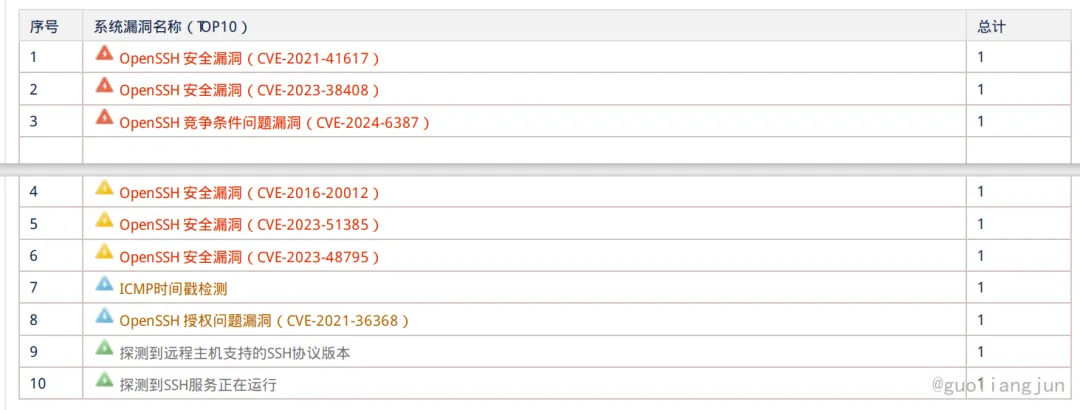
最近公司接的项目,有部分项目虚拟机使用AlmaLinux9.4,昨天收到漏洞OpenSSH 竞争条件问题漏洞(CVE-2024-6387) ,反馈需修复。那就做个笔记记录一下操作。
修复过程
因有些虚拟机没关闭,我就执行了。已执行可忽略
# 启动后无法登录、权限等问题,关闭SELinuxcat /etc/selinux/configsetenforce 0 && sed -i 's/^SELINUX=.*/SELINUX=disabled/' /etc/selinux/config && getenforcecat /etc/selinux/config
查看Openssh路径
[root@host121 ~]# ssh -VOpenSSH_8.7p1, OpenSSL 3.2.2 4 Jun 2024[gzapps@host88 ~]$ which ssh/usr/bin/ssh[gzapps@host88 ~]$ whereis sshssh: /usr/bin/ssh /etc/ssh /usr/share/man/man1/ssh.1.gz[root@host121 gxjt]# openssl versionOpenSSL 3.2.2 4 Jun 2024 (Library: OpenSSL 3.2.2 4 Jun 2024)
安装telnet
dnf install telnet telnet-server -yfirewall-cmd --permanent --add-port=23/tcp --zone=publicfirewall-cmd --reloadsystemctl start telnet.socketfirewall-cmd --list-portsss -nltp| grep 23
备份OpenSSH
#备份ssh相关文件mkdir -p ~/sshbak20241226/cp -rf /etc/ssh ~/sshbak20241226/cp -rf /usr/bin/openssl ~/sshbak20241226/opensslcp /usr/bin/ssh ~/sshbak20241226/ssh.bakcp /usr/bin/ssh-keygen ~/sshbak20241226/cp /usr/sbin/sshd ~/sshbak20241226/cp -rf /etc/pam.d/ ~/sshbak20241226/pam.dcp -rf /usr/lib/systemd/system ~/sshbak20241226/#验证备份ls -l ~/sshbak20241226/
源码安装(在线)
#安装源码编译依赖包#yum groupinstall "Development Tools" -yyum install -y zlib-devel openssl-devel gcc make perl-devel pam-devel unzip wget tar# 自行查看版本:openssl version,如需编译安装可参考:https://199604.com/2420 编译安装openssl# 下载源码并编译升级 opensshcd /usr/local/src/wget https://cdn.openbsd.org/pub/OpenBSD/OpenSSH/portable/openssh-9.8p1.tar.gztar -xzf openssh-9.8p1.tar.gzcd openssh-9.8p1./configure --prefix=/usr/ --sysconfdir=/etc/ssh --with-zlib --with-md5-passwords --with-pam# 如编译openssl了,需要指定--with-ssl-dir目录路径#./configure --prefix=/usr/ --sysconfdir=/etc/ssh --with-ssl-dir=/usr/local/openssl --with-zlib --with-md5-passwords --with-pammake -j 4 && make install # 配置文件权限chmod 600 /etc/ssh/ssh_host_*_key# 重启sshsystemctl restart sshdsystemctl status sshd
编译opensssh时需要服务器上安装的openssl版本大于等于1.1.1,而从上面ssh -V的结果可以看到系统默认的OpenSSL版本就是3.2.2,所以不需要考虑升级,直接升级openssh即可。OpenSSH 9.8 支持 OpenSSL 1.1.1 及更高版本,请检查!!!!编译升级 openssh参数解释:- `--prefix=/usr/`: 指定软件安装的基本目录。在这里,软件将被安装到 `/usr` 目录下,通常包含系统级的程序和库。- `--sysconfdir=/etc/ssh`: 指定配置文件的安装目录。在这个例子中,软件的配置文件将安装到 `/etc/ssh` 目录。这是 SSH 服务的默认配置文件位置。- `--with-ssl-dir=/usr/local/openssl`: 指定 OpenSSL 的安装目录。这个选项告诉编译系统在 `/usr/local/openssl` 目录中查找 OpenSSL 相关的库和头文件,以便在构建时链接和使用 OpenSSL。- `--with-zlib`: 启用对 zlib 库的支持。zlib 是一个常用的数据压缩库,这个选项会确保编译过程中包含对 zlib 的支持。- `--with-md5-passwords`: 启用对 MD5 密码的支持。这指定了在用户认证时允许使用 MD5 加密的密码。- `--with-pam`: 启用对 PAM(可插拔认证模块)的支持。PAM 是一种常用的认证框架,允许系统管理员在系统中配置认证策略。
重启服务出现相关错误
#错误1:-------------12月 26 21:25:38 host103 sshd[2265892]: /etc/crypto-policies/back-ends/opensshserver.config: line 3: Bad configuration option: GSSAPIKexAlgorithms12月 26 21:25:38 host103 sshd[2265892]: /etc/crypto-policies/back-ends/opensshserver.config: terminating, 1 bad configuration options12月 26 21:25:38 host103 systemd[1]: sshd.service: Main process exited, code=exited, status=255/EXCEPTION-------------#解决,注释/etc/crypto-policies/back-ends/opensshserver.config文件的GSSAPIKexAlgorithms--------------------------vim /etc/crypto-policies/back-ends/opensshserver.configvim /etc/crypto-policies/back-ends/openssh.config#GSSAPIKexAlgorithms gss-curve25519-sha256-,gss-nistp256-sha256-,gss-group14-sha256-,gss-group16-sha512--------------#错误2:12月 26 21:29:02 host103 sshd[2267542]: /etc/ssh/sshd_config.d/50-redhat.conf line 12: Unsupported option GSSAPIAuthentication12月 26 21:29:02 host103 sshd[2267542]: /etc/ssh/sshd_config.d/50-redhat.conf line 13: Unsupported option GSSAPICleanupCredentials#解决,注释etc/ssh/sshd_config.d/50-redhat.conf文件的 GSSAPIAuthentication和GSSAPICleanupCredentials--------------------------vim /etc/ssh/sshd_config.d/50-redhat.confvim /etc/ssh/ssh_config.d/50-redhat.conf#GSSAPIAuthentication yes#GSSAPICleanupCredentials no
重启服务验证,关闭telnet服务
[root@host27 openssh-9.8p1]# ssh -VOpenSSH_9.8p1, OpenSSL 3.2.2 4 Jun 2024[gzapps@host90 ~]$ which ssh/usr/bin/ssh#关闭Telnet服务#停止Telnet 服务systemctl stop telnet.socketsystemctl status telnet.socket#禁用Telnet服务开机启动systemctl disable telnet.socket
参考
1.https://blog.csdn.net/qq_44534541/article/details/138072685
2.https://eternalcenter-sep-2022.github.io/ssh-encryption-algorithm-no-crypto-policies-rhel-8/
