Python绘图神器seaborn:直方图-密度图-小提琴图-热力图
- 2026-08-26 20:43:45
👇 连享会 · 推文导航 | www.lianxh.cn
🍓 课程推荐:连享会 · 2026寒假嘉宾:连玉君 (中山大学);郭士祺(上海交通大学)时间:2026 年 1 月 28 - 2 月 9 日咨询:王老师 18903405450(微信)

做一个好的学术论文,有三个要求:
• 一是技能,包括 Stata 软件怎么用,怎么处理数据,编程,可视化,初级班可以完美解决大家的这一步; • 二是方法,比如说怎么处理非线性关系,怎么说清楚内生性问题与样本选择等。在这一部分,老师的提点十分重要。高级班的内容就是针对这一步,通过复现论文,带着大家学习同一种方法在不同场景下是怎么变形落地,从而把关键假设与证据写的更稳 • 三是道,就是说写论文讲的什么故事,用的什么idea。
技能与方法都是为“道”服务,一篇好的论文,不仅仅是用好的方法,更是要用这些好的方法去讲好这个故事。论文班就是在讲这个。

作者: 彭晴 (暨南大学)邮箱:natasha_pong@163.com[1]
提要:本文介绍 Python 可视化库 seaborn 的基本使用方法,包括 seaborn 的安装、导入、基础设置以及常用绘图函数的使用 (如散点图、回归图、小提琴图、热力图等),帮助读者快速上手 seaborn,提升数据可视化能力。
• Title: Python绘图神器seaborn:直方图-密度图-小提琴图-热力图 • Keywords: Python绘图, 数据可视化, 小提琴图, violinplot, seaborn, 散点图, scatterplot, 回归图, regplot, 热力图, heatmap
温馨提示: 文中链接在微信中无法生效。请点击底部「阅读原文」。或直接长按/扫描如下二维码,直达原文:
1. Seaborn 简介
Seaborn 是一个基于 matplotlib 的 Python 数据可视化库。由于其是对 matplotlib 的二次封装,所以很多语法以及参数设置和 matplotlib 很相近,而且能与 matplotlib 一起使用。
1.1 Seaborn 的安装
Seaborn 有两种安装方式:
第一种安装方式:直接通过 PyPI 安装
pip install seaborn第二种安装方式:通过 Anaconda 安装
conda install seaborn1.2 Seaborn 的导入
安装好 Seaborn 包之后,需要 import 这个包才可使用。一般情况下,与 matplotlib 一起导入,配合使用。
import seaborn as snsimport matplotlib.pyplot as plt2. Seaborn 的基础设置
2.1 Seaborn 的风格设置
Seaborn 一共设置了五种风格:darkgrid(黑色背景带网格线)、whitegrid(白色背景带网格线)、dark(黑色背景无网格线)、white(白色背景无网格线)和ticks(白色背景无网格线,且坐标轴带刻度线)。其中,Seaborn 的默认风格为 darkgrid(黑色背景带网格线)。
sns.set() # 默认风格的设置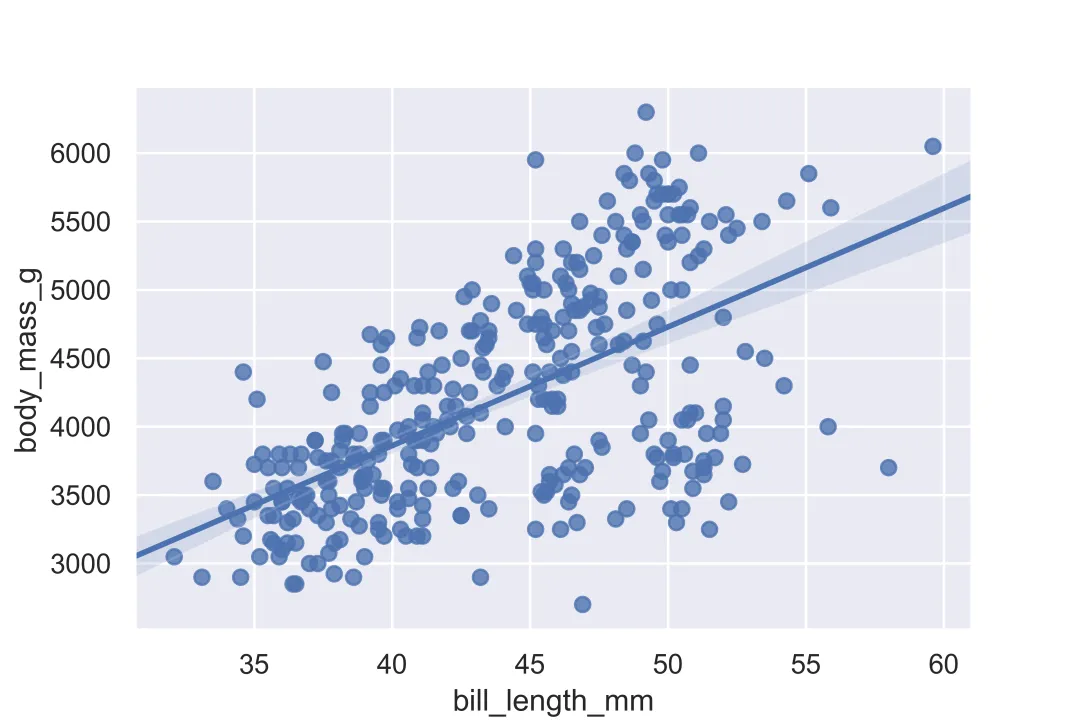
其他风格设置的核心代码
sns.set_style('dark') # 对应图(A), dark风格sns.set_style('white') # 对应图(B),whith风格sns.set_style('whitegrid') # 对应图(C),whitegrid风格sns.set_style('ticks') # 对应图(D),ticks风格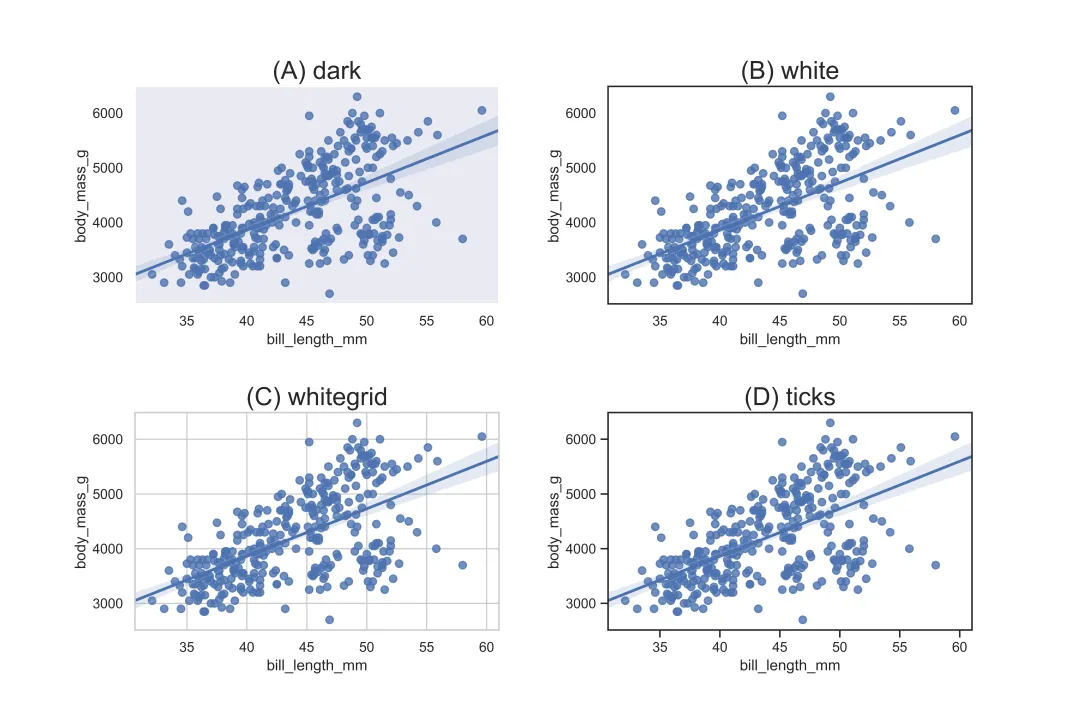
2.2 Seaborn 的边框设置
Seaborn 默认显示图形的四条边框。如果想调整图形的边框,可以通过sns.despine()命令调整。
(1)sns.despine()命令,默认只显示左边框和下边框
sns.set_style('ticks')sns.regplot(x='bill_length_mm',y='body_mass_g',data=df)sns.despine()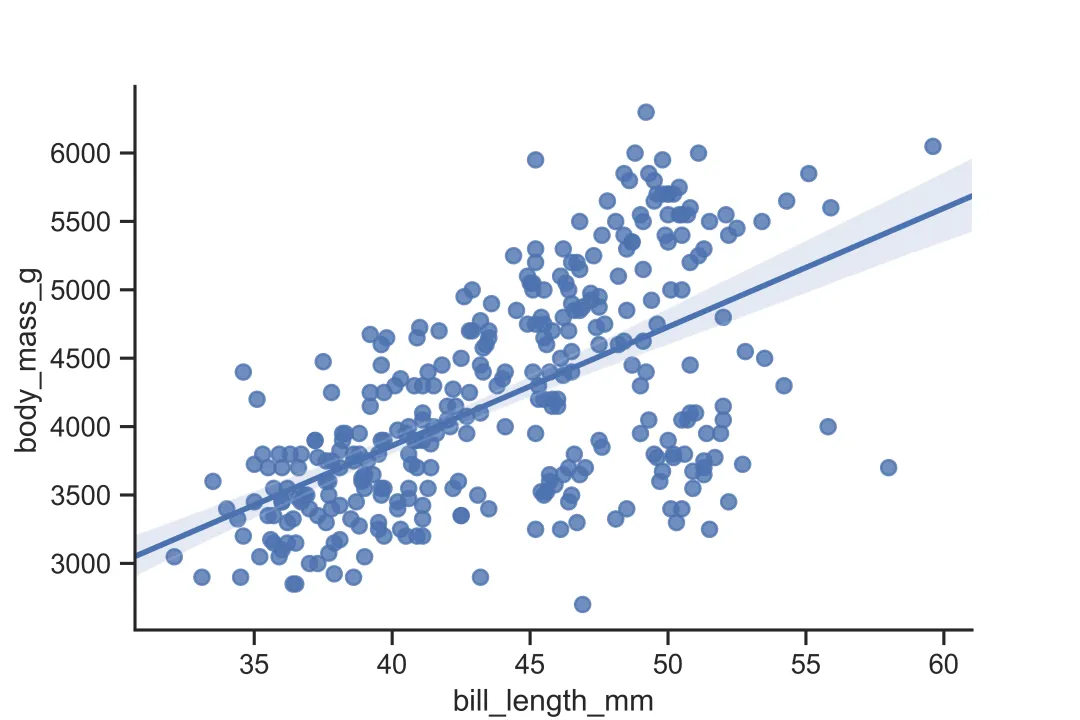
(2) 通过设置 sns.despine()命令的参数(left、right,top,bottom),可以指定图形显示哪一条边框
在sns.despine()命令中加入参数,如left=True,来指定左边是否显示。需要注意的是,True表示不显示边框,False表示显示边框。下面展示只显示下边框的例子:
sns.set_style('ticks')sns.regplot(x='bill_length_mm',y='body_mass_g',data=df)sns.despine(left=True,right=True,top=True,bottom=False) # 只显示下边框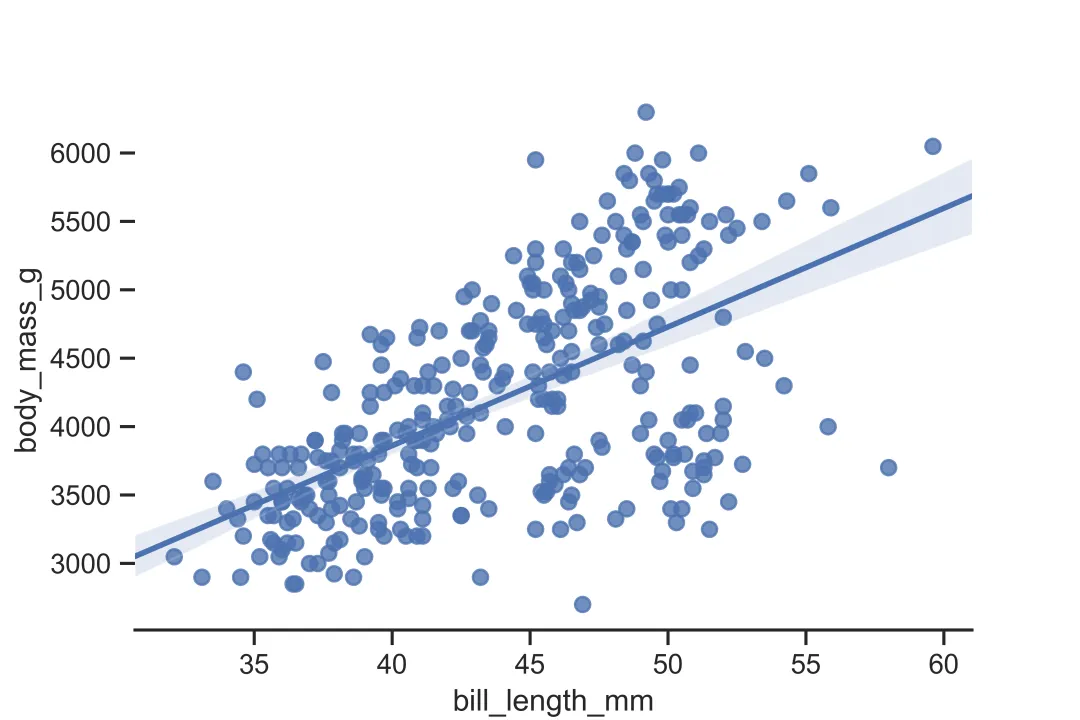
(3)通过设置 sns.despine()命令的参数(offset),可以调整图形与坐标轴的距离
sns.set_style('ticks')sns.regplot(x='bill_length_mm',y='body_mass_g',data=df)sns.despine(offset=20)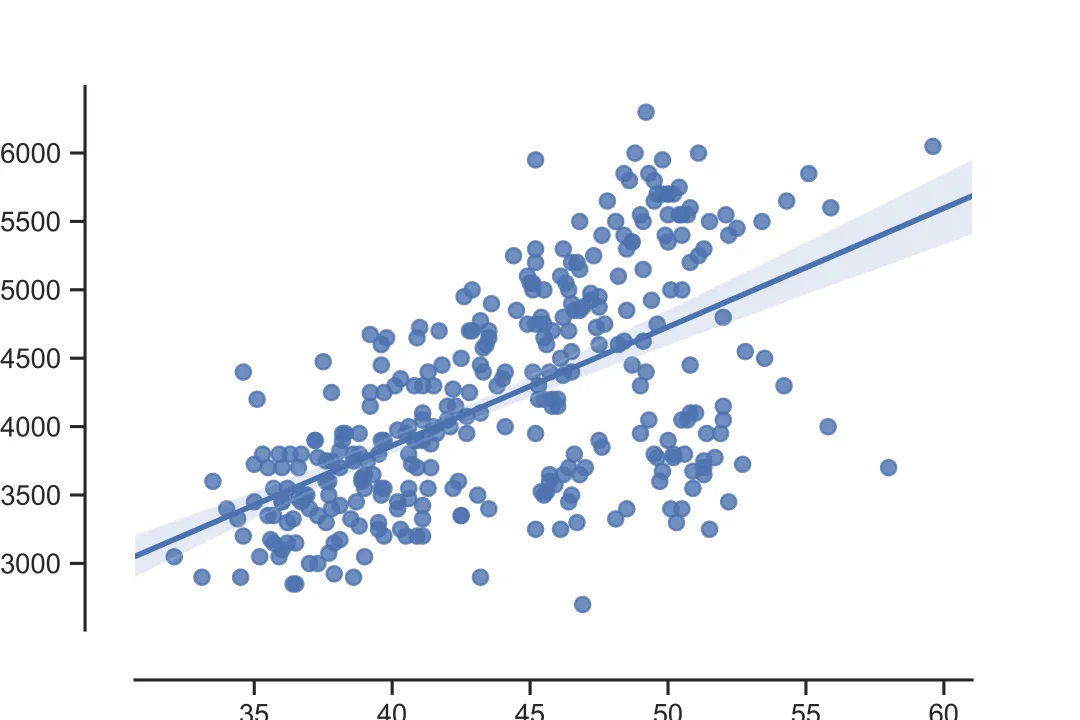
3. Seaborn 的可视化实例
3.1 样本数据介绍
# 导入样本数据df = sns.loaddata('penguins')penguins 是 seaborn 自带的数据集,称为企鹅数据集。企鹅数据集一共包括 344 条观测值,7 个变量:species(种类), island(岛屿), bill_length_mm(鸟嘴长度), bill_depth_mm(鸟嘴宽度), flipper_length_mm(鳍足长度), body_mass_g(体重), sex(性别)。除此之外,Seaborn 还有多个自带的数据集,方便初学者学习。
3.2 数据关系图
3.2.1 散点图 scatterplot
sns.scatterplot()可用于描绘 x 和 y 的散点图,其核心参数如下:
参数 | 作用 |
|---|---|
x,y | 指定x轴和y轴的变量 |
data | 指定数据集 |
hue | |
size | |
style | |
palette | |
hue_order | hue时,指定分类变量的顺序 |
sizes | size时,指定散点的大小 |
size_order | size时,指定分类变量的顺序 |
markers | style时,指定散点的形状 |
style_order | style时,指定分类变量的顺序 |
sns.scatterplot(x='bill_length_mm',y='body_mass_g',data=df)# 对应图(A), 基础设置sns.scatterplot(x='bill_length_mm',y='body_mass_g',data=df,hue='sex')# 对应图(B), 通过散点颜色标识不同的性别sns.scatterplot(x='bill_length_mm',y='body_mass_g',data=df,size='sex')# 对应图(C), 通过散点大小标识不同的性别sns.scatterplot(x='bill_length_mm',y='body_mass_g',data=df,style='sex')# 对应图(D), 通过散点形状标识不同的性别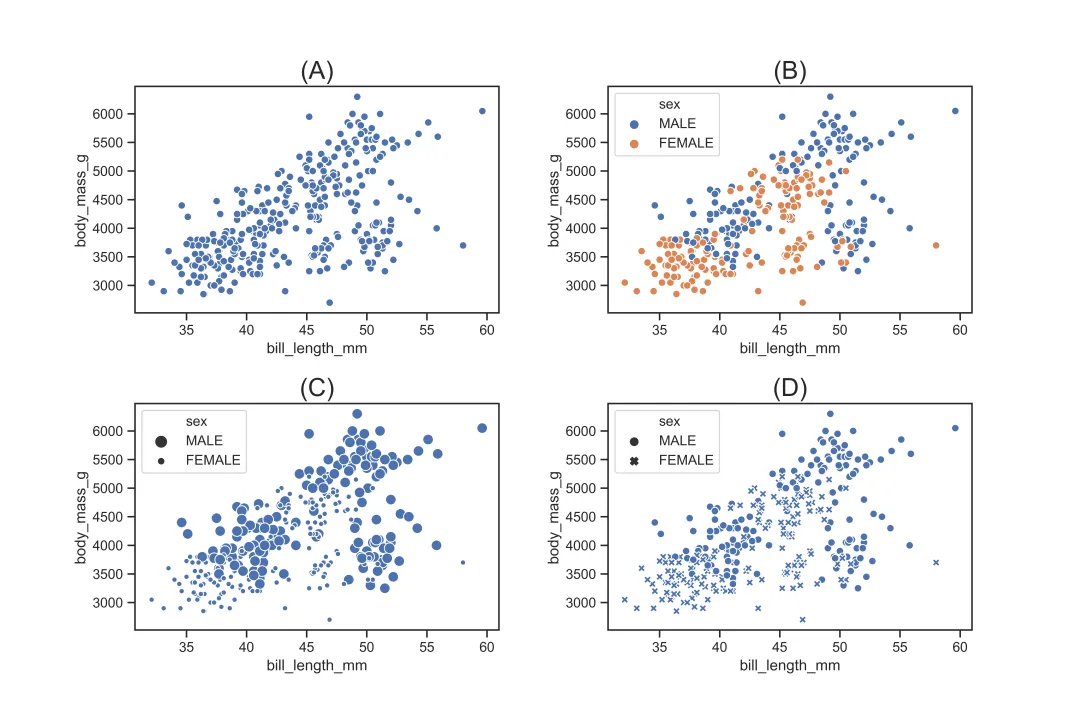
3.2.2 回归图 regplot
sns.regplot()可用于描绘 x 和 y 的回归关系。对比散点图,回归图可以展示 x 和 y 回归拟合出来的直线。回归图的核心参数如下:
参数 | 作用 |
|---|---|
x,y | 指定x轴和y轴的变量 |
data | 指定数据集 |
scatter | True则表示描绘散点;选择False则表示不描绘散点 |
fit_reg | True则表示描绘 x 和 y 拟合的直线;选择False则表示不描绘 x 和 y 拟合的直线 |
ci | |
n_boot | ci的抽样次数,默认值为 1000 |
logistic | True则表示 y 为二元变量;默认选择False |
marker | |
color | |
{scatter,line}_kws |
sns.regplot(x='bill_length_mm',y='body_mass_g',data=df)# 对应图(A), 基础设置sns.regplot(x='bill_length_mm',y='body_mass_g',data=df,scatter=False)# 对应图(B), 不描绘散点sns.regplot(x='bill_length_mm',y='body_mass_g',data=df,marker='^')# 对应图(C), 设置散点的形状为三角形sns.regplot(x='bill_length_mm',y='body_mass_g',data=df, line_kws={"linestyle": "--",'color':'k','linewidth':2}, scatter_kws={'color':'grey','alpha':0.5})# 对应图(D), 调整散点和直线的样式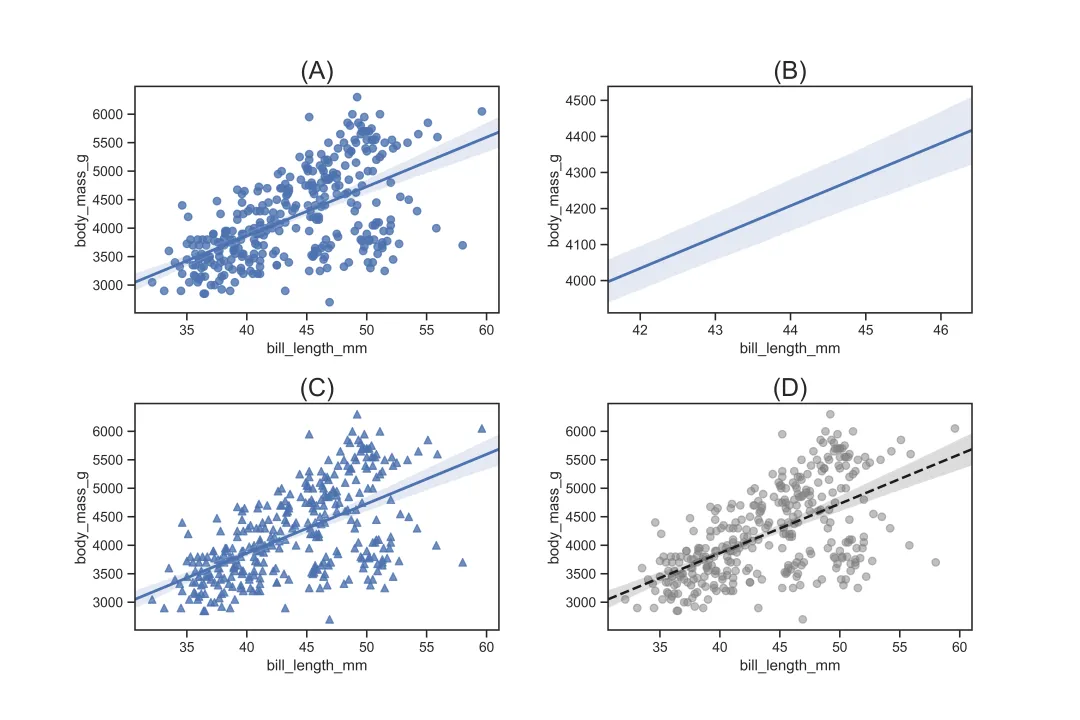
3.2.3 分类散点图 stripplot
sns.stripplot()可用于描绘分类变量 x 与 y 之间的关系。与散点图和回归图不同的是,sns.stripplot()的 x 变量是一个离散的分类变量,其核心参数如下:
参数 | 作用 |
|---|---|
x,y | 指定x轴和y轴的变量 |
data | 指定数据集 |
hue | |
hue_order | hue时,指定分类变量的顺序 |
color | |
palette | |
size | |
edgecolor | |
linewidth | |
orient | v则指定图形为纵向;选择h则指定图形为横向 |
dodge | hue时,选择True则表示分类的散点不会重叠;选择False则表示分类的散点会重叠 |
sns.stripplot(x="species", y="body_mass_g", data=df,color='b')# 对应图(A), 基础设置sns.stripplot(x="species", y="body_mass_g",data=df,hue='sex',dodge=True)# 对应图(B), 对性别进行分组,并且分组散点不重叠sns.stripplot(x="species", y="body_mass_g", data=df,color='b', edgecolor='k',linewidth=0.5)# 对应图(C), 设置散点的边粗细以及颜色sns.stripplot(x="body_mass_g", y="species", data=df,color='b',orient='h')# 对应图(D), 设置方向为横向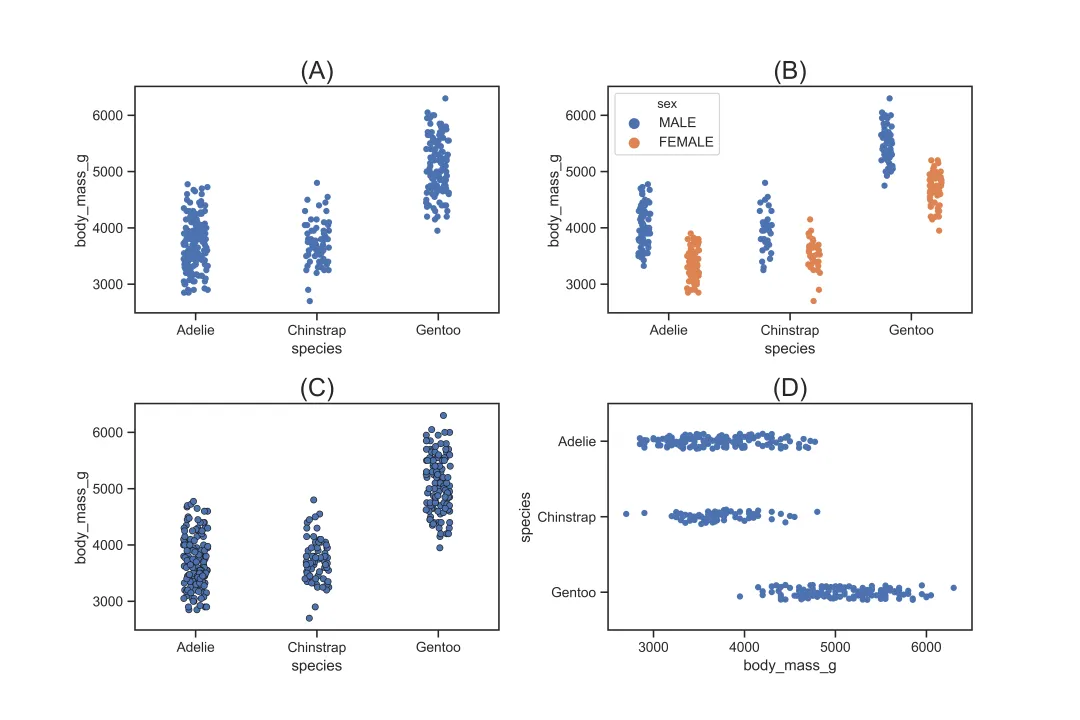
3.2.4 无重叠的分类散点图 swarmplot
sns.swarmplot()也是用于描绘分类变量 x 与 y 之间的关系,被称为蜂巢图。与sns.stripplot()不同的是,sns.swarmplot()描绘出来的散点不会重叠,因此能看出散点的分布。sns.swarmplot()与sns.stripplot()的参数基本一致,此处不再重复阐述。
sns.swarmplot(x="species", y="body_mass_g", data=df,color='b')# 对应图(A), 基础设置sns.swarmplot(x="species", y="body_mass_g",data=df,hue='sex',dodge=True)# 对应图(B), 对性别进行分组,并且分组散点不重叠sns.swarmplot(x="species", y="body_mass_g", data=df,color='b', edgecolor='k',linewidth=0.5)# 对应图(C), 设置散点的边粗细以及颜色sns.swarmplot(x="body_mass_g", y="species", data=df,color='b',orient='h')# 对应图(D), 设置方向为横向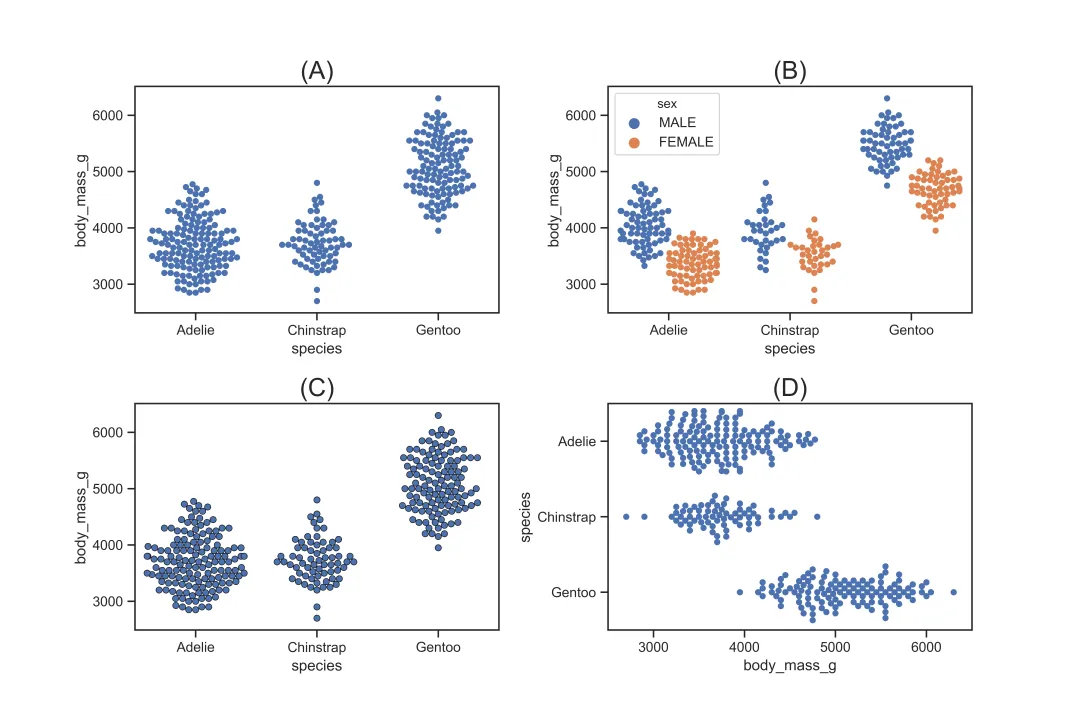
3.3 数据分布图
3.3.1 直方图 distplot
sns.distplot()用于描绘连续变量的直方图,其核心参数如下:
参数 | 作用 |
|---|---|
hist | True则显示柱状;选择False则不显示柱状 |
kde | True则显示分布线;选择False则不显示分布线 |
rug | True则显示锯齿分布;选择False则不显示锯齿分布 |
bins |
sns.distplot(df["body_mass_g"])# 对应图(A), 基础设置sns.distplot(df["body_mass_g"],kde=False,rug=True)# 对应图(B), 不显示分布线,显示锯齿分布sns.distplot(df["body_mass_g"],bins=15,vertical=True)# 对应图(C), 设置15个柱状,且方向为水平sns.distplot(df["body_mass_g"], hist_kws={"linestyle": "--",'color':'b','linewidth':3,'histtype':'step'}, kde_kws={'color':'grey','alpha':0.5})# 对应图(D), 设置柱状和分布线的参数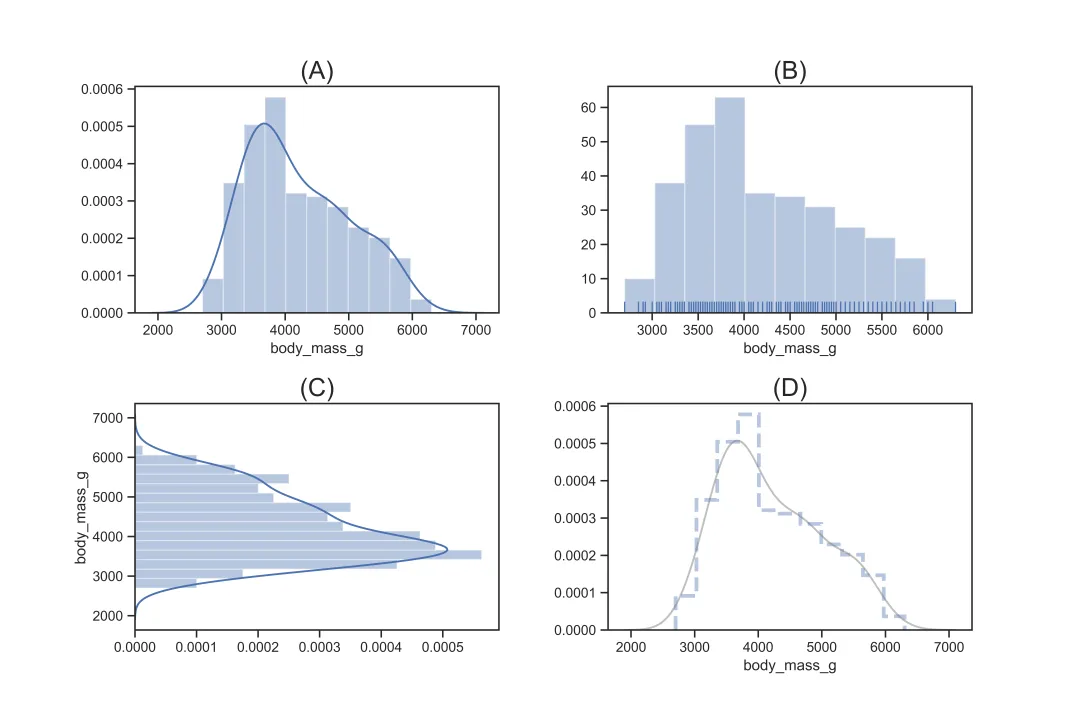
3.3.2 核密度图 kdeplot
sns.kdeplot()用于描绘连续变量的核密度图,其核心参数如下:
参数 | 作用 |
|---|---|
shade | True则显示阴影;选择False则不显示阴影 |
cumulative | True则显示累积分布图;默认选择为False |
bw | |
hue | |
hue_order | hue时,指定分类变量的顺序 |
color | |
palette | |
log_scale | True则对 X 取对数处理;默认选择为False |
rug_kws | |
vertical | True则指定图形为横向;选择False则指定图形为纵向 |
linewidth | |
linestyle |
sns.kdeplot(data=df["body_mass_g"])# 对应图(A), 基础设置sns.kdeplot(data=df["body_mass_g"],cumulative=True,shade=True)# 对应图(B), 设置阴影,且设置为累积分布图sns.kdeplot(data=df["body_mass_g"],bw=50)# 对应图(C), 设置分布的平滑程度sns.kdeplot(df["body_mass_g"],color='k',linewidth=3,linestyle='--')# 对应图(D), 设置分布线的粗细、颜色和样式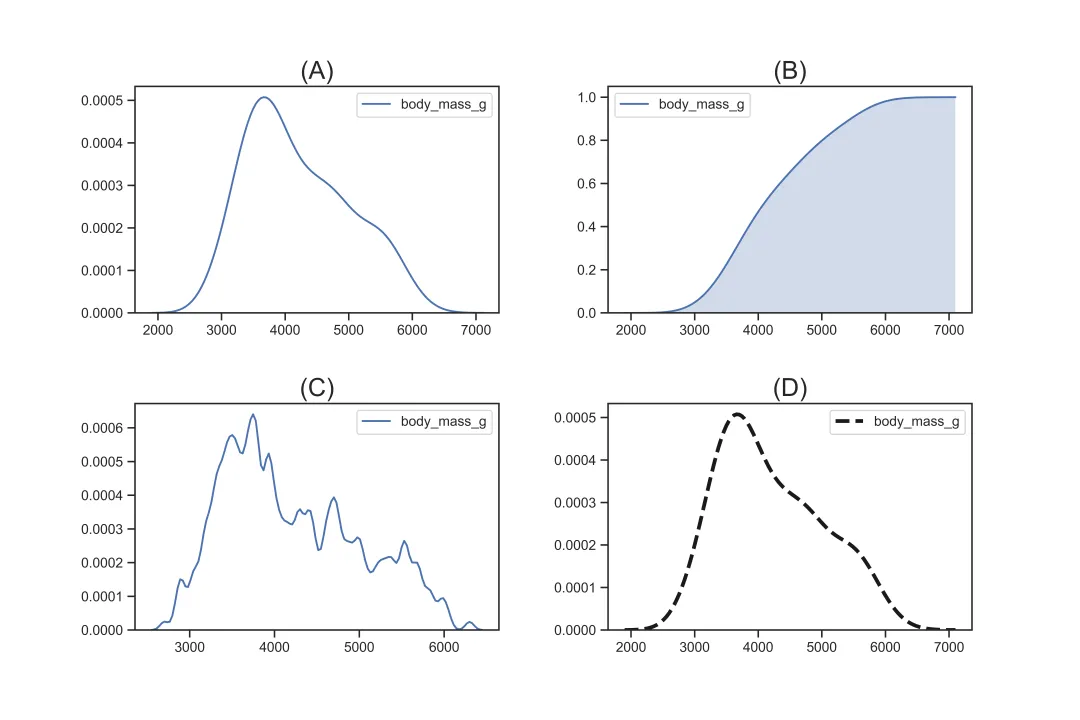
3.3.3 箱型图 boxplot
sns.boxplot()用于描绘分类变量的分布,其核心参数如下:
参数 | 作用 |
|---|---|
x,y | 指定x轴和y轴的变量 |
data | 指定数据集 |
hue | |
order | |
hue_order | hue时,指定分类变量的顺序 |
color | |
saturation | |
palette | |
width | |
fliersize | |
linewidth | |
orient | v则指定图形为纵向;选择h则指定图形为横向 |
dodge | hue时,选择True则表示分类的散点不会重叠;选择False则表示分类的散点会重叠 |
sns.boxplot(x="species", y="body_mass_g", data=df,color='b')# 对应图(A), 基础设置sns.boxplot(x="species", y="body_mass_g",data=df,hue='sex',dodge=True)# 对应图(B), 按性别分组显示sns.boxplot(x="species", y="body_mass_g", data=df, order=['Gentoo','Chinstrap','Adelie'], palette="Set2",saturation=0.6,width=0.3,fliersize=10,linewidth=3)# 对应图(C), 设置变量顺序,以及箱体宽度、线条、颜色、异常值大小等样式sns.boxplot(x="body_mass_g", y="species", data=df,color='b',orient='h')# 对应图(D), 设置水平方向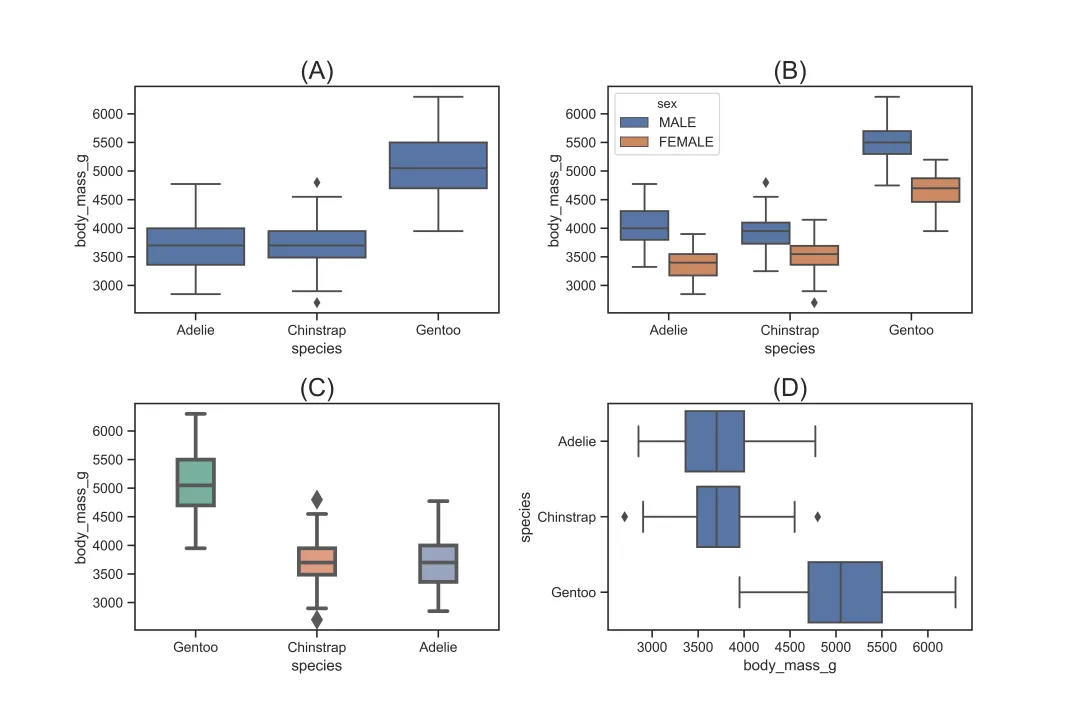
3.3.4 增强箱型图 boxenplot
sns.boxenplot()用于描绘分类变量的分布。与箱型图不同的是,增强箱型图通过箱体的宽窄更细致地显示变量的分布,其核心参数如下:
参数 | 作用 |
|---|---|
x,y | 指定x轴和y轴的变量 |
data | 指定数据集 |
hue | |
order | |
hue_order | hue时,指定分类变量的顺序 |
color | |
saturation | |
palette | |
width | |
outlier_pop | |
linewidth | |
orient | v则指定图形为纵向;选择h则指定图形为横向 |
dodge | hue时,选择True则表示分类的散点不会重叠;选择False则表示分类的散点会重叠 |
scale | linear表示通过线性因子减少箱体宽度;exponential表示使用未覆盖数据调整箱体宽度;area表示使用覆盖数据的百分比调整箱体宽度),默认为exponential |
sns.boxenplot(x="species", y="body_mass_g", data=df,color='b')# 对应图(A), 基础设置sns.boxenplot(x="species", y="body_mass_g",data=df,hue='sex',dodge=True)# 对应图(B), 按性别分组显示sns.boxenplot(x="species", y="body_mass_g", data=df, order=['Gentoo','Chinstrap','Adelie'], palette="Set1",saturation=0.5,width=0.5)# 对应图(C), 设置变量顺序,以及箱体宽度、颜色等样式sns.boxenplot(x="body_mass_g", y="species", data=df,color='b',orient='h',scale='linear')# 对应图(D), 设置水平方向,且按照线性的方式来调整箱体宽度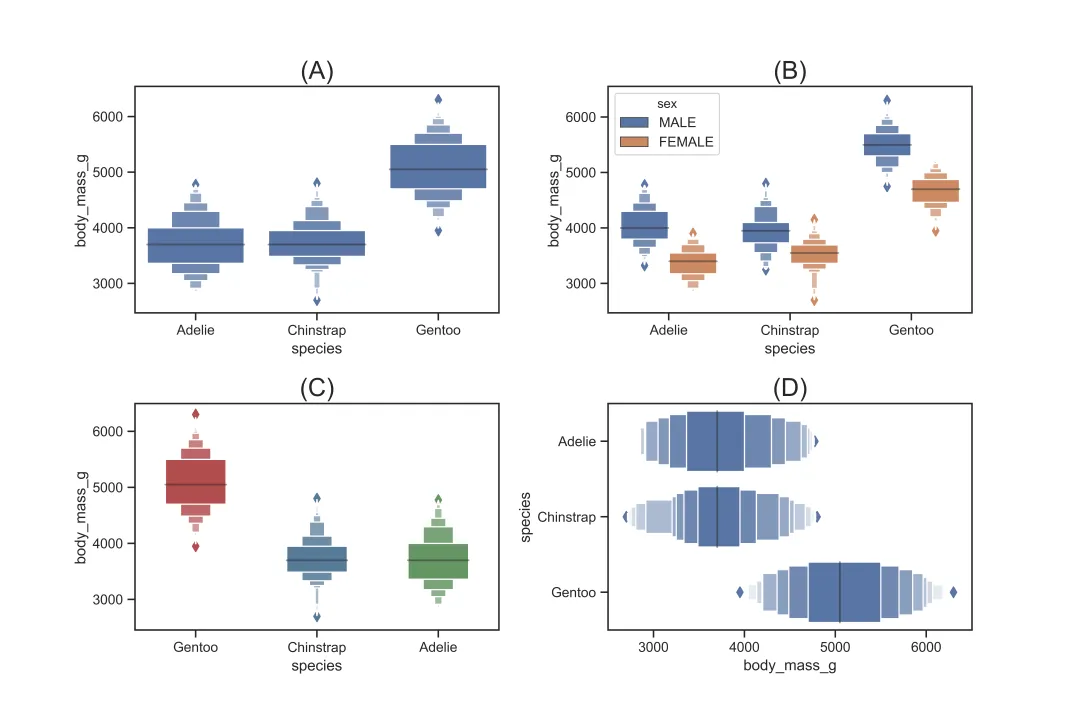
3.3.5 小提琴图 violinplot
sns.violinplot()用于描绘分类变量的分布。与箱型图不同的是,箱型图的箱体无法更进一步显示其分布,而小提琴图的箱体可以通过其宽窄进一步显示分布,其核心参数如下:
参数 | 作用 |
|---|---|
x,y | 指定x轴和y轴的变量 |
data | 指定数据集 |
hue | |
order | |
hue_order | hue时,指定分类变量的顺序 |
color | |
saturation | |
palette | |
width | |
fliersize | |
linewidth | |
orient | v则指定图形为纵向;选择h则指定图形为横向 |
dodge | hue时,选择True则表示分类的散点不会重叠;选择False则表示分类的散点会重叠 |
split | hue时,选择True则表示分类变量结合在一个小提琴显示;默认选项为False,表示分类变量分开多个小提琴表示 |
inner | box为箱体表示;quartile为分位数表示;point用点表示;stick用线条表示;None表示无内部图形),默认为box |
scale | area表示每个小提琴面积一样;count表示观测值频数一样时小提琴的宽度一致;width表示每个小提琴的宽度一致),默认为area |
sns.violinplot(x="species", y="body_mass_g", data=df,color='b')# 对应图(A), 基础设置sns.violinplot(x="species", y="body_mass_g",data=df,hue='sex',dodge=True)# 对应图(B), 按性别分组显示sns.violinplot(x="species", y="body_mass_g", data=df, order=['Gentoo','Chinstrap','Adelie'], palette="Set2",saturation=0.6,width=0.3,fliersize=10,linewidth=3)# 对应图(C), 设置变量顺序,以及线条、颜色、异常值大小等样式sns.violinplot(x="body_mass_g", y="species", data=df,color='b', orient='h',inner='quartile')# 对应图(D), 设置水平方向,且内部显示分位数线条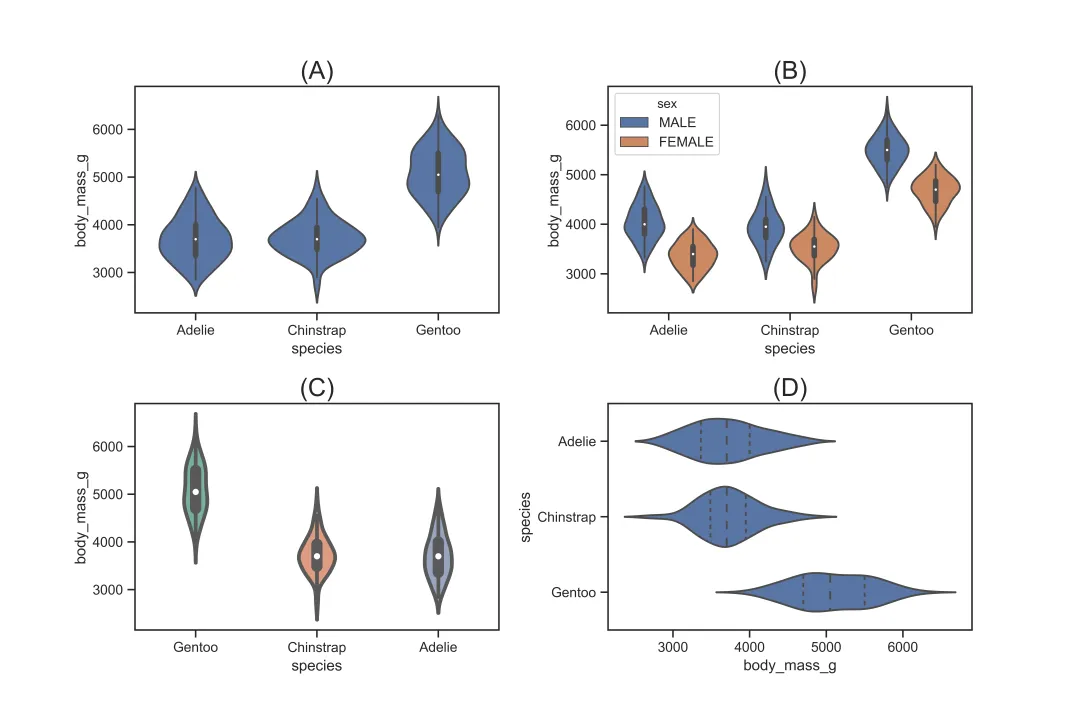
3.3.6 多变量分布图 pairplot
sns.pairplot()用于描绘数据集中连续变量之间的两两关系以及连续变量自身的直方图,其核心参数如下:
参数 | 作用 |
|---|---|
data | |
hue | |
hue_order | hue时,指定分类变量的顺序 |
palette | |
vars | |
kind | scatter表示散点图;kde表示核密度图;hist表示直方图;reg表示回归图),默认为scatter |
diag_kind | auto表示自动选择;kde表示核密度图;hist表示直方图),默认为auto |
markers | |
height | |
aspect |
sns.pairplot(df,hue='sex')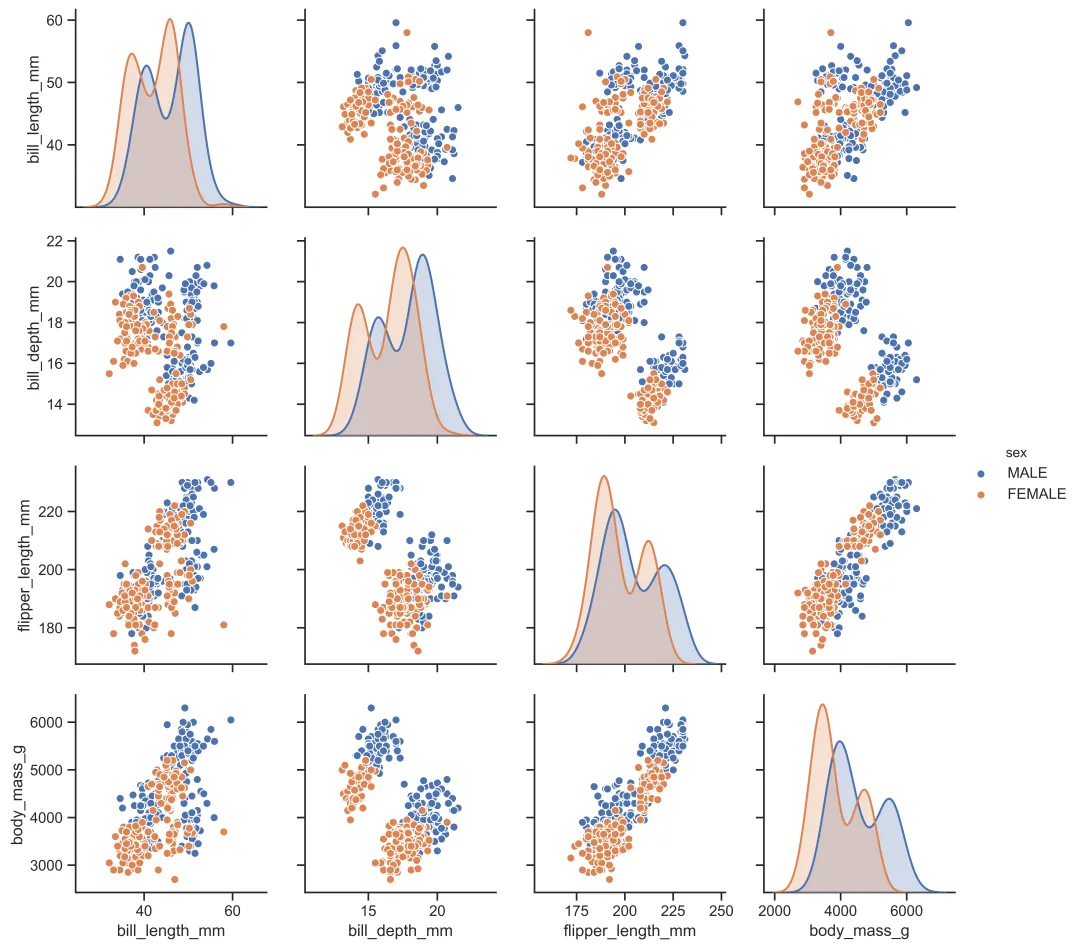
4. 参考资料
[1]tutorial for seaborn[2]
5. 相关推文
Note:产生如下推文列表的 Stata 命令为:
lianxh 可视化 Python安装最新版lianxh命令:ssc install lianxh, replace
-(https://www.lianxh.cn/news/9c86f40c6f17a.html)
• Stata+Python:同花顺里爬取创历史新高的股票[3] • 专题:数据分享[4] • Python+Stata:如何获取中国气象历史数据[5] • 专题:Stata 入门[6] • 使用 Jupyter Notebook 配置 Stata\Python\Julia\R[7] • 专题:Stata 教程[8] • Stata-Python 交互-9:将 python 数据导入 Stata[9] • Stata-Python 交互-8:将 Stata 数据导入 Python[10] • Stata-Python 交互-7:在 Stata 中实现机器学习-支持向量机[11] • Stata-Python 交互-6:调用 APIs 和 JSON 数据[12] • Stata-Python 交互-5:边际效应三维立体图示[13] • Stata-Python 交互-4:如何调用 Python 宏包[14] • Stata-Python 交互-3:如何安装 Python 宏包[15] • Stata-Python 交互-2:在 Stata 中调用 Python 的三种方式[16] • Stata-Python 交互-1:二者配合的基本设定[17] • 专题:Stata 命令[18] • Stata 与 Python 等价命令[19] • 专题:数据处理[20] • Stata:边际处理效应及其可视化-mtefe-T309[21] • Stata: 约翰霍普金斯大学 COVID-19 疫情数据处理及可视化[22] • 专题:Stata 绘图[23] • Stata 绘图:回归系数可视化-multicoefplot[24] • Stata 绘图-可视化:组间差异比较散点图[25] • Stata 可视化:biplot 一图看尽方差、相关性和主成分[26] • Stata 绘图-组间差异可视化:不良事件火山图、点阵图[27] • forest-森林图:分组回归系数可视化[28] • Stata 绘图:回归系数可视化-论文更出彩[29] • Stata 绘图:世行可视化案例-条形图-密度函数图-地图-断点回归图-散点图[30] • Stata 绘图:随机推断中的系数可视化[31] • 专题:Stata 程序[32] • Stata 程序:是否有类似-Python-中的-zip()-函数[33] • 专题:结果输出[34] • Stata 可视化:让他看懂我的结果![35] • 专题:回归分析[36] • Stata:在线可视化模拟-OLS-的性质[37] • 专题:文本分析-爬虫[38] • Stata+Python:爬取创历史新高股票列表[39] • Python:爬取东方财富股吧评论进行情感分析[40] • VaR 风险价值: Stata 及 Python 实现[41] • 支持向量机:Stata 和 Python 实现[42] • Python 爬虫: 《经济研究》研究热点和主题分析[43] • 专题:Python-R-Matlab[44] • Python:多进程、多线程及其爬虫应用[45] • Python:爬取动态网站[46] • Python 爬取静态网站:以历史天气为例[47] • Python:绘制动态地图-pyecharts[48] • Python 爬虫 1:小白系列之 requests 和 json[49] • Python 爬虫 2:小白系列之 requests 和 lxml[50] • Python 爬虫:爬取华尔街日报的全部历史文章并翻译[51] • Python 爬虫:从 SEC-EDGAR 爬取股东治理数据-Shareholder-Activism[52] • Python:爬取巨潮网公告[53] • 司继春:Python 学习建议和资源[54] • Stata 交互:Python-与-Stata-对比[55] • Python:拆分文件让百万级数据运行速度提高 135 倍[56] • Python+Stata:批量制作个性化结业证书[57] • Python+Wind:用 Pyautogui 轻松下载 Wind 数据[58] • Python:爬取上市公司公告-Wind-CSMAR[59] • Python: 如何优雅地管理微信数据库?[60] • Python: 6 小时爬完上交所和深交所的年报问询函[61] • Python: 使用正则表达式从文本中定位并提取想要的内容[62] • Python 调用 API 爬取百度 POI 数据小贴士——坐标转换、数据清洗与 ArcGIS 可视化[63] • Python 调用 API 爬取百度 POI 数据[64] • Python 调用 API 进行逆地理编码[65] • Python 调用 API 进行地理编码[66] • Python: 批量爬取下载中国知网(CNKI) PDF 论文[67] • 专题:工具软件[68] • 知乎热议:有哪些一用就爱上的可视化工具?[69] • 专题:其它[70] • 数据可视化:带孩子们边玩边学吧[71] • ES 期望损失: Stata 及 Python 实现[72]

连享会微信小店上线啦!
Note:扫一扫进入“连享会微信小店”,你想学的课程在这里······


New! Stata 搜索神器:
lianxh和songblGIF 动图介绍搜: 推文、数据分享、期刊论文、重现代码 ……👉 安装:. ssc install lianxh. ssc install songbl👉 使用:. lianxh DID 倍分法. songbl all

🍏 关于我们
• 连享会 ( www.lianxh.cn,推文列表) 由中山大学连玉君老师团队创办,定期分享实证分析经验。 • 直通车: 👉【百度一下:连享会】即可直达连享会主页。亦可进一步添加 「知乎」,「b 站」,「面板数据」,「公开课」 等关键词细化搜索。

引用链接
[1] natasha_pong@163.com: mailto:natasha_pong@163.com[2] tutorial for seaborn: https://seaborn.pydata.org/tutorial.html[3] Stata+Python:同花顺里爬取创历史新高的股票: https://www.lianxh.cn/news/35e3f9f6a79ad.html[4] 数据分享: https://www.lianxh.cn/blogs/34.html[5] Python+Stata:如何获取中国气象历史数据: https://www.lianxh.cn/news/b26d2b4f29053.html[6] Stata 入门: https://www.lianxh.cn/blogs/16.html[7] 使用 Jupyter Notebook 配置 Stata\Python\Julia\R: https://www.lianxh.cn/news/1b7c55f899314.html[8] Stata 教程: https://www.lianxh.cn/blogs/17.html[9] Stata-Python 交互-9:将 python 数据导入 Stata: https://www.lianxh.cn/news/929a3cc22307b.html[10] Stata-Python 交互-8:将 Stata 数据导入 Python: https://www.lianxh.cn/news/17c9d76816839.html[11] Stata-Python 交互-7:在 Stata 中实现机器学习-支持向量机: https://www.lianxh.cn/news/f1359e7fa9488.html[12] Stata-Python 交互-6:调用 APIs 和 JSON 数据: https://www.lianxh.cn/news/957b9df0d08e1.html[13] Stata-Python 交互-5:边际效应三维立体图示: https://www.lianxh.cn/news/303e9d5a0087c.html[14] Stata-Python 交互-4:如何调用 Python 宏包: https://www.lianxh.cn/news/b7fd8023587cf.html[15] Stata-Python 交互-3:如何安装 Python 宏包: https://www.lianxh.cn/news/5c93706797ad1.html[16] Stata-Python 交互-2:在 Stata 中调用 Python 的三种方式: https://www.lianxh.cn/news/290a48d428074.html[17] Stata-Python 交互-1:二者配合的基本设定: https://www.lianxh.cn/news/285493e301c8a.html[18] Stata 命令: https://www.lianxh.cn/blogs/43.html[19] Stata 与 Python 等价命令: https://www.lianxh.cn/news/98f592b0a9d9e.html[20] 数据处理: https://www.lianxh.cn/blogs/25.html[21] Stata:边际处理效应及其可视化-mtefe-T309: https://www.lianxh.cn/news/edd2a0cf9fa6a.html[22] Stata: 约翰霍普金斯大学 COVID-19 疫情数据处理及可视化: https://www.lianxh.cn/news/ca5082adbf97f.html[23] Stata 绘图: https://www.lianxh.cn/blogs/24.html[24] Stata 绘图:回归系数可视化-multicoefplot: https://www.lianxh.cn/news/3e052bd3291dd.html[25] Stata 绘图-可视化:组间差异比较散点图: https://www.lianxh.cn/news/b5fc0aeb1d7b7.html[26] Stata 可视化:biplot 一图看尽方差、相关性和主成分: https://www.lianxh.cn/news/3173ebd034f12.html[27] Stata 绘图-组间差异可视化:不良事件火山图、点阵图: https://www.lianxh.cn/news/f9680c4be14fe.html[28] forest-森林图:分组回归系数可视化: https://www.lianxh.cn/news/472768848cd8d.html[29] Stata 绘图:回归系数可视化-论文更出彩: https://www.lianxh.cn/news/324f5e3053883.html[30] Stata 绘图:世行可视化案例-条形图-密度函数图-地图-断点回归图-散点图: https://www.lianxh.cn/news/96989b0de4d83.html[31] Stata 绘图:随机推断中的系数可视化: https://www.lianxh.cn/news/ce93c41862c16.html[32] Stata 程序: https://www.lianxh.cn/blogs/26.html[33] Stata 程序:是否有类似-Python-中的-zip()-函数: https://www.lianxh.cn/news/08e4b2b6f56ca.html[34] 结果输出: https://www.lianxh.cn/blogs/22.html[35] Stata 可视化:让他看懂我的结果!: https://www.lianxh.cn/news/01607de7be5e8.html[36] 回归分析: https://www.lianxh.cn/blogs/32.html[37] Stata:在线可视化模拟-OLS-的性质: https://www.lianxh.cn/news/555995cc140a8.html[38] 文本分析-爬虫: https://www.lianxh.cn/blogs/36.html[39] Stata+Python:爬取创历史新高股票列表: https://www.lianxh.cn/news/741fb511af2a1.html[40] Python:爬取东方财富股吧评论进行情感分析: https://www.lianxh.cn/news/788ffac4c50fb.html[41] VaR 风险价值: Stata 及 Python 实现: https://www.lianxh.cn/news/5001362259713.html[42] 支持向量机:Stata 和 Python 实现: https://www.lianxh.cn/news/4997d62149216.html[43] Python 爬虫: 《经济研究》研究热点和主题分析: https://www.lianxh.cn/news/2fb619662956e.html[44] Python-R-Matlab: https://www.lianxh.cn/blogs/37.html[45] Python:多进程、多线程及其爬虫应用: https://www.lianxh.cn/news/8c175c980bcd9.html[46] Python:爬取动态网站: https://www.lianxh.cn/news/0b6fd3e71afe9.html[47] Python 爬取静态网站:以历史天气为例: https://www.lianxh.cn/news/63ffc529caf31.html[48] Python:绘制动态地图-pyecharts: https://www.lianxh.cn/news/113f0d9abb4e8.html[49] Python 爬虫 1:小白系列之 requests 和 json: https://www.lianxh.cn/news/b4f20b9c35e27.html[50] Python 爬虫 2:小白系列之 requests 和 lxml: https://www.lianxh.cn/news/22c7f1ab6295e.html[51] Python 爬虫:爬取华尔街日报的全部历史文章并翻译: https://www.lianxh.cn/news/e080bab8798f9.html[52] Python 爬虫:从 SEC-EDGAR 爬取股东治理数据-Shareholder-Activism: https://www.lianxh.cn/news/f2ec917e39a6c.html[53] Python:爬取巨潮网公告: https://www.lianxh.cn/news/94192bcec139e.html[54] 司继春:Python 学习建议和资源: https://www.lianxh.cn/news/e353969e44de9.html[55] Stata 交互:Python-与-Stata-对比: https://www.lianxh.cn/news/83f922ff1daea.html[56] Python:拆分文件让百万级数据运行速度提高 135 倍: https://www.lianxh.cn/news/00dd20363b364.html[57] Python+Stata:批量制作个性化结业证书: https://www.lianxh.cn/news/1164f7ad9b4cc.html[58] Python+Wind:用 Pyautogui 轻松下载 Wind 数据: https://www.lianxh.cn/news/4abccd481a8e7.html[59] Python:爬取上市公司公告-Wind-CSMAR: https://www.lianxh.cn/news/ca3a4a5b54758.html[60] Python: 如何优雅地管理微信数据库?: https://www.lianxh.cn/news/d34f09cb214e0.html[61] Python: 6 小时爬完上交所和深交所的年报问询函: https://www.lianxh.cn/news/0e57c635cd225.html[62] Python: 使用正则表达式从文本中定位并提取想要的内容: https://www.lianxh.cn/news/7c2e4aed24196.html[63] Python 调用 API 爬取百度 POI 数据小贴士——坐标转换、数据清洗与 ArcGIS 可视化: https://www.lianxh.cn/news/a72842993b22b.html[64] Python 调用 API 爬取百度 POI 数据: https://www.lianxh.cn/news/223fabe3b6724.html[65] Python 调用 API 进行逆地理编码: https://www.lianxh.cn/news/c79e366974316.html[66] Python 调用 API 进行地理编码: https://www.lianxh.cn/news/b08df4d49099f.html[67] Python: 批量爬取下载中国知网(CNKI) PDF 论文: https://www.lianxh.cn/news/a27e2dd57f12e.html[68] 工具软件: https://www.lianxh.cn/blogs/23.html[69] 知乎热议:有哪些一用就爱上的可视化工具?: https://www.lianxh.cn/news/67e8b9c15a0e9.html[70] 其它: https://www.lianxh.cn/blogs/33.html[71] 数据可视化:带孩子们边玩边学吧: https://www.lianxh.cn/news/5a0f12c4ea08a.html[72] ES 期望损失: Stata 及 Python 实现: https://www.lianxh.cn/news/5e74f7966cf51.html
