当前位置:首页>python>基于Python深度学习的车辆车牌识别系统(PyTorch2卷积神经网络CNN+OpenCV4实现)- 集成到web系统-车牌识别实现
基于Python深度学习的车辆车牌识别系统(PyTorch2卷积神经网络CNN+OpenCV4实现)- 集成到web系统-车牌识别实现
  • 2026-02-06 07:24:12
基于Python深度学习的车辆车牌识别系统(PyTorch2卷积神经网络CNN+OpenCV4实现)- 集成到web系统-车牌识别实现
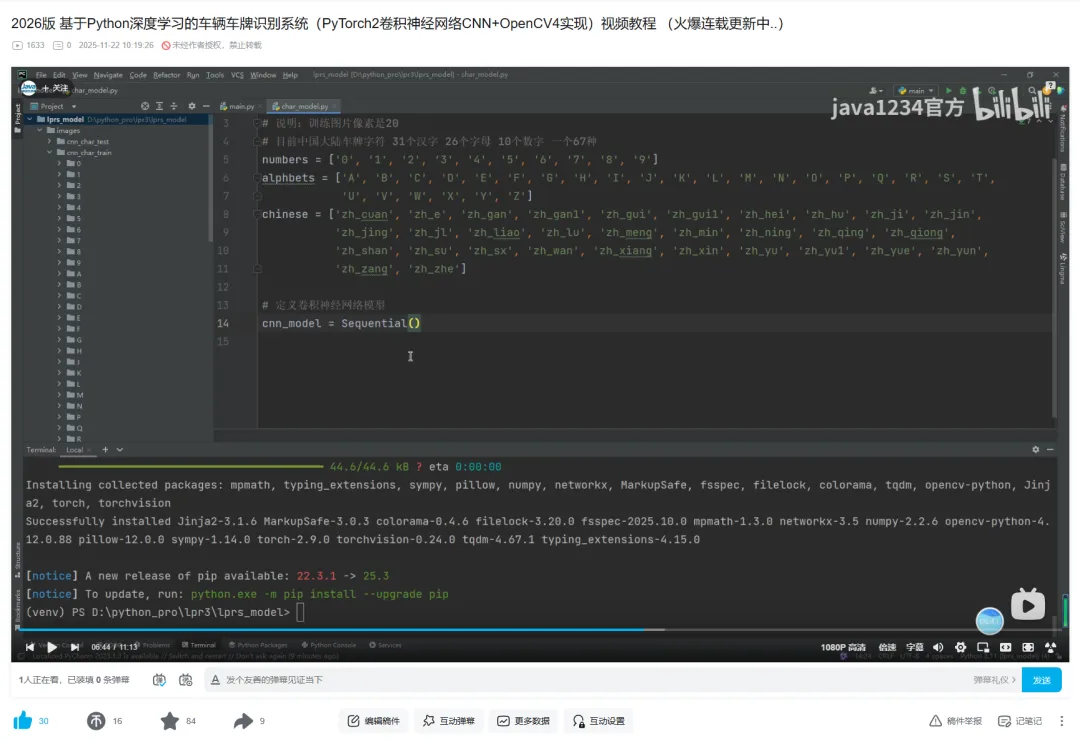
大家好,我是python222_锋哥,最近更新基于Python深度学习的车辆车牌识别系统(PyTorch2卷积神经网络CNN+OpenCV4实现)视频教程系列课程,感谢大家支持。

B站连载更新地址:

https://www.bilibili.com/video/BV1BdUnBLE6N/

本课程采用主流的Python技术栈实现,分两套系统讲解,一套是专门讲PyTorch2卷积神经网络CNN训练模型,识别车牌,当然实现过程中还用到OpenCV实现图像格式转换,裁剪,大小缩放等。另外一套是基于前面Django+Vue通用权限系统基础上(https://www.bilibili.com/video/BV19spseGE9Y/),加了车辆识别业务模型,Mysql8数据库,Django后端,Vue前端,后端集成训练好的模型,实现车牌识别。
点击下方公众号【Python222】小卡片,
回复888
👇👇 即可获取锋哥Python视频打包下载 👇👇
👆👆👆点击上方小卡片
回复「888」即可

1,后端模块新建以及实体新建

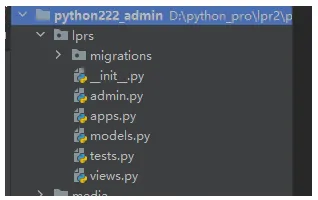
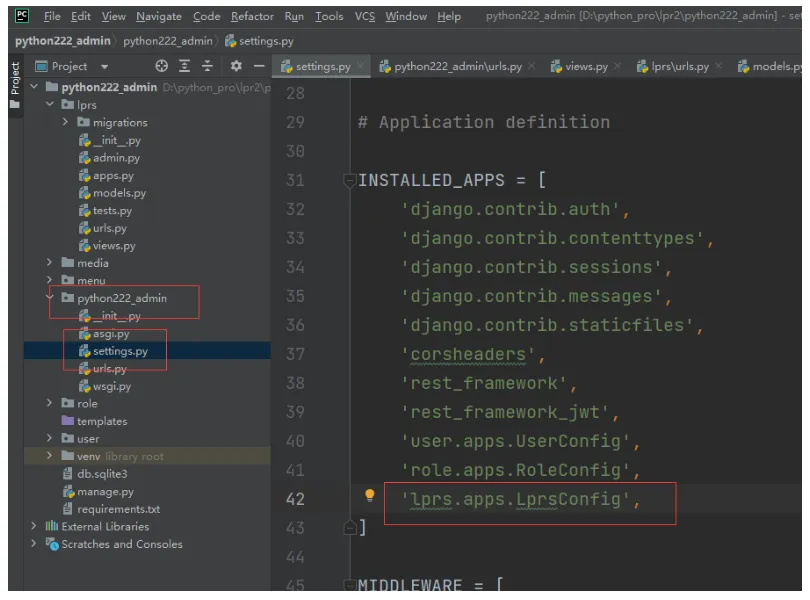
首先我们使用 manage.py 工具,执行 startapp lprs 命令,新建lprs模块。

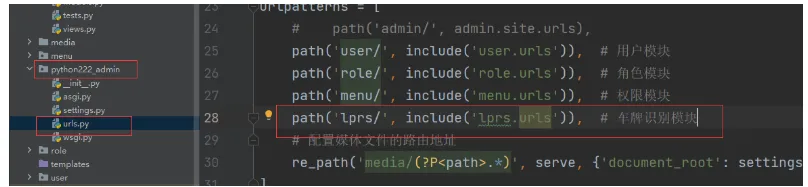
项目ulrs.py里配置下lprs.urls

path('lprs/', include('lprs.urls')),  # 车牌识别模块

lprs模块->views.py里我们新建汽车图片上传视图CarImageView和车辆识别视图RecognizeView

fromdjango.shortcutsimportrender
fromdjango.viewsimportView
# Create your views here.
classCarImageView(View):
pass
classRecognizeView(View):
pass

lprs模块下新建映射文件urls.py

fromdjango.urlsimportpath
fromlprs.viewsimportCarImageViewRecognizeView
urlpatterns = [
path('uploadCarImage'CarImageView.as_view(), name='uploadCarImage'),  # 上传车辆图片
path('recognize'RecognizeView.as_view(), name='recognize'),  # 识别车辆图片
]

lprs模块->models.py下新建Lprs车牌识别实体类

fromdjango.dbimportmodels
# Create your models here.
# 车牌识别类
classLprs(models.Model):
id = models.AutoField(primary_key=True)
carimage = models.CharField(max_length=255null=Trueverbose_name="车牌图像")
result = models.CharField(max_length=20null=Trueverbose_name="车牌识别结果")
create_time = models.DateTimeField(null=Trueverbose_name="识别时间")
classMeta:
db_table = "sys_lprs"

接下来,主项目settings.py里,INSTALLED_APPS 里面加下lprs模块配置

'lprs.apps.LprsConfig',

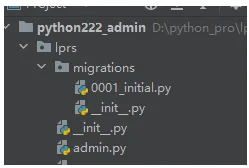
然后我们通过manage.py里,执行 makemigrations lprs 命令生成迁移文件。

makemigrations lprs

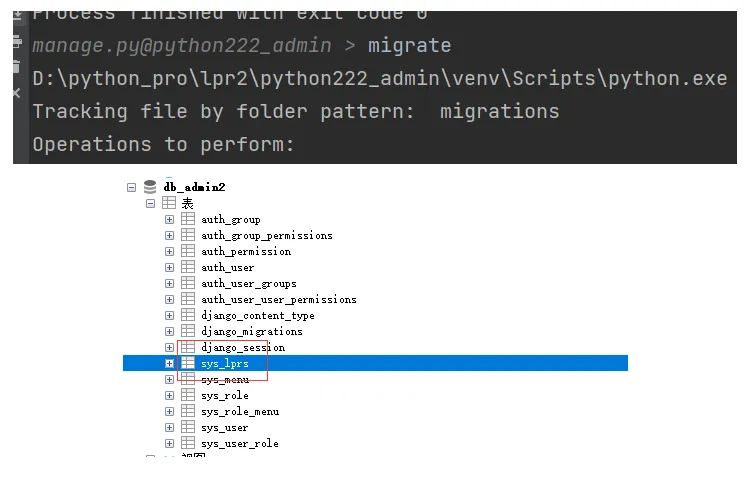
最后我们执行migrate命令执行迁移文件。

2,上传图像后端实现

首先在media下新建carImages目录用来存放上传的图片

图片上传CarImageView具体实现

classCarImageView(View):
defpost(selfrequest):
file = request.FILES.get('car')
print("file:"file)
iffile:
file_name = file.name
suffixName = file_name[file_name.rfind("."):]
new_file_name = datetime.now().strftime('%Y%m%d%H%M%S'+suffixName
file_path = str(settings.MEDIA_ROOT+"\\carImages\\"+new_file_name
print("file_path:"file_path)
try:
withopen(file_path'wb'asf:
forchunkinfile.chunks():
f.write(chunk)
returnJsonResponse({'code'200'title'new_file_name})
except:
returnJsonResponse({'code'500'errorInfo''上传头像失败'})

3,图片上传前端实现

首先我们实现UI界面,一个上传位置和按钮。

实现Car.vue

<template>
<el-form
ref="formRef"
:model="form"
label-width="100px"
style="text-align: center;padding-bottom:10px"
>
<el-upload
name="car"
        :headers="headers"
class="car-uploader"
        :action="getServerUrl()+'lprs/uploadCarImage'"
        :show-file-list="false"
        :on-success="handleSuccess"
        :before-upload="beforeAvatarUpload"
>
<imgv-if="imageUrl" :src="imageUrl"class="car"/>
<el-iconv-elseclass="car-uploader-icon">
<Plus/>
</el-icon>
</el-upload>
<br/>
<el-buttonsize="large"type="primary">识别车牌</el-button>
<divstyle="padding: 20px"><strong><fontsize="5">识别结果:</font><fontsize="5"color="red">{{carNo}}</font></strong></div>
</el-form>
</template>
<scriptsetup>
import {reffrom"vue";
importrequestUtil, {getServerUrlfrom"@/utils/request";
import {ElMessagefrom'element-plus'
import {Plusfrom'@element-plus/icons-vue'
constheaders = ref({
Authorizationwindow.sessionStorage.getItem('token')
})
constform = ref({
id-1,
car''
})
constformRef = ref(null)
constimageUrl = ref("")
constcarNo=ref("")
consthandleSuccess = (res) => {
imageUrl.value = getServerUrl() +'media/carImages/'+res.title
form.value.car = res.title;
}
constbeforeAvatarUpload = (file) => {
constisJPG = file.type === 'image/jpeg'
constisLt2M = file.size/1024/1024<2
if (!isJPG) {
ElMessage.error('图片必须是jpg格式')
  }
if (!isLt2M) {
ElMessage.error('图片大小不能超过2M!')
  }
returnisJPG&&isLt2M
}
</script>
<style>
.car-uploader .el-upload {
border1pxdashed#d9d9d9;
border-radius6px;
cursorpointer;
positionrelative;
overflowhidden;
width500px;
height500px;
}
.car-uploader .el-uploadimg{
width500px;
height500px;
}
.car-uploader .el-upload:hover {
border-color#409eff;
}
.el-icon.car-uploader-icon {
font-size28px;
color#8c939d;
width178px;
height178px;
text-aligncenter;
}
.car {
width120px;
height120px;
displayblock;
}
</style>

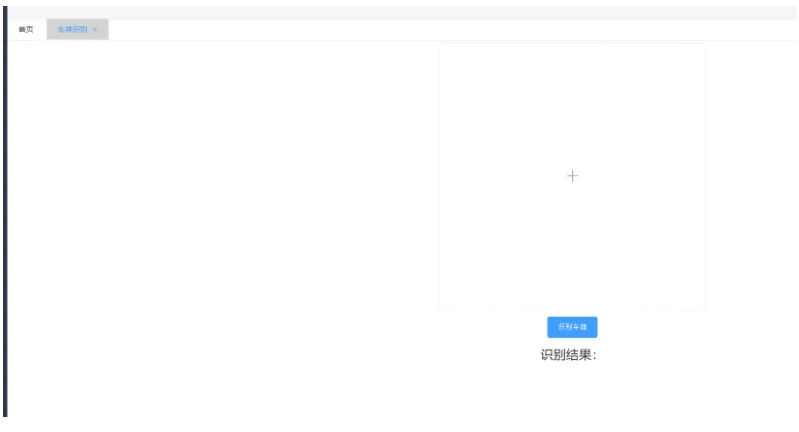
效果:

4,图片上传测试

点击图像框,选择图片。

页面回显了上传图片。

我们查看下后端media->carImages下

也有图像。

5,识别车牌后端实现

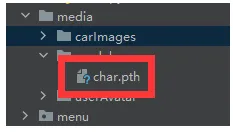
我们在media目录下新建model,把之前训练好的模型文件char.pth放到model目录下。

识别车牌RecognizeView实现:

importjson
fromdatetimeimportdatetime
fromdjango.httpimportJsonResponse
fromdjango.viewsimportView
fromlprs.modelsimportLprs
frompython222_adminimportsettings
importos
importcv2
importnumpyasnp
importtorch
fromtorchvisionimporttransforms
# 车牌字符
char_table = ['0''1''2''3''4''5''6''7''8''9''A''B''C''D''E''F''G''H''I''J''K',
'L''M''N''O''P''Q''R''S''T''U''V''W''X''Y''Z''川''鄂''赣''甘''贵',
'桂''黑''沪''冀''津''京''吉''辽''鲁''蒙''闽''宁''青''琼''陕''苏''晋',
'皖''湘''新''豫''渝''粤''云''藏''浙']
# 图像预处理
defpre_process(orig_img):
gray_img = cv2.cvtColor(orig_imgcv2.COLOR_BGR2GRAY)  # BGR色彩空间转换为灰度图像
cv2.imwrite('process_img/gray_img.jpg'gray_img)  # 保存灰度图
blur_img = cv2.blur(gray_img, (33))  # 对灰度图像进行均值模糊,使用3*3的内核来减少图像噪声
cv2.imwrite('process_img/blur_img.jpg'blur_img)  # 保存模糊图
# 对模糊图进行sobel算子处理 对模糊图像进行边缘检测处理
# 参数1, 0表示只计算x方向梯度,不计算y方向梯度
# ksize=3表示使用3×3的卷积核进行计算
# cv2.CV_16S表示输出图像的深度为16位有符号整数
sobel_img = cv2.Sobel(blur_imgcv2.CV_16S10ksize=3)
sobel_img = cv2.convertScaleAbs(sobel_img)  # 转换为8位图像
cv2.imwrite('process_img/sobel_img.jpg'sobel_img)  # 保存sobel图
hsv_img = cv2.cvtColor(orig_imgcv2.COLOR_BGR2HSV)  # 获取图像的HSV色彩空间
hsv = hsv_img[:, :, 0], hsv_img[:, :, 1], hsv_img[:, :, 2]
# 黄色色调区间[26,34],蓝色色调区间:[100,124]
blue_img = (((h>26& (h<34)) | ((h>100& (h<124))) & (s>70& (v>70)
blue_img = blue_img.astype('float32')
cv2.imwrite('process_img/hsv.jpg'blue_img)
mix_img = np.multiply(sobel_imgblue_img)  # 混合图像
cv2.imwrite('process_img/mix.jpg'mix_img)
mix_img = mix_img.astype(np.uint8)  # 转换为uint8
retbinary_img = cv2.threshold(mix_img0255cv2.THRESH_BINARY|cv2.THRESH_OTSU)  # 二值化
cv2.imwrite('process_img/binary.jpg'binary_img)
kernel = cv2.getStructuringElement(cv2.MORPH_RECT, (215))  # 定义一个结构元素
close_img = cv2.morphologyEx(binary_imgcv2.MORPH_CLOSEkernel)  # 对二值图像进行闭运算,可以填充可能的断裂并去除小的物体
cv2.imwrite('process_img/close.jpg'close_img)
returnclose_img
deflist_all_files(root):
files = []
list = os.listdir(root)  # 获取根目录下的所有文件名
foriinrange(len(list)):
element = os.path.join(rootlist[i])  # 获取文件路径
ifos.path.isfile(element):  # 判断是否是文件
files.append(element)
elifos.path.isdir(element):  # 递归判断子目录
files.extend(list_all_files(element))
returnfiles
# # 验证检测到的矩阵区域是否符合车牌的尺寸比例和面积特征
defverify_scale(rotate_rect):
error = 0.4# error为车牌允许的宽高比误差
aspect = 4# 4.7272  # aspect为期望的车牌宽高比,计算车牌的最小和最大面积。这些值用于过滤掉不符合车牌尺寸的矩形
min_area = 10* (10*aspect)
max_area = 150* (150*aspect)
# 计算车牌区域的宽高比的最小值和最大值,考虑到了误差范围
min_aspect = aspect* (1-error)
max_aspect = aspect* (1+error)
# 宽或高为0,不满足矩形直接返回False
ifrotate_rect[1][0] == 0orrotate_rect[1][1] == 0:
returnFalse
# 计算旋转矩形
r = rotate_rect[1][0/rotate_rect[1][1]
r = max(r1/r)
area = rotate_rect[1][0*rotate_rect[1][1]  # 计算旋转矩形的面积
ifarea>min_areaandarea<max_areaandr>min_aspectandr<max_aspect:
returnTrue
returnFalse
# 将检测到的车牌区域从原始图像中正确的裁剪出来,并进行必要的变换以满足后续处理的需求,如车牌矫正和大小调整
defimg_transform(car_rectimage):
img_himg_w = image.shape[:2]  # 获取图片的宽高
rect_wrect_h = car_rect[1][0], car_rect[1][1]  # 获取车牌的宽和高
angle = car_rect[2]  # 获取车牌的旋转角度
return_flag = False
ifcar_rect[2] == 0.0:  # 旋转角度为0
return_flag = True
ifcar_rect[2] == 90.0andrect_w<rect_h:  # 旋转角度为90 并且 宽高比小于1
rect_wrect_h = rect_hrect_w
return_flag = True
ifreturn_flag:
"""
        从原始图像中裁剪出车牌区域。具体来说:
        使用car_rect[0]作为车牌中心点坐标;
        根据车牌的宽度rect_w和高度rect_h,计算上下左右边界;
        从原图image中截取以该中心点为中心、指定宽高的矩形区域作为车牌图像car_img。
        """
car_img = image[int(car_rect[0][1-rect_h/2):int(car_rect[0][1+rect_h/2),
int(car_rect[0][0-rect_w/2):int(car_rect[0][0+rect_w/2)]
returncar_img# 将车牌从图片中切割出来
"""
    1. 使用`cv2.boxPoints`获取旋转矩形的四个顶点坐标。  
    2. 初始化四个变量分别用于记录最左、最下、最高和最右的点。  
    3. 遍历四个顶点,根据坐标更新这四个变量,从而确定矩形的边界点,为后续仿射变换做准备。
    """
car_rect = (car_rect[0], (rect_wrect_h), angle)  # 创建旋转矩阵
box = cv2.boxPoints(car_rect)  # 调用函数获取矩形边框的四个点
heigth_point = right_point = [00]  # 定义变量保存矩形边框的右上顶点
left_point = low_point = [car_rect[0][0], car_rect[0][1]]  # 定义变量保存矩形边框的左下顶点
forpointinbox:
ifleft_point[0>point[0]:
left_point = point
iflow_point[1>point[1]:
low_point = point
ifheigth_point[1<point[1]:
heigth_point = point
ifright_point[0<point[0]:
right_point = point
"""
    这段代码用于根据车牌的旋转角度,对图像进行仿射变换以矫正车牌区域。具体步骤如下:
    1. 判断角度正负:通过比较左点和右点的纵坐标判断车牌是正角度还是负角度倾斜。
    2. 构造目标点:根据倾斜方向调整右上角或左下角点的位置,使车牌变为水平。
    3. 生成变换矩阵:使用`cv2.getAffineTransform`计算三点之间的仿射变换矩阵。
    4. 执行仿射变换:利用`cv2.warpAffine`将图像展开并裁剪出矫正后的车牌区域。
    最终返回的是经过旋转矫正后的车牌图像。
    """
ifleft_point[1<right_point[1]:  # 正角度
new_right_point = [right_point[0], heigth_point[1]]
pts1 = np.float32([left_pointheigth_pointright_point])
pts2 = np.float32([left_pointheigth_pointnew_right_point])  # 字符只是高度需要改变
M = cv2.getAffineTransform(pts1pts2)
dst = cv2.warpAffine(imageM, (round(img_w*2), round(img_h*2)))
car_img = dst[int(left_point[1]):int(heigth_point[1]), int(left_point[0]):int(new_right_point[0])]
elifleft_point[1>right_point[1]:  # 负角度
new_left_point = [left_point[0], heigth_point[1]]
pts1 = np.float32([left_pointheigth_pointright_point])
pts2 = np.float32([new_left_pointheigth_pointright_point])  # 字符只是高度需要改变
M = cv2.getAffineTransform(pts1pts2)
dst = cv2.warpAffine(imageM, (round(img_w*2), round(img_h*2)))
car_img = dst[int(right_point[1]):int(heigth_point[1]), int(new_left_point[0]):int(right_point[0])]
returncar_img
deflocate_carPlate(orig_imgpred_img):
carPlate_list = []  # 车牌列表
temp1_orig_img = orig_img.copy()  # 拷贝图片 调试用
temp2_orig_img = orig_img.copy()  # 拷贝图片 调试用
# 从二值图像中查找轮廓的函数
# cv2.RETR_EXTERNAL参数表示只检索最外层轮廓,
# cv2.CHAIN_APPROX_SIMPLE参数表示压缩轮廓的水平、垂直和对角线部分,只保留端点。
# 函数返回轮廓列表contours和层级信息heriachy,用于后续的车牌定位处理。
contourshierarchy = cv2.findContours(pred_imgcv2.RETR_EXTERNALcv2.CHAIN_APPROX_SIMPLE)
foricontourinenumerate(contours):
"""
        这段代码的功能是在调试图像上绘制检测到的轮廓。具体来说:
        cv2.drawContours()函数用于在temp1_orig_img图像上绘制轮廓
        contours是要绘制的轮廓点集
        i表示当前绘制第几个轮廓
        (0, 255, 255)是绘制的颜色(青色)
        2是线条粗细度
        这样可以可视化显示所有检测到的车牌候选区域轮廓,便于调试观察。
        """
cv2.drawContours(temp1_orig_imgcontoursi, (0255255), 2)
"""
        获取当前轮廓的最小外接矩形,cv2.minAreaRect()函数会计算能够完全包围轮廓的最小面积矩形,
        并返回一个包含矩形中心点坐标、宽度高度和旋转角度的元组,
        用于后续的车牌定位和矫正处理。
        """
rotate_rect = cv2.minAreaRect(contour)
# 根据矩形面积大小和长宽比判断是否是车牌
ifverify_scale(rotate_rect):
# 裁剪车牌并且位置矫正
car_plate = img_transform(rotate_recttemp2_orig_img)
cv2.imwrite('process_img/transform_img.jpg'car_plate)
# 调整尺寸为后面CNN车牌识别做准备
car_plate = cv2.resize(car_plate, (car_plate_wcar_plate_h))
cv2.imwrite('process_img/resize_img.jpg'car_plate)
carPlate_list.append(car_plate)
returncarPlate_list
# 左右切割
defhorizontal_cut_chars(plate):
"""
    该函数用于对车牌图像进行水平切割,提取字符区域。主要步骤包括:
    1. 计算每列像素点总和;
    2. 根据阈值判断字符区域起止位置;
    3. 限制字符宽度范围以过滤无效区域;
    4. 返回符合条件的字符区域坐标列表。
    """
char_addr_list = []
area_leftarea_rightchar_leftchar_right = 0000
img_w = plate.shape[1]
# 获取车牌每列边缘像素点个数
defgetColSum(imgcol):
sum = 0
foriinrange(img.shape[0]):
sum += round(img[icol/255)
returnsum;
sum = 0
forcolinrange(img_w):
sum += getColSum(platecol)
# 每列边缘像素点必须超过均值的60%才能判断属于字符区域
col_limit = 0# round(0.5*sum/img_w)
# 每个字符宽度也进行限制
charWid_limit = [round(img_w/12), round(img_w/5)]
is_char_flag = False
foriinrange(img_w):
colValue = getColSum(platei)
ifcolValue>col_limit:
ifis_char_flag == False:
area_right = round((i+char_right/2)
area_width = area_right-area_left
char_width = char_right-char_left
if (area_width>charWid_limit[0]) and (area_width<charWid_limit[1]):
char_addr_list.append((area_leftarea_rightchar_width))
char_left = i
area_left = round((char_left+char_right/2)
is_char_flag = True
else:
ifis_char_flag == True:
char_right = i-1
is_char_flag = False
# 手动结束最后未完成的字符分割
ifarea_right<char_left:
area_rightchar_right = img_wimg_w
area_width = area_right-area_left
char_width = char_right-char_left
if (area_width>charWid_limit[0]) and (area_width<charWid_limit[1]):
char_addr_list.append((area_leftarea_rightchar_width))
returnchar_addr_list
# 获取字符
defget_chars(car_plate):
img_himg_w = car_plate.shape[:2]
h_proj_list = []  # 水平投影长度列表
h_temp_lenv_temp_len = 00
h_startIndexh_end_index = 00# 水平投影记索引
h_proj_limit = [0.20.8]  # 车牌在水平方向得轮廓长度少于20%或多余80%过滤掉
char_imgs = []
"""
    这段代码用于对二值化车牌图像进行水平投影分析。
    它统计每一行的白色像素数量,记录连续有效投影段,并根据比例过滤掉过短或过长的投影区域,
    最终提取出最可能包含字符的水平区域。
    """
# 将二值化的车牌水平投影到Y轴,计算投影后的连续长度,连续投影长度可能不止一段
h_count = [0foriinrange(img_h)]
forrowinrange(img_h):
temp_cnt = 0
forcolinrange(img_w):
ifcar_plate[rowcol] == 255:
temp_cnt += 1
h_count[row] = temp_cnt
iftemp_cnt/img_w<h_proj_limit[0ortemp_cnt/img_w>h_proj_limit[1]:
ifh_temp_len!0:
h_end_index = row-1
h_proj_list.append((h_startIndexh_end_index))
h_temp_len = 0
continue
iftemp_cnt>0:
ifh_temp_len == 0:
h_startIndex = row
h_temp_len = 1
else:
h_temp_len += 1
else:
ifh_temp_len>0:
h_end_index = row-1
h_proj_list.append((h_startIndexh_end_index))
h_temp_len = 0
# 手动结束最后得水平投影长度累加
ifh_temp_len!0:
h_end_index = img_h-1
h_proj_list.append((h_startIndexh_end_index))
"""
    这段代码的功能是:
    1. 遍历水平投影列表,找出最长的有效投影段(即字符区域)。
    2. 若该投影段高度不足图像总高度的50%,则认为未检测到有效车牌字符,直接返回空结果。
    3. 否则,截取该区域作为车牌主体部分,并调用[horizontal_cut_chars]函数进一步横向切割出每个字符的边界。
    4. 根据字符边界从原图中提取每个字符图像,缩放到统一尺寸后加入结果列表返回。
    """
h_maxIndexh_maxHeight = 00
fori, (startendinenumerate(h_proj_list):
ifh_maxHeight< (end-start):
h_maxHeight = (end-start)
h_maxIndex = i
ifh_maxHeight/img_h<0.5:
returnchar_imgs
chars_topchars_bottom = h_proj_list[h_maxIndex][0], h_proj_list[h_maxIndex][1]
plates = car_plate[chars_top:chars_bottom+1, :]
cv2.imwrite('process_img/plate.jpg'plates)
char_addr_list = horizontal_cut_chars(plates)
foriaddrinenumerate(char_addr_list):
char_img = car_plate[chars_top:chars_bottom+1addr[0]:addr[1]]
char_img = cv2.resize(char_img, (char_wchar_h))
char_imgs.append(char_img)
returnchar_imgs
defextract_char(car_plate):
gray_plate = cv2.cvtColor(car_platecv2.COLOR_BGR2GRAY)  # 转为灰度图
retbinary_plate = cv2.threshold(gray_plate0255cv2.THRESH_BINARY|cv2.THRESH_OTSU)  # 二值化
cv2.imwrite('process_img/binary_plate.jpg'gray_plate)
returnget_chars(binary_plate)
# 识别车牌字符
defcnn_recongnize_char(img_listmodel_path):
model = torch.load(model_pathweights_only=False)  # 加载模型
text_list = []  # 识别结果
tf = transforms.ToTensor()
forimginimg_list:
"""
        这段代码的功能是:
        将图像数据转换为模型输入格式。具体包括:
        1. `np.array(img)` - 将PIL图像转换为numpy数组
        2. `tf()` - 使用ToTensor变换将numpy数组转换为PyTorch张量
        3. `.unsqueeze(0)` - 在第0维添加批次维度,使单张图像变为批次大小为1的张量,符合模型输入要求
        """
input = tf(np.array(img)).unsqueeze(0)
withtorch.no_grad():
output = model(input)
_predicted = torch.topk(output1)
text_list.append(char_table[predicted])
returntext_list
# Create your views here.
classCarImageView(View):
defpost(selfrequest):
file = request.FILES.get('car')
print("file:"file)
iffile:
file_name = file.name
suffixName = file_name[file_name.rfind("."):]
new_file_name = datetime.now().strftime('%Y%m%d%H%M%S'+suffixName
file_path = str(settings.MEDIA_ROOT+"\\carImages\\"+new_file_name
print("file_path:"file_path)
try:
withopen(file_path'wb'asf:
forchunkinfile.chunks():
f.write(chunk)
returnJsonResponse({'code'200'title'new_file_name})
except:
returnJsonResponse({'code'500'errorInfo''上传头像失败'})
char_model_path = str(settings.MEDIA_ROOT+"\\model\\"+"char.pth"
car_plate_wcar_plate_h = 13636# 车牌宽高
char_wchar_h = 2020# 字符宽高
classRecognizeView(View):
defpost(selfrequest):
data = json.loads(request.body.decode("utf-8"))
car = data['car']
file_path = str(settings.MEDIA_ROOT+"\\carImages\\"+car
print("file_path:"file_path)
img = cv2.imread(file_path)  # 读取图片
pred_img = pre_process(img)  # 预处理图片
car_plate_list = locate_carPlate(imgpred_img)  # 车牌定位
result = ''
iflen(car_plate_list) == 0:
result = '识别失败!'
else:
car_plate = car_plate_list[0]  # 获取车牌
char_img_list = extract_char(car_plate)  # 获取车牌字符
foridinrange(len(char_img_list)):
img_name = 'char/char-'+str(id+'.jpg'
cv2.imwrite(img_namechar_img_list[id])
text = cnn_recongnize_char(char_img_listchar_model_path)
print('识别结果:'text)
result = ''.join(text)
# 识别记录存数据库
obj_lprs = Lprs(carimage=carresult=result)
obj_lprs.create_time = datetime.now()
obj_lprs.save()
returnJsonResponse({'code'200'result'result})

6,识别车牌前端实现

Car.vue定义点击事件方法handleConfirm:

consthandleConfirm = async () => {
letresult = awaitrequestUtil.post("lprs/recognize"form.value);
letdata = result.data;
if (data.code == 200) {
carNo.value=data.result
  } else {
ElMessage.error(data.errorInfo);
  }
}

按钮上注册点击事件:

7,识别车牌测试

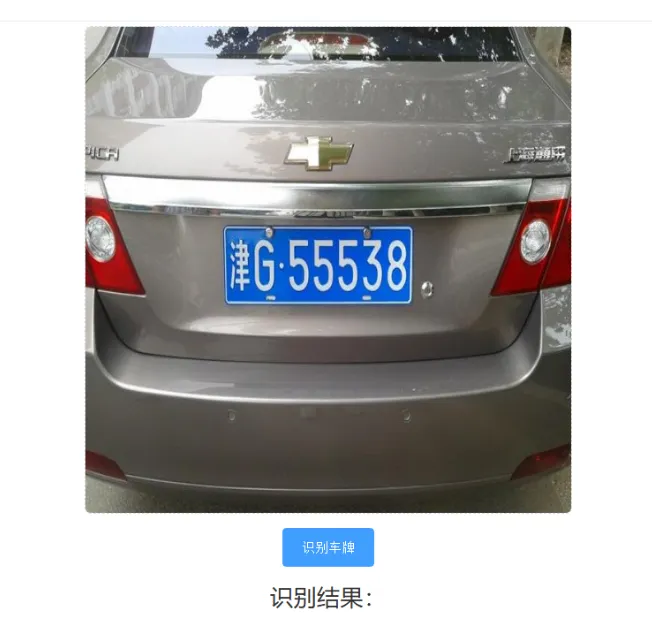
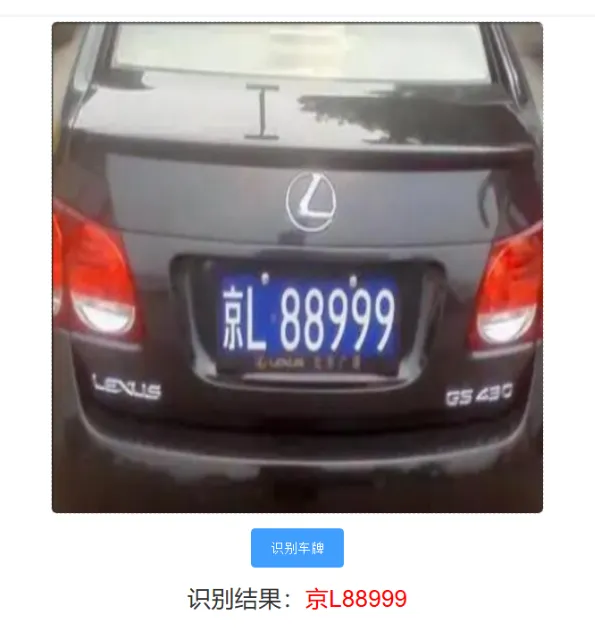
我们上传车牌图像,然后点击“识别车牌”按钮测试:

    点击下方公众号【Python222】小卡片,
回复888
👇👇 即可获取锋哥Python视频打包下载 👇👇
👆👆👆点击上方小卡片
回复「888」即可

最新文章

随机文章

基本 文件 流程 错误 SQL 调试
  1. 请求信息 : 2026-02-07 23:42:46 HTTP/2.0 GET : https://f.mffb.com.cn/a/467749.html
  2. 运行时间 : 0.084347s [ 吞吐率:11.86req/s ] 内存消耗:4,773.28kb 文件加载:140
  3. 缓存信息 : 0 reads,0 writes
  4. 会话信息 : SESSION_ID=5dc22f04e5eaf4fac4b2f150bc366f21
  1. /yingpanguazai/ssd/ssd1/www/f.mffb.com.cn/public/index.php ( 0.79 KB )
  2. /yingpanguazai/ssd/ssd1/www/f.mffb.com.cn/vendor/autoload.php ( 0.17 KB )
  3. /yingpanguazai/ssd/ssd1/www/f.mffb.com.cn/vendor/composer/autoload_real.php ( 2.49 KB )
  4. /yingpanguazai/ssd/ssd1/www/f.mffb.com.cn/vendor/composer/platform_check.php ( 0.90 KB )
  5. /yingpanguazai/ssd/ssd1/www/f.mffb.com.cn/vendor/composer/ClassLoader.php ( 14.03 KB )
  6. /yingpanguazai/ssd/ssd1/www/f.mffb.com.cn/vendor/composer/autoload_static.php ( 4.90 KB )
  7. /yingpanguazai/ssd/ssd1/www/f.mffb.com.cn/vendor/topthink/think-helper/src/helper.php ( 8.34 KB )
  8. /yingpanguazai/ssd/ssd1/www/f.mffb.com.cn/vendor/topthink/think-validate/src/helper.php ( 2.19 KB )
  9. /yingpanguazai/ssd/ssd1/www/f.mffb.com.cn/vendor/topthink/think-orm/src/helper.php ( 1.47 KB )
  10. /yingpanguazai/ssd/ssd1/www/f.mffb.com.cn/vendor/topthink/think-orm/stubs/load_stubs.php ( 0.16 KB )
  11. /yingpanguazai/ssd/ssd1/www/f.mffb.com.cn/vendor/topthink/framework/src/think/Exception.php ( 1.69 KB )
  12. /yingpanguazai/ssd/ssd1/www/f.mffb.com.cn/vendor/topthink/think-container/src/Facade.php ( 2.71 KB )
  13. /yingpanguazai/ssd/ssd1/www/f.mffb.com.cn/vendor/symfony/deprecation-contracts/function.php ( 0.99 KB )
  14. /yingpanguazai/ssd/ssd1/www/f.mffb.com.cn/vendor/symfony/polyfill-mbstring/bootstrap.php ( 8.26 KB )
  15. /yingpanguazai/ssd/ssd1/www/f.mffb.com.cn/vendor/symfony/polyfill-mbstring/bootstrap80.php ( 9.78 KB )
  16. /yingpanguazai/ssd/ssd1/www/f.mffb.com.cn/vendor/symfony/var-dumper/Resources/functions/dump.php ( 1.49 KB )
  17. /yingpanguazai/ssd/ssd1/www/f.mffb.com.cn/vendor/topthink/think-dumper/src/helper.php ( 0.18 KB )
  18. /yingpanguazai/ssd/ssd1/www/f.mffb.com.cn/vendor/symfony/var-dumper/VarDumper.php ( 4.30 KB )
  19. /yingpanguazai/ssd/ssd1/www/f.mffb.com.cn/vendor/topthink/framework/src/think/App.php ( 15.30 KB )
  20. /yingpanguazai/ssd/ssd1/www/f.mffb.com.cn/vendor/topthink/think-container/src/Container.php ( 15.76 KB )
  21. /yingpanguazai/ssd/ssd1/www/f.mffb.com.cn/vendor/psr/container/src/ContainerInterface.php ( 1.02 KB )
  22. /yingpanguazai/ssd/ssd1/www/f.mffb.com.cn/app/provider.php ( 0.19 KB )
  23. /yingpanguazai/ssd/ssd1/www/f.mffb.com.cn/vendor/topthink/framework/src/think/Http.php ( 6.04 KB )
  24. /yingpanguazai/ssd/ssd1/www/f.mffb.com.cn/vendor/topthink/think-helper/src/helper/Str.php ( 7.29 KB )
  25. /yingpanguazai/ssd/ssd1/www/f.mffb.com.cn/vendor/topthink/framework/src/think/Env.php ( 4.68 KB )
  26. /yingpanguazai/ssd/ssd1/www/f.mffb.com.cn/app/common.php ( 0.03 KB )
  27. /yingpanguazai/ssd/ssd1/www/f.mffb.com.cn/vendor/topthink/framework/src/helper.php ( 18.78 KB )
  28. /yingpanguazai/ssd/ssd1/www/f.mffb.com.cn/vendor/topthink/framework/src/think/Config.php ( 5.54 KB )
  29. /yingpanguazai/ssd/ssd1/www/f.mffb.com.cn/config/app.php ( 0.95 KB )
  30. /yingpanguazai/ssd/ssd1/www/f.mffb.com.cn/config/cache.php ( 0.78 KB )
  31. /yingpanguazai/ssd/ssd1/www/f.mffb.com.cn/config/console.php ( 0.23 KB )
  32. /yingpanguazai/ssd/ssd1/www/f.mffb.com.cn/config/cookie.php ( 0.56 KB )
  33. /yingpanguazai/ssd/ssd1/www/f.mffb.com.cn/config/database.php ( 2.48 KB )
  34. /yingpanguazai/ssd/ssd1/www/f.mffb.com.cn/vendor/topthink/framework/src/think/facade/Env.php ( 1.67 KB )
  35. /yingpanguazai/ssd/ssd1/www/f.mffb.com.cn/config/filesystem.php ( 0.61 KB )
  36. /yingpanguazai/ssd/ssd1/www/f.mffb.com.cn/config/lang.php ( 0.91 KB )
  37. /yingpanguazai/ssd/ssd1/www/f.mffb.com.cn/config/log.php ( 1.35 KB )
  38. /yingpanguazai/ssd/ssd1/www/f.mffb.com.cn/config/middleware.php ( 0.19 KB )
  39. /yingpanguazai/ssd/ssd1/www/f.mffb.com.cn/config/route.php ( 1.89 KB )
  40. /yingpanguazai/ssd/ssd1/www/f.mffb.com.cn/config/session.php ( 0.57 KB )
  41. /yingpanguazai/ssd/ssd1/www/f.mffb.com.cn/config/trace.php ( 0.34 KB )
  42. /yingpanguazai/ssd/ssd1/www/f.mffb.com.cn/config/view.php ( 0.82 KB )
  43. /yingpanguazai/ssd/ssd1/www/f.mffb.com.cn/app/event.php ( 0.25 KB )
  44. /yingpanguazai/ssd/ssd1/www/f.mffb.com.cn/vendor/topthink/framework/src/think/Event.php ( 7.67 KB )
  45. /yingpanguazai/ssd/ssd1/www/f.mffb.com.cn/app/service.php ( 0.13 KB )
  46. /yingpanguazai/ssd/ssd1/www/f.mffb.com.cn/app/AppService.php ( 0.26 KB )
  47. /yingpanguazai/ssd/ssd1/www/f.mffb.com.cn/vendor/topthink/framework/src/think/Service.php ( 1.64 KB )
  48. /yingpanguazai/ssd/ssd1/www/f.mffb.com.cn/vendor/topthink/framework/src/think/Lang.php ( 7.35 KB )
  49. /yingpanguazai/ssd/ssd1/www/f.mffb.com.cn/vendor/topthink/framework/src/lang/zh-cn.php ( 13.70 KB )
  50. /yingpanguazai/ssd/ssd1/www/f.mffb.com.cn/vendor/topthink/framework/src/think/initializer/Error.php ( 3.31 KB )
  51. /yingpanguazai/ssd/ssd1/www/f.mffb.com.cn/vendor/topthink/framework/src/think/initializer/RegisterService.php ( 1.33 KB )
  52. /yingpanguazai/ssd/ssd1/www/f.mffb.com.cn/vendor/services.php ( 0.14 KB )
  53. /yingpanguazai/ssd/ssd1/www/f.mffb.com.cn/vendor/topthink/framework/src/think/service/PaginatorService.php ( 1.52 KB )
  54. /yingpanguazai/ssd/ssd1/www/f.mffb.com.cn/vendor/topthink/framework/src/think/service/ValidateService.php ( 0.99 KB )
  55. /yingpanguazai/ssd/ssd1/www/f.mffb.com.cn/vendor/topthink/framework/src/think/service/ModelService.php ( 2.04 KB )
  56. /yingpanguazai/ssd/ssd1/www/f.mffb.com.cn/vendor/topthink/think-trace/src/Service.php ( 0.77 KB )
  57. /yingpanguazai/ssd/ssd1/www/f.mffb.com.cn/vendor/topthink/framework/src/think/Middleware.php ( 6.72 KB )
  58. /yingpanguazai/ssd/ssd1/www/f.mffb.com.cn/vendor/topthink/framework/src/think/initializer/BootService.php ( 0.77 KB )
  59. /yingpanguazai/ssd/ssd1/www/f.mffb.com.cn/vendor/topthink/think-orm/src/Paginator.php ( 11.86 KB )
  60. /yingpanguazai/ssd/ssd1/www/f.mffb.com.cn/vendor/topthink/think-validate/src/Validate.php ( 63.20 KB )
  61. /yingpanguazai/ssd/ssd1/www/f.mffb.com.cn/vendor/topthink/think-orm/src/Model.php ( 23.55 KB )
  62. /yingpanguazai/ssd/ssd1/www/f.mffb.com.cn/vendor/topthink/think-orm/src/model/concern/Attribute.php ( 21.05 KB )
  63. /yingpanguazai/ssd/ssd1/www/f.mffb.com.cn/vendor/topthink/think-orm/src/model/concern/AutoWriteData.php ( 4.21 KB )
  64. /yingpanguazai/ssd/ssd1/www/f.mffb.com.cn/vendor/topthink/think-orm/src/model/concern/Conversion.php ( 6.44 KB )
  65. /yingpanguazai/ssd/ssd1/www/f.mffb.com.cn/vendor/topthink/think-orm/src/model/concern/DbConnect.php ( 5.16 KB )
  66. /yingpanguazai/ssd/ssd1/www/f.mffb.com.cn/vendor/topthink/think-orm/src/model/concern/ModelEvent.php ( 2.33 KB )
  67. /yingpanguazai/ssd/ssd1/www/f.mffb.com.cn/vendor/topthink/think-orm/src/model/concern/RelationShip.php ( 28.29 KB )
  68. /yingpanguazai/ssd/ssd1/www/f.mffb.com.cn/vendor/topthink/think-helper/src/contract/Arrayable.php ( 0.09 KB )
  69. /yingpanguazai/ssd/ssd1/www/f.mffb.com.cn/vendor/topthink/think-helper/src/contract/Jsonable.php ( 0.13 KB )
  70. /yingpanguazai/ssd/ssd1/www/f.mffb.com.cn/vendor/topthink/think-orm/src/model/contract/Modelable.php ( 0.09 KB )
  71. /yingpanguazai/ssd/ssd1/www/f.mffb.com.cn/vendor/topthink/framework/src/think/Db.php ( 2.88 KB )
  72. /yingpanguazai/ssd/ssd1/www/f.mffb.com.cn/vendor/topthink/think-orm/src/DbManager.php ( 8.52 KB )
  73. /yingpanguazai/ssd/ssd1/www/f.mffb.com.cn/vendor/topthink/framework/src/think/Log.php ( 6.28 KB )
  74. /yingpanguazai/ssd/ssd1/www/f.mffb.com.cn/vendor/topthink/framework/src/think/Manager.php ( 3.92 KB )
  75. /yingpanguazai/ssd/ssd1/www/f.mffb.com.cn/vendor/psr/log/src/LoggerTrait.php ( 2.69 KB )
  76. /yingpanguazai/ssd/ssd1/www/f.mffb.com.cn/vendor/psr/log/src/LoggerInterface.php ( 2.71 KB )
  77. /yingpanguazai/ssd/ssd1/www/f.mffb.com.cn/vendor/topthink/framework/src/think/Cache.php ( 4.92 KB )
  78. /yingpanguazai/ssd/ssd1/www/f.mffb.com.cn/vendor/psr/simple-cache/src/CacheInterface.php ( 4.71 KB )
  79. /yingpanguazai/ssd/ssd1/www/f.mffb.com.cn/vendor/topthink/think-helper/src/helper/Arr.php ( 16.63 KB )
  80. /yingpanguazai/ssd/ssd1/www/f.mffb.com.cn/vendor/topthink/framework/src/think/cache/driver/File.php ( 7.84 KB )
  81. /yingpanguazai/ssd/ssd1/www/f.mffb.com.cn/vendor/topthink/framework/src/think/cache/Driver.php ( 9.03 KB )
  82. /yingpanguazai/ssd/ssd1/www/f.mffb.com.cn/vendor/topthink/framework/src/think/contract/CacheHandlerInterface.php ( 1.99 KB )
  83. /yingpanguazai/ssd/ssd1/www/f.mffb.com.cn/app/Request.php ( 0.09 KB )
  84. /yingpanguazai/ssd/ssd1/www/f.mffb.com.cn/vendor/topthink/framework/src/think/Request.php ( 55.78 KB )
  85. /yingpanguazai/ssd/ssd1/www/f.mffb.com.cn/app/middleware.php ( 0.25 KB )
  86. /yingpanguazai/ssd/ssd1/www/f.mffb.com.cn/vendor/topthink/framework/src/think/Pipeline.php ( 2.61 KB )
  87. /yingpanguazai/ssd/ssd1/www/f.mffb.com.cn/vendor/topthink/think-trace/src/TraceDebug.php ( 3.40 KB )
  88. /yingpanguazai/ssd/ssd1/www/f.mffb.com.cn/vendor/topthink/framework/src/think/middleware/SessionInit.php ( 1.94 KB )
  89. /yingpanguazai/ssd/ssd1/www/f.mffb.com.cn/vendor/topthink/framework/src/think/Session.php ( 1.80 KB )
  90. /yingpanguazai/ssd/ssd1/www/f.mffb.com.cn/vendor/topthink/framework/src/think/session/driver/File.php ( 6.27 KB )
  91. /yingpanguazai/ssd/ssd1/www/f.mffb.com.cn/vendor/topthink/framework/src/think/contract/SessionHandlerInterface.php ( 0.87 KB )
  92. /yingpanguazai/ssd/ssd1/www/f.mffb.com.cn/vendor/topthink/framework/src/think/session/Store.php ( 7.12 KB )
  93. /yingpanguazai/ssd/ssd1/www/f.mffb.com.cn/vendor/topthink/framework/src/think/Route.php ( 23.73 KB )
  94. /yingpanguazai/ssd/ssd1/www/f.mffb.com.cn/vendor/topthink/framework/src/think/route/RuleName.php ( 5.75 KB )
  95. /yingpanguazai/ssd/ssd1/www/f.mffb.com.cn/vendor/topthink/framework/src/think/route/Domain.php ( 2.53 KB )
  96. /yingpanguazai/ssd/ssd1/www/f.mffb.com.cn/vendor/topthink/framework/src/think/route/RuleGroup.php ( 22.43 KB )
  97. /yingpanguazai/ssd/ssd1/www/f.mffb.com.cn/vendor/topthink/framework/src/think/route/Rule.php ( 26.95 KB )
  98. /yingpanguazai/ssd/ssd1/www/f.mffb.com.cn/vendor/topthink/framework/src/think/route/RuleItem.php ( 9.78 KB )
  99. /yingpanguazai/ssd/ssd1/www/f.mffb.com.cn/route/app.php ( 1.72 KB )
  100. /yingpanguazai/ssd/ssd1/www/f.mffb.com.cn/vendor/topthink/framework/src/think/facade/Route.php ( 4.70 KB )
  101. /yingpanguazai/ssd/ssd1/www/f.mffb.com.cn/vendor/topthink/framework/src/think/route/dispatch/Controller.php ( 4.74 KB )
  102. /yingpanguazai/ssd/ssd1/www/f.mffb.com.cn/vendor/topthink/framework/src/think/route/Dispatch.php ( 10.44 KB )
  103. /yingpanguazai/ssd/ssd1/www/f.mffb.com.cn/app/controller/Index.php ( 4.81 KB )
  104. /yingpanguazai/ssd/ssd1/www/f.mffb.com.cn/app/BaseController.php ( 2.05 KB )
  105. /yingpanguazai/ssd/ssd1/www/f.mffb.com.cn/vendor/topthink/think-orm/src/facade/Db.php ( 0.93 KB )
  106. /yingpanguazai/ssd/ssd1/www/f.mffb.com.cn/vendor/topthink/think-orm/src/db/connector/Mysql.php ( 5.44 KB )
  107. /yingpanguazai/ssd/ssd1/www/f.mffb.com.cn/vendor/topthink/think-orm/src/db/PDOConnection.php ( 52.47 KB )
  108. /yingpanguazai/ssd/ssd1/www/f.mffb.com.cn/vendor/topthink/think-orm/src/db/Connection.php ( 8.39 KB )
  109. /yingpanguazai/ssd/ssd1/www/f.mffb.com.cn/vendor/topthink/think-orm/src/db/ConnectionInterface.php ( 4.57 KB )
  110. /yingpanguazai/ssd/ssd1/www/f.mffb.com.cn/vendor/topthink/think-orm/src/db/builder/Mysql.php ( 16.58 KB )
  111. /yingpanguazai/ssd/ssd1/www/f.mffb.com.cn/vendor/topthink/think-orm/src/db/Builder.php ( 24.06 KB )
  112. /yingpanguazai/ssd/ssd1/www/f.mffb.com.cn/vendor/topthink/think-orm/src/db/BaseBuilder.php ( 27.50 KB )
  113. /yingpanguazai/ssd/ssd1/www/f.mffb.com.cn/vendor/topthink/think-orm/src/db/Query.php ( 15.71 KB )
  114. /yingpanguazai/ssd/ssd1/www/f.mffb.com.cn/vendor/topthink/think-orm/src/db/BaseQuery.php ( 45.13 KB )
  115. /yingpanguazai/ssd/ssd1/www/f.mffb.com.cn/vendor/topthink/think-orm/src/db/concern/TimeFieldQuery.php ( 7.43 KB )
  116. /yingpanguazai/ssd/ssd1/www/f.mffb.com.cn/vendor/topthink/think-orm/src/db/concern/AggregateQuery.php ( 3.26 KB )
  117. /yingpanguazai/ssd/ssd1/www/f.mffb.com.cn/vendor/topthink/think-orm/src/db/concern/ModelRelationQuery.php ( 20.07 KB )
  118. /yingpanguazai/ssd/ssd1/www/f.mffb.com.cn/vendor/topthink/think-orm/src/db/concern/ParamsBind.php ( 3.66 KB )
  119. /yingpanguazai/ssd/ssd1/www/f.mffb.com.cn/vendor/topthink/think-orm/src/db/concern/ResultOperation.php ( 7.01 KB )
  120. /yingpanguazai/ssd/ssd1/www/f.mffb.com.cn/vendor/topthink/think-orm/src/db/concern/WhereQuery.php ( 19.37 KB )
  121. /yingpanguazai/ssd/ssd1/www/f.mffb.com.cn/vendor/topthink/think-orm/src/db/concern/JoinAndViewQuery.php ( 7.11 KB )
  122. /yingpanguazai/ssd/ssd1/www/f.mffb.com.cn/vendor/topthink/think-orm/src/db/concern/TableFieldInfo.php ( 2.63 KB )
  123. /yingpanguazai/ssd/ssd1/www/f.mffb.com.cn/vendor/topthink/think-orm/src/db/concern/Transaction.php ( 2.77 KB )
  124. /yingpanguazai/ssd/ssd1/www/f.mffb.com.cn/vendor/topthink/framework/src/think/log/driver/File.php ( 5.96 KB )
  125. /yingpanguazai/ssd/ssd1/www/f.mffb.com.cn/vendor/topthink/framework/src/think/contract/LogHandlerInterface.php ( 0.86 KB )
  126. /yingpanguazai/ssd/ssd1/www/f.mffb.com.cn/vendor/topthink/framework/src/think/log/Channel.php ( 3.89 KB )
  127. /yingpanguazai/ssd/ssd1/www/f.mffb.com.cn/vendor/topthink/framework/src/think/event/LogRecord.php ( 1.02 KB )
  128. /yingpanguazai/ssd/ssd1/www/f.mffb.com.cn/vendor/topthink/think-helper/src/Collection.php ( 16.47 KB )
  129. /yingpanguazai/ssd/ssd1/www/f.mffb.com.cn/vendor/topthink/framework/src/think/facade/View.php ( 1.70 KB )
  130. /yingpanguazai/ssd/ssd1/www/f.mffb.com.cn/vendor/topthink/framework/src/think/View.php ( 4.39 KB )
  131. /yingpanguazai/ssd/ssd1/www/f.mffb.com.cn/vendor/topthink/framework/src/think/Response.php ( 8.81 KB )
  132. /yingpanguazai/ssd/ssd1/www/f.mffb.com.cn/vendor/topthink/framework/src/think/response/View.php ( 3.29 KB )
  133. /yingpanguazai/ssd/ssd1/www/f.mffb.com.cn/vendor/topthink/framework/src/think/Cookie.php ( 6.06 KB )
  134. /yingpanguazai/ssd/ssd1/www/f.mffb.com.cn/vendor/topthink/think-view/src/Think.php ( 8.38 KB )
  135. /yingpanguazai/ssd/ssd1/www/f.mffb.com.cn/vendor/topthink/framework/src/think/contract/TemplateHandlerInterface.php ( 1.60 KB )
  136. /yingpanguazai/ssd/ssd1/www/f.mffb.com.cn/vendor/topthink/think-template/src/Template.php ( 46.61 KB )
  137. /yingpanguazai/ssd/ssd1/www/f.mffb.com.cn/vendor/topthink/think-template/src/template/driver/File.php ( 2.41 KB )
  138. /yingpanguazai/ssd/ssd1/www/f.mffb.com.cn/vendor/topthink/think-template/src/template/contract/DriverInterface.php ( 0.86 KB )
  139. /yingpanguazai/ssd/ssd1/www/f.mffb.com.cn/runtime/temp/067d451b9a0c665040f3f1bdd3293d68.php ( 11.98 KB )
  140. /yingpanguazai/ssd/ssd1/www/f.mffb.com.cn/vendor/topthink/think-trace/src/Html.php ( 4.42 KB )
  1. CONNECT:[ UseTime:0.000561s ] mysql:host=127.0.0.1;port=3306;dbname=f_mffb;charset=utf8mb4
  2. SHOW FULL COLUMNS FROM `fenlei` [ RunTime:0.000831s ]
  3. SELECT * FROM `fenlei` WHERE `fid` = 0 [ RunTime:0.000294s ]
  4. SELECT * FROM `fenlei` WHERE `fid` = 63 [ RunTime:0.000307s ]
  5. SHOW FULL COLUMNS FROM `set` [ RunTime:0.000501s ]
  6. SELECT * FROM `set` [ RunTime:0.000196s ]
  7. SHOW FULL COLUMNS FROM `article` [ RunTime:0.000544s ]
  8. SELECT * FROM `article` WHERE `id` = 467749 LIMIT 1 [ RunTime:0.000698s ]
  9. UPDATE `article` SET `lasttime` = 1770478966 WHERE `id` = 467749 [ RunTime:0.003747s ]
  10. SELECT * FROM `fenlei` WHERE `id` = 66 LIMIT 1 [ RunTime:0.000258s ]
  11. SELECT * FROM `article` WHERE `id` < 467749 ORDER BY `id` DESC LIMIT 1 [ RunTime:0.000405s ]
  12. SELECT * FROM `article` WHERE `id` > 467749 ORDER BY `id` ASC LIMIT 1 [ RunTime:0.000588s ]
  13. SELECT * FROM `article` WHERE `id` < 467749 ORDER BY `id` DESC LIMIT 10 [ RunTime:0.004299s ]
  14. SELECT * FROM `article` WHERE `id` < 467749 ORDER BY `id` DESC LIMIT 10,10 [ RunTime:0.002885s ]
  15. SELECT * FROM `article` WHERE `id` < 467749 ORDER BY `id` DESC LIMIT 20,10 [ RunTime:0.001580s ]
0.086074s