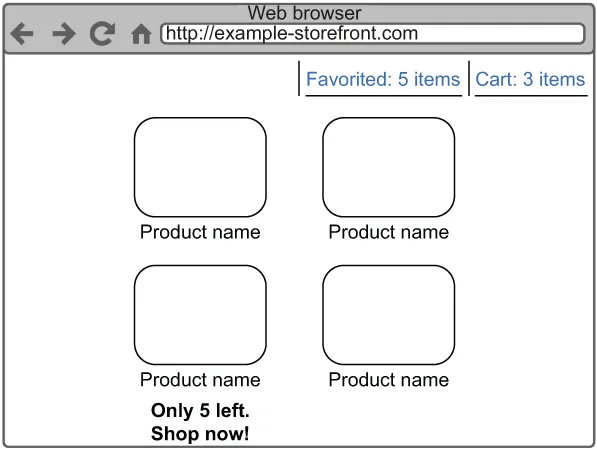
我们来构建一个「全部商品」页面的后端服务,对应桌面端的体验。这个页面要展示所有商品,同时显示用户购物车和收藏夹状态,还有库存不足提示。
图10.2 商品列表页原型图在这种架构下,我们需要从几个独立服务获取数据,再拼在一起。先来看看我们需要哪些基础服务和数据模型:
这个服务记录每个用户收藏了哪些商品。下面这几个服务也都会用到:
购物车服务:用户 → 商品的映射关系,数据模型和收藏服务一样。 库存服务:商品 → 可售数量的映射。 商品服务:商品详情(名称、规格等),类似第9章的数据库服务。
先写个最简单的库存服务,我们用 aiohttp 搭个框架,模拟一下返回库存数据。为了演示效果,我们随机生成0-100之间的数字,还故意加了随机延迟,模拟网络抖动。
服务启动在 8001 端口,和之前的商品服务(8000)不冲突。
# Listing 10.1 库存服务import asyncioimport randomfrom aiohttp import webfrom aiohttp.web_response import Responseroutes = web.RouteTableDef()@routes.get('/products/{id}/inventory')async def get_inventory(request: Request) -> Response: delay: int = random.randint(0, 5) await asyncio.sleep(delay) inventory: int = random.randint(0, 100) return web.json_response({'inventory': inventory})app = web.Application()app.add_routes(routes)web.run_app(app, port=8001)
接下来实现用户购物车和收藏服务。这两个表结构一样,所以我们直接复用代码,只改表名。
-- Listing 10.2 购物车表CREATE TABLE user_cart( user_id INT NOT NULL, product_id INT NOT NULL);INSERT INTO user_cart VALUES(1, 1);INSERT INTO user_cart VALUES(1, 2);INSERT INTO user_cart VALUES(1, 3);INSERT INTO user_cart VALUES(2, 1);INSERT INTO user_cart VALUES(2, 2);INSERT INTO user_cart VALUES(2, 5);
-- Listing 10.3 收藏表CREATE TABLE user_favorite( user_id INT NOT NULL, product_id INT NOT NULL);INSERT INTO user_favorite VALUES(1, 1);INSERT INTO user_favorite VALUES(1, 2);INSERT INTO user_favorite VALUES(1, 3);INSERT INTO user_favorite VALUES(3, 1);INSERT INTO user_favorite VALUES(3, 2);INSERT INTO user_favorite VALUES(3, 3);
由于我们想模拟多数据库,要把两个表分别放在不同的 Postgres 数据库里。可以用命令行创建:
sudo -u postgres psql -c "CREATE DATABASE cart;"sudo -u postgres psql -c "CREATE DATABASE favorites;"
为避免频繁连接数据库,我们封装一个通用的连接池工具,后面会用在 on_startup / on_cleanup 钩子里。
# Listing 10.4 创建和销毁数据库连接池import asyncpgfrom aiohttp.web_app import Applicationfrom asyncpg.pool import PoolDB_KEY = 'database'async def create_database_pool(app: Application, host: str, port: int, user: str, database: str, password: str): pool: Pool = await asyncpg.create_pool(host=host, port=port, user=user, password=password, database=database, min_size=6, max_size=6) app[DB_KEY] = poolasync def destroy_database_pool(app: Application): pool: Pool = app[DB_KEY] await pool.close()
上面这段代码就跟第五章差不多,create_database_pool 创建连接池并挂载到 App;destroy_database_pool 则关闭连接池。
接着我们写服务。因为收藏和购物车都是用户的子资源,所以路径格式是 /users/{id}/favorites 这种。
# Listing 10.5 收藏服务import functoolsfrom aiohttp import webfrom aiohttp.web_request import Requestfrom aiohttp.web_response import Responsefrom chapter_10.listing_10_4 import DB_KEY, create_database_pool, destroy_database_poolroutes = web.RouteTableDef()@routes.get('/users/{id}/favorites')async def favorites(request: Request) -> Response: try: str_id = request.match_info['id'] user_id = int(str_id) db = request.app[DB_KEY] favorite_query = 'SELECT product_id from user_favorite where user_id = $1' result = await db.fetch(favorite_query, user_id) if result is not None: return web.json_response([dict(record) for record in result]) else: raise web.HTTPNotFound() except ValueError: raise web.HTTPBadRequest()app = web.Application()app.on_startup.append(functools.partial(create_database_pool, host='127.0.0.1', port=5432, user='postgres', password='password', database='favorites'))app.on_cleanup.append(destroy_database_pool)app.add_routes(routes)web.run_app(app, port=8002)
再写购物车服务,几乎一样,只是改成了 user_cart 表:
# Listing 10.6 购物车服务import functoolsfrom aiohttp import webfrom aiohttp.web_request import Requestfrom aiohttp.web_response import Responsefrom chapter_10.listing_10_4 import DB_KEY, create_database_pool, destroy_database_poolroutes = web.RouteTableDef()@routes.get('/users/{id}/cart')async def time(request: Request) -> Response: try: str_id = request.match_info['id'] user_id = int(str_id) db = request.app[DB_KEY] favorite_query = 'SELECT product_id from user_cart where user_id = $1' result = await db.fetch(favorite_query, user_id) if result is not None: return web.json_response([dict(record) for record in result]) else: raise web.HTTPNotFound() except ValueError: raise web.HTTPBadRequest()app = web.Application()app.on_startup.append(functools.partial(create_database_pool, host='127.0.0.1', port=5432, user='postgres', password='password', database='cart'))app.on_cleanup.append(destroy_database_pool)app.add_routes(routes)web.run_app(app, port=8003)
最后写商品服务,和第9章类似,但这次查询的是所有商品:
# Listing 10.7 商品服务import functoolsfrom aiohttp import webfrom aiohttp.web_request import Requestfrom aiohttp.web_response import Responsefrom chapter_10.listing_10_4 import DB_KEY, create_database_pool, destroy_database_poolroutes = web.RouteTableDef()@routes.get('/products')async def products(request: Request) -> Response: db = request.app[DB_KEY] product_query = 'SELECT product_id, product_name FROM product' result = await db.fetch(product_query) return web.json_response([dict(record) for record in result])app = web.Application()app.on_startup.append(functools.partial(create_database_pool, host='127.0.0.1', port=5432, user='postgres', password='password', database='products'))app.on_cleanup.append(destroy_database_pool)app.add_routes(routes)web.run_app(app, port=8000)
好了,四个基础服务都搭好了,现在开始打造我们的「前端后端」服务。
先明确需求:商品加载速度至关重要。用户等得越久,就越不想继续逛,购买意愿也越低。所以我们追求的是:在最短时间内返回最少必要数据。
- 商品服务最多等1秒。超时就返回504错误,不让前端一直卡着。
- 购物车和收藏数据是可选的。如果能在1秒内拿到,就返回;否则就放弃,直接给商品数据。
这么一来,即使某个服务崩溃或网络超时,咱们的接口也能“活着”返回有用信息,用户不至于看到一个永远转圈的进度条。
{ "cart_items": 1, "favorite_items": null, "products": [ {"product_id": 4, "inventory": 4}, {"product_id": 3, "inventory": 65} ]}
解释一下:用户购物车有1个商品;收藏数据拿不到,返回 null;有两个商品要展示,库存分别是4和65件。
- 使用
asyncio.wait 同时发起请求,设超时1秒。 - 一旦超时或出现异常,立刻取消未完成请求,快速响应。
关键来了,要先确认商品数据(这是主干),才能决定是否拉库存。所以我们在 all_products 中这样做:
# Listing 10.8 商品前端后端服务import asynciofrom asyncio import Taskimport aiohttpfrom aiohttp import web, ClientSessionfrom aiohttp.web_request import Requestfrom aiohttp.web_response import Responseimport loggingfrom typing import Dict, Set, Awaitable, Optional, Listroutes = web.RouteTableDef()PRODUCT_BASE = 'http://127.0.0.1:8000'INVENTORY_BASE = 'http://127.0.0.1:8001'FAVORITE_BASE = 'http://127.0.0.1:8002'CART_BASE = 'http://127.0.0.1:8003'@routes.get('/products/all')async def all_products(request: Request) -> Response: async with aiohttp.ClientSession() as session: products = asyncio.create_task(session.get(f'{PRODUCT_BASE}/products')) favorites = asyncio.create_task(session.get(f'{FAVORITE_BASE}/users/3/favorites')) cart = asyncio.create_task(session.get(f'{CART_BASE}/users/3/cart')) requests = [products, favorites, cart] done, pending = await asyncio.wait(requests, timeout=1.0) # ❶ if products in pending: # ❷ [request.cancel() for request in requests] return web.json_response({'error': 'Could not reach products service.'}, status=504) elif products in done and products.exception() is not None: [request.cancel() for request in requests] logging.exception('Server error reaching product service.', exc_info=products.exception()) return web.json_response({'error': 'Server error reaching products service.'}, status=500) else: product_response = await products.result().json() # ❸ product_results: List[Dict] = await get_products_with_inventory(session, product_response) cart_item_count: Optional[int] = await get_response_item_count(cart, done, pending, 'Error getting user cart.') favorite_item_count: Optional[int] = await get_response_item_count(favorites, done, pending, 'Error getting user favorites.') return web.json_response({'cart_items': cart_item_count, 'favorite_items': favorite_item_count, 'products': product_results})
函数 get_products_with_inventory 和 get_response_item_count 也都要写:
async def get_products_with_inventory(session: ClientSession, product_response) -> List[Dict]: def get_inventory(session: ClientSession, product_id: str) -> Task: url = f"{INVENTORY_BASE}/products/{product_id}/inventory" return asyncio.create_task(session.get(url)) def create_product_record(product_id: int, inventory: Optional[int]) -> Dict: return {'product_id': product_id, 'inventory': inventory} inventory_tasks_to_product_id = { get_inventory(session, product['product_id']): product['product_id'] for product in product_response } inventory_done, inventory_pending = await asyncio.wait(inventory_tasks_to_product_id.keys(), timeout=1.0) product_results = [] for done_task in inventory_done: if done_task.exception() is None: product_id = inventory_tasks_to_product_id[done_task] inventory = await done_task.result().json() product_results.append(create_product_record(product_id, inventory['inventory'])) else: product_id = inventory_tasks_to_product_id[done_task] product_results.append(create_product_record(product_id, None)) logging.exception(f'Error getting inventory for id {product_id}', exc_info=inventory_tasks_to_product_id[done_task].exception()) for pending_task in inventory_pending: pending_task.cancel() product_id = inventory_tasks_to_product_id[pending_task] product_results.append(create_product_record(product_id, None)) return product_resultsasync def get_response_item_count(task: Task, done: Set[Awaitable], pending: Set[Awaitable], error_msg: str) -> Optional[int]: if task in done and task.exception() is None: return len(await task.result().json()) elif task in pending: task.cancel() else: logging.exception(error_msg, exc_info=task.exception()) return None
这套逻辑非常实用:即便某个服务雪崩,也能快速返回部分内容,让用户至少看到点东西。
上面这个版本有个小缺点:一出错就“认输”,直接放弃。但实际上很多问题是瞬时的,比如临时网络波动、负载均衡器抖动,过一会儿就好了。
这个时候,我们可以试试“重试”:失败后短暂等待,再试一次。
asyncio.wait_for 就是好工具,它支持超时,失败就抛异常。我们可以封装一个通用的 retry 协程:
# Listing 10.9 重试协程import asyncioimport loggingfrom typing import Callable, Awaitableclass TooManyRetries(Exception): passasync def retry(coro: Callable[[], Awaitable], max_retries: int, timeout: float, retry_interval: float): for retry_num in range(0, max_retries): try: return await asyncio.wait_for(coro(), timeout=timeout) # ❶ except Exception as e: logging.exception(f'Exception while waiting (tried {retry_num} times), retrying.', exc_info=e) # ❷ await asyncio.sleep(retry_interval) raise TooManyRetries() # ❸
# Listing 10.10 测试重试import asynciofrom chapter_10.listing_10_9 import retry, TooManyRetriesasync def main(): async def always_fail(): raise Exception("I've failed!") async def always_timeout(): await asyncio.sleep(1) try: await retry(always_fail, max_retries=3, timeout=.1, retry_interval=.1) except TooManyRetries: print('Retried too many times!') try: await retry(always_timeout, max_retries=3, timeout=.1, retry_interval=.1) except TooManyRetries: print('Retried too many times!')asyncio.run(main())
运行后你会看到两条报错信息,最后打印出“Retried too many times!”。说明重试机制生效了。
product_request = functools.partial(session.get, f'{PRODUCT_BASE}/products')favorite_request = functools.partial(session.get, f'{FAVORITE_BASE}/users/5/favorites')cart_request = functools.partial(session.get, f'{CART_BASE}/users/5/cart')products = asyncio.create_task(retry(product_request, max_retries=3, timeout=.1, retry_interval=.1))favorites = asyncio.create_task(retry(favorite_request, max_retries=3, timeout=.1, retry_interval=.1))cart = asyncio.create_task(retry(cart_request, max_retries=3, timeout=.1, retry_interval=.1))requests = [products, favorites, cart]done, pending = await asyncio.wait(requests, timeout=1.0)
这样改完,遇到偶尔失败也不慌,最多尝试3次,大大提高了容错率。
不过还是有个潜在问题:如果某个服务一直超时,岂不是每次都重试,白白浪费用户时间?
这才是真正的“防崩神器”——熔断器(circuit breaker)。
当某个服务持续超时或出错,比如用户收藏服务总是1秒才返回,那所有用户都会被拖死。
这时,我们该“跳闸”了!让它像电闸一样自动断开,拒绝所有请求,直接返回错误,防止用户一直在等。
- 开启(open):出错次数超过阈值,立刻拦截请求。
- 半开(half-open):过一段时间后允许一次请求探路,若恢复则关闭熔断。
我们可以简化实现,暂时忽略“半开”状态,只做“闭合→开启”切换。
# Listing 10.11 简易熔断器import asynciofrom datetime import datetime, timedeltaclass CircuitOpenException(Exception): passclass CircuitBreaker: def __init__(self, callback, timeout: float, time_window: float, max_failures: int, reset_interval: float): self.callback = callback self.timeout = timeout self.time_window = time_window self.max_failures = max_failures self.reset_interval = reset_interval self.last_request_time = None self.last_failure_time = None self.current_failures = 0 async def request(self, *args, **kwargs): # ❶ if self.current_failures >= self.max_failures: if datetime.now() > self.last_request_time + timedelta(seconds=self.reset_interval): self._reset('Circuit is going from open to closed, resetting!') return await self._do_request(*args, **kwargs) else: print('Circuit is open, failing fast!') raise CircuitOpenException() else: if self.last_failure_time and datetime.now() > self.last_failure_time + timedelta(seconds=self.time_window): self._reset('Interval since first failure elapsed, resetting!') print('Circuit is closed, requesting!') return await self._do_request(*args, **kwargs) def _reset(self, msg: str): # ❷ print(msg) self.last_failure_time = None self.current_failures = 0 async def _do_request(self, *args, **kwargs): # ❸ try: print('Making request!') self.last_request_time = datetime.now() return await asyncio.wait_for(self.callback(*args, **kwargs), timeout=self.timeout) except Exception as e: self.current_failures = self.current_failures + 1 if self.last_failure_time is None: self.last_failure_time = datetime.now() raise
# Listing 10.12 熔断器实战import asynciofrom chapter_10.listing_10_11 import CircuitBreakerasync def main(): async def slow_callback(): await asyncio.sleep(2) cb = CircuitBreaker(slow_callback, timeout=1.0, time_window=5, max_failures=2, reset_interval=5) for _ in range(4): try: await cb.request() except Exception as e: pass print('Sleeping for 5 seconds so breaker closes...') await asyncio.sleep(5) for _ in range(4): try: await cb.request() except Exception as e: passasyncio.run(main())
输出可见,前两次触发超时,然后进入“熔断状态”,后续请求直接失败。等5秒后,“熔断器”自动复位,再次恢复。
async def get_inventory(session: ClientSession, product_id: str): url = f"{INVENTORY_BASE}/products/{product_id}/inventory" return await session.get(url)inventory_circuit = CircuitBreaker(get_inventory, timeout=.5, time_window=5.0, max_failures=3, reset_interval=30)
inventory_tasks_to_pid = { asyncio.create_task(inventory_circuit.request(session, product['product_id'])): product['product_id'] for product in product_response}inventory_done, inventory_pending = await asyncio.wait(inventory_tasks_to_pid.keys(), timeout=1.0)
这样一来,一旦库存服务扛不住,我们就“手动跳闸”,后续请求直接拒绝,用户也不会傻等了。
asyncio.wait 能实现并发拉取+超时控制,让服务更稳健。- 熔断器模式是防雪崩的关键,真正做到了“不求完美,但求不死”。