当前位置:首页>python>第三方库python-Locust

第三方库python-Locust

  • 2026-02-06 17:33:40
第三方库python-Locust

Locust 官方网站:https://www.locust.io/

本文转载: 虫师-性能测试工具Locust


一.Locust 介绍

Locust 官方网站:https://www.locust.io/

Locust 介绍


An open source load testing tool.

一个开源性能测试工具。

define user behaviour with python code, and swarm your system with millions of simultaneous users.

使用 Python 代码来定义用户行为。用它可以模拟百万计的并发用户访问你的系统。

性能工具对比


LoadRunner 是非常有名的商业性能测试工具,功能非常强大。使用也比较复杂,目前大多介绍性能测试的书籍都以该工具为基础,甚至有些书整本都在介绍 LoadRunner 的使用。

Jmeter 同样是非常有名的开源性能测试工具,功能也很完善,在本书中介绍了它作为接口测试工具的使用。但实际上,它是一个标准的性能测试工具。关于Jmeter相关的资料也非常丰富,它的官方文档也很完善。

Locust 同样是性能测试工具,虽然官方这样来描述它 “An open source load testing tool.” 。但其它和前面两个工具有着较大的不同。相比前面两个工具,功能上要差上不少,但它也并非优点全无。

  • Locust 完全基本 Python 编程语言,采用 Pure Python 描述测试脚本,并且 HTTP 请求完全基于 Requests 库。除了 HTTP/HTTPS 协议,Locust 也可以测试其它协议的系统,只需要采用Python调用对应的库进行请求描述即可。
  • LoadRunner 和 Jmeter 这类采用进程和线程的测试工具,都很难在单机上模拟出较高的并发压力。Locust 的并发机制摒弃了进程和线程,采用协程(gevent)的机制。协程避免了系统级资源调度,由此可以大幅提高单机的并发能力。

正是基于这样的特点,使我选择使用Locust工具来做性能测试,另外一个原因是它可以让我们换一种方式认识性能测试,可能更容易看清性能测试的本质。

我想已经成功的引起了你的兴趣,那么接下来就跟着来学习Locust的使用吧。


二.Locust 安装

Locust 安装


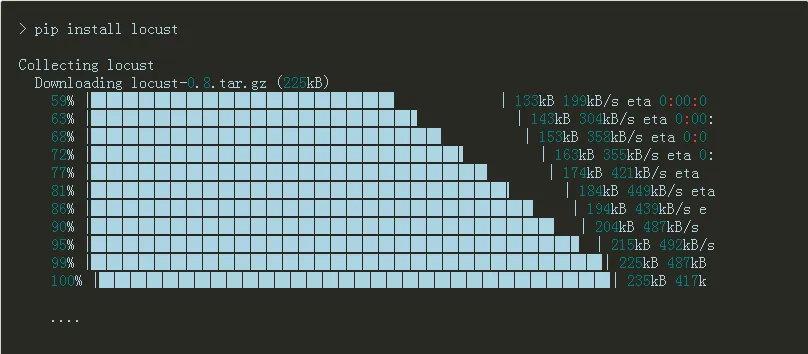
方式一:通过 pip 命令安装

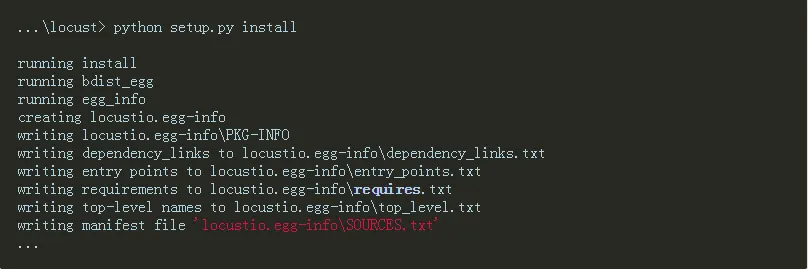
方式二:GitHub下载安装

GitHub项目地址:https://github.com/locustio/locust/

将项目克隆下来,通过Python 执行 setup.py 文件

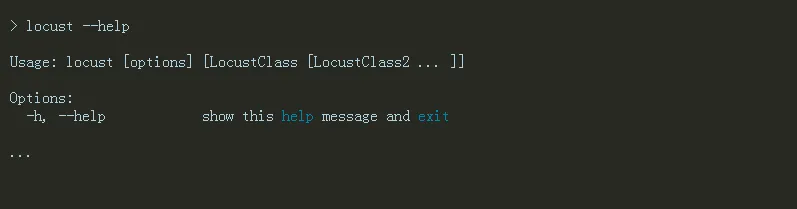
最后,检查是否安装成功。打开Windows命令提示符,输入 “locust –help”回车

每个参数的含义,将会放到后面介绍。

安装依赖分析


这里想简单介绍 Locust 都基于了哪些库。打开 Locust 安装目录下的 setup.py 文件。查看安装要求:

install_requires=[“gevent>=1.1.2”, “flask>=0.10.1”, “requests>=2.9.1”, “msgpack-python>=0.4.2”, “six>=1.10.0”, “pyzmq==15.2.0”]

gevent 是在 Python 中实现协程的一个第三方库。协程,又称微线程(Coroutine)。使用gevent可以获得极高的并发性能。

flask 是 Python 的一个 Web 开发框架。

Requests 用来做 HTTP 接口测试。

msgpack-python 是一种快速、紧凑的二进制序列化格式,适用于类似JSON的数据。

six 提供了一些简单的工具用来封装 Python2 和 Python3 之间的差异性。

pyzmq 如果你打算运行 Locust 分布在多个进程/机器,建议你安装pyzmq。

当我们在安装 Locust 时,它会检测我们当前的 Python 环境是否已经安装了这些库,如果没有安装,它会先把这些库一一装上。并且对这些库版本有要求,有些是必须等于某版本,有些是大于某版本。我们也可以事先把这些库全部按要求装好,再安装Locust时就会快上许多。

三.Locust 创建性能测试

Locust 可没有傻瓜式的脚本录制功能,要想用它来做性能测试,必须撸起袖子来写代码。不过。它并不难!

编写简单的性能测试脚本

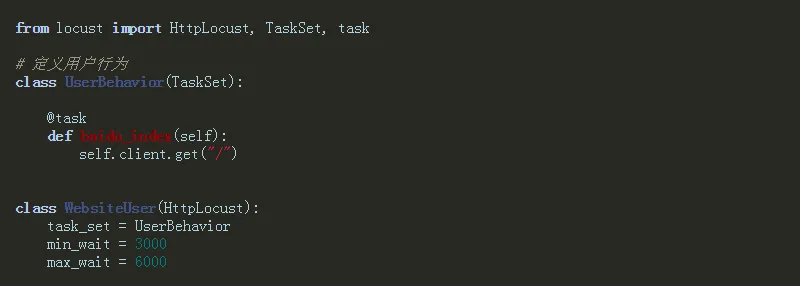
创建 load_test.py 文件,通过 Python 编写性能测试脚本。

UserBehavior类继承TaskSet类,用于描述用户行为。

baidu_index() 方法表示一个用户为行,访问百度首页。使用@task装饰该方法为一个事务。client.get()用于指请求的路径“/”,因为是百度首页,所以指定为根路径。

WebsiteUser类用于设置性能测试。

  • task_set :指向一个定义的用户行为类。
  • min_wait :执行事务之间用户等待时间的下界(单位:毫秒)。
  • max_wait :执行事务之间用户等待时间的上界(单位:毫秒)。

执行性能测试


启动性能测试

  • -f 指定性能测试脚本文件。
  • –host 指定被测试应用的URL的地址,注意访问百度使用的HTTPS协议。

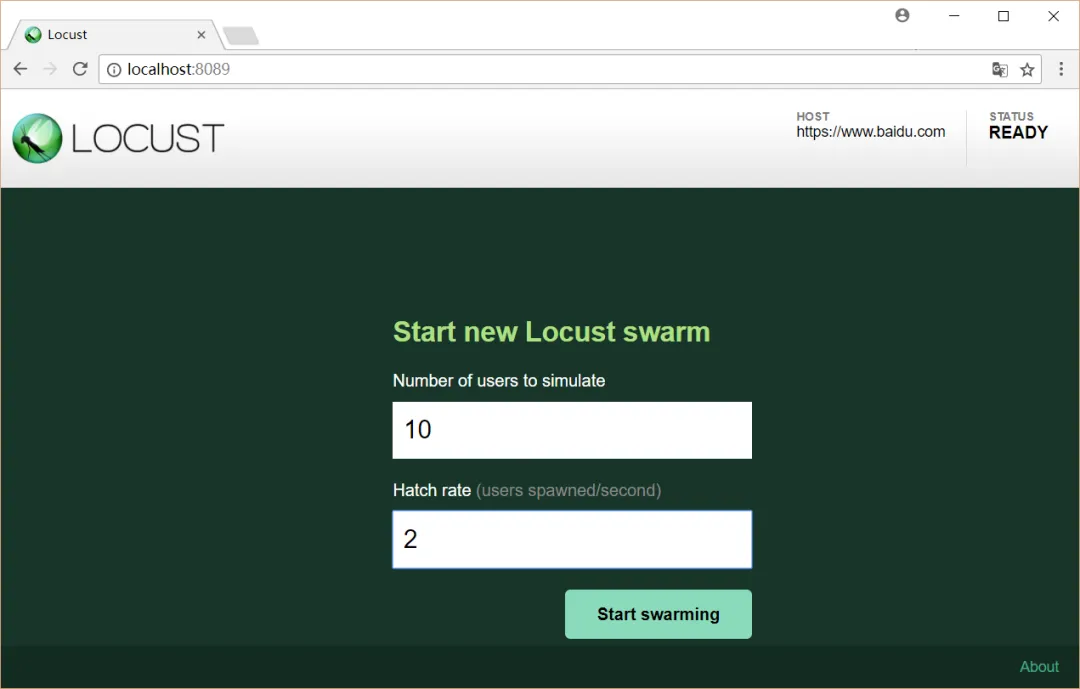
通过浏览器访问:http://localhost:8089(Locust启动网络监控器,默认为端口号为:8089)

设置测试

Number of users to simulate 设置模拟用户数。

Hatch rate(users spawned/second) 每秒产生(启动)的虚拟用户数。

点击 “Start swarming” 按钮,开始运行性能测试。

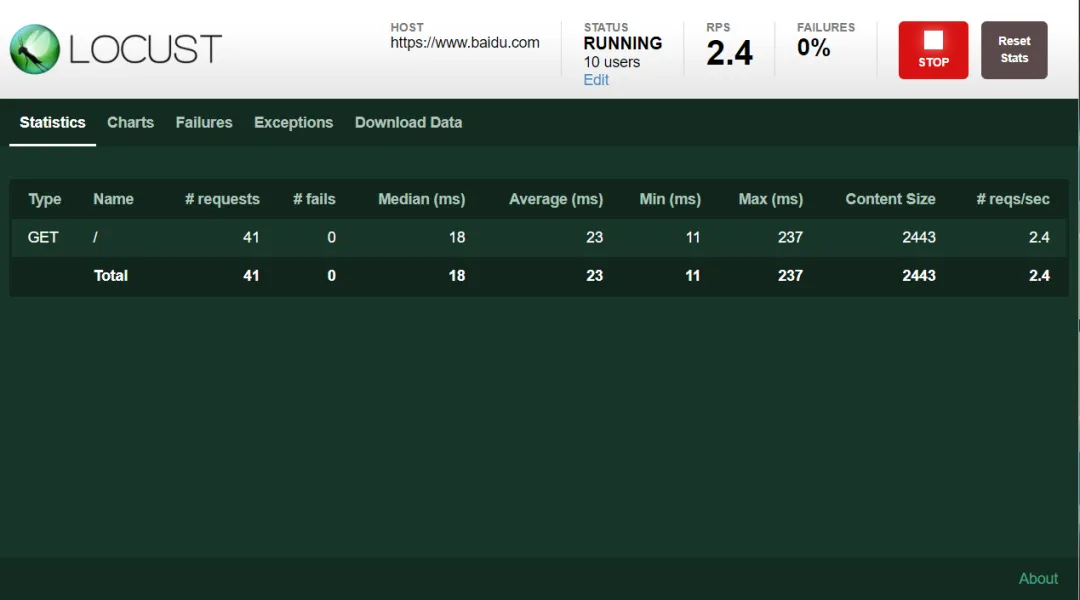
运行测试

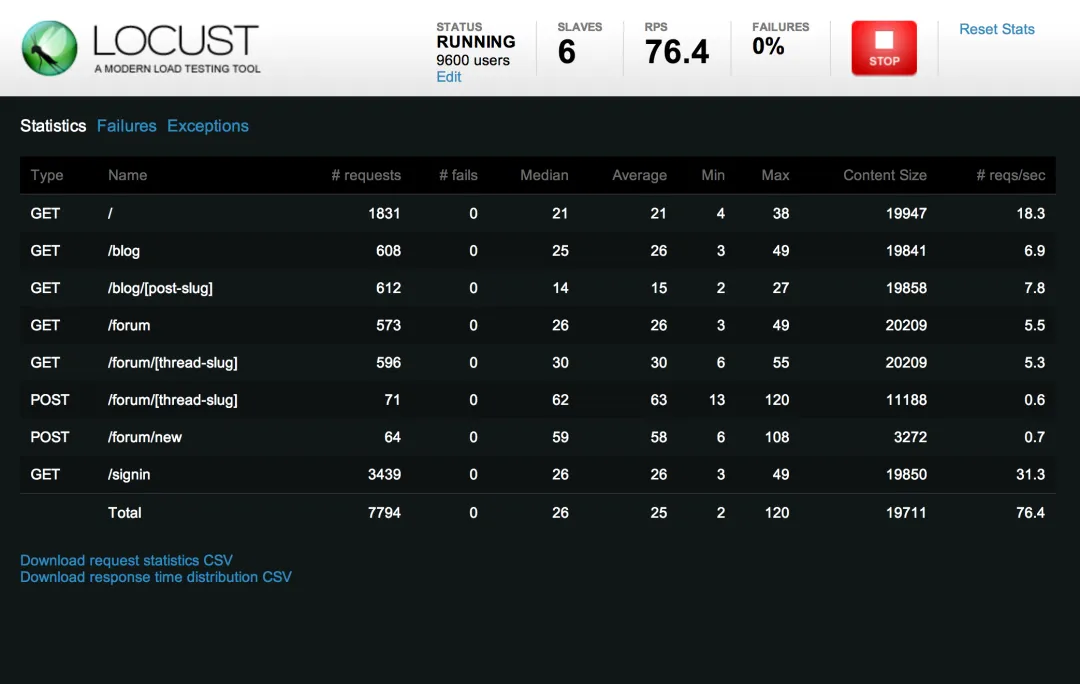
性能测试参数

  • Type: 请求的类型,例如GET/POST。
  • Name:请求的路径。这里为百度首页,即:https://www.baidu.com/
  • request:当前请求的数量。
  • fails:当前请求失败的数量。
  • Median:中间值,单位毫秒,一半的服务器响应时间低于该值,而另一半高于该值。
  • Average:平均值,单位毫秒,所有请求的平均响应时间。
  • Min:请求的最小服务器响应时间,单位毫秒。
  • Max:请求的最大服务器响应时间,单位毫秒。
  • Content Size:单个请求的大小,单位字节。
  • reqs/sec:是每秒钟请求的个数。

四.Locust no-web模式

熟悉 Apache ab 工具的同学都知道,它是没有界面的,通过命令行执行。 Locust 同样也提供的命令行运行,好处就是更节省客户端资源。

命令行运行 Locust 测试


以上一节的 baidu 首页测试(load_test.py)为例 通过 no-web 模式运行测试。

> locust -f load_test.py --host=https://www.baidu.com --no-web -c 10 -r 2 -t 1m[2017-10-30 22:17:30,292] DESKTOP-SMGQBBM/INFO/locust.main: Run time limit set to 60 seconds[2017-10-30 22:17:30,302] DESKTOP-SMGQBBM/INFO/locust.main: Starting Locust 0.8[2017-10-30 22:17:30,302] DESKTOP-SMGQBBM/INFO/locust.runners: Hatching and swarming 10 clients at the rate 2 clients/s... Name                                                          # reqs      # fails     Avg     Min     Max  |  Median   req/s.... [2017-10-30 22:18:30,301] DESKTOP-SMGQBBM/INFO/locust.main: Time limit reached. Stopping Locust. [2017-10-30 22:18:30,302] DESKTOP-SMGQBBM/INFO/locust.main: Shutting down (exit code 0), bye.  Name                                                          # reqs      # fails     Avg     Min     Max  |  Median   req/s --------------------------------------------------------------------------------------------------------------------------------------------  GET /                                                            117     0(0.00%)      31      17      96  |      28    2.10 --------------------------------------------------------------------------------------------------------------------------------------------  Total                                                            117     0(0.00%)                                       2.10 Percentage of the requests completed within given times  Name                                                           # reqs    50%    66%    75%    80%    90%    95%    98%    99%   100% --------------------------------------------------------------------------------------------------------------------------------------------  GET /                                                             117     28     30     36     37     49     62     69     72     96 --------------------------------------------------------------------------------------------------------------------------------------------  Total                                                             117     28     30     36     37     49     62     69     72     96

启动参数:

–no-web 表示不使用Web界面运行测试。

-c 设置虚拟用户数。

-r 设置每秒启动虚拟用户数。

-t 设置设置运行时间。


五.Locust 参数说明

最时候该讲一下 locust 工具的参数了,虽然前面几节我们已经使用了不少参数,例如 “-f” 、“–host” 等。

Locust 参数


打开命令提示符(或Linux终端),输入 locust --help 。

> locust --helpUsage: locust [options] [LocustClass [LocustClass2 ... ]]Options:  -h, --help            show this help message and exit  -H HOST, --host=HOST  Host to load test in the following format:                        http://10.21.32.33  --web-host=WEB_HOST   Host to bind the web interface to. Defaults to '' (all                        interfaces)  -P PORT, --port=PORT, --web-port=PORT                        Port on which to run web host  -f LOCUSTFILE, --locustfile=LOCUSTFILE                        Python module file to import, e.g. '../other.py'.                        Default: locustfile  --csv=CSVFILEBASE, --csv-base-name=CSVFILEBASE                        Store current request stats to files in CSV format.  --master              Set locust to run in distributed mode with this                        process as master  --slave               Set locust to run in distributed mode with this                        process as slave  --master-host=MASTER_HOST                        Host or IP address of locust master for distributed                        load testing. Only used when running with --slave.                        Defaults to 127.0.0.1.  --master-port=MASTER_PORT                        The port to connect to that is used by the locust                        master for distributed load testing. Only used when                        running with --slave. Defaults to 5557. Note that                        slaves will also connect to the master node on this                        port + 1.  --master-bind-host=MASTER_BIND_HOST                        Interfaces (hostname, ip) that locust master should                        bind to. Only used when running with --master.                        Defaults to * (all available interfaces).  --master-bind-port=MASTER_BIND_PORT                        Port that locust master should bind to. Only used when                        running with --master. Defaults to 5557. Note that                        Locust will also use this port + 1, so by default the                        master node will bind to 5557 and 5558.  --expect-slaves=EXPECT_SLAVES                        How many slaves master should expect to connect before                        starting the test (only when --no-web used).  --no-web              Disable the web interface, and instead start running                        the test immediately. Requires -and -to be                        specified.  -c NUM_CLIENTS, --clients=NUM_CLIENTS                        Number of concurrent Locust users. Only used together                        with --no-web  -r HATCH_RATE, --hatch-rate=HATCH_RATE                        The rate per second in which clients are spawned. Only                        used together with --no-web  -t RUN_TIME, --run-time=RUN_TIME                        Stop after the specified amount of time, e.g. (300s,                        20m, 3h, 1h30m, etc.). Only used together with --no-                        web  -L LOGLEVEL, --loglevel=LOGLEVEL                        Choose between DEBUG/INFO/WARNING/ERROR/CRITICAL.                        Default is INFO.  --logfile=LOGFILE     Path to log file. If not set, log will go to                        stdout/stderr  --print-stats         Print stats in the console  --only-summary        Only print the summary stats  --no-reset-stats      Do not reset statistics once hatching has been                        completed  -l, --list            Show list of possible locust classes and exit  --show-task-ratio     print table of the locust classes' task execution                        ratio  --show-task-ratio-json                        print json data of the locust classes' task execution                        ratio  -V, --version         show program's version number and exit

参数说明:

参数

说明

-h, –help

查看帮助

-H HOST, –host=HOST

指定被测试的主机,采用以格式:http://10.21.32.33

–web-host=WEB_HOST

指定运行 Locust Web 页面的主机,默认为空 “。

-P PORT, –port=PORT, –web-port=PORT

指定 –web-host 的端口,默认是8089

-f LOCUSTFILE, –locustfile=LOCUSTFILE

指定运行 Locust 性能测试文件,默认为: locustfile.py

–csv=CSVFILEBASE, –csv-base-name=CSVFILEBASE

以CSV格式存储当前请求测试数据。

–master

Locust 分布式模式使用,当前节点为 master 节点。

–slave

Locust 分布式模式使用,当前节点为 slave 节点。

–master-host=MASTER_HOST

分布式模式运行,设置 master 节点的主机或 IP 地址,只在与 –slave 节点一起运行时使用,默认为:127.0.0.1.

–master-port=MASTER_PORT

分布式模式运行, 设置 master 节点的端口号,只在与 –slave 节点一起运行时使用,默认为:5557。注意,slave 节点也将连接到这个端口+1 上的 master 节点。

–master-bind-host=MASTER_BIND_HOST

Interfaces (hostname, ip) that locust master should bind to. Only used when running with –master. Defaults to * (all available interfaces).

–master-bind-port=MASTER_BIND_PORT

Port that locust master should bind to. Only used when running with –master. Defaults to 5557. Note that Locust will also use this port + 1, so by default the master node will bind to 5557 and 5558.

–expect-slaves=EXPECT_SLAVES

How many slaves master should expect to connect before starting the test (only when –no-web used).

–no-web

no-web 模式运行测试,需要 -c 和 -r 配合使用.

-c NUM_CLIENTS, –clients=NUM_CLIENTS

指定并发用户数,作用于 –no-web 模式。

-r HATCH_RATE, –hatch-rate=HATCH_RATE

指定每秒启动的用户数,作用于 –no-web 模式。

-t RUN_TIME, –run-time=RUN_TIME

设置运行时间, 例如: (300s, 20m, 3h, 1h30m). 作用于 –no-web 模式。

-L LOGLEVEL, –loglevel=LOGLEVEL

选择 log 级别(DEBUG/INFO/WARNING/ERROR/CRITICAL). 默认是 INFO.

–logfile=LOGFILE

日志文件路径。如果没有设置,日志将去 stdout/stderr

–print-stats

在控制台中打印数据

–only-summary

只打印摘要统计

–no-reset-stats

Do not reset statistics once hatching has been completed。

-l, –list

显示测试类, 配置 -f 参数使用

–show-task-ratio

打印 locust 测试类的任务执行比例,配合 -f 参数使用.

–show-task-ratio-json

以 json 格式打印 locust 测试类的任务执行比例,配合 -f 参数使用.

-V, –version

查看当前 Locust 工具的版本.

六.Locust 分布式运行

分布式运行Locust


一旦单台机器不够模拟足够多的用户时,Locust支持运行在多台机器中进行压力测试。

为了实现这个,你应该在 master 模式中使用--master标记来启用一个 Locust 实例。这个实例将会运行你启动测试的 Locust 交互网站并查看实时统计数据。master 节点的机器自身不会模拟任何用户。相反,你必须使用 --slave 标记启动一台到多台 Locustslave 机器节点,与标记 --master-host 一起使用(指出master机器的IP/hostname)。

常用的做法是在一台独立的机器中运行master,在slave机器中每个处理器内核运行一个slave实例。

注意:master 和每一台 slave 机器,在运行分布式测试时都必须要有 locust 的测试文件

示例


在 master 模式下启动 Locust:

locust -f my_loucstfile.py --master

在每个 slave 中执行(192.168.0.14 替换为你 msater 的IP):

locust -f my_locustfile.py --slave --master-host=192.168.0.14

参数说明


参数

–master

设置 Locust 为 master 模式。网页交互会在这台节点机器中运行。

–slave

设置 Locust 为 slave 模式。

–master-host=X.X.X.X

可选项,与 --slave 一起结合使用,用于设置 master 模式下的 master 机器的IP/hostname(默认设置为127.0.0.1)

–master-port=5557

可选项,与 --slave 一起结合使用,用于设置 master 模式下的 master 机器中 Locust 的端口(默认为5557)。注意,locust 将会使用这个指定的端口号,同时指定端口+1的号也会被占用。因此,5557 会被使用,Locust将会使用 5557 和 5558。

–master-bind-host=X.X.X.X`

可选项,与 --master 一起结合使用。决定在 master 模式下将会绑定什么网络接口。默认设置为*(所有可用的接口)。

–master-bind-port=5557

可选项,与 --master 一起结合使用。决定哪个网络端口 master 模式将会监听。默认设置为 5557。注意 Locust 会使用指定的端口号,同时指定端口+1的号也会被占用。因此,5557 会被使用,Locust 将会使用 5557 和 5558。

–expect-slaves=X

在 no-web 模式下启动 master 时使用。master 将等待X连接节点在测试开始之前连接。

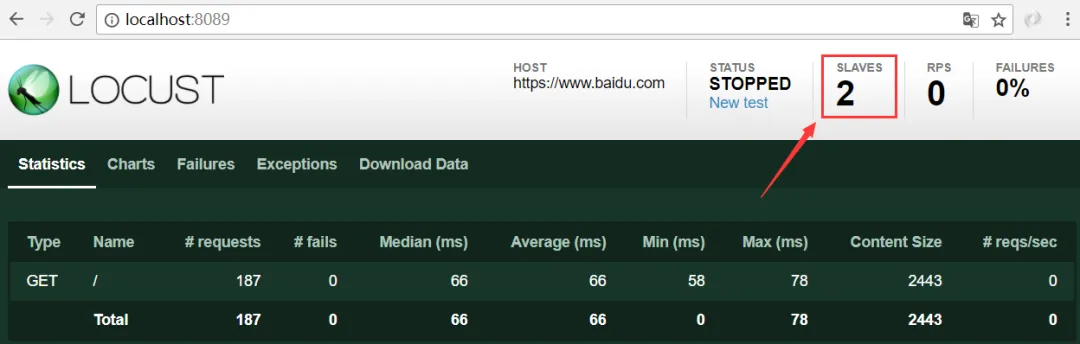
效果


如下图,我启动了一个 master 和两个 slave,由两个 slave 来向被测试系统发送请求。

七.Locust 的类和方法

针对你的业务,你如何进行测试测试,需要通过编写性能测试脚本实现。所以,我们要熟悉 Locust 提供了哪些类和方法,它们分别实现什么操作。

HttpLocust 类

每一个模拟的用户可以看做一个 HttpLocust 类的实例,HttpLocust 类有如下属性:

  • task_set

指向一个 TaskSet 类,TaskSet 类定义了每个用户的行为。

  • min_wait

用户执行任务之间等待时间的下界,单位:毫秒。如果TaskSet类中有覆盖,以TaskSet 中的定义为准。

  • max_wait

用户执行任务之间等待时间的上界,单位:毫秒。如果TaskSet类中有覆盖,以TaskSet中的定义为准。

  • host

如果是 Web 服务的测试,host 相当于是提供 URL 前缀的默认值,但是如果在命令行中指定了 --host 选项,则以命令行中指定的为准。如果不是 Web 服务测试,使用默认的 None 就好。

  • stop_timeout

设置 Locust 多少秒后超时,如果为 None ,则不会超时。

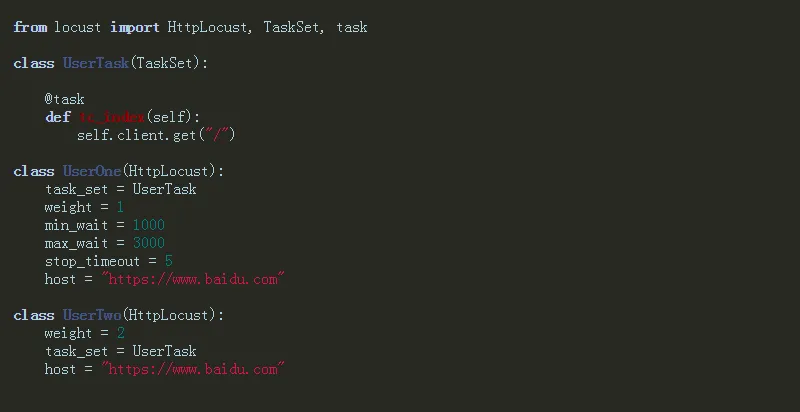
  • weight

一个Locust实例被挑选执行的权重,数值越大,执行频率越高。在一个 locustfile.py 文件中可以同时定义多个 HttpLocust 子类,然后分配他们的执行权重,例如:

然后在终端启动测试:

locust -f load_test.py UserOne UserTwo

TaskSet 类


TaskSet类定义了每个用户的任务集合,测试任务开始后,每个 Locust 用户会从 TaskSet 中随机挑选一个任务执行,然后随机等待 HttpLocust 类中定义的 min_wait和 max_wait 之间的一段时间,执行下一个任务。

  • on_start():

定义每个 Locust 用户开始做的第一件事。

  • @task

通过@task()装饰的方法为一个事务。方法的参数用于指定该行为的执行权重。参数越大每次被虚拟用户执行的概率越高。如果不设置默认为1。

  • interrupt(reschedule=True)

顶层的TaskSet(即被绑定到某个Locust类的task_set的第一层TaskSet)不能调用这个方法。reschedule置为True时,从被嵌套任务出来马上选择新任务执行,如果置为False,从被嵌套任务出来后,随机等待min_wait和max_wait之间的一段时间,再选择新任务执行。

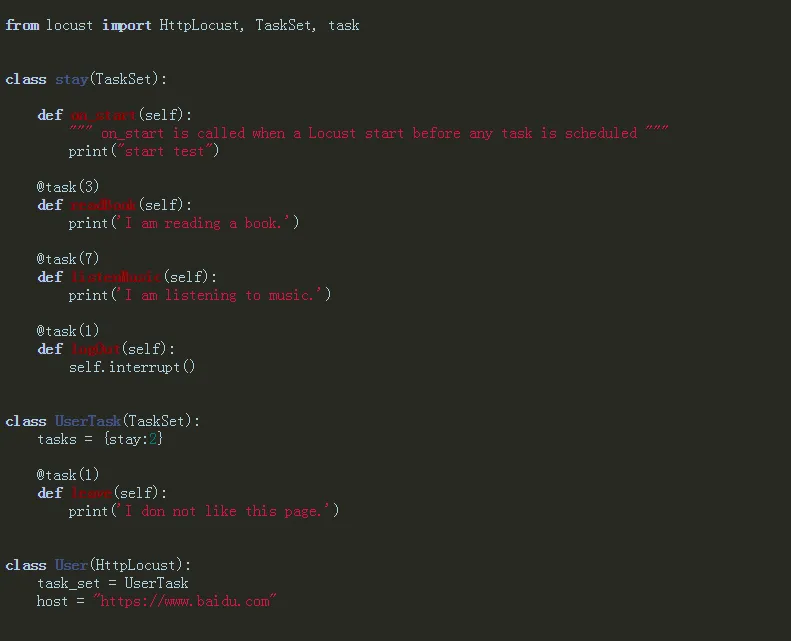
  • tasks 属性

tasks = {stay:2} 表示每个用户执行 stay 的频率是2,也就的 UserTask 的两倍。

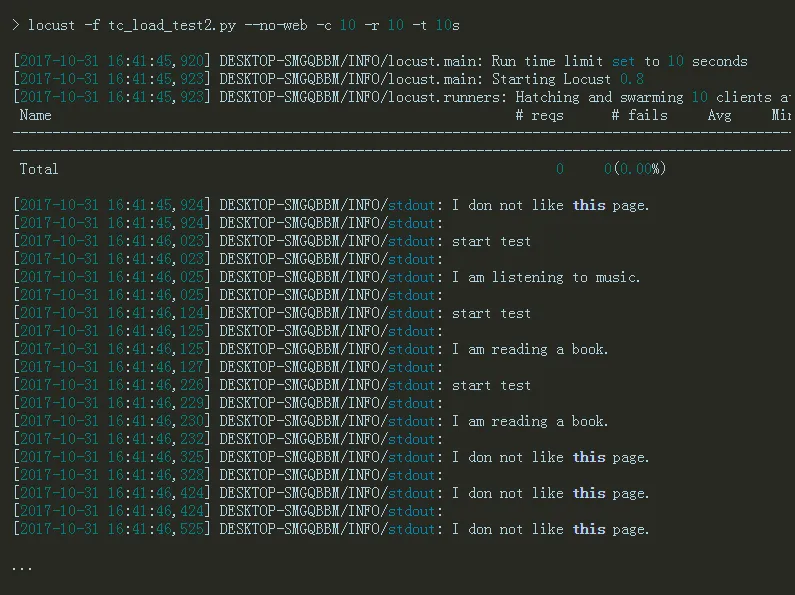
然后在终端启动测试:

在这个例子中虽然指定的 host ,但我们并没有调用 client() 方法发送http 请求。只是在 TaskSet 类方法中简单做了简单的打印,通过后台的输出,你可以看到每个方法被调用的频率。

八.Locust 设置断言

性能测试也需要设置断言么? 某些情况下是需要,比如你在请求一个页面时,就可以通过状态来判断返回的 HTTP 状态码是不是 200。

设置响应断言


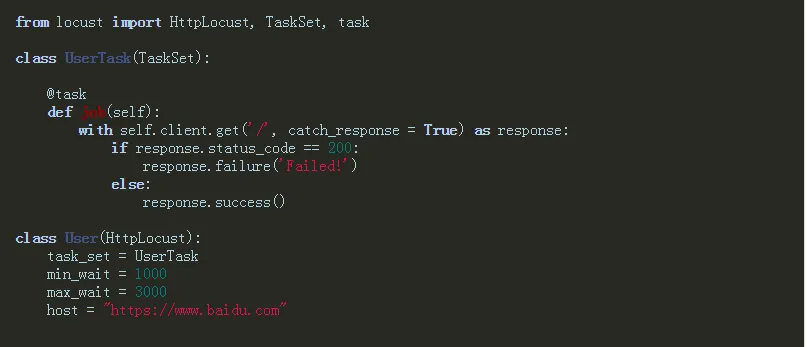
这里同样以测试百度首页为例。

catch_response = True :布尔类型,如果设置为 True, 允许该请求被标记为失败。

通过 client.get() 方法发送请求,将整个请求的给 response, 通过 response.status_code 得请求响应的 HTTP 状态码。如果不为 200 则通过 response.failure(‘Failed!’) 打印失败!

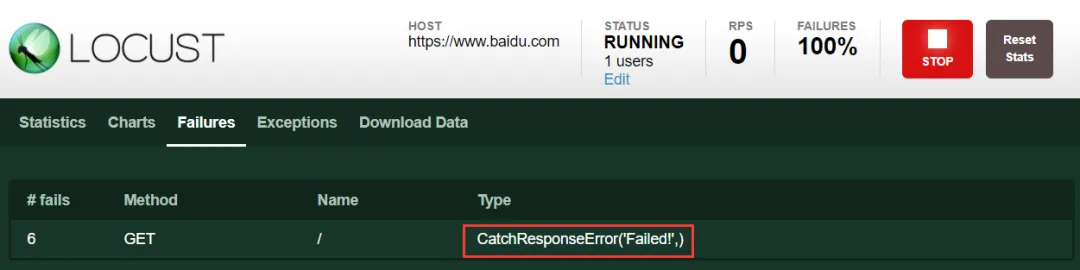
启动测试,运行情况:

至于,我上面的测试脚本为什么为失败,你自个分析一下吧!原因很简单。


九.Locust 参数化

使用 LoadRunner 和 JMeter 的同学都知道,性能测试工具设置参数化颇为麻烦,但对于 Python 来说,生成点数据再简单不过了。

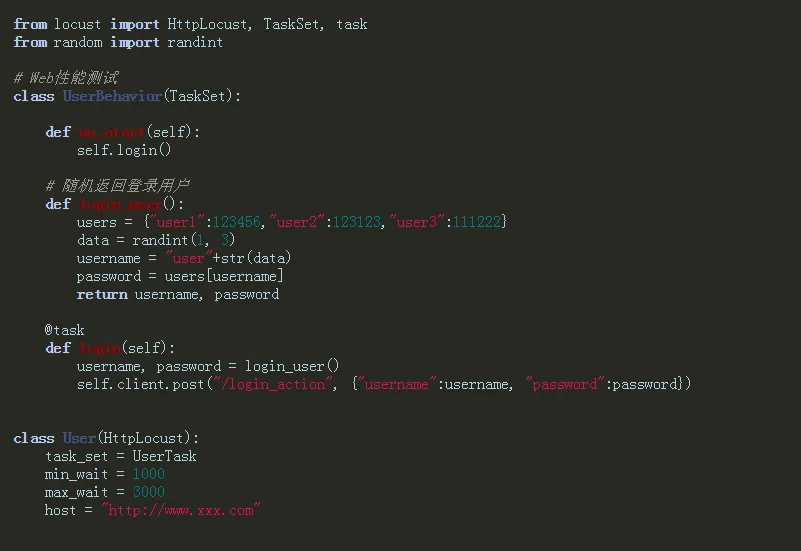
参数化系统登录


这里以某系统登录为例,简单介绍登录用户名密码的参数化实现

创建 login_user() 方法,定义登录字典 users , 通过randint 随机获取字典中的用户数据。

在 login() 登录任务中,调用 login_user() 方法实现 随机用户的登录。

关于参数化方式很多,这里起一个抛砖引玉作用。


关于 Locust 工具就介绍到这里,能否把 Locust 在工作中用好,取决于你对性能测试业务的理解,其次是灵活的运行 python 语言。
最新文章

随机文章

基本 文件 流程 错误 SQL 调试
  1. 请求信息 : 2026-02-07 12:15:49 HTTP/2.0 GET : https://f.mffb.com.cn/a/473940.html
  2. 运行时间 : 0.179858s [ 吞吐率:5.56req/s ] 内存消耗:4,808.41kb 文件加载:140
  3. 缓存信息 : 0 reads,0 writes
  4. 会话信息 : SESSION_ID=a8de188003fd0bc7b8bfeaade5761a91
  1. /yingpanguazai/ssd/ssd1/www/f.mffb.com.cn/public/index.php ( 0.79 KB )
  2. /yingpanguazai/ssd/ssd1/www/f.mffb.com.cn/vendor/autoload.php ( 0.17 KB )
  3. /yingpanguazai/ssd/ssd1/www/f.mffb.com.cn/vendor/composer/autoload_real.php ( 2.49 KB )
  4. /yingpanguazai/ssd/ssd1/www/f.mffb.com.cn/vendor/composer/platform_check.php ( 0.90 KB )
  5. /yingpanguazai/ssd/ssd1/www/f.mffb.com.cn/vendor/composer/ClassLoader.php ( 14.03 KB )
  6. /yingpanguazai/ssd/ssd1/www/f.mffb.com.cn/vendor/composer/autoload_static.php ( 4.90 KB )
  7. /yingpanguazai/ssd/ssd1/www/f.mffb.com.cn/vendor/topthink/think-helper/src/helper.php ( 8.34 KB )
  8. /yingpanguazai/ssd/ssd1/www/f.mffb.com.cn/vendor/topthink/think-validate/src/helper.php ( 2.19 KB )
  9. /yingpanguazai/ssd/ssd1/www/f.mffb.com.cn/vendor/topthink/think-orm/src/helper.php ( 1.47 KB )
  10. /yingpanguazai/ssd/ssd1/www/f.mffb.com.cn/vendor/topthink/think-orm/stubs/load_stubs.php ( 0.16 KB )
  11. /yingpanguazai/ssd/ssd1/www/f.mffb.com.cn/vendor/topthink/framework/src/think/Exception.php ( 1.69 KB )
  12. /yingpanguazai/ssd/ssd1/www/f.mffb.com.cn/vendor/topthink/think-container/src/Facade.php ( 2.71 KB )
  13. /yingpanguazai/ssd/ssd1/www/f.mffb.com.cn/vendor/symfony/deprecation-contracts/function.php ( 0.99 KB )
  14. /yingpanguazai/ssd/ssd1/www/f.mffb.com.cn/vendor/symfony/polyfill-mbstring/bootstrap.php ( 8.26 KB )
  15. /yingpanguazai/ssd/ssd1/www/f.mffb.com.cn/vendor/symfony/polyfill-mbstring/bootstrap80.php ( 9.78 KB )
  16. /yingpanguazai/ssd/ssd1/www/f.mffb.com.cn/vendor/symfony/var-dumper/Resources/functions/dump.php ( 1.49 KB )
  17. /yingpanguazai/ssd/ssd1/www/f.mffb.com.cn/vendor/topthink/think-dumper/src/helper.php ( 0.18 KB )
  18. /yingpanguazai/ssd/ssd1/www/f.mffb.com.cn/vendor/symfony/var-dumper/VarDumper.php ( 4.30 KB )
  19. /yingpanguazai/ssd/ssd1/www/f.mffb.com.cn/vendor/topthink/framework/src/think/App.php ( 15.30 KB )
  20. /yingpanguazai/ssd/ssd1/www/f.mffb.com.cn/vendor/topthink/think-container/src/Container.php ( 15.76 KB )
  21. /yingpanguazai/ssd/ssd1/www/f.mffb.com.cn/vendor/psr/container/src/ContainerInterface.php ( 1.02 KB )
  22. /yingpanguazai/ssd/ssd1/www/f.mffb.com.cn/app/provider.php ( 0.19 KB )
  23. /yingpanguazai/ssd/ssd1/www/f.mffb.com.cn/vendor/topthink/framework/src/think/Http.php ( 6.04 KB )
  24. /yingpanguazai/ssd/ssd1/www/f.mffb.com.cn/vendor/topthink/think-helper/src/helper/Str.php ( 7.29 KB )
  25. /yingpanguazai/ssd/ssd1/www/f.mffb.com.cn/vendor/topthink/framework/src/think/Env.php ( 4.68 KB )
  26. /yingpanguazai/ssd/ssd1/www/f.mffb.com.cn/app/common.php ( 0.03 KB )
  27. /yingpanguazai/ssd/ssd1/www/f.mffb.com.cn/vendor/topthink/framework/src/helper.php ( 18.78 KB )
  28. /yingpanguazai/ssd/ssd1/www/f.mffb.com.cn/vendor/topthink/framework/src/think/Config.php ( 5.54 KB )
  29. /yingpanguazai/ssd/ssd1/www/f.mffb.com.cn/config/app.php ( 0.95 KB )
  30. /yingpanguazai/ssd/ssd1/www/f.mffb.com.cn/config/cache.php ( 0.78 KB )
  31. /yingpanguazai/ssd/ssd1/www/f.mffb.com.cn/config/console.php ( 0.23 KB )
  32. /yingpanguazai/ssd/ssd1/www/f.mffb.com.cn/config/cookie.php ( 0.56 KB )
  33. /yingpanguazai/ssd/ssd1/www/f.mffb.com.cn/config/database.php ( 2.48 KB )
  34. /yingpanguazai/ssd/ssd1/www/f.mffb.com.cn/vendor/topthink/framework/src/think/facade/Env.php ( 1.67 KB )
  35. /yingpanguazai/ssd/ssd1/www/f.mffb.com.cn/config/filesystem.php ( 0.61 KB )
  36. /yingpanguazai/ssd/ssd1/www/f.mffb.com.cn/config/lang.php ( 0.91 KB )
  37. /yingpanguazai/ssd/ssd1/www/f.mffb.com.cn/config/log.php ( 1.35 KB )
  38. /yingpanguazai/ssd/ssd1/www/f.mffb.com.cn/config/middleware.php ( 0.19 KB )
  39. /yingpanguazai/ssd/ssd1/www/f.mffb.com.cn/config/route.php ( 1.89 KB )
  40. /yingpanguazai/ssd/ssd1/www/f.mffb.com.cn/config/session.php ( 0.57 KB )
  41. /yingpanguazai/ssd/ssd1/www/f.mffb.com.cn/config/trace.php ( 0.34 KB )
  42. /yingpanguazai/ssd/ssd1/www/f.mffb.com.cn/config/view.php ( 0.82 KB )
  43. /yingpanguazai/ssd/ssd1/www/f.mffb.com.cn/app/event.php ( 0.25 KB )
  44. /yingpanguazai/ssd/ssd1/www/f.mffb.com.cn/vendor/topthink/framework/src/think/Event.php ( 7.67 KB )
  45. /yingpanguazai/ssd/ssd1/www/f.mffb.com.cn/app/service.php ( 0.13 KB )
  46. /yingpanguazai/ssd/ssd1/www/f.mffb.com.cn/app/AppService.php ( 0.26 KB )
  47. /yingpanguazai/ssd/ssd1/www/f.mffb.com.cn/vendor/topthink/framework/src/think/Service.php ( 1.64 KB )
  48. /yingpanguazai/ssd/ssd1/www/f.mffb.com.cn/vendor/topthink/framework/src/think/Lang.php ( 7.35 KB )
  49. /yingpanguazai/ssd/ssd1/www/f.mffb.com.cn/vendor/topthink/framework/src/lang/zh-cn.php ( 13.70 KB )
  50. /yingpanguazai/ssd/ssd1/www/f.mffb.com.cn/vendor/topthink/framework/src/think/initializer/Error.php ( 3.31 KB )
  51. /yingpanguazai/ssd/ssd1/www/f.mffb.com.cn/vendor/topthink/framework/src/think/initializer/RegisterService.php ( 1.33 KB )
  52. /yingpanguazai/ssd/ssd1/www/f.mffb.com.cn/vendor/services.php ( 0.14 KB )
  53. /yingpanguazai/ssd/ssd1/www/f.mffb.com.cn/vendor/topthink/framework/src/think/service/PaginatorService.php ( 1.52 KB )
  54. /yingpanguazai/ssd/ssd1/www/f.mffb.com.cn/vendor/topthink/framework/src/think/service/ValidateService.php ( 0.99 KB )
  55. /yingpanguazai/ssd/ssd1/www/f.mffb.com.cn/vendor/topthink/framework/src/think/service/ModelService.php ( 2.04 KB )
  56. /yingpanguazai/ssd/ssd1/www/f.mffb.com.cn/vendor/topthink/think-trace/src/Service.php ( 0.77 KB )
  57. /yingpanguazai/ssd/ssd1/www/f.mffb.com.cn/vendor/topthink/framework/src/think/Middleware.php ( 6.72 KB )
  58. /yingpanguazai/ssd/ssd1/www/f.mffb.com.cn/vendor/topthink/framework/src/think/initializer/BootService.php ( 0.77 KB )
  59. /yingpanguazai/ssd/ssd1/www/f.mffb.com.cn/vendor/topthink/think-orm/src/Paginator.php ( 11.86 KB )
  60. /yingpanguazai/ssd/ssd1/www/f.mffb.com.cn/vendor/topthink/think-validate/src/Validate.php ( 63.20 KB )
  61. /yingpanguazai/ssd/ssd1/www/f.mffb.com.cn/vendor/topthink/think-orm/src/Model.php ( 23.55 KB )
  62. /yingpanguazai/ssd/ssd1/www/f.mffb.com.cn/vendor/topthink/think-orm/src/model/concern/Attribute.php ( 21.05 KB )
  63. /yingpanguazai/ssd/ssd1/www/f.mffb.com.cn/vendor/topthink/think-orm/src/model/concern/AutoWriteData.php ( 4.21 KB )
  64. /yingpanguazai/ssd/ssd1/www/f.mffb.com.cn/vendor/topthink/think-orm/src/model/concern/Conversion.php ( 6.44 KB )
  65. /yingpanguazai/ssd/ssd1/www/f.mffb.com.cn/vendor/topthink/think-orm/src/model/concern/DbConnect.php ( 5.16 KB )
  66. /yingpanguazai/ssd/ssd1/www/f.mffb.com.cn/vendor/topthink/think-orm/src/model/concern/ModelEvent.php ( 2.33 KB )
  67. /yingpanguazai/ssd/ssd1/www/f.mffb.com.cn/vendor/topthink/think-orm/src/model/concern/RelationShip.php ( 28.29 KB )
  68. /yingpanguazai/ssd/ssd1/www/f.mffb.com.cn/vendor/topthink/think-helper/src/contract/Arrayable.php ( 0.09 KB )
  69. /yingpanguazai/ssd/ssd1/www/f.mffb.com.cn/vendor/topthink/think-helper/src/contract/Jsonable.php ( 0.13 KB )
  70. /yingpanguazai/ssd/ssd1/www/f.mffb.com.cn/vendor/topthink/think-orm/src/model/contract/Modelable.php ( 0.09 KB )
  71. /yingpanguazai/ssd/ssd1/www/f.mffb.com.cn/vendor/topthink/framework/src/think/Db.php ( 2.88 KB )
  72. /yingpanguazai/ssd/ssd1/www/f.mffb.com.cn/vendor/topthink/think-orm/src/DbManager.php ( 8.52 KB )
  73. /yingpanguazai/ssd/ssd1/www/f.mffb.com.cn/vendor/topthink/framework/src/think/Log.php ( 6.28 KB )
  74. /yingpanguazai/ssd/ssd1/www/f.mffb.com.cn/vendor/topthink/framework/src/think/Manager.php ( 3.92 KB )
  75. /yingpanguazai/ssd/ssd1/www/f.mffb.com.cn/vendor/psr/log/src/LoggerTrait.php ( 2.69 KB )
  76. /yingpanguazai/ssd/ssd1/www/f.mffb.com.cn/vendor/psr/log/src/LoggerInterface.php ( 2.71 KB )
  77. /yingpanguazai/ssd/ssd1/www/f.mffb.com.cn/vendor/topthink/framework/src/think/Cache.php ( 4.92 KB )
  78. /yingpanguazai/ssd/ssd1/www/f.mffb.com.cn/vendor/psr/simple-cache/src/CacheInterface.php ( 4.71 KB )
  79. /yingpanguazai/ssd/ssd1/www/f.mffb.com.cn/vendor/topthink/think-helper/src/helper/Arr.php ( 16.63 KB )
  80. /yingpanguazai/ssd/ssd1/www/f.mffb.com.cn/vendor/topthink/framework/src/think/cache/driver/File.php ( 7.84 KB )
  81. /yingpanguazai/ssd/ssd1/www/f.mffb.com.cn/vendor/topthink/framework/src/think/cache/Driver.php ( 9.03 KB )
  82. /yingpanguazai/ssd/ssd1/www/f.mffb.com.cn/vendor/topthink/framework/src/think/contract/CacheHandlerInterface.php ( 1.99 KB )
  83. /yingpanguazai/ssd/ssd1/www/f.mffb.com.cn/app/Request.php ( 0.09 KB )
  84. /yingpanguazai/ssd/ssd1/www/f.mffb.com.cn/vendor/topthink/framework/src/think/Request.php ( 55.78 KB )
  85. /yingpanguazai/ssd/ssd1/www/f.mffb.com.cn/app/middleware.php ( 0.25 KB )
  86. /yingpanguazai/ssd/ssd1/www/f.mffb.com.cn/vendor/topthink/framework/src/think/Pipeline.php ( 2.61 KB )
  87. /yingpanguazai/ssd/ssd1/www/f.mffb.com.cn/vendor/topthink/think-trace/src/TraceDebug.php ( 3.40 KB )
  88. /yingpanguazai/ssd/ssd1/www/f.mffb.com.cn/vendor/topthink/framework/src/think/middleware/SessionInit.php ( 1.94 KB )
  89. /yingpanguazai/ssd/ssd1/www/f.mffb.com.cn/vendor/topthink/framework/src/think/Session.php ( 1.80 KB )
  90. /yingpanguazai/ssd/ssd1/www/f.mffb.com.cn/vendor/topthink/framework/src/think/session/driver/File.php ( 6.27 KB )
  91. /yingpanguazai/ssd/ssd1/www/f.mffb.com.cn/vendor/topthink/framework/src/think/contract/SessionHandlerInterface.php ( 0.87 KB )
  92. /yingpanguazai/ssd/ssd1/www/f.mffb.com.cn/vendor/topthink/framework/src/think/session/Store.php ( 7.12 KB )
  93. /yingpanguazai/ssd/ssd1/www/f.mffb.com.cn/vendor/topthink/framework/src/think/Route.php ( 23.73 KB )
  94. /yingpanguazai/ssd/ssd1/www/f.mffb.com.cn/vendor/topthink/framework/src/think/route/RuleName.php ( 5.75 KB )
  95. /yingpanguazai/ssd/ssd1/www/f.mffb.com.cn/vendor/topthink/framework/src/think/route/Domain.php ( 2.53 KB )
  96. /yingpanguazai/ssd/ssd1/www/f.mffb.com.cn/vendor/topthink/framework/src/think/route/RuleGroup.php ( 22.43 KB )
  97. /yingpanguazai/ssd/ssd1/www/f.mffb.com.cn/vendor/topthink/framework/src/think/route/Rule.php ( 26.95 KB )
  98. /yingpanguazai/ssd/ssd1/www/f.mffb.com.cn/vendor/topthink/framework/src/think/route/RuleItem.php ( 9.78 KB )
  99. /yingpanguazai/ssd/ssd1/www/f.mffb.com.cn/route/app.php ( 1.72 KB )
  100. /yingpanguazai/ssd/ssd1/www/f.mffb.com.cn/vendor/topthink/framework/src/think/facade/Route.php ( 4.70 KB )
  101. /yingpanguazai/ssd/ssd1/www/f.mffb.com.cn/vendor/topthink/framework/src/think/route/dispatch/Controller.php ( 4.74 KB )
  102. /yingpanguazai/ssd/ssd1/www/f.mffb.com.cn/vendor/topthink/framework/src/think/route/Dispatch.php ( 10.44 KB )
  103. /yingpanguazai/ssd/ssd1/www/f.mffb.com.cn/app/controller/Index.php ( 4.81 KB )
  104. /yingpanguazai/ssd/ssd1/www/f.mffb.com.cn/app/BaseController.php ( 2.05 KB )
  105. /yingpanguazai/ssd/ssd1/www/f.mffb.com.cn/vendor/topthink/think-orm/src/facade/Db.php ( 0.93 KB )
  106. /yingpanguazai/ssd/ssd1/www/f.mffb.com.cn/vendor/topthink/think-orm/src/db/connector/Mysql.php ( 5.44 KB )
  107. /yingpanguazai/ssd/ssd1/www/f.mffb.com.cn/vendor/topthink/think-orm/src/db/PDOConnection.php ( 52.47 KB )
  108. /yingpanguazai/ssd/ssd1/www/f.mffb.com.cn/vendor/topthink/think-orm/src/db/Connection.php ( 8.39 KB )
  109. /yingpanguazai/ssd/ssd1/www/f.mffb.com.cn/vendor/topthink/think-orm/src/db/ConnectionInterface.php ( 4.57 KB )
  110. /yingpanguazai/ssd/ssd1/www/f.mffb.com.cn/vendor/topthink/think-orm/src/db/builder/Mysql.php ( 16.58 KB )
  111. /yingpanguazai/ssd/ssd1/www/f.mffb.com.cn/vendor/topthink/think-orm/src/db/Builder.php ( 24.06 KB )
  112. /yingpanguazai/ssd/ssd1/www/f.mffb.com.cn/vendor/topthink/think-orm/src/db/BaseBuilder.php ( 27.50 KB )
  113. /yingpanguazai/ssd/ssd1/www/f.mffb.com.cn/vendor/topthink/think-orm/src/db/Query.php ( 15.71 KB )
  114. /yingpanguazai/ssd/ssd1/www/f.mffb.com.cn/vendor/topthink/think-orm/src/db/BaseQuery.php ( 45.13 KB )
  115. /yingpanguazai/ssd/ssd1/www/f.mffb.com.cn/vendor/topthink/think-orm/src/db/concern/TimeFieldQuery.php ( 7.43 KB )
  116. /yingpanguazai/ssd/ssd1/www/f.mffb.com.cn/vendor/topthink/think-orm/src/db/concern/AggregateQuery.php ( 3.26 KB )
  117. /yingpanguazai/ssd/ssd1/www/f.mffb.com.cn/vendor/topthink/think-orm/src/db/concern/ModelRelationQuery.php ( 20.07 KB )
  118. /yingpanguazai/ssd/ssd1/www/f.mffb.com.cn/vendor/topthink/think-orm/src/db/concern/ParamsBind.php ( 3.66 KB )
  119. /yingpanguazai/ssd/ssd1/www/f.mffb.com.cn/vendor/topthink/think-orm/src/db/concern/ResultOperation.php ( 7.01 KB )
  120. /yingpanguazai/ssd/ssd1/www/f.mffb.com.cn/vendor/topthink/think-orm/src/db/concern/WhereQuery.php ( 19.37 KB )
  121. /yingpanguazai/ssd/ssd1/www/f.mffb.com.cn/vendor/topthink/think-orm/src/db/concern/JoinAndViewQuery.php ( 7.11 KB )
  122. /yingpanguazai/ssd/ssd1/www/f.mffb.com.cn/vendor/topthink/think-orm/src/db/concern/TableFieldInfo.php ( 2.63 KB )
  123. /yingpanguazai/ssd/ssd1/www/f.mffb.com.cn/vendor/topthink/think-orm/src/db/concern/Transaction.php ( 2.77 KB )
  124. /yingpanguazai/ssd/ssd1/www/f.mffb.com.cn/vendor/topthink/framework/src/think/log/driver/File.php ( 5.96 KB )
  125. /yingpanguazai/ssd/ssd1/www/f.mffb.com.cn/vendor/topthink/framework/src/think/contract/LogHandlerInterface.php ( 0.86 KB )
  126. /yingpanguazai/ssd/ssd1/www/f.mffb.com.cn/vendor/topthink/framework/src/think/log/Channel.php ( 3.89 KB )
  127. /yingpanguazai/ssd/ssd1/www/f.mffb.com.cn/vendor/topthink/framework/src/think/event/LogRecord.php ( 1.02 KB )
  128. /yingpanguazai/ssd/ssd1/www/f.mffb.com.cn/vendor/topthink/think-helper/src/Collection.php ( 16.47 KB )
  129. /yingpanguazai/ssd/ssd1/www/f.mffb.com.cn/vendor/topthink/framework/src/think/facade/View.php ( 1.70 KB )
  130. /yingpanguazai/ssd/ssd1/www/f.mffb.com.cn/vendor/topthink/framework/src/think/View.php ( 4.39 KB )
  131. /yingpanguazai/ssd/ssd1/www/f.mffb.com.cn/vendor/topthink/framework/src/think/Response.php ( 8.81 KB )
  132. /yingpanguazai/ssd/ssd1/www/f.mffb.com.cn/vendor/topthink/framework/src/think/response/View.php ( 3.29 KB )
  133. /yingpanguazai/ssd/ssd1/www/f.mffb.com.cn/vendor/topthink/framework/src/think/Cookie.php ( 6.06 KB )
  134. /yingpanguazai/ssd/ssd1/www/f.mffb.com.cn/vendor/topthink/think-view/src/Think.php ( 8.38 KB )
  135. /yingpanguazai/ssd/ssd1/www/f.mffb.com.cn/vendor/topthink/framework/src/think/contract/TemplateHandlerInterface.php ( 1.60 KB )
  136. /yingpanguazai/ssd/ssd1/www/f.mffb.com.cn/vendor/topthink/think-template/src/Template.php ( 46.61 KB )
  137. /yingpanguazai/ssd/ssd1/www/f.mffb.com.cn/vendor/topthink/think-template/src/template/driver/File.php ( 2.41 KB )
  138. /yingpanguazai/ssd/ssd1/www/f.mffb.com.cn/vendor/topthink/think-template/src/template/contract/DriverInterface.php ( 0.86 KB )
  139. /yingpanguazai/ssd/ssd1/www/f.mffb.com.cn/runtime/temp/067d451b9a0c665040f3f1bdd3293d68.php ( 11.98 KB )
  140. /yingpanguazai/ssd/ssd1/www/f.mffb.com.cn/vendor/topthink/think-trace/src/Html.php ( 4.42 KB )
  1. CONNECT:[ UseTime:0.000598s ] mysql:host=127.0.0.1;port=3306;dbname=f_mffb;charset=utf8mb4
  2. SHOW FULL COLUMNS FROM `fenlei` [ RunTime:0.000826s ]
  3. SELECT * FROM `fenlei` WHERE `fid` = 0 [ RunTime:0.000246s ]
  4. SELECT * FROM `fenlei` WHERE `fid` = 63 [ RunTime:0.000332s ]
  5. SHOW FULL COLUMNS FROM `set` [ RunTime:0.000619s ]
  6. SELECT * FROM `set` [ RunTime:0.002205s ]
  7. SHOW FULL COLUMNS FROM `article` [ RunTime:0.000592s ]
  8. SELECT * FROM `article` WHERE `id` = 473940 LIMIT 1 [ RunTime:0.021198s ]
  9. UPDATE `article` SET `lasttime` = 1770437749 WHERE `id` = 473940 [ RunTime:0.004540s ]
  10. SELECT * FROM `fenlei` WHERE `id` = 66 LIMIT 1 [ RunTime:0.002099s ]
  11. SELECT * FROM `article` WHERE `id` < 473940 ORDER BY `id` DESC LIMIT 1 [ RunTime:0.000467s ]
  12. SELECT * FROM `article` WHERE `id` > 473940 ORDER BY `id` ASC LIMIT 1 [ RunTime:0.002959s ]
  13. SELECT * FROM `article` WHERE `id` < 473940 ORDER BY `id` DESC LIMIT 10 [ RunTime:0.002643s ]
  14. SELECT * FROM `article` WHERE `id` < 473940 ORDER BY `id` DESC LIMIT 10,10 [ RunTime:0.019897s ]
  15. SELECT * FROM `article` WHERE `id` < 473940 ORDER BY `id` DESC LIMIT 20,10 [ RunTime:0.049200s ]
0.181566s