Python项目95:json数据调试工具1.0
- 2026-09-02 20:34:20


Python,速成心法
敲代码,查资料,问Ai
练习,探索,总结,优化

★★★★★博文创作不易,我的博文不需要打赏,也不需要知识付费,可以白嫖学习编程小技巧。使用代码的过程中,如有疑问的地方,欢迎大家指正留言交流。喜欢的老铁可以多多点赞+收藏分享+置顶,小红牛在此表示感谢。★★★★★
------★Python练手项目源码★------
Python项目94:全球疫情模拟数据可视化大屏(dash+plotly+pandas)
Python项目91:绘制红楼梦人物关系图(NetworkX+Matplotlib)
Python项目89:NetworkX最短路径规划(城市交通)
Python项目88:文件备份与压缩系统2.0(tkinter+shutil+zipfile)
Python项目86:增强版画板2.0(tk.Canvas)
Python项目81:Excel工作表批量重命名工具1.0(tkinter+openpyxl)
Python项目78:学生成绩分析系统(Tkinter+SQLite3)
Python项目77:模拟炒股训练系统3.0(Mplfinance+tkinter)
Python项目76:员工排班表系统1.0(tkinter+sqlite3+tkcalendar)
Python项目74:多线程数据可视化工具2.0(tkinter+matplotlib+mplcursors)
Python项目73:自动化文件备份系统1.0(tkinter)
Python项目源码71:药品管理系统1.0(tkinter+sqlite3)
Python项目源码69:Excel数据筛选器1.0(tkinter+sqlite3+pandas)
Python项目源码63:病历管理系统1.0(tkinter+sqlite3+matplotlib)
Python源码62:酒店住房管理系统1.0(tkinter+sqlite3)
Python项目源码57:数据格式转换工具1.0(csv+json+excel+sqlite3)
Python项目源码56:食堂饭卡管理系统1.0(tkinter+splite3)
Python项目源码54:员工信息管理系统2.0(tkinter+sqlite3)
Python项目源码52:模拟银行卡系统1.0(账户管理、存款、取款、转账和交易记录查询)
Python项目源码50:理发店会员管理系统1.0(tkinter+sqlite3)
Python项目源码48:正则表达式调试工具3.0(tkinter+re+requests)
Python项目源码44:图书管理系统1.0(tkinter+sqlite3)
Python项目源码42:仓库商品管理系统1.0(tkinter+sqlite3+Excel)
Python项目源码40:字符串处理工具(tkinter+入门练习)
Python项目源码39:学生积分管理系统1.0(命令行界面+Json)
Python项目源码35:音乐播放器2.0(Tkinter+mutagen)
Python项目源码33:待办事项列表应用2.0(命令行界面+Json+类)
Python项目32:订单销售额管理系统1.0(Tkinter+CSV)
Python项目源码29:学生缴费管理系统(Tkinter+CSV)
Python项目28:设计日志管理系统2.0(Tkinter+Json)
1. 核心功能:JSON解析和格式化:将输入的JSON数据解析并格式化为易读的结构,语法验证:检查JSON语法是否正确,并显示错误位置,树状视图:以树形结构展示JSON的层次关系,JSON压缩:将格式化的JSON压缩为一行。
2. 数据操作:复制JSON:将格式化后的JSON复制到剪贴板,从剪贴板粘贴:从剪贴板粘贴JSON数据,清除所有内容:一键清空输入、输出和树状视图
3. 搜索功能:全文搜索:在JSON中搜索指定的键或值,高亮显示:搜索结果显示为黄色高亮,树状视图导航:搜索时自动展开匹配的树节点4. 信息显示。
JSON信息面板:显示JSON类型、项目数量等统计信息,状态栏:显示当前操作状态,错误定位:精确显示JSON解析错误的位置。
4.使用示例:程序启动后,输入框中已有示例JSON数据,点击"解析和格式化"按钮,将在右侧看到格式化后的JSON和树状视图,尝试修改JSON数据,点击"验证语法"检查格式是否正确,使用搜索功能查找特定内容,使用"压缩JSON"功能将格式化的JSON压缩为一行。
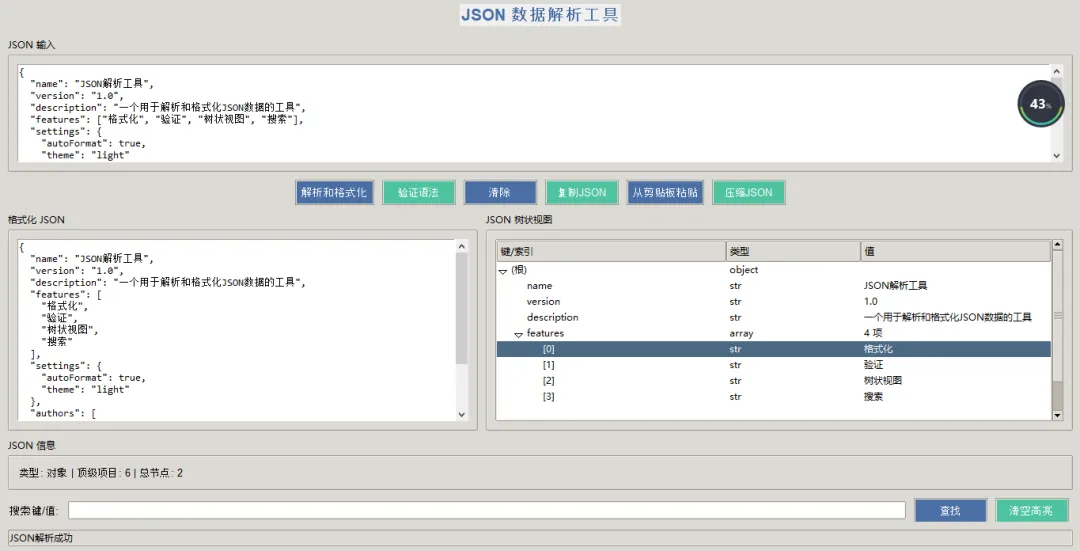
↓ 完整源码如下 ↓
# -*- coding: utf-8 -*-# @Author : 小红牛# 微信公众号:wdPythonimport tkinter as tkfrom tkinter import ttk, scrolledtext, messagebox, fontimport jsonimport refrom collections import OrderedDictimport pyperclip # 需要安装: pip install pyperclipclass JSONParserTool:def __init__(self, root):self.root = rootself.root.title("JSON 数据解析工具1.0")self.root.geometry("1000x700")self.root.configure(bg='#f0f0f0')# 设置图标和标题self.root.iconbitmap(default='') # 可以设置图标文件路径# 创建样式self.setup_styles()# 初始化变量self.json_data = Noneself.tree_items = {}# 创建UIself.create_widgets()def setup_styles(self):"""设置UI样式"""self.style = ttk.Style()self.style.theme_use('clam')# 自定义颜色self.bg_color = '#f0f0f0'self.primary_color = '#4a6fa5'self.secondary_color = '#166088'self.accent_color = '#4fc3a1'# 配置样式self.style.configure('Title.TLabel',background=self.bg_color,foreground=self.primary_color,font=('Arial', 16, 'bold'))self.style.configure('Primary.TButton',background=self.primary_color,foreground='white',font=('Arial', 10))self.style.map('Primary.TButton',background=[('active', self.secondary_color)])self.style.configure('Secondary.TButton',background=self.accent_color,foreground='white',font=('Arial', 10))def create_widgets(self):"""创建所有UI组件"""# 主框架main_frame = ttk.Frame(self.root, padding="10")main_frame.grid(row=0, column=0, sticky=(tk.W, tk.E, tk.N, tk.S))# 配置网格权重self.root.columnconfigure(0, weight=1)self.root.rowconfigure(0, weight=1)main_frame.columnconfigure(1, weight=1)main_frame.rowconfigure(3, weight=1)main_frame.rowconfigure(5, weight=1)# 标题title_label = ttk.Label(main_frame, text="JSON 数据解析工具", style='Title.TLabel')title_label.grid(row=0, column=0, columnspan=3, pady=(0, 15))# 输入区域input_frame = ttk.LabelFrame(main_frame, text="JSON 输入", padding="10")input_frame.grid(row=1, column=0, columnspan=3, sticky=(tk.W, tk.E), pady=(0, 10))input_frame.columnconfigure(0, weight=1)self.input_text = scrolledtext.ScrolledText(input_frame, width=80, height=8,font=('Consolas', 10), wrap=tk.NONE)self.input_text.grid(row=0, column=0, sticky=(tk.W, tk.E, tk.N, tk.S))# 添加示例JSONexample_json = '''{"name": "JSON解析工具","version": "1.0","description": "一个用于解析和格式化JSON数据的工具","features": ["格式化", "验证", "树状视图", "搜索"],"settings": {"autoFormat": true,"theme": "light"},"authors": [{"name": "开发者","role": "主要开发"}]}'''self.input_text.insert('1.0', example_json)# 按钮区域button_frame = ttk.Frame(main_frame)button_frame.grid(row=2, column=0, columnspan=3, pady=(0, 10))# 操作按钮ttk.Button(button_frame, text="解析和格式化", command=self.parse_json,style='Primary.TButton').grid(row=0, column=0, padx=5)ttk.Button(button_frame, text="验证语法", command=self.validate_json,style='Secondary.TButton').grid(row=0, column=1, padx=5)ttk.Button(button_frame, text="清除", command=self.clear_all,style='Primary.TButton').grid(row=0, column=2, padx=5)ttk.Button(button_frame, text="复制JSON", command=self.copy_json,style='Secondary.TButton').grid(row=0, column=3, padx=5)ttk.Button(button_frame, text="从剪贴板粘贴", command=self.paste_from_clipboard,style='Primary.TButton').grid(row=0, column=4, padx=5)ttk.Button(button_frame, text="压缩JSON", command=self.minify_json,style='Secondary.TButton').grid(row=0, column=5, padx=5)# 结果显示区域 (两列布局)result_frame = ttk.Frame(main_frame)result_frame.grid(row=3, column=0, columnspan=3, sticky=(tk.W, tk.E, tk.N, tk.S), pady=(0, 10))result_frame.columnconfigure(0, weight=1)result_frame.columnconfigure(1, weight=1)result_frame.rowconfigure(0, weight=1)# 格式化JSON输出output_frame = ttk.LabelFrame(result_frame, text="格式化 JSON", padding="10")output_frame.grid(row=0, column=0, sticky=(tk.W, tk.E, tk.N, tk.S), padx=(0, 5))output_frame.columnconfigure(0, weight=1)output_frame.rowconfigure(0, weight=1)self.output_text = scrolledtext.ScrolledText(output_frame, width=40, height=15,font=('Consolas', 10), wrap=tk.NONE)self.output_text.grid(row=0, column=0, sticky=(tk.W, tk.E, tk.N, tk.S))# JSON树状视图tree_frame = ttk.LabelFrame(result_frame, text="JSON 树状视图", padding="10")tree_frame.grid(row=0, column=1, sticky=(tk.W, tk.E, tk.N, tk.S), padx=(5, 0))tree_frame.columnconfigure(0, weight=1)tree_frame.rowconfigure(0, weight=1)# 创建树状视图self.tree = ttk.Treeview(tree_frame, columns=('type', 'value'), show='tree headings')self.tree.grid(row=0, column=0, sticky=(tk.W, tk.E, tk.N, tk.S))# 设置树状视图列self.tree.column('#0', width=200, anchor=tk.W)self.tree.column('type', width=80, anchor=tk.W)self.tree.column('value', width=150, anchor=tk.W)# 设置树状视图标题self.tree.heading('#0', text='键/索引', anchor=tk.W)self.tree.heading('type', text='类型', anchor=tk.W)self.tree.heading('value', text='值', anchor=tk.W)# 树状视图滚动条tree_scroll = ttk.Scrollbar(tree_frame, orient="vertical", command=self.tree.yview)tree_scroll.grid(row=0, column=1, sticky=(tk.N, tk.S))self.tree.configure(yscrollcommand=tree_scroll.set)# 信息面板info_frame = ttk.LabelFrame(main_frame, text="JSON 信息", padding="10")info_frame.grid(row=4, column=0, columnspan=3, sticky=(tk.W, tk.E), pady=(0, 10))# 信息标签self.info_label = ttk.Label(info_frame, text="未解析 JSON 数据", font=('Arial', 10))self.info_label.grid(row=0, column=0, sticky=tk.W)# 搜索区域search_frame = ttk.Frame(main_frame)search_frame.grid(row=5, column=0, columnspan=3, sticky=(tk.W, tk.E))search_frame.columnconfigure(1, weight=1)ttk.Label(search_frame, text="搜索键/值:", font=('Arial', 10)).grid(row=0, column=0, padx=(0, 5))self.search_var = tk.StringVar()self.search_entry = ttk.Entry(search_frame, textvariable=self.search_var, width=30)self.search_entry.grid(row=0, column=1, padx=5, sticky=(tk.W, tk.E))ttk.Button(search_frame, text="查找", command=self.search_json,style='Primary.TButton').grid(row=0, column=2, padx=5)ttk.Button(search_frame, text="清空高亮", command=self.clear_highlights,style='Secondary.TButton').grid(row=0, column=3, padx=5)# 状态栏self.status_bar = ttk.Label(main_frame, text="就绪", relief=tk.SUNKEN, anchor=tk.W)self.status_bar.grid(row=6, column=0, columnspan=3, sticky=(tk.W, tk.E), pady=(10, 0))def parse_json(self):"""解析和格式化JSON数据"""json_str = self.input_text.get('1.0', tk.END).strip()if not json_str:messagebox.showwarning("警告", "请输入JSON数据")returntry:# 解析JSONself.json_data = json.loads(json_str, object_pairs_hook=OrderedDict)# 格式化JSON输出formatted_json = json.dumps(self.json_data, indent=2, ensure_ascii=False)self.output_text.delete('1.0', tk.END)self.output_text.insert('1.0', formatted_json)# 构建树状视图self.build_tree_view(self.json_data)# 更新信息面板self.update_info_panel()# 更新状态栏self.status_bar.config(text="JSON解析成功")except json.JSONDecodeError as e:messagebox.showerror("JSON解析错误", f"JSON格式错误:\n第{e.lineno}行, 列{e.colno}: {e.msg}")self.status_bar.config(text="JSON解析失败")def validate_json(self):"""验证JSON语法"""json_str = self.input_text.get('1.0', tk.END).strip()if not json_str:messagebox.showwarning("警告", "请输入JSON数据")returntry:json.loads(json_str)messagebox.showinfo("成功", "JSON语法正确!")self.status_bar.config(text="JSON语法验证通过")except json.JSONDecodeError as e:# 高亮显示错误行lines = json_str.split('\n')if e.lineno <= len(lines):error_line = lines[e.lineno - 1]messagebox.showerror("JSON语法错误",f"第{e.lineno}行, 列{e.colno}: {e.msg}\n\n错误行: {error_line}")else:messagebox.showerror("JSON语法错误", f"第{e.lineno}行, 列{e.colno}: {e.msg}")self.status_bar.config(text="JSON语法验证失败")def build_tree_view(self, data, parent='', key=''):"""递归构建树状视图"""if parent == '':# 清除现有树状视图for item in self.tree.get_children():self.tree.delete(item)self.tree_items = {}# 添加根节点root_id = self.tree.insert('', 'end', text='(根)', values=('object' if isinstance(data, dict) else 'array', ''))self.tree_items[''] = root_idparent = root_idif isinstance(data, dict):for k, v in data.items():item_id = self.tree.insert(parent, 'end', text=str(k))if isinstance(v, dict):self.tree.set(item_id, 'type', 'object')self.tree.set(item_id, 'value', f'{len(v)} 项')self.build_tree_view(v, item_id, k)elif isinstance(v, list):self.tree.set(item_id, 'type', 'array')self.tree.set(item_id, 'value', f'{len(v)} 项')self.build_tree_view(v, item_id, k)else:value_type = type(v).__name__self.tree.set(item_id, 'type', value_type)self.tree.set(item_id, 'value', str(v))elif isinstance(data, list):for i, v in enumerate(data):item_id = self.tree.insert(parent, 'end', text=f'[{i}]')if isinstance(v, dict):self.tree.set(item_id, 'type', 'object')self.tree.set(item_id, 'value', f'{len(v)} 项')self.build_tree_view(v, item_id, str(i))elif isinstance(v, list):self.tree.set(item_id, 'type', 'array')self.tree.set(item_id, 'value', f'{len(v)} 项')self.build_tree_view(v, item_id, str(i))else:value_type = type(v).__name__self.tree.set(item_id, 'type', value_type)self.tree.set(item_id, 'value', str(v))def update_info_panel(self):"""更新信息面板"""if self.json_data is None:self.info_label.config(text="未解析 JSON 数据")return# 计算JSON基本信息if isinstance(self.json_data, dict):item_count = len(self.json_data)data_type = "对象"elif isinstance(self.json_data, list):item_count = len(self.json_data)data_type = "数组"else:item_count = 1data_type = type(self.json_data).__name__# 获取树状视图中的所有节点数量tree_item_count = len(self.tree.get_children('')) + sum(1 for _ in self.tree.get_children('') if self.tree.get_children(_))info_text = f"类型: {data_type} | 顶级项目: {item_count} | 总节点: {tree_item_count}"self.info_label.config(text=info_text)def search_json(self):"""在JSON中搜索"""search_term = self.search_var.get().strip()if not search_term:messagebox.showwarning("警告", "请输入搜索词")return# 清除之前的高亮self.clear_highlights()# 在输入文本中搜索input_content = self.input_text.get('1.0', tk.END)self.highlight_text(self.input_text, search_term, 'input')# 在输出文本中搜索output_content = self.output_text.get('1.0', tk.END)self.highlight_text(self.output_text, search_term, 'output')# 在树状视图中搜索self.highlight_tree_items(search_term)# 更新状态栏self.status_bar.config(text=f"搜索完成: '{search_term}'")def highlight_text(self, text_widget, search_term, widget_type):"""高亮显示文本中的搜索词"""# 清除之前的高亮标签text_widget.tag_remove('highlight', '1.0', tk.END)if not search_term:return# 配置高亮样式text_widget.tag_config('highlight', background='yellow', foreground='black')# 搜索并高亮content = text_widget.get('1.0', tk.END)start_idx = '1.0'while True:start_idx = text_widget.search(search_term, start_idx, stopindex=tk.END, nocase=True)if not start_idx:breakend_idx = f"{start_idx}+{len(search_term)}c"text_widget.tag_add('highlight', start_idx, end_idx)start_idx = end_idxdef highlight_tree_items(self, search_term):"""高亮树状视图中的匹配项"""# 清除之前的高亮for item in self.tree.get_children():self.tree.tag_configure(item, background='')# 搜索树状视图matches = []for item in self.tree.get_children(''):self._search_tree_item(item, search_term, matches)# 高亮匹配项for item in matches:self.tree.tag_configure(item, background='yellow')# 展开父节点以显示匹配项parent = self.tree.parent(item)while parent:self.tree.item(parent, open=True)parent = self.tree.parent(parent)return len(matches)def _search_tree_item(self, item_id, search_term, matches):"""递归搜索树状视图项"""# 检查当前项item_text = self.tree.item(item_id, 'text')item_values = self.tree.item(item_id, 'values')if (search_term.lower() in str(item_text).lower() orany(search_term.lower() in str(val).lower() for val in item_values if val)):matches.append(item_id)# 递归检查子项for child in self.tree.get_children(item_id):self._search_tree_child(child, search_term, matches)def _search_tree_child(self, item_id, search_term, matches):"""递归搜索树状视图子项"""item_text = self.tree.item(item_id, 'text')item_values = self.tree.item(item_id, 'values')if (search_term.lower() in str(item_text).lower() orany(search_term.lower() in str(val).lower() for val in item_values if val)):matches.append(item_id)for child in self.tree.get_children(item_id):self._search_tree_child(child, search_term, matches)def clear_highlights(self):"""清除所有高亮"""# 清除文本高亮self.input_text.tag_remove('highlight', '1.0', tk.END)self.output_text.tag_remove('highlight', '1.0', tk.END)# 清除树状视图高亮for item in self.tree.get_children():self.tree.tag_configure(item, background='')self.status_bar.config(text="已清除所有高亮")def clear_all(self):"""清除所有内容"""self.input_text.delete('1.0', tk.END)self.output_text.delete('1.0', tk.END)# 清除树状视图for item in self.tree.get_children():self.tree.delete(item)self.info_label.config(text="未解析 JSON 数据")self.search_var.set("")self.clear_highlights()self.json_data = Noneself.status_bar.config(text="已清除所有内容")def copy_json(self):"""复制JSON到剪贴板"""json_str = self.output_text.get('1.0', tk.END).strip()if json_str:try:pyperclip.copy(json_str)self.status_bar.config(text="JSON已复制到剪贴板")except:messagebox.showerror("错误", "无法访问剪贴板")else:messagebox.showwarning("警告", "没有JSON数据可复制")def paste_from_clipboard(self):"""从剪贴板粘贴JSON"""try:clipboard_content = pyperclip.paste()if clipboard_content:self.input_text.delete('1.0', tk.END)self.input_text.insert('1.0', clipboard_content)self.status_bar.config(text="已从剪贴板粘贴内容")else:messagebox.showwarning("警告", "剪贴板为空")except:messagebox.showerror("错误", "无法访问剪贴板")def minify_json(self):"""压缩JSON"""json_str = self.input_text.get('1.0', tk.END).strip()if not json_str:messagebox.showwarning("警告", "请输入JSON数据")returntry:# 解析JSONdata = json.loads(json_str)# 压缩JSONminified = json.dumps(data, separators=(',', ':'), ensure_ascii=False)# 显示压缩后的JSONself.output_text.delete('1.0', tk.END)self.output_text.insert('1.0', minified)# 更新树状视图self.json_data = dataself.build_tree_view(data)self.update_info_panel()self.status_bar.config(text="JSON压缩完成")except json.JSONDecodeError as e:messagebox.showerror("JSON解析错误", f"JSON格式错误:\n第{e.lineno}行, 列{e.colno}: {e.msg}")def main():root = tk.Tk()app = JSONParserTool(root)root.mainloop()if __name__ == "__main__":main()
完毕!!感谢您的收看
------★★历史博文集合★★------
随机文章
-
 10个月宝宝每天需要喝多少奶粉?
- 高职大数据技术专业,CDA和Python认证优先考哪个?
- 一周练完Python自动化办公就再也不用加班
- Python学习记录 Day 02
- Python其实很水反反复复就这64页纸
- Python中字典的使用(相关函数)
- 阿里云Alinux 3 全栈环境安装+运维+部署指南
- 【案例教程】AI-Python多技术融合下双碳与生态水文关键技术(蒸散发组分解析/GPP估算)实践应用
- 2月8日周日 | Python热门项目
- 字节跳动竟然斥巨资开发出《Python知识手册》,高清PDF!小白入门首选电子书!非常详细!非常基础!附PDF~
- CausalNex,一个决策强的python项目!