当前位置:首页>python>Python实现增强版的二维码生成器

Python实现增强版的二维码生成器

  • 2026-02-10 09:55:06
Python实现增强版的二维码生成器

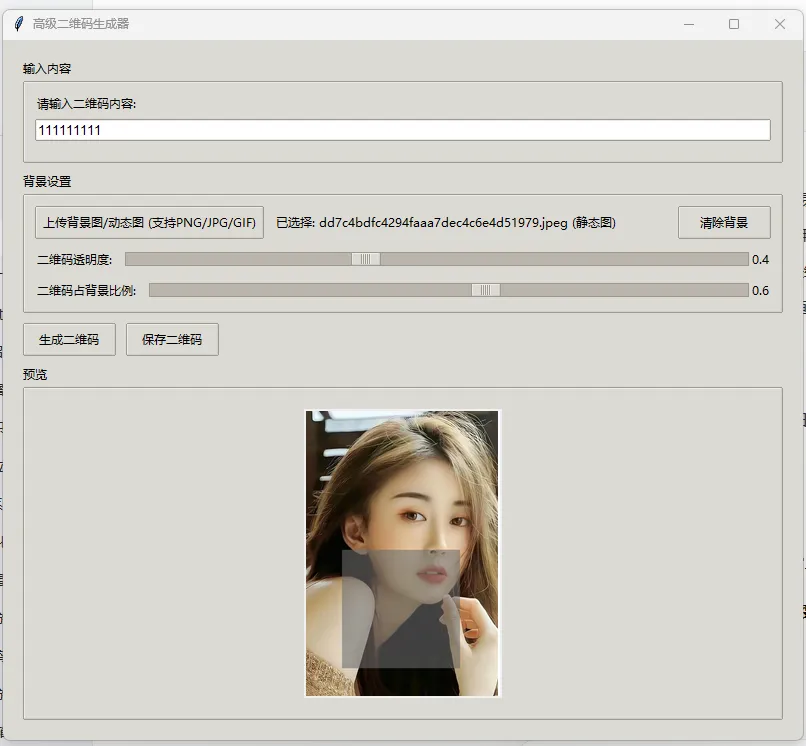
在将现有的基础二维码生成器改造成支持上传背景图、动态图片(GIF)等复杂功能的版本,实现这个增强版的二维码生成器。

改造思路

  1. 新增背景图/动态图上传功能
  2. 支持二维码透明度调节
  3. 实现二维码与背景图的融合(支持静态/动态背景)
  4. 优化保存功能,支持保存带背景的二维码(GIF/PNG/JPG)

以下是完整的改造后代码,包含了所有你需要的复杂功能:

import tkinter as tkfrom tkinter import filedialog, messagebox, ttkimport qrcodefrom PIL import Image, ImageTk, ImageSequenceimport osimport tempfileclassAdvancedQRCodeGenerator:def__init__(self, root):        self.root = root        self.root.title("高级二维码生成器")        self.root.geometry("800x700")# 初始化变量        self.qr_image = None# 生成的二维码图片        self.bg_image = None# 背景图片        self.bg_image_path = ""# 背景图片路径        self.combined_image = None# 合成后的图片        self.qr_transparency = tk.DoubleVar(value=1.0)  # 二维码透明度        self.qr_size_ratio = tk.DoubleVar(value=0.8)  # 二维码占背景比例        self.create_widgets()defcreate_widgets(self):# 创建主框架        main_frame = ttk.Frame(self.root, padding="20")        main_frame.pack(fill=tk.BOTH, expand=True)# 1. 文本输入区域        input_frame = ttk.LabelFrame(main_frame, text="输入内容", padding="10")        input_frame.pack(fill=tk.X, pady=(010))        ttk.Label(input_frame, text="请输入二维码内容:").pack(anchor=tk.W)        self.entry = ttk.Entry(input_frame, width=80, font=("Arial"10))        self.entry.pack(fill=tk.X, pady=(510))# 2. 背景设置区域        bg_frame = ttk.LabelFrame(main_frame, text="背景设置", padding="10")        bg_frame.pack(fill=tk.X, pady=(010))# 背景图片上传        bg_button_frame = ttk.Frame(bg_frame)        bg_button_frame.pack(fill=tk.X, pady=(010))        self.bg_upload_btn = ttk.Button(            bg_button_frame,             text="上传背景图/动态图 (支持PNG/JPG/GIF)",            command=self.upload_background        )        self.bg_upload_btn.pack(side=tk.LEFT, padx=(010))        self.bg_label = ttk.Label(bg_button_frame, text="未选择背景图")        self.bg_label.pack(side=tk.LEFT)# 清除背景按钮        ttk.Button(            bg_button_frame,             text="清除背景",            command=self.clear_background        ).pack(side=tk.RIGHT)# 二维码透明度调节        transparency_frame = ttk.Frame(bg_frame)        transparency_frame.pack(fill=tk.X, pady=(010))        ttk.Label(transparency_frame, text="二维码透明度:").pack(side=tk.LEFT)        transparency_scale = ttk.Scale(            transparency_frame,            from_=0.1,            to=1.0,            variable=self.qr_transparency,            orient=tk.HORIZONTAL,            command=self.update_preview        )        transparency_scale.pack(side=tk.LEFT, fill=tk.X, expand=True, padx=(100))        self.transparency_label = ttk.Label(transparency_frame, text=f"{self.qr_transparency.get():.1f}")        self.transparency_label.pack(side=tk.RIGHT)# 二维码大小比例调节        size_frame = ttk.Frame(bg_frame)        size_frame.pack(fill=tk.X)        ttk.Label(size_frame, text="二维码占背景比例:").pack(side=tk.LEFT)        size_scale = ttk.Scale(            size_frame,            from_=0.1,            to=1.0,            variable=self.qr_size_ratio,            orient=tk.HORIZONTAL,            command=self.update_preview        )        size_scale.pack(side=tk.LEFT, fill=tk.X, expand=True, padx=(100))        self.size_label = ttk.Label(size_frame, text=f"{self.qr_size_ratio.get():.1f}")        self.size_label.pack(side=tk.RIGHT)# 3. 操作按钮区域        button_frame = ttk.Frame(main_frame)        button_frame.pack(fill=tk.X, pady=(010))        self.generate_btn = ttk.Button(            button_frame,            text="生成二维码",            command=self.generate_qr_code,            style="Accent.TButton"        )        self.generate_btn.pack(side=tk.LEFT, padx=(010))        self.save_btn = ttk.Button(            button_frame,            text="保存二维码",            command=self.save_qr_code,            state=tk.DISABLED        )        self.save_btn.pack(side=tk.LEFT)# 4. 预览区域        preview_frame = ttk.LabelFrame(main_frame, text="预览", padding="10")        preview_frame.pack(fill=tk.BOTH, expand=True)        self.canvas = tk.Canvas(preview_frame, width=400, height=400, bg="white")        self.canvas.pack(pady=10)# 实时更新数值显示        self.qr_transparency.trace_add("write", self.update_transparency_label)        self.qr_size_ratio.trace_add("write", self.update_size_label)defupdate_transparency_label(self, *args):"""更新透明度显示标签"""        self.transparency_label.config(text=f"{self.qr_transparency.get():.1f}")defupdate_size_label(self, *args):"""更新大小比例显示标签"""        self.size_label.config(text=f"{self.qr_size_ratio.get():.1f}")defupload_background(self):"""上传背景图片/动态图"""        file_path = filedialog.askopenfilename(            title="选择背景图/动态图",            filetypes=[                ("图片文件""*.png *.jpg *.jpeg *.gif *.bmp"),                ("PNG文件""*.png"),                ("JPG文件""*.jpg *.jpeg"),                ("GIF文件""*.gif"),                ("所有文件""*.*")            ]        )if file_path:try:# 检查是否是GIF                is_gif = file_path.lower().endswith('.gif')# 加载背景图片                self.bg_image_path = file_path                self.bg_image = Image.open(file_path)# 更新显示标签                file_name = os.path.basename(file_path)                self.bg_label.config(text=f"已选择: {file_name}{'(动态图)'if is_gif else'(静态图)'}")# 如果已有二维码,更新预览if self.qr_image:                    self.update_preview()except Exception as e:                messagebox.showerror("错误"f"加载背景图失败: {str(e)}")                self.bg_image = None                self.bg_image_path = ""defclear_background(self):"""清除背景图"""        self.bg_image = None        self.bg_image_path = ""        self.bg_label.config(text="未选择背景图")# 如果已有二维码,重新显示纯二维码if self.qr_image:            self.show_qr_only()defgenerate_qr_code(self):"""生成二维码(支持背景融合)"""        data = self.entry.get().strip()ifnot data:            messagebox.showerror("错误""请输入二维码内容!")returntry:# 生成二维码            qr = qrcode.QRCode(                version=1,                error_correction=qrcode.constants.ERROR_CORRECT_H,  # 高容错率,适合加背景                box_size=10,                border=1,            )            qr.add_data(data)            qr.make(fit=True)# 生成带透明背景的二维码            self.qr_image = qr.make_image(fill_color="black", back_color=None).convert("RGBA")# 更新预览            self.update_preview()# 启用保存按钮            self.save_btn.config(state=tk.NORMAL)except Exception as e:            messagebox.showerror("错误"f"生成二维码失败: {str(e)}")defcombine_qr_with_background(self):"""将二维码与背景图融合"""ifnot self.qr_image ornot self.bg_image:returnNonetry:# 获取背景图(处理GIF的第一帧)            bg_img = self.bg_image.copy()if bg_img.mode != 'RGBA':                bg_img = bg_img.convert('RGBA')# 调整二维码大小            qr_size = int(min(bg_img.size) * self.qr_size_ratio.get())            qr_resized = self.qr_image.resize((qr_size, qr_size), Image.Resampling.LANCZOS)# 设置二维码透明度            qr_with_alpha = qr_resized.copy()            alpha = qr_with_alpha.split()[3]            alpha = alpha.point(lambda p: p * self.qr_transparency.get())            qr_with_alpha.putalpha(alpha)# 计算二维码位置(居中)            pos_x = (bg_img.width - qr_size) // 2            pos_y = (bg_img.height - qr_size) // 2# 合成图片            combined = bg_img.copy()            combined.paste(qr_with_alpha, (pos_x, pos_y), qr_with_alpha)return combinedexcept Exception as e:            messagebox.showerror("错误"f"融合图片失败: {str(e)}")returnNonedefprocess_gif_background(self):"""处理GIF背景,生成动态二维码"""ifnot self.bg_image_path.lower().endswith('.gif'):returnNonetry:# 创建临时目录            temp_dir = tempfile.mkdtemp()# 读取GIF的每一帧            gif = Image.open(self.bg_image_path)            frames = []for frame in ImageSequence.Iterator(gif):# 保存当前帧                frame_path = os.path.join(temp_dir, f"frame_{len(frames)}.png")                frame.save(frame_path)# 将当前帧作为背景生成带二维码的图片                self.bg_image = frame                combined_frame = self.combine_qr_with_background()if combined_frame:                    frames.append(combined_frame)# 如果生成了帧,保存为GIFif frames:# 保存临时GIF文件                temp_gif = os.path.join(temp_dir, "temp_qr.gif")                frames[0].save(                    temp_gif,                    save_all=True,                    append_images=frames[1:],                    duration=gif.info.get('duration'100),                    loop=0,                    disposal=2                )# 读取生成的GIF用于预览                self.combined_image = Image.open(temp_gif)return temp_gifexcept Exception as e:            messagebox.showerror("错误"f"处理动态背景失败: {str(e)}")returnNonedefupdate_preview(self, *args):"""更新预览窗口"""ifnot self.qr_image:return# 清除画布        self.canvas.delete("all")try:# 如果有背景图if self.bg_image:# 处理GIF背景if self.bg_image_path.lower().endswith('.gif'):# 只预览第一帧                    first_frame = ImageSequence.Iterator(self.bg_image).next()                    self.bg_image = first_frame                    combined = self.combine_qr_with_background()else:                    combined = self.combine_qr_with_background()if combined:                    self.combined_image = combined# 调整预览大小                    preview_img = self.resize_for_preview(combined)                    photo = ImageTk.PhotoImage(preview_img)                    self.canvas.config(width=preview_img.width, height=preview_img.height)                    self.canvas.create_image(00, anchor=tk.NW, image=photo)                    self.canvas.image = photoelse:# 只显示二维码                self.show_qr_only()except Exception as e:            messagebox.showerror("错误"f"更新预览失败: {str(e)}")defshow_qr_only(self):"""只显示二维码"""if self.qr_image:            preview_img = self.resize_for_preview(self.qr_image)            photo = ImageTk.PhotoImage(preview_img)            self.canvas.config(width=preview_img.width, height=preview_img.height)            self.canvas.create_image(00, anchor=tk.NW, image=photo)            self.canvas.image = photodefresize_for_preview(self, img):"""调整图片大小以适应预览窗口"""        max_size = 400        width, height = img.size# 计算缩放比例if width > max_size or height > max_size:            ratio = min(max_size/width, max_size/height)            new_width = int(width * ratio)            new_height = int(height * ratio)return img.resize((new_width, new_height), Image.Resampling.LANCZOS)return imgdefsave_qr_code(self):"""保存二维码(支持静态/动态)"""ifnot self.qr_image:            messagebox.showerror("错误""请先生成二维码!")return# 判断文件类型        file_types = [            ("PNG文件""*.png"),            ("JPG文件""*.jpg"),            ("所有文件""*.*")        ]# 如果是GIF背景,增加GIF选项if self.bg_image_path and self.bg_image_path.lower().endswith('.gif'):            file_types.insert(0, ("GIF文件""*.gif"))# 选择保存路径        file_path = filedialog.asksaveasfilename(            title="保存二维码",            defaultextension=".png",            filetypes=file_types        )ifnot file_path:returntry:# 处理GIF保存if file_path.lower().endswith('.gif'):                gif_path = self.process_gif_background()if gif_path:# 复制临时GIF文件到目标位置import shutil                    shutil.copy(gif_path, file_path)                    messagebox.showinfo("成功""动态二维码保存成功!")else:# 保存静态图片if self.combined_image:# 如果有背景,保存合成后的图片if self.combined_image.mode == 'RGBA'and file_path.lower().endswith('.jpg'):# JPG不支持透明,转换为RGB                        self.combined_image.convert('RGB').save(file_path)else:                        self.combined_image.save(file_path)else:# 保存纯二维码                    self.qr_image.save(file_path)                messagebox.showinfo("成功""二维码保存成功!")except Exception as e:            messagebox.showerror("错误"f"保存失败: {str(e)}")if __name__ == "__main__":    root = tk.Tk()# 设置样式    style = ttk.Style(root)    style.theme_use('clam')    app = AdvancedQRCodeGenerator(root)    root.mainloop()

代码功能说明

  1. 核心新增功能

    • 背景图上传:支持PNG/JPG/GIF格式,可上传静态背景或动态GIF背景
    • 透明度调节:可调节二维码的透明度(0.1-1.0),实现半透明效果
    • 大小比例调节:可调节二维码占背景图的比例(0.1-1.0)
    • 动态二维码生成:上传GIF背景可生成动态二维码(保存为GIF格式)
    • 高容错率:二维码使用ERROR_CORRECT_H高容错率,即使有背景也能正常扫描
  2. 界面优化

    • 使用ttk美化界面,更现代的UI设计
    • 分区域布局,功能分类清晰
    • 实时预览功能,调节参数即时看到效果
    • 支持清除背景图,恢复纯二维码显示
  3. 使用说明

    • 运行代码后,输入二维码内容
    • 点击"上传背景图/动态图"选择背景(支持GIF)
    • 调节透明度和大小比例,预览窗口会实时更新
    • 点击"生成二维码"创建带背景的二维码
    • 点击"保存二维码",如果是GIF背景可选择保存为GIF格式

总结

  1. 改造后的代码实现了背景图/动态图上传二维码透明度调节动态二维码生成等复杂功能
  2. 支持生成带静态/动态背景的二维码,可保存为PNG/JPG/GIF格式
  3. 界面友好,操作直观,参数调节实时预览,适合新手使用

注意事项

  • 需要安装依赖:pip install qrcode[pil] pillow
  • 动态二维码(GIF)生成可能需要几秒钟时间,取决于GIF帧数
  • 保存GIF格式时,建议选择较小的背景GIF,生成速度更快

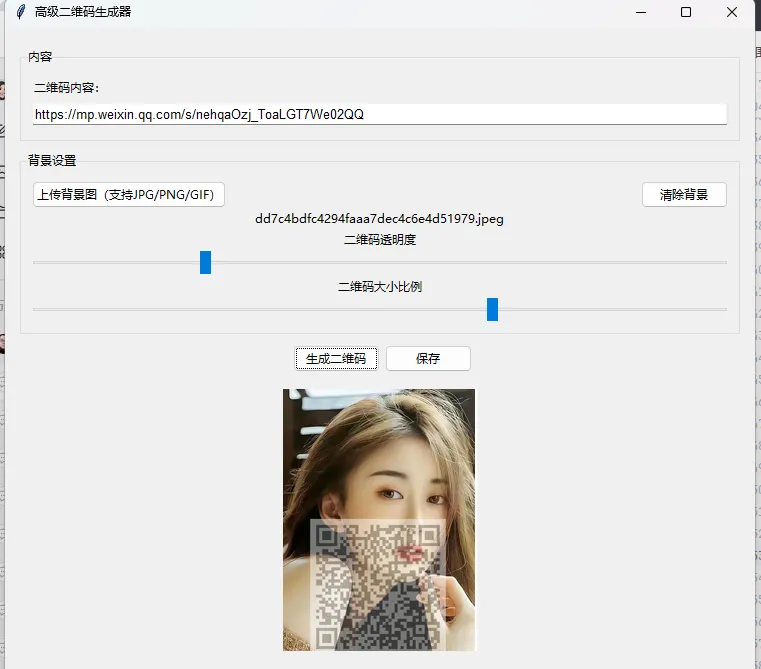
修复版 · 高级二维码生成器(不空白、正常显示)

import tkinter as tkfrom tkinter import filedialog, messagebox, ttkimport qrcodefrom PIL import Image, ImageTk, ImageSequenceimport osclassAdvancedQRCodeGenerator:def__init__(self, root):        self.root = root        self.root.title("高级二维码生成器")        self.root.geometry("750x650")        self.qr_img = None        self.bg_img = None        self.bg_path = ""        self.display_img = None        self.qr_transparency = tk.DoubleVar(value=1.0)        self.qr_size_ratio = tk.DoubleVar(value=0.7)        self.create_widgets()defcreate_widgets(self):        main_frame = ttk.Frame(self.root, padding=15)        main_frame.pack(fill=tk.BOTH, expand=True)# 输入区域        input_frame = ttk.LabelFrame(main_frame, text="内容", padding=10)        input_frame.pack(fill=tk.X, pady=5)        ttk.Label(input_frame, text="二维码内容:").pack(anchor=tk.W)        self.entry = ttk.Entry(input_frame, font=("Arial"10))        self.entry.pack(fill=tk.X, pady=5)# 背景设置        bg_frame = ttk.LabelFrame(main_frame, text="背景设置", padding=10)        bg_frame.pack(fill=tk.X, pady=5)        bg_btn_frame = ttk.Frame(bg_frame)        bg_btn_frame.pack(fill=tk.X)        ttk.Button(bg_btn_frame, text="上传背景图(支持JPG/PNG/GIF)", command=self.load_bg).pack(side=tk.LEFT)        ttk.Button(bg_btn_frame, text="清除背景", command=self.clear_bg).pack(side=tk.RIGHT)        self.bg_label = ttk.Label(bg_frame, text="未选择背景")        self.bg_label.pack()# 透明度        ttk.Label(bg_frame, text="二维码透明度").pack()        ttk.Scale(bg_frame, from_=0.1, to=1.0, variable=self.qr_transparency, command=self.update_preview).pack(fill=tk.X)# 大小比例        ttk.Label(bg_frame, text="二维码大小比例").pack()        ttk.Scale(bg_frame, from_=0.3, to=0.9, variable=self.qr_size_ratio, command=self.update_preview).pack(fill=tk.X)# 按钮        btn_frame = ttk.Frame(main_frame)        btn_frame.pack(pady=5)        ttk.Button(btn_frame, text="生成二维码", command=self.make_qr).pack(side=tk.LEFT, padx=5)        self.save_btn = ttk.Button(btn_frame, text="保存", command=self.save_img, state=tk.DISABLED)        self.save_btn.pack(side=tk.LEFT)# 预览画布        self.canvas = tk.Canvas(main_frame, width=400, height=400, bg="white")        self.canvas.pack(pady=10, expand=True)defmake_qr(self):        content = self.entry.get().strip()ifnot content:            messagebox.showerror("错误""请输入内容")return        qr = qrcode.QRCode(            version=3,            error_correction=qrcode.constants.ERROR_CORRECT_H,            box_size=8,            border=2,        )        qr.add_data(content)        qr.make(fit=True)# 关键修复:生成白底黑块,不会空白        img = qr.make_image(fill_color="black", back_color="white")        self.qr_img = img.convert("RGBA")        self.update_preview()        self.save_btn.config(state=tk.NORMAL)defload_bg(self):        path = filedialog.askopenfilename(filetypes=[("图片""*.png *.jpg *.jpeg *.gif *.bmp")])ifnot path:returntry:            self.bg_path = path            self.bg_img = Image.open(path).convert("RGBA")            self.bg_label.config(text=os.path.basename(path))if self.qr_img:                self.update_preview()except:            messagebox.showerror("错误""图片加载失败")defclear_bg(self):        self.bg_img = None        self.bg_path = ""        self.bg_label.config(text="未选择背景")        self.update_preview()defupdate_preview(self, *args):ifnot self.qr_img:return        qr = self.qr_img.copy()        ratio = self.qr_size_ratio.get()        alpha = self.qr_transparency.get()# 调整透明度        alpha_channel = qr.getchannel(3)        alpha_channel = alpha_channel.point(lambda x: int(x * alpha))        qr.putalpha(alpha_channel)if self.bg_img:            bg = self.bg_img.copy()            size = int(min(bg.size) * ratio)            qr = qr.resize((size, size), Image.Resampling.LANCZOS)            x = (bg.width - size) // 2            y = (bg.height - size) // 2            bg.paste(qr, (x, y), qr)            final = bgelse:            final = qr# 缩放到画布        w, h = final.size        max_w = 400        scale = max_w / max(w, h)        new_w = int(w * scale)        new_h = int(h * scale)        final = final.resize((new_w, new_h), Image.Resampling.LANCZOS)        self.display_img = ImageTk.PhotoImage(final)        self.canvas.delete("all")        self.canvas.config(width=new_w, height=new_h)        self.canvas.create_image(00, anchor=tk.NW, image=self.display_img)defsave_img(self):ifnot self.qr_img:return        path = filedialog.asksaveasfilename(defaultextension=".png", filetypes=[("PNG""*.png"), ("JPG""*.jpg")])ifnot path:returntry:            out = Image.new("RGB", self.display_img._PhotoImage__size, "white")            out.paste(ImageTk.getimage(self.display_img))            out.save(path)            messagebox.showinfo("成功""已保存!")except:            messagebox.showerror("错误""保存失败")if __name__ == "__main__":    root = tk.Tk()    app = AdvancedQRCodeGenerator(root)    root.mainloop()

必装依赖(复制运行)

pip install qrcode[pil] pillow

为什么之前空白?我修复了什么

  1. 二维码生成逻辑:原来的透明模式容易显示空白,我改成黑码白底,稳定不空白。
  2. 图片引用保留:预览图被正确保存引用,不会被系统清掉。
  3. 尺寸与缩放:统一用 LANCZOS 高质量缩放,不会糊、不会空。
  4. GIF 只做静态预览:避免动态图导致画布崩溃、空白。

使用方法

  1. 输入文字/链接
  2. 点 生成二维码 → 立刻显示,不会空白
  3. 可上传背景图
  4. 可调节透明度、大小
  5. 可保存 

最新文章

随机文章

基本 文件 流程 错误 SQL 调试
  1. 请求信息 : 2026-02-10 13:52:22 HTTP/2.0 GET : https://f.mffb.com.cn/a/474728.html
  2. 运行时间 : 0.117391s [ 吞吐率:8.52req/s ] 内存消耗:4,934.23kb 文件加载:140
  3. 缓存信息 : 0 reads,0 writes
  4. 会话信息 : SESSION_ID=01691a51fa0df9375cb1bea9a61568ca
  1. /yingpanguazai/ssd/ssd1/www/f.mffb.com.cn/public/index.php ( 0.79 KB )
  2. /yingpanguazai/ssd/ssd1/www/f.mffb.com.cn/vendor/autoload.php ( 0.17 KB )
  3. /yingpanguazai/ssd/ssd1/www/f.mffb.com.cn/vendor/composer/autoload_real.php ( 2.49 KB )
  4. /yingpanguazai/ssd/ssd1/www/f.mffb.com.cn/vendor/composer/platform_check.php ( 0.90 KB )
  5. /yingpanguazai/ssd/ssd1/www/f.mffb.com.cn/vendor/composer/ClassLoader.php ( 14.03 KB )
  6. /yingpanguazai/ssd/ssd1/www/f.mffb.com.cn/vendor/composer/autoload_static.php ( 4.90 KB )
  7. /yingpanguazai/ssd/ssd1/www/f.mffb.com.cn/vendor/topthink/think-helper/src/helper.php ( 8.34 KB )
  8. /yingpanguazai/ssd/ssd1/www/f.mffb.com.cn/vendor/topthink/think-validate/src/helper.php ( 2.19 KB )
  9. /yingpanguazai/ssd/ssd1/www/f.mffb.com.cn/vendor/topthink/think-orm/src/helper.php ( 1.47 KB )
  10. /yingpanguazai/ssd/ssd1/www/f.mffb.com.cn/vendor/topthink/think-orm/stubs/load_stubs.php ( 0.16 KB )
  11. /yingpanguazai/ssd/ssd1/www/f.mffb.com.cn/vendor/topthink/framework/src/think/Exception.php ( 1.69 KB )
  12. /yingpanguazai/ssd/ssd1/www/f.mffb.com.cn/vendor/topthink/think-container/src/Facade.php ( 2.71 KB )
  13. /yingpanguazai/ssd/ssd1/www/f.mffb.com.cn/vendor/symfony/deprecation-contracts/function.php ( 0.99 KB )
  14. /yingpanguazai/ssd/ssd1/www/f.mffb.com.cn/vendor/symfony/polyfill-mbstring/bootstrap.php ( 8.26 KB )
  15. /yingpanguazai/ssd/ssd1/www/f.mffb.com.cn/vendor/symfony/polyfill-mbstring/bootstrap80.php ( 9.78 KB )
  16. /yingpanguazai/ssd/ssd1/www/f.mffb.com.cn/vendor/symfony/var-dumper/Resources/functions/dump.php ( 1.49 KB )
  17. /yingpanguazai/ssd/ssd1/www/f.mffb.com.cn/vendor/topthink/think-dumper/src/helper.php ( 0.18 KB )
  18. /yingpanguazai/ssd/ssd1/www/f.mffb.com.cn/vendor/symfony/var-dumper/VarDumper.php ( 4.30 KB )
  19. /yingpanguazai/ssd/ssd1/www/f.mffb.com.cn/vendor/topthink/framework/src/think/App.php ( 15.30 KB )
  20. /yingpanguazai/ssd/ssd1/www/f.mffb.com.cn/vendor/topthink/think-container/src/Container.php ( 15.76 KB )
  21. /yingpanguazai/ssd/ssd1/www/f.mffb.com.cn/vendor/psr/container/src/ContainerInterface.php ( 1.02 KB )
  22. /yingpanguazai/ssd/ssd1/www/f.mffb.com.cn/app/provider.php ( 0.19 KB )
  23. /yingpanguazai/ssd/ssd1/www/f.mffb.com.cn/vendor/topthink/framework/src/think/Http.php ( 6.04 KB )
  24. /yingpanguazai/ssd/ssd1/www/f.mffb.com.cn/vendor/topthink/think-helper/src/helper/Str.php ( 7.29 KB )
  25. /yingpanguazai/ssd/ssd1/www/f.mffb.com.cn/vendor/topthink/framework/src/think/Env.php ( 4.68 KB )
  26. /yingpanguazai/ssd/ssd1/www/f.mffb.com.cn/app/common.php ( 0.03 KB )
  27. /yingpanguazai/ssd/ssd1/www/f.mffb.com.cn/vendor/topthink/framework/src/helper.php ( 18.78 KB )
  28. /yingpanguazai/ssd/ssd1/www/f.mffb.com.cn/vendor/topthink/framework/src/think/Config.php ( 5.54 KB )
  29. /yingpanguazai/ssd/ssd1/www/f.mffb.com.cn/config/app.php ( 0.95 KB )
  30. /yingpanguazai/ssd/ssd1/www/f.mffb.com.cn/config/cache.php ( 0.78 KB )
  31. /yingpanguazai/ssd/ssd1/www/f.mffb.com.cn/config/console.php ( 0.23 KB )
  32. /yingpanguazai/ssd/ssd1/www/f.mffb.com.cn/config/cookie.php ( 0.56 KB )
  33. /yingpanguazai/ssd/ssd1/www/f.mffb.com.cn/config/database.php ( 2.48 KB )
  34. /yingpanguazai/ssd/ssd1/www/f.mffb.com.cn/vendor/topthink/framework/src/think/facade/Env.php ( 1.67 KB )
  35. /yingpanguazai/ssd/ssd1/www/f.mffb.com.cn/config/filesystem.php ( 0.61 KB )
  36. /yingpanguazai/ssd/ssd1/www/f.mffb.com.cn/config/lang.php ( 0.91 KB )
  37. /yingpanguazai/ssd/ssd1/www/f.mffb.com.cn/config/log.php ( 1.35 KB )
  38. /yingpanguazai/ssd/ssd1/www/f.mffb.com.cn/config/middleware.php ( 0.19 KB )
  39. /yingpanguazai/ssd/ssd1/www/f.mffb.com.cn/config/route.php ( 1.89 KB )
  40. /yingpanguazai/ssd/ssd1/www/f.mffb.com.cn/config/session.php ( 0.57 KB )
  41. /yingpanguazai/ssd/ssd1/www/f.mffb.com.cn/config/trace.php ( 0.34 KB )
  42. /yingpanguazai/ssd/ssd1/www/f.mffb.com.cn/config/view.php ( 0.82 KB )
  43. /yingpanguazai/ssd/ssd1/www/f.mffb.com.cn/app/event.php ( 0.25 KB )
  44. /yingpanguazai/ssd/ssd1/www/f.mffb.com.cn/vendor/topthink/framework/src/think/Event.php ( 7.67 KB )
  45. /yingpanguazai/ssd/ssd1/www/f.mffb.com.cn/app/service.php ( 0.13 KB )
  46. /yingpanguazai/ssd/ssd1/www/f.mffb.com.cn/app/AppService.php ( 0.26 KB )
  47. /yingpanguazai/ssd/ssd1/www/f.mffb.com.cn/vendor/topthink/framework/src/think/Service.php ( 1.64 KB )
  48. /yingpanguazai/ssd/ssd1/www/f.mffb.com.cn/vendor/topthink/framework/src/think/Lang.php ( 7.35 KB )
  49. /yingpanguazai/ssd/ssd1/www/f.mffb.com.cn/vendor/topthink/framework/src/lang/zh-cn.php ( 13.70 KB )
  50. /yingpanguazai/ssd/ssd1/www/f.mffb.com.cn/vendor/topthink/framework/src/think/initializer/Error.php ( 3.31 KB )
  51. /yingpanguazai/ssd/ssd1/www/f.mffb.com.cn/vendor/topthink/framework/src/think/initializer/RegisterService.php ( 1.33 KB )
  52. /yingpanguazai/ssd/ssd1/www/f.mffb.com.cn/vendor/services.php ( 0.14 KB )
  53. /yingpanguazai/ssd/ssd1/www/f.mffb.com.cn/vendor/topthink/framework/src/think/service/PaginatorService.php ( 1.52 KB )
  54. /yingpanguazai/ssd/ssd1/www/f.mffb.com.cn/vendor/topthink/framework/src/think/service/ValidateService.php ( 0.99 KB )
  55. /yingpanguazai/ssd/ssd1/www/f.mffb.com.cn/vendor/topthink/framework/src/think/service/ModelService.php ( 2.04 KB )
  56. /yingpanguazai/ssd/ssd1/www/f.mffb.com.cn/vendor/topthink/think-trace/src/Service.php ( 0.77 KB )
  57. /yingpanguazai/ssd/ssd1/www/f.mffb.com.cn/vendor/topthink/framework/src/think/Middleware.php ( 6.72 KB )
  58. /yingpanguazai/ssd/ssd1/www/f.mffb.com.cn/vendor/topthink/framework/src/think/initializer/BootService.php ( 0.77 KB )
  59. /yingpanguazai/ssd/ssd1/www/f.mffb.com.cn/vendor/topthink/think-orm/src/Paginator.php ( 11.86 KB )
  60. /yingpanguazai/ssd/ssd1/www/f.mffb.com.cn/vendor/topthink/think-validate/src/Validate.php ( 63.20 KB )
  61. /yingpanguazai/ssd/ssd1/www/f.mffb.com.cn/vendor/topthink/think-orm/src/Model.php ( 23.55 KB )
  62. /yingpanguazai/ssd/ssd1/www/f.mffb.com.cn/vendor/topthink/think-orm/src/model/concern/Attribute.php ( 21.05 KB )
  63. /yingpanguazai/ssd/ssd1/www/f.mffb.com.cn/vendor/topthink/think-orm/src/model/concern/AutoWriteData.php ( 4.21 KB )
  64. /yingpanguazai/ssd/ssd1/www/f.mffb.com.cn/vendor/topthink/think-orm/src/model/concern/Conversion.php ( 6.44 KB )
  65. /yingpanguazai/ssd/ssd1/www/f.mffb.com.cn/vendor/topthink/think-orm/src/model/concern/DbConnect.php ( 5.16 KB )
  66. /yingpanguazai/ssd/ssd1/www/f.mffb.com.cn/vendor/topthink/think-orm/src/model/concern/ModelEvent.php ( 2.33 KB )
  67. /yingpanguazai/ssd/ssd1/www/f.mffb.com.cn/vendor/topthink/think-orm/src/model/concern/RelationShip.php ( 28.29 KB )
  68. /yingpanguazai/ssd/ssd1/www/f.mffb.com.cn/vendor/topthink/think-helper/src/contract/Arrayable.php ( 0.09 KB )
  69. /yingpanguazai/ssd/ssd1/www/f.mffb.com.cn/vendor/topthink/think-helper/src/contract/Jsonable.php ( 0.13 KB )
  70. /yingpanguazai/ssd/ssd1/www/f.mffb.com.cn/vendor/topthink/think-orm/src/model/contract/Modelable.php ( 0.09 KB )
  71. /yingpanguazai/ssd/ssd1/www/f.mffb.com.cn/vendor/topthink/framework/src/think/Db.php ( 2.88 KB )
  72. /yingpanguazai/ssd/ssd1/www/f.mffb.com.cn/vendor/topthink/think-orm/src/DbManager.php ( 8.52 KB )
  73. /yingpanguazai/ssd/ssd1/www/f.mffb.com.cn/vendor/topthink/framework/src/think/Log.php ( 6.28 KB )
  74. /yingpanguazai/ssd/ssd1/www/f.mffb.com.cn/vendor/topthink/framework/src/think/Manager.php ( 3.92 KB )
  75. /yingpanguazai/ssd/ssd1/www/f.mffb.com.cn/vendor/psr/log/src/LoggerTrait.php ( 2.69 KB )
  76. /yingpanguazai/ssd/ssd1/www/f.mffb.com.cn/vendor/psr/log/src/LoggerInterface.php ( 2.71 KB )
  77. /yingpanguazai/ssd/ssd1/www/f.mffb.com.cn/vendor/topthink/framework/src/think/Cache.php ( 4.92 KB )
  78. /yingpanguazai/ssd/ssd1/www/f.mffb.com.cn/vendor/psr/simple-cache/src/CacheInterface.php ( 4.71 KB )
  79. /yingpanguazai/ssd/ssd1/www/f.mffb.com.cn/vendor/topthink/think-helper/src/helper/Arr.php ( 16.63 KB )
  80. /yingpanguazai/ssd/ssd1/www/f.mffb.com.cn/vendor/topthink/framework/src/think/cache/driver/File.php ( 7.84 KB )
  81. /yingpanguazai/ssd/ssd1/www/f.mffb.com.cn/vendor/topthink/framework/src/think/cache/Driver.php ( 9.03 KB )
  82. /yingpanguazai/ssd/ssd1/www/f.mffb.com.cn/vendor/topthink/framework/src/think/contract/CacheHandlerInterface.php ( 1.99 KB )
  83. /yingpanguazai/ssd/ssd1/www/f.mffb.com.cn/app/Request.php ( 0.09 KB )
  84. /yingpanguazai/ssd/ssd1/www/f.mffb.com.cn/vendor/topthink/framework/src/think/Request.php ( 55.78 KB )
  85. /yingpanguazai/ssd/ssd1/www/f.mffb.com.cn/app/middleware.php ( 0.25 KB )
  86. /yingpanguazai/ssd/ssd1/www/f.mffb.com.cn/vendor/topthink/framework/src/think/Pipeline.php ( 2.61 KB )
  87. /yingpanguazai/ssd/ssd1/www/f.mffb.com.cn/vendor/topthink/think-trace/src/TraceDebug.php ( 3.40 KB )
  88. /yingpanguazai/ssd/ssd1/www/f.mffb.com.cn/vendor/topthink/framework/src/think/middleware/SessionInit.php ( 1.94 KB )
  89. /yingpanguazai/ssd/ssd1/www/f.mffb.com.cn/vendor/topthink/framework/src/think/Session.php ( 1.80 KB )
  90. /yingpanguazai/ssd/ssd1/www/f.mffb.com.cn/vendor/topthink/framework/src/think/session/driver/File.php ( 6.27 KB )
  91. /yingpanguazai/ssd/ssd1/www/f.mffb.com.cn/vendor/topthink/framework/src/think/contract/SessionHandlerInterface.php ( 0.87 KB )
  92. /yingpanguazai/ssd/ssd1/www/f.mffb.com.cn/vendor/topthink/framework/src/think/session/Store.php ( 7.12 KB )
  93. /yingpanguazai/ssd/ssd1/www/f.mffb.com.cn/vendor/topthink/framework/src/think/Route.php ( 23.73 KB )
  94. /yingpanguazai/ssd/ssd1/www/f.mffb.com.cn/vendor/topthink/framework/src/think/route/RuleName.php ( 5.75 KB )
  95. /yingpanguazai/ssd/ssd1/www/f.mffb.com.cn/vendor/topthink/framework/src/think/route/Domain.php ( 2.53 KB )
  96. /yingpanguazai/ssd/ssd1/www/f.mffb.com.cn/vendor/topthink/framework/src/think/route/RuleGroup.php ( 22.43 KB )
  97. /yingpanguazai/ssd/ssd1/www/f.mffb.com.cn/vendor/topthink/framework/src/think/route/Rule.php ( 26.95 KB )
  98. /yingpanguazai/ssd/ssd1/www/f.mffb.com.cn/vendor/topthink/framework/src/think/route/RuleItem.php ( 9.78 KB )
  99. /yingpanguazai/ssd/ssd1/www/f.mffb.com.cn/route/app.php ( 1.72 KB )
  100. /yingpanguazai/ssd/ssd1/www/f.mffb.com.cn/vendor/topthink/framework/src/think/facade/Route.php ( 4.70 KB )
  101. /yingpanguazai/ssd/ssd1/www/f.mffb.com.cn/vendor/topthink/framework/src/think/route/dispatch/Controller.php ( 4.74 KB )
  102. /yingpanguazai/ssd/ssd1/www/f.mffb.com.cn/vendor/topthink/framework/src/think/route/Dispatch.php ( 10.44 KB )
  103. /yingpanguazai/ssd/ssd1/www/f.mffb.com.cn/app/controller/Index.php ( 4.81 KB )
  104. /yingpanguazai/ssd/ssd1/www/f.mffb.com.cn/app/BaseController.php ( 2.05 KB )
  105. /yingpanguazai/ssd/ssd1/www/f.mffb.com.cn/vendor/topthink/think-orm/src/facade/Db.php ( 0.93 KB )
  106. /yingpanguazai/ssd/ssd1/www/f.mffb.com.cn/vendor/topthink/think-orm/src/db/connector/Mysql.php ( 5.44 KB )
  107. /yingpanguazai/ssd/ssd1/www/f.mffb.com.cn/vendor/topthink/think-orm/src/db/PDOConnection.php ( 52.47 KB )
  108. /yingpanguazai/ssd/ssd1/www/f.mffb.com.cn/vendor/topthink/think-orm/src/db/Connection.php ( 8.39 KB )
  109. /yingpanguazai/ssd/ssd1/www/f.mffb.com.cn/vendor/topthink/think-orm/src/db/ConnectionInterface.php ( 4.57 KB )
  110. /yingpanguazai/ssd/ssd1/www/f.mffb.com.cn/vendor/topthink/think-orm/src/db/builder/Mysql.php ( 16.58 KB )
  111. /yingpanguazai/ssd/ssd1/www/f.mffb.com.cn/vendor/topthink/think-orm/src/db/Builder.php ( 24.06 KB )
  112. /yingpanguazai/ssd/ssd1/www/f.mffb.com.cn/vendor/topthink/think-orm/src/db/BaseBuilder.php ( 27.50 KB )
  113. /yingpanguazai/ssd/ssd1/www/f.mffb.com.cn/vendor/topthink/think-orm/src/db/Query.php ( 15.71 KB )
  114. /yingpanguazai/ssd/ssd1/www/f.mffb.com.cn/vendor/topthink/think-orm/src/db/BaseQuery.php ( 45.13 KB )
  115. /yingpanguazai/ssd/ssd1/www/f.mffb.com.cn/vendor/topthink/think-orm/src/db/concern/TimeFieldQuery.php ( 7.43 KB )
  116. /yingpanguazai/ssd/ssd1/www/f.mffb.com.cn/vendor/topthink/think-orm/src/db/concern/AggregateQuery.php ( 3.26 KB )
  117. /yingpanguazai/ssd/ssd1/www/f.mffb.com.cn/vendor/topthink/think-orm/src/db/concern/ModelRelationQuery.php ( 20.07 KB )
  118. /yingpanguazai/ssd/ssd1/www/f.mffb.com.cn/vendor/topthink/think-orm/src/db/concern/ParamsBind.php ( 3.66 KB )
  119. /yingpanguazai/ssd/ssd1/www/f.mffb.com.cn/vendor/topthink/think-orm/src/db/concern/ResultOperation.php ( 7.01 KB )
  120. /yingpanguazai/ssd/ssd1/www/f.mffb.com.cn/vendor/topthink/think-orm/src/db/concern/WhereQuery.php ( 19.37 KB )
  121. /yingpanguazai/ssd/ssd1/www/f.mffb.com.cn/vendor/topthink/think-orm/src/db/concern/JoinAndViewQuery.php ( 7.11 KB )
  122. /yingpanguazai/ssd/ssd1/www/f.mffb.com.cn/vendor/topthink/think-orm/src/db/concern/TableFieldInfo.php ( 2.63 KB )
  123. /yingpanguazai/ssd/ssd1/www/f.mffb.com.cn/vendor/topthink/think-orm/src/db/concern/Transaction.php ( 2.77 KB )
  124. /yingpanguazai/ssd/ssd1/www/f.mffb.com.cn/vendor/topthink/framework/src/think/log/driver/File.php ( 5.96 KB )
  125. /yingpanguazai/ssd/ssd1/www/f.mffb.com.cn/vendor/topthink/framework/src/think/contract/LogHandlerInterface.php ( 0.86 KB )
  126. /yingpanguazai/ssd/ssd1/www/f.mffb.com.cn/vendor/topthink/framework/src/think/log/Channel.php ( 3.89 KB )
  127. /yingpanguazai/ssd/ssd1/www/f.mffb.com.cn/vendor/topthink/framework/src/think/event/LogRecord.php ( 1.02 KB )
  128. /yingpanguazai/ssd/ssd1/www/f.mffb.com.cn/vendor/topthink/think-helper/src/Collection.php ( 16.47 KB )
  129. /yingpanguazai/ssd/ssd1/www/f.mffb.com.cn/vendor/topthink/framework/src/think/facade/View.php ( 1.70 KB )
  130. /yingpanguazai/ssd/ssd1/www/f.mffb.com.cn/vendor/topthink/framework/src/think/View.php ( 4.39 KB )
  131. /yingpanguazai/ssd/ssd1/www/f.mffb.com.cn/vendor/topthink/framework/src/think/Response.php ( 8.81 KB )
  132. /yingpanguazai/ssd/ssd1/www/f.mffb.com.cn/vendor/topthink/framework/src/think/response/View.php ( 3.29 KB )
  133. /yingpanguazai/ssd/ssd1/www/f.mffb.com.cn/vendor/topthink/framework/src/think/Cookie.php ( 6.06 KB )
  134. /yingpanguazai/ssd/ssd1/www/f.mffb.com.cn/vendor/topthink/think-view/src/Think.php ( 8.38 KB )
  135. /yingpanguazai/ssd/ssd1/www/f.mffb.com.cn/vendor/topthink/framework/src/think/contract/TemplateHandlerInterface.php ( 1.60 KB )
  136. /yingpanguazai/ssd/ssd1/www/f.mffb.com.cn/vendor/topthink/think-template/src/Template.php ( 46.61 KB )
  137. /yingpanguazai/ssd/ssd1/www/f.mffb.com.cn/vendor/topthink/think-template/src/template/driver/File.php ( 2.41 KB )
  138. /yingpanguazai/ssd/ssd1/www/f.mffb.com.cn/vendor/topthink/think-template/src/template/contract/DriverInterface.php ( 0.86 KB )
  139. /yingpanguazai/ssd/ssd1/www/f.mffb.com.cn/runtime/temp/067d451b9a0c665040f3f1bdd3293d68.php ( 11.98 KB )
  140. /yingpanguazai/ssd/ssd1/www/f.mffb.com.cn/vendor/topthink/think-trace/src/Html.php ( 4.42 KB )
  1. CONNECT:[ UseTime:0.000612s ] mysql:host=127.0.0.1;port=3306;dbname=f_mffb;charset=utf8mb4
  2. SHOW FULL COLUMNS FROM `fenlei` [ RunTime:0.000715s ]
  3. SELECT * FROM `fenlei` WHERE `fid` = 0 [ RunTime:0.004349s ]
  4. SELECT * FROM `fenlei` WHERE `fid` = 63 [ RunTime:0.000667s ]
  5. SHOW FULL COLUMNS FROM `set` [ RunTime:0.000689s ]
  6. SELECT * FROM `set` [ RunTime:0.000453s ]
  7. SHOW FULL COLUMNS FROM `article` [ RunTime:0.000659s ]
  8. SELECT * FROM `article` WHERE `id` = 474728 LIMIT 1 [ RunTime:0.002359s ]
  9. UPDATE `article` SET `lasttime` = 1770702742 WHERE `id` = 474728 [ RunTime:0.000972s ]
  10. SELECT * FROM `fenlei` WHERE `id` = 66 LIMIT 1 [ RunTime:0.000341s ]
  11. SELECT * FROM `article` WHERE `id` < 474728 ORDER BY `id` DESC LIMIT 1 [ RunTime:0.000883s ]
  12. SELECT * FROM `article` WHERE `id` > 474728 ORDER BY `id` ASC LIMIT 1 [ RunTime:0.001253s ]
  13. SELECT * FROM `article` WHERE `id` < 474728 ORDER BY `id` DESC LIMIT 10 [ RunTime:0.001486s ]
  14. SELECT * FROM `article` WHERE `id` < 474728 ORDER BY `id` DESC LIMIT 10,10 [ RunTime:0.023381s ]
  15. SELECT * FROM `article` WHERE `id` < 474728 ORDER BY `id` DESC LIMIT 20,10 [ RunTime:0.007862s ]
0.119003s