Python Flet 进阶实战:打造一款“赛博朋克”风格的银河时钟(附全部源码)
- 2026-09-20 08:43:45
在 Python 的 GUI 开发领域,习惯了 Tkinter 的朴素或 PyQt 的厚重。但随着 Flet 的出现,Python也能轻松构建出媲美前端框架的精美、流畅且富有交互性的应用。
今天,我们将通过一个实战案例——“银河冷色圆形时钟”,来探索如何利用 Flet 实现动态粒子背景、呼吸光圈动画以及精准的时钟逻辑。这不仅是一个时钟,更是一次关于“代码美学”的练习。
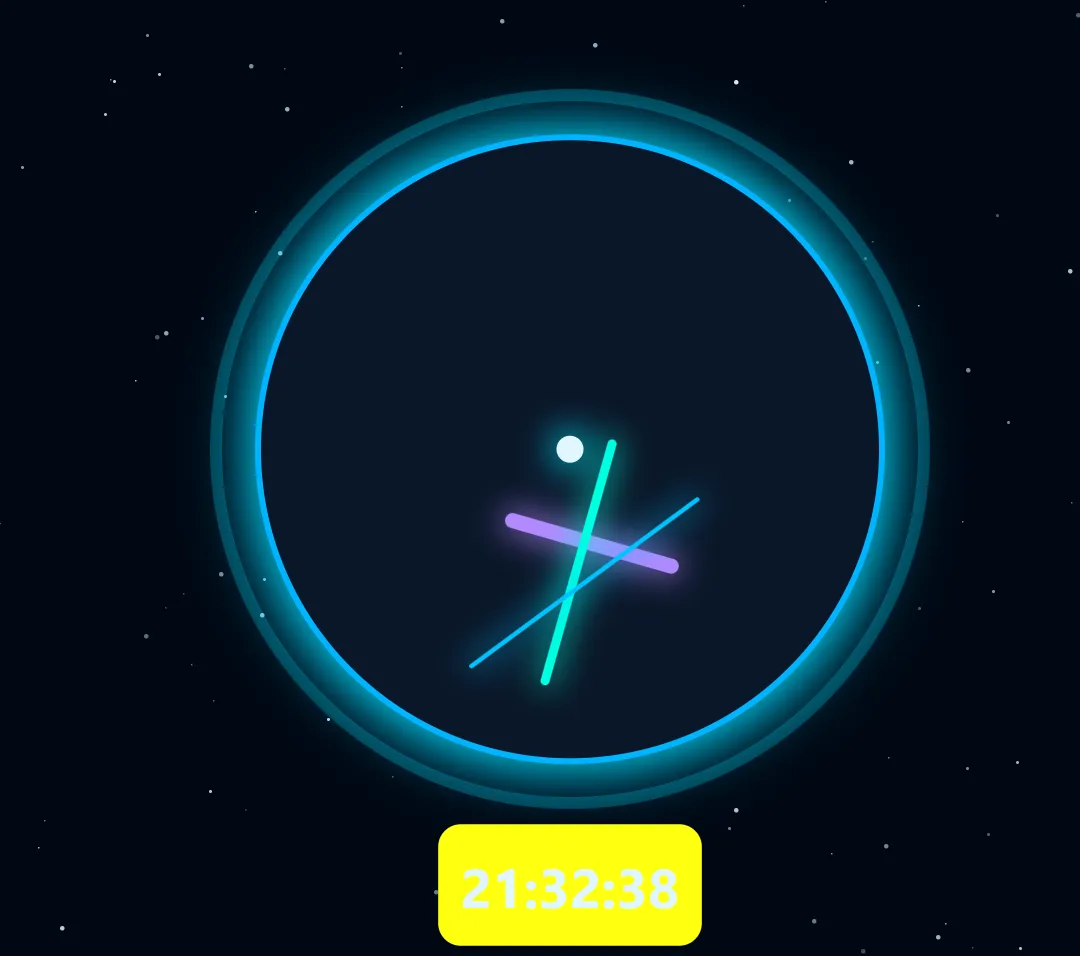
核心技术点解析
在动手之前,先拆解代码的几个核心亮点:
Stack(层叠布局)的艺术:如何将星空、表盘、指针、光圈层层堆叠,营造出景深感。 异步动画循环 ( asyncio):如何在不卡死主线程的前提下,让时钟走动、星星飘移、光圈呼吸同步进行。视觉设计:利用 BoxShadow和Opacity打造“发光”的霓虹质感。
第一步:构建沉浸式的星空背景
一个好的 UI 背景 ਪੰਜਾਬੀ 是灵魂。我们不讲朴素的纯色背景,而是要“动起来”的星空。
我利用 Stack 容器,将 160 个随机大小的白色方块作为星星放入其中。
# 生成星星stars = []for _ in range(160): size = random.randint(1, 3) star = ft.Container( width=size, height=size, bgcolor="#cfe9ff", # 冷白色 border_radius=5, # 稍微圆角,模拟星芒 left=random.randint(0, WIDTH), top=random.randint(0, HEIGHT), opacity=random.uniform(0.3, 1), # 随机透明度,模拟远近 ) stars.append(star)设计思路:通过随机大小和透明度,我们在二维屏幕上模拟了三维空间的纵深感。
第二步:打造“呼吸”的霓虹表盘
时钟主体由两部分组成:内层的实体表盘和外层的“呼吸光圈”。
为了实现那个迷人的发光边缘,我们大量使用了 BoxShadow。在 Flet 中,阴影不仅仅是黑色的投影,通过将阴影颜色设置为与边框相同的亮色(如 #00d9ff),我们可以实现霓虹灯般的发光效果。
# 外层呼吸光圈glow_ring = ft.Container(# ... 尺寸设置 ... border=ft.Border.all(8, "#00d9ff"), opacity=0.35,)# 内层表盘clock_face = ft.Container(# ... 尺寸设置 ... border=ft.Border.all(4, "#00b4ff"), shadow=ft.BoxShadow( blur_radius=30, spread_radius=5, color="#00d9ff", # 发光阴影 ),)第三步:指针的旋转逻辑
这是整个代码中最“数学”的部分。时钟指针的旋转需要我们将时间角度转换为弧度,并处理 Flet 的布局特性。
1、指针构造的陷阱与技巧
在 Flet 中,容器默认以中心点为旋转轴心。但时钟指针需要绕着“尾部”旋转。我们的解决方案是使用 Column 布局,在指针上方放置一个 expand=True 的透明容器,将可见的指针部分“挤”到底部。
defcreate_hand(length, width, color):return ft.Column( controls=[ ft.Container(expand=True), # 透明占位,将旋转轴心移至底部 ft.Container( width=width, height=length, bgcolor=color,# ... 发光阴影 ... ), ],# ... )2、角度计算
在动画循环中,我们通过 datetime 获取当前时间,并计算出对应的弧度。
# 1. 获取当前时间now = datetime.now()# 2. 计算角度 (小时一圈30度,分钟一圈6度...)hour_angle = ((hour + minute / 60) * 30) * math.pi / 180# 3. 应用旋转hour_hand_container.rotate = hour_angle第四步:统一的心跳 —— 异步动画循环
如果是在 Tkinter 中,我们需要使用 after 方法,容易造成逻辑割裂。Flet 基于 asyncio,我们可以写一个 while True 的死循环,让所有动画在后台平滑运行。
asyncdefanimate(): glow_phase = 0whileTrue:# 1. 更新时钟指针# ... 计算角度并赋值 ...# 2. 星空流动 (使用正弦余弦函数让星星飘动)for star in stars: star.left = (star.left + math.sin(galaxy_phase) * 0.5) % WIDTH star.top = (star.top + math.cos(galaxy_phase) * 0.5) % HEIGHT star.opacity = random.uniform(0.3, 1) # 闪烁# 3. 光圈呼吸 glow_ring.opacity = 0.3 + 0.25 * math.sin(glow_phase) page.update() # 刷新页面await asyncio.sleep(0.03) # 控制帧率约 30fps这段代码极其优雅:它以极快的速度不断刷新 UI 状态,将时间流逝、粒子运动和光照变化统一在一个流程中。
完整代码
将上述逻辑整合,我们得到了完整的程序。你可以直接复制运行,体验这个炫酷的银河时钟。
import flet as ftimport mathimport randomimport asynciofrom datetime import datetimeasyncdefmain(page: ft.Page): page.title = "银河冷色圆形时钟" page.window.width = 1000 page.window.height = 750 page.bgcolor = "#000814" page.theme_mode = "dark" WIDTH = 1000 HEIGHT = 750 CLOCK_SIZE = 420 CLOCK_BORDER = 30# 外边框宽度# =======================# 星空粒子# ======================= stars = []for _ in range(160): size = random.randint(1, 3) star = ft.Container( width=size, height=size, bgcolor="#cfe9ff", border_radius=5, left=random.randint(0, WIDTH), top=random.randint(0, HEIGHT), opacity=random.uniform(0.3, 1), ) stars.append(star)# =======================# 呼吸光圈(纯蓝)# ======================= glow_ring = ft.Container( width=CLOCK_SIZE + 2 * CLOCK_BORDER, height=CLOCK_SIZE + 2 * CLOCK_BORDER, border_radius=(CLOCK_SIZE + 2 * CLOCK_BORDER) / 2, border=ft.Border.all(8, "#00d9ff"), opacity=0.35, )# =======================# 圆形表盘(冷色)# ======================= clock_face = ft.Container( width=CLOCK_SIZE, height=CLOCK_SIZE, border_radius=CLOCK_SIZE / 2, bgcolor="#0a1628", border=ft.Border.all(4, "#00b4ff"), shadow=ft.BoxShadow( blur_radius=30, spread_radius=5, color="#00d9ff", offset=ft.Offset(0, 0), ), )# =======================# 指针创建函数(指针从底部开始)# =======================defcreate_hand(length, width, color):return ft.Column( controls=[ ft.Container(expand=True), # 占位,让指针从底部开始 ft.Container( width=width, height=length, bgcolor=color, border_radius=width / 2, shadow=ft.BoxShadow( blur_radius=18, spread_radius=1, color=color, ), ), ], width=width, height=length, ) hour_hand = create_hand(120, 10, "#b388ff") minute_hand = create_hand(170, 6, "#00ffe1") second_hand = create_hand(190, 3, "#00c3ff") center_dot = ft.Container( width=18, height=18, bgcolor="#e0f7ff", border_radius=9, shadow=ft.BoxShadow( blur_radius=20, spread_radius=2, color="#00e5ff", ), )# =======================# 数字时间显示# ======================= time_text = ft.Text( size=36, weight="bold", color="#e0f7ff", ) time_display = ft.Container( content=time_text, padding=15, bgcolor="#ffffff10", border_radius=15, )# =======================# 指针容器 - 左上角放在表盘中心# ======================= FACE_CENTER = CLOCK_SIZE / 2 + CLOCK_BORDER hour_hand_container = ft.Container( content=hour_hand, left=FACE_CENTER, top=FACE_CENTER, width=10, height=120, ) minute_hand_container = ft.Container( content=minute_hand, left=FACE_CENTER, top=FACE_CENTER, width=6, height=170, ) second_hand_container = ft.Container( content=second_hand, left=FACE_CENTER, top=FACE_CENTER, width=3, height=190, )# =======================# 表盘主容器 - 使用 Stack# ======================= clock_stack = ft.Stack( width=CLOCK_SIZE + 2 * CLOCK_BORDER, height=CLOCK_SIZE + 2 * CLOCK_BORDER, controls=[ glow_ring, ft.Container( content=clock_face, left=CLOCK_BORDER, top=CLOCK_BORDER, ), hour_hand_container, minute_hand_container, second_hand_container,# 中心点 ft.Container( content=center_dot, left=FACE_CENTER - 9, top=FACE_CENTER - 9, ), ], )# =======================# 主容器布局# ======================= main_column = ft.Column( horizontal_alignment=ft.CrossAxisAlignment.CENTER, controls=[ ft.Container(expand=True), # 顶部空白 clock_stack, time_display, ft.Container(expand=True), # 底部空白 ], ) main_stack = ft.Stack( width=WIDTH, height=HEIGHT, controls=stars + [ ft.Container( content=main_column, expand=True, ) ], ) page.add(main_stack)# =======================# 动画循环# =======================asyncdefanimate(): glow_phase = 0 galaxy_phase = 0whileTrue: now = datetime.now() hour = now.hour % 12 minute = now.minute second = now.second micro = now.microsecond# 计算旋转角度(弧度) hour_angle = ((hour + minute / 60) * 30) * math.pi / 180 minute_angle = ((minute + second / 60) * 6) * math.pi / 180 second_angle = ((second + micro / 1_000_000) * 6) * math.pi / 180# 设置旋转 hour_hand_container.rotate = hour_angle minute_hand_container.rotate = minute_angle second_hand_container.rotate = second_angle# 更新时间显示 time_text.value = now.strftime("%H:%M:%S")# 星空流动 galaxy_phase += 0.0007for star in stars: star.left = (star.left + math.sin(galaxy_phase) * 0.5) % WIDTH star.top = (star.top + math.cos(galaxy_phase) * 0.5) % HEIGHT star.opacity = random.uniform(0.3, 1)# 光圈呼吸 glow_phase += 0.05 glow_ring.opacity = 0.3 + 0.25 * math.sin(glow_phase) page.update()await asyncio.sleep(0.03) page.run_task(animate)ft.run(main)这个项目展示了 Flet 处理复杂动画的能力。通过 Stack 布局解决图层问题,Container 解决样式问题,以及 asyncio 解决逻辑控制问题。这不仅仅是写一个时钟,更是用代码绘制艺术品。
随机文章
-
 10个月宝宝每天需要喝多少奶粉?
- 【跟着AI学Python】第22天:虚拟环境与 pip
- Linux From Scratch —— 从零开始打造属于你的 Linux 系统
- Linux 常用命令速查表2026(附高清PDF文件下载)
- Java 依然是中国的铁饭碗
- 【IT专业技能解读】人工智能应用开发(Python)|白话专业解读
- GESP第12次认证真题解析|Python二级真题回顾
- 【原创】通过调取网站API结合Python代码实现体育领域大数据集采集的案例
- 听我一句劝!学 Linux 先从这几个命令开始
- 手把手| 用Python代码建个数据实验室,顺利入坑比特币
- Python是蟒蛇,还是编程语言?不,是导弹!