当前位置:首页>python>Python复习Tkinter基础组件案例

Python复习Tkinter基础组件案例

  • 2026-02-26 14:26:44
Python复习Tkinter基础组件案例

点击上方“只会写BUG的程序猿”,选择“设为星标

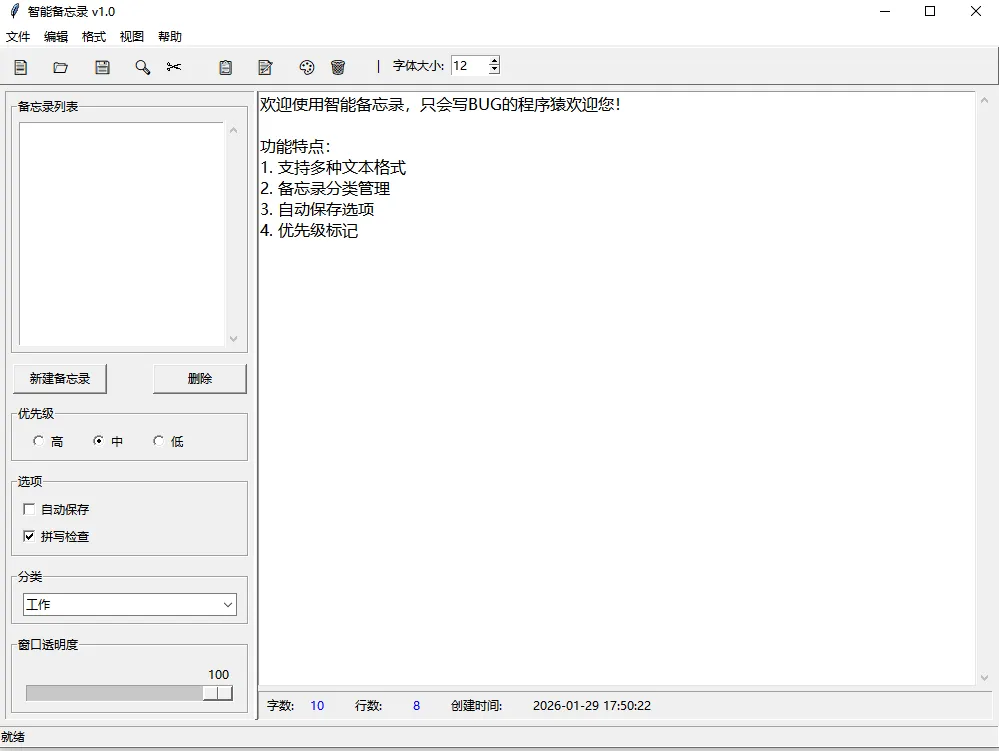
今天我们复习一下前几天学过的tkinter组件,做一个全局的,各种组件都有的案例。

话不多数,直接上代码:

import tkinter as tkfrom tkinter import ttk, scrolledtext, messagebox, filedialog, colorchooserimport datetimeimport jsonimport osclass SmartMemoApp:    def __init__(self):        # 第1篇内容:创建主窗口        self.window = tk.Tk()        self.window.title("智能备忘录 v1.0")        self.window.geometry("1000x700+200+100")        # 全局变量        self.current_file = None        self.font_size = 12        self.text_color = "black"        self.bg_color = "white"        self.memos = []        # 初始化UI - 注意顺序:先创建组件,再设置菜单        self.setup_toolbar()  # 第7篇:工具栏        self.setup_main_area()  # 第2-6篇:主区域布局和组件(这里创建text_editor)        self.setup_menu()  # 第7篇:菜单系统(现在可以访问text_editor)        self.setup_statusbar()  # 状态栏        # 绑定事件        self.bind_events()    def setup_menu(self):        """设置菜单系统 - 第7篇内容"""        menubar = tk.Menu(self.window)        # 文件菜单        file_menu = tk.Menu(menubar, tearoff=0)        file_menu.add_command(label="新建", accelerator="Ctrl+N", command=self.new_file)        file_menu.add_command(label="打开", accelerator="Ctrl+O", command=self.open_file)        file_menu.add_command(label="保存", accelerator="Ctrl+S", command=self.save_file)        file_menu.add_command(label="另存为", command=self.save_as)        file_menu.add_separator()        file_menu.add_command(label="导出为JSON", command=self.export_json)        file_menu.add_separator()        file_menu.add_command(label="退出", command=self.quit_app)        menubar.add_cascade(label="文件", menu=file_menu)        # 编辑菜单        edit_menu = tk.Menu(menubar, tearoff=0)        edit_menu.add_command(label="撤销", accelerator="Ctrl+Z", command=self.undo_text)        edit_menu.add_command(label="重做", accelerator="Ctrl+Y", command=self.redo_text)        edit_menu.add_separator()        edit_menu.add_command(label="剪切", accelerator="Ctrl+X", command=self.cut_text)        edit_menu.add_command(label="复制", accelerator="Ctrl+C", command=self.copy_text)        edit_menu.add_command(label="粘贴", accelerator="Ctrl+V", command=self.paste_text)        edit_menu.add_separator()        edit_menu.add_command(label="查找", accelerator="Ctrl+F", command=self.find_text)        edit_menu.add_command(label="替换", accelerator="Ctrl+H", command=self.replace_text)        menubar.add_cascade(label="编辑", menu=edit_menu)        # 格式菜单        format_menu = tk.Menu(menubar, tearoff=0)        format_menu.add_command(label="字体颜色", command=self.change_text_color)        format_menu.add_command(label="背景颜色", command=self.change_bg_color)        format_menu.add_separator()        # 字体大小子菜单        size_menu = tk.Menu(format_menu, tearoff=0)        for size in [10121416182024]:            size_menu.add_command(                label=f"{size}pt",                command=lambda s=size: self.change_font_size(s)            )        format_menu.add_cascade(label="字体大小", menu=size_menu)        menubar.add_cascade(label="格式", menu=format_menu)        # 视图菜单        view_menu = tk.Menu(menubar, tearoff=0)        self.sidebar_var = tk.BooleanVar(value=True)        self.statusbar_var = tk.BooleanVar(value=True)        view_menu.add_checkbutton(label="显示侧边栏", variable=self.sidebar_var,                                  command=self.toggle_sidebar)        view_menu.add_checkbutton(label="显示状态栏", variable=self.statusbar_var,                                  command=self.toggle_statusbar)        menubar.add_cascade(label="视图", menu=view_menu)        # 帮助菜单        help_menu = tk.Menu(menubar, tearoff=0)        help_menu.add_command(label="使用说明", command=self.show_help)        help_menu.add_command(label="关于", command=self.show_about)        menubar.add_cascade(label="帮助", menu=help_menu)        self.window.config(menu=menubar)        # 第7篇:右键弹出菜单        self.setup_context_menu()    def setup_context_menu(self):        """设置右键菜单"""        self.context_menu = tk.Menu(self.window, tearoff=0)        self.context_menu.add_command(label="剪切", command=self.cut_text)        self.context_menu.add_command(label="复制", command=self.copy_text)        self.context_menu.add_command(label="粘贴", command=self.paste_text)        self.context_menu.add_separator()        self.context_menu.add_command(label="全选", command=self.select_all)        # 绑定右键事件        self.text_editor.bind("<Button-3>"self.show_context_menu)    def show_context_menu(self, event):        """显示右键菜单"""        try:            self.context_menu.tk_popup(event.x_root, event.y_root)        finally:            self.context_menu.grab_release()    def undo_text(self):        """撤销"""        try:            self.text_editor.edit_undo()        except:            pass    def redo_text(self):        """重做"""        try:            self.text_editor.edit_redo()        except:            pass    def cut_text(self):        """剪切"""        self.text_editor.event_generate("<<Cut>>")    def copy_text(self):        """复制"""        self.text_editor.event_generate("<<Copy>>")    def paste_text(self):        """粘贴"""        self.text_editor.event_generate("<<Paste>>")    def select_all(self):        """全选"""        self.text_editor.tag_add('sel''1.0''end')    def setup_toolbar(self):        """设置工具栏 - 第7篇内容"""        toolbar = tk.Frame(self.window, relief=tk.RAISED, bd=1)        toolbar.pack(side=tk.TOP, fill=tk.X)        # 工具栏按钮        buttons = [            ("📄""新建"self.new_file),            ("📂""打开"self.open_file),            ("💾""保存"self.save_file),            ("🔍""查找"self.find_text),            ("✂️""剪切"self.cut_text),            ("📋""复制"self.copy_text),            ("📝""粘贴"self.paste_text),            ("🎨""颜色"self.change_text_color),            ("🗑️""清空"self.clear_text)        ]        for icon, tooltip, command in buttons:            btn = tk.Button(toolbar, text=icon, command=command,                            relief=tk.FLAT, width=3, font=("Arial"12))            btn.pack(side=tk.LEFT, padx=2, pady=2)            # 简单工具提示            self.create_tooltip(btn, tooltip)        # 添加一个分隔符        tk.Label(toolbar, text="|").pack(side=tk.LEFT, padx=5)        # 添加字体大小选择 - 第6篇:Spinbox组件        tk.Label(toolbar, text="字体大小:").pack(side=tk.LEFT, padx=2)        self.size_spin = tk.Spinbox(            toolbar,            from_=8,            to=72,            width=5,            validate='key',            validatecommand=(self.window.register(self.validate_spinbox), '%P')        )        self.size_spin.delete(0, tk.END)        self.size_spin.insert(0str(self.font_size))        self.size_spin.bind("<<Increment>>"lambda e: self.on_font_size_change())        self.size_spin.bind("<<Decrement>>"lambda e: self.on_font_size_change())        self.size_spin.bind("<Return>"lambda e: self.on_font_size_change())        self.size_spin.pack(side=tk.LEFT, padx=2)    def validate_spinbox(self, value):        """验证Spinbox输入"""        if value == "":            return True        try:            int_value = int(value)            return 8 <= int_value <= 72        except ValueError:            return False    def create_tooltip(self, widget, text):        """创建简单的工具提示"""        def show_tip(event):            tip = tk.Toplevel()            tip.wm_overrideredirect(True)            tip.wm_geometry(f"+{event.x_root + 10}+{event.y_root + 10}")            label = tk.Label(tip, text=text, background="yellow",                             relief=tk.SOLID, borderwidth=1)            label.pack()            widget.tip_window = tip        def hide_tip(event):            if hasattr(widget, 'tip_window'):                widget.tip_window.destroy()                delattr(widget, 'tip_window')        widget.bind("<Enter>", show_tip)        widget.bind("<Leave>", hide_tip)    def setup_main_area(self):        """设置主区域 - 使用多种布局管理器"""        # 主容器 - 第6篇:Frame容器        main_container = tk.Frame(self.window)        main_container.pack(fill=tk.BOTH, expand=True, padx=5, pady=5)        # 第6篇:PanedWindow - 可调节左右面板        self.paned = tk.PanedWindow(main_container, orient=tk.HORIZONTAL, sashrelief=tk.RAISED)        self.paned.pack(fill=tk.BOTH, expand=True)        # 左侧面板 - 第2篇:使用pack布局        left_panel = tk.Frame(self.paned, relief=tk.SUNKEN, bd=1)        # 第6篇:LabelFrame - 备忘录列表        memo_frame = tk.LabelFrame(left_panel, text="备忘录列表", padx=5, pady=5)        memo_frame.pack(fill=tk.BOTH, expand=True, padx=5, pady=5)        # 第5篇:Listbox组件        self.memo_listbox = tk.Listbox(memo_frame, selectmode=tk.SINGLE)        self.memo_listbox.pack(side=tk.LEFT, fill=tk.BOTH, expand=True)        # 第4篇:Scrollbar组件        memo_scroll = tk.Scrollbar(memo_frame)        memo_scroll.pack(side=tk.RIGHT, fill=tk.Y)        self.memo_listbox.config(yscrollcommand=memo_scroll.set)        memo_scroll.config(command=self.memo_listbox.yview)        # 备忘录操作按钮        memo_btn_frame = tk.Frame(left_panel)        memo_btn_frame.pack(fill=tk.X, padx=5, pady=5)        tk.Button(memo_btn_frame, text="新建备忘录", command=self.add_memo,                  width=12).pack(side=tk.LEFT, padx=2)        tk.Button(memo_btn_frame, text="删除", command=self.delete_memo,                  width=12).pack(side=tk.RIGHT, padx=2)        # 第5篇:Radiobutton - 优先级选择        priority_frame = tk.LabelFrame(left_panel, text="优先级", padx=5, pady=5)        priority_frame.pack(fill=tk.X, padx=5, pady=5)        self.priority_var = tk.StringVar(value="medium")        priorities = [("高""high"), ("中""medium"), ("低""low")]        for text, value in priorities:            rb = tk.Radiobutton(priority_frame, text=text, variable=self.priority_var,                                value=value, command=self.on_priority_change)            rb.pack(side=tk.LEFT, padx=10)        # 第5篇:Checkbutton - 选项设置        options_frame = tk.LabelFrame(left_panel, text="选项", padx=5, pady=5)        options_frame.pack(fill=tk.X, padx=5, pady=5)        self.auto_save_var = tk.BooleanVar(value=False)        self.spell_check_var = tk.BooleanVar(value=True)        tk.Checkbutton(options_frame, text="自动保存",                       variable=self.auto_save_var).pack(anchor=tk.W)        tk.Checkbutton(options_frame, text="拼写检查",                       variable=self.spell_check_var).pack(anchor=tk.W)        # 第5篇:Combobox - 分类选择(使用ttk)        category_frame = tk.LabelFrame(left_panel, text="分类", padx=5, pady=5)        category_frame.pack(fill=tk.X, padx=5, pady=5)        self.category_combo = ttk.Combobox(category_frame,                                           values=["工作""学习""生活""购物""其他"])        self.category_combo.set("工作")        self.category_combo.pack(fill=tk.X, padx=5, pady=2)        # 第6篇:Scale组件 - 文本透明度        opacity_frame = tk.LabelFrame(left_panel, text="窗口透明度", padx=5, pady=5)        opacity_frame.pack(fill=tk.X, padx=5, pady=5)        self.opacity_scale = tk.Scale(opacity_frame, from_=30, to=100,                                      orient=tk.HORIZONTAL, showvalue=True)        self.opacity_scale.set(100)        self.opacity_scale.pack(fill=tk.X, padx=5, pady=2)        self.opacity_scale.bind("<ButtonRelease-1>"self.on_opacity_change)        # 添加左侧面板到PanedWindow        self.paned.add(left_panel, width=250)        # 右侧面板 - 文本编辑区        right_panel = tk.Frame(self.paned)        # 第4篇:Text组件与Scrollbar - 主文本编辑器        text_frame = tk.Frame(right_panel)        text_frame.pack(fill=tk.BOTH, expand=True)        # 创建ScrolledText(已包含滚动条)        self.text_editor = scrolledtext.ScrolledText(            text_frame,            wrap=tk.WORD,            font=("微软雅黑"self.font_size),            bg=self.bg_color,            fg=self.text_color,            undo=True  # 启用撤销功能        )        self.text_editor.pack(fill=tk.BOTH, expand=True)        # 添加一些初始文本        self.text_editor.insert(tk.END, "欢迎使用智能备忘录!\n\n")        self.text_editor.insert(tk.END, "功能特点:\n")        self.text_editor.insert(tk.END, "1. 支持多种文本格式\n")        self.text_editor.insert(tk.END, "2. 备忘录分类管理\n")        self.text_editor.insert(tk.END, "3. 自动保存选项\n")        self.text_editor.insert(tk.END, "4. 优先级标记\n")        # 第2篇:使用grid布局 - 信息显示区        info_frame = tk.Frame(right_panel, relief=tk.SUNKEN, bd=1)        info_frame.pack(fill=tk.X, pady=(50))        # 使用grid布局管理器        tk.Label(info_frame, text="字数:").grid(row=0, column=0, padx=5, pady=2, sticky=tk.W)        self.word_count_label = tk.Label(info_frame, text="0", fg="blue")        self.word_count_label.grid(row=0, column=1, padx=5, pady=2, sticky=tk.W)        tk.Label(info_frame, text="行数:").grid(row=0, column=2, padx=20, pady=2, sticky=tk.W)        self.line_count_label = tk.Label(info_frame, text="1", fg="blue")        self.line_count_label.grid(row=0, column=3, padx=5, pady=2, sticky=tk.W)        tk.Label(info_frame, text="创建时间:").grid(row=0, column=4, padx=20, pady=2, sticky=tk.W)        self.time_label = tk.Label(info_frame, text=datetime.datetime.now().strftime("%Y-%m-%d %H:%M:%S"))        self.time_label.grid(row=0, column=5, padx=5, pady=2, sticky=tk.W)        # 添加右侧面板到PanedWindow        self.paned.add(right_panel)    def setup_statusbar(self):        """设置状态栏"""        self.statusbar = tk.Label(self.window, text="就绪", bd=1, relief=tk.SUNKEN, anchor=tk.W)        self.statusbar.pack(side=tk.BOTTOM, fill=tk.X)    def bind_events(self):        """绑定事件"""        # 文本变化事件        self.text_editor.bind("<<Modified>>"self.on_text_change)        # 快捷键绑定        self.window.bind("<Control-n>"lambda e: self.new_file())        self.window.bind("<Control-o>"lambda e: self.open_file())        self.window.bind("<Control-s>"lambda e: self.save_file())        self.window.bind("<Control-f>"lambda e: self.find_text())        # 窗口关闭事件        self.window.protocol("WM_DELETE_WINDOW"self.quit_app)    # =================== 功能方法 ===================    def on_text_change(self, event=None):        """文本变化时的处理"""        # 更新字数统计        content = self.text_editor.get("1.0", tk.END)        words = content.strip().split()        word_count = len(words)        line_count = int(self.text_editor.index('end').split('.')[0]) - 1        self.word_count_label.config(text=str(word_count))        self.line_count_label.config(text=str(line_count))        # 如果是修改事件,需要重置modified标志        if event:            self.text_editor.edit_modified(False)    def on_font_size_change(self, event=None):        """字体大小改变"""        try:            self.font_size = int(self.size_spin.get())            self.text_editor.config(font=("微软雅黑"self.font_size))            self.statusbar.config(text=f"字体大小已改为: {self.font_size}pt")        except ValueError:            # 如果输入无效,恢复原值            self.size_spin.delete(0, tk.END)            self.size_spin.insert(0str(self.font_size))    def on_priority_change(self):        """优先级改变"""        priority_map = {"high""高""medium""中""low""低"}        self.statusbar.config(text=f"优先级: {priority_map[self.priority_var.get()]}")    def on_opacity_change(self, event=None):        """透明度改变"""        opacity = self.opacity_scale.get() / 100        self.window.attributes('-alpha', opacity)        self.statusbar.config(text=f"窗口透明度: {self.opacity_scale.get()}%")    def toggle_sidebar(self):        """切换侧边栏显示"""        if self.sidebar_var.get():            self.paned.pane(0).pack(fill=tk.BOTH, expand=True)        else:            self.paned.pane(0).pack_forget()    def toggle_statusbar(self):        """切换状态栏显示"""        if self.statusbar_var.get():            self.statusbar.pack(side=tk.BOTTOM, fill=tk.X)        else:            self.statusbar.pack_forget()    def change_text_color(self):        """改变文本颜色 - 使用颜色对话框"""        color = colorchooser.askcolor(title="选择文本颜色", initialcolor=self.text_color)[1]        if color:            self.text_color = color            self.text_editor.config(fg=color)            self.statusbar.config(text=f"文本颜色已改为: {color}")    def change_bg_color(self):        """改变背景颜色"""        color = colorchooser.askcolor(title="选择背景颜色", initialcolor=self.bg_color)[1]        if color:            self.bg_color = color            self.text_editor.config(bg=color)            self.statusbar.config(text=f"背景颜色已改为: {color}")    def change_font_size(self, size):        """改变字体大小"""        self.font_size = size        self.text_editor.config(font=("微软雅黑", size))        self.size_spin.delete(0, tk.END)        self.size_spin.insert(0str(size))        self.statusbar.config(text=f"字体大小已改为: {size}pt")    def add_memo(self):        """添加新备忘录"""        memo_name = f"备忘录 {len(self.memos) + 1}"        self.memos.append({            "name": memo_name,            "content""",            "priority"self.priority_var.get(),            "category"self.category_combo.get(),            "time": datetime.datetime.now().strftime("%Y-%m-%d %H:%M:%S")        })        self.memo_listbox.insert(tk.END, memo_name)        self.statusbar.config(text=f"已添加: {memo_name}")    def delete_memo(self):        """删除选中的备忘录"""        selection = self.memo_listbox.curselection()        if selection:            index = selection[0]            memo_name = self.memo_listbox.get(index)            self.memo_listbox.delete(index)            if index < len(self.memos):                self.memos.pop(index)            self.statusbar.config(text=f"已删除: {memo_name}")        else:            messagebox.showinfo("提示""请先选择一个备忘录")    def clear_text(self):        """清空文本编辑器"""        if messagebox.askyesno("确认""确定要清空所有文本吗?"):            self.text_editor.delete("1.0", tk.END)            self.statusbar.config(text="文本已清空")    def new_file(self):        """新建文件"""        if self.text_editor.edit_modified():            if not messagebox.askyesno("保存""当前内容未保存,是否保存?"):                return            self.save_file()        self.text_editor.delete("1.0", tk.END)        self.current_file = None        self.window.title("智能备忘录 v1.0 - 未命名")        self.statusbar.config(text="已创建新文档")    def open_file(self):        """打开文件"""        file_path = filedialog.askopenfilename(            title="打开文件",            filetypes=[("文本文件""*.txt"), ("所有文件""*.*")]        )        if file_path:            try:                with open(file_path, 'r', encoding='utf-8'as f:                    content = f.read()                self.text_editor.delete("1.0", tk.END)                self.text_editor.insert(tk.END, content)                self.current_file = file_path                self.window.title(f"智能备忘录 v1.0 - {os.path.basename(file_path)}")                self.statusbar.config(text=f"已打开: {file_path}")            except Exception as e:                messagebox.showerror("错误"f"无法打开文件: {str(e)}")    def save_file(self):        """保存文件"""        if self.current_file:            self.save_to_file(self.current_file)        else:            self.save_as()    def save_as(self):        """另存为"""        file_path = filedialog.asksaveasfilename(            title="保存文件",            defaultextension=".txt",            filetypes=[("文本文件""*.txt"), ("所有文件""*.*")]        )        if file_path:            self.save_to_file(file_path)            self.current_file = file_path            self.window.title(f"智能备忘录 v1.0 - {os.path.basename(file_path)}")    def save_to_file(self, file_path):        """保存内容到文件"""        try:            content = self.text_editor.get("1.0", tk.END)            with open(file_path, 'w', encoding='utf-8'as f:                f.write(content)            self.text_editor.edit_modified(False)            self.statusbar.config(text=f"已保存: {file_path}")        except Exception as e:            messagebox.showerror("错误"f"保存失败: {str(e)}")    def export_json(self):        """导出为JSON"""        file_path = filedialog.asksaveasfilename(            title="导出JSON",            defaultextension=".json",            filetypes=[("JSON文件""*.json"), ("所有文件""*.*")]        )        if file_path:            try:                data = {                    "content"self.text_editor.get("1.0", tk.END).strip(),                    "memos"self.memos,                    "settings": {                        "font_size"self.font_size,                        "text_color"self.text_color,                        "bg_color"self.bg_color,                        "priority"self.priority_var.get(),                        "category"self.category_combo.get()                    },                    "export_time": datetime.datetime.now().isoformat()                }                with open(file_path, 'w', encoding='utf-8'as f:                    json.dump(data, f, ensure_ascii=False, indent=2)                self.statusbar.config(text=f"已导出: {file_path}")            except Exception as e:                messagebox.showerror("错误"f"导出失败: {str(e)}")    def find_text(self):        """查找文本"""        # 创建查找对话框        find_dialog = tk.Toplevel(self.window)        find_dialog.title("查找")        find_dialog.geometry("300x150")        find_dialog.transient(self.window)        tk.Label(find_dialog, text="查找内容:").pack(pady=5)        find_entry = tk.Entry(find_dialog, width=30)        find_entry.pack(pady=5)        find_entry.focus()        def do_find():            text_to_find = find_entry.get()            if text_to_find:                content = self.text_editor.get("1.0", tk.END)                if text_to_find in content:                    self.text_editor.tag_remove("found""1.0", tk.END)                    start_pos = "1.0"                    while True:                        start_pos = self.text_editor.search(text_to_find, start_pos, stopindex=tk.END)                        if not start_pos:                            break                        end_pos = f"{start_pos}+{len(text_to_find)}c"                        self.text_editor.tag_add("found", start_pos, end_pos)                        start_pos = end_pos                    self.text_editor.tag_config("found", background="yellow")                    self.statusbar.config(text=f"找到 '{text_to_find}'")                    find_dialog.destroy()                else:                    messagebox.showinfo("查找""未找到指定文本")        tk.Button(find_dialog, text="查找", command=do_find, width=10).pack(pady=10)    def replace_text(self):        """替换文本 - 第9篇:对话框"""        # 创建替换对话框        replace_dialog = tk.Toplevel(self.window)        replace_dialog.title("替换")        replace_dialog.geometry("300x200")        tk.Label(replace_dialog, text="查找内容:").pack(pady=5)        find_entry = tk.Entry(replace_dialog, width=30)        find_entry.pack(pady=5)        tk.Label(replace_dialog, text="替换为:").pack(pady=5)        replace_entry = tk.Entry(replace_dialog, width=30)        replace_entry.pack(pady=5)        def do_replace():            find_text = find_entry.get()            replace_text = replace_entry.get()            if find_text:                content = self.text_editor.get("1.0", tk.END)                new_content = content.replace(find_text, replace_text)                self.text_editor.delete("1.0", tk.END)                self.text_editor.insert(tk.END, new_content)                self.statusbar.config(text=f"已替换 '{find_text}' 为 '{replace_text}'")                replace_dialog.destroy()        tk.Button(replace_dialog, text="替换", command=do_replace, width=10).pack(pady=10)    def show_help(self):        """显示帮助"""        help_text = """智能备忘录使用说明:1. 文件操作:   - 新建:Ctrl+N   - 打开:Ctrl+O   - 保存:Ctrl+S2. 编辑操作:   - 查找:Ctrl+F   - 替换:Ctrl+H3. 备忘录管理:   - 左侧面板可以管理多个备忘录   - 设置优先级和分类4. 格式设置:   - 通过格式菜单调整字体和颜色   - 使用工具栏快速操作"""        help_window = tk.Toplevel(self.window)        help_window.title("使用说明")        help_window.geometry("500x400")        text = scrolledtext.ScrolledText(help_window, wrap=tk.WORD)        text.pack(fill=tk.BOTH, expand=True, padx=10, pady=10)        text.insert(tk.END, help_text)        text.config(state=tk.DISABLED)    def show_about(self):        """显示关于对话框"""        about_text = """智能备忘录 v1.0一个综合的tkinter学习案例包含所有主要GUI组件:✓ 窗口和布局管理✓ 菜单和工具栏✓ 文本编辑和滚动条✓ 各种选择组件✓ 对话框和消息框✓ 事件处理和绑定作者:只会写BUG的程序猿学习tkinter的最佳实践案例"""        messagebox.showinfo("关于", about_text)    def quit_app(self):        """退出应用"""        if self.text_editor.edit_modified():            response = messagebox.askyesnocancel("保存""当前内容未保存,是否保存?")            if response is None:  # 取消                return            elif response:  # 是                self.save_file()        self.window.destroy()    def run(self):        """运行应用"""        self.window.mainloop()# =================== 主程序 ===================if __name__ == "__main__":    app = SmartMemoApp()    app.run()
最新文章

随机文章

基本 文件 流程 错误 SQL 调试
  1. 请求信息 : 2026-02-28 08:58:20 HTTP/2.0 GET : https://f.mffb.com.cn/a/476358.html
  2. 运行时间 : 0.141423s [ 吞吐率:7.07req/s ] 内存消耗:4,484.72kb 文件加载:140
  3. 缓存信息 : 0 reads,0 writes
  4. 会话信息 : SESSION_ID=aa424c517f235543ae9fbe060eaac1d9
  1. /yingpanguazai/ssd/ssd1/www/f.mffb.com.cn/public/index.php ( 0.79 KB )
  2. /yingpanguazai/ssd/ssd1/www/f.mffb.com.cn/vendor/autoload.php ( 0.17 KB )
  3. /yingpanguazai/ssd/ssd1/www/f.mffb.com.cn/vendor/composer/autoload_real.php ( 2.49 KB )
  4. /yingpanguazai/ssd/ssd1/www/f.mffb.com.cn/vendor/composer/platform_check.php ( 0.90 KB )
  5. /yingpanguazai/ssd/ssd1/www/f.mffb.com.cn/vendor/composer/ClassLoader.php ( 14.03 KB )
  6. /yingpanguazai/ssd/ssd1/www/f.mffb.com.cn/vendor/composer/autoload_static.php ( 4.90 KB )
  7. /yingpanguazai/ssd/ssd1/www/f.mffb.com.cn/vendor/topthink/think-helper/src/helper.php ( 8.34 KB )
  8. /yingpanguazai/ssd/ssd1/www/f.mffb.com.cn/vendor/topthink/think-validate/src/helper.php ( 2.19 KB )
  9. /yingpanguazai/ssd/ssd1/www/f.mffb.com.cn/vendor/topthink/think-orm/src/helper.php ( 1.47 KB )
  10. /yingpanguazai/ssd/ssd1/www/f.mffb.com.cn/vendor/topthink/think-orm/stubs/load_stubs.php ( 0.16 KB )
  11. /yingpanguazai/ssd/ssd1/www/f.mffb.com.cn/vendor/topthink/framework/src/think/Exception.php ( 1.69 KB )
  12. /yingpanguazai/ssd/ssd1/www/f.mffb.com.cn/vendor/topthink/think-container/src/Facade.php ( 2.71 KB )
  13. /yingpanguazai/ssd/ssd1/www/f.mffb.com.cn/vendor/symfony/deprecation-contracts/function.php ( 0.99 KB )
  14. /yingpanguazai/ssd/ssd1/www/f.mffb.com.cn/vendor/symfony/polyfill-mbstring/bootstrap.php ( 8.26 KB )
  15. /yingpanguazai/ssd/ssd1/www/f.mffb.com.cn/vendor/symfony/polyfill-mbstring/bootstrap80.php ( 9.78 KB )
  16. /yingpanguazai/ssd/ssd1/www/f.mffb.com.cn/vendor/symfony/var-dumper/Resources/functions/dump.php ( 1.49 KB )
  17. /yingpanguazai/ssd/ssd1/www/f.mffb.com.cn/vendor/topthink/think-dumper/src/helper.php ( 0.18 KB )
  18. /yingpanguazai/ssd/ssd1/www/f.mffb.com.cn/vendor/symfony/var-dumper/VarDumper.php ( 4.30 KB )
  19. /yingpanguazai/ssd/ssd1/www/f.mffb.com.cn/vendor/topthink/framework/src/think/App.php ( 15.30 KB )
  20. /yingpanguazai/ssd/ssd1/www/f.mffb.com.cn/vendor/topthink/think-container/src/Container.php ( 15.76 KB )
  21. /yingpanguazai/ssd/ssd1/www/f.mffb.com.cn/vendor/psr/container/src/ContainerInterface.php ( 1.02 KB )
  22. /yingpanguazai/ssd/ssd1/www/f.mffb.com.cn/app/provider.php ( 0.19 KB )
  23. /yingpanguazai/ssd/ssd1/www/f.mffb.com.cn/vendor/topthink/framework/src/think/Http.php ( 6.04 KB )
  24. /yingpanguazai/ssd/ssd1/www/f.mffb.com.cn/vendor/topthink/think-helper/src/helper/Str.php ( 7.29 KB )
  25. /yingpanguazai/ssd/ssd1/www/f.mffb.com.cn/vendor/topthink/framework/src/think/Env.php ( 4.68 KB )
  26. /yingpanguazai/ssd/ssd1/www/f.mffb.com.cn/app/common.php ( 0.03 KB )
  27. /yingpanguazai/ssd/ssd1/www/f.mffb.com.cn/vendor/topthink/framework/src/helper.php ( 18.78 KB )
  28. /yingpanguazai/ssd/ssd1/www/f.mffb.com.cn/vendor/topthink/framework/src/think/Config.php ( 5.54 KB )
  29. /yingpanguazai/ssd/ssd1/www/f.mffb.com.cn/config/app.php ( 0.95 KB )
  30. /yingpanguazai/ssd/ssd1/www/f.mffb.com.cn/config/cache.php ( 0.78 KB )
  31. /yingpanguazai/ssd/ssd1/www/f.mffb.com.cn/config/console.php ( 0.23 KB )
  32. /yingpanguazai/ssd/ssd1/www/f.mffb.com.cn/config/cookie.php ( 0.56 KB )
  33. /yingpanguazai/ssd/ssd1/www/f.mffb.com.cn/config/database.php ( 2.48 KB )
  34. /yingpanguazai/ssd/ssd1/www/f.mffb.com.cn/vendor/topthink/framework/src/think/facade/Env.php ( 1.67 KB )
  35. /yingpanguazai/ssd/ssd1/www/f.mffb.com.cn/config/filesystem.php ( 0.61 KB )
  36. /yingpanguazai/ssd/ssd1/www/f.mffb.com.cn/config/lang.php ( 0.91 KB )
  37. /yingpanguazai/ssd/ssd1/www/f.mffb.com.cn/config/log.php ( 1.35 KB )
  38. /yingpanguazai/ssd/ssd1/www/f.mffb.com.cn/config/middleware.php ( 0.19 KB )
  39. /yingpanguazai/ssd/ssd1/www/f.mffb.com.cn/config/route.php ( 1.89 KB )
  40. /yingpanguazai/ssd/ssd1/www/f.mffb.com.cn/config/session.php ( 0.57 KB )
  41. /yingpanguazai/ssd/ssd1/www/f.mffb.com.cn/config/trace.php ( 0.34 KB )
  42. /yingpanguazai/ssd/ssd1/www/f.mffb.com.cn/config/view.php ( 0.82 KB )
  43. /yingpanguazai/ssd/ssd1/www/f.mffb.com.cn/app/event.php ( 0.25 KB )
  44. /yingpanguazai/ssd/ssd1/www/f.mffb.com.cn/vendor/topthink/framework/src/think/Event.php ( 7.67 KB )
  45. /yingpanguazai/ssd/ssd1/www/f.mffb.com.cn/app/service.php ( 0.13 KB )
  46. /yingpanguazai/ssd/ssd1/www/f.mffb.com.cn/app/AppService.php ( 0.26 KB )
  47. /yingpanguazai/ssd/ssd1/www/f.mffb.com.cn/vendor/topthink/framework/src/think/Service.php ( 1.64 KB )
  48. /yingpanguazai/ssd/ssd1/www/f.mffb.com.cn/vendor/topthink/framework/src/think/Lang.php ( 7.35 KB )
  49. /yingpanguazai/ssd/ssd1/www/f.mffb.com.cn/vendor/topthink/framework/src/lang/zh-cn.php ( 13.70 KB )
  50. /yingpanguazai/ssd/ssd1/www/f.mffb.com.cn/vendor/topthink/framework/src/think/initializer/Error.php ( 3.31 KB )
  51. /yingpanguazai/ssd/ssd1/www/f.mffb.com.cn/vendor/topthink/framework/src/think/initializer/RegisterService.php ( 1.33 KB )
  52. /yingpanguazai/ssd/ssd1/www/f.mffb.com.cn/vendor/services.php ( 0.14 KB )
  53. /yingpanguazai/ssd/ssd1/www/f.mffb.com.cn/vendor/topthink/framework/src/think/service/PaginatorService.php ( 1.52 KB )
  54. /yingpanguazai/ssd/ssd1/www/f.mffb.com.cn/vendor/topthink/framework/src/think/service/ValidateService.php ( 0.99 KB )
  55. /yingpanguazai/ssd/ssd1/www/f.mffb.com.cn/vendor/topthink/framework/src/think/service/ModelService.php ( 2.04 KB )
  56. /yingpanguazai/ssd/ssd1/www/f.mffb.com.cn/vendor/topthink/think-trace/src/Service.php ( 0.77 KB )
  57. /yingpanguazai/ssd/ssd1/www/f.mffb.com.cn/vendor/topthink/framework/src/think/Middleware.php ( 6.72 KB )
  58. /yingpanguazai/ssd/ssd1/www/f.mffb.com.cn/vendor/topthink/framework/src/think/initializer/BootService.php ( 0.77 KB )
  59. /yingpanguazai/ssd/ssd1/www/f.mffb.com.cn/vendor/topthink/think-orm/src/Paginator.php ( 11.86 KB )
  60. /yingpanguazai/ssd/ssd1/www/f.mffb.com.cn/vendor/topthink/think-validate/src/Validate.php ( 63.20 KB )
  61. /yingpanguazai/ssd/ssd1/www/f.mffb.com.cn/vendor/topthink/think-orm/src/Model.php ( 23.55 KB )
  62. /yingpanguazai/ssd/ssd1/www/f.mffb.com.cn/vendor/topthink/think-orm/src/model/concern/Attribute.php ( 21.05 KB )
  63. /yingpanguazai/ssd/ssd1/www/f.mffb.com.cn/vendor/topthink/think-orm/src/model/concern/AutoWriteData.php ( 4.21 KB )
  64. /yingpanguazai/ssd/ssd1/www/f.mffb.com.cn/vendor/topthink/think-orm/src/model/concern/Conversion.php ( 6.44 KB )
  65. /yingpanguazai/ssd/ssd1/www/f.mffb.com.cn/vendor/topthink/think-orm/src/model/concern/DbConnect.php ( 5.16 KB )
  66. /yingpanguazai/ssd/ssd1/www/f.mffb.com.cn/vendor/topthink/think-orm/src/model/concern/ModelEvent.php ( 2.33 KB )
  67. /yingpanguazai/ssd/ssd1/www/f.mffb.com.cn/vendor/topthink/think-orm/src/model/concern/RelationShip.php ( 28.29 KB )
  68. /yingpanguazai/ssd/ssd1/www/f.mffb.com.cn/vendor/topthink/think-helper/src/contract/Arrayable.php ( 0.09 KB )
  69. /yingpanguazai/ssd/ssd1/www/f.mffb.com.cn/vendor/topthink/think-helper/src/contract/Jsonable.php ( 0.13 KB )
  70. /yingpanguazai/ssd/ssd1/www/f.mffb.com.cn/vendor/topthink/think-orm/src/model/contract/Modelable.php ( 0.09 KB )
  71. /yingpanguazai/ssd/ssd1/www/f.mffb.com.cn/vendor/topthink/framework/src/think/Db.php ( 2.88 KB )
  72. /yingpanguazai/ssd/ssd1/www/f.mffb.com.cn/vendor/topthink/think-orm/src/DbManager.php ( 8.52 KB )
  73. /yingpanguazai/ssd/ssd1/www/f.mffb.com.cn/vendor/topthink/framework/src/think/Log.php ( 6.28 KB )
  74. /yingpanguazai/ssd/ssd1/www/f.mffb.com.cn/vendor/topthink/framework/src/think/Manager.php ( 3.92 KB )
  75. /yingpanguazai/ssd/ssd1/www/f.mffb.com.cn/vendor/psr/log/src/LoggerTrait.php ( 2.69 KB )
  76. /yingpanguazai/ssd/ssd1/www/f.mffb.com.cn/vendor/psr/log/src/LoggerInterface.php ( 2.71 KB )
  77. /yingpanguazai/ssd/ssd1/www/f.mffb.com.cn/vendor/topthink/framework/src/think/Cache.php ( 4.92 KB )
  78. /yingpanguazai/ssd/ssd1/www/f.mffb.com.cn/vendor/psr/simple-cache/src/CacheInterface.php ( 4.71 KB )
  79. /yingpanguazai/ssd/ssd1/www/f.mffb.com.cn/vendor/topthink/think-helper/src/helper/Arr.php ( 16.63 KB )
  80. /yingpanguazai/ssd/ssd1/www/f.mffb.com.cn/vendor/topthink/framework/src/think/cache/driver/File.php ( 7.84 KB )
  81. /yingpanguazai/ssd/ssd1/www/f.mffb.com.cn/vendor/topthink/framework/src/think/cache/Driver.php ( 9.03 KB )
  82. /yingpanguazai/ssd/ssd1/www/f.mffb.com.cn/vendor/topthink/framework/src/think/contract/CacheHandlerInterface.php ( 1.99 KB )
  83. /yingpanguazai/ssd/ssd1/www/f.mffb.com.cn/app/Request.php ( 0.09 KB )
  84. /yingpanguazai/ssd/ssd1/www/f.mffb.com.cn/vendor/topthink/framework/src/think/Request.php ( 55.78 KB )
  85. /yingpanguazai/ssd/ssd1/www/f.mffb.com.cn/app/middleware.php ( 0.25 KB )
  86. /yingpanguazai/ssd/ssd1/www/f.mffb.com.cn/vendor/topthink/framework/src/think/Pipeline.php ( 2.61 KB )
  87. /yingpanguazai/ssd/ssd1/www/f.mffb.com.cn/vendor/topthink/think-trace/src/TraceDebug.php ( 3.40 KB )
  88. /yingpanguazai/ssd/ssd1/www/f.mffb.com.cn/vendor/topthink/framework/src/think/middleware/SessionInit.php ( 1.94 KB )
  89. /yingpanguazai/ssd/ssd1/www/f.mffb.com.cn/vendor/topthink/framework/src/think/Session.php ( 1.80 KB )
  90. /yingpanguazai/ssd/ssd1/www/f.mffb.com.cn/vendor/topthink/framework/src/think/session/driver/File.php ( 6.27 KB )
  91. /yingpanguazai/ssd/ssd1/www/f.mffb.com.cn/vendor/topthink/framework/src/think/contract/SessionHandlerInterface.php ( 0.87 KB )
  92. /yingpanguazai/ssd/ssd1/www/f.mffb.com.cn/vendor/topthink/framework/src/think/session/Store.php ( 7.12 KB )
  93. /yingpanguazai/ssd/ssd1/www/f.mffb.com.cn/vendor/topthink/framework/src/think/Route.php ( 23.73 KB )
  94. /yingpanguazai/ssd/ssd1/www/f.mffb.com.cn/vendor/topthink/framework/src/think/route/RuleName.php ( 5.75 KB )
  95. /yingpanguazai/ssd/ssd1/www/f.mffb.com.cn/vendor/topthink/framework/src/think/route/Domain.php ( 2.53 KB )
  96. /yingpanguazai/ssd/ssd1/www/f.mffb.com.cn/vendor/topthink/framework/src/think/route/RuleGroup.php ( 22.43 KB )
  97. /yingpanguazai/ssd/ssd1/www/f.mffb.com.cn/vendor/topthink/framework/src/think/route/Rule.php ( 26.95 KB )
  98. /yingpanguazai/ssd/ssd1/www/f.mffb.com.cn/vendor/topthink/framework/src/think/route/RuleItem.php ( 9.78 KB )
  99. /yingpanguazai/ssd/ssd1/www/f.mffb.com.cn/route/app.php ( 1.72 KB )
  100. /yingpanguazai/ssd/ssd1/www/f.mffb.com.cn/vendor/topthink/framework/src/think/facade/Route.php ( 4.70 KB )
  101. /yingpanguazai/ssd/ssd1/www/f.mffb.com.cn/vendor/topthink/framework/src/think/route/dispatch/Controller.php ( 4.74 KB )
  102. /yingpanguazai/ssd/ssd1/www/f.mffb.com.cn/vendor/topthink/framework/src/think/route/Dispatch.php ( 10.44 KB )
  103. /yingpanguazai/ssd/ssd1/www/f.mffb.com.cn/app/controller/Index.php ( 4.81 KB )
  104. /yingpanguazai/ssd/ssd1/www/f.mffb.com.cn/app/BaseController.php ( 2.05 KB )
  105. /yingpanguazai/ssd/ssd1/www/f.mffb.com.cn/vendor/topthink/think-orm/src/facade/Db.php ( 0.93 KB )
  106. /yingpanguazai/ssd/ssd1/www/f.mffb.com.cn/vendor/topthink/think-orm/src/db/connector/Mysql.php ( 5.44 KB )
  107. /yingpanguazai/ssd/ssd1/www/f.mffb.com.cn/vendor/topthink/think-orm/src/db/PDOConnection.php ( 52.47 KB )
  108. /yingpanguazai/ssd/ssd1/www/f.mffb.com.cn/vendor/topthink/think-orm/src/db/Connection.php ( 8.39 KB )
  109. /yingpanguazai/ssd/ssd1/www/f.mffb.com.cn/vendor/topthink/think-orm/src/db/ConnectionInterface.php ( 4.57 KB )
  110. /yingpanguazai/ssd/ssd1/www/f.mffb.com.cn/vendor/topthink/think-orm/src/db/builder/Mysql.php ( 16.58 KB )
  111. /yingpanguazai/ssd/ssd1/www/f.mffb.com.cn/vendor/topthink/think-orm/src/db/Builder.php ( 24.06 KB )
  112. /yingpanguazai/ssd/ssd1/www/f.mffb.com.cn/vendor/topthink/think-orm/src/db/BaseBuilder.php ( 27.50 KB )
  113. /yingpanguazai/ssd/ssd1/www/f.mffb.com.cn/vendor/topthink/think-orm/src/db/Query.php ( 15.71 KB )
  114. /yingpanguazai/ssd/ssd1/www/f.mffb.com.cn/vendor/topthink/think-orm/src/db/BaseQuery.php ( 45.13 KB )
  115. /yingpanguazai/ssd/ssd1/www/f.mffb.com.cn/vendor/topthink/think-orm/src/db/concern/TimeFieldQuery.php ( 7.43 KB )
  116. /yingpanguazai/ssd/ssd1/www/f.mffb.com.cn/vendor/topthink/think-orm/src/db/concern/AggregateQuery.php ( 3.26 KB )
  117. /yingpanguazai/ssd/ssd1/www/f.mffb.com.cn/vendor/topthink/think-orm/src/db/concern/ModelRelationQuery.php ( 20.07 KB )
  118. /yingpanguazai/ssd/ssd1/www/f.mffb.com.cn/vendor/topthink/think-orm/src/db/concern/ParamsBind.php ( 3.66 KB )
  119. /yingpanguazai/ssd/ssd1/www/f.mffb.com.cn/vendor/topthink/think-orm/src/db/concern/ResultOperation.php ( 7.01 KB )
  120. /yingpanguazai/ssd/ssd1/www/f.mffb.com.cn/vendor/topthink/think-orm/src/db/concern/WhereQuery.php ( 19.37 KB )
  121. /yingpanguazai/ssd/ssd1/www/f.mffb.com.cn/vendor/topthink/think-orm/src/db/concern/JoinAndViewQuery.php ( 7.11 KB )
  122. /yingpanguazai/ssd/ssd1/www/f.mffb.com.cn/vendor/topthink/think-orm/src/db/concern/TableFieldInfo.php ( 2.63 KB )
  123. /yingpanguazai/ssd/ssd1/www/f.mffb.com.cn/vendor/topthink/think-orm/src/db/concern/Transaction.php ( 2.77 KB )
  124. /yingpanguazai/ssd/ssd1/www/f.mffb.com.cn/vendor/topthink/framework/src/think/log/driver/File.php ( 5.96 KB )
  125. /yingpanguazai/ssd/ssd1/www/f.mffb.com.cn/vendor/topthink/framework/src/think/contract/LogHandlerInterface.php ( 0.86 KB )
  126. /yingpanguazai/ssd/ssd1/www/f.mffb.com.cn/vendor/topthink/framework/src/think/log/Channel.php ( 3.89 KB )
  127. /yingpanguazai/ssd/ssd1/www/f.mffb.com.cn/vendor/topthink/framework/src/think/event/LogRecord.php ( 1.02 KB )
  128. /yingpanguazai/ssd/ssd1/www/f.mffb.com.cn/vendor/topthink/think-helper/src/Collection.php ( 16.47 KB )
  129. /yingpanguazai/ssd/ssd1/www/f.mffb.com.cn/vendor/topthink/framework/src/think/facade/View.php ( 1.70 KB )
  130. /yingpanguazai/ssd/ssd1/www/f.mffb.com.cn/vendor/topthink/framework/src/think/View.php ( 4.39 KB )
  131. /yingpanguazai/ssd/ssd1/www/f.mffb.com.cn/vendor/topthink/framework/src/think/Response.php ( 8.81 KB )
  132. /yingpanguazai/ssd/ssd1/www/f.mffb.com.cn/vendor/topthink/framework/src/think/response/View.php ( 3.29 KB )
  133. /yingpanguazai/ssd/ssd1/www/f.mffb.com.cn/vendor/topthink/framework/src/think/Cookie.php ( 6.06 KB )
  134. /yingpanguazai/ssd/ssd1/www/f.mffb.com.cn/vendor/topthink/think-view/src/Think.php ( 8.38 KB )
  135. /yingpanguazai/ssd/ssd1/www/f.mffb.com.cn/vendor/topthink/framework/src/think/contract/TemplateHandlerInterface.php ( 1.60 KB )
  136. /yingpanguazai/ssd/ssd1/www/f.mffb.com.cn/vendor/topthink/think-template/src/Template.php ( 46.61 KB )
  137. /yingpanguazai/ssd/ssd1/www/f.mffb.com.cn/vendor/topthink/think-template/src/template/driver/File.php ( 2.41 KB )
  138. /yingpanguazai/ssd/ssd1/www/f.mffb.com.cn/vendor/topthink/think-template/src/template/contract/DriverInterface.php ( 0.86 KB )
  139. /yingpanguazai/ssd/ssd1/www/f.mffb.com.cn/runtime/temp/067d451b9a0c665040f3f1bdd3293d68.php ( 11.98 KB )
  140. /yingpanguazai/ssd/ssd1/www/f.mffb.com.cn/vendor/topthink/think-trace/src/Html.php ( 4.42 KB )
  1. CONNECT:[ UseTime:0.000497s ] mysql:host=127.0.0.1;port=3306;dbname=f_mffb;charset=utf8mb4
  2. SHOW FULL COLUMNS FROM `fenlei` [ RunTime:0.000628s ]
  3. SELECT * FROM `fenlei` WHERE `fid` = 0 [ RunTime:0.000297s ]
  4. SELECT * FROM `fenlei` WHERE `fid` = 63 [ RunTime:0.001732s ]
  5. SHOW FULL COLUMNS FROM `set` [ RunTime:0.000497s ]
  6. SELECT * FROM `set` [ RunTime:0.000286s ]
  7. SHOW FULL COLUMNS FROM `article` [ RunTime:0.000665s ]
  8. SELECT * FROM `article` WHERE `id` = 476358 LIMIT 1 [ RunTime:0.000596s ]
  9. UPDATE `article` SET `lasttime` = 1772240300 WHERE `id` = 476358 [ RunTime:0.011245s ]
  10. SELECT * FROM `fenlei` WHERE `id` = 66 LIMIT 1 [ RunTime:0.000231s ]
  11. SELECT * FROM `article` WHERE `id` < 476358 ORDER BY `id` DESC LIMIT 1 [ RunTime:0.000483s ]
  12. SELECT * FROM `article` WHERE `id` > 476358 ORDER BY `id` ASC LIMIT 1 [ RunTime:0.000380s ]
  13. SELECT * FROM `article` WHERE `id` < 476358 ORDER BY `id` DESC LIMIT 10 [ RunTime:0.006174s ]
  14. SELECT * FROM `article` WHERE `id` < 476358 ORDER BY `id` DESC LIMIT 10,10 [ RunTime:0.002198s ]
  15. SELECT * FROM `article` WHERE `id` < 476358 ORDER BY `id` DESC LIMIT 20,10 [ RunTime:0.000789s ]
0.143001s
