当前位置:首页>python>Python 开发 Windows 控制台交互工具类

Python 开发 Windows 控制台交互工具类

  • 2026-02-27 22:16:26
Python 开发 Windows 控制台交互工具类

本文实现一个Windows控制台交互工具,聚焦Win10+原生支持的ANSI转义序列和UTF-8编码,实现专业级控制台输出能力,涵盖编码管理、彩色输出、表格渲染、光标控制等核心功能,最终实现一个可直接复用的Python控制台工具类。

一、目标与核心功能清单

功能模块
具体实现目标
1. 编码管理
初始化控制台为UTF-8编码、程序退出时恢复原始编码、兼容中文/特殊字符输出
2. 彩色文本输出
支持14种颜色(7种基础色+7种亮色)、样式重置、快捷输出(成功/错误/警告/信息)
3. 结构化表格输出
带圆角边框、自定义列宽、单元格独立着色、表头/数据/表尾分层渲染
4. 高级交互功能
光标定位/隐藏/保存恢复、清屏/清行、进度条(动态刷新)、带边框文本块
5. 控制台信息检测
获取编码类型、控制台尺寸、检测虚拟终端支持状态

二、技术原理

  1. Windows UTF-8控制台配置:通过ctypes调用Windows API设置控制台代码页(CP_UTF8)、启用虚拟终端处理(支持ANSI转义序列);
  2. ANSI转义序列:使用\033[xxxm格式实现颜色、样式、光标控制,Win10+原生支持;
  3. 结构化输出:通过字符串格式化、列宽计算实现表格/边框文本的规整渲染;
  4. 资源管理:初始化时保存控制台原始状态,退出时恢复,避免影响系统环境。

三、项目开发步骤

1. 项目结构与基础环境准备

创建项目文件结构:

console_tool/├── console_utils.py      # 核心工具类└── demo.py               # 功能演示脚本

2. 核心工具类基础架构

首先实现控制台UTF-8初始化与恢复,这是所有功能的基础(依赖ctypes调用Windows API)。

# console_utils.pyimport ctypesimport osimport sysfrom ctypes import wintypesfrom typing import Dict, List, Optional# Windows API 常量定义STD_OUTPUT_HANDLE = -11ENABLE_VIRTUAL_TERMINAL_PROCESSING = 0x0004CP_UTF8 = 65001# 加载Windows APIkernel32 = ctypes.WinDLL("kernel32", use_last_error=True)# 类型定义HANDLE = wintypes.HANDLEDWORD = wintypes.DWORDUINT = wintypes.UINTWORD = wintypes.WORDSHORT = wintypes.SHORTSMALL_RECT = wintypes.SMALL_RECT# 定义 CONSOLE_SCREEN_BUFFER_INFO 结构体classCONSOLE_SCREEN_BUFFER_INFO(ctypes.Structure):    _fields_ = [        ("dwSize", wintypes._COORD),        ("dwCursorPosition", wintypes._COORD),        ("wAttributes", WORD),        ("srWindow", SMALL_RECT),        ("dwMaximumWindowSize", wintypes._COORD),    ]# API函数原型kernel32.GetStdHandle.argtypes = [DWORD]kernel32.GetStdHandle.restype = HANDLEkernel32.GetConsoleMode.argtypes = [HANDLE, ctypes.POINTER(DWORD)]kernel32.GetConsoleMode.restype = wintypes.BOOLkernel32.SetConsoleMode.argtypes = [HANDLE, DWORD]kernel32.SetConsoleMode.restype = wintypes.BOOLkernel32.SetConsoleOutputCP.argtypes = [UINT]kernel32.SetConsoleOutputCP.restype = wintypes.BOOLkernel32.SetConsoleCP.argtypes = [UINT]kernel32.SetConsoleCP.restype = wintypes.BOOLkernel32.GetConsoleOutputCP.argtypes = []kernel32.GetConsoleOutputCP.restype = UINTkernel32.GetConsoleCP.argtypes = []kernel32.GetConsoleCP.restype = UINTkernel32.GetConsoleScreenBufferInfo.argtypes = [    HANDLE,    ctypes.POINTER(CONSOLE_SCREEN_BUFFER_INFO),]kernel32.GetConsoleScreenBufferInfo.restype = wintypes.BOOLclassConsoleUtils:"""Windows控制台高级交互工具类(Win10+)"""# 静态变量保存控制台原始状态    _original_output_cp: UINT = 0    _original_input_cp: UINT = 0    _original_console_mode: DWORD = 0    _is_initialized: bool = False# ANSI转义序列常量(核心)    ANSI: Dict[str, str] = {# 基础重置/样式"RESET""\033[0m","BOLD""\033[1m",# 前景色(7基础+7亮色)"FG_RED""\033[31m","FG_GREEN""\033[32m","FG_YELLOW""\033[33m","FG_BLUE""\033[34m","FG_MAGENTA""\033[35m","FG_CYAN""\033[36m","FG_WHITE""\033[37m","FG_BRIGHT_RED""\033[91m","FG_BRIGHT_GREEN""\033[92m","FG_BRIGHT_YELLOW""\033[93m","FG_BRIGHT_BLUE""\033[94m","FG_BRIGHT_MAGENTA""\033[95m","FG_BRIGHT_CYAN""\033[96m","FG_BRIGHT_WHITE""\033[97m",# 背景色(用于进度条)"BG_GREEN""\033[42m","BG_BRIGHT_BLACK""\033[100m",# 光标控制"CLEAR_SCREEN""\033[2J","CLEAR_LINE""\033[2K","CURSOR_HOME""\033[H","CURSOR_HIDE""\033[?25l","CURSOR_SHOW""\033[?25h","SAVE_CURSOR""\033[s","RESTORE_CURSOR""\033[u",    }# 颜色代码映射(1-14对应需求的14种颜色)    COLOR_MAP: Dict[int, str] = {1: ANSI["FG_RED"],2: ANSI["FG_GREEN"],3: ANSI["FG_YELLOW"],4: ANSI["FG_BLUE"],5: ANSI["FG_MAGENTA"],6: ANSI["FG_CYAN"],7: ANSI["FG_WHITE"],8: ANSI["FG_BRIGHT_RED"],9: ANSI["FG_BRIGHT_GREEN"],10: ANSI["FG_BRIGHT_YELLOW"],11: ANSI["FG_BRIGHT_BLUE"],12: ANSI["FG_BRIGHT_MAGENTA"],13: ANSI["FG_BRIGHT_CYAN"],14: ANSI["FG_BRIGHT_WHITE"],    }    @classmethoddefinit_utf8_console(cls) -> bool:"""初始化控制台为UTF-8模式,启用虚拟终端支持"""if cls._is_initialized:returnTruetry:# 1. 获取标准输出句柄            h_std_out = kernel32.GetStdHandle(STD_OUTPUT_HANDLE)if h_std_out == wintypes.HANDLE(-1):raise OSError("获取控制台句柄失败")# 2. 保存原始控制台状态            cls._original_output_cp = kernel32.GetConsoleOutputCP()            cls._original_input_cp = kernel32.GetConsoleCP()            original_mode = DWORD(0)            kernel32.GetConsoleMode(h_std_out, ctypes.byref(original_mode))            cls._original_console_mode = original_mode.value# 3. 设置UTF-8编码ifnot kernel32.SetConsoleOutputCP(CP_UTF8):raise OSError("设置输出编码为UTF-8失败")ifnot kernel32.SetConsoleCP(CP_UTF8):                kernel32.SetConsoleOutputCP(cls._original_output_cp)raise OSError("设置输入编码为UTF-8失败")# 4. 启用虚拟终端处理(支持ANSI转义序列)            new_mode = cls._original_console_mode | ENABLE_VIRTUAL_TERMINAL_PROCESSINGifnot kernel32.SetConsoleMode(h_std_out, DWORD(new_mode)):# 降级启用基础处理模式                new_mode = (                    cls._original_console_mode | 0x0001                )  # ENABLE_PROCESSED_OUTPUT                kernel32.SetConsoleMode(h_std_out, DWORD(new_mode))# 5. 设置Python标准输出编码if hasattr(sys.stdout, "reconfigure"):                sys.stdout.reconfigure(encoding="utf-8")                sys.stderr.reconfigure(encoding="utf-8")            cls._is_initialized = TruereturnTrueexcept Exception as e:            print(f"控制台初始化失败: {e}", file=sys.stderr)returnFalse

3. 实现彩色UTF-8文本输出功能

ConsoleUtils类中新增彩色输出相关方法,支持14种颜色映射和快捷消息输出:

    @classmethoddefprint_utf8(cls, text: str, end: str = "\n") -> None:"""打印UTF-8编码的纯文本"""ifnot cls._is_initialized andnot cls.init_utf8_console():            print(text, end=end)return        print(text, end=end)    @classmethoddefprint_color_utf8(cls, text: str, color_code: int = 7, end: str = "\n") -> None:"""        打印带颜色的UTF-8文本        :param text: 输出文本        :param color_code: 颜色代码(1-14,对应COLOR_MAP)        :param end: 结束符        """ifnot cls._is_initialized andnot cls.init_utf8_console():            print(text, end=end)return# 获取颜色ANSI码,默认白色        color_ansi = cls.COLOR_MAP.get(color_code, cls.ANSI["FG_WHITE"])        print(f"{color_ansi}{text}{cls.ANSI['RESET']}", end=end)    @classmethoddefprint_success(cls, text: str) -> None:"""打印成功消息(亮绿色)"""        cls.print_color_utf8(f"{text}"9)    @classmethoddefprint_error(cls, text: str) -> None:"""打印错误消息(亮红色)"""        cls.print_color_utf8(f"{text}"8)    @classmethoddefprint_warning(cls, text: str) -> None:"""打印警告消息(亮黄色)"""        cls.print_color_utf8(f"{text}"10)    @classmethoddefprint_info(cls, text: str) -> None:"""打印信息消息(亮青色)"""        cls.print_color_utf8(f"{text}"13)

4. 实现结构化表格输出功能

新增表格渲染方法,支持自定义列宽、单元格着色、圆角边框:

    @classmethoddef_get_col_widths(cls, headers: List[str], widths: List[int]) -> List[int]:"""计算列宽(默认15,不足则用表头长度补充)"""        col_widths = []for i, header in enumerate(headers):if i < len(widths) and widths[i] > 0:                col_widths.append(widths[i])else:                col_widths.append(max(15, len(header)))return col_widths    @classmethoddefprint_table_header(cls, headers: List[str], widths: List[int] = []) -> None:"""打印表格表头(带顶部边框)"""ifnot headers:returnifnot cls._is_initialized andnot cls.init_utf8_console():return        col_widths = cls._get_col_widths(headers, widths)# 打印顶部边框        border = cls.ANSI["BOLD"] + cls.ANSI["FG_BRIGHT_BLUE"]        border += "┌" + "┌".join(["─" * w for w in col_widths]) + "┐"        print(border)# 打印表头内容        header_line = cls.ANSI["BOLD"] + cls.ANSI["FG_BRIGHT_BLUE"] + "│"for i, header in enumerate(headers):            header_line += f"{header.ljust(col_widths[i])}│"        print(header_line + cls.ANSI["RESET"])# 打印分隔线        sep_line = cls.ANSI["BOLD"] + cls.ANSI["FG_BRIGHT_BLUE"] + "├"        sep_line += "┼".join(["─" * w for w in col_widths]) + "┤"        print(sep_line + cls.ANSI["RESET"])    @classmethoddefprint_table_row(cls, cells: List[str], widths: List[int] = [], colors: List[int] = []) -> None:"""打印表格行(支持单元格独立着色)"""ifnot cells:returnifnot cls._is_initialized andnot cls.init_utf8_console():return        col_widths = cls._get_col_widths(cells, widths)        row_line = "│"for i, cell in enumerate(cells):            cell_text = cell.ljust(col_widths[i])[:col_widths[i]]  # 截断超长文本if i < len(colors):# 单元格着色                row_line += f"{cls.COLOR_MAP.get(colors[i], cls.ANSI['FG_WHITE'])}{cell_text}{cls.ANSI['RESET']}│"else:                row_line += f"{cell_text}│"        print(row_line)    @classmethoddefprint_table_footer(cls, widths: List[int]) -> None:"""打印表格底部边框"""ifnot widths:returnifnot cls._is_initialized andnot cls.init_utf8_console():return        footer_line = cls.ANSI["BOLD"] + cls.ANSI["FG_BRIGHT_BLUE"] + "└"        footer_line += "┴".join(["─" * w for w in widths]) + "┘"        print(footer_line + cls.ANSI["RESET"])

5. 实现光标控制/进度条/边框文本等高级功能

    @classmethoddefget_console_size(cls) -> tuple[int, int]:"""获取控制台尺寸(宽度, 高度)"""try:            h_std_out = kernel32.GetStdHandle(STD_OUTPUT_HANDLE)            csbi = wintypes.CONSOLE_SCREEN_BUFFER_INFO()            kernel32.GetConsoleScreenBufferInfo(h_std_out, ctypes.byref(csbi))            width = csbi.srWindow.Right - csbi.srWindow.Left + 1            height = csbi.srWindow.Bottom - csbi.srWindow.Top + 1return width, heightexcept:return8025# 默认值    @classmethoddefclear_screen(cls) -> None:"""清空屏幕并将光标移至首页"""ifnot cls._is_initialized andnot cls.init_utf8_console():            os.system("cls")return        print(f"{cls.ANSI['CLEAR_SCREEN']}{cls.ANSI['CURSOR_HOME']}", end="")    @classmethoddefclear_line(cls) -> None:"""清空当前行并将光标移至行首"""if cls._is_initialized or cls.init_utf8_console():            print(f"{cls.ANSI['CLEAR_LINE']}\r", end="")    @classmethoddefset_cursor_position(cls, row: int, col: int) -> None:"""设置光标位置(1-based)"""ifnot cls._is_initialized andnot cls.init_utf8_console():return        print(f"\033[{row};{col}H", end="")    @classmethoddefshow_cursor(cls, show: bool = True) -> None:"""显示/隐藏光标"""ifnot cls._is_initialized andnot cls.init_utf8_console():return        print(cls.ANSI["CURSOR_SHOW"if show else cls.ANSI["CURSOR_HIDE"], end="")    @classmethoddefsave_cursor(cls) -> None:"""保存光标位置"""if cls._is_initialized or cls.init_utf8_console():            print(cls.ANSI["SAVE_CURSOR"], end="")    @classmethoddefrestore_cursor(cls) -> None:"""恢复光标位置"""if cls._is_initialized or cls.init_utf8_console():            print(cls.ANSI["RESTORE_CURSOR"], end="")    @classmethoddefprint_progress_bar(cls, percentage: int, width: int = -1, label: str = "进度") -> None:"""        打印动态进度条        :param percentage: 进度百分比(0-100)        :param width: 进度条宽度(-1=自动适配)        :param label: 进度条标签        """ifnot cls._is_initialized andnot cls.init_utf8_console():            print(f"\r{label}{percentage}%", end="")if percentage >= 100:                print()return# 自动计算宽度if width <= 0:            console_width, _ = cls.get_console_size()            width = console_width - len(label) - 10# 预留标签和百分比空间            width = max(10, width)  # 最小宽度# 计算进度条分段        percentage = max(0, min(100, percentage))        completed = int(width * percentage / 100)        remaining = width - completed# 构建进度条        bar = f"[{cls.ANSI['BG_GREEN']}{' ' * completed}{cls.ANSI['BG_BRIGHT_BLACK']}{' ' * remaining}{cls.ANSI['RESET']}{percentage}%"# 动态刷新        print(f"\r{label}{bar}", end="")if percentage >= 100:            print()    @classmethoddefprint_boxed_text(cls, text: str, box_color: int = 6, text_color: int = 14) -> None:"""        打印带边框的文本块        :param text: 文本内容(支持换行)        :param box_color: 边框颜色代码        :param text_color: 文本颜色代码        """ifnot cls._is_initialized andnot cls.init_utf8_console():            print(text)return# 分割文本行并计算最大长度        lines = text.split("\n")        max_len = max(len(line) for line in lines) if lines else0# 打印边框和文本        box_ansi = cls.COLOR_MAP.get(box_color, cls.ANSI["FG_CYAN"])# 顶部边框        print(f"{box_ansi}{'─' * (max_len + 2)}{cls.ANSI['RESET']}")# 文本行for line in lines:            padded_line = line.ljust(max_len)            print(f"{box_ansi}│ {cls.COLOR_MAP.get(text_color, cls.ANSI['FG_BRIGHT_WHITE'])}{padded_line}{cls.ANSI['RESET']}{box_ansi} │{cls.ANSI['RESET']}")# 底部边框        print(f"{box_ansi}{'─' * (max_len + 2)}{cls.ANSI['RESET']}")    @classmethoddefget_console_info(cls) -> Dict[str, str]:"""获取控制台信息(编码、尺寸、虚拟终端支持)"""        info = {}# 编码信息        info["输出编码"] = "UTF-8"if kernel32.GetConsoleOutputCP() == CP_UTF8 elsef"代码页{kernel32.GetConsoleOutputCP()}"        info["输入编码"] = "UTF-8"if kernel32.GetConsoleCP() == CP_UTF8 elsef"代码页{kernel32.GetConsoleCP()}"# 尺寸信息        width, height = cls.get_console_size()        info["控制台尺寸"] = f"{width}x{height}"# 虚拟终端支持try:            h_std_out = kernel32.GetStdHandle(STD_OUTPUT_HANDLE)            mode = DWORD(0)            kernel32.GetConsoleMode(h_std_out, ctypes.byref(mode))            info["虚拟终端支持"] = "是"if (mode.value & ENABLE_VIRTUAL_TERMINAL_PROCESSING) else"否"except:            info["虚拟终端支持"] = "未知"return info

6. 编写演示脚本

创建demo.py,测试工具类的全部核心功能:

# demo.pyimport timefrom console_utils import ConsoleUtilsdefmain():# 1. 初始化控制台ifnot ConsoleUtils.init_utf8_console():return1try:# ========== 功能1:基础彩色输出 ==========        ConsoleUtils.print_color_utf8("=== Python控制台工具演示 ===\n"9)        ConsoleUtils.print_success("初始化成功:控制台已切换为UTF-8编码")        ConsoleUtils.print_info("支持中文、特殊字符、ANSI颜色输出")        ConsoleUtils.print_warning("这是一条警告消息(亮黄色)")        ConsoleUtils.print_error("这是一条错误消息(亮红色)\n")# ========== 功能2:控制台信息检测 ==========        ConsoleUtils.print_color_utf8("控制台信息检测\n"11)        console_info = ConsoleUtils.get_console_info()for key, value in console_info.items():            ConsoleUtils.print_utf8(f"  {key}{value}")        print()# ========== 功能3:结构化表格输出 ==========        ConsoleUtils.print_color_utf8("技术指标状态表格\n"10)        headers = ["指标名称""状态""周期"]        widths = [1288]# 打印表头        ConsoleUtils.print_table_header(headers, widths)# 打印行(带单元格着色)        ConsoleUtils.print_table_row(["移动平均(MA)""正常""20日"], widths, [14914])        ConsoleUtils.print_table_row(["MACD""正常""12/26/9"], widths, [14914])        ConsoleUtils.print_table_row(["KDJ""警告""9日"], widths, [141014])        ConsoleUtils.print_table_row(["RSI""错误""14日"], widths, [14814])# 打印表尾        ConsoleUtils.print_table_footer(widths)        print()# ========== 功能4:进度条演示 ==========        ConsoleUtils.print_color_utf8("进度条演示\n"11)for i in range(01015):            ConsoleUtils.print_progress_bar(i, label="下载进度")            time.sleep(0.1)        print()# ========== 功能5:边框文本演示 ==========        ConsoleUtils.print_color_utf8("带边框文本块\n"12)        box_text = """通达信Python插件控制台工具支持功能:1. UTF-8编码管理2. 14色彩色输出3. 结构化表格渲染4. 光标控制与进度条5. 控制台信息检测"""        ConsoleUtils.print_boxed_text(box_text, box_color=6, text_color=14)        print()# ========== 功能6:光标控制演示 ==========        ConsoleUtils.print_color_utf8("光标控制演示\n"13)        ConsoleUtils.save_cursor()  # 保存光标位置        ConsoleUtils.set_cursor_position(ConsoleUtils.get_console_size()[1]-210)  # 移至倒数第2行第10列        ConsoleUtils.print_color_utf8("光标定位测试"8)        time.sleep(1)        ConsoleUtils.restore_cursor()  # 恢复光标位置        ConsoleUtils.show_cursor(False)  # 隐藏光标        time.sleep(1)        ConsoleUtils.show_cursor(True)  # 显示光标        print()finally:# 必须恢复控制台设置        ConsoleUtils.restore_console()        ConsoleUtils.print_success("演示结束,控制台已恢复原始设置")if __name__ == "__main__":    main()

四、项目运行与验证

  1. 运行演示脚本
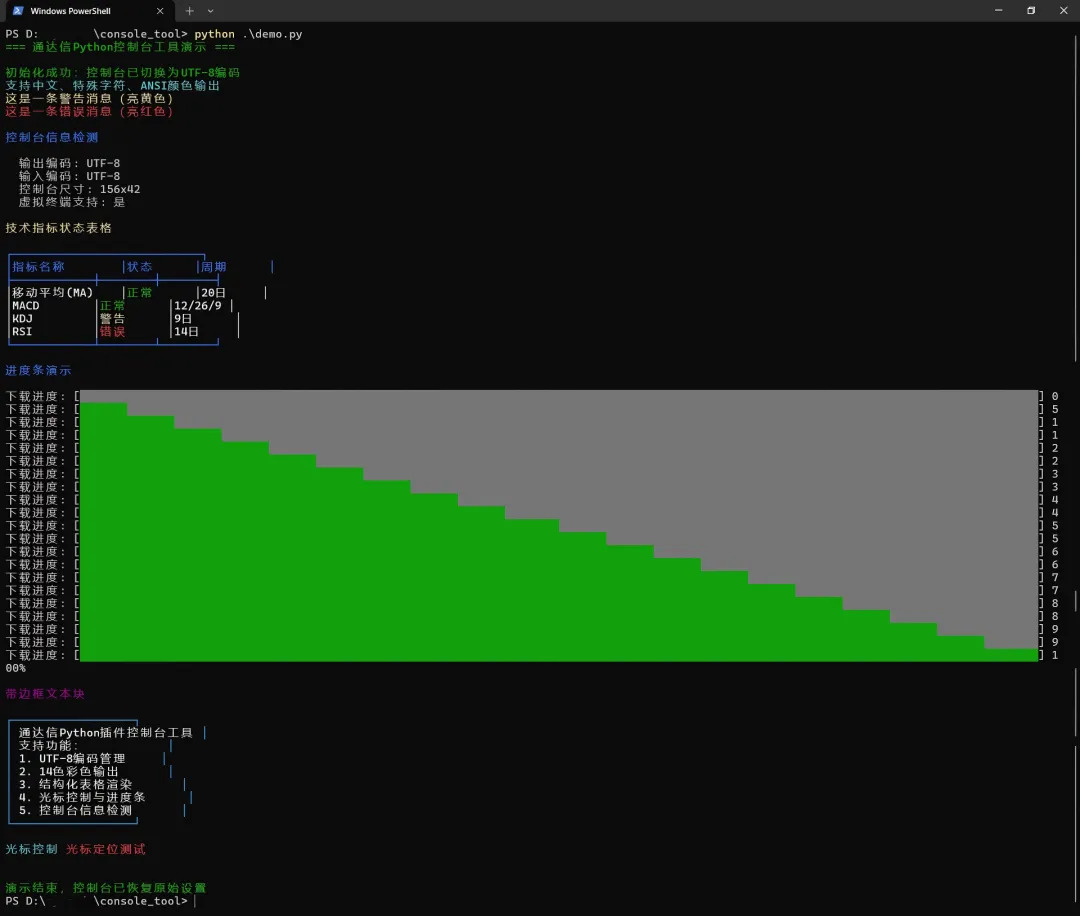
python demo.py

效果如下:

2. 验证要点

  • 中文/特殊字符无乱码(UTF-8生效);
  • 不同颜色的消息、表格单元格着色正确;
  • 进度条动态刷新无闪烁;
  • 边框文本、光标控制功能正常;
  • 程序退出后控制台编码/样式恢复正常。

五、后续待扩展

  1. 异常处理增强:为所有API调用添加更精细的错误捕获;
  2. 样式扩展:增加背景色、加粗/下划线等复合样式支持;
  3. 异步输出:适配多线程/异步场景的线程安全输出;
  4. 配置化:支持通过配置文件定义默认颜色、表格样式;
  5. 日志集成:对接Python标准logging模块,实现彩色日志输出。

六、核心知识点总结

  1. Windows API调用:通过ctypes操作控制台句柄、代码页、终端模式;
  2. ANSI转义序列:掌握颜色、样式、光标控制的核心转义码格式;
  3. UTF-8编码管理:解决Windows控制台中文乱码的核心方案;
  4. 结构化输出:通过字符串格式化实现规整的表格/边框渲染;
  5. 资源管理:初始化-使用-恢复的生命周期管理模式,避免环境污染。

本文实现的工具类可直接集成到其他软件,如自动化脚本、命令行工具等场景,完全适配Windows 10+系统,具备专业级的控制台交互能力。

作者简介:码上工坊,探索用编程为己赋能,定期分享编程知识和项目实战经验。持续学习、适应变化、记录点滴、复盘反思、成长进步。

重要提示:本文主要是记录自己的学习与实践过程,所提内容或者观点仅代表个人意见,只是我以为的,不代表完全正确,欢迎交流讨论。

最新文章

随机文章

基本 文件 流程 错误 SQL 调试
  1. 请求信息 : 2026-02-28 12:40:51 HTTP/2.0 GET : https://f.mffb.com.cn/a/476435.html
  2. 运行时间 : 0.089199s [ 吞吐率:11.21req/s ] 内存消耗:4,433.59kb 文件加载:140
  3. 缓存信息 : 0 reads,0 writes
  4. 会话信息 : SESSION_ID=d5e92b2d4af846de63ab5d96d01cbc05
  1. /yingpanguazai/ssd/ssd1/www/f.mffb.com.cn/public/index.php ( 0.79 KB )
  2. /yingpanguazai/ssd/ssd1/www/f.mffb.com.cn/vendor/autoload.php ( 0.17 KB )
  3. /yingpanguazai/ssd/ssd1/www/f.mffb.com.cn/vendor/composer/autoload_real.php ( 2.49 KB )
  4. /yingpanguazai/ssd/ssd1/www/f.mffb.com.cn/vendor/composer/platform_check.php ( 0.90 KB )
  5. /yingpanguazai/ssd/ssd1/www/f.mffb.com.cn/vendor/composer/ClassLoader.php ( 14.03 KB )
  6. /yingpanguazai/ssd/ssd1/www/f.mffb.com.cn/vendor/composer/autoload_static.php ( 4.90 KB )
  7. /yingpanguazai/ssd/ssd1/www/f.mffb.com.cn/vendor/topthink/think-helper/src/helper.php ( 8.34 KB )
  8. /yingpanguazai/ssd/ssd1/www/f.mffb.com.cn/vendor/topthink/think-validate/src/helper.php ( 2.19 KB )
  9. /yingpanguazai/ssd/ssd1/www/f.mffb.com.cn/vendor/topthink/think-orm/src/helper.php ( 1.47 KB )
  10. /yingpanguazai/ssd/ssd1/www/f.mffb.com.cn/vendor/topthink/think-orm/stubs/load_stubs.php ( 0.16 KB )
  11. /yingpanguazai/ssd/ssd1/www/f.mffb.com.cn/vendor/topthink/framework/src/think/Exception.php ( 1.69 KB )
  12. /yingpanguazai/ssd/ssd1/www/f.mffb.com.cn/vendor/topthink/think-container/src/Facade.php ( 2.71 KB )
  13. /yingpanguazai/ssd/ssd1/www/f.mffb.com.cn/vendor/symfony/deprecation-contracts/function.php ( 0.99 KB )
  14. /yingpanguazai/ssd/ssd1/www/f.mffb.com.cn/vendor/symfony/polyfill-mbstring/bootstrap.php ( 8.26 KB )
  15. /yingpanguazai/ssd/ssd1/www/f.mffb.com.cn/vendor/symfony/polyfill-mbstring/bootstrap80.php ( 9.78 KB )
  16. /yingpanguazai/ssd/ssd1/www/f.mffb.com.cn/vendor/symfony/var-dumper/Resources/functions/dump.php ( 1.49 KB )
  17. /yingpanguazai/ssd/ssd1/www/f.mffb.com.cn/vendor/topthink/think-dumper/src/helper.php ( 0.18 KB )
  18. /yingpanguazai/ssd/ssd1/www/f.mffb.com.cn/vendor/symfony/var-dumper/VarDumper.php ( 4.30 KB )
  19. /yingpanguazai/ssd/ssd1/www/f.mffb.com.cn/vendor/topthink/framework/src/think/App.php ( 15.30 KB )
  20. /yingpanguazai/ssd/ssd1/www/f.mffb.com.cn/vendor/topthink/think-container/src/Container.php ( 15.76 KB )
  21. /yingpanguazai/ssd/ssd1/www/f.mffb.com.cn/vendor/psr/container/src/ContainerInterface.php ( 1.02 KB )
  22. /yingpanguazai/ssd/ssd1/www/f.mffb.com.cn/app/provider.php ( 0.19 KB )
  23. /yingpanguazai/ssd/ssd1/www/f.mffb.com.cn/vendor/topthink/framework/src/think/Http.php ( 6.04 KB )
  24. /yingpanguazai/ssd/ssd1/www/f.mffb.com.cn/vendor/topthink/think-helper/src/helper/Str.php ( 7.29 KB )
  25. /yingpanguazai/ssd/ssd1/www/f.mffb.com.cn/vendor/topthink/framework/src/think/Env.php ( 4.68 KB )
  26. /yingpanguazai/ssd/ssd1/www/f.mffb.com.cn/app/common.php ( 0.03 KB )
  27. /yingpanguazai/ssd/ssd1/www/f.mffb.com.cn/vendor/topthink/framework/src/helper.php ( 18.78 KB )
  28. /yingpanguazai/ssd/ssd1/www/f.mffb.com.cn/vendor/topthink/framework/src/think/Config.php ( 5.54 KB )
  29. /yingpanguazai/ssd/ssd1/www/f.mffb.com.cn/config/app.php ( 0.95 KB )
  30. /yingpanguazai/ssd/ssd1/www/f.mffb.com.cn/config/cache.php ( 0.78 KB )
  31. /yingpanguazai/ssd/ssd1/www/f.mffb.com.cn/config/console.php ( 0.23 KB )
  32. /yingpanguazai/ssd/ssd1/www/f.mffb.com.cn/config/cookie.php ( 0.56 KB )
  33. /yingpanguazai/ssd/ssd1/www/f.mffb.com.cn/config/database.php ( 2.48 KB )
  34. /yingpanguazai/ssd/ssd1/www/f.mffb.com.cn/vendor/topthink/framework/src/think/facade/Env.php ( 1.67 KB )
  35. /yingpanguazai/ssd/ssd1/www/f.mffb.com.cn/config/filesystem.php ( 0.61 KB )
  36. /yingpanguazai/ssd/ssd1/www/f.mffb.com.cn/config/lang.php ( 0.91 KB )
  37. /yingpanguazai/ssd/ssd1/www/f.mffb.com.cn/config/log.php ( 1.35 KB )
  38. /yingpanguazai/ssd/ssd1/www/f.mffb.com.cn/config/middleware.php ( 0.19 KB )
  39. /yingpanguazai/ssd/ssd1/www/f.mffb.com.cn/config/route.php ( 1.89 KB )
  40. /yingpanguazai/ssd/ssd1/www/f.mffb.com.cn/config/session.php ( 0.57 KB )
  41. /yingpanguazai/ssd/ssd1/www/f.mffb.com.cn/config/trace.php ( 0.34 KB )
  42. /yingpanguazai/ssd/ssd1/www/f.mffb.com.cn/config/view.php ( 0.82 KB )
  43. /yingpanguazai/ssd/ssd1/www/f.mffb.com.cn/app/event.php ( 0.25 KB )
  44. /yingpanguazai/ssd/ssd1/www/f.mffb.com.cn/vendor/topthink/framework/src/think/Event.php ( 7.67 KB )
  45. /yingpanguazai/ssd/ssd1/www/f.mffb.com.cn/app/service.php ( 0.13 KB )
  46. /yingpanguazai/ssd/ssd1/www/f.mffb.com.cn/app/AppService.php ( 0.26 KB )
  47. /yingpanguazai/ssd/ssd1/www/f.mffb.com.cn/vendor/topthink/framework/src/think/Service.php ( 1.64 KB )
  48. /yingpanguazai/ssd/ssd1/www/f.mffb.com.cn/vendor/topthink/framework/src/think/Lang.php ( 7.35 KB )
  49. /yingpanguazai/ssd/ssd1/www/f.mffb.com.cn/vendor/topthink/framework/src/lang/zh-cn.php ( 13.70 KB )
  50. /yingpanguazai/ssd/ssd1/www/f.mffb.com.cn/vendor/topthink/framework/src/think/initializer/Error.php ( 3.31 KB )
  51. /yingpanguazai/ssd/ssd1/www/f.mffb.com.cn/vendor/topthink/framework/src/think/initializer/RegisterService.php ( 1.33 KB )
  52. /yingpanguazai/ssd/ssd1/www/f.mffb.com.cn/vendor/services.php ( 0.14 KB )
  53. /yingpanguazai/ssd/ssd1/www/f.mffb.com.cn/vendor/topthink/framework/src/think/service/PaginatorService.php ( 1.52 KB )
  54. /yingpanguazai/ssd/ssd1/www/f.mffb.com.cn/vendor/topthink/framework/src/think/service/ValidateService.php ( 0.99 KB )
  55. /yingpanguazai/ssd/ssd1/www/f.mffb.com.cn/vendor/topthink/framework/src/think/service/ModelService.php ( 2.04 KB )
  56. /yingpanguazai/ssd/ssd1/www/f.mffb.com.cn/vendor/topthink/think-trace/src/Service.php ( 0.77 KB )
  57. /yingpanguazai/ssd/ssd1/www/f.mffb.com.cn/vendor/topthink/framework/src/think/Middleware.php ( 6.72 KB )
  58. /yingpanguazai/ssd/ssd1/www/f.mffb.com.cn/vendor/topthink/framework/src/think/initializer/BootService.php ( 0.77 KB )
  59. /yingpanguazai/ssd/ssd1/www/f.mffb.com.cn/vendor/topthink/think-orm/src/Paginator.php ( 11.86 KB )
  60. /yingpanguazai/ssd/ssd1/www/f.mffb.com.cn/vendor/topthink/think-validate/src/Validate.php ( 63.20 KB )
  61. /yingpanguazai/ssd/ssd1/www/f.mffb.com.cn/vendor/topthink/think-orm/src/Model.php ( 23.55 KB )
  62. /yingpanguazai/ssd/ssd1/www/f.mffb.com.cn/vendor/topthink/think-orm/src/model/concern/Attribute.php ( 21.05 KB )
  63. /yingpanguazai/ssd/ssd1/www/f.mffb.com.cn/vendor/topthink/think-orm/src/model/concern/AutoWriteData.php ( 4.21 KB )
  64. /yingpanguazai/ssd/ssd1/www/f.mffb.com.cn/vendor/topthink/think-orm/src/model/concern/Conversion.php ( 6.44 KB )
  65. /yingpanguazai/ssd/ssd1/www/f.mffb.com.cn/vendor/topthink/think-orm/src/model/concern/DbConnect.php ( 5.16 KB )
  66. /yingpanguazai/ssd/ssd1/www/f.mffb.com.cn/vendor/topthink/think-orm/src/model/concern/ModelEvent.php ( 2.33 KB )
  67. /yingpanguazai/ssd/ssd1/www/f.mffb.com.cn/vendor/topthink/think-orm/src/model/concern/RelationShip.php ( 28.29 KB )
  68. /yingpanguazai/ssd/ssd1/www/f.mffb.com.cn/vendor/topthink/think-helper/src/contract/Arrayable.php ( 0.09 KB )
  69. /yingpanguazai/ssd/ssd1/www/f.mffb.com.cn/vendor/topthink/think-helper/src/contract/Jsonable.php ( 0.13 KB )
  70. /yingpanguazai/ssd/ssd1/www/f.mffb.com.cn/vendor/topthink/think-orm/src/model/contract/Modelable.php ( 0.09 KB )
  71. /yingpanguazai/ssd/ssd1/www/f.mffb.com.cn/vendor/topthink/framework/src/think/Db.php ( 2.88 KB )
  72. /yingpanguazai/ssd/ssd1/www/f.mffb.com.cn/vendor/topthink/think-orm/src/DbManager.php ( 8.52 KB )
  73. /yingpanguazai/ssd/ssd1/www/f.mffb.com.cn/vendor/topthink/framework/src/think/Log.php ( 6.28 KB )
  74. /yingpanguazai/ssd/ssd1/www/f.mffb.com.cn/vendor/topthink/framework/src/think/Manager.php ( 3.92 KB )
  75. /yingpanguazai/ssd/ssd1/www/f.mffb.com.cn/vendor/psr/log/src/LoggerTrait.php ( 2.69 KB )
  76. /yingpanguazai/ssd/ssd1/www/f.mffb.com.cn/vendor/psr/log/src/LoggerInterface.php ( 2.71 KB )
  77. /yingpanguazai/ssd/ssd1/www/f.mffb.com.cn/vendor/topthink/framework/src/think/Cache.php ( 4.92 KB )
  78. /yingpanguazai/ssd/ssd1/www/f.mffb.com.cn/vendor/psr/simple-cache/src/CacheInterface.php ( 4.71 KB )
  79. /yingpanguazai/ssd/ssd1/www/f.mffb.com.cn/vendor/topthink/think-helper/src/helper/Arr.php ( 16.63 KB )
  80. /yingpanguazai/ssd/ssd1/www/f.mffb.com.cn/vendor/topthink/framework/src/think/cache/driver/File.php ( 7.84 KB )
  81. /yingpanguazai/ssd/ssd1/www/f.mffb.com.cn/vendor/topthink/framework/src/think/cache/Driver.php ( 9.03 KB )
  82. /yingpanguazai/ssd/ssd1/www/f.mffb.com.cn/vendor/topthink/framework/src/think/contract/CacheHandlerInterface.php ( 1.99 KB )
  83. /yingpanguazai/ssd/ssd1/www/f.mffb.com.cn/app/Request.php ( 0.09 KB )
  84. /yingpanguazai/ssd/ssd1/www/f.mffb.com.cn/vendor/topthink/framework/src/think/Request.php ( 55.78 KB )
  85. /yingpanguazai/ssd/ssd1/www/f.mffb.com.cn/app/middleware.php ( 0.25 KB )
  86. /yingpanguazai/ssd/ssd1/www/f.mffb.com.cn/vendor/topthink/framework/src/think/Pipeline.php ( 2.61 KB )
  87. /yingpanguazai/ssd/ssd1/www/f.mffb.com.cn/vendor/topthink/think-trace/src/TraceDebug.php ( 3.40 KB )
  88. /yingpanguazai/ssd/ssd1/www/f.mffb.com.cn/vendor/topthink/framework/src/think/middleware/SessionInit.php ( 1.94 KB )
  89. /yingpanguazai/ssd/ssd1/www/f.mffb.com.cn/vendor/topthink/framework/src/think/Session.php ( 1.80 KB )
  90. /yingpanguazai/ssd/ssd1/www/f.mffb.com.cn/vendor/topthink/framework/src/think/session/driver/File.php ( 6.27 KB )
  91. /yingpanguazai/ssd/ssd1/www/f.mffb.com.cn/vendor/topthink/framework/src/think/contract/SessionHandlerInterface.php ( 0.87 KB )
  92. /yingpanguazai/ssd/ssd1/www/f.mffb.com.cn/vendor/topthink/framework/src/think/session/Store.php ( 7.12 KB )
  93. /yingpanguazai/ssd/ssd1/www/f.mffb.com.cn/vendor/topthink/framework/src/think/Route.php ( 23.73 KB )
  94. /yingpanguazai/ssd/ssd1/www/f.mffb.com.cn/vendor/topthink/framework/src/think/route/RuleName.php ( 5.75 KB )
  95. /yingpanguazai/ssd/ssd1/www/f.mffb.com.cn/vendor/topthink/framework/src/think/route/Domain.php ( 2.53 KB )
  96. /yingpanguazai/ssd/ssd1/www/f.mffb.com.cn/vendor/topthink/framework/src/think/route/RuleGroup.php ( 22.43 KB )
  97. /yingpanguazai/ssd/ssd1/www/f.mffb.com.cn/vendor/topthink/framework/src/think/route/Rule.php ( 26.95 KB )
  98. /yingpanguazai/ssd/ssd1/www/f.mffb.com.cn/vendor/topthink/framework/src/think/route/RuleItem.php ( 9.78 KB )
  99. /yingpanguazai/ssd/ssd1/www/f.mffb.com.cn/route/app.php ( 1.72 KB )
  100. /yingpanguazai/ssd/ssd1/www/f.mffb.com.cn/vendor/topthink/framework/src/think/facade/Route.php ( 4.70 KB )
  101. /yingpanguazai/ssd/ssd1/www/f.mffb.com.cn/vendor/topthink/framework/src/think/route/dispatch/Controller.php ( 4.74 KB )
  102. /yingpanguazai/ssd/ssd1/www/f.mffb.com.cn/vendor/topthink/framework/src/think/route/Dispatch.php ( 10.44 KB )
  103. /yingpanguazai/ssd/ssd1/www/f.mffb.com.cn/app/controller/Index.php ( 4.81 KB )
  104. /yingpanguazai/ssd/ssd1/www/f.mffb.com.cn/app/BaseController.php ( 2.05 KB )
  105. /yingpanguazai/ssd/ssd1/www/f.mffb.com.cn/vendor/topthink/think-orm/src/facade/Db.php ( 0.93 KB )
  106. /yingpanguazai/ssd/ssd1/www/f.mffb.com.cn/vendor/topthink/think-orm/src/db/connector/Mysql.php ( 5.44 KB )
  107. /yingpanguazai/ssd/ssd1/www/f.mffb.com.cn/vendor/topthink/think-orm/src/db/PDOConnection.php ( 52.47 KB )
  108. /yingpanguazai/ssd/ssd1/www/f.mffb.com.cn/vendor/topthink/think-orm/src/db/Connection.php ( 8.39 KB )
  109. /yingpanguazai/ssd/ssd1/www/f.mffb.com.cn/vendor/topthink/think-orm/src/db/ConnectionInterface.php ( 4.57 KB )
  110. /yingpanguazai/ssd/ssd1/www/f.mffb.com.cn/vendor/topthink/think-orm/src/db/builder/Mysql.php ( 16.58 KB )
  111. /yingpanguazai/ssd/ssd1/www/f.mffb.com.cn/vendor/topthink/think-orm/src/db/Builder.php ( 24.06 KB )
  112. /yingpanguazai/ssd/ssd1/www/f.mffb.com.cn/vendor/topthink/think-orm/src/db/BaseBuilder.php ( 27.50 KB )
  113. /yingpanguazai/ssd/ssd1/www/f.mffb.com.cn/vendor/topthink/think-orm/src/db/Query.php ( 15.71 KB )
  114. /yingpanguazai/ssd/ssd1/www/f.mffb.com.cn/vendor/topthink/think-orm/src/db/BaseQuery.php ( 45.13 KB )
  115. /yingpanguazai/ssd/ssd1/www/f.mffb.com.cn/vendor/topthink/think-orm/src/db/concern/TimeFieldQuery.php ( 7.43 KB )
  116. /yingpanguazai/ssd/ssd1/www/f.mffb.com.cn/vendor/topthink/think-orm/src/db/concern/AggregateQuery.php ( 3.26 KB )
  117. /yingpanguazai/ssd/ssd1/www/f.mffb.com.cn/vendor/topthink/think-orm/src/db/concern/ModelRelationQuery.php ( 20.07 KB )
  118. /yingpanguazai/ssd/ssd1/www/f.mffb.com.cn/vendor/topthink/think-orm/src/db/concern/ParamsBind.php ( 3.66 KB )
  119. /yingpanguazai/ssd/ssd1/www/f.mffb.com.cn/vendor/topthink/think-orm/src/db/concern/ResultOperation.php ( 7.01 KB )
  120. /yingpanguazai/ssd/ssd1/www/f.mffb.com.cn/vendor/topthink/think-orm/src/db/concern/WhereQuery.php ( 19.37 KB )
  121. /yingpanguazai/ssd/ssd1/www/f.mffb.com.cn/vendor/topthink/think-orm/src/db/concern/JoinAndViewQuery.php ( 7.11 KB )
  122. /yingpanguazai/ssd/ssd1/www/f.mffb.com.cn/vendor/topthink/think-orm/src/db/concern/TableFieldInfo.php ( 2.63 KB )
  123. /yingpanguazai/ssd/ssd1/www/f.mffb.com.cn/vendor/topthink/think-orm/src/db/concern/Transaction.php ( 2.77 KB )
  124. /yingpanguazai/ssd/ssd1/www/f.mffb.com.cn/vendor/topthink/framework/src/think/log/driver/File.php ( 5.96 KB )
  125. /yingpanguazai/ssd/ssd1/www/f.mffb.com.cn/vendor/topthink/framework/src/think/contract/LogHandlerInterface.php ( 0.86 KB )
  126. /yingpanguazai/ssd/ssd1/www/f.mffb.com.cn/vendor/topthink/framework/src/think/log/Channel.php ( 3.89 KB )
  127. /yingpanguazai/ssd/ssd1/www/f.mffb.com.cn/vendor/topthink/framework/src/think/event/LogRecord.php ( 1.02 KB )
  128. /yingpanguazai/ssd/ssd1/www/f.mffb.com.cn/vendor/topthink/think-helper/src/Collection.php ( 16.47 KB )
  129. /yingpanguazai/ssd/ssd1/www/f.mffb.com.cn/vendor/topthink/framework/src/think/facade/View.php ( 1.70 KB )
  130. /yingpanguazai/ssd/ssd1/www/f.mffb.com.cn/vendor/topthink/framework/src/think/View.php ( 4.39 KB )
  131. /yingpanguazai/ssd/ssd1/www/f.mffb.com.cn/vendor/topthink/framework/src/think/Response.php ( 8.81 KB )
  132. /yingpanguazai/ssd/ssd1/www/f.mffb.com.cn/vendor/topthink/framework/src/think/response/View.php ( 3.29 KB )
  133. /yingpanguazai/ssd/ssd1/www/f.mffb.com.cn/vendor/topthink/framework/src/think/Cookie.php ( 6.06 KB )
  134. /yingpanguazai/ssd/ssd1/www/f.mffb.com.cn/vendor/topthink/think-view/src/Think.php ( 8.38 KB )
  135. /yingpanguazai/ssd/ssd1/www/f.mffb.com.cn/vendor/topthink/framework/src/think/contract/TemplateHandlerInterface.php ( 1.60 KB )
  136. /yingpanguazai/ssd/ssd1/www/f.mffb.com.cn/vendor/topthink/think-template/src/Template.php ( 46.61 KB )
  137. /yingpanguazai/ssd/ssd1/www/f.mffb.com.cn/vendor/topthink/think-template/src/template/driver/File.php ( 2.41 KB )
  138. /yingpanguazai/ssd/ssd1/www/f.mffb.com.cn/vendor/topthink/think-template/src/template/contract/DriverInterface.php ( 0.86 KB )
  139. /yingpanguazai/ssd/ssd1/www/f.mffb.com.cn/runtime/temp/067d451b9a0c665040f3f1bdd3293d68.php ( 11.98 KB )
  140. /yingpanguazai/ssd/ssd1/www/f.mffb.com.cn/vendor/topthink/think-trace/src/Html.php ( 4.42 KB )
  1. CONNECT:[ UseTime:0.000373s ] mysql:host=127.0.0.1;port=3306;dbname=f_mffb;charset=utf8mb4
  2. SHOW FULL COLUMNS FROM `fenlei` [ RunTime:0.000665s ]
  3. SELECT * FROM `fenlei` WHERE `fid` = 0 [ RunTime:0.000328s ]
  4. SELECT * FROM `fenlei` WHERE `fid` = 63 [ RunTime:0.000264s ]
  5. SHOW FULL COLUMNS FROM `set` [ RunTime:0.000513s ]
  6. SELECT * FROM `set` [ RunTime:0.000228s ]
  7. SHOW FULL COLUMNS FROM `article` [ RunTime:0.000587s ]
  8. SELECT * FROM `article` WHERE `id` = 476435 LIMIT 1 [ RunTime:0.002683s ]
  9. UPDATE `article` SET `lasttime` = 1772253651 WHERE `id` = 476435 [ RunTime:0.004421s ]
  10. SELECT * FROM `fenlei` WHERE `id` = 66 LIMIT 1 [ RunTime:0.000244s ]
  11. SELECT * FROM `article` WHERE `id` < 476435 ORDER BY `id` DESC LIMIT 1 [ RunTime:0.000425s ]
  12. SELECT * FROM `article` WHERE `id` > 476435 ORDER BY `id` ASC LIMIT 1 [ RunTime:0.001144s ]
  13. SELECT * FROM `article` WHERE `id` < 476435 ORDER BY `id` DESC LIMIT 10 [ RunTime:0.009909s ]
  14. SELECT * FROM `article` WHERE `id` < 476435 ORDER BY `id` DESC LIMIT 10,10 [ RunTime:0.001511s ]
  15. SELECT * FROM `article` WHERE `id` < 476435 ORDER BY `id` DESC LIMIT 20,10 [ RunTime:0.000820s ]
0.090817s
