太棒了!欢迎来到 【跟着AI学Python】第24天!🎉今天我们将深入学习 JSON(JavaScript Object Notation) —— 当前最主流的轻量级数据交换格式,广泛用于 Web API、配置文件、数据库存储等场景!
💡 Python 内置 json 模块,让你轻松在 字符串 ↔ Python 对象 之间转换,并读写 JSON 文件!
🎯 第24天目标:
✅ 掌握 json.loads() 和 json.dumps()✅ 学会读写 JSON 文件:json.load() / json.dump()✅ 理解 JSON 与 Python 数据类型的对应关系✅ 实战:保存和加载用户配置
📘 一、JSON 是什么?
- 纯文本格式,人类可读
- 支持:对象(字典)、数组(列表)、字符串、数字、布尔值、null
{ "name": "Alice", "age": 25, "is_student": false, "courses": ["Math", "Physics"], "address": null}
📘 二、核心函数速查表
| | |
|---|
| 字符串 → Python 对象 | json.loads(str) | |
| Python 对象 → 字符串 | json.dumps(obj) | |
| 文件 → Python 对象 | json.load(file) | |
| Python 对象 → 文件 | json.dump(obj, file) | |
🔑 记忆技巧:
- 带
s 的处理 字符串(loads, dumps) - 不带
s 的处理 文件对象(load, dump)
📘 三、json.loads():解析 JSON 字符串
import json# JSON 字符串(注意:必须用双引号!)json_str = '''{ "name": "张三", "age": 20, "scores": {"math": 90, "english": 85}}'''# 转为 Python 字典data = json.loads(json_str)print(data["name"]) # 张三print(data["scores"]["math"]) # 90print(type(data)) # <class 'dict'>
⚠️ 常见错误:
- 使用单引号
'{"name": "Alice"}' → 合法(Python 字符串) - 但 JSON 内部必须双引号,否则
json.loads() 报错!
📘 四、json.dumps():生成 JSON 字符串
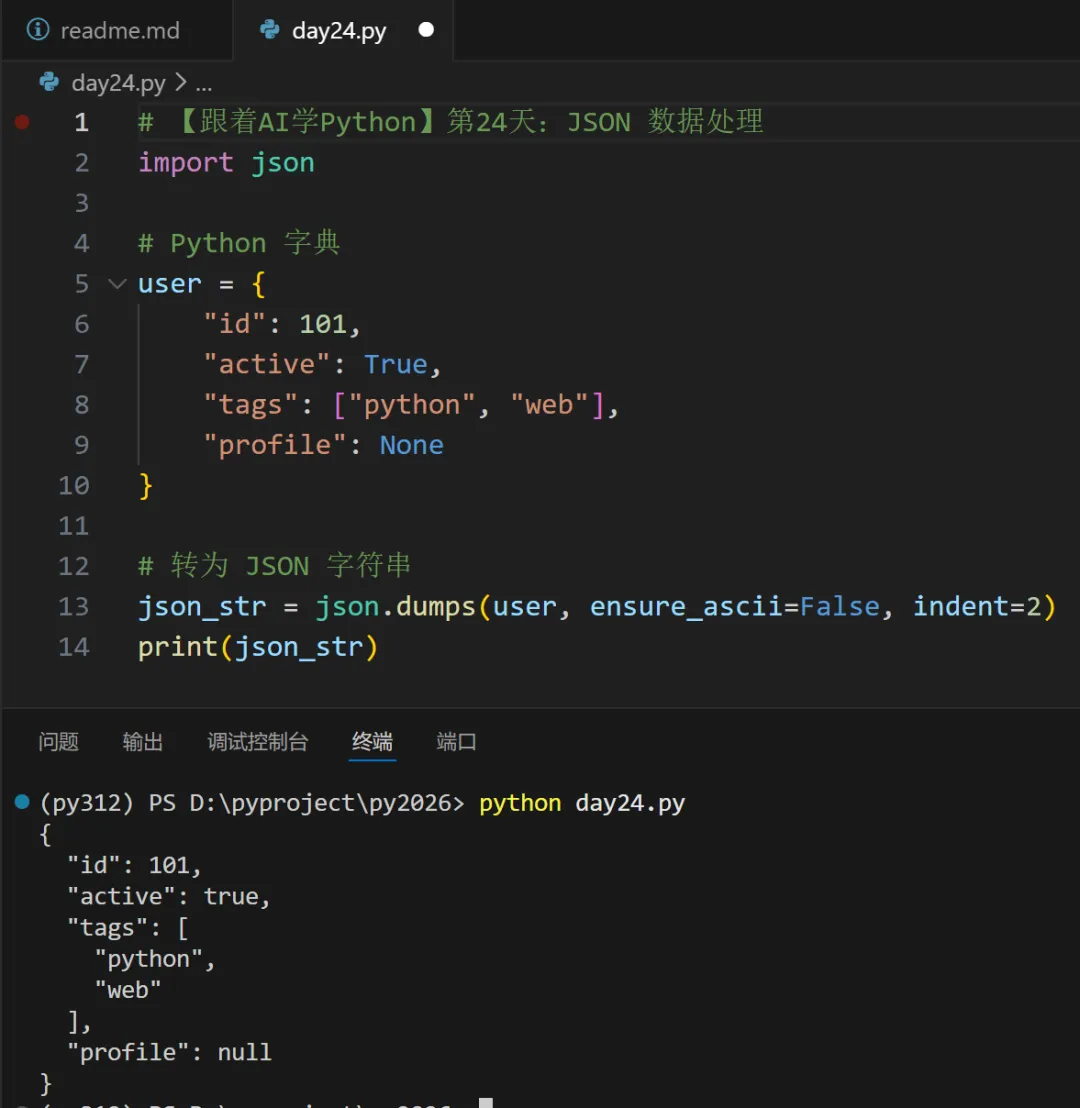
🔹 关键参数:
ensure_ascii=False :允许中文直接显示(默认会转为\u4e2d)indent=2 :美化输出,缩进 2 空格(适合调试)sort_keys=True :按键排序(可选)
📘 五、读写 JSON 文件
🔹 写入 JSON 文件
🔹 读取 JSON 文件
✅ 最佳实践:
- 始终指定
encoding="utf-8" 避免中文乱码
💻 综合实战:用户配置管理器
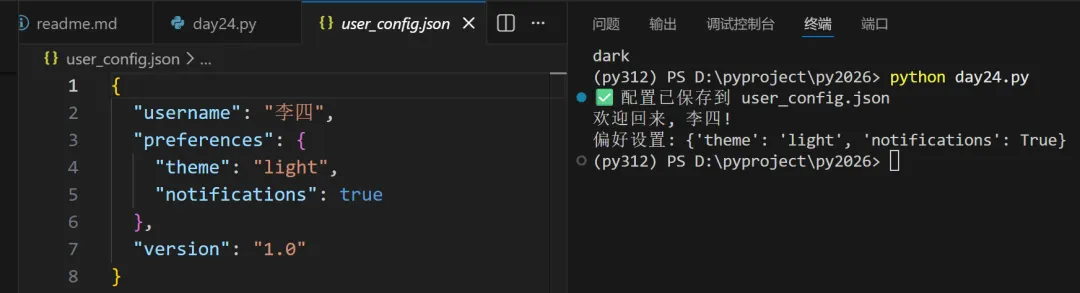
import jsonimport osCONFIG_FILE = "user_config.json"def save_config(username, preferences): """保存用户配置到 JSON 文件""" config = { "username": username, "preferences": preferences, "version": "1.0" } with open(CONFIG_FILE, "w", encoding="utf-8") as f: json.dump(config, f, ensure_ascii=False, indent=2) print(f"✅ 配置已保存到 {CONFIG_FILE}")def load_config(): """从 JSON 文件加载配置""" if not os.path.exists(CONFIG_FILE): print("📭 配置文件不存在") return None try: with open(CONFIG_FILE, "r", encoding="utf-8") as f: return json.load(f) except (json.JSONDecodeError, IOError) as e: print(f"❌ 读取配置失败: {e}") return None# 使用示例if __name__ == "__main__": # 保存配置 prefs = {"theme": "light", "notifications": True} save_config("李四", prefs) # 加载配置 config = load_config() if config: print(f"欢迎回来, {config['username']}!") print("偏好设置:", config["preferences"])
运行后生成 user_config.json:
🔄 JSON 与 Python 类型对照表
| |
|---|
| dict |
| list |
| str |
| int/float |
| True |
| False |
| None |
⚠️ 注意:
✅ 今日小任务
- 用
json.dumps()将 {"message": "你好,世界!"}转为 JSON 字符串(确保中文不乱码) - 创建
data.json 文件,写入一个包含姓名和年龄的字典,然后读取并打印年龄
💡 答案参考:
# 任务1import jsons = json.dumps({"message": "你好,世界!"}, ensure_ascii=False)print(s)# 任务2data = {"name": "王五", "age": 30}with open("data.json", "w") as f: json.dump(data, f)with open("data.json") as f: loaded = json.load(f) print(loaded["age"])
📝 小结:JSON 处理最佳实践
| |
|---|
| API 响应解析 | response.json() |
| 生成 JSON 字符串 | json.dumps(obj, ensure_ascii=False, indent=2) |
| 保存配置/数据 | |
| 错误处理 | |
✅ 记住:JSON 是“数据”,不是“代码” —— 它安全、通用、跨语言!
🎉 恭喜完成第24天!你已掌握 结构化数据存储与交换的核心技能,能轻松对接 Web API 和配置系统!
继续加油,你的数据处理能力越来越全面了!📊🐍
 10个月宝宝每天需要喝多少奶粉?