序列就像一列火车,有固定顺序的车厢,可以通过编号找到每一节
🎯 本章目标
学完本章,你会:
✅ 理解序列的共同特性
✅ 掌握序列的通用操作
✅ 理解序列的索引、切片、遍历
✅ 掌握序列的内置函数
✅ 理解序列之间的区别和转换
✅ 能在测试中灵活使用序列
🎪 什么是序列?
序列的定义:序列是Python中最基本的数据结构,它是一组有序的元素集合。
想象一下:
序列 = 一列火车 🚂
元素 = 车厢
索引 = 车厢编号
顺序 = 车厢排列顺序
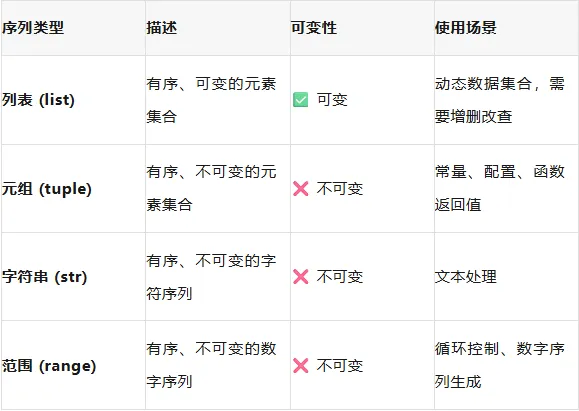
Python中的主要序列类型
序列的共同特性
# 1. 有序性 - 元素有固定顺序list_example = ["a", "b", "c"] # 顺序:a, b, ctuple_example = (1, 2, 3) # 顺序:1, 2, 3str_example = "abc" # 顺序:a, b, c# 2. 可通过索引访问print(list_example[0]) # aprint(tuple_example[1]) # 2print(str_example[2]) # c# 3. 支持切片操作print(list_example[0:2]) # ['a', 'b']print(tuple_example[1:]) # (2, 3)print(str_example[:2]) # 'ab'# 4. 有长度print(len(list_example)) # 3print(len(tuple_example)) # 3print(len(str_example)) # 3# 5. 可遍历for item in list_example: print(item)
🔢 序列索引:正向和反向
正向索引(从0开始)# 索引从0开始sequence = ["a", "b", "c", "d", "e"]# 正向索引print(sequence[0]) # a(第一个)print(sequence[1]) # b(第二个)print(sequence[2]) # c(第三个)print(sequence[3]) # d(第四个)print(sequence[4]) # e(第五个)# 注意:索引不能越界# print(sequence[5]) # IndexError: list index out of range反向索引(从-1开始)# 反向索引(从-1开始,倒数第一个)sequence = ["a", "b", "c", "d", "e"]# 反向索引print(sequence[-1]) # e(倒数第一个)print(sequence[-2]) # d(倒数第二个)print(sequence[-3]) # c(倒数第三个)print(sequence[-4]) # b(倒数第四个)print(sequence[-5]) # a(倒数第五个)# 注意:反向索引也不能越界# print(sequence[-6]) # IndexError: list index out of range
记忆技巧:
正向索引: 0 1 2 3 4 ↓ ↓ ↓ ↓ ↓序列: [a, b, c, d, e] ↑ ↑ ↑ ↑ ↑反向索引: -5 -4 -3 -2 -1
实战:获取测试结果:
# 测试结果列表test_results = ["pending", "running", "passed", "failed", "passed", "error"]# 获取第一个测试结果first_result = test_results[0] # "pending"# 获取最后一个测试结果last_result = test_results[-1] # "error"# 获取倒数第二个测试结果second_last = test_results[-2] # "passed"
✂️ 序列切片:获取子序列
切片基本语法
# 语法:sequence[start:stop:step]# start: 起始索引(包含)# stop: 结束索引(不包含)# step: 步长(默认为1)sequence = ["a", "b", "c", "d", "e", "f", "g", "h"]# 基本切片print(sequence[2:5]) # ['c', 'd', 'e'](索引2到4)print(sequence[:3]) # ['a', 'b', 'c'](从头到索引2)print(sequence[3:]) # ['d', 'e', 'f', 'g', 'h'](从索引3到最后)print(sequence[:]) # 整个序列的副本# 步长切片print(sequence[::2]) # ['a', 'c', 'e', 'g'](每隔一个)print(sequence[1::2]) # ['b', 'd', 'f', 'h'](从索引1开始,每隔一个)# 反向切片print(sequence[::-1]) # ['h', 'g', 'f', 'e', 'd', 'c', 'b', 'a'](反转)print(sequence[5:2:-1]) # ['f', 'e', 'd'](反向从5到3)
切片默认值
# 默认值# start默认:0 或 len(sequence)(当step为负数时)# stop默认:len(sequence) 或 -len(sequence)-1(当step为负数时)# step默认:1sequence = ["a", "b", "c", "d", "e"]# 等价写法print(sequence[:]) # 整个序列print(sequence[::]) # 整个序列print(sequence[0:len(sequence):1]) # 整个序列# 实战:分批处理测试用例all_tests = ["T1", "T2", "T3", "T4", "T5", "T6", "T7", "T8"]# 第一批:前4个测试batch1 = all_tests[:4] # ['T1', 'T2', 'T3', 'T4']# 第二批:中间4个测试batch2 = all_tests[2:6] # ['T3', 'T4', 'T5', 'T6']# 每隔一个测试alternate = all_tests[::2] # ['T1', 'T3', 'T5', 'T7']# 反向执行测试reverse_order = all_tests[::-1] # ['T8', 'T7', 'T6', 'T5', 'T4', 'T3', 'T2', 'T1']
🔁 序列遍历
基本遍历
# 遍历列表test_cases = ["登录测试", "注册测试", "支付测试"]for test in test_cases: print(f"执行测试: {test}")# 遍历元组status_codes = (200, 301, 400, 404, 500)for code in status_codes: print(f"状态码: {code}")# 遍历字符串text = "test"for char in text: print(f"字符: {char}")
使用enumerate()遍历
# enumerate()同时获取索引和值test_cases = ["登录测试", "注册测试", "支付测试"]# 基本用法for i, test in enumerate(test_cases): print(f"第{i+1}个测试: {test}")# 指定起始索引for i, test in enumerate(test_cases, 1): # 从1开始 print(f"{i}. {test}")# 实战:带编号的测试报告test_results = [ ("登录测试", "passed", 2.5), ("注册测试", "failed", 1.8), ("支付测试", "passed", 5.2)]print("测试报告:")for i, (test_name, status, duration) in enumerate(test_results, 1): icon = "✅" if status == "passed" else "❌" print(f"{i:2d}. {icon}{test_name:10} - {status:6} ({duration:5.2f}s)")
使用zip()遍历多个序列
# zip()同时遍历多个序列test_names = ["登录测试", "注册测试", "支付测试"]statuses = ["passed", "failed", "passed"]durations = [2.5, 1.8, 5.2]# 同时遍历三个列表for name, status, duration in zip(test_names, statuses, durations): print(f"{name}: {status} ({duration}s)")# zip()返回元组for item in zip(test_names, statuses, durations): print(item) # ('登录测试', 'passed', 2.5) ...# 不同长度的序列short_list = [1, 2, 3]long_list = ["a", "b", "c", "d", "e"]for a, b in zip(short_list, long_list): print(f"{a} - {b}") # 只遍历到短序列结束# 使用itertools.zip_longest遍历所有from itertools import zip_longestfor a, b in zip_longest(short_list, long_list, fillvalue="N/A"): print(f"{a} - {b}") # 遍历所有,用fillvalue填充
📊 序列通用操作
1. 长度和存在性检查
# len() - 获取长度test_cases = ["登录测试", "注册测试", "支付测试"]print(len(test_cases)) # 3# in - 检查元素是否存在has_login = "登录测试" in test_cases # Truehas_security = "安全测试" in test_cases # Falsenot_has_security = "安全测试" not in test_cases # True
2. 连接和重复
# + 运算符 - 连接序列list1 = [1, 2, 3]list2 = [4, 5, 6]combined_list = list1 + list2 # [1, 2, 3, 4, 5, 6]tuple1 = (1, 2)tuple2 = (3, 4)combined_tuple = tuple1 + tuple2 # (1, 2, 3, 4)str1 = "Hello"str2 = "World"combined_str = str1 + " " + str2 # "Hello World"# * 运算符 - 重复序列repeated_list = [1, 2] * 3 # [1, 2, 1, 2, 1, 2]repeated_tuple = (1, 2) * 2 # (1, 2, 1, 2)repeated_str = "ab" * 3 # "ababab"
3. 最大值、最小值、求和
# max() - 最大值numbers = [5, 2, 8, 1, 9]print(max(numbers)) # 9strings = ["apple", "banana", "cherry"]print(max(strings)) # "cherry"(按字母顺序)# min() - 最小值print(min(numbers)) # 1print(min(strings)) # "apple"# sum() - 求和print(sum(numbers)) # 25
# 实战:测试结果统计test_durations = [2.5, 1.8, 5.2, 0.5, 3.8]total_time = sum(test_durations) # 13.8avg_time = total_time / len(test_durations) # 2.76max_time = max(test_durations) # 5.2min_time = min(test_durations) # 0.5print(f"总时间: {total_time:.1f}s")print(f"平均时间: {avg_time:.1f}s")print(f"最长时间: {max_time:.1f}s")print(f"最短时间: {min_time:.1f}s")
4. 排序和反转
# sorted() - 返回排序后的新列表numbers = [5, 2, 8, 1, 9]sorted_numbers = sorted(numbers) # [1, 2, 5, 8, 9]sorted_desc = sorted(numbers, reverse=True) # [9, 8, 5, 2, 1]# 对字符串排序words = ["banana", "apple", "cherry", "date"]sorted_words = sorted(words) # ['apple', 'banana', 'cherry', 'date']# 对元组排序(返回列表)tuple_data = (5, 2, 8, 1, 9)sorted_from_tuple = sorted(tuple_data) # [1, 2, 5, 8, 9]# reversed() - 返回反转的迭代器numbers = [1, 2, 3, 4, 5]reversed_numbers = list(reversed(numbers)) # [5, 4, 3, 2, 1]# 实战:按优先级排序测试用例test_cases = [ ("TC001", "低", 1.5), ("TC002", "高", 2.3), ("TC003", "中", 0.8)]# 按优先级排序priority_order = {"高": 3, "中": 2, "低": 1}sorted_by_priority = sorted( test_cases, key=lambda x: priority_order[x[1]], reverse=True)# [('TC002', '高', 2.3), ('TC003', '中', 0.8), ('TC001', '低', 1.5)]# 按执行时间排序sorted_by_time = sorted(test_cases, key=lambda x: x[2])# [('TC003', '中', 0.8), ('TC001', '低', 1.5), ('TC002', '高', 2.3)]
🔄 序列转换
序列类型转换
# 列表 ↔ 元组my_list = [1, 2, 3]my_tuple = tuple(my_list) # (1, 2, 3)back_to_list = list(my_tuple) # [1, 2, 3]# 字符串 ↔ 列表/元组my_str = "hello"str_to_list = list(my_str) # ['h', 'e', 'l', 'l', 'o']str_to_tuple = tuple(my_str) # ('h', 'e', 'l', 'l', 'o')# 列表/元组 → 字符串list_to_str = "".join(["h", "e", "l", "l", "o"]) # "hello"tuple_to_str = "".join(("h", "e", "l", "l", "o")) # "hello"# 数字列表 → 字符串numbers = [1, 2, 3, 4, 5]numbers_str = "".join(str(n) for n in numbers) # "12345"numbers_str_comma = ",".join(str(n) for n in numbers) # "1,2,3,4,5"
range对象
# range()创建数字序列range1 = range(5) # 0, 1, 2, 3, 4range2 = range(1, 6) # 1, 2, 3, 4, 5range3 = range(1, 10, 2) # 1, 3, 5, 7, 9range4 = range(10, 0, -1) # 10, 9, 8, 7, 6, 5, 4, 3, 2, 1# 转换为列表list_from_range = list(range(5)) # [0, 1, 2, 3, 4]# 遍历rangefor i in range(5): print(f"执行第{i+1}次测试")# 遍历指定范围for i in range(1, 6): # 1到5 print(f"测试用例 {i}")# 反向遍历for i in range(5, 0, -1): # 5到1 print(f"倒计时: {i}")
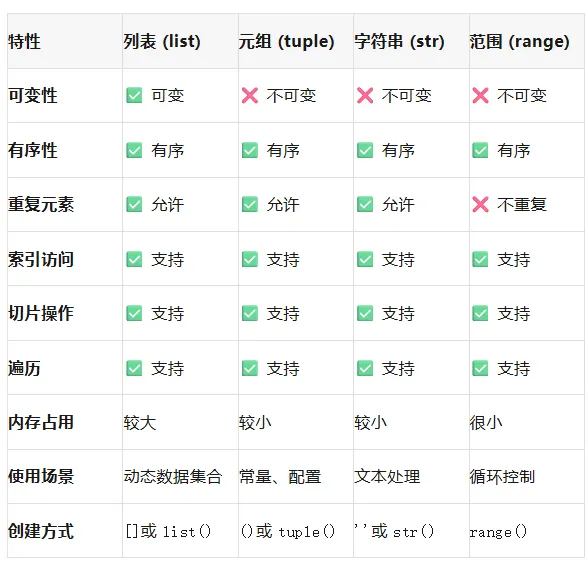
📊 序列类型对比总结
📋 本章检查清单
[ ] 理解序列是有序的元素集合
[ ] 掌握序列的索引访问(正向和反向)
[ ] 掌握序列的切片操作
[ ] 掌握序列的遍历方法
[ ] 掌握序列的通用操作(长度、连接、重复等)
[ ] 掌握序列的转换方法
[ ] 理解列表、元组、字符串的区别
[ ] 能在测试中灵活使用各种序列
[ ] 掌握range对象的用法
[ ] 能编写序列相关的测试代码
🎉 恭喜!序列掌握完成
现在你已经全面掌握了Python中的序列操作:
关键收获:
✅ 序列概念:有序元素的集合
✅ 索引切片:通过索引访问元素,通过切片获取子序列
✅ 序列操作:长度、连接、重复、遍历
✅ 序列函数:len()、max()、min()、sum()、sorted()
✅ 序列转换:不同类型序列之间的转换
✅ 实战应用:在测试中灵活使用序列
序列是Python编程的基础,掌握了序列操作,你就掌握了:
数据处理的基本能力
测试数据管理的方法
测试结果分析的技巧
测试用例调度的思路
下一章预告:语句结构
准备好了吗?让我们继续前进!🚀
记住:序列操作要多练习才能熟练掌握。尝试用不同的序列类型解决同一个问题,体会它们的差异和适用场景。
 10个月宝宝每天需要喝多少奶粉?