当前位置:首页>python>【小沐学Python】Python可视化从0到1:每种图表该怎么选、怎么画(11)

【小沐学Python】Python可视化从0到1:每种图表该怎么选、怎么画(11)

  • 2026-03-21 04:34:50
【小沐学Python】Python可视化从0到1:每种图表该怎么选、怎么画(11)

小沐:戈戈,最近老师让我们做数据分析展示,我对着电脑发了半天愁,不知道该用啥工具好。

戈戈:哈哈,这是个好问题!Python里图表库可多了去了,从简单的柱状图到炫酷的交互式图表都能搞定。

小沐:可是太多了,我都不知道该学哪个。每个都要学吗?感觉时间不够用啊。

戈戈:别贪多!我给你介绍最主流的5个库,学会它们应付学生作业和项目展示足够了。

小沐:太好了!戈戈你快给我讲讲,我拿小本本记下来~

在数据分析和可视化领域,Python凭借其丰富的图表库生态占据重要地位。无论是学术研究、商业报表还是个人项目,选择合适的可视化工具都能让数据"说话"。本文将详细介绍Python生态中最流行的五大图表库,从安装到实战,手把手教你快速上手。

一、Matplotlib——Python绘图界的"老前辈"

功能介绍

Matplotlib是Python最基础、最强大的二维绘图库,几乎所有其他可视化库都是基于它构建的。它提供了类似MATLAB的绘图接口,支持几乎所有类型的静态图表,从简单的折线图到复杂的三维曲面都不在话下。

安装方法

pip install matplotlib numpy

示例代码

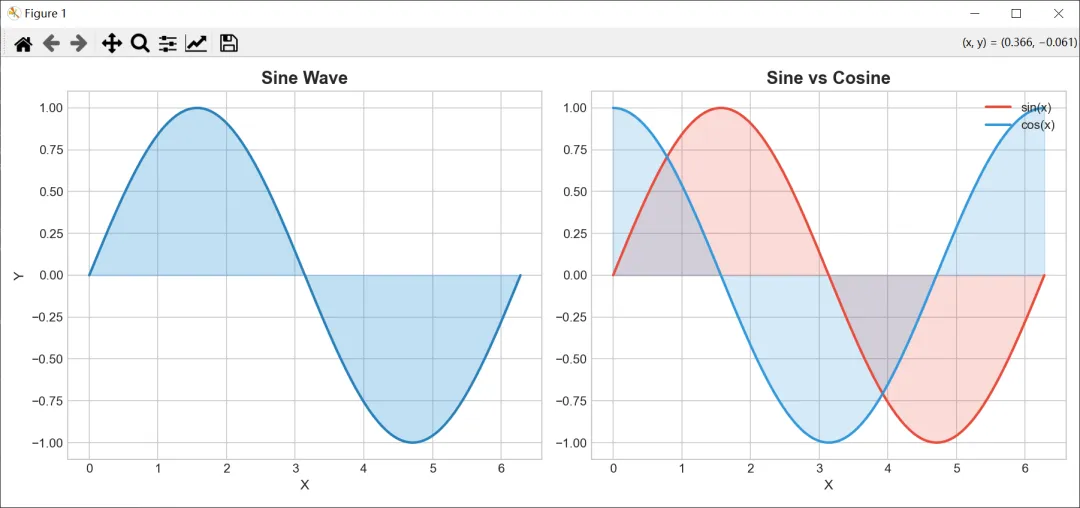
import matplotlib.pyplot as pltimport numpy as np# 设置样式plt.style.use('seaborn-v0_8-whitegrid')# 准备数据x = np.linspace(0, 2 * np.pi, 100)# 创建图形fig, axes = plt.subplots(1, 2, figsize=(12, 5))# 左图:渐变色填充曲线axes[0].fill_between(x, np.sin(x), alpha=0.3, color='#3498db')axes[0].plot(x, np.sin(x), color='#2980b9', linewidth=2)axes[0].set_title('Sine Wave', fontsize=14, fontweight='bold')axes[0].set_xlabel('X', fontsize=11)axes[0].set_ylabel('Y', fontsize=11)# 右图:双曲线对比axes[1].fill_between(x, np.sin(x), alpha=0.2, color='#e74c3c')axes[1].fill_between(x, np.cos(x), alpha=0.2, color='#3498db')axes[1].plot(x, np.sin(x), color='#e74c3c', linewidth=2, label='sin(x)')axes[1].plot(x, np.cos(x), color='#3498db', linewidth=2, label='cos(x)')axes[1].set_title('Sine vs Cosine', fontsize=14, fontweight='bold')axes[1].set_xlabel('X', fontsize=11)axes[1].legend(loc='upper right')plt.tight_layout()plt.savefig('matplotlib_demo.png', dpi=150, bbox_inches='tight')plt.show()print("图表已保存为 matplotlib_demo.png")

代码运行结果如下:
image

作为Python可视化的奠基之作,Matplotlib的优势在于高度灵活和可控性强。缺点是代码相对冗长,交互性较差。如果你需要快速出图,它仍然是首选工具。

二、Seaborn——统计数据可视化的"神助攻"

功能介绍

Seaborn构建在Matplotlib之上,专门为统计图表设计。它的默认配色和样式更加美观,特别适合数据探索和统计分析场景。内置的回归分析、分布图、热力图等功能让数据科学家爱不释手。

安装方法

pip install seaborn pandas

示例代码

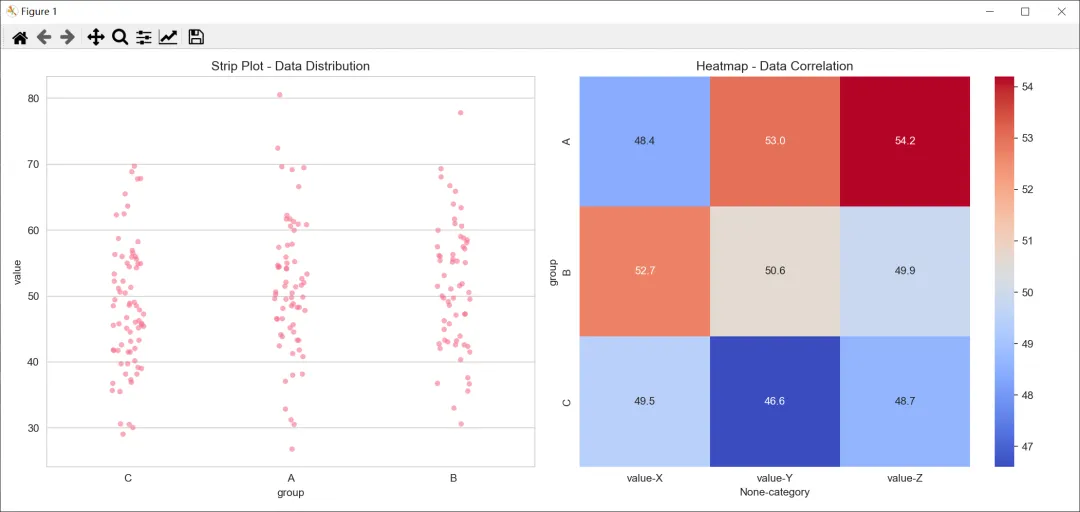
import seaborn as snsimport pandas as pdimport matplotlib.pyplot as pltimport numpy as np# 设置样式sns.set_style("whitegrid")sns.set_palette("husl")# 创建示例数据np.random.seed(42)data = pd.DataFrame({    'group': np.random.choice(['A', 'B', 'C'], 200),    'value': np.random.randn(200) * 10 + 50,    'category': np.random.choice(['X', 'Y', 'Z'], 200)})# 创建图表fig, axes = plt.subplots(1, 2, figsize=(14, 6))# 1. Strip Plotsns.stripplot(x='group', y='value', data=data, ax=axes[0], alpha=0.6)axes[0].set_title('Strip Plot - Data Distribution', fontsize=12)# 2. Heatmapcorrelation_data = data.groupby(['group', 'category']).mean().unstack()sns.heatmap(correlation_data, annot=True, fmt='.1f', cmap='coolwarm', ax=axes[1])axes[1].set_title('Heatmap - Data Correlation', fontsize=12)plt.tight_layout()plt.savefig('seaborn_demo.png', dpi=150, bbox_inches='tight')plt.show()print("统计图表已保存为 seaborn_demo.png")

代码运行结果如下:
image

Seaborn让统计图表变得简单美观,特别适合数据探索阶段使用。它的缺点是自定义程度不如Matplotlib,且依赖Matplotlib。

三、Plotly——交互式图表的"扛把子"

功能介绍

Plotly是新一代交互式可视化库,支持Python、R、JavaScript等多种语言。它生成的图表可以悬停查看数据、缩放、拖拽,甚至制作动画效果。Web端展示效果极佳,是数据仪表盘的理想选择。

安装方法

pip install plotly pandas

示例代码

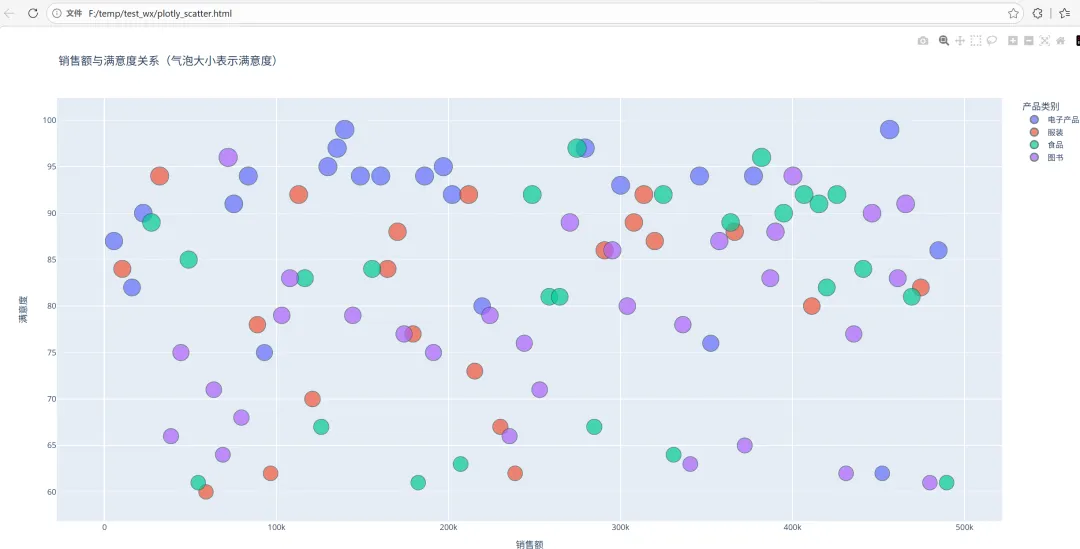
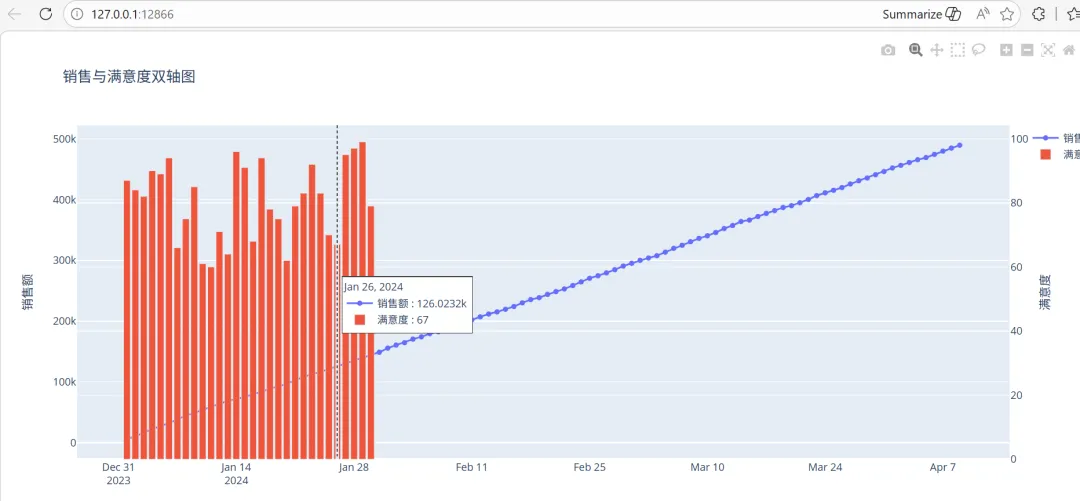
import plotly.express as pximport plotly.graph_objects as goimport pandas as pdimport numpy as np# 创建示例数据np.random.seed(42)df = pd.DataFrame({    '日期': pd.date_range('2024-01-01', periods=100),    '销售额': np.cumsum(np.random.randn(100) * 1000 + 5000),    '产品类别': np.random.choice(['电子产品', '服装', '食品', '图书'], 100),    '满意度': np.random.randint(60, 100, 100)})# 1. 交互式折线图fig1 = px.line(df, x='日期', y='销售额', color='产品类别',               title='2024年销售额趋势(悬停查看详情)',               markers=True)fig1.update_layout(hovermode='x unified')# 2. 动态散点图fig2 = px.scatter(df, x='销售额', y='满意度', color='产品类别',                  size='满意度', hover_data=['日期'],                  title='销售额与满意度关系(气泡大小表示满意度)')fig2.update_traces(marker=dict(line=dict(width=1, color='DarkSlateGrey')))# 3. 组合图表fig3 = go.Figure()fig3.add_trace(go.Scatter(x=df['日期'], y=df['销售额'],                          mode='lines+markers', name='销售额'))fig3.add_trace(go.Bar(x=df['日期'][:30], y=df['满意度'][:30],                       name='满意度', yaxis='y2'))fig3.update_layout(    title='销售与满意度双轴图',    yaxis=dict(title='销售额'),    yaxis2=dict(title='满意度', overlaying='y', side='right'),    hovermode='x unified')# 保存为HTML文件(可交互)fig1.write_html('plotly_line.html')fig2.write_html('plotly_scatter.html')fig3.write_html('plotly_combined.html')# 也可显示在notebook中fig1.show()fig2.show()fig3.show()print("交互式图表已保存为HTML文件,可在浏览器中打开")

代码运行结果如下:
image

Plotly的交互性是最大亮点,特别适合需要用户交互的数据展示场景。生成的HTML文件可以嵌入网页或分享给他人。缺点是文件体积较大,静态导出不如静态库方便。

四、Pyecharts——中国风的交互式图表

功能介绍

Pyecharts是ECharts的Python绑定,ECharts是百度开源的强大JavaScript图表库。Pyecharts完美继承了ECharts的优美设计和丰富图表类型,中文文档完善,是中国开发者最熟悉的交互式图表工具之一。

安装方法

pip install pyecharts

示例代码

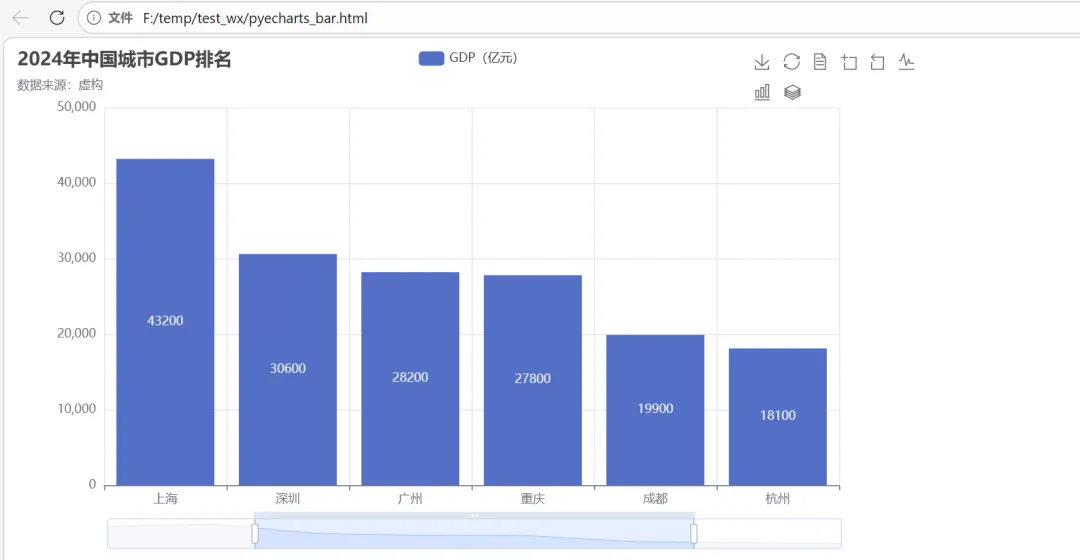
from pyecharts import options as optsfrom pyecharts.charts import Bar, Line, Pie, Scatter, WordCloudfrom pyecharts.globals import ThemeTypeimport random# 1. 柱状图 - 中国城市GDP排名cities = ['北京', '上海', '深圳', '广州', '重庆', '成都', '杭州', '武汉']gdp = [40200, 43200, 30600, 28200, 27800, 19900, 18100, 17700]bar = (    Bar(init_opts=opts.InitOpts(theme=ThemeType.LIGHT))    .add_xaxis(cities)    .add_yaxis("GDP(亿元)", gdp, itemstyle_opts=opts.ItemStyleOpts(color="#5470C6"))    .set_global_opts(        title_opts=opts.TitleOpts(title="2024年中国城市GDP排名", subtitle="数据来源:虚构"),        toolbox_opts=opts.ToolboxOpts(is_show=True),        datazoom_opts=opts.DataZoomOpts(),    ))# 2. 折线图 - 股票走势模拟dates = [f"2024-01-{i:02d}" for i in range(1, 31)]prices = [100 + random.randint(-50, 80) for _ in range(30)]prices = [min(max(p, 80), 200) for p in prices]  # 限制范围line = (    Line(init_opts=opts.InitOpts(theme=ThemeType.ROMANTIC))    .add_xaxis(dates)    .add_yaxis(        "股价(元)",        prices,        markpoint_opts=opts.MarkPointOpts(            data=[                opts.MarkPointItem(type_="max", name="最高"),                opts.MarkPointItem(type_="min", name="最低"),            ]        ),        markline_opts=opts.MarkLineOpts(            data=[opts.MarkLineItem(y=150, name="预警线")]        ),    )    .set_global_opts(        title_opts=opts.TitleOpts(title="股票价格走势图"),        tooltip_opts=opts.TooltipOpts(trigger="axis"),        xaxis_opts=opts.AxisOpts(axislabel_opts=opts.LabelOpts(rotate=45)),    ))# 3. 饼图 - 用户年龄段分布age_groups = ['18-25岁', '26-35岁', '36-45岁', '46-55岁', '55岁以上']ages_count = [25, 40, 20, 10, 5]pie = (    Pie(init_opts=opts.InitOpts(theme=ThemeType.PURPLE_PASSION))    .add(        "",        [list(z) for z in zip(age_groups, ages_count)],        radius=["30%", "70%"],        label_opts=opts.LabelOpts(formatter="{b}: {c}%"),    )    .set_global_opts(        title_opts=opts.TitleOpts(title="用户年龄段分布"),        legend_opts=opts.LegendOpts(orient="vertical", pos_left="left"),    ))# 4. 词云图 - 热门关键词words = [    ("Python", 1000),    ("数据分析", 800),    ("可视化", 650),    ("机器学习", 600),    ("人工智能", 550),    ("深度学习", 500),    ("大数据", 450),    ("Web开发", 400),    ("爬虫", 350),    ("自动化", 300),]wordcloud = (    WordCloud(init_opts=opts.InitOpts(theme=ThemeType.WESTEROS))    .add("", words, word_size_range=[20, 100], shape="cardioid")    .set_global_opts(title_opts=opts.TitleOpts(title="技术热门关键词")))# 保存为HTML文件bar.render("pyecharts_bar.html")line.render("pyecharts_line.html")pie.render("pyecharts_pie.html")wordcloud.render("pyecharts_wordcloud.html")print("Pyecharts图表已保存为HTML文件")# 在Jupyter中直接显示# bar.render_notebook()# line.render_notebook()# pie.render_notebook()# wordcloud.render_notebook()

代码运行结果如下:

image
image
image

Pyecharts的中文支持非常好,图表风格现代美观,国内用户使用起来非常顺手。丰富的图表类型和交互功能让它成为制作数据大屏的首选工具。

五、Altair——声明式可视化的"清新派"

功能介绍

Altair是基于Vega-Lite的声明式可视化库,它的设计理念是"告诉图表你要什么,而不是怎么做"。这种简洁的API设计让代码更加清晰易读,特别适合快速原型开发和数据探索。

安装方法

pip install altair pandas

示例代码

import altair as altimport pandas as pdimport numpy as np# 创建示例数据np.random.seed(42)df = pd.DataFrame({    '品牌': np.random.choice(['苹果', '华为', '小米', 'OPPO', 'vivo'], 500),    '价格': np.random.randint(1000, 8000, 500),    '销量': np.random.randint(10, 1000, 500),    '评分': np.random.uniform(3.0, 5.0, 500),    '类型': np.random.choice(['手机', '平板', '耳机'], 500)})# 1. 散点图 - 价格与销量关系chart1 = alt.Chart(df).mark_circle(size=60).encode(    x='价格',    y='销量',    color='品牌',    tooltip=['品牌', '价格', '销量', '评分']).properties(    title='手机价格与销量关系',    width=500,    height=300).interactive()# 2. 柱状图 - 各品牌平均评分chart2 = alt.Chart(df).mark_bar().encode(    x='品牌',    y='mean(评分)',    color='品牌',    tooltip=['品牌', 'mean(评分)']).properties(    title='各品牌平均评分',    width=400,    height=300)# 3. 盒须图 - 不同类型产品的价格分布chart3 = alt.Chart(df).mark_boxplot().encode(    x='类型',    y='价格',    color='类型').properties(    title='不同类型产品价格分布',    width=400,    height=300)# 4. 多图表组合combined = alt.hconcat(    chart2,    alt.vconcat(chart1, chart3)).properties(    title='手机市场数据分析仪表盘')# 保存为HTML文件chart1.save('altair_scatter.html')chart2.save('altair_bar.html')combined.save('altair_dashboard.html')# 在Jupyter中显示# chart1# chart2# combinedprint("Altair图表已保存为HTML文件")print(f"数据样本:\n{df.head()}")

代码运行结果如下:
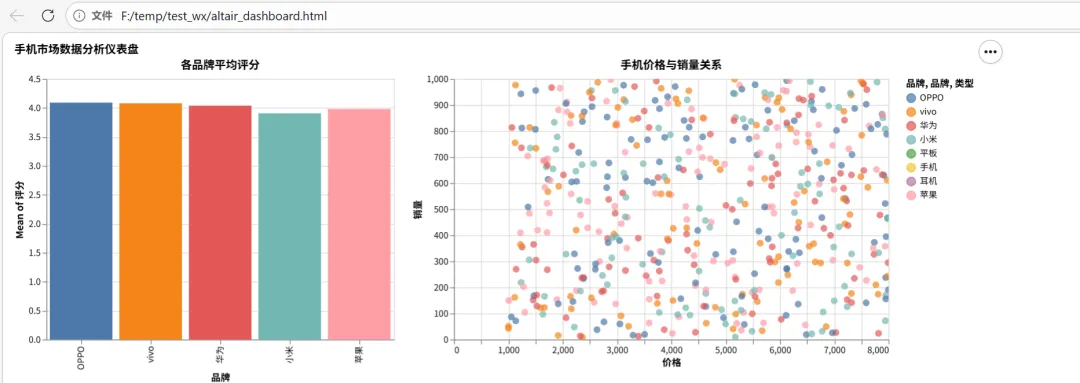
Altair的声明式API非常优雅,代码可读性极高。它会自动处理比例尺、图例等细节,让你专注于数据本身。不过自定义灵活性稍差,不适合需要高度定制的场景。

总结:如何选择适合你的图表库?

库名
适用场景
优点
缺点
Matplotlib
基础绘图、科研论文
灵活可控、生态成熟
代码冗长、交互性差
Seaborn
统计分析、探索性分析
样式美观、统计功能强
自定义程度有限
Plotly
交互式Web展示、仪表盘
交互性强、图表丰富
文件较大
Pyecharts
中国项目、数据大屏
中文支持好、图表多样
依赖ECharts生态
Altair
快速原型、数据探索
API简洁、声明式
自定义能力弱

小沐:戈戈,你介绍的这几个库太实用了,我的期末展示肯定没问题了!

戈戈:那是必须的!图表选对了,数据表达就成功了一半。加油,期待你做出漂亮的可视化作品!

结语

如果您觉得这些文字有一点点用处,请给作者点个赞或关个注;╮( ̄▽ ̄)╭
如果您有技术问题探讨,评论处留言。//(ㄒoㄒ)//
谢谢各位童鞋们啦( ´ ▽ ` )ノ ( ´ ▽ `` )っ!
更多精彩文章详见:
CSDN博客:爱看书的小沐

最新文章

随机文章

基本 文件 流程 错误 SQL 调试
  1. 请求信息 : 2026-03-27 11:21:43 HTTP/2.0 GET : https://f.mffb.com.cn/a/479685.html
  2. 运行时间 : 0.123588s [ 吞吐率:8.09req/s ] 内存消耗:4,591.70kb 文件加载:140
  3. 缓存信息 : 0 reads,0 writes
  4. 会话信息 : SESSION_ID=194089c59dadb554934a6c2b643f04ff
  1. /yingpanguazai/ssd/ssd1/www/f.mffb.com.cn/public/index.php ( 0.79 KB )
  2. /yingpanguazai/ssd/ssd1/www/f.mffb.com.cn/vendor/autoload.php ( 0.17 KB )
  3. /yingpanguazai/ssd/ssd1/www/f.mffb.com.cn/vendor/composer/autoload_real.php ( 2.49 KB )
  4. /yingpanguazai/ssd/ssd1/www/f.mffb.com.cn/vendor/composer/platform_check.php ( 0.90 KB )
  5. /yingpanguazai/ssd/ssd1/www/f.mffb.com.cn/vendor/composer/ClassLoader.php ( 14.03 KB )
  6. /yingpanguazai/ssd/ssd1/www/f.mffb.com.cn/vendor/composer/autoload_static.php ( 4.90 KB )
  7. /yingpanguazai/ssd/ssd1/www/f.mffb.com.cn/vendor/topthink/think-helper/src/helper.php ( 8.34 KB )
  8. /yingpanguazai/ssd/ssd1/www/f.mffb.com.cn/vendor/topthink/think-validate/src/helper.php ( 2.19 KB )
  9. /yingpanguazai/ssd/ssd1/www/f.mffb.com.cn/vendor/topthink/think-orm/src/helper.php ( 1.47 KB )
  10. /yingpanguazai/ssd/ssd1/www/f.mffb.com.cn/vendor/topthink/think-orm/stubs/load_stubs.php ( 0.16 KB )
  11. /yingpanguazai/ssd/ssd1/www/f.mffb.com.cn/vendor/topthink/framework/src/think/Exception.php ( 1.69 KB )
  12. /yingpanguazai/ssd/ssd1/www/f.mffb.com.cn/vendor/topthink/think-container/src/Facade.php ( 2.71 KB )
  13. /yingpanguazai/ssd/ssd1/www/f.mffb.com.cn/vendor/symfony/deprecation-contracts/function.php ( 0.99 KB )
  14. /yingpanguazai/ssd/ssd1/www/f.mffb.com.cn/vendor/symfony/polyfill-mbstring/bootstrap.php ( 8.26 KB )
  15. /yingpanguazai/ssd/ssd1/www/f.mffb.com.cn/vendor/symfony/polyfill-mbstring/bootstrap80.php ( 9.78 KB )
  16. /yingpanguazai/ssd/ssd1/www/f.mffb.com.cn/vendor/symfony/var-dumper/Resources/functions/dump.php ( 1.49 KB )
  17. /yingpanguazai/ssd/ssd1/www/f.mffb.com.cn/vendor/topthink/think-dumper/src/helper.php ( 0.18 KB )
  18. /yingpanguazai/ssd/ssd1/www/f.mffb.com.cn/vendor/symfony/var-dumper/VarDumper.php ( 4.30 KB )
  19. /yingpanguazai/ssd/ssd1/www/f.mffb.com.cn/vendor/topthink/framework/src/think/App.php ( 15.30 KB )
  20. /yingpanguazai/ssd/ssd1/www/f.mffb.com.cn/vendor/topthink/think-container/src/Container.php ( 15.76 KB )
  21. /yingpanguazai/ssd/ssd1/www/f.mffb.com.cn/vendor/psr/container/src/ContainerInterface.php ( 1.02 KB )
  22. /yingpanguazai/ssd/ssd1/www/f.mffb.com.cn/app/provider.php ( 0.19 KB )
  23. /yingpanguazai/ssd/ssd1/www/f.mffb.com.cn/vendor/topthink/framework/src/think/Http.php ( 6.04 KB )
  24. /yingpanguazai/ssd/ssd1/www/f.mffb.com.cn/vendor/topthink/think-helper/src/helper/Str.php ( 7.29 KB )
  25. /yingpanguazai/ssd/ssd1/www/f.mffb.com.cn/vendor/topthink/framework/src/think/Env.php ( 4.68 KB )
  26. /yingpanguazai/ssd/ssd1/www/f.mffb.com.cn/app/common.php ( 0.03 KB )
  27. /yingpanguazai/ssd/ssd1/www/f.mffb.com.cn/vendor/topthink/framework/src/helper.php ( 18.78 KB )
  28. /yingpanguazai/ssd/ssd1/www/f.mffb.com.cn/vendor/topthink/framework/src/think/Config.php ( 5.54 KB )
  29. /yingpanguazai/ssd/ssd1/www/f.mffb.com.cn/config/app.php ( 0.95 KB )
  30. /yingpanguazai/ssd/ssd1/www/f.mffb.com.cn/config/cache.php ( 0.78 KB )
  31. /yingpanguazai/ssd/ssd1/www/f.mffb.com.cn/config/console.php ( 0.23 KB )
  32. /yingpanguazai/ssd/ssd1/www/f.mffb.com.cn/config/cookie.php ( 0.56 KB )
  33. /yingpanguazai/ssd/ssd1/www/f.mffb.com.cn/config/database.php ( 2.48 KB )
  34. /yingpanguazai/ssd/ssd1/www/f.mffb.com.cn/vendor/topthink/framework/src/think/facade/Env.php ( 1.67 KB )
  35. /yingpanguazai/ssd/ssd1/www/f.mffb.com.cn/config/filesystem.php ( 0.61 KB )
  36. /yingpanguazai/ssd/ssd1/www/f.mffb.com.cn/config/lang.php ( 0.91 KB )
  37. /yingpanguazai/ssd/ssd1/www/f.mffb.com.cn/config/log.php ( 1.35 KB )
  38. /yingpanguazai/ssd/ssd1/www/f.mffb.com.cn/config/middleware.php ( 0.19 KB )
  39. /yingpanguazai/ssd/ssd1/www/f.mffb.com.cn/config/route.php ( 1.89 KB )
  40. /yingpanguazai/ssd/ssd1/www/f.mffb.com.cn/config/session.php ( 0.57 KB )
  41. /yingpanguazai/ssd/ssd1/www/f.mffb.com.cn/config/trace.php ( 0.34 KB )
  42. /yingpanguazai/ssd/ssd1/www/f.mffb.com.cn/config/view.php ( 0.82 KB )
  43. /yingpanguazai/ssd/ssd1/www/f.mffb.com.cn/app/event.php ( 0.25 KB )
  44. /yingpanguazai/ssd/ssd1/www/f.mffb.com.cn/vendor/topthink/framework/src/think/Event.php ( 7.67 KB )
  45. /yingpanguazai/ssd/ssd1/www/f.mffb.com.cn/app/service.php ( 0.13 KB )
  46. /yingpanguazai/ssd/ssd1/www/f.mffb.com.cn/app/AppService.php ( 0.26 KB )
  47. /yingpanguazai/ssd/ssd1/www/f.mffb.com.cn/vendor/topthink/framework/src/think/Service.php ( 1.64 KB )
  48. /yingpanguazai/ssd/ssd1/www/f.mffb.com.cn/vendor/topthink/framework/src/think/Lang.php ( 7.35 KB )
  49. /yingpanguazai/ssd/ssd1/www/f.mffb.com.cn/vendor/topthink/framework/src/lang/zh-cn.php ( 13.70 KB )
  50. /yingpanguazai/ssd/ssd1/www/f.mffb.com.cn/vendor/topthink/framework/src/think/initializer/Error.php ( 3.31 KB )
  51. /yingpanguazai/ssd/ssd1/www/f.mffb.com.cn/vendor/topthink/framework/src/think/initializer/RegisterService.php ( 1.33 KB )
  52. /yingpanguazai/ssd/ssd1/www/f.mffb.com.cn/vendor/services.php ( 0.14 KB )
  53. /yingpanguazai/ssd/ssd1/www/f.mffb.com.cn/vendor/topthink/framework/src/think/service/PaginatorService.php ( 1.52 KB )
  54. /yingpanguazai/ssd/ssd1/www/f.mffb.com.cn/vendor/topthink/framework/src/think/service/ValidateService.php ( 0.99 KB )
  55. /yingpanguazai/ssd/ssd1/www/f.mffb.com.cn/vendor/topthink/framework/src/think/service/ModelService.php ( 2.04 KB )
  56. /yingpanguazai/ssd/ssd1/www/f.mffb.com.cn/vendor/topthink/think-trace/src/Service.php ( 0.77 KB )
  57. /yingpanguazai/ssd/ssd1/www/f.mffb.com.cn/vendor/topthink/framework/src/think/Middleware.php ( 6.72 KB )
  58. /yingpanguazai/ssd/ssd1/www/f.mffb.com.cn/vendor/topthink/framework/src/think/initializer/BootService.php ( 0.77 KB )
  59. /yingpanguazai/ssd/ssd1/www/f.mffb.com.cn/vendor/topthink/think-orm/src/Paginator.php ( 11.86 KB )
  60. /yingpanguazai/ssd/ssd1/www/f.mffb.com.cn/vendor/topthink/think-validate/src/Validate.php ( 63.20 KB )
  61. /yingpanguazai/ssd/ssd1/www/f.mffb.com.cn/vendor/topthink/think-orm/src/Model.php ( 23.55 KB )
  62. /yingpanguazai/ssd/ssd1/www/f.mffb.com.cn/vendor/topthink/think-orm/src/model/concern/Attribute.php ( 21.05 KB )
  63. /yingpanguazai/ssd/ssd1/www/f.mffb.com.cn/vendor/topthink/think-orm/src/model/concern/AutoWriteData.php ( 4.21 KB )
  64. /yingpanguazai/ssd/ssd1/www/f.mffb.com.cn/vendor/topthink/think-orm/src/model/concern/Conversion.php ( 6.44 KB )
  65. /yingpanguazai/ssd/ssd1/www/f.mffb.com.cn/vendor/topthink/think-orm/src/model/concern/DbConnect.php ( 5.16 KB )
  66. /yingpanguazai/ssd/ssd1/www/f.mffb.com.cn/vendor/topthink/think-orm/src/model/concern/ModelEvent.php ( 2.33 KB )
  67. /yingpanguazai/ssd/ssd1/www/f.mffb.com.cn/vendor/topthink/think-orm/src/model/concern/RelationShip.php ( 28.29 KB )
  68. /yingpanguazai/ssd/ssd1/www/f.mffb.com.cn/vendor/topthink/think-helper/src/contract/Arrayable.php ( 0.09 KB )
  69. /yingpanguazai/ssd/ssd1/www/f.mffb.com.cn/vendor/topthink/think-helper/src/contract/Jsonable.php ( 0.13 KB )
  70. /yingpanguazai/ssd/ssd1/www/f.mffb.com.cn/vendor/topthink/think-orm/src/model/contract/Modelable.php ( 0.09 KB )
  71. /yingpanguazai/ssd/ssd1/www/f.mffb.com.cn/vendor/topthink/framework/src/think/Db.php ( 2.88 KB )
  72. /yingpanguazai/ssd/ssd1/www/f.mffb.com.cn/vendor/topthink/think-orm/src/DbManager.php ( 8.52 KB )
  73. /yingpanguazai/ssd/ssd1/www/f.mffb.com.cn/vendor/topthink/framework/src/think/Log.php ( 6.28 KB )
  74. /yingpanguazai/ssd/ssd1/www/f.mffb.com.cn/vendor/topthink/framework/src/think/Manager.php ( 3.92 KB )
  75. /yingpanguazai/ssd/ssd1/www/f.mffb.com.cn/vendor/psr/log/src/LoggerTrait.php ( 2.69 KB )
  76. /yingpanguazai/ssd/ssd1/www/f.mffb.com.cn/vendor/psr/log/src/LoggerInterface.php ( 2.71 KB )
  77. /yingpanguazai/ssd/ssd1/www/f.mffb.com.cn/vendor/topthink/framework/src/think/Cache.php ( 4.92 KB )
  78. /yingpanguazai/ssd/ssd1/www/f.mffb.com.cn/vendor/psr/simple-cache/src/CacheInterface.php ( 4.71 KB )
  79. /yingpanguazai/ssd/ssd1/www/f.mffb.com.cn/vendor/topthink/think-helper/src/helper/Arr.php ( 16.63 KB )
  80. /yingpanguazai/ssd/ssd1/www/f.mffb.com.cn/vendor/topthink/framework/src/think/cache/driver/File.php ( 7.84 KB )
  81. /yingpanguazai/ssd/ssd1/www/f.mffb.com.cn/vendor/topthink/framework/src/think/cache/Driver.php ( 9.03 KB )
  82. /yingpanguazai/ssd/ssd1/www/f.mffb.com.cn/vendor/topthink/framework/src/think/contract/CacheHandlerInterface.php ( 1.99 KB )
  83. /yingpanguazai/ssd/ssd1/www/f.mffb.com.cn/app/Request.php ( 0.09 KB )
  84. /yingpanguazai/ssd/ssd1/www/f.mffb.com.cn/vendor/topthink/framework/src/think/Request.php ( 55.78 KB )
  85. /yingpanguazai/ssd/ssd1/www/f.mffb.com.cn/app/middleware.php ( 0.25 KB )
  86. /yingpanguazai/ssd/ssd1/www/f.mffb.com.cn/vendor/topthink/framework/src/think/Pipeline.php ( 2.61 KB )
  87. /yingpanguazai/ssd/ssd1/www/f.mffb.com.cn/vendor/topthink/think-trace/src/TraceDebug.php ( 3.40 KB )
  88. /yingpanguazai/ssd/ssd1/www/f.mffb.com.cn/vendor/topthink/framework/src/think/middleware/SessionInit.php ( 1.94 KB )
  89. /yingpanguazai/ssd/ssd1/www/f.mffb.com.cn/vendor/topthink/framework/src/think/Session.php ( 1.80 KB )
  90. /yingpanguazai/ssd/ssd1/www/f.mffb.com.cn/vendor/topthink/framework/src/think/session/driver/File.php ( 6.27 KB )
  91. /yingpanguazai/ssd/ssd1/www/f.mffb.com.cn/vendor/topthink/framework/src/think/contract/SessionHandlerInterface.php ( 0.87 KB )
  92. /yingpanguazai/ssd/ssd1/www/f.mffb.com.cn/vendor/topthink/framework/src/think/session/Store.php ( 7.12 KB )
  93. /yingpanguazai/ssd/ssd1/www/f.mffb.com.cn/vendor/topthink/framework/src/think/Route.php ( 23.73 KB )
  94. /yingpanguazai/ssd/ssd1/www/f.mffb.com.cn/vendor/topthink/framework/src/think/route/RuleName.php ( 5.75 KB )
  95. /yingpanguazai/ssd/ssd1/www/f.mffb.com.cn/vendor/topthink/framework/src/think/route/Domain.php ( 2.53 KB )
  96. /yingpanguazai/ssd/ssd1/www/f.mffb.com.cn/vendor/topthink/framework/src/think/route/RuleGroup.php ( 22.43 KB )
  97. /yingpanguazai/ssd/ssd1/www/f.mffb.com.cn/vendor/topthink/framework/src/think/route/Rule.php ( 26.95 KB )
  98. /yingpanguazai/ssd/ssd1/www/f.mffb.com.cn/vendor/topthink/framework/src/think/route/RuleItem.php ( 9.78 KB )
  99. /yingpanguazai/ssd/ssd1/www/f.mffb.com.cn/route/app.php ( 1.72 KB )
  100. /yingpanguazai/ssd/ssd1/www/f.mffb.com.cn/vendor/topthink/framework/src/think/facade/Route.php ( 4.70 KB )
  101. /yingpanguazai/ssd/ssd1/www/f.mffb.com.cn/vendor/topthink/framework/src/think/route/dispatch/Controller.php ( 4.74 KB )
  102. /yingpanguazai/ssd/ssd1/www/f.mffb.com.cn/vendor/topthink/framework/src/think/route/Dispatch.php ( 10.44 KB )
  103. /yingpanguazai/ssd/ssd1/www/f.mffb.com.cn/app/controller/Index.php ( 4.81 KB )
  104. /yingpanguazai/ssd/ssd1/www/f.mffb.com.cn/app/BaseController.php ( 2.05 KB )
  105. /yingpanguazai/ssd/ssd1/www/f.mffb.com.cn/vendor/topthink/think-orm/src/facade/Db.php ( 0.93 KB )
  106. /yingpanguazai/ssd/ssd1/www/f.mffb.com.cn/vendor/topthink/think-orm/src/db/connector/Mysql.php ( 5.44 KB )
  107. /yingpanguazai/ssd/ssd1/www/f.mffb.com.cn/vendor/topthink/think-orm/src/db/PDOConnection.php ( 52.47 KB )
  108. /yingpanguazai/ssd/ssd1/www/f.mffb.com.cn/vendor/topthink/think-orm/src/db/Connection.php ( 8.39 KB )
  109. /yingpanguazai/ssd/ssd1/www/f.mffb.com.cn/vendor/topthink/think-orm/src/db/ConnectionInterface.php ( 4.57 KB )
  110. /yingpanguazai/ssd/ssd1/www/f.mffb.com.cn/vendor/topthink/think-orm/src/db/builder/Mysql.php ( 16.58 KB )
  111. /yingpanguazai/ssd/ssd1/www/f.mffb.com.cn/vendor/topthink/think-orm/src/db/Builder.php ( 24.06 KB )
  112. /yingpanguazai/ssd/ssd1/www/f.mffb.com.cn/vendor/topthink/think-orm/src/db/BaseBuilder.php ( 27.50 KB )
  113. /yingpanguazai/ssd/ssd1/www/f.mffb.com.cn/vendor/topthink/think-orm/src/db/Query.php ( 15.71 KB )
  114. /yingpanguazai/ssd/ssd1/www/f.mffb.com.cn/vendor/topthink/think-orm/src/db/BaseQuery.php ( 45.13 KB )
  115. /yingpanguazai/ssd/ssd1/www/f.mffb.com.cn/vendor/topthink/think-orm/src/db/concern/TimeFieldQuery.php ( 7.43 KB )
  116. /yingpanguazai/ssd/ssd1/www/f.mffb.com.cn/vendor/topthink/think-orm/src/db/concern/AggregateQuery.php ( 3.26 KB )
  117. /yingpanguazai/ssd/ssd1/www/f.mffb.com.cn/vendor/topthink/think-orm/src/db/concern/ModelRelationQuery.php ( 20.07 KB )
  118. /yingpanguazai/ssd/ssd1/www/f.mffb.com.cn/vendor/topthink/think-orm/src/db/concern/ParamsBind.php ( 3.66 KB )
  119. /yingpanguazai/ssd/ssd1/www/f.mffb.com.cn/vendor/topthink/think-orm/src/db/concern/ResultOperation.php ( 7.01 KB )
  120. /yingpanguazai/ssd/ssd1/www/f.mffb.com.cn/vendor/topthink/think-orm/src/db/concern/WhereQuery.php ( 19.37 KB )
  121. /yingpanguazai/ssd/ssd1/www/f.mffb.com.cn/vendor/topthink/think-orm/src/db/concern/JoinAndViewQuery.php ( 7.11 KB )
  122. /yingpanguazai/ssd/ssd1/www/f.mffb.com.cn/vendor/topthink/think-orm/src/db/concern/TableFieldInfo.php ( 2.63 KB )
  123. /yingpanguazai/ssd/ssd1/www/f.mffb.com.cn/vendor/topthink/think-orm/src/db/concern/Transaction.php ( 2.77 KB )
  124. /yingpanguazai/ssd/ssd1/www/f.mffb.com.cn/vendor/topthink/framework/src/think/log/driver/File.php ( 5.96 KB )
  125. /yingpanguazai/ssd/ssd1/www/f.mffb.com.cn/vendor/topthink/framework/src/think/contract/LogHandlerInterface.php ( 0.86 KB )
  126. /yingpanguazai/ssd/ssd1/www/f.mffb.com.cn/vendor/topthink/framework/src/think/log/Channel.php ( 3.89 KB )
  127. /yingpanguazai/ssd/ssd1/www/f.mffb.com.cn/vendor/topthink/framework/src/think/event/LogRecord.php ( 1.02 KB )
  128. /yingpanguazai/ssd/ssd1/www/f.mffb.com.cn/vendor/topthink/think-helper/src/Collection.php ( 16.47 KB )
  129. /yingpanguazai/ssd/ssd1/www/f.mffb.com.cn/vendor/topthink/framework/src/think/facade/View.php ( 1.70 KB )
  130. /yingpanguazai/ssd/ssd1/www/f.mffb.com.cn/vendor/topthink/framework/src/think/View.php ( 4.39 KB )
  131. /yingpanguazai/ssd/ssd1/www/f.mffb.com.cn/vendor/topthink/framework/src/think/Response.php ( 8.81 KB )
  132. /yingpanguazai/ssd/ssd1/www/f.mffb.com.cn/vendor/topthink/framework/src/think/response/View.php ( 3.29 KB )
  133. /yingpanguazai/ssd/ssd1/www/f.mffb.com.cn/vendor/topthink/framework/src/think/Cookie.php ( 6.06 KB )
  134. /yingpanguazai/ssd/ssd1/www/f.mffb.com.cn/vendor/topthink/think-view/src/Think.php ( 8.38 KB )
  135. /yingpanguazai/ssd/ssd1/www/f.mffb.com.cn/vendor/topthink/framework/src/think/contract/TemplateHandlerInterface.php ( 1.60 KB )
  136. /yingpanguazai/ssd/ssd1/www/f.mffb.com.cn/vendor/topthink/think-template/src/Template.php ( 46.61 KB )
  137. /yingpanguazai/ssd/ssd1/www/f.mffb.com.cn/vendor/topthink/think-template/src/template/driver/File.php ( 2.41 KB )
  138. /yingpanguazai/ssd/ssd1/www/f.mffb.com.cn/vendor/topthink/think-template/src/template/contract/DriverInterface.php ( 0.86 KB )
  139. /yingpanguazai/ssd/ssd1/www/f.mffb.com.cn/runtime/temp/067d451b9a0c665040f3f1bdd3293d68.php ( 11.98 KB )
  140. /yingpanguazai/ssd/ssd1/www/f.mffb.com.cn/vendor/topthink/think-trace/src/Html.php ( 4.42 KB )
  1. CONNECT:[ UseTime:0.000544s ] mysql:host=127.0.0.1;port=3306;dbname=f_mffb;charset=utf8mb4
  2. SHOW FULL COLUMNS FROM `fenlei` [ RunTime:0.000831s ]
  3. SELECT * FROM `fenlei` WHERE `fid` = 0 [ RunTime:0.000295s ]
  4. SELECT * FROM `fenlei` WHERE `fid` = 63 [ RunTime:0.000255s ]
  5. SHOW FULL COLUMNS FROM `set` [ RunTime:0.000516s ]
  6. SELECT * FROM `set` [ RunTime:0.000235s ]
  7. SHOW FULL COLUMNS FROM `article` [ RunTime:0.000556s ]
  8. SELECT * FROM `article` WHERE `id` = 479685 LIMIT 1 [ RunTime:0.001352s ]
  9. UPDATE `article` SET `lasttime` = 1774581703 WHERE `id` = 479685 [ RunTime:0.005788s ]
  10. SELECT * FROM `fenlei` WHERE `id` = 66 LIMIT 1 [ RunTime:0.000338s ]
  11. SELECT * FROM `article` WHERE `id` < 479685 ORDER BY `id` DESC LIMIT 1 [ RunTime:0.001974s ]
  12. SELECT * FROM `article` WHERE `id` > 479685 ORDER BY `id` ASC LIMIT 1 [ RunTime:0.003207s ]
  13. SELECT * FROM `article` WHERE `id` < 479685 ORDER BY `id` DESC LIMIT 10 [ RunTime:0.004906s ]
  14. SELECT * FROM `article` WHERE `id` < 479685 ORDER BY `id` DESC LIMIT 10,10 [ RunTime:0.007498s ]
  15. SELECT * FROM `article` WHERE `id` < 479685 ORDER BY `id` DESC LIMIT 20,10 [ RunTime:0.026774s ]
0.125285s