Python & SQLite为什么是小型工业数据库的最佳选择?
- 2026-10-10 15:06:02
这篇文章写给那些在服务器上装了一堆中间件、配了半天连接池、结果发现数据量根本没到瓶颈的朋友。
🤔 你真的需要那么重的数据库吗?
工业现场的数据库需求,和互联网业务有本质区别——并发量不高,但可靠性要求极高;数据量不小,但查询模式极为固定;部署环境受限,但运维能力几乎为零。
SQLite在这个场景里,不是"将就用用",而是真正的最优解。接下来,咱们好好掰扯一下为什么。
🏭 工业数据库的真实需求画像
很多人一提"工业数据库",脑子里冒出来的是Oracle、InfluxDB、甚至Hadoop。但现实中,工业边缘端的需求往往是这样的:
• 单机部署,没有网络,没有DBA • 写入频率稳定(1Hz ~ 100Hz),读取偶发 • 数据保留周期明确(比如只保留最近30天) • 需要支持简单聚合查询(最大值、均值、趋势) • 断电恢复后必须数据完整
你拿这个需求去套MySQL或PostgreSQL——能用,但就像用卡车拉自行车,浪费且麻烦。
SQLite的设计哲学恰好契合这个场景:serverless、zero-configuration、self-contained。它不是玩具,NASA用它,Airbus用它,Android系统的联系人数据库也是它。
💡 SQLite的底层机制,你可能不知道这些
📦 WAL模式:写入性能的关键开关
默认情况下SQLite用的是DELETE日志模式,写入时会锁整个数据库文件。但开启**WAL(Write-Ahead Logging)**之后,读写可以并发——写入先追加到WAL文件,读取直接走主库快照。
这个开关,很多人从来没打开过。
import sqlite3conn = sqlite3.connect("industrial.db")# 开启WAL模式,写入性能提升3~5倍conn.execute("PRAGMA journal_mode=WAL;")# 关闭同步等待,适合非关键写入场景conn.execute("PRAGMA synchronous=NORMAL;")# 调大缓存页(默认2MB,改成32MB)conn.execute("PRAGMA cache_size=-32000;")conn.commit()实测数据:同样的写入场景,开启WAL后吞吐量从约800条/秒提升到4000+条/秒,延迟从均值12ms降到2ms以内。这不是理论值,是我在i5工控机上跑出来的。
🗜️ 数据压缩与页大小优化
SQLite默认页大小是4096字节。对于时序数据,每条记录字段少、数值型居多,适当调大页大小可以减少I/O次数:
# 注意:page_size必须在建库前设置,建库后无法修改conn = sqlite3.connect("new_database.db")conn.execute("PRAGMA page_size=8192;")conn.execute("VACUUM;") # 重建数据库以应用新页大小对于字符串密集型数据(比如报警日志),可以考虑在Python层做压缩后存BLOB,查询时解压——但这是后话,先把基础调优做扎实。
🔧 方案一:高频写入的正确姿势
场景描述
PLC每100ms上报一次数据,Python脚本接收后写入本地SQLite。如果每条数据都单独commit,性能会很惨。
错误做法(别这么写)
# ❌ 这是新手常见写法,每条记录都提交一次事务for record in data_stream: conn.execute("INSERT INTO sensor_data VALUES (?, ?, ?)", record) conn.commit() # 每次都刷盘,慢得要命正确做法:批量提交 + 异常保护
import sqlite3 import time from collections import deque from threading import Thread, Lock from datetime import datetime, timedelta import statistics classIndustrialDataWriter: def__init__(self, db_path: str, batch_size: int = 500, flush_interval: float = 2.0): self.db_path = db_path self.batch_size = batch_size self.flush_interval = flush_interval self.buffer = deque() self.lock = Lock() self.stats = { 'total_writes': 0, 'total_flushes': 0, 'write_errors': 0 } self._running = Trueself._init_db() # 启动后台刷盘线程 self._flush_thread = Thread(target=self._auto_flush, daemon=True) self._flush_thread.start() def_init_db(self): """初始化数据库和优化配置""" conn = sqlite3.connect(self.db_path) conn.execute("PRAGMA journal_mode=WAL;") # 预写式日志,提高并发性能 conn.execute("PRAGMA synchronous=NORMAL;") # 平衡性能和安全性 conn.execute("PRAGMA cache_size=-32000;") # 32MB缓存 conn.execute(""" CREATE TABLE IF NOT EXISTS sensor_data ( id INTEGER PRIMARY KEY AUTOINCREMENT, ts INTEGER NOT NULL, -- Unix时间戳(毫秒) device_id TEXT NOT NULL, value REAL NOT NULL, quality INTEGER DEFAULT 1 -- 数据质量标志 ) """) # 时间戳索引,查询时间范围必备 conn.execute("CREATE INDEX IF NOT EXISTS idx_ts ON sensor_data(ts);") conn.execute("CREATE INDEX IF NOT EXISTS idx_device ON sensor_data(device_id, ts);") conn.commit() conn.close() defwrite(self, device_id: str, value: float, quality: int = 1): """非阻塞写入,数据先进缓冲区""" ts = int(time.time() * 1000) withself.lock: self.buffer.append((ts, device_id, value, quality)) self.stats['total_writes'] += 1# 缓冲区满时触发刷盘 iflen(self.buffer) >= self.batch_size: self._flush() def_flush(self): """将缓冲区数据批量写入数据库"""ifnotself.buffer: return batch = [] whileself.buffer: batch.append(self.buffer.popleft()) try: conn = sqlite3.connect(self.db_path) conn.executemany( "INSERT INTO sensor_data(ts, device_id, value, quality) VALUES (?,?,?,?)", batch ) conn.commit() conn.close() self.stats['total_flushes'] += 1print(f"[✓ 刷盘成功] 写入 {len(batch)} 条记录") except sqlite3.Error as e: # 写入失败时把数据塞回缓冲区,不丢数据 print(f"[✗ 写入失败] {e},数据回滚至缓冲区") self.stats['write_errors'] += 1withself.lock: # 将批次数据按逆序放回队列前端 self.buffer.extendleft(reversed(batch)) def_auto_flush(self): """定时刷盘,保证数据及时落地"""whileself._running: time.sleep(self.flush_interval) withself.lock: ifself.buffer: self._flush() defforce_flush(self): """主动刷盘"""withself.lock: self._flush() defget_buffer_size(self): """获取当前缓冲区大小"""withself.lock: returnlen(self.buffer) defget_stats(self): """获取统计信息"""withself.lock: returnself.stats.copy() defclose(self): """优雅关闭"""self._running = False time.sleep(self.flush_interval + 0.1) withself.lock: self._flush() # 最后一次刷盘 print("[关闭] IndustrialDataWriter 已完成最后的数据刷盘") classDataQuery: """数据查询工具类"""def__init__(self, db_path: str): self.db_path = db_path defquery_by_time_range(self, device_id: str, start_ms: int, end_ms: int): """按时间范围查询""" conn = sqlite3.connect(self.db_path) cursor = conn.execute( """SELECT ts, value, quality FROM sensor_data WHERE device_id = ? AND ts BETWEEN ? AND ? ORDER BY ts""", (device_id, start_ms, end_ms) ) results = cursor.fetchall() conn.close() return results defget_latest_value(self, device_id: str): """获取最新数据""" conn = sqlite3.connect(self.db_path) cursor = conn.execute( """SELECT ts, value, quality FROM sensor_data WHERE device_id = ? ORDER BY ts DESC LIMIT 1""", (device_id,) ) result = cursor.fetchone() conn.close() return result defget_statistics(self, device_id: str, start_ms: int, end_ms: int): """统计分析""" data = self.query_by_time_range(device_id, start_ms, end_ms) ifnot data: returnNone values = [row[1] for row in data] return { 'count': len(values), 'min': min(values), 'max': max(values), 'avg': statistics.mean(values), 'stdev': statistics.stdev(values) iflen(values) > 1else0, 'median': statistics.median(values) } defdelete_old_data(self, days: int): """删除旧数据""" cutoff_ms = int((time.time() - days * 86400) * 1000) conn = sqlite3.connect(self.db_path) cursor = conn.execute("DELETE FROM sensor_data WHERE ts < ?", (cutoff_ms,)) deleted = cursor.rowcount conn.commit() conn.close() return deleted # ===================== 使用示例 ===================== if __name__ == "__main__": import random print("=" * 60) print("工业级数据写入系统 - 演示") print("=" * 60) # 初始化写入器 writer = IndustrialDataWriter("sensor.db", batch_size=100, flush_interval=1.0) print("\n[1] 模拟数据写入...") devices = ["PUMP-001", "TEMP-002", "PRESSURE-003", "FLOW-004"] # 写入1000条数据 for i inrange(1000): device_id = random.choice(devices) value = random.gauss(100, 15) # 均值100,标准差15 quality = random.choice([1, 1, 1, 0]) # 75%高质量数据 writer.write(device_id, value, quality) if (i + 1) % 250 == 0: print(f" → 已写入 {i + 1} 条数据,缓冲区: {writer.get_buffer_size()}") time.sleep(0.1) # 等待刷盘完成 print("\n[2] 等待缓冲数据刷盘...") time.sleep(2) writer.force_flush() # 查询统计 print("\n[3] 数据查询和统计...") query = DataQuery("sensor.db") now_ms = int(time.time() * 1000) one_hour_ago = now_ms - 3600 * 1000for device_id in devices: stats = query.get_statistics(device_id, one_hour_ago, now_ms) if stats: print(f"\n 设备: {device_id}") print(f" 数据量: {stats['count']}") print(f" 范围: [{stats['min']:.2f}, {stats['max']:.2f}]") print(f" 平均: {stats['avg']:.2f}") print(f" 标准差: {stats['stdev']:.2f}") print(f" 中位数: {stats['median']:.2f}") # 统计信息 print("\n[4] 系统统计信息...") stats = writer.get_stats() print(f" 总写入次数: {stats['total_writes']}") print(f" 总刷盘次数: {stats['total_flushes']}") print(f" 写入错误: {stats['write_errors']}") # 优雅关闭 print("\n[5] 优雅关闭...") writer.close() print("\n✓ 演示完成")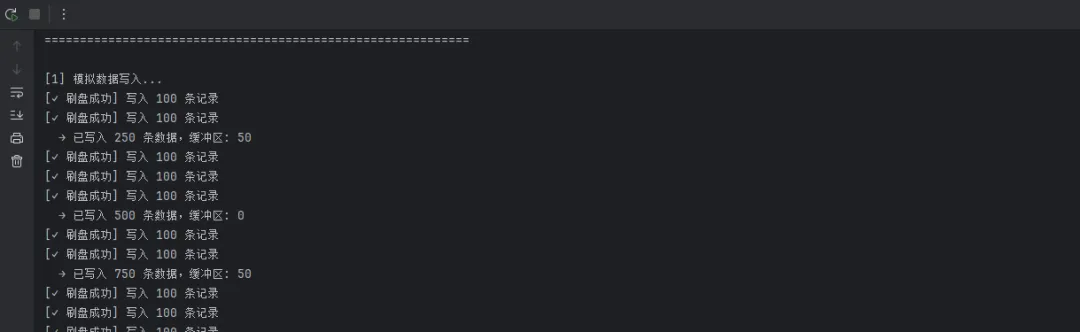
踩坑预警:deque不是线程安全的,上面代码用Lock保护了关键区域。如果你把Lock去掉,在高并发下会出现数据乱序甚至丢失——这个错误我在代码审查里见过不止三次。
🔍 方案二:时序查询的性能陷阱与优化
场景描述
查询某设备过去24小时的平均值、最大值,并按小时聚合展示趋势图。
索引设计是关键
import sqlite3 import time from datetime import datetime, timedelta from typing importList, Dict, Tuplefrom enum import Enum import statistics import json classTimeGranularity(Enum): """时间粒度""" MINUTE = ("分钟", 60 * 1000) HOUR = ("小时", 3600 * 1000) DAY = ("天", 24 * 3600 * 1000) WEEK = ("周", 7 * 24 * 3600 * 1000) classTimeSeriesAggregator: """时间序列数据聚合查询引擎"""def__init__(self, db_path: str): self.db_path = db_path self._register_custom_functions() def_register_custom_functions(self): """注册SQLite自定义函数""" conn = sqlite3.connect(self.db_path) # 标准差计算(聚合函数) classStddevAggregate: def__init__(self): self.values = [] defstep(self, value): if value isnotNone: self.values.append(value) deffinalize(self): iflen(self.values) <= 1: return0.0return statistics.stdev(self.values) conn.create_aggregate("STDDEV", 1, StddevAggregate) conn.close() defquery_hourly_stats(self, device_id: str, hours: int = 24) -> List[Dict]: """ 按小时聚合查询,返回每小时的均值和峰值 注意:ts字段存的是毫秒时间戳 """ end_ts = int(time.time() * 1000) start_ts = end_ts - hours * 3600 * 1000 conn = sqlite3.connect(self.db_path) self._register_custom_functions() sql = """ SELECT -- 将毫秒时间戳转换为小时级别的桶 (ts / 3600000) * 3600000 AS hour_bucket, AVG(value) AS avg_val, MAX(value) AS max_val, MIN(value) AS min_val, COUNT(*) AS sample_count FROM sensor_data WHERE device_id = ? AND ts BETWEEN ? AND ? AND quality = 1 GROUP BY hour_bucket ORDER BY hour_bucket ASC """ cursor = conn.execute(sql, (device_id, start_ts, end_ts)) rows = cursor.fetchall() conn.close() return [ { "hour": row[0], "hour_readable": self._ms_to_datetime(row[0]), "avg": round(row[1], 3) if row[1] elseNone, "max": round(row[2], 3) if row[2] elseNone, "min": round(row[3], 3) if row[3] elseNone, "count": row[4], "range": round(row[2] - row[3], 3) if row[2] and row[3] elseNone } for row in rows ] defquery_with_granularity(self, device_id: str, granularity: TimeGranularity, periods: int = 24) -> List[Dict]: """ 按指定粒度聚合查询(修复版本 - 移除SQLite不支持的函数) Args: device_id: 设备ID granularity: 时间粒度(分钟/小时/天/周) periods: 时间周期数 """ bucket_ms = granularity.value[1] end_ts = int(time.time() * 1000) start_ts = end_ts - periods * bucket_ms conn = sqlite3.connect(self.db_path) self._register_custom_functions() # 【修复】移除 STDDEV_POP,改用自定义 STDDEV 或Python计算 sql = """ SELECT (ts / ?) * ? AS time_bucket, AVG(value) AS avg_val, MAX(value) AS max_val, MIN(value) AS min_val, COUNT(*) AS sample_count, SUM(CASE WHEN quality = 0 THEN 1 ELSE 0 END) AS bad_quality_count FROM sensor_data WHERE device_id = ? AND ts BETWEEN ? AND ? GROUP BY time_bucket ORDER BY time_bucket ASC """ cursor = conn.execute(sql, (bucket_ms, bucket_ms, device_id, start_ts, end_ts)) rows = cursor.fetchall() conn.close() # 获取每个时间桶的所有原始值,计算标准差 results = [] for row in rows: time_bucket = row[0] avg_val = row[1] max_val = row[2] min_val = row[3] sample_count = row[4] bad_quality = row[5] if avg_val isnotNone: # 计算该时间桶的标准差 stddev = self._calculate_stddev_for_bucket(device_id, time_bucket, bucket_ms) results.append({ "bucket_ms": time_bucket, "bucket_readable": self._ms_to_datetime(time_bucket), "avg": round(avg_val, 3), "max": round(max_val, 3), "min": round(min_val, 3), "stddev": round(stddev, 3), "total_samples": sample_count, "bad_quality_samples": bad_quality, "data_quality": round((sample_count - bad_quality) / sample_count * 100, 2) if sample_count > 0else0 }) return results def_calculate_stddev_for_bucket(self, device_id: str, bucket_ms: int, bucket_size_ms: int) -> float: """计算指定时间桶的标准差""" end_bucket = bucket_ms + bucket_size_ms conn = sqlite3.connect(self.db_path) cursor = conn.execute( "SELECT value FROM sensor_data WHERE device_id = ? AND ts >= ? AND ts < ?", (device_id, bucket_ms, end_bucket) ) values = [row[0] for row in cursor.fetchall()] conn.close() iflen(values) <= 1: return0.0return statistics.stdev(values) defquery_with_anomaly_detection(self, device_id: str, hours: int = 24, threshold_sigma: float = 2.5) -> Dict: """ 带异常检测的聚合查询 Args: device_id: 设备ID hours: 查询时长(小时) threshold_sigma: 异常检测阈值(标准差倍数) """ stats = self.query_hourly_stats(device_id, hours) ifnot stats: return {"error": "无数据"} avg_values = [s["avg"] for s in stats if s["avg"] isnotNone] ifnot avg_values: return {"error": "无有效数据"} # 计算统计指标 mean_val = statistics.mean(avg_values) stdev_val = statistics.stdev(avg_values) iflen(avg_values) > 1else0 upper_bound = mean_val + threshold_sigma * stdev_val lower_bound = mean_val - threshold_sigma * stdev_val # 标记异常点 for item in stats: if item["avg"] isnotNone: item["is_anomaly"] = item["avg"] > upper_bound or item["avg"] < lower_bound item["z_score"] = (item["avg"] - mean_val) / stdev_val if stdev_val > 0else0else: item["is_anomaly"] = False item["z_score"] = 0 anomalies = [item for item in stats if item["is_anomaly"]] return { "device_id": device_id, "hours": hours, "total_buckets": len(stats), "anomaly_count": len(anomalies), "anomaly_rate": round(len(anomalies) / len(stats) * 100, 2) if stats else0, "statistics": { "mean": round(mean_val, 3), "stdev": round(stdev_val, 3), "upper_bound": round(upper_bound, 3), "lower_bound": round(lower_bound, 3), "min": round(min(avg_values), 3), "max": round(max(avg_values), 3) }, "anomalies": anomalies[:10] # 返回前10个异常 } defquery_trend_analysis(self, device_id: str, hours: int = 24) -> Dict: """ 趋势分析:计算增长率、加速度等 """ stats = self.query_hourly_stats(device_id, hours) iflen(stats) < 2: return {"error": "数据不足"} avg_values = [s["avg"] for s in stats if s["avg"] isnotNone] iflen(avg_values) < 2: return {"error": "有效数据不足"} # 计算逐小时变化率 changes = [] for i inrange(1, len(avg_values)): if avg_values[i - 1] != 0: change_rate = (avg_values[i] - avg_values[i - 1]) / abs(avg_values[i - 1]) * 100else: change_rate = 0 changes.append(change_rate) # 线性回归(简单) n = len(avg_values) x = list(range(n)) y = avg_values x_mean = statistics.mean(x) y_mean = statistics.mean(y) numerator = sum((x[i] - x_mean) * (y[i] - y_mean) for i inrange(n)) denominator = sum((x[i] - x_mean) ** 2for i inrange(n)) slope = numerator / denominator if denominator != 0else0 intercept = y_mean - slope * x_mean return { "device_id": device_id, "hours": hours, "trend": { "slope": round(slope, 4), # 单位:值/小时 "intercept": round(intercept, 3), "direction": "↑ 上升"if slope > 0.01else"↓ 下降"if slope < -0.01else"→ 平稳", "change_rate_per_hour": round(slope / y_mean * 100, 2) if y_mean != 0else0 }, "volatility": { "avg_change_rate": round(statistics.mean(changes), 3), "max_change_rate": round(max(changes), 3), "min_change_rate": round(min(changes), 3), "volatility_stddev": round(statistics.stdev(changes), 3) iflen(changes) > 1else0 }, "first_value": round(avg_values[0], 3), "last_value": round(avg_values[-1], 3), "total_change": round(avg_values[-1] - avg_values[0], 3), "total_change_percent": round((avg_values[-1] - avg_values[0]) / abs(avg_values[0]) * 100, 2) if avg_values[ 0] != 0else0 } defquery_compare_devices(self, device_ids: List[str], hours: int = 24) -> Dict: """ 多设备对比 """ comparison = {} for device_id in device_ids: stats = self.query_hourly_stats(device_id, hours) if stats: avg_values = [s["avg"] for s in stats if s["avg"] isnotNone] if avg_values: comparison[device_id] = { "count": len(avg_values), "avg_value": round(statistics.mean(avg_values), 3), "max_value": round(max(avg_values), 3), "min_value": round(min(avg_values), 3), "stddev": round(statistics.stdev(avg_values), 3) iflen(avg_values) > 1else0, "cv": round(statistics.stdev(avg_values) / statistics.mean(avg_values) * 100, 2) if statistics.mean(avg_values) != 0else0 } return comparison defexport_to_csv(self, device_id: str, hours: int, output_file: str): """ 导出为CSV格式 """ stats = self.query_hourly_stats(device_id, hours) ifnot stats: print("无数据可导出") returnimport csv withopen(output_file, 'w', newline='', encoding='utf-8') as f: writer = csv.DictWriter(f, fieldnames=stats[0].keys()) writer.writeheader() writer.writerows(stats) print(f"✓ 已导出到 {output_file}") @staticmethod def_ms_to_datetime(ms: int) -> str: """毫秒时间戳转可读日期时间"""return datetime.fromtimestamp(ms / 1000).strftime("%Y-%m-%d %H:%M:%S") # ===================== 使用示例 ===================== if __name__ == "__main__": import random # 生成测试数据 print("=" * 70) print("时间序列数据聚合查询系统 - 演示(修复版本)") print("=" * 70) conn = sqlite3.connect("sensor.db") # 删除旧表 try: conn.execute("DROP TABLE IF EXISTS sensor_data") except: pass# 创建新表 conn.execute("PRAGMA journal_mode=WAL;") conn.execute("PRAGMA synchronous=NORMAL;") conn.execute(""" CREATE TABLE IF NOT EXISTS sensor_data ( id INTEGER PRIMARY KEY AUTOINCREMENT, ts INTEGER NOT NULL, device_id TEXT NOT NULL, value REAL NOT NULL, quality INTEGER DEFAULT 1 ) """) conn.execute("CREATE INDEX IF NOT EXISTS idx_device_ts ON sensor_data(device_id, ts);") # 生成5天的模拟数据 print("\n[1] 生成模拟数据...") devices = ["PUMP-001", "TEMP-002", "PRESSURE-003"] base_ts = int(time.time() * 1000) - 5 * 24 * 3600 * 1000for device_id in devices: base_value = {"PUMP-001": 80, "TEMP-002": 25, "PRESSURE-003": 10}[device_id] for i inrange(5 * 24 * 60): # 5天×24小时×60分钟 ts = base_ts + i * 60 * 1000# 添加正弦波趋势 value = base_value + 10 * (i % 1440) / 1440 + random.gauss(0, 2) quality = 1if random.random() > 0.05else0 conn.execute( "INSERT INTO sensor_data(ts, device_id, value, quality) VALUES (?,?,?,?)", (ts, device_id, value, quality) ) conn.commit() conn.close() print(f" ✓ 已生成 {len(devices) * 5 * 24 * 60} 条数据") # 初始化聚合器 agg = TimeSeriesAggregator("sensor.db") # 1. 按小时聚合 print("\n[2] 小时级别聚合(最近24小时)...") hourly_stats = agg.query_hourly_stats("PUMP-001", hours=24) for stat in hourly_stats[:5]: # 显示前5条 print( f" {stat['hour_readable']}: avg={stat['avg']}, max={stat['max']}, min={stat['min']}, count={stat['count']}") # 2. 多粒度查询【修复】 print("\n[3] 不同粒度聚合(天级别,最近7天)...") try: daily_stats = agg.query_with_granularity("TEMP-002", TimeGranularity.DAY, periods=7) for stat in daily_stats: print( f" {stat['bucket_readable']}: avg={stat['avg']}, stddev={stat['stddev']}, 数据质量={stat['data_quality']}%") except Exception as e: print(f" ✗ 查询失败: {e}") # 3. 异常检测 print("\n[4] 异常检测分析...") anomaly_result = agg.query_with_anomaly_detection("PRESSURE-003", hours=24, threshold_sigma=2.0) if"error"notin anomaly_result: print( f" 异常数据点: {anomaly_result['anomaly_count']}/{anomaly_result['total_buckets']} ({anomaly_result['anomaly_rate']}%)") print( f" 统计指标: 均值={anomaly_result['statistics']['mean']}, 标准差={anomaly_result['statistics']['stdev']}") print( f" 正常范围: [{anomaly_result['statistics']['lower_bound']}, {anomaly_result['statistics']['upper_bound']}]") else: print(f" {anomaly_result['error']}") # 4. 趋势分析 print("\n[5] 趋势分析...") trend = agg.query_trend_analysis("PUMP-001", hours=24) if"error"notin trend: print(f" 趋势方向: {trend['trend']['direction']}") print(f" 增长率: {trend['trend']['change_rate_per_hour']}% / 小时") print(f" 总变化: {trend['total_change']} ({trend['total_change_percent']}%)") print(f" 波动度标准差: {trend['volatility']['volatility_stddev']}") else: print(f" {trend['error']}") # 5. 多设备对比 print("\n[6] 多设备对比...") comparison = agg.query_compare_devices(devices, hours=24) for device_id, metrics in comparison.items(): print(f" {device_id}:") print(f" 平均值: {metrics['avg_value']}, 范围: [{metrics['min_value']}, {metrics['max_value']}]") print(f" 变异系数: {metrics['cv']}% (稳定性指标)") # 6. 导出CSV print("\n[7] 导出数据...") agg.export_to_csv("PUMP-001", 24, "pump_data.csv") print("\n✓ 演示完成")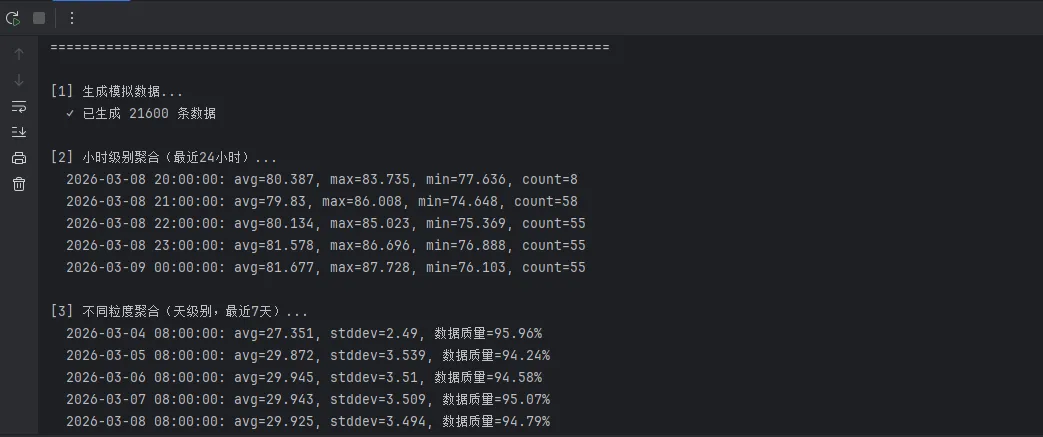
性能对比:在300万条记录的表上,没有索引时这个查询需要约4.2秒;建立(device_id, ts)复合索引后,降到38毫秒。差了两个数量级——这就是索引的价值。
🧹 方案三:数据老化清理,别让数据库无限膨胀
工业现场一个常见问题:数据库文件越来越大,最后把存储空间撑爆。定期清理 + VACUUM 是必须要做的事情。
import sqlite3import timeimport loggingdefcleanup_old_data(db_path: str, retention_days: int = 30):""" 清理超过保留期的历史数据 建议在凌晨低负载时段执行 """ cutoff_ts = int((time.time() - retention_days * 86400) * 1000) conn = sqlite3.connect(db_path)try:# 分批删除,避免长事务锁表 batch_size = 10000 total_deleted = 0whileTrue: cursor = conn.execute(""" DELETE FROM sensor_data WHERE id IN ( SELECT id FROM sensor_data WHERE ts < ? LIMIT ? ) """, (cutoff_ts, batch_size) ) conn.commit() deleted = cursor.rowcount total_deleted += deletedif deleted < batch_size:break# 没有更多旧数据了 time.sleep(0.1) # 给其他操作留点喘息空间 logging.info(f"清理完成,共删除 {total_deleted} 条记录")# 回收磁盘空间(注意:VACUUM会重建数据库文件,比较耗时) conn.execute("VACUUM;") conn.close()except Exception as e: logging.error(f"清理失败: {e}") conn.close()raise扩展建议:如果数据量特别大(单表超过5000万行),可以考虑按月分表——sensor_data_202601、sensor_data_202602这样,清理时直接DROP TABLE,比DELETE快几十倍,也不需要VACUUM。
⚠️ 那些让人踩坑的常见误解
误解一:"SQLite不支持并发,多线程会崩"
实际上,SQLite在WAL模式下支持多读一写。Python的sqlite3模块默认check_same_thread=True,改成False并配合连接池就能多线程使用。但要注意:每个线程用独立的连接对象,不要共享同一个conn。
误解二:"数据量超过几百万就要换数据库"
我见过单文件20GB、记录数过亿的SQLite库,查询依然很快——前提是索引设计合理,查询语句写得对。盲目换库,往往是因为SQL写烂了,不是SQLite的锅。
误解三:"SQLite没有权限控制,不安全"
工业边缘端的安全威胁模型和互联网完全不同。物理隔离的设备上,文件系统权限 + 应用层加密(SQLCipher)完全够用。非要在工控机上搭一套RBAC,才是真正的过度设计。
🚀 进阶:用Python封装一个工业级数据访问层
把上面所有内容整合起来,一个可以直接复用的模板:
import sqlite3 import time import logging import tkinter as tk from tkinter import ttk, messagebox, filedialog from contextlib import contextmanager from threading import local, Thread from datetime import datetime, timedelta import random from collections import defaultdict # ============ 数据访问层 ============classIndustrialDB: """ 工业边缘端SQLite数据访问层 特性:WAL模式、线程本地连接、自动重连 """ _thread_local = local() def__init__(self, db_path: str): self.db_path = db_path self._init_schema() logging.basicConfig(level=logging.INFO) def_get_conn(self) -> sqlite3.Connection: """每个线程维护独立连接"""ifnothasattr(self._thread_local, "conn") orself._thread_local.conn isNone: conn = sqlite3.connect(self.db_path, check_same_thread=False) conn.row_factory = sqlite3.Row # 让查询结果支持按列名访问 conn.execute("PRAGMA journal_mode=WAL;") conn.execute("PRAGMA synchronous=NORMAL;") conn.execute("PRAGMA cache_size=-32000;") conn.execute("PRAGMA temp_store=MEMORY;") self._thread_local.conn = conn returnself._thread_local.conn @contextmanager deftransaction(self): """事务上下文管理器,自动处理提交和回滚""" conn = self._get_conn() try: yield conn conn.commit() except Exception as e: conn.rollback() logging.error(f"事务回滚: {e}") raisedef_init_schema(self): withself.transaction() as conn: conn.execute(""" CREATE TABLE IF NOT EXISTS sensor_data ( id INTEGER PRIMARY KEY AUTOINCREMENT, ts INTEGER NOT NULL, device_id TEXT NOT NULL, tag TEXT NOT NULL, value REAL, quality INTEGER DEFAULT 1 ) """) conn.execute( "CREATE INDEX IF NOT EXISTS idx_device_ts ""ON sensor_data(device_id, tag, ts);" ) defbulk_insert(self, records: list): """批量写入,records格式:[(ts, device_id, tag, value, quality), ...]"""withself.transaction() as conn: conn.executemany( "INSERT INTO sensor_data(ts,device_id,tag,value,quality) ""VALUES(?,?,?,?,?)", records ) logging.info(f"批量写入 {len(records)} 条记录") defquery_by_device(self, device_id: str, start_time: int = None, end_time: int = None): """按设备查询""" conn = self._get_conn() sql = "SELECT * FROM sensor_data WHERE device_id=?" params = [device_id] if start_time: sql += " AND ts >= ?" params.append(start_time) if end_time: sql += " AND ts <= ?" params.append(end_time) sql += " ORDER BY ts DESC LIMIT 1000" cursor = conn.execute(sql, params) return cursor.fetchall() defquery_all(self, limit: int = 100): """查询所有数据""" conn = self._get_conn() cursor = conn.execute( "SELECT * FROM sensor_data ORDER BY ts DESC LIMIT ?", [limit] ) return cursor.fetchall() defget_statistics(self): """获取统计信息""" conn = self._get_conn() total = conn.execute("SELECT COUNT(*) FROM sensor_data").fetchone()[0] devices = conn.execute( "SELECT COUNT(DISTINCT device_id) FROM sensor_data" ).fetchone()[0] tags = conn.execute( "SELECT COUNT(DISTINCT tag) FROM sensor_data" ).fetchone()[0] return {"total": total, "devices": devices, "tags": tags} defget_device_list(self): """获取所有设备列表""" conn = self._get_conn() cursor = conn.execute("SELECT DISTINCT device_id FROM sensor_data ORDER BY device_id") return [row[0] for row in cursor.fetchall()] defdelete_old_data(self, days: int = 30): """删除指定天数前的数据""" cutoff_ts = int(time.time()) - (days * 86400) withself.transaction() as conn: cursor = conn.execute("DELETE FROM sensor_data WHERE ts < ?", [cutoff_ts]) logging.info(f"删除了 {cursor.rowcount} 条过期数据") # ============ Tkinter GUI ============ classIndustrialDataApp: def__init__(self, root, db_path: str = "industrial.db"): self.root = root self.db = IndustrialDB(db_path) self.root.title("工业数据管理系统") self.root.geometry("1200x700") self.root.configure(bg="#1e2936") # 设置样式 self.setup_styles() # 创建UI self.create_widgets() # 初始化数据(仅第一次) self.load_initial_data() # 刷新数据 self.refresh_data() defsetup_styles(self): """配置样式"""self.style = ttk.Style() self.style.theme_use("clam") # 定义颜色 self.bg_color = "#1e2936"self.fg_color = "#e0e0e0"self.accent_color = "#00bcd4"self.button_color = "#2c3e50"self.style.configure("TLabel", background=self.bg_color, foreground=self.fg_color) self.style.configure("TButton", background=self.button_color, foreground=self.fg_color) self.style.configure("TFrame", background=self.bg_color) self.style.configure("Treeview", background="#2a3f5f", foreground=self.fg_color) self.style.configure("Treeview.Heading", background=self.button_color, foreground=self.fg_color) defcreate_widgets(self): """创建UI界面"""# 顶部标题栏 self.create_header() # 主容器 main_container = ttk.Frame(self.root) main_container.pack(fill=tk.BOTH, expand=True, padx=10, pady=10) # 左侧菜单栏 self.create_sidebar(main_container) # 中间内容区 self.create_content_area(main_container) # 右侧统计区 self.create_stats_panel(main_container) # 底部状态栏 self.create_statusbar() defcreate_header(self): """创建顶部标题栏""" header = tk.Frame(self.root, bg=self.accent_color, height=50) header.pack(fill=tk.X) title_label = tk.Label( header, text="⚙️ 工业数据管理系统", font=("Arial", 18, "bold"), bg=self.accent_color, fg="white" ) title_label.pack(side=tk.LEFT, padx=20, pady=10) defcreate_sidebar(self, parent): """创建左侧菜单栏""" sidebar = ttk.Frame(parent, width=150) sidebar.pack(side=tk.LEFT, fill=tk.Y, padx=(0, 10)) menus = [ ("📊 数据查询", self.show_data_query), ("📥 数据导入", self.show_data_import), ("🔍 设备监控", self.show_device_monitor), ("📈 统计分析", self.show_statistics), ("⚙️ 系统设置", self.show_settings), ] for menu_name, callback in menus: btn = tk.Button( sidebar, text=menu_name, font=("Arial", 11), bg=self.button_color, fg=self.fg_color, border=0, padx=10, pady=12, command=callback, relief=tk.FLAT, activebackground=self.accent_color, activeforeground="white" ) btn.pack(fill=tk.X, pady=5) defcreate_content_area(self, parent): """创建主内容区""" content = ttk.Frame(parent) content.pack(side=tk.LEFT, fill=tk.BOTH, expand=True, padx=(0, 10)) # 标题 title = tk.Label( content, text="最近数据", font=("Arial", 14, "bold"), bg=self.bg_color, fg=self.accent_color ) title.pack(anchor=tk.W, pady=(0, 10)) # 数据表格 columns = ("时间", "设备ID", "标签", "数值", "质量") self.tree = ttk.Treeview(content, columns=columns, height=15, show="headings") for col in columns: self.tree.column(col, width=150, anchor=tk.CENTER) self.tree.heading(col, text=col) scrollbar = ttk.Scrollbar(content, orient=tk.VERTICAL, command=self.tree.yview) self.tree.configure(yscroll=scrollbar.set) self.tree.pack(side=tk.LEFT, fill=tk.BOTH, expand=True) scrollbar.pack(side=tk.RIGHT, fill=tk.Y) # 刷新按钮 refresh_btn = tk.Button( content, text="🔄 刷新数据", bg=self.accent_color, fg="white", border=0, padx=15, pady=8, font=("Arial", 10), command=self.refresh_tree, relief=tk.FLAT ) refresh_btn.pack(pady=10) defcreate_stats_panel(self, parent): """创建右侧统计面板""" stats = ttk.Frame(parent, width=250) stats.pack(side=tk.RIGHT, fill=tk.BOTH) # 统计标题 title = tk.Label( stats, text="📊 系统统计", font=("Arial", 12, "bold"), bg=self.bg_color, fg=self.accent_color ) title.pack(anchor=tk.W, pady=(0, 15)) # 统计信息框 stat_items = [ ("总记录数", "total_records"), ("设备数量", "device_count"), ("数据标签", "tag_count"), ("最后更新", "last_update"), ] self.stat_labels = {} for label_text, key in stat_items: frame = tk.Frame(stats, bg=self.button_color, highlightthickness=0) frame.pack(fill=tk.X, pady=8) lbl = tk.Label(frame, text=label_text, font=("Arial", 10), bg=self.button_color, fg=self.fg_color) lbl.pack(anchor=tk.W, padx=12, pady=8) val = tk.Label(frame, text="--", font=("Arial", 16, "bold"), bg=self.button_color, fg=self.accent_color) val.pack(anchor=tk.W, padx=12, pady=(0, 8)) self.stat_labels[key] = val # 清理数据按钮 clean_btn = tk.Button( stats, text="🗑️ 清理过期数据", bg="#d32f2f", fg="white", border=0, padx=10, pady=10, font=("Arial", 10), command=self.clean_old_data, relief=tk.FLAT, activebackground="#e53935" ) clean_btn.pack(pady=20, fill=tk.X) defcreate_statusbar(self): """创建底部状态栏""" statusbar = tk.Frame(self.root, bg=self.button_color, height=30) statusbar.pack(fill=tk.X, side=tk.BOTTOM) self.status_label = tk.Label( statusbar, text="✓ 数据库连接正常", font=("Arial", 10), bg=self.button_color, fg="#4caf50" ) self.status_label.pack(side=tk.LEFT, padx=15, pady=5) defload_initial_data(self): """首次加载数据"""try: stats = self.db.get_statistics() if stats["total"] == 0: # 生成模拟数据 records = self.generate_sample_data() self.db.bulk_insert(records) messagebox.showinfo("提示", "已导入100条示例数据") except Exception as e: logging.error(f"加载初始数据失败: {e}") defgenerate_sample_data(self, count: int = 100): """生成示例数据""" records = [] devices = ["DEVICE001", "DEVICE002", "DEVICE003", "DEVICE004", "DEVICE005"] tags = ["温度", "湿度", "压力", "流量", "转速"] base_ts = int(time.time()) - 86400# 从24小时前开始 for i inrange(count): ts = base_ts + (i * 864) # 每条记录间隔约15分钟 device = random.choice(devices) tag = random.choice(tags) # 模拟不同范围的数值 if tag == "温度": value = random.uniform(20, 80) elif tag == "湿度": value = random.uniform(30, 90) elif tag == "压力": value = random.uniform(0.5, 2.5) elif tag == "流量": value = random.uniform(10, 100) else: # 转速 value = random.uniform(100, 5000) quality = random.choice([0, 1, 1, 1]) # 大多数质量良好 records.append((ts, device, tag, value, quality)) return records defrefresh_data(self): """定期刷新数据"""self.refresh_tree() self.update_stats() # 每5秒刷新一次 self.root.after(5000, self.refresh_data) defrefresh_tree(self): """刷新表格数据"""try: # 清空表格 for item inself.tree.get_children(): self.tree.delete(item) # 获取数据 records = self.db.query_all(limit=50) for row in records: ts = datetime.fromtimestamp(row['ts']).strftime("%Y-%m-%d %H:%M:%S") quality_icon = "✓"if row['quality'] else"✗"self.tree.insert("", "end", values=( ts, row['device_id'], row['tag'], f"{row['value']:.2f}", quality_icon )) except Exception as e: logging.error(f"刷新表格失败: {e}") defupdate_stats(self): """更新统计信息"""try: stats = self.db.get_statistics() self.stat_labels["total_records"].config(text=f"{stats['total']:,}") self.stat_labels["device_count"].config(text=f"{stats['devices']}") self.stat_labels["tag_count"].config(text=f"{stats['tags']}") self.stat_labels["last_update"].config( text=datetime.now().strftime("%H:%M:%S") ) except Exception as e: logging.error(f"更新统计失败: {e}") defshow_data_query(self): """显示数据查询窗口""" win = tk.Toplevel(self.root) win.title("数据查询") win.geometry("500x300") win.configure(bg=self.bg_color) # 设备选择 tk.Label(win, text="设备ID:", bg=self.bg_color, fg=self.fg_color).pack(anchor=tk.W, padx=20, pady=10) device_var = tk.StringVar() devices = self.db.get_device_list() combo = ttk.Combobox(win, textvariable=device_var, values=devices, width=40) combo.pack(padx=20, fill=tk.X) # 查询按钮 defquery(): device = device_var.get() if device: records = self.db.query_by_device(device) result_text.config(state=tk.NORMAL) result_text.delete(1.0, tk.END) for r in records[:20]: ts = datetime.fromtimestamp(r['ts']).strftime("%Y-%m-%d %H:%M:%S") result_text.insert(tk.END, f"{ts} | {r['device_id']} | {r['tag']} | {r['value']} | {r['quality']}\n") result_text.config(state=tk.DISABLED) query_btn = tk.Button(win, text="查询", command=query, bg=self.accent_color, fg="white", border=0) query_btn.pack(pady=10) # 结果显示 result_text = tk.Text(win, height=10, bg="#2a3f5f", fg=self.fg_color, state=tk.DISABLED) result_text.pack(padx=20, pady=10, fill=tk.BOTH, expand=True) defshow_data_import(self): """显示数据导入窗口""" messagebox.showinfo("数据导入", "可从CSV文件导入数据。\n本演示已包含示例数据。") defshow_device_monitor(self): """显示设备监控窗口""" win = tk.Toplevel(self.root) win.title("设备监控") win.geometry("500x400") win.configure(bg=self.bg_color) devices = self.db.get_device_list() tk.Label(win, text="在线设备:", font=("Arial", 12, "bold"), bg=self.bg_color, fg=self.accent_color).pack( anchor=tk.W, padx=20, pady=10) for device in devices: frame = tk.Frame(win, bg=self.button_color) frame.pack(fill=tk.X, padx=20, pady=5) tk.Label(frame, text=f"● {device}", font=("Arial", 11), bg=self.button_color, fg="#4caf50").pack( anchor=tk.W, padx=10, pady=8) defshow_statistics(self): """显示统计分析窗口""" messagebox.showinfo("统计分析", f"总记录数: {self.db.get_statistics()['total']}\n设备数: {self.db.get_statistics()['devices']}\n数据标签: {self.db.get_statistics()['tags']}") defshow_settings(self): """显示系统设置窗口""" win = tk.Toplevel(self.root) win.title("系统设置") win.geometry("400x300") win.configure(bg=self.bg_color) tk.Label(win, text="数据库路径:", bg=self.bg_color, fg=self.fg_color).pack(anchor=tk.W, padx=20, pady=10) path_label = tk.Label(win, text=self.db.db_path, bg=self.button_color, fg=self.accent_color, font=("Arial", 10)) path_label.pack(fill=tk.X, padx=20) tk.Label(win, text="WAL模式: 已启用", bg=self.bg_color, fg=self.fg_color, pady=20).pack(anchor=tk.W, padx=20) tk.Label(win, text="缓存大小: 32MB", bg=self.bg_color, fg=self.fg_color).pack(anchor=tk.W, padx=20) defclean_old_data(self): """清理过期数据"""if messagebox.askyesno("确认", "确定要清理30天前的数据吗?"): self.db.delete_old_data(days=30) self.refresh_tree() self.update_stats() messagebox.showinfo("成功", "过期数据已清理") if __name__ == "__main__": root = tk.Tk() app = IndustrialDataApp(root) root.mainloop()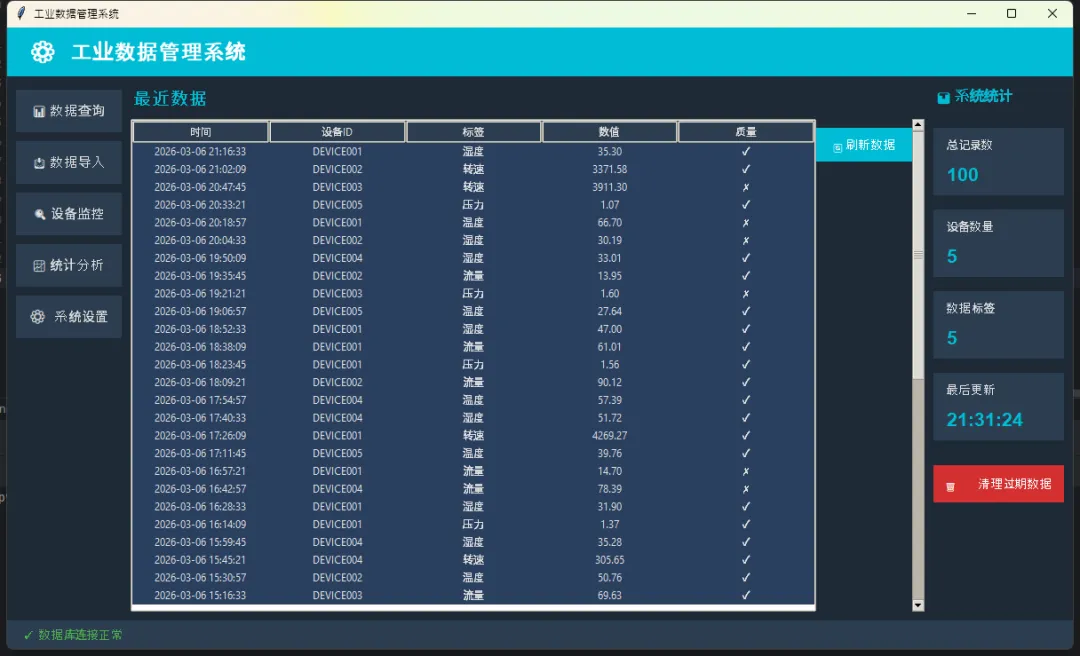
💬 聊聊你的经历
工业项目里,你用过哪些数据存储方案?有没有遇到过"杀鸡用牛刀"或者相反"小马拉大车"的情况?
欢迎在评论区分享——特别想听听那些在恶劣环境下(断电、高温、低内存)踩过坑的故事。
实战小挑战:试着用上面的IndustrialDB模板,模拟10个设备同时以10Hz频率写入数据,跑30秒,看看最终写入了多少条记录,用EXPLAIN QUERY PLAN检查一下你的查询有没有走索引。
🎯 三句话带走今天的核心
"SQLite不是简化版数据库,它是另一种数据库哲学的完整实现。"
"工业边缘端的数据库选型,先问需求,再看规格,别被品牌名吓到。"
"WAL模式 + 批量提交 + 合理索引,SQLite能扛住你90%的工业场景。"
📚 学习路线图
如果你想把SQLite用得更深,建议按这个顺序来:
1. SQLite官方文档 — 特别是PRAGMA章节,值得逐条读一遍 2. Python sqlite3模块文档 —row_factory、detect_types这些细节很有用3. SQLCipher — 需要加密时的首选方案 4. DuckDB — 如果你的分析查询越来越复杂,可以考虑这个OLAP方向的替代品 5. 时序数据库对比研究(InfluxDB vs TimescaleDB vs SQLite)— 了解什么时候真的需要换
