《嵌入式AI筑基笔记02:Python数据类型01,从C的“硬核”到Python的“包容”》
- 2026-09-02 19:57:59
《嵌入式AI筑基笔记02:Python数据类型01,从C的“硬核”到Python的“包容”》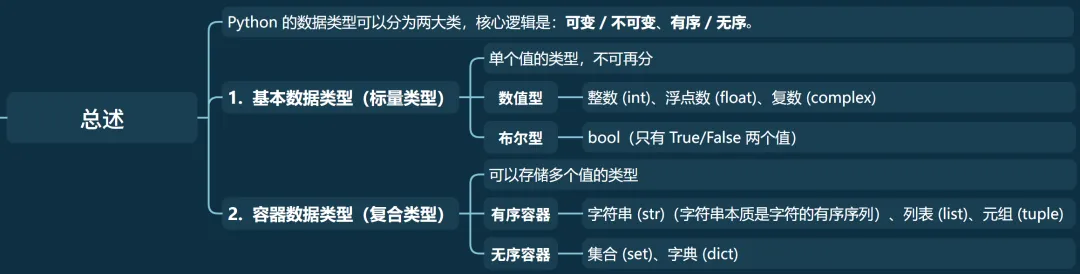
Python 的数据类型可以分为两大类,核心逻辑是:可变 / 不可变、有序 / 无序: 基本数据类型(标量类型):单个值的类型,不可再分 • 数值型:整数 (int)、浮点数 (float)、复数 (complex) • 布尔型:bool(只有 True/False 两个值) • 字符串:str(字符的序列) 容器数据类型(复合类型):可以存储多个值的类型 • 有序容器:列表 (list)、元组 (tuple)、字符串 (str)(字符串本质是字符的有序序列) • 无序容器:集合 (set)、字典 (dict) 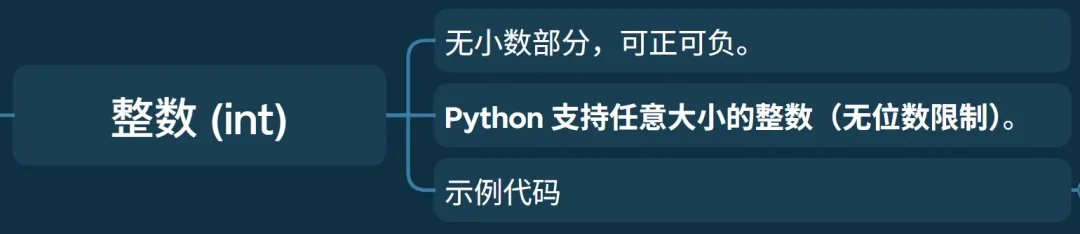
• 无小数部分,可正可负。 • Python 支持任意大小的整数(无位数限制)。 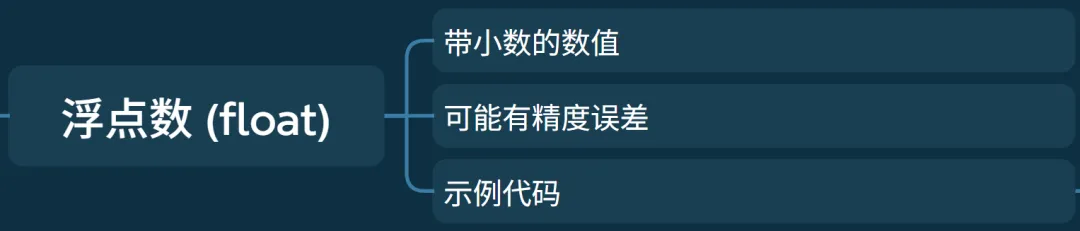
• 带小数的数值 • 可能有精度误差 • 示例代码 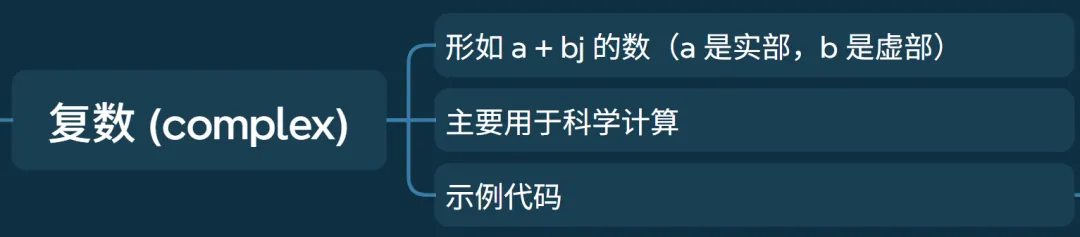
• 形如 • 主要用于科学计算 • 示例代码 
• 只有两个值: • 主要用于条件判断 • Python 中除了 • 示例代码 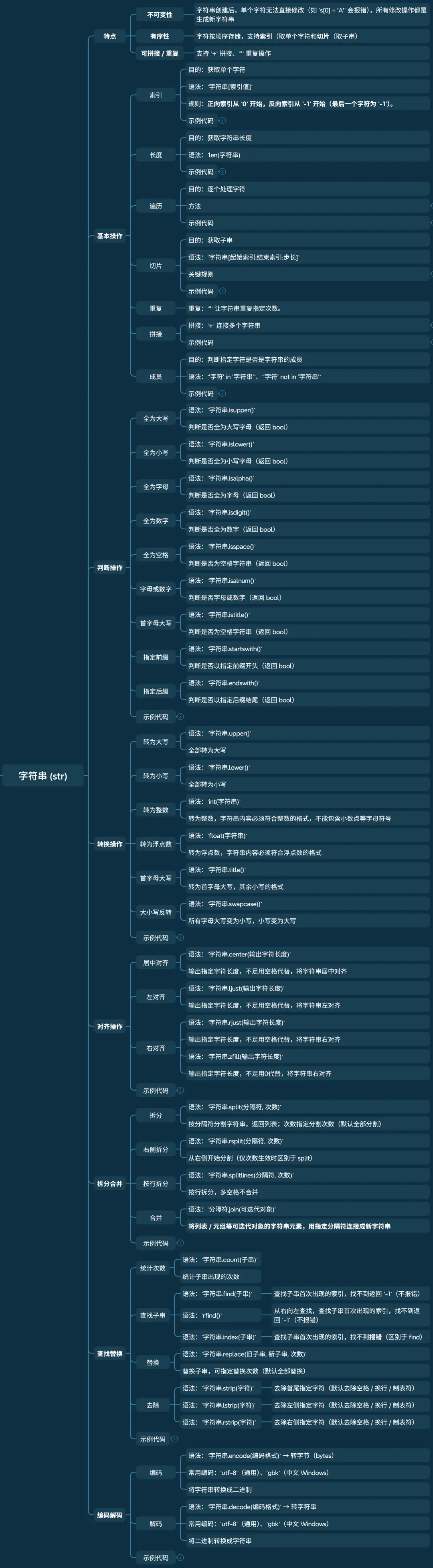

• 不可变性:字符串创建后,单个字符无法直接修改(如 • 有序性:字符按顺序存储,支持索引(取单个字符和切片(取子串)。 • 可拼接 / 重复:支持 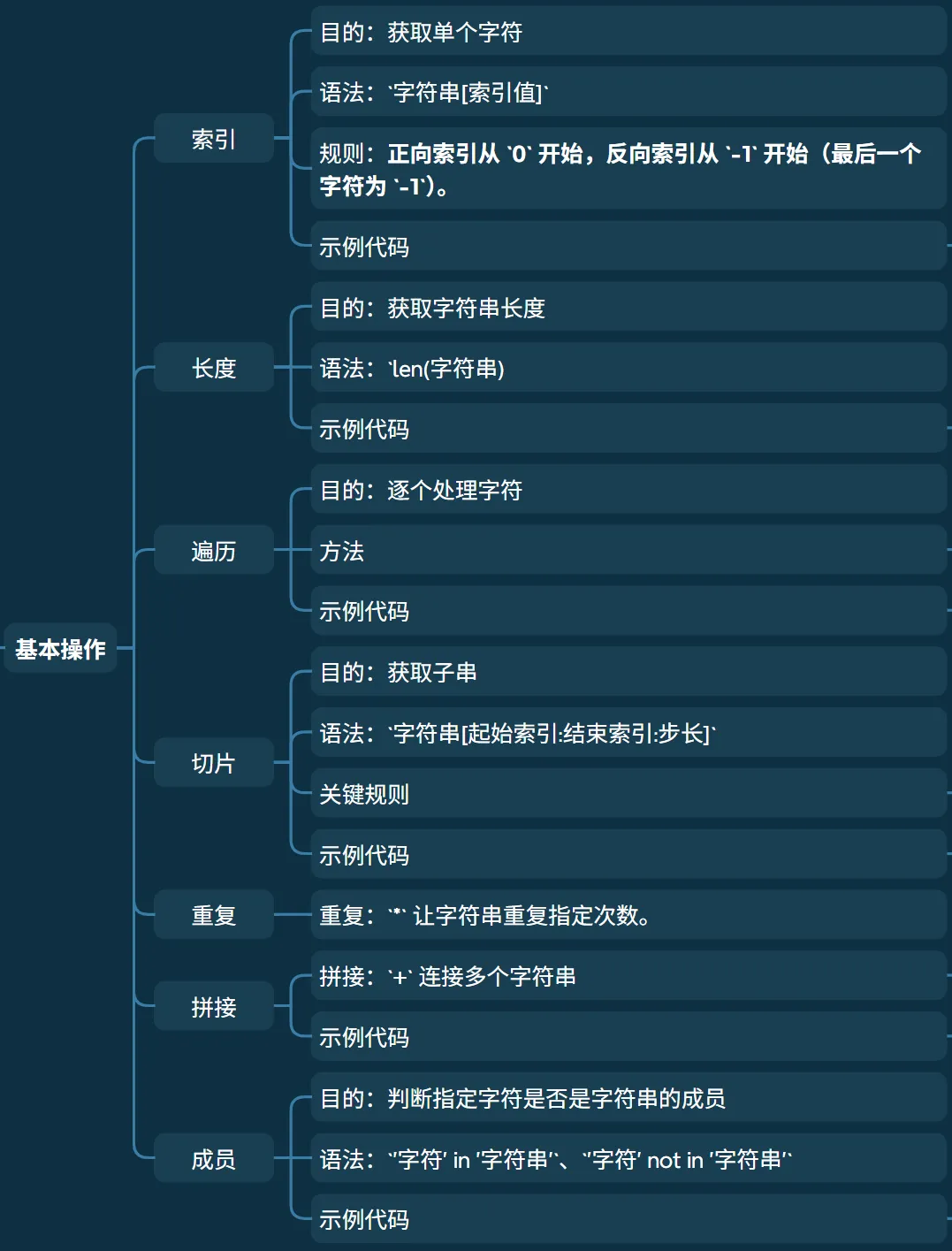
• 索引 • 长度 • 成员 • 遍历 • 通过索引遍历 • • • 切片 • 拼接与重复 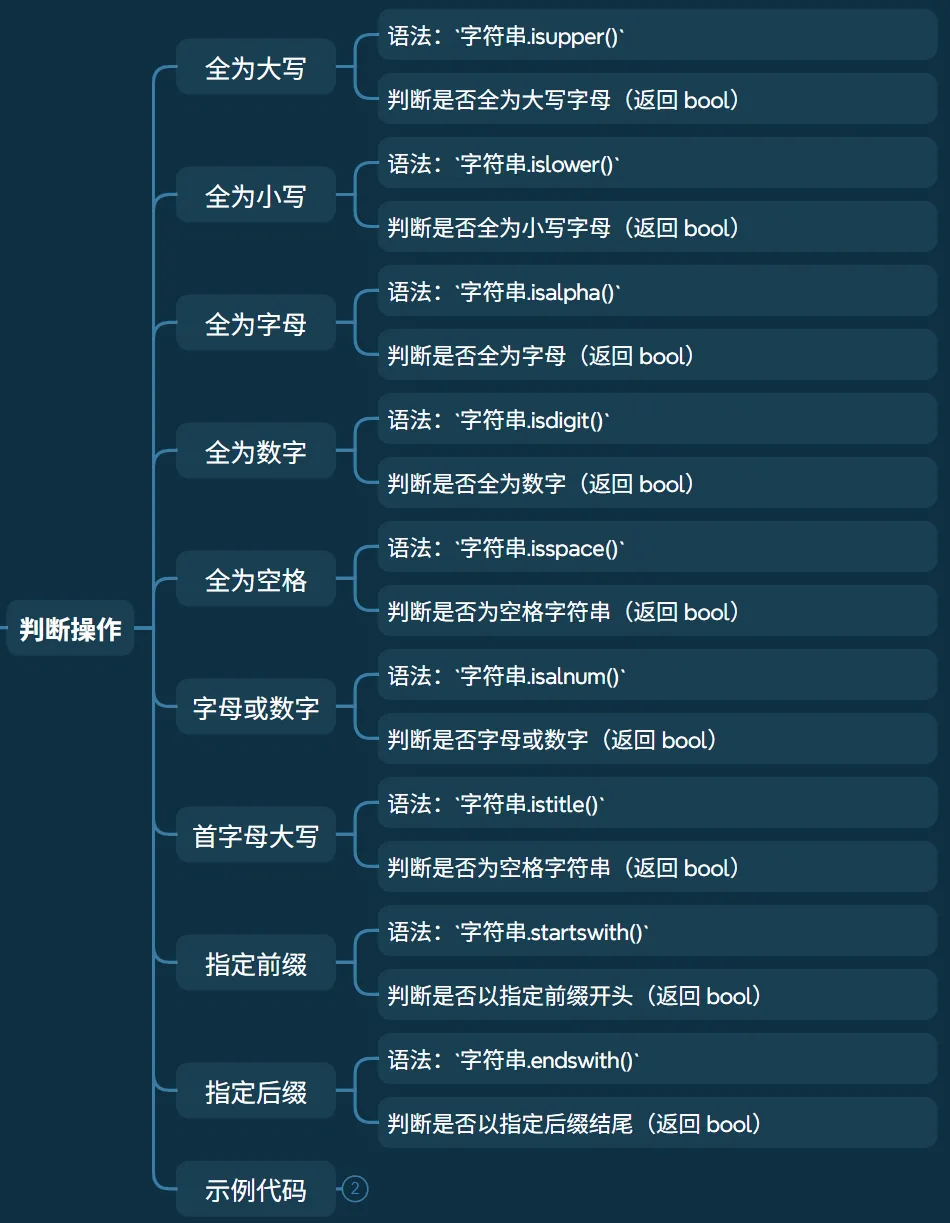
• 全为大写 • 全为小写 • 全为字母 • 全为数字 • 全为空格 • 字母或数字 • 首字母大写 • 指定前缀 • 指定后缀 • 示例代码 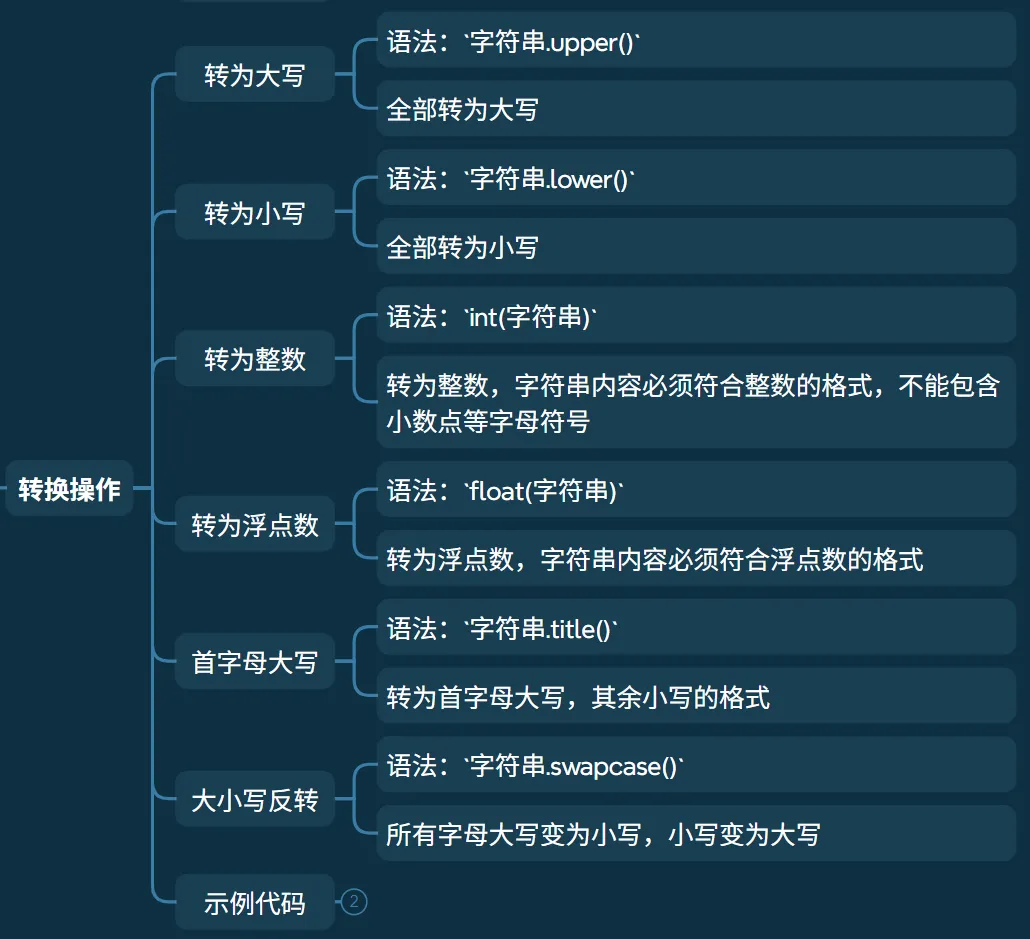
• 转为大写 • 转为小写 • 转为整数 • 转为浮点数 • 首字母大写 • 大小写反转 • 示例代码 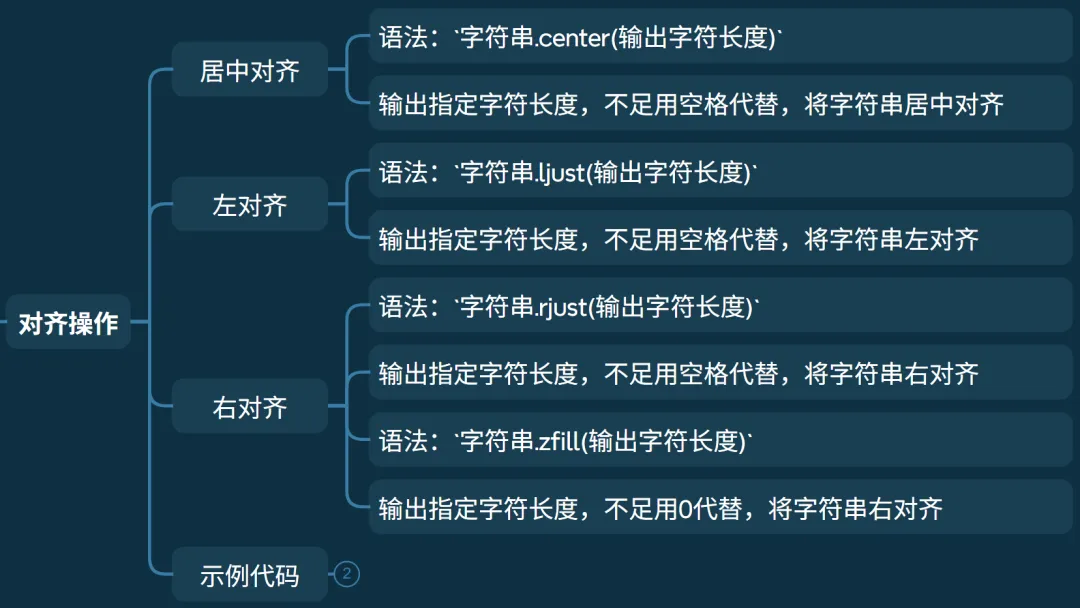
• 居中对齐 • 左对齐 • 右对齐 • 示例代码 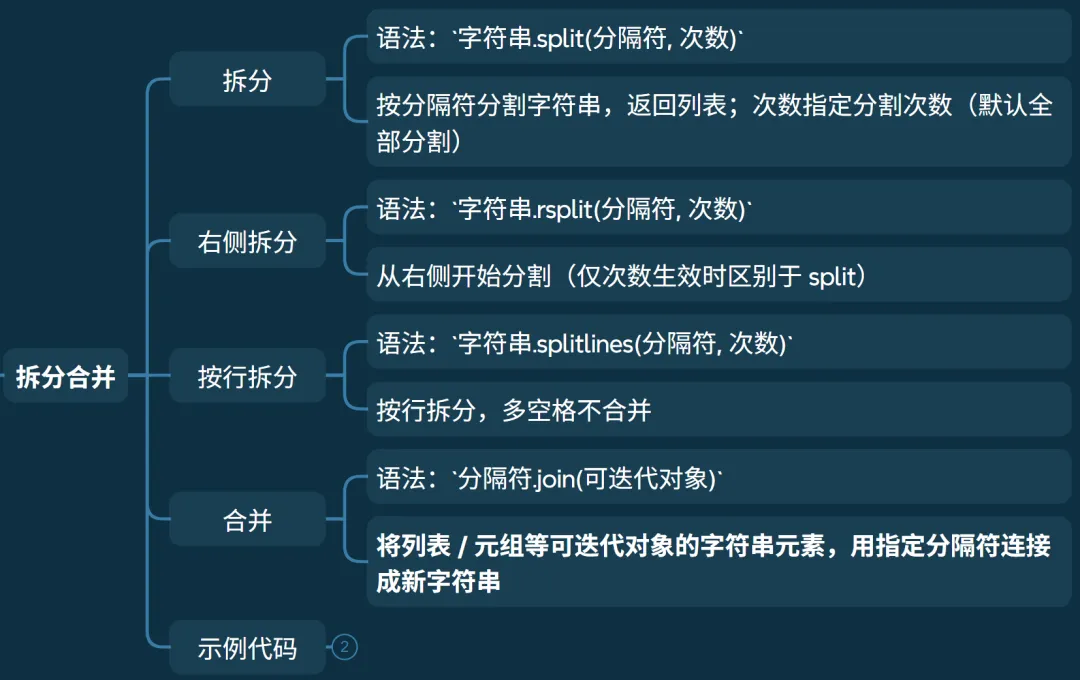
• 拆分 • 右侧拆分 • 按行拆分 • 合并 • 示例代码 查找替换
•统计次数 • 查找子串 • 替换 • 去除 • 示例代码 编码解码
• 编码 • 解码 • 示例代码
《嵌入式AI筑基笔记02:Python数据类型01,从C的“硬核”到Python的“包容”》
前言
数据类型是编程的基石。Python的数据类型虽灵活,但遵循着可变/不可变、有序/无序两大核心规则。理解它们,就能掌握字符串、列表、元组、字典、集合的精髓。
原文内容过长,为了方便阅读,将内容拆分两篇文章发布,本章主要介绍标量类型。
整数(int)
# 整数 可正可负,无位数限制a = 4b = -1000000000000000000000print(a, type(a)) # 4 <class 'int'>print(b, type(b)) # -1000000000000000000000 <class 'int'>C程序员的视角:
• 整数:Python 无位数限制,C 语言有固定范围(如 int最大 2^31-1)。• 大数运算再也不用担心溢出了。 浮点数(float)
# 浮点数 带小数部分,可能有精度限制f1 = 3.1415926f2 = -2.3e-3print(f1, type(f1)) # 3.1415926 <class 'float'>print(f2, type(f2)) # -0.0023 <class 'float'>C程序员的视角:
• 浮点数和 C 的 double类似,精度问题依然存在,比较时要注意。复数(complex)
a + bj 的数(a 是实部,b 是虚部)# 复数 (complex)# 形如 `a + bj` 的数(a 是实部,b 是虚部)# 主要用于科学计算comp = 3 + 4jprint(comp, type(comp)) # (3+4j) <class 'complex'>print(comp.real, type(comp.real)) # 实部 3.0 <class 'float'>print(comp.imag, type(comp.imag)) # 虚部 4.0 <class 'float'>C程序员的视角:
• C 语言没有原生复数,需要自己定义结构体或使用库。Python 直接内置,科学计算方便很多。 布尔型(bool)
True(真,等价于 1)、False(假,等价于 0)0、""、[]、{}、None 等空值,其他值都被视为 True# 布尔型 (bool)# 只有两个值:`True`(真,等价于 1)、`False`(假,等价于 0)# 主要用于条件判断# Python 中除了 `0`、`""`、`[]`、`{}`、`None` 等空值,其他值都被视为 `True`b = Trueprint(b, type(b)) # True <class 'bool'>print(b and False, b or False, not b) # False True Falseprint(bool([]), bool(None), bool("")) # False False FalseC程序员的视角:
• C 语言中布尔值本质是整数(0 假,非 0 真)。Python 的 True/False是独立类型,但也能参与运算。• 假值的范围扩大了:除了 0,还有空容器、None 等,写条件判断时要留意。 字符串(str)
特点
s[0] = 'A' 会报错),所有修改操作都是生成新字符串。+ 拼接、* 重复操作。基本操作
• 功能:获取单个字符 • 语法: 字符串[索引值]• 规则:正向索引从 0开始,反向索引从-1开始(最后一个字符为-1)。• 示例代码 # 索引# 使用下标索引s = "hello"print(s[1], s[-1]) # 第二个元素和最后一个元素 e o
• 功能:获取字符串长度 • 语法: len(字符串)
• 示例代码 # 长度# 使用len()s = "hello"print(s, len(s)) # hello 5
• 功能:判断指定字符是否是字符串的成员 • 语法: '字符' in '字符串'、'字符' not in '字符串'• 示例代码 # 成员s = "hello"print('1' in s) # 1 不是 s 的成员 Falseprint('1' not in s) # 1 不是 s 的成员 Trueprint('o' in s) # o 是 s 的成员 True
• 功能:逐个处理字符 • 方法
• 直接遍历字符 • 语法: for char in 字符串:• 特点:最简洁,最基础
• 语法: for idx in range(len(字符串)):+字符串[idx]• 特点:手动控制索引和步长,灵活度高
• 使用 enumerate () 遍历 • 语法: for idx, char in enumerate(字符串, start=起始索引):
enumerate() 会返回一个迭代器,每个元素是 (索引, 字符) 的元组;start 参数可选,默认从 0 开始,可指定起始索引(如 start=1)。• 特点:推荐!索引 + 字符一键获取
• 示例代码 # 遍历# 直接遍历字符#特点:最简洁,最基础s = "hello"for char in s: print(char, end='') # helloprint()# 通过索引遍历# 手动控制索引和步长,灵活度高for i in range(len(s)): print(s[i], end='') # helloprint()# 使用 enumerate () 遍历# 推荐!索引 + 字符一键获取for i, char in enumerate(s): print(i, char, end='|') # 0 h|1 e|2 l|3 l|4 o|print()
• 功能:获取子串 • 语法: 字符串[起始索引:结束索引:步长]• 关键规则 • 左闭右开:包含起始索引,不包含结束索引; • 步长默认 1,步长为负数表示反向切片;• 起始 / 结束索引可省略(省略起始 = 从开头,省略结束 = 到末尾)。
• 示例代码 # 切片# 获取子串s = "hello"print(s[1:3]) # 取[1,3)的字符 elprint(s[:2]) # 取[0,2)的字符 heprint(s[2:]) # 取[2,4]的字符 lloprint(s[::2]) # 隔2位取所有字符 hloprint(s[-4:-2]) # 取[-4,-2)的字符 elprint(s[::-1]) # 反向取所有字符 olleh
• 拼接: +连接多个字符串• 注意:仅能和字符串拼接,其他类型需先转 str
• 重复: *让字符串重复指定次数。• 示例代码 # 拼接和重复s = "hello"s1 = ',feng!'print(s+s1) # 拼接 hello,feng!print(s*2) # 重复 hellohello
判断操作
• 语法: 字符串.isupper()• 判断是否全为大写字母(返回 bool)
• 语法: 字符串.islower()• 判断是否全为小写字母(返回 bool)
• 语法: 字符串.isalpha()• 判断是否全为字母(返回 bool)
• 语法: 字符串.isdigit()• 判断是否全为数字(返回 bool)
• 语法: 字符串.isspace()• 判断是否为空格字符串(返回 bool)
• 语法: 字符串.isalnum()• 判断是否字母或数字(返回 bool)
• 语法: 字符串.istitle()• 判断是否为空格字符串(返回 bool)
• 语法: 字符串.startswith()• 判断是否以指定前缀开头(返回 bool)
• 语法: 字符串.endswith()• 判断是否以指定后缀结尾(返回 bool)
# 判断操作print("hello".isupper(), "HELLO".isupper()) # 判断全为大写 False Trueprint("HELLO".islower(), "hello".islower()) # 判断全为小写 False Trueprint("HE12O".isalpha(), "hello".isalpha()) # 判断全为字母 False Trueprint("hello".isdigit(), "12345".isdigit()) # 判断全为数字 False Trueprint("HELLO".isspace(), " ".isspace()) # 判断为空格字符串 False Trueprint("he_lo".isalnum(), "HE12O".isalnum()) # 判断全为字母或数字 False Trueprint("hello".istitle(), "Hello".istitle()) # 判断首字母大写 False Trueprint("hello".startswith("ll"), "HELLO".startswith("HE")) # 判断前缀 False Trueprint("hello".endswith("ll"), "HELLO".endswith("LO")) # 判断后缀 False True转换操作
• 语法: 字符串.upper()• 全部转为大写
• 语法: 字符串.lower()• 全部转为小写
• 语法: int(字符串)• 转为整数,字符串内容必须符合整数的格式,不能包含小数点等字母符号
• 语法: float(字符串)• 转为浮点数,字符串内容必须符合浮点数的格式
• 语法: 字符串.title()• 转为首字母大写,其余小写的格式
• 语法: 字符串.swapcase()• 所有字母大写变为小写,小写变为大写
# 转换操作print("hello".upper(), "H12LO".upper()) # 转为大写 HELLO H12LOprint("HELLO".lower(), "hELlo".lower()) # 转为小写 hello helloprint(int("+12343323"), int("-15324")) # 转为整数 12343323 -15324print(float("3.141592"),float("-12.3")) # 转为浮点数 3.141592 -12.3print("HELLO".title(), "heLLo".title()) # 首字母大写 Hello Helloprint("hLo".swapcase(), "HL12O".swapcase()) # 大小写反转 HlO hl12o对齐操作
• 语法: 字符串.center(输出字符长度)• 输出指定字符长度,不足用空格代替,将字符串居中对齐
• 语法: 字符串.ljust(输出字符长度)• 输出指定字符长度,不足用空格代替,将字符串左对齐
• 语法: 字符串.rjust(输出字符长度)• 输出指定字符长度,不足用空格代替,将字符串右对齐 • 语法: 字符串.zfill(输出字符长度)• 输出指定字符长度,不足用0代替,将字符串右对齐
# 对齐操作s = "hello"print(s.center(10)) # 居中对齐 " hello "print(s.ljust(10)) # 左对齐 "hello "print(s.rjust(10)) # 右对齐 " hello"print(s.zfill(10)) # 靠右补0 "00000hello"拆分合并
• 语法: 字符串.split(分隔符, 次数)• 按分隔符分割字符串,返回列表;次数指定分割次数(默认全部分割)
• 语法: 字符串.rsplit(分隔符, 次数)• 从右侧开始分割(仅次数生效时区别于 split)
• 语法: 字符串.splitlines(分隔符, 次数)• 按行拆分,多空格不合并
• 语法: 分隔符.join(可迭代对象)• 将列表 / 元组等可迭代对象的字符串元素,用指定分隔符连接成新字符串
# 拆分操作# split() : 拆分s = "hello seven world"print(s.split()) # 默认使用空格拆分,多空格合并 ['hello', 'seven', 'world']print(s.split(' ')) # 指定使用空格拆分, 多空格不合并 ['hello', '', '', '', 'seven', 'world']print(s.split('lo')) # 指定使用”lo"拆分 ['hel', ' seven world']print(s.split('123')) # 指定使用”123"拆分,未找到,不分割 ['hello seven world']print(s.rsplit(maxsplit=1)) # 从右开始按空格拆分1次, ['hello seven', 'world']# splitlines(): 按行拆分s ='''hello sevenworld'''print(s.splitlines()) # 按行拆分,多空格不合并 ['hello ', 'seven', 'world']print(s.split('\n')) # 按行拆分,多空格不合并 ['hello ', 'seven', 'world']# 合并: join : 会得到字符串类型# join 将列表中的字符串拼接s = ['hello', 'world', 'seven']print('\n'.join(s)) # 以换行符合并字符串 hello\nworld\nsevenprint('\t'.join(s)) # 以制表符合并字符串 hello world sevenprint(''.join(s)) # 直接合并字符串 helloworldseven查找替换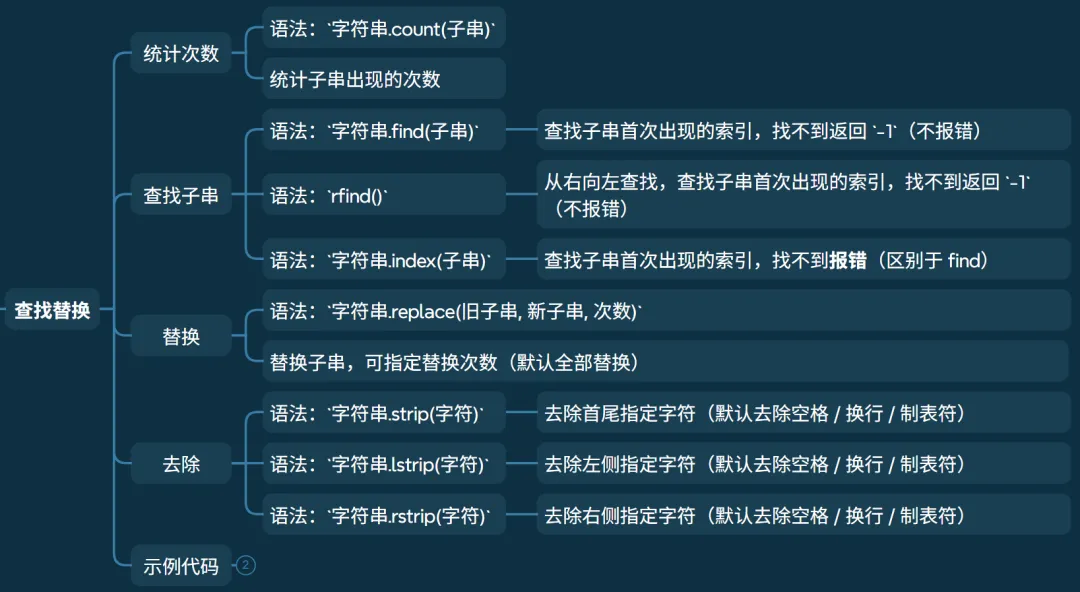
• 语法: 字符串.count(子串)• 统计子串出现的次数
• 语法: 字符串.find(子串)• 查找子串首次出现的索引,找不到返回 -1(不报错)
• 语法: rfind()
• 从右向左查找,查找子串首次出现的索引,找不到返回 -1(不报错)
• 语法: 字符串.index(子串)• 查找子串首次出现的索引,找不到报错(区别于 find)
• 语法: 字符串.replace(旧子串, 新子串, 次数)• 替换子串,可指定替换次数(默认全部替换)
• 语法: 字符串.strip(字符)• 去除首尾指定字符(默认去除空格 / 换行 / 制表符)
• 语法: 字符串.lstrip(字符)
• 去除左侧指定字符(默认去除空格 / 换行 / 制表符) • 语法: 字符串.rstrip(字符)• 去除右侧指定字符(默认去除空格 / 换行 / 制表符)
# 查找和替换# count(): 统计字符出现个数s = "hello hello"print(s.count('l')) # 'l' 出现次数 4print(s.count('e')) # 'e' 出现次数 2print(s.count('ll')) # 'll' 出现次数 2print(s.count('e', 5, 10) ) # [5, 10)中'e'出现次数 1# find()/rfind(): 查找指定子串第一次出现的下标位置,如果不存在则返回-1s = "124 hello world hello 1234"print(s.find('hello')) # 4print(s.rfind('l')) # 从右向左查找 19print(s.rfind('x')) # 不存在 -1# index(): 查找子串首次出现的索引,找不到报错(区别于 find)s = "124 hello world hello 1234"print(s.index('hello')) # 4# 替换: replace() : 默认替换所有匹配的字符s = 'hello world seven'print(s.replace('l', 'm')) # 将’l‘替换成'm' hemmo wormd sevenprint(s.replace('l', 'nn')) # 将’l‘替换成'nn' hennnno wornnd sevenprint(s.replace('x', '2')) # 将’x‘替换成'2',未找到 hello world seven# strip() : 去除两边的指定字符(默认去除空格) (了解)s = ' --hello feng-- seven-- 'print(s.strip()) # 去掉两边空格 "--hello feng-- seven--"print(s.strip(' -')) # 去掉两边空格和- "hello feng-- seven"print(s.lstrip()) # 去掉左边空格 "--hello feng-- seven-- "print(s.rstrip()) # 去掉右边空格 " --hello feng-- seven--"编码解码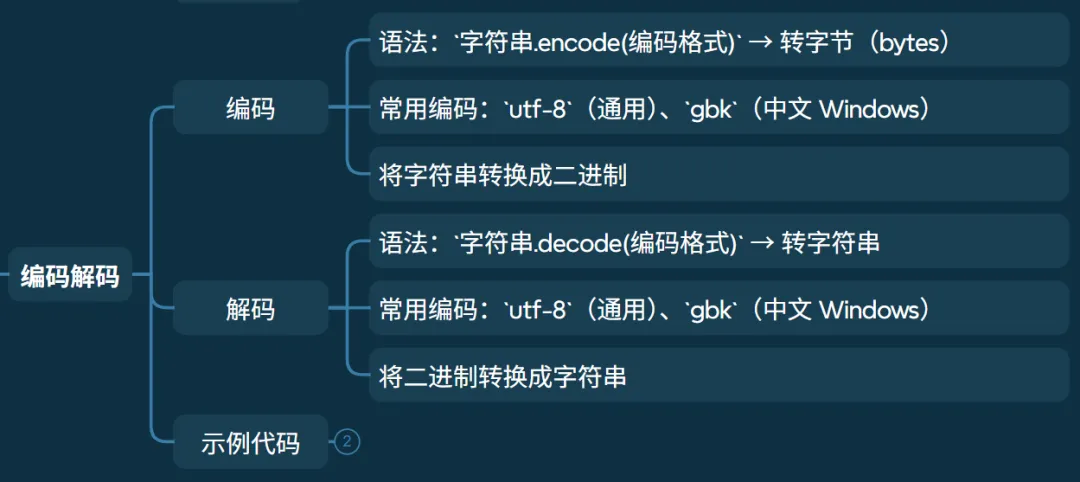
• 语法: 字符串.encode(编码格式)→ 转字节(bytes)• 常用编码: utf-8(通用)、gbk(中文 Windows)• 将字符串转换成二进制
• 语法: 字符串.decode(编码格式)→ 转字符串• 常用编码: utf-8(通用)、gbk(中文 Windows)• 将二进制转换成字符串
# 编码解码# 编码: encode() 将 字符串 => 二进制# 解码: decode() 将 二进制 => 字符串s = "hello 你好"b = s.encode("utf-8") # 编码,使用“utf-8” b'hello \xe4\xbd\xa0\xe5\xa5\xbd'b1 = s.encode("gbk") # 编码,使用“gbk” b'hello \xc4\xe3\xba\xc3'print(b)print(b1)x = b.decode("utf-8") # 解码,使用“utf-8” hello 你好x1 = b1.decode("gbk") # 解码,使用“gbk” hello 你好print(x)print(x1)总结
本章仅介绍标量类型,想获取容器数据类型及完整代码内容,请参考《嵌入式AI筑基笔记02:Python数据类型02,从C的“硬核”到Python的“包容”》。
本文来自网友投稿或网络内容,如有侵犯您的权益请联系我们删除,联系邮箱:596563534@qq.com 。
