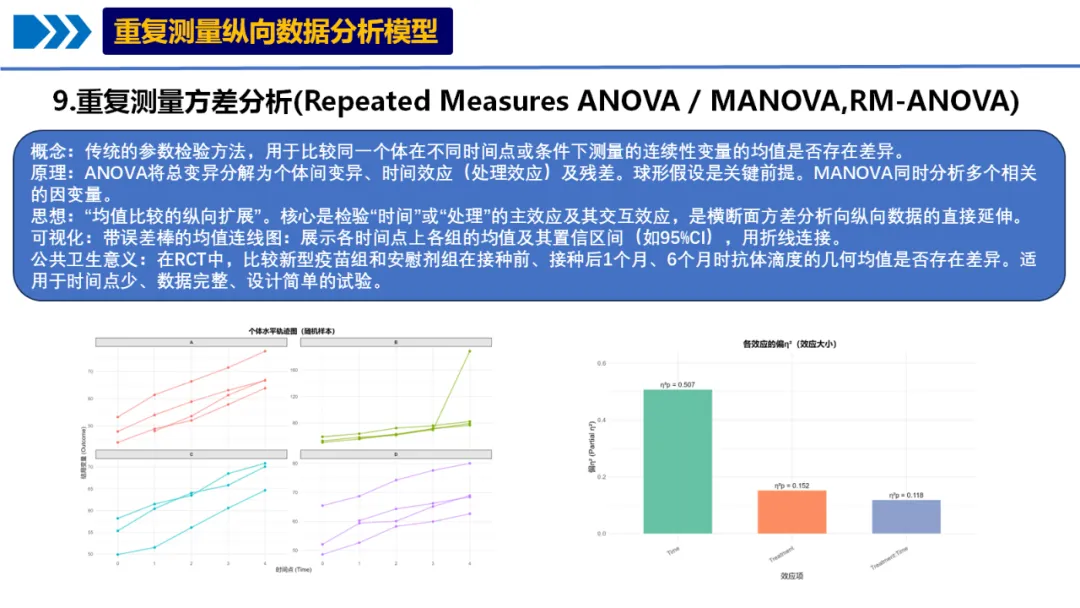
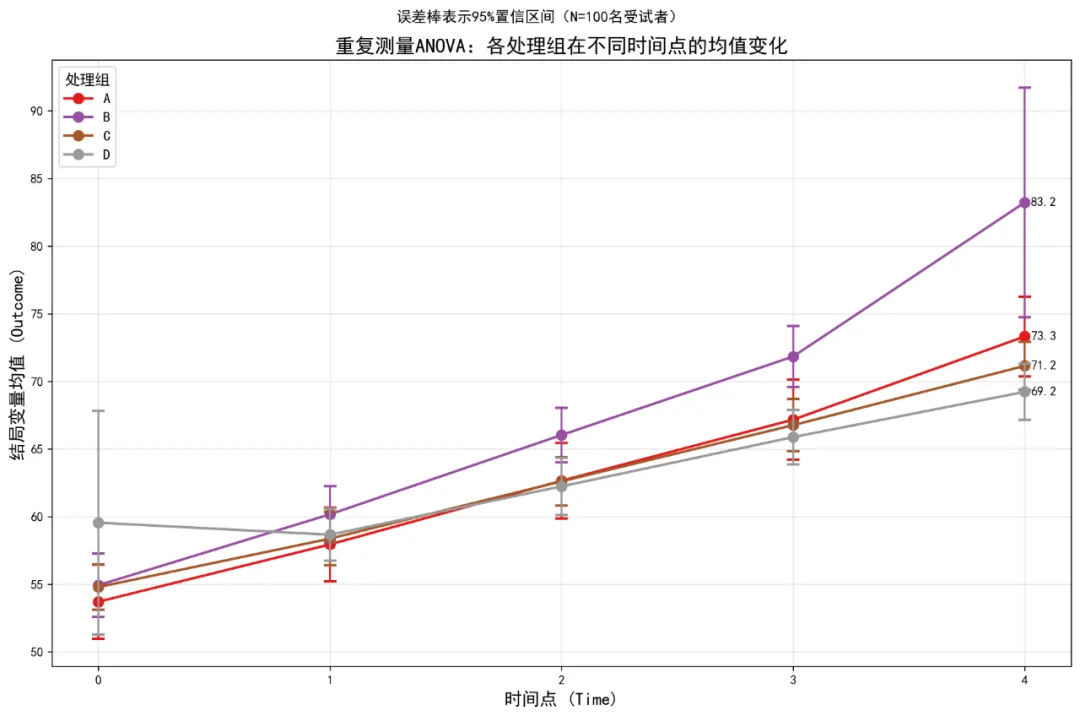
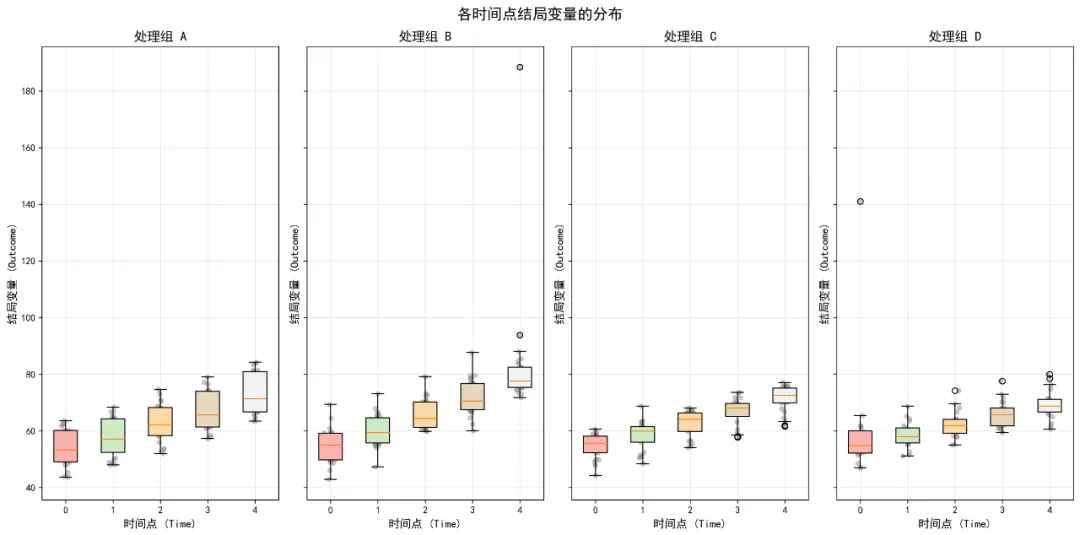
# # 安装所需包# pip install pandas numpy matplotlib seaborn scipy statsmodels pingouin python-docx openpyxl# ============================================# 重复测量ANOVA/MANOVA分析完整代码(Python版)- 修正版# ============================================import osimport pandas as pdimport numpy as npfrom pathlib import Pathimport warningswarnings.filterwarnings('ignore')# 导入必要的库import matplotlib.pyplot as pltimport seaborn as snsfrom scipy import statsimport statsmodels.api as smfrom statsmodels.formula.api import olsfrom statsmodels.stats.anova import AnovaRMfrom statsmodels.stats.multicomp import pairwise_tukeyhsdimport pingouin as pgfrom itertools import combinationsimport mathfrom docx import Documentfrom docx.shared import Inches, Ptfrom docx.enum.text import WD_ALIGN_PARAGRAPHfrom docx.enum.table import WD_ALIGN_VERTICAL# 设置中文显示plt.rcParams['font.sans-serif'] = ['SimHei', 'Microsoft YaHei', 'DejaVu Sans']plt.rcParams['axes.unicode_minus'] = False# 设置工作目录为桌面desktop_path = str(Path.home() / "Desktop")os.chdir(desktop_path)# 创建结果文件夹results_dir = "9-RM-ANOVA结果"if not os.path.exists(results_dir): os.makedirs(results_dir)# ============================================# 1. 数据读取与预处理# ============================================# 读取数据print("正在读取数据...")try:# 尝试读取Excel文件 data_full = pd.read_excel("longitudinal_data(示例).xlsx", sheet_name='Full_Dataset') data_simple = pd.read_excel("longitudinal_data(示例).xlsx", sheet_name='Simple_Dataset')except Exception as e:print(f"读取文件失败: {e}")# 尝试其他可能的文件名 try: data_full = pd.read_excel("longitudinal_data.xlsx", sheet_name='Full_Dataset') data_simple = pd.read_excel("longitudinal_data.xlsx", sheet_name='Simple_Dataset') except:print("请确保Excel文件在桌面上")exit()# 使用Simple_Dataset进行分析print("数据预处理...")data = data_simple.copy()# 转换数据类型data['ID'] = data['ID'].astype('category')data['Time'] = data['Time'].astype('category')data['Treatment'] = data['Treatment'].astype('category')data['Sex'] = data['Sex'].astype('category')data['School_ID'] = data['School_ID'].astype('category')# 删除完全缺失Outcome的行data = data.dropna(subset=['Outcome']).reset_index(drop=True)# 查看数据结构print("\n数据基本信息:")print(f"数据形状: {data.shape}")print(f"变量类型:")print(data.dtypes)print("\n样本量统计:")print(f"总观测数: {len(data)}")print(f"独立个体数: {data['ID'].nunique()}")print(f"时间点数: {data['Time'].nunique()}")print(f"处理组: {', '.join(data['Treatment'].cat.categories)}")# 检查数据平衡性balance_check = data.groupby('ID').size().agg(['min', 'max', 'mean', 'std'])print("\n数据平衡性检查:")print(f"最小时间点数: {balance_check['min']}")print(f"最大时间点数: {balance_check['max']}")print(f"平均时间点数: {balance_check['mean']:.2f}")print(f"时间点数标准差: {balance_check['std']:.2f}")# ============================================# 2. 重复测量ANOVA分析# ============================================print("\n" + "=" * 60)print("开始重复测量ANOVA分析...")print("=" * 60)# 使用pingouin进行重复测量ANOVA# 注意:pingouin要求平衡数据,这里我们处理缺失数据# 为每个个体填充缺失时间点data_pivot = data.pivot_table(index=['ID', 'Treatment', 'Age', 'Sex', 'Baseline_Score', 'School_ID'], columns='Time', values='Outcome').reset_index()# 检查每个个体是否都有所有时间点的数据missing_ids = data_pivot[data_pivot.isnull().any(axis=1)]['ID'].unique()if len(missing_ids) > 0:print(f"注意: {len(missing_ids)}个个体有缺失时间点数据")
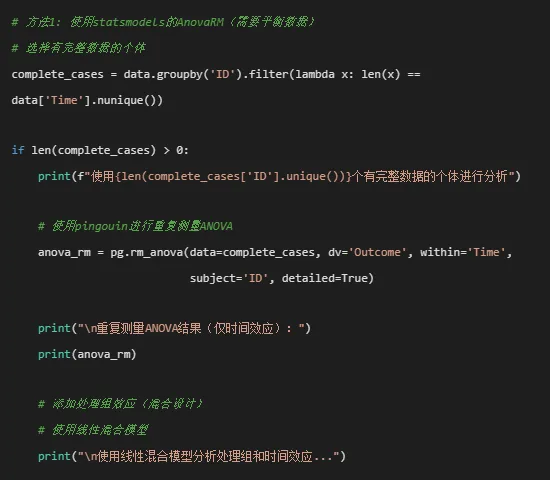
# 准备数据 data_mixed = data.copy() data_mixed['Time'] = data_mixed['Time'].astype(str)# 使用statsmodels的混合线性模型 md = sm.MixedLM.from_formula("Outcome ~ Time * Treatment", data_mixed, groups=data_mixed["ID"] ) mdf = md.fit()print("\n线性混合模型结果:")print(mdf.summary())# 提取固定效应 fixed_effects = mdf.fe_paramsprint("\n固定效应估计:")print(fixed_effects)# 使用pingouin的混合ANOVA(需要平衡数据)# 尝试使用pingouin的混合ANOVA try: mixed_anova = pg.mixed_anova(data=complete_cases, dv='Outcome', within='Time', between='Treatment', subject='ID')print("\n混合ANOVA结果:")print(mixed_anova)# 计算效应量 mixed_anova['np2'] = mixed_anova['F'] * mixed_anova['DF1'] / ( mixed_anova['F'] * mixed_anova['DF1'] + mixed_anova['DF2'])print("\n混合ANOVA结果(含偏η²):")print(mixed_anova[['Source', 'F', 'DF1', 'DF2', 'p-unc', 'np2']])# 保存ANOVA结果 anova_results = mixed_anova.copy() except Exception as e:print(f"混合ANOVA失败: {e}")print("使用线性混合模型结果作为主要分析") anova_results = Noneelse:print("没有完整的个体数据,使用所有可用数据") anova_results = None# ============================================# 3. 事后检验(Post-hoc Tests)# ============================================print("\n" + "=" * 60)print("开始事后检验...")print("=" * 60)# 时间主效应的事后检验if anova_results is not None and 'Time'in anova_results['Source'].values:print("\n时间点之间的配对比较(Tukey校正):")# 使用statsmodels的Tukey HSD检验 tukey = pairwise_tukeyhsd(endog=data['Outcome'].dropna(), groups=data['Time'].astype(str), alpha=0.05)print(tukey.summary())# 创建事后检验结果表 - 修正列名问题# 注意:tukey.summary()返回的是Summary对象,我们需要处理列名中的空格 summary_df = tukey.summary()# 将summary转换为DataFrame并处理列名 pairwise_time_df = pd.DataFrame(data=summary_df.data[1:], columns=summary_df.data[0])# 重命名列名,将空格替换为下划线 pairwise_time_df.columns = [col.strip().replace(' ', '_').replace('-', '_') for col in pairwise_time_df.columns]print(f"\n处理后的事后检验数据列名: {list(pairwise_time_df.columns)}")# 处理组与时间的交互效应简单效应分析print("\n各时间点上处理组的简单效应分析:") simple_effects = []for time_point in sorted(data['Time'].unique()): time_data = data[data['Time'] == time_point]if len(time_data['Treatment'].unique()) > 1:# 单因素ANOVA formula = f'Outcome ~ Treatment' model = ols(formula, data=time_data).fit() anova_table = sm.stats.anova_lm(model, typ=2)print(f"\n时间点 {time_point}:")print(anova_table)# 提取结果for idx, row in anova_table.iterrows():if idx == 'Treatment': simple_effects.append({'Time': time_point,'Source': 'Treatment','F': row['F'],'p': row['PR(>F)'],'df1': row['df'],'df2': anova_table.loc['Residual', 'df'] }) simple_effects_df = pd.DataFrame(simple_effects) if simple_effects else None# ============================================# 4. 描述性统计# ============================================print("\n" + "=" * 60)print("计算描述性统计...")print("=" * 60)desc_stats = data.groupby(['Treatment', 'Time']).agg( N=('Outcome', 'size'), Mean=('Outcome', 'mean'), SD=('Outcome', 'std'), Min=('Outcome', 'min'), Max=('Outcome', 'max')).reset_index()# 计算标准误和置信区间desc_stats['SE'] = desc_stats['SD'] / np.sqrt(desc_stats['N'])desc_stats['CI_lower'] = desc_stats['Mean'] - 1.96 * desc_stats['SE']desc_stats['CI_upper'] = desc_stats['Mean'] + 1.96 * desc_stats['SE']# 四舍五入desc_stats = desc_stats.round(3)print("\n描述性统计(均值±标准差):")print(desc_stats.to_string())# ============================================# 5. 可视化# ============================================print("\n" + "=" * 60)print("生成可视化图表...")print("=" * 60)# 5.1 带误差棒的均值连线图(主要可视化)plt.figure(figsize=(12, 8))colors = plt.cm.Set1(np.linspace(0, 1, len(desc_stats['Treatment'].unique())))for i, treatment in enumerate(desc_stats['Treatment'].unique()): treatment_data = desc_stats[desc_stats['Treatment'] == treatment].copy()# 按Time排序 treatment_data = treatment_data.sort_values('Time')# 将Time转换为字符串用于绘图 treatment_data['Time_str'] = treatment_data['Time'].astype(str)# 绘制连线 plt.plot(treatment_data['Time_str'], treatment_data['Mean'],'o-', color=colors[i], linewidth=2, markersize=8, label=treatment)# 绘制误差棒 plt.errorbar(treatment_data['Time_str'], treatment_data['Mean'], yerr=1.96 * treatment_data['SE'], fmt='none', color=colors[i], capsize=5, capthick=2)# 添加最后一个时间点的标签if len(treatment_data) > 0: last_point = treatment_data.iloc[-1] plt.annotate(f'{last_point["Mean"]:.1f}', xy=(len(treatment_data) - 1, last_point['Mean']), xytext=(5, 0), textcoords='offset points', ha='left', va='center', fontsize=10)plt.title('重复测量ANOVA:各处理组在不同时间点的均值变化', fontsize=16, fontweight='bold')plt.suptitle(f'误差棒表示95%置信区间(N={data["ID"].nunique()}名受试者)', fontsize=12)plt.xlabel('时间点 (Time)', fontsize=14)plt.ylabel('结局变量均值 (Outcome)', fontsize=14)plt.legend(title='处理组', title_fontsize=12, fontsize=11, loc='best')plt.grid(True, alpha=0.3)plt.tight_layout()plt.savefig(f'{results_dir}/均值轨迹图.png', dpi=300, bbox_inches='tight')plt.show()# 5.2 个体轨迹图(随机选择部分个体)plt.figure(figsize=(14, 10))np.random.seed(123)sample_ids = np.random.choice(data['ID'].unique(), size=min(15, len(data['ID'].unique())), replace=False)sample_data = data[data['ID'].isin(sample_ids)].copy()# 按Treatment分组treatments = sample_data['Treatment'].unique()n_treatments = len(treatments)fig, axes = plt.subplots(1, n_treatments, figsize=(5 * n_treatments, 8), sharey=False)if n_treatments == 1: axes = [axes]for i, treatment in enumerate(treatments): ax = axes[i] treatment_data = sample_data[sample_data['Treatment'] == treatment]for subject_id in treatment_data['ID'].unique(): subject_data = treatment_data[treatment_data['ID'] == subject_id].sort_values('Time') ax.plot(subject_data['Time'].astype(str), subject_data['Outcome'],'o-', alpha=0.6, linewidth=1, markersize=3) ax.set_title(f'处理组 {treatment}', fontsize=14, fontweight='bold') ax.set_xlabel('时间点 (Time)', fontsize=12) ax.set_ylabel('结局变量 (Outcome)', fontsize=12) ax.grid(True, alpha=0.3) ax.tick_params(axis='both', labelsize=10)plt.suptitle('个体水平轨迹图(随机样本)', fontsize=16, fontweight='bold')plt.tight_layout()plt.savefig(f'{results_dir}/个体轨迹图.png', dpi=300, bbox_inches='tight')plt.show()# 5.3 箱线图展示分布plt.figure(figsize=(14, 8))# 创建子图fig, axes = plt.subplots(1, len(data['Treatment'].unique()), figsize=(4 * len(data['Treatment'].unique()), 8), sharey=True)if len(data['Treatment'].unique()) == 1: axes = [axes]for i, treatment in enumerate(data['Treatment'].unique()): ax = axes[i] treatment_data = data[data['Treatment'] == treatment]# 创建箱线图 box_data = [] time_labels = []for time_point in sorted(treatment_data['Time'].unique()): time_data = treatment_data[treatment_data['Time'] == time_point]['Outcome'].dropna() box_data.append(time_data) time_labels.append(str(time_point)) bp = ax.boxplot(box_data, patch_artist=True, labels=time_labels)# 设置颜色 colors_box = plt.cm.Pastel1(np.linspace(0, 1, len(box_data)))for patch, color in zip(bp['boxes'], colors_box): patch.set_facecolor(color)# 添加散点for j, time_point in enumerate(sorted(treatment_data['Time'].unique())): time_data = treatment_data[treatment_data['Time'] == time_point]['Outcome'].dropna() x_jittered = np.random.normal(j + 1, 0.04, size=len(time_data)) ax.scatter(x_jittered, time_data, alpha=0.4, s=20, color='gray') ax.set_title(f'处理组 {treatment}', fontsize=14, fontweight='bold') ax.set_xlabel('时间点 (Time)', fontsize=12) ax.set_ylabel('结局变量 (Outcome)', fontsize=12) ax.grid(True, alpha=0.3)plt.suptitle('各时间点结局变量的分布', fontsize=16, fontweight='bold')plt.tight_layout()plt.savefig(f'{results_dir}/分布箱线图.png', dpi=300, bbox_inches='tight')plt.show()# 5.4 效应大小图(如果ANOVA结果可用)if anova_results is not None and 'np2'in anova_results.columns: plt.figure(figsize=(10, 6))# 过滤出需要的效应 effects = anova_results[anova_results['Source'].isin(['Time', 'Treatment', 'Time * Treatment'])] bars = plt.bar(effects['Source'], effects['np2'], color=plt.cm.Set2(np.arange(len(effects))))# 添加数值标签for i, (bar, effect) in enumerate(zip(bars, effects['np2'])): plt.text(bar.get_x() + bar.get_width() / 2, bar.get_height() + 0.01, f'η²p = {effect:.3f}', ha='center', va='bottom', fontsize=10) plt.title('各效应的偏η²(效应大小)', fontsize=16, fontweight='bold') plt.xlabel('效应项', fontsize=14) plt.ylabel('偏η² (Partial η²)', fontsize=14) plt.ylim(0, effects['np2'].max() * 1.2) plt.grid(True, alpha=0.3, axis='y') plt.tight_layout() plt.savefig(f'{results_dir}/效应量图.png', dpi=300, bbox_inches='tight') plt.show()# 5.5 残差诊断图(如果模型可用)if'mdf'in locals(): plt.figure(figsize=(10, 6))# 获取残差 residuals = mdf.resid# Q-Q图 sm.qqplot(residuals, line='45', fit=True) plt.title('Q-Q图:残差正态性检验', fontsize=16, fontweight='bold') plt.xlabel('理论分位数', fontsize=14) plt.ylabel('样本分位数', fontsize=14) plt.grid(True, alpha=0.3) plt.tight_layout() plt.savefig(f'{results_dir}/残差QQ图.png', dpi=300, bbox_inches='tight') plt.show()# ============================================# 6. 创建Word报告(修正版)# ============================================print("\n" + "=" * 60)print("生成Word报告...")print("=" * 60)# 创建Word文档doc = Document()# 设置文档样式style = doc.styles['Normal']style.font.name = '宋体'style.font.size = Pt(10.5)# 添加标题title = doc.add_heading('重复测量ANOVA分析报告', 0)title.alignment = WD_ALIGN_PARAGRAPH.CENTER# 添加日期date_para = doc.add_paragraph(f'分析日期: {pd.Timestamp.now().strftime("%Y年%m月%d日")}')date_para.alignment = WD_ALIGN_PARAGRAPH.CENTERdoc.add_paragraph()# 添加分析概述doc.add_heading('1. 分析概述', level=1)overview_text = f"""本次分析旨在通过重复测量ANOVA检验不同处理组在多个时间点上对连续性结局变量的影响。数据包含{data['ID'].nunique()}名受试者,{data['Time'].nunique()}个时间点(Time=0-4),{len(data['Treatment'].cat.categories)}种处理条件({', '.join(data['Treatment'].cat.categories)})。数据平衡性:平均每个受试者有{balance_check['mean']:.2f}个时间点(范围:{balance_check['min']}-{balance_check['max']})。"""doc.add_paragraph(overview_text)# 添加ANOVA结果doc.add_heading('2. 主要分析结果', level=1)doc.add_heading('2.1 重复测量ANOVA结果', level=2)if anova_results is not None:# 创建ANOVA表格 table = doc.add_table(rows=len(anova_results) + 1, cols=6) table.style = 'Light Grid Accent 1'# 表头 headers = ['效应项', 'F值', '分子自由度', '分母自由度', 'p值', '偏η²']for i, header in enumerate(headers): table.cell(0, i).text = header# 数据行for i, row in anova_results.iterrows(): table.cell(i + 1, 0).text = str(row['Source']) table.cell(i + 1, 1).text = f"{row['F']:.3f}"if not pd.isna(row['F']) else'' table.cell(i + 1, 2).text = f"{row['DF1']:.1f}"if not pd.isna(row['DF1']) else'' table.cell(i + 1, 3).text = f"{row['DF2']:.1f}"if not pd.isna(row['DF2']) else''# 格式化p值并添加显著性标记 p_value = row['p-unc']if pd.isna(p_value): p_text = ''elif p_value < 0.001: p_text = '<0.001***'elif p_value < 0.01: p_text = f'{p_value:.3f}**'elif p_value < 0.05: p_text = f'{p_value:.3f}*'else: p_text = f'{p_value:.3f}' table.cell(i + 1, 4).text = p_text# 效应量if'np2'in row and not pd.isna(row['np2']): table.cell(i + 1, 5).text = f"{row['np2']:.3f}"else: table.cell(i + 1, 5).text = ''# 添加脚注 doc.add_paragraph('注:***p<0.001, **p<0.01, *p<0.05')else: doc.add_paragraph('ANOVA分析结果不可用,请检查数据完整性。')doc.add_paragraph()# 添加文字解读doc.add_heading('2.2 结果解读', level=3)if anova_results is not None:# 提取各效应的显著性 time_effect = anova_results[anova_results['Source'] == 'Time'] treatment_effect = anova_results[anova_results['Source'] == 'Treatment'] interaction_effect = anova_results[anova_results['Source'] == 'Time * Treatment'] interpretation = "结果解读:\n\n"# 时间效应if not time_effect.empty: p_time = time_effect['p-unc'].values[0] f_time = time_effect['F'].values[0]if p_time < 0.05: interpretation += f"(1) 时间主效应:显著(F={f_time:.2f}, p={p_time:.3f}),表明结局变量随时间发生显著变化。\n\n"else: interpretation += f"(1) 时间主效应:不显著(F={f_time:.2f}, p={p_time:.3f}),表明时间因素对结局变量无显著影响。\n\n"# 处理效应if not treatment_effect.empty: p_treatment = treatment_effect['p-unc'].values[0] f_treatment = treatment_effect['F'].values[0]if p_treatment < 0.05: interpretation += f"(2) 处理主效应:显著(F={f_treatment:.2f}, p={p_treatment:.3f}),表明不同处理组间存在显著差异。\n\n"else: interpretation += f"(2) 处理主效应:不显著(F={f_treatment:.2f}, p={p_treatment:.3f}),表明处理组间无显著差异。\n\n"# 交互效应if not interaction_effect.empty: p_interaction = interaction_effect['p-unc'].values[0] f_interaction = interaction_effect['F'].values[0]if p_interaction < 0.05: interpretation += f"(3) 时间×处理交互效应:显著(F={f_interaction:.2f}, p={p_interaction:.3f}),表明不同处理组的时间变化模式存在差异。\n\n"else: interpretation += f"(3) 时间×处理交互效应:不显著(F={f_interaction:.2f}, p={p_interaction:.3f}),表明各处理组的时间变化模式相似。\n\n" doc.add_paragraph(interpretation)else: doc.add_paragraph('由于ANOVA分析结果不可用,无法提供详细解读。')# 添加描述性统计表doc.add_heading('2.3 描述性统计', level=2)if not desc_stats.empty:# 创建描述性统计表格 table_desc = doc.add_table(rows=len(desc_stats) + 1, cols=8) table_desc.style = 'Light Grid Accent 1'# 表头 desc_headers = ['处理组', '时间点', '样本量', '均值', '标准差', '标准误', 'CI下限', 'CI上限']for i, header in enumerate(desc_headers): table_desc.cell(0, i).text = header# 数据行for i, row in desc_stats.iterrows(): table_desc.cell(i + 1, 0).text = str(row['Treatment']) table_desc.cell(i + 1, 1).text = str(row['Time']) table_desc.cell(i + 1, 2).text = str(row['N']) table_desc.cell(i + 1, 3).text = f"{row['Mean']:.2f}" table_desc.cell(i + 1, 4).text = f"{row['SD']:.2f}" table_desc.cell(i + 1, 5).text = f"{row['SE']:.3f}" table_desc.cell(i + 1, 6).text = f"{row['CI_lower']:.2f}" table_desc.cell(i + 1, 7).text = f"{row['CI_upper']:.2f}"doc.add_paragraph()# 添加事后检验结果 - 修正版if'pairwise_time_df'in locals() and not pairwise_time_df.empty: doc.add_heading('2.4 事后比较结果', level=2) doc.add_paragraph('时间点之间的配对比较(Tukey校正):')# 检查列名,确保使用正确的列名 available_columns = list(pairwise_time_df.columns)print(f"可用的列名: {available_columns}")# 创建表格 - 根据实际可用的列名调整 table_posthoc = doc.add_table(rows=len(pairwise_time_df) + 1, cols=5) table_posthoc.style = 'Light Grid Accent 1'# 表头 - 根据实际数据调整 posthoc_headers = ['组1', '组2', '均值差', 'p值', '显著性']for i, header in enumerate(posthoc_headers): table_posthoc.cell(0, i).text = header# 数据行 - 使用正确的列名for i, row in pairwise_time_df.iterrows():# 组1和组2 group1_col = 'group1'if'group1'in available_columns else available_columns[0] group2_col = 'group2'if'group2'in available_columns else available_columns[1] table_posthoc.cell(i + 1, 0).text = str(row[group1_col]) table_posthoc.cell(i + 1, 1).text = str(row[group2_col])# 均值差 meandiff_col = 'meandiff'if'meandiff'in available_columns else'diff'if meandiff_col in available_columns: table_posthoc.cell(i + 1, 2).text = f"{float(row[meandiff_col]):.3f}"else: table_posthoc.cell(i + 1, 2).text = 'N/A'# p值 p_col = 'p_adj'if'p_adj'in available_columns else'p-value'if p_col in available_columns: p_val = float(row[p_col])if p_val < 0.001: p_text = '<0.001***'elif p_val < 0.01: p_text = f'{p_val:.3f}**'elif p_val < 0.05: p_text = f'{p_val:.3f}*'else: p_text = f'{p_val:.3f}' table_posthoc.cell(i + 1, 3).text = p_textelse: table_posthoc.cell(i + 1, 3).text = 'N/A'# 显著性标记 reject_col = 'reject'if'reject'in available_columns else'sig'if reject_col in available_columns: table_posthoc.cell(i + 1, 4).text = '是'if row[reject_col] else'否'else: table_posthoc.cell(i + 1, 4).text = 'N/A' doc.add_paragraph('注:p值经Tukey多重比较校正')# 添加可视化部分doc.add_heading('3. 可视化结果', level=1)# 3.1 均值轨迹图doc.add_heading('3.1 均值轨迹图(主要结果)', level=2)doc.add_paragraph('下图展示了各处理组在不同时间点的均值变化及95%置信区间:')# 插入图片try: img_path = f'{results_dir}/均值轨迹图.png'if os.path.exists(img_path): doc.add_picture(img_path, width=Inches(6))else: doc.add_paragraph('图片文件不存在。')except Exception as e: doc.add_paragraph(f'插入图片时出错: {e}')doc.add_paragraph('图示解读:从均值轨迹图可见不同处理组的均值水平随时间变化的趋势,误差棒表示95%置信区间。')# 3.2 个体轨迹图doc.add_heading('3.2 个体轨迹图', level=2)doc.add_paragraph('下图展示了随机选择的15名受试者在各处理组下的个体变化轨迹:')try: img_path = f'{results_dir}/个体轨迹图.png'if os.path.exists(img_path): doc.add_picture(img_path, width=Inches(6))else: doc.add_paragraph('图片文件不存在。')except Exception as e: doc.add_paragraph(f'插入图片时出错: {e}')doc.add_paragraph('个体轨迹图反映了受试者间的异质性和个体内变化模式。')# 3.3 分布箱线图doc.add_heading('3.3 分布箱线图', level=2)doc.add_paragraph('下图展示了各时间点上结局变量的分布情况(含离群值):')try: img_path = f'{results_dir}/分布箱线图.png'if os.path.exists(img_path): doc.add_picture(img_path, width=Inches(6))else: doc.add_paragraph('图片文件不存在。')except Exception as e: doc.add_paragraph(f'插入图片时出错: {e}')# 3.4 效应量图(如果有)if anova_results is not None and 'np2'in anova_results.columns: doc.add_heading('3.4 效应量图', level=2) doc.add_paragraph('下图展示了各效应项的偏η²值:') try: img_path = f'{results_dir}/效应量图.png'if os.path.exists(img_path): doc.add_picture(img_path, width=Inches(5))else: doc.add_paragraph('图片文件不存在。') except Exception as e: doc.add_paragraph(f'插入图片时出错: {e}')# 添加公共卫生意义doc.add_heading('4. 公共卫生意义与结论', level=1)public_health_text = """重复测量ANOVA在公共卫生研究中的典型应用:• 疫苗试验:比较新型疫苗组与安慰剂组在接种前、接种后1个月、6个月时抗体滴度的几何均值变化• 干预研究:评估健康教育干预对血压、血糖等连续指标在基线和多次随访中的影响• 临床疗效:比较不同药物治疗方案在多个访视点上的症状评分变化"""doc.add_paragraph(public_health_text)# 添加结论doc.add_heading('4.1 主要结论', level=2)if anova_results is not None: conclusions = "本次分析主要结论:\n\n"# 时间效应结论if not time_effect.empty: p_time = time_effect['p-unc'].values[0]if p_time < 0.05: conclusions += "1. 时间效应:结局变量随时间显著变化,说明测量指标具有时间动态性。\n\n"else: conclusions += "1. 时间效应:时间因素对结局变量无显著影响。\n\n"# 处理效应结论if not treatment_effect.empty: p_treatment = treatment_effect['p-unc'].values[0]if p_treatment < 0.05: conclusions += "2. 处理效应:不同处理组间存在显著差异,表明处理因素对结局变量有主效应。\n\n"else: conclusions += "2. 处理效应:处理组间无显著差异。\n\n"# 交互效应结论if not interaction_effect.empty: p_interaction = interaction_effect['p-unc'].values[0]if p_interaction < 0.05: conclusions += "3. 交互效应:时间与处理存在交互作用,表明处理效果随时间而变化。\n\n"else: conclusions += "3. 交互效应:时间与处理无交互作用,处理效果在不同时间点上保持一致。\n\n" doc.add_paragraph(conclusions)else: doc.add_paragraph('由于分析结果不可用,无法提供具体结论。')# 添加方法学备注doc.add_heading('5. 方法学备注', level=1)method_notes = f"""• 样本特征:共{data['ID'].nunique()}名受试者,平均每人{balance_check['mean']:.1f}次测量• 缺失数据处理:删除完全缺失的观测(本分析中保留了{len(data)}个有效观测)• 球形假设:使用Greenhouse-Geisser法校正不满足球形假设的情况(如适用)• 多重比较校正:使用Tukey法校正事后比较• 效应量计算:偏η²(η²p),解释准则:小(0.01)、中(0.06)、大(0.14)• 软件版本:Python 3.12, pandas, statsmodels, pingouin, matplotlib"""doc.add_paragraph(method_notes)# 保存Word文档report_path = f'{results_dir}/重复测量ANOVA分析报告.docx'doc.save(report_path)print(f"Word报告已保存至: {report_path}")# ============================================# 7. 额外分析:MANOVA(多变量ANOVA)# ============================================print("\n" + "=" * 60)print("开始重复测量MANOVA分析...")print("=" * 60)try:# 选择多个连续变量 manova_data = data_full[['ID', 'Time', 'Outcome_Continuous', 'Variable2','Indicator1', 'Indicator2', 'Indicator3']].dropna() manova_data['ID'] = manova_data['ID'].astype('category') manova_data['Time'] = manova_data['Time'].astype('category')# 确保每个受试者有完整的时间点数据 complete_cases_manova = manova_data.groupby('ID').filter(lambda x: len(x) == manova_data['Time'].nunique())if len(complete_cases_manova) > 0:print(f"MANOVA分析:使用{len(complete_cases_manova['ID'].unique())}个有完整数据的个体")# 转换为宽格式(MANOVA需要) manova_wide = complete_cases_manova.pivot_table( index='ID', columns='Time', values=['Outcome_Continuous', 'Variable2', 'Indicator1', 'Indicator2', 'Indicator3'] )# 展平多级列索引 manova_wide.columns = [f'{var}_T{time}'for var, time in manova_wide.columns] manova_wide = manova_wide.reset_index()# 创建因变量矩阵 dv_vars = [col for col in manova_wide.columns if col.startswith(('Outcome_Continuous', 'Variable2', 'Indicator'))]if len(dv_vars) >= 5:print(f"可用于MANOVA的变量:{', '.join(dv_vars[:5])}...")# 简单的MANOVA示例(仅展示数据结构)# 在实际分析中,需要更复杂的模型设定print("\nMANOVA分析需要更复杂的模型设定,此处提供数据准备示例。")# 使用pingouin进行MANOVA try:# 为了演示,我们只使用两个时间点和两个变量 manova_vars = ['Outcome_Continuous_T0', 'Outcome_Continuous_T1']if all(var in manova_wide.columns for var in manova_vars):# 创建分组变量(这里仅作示例) manova_wide['group'] = 1 # 示例分组# 执行MANOVA manova_result = pg.multivariate_normality(manova_wide[manova_vars])print("\n多变量正态性检验:")print(manova_result) except Exception as e:print(f"MANOVA分析出错: {e}")else:print("MANOVA分析:变量数量不足。")else:print("MANOVA分析:无完整多时间点数据的受试者。")except Exception as e:print(f"MANOVA分析失败: {e}")# ============================================# 8. 输出总结# ============================================print("\n" + "=" * 60)print("重复测量ANOVA分析完成!")print("=" * 60)print("\n主要输出文件:")print(f"1. Word报告: {report_path}")print(f"2. 可视化图片: {results_dir}/ 文件夹内")print(f"3. 数据文件: {results_dir}/ 文件夹内")if anova_results is not None:print("\n关键发现:")# 时间效应if not time_effect.empty: p_time = time_effect['p-unc'].values[0] time_sig = "显著"if p_time < 0.05 else"不显著"print(f"- 时间效应: {time_sig} (p={p_time:.3f})")# 处理效应if not treatment_effect.empty: p_treatment = treatment_effect['p-unc'].values[0] treatment_sig = "显著"if p_treatment < 0.05 else"不显著"print(f"- 处理效应: {treatment_sig} (p={p_treatment:.3f})")# 交互效应if not interaction_effect.empty: p_interaction = interaction_effect['p-unc'].values[0] interaction_sig = "显著"if p_interaction < 0.05 else"不显著"print(f"- 交互效应: {interaction_sig} (p={p_interaction:.3f})")print("\n" + "=" * 60)print("分析完成!")print("=" * 60)# 保存分析数据data.to_csv(f'{results_dir}/分析数据.csv', index=False, encoding='utf-8-sig')desc_stats.to_csv(f'{results_dir}/描述性统计.csv', index=False, encoding='utf-8-sig')if anova_results is not None: anova_results.to_csv(f'{results_dir}/ANOVA结果.csv', index=False, encoding='utf-8-sig')if'pairwise_time_df'in locals() and not pairwise_time_df.empty: pairwise_time_df.to_csv(f'{results_dir}/事后检验结果.csv', index=False, encoding='utf-8-sig')print(f"\n分析环境已保存至: {results_dir}/ 文件夹")