当前位置:首页>python>Python 数据可视化的灵魂:直方图和密度图的"黑魔法"

Python 数据可视化的灵魂:直方图和密度图的"黑魔法"

  • 2026-03-21 01:30:20
Python 数据可视化的灵魂:直方图和密度图的"黑魔法"

那天凌晨两点。盯着一堆用户行为数据,老板要的"数据分布报告"明早就得交。Excel?太low。Matplotlib的plot()画折线图?完全不对路子啊!

直方图才是答案。

但这玩意儿的门道,远比你想的复杂。bins参数设错,整个分析结论全毁;密度图画不好,看着像心电图异常……我在那个项目里踩的坑,够写本血泪史的。后来发现:掌握直方图和密度估计,基本就摸到了数据分析的任督二脉。今天咱们就把这两个"硬茬"彻底拿下,从hist()的细节魔鬼,到KDE的数学美学。

准备好了吗?开整!


📊 直方图的"真面目":hist()深度解剖

先搞清楚一件事

很多人以为直方图就是"柱状图的另一个名字"。错!大错特错!

柱状图(Bar Chart):展示分类数据,比如各部门销售额。直方图(Histogram):展示连续数据的分布,比如员工年龄分布。

看着都是"柱子",本质���全不同。直方图的每个柱子代表一个区间的频数,柱子之间没有间隙——这是连续性的视觉体现。

🔧 基础用法:从零开始

import matplotlib  import matplotlib.pyplot as plt  import numpy as np  matplotlib.use('TkAgg')  # 模拟1000个用户的响应时间数据(毫秒)  np.random.seed(42)  response_times = np.random.normal(200501000)  # 均值200ms,标准差50ms  plt.rcParams['font.sans-serif'] = ['Microsoft YaHei']  # Windows下显示中文  plt.rcParams['axes.unicode_minus'] = False# 最简单的直方图  plt.figure(figsize=(106))  plt.hist(response_times, bins=30, color='steelblue', alpha=0.7, edgecolor='black')  plt.xlabel('响应时间 (ms)', fontsize=12)  plt.ylabel('频数', fontsize=12)  plt.title('API响应时间分布', fontsize=14, fontweight='bold')  plt.grid(axis='y', alpha=0.3)  plt.show()
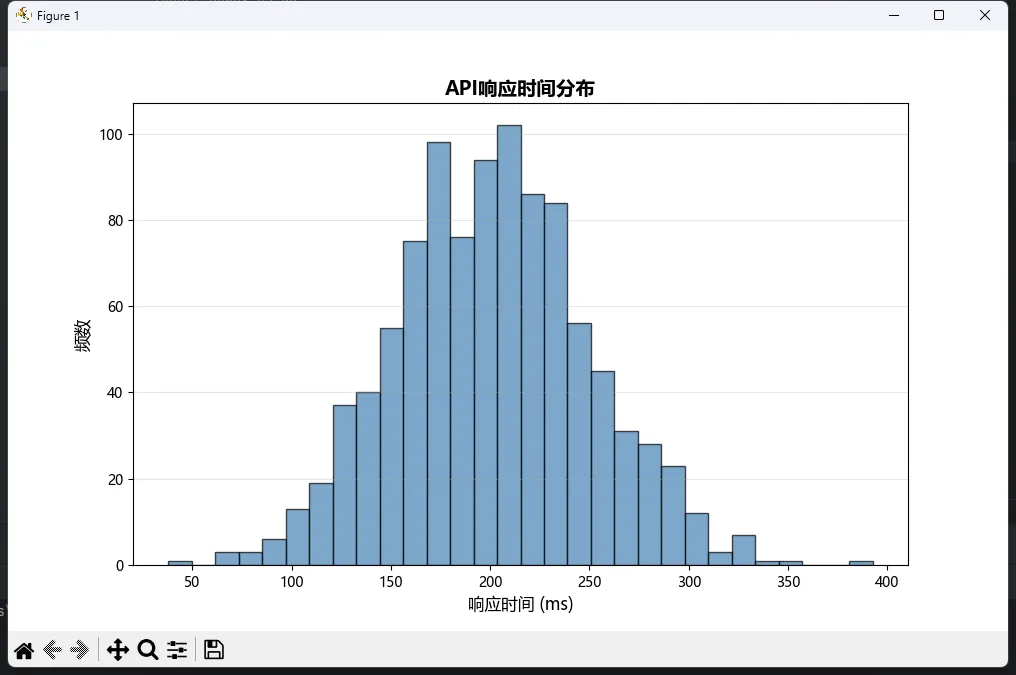
简单吧?但魔鬼在细节里。

⚙️ bins参数:直方图的"灵魂调节器"

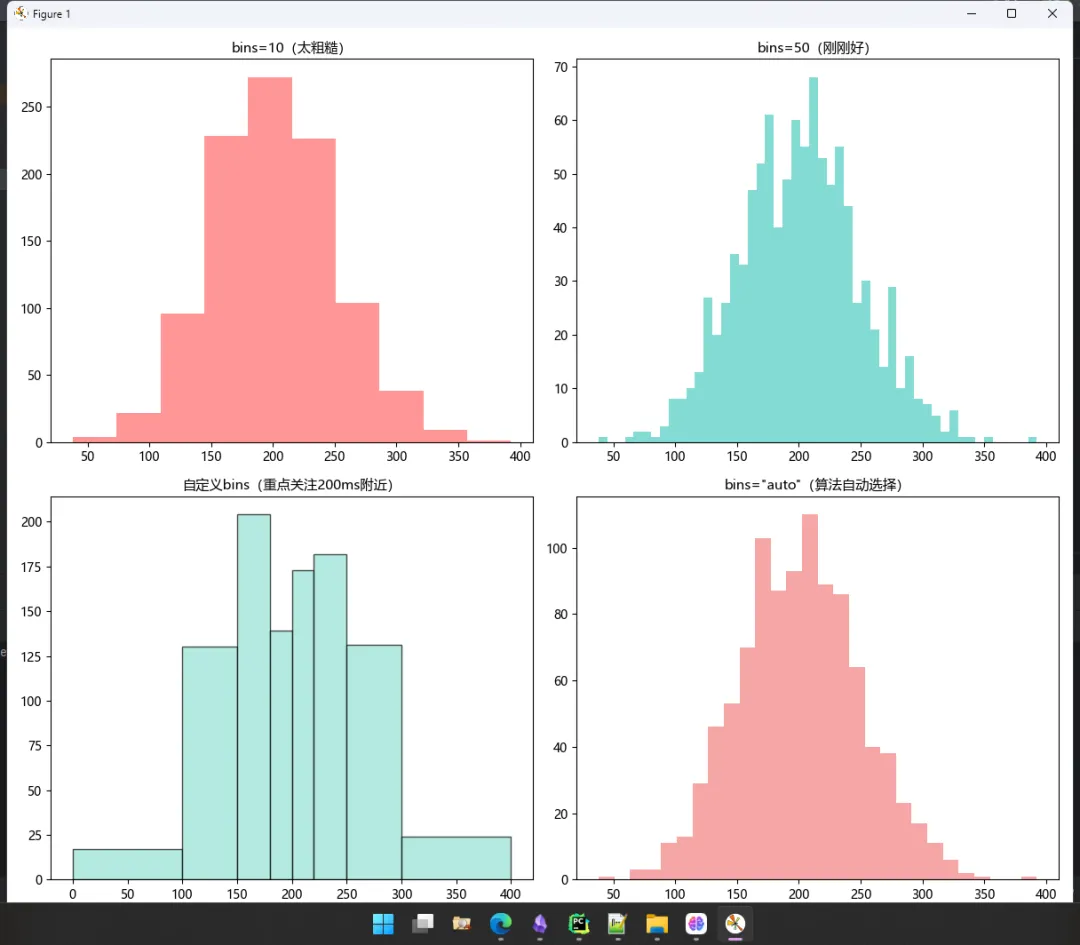
这个参数我踩过无数次坑。设太少,看不出规律;设太多,全是噪声。

三种常见设置方式:

fig, axes = plt.subplots(22, figsize=(1210))# 方式1:固定数量(最常用但不一定最好)axes[00].hist(response_times, bins=10, color='#FF6B6B', alpha=0.7)axes[00].set_title('bins=10(太粗糙)', fontsize=11)axes[01].hist(response_times, bins=50, color='#4ECDC4', alpha=0.7)axes[01].set_title('bins=50(刚刚好)', fontsize=11)# 方式2:自定义边界(适合非均匀分布)custom_bins = [0100150180200220250300400]axes[10].hist(response_times, bins=custom_bins, color='#95E1D3', alpha=0.7, edgecolor='black')axes[10].set_title('自定义bins(重点关注200ms附近)', fontsize=11)# 方式3:自动优化算法(推荐!)axes[11].hist(response_times, bins='auto', color='#F38181', alpha=0.7)axes[11].set_title('bins="auto"(算法自动选择)', fontsize=11)plt.tight_layout()plt.show()
我的实战经验

  • • 探索性分析?用bins='auto''sturges'
  • • 做汇报PPT?手动调bins数量,让图"好看"
  • • 对比实验?必须统一bins设置,否则没可比性

🎨 进阶技巧:让直方图"活"起来

技巧1:叠加统计线

plt.figure(figsize=(106))n, bins, patches = plt.hist(response_times, bins=40, color='lightblue'                             alpha=0.6, edgecolor='black', density=True)# 叠加均值线和标准差区域mean = np.mean(response_times)std = np.std(response_times)plt.axvline(mean, color='red', linestyle='--', linewidth=2, label=f'均值: {mean:.1f}ms')plt.axvline(mean - std, color='orange', linestyle=':', linewidth=1.5, label=f'±1σ')plt.axvline(mean + std, color='orange', linestyle=':', linewidth=1.5)plt.xlabel('响应时间 (ms)')plt.ylabel('概率密度')plt.legend()plt.title('带统计指标的直方图')plt.show()
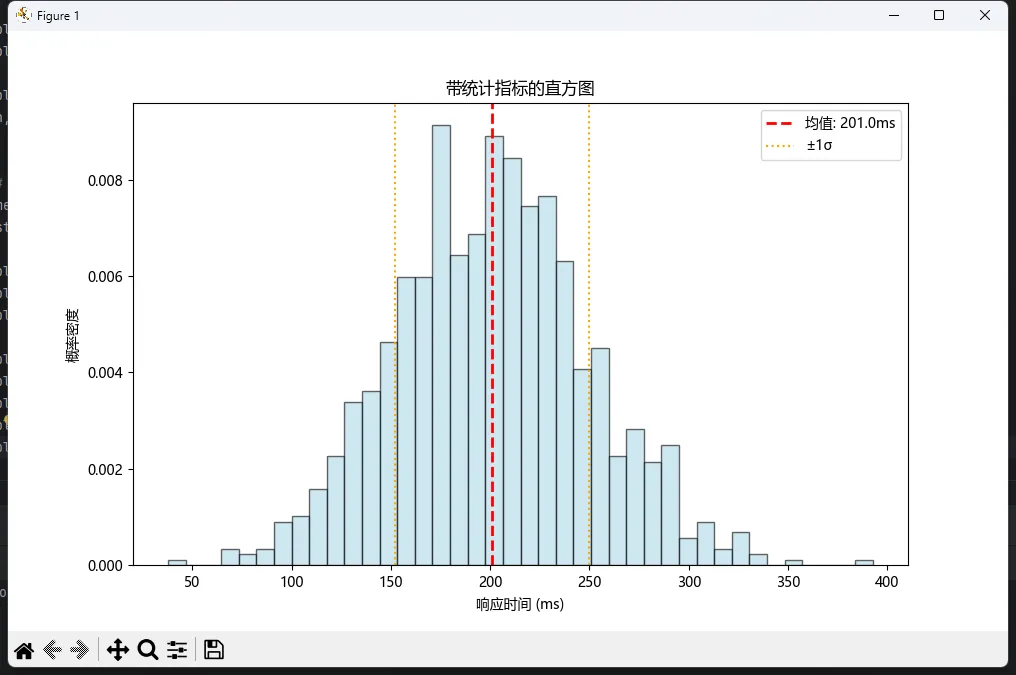
这招在技术评审会上特别好使!老板一眼就能看出性能指标是否达标。

技巧2:动态颜色映射(根据高度上色)

import matplotlib  import matplotlib.pyplot as plt  import numpy as np  matplotlib.use('TkAgg')  # 模拟1000个用户的响应时间数据(毫秒)  np.random.seed(42)  response_times = np.random.normal(200501000)  # 均值200ms,标准差50ms  plt.rcParams['font.sans-serif'] = ['Microsoft YaHei']  # Windows下显示中文  plt.rcParams['axes.unicode_minus'] = Falsefig, ax = plt.subplots(figsize=(106))  # Create figure and axes  n, bins, patches = ax.hist(response_times, bins=35, edgecolor='white')  # 根据柱子高度动态着色  cm = plt.cm.viridis  # 使用viridis配色方案  norm = plt.Normalize(vmin=n.min(), vmax=n.max())  for i, patch inenumerate(patches):      patch.set_facecolor(cm(norm(n[i])))  # 创建一个与颜色映射相关联的 ScalarMappable 对象  sm = plt.cm.ScalarMappable(norm=norm, cmap=cm)  sm.set_array([])  # 设置空数组以避免警告  # 使用 ax 参数明确指定颜色条的关联轴  fig.colorbar(sm, ax=ax, label='频数')  # 使用 ScalarMappable 对象创建颜色条  ax.set_xlabel('响应时间 (ms)')  ax.set_title('热力直方图:颜色越深频数越高')  plt.show()
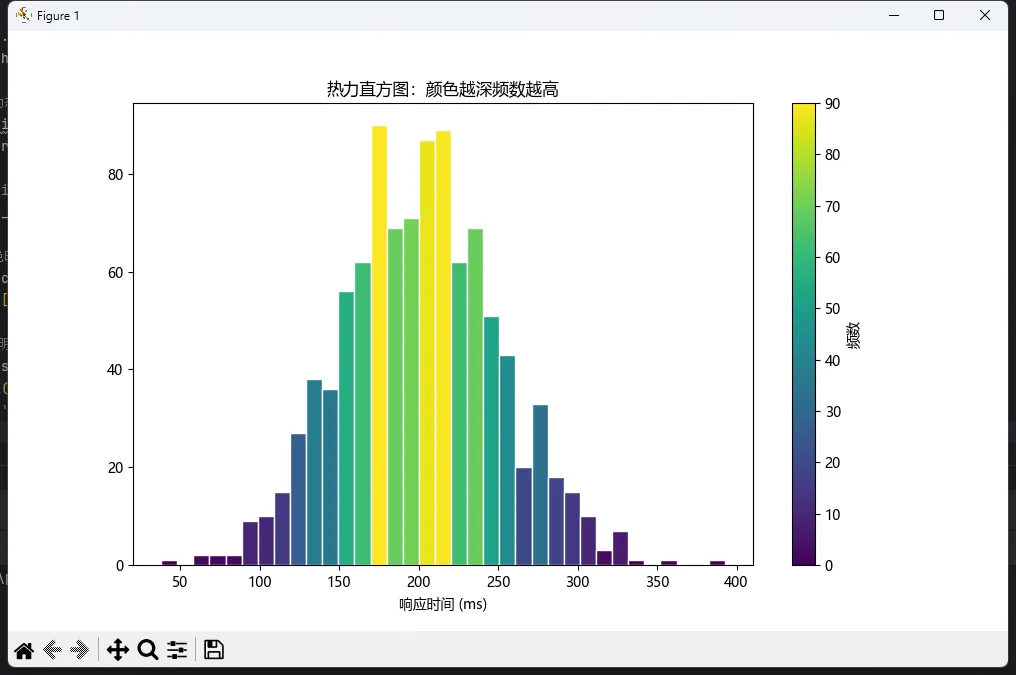
炫是炫,但得看场合用。写论文?稳重点好。做产品demo?可以秀一波。


🔀 分组直方图:多数据集的对决

场景还原

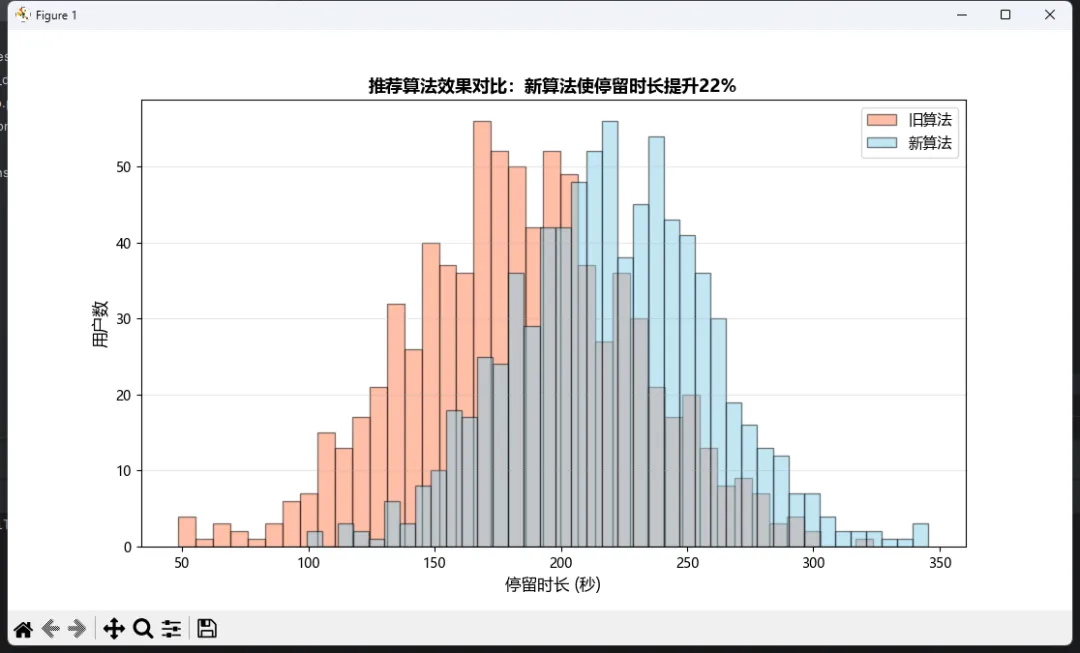
去年做AB测试分析时遇到的真实需求:对比新旧两个推荐算法下的用户停留时长分布。单独画两张图?太傻。叠在一起才能看出差异!

🎯 方法一:透明叠加法(最直观)

# 模拟两组数据old_algo_time = np.random.normal(18045800)  # 旧算法new_algo_time = np.random.normal(22040800)  # 新算法(均值更高)plt.figure(figsize=(116))plt.hist(old_algo_time, bins=40, alpha=0.5, label='旧算法', color='coral', edgecolor='black')plt.hist(new_algo_time, bins=40, alpha=0.5, label='新算法', color='skyblue', edgecolor='black')plt.xlabel('停留时长 (秒)', fontsize=12)plt.ylabel('用户数', fontsize=12)plt.title('推荐算法效果对比:新算法使停留时长提升22%', fontsize=13, fontweight='bold')plt.legend(loc='upper right', fontsize=11)plt.grid(axis='y', alpha=0.3)plt.show()
关键点

  • • alpha=0.5 设置透明度,否则后画的会遮挡前面的
  • • 两组数据的bins参数必须一致
  • • 颜色选择要有对比度(避免红绿色盲问题)

🎯 方法二:并排对比法(更清晰)

fig, axes = plt.subplots(12, figsize=(145), sharey=True)axes[0].hist(old_algo_time, bins=35, color='#FF7F50', alpha=0.7, edgecolor='black')axes[0].set_title('旧算法', fontsize=12, fontweight='bold')axes[0].set_xlabel('停留时长 (秒)')axes[0].set_ylabel('用户数')axes[0].axvline(np.mean(old_algo_time), color='red', linestyle='--', linewidth=2)axes[1].hist(new_algo_time, bins=35, color='#87CEEB', alpha=0.7, edgecolor='black')axes[1].set_title('新算法', fontsize=12, fontweight='bold')axes[1].set_xlabel('停留时长 (秒)')axes[1].axvline(np.mean(new_algo_time), color='blue', linestyle='--', linewidth=2)plt.tight_layout()plt.show()
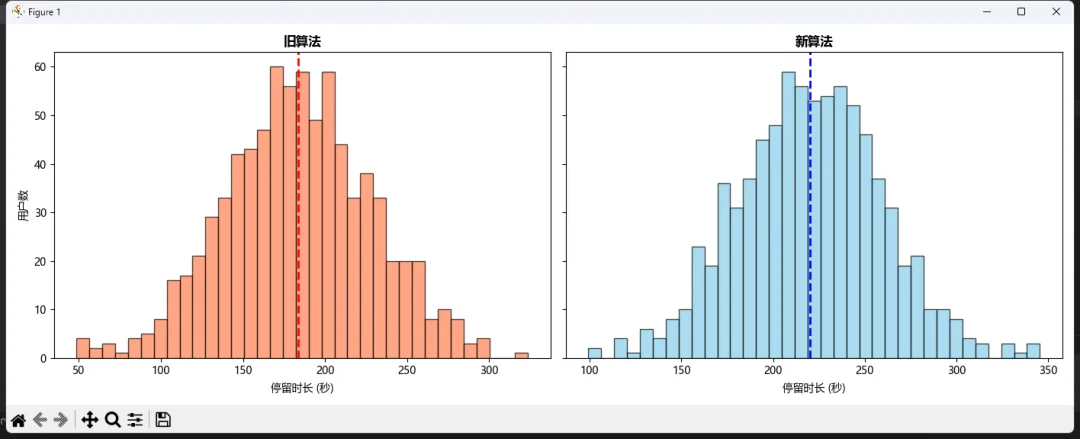
这种布局适合PPT汇报。左右对比,一目了然!

🎯 方法三:堆叠式(适合多分类)

# 模拟三个年龄段用户的购买金额youth = np.random.gamma(250500)      # 18-25岁middle = np.random.gamma(370500)    # 26-40岁  senior = np.random.gamma(2.590500)  # 40岁以上plt.figure(figsize=(116))plt.hist([youth, middle, senior], bins=30, stacked=True,         label=['18-25岁''26-40岁''40+岁'],         color=['#FFD93D''#6BCB77''#4D96FF'],          alpha=0.8, edgecolor='white')plt.xlabel('单次购买金额 (元)', fontsize=12)plt.ylabel('订单数', fontsize=12)plt.title('不同年龄段用户消费分布(堆叠视图)', fontsize=13, fontweight='bold')plt.legend(loc='upper right')plt.show()
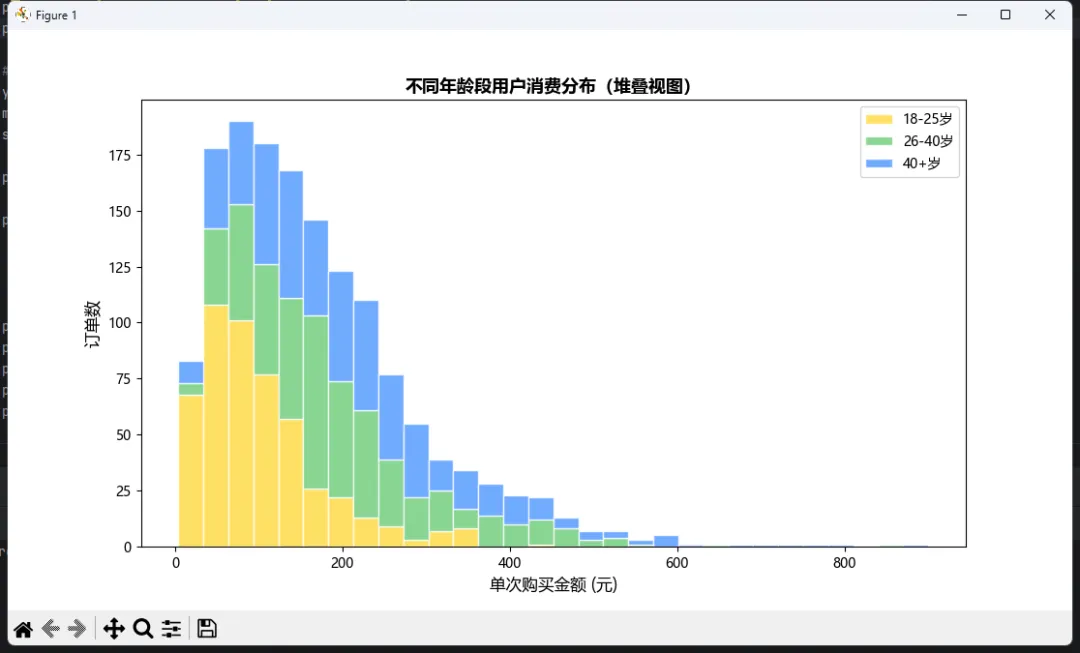
注意!堆叠图虽然好看,但容易误导——底部的分布很清楚,顶部的就模糊了。慎用。


📈 概率密度函数:从计数到概率的跨越

为什么需要density=True?

直方图默认显示的是频数(count),但这有个致命问题:样本量不同的数据集无法对比。

比如:A组有1000个样本,B组有500个。即使分布形状相同,频数也差一倍。怎么办?

归一化! 让纵轴表示概率密度而非频数。

fig, axes = plt.subplots(12, figsize=(145))# 左图:频数直方图(无法对比)axes[0].hist(old_algo_time, bins=35, alpha=0.6, label=f'旧算法 (n={len(old_algo_time)})', color='coral')axes[0].hist(new_algo_time[:400], bins=35, alpha=0.6, label=f'新算法 (n=400)', color='skyblue')axes[0].set_ylabel('频数')axes[0].set_title('频数模式:样本量差异导致无法对比', fontsize=11)axes[0].legend()# 右图:概率密度(可对比)axes[1].hist(old_algo_time, bins=35, alpha=0.6, label=f'旧算法', color='coral', density=True)axes[1].hist(new_algo_time[:400], bins=35, alpha=0.6, label=f'新算法', color='skyblue', density=True)axes[1].set_ylabel('概率密度')axes[1].set_title('密度模式:归一化后可直接对比形状', fontsize=11)axes[1].legend()plt.tight_layout()plt.show()

数学本质density=True会让每个柱子的面积表示概率,所以所有柱子面积之和等于1。这样不同样本量的数据就能放在同一坐标系里对比了。

🧮 手动验证概率密度

n, bins, _ = plt.hist(response_times, bins=30, density=True, alpha=0.7)# 验证:所有柱子面积之和应该≈1bin_width = bins[1] - bins[0]total_area = np.sum(n * bin_width)print(f"所有柱子面积之和: {total_area:.4f}")  # 输出应接近1.0000plt.xlabel('响应时间 (ms)')plt.ylabel('概率密度')plt.title(f'概率密度直方图(面积和={total_area:.3f})')plt.show()

这个验证在我调试分布拟合代码时救过命——发现密度计算不对,结果是bins设置有bug。


🌊 KDE核密度估计:从"柱子"到"曲线"的优雅

直方图的"原罪"

再精细的直方图,本质还是离散的。看着总有点"棱角分明"的感觉,不够平滑。而且bins设置不同,形状会变!

KDE(Kernel Density Estimation)就是来解决这个问题的。它用光滑的曲线拟合数据分布,不依赖bins参数。

🎨 scipy实现KDE

from scipy.stats import gaussian_kde# 准备数据data = np.random.exponential(501000)  # 指数分布数据# 计算KDEkde = gaussian_kde(data)x_range = np.linspace(data.min(), data.max(), 500)density = kde(x_range)# 绘图对比fig, axes = plt.subplots(12, figsize=(145))# 左:传统直方图axes[0].hist(data, bins=40, density=True, alpha=0.6, color='lightcoral', edgecolor='black')axes[0].set_title('传统直方图(有锯齿感)', fontsize=12)axes[0].set_xlabel('值')axes[0].set_ylabel('概率密度')# 右:KDE曲线axes[1].hist(data, bins=40, density=True, alpha=0.3, color='lightgray', edgecolor='black')axes[1].plot(x_range, density, color='darkblue', linewidth=2.5, label='KDE曲线')axes[1].fill_between(x_range, density, alpha=0.3, color='skyblue')axes[1].set_title('KDE核密度估计(平滑优雅)', fontsize=12)axes[1].set_xlabel('值')axes[1].legend()plt.tight_layout()plt.show()
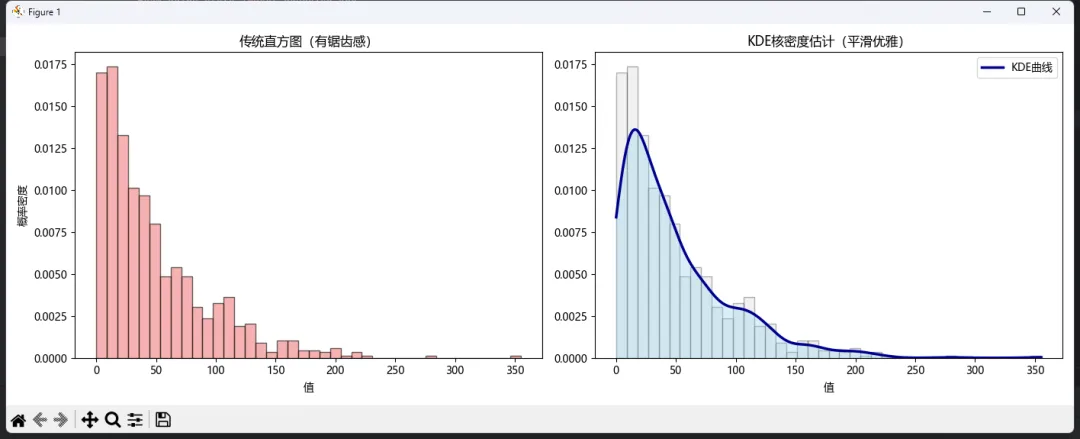
看到那条光滑的曲线了吗?这才是数据分布的"真实面貌"。

🔬 带宽(bandwidth)的玄机

KDE有个关键参数叫bw_method(带宽),它控制平滑程度。就像给照片加滤镜——太模糊看不清细节,太锐利全是噪声。

fig, axes = plt.subplots(22, figsize=(1310))bandwidths = [0.10.30.51.0]titles = ['带宽=0.1(过拟合)''带宽=0.3(较合适)''带宽=0.5(适中)''带宽=1.0(过平滑)']for ax, bw, title inzip(axes.flat, bandwidths, titles):    kde = gaussian_kde(data, bw_method=bw)    density = kde(x_range)    ax.hist(data, bins=40, density=True, alpha=0.3, color='lightgray')    ax.plot(x_range, density, color='crimson', linewidth=2)    ax.set_title(title, fontsize=11, fontweight='bold')    ax.set_xlabel('值')    ax.set_ylabel('密度')plt.tight_layout()plt.show()
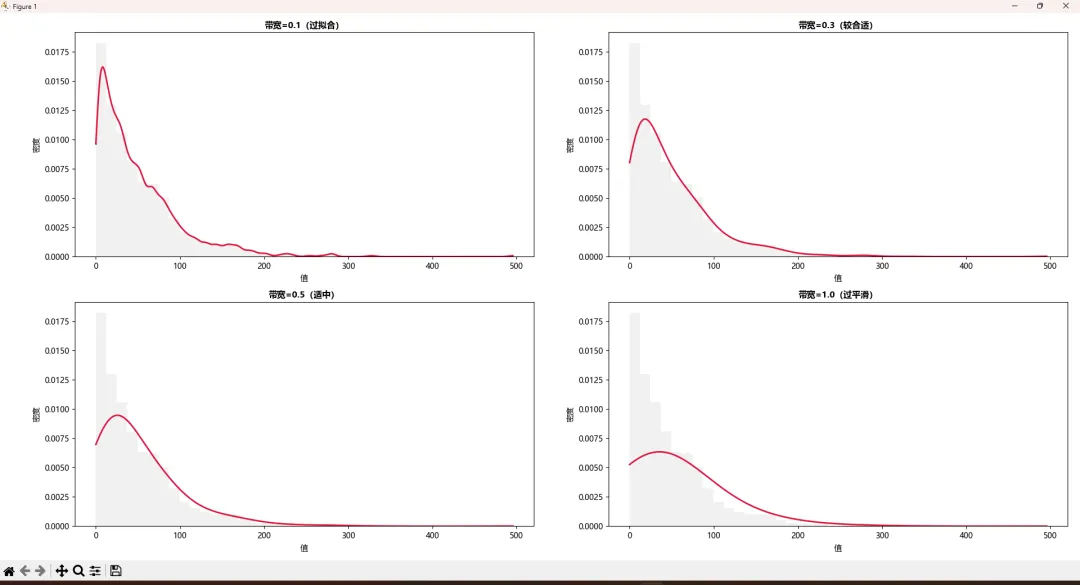
我的选择策略

  • • 默认用bw_method='scott'(scipy的默认值)
  • • 数据有明显多峰?试试bw_method=0.2~0.4
  • • 只是看大致趋势?bw_method=0.5~1.0够了

🌟 seaborn的快捷方案

嫌scipy麻烦?seaborn一行代码搞定!

import seaborn as snsplt.figure(figsize=(116))# 绘制KDE曲线sns.kdeplot(data=response_times, fill=True, color='steelblue', alpha=0.5, linewidth=2)# 叠加原始数据点(rug plot)sns.rugplot(data=response_times, color='darkblue', alpha=0.5, height=0.05)plt.xlabel('响应时间 (ms)', fontsize=12)plt.ylabel('概率密度', fontsize=12)plt.title('Seaborn风格的KDE图(带数据点标记)', fontsize=13, fontweight='bold')plt.grid(alpha=0.3)plt.show()

那些小竖线(rug plot)展示每个真实数据点的位置,特别适合论文插图——既有美学,又有严谨性。

🎭 多组KDE对比

plt.figure(figsize=(116))sns.kdeplot(data=old_algo_time, fill=True, color='coral', alpha=0.4, label='旧算法', linewidth=2)sns.kdeplot(data=new_algo_time, fill=True, color='skyblue', alpha=0.4, label='新算法', linewidth=2)plt.xlabel('停留时长 (秒)', fontsize=12)plt.ylabel('概率密度', fontsize=12)plt.title('AB测试效果对比:KDE视角', fontsize=13, fontweight='bold')plt.legend(fontsize=11)plt.grid(alpha=0.25)plt.show()

这图放在产品迭代报告里,比Excel表格有说服力一万倍。


🎯 实战综合案例:电商用户行为分析

业务背景

某电商平台想分析三个渠道(搜索、推荐、广告)带来的用户质量。评估指标:单次访问浏览商品数。

import matplotlib  import matplotlib.pyplot as plt  import numpy as np  from scipy.stats import gaussian_kde  matplotlib.use('TkAgg')  plt.rcParams['font.sans-serif'] = ['Microsoft YaHei']  # Windows下显示中文  plt.rcParams['axes.unicode_minus'] = False# 生成模拟数据  np.random.seed(88)  search_views = np.random.poisson(81500)  # 搜索用户:泊松分布  recommend_views = np.random.poisson(121200)  # 推荐用户:更高期望  ad_views = np.random.exponential(51000)  # 广告用户:指数分布(高流失)  # 创建综合视图  fig = plt.figure(figsize=(1510))  gs = fig.add_gridspec(32, hspace=0.3, wspace=0.3)  # 子图1:分组直方图  ax1 = fig.add_subplot(gs[0, :])  ax1.hist([search_views, recommend_views, ad_views], bins=30,           label=['搜索流量''推荐流量''广告流量'],           color=['#FF6B6B''#4ECDC4''#45B7D1'], alpha=0.6, edgecolor='black')  ax1.set_xlabel('单次访问浏览商品数', fontsize=11)  ax1.set_ylabel('用户数', fontsize=11)  ax1.set_title('三大渠道用户行为对比(频数视图)', fontsize=13, fontweight='bold')  ax1.legend(loc='upper right', fontsize=10)  ax1.grid(axis='y', alpha=0.3)  # 子图2:KDE密度对比  ax2 = fig.add_subplot(gs[1, :])  for data, label, color inzip([search_views, recommend_views, ad_views],                                ['搜索''推荐''广告'],                                ['#FF6B6B''#4ECDC4''#45B7D1']):      kde = gaussian_kde(data)      x = np.linspace(030300)      ax2.plot(x, kde(x), label=label, linewidth=2.5, color=color)      ax2.fill_between(x, kde(x), alpha=0.2, color=color)  ax2.set_xlabel('浏览商品数', fontsize=11)  ax2.set_ylabel('概率密度', fontsize=11)  ax2.set_title('KDE平滑分布对比', fontsize=13, fontweight='bold')  ax2.legend(fontsize=10)  ax2.grid(alpha=0.3)  # 子图3-5:各渠道详细分析  channels = [      (search_views, '搜索流量''#FF6B6B', gs[20]),      (recommend_views, '推荐流量''#4ECDC4', gs[21])  ]  for data, title, color, position in channels:      ax = fig.add_subplot(position)      ax.hist(data, bins=25, density=True, alpha=0.5, color=color, edgecolor='black')      kde = gaussian_kde(data)      x = np.linspace(data.min(), data.max(), 200)      ax.plot(x, kde(x), color='darkred'if'搜索'in title else'darkblue', linewidth=2)      mean_val = np.mean(data)      ax.axvline(mean_val, color='black', linestyle='--', linewidth=1.5,                 label=f'均值: {mean_val:.1f}')      ax.set_title(title, fontsize=11, fontweight='bold')      ax.set_xlabel('浏览数')      ax.legend(fontsize=9)  plt.show()  # 输出统计摘要  print("=" * 50)  print("渠道质量评估报告".center(50))  print("=" * 50)  for name, data in [('搜索', search_views), ('推荐', recommend_views), ('广告', ad_views)]:  print(f"\n【{name}渠道】")  print(f"  平均浏览数: {np.mean(data):.2f} 件")  print(f"  中位数: {np.median(data):.2f} 件")  print(f"  标准差: {np.std(data):.2f}")  print(f"  优质用户比例(>10件): {(data > 10).sum() / len(data) * 100:.1f}%")
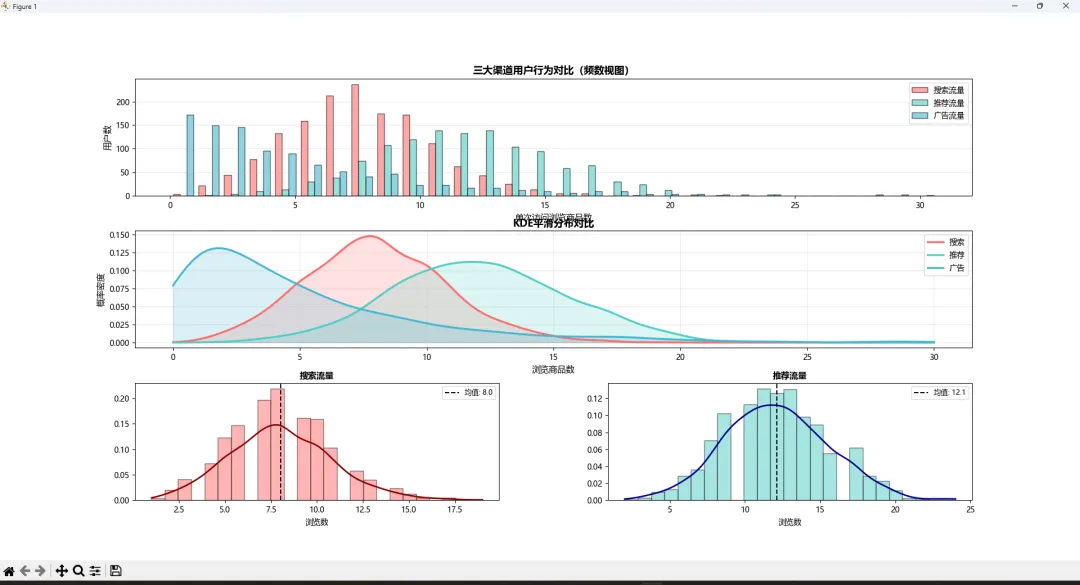
一套组合拳下来,业务结论清晰可见:推荐流量质量最优,广告流量波动大需优化投放策略


💡 总结

  1. 1. 直方图的bins设置,决定了你看到的是真相还是幻觉。bins='auto'是探索的起点,手动微调是专业的体现。
  2. 2. density=True不是可选项,是对比不同数据集的必选项。 频数会骗人,概率密度才能揭示本质。
  3. 3. KDE不是为了炫技,是为了看清数据的"灵魂曲线"。 当你需要向非技术人员展示趋势时,一条光滑的密度曲线胜过千言万语。

🚀 可复用代码模板

模板1:快速生成对比直方图

defplot_comparison_hist(data_dict, bins=30, title='数据对比'):"""    data_dict: {'标签1': 数据数组1, '标签2': 数据数组2, ...}    """    plt.figure(figsize=(116))for label, data in data_dict.items():        plt.hist(data, bins=bins, alpha=0.5, label=label, edgecolor='black')    plt.xlabel('数值')    plt.ylabel('频数')    plt.title(title, fontweight='bold')    plt.legend()    plt.grid(axis='y', alpha=0.3)    plt.show()

模板2:一键生成直方图+KDE组合

defhist_with_kde(data, bins=30, color='steelblue'):    fig, axes = plt.subplots(12, figsize=(145))# 直方图    axes[0].hist(data, bins=bins, color=color, alpha=0.7, edgecolor='black')    axes[0].set_title('直方图视图')# 直方图+KDE    axes[1].hist(data, bins=bins, density=True, alpha=0.4, color='lightgray')    kde = gaussian_kde(data)    x = np.linspace(data.min(), data.max(), 300)    axes[1].plot(x, kde(x), color='darkred', linewidth=2.5)    axes[1].set_title('KDE密度视图')    plt.tight_layout()    plt.show()

🤔 留给你的思考题

  1. 1. 你们项目中最常用直方图分析什么数据? bins一般设多少?欢迎评论区分享经验!
  2. 2. 挑战题:如果要对比5个以上的数据集分布,用什么方式展示最清晰?(提示:考虑小提琴图或ridge plot)
  3. 3. 实战练习:下载一份真实数据集(如Kaggle的Titanic数据),用今天学的方法分析乘客年龄分布,试着用KDE找出是否存在多个年龄峰值。

✍️ 写在最后

凌晨写这篇文章的时候,又想起那个熬夜做分析的夜晚。如果当时就掌握这些技巧,何至于反复调bins参数调到怀疑人生?

数据可视化不是"画个图"那么简单。选对图表类型,调好参数细节,才能让数据真正"说话"。直方图和密度图,就是打开分布分析大门的两把钥匙。

收藏这篇文章的理由:下次做数据分析报告时,直接复制模板改改数据源,10分钟出图!老板夸,同事服,你还能准点下班。

如果这篇文章帮到你了,点个在看或转发给需要的朋友吧~咱们数据分析路上,一起进步!💪


#Python数据分析 #Matplotlib可视化 #直方图技巧 #KDE密度估计 #数据科学

最新文章

随机文章

基本 文件 流程 错误 SQL 调试
  1. 请求信息 : 2026-03-27 20:23:34 HTTP/2.0 GET : https://f.mffb.com.cn/a/481359.html
  2. 运行时间 : 0.234900s [ 吞吐率:4.26req/s ] 内存消耗:4,761.36kb 文件加载:140
  3. 缓存信息 : 0 reads,0 writes
  4. 会话信息 : SESSION_ID=7267da016de5bb83e150670240183290
  1. /yingpanguazai/ssd/ssd1/www/f.mffb.com.cn/public/index.php ( 0.79 KB )
  2. /yingpanguazai/ssd/ssd1/www/f.mffb.com.cn/vendor/autoload.php ( 0.17 KB )
  3. /yingpanguazai/ssd/ssd1/www/f.mffb.com.cn/vendor/composer/autoload_real.php ( 2.49 KB )
  4. /yingpanguazai/ssd/ssd1/www/f.mffb.com.cn/vendor/composer/platform_check.php ( 0.90 KB )
  5. /yingpanguazai/ssd/ssd1/www/f.mffb.com.cn/vendor/composer/ClassLoader.php ( 14.03 KB )
  6. /yingpanguazai/ssd/ssd1/www/f.mffb.com.cn/vendor/composer/autoload_static.php ( 4.90 KB )
  7. /yingpanguazai/ssd/ssd1/www/f.mffb.com.cn/vendor/topthink/think-helper/src/helper.php ( 8.34 KB )
  8. /yingpanguazai/ssd/ssd1/www/f.mffb.com.cn/vendor/topthink/think-validate/src/helper.php ( 2.19 KB )
  9. /yingpanguazai/ssd/ssd1/www/f.mffb.com.cn/vendor/topthink/think-orm/src/helper.php ( 1.47 KB )
  10. /yingpanguazai/ssd/ssd1/www/f.mffb.com.cn/vendor/topthink/think-orm/stubs/load_stubs.php ( 0.16 KB )
  11. /yingpanguazai/ssd/ssd1/www/f.mffb.com.cn/vendor/topthink/framework/src/think/Exception.php ( 1.69 KB )
  12. /yingpanguazai/ssd/ssd1/www/f.mffb.com.cn/vendor/topthink/think-container/src/Facade.php ( 2.71 KB )
  13. /yingpanguazai/ssd/ssd1/www/f.mffb.com.cn/vendor/symfony/deprecation-contracts/function.php ( 0.99 KB )
  14. /yingpanguazai/ssd/ssd1/www/f.mffb.com.cn/vendor/symfony/polyfill-mbstring/bootstrap.php ( 8.26 KB )
  15. /yingpanguazai/ssd/ssd1/www/f.mffb.com.cn/vendor/symfony/polyfill-mbstring/bootstrap80.php ( 9.78 KB )
  16. /yingpanguazai/ssd/ssd1/www/f.mffb.com.cn/vendor/symfony/var-dumper/Resources/functions/dump.php ( 1.49 KB )
  17. /yingpanguazai/ssd/ssd1/www/f.mffb.com.cn/vendor/topthink/think-dumper/src/helper.php ( 0.18 KB )
  18. /yingpanguazai/ssd/ssd1/www/f.mffb.com.cn/vendor/symfony/var-dumper/VarDumper.php ( 4.30 KB )
  19. /yingpanguazai/ssd/ssd1/www/f.mffb.com.cn/vendor/topthink/framework/src/think/App.php ( 15.30 KB )
  20. /yingpanguazai/ssd/ssd1/www/f.mffb.com.cn/vendor/topthink/think-container/src/Container.php ( 15.76 KB )
  21. /yingpanguazai/ssd/ssd1/www/f.mffb.com.cn/vendor/psr/container/src/ContainerInterface.php ( 1.02 KB )
  22. /yingpanguazai/ssd/ssd1/www/f.mffb.com.cn/app/provider.php ( 0.19 KB )
  23. /yingpanguazai/ssd/ssd1/www/f.mffb.com.cn/vendor/topthink/framework/src/think/Http.php ( 6.04 KB )
  24. /yingpanguazai/ssd/ssd1/www/f.mffb.com.cn/vendor/topthink/think-helper/src/helper/Str.php ( 7.29 KB )
  25. /yingpanguazai/ssd/ssd1/www/f.mffb.com.cn/vendor/topthink/framework/src/think/Env.php ( 4.68 KB )
  26. /yingpanguazai/ssd/ssd1/www/f.mffb.com.cn/app/common.php ( 0.03 KB )
  27. /yingpanguazai/ssd/ssd1/www/f.mffb.com.cn/vendor/topthink/framework/src/helper.php ( 18.78 KB )
  28. /yingpanguazai/ssd/ssd1/www/f.mffb.com.cn/vendor/topthink/framework/src/think/Config.php ( 5.54 KB )
  29. /yingpanguazai/ssd/ssd1/www/f.mffb.com.cn/config/app.php ( 0.95 KB )
  30. /yingpanguazai/ssd/ssd1/www/f.mffb.com.cn/config/cache.php ( 0.78 KB )
  31. /yingpanguazai/ssd/ssd1/www/f.mffb.com.cn/config/console.php ( 0.23 KB )
  32. /yingpanguazai/ssd/ssd1/www/f.mffb.com.cn/config/cookie.php ( 0.56 KB )
  33. /yingpanguazai/ssd/ssd1/www/f.mffb.com.cn/config/database.php ( 2.48 KB )
  34. /yingpanguazai/ssd/ssd1/www/f.mffb.com.cn/vendor/topthink/framework/src/think/facade/Env.php ( 1.67 KB )
  35. /yingpanguazai/ssd/ssd1/www/f.mffb.com.cn/config/filesystem.php ( 0.61 KB )
  36. /yingpanguazai/ssd/ssd1/www/f.mffb.com.cn/config/lang.php ( 0.91 KB )
  37. /yingpanguazai/ssd/ssd1/www/f.mffb.com.cn/config/log.php ( 1.35 KB )
  38. /yingpanguazai/ssd/ssd1/www/f.mffb.com.cn/config/middleware.php ( 0.19 KB )
  39. /yingpanguazai/ssd/ssd1/www/f.mffb.com.cn/config/route.php ( 1.89 KB )
  40. /yingpanguazai/ssd/ssd1/www/f.mffb.com.cn/config/session.php ( 0.57 KB )
  41. /yingpanguazai/ssd/ssd1/www/f.mffb.com.cn/config/trace.php ( 0.34 KB )
  42. /yingpanguazai/ssd/ssd1/www/f.mffb.com.cn/config/view.php ( 0.82 KB )
  43. /yingpanguazai/ssd/ssd1/www/f.mffb.com.cn/app/event.php ( 0.25 KB )
  44. /yingpanguazai/ssd/ssd1/www/f.mffb.com.cn/vendor/topthink/framework/src/think/Event.php ( 7.67 KB )
  45. /yingpanguazai/ssd/ssd1/www/f.mffb.com.cn/app/service.php ( 0.13 KB )
  46. /yingpanguazai/ssd/ssd1/www/f.mffb.com.cn/app/AppService.php ( 0.26 KB )
  47. /yingpanguazai/ssd/ssd1/www/f.mffb.com.cn/vendor/topthink/framework/src/think/Service.php ( 1.64 KB )
  48. /yingpanguazai/ssd/ssd1/www/f.mffb.com.cn/vendor/topthink/framework/src/think/Lang.php ( 7.35 KB )
  49. /yingpanguazai/ssd/ssd1/www/f.mffb.com.cn/vendor/topthink/framework/src/lang/zh-cn.php ( 13.70 KB )
  50. /yingpanguazai/ssd/ssd1/www/f.mffb.com.cn/vendor/topthink/framework/src/think/initializer/Error.php ( 3.31 KB )
  51. /yingpanguazai/ssd/ssd1/www/f.mffb.com.cn/vendor/topthink/framework/src/think/initializer/RegisterService.php ( 1.33 KB )
  52. /yingpanguazai/ssd/ssd1/www/f.mffb.com.cn/vendor/services.php ( 0.14 KB )
  53. /yingpanguazai/ssd/ssd1/www/f.mffb.com.cn/vendor/topthink/framework/src/think/service/PaginatorService.php ( 1.52 KB )
  54. /yingpanguazai/ssd/ssd1/www/f.mffb.com.cn/vendor/topthink/framework/src/think/service/ValidateService.php ( 0.99 KB )
  55. /yingpanguazai/ssd/ssd1/www/f.mffb.com.cn/vendor/topthink/framework/src/think/service/ModelService.php ( 2.04 KB )
  56. /yingpanguazai/ssd/ssd1/www/f.mffb.com.cn/vendor/topthink/think-trace/src/Service.php ( 0.77 KB )
  57. /yingpanguazai/ssd/ssd1/www/f.mffb.com.cn/vendor/topthink/framework/src/think/Middleware.php ( 6.72 KB )
  58. /yingpanguazai/ssd/ssd1/www/f.mffb.com.cn/vendor/topthink/framework/src/think/initializer/BootService.php ( 0.77 KB )
  59. /yingpanguazai/ssd/ssd1/www/f.mffb.com.cn/vendor/topthink/think-orm/src/Paginator.php ( 11.86 KB )
  60. /yingpanguazai/ssd/ssd1/www/f.mffb.com.cn/vendor/topthink/think-validate/src/Validate.php ( 63.20 KB )
  61. /yingpanguazai/ssd/ssd1/www/f.mffb.com.cn/vendor/topthink/think-orm/src/Model.php ( 23.55 KB )
  62. /yingpanguazai/ssd/ssd1/www/f.mffb.com.cn/vendor/topthink/think-orm/src/model/concern/Attribute.php ( 21.05 KB )
  63. /yingpanguazai/ssd/ssd1/www/f.mffb.com.cn/vendor/topthink/think-orm/src/model/concern/AutoWriteData.php ( 4.21 KB )
  64. /yingpanguazai/ssd/ssd1/www/f.mffb.com.cn/vendor/topthink/think-orm/src/model/concern/Conversion.php ( 6.44 KB )
  65. /yingpanguazai/ssd/ssd1/www/f.mffb.com.cn/vendor/topthink/think-orm/src/model/concern/DbConnect.php ( 5.16 KB )
  66. /yingpanguazai/ssd/ssd1/www/f.mffb.com.cn/vendor/topthink/think-orm/src/model/concern/ModelEvent.php ( 2.33 KB )
  67. /yingpanguazai/ssd/ssd1/www/f.mffb.com.cn/vendor/topthink/think-orm/src/model/concern/RelationShip.php ( 28.29 KB )
  68. /yingpanguazai/ssd/ssd1/www/f.mffb.com.cn/vendor/topthink/think-helper/src/contract/Arrayable.php ( 0.09 KB )
  69. /yingpanguazai/ssd/ssd1/www/f.mffb.com.cn/vendor/topthink/think-helper/src/contract/Jsonable.php ( 0.13 KB )
  70. /yingpanguazai/ssd/ssd1/www/f.mffb.com.cn/vendor/topthink/think-orm/src/model/contract/Modelable.php ( 0.09 KB )
  71. /yingpanguazai/ssd/ssd1/www/f.mffb.com.cn/vendor/topthink/framework/src/think/Db.php ( 2.88 KB )
  72. /yingpanguazai/ssd/ssd1/www/f.mffb.com.cn/vendor/topthink/think-orm/src/DbManager.php ( 8.52 KB )
  73. /yingpanguazai/ssd/ssd1/www/f.mffb.com.cn/vendor/topthink/framework/src/think/Log.php ( 6.28 KB )
  74. /yingpanguazai/ssd/ssd1/www/f.mffb.com.cn/vendor/topthink/framework/src/think/Manager.php ( 3.92 KB )
  75. /yingpanguazai/ssd/ssd1/www/f.mffb.com.cn/vendor/psr/log/src/LoggerTrait.php ( 2.69 KB )
  76. /yingpanguazai/ssd/ssd1/www/f.mffb.com.cn/vendor/psr/log/src/LoggerInterface.php ( 2.71 KB )
  77. /yingpanguazai/ssd/ssd1/www/f.mffb.com.cn/vendor/topthink/framework/src/think/Cache.php ( 4.92 KB )
  78. /yingpanguazai/ssd/ssd1/www/f.mffb.com.cn/vendor/psr/simple-cache/src/CacheInterface.php ( 4.71 KB )
  79. /yingpanguazai/ssd/ssd1/www/f.mffb.com.cn/vendor/topthink/think-helper/src/helper/Arr.php ( 16.63 KB )
  80. /yingpanguazai/ssd/ssd1/www/f.mffb.com.cn/vendor/topthink/framework/src/think/cache/driver/File.php ( 7.84 KB )
  81. /yingpanguazai/ssd/ssd1/www/f.mffb.com.cn/vendor/topthink/framework/src/think/cache/Driver.php ( 9.03 KB )
  82. /yingpanguazai/ssd/ssd1/www/f.mffb.com.cn/vendor/topthink/framework/src/think/contract/CacheHandlerInterface.php ( 1.99 KB )
  83. /yingpanguazai/ssd/ssd1/www/f.mffb.com.cn/app/Request.php ( 0.09 KB )
  84. /yingpanguazai/ssd/ssd1/www/f.mffb.com.cn/vendor/topthink/framework/src/think/Request.php ( 55.78 KB )
  85. /yingpanguazai/ssd/ssd1/www/f.mffb.com.cn/app/middleware.php ( 0.25 KB )
  86. /yingpanguazai/ssd/ssd1/www/f.mffb.com.cn/vendor/topthink/framework/src/think/Pipeline.php ( 2.61 KB )
  87. /yingpanguazai/ssd/ssd1/www/f.mffb.com.cn/vendor/topthink/think-trace/src/TraceDebug.php ( 3.40 KB )
  88. /yingpanguazai/ssd/ssd1/www/f.mffb.com.cn/vendor/topthink/framework/src/think/middleware/SessionInit.php ( 1.94 KB )
  89. /yingpanguazai/ssd/ssd1/www/f.mffb.com.cn/vendor/topthink/framework/src/think/Session.php ( 1.80 KB )
  90. /yingpanguazai/ssd/ssd1/www/f.mffb.com.cn/vendor/topthink/framework/src/think/session/driver/File.php ( 6.27 KB )
  91. /yingpanguazai/ssd/ssd1/www/f.mffb.com.cn/vendor/topthink/framework/src/think/contract/SessionHandlerInterface.php ( 0.87 KB )
  92. /yingpanguazai/ssd/ssd1/www/f.mffb.com.cn/vendor/topthink/framework/src/think/session/Store.php ( 7.12 KB )
  93. /yingpanguazai/ssd/ssd1/www/f.mffb.com.cn/vendor/topthink/framework/src/think/Route.php ( 23.73 KB )
  94. /yingpanguazai/ssd/ssd1/www/f.mffb.com.cn/vendor/topthink/framework/src/think/route/RuleName.php ( 5.75 KB )
  95. /yingpanguazai/ssd/ssd1/www/f.mffb.com.cn/vendor/topthink/framework/src/think/route/Domain.php ( 2.53 KB )
  96. /yingpanguazai/ssd/ssd1/www/f.mffb.com.cn/vendor/topthink/framework/src/think/route/RuleGroup.php ( 22.43 KB )
  97. /yingpanguazai/ssd/ssd1/www/f.mffb.com.cn/vendor/topthink/framework/src/think/route/Rule.php ( 26.95 KB )
  98. /yingpanguazai/ssd/ssd1/www/f.mffb.com.cn/vendor/topthink/framework/src/think/route/RuleItem.php ( 9.78 KB )
  99. /yingpanguazai/ssd/ssd1/www/f.mffb.com.cn/route/app.php ( 1.72 KB )
  100. /yingpanguazai/ssd/ssd1/www/f.mffb.com.cn/vendor/topthink/framework/src/think/facade/Route.php ( 4.70 KB )
  101. /yingpanguazai/ssd/ssd1/www/f.mffb.com.cn/vendor/topthink/framework/src/think/route/dispatch/Controller.php ( 4.74 KB )
  102. /yingpanguazai/ssd/ssd1/www/f.mffb.com.cn/vendor/topthink/framework/src/think/route/Dispatch.php ( 10.44 KB )
  103. /yingpanguazai/ssd/ssd1/www/f.mffb.com.cn/app/controller/Index.php ( 4.81 KB )
  104. /yingpanguazai/ssd/ssd1/www/f.mffb.com.cn/app/BaseController.php ( 2.05 KB )
  105. /yingpanguazai/ssd/ssd1/www/f.mffb.com.cn/vendor/topthink/think-orm/src/facade/Db.php ( 0.93 KB )
  106. /yingpanguazai/ssd/ssd1/www/f.mffb.com.cn/vendor/topthink/think-orm/src/db/connector/Mysql.php ( 5.44 KB )
  107. /yingpanguazai/ssd/ssd1/www/f.mffb.com.cn/vendor/topthink/think-orm/src/db/PDOConnection.php ( 52.47 KB )
  108. /yingpanguazai/ssd/ssd1/www/f.mffb.com.cn/vendor/topthink/think-orm/src/db/Connection.php ( 8.39 KB )
  109. /yingpanguazai/ssd/ssd1/www/f.mffb.com.cn/vendor/topthink/think-orm/src/db/ConnectionInterface.php ( 4.57 KB )
  110. /yingpanguazai/ssd/ssd1/www/f.mffb.com.cn/vendor/topthink/think-orm/src/db/builder/Mysql.php ( 16.58 KB )
  111. /yingpanguazai/ssd/ssd1/www/f.mffb.com.cn/vendor/topthink/think-orm/src/db/Builder.php ( 24.06 KB )
  112. /yingpanguazai/ssd/ssd1/www/f.mffb.com.cn/vendor/topthink/think-orm/src/db/BaseBuilder.php ( 27.50 KB )
  113. /yingpanguazai/ssd/ssd1/www/f.mffb.com.cn/vendor/topthink/think-orm/src/db/Query.php ( 15.71 KB )
  114. /yingpanguazai/ssd/ssd1/www/f.mffb.com.cn/vendor/topthink/think-orm/src/db/BaseQuery.php ( 45.13 KB )
  115. /yingpanguazai/ssd/ssd1/www/f.mffb.com.cn/vendor/topthink/think-orm/src/db/concern/TimeFieldQuery.php ( 7.43 KB )
  116. /yingpanguazai/ssd/ssd1/www/f.mffb.com.cn/vendor/topthink/think-orm/src/db/concern/AggregateQuery.php ( 3.26 KB )
  117. /yingpanguazai/ssd/ssd1/www/f.mffb.com.cn/vendor/topthink/think-orm/src/db/concern/ModelRelationQuery.php ( 20.07 KB )
  118. /yingpanguazai/ssd/ssd1/www/f.mffb.com.cn/vendor/topthink/think-orm/src/db/concern/ParamsBind.php ( 3.66 KB )
  119. /yingpanguazai/ssd/ssd1/www/f.mffb.com.cn/vendor/topthink/think-orm/src/db/concern/ResultOperation.php ( 7.01 KB )
  120. /yingpanguazai/ssd/ssd1/www/f.mffb.com.cn/vendor/topthink/think-orm/src/db/concern/WhereQuery.php ( 19.37 KB )
  121. /yingpanguazai/ssd/ssd1/www/f.mffb.com.cn/vendor/topthink/think-orm/src/db/concern/JoinAndViewQuery.php ( 7.11 KB )
  122. /yingpanguazai/ssd/ssd1/www/f.mffb.com.cn/vendor/topthink/think-orm/src/db/concern/TableFieldInfo.php ( 2.63 KB )
  123. /yingpanguazai/ssd/ssd1/www/f.mffb.com.cn/vendor/topthink/think-orm/src/db/concern/Transaction.php ( 2.77 KB )
  124. /yingpanguazai/ssd/ssd1/www/f.mffb.com.cn/vendor/topthink/framework/src/think/log/driver/File.php ( 5.96 KB )
  125. /yingpanguazai/ssd/ssd1/www/f.mffb.com.cn/vendor/topthink/framework/src/think/contract/LogHandlerInterface.php ( 0.86 KB )
  126. /yingpanguazai/ssd/ssd1/www/f.mffb.com.cn/vendor/topthink/framework/src/think/log/Channel.php ( 3.89 KB )
  127. /yingpanguazai/ssd/ssd1/www/f.mffb.com.cn/vendor/topthink/framework/src/think/event/LogRecord.php ( 1.02 KB )
  128. /yingpanguazai/ssd/ssd1/www/f.mffb.com.cn/vendor/topthink/think-helper/src/Collection.php ( 16.47 KB )
  129. /yingpanguazai/ssd/ssd1/www/f.mffb.com.cn/vendor/topthink/framework/src/think/facade/View.php ( 1.70 KB )
  130. /yingpanguazai/ssd/ssd1/www/f.mffb.com.cn/vendor/topthink/framework/src/think/View.php ( 4.39 KB )
  131. /yingpanguazai/ssd/ssd1/www/f.mffb.com.cn/vendor/topthink/framework/src/think/Response.php ( 8.81 KB )
  132. /yingpanguazai/ssd/ssd1/www/f.mffb.com.cn/vendor/topthink/framework/src/think/response/View.php ( 3.29 KB )
  133. /yingpanguazai/ssd/ssd1/www/f.mffb.com.cn/vendor/topthink/framework/src/think/Cookie.php ( 6.06 KB )
  134. /yingpanguazai/ssd/ssd1/www/f.mffb.com.cn/vendor/topthink/think-view/src/Think.php ( 8.38 KB )
  135. /yingpanguazai/ssd/ssd1/www/f.mffb.com.cn/vendor/topthink/framework/src/think/contract/TemplateHandlerInterface.php ( 1.60 KB )
  136. /yingpanguazai/ssd/ssd1/www/f.mffb.com.cn/vendor/topthink/think-template/src/Template.php ( 46.61 KB )
  137. /yingpanguazai/ssd/ssd1/www/f.mffb.com.cn/vendor/topthink/think-template/src/template/driver/File.php ( 2.41 KB )
  138. /yingpanguazai/ssd/ssd1/www/f.mffb.com.cn/vendor/topthink/think-template/src/template/contract/DriverInterface.php ( 0.86 KB )
  139. /yingpanguazai/ssd/ssd1/www/f.mffb.com.cn/runtime/temp/067d451b9a0c665040f3f1bdd3293d68.php ( 11.98 KB )
  140. /yingpanguazai/ssd/ssd1/www/f.mffb.com.cn/vendor/topthink/think-trace/src/Html.php ( 4.42 KB )
  1. CONNECT:[ UseTime:0.001154s ] mysql:host=127.0.0.1;port=3306;dbname=f_mffb;charset=utf8mb4
  2. SHOW FULL COLUMNS FROM `fenlei` [ RunTime:0.001348s ]
  3. SELECT * FROM `fenlei` WHERE `fid` = 0 [ RunTime:0.004362s ]
  4. SELECT * FROM `fenlei` WHERE `fid` = 63 [ RunTime:0.000734s ]
  5. SHOW FULL COLUMNS FROM `set` [ RunTime:0.001326s ]
  6. SELECT * FROM `set` [ RunTime:0.000896s ]
  7. SHOW FULL COLUMNS FROM `article` [ RunTime:0.001502s ]
  8. SELECT * FROM `article` WHERE `id` = 481359 LIMIT 1 [ RunTime:0.012854s ]
  9. UPDATE `article` SET `lasttime` = 1774614214 WHERE `id` = 481359 [ RunTime:0.017286s ]
  10. SELECT * FROM `fenlei` WHERE `id` = 66 LIMIT 1 [ RunTime:0.000607s ]
  11. SELECT * FROM `article` WHERE `id` < 481359 ORDER BY `id` DESC LIMIT 1 [ RunTime:0.005694s ]
  12. SELECT * FROM `article` WHERE `id` > 481359 ORDER BY `id` ASC LIMIT 1 [ RunTime:0.001287s ]
  13. SELECT * FROM `article` WHERE `id` < 481359 ORDER BY `id` DESC LIMIT 10 [ RunTime:0.005550s ]
  14. SELECT * FROM `article` WHERE `id` < 481359 ORDER BY `id` DESC LIMIT 10,10 [ RunTime:0.010582s ]
  15. SELECT * FROM `article` WHERE `id` < 481359 ORDER BY `id` DESC LIMIT 20,10 [ RunTime:0.004612s ]
0.238705s
