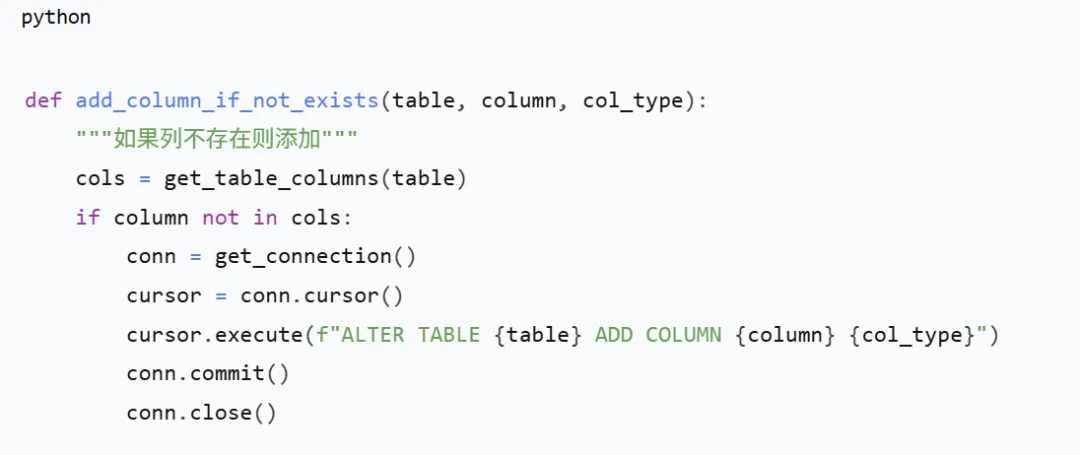
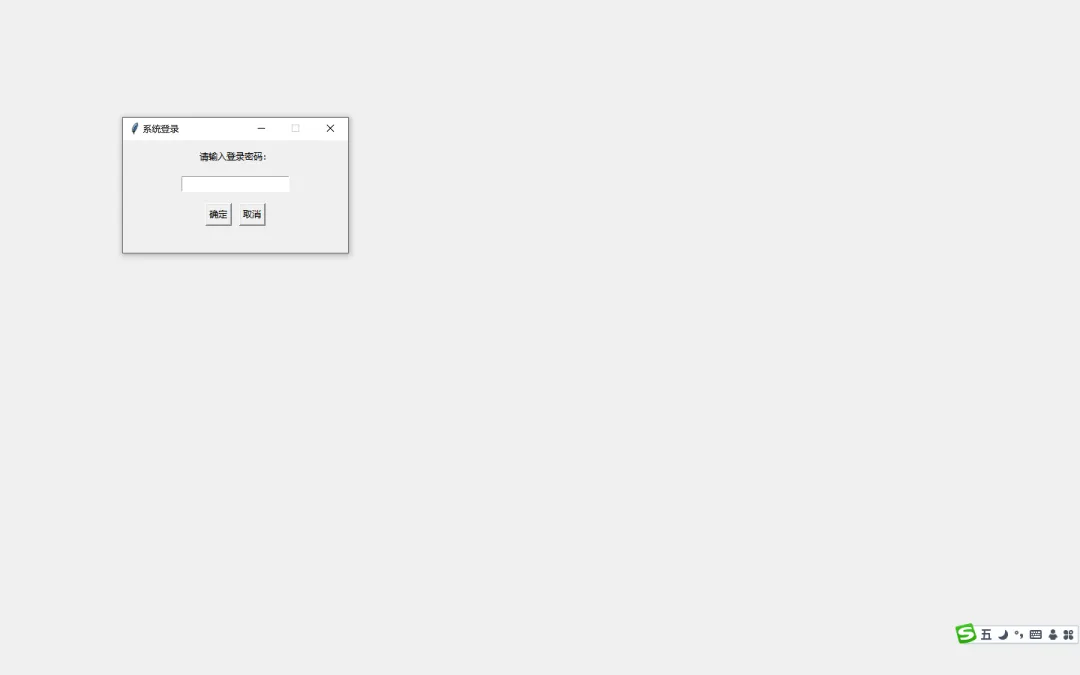
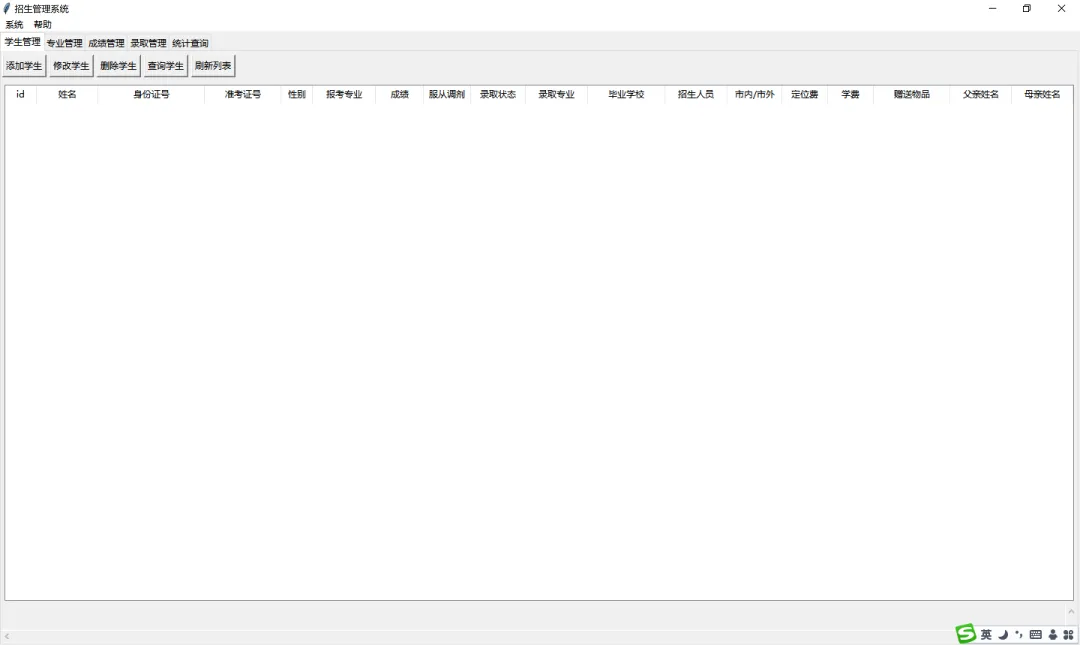
# ================== 全局变量 ==================# 当前背景图片路径(默认为空,程序启动时尝试加载 background.jpg)current_bg_path = NoneDEFAULT_BG_FILE = "background.jpg"# ================== 数据库初始化(智能升级) ==================DB_NAME = 'enrollment.db'def get_connection(): conn = sqlite3.connect(DB_NAME) conn.row_factory = sqlite3.Row return conndef get_table_columns(table_name): """获取表的所有列名""" conn = get_connection() cursor = conn.cursor() cursor.execute(f"PRAGMA table_info({table_name})") cols = [row['name'] for row in cursor.fetchall()] conn.close() return colsdef add_column_if_not_exists(table, column, col_type): """如果列不存在则添加""" cols = get_table_columns(table) if column not in cols: conn = get_connection() cursor = conn.cursor() try: cursor.execute(f"ALTER TABLE {table} ADD COLUMN {column}{col_type}") conn.commit() except sqlite3.OperationalError as e: # 如果列已存在或其他错误,忽略 pass finally: conn.close()def init_db(): """初始化数据库表结构,自动添加缺失列""" with get_connection() as conn: conn.execute('PRAGMA foreign_keys = ON') # 创建专业表 conn.execute(''' CREATE TABLE IF NOT EXISTS major ( id INTEGER PRIMARY KEY AUTOINCREMENT, name TEXT NOT NULL UNIQUE, quota INTEGER NOT NULL CHECK(quota >= 0) ) ''') # 创建学生表(基础版本) conn.execute(''' CREATE TABLE IF NOT EXISTS student ( id INTEGER PRIMARY KEY AUTOINCREMENT, name TEXT NOT NULL, id_number TEXT NOT NULL UNIQUE, exam_id TEXT NOT NULL UNIQUE, gender TEXT CHECK(gender IN ('男','女')), major_id INTEGER, score REAL DEFAULT 0, adjustable INTEGER DEFAULT 1, admitted INTEGER DEFAULT 0, admitted_major_id INTEGER, FOREIGN KEY (major_id) REFERENCES major(id) ON DELETE SET NULL, FOREIGN KEY (admitted_major_id) REFERENCES major(id) ON DELETE SET NULL ) ''') conn.commit() # 逐个添加新列(如果不存在) new_columns = [ ('graduation_school', 'TEXT'), ('recruiter', 'TEXT'), ('location_type', 'TEXT CHECK(location_type IN (\'市内\',\'市外\'))'), ('deposit_fee', 'REAL DEFAULT 0'), ('tuition_fee', 'REAL DEFAULT 0'), ('gift', 'TEXT'), ('father_name', 'TEXT'), ('father_phone', 'TEXT'), ('mother_name', 'TEXT'), ('mother_phone', 'TEXT') ] for col, col_type in new_columns: add_column_if_not_exists('student', col, col_type)# ================== 工具函数 ==================def validate_id_number(id_num): """简单身份证验证:18位,前17位数字,最后一位数字或X(不校验校验码)""" if not id_num or len(id_num) != 18: return False pattern = r'^\d{17}[\dXx]$' return re.match(pattern, id_num) is not Nonedef set_window_background(window, image_path): """ 为指定的Tk窗口设置背景图片 如果image_path无效或PIL不可用,则不做任何事 如果窗口已有背景标签,先移除 """ if not PIL_AVAILABLE or not image_path or not os.path.exists(image_path): return try: # 移除旧背景标签(如果存在) if hasattr(window, 'bg_label') and window.bg_label.winfo_exists(): window.bg_label.destroy() delattr(window, 'bg_label') delattr(window, 'bg_image') # 获取窗口当前尺寸 window.update_idletasks() # 确保尺寸已更新 win_width = window.winfo_width() win_height = window.winfo_height() if win_width <= 1 or win_height <= 1: # 窗口尚未完全绘制,使用屏幕尺寸 win_width = window.winfo_screenwidth() win_height = window.winfo_screenheight() pil_image = Image.open(image_path) # 缩放图片以适应窗口(保持比例,可能会裁剪,这里使用resize填充) pil_image = pil_image.resize((win_width, win_height), Image.Resampling.LANCZOS) bg_image = ImageTk.PhotoImage(pil_image) # 创建Label放置背景 bg_label = tk.Label(window, image=bg_image) bg_label.image = bg_image # 保持引用 bg_label.place(x=0, y=0, relwidth=1, relheight=1) bg_label.lower() # 置于底层 # 保存到窗口属性 window.bg_label = bg_label window.bg_image = bg_image except Exception as e: print(f"设置背景图片失败:{e}")# ================== 登录窗口 ==================class LoginDialog: def __init__(self, parent): self.parent = parent self.result = False self.top = tk.Toplevel(parent) self.top.title("系统登录") self.top.geometry("300x150") self.top.resizable(False, False) self.top.grab_set() # 模态 self.top.attributes('-topmost', True) # 置顶 # 设置背景(如果有默认背景图片) set_window_background(self.top, current_bg_path) tk.Label(self.top, text="请输入登录密码:").pack(pady=10) self.entry_pw = tk.Entry(self.top, show="*") self.entry_pw.pack(pady=5) self.entry_pw.bind('<Return>', lambda e: self.check_password()) btn_frame = tk.Frame(self.top) btn_frame.pack(pady=10) tk.Button(btn_frame, text="确定", command=self.check_password).pack(side=tk.LEFT, padx=5) tk.Button(btn_frame, text="取消", command=self.cancel).pack(side=tk.LEFT, padx=5) self.top.protocol("WM_DELETE_WINDOW", self.cancel) self.parent.wait_window(self.top) def check_password(self): if self.entry_pw.get() == "admin": self.result = True self.top.destroy() else: messagebox.showerror("错误", "密码错误,请重新输入") self.entry_pw.delete(0, tk.END) def cancel(self): self.result = False self.top.destroy()# ================== 主窗口 ==================class EnrollmentSystem: def __init__(self): self.root = tk.Tk() self.root.title("招生管理系统") self.root.attributes('-fullscreen', True) # 全屏显示 # 按Esc键退出全屏 self.root.bind('<Escape>', lambda e: self.root.attributes('-fullscreen', False)) # 登录验证 login = LoginDialog(self.root) if not login.result: self.root.destroy() return # 初始化数据库 try: init_db() except Exception as e: messagebox.showerror("数据库初始化失败", str(e)) self.root.destroy() return # 设置背景图片(如果存在默认背景) set_window_background(self.root, current_bg_path) # 存储所有打开的顶层窗口(用于背景刷新) self.top_windows = [] # 创建菜单栏 menubar = tk.Menu(self.root) self.root.config(menu=menubar) # 系统菜单 file_menu = tk.Menu(menubar, tearoff=0) file_menu.add_command(label="更换背景图片", command=self.change_background_image) file_menu.add_command(label="更换背景颜色", command=self.change_background_color) file_menu.add_separator() file_menu.add_command(label="退出", command=self.root.quit) menubar.add_cascade(label="系统", menu=file_menu) # 帮助菜单 help_menu = tk.Menu(menubar, tearoff=0) help_menu.add_command(label="关于", command=self.show_about) help_menu.add_command(label="使用说明", command=self.show_usage) menubar.add_cascade(label="帮助", menu=help_menu) # 使用Notebook(选项卡)组织功能 self.notebook = ttk.Notebook(self.root) self.notebook.pack(fill=tk.BOTH, expand=True) # 创建各个功能模块的Frame self.frame_student = ttk.Frame(self.notebook) self.frame_major = ttk.Frame(self.notebook) self.frame_score = ttk.Frame(self.notebook) self.frame_admit = ttk.Frame(self.notebook) self.frame_stat = ttk.Frame(self.notebook) self.notebook.add(self.frame_student, text="学生管理") self.notebook.add(self.frame_major, text="专业管理") self.notebook.add(self.frame_score, text="成绩管理") self.notebook.add(self.frame_admit, text="录取管理") self.notebook.add(self.frame_stat, text="统计查询") # 初始化各个模块的界面 self.init_student_tab() self.init_major_tab() self.init_score_tab() self.init_admit_tab() self.init_stat_tab() self.root.mainloop() # ---------- 注册顶层窗口 ---------- def register_top_window(self, window): """注册一个打开的对话框窗口,用于背景刷新""" self.top_windows.append(window) def unregister_top_window(self, window): """从列表中移除已关闭的对话框窗口""" if window in self.top_windows: self.top_windows.remove(window) # ---------- 更换背景图片功能 ---------- def change_background_image(self): global current_bg_path file_path = filedialog.askopenfilename( title="选择背景图片", filetypes=[("图片文件", "*.jpg *.jpeg *.png *.bmp *.gif"), ("所有文件", "*.*")] ) if not file_path: return # 将选中的图片复制到程序目录作为默认背景 try: dest_path = os.path.join(os.path.dirname(__file__), DEFAULT_BG_FILE) shutil.copy2(file_path, dest_path) current_bg_path = dest_path except Exception as e: messagebox.showerror("错误", f"无法保存背景图片:{e}") return # 更新主窗口背景 set_window_background(self.root, current_bg_path) # 更新所有已打开的对话框背景 for win in self.top_windows: if win.winfo_exists(): set_window_background(win, current_bg_path) messagebox.showinfo("成功", "背景图片已更换,所有窗口已更新。") # ---------- 更换背景颜色功能 ---------- def change_background_color(self): color = colorchooser.askcolor(title="选择背景颜色")[1] if color: self.root.configure(bg=color) # 移除主窗口的图片背景 if hasattr(self.root, 'bg_label') and self.root.bg_label.winfo_exists(): self.root.bg_label.destroy() delattr(self.root, 'bg_label') delattr(self.root, 'bg_image') # 更新所有已打开的对话框背景(移除图片,因为颜色只应用于主窗口?此处简单处理:对话框也清除图片背景) for win in self.top_windows: if win.winfo_exists(): if hasattr(win, 'bg_label') and win.bg_label.winfo_exists(): win.bg_label.destroy() delattr(win, 'bg_label') delattr(win, 'bg_image') # 可以设置对话框背景颜色,但对话框通常是独立的,不继承主窗口颜色,所以不设置颜色 # ---------- 帮助菜单功能 ---------- def show_about(self): about_text = "招生管理系统\n\n开发者:海风工作室\n版本:1.0\n发布日期:2026年3月20日\n\n本系统基于Python Tkinter开发,使用SQLite数据库。" messagebox.showinfo("关于", about_text) def show_usage(self): usage_text = """操作注意事项:1. 基本流程: - 先添加专业,再添加学生。 - 录入学生成绩后,方可进行录取操作。 - 录取分为自动录取(按志愿分数)和手动录取。2. 数据输入: - 身份证号必须为18位,最后一位可为数字或X。 - 性别、是否服从调剂、市内/市外请使用下拉选择。 - 定位费、学费请输入数字(可带小数)。3. 录取规则: - 自动录取:第一轮按学生报考专业志愿从高分到低分录取,未录满则进行第二轮调剂,将服从调剂的学生按分数分配到剩余名额较多的专业。 - 手动录取:需输入学生ID和专业ID,且该专业必须有剩余名额。4. 通知书打印: - 在录取管理选项卡中选中已录取学生,点击“打印录取通知书”可预览并保存为文本文件。5. 数据安全: - 系统数据保存在 enrollment.db 文件中,请定期备份。 - 删除操作不可恢复,请谨慎确认。6. 其他: - 查询功能支持模糊匹配(姓名支持部分匹配)。 - 表格支持水平和垂直滚动,可调整列宽。 """ messagebox.showinfo("使用说明", usage_text) # ---------- 学生管理选项卡 ---------- def init_student_tab(self): # 工具栏 toolbar = tk.Frame(self.frame_student) toolbar.pack(side=tk.TOP, fill=tk.X, pady=5) tk.Button(toolbar, text="添加学生", command=self.add_student).pack(side=tk.LEFT, padx=2) tk.Button(toolbar, text="修改学生", command=self.update_student).pack(side=tk.LEFT, padx=2) tk.Button(toolbar, text="删除学生", command=self.delete_student).pack(side=tk.LEFT, padx=2) tk.Button(toolbar, text="查询学生", command=self.query_student).pack(side=tk.LEFT, padx=2) tk.Button(toolbar, text="刷新列表", command=self.refresh_student_list).pack(side=tk.LEFT, padx=2) # 表格显示学生列表(增加父亲姓名、母亲姓名,电话在查询中可见) columns = ('id', '姓名', '身份证号', '准考证号', '性别', '报考专业', '成绩', '服从调剂', '录取状态', '录取专业', '毕业学校', '招生人员', '市内/市外', '定位费', '学费', '赠送物品', '父亲姓名', '母亲姓名') self.tree_student = ttk.Treeview(self.frame_student, columns=columns, show='headings') # 设置列宽 col_widths = [40, 80, 140, 100, 40, 80, 60, 60, 70, 80, 100, 80, 70, 60, 60, 100, 80, 80] for i, col in enumerate(columns): self.tree_student.heading(col, text=col) self.tree_student.column(col, width=col_widths[i]) self.tree_student.pack(fill=tk.BOTH, expand=True, padx=5, pady=5) # 滚动条(垂直+水平) v_scroll = ttk.Scrollbar(self.frame_student, orient=tk.VERTICAL, command=self.tree_student.yview) v_scroll.pack(side=tk.RIGHT, fill=tk.Y) h_scroll = ttk.Scrollbar(self.frame_student, orient=tk.HORIZONTAL, command=self.tree_student.xview) h_scroll.pack(side=tk.BOTTOM, fill=tk.X) self.tree_student.configure(yscrollcommand=v_scroll.set, xscrollcommand=h_scroll.set) self.refresh_student_list() def refresh_student_list(self): for row in self.tree_student.get_children(): self.tree_student.delete(row) conn = get_connection() cursor = conn.cursor() cursor.execute(''' SELECT s.id, s.name, s.id_number, s.exam_id, s.gender, m.name as major_name, s.score, CASE WHEN s.adjustable=1 THEN '是' ELSE '否' END as adjustable, CASE WHEN s.admitted=1 THEN '已录取' ELSE '未录取' END as status, m2.name as admitted_major, s.graduation_school, s.recruiter, s.location_type, s.deposit_fee, s.tuition_fee, s.gift, s.father_name, s.mother_name FROM student s LEFT JOIN major m ON s.major_id = m.id LEFT JOIN major m2 ON s.admitted_major_id = m2.id ORDER BY s.id ''') rows = cursor.fetchall() for row in rows: self.tree_student.insert('', tk.END, values=( row['id'], row['name'], row['id_number'], row['exam_id'], row['gender'], row['major_name'] or '', row['score'], row['adjustable'], row['status'], row['admitted_major'] or '', row['graduation_school'] or '', row['recruiter'] or '', row['location_type'] or '', row['deposit_fee'] or 0, row['tuition_fee'] or 0, row['gift'] or '', row['father_name'] or '', row['mother_name'] or '' )) conn.close() def add_student(self): AddStudentDialog(self) def update_student(self): selected = self.tree_student.selection() if not selected: messagebox.showwarning("提示", "请先选择要修改的学生") return item = self.tree_student.item(selected[0]) student_id = item['values'][0] UpdateStudentDialog(self, student_id) def delete_student(self): selected = self.tree_student.selection() if not selected: messagebox.showwarning("提示", "请先选择要删除的学生") return item = self.tree_student.item(selected[0]) student_id = item['values'][0] student_name = item['values'][1] if messagebox.askyesno("确认", f"确定要删除学生 {student_name} 吗?"): conn = get_connection() cursor = conn.cursor() cursor.execute("DELETE FROM student WHERE id=?", (student_id,)) conn.commit() conn.close() self.refresh_student_list() messagebox.showinfo("成功", "学生已删除") def query_student(self): QueryStudentDialog(self) # ---------- 专业管理选项卡 ---------- def init_major_tab(self): toolbar = tk.Frame(self.frame_major) toolbar.pack(side=tk.TOP, fill=tk.X, pady=5) tk.Button(toolbar, text="添加专业", command=self.add_major).pack(side=tk.LEFT, padx=2) tk.Button(toolbar, text="修改计划人数", command=self.update_major_quota).pack(side=tk.LEFT, padx=2) tk.Button(toolbar, text="删除专业", command=self.delete_major).pack(side=tk.LEFT, padx=2) tk.Button(toolbar, text="刷新", command=self.refresh_major_list).pack(side=tk.LEFT, padx=2) columns = ('id', '专业名称', '计划人数') self.tree_major = ttk.Treeview(self.frame_major, columns=columns, show='headings') for col in columns: self.tree_major.heading(col, text=col) self.tree_major.column(col, width=150) self.tree_major.pack(fill=tk.BOTH, expand=True, padx=5, pady=5) scrollbar = ttk.Scrollbar(self.frame_major, orient=tk.VERTICAL, command=self.tree_major.yview) scrollbar.pack(side=tk.RIGHT, fill=tk.Y) self.tree_major.configure(yscrollcommand=scrollbar.set) self.refresh_major_list() def refresh_major_list(self): for row in self.tree_major.get_children(): self.tree_major.delete(row) conn = get_connection() cursor = conn.cursor() cursor.execute("SELECT id, name, quota FROM major ORDER BY id") rows = cursor.fetchall() for row in rows: self.tree_major.insert('', tk.END, values=(row['id'], row['name'], row['quota'])) conn.close() def add_major(self): AddMajorDialog(self) def update_major_quota(self): selected = self.tree_major.selection() if not selected: messagebox.showwarning("提示", "请先选择专业") return item = self.tree_major.item(selected[0]) major_id = item['values'][0] current_quota = item['values'][2] new_quota = simpledialog.askinteger("修改计划人数", f"当前计划人数:{current_quota}\n请输入新计划人数:", minvalue=1, parent=self.frame_major) if new_quota: conn = get_connection() cursor = conn.cursor() cursor.execute("UPDATE major SET quota=? WHERE id=?", (new_quota, major_id)) conn.commit() conn.close() self.refresh_major_list() messagebox.showinfo("成功", "计划人数已更新") def delete_major(self): selected = self.tree_major.selection() if not selected: messagebox.showwarning("提示", "请先选择专业") return item = self.tree_major.item(selected[0]) major_id = item['values'][0] major_name = item['values'][1] conn = get_connection() cursor = conn.cursor() cursor.execute("SELECT COUNT(*) as cnt FROM student WHERE major_id=? OR admitted_major_id=?", (major_id, major_id)) cnt = cursor.fetchone()['cnt'] conn.close() if cnt > 0: messagebox.showerror("错误", f"该专业下有{cnt}名学生关联,无法删除") return if messagebox.askyesno("确认", f"确定要删除专业 {major_name} 吗?"): conn = get_connection() cursor = conn.cursor() cursor.execute("DELETE FROM major WHERE id=?", (major_id,)) conn.commit() conn.close() self.refresh_major_list() messagebox.showinfo("成功", "专业已删除") # ---------- 成绩管理选项卡 ---------- def init_score_tab(self): toolbar = tk.Frame(self.frame_score) toolbar.pack(side=tk.TOP, fill=tk.X, pady=5) tk.Button(toolbar, text="录入/修改成绩", command=self.set_score).pack(side=tk.LEFT, padx=2) tk.Button(toolbar, text="查看成绩", command=self.view_score).pack(side=tk.LEFT, padx=2) columns = ('id', '姓名', '准考证号', '成绩') self.tree_score = ttk.Treeview(self.frame_score, columns=columns, show='headings') for col in columns: self.tree_score.heading(col, text=col) self.tree_score.column(col, width=150) self.tree_score.pack(fill=tk.BOTH, expand=True, padx=5, pady=5) scrollbar = ttk.Scrollbar(self.frame_score, orient=tk.VERTICAL, command=self.tree_score.yview) scrollbar.pack(side=tk.RIGHT, fill=tk.Y) self.tree_score.configure(yscrollcommand=scrollbar.set) self.refresh_score_list() def refresh_score_list(self): for row in self.tree_score.get_children(): self.tree_score.delete(row) conn = get_connection() cursor = conn.cursor() cursor.execute("SELECT id, name, exam_id, score FROM student ORDER BY id") rows = cursor.fetchall() for row in rows: self.tree_score.insert('', tk.END, values=(row['id'], row['name'], row['exam_id'], row['score'])) conn.close() def set_score(self): selected = self.tree_score.selection() if not selected: messagebox.showwarning("提示", "请先选择一名学生") return item = self.tree_score.item(selected[0]) student_id = item['values'][0] current_score = item['values'][3] new_score = simpledialog.askfloat("录入成绩", f"当前成绩:{current_score}\n请输入新成绩:", minvalue=0, maxvalue=750, parent=self.frame_score) if new_score is not None: conn = get_connection() cursor = conn.cursor() cursor.execute("UPDATE student SET score=? WHERE id=?", (new_score, student_id)) conn.commit() conn.close() self.refresh_score_list() messagebox.showinfo("成功", "成绩已更新") def view_score(self): selected = self.tree_score.selection() if not selected: messagebox.showwarning("提示", "请先选择一名学生") return item = self.tree_score.item(selected[0]) student_id, name, exam_id, score = item['values'] messagebox.showinfo("学生成绩", f"姓名:{name}\n准考证号:{exam_id}\n成绩:{score}") # ---------- 录取管理选项卡 ---------- def init_admit_tab(self): toolbar = tk.Frame(self.frame_admit) toolbar.pack(side=tk.TOP, fill=tk.X, pady=5) tk.Button(toolbar, text="重置录取状态", command=self.reset_admission).pack(side=tk.LEFT, padx=2) tk.Button(toolbar, text="自动录取", command=self.auto_admit).pack(side=tk.LEFT, padx=2) tk.Button(toolbar, text="手动录取", command=self.manual_admit).pack(side=tk.LEFT, padx=2) tk.Button(toolbar, text="查看录取名单", command=self.view_admitted).pack(side=tk.LEFT, padx=2) tk.Button(toolbar, text="打印录取通知书", command=self.print_admission).pack(side=tk.LEFT, padx=2) tk.Button(toolbar, text="刷新", command=self.refresh_admit_list).pack(side=tk.LEFT, padx=2) columns = ('id', '姓名', '准考证号', '录取专业') self.tree_admit = ttk.Treeview(self.frame_admit, columns=columns, show='headings') for col in columns: self.tree_admit.heading(col, text=col) self.tree_admit.column(col, width=150) self.tree_admit.pack(fill=tk.BOTH, expand=True, padx=5, pady=5) scrollbar = ttk.Scrollbar(self.frame_admit, orient=tk.VERTICAL, command=self.tree_admit.yview) scrollbar.pack(side=tk.RIGHT, fill=tk.Y) self.tree_admit.configure(yscrollcommand=scrollbar.set) self.refresh_admit_list() def refresh_admit_list(self): for row in self.tree_admit.get_children(): self.tree_admit.delete(row) conn = get_connection() cursor = conn.cursor() cursor.execute(''' SELECT s.id, s.name, s.exam_id, m.name as major_name FROM student s JOIN major m ON s.admitted_major_id = m.id WHERE s.admitted=1 ORDER BY m.id, s.score DESC ''') rows = cursor.fetchall() for row in rows: self.tree_admit.insert('', tk.END, values=(row['id'], row['name'], row['exam_id'], row['major_name'])) conn.close() def reset_admission(self): if messagebox.askyesno("确认", "确定要清空所有录取状态吗?"): conn = get_connection() cursor = conn.cursor() cursor.execute("UPDATE student SET admitted=0, admitted_major_id=NULL") conn.commit() conn.close() self.refresh_admit_list() messagebox.showinfo("成功", "录取状态已重置") def auto_admit(self): if not messagebox.askyesno("确认", "自动录取将按分数和志愿进行,是否继续?"): return conn = get_connection() conn.execute('PRAGMA foreign_keys = ON') cursor = conn.cursor() # 可选清空 if messagebox.askyesno("确认", "是否先清空已有录取状态?", default=messagebox.YES): cursor.execute("UPDATE student SET admitted=0, admitted_major_id=NULL") conn.commit() # 第一轮:志愿录取 cursor.execute("SELECT id, quota FROM major") majors = cursor.fetchall() for major in majors: major_id = major['id'] quota = major['quota'] cursor.execute("SELECT COUNT(*) as cnt FROM student WHERE admitted_major_id=? AND admitted=1", (major_id,)) enrolled = cursor.fetchone()['cnt'] if enrolled >= quota: continue cursor.execute(''' SELECT id FROM student WHERE major_id=? AND admitted=0 ORDER BY score DESC ''', (major_id,)) students = cursor.fetchall() for stu in students: if enrolled >= quota: break cursor.execute("UPDATE student SET admitted=1, admitted_major_id=? WHERE id=?", (major_id, stu['id'])) enrolled += 1 conn.commit() # 第二轮:调剂录取 cursor.execute(''' SELECT m.id, m.quota - COUNT(s.admitted_major_id) as remain FROM major m LEFT JOIN student s ON m.id = s.admitted_major_id AND s.admitted=1 GROUP BY m.id ''') remains = {row['id']: row['remain'] for row in cursor.fetchall()} cursor.execute(''' SELECT id FROM student WHERE admitted=0 AND adjustable=1 ORDER BY score DESC ''') adjust_students = cursor.fetchall() for stu in adjust_students: available = [(rem, mid) for mid, rem in remains.items() if rem > 0] if not available: break available.sort(reverse=True) target_mid = available[0][1] cursor.execute("UPDATE student SET admitted=1, admitted_major_id=? WHERE id=?", (target_mid, stu['id'])) remains[target_mid] -= 1 conn.commit() conn.close() self.refresh_admit_list() messagebox.showinfo("成功", "自动录取完成") def manual_admit(self): ManualAdmitDialog(self) def view_admitted(self): self.refresh_admit_list() self.notebook.select(self.frame_admit) def print_admission(self): selected = self.tree_admit.selection() if not selected: messagebox.showwarning("提示", "请先选择一名已录取学生") return item = self.tree_admit.item(selected[0]) student_id = item['values'][0] PrintDialog(self, student_id) # ---------- 统计查询选项卡 ---------- def init_stat_tab(self): toolbar = tk.Frame(self.frame_stat) toolbar.pack(side=tk.TOP, fill=tk.X, pady=5) tk.Button(toolbar, text="各专业报考人数", command=self.stat_major_applicants).pack(side=tk.LEFT, padx=2) tk.Button(toolbar, text="各专业录取人数", command=self.stat_major_admitted).pack(side=tk.LEFT, padx=2) tk.Button(toolbar, text="未录取学生名单", command=self.stat_unadmitted).pack(side=tk.LEFT, padx=2) tk.Button(toolbar, text="分数段统计", command=self.stat_score_section).pack(side=tk.LEFT, padx=2) self.stat_text = tk.Text(self.frame_stat, wrap=tk.WORD) self.stat_text.pack(fill=tk.BOTH, expand=True, padx=5, pady=5) scrollbar = ttk.Scrollbar(self.frame_stat, orient=tk.VERTICAL, command=self.stat_text.yview) scrollbar.pack(side=tk.RIGHT, fill=tk.Y) self.stat_text.configure(yscrollcommand=scrollbar.set) def clear_stat_text(self): self.stat_text.delete(1.0, tk.END) def stat_major_applicants(self): self.clear_stat_text() conn = get_connection() cursor = conn.cursor() cursor.execute(''' SELECT m.name, COUNT(s.id) as cnt FROM major m LEFT JOIN student s ON m.id = s.major_id GROUP BY m.id ORDER BY cnt DESC ''') rows = cursor.fetchall() self.stat_text.insert(tk.END, "各专业报考人数:\n") for row in rows: self.stat_text.insert(tk.END, f"{row['name']}: {row['cnt']}人\n") conn.close() def stat_major_admitted(self): self.clear_stat_text() conn = get_connection() cursor = conn.cursor() cursor.execute(''' SELECT m.name, COUNT(s.id) as cnt FROM major m LEFT JOIN student s ON m.id = s.admitted_major_id AND s.admitted=1 GROUP BY m.id ORDER BY cnt DESC ''') rows = cursor.fetchall() self.stat_text.insert(tk.END, "各专业录取人数:\n") for row in rows: self.stat_text.insert(tk.END, f"{row['name']}: {row['cnt']}人\n") conn.close() def stat_unadmitted(self): self.clear_stat_text() conn = get_connection() cursor = conn.cursor() cursor.execute(''' SELECT id, name, exam_id, score FROM student WHERE admitted=0 ORDER BY score DESC ''') rows = cursor.fetchall() if rows: self.stat_text.insert(tk.END, "未录取学生名单:\n") for row in rows: self.stat_text.insert(tk.END, f"ID:{row['id']}{row['name']} 准考证:{row['exam_id']} 成绩:{row['score']}\n") else: self.stat_text.insert(tk.END, "所有学生均已录取\n") conn.close() def stat_score_section(self): self.clear_stat_text() conn = get_connection() cursor = conn.cursor() sections = [(0,400),(400,500),(500,600),(600,750)] self.stat_text.insert(tk.END, "分数段统计:\n") for low, high in sections: cursor.execute("SELECT COUNT(*) as cnt FROM student WHERE score>=? AND score<?", (low, high)) cnt = cursor.fetchone()['cnt'] self.stat_text.insert(tk.END, f"{low}-{high}分: {cnt}人\n") cursor.execute("SELECT COUNT(*) as cnt FROM student WHERE score>=750") cnt = cursor.fetchone()['cnt'] self.stat_text.insert(tk.END, f"750分以上: {cnt}人\n") conn.close()# ================== 添加学生对话框 ==================class AddStudentDialog: def __init__(self, parent): self.parent = parent self.dialog = tk.Toplevel(parent.root) self.dialog.title("添加学生") self.dialog.geometry("500x700") self.dialog.grab_set() # 注册到主窗口,以便背景刷新 self.parent.register_top_window(self.dialog) # 设置关闭协议,从列表中移除 self.dialog.protocol("WM_DELETE_WINDOW", self.on_close) # 设置背景 set_window_background(self.dialog, current_bg_path) # 创建滚动画布以容纳较多输入项 canvas = tk.Canvas(self.dialog) scrollbar = ttk.Scrollbar(self.dialog, orient="vertical", command=canvas.yview) scrollable_frame = ttk.Frame(canvas) scrollable_frame.bind( "<Configure>", lambda e: canvas.configure(scrollregion=canvas.bbox("all")) ) canvas.create_window((0, 0), window=scrollable_frame, anchor="nw") canvas.configure(yscrollcommand=scrollbar.set) canvas.pack(side="left", fill="both", expand=True) scrollbar.pack(side="right", fill="y") # 定义字段 fields = [ ("姓名", "name", "entry"), ("身份证号", "id_number", "entry"), ("准考证号", "exam_id", "entry"), ("性别", "gender", "combobox", ["男","女"]), ("报考专业ID", "major_id", "entry"), ("是否服从调剂", "adjustable", "combobox", ["是","否"]), ("毕业学校", "graduation_school", "entry"), ("招生人员", "recruiter", "entry"), ("市内/市外", "location_type", "combobox", ["市内","市外"]), ("定位费", "deposit_fee", "entry"), ("学费", "tuition_fee", "entry"), ("赠送物品", "gift", "entry"), ("父亲姓名", "father_name", "entry"), ("父亲电话", "father_phone", "entry"), ("母亲姓名", "mother_name", "entry"), ("母亲电话", "mother_phone", "entry") ] self.entries = {} row = 0 for field in fields: label = field[0] key = field[1] typ = field[2] tk.Label(scrollable_frame, text=label).grid(row=row, column=0, padx=5, pady=3, sticky=tk.W) if typ == "entry": entry = tk.Entry(scrollable_frame) entry.grid(row=row, column=1, padx=5, pady=3, sticky=tk.EW) self.entries[key] = entry elif typ == "combobox": values = field[3] combo = ttk.Combobox(scrollable_frame, values=values, state="readonly") combo.grid(row=row, column=1, padx=5, pady=3, sticky=tk.EW) combo.set(values[0]) # 默认 self.entries[key] = combo row += 1 # 按钮 btn_frame = tk.Frame(scrollable_frame) btn_frame.grid(row=row, column=0, columnspan=2, pady=10) tk.Button(btn_frame, text="保存", command=self.save).pack(side=tk.LEFT, padx=5) tk.Button(btn_frame, text="取消", command=self.on_close).pack(side=tk.LEFT, padx=5) scrollable_frame.columnconfigure(1, weight=1) def on_close(self): """关闭窗口时从主窗口列表中移除并销毁""" self.parent.unregister_top_window(self.dialog) self.dialog.destroy() def save(self): data = {} for key, widget in self.entries.items(): if isinstance(widget, ttk.Combobox): data[key] = widget.get().strip() else: data[key] = widget.get().strip() if not data['name']: messagebox.showerror("错误", "姓名不能为空") return # 身份证验证 if not validate_id_number(data['id_number']): messagebox.showerror("错误", "身份证号格式不正确(应为18位,最后一位数字或X)") return # 性别已由下拉保证 # 专业ID可为空 major_id = None if data['major_id']: try: major_id = int(data['major_id']) except: messagebox.showerror("错误", "专业ID必须为整数") return # 调剂:下拉为“是”/“否” -> 1/0 adjustable = 1 if data['adjustable'] == "是" else 0 # 市内市外 location_type = data['location_type'] if data['location_type'] else None # 数字字段 deposit_fee = 0 if data['deposit_fee']: try: deposit_fee = float(data['deposit_fee']) except: messagebox.showerror("错误", "定位费必须为数字") return tuition_fee = 0 if data['tuition_fee']: try: tuition_fee = float(data['tuition_fee']) except: messagebox.showerror("错误", "学费必须为数字") return conn = get_connection() cursor = conn.cursor() try: cursor.execute(''' INSERT INTO student ( name, id_number, exam_id, gender, major_id, adjustable, graduation_school, recruiter, location_type, deposit_fee, tuition_fee, gift, father_name, father_phone, mother_name, mother_phone ) VALUES (?, ?, ?, ?, ?, ?, ?, ?, ?, ?, ?, ?, ?, ?, ?, ?) ''', ( data['name'], data['id_number'], data['exam_id'], data['gender'], major_id, adjustable, data['graduation_school'], data['recruiter'], location_type, deposit_fee, tuition_fee, data['gift'], data['father_name'], data['father_phone'], data['mother_name'], data['mother_phone'] )) conn.commit() messagebox.showinfo("成功", "学生添加成功") self.parent.refresh_student_list() self.on_close() # 关闭窗口 except sqlite3.IntegrityError as e: messagebox.showerror("错误", f"添加失败:{e}") except Exception as e: messagebox.showerror("错误", f"未知错误:{e}") finally: conn.close()# ================== 修改学生对话框 ==================class UpdateStudentDialog: def __init__(self, parent, student_id): self.parent = parent self.student_id = student_id self.dialog = tk.Toplevel(parent.root) self.dialog.title("修改学生") self.dialog.geometry("500x700") self.dialog.grab_set() # 注册到主窗口 self.parent.register_top_window(self.dialog) self.dialog.protocol("WM_DELETE_WINDOW", self.on_close) # 设置背景 set_window_background(self.dialog, current_bg_path) # 获取当前学生信息 conn = get_connection() cursor = conn.cursor() cursor.execute("SELECT * FROM student WHERE id=?", (student_id,)) self.student = cursor.fetchone() conn.close() if not self.student: messagebox.showerror("错误", "学生不存在") self.dialog.destroy() return # 创建滚动画布 canvas = tk.Canvas(self.dialog) scrollbar = ttk.Scrollbar(self.dialog, orient="vertical", command=canvas.yview) scrollable_frame = ttk.Frame(canvas) scrollable_frame.bind( "<Configure>", lambda e: canvas.configure(scrollregion=canvas.bbox("all")) ) canvas.create_window((0, 0), window=scrollable_frame, anchor="nw") canvas.configure(yscrollcommand=scrollbar.set) canvas.pack(side="left", fill="both", expand=True) scrollbar.pack(side="right", fill="y") fields = [ ("姓名", "name", "entry"), ("身份证号", "id_number", "entry"), ("准考证号", "exam_id", "entry"), ("性别", "gender", "combobox", ["男","女"]), ("报考专业ID", "major_id", "entry"), ("是否服从调剂", "adjustable", "combobox", ["是","否"]), ("毕业学校", "graduation_school", "entry"), ("招生人员", "recruiter", "entry"), ("市内/市外", "location_type", "combobox", ["市内","市外"]), ("定位费", "deposit_fee", "entry"), ("学费", "tuition_fee", "entry"), ("赠送物品", "gift", "entry"), ("父亲姓名", "father_name", "entry"), ("父亲电话", "father_phone", "entry"), ("母亲姓名", "mother_name", "entry"), ("母亲电话", "mother_phone", "entry") ] self.entries = {} row = 0 for field in fields: label = field[0] key = field[1] typ = field[2] tk.Label(scrollable_frame, text=label).grid(row=row, column=0, padx=5, pady=3, sticky=tk.W) if typ == "entry": entry = tk.Entry(scrollable_frame) entry.grid(row=row, column=1, padx=5, pady=3, sticky=tk.EW) # 预填当前值 default = str(self.student[key] or '') entry.insert(0, default) self.entries[key] = entry elif typ == "combobox": values = field[3] combo = ttk.Combobox(scrollable_frame, values=values, state="readonly") combo.grid(row=row, column=1, padx=5, pady=3, sticky=tk.EW) # 设置当前值 if key == 'gender': current = self.student[key] or '男' elif key == 'adjustable': current = '是' if self.student[key] == 1 else '否' elif key == 'location_type': current = self.student[key] or '市内' else: current = values[0] combo.set(current) self.entries[key] = combo row += 1 btn_frame = tk.Frame(scrollable_frame) btn_frame.grid(row=row, column=0, columnspan=2, pady=10) tk.Button(btn_frame, text="保存", command=self.save).pack(side=tk.LEFT, padx=5) tk.Button(btn_frame, text="取消", command=self.on_close).pack(side=tk.LEFT, padx=5) scrollable_frame.columnconfigure(1, weight=1) def on_close(self): self.parent.unregister_top_window(self.dialog) self.dialog.destroy() def save(self): data = {} for key, widget in self.entries.items(): if isinstance(widget, ttk.Combobox): data[key] = widget.get().strip() else: data[key] = widget.get().strip() if not data['name']: messagebox.showerror("错误", "姓名不能为空") return if not validate_id_number(data['id_number']): messagebox.showerror("错误", "身份证号格式不正确(应为18位,最后一位数字或X)") return major_id = None if data['major_id']: try: major_id = int(data['major_id']) except: messagebox.showerror("错误", "专业ID必须为整数") return adjustable = 1 if data['adjustable'] == "是" else 0 location_type = data['location_type'] if data['location_type'] else None deposit_fee = 0 if data['deposit_fee']: try: deposit_fee = float(data['deposit_fee']) except: messagebox.showerror("错误", "定位费必须为数字") return tuition_fee = 0 if data['tuition_fee']: try: tuition_fee = float(data['tuition_fee']) except: messagebox.showerror("错误", "学费必须为数字") return conn = get_connection() cursor = conn.cursor() try: cursor.execute(''' UPDATE student SET name=?, id_number=?, exam_id=?, gender=?, major_id=?, adjustable=?, graduation_school=?, recruiter=?, location_type=?, deposit_fee=?, tuition_fee=?, gift=?, father_name=?, father_phone=?, mother_name=?, mother_phone=? WHERE id=? ''', ( data['name'], data['id_number'], data['exam_id'], data['gender'], major_id, adjustable, data['graduation_school'], data['recruiter'], location_type, deposit_fee, tuition_fee, data['gift'], data['father_name'], data['father_phone'], data['mother_name'], data['mother_phone'], self.student_id )) conn.commit() messagebox.showinfo("成功", "学生信息修改成功") self.parent.refresh_student_list() self.on_close() except sqlite3.IntegrityError as e: messagebox.showerror("错误", f"修改失败:{e}") except Exception as e: messagebox.showerror("错误", f"未知错误:{e}") finally: conn.close()# ================== 查询学生对话框 ==================class QueryStudentDialog: def __init__(self, parent): self.parent = parent self.dialog = tk.Toplevel(parent.root) self.dialog.title("查询学生") self.dialog.geometry("1200x500") self.dialog.grab_set() # 注册到主窗口 self.parent.register_top_window(self.dialog) self.dialog.protocol("WM_DELETE_WINDOW", self.on_close) # 设置背景 set_window_background(self.dialog, current_bg_path) # 查询条件 frame = tk.Frame(self.dialog) frame.pack(fill=tk.X, padx=5, pady=5) tk.Label(frame, text="按姓名:").pack(side=tk.LEFT) self.entry_name = tk.Entry(frame) self.entry_name.pack(side=tk.LEFT, padx=5) tk.Button(frame, text="查询", command=self.query).pack(side=tk.LEFT, padx=5) frame2 = tk.Frame(self.dialog) frame2.pack(fill=tk.X, padx=5, pady=5) tk.Label(frame2, text="按身份证号:").pack(side=tk.LEFT) self.entry_idnum = tk.Entry(frame2) self.entry_idnum.pack(side=tk.LEFT, padx=5) tk.Button(frame2, text="查询", command=self.query_idnum).pack(side=tk.LEFT, padx=5) frame3 = tk.Frame(self.dialog) frame3.pack(fill=tk.X, padx=5, pady=5) tk.Label(frame3, text="按准考证号:").pack(side=tk.LEFT) self.entry_exam = tk.Entry(frame3) self.entry_exam.pack(side=tk.LEFT, padx=5) tk.Button(frame3, text="查询", command=self.query_exam).pack(side=tk.LEFT, padx=5) # 结果显示(包含所有字段) columns = ('id', '姓名', '身份证号', '准考证号', '性别', '报考专业', '成绩', '服从调剂', '录取状态', '录取专业', '毕业学校', '招生人员', '市内/市外', '定位费', '学费', '赠送物品', '父亲姓名', '父亲电话', '母亲姓名', '母亲电话') self.tree = ttk.Treeview(self.dialog, columns=columns, show='headings') col_widths = [40, 80, 140, 100, 40, 80, 60, 60, 70, 80, 100, 80, 70, 60, 60, 100, 80, 100, 80, 100] for i, col in enumerate(columns): self.tree.heading(col, text=col) self.tree.column(col, width=col_widths[i]) self.tree.pack(fill=tk.BOTH, expand=True, padx=5, pady=5) # 滚动条 v_scroll = ttk.Scrollbar(self.dialog, orient=tk.VERTICAL, command=self.tree.yview) v_scroll.pack(side=tk.RIGHT, fill=tk.Y) h_scroll = ttk.Scrollbar(self.dialog, orient=tk.HORIZONTAL, command=self.tree.xview) h_scroll.pack(side=tk.BOTTOM, fill=tk.X) self.tree.configure(yscrollcommand=v_scroll.set, xscrollcommand=h_scroll.set) def on_close(self): self.parent.unregister_top_window(self.dialog) self.dialog.destroy() def query(self): name = self.entry_name.get().strip() if not name: messagebox.showwarning("提示", "请输入姓名") return self.perform_query("s.name LIKE ?", (f'%{name}%',)) def query_idnum(self): idn = self.entry_idnum.get().strip() if not idn: messagebox.showwarning("提示", "请输入身份证号") return self.perform_query("s.id_number = ?", (idn,)) def query_exam(self): eid = self.entry_exam.get().strip() if not eid: messagebox.showwarning("提示", "请输入准考证号") return self.perform_query("s.exam_id = ?", (eid,)) def perform_query(self, where_clause, params): for row in self.tree.get_children(): self.tree.delete(row) conn = get_connection() cursor = conn.cursor() query = f''' SELECT s.id, s.name, s.id_number, s.exam_id, s.gender, m.name as major_name, s.score, CASE WHEN s.adjustable=1 THEN '是' ELSE '否' END as adjustable, CASE WHEN s.admitted=1 THEN '已录取' ELSE '未录取' END as status, m2.name as admitted_major, s.graduation_school, s.recruiter, s.location_type, s.deposit_fee, s.tuition_fee, s.gift, s.father_name, s.father_phone, s.mother_name, s.mother_phone FROM student s LEFT JOIN major m ON s.major_id = m.id LEFT JOIN major m2 ON s.admitted_major_id = m2.id WHERE {where_clause} ORDER BY s.id ''' cursor.execute(query, params) rows = cursor.fetchall() for row in rows: self.tree.insert('', tk.END, values=( row['id'], row['name'], row['id_number'], row['exam_id'], row['gender'], row['major_name'] or '', row['score'], row['adjustable'], row['status'], row['admitted_major'] or '', row['graduation_school'] or '', row['recruiter'] or '', row['location_type'] or '', row['deposit_fee'] or 0, row['tuition_fee'] or 0, row['gift'] or '', row['father_name'] or '', row['father_phone'] or '', row['mother_name'] or '', row['mother_phone'] or '' )) conn.close() if not rows: messagebox.showinfo("结果", "未找到匹配的学生")# ================== 添加专业对话框 ==================class AddMajorDialog: def __init__(self, parent): self.parent = parent self.dialog = tk.Toplevel(parent.root) self.dialog.title("添加专业") self.dialog.geometry("300x150") self.dialog.grab_set() # 注册到主窗口 self.parent.register_top_window(self.dialog) self.dialog.protocol("WM_DELETE_WINDOW", self.on_close) # 设置背景 set_window_background(self.dialog, current_bg_path) tk.Label(self.dialog, text="专业名称:").pack(pady=5) self.entry_name = tk.Entry(self.dialog) self.entry_name.pack(pady=5) tk.Label(self.dialog, text="计划人数:").pack(pady=5) self.entry_quota = tk.Entry(self.dialog) self.entry_quota.pack(pady=5) tk.Button(self.dialog, text="保存", command=self.save).pack(pady=10) def on_close(self): self.parent.unregister_top_window(self.dialog) self.dialog.destroy() def save(self): name = self.entry_name.get().strip() quota_str = self.entry_quota.get().strip() if not name: messagebox.showerror("错误", "专业名称不能为空") return try: quota = int(quota_str) if quota <= 0: raise ValueError except: messagebox.showerror("错误", "计划人数必须为正整数") return conn = get_connection() cursor = conn.cursor() try: cursor.execute("INSERT INTO major (name, quota) VALUES (?, ?)", (name, quota)) conn.commit() messagebox.showinfo("成功", "专业添加成功") self.parent.refresh_major_list() self.on_close() except sqlite3.IntegrityError: messagebox.showerror("错误", "专业名称已存在") finally: conn.close()# ================== 手动录取对话框 ==================class ManualAdmitDialog: def __init__(self, parent): self.parent = parent self.dialog = tk.Toplevel(parent.root) self.dialog.title("手动录取") self.dialog.geometry("300x200") self.dialog.grab_set() # 注册到主窗口 self.parent.register_top_window(self.dialog) self.dialog.protocol("WM_DELETE_WINDOW", self.on_close) # 设置背景 set_window_background(self.dialog, current_bg_path) tk.Label(self.dialog, text="学生ID:").pack(pady=5) self.entry_sid = tk.Entry(self.dialog) self.entry_sid.pack(pady=5) tk.Label(self.dialog, text="录取专业ID:").pack(pady=5) self.entry_mid = tk.Entry(self.dialog) self.entry_mid.pack(pady=5) tk.Button(self.dialog, text="录取", command=self.admit).pack(pady=10) def on_close(self): self.parent.unregister_top_window(self.dialog) self.dialog.destroy() def admit(self): try: sid = int(self.entry_sid.get().strip()) mid = int(self.entry_mid.get().strip()) except: messagebox.showerror("错误", "请输入有效的整数ID") return conn = get_connection() cursor = conn.cursor() try: cursor.execute("SELECT admitted FROM student WHERE id=?", (sid,)) stu = cursor.fetchone() if not stu: messagebox.showerror("错误", "学生不存在") return if stu['admitted'] == 1: messagebox.showerror("错误", "该学生已录取") return cursor.execute("SELECT quota FROM major WHERE id=?", (mid,)) major = cursor.fetchone() if not major: messagebox.showerror("错误", "专业不存在") return cursor.execute(''' SELECT m.quota - COUNT(s.admitted_major_id) as remain FROM major m LEFT JOIN student s ON m.id = s.admitted_major_id AND s.admitted=1 WHERE m.id=? GROUP BY m.id ''', (mid,)) row = cursor.fetchone() if row and row['remain'] <= 0: messagebox.showerror("错误", "该专业已无剩余名额") return cursor.execute("UPDATE student SET admitted=1, admitted_major_id=? WHERE id=?", (mid, sid)) conn.commit() messagebox.showinfo("成功", "录取完成") self.parent.refresh_admit_list() self.on_close() except Exception as e: messagebox.showerror("错误", str(e)) finally: conn.close()# ================== 打印录取通知书对话框 ==================class PrintDialog: def __init__(self, parent, student_id): self.parent = parent self.student_id = student_id self.dialog = tk.Toplevel(parent.root) self.dialog.title("录取通知书") self.dialog.geometry("600x700") self.dialog.grab_set() # 注册到主窗口 self.parent.register_top_window(self.dialog) self.dialog.protocol("WM_DELETE_WINDOW", self.on_close) # 设置背景 set_window_background(self.dialog, current_bg_path) # 获取学生完整信息 conn = get_connection() cursor = conn.cursor() cursor.execute(''' SELECT s.*, m.name as major_name FROM student s LEFT JOIN major m ON s.admitted_major_id = m.id WHERE s.id=? ''', (student_id,)) self.stu = cursor.fetchone() conn.close() if not self.stu: messagebox.showerror("错误", "学生信息不存在") self.dialog.destroy() return # 标题 title = tk.Label(self.dialog, text="录取通知书", font=("黑体", 20, "bold")) title.pack(pady=10) # 内容文本框 self.text = tk.Text(self.dialog, wrap=tk.WORD, font=("宋体", 12)) self.text.pack(fill=tk.BOTH, expand=True, padx=20, pady=10) # 生成通知书内容 content = self.generate_content() self.text.insert(tk.END, content) self.text.config(state=tk.DISABLED) btn_frame = tk.Frame(self.dialog) btn_frame.pack(pady=10) tk.Button(btn_frame, text="保存到文件", command=self.save_to_file).pack(side=tk.LEFT, padx=5) tk.Button(btn_frame, text="关闭", command=self.on_close).pack(side=tk.LEFT, padx=5) def on_close(self): self.parent.unregister_top_window(self.dialog) self.dialog.destroy() def generate_content(self): stu = self.stu lines = [] lines.append(f"学生姓名:{stu['name']}") lines.append(f"身份证号:{stu['id_number']}") lines.append(f"准考证号:{stu['exam_id']}") lines.append(f"录取专业:{stu['major_name']}") lines.append(f"毕业学校:{stu['graduation_school'] or'无'}") lines.append(f"招生人员:{stu['recruiter'] or'无'}") lines.append(f"生源类型:{stu['location_type'] or'无'}") lines.append(f"定位费:{stu['deposit_fee'] or0} 元") lines.append(f"学费:{stu['tuition_fee'] or0} 元/年") lines.append(f"赠送物品:{stu['gift'] or'无'}") lines.append(f"父亲姓名:{stu['father_name'] or'无'}") lines.append(f"父亲电话:{stu['father_phone'] or'无'}") lines.append(f"母亲姓名:{stu['mother_name'] or'无'}") lines.append(f"母亲电话:{stu['mother_phone'] or'无'}") lines.append("") lines.append("恭喜您被我校录取,请按通知书要求按时报到。") lines.append("(此为电子通知书,请自行打印保存)") return "\n".join(lines) def save_to_file(self): from tkinter import filedialog file_path = filedialog.asksaveasfilename(defaultextension=".txt", filetypes=[("文本文件", "*.txt"), ("所有文件", "*.*")]) if file_path: try: with open(file_path, "w", encoding="utf-8") as f: f.write(self.generate_content()) messagebox.showinfo("成功", f"通知书已保存到:{file_path}") # 尝试用默认程序打开 try: os.startfile(file_path) except AttributeError: # 非Windows系统 pass except Exception as e: messagebox.showerror("错误", f"保存失败:{e}")