2分钟用Python开发了个点名小工具
- 2026-09-10 18:25:15
2分钟用Python开发了个点名小工具点击蓝字,关注我们 这次用的是豆包及Python开发工具PyCharm。 跟豆包对话的提示词:帮我用Python编写一个点名的系统,要求能导入EXCLE姓名名单,然后点击后姓名闪烁,点击确定姓名停留。 可运行的代码如下(需要安装openpyxl库用来读取EXCEL文件): 在命令行窗口输入如下命令:pyinstaller -F -w roll_call_system.py (其中roll_call_system为文件名,前提是安装pyinstaller库) 就打包成roll_call_system.exe这个可执行文件了。 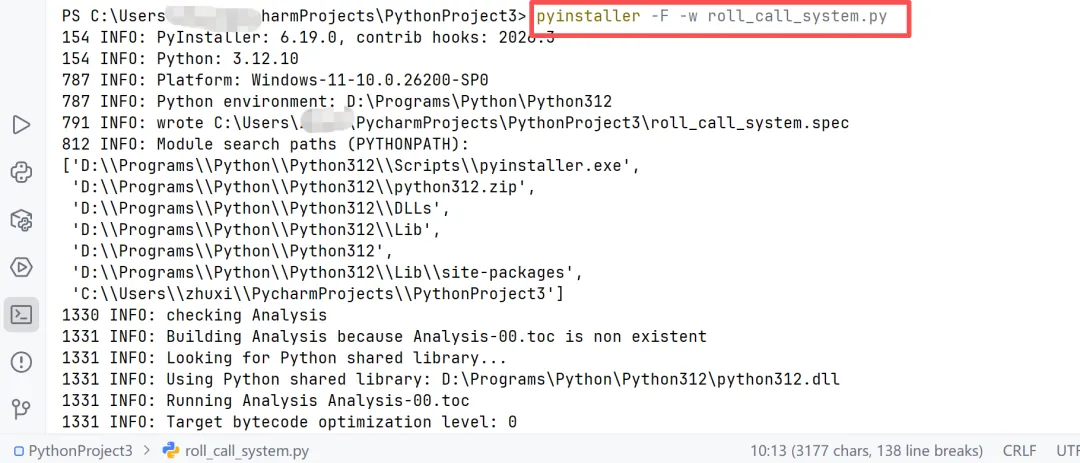
试用效果如下,明天上课试试! 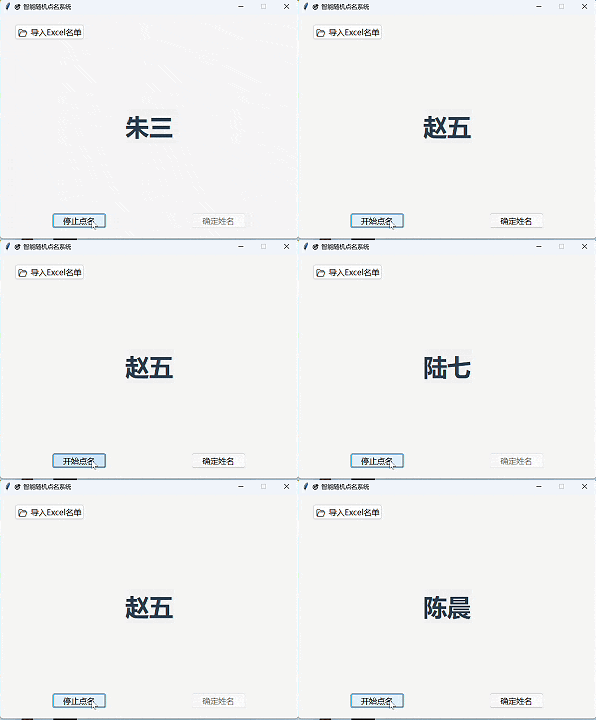
END 创作不易,您的每一个【关注】、【点赞】、【转发】和【在看】都是对我最大的支持。感谢您的陪伴!如果希望持续接收星晴的文章推送,需要将公众号【设为星标】,更多历史文章点文末标签。 更多历史文章
#Python开发#Python#点名小工具
大家好,我是星晴,85后,爱学习的中年女子,业余时间热衷分享AI科普知识,AI工具使用,公众号写作心得、办公小技巧等
花费2分钟就开发了点名小工具,毫不夸张。
import tkinter as tkfrom tkinter import ttk, filedialog, messageboximport pandas as pdimport random# 主窗口配置root = tk.Tk()root.title("🎯 智能随机点名系统")root.geometry("600x450")root.resizable(False, False)# 全局变量name_list = [] # 存储名单is_running = False # 是否正在点名current_name = tk.StringVar(value="等待导入名单")blink_id = None # 动画定时器ID# ---------------------- 功能函数 ----------------------def import_excel(): """导入Excel名单""" global name_list file_path = filedialog.askopenfilename( title="选择Excel文件", filetypes=[("Excel文件", "*.xlsx;*.xls")] ) if not file_path: return try: # 读取Excel第一列作为姓名 df = pd.read_excel(file_path) name_list = df.iloc[:, 0].dropna().astype(str).tolist() if len(name_list) == 0: messagebox.showwarning("警告", "Excel中未找到有效姓名!") return current_name.set(f"已导入 {len(name_list)} 人") start_btn.config(state=tk.NORMAL) except Exception as e: messagebox.showerror("错误", f"导入失败:{str(e)}")def random_name(): """随机滚动姓名(闪烁效果)""" global blink_id if not is_running: return # 随机选一个名字 name = random.choice(name_list) current_name.set(name) # 控制闪烁速度(50ms切换一次) blink_id = root.after(50, random_name)def start_stop(): """开始/停止点名动画""" global is_running if not name_list: messagebox.showwarning("提示", "请先导入Excel名单!") return if not is_running: # 开始点名 is_running = True start_btn.config(text="停止点名") confirm_btn.config(state=tk.DISABLED) random_name() else: # 停止点名 is_running = False if blink_id: root.after_cancel(blink_id) start_btn.config(text="开始点名") confirm_btn.config(state=tk.NORMAL)def confirm_name(): """确定选中姓名""" confirm_btn.config(state=tk.DISABLED) start_btn.config(state=tk.NORMAL) messagebox.showinfo("结果", f"本次点名:\n\n【 {current_name.get()} 】")# ---------------------- 界面布局 ----------------------# 顶部导入区域frame_top = ttk.Frame(root, padding=20)frame_top.pack(fill=tk.X)import_btn = ttk.Button(frame_top, text="📂 导入Excel名单", command=import_excel)import_btn.pack(side=tk.LEFT, padx=10)# 中间姓名显示区域frame_center = ttk.Frame(root, padding=30)frame_center.pack(fill=tk.BOTH, expand=True)# 姓名标签(大号字体+闪烁效果)name_label = ttk.Label( frame_center, textvariable=current_name, font=("微软雅黑", 36, "bold"), foreground="#2c3e50")name_label.pack(expand=True)# 底部按钮区域frame_bottom = ttk.Frame(root, padding=20)frame_bottom.pack(fill=tk.X)start_btn = ttk.Button( frame_bottom, text="开始点名", command=start_stop, state=tk.DISABLED)start_btn.pack(side=tk.LEFT, expand=True, padx=10)confirm_btn = ttk.Button( frame_bottom, text="确定姓名", command=confirm_name, state=tk.DISABLED)confirm_btn.pack(side=tk.RIGHT, expand=True, padx=10)# 界面样式美化style = ttk.Style()style.configure('TButton', font=('微软雅黑', 12))style.configure('TFrame', background='#f5f5f5')frame_top.config(style='TFrame')frame_center.config(style='TFrame')frame_bottom.config(style='TFrame')# 启动主程序root.mainloop()
本文来自网友投稿或网络内容,如有侵犯您的权益请联系我们删除,联系邮箱:596563534@qq.com 。
随机文章
-
 10个月宝宝每天需要喝多少奶粉?
- Python基础学习手册第4章:掌握for循环基础结构以及常用搭配range + break/continue的函数运用
- Linux内核参数优化:百万并发Web服务的sysctl调优手册
- Python基础篇 - Python中的生成器(Generator)
- Linux 端口扫描及拓展
- Python函数玩出花?和Java、C++对比很惊人
- Linux内存管理:数据结构和API
- 一图带你掌握python学习顺序
- Python每日一题 | 今天来练 如何创建字典
- 老王linux-进阶-shell编程(三)信号捕获(trap)+ 异步执行
- Linux网络流量镜像与深度检测技术实战