当前位置:首页>python>Python Tkinter 实战:文件日志 + 数据库的双轨记录系统

Python Tkinter 实战:文件日志 + 数据库的双轨记录系统

  • 2026-03-29 10:23:48
Python Tkinter 实战:文件日志 + 数据库的双轨记录系统

🧩 先说说这事儿的来龙去脉

做过桌面工具的朋友,多少都踩过这个坑——程序跑着跑着出了问题,你打开一看,日志?没有。数据库记录?空的。只剩一个报错弹窗,连个回溯的线索都没给你留。

这不是代码写得烂,是架构设计漏了一环。

日志和数据库,本质上是两种不同维度的记录手段。 文件日志是时序流水账,适合排查"什么时间发生了什么";数据库则是结构化存档,适合做统计、筛选、分析。两者不是竞争关系,而是互补的——就像监控录像和案件档案,缺一不可。

今天咱们就用 Tkinter 搭一个真实可用的桌面应用,把这两套机制整合进去,做成一个操作行为双轨记录系统。用户在界面上的每一步操作,既写进 .log 文件,也存进 SQLite 数据库,随时可查、可导出、可分析。

文章涵盖:

  • • logging 模块的进阶配置(不只是 basicConfig
  • • SQLite 与 Tkinter 的整合方式
  • • 多线程写入的安全性处理
  • • 日志查询界面的实现

代码全部可运行,Windows 环境验证过。


🏗️ 整体架构先捋一遍

别急着写代码。先把脑子里的结构理清楚,后面写起来才不会乱。
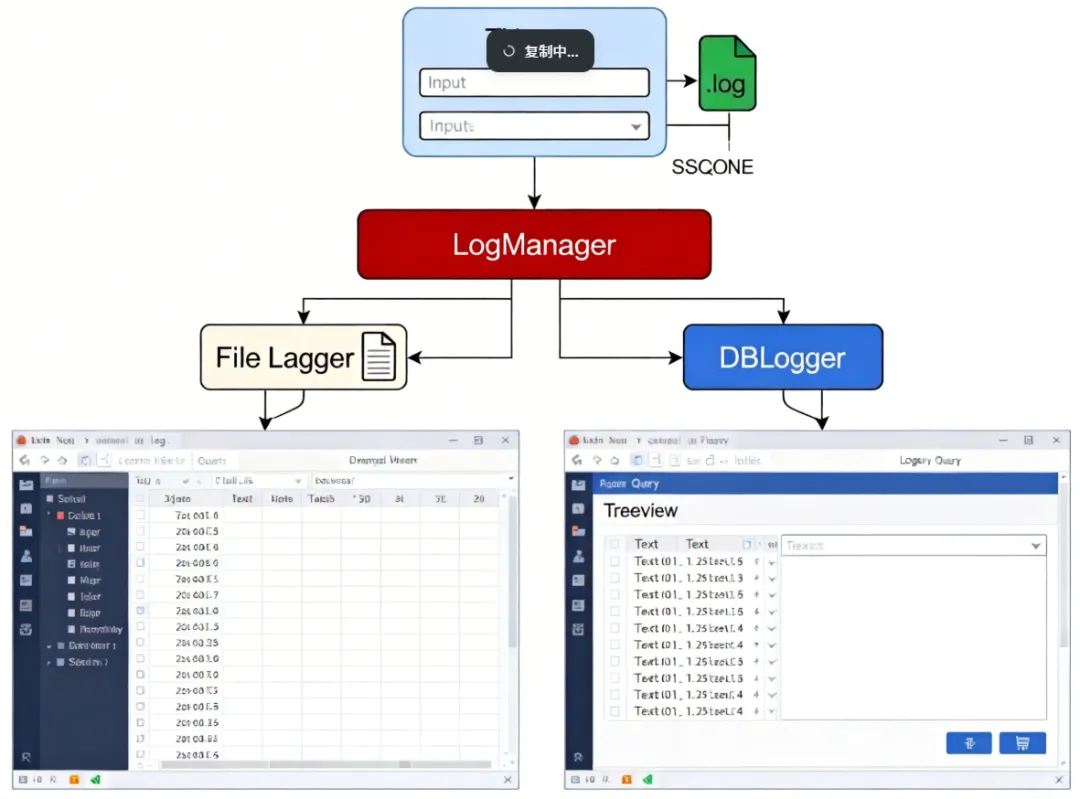
三层结构:界面层触发事件,核心层双写,展示层读取查询。干净,职责清晰,改哪层不影响另外两层。


🔧 环境准备

Python 标准库全家桶,不需要额外安装第三方包:

# 用到的模块清单
import tkinter as tk
from tkinter import ttk, messagebox, filedialog
import logging
import sqlite3
import threading
import os
import csv
from datetime import datetime

SQLite 是 Python 内置的,logging 也是,Tkinter 在 Windows 下随 Python 一起装好了。零依赖,拿来就能跑。


📁 第一轨:文件日志的"正确打开方式"

很多人用 logging 只会写这一行:

logging.basicConfig(filename='app.log', level=logging.DEBUG)

能用,但太粗糙了。生产环境里这样搞,日志文件会无限增长,出了问题翻起来像大海捞针。

咱们来配一个按日期滚动、带格式、分级别的文件日志器:

import logging
from logging.handlers import TimedRotatingFileHandler
import os

defsetup_file_logger(log_dir="logs"):
"""
    配置文件日志器
    - 按天滚动,保留最近 7 天
    - 同时输出到控制台(开发调试用)
    """

    os.makedirs(log_dir, exist_ok=True)

    logger = logging.getLogger("AppLogger")
    logger.setLevel(logging.DEBUG)

# 避免重复添加 handler(Tkinter 应用可能多次初始化)
if logger.handlers:
return logger

    log_path = os.path.join(log_dir, "app.log")

# 按天滚动,保留 7 天
    file_handler = TimedRotatingFileHandler(
        filename=log_path,
        when="midnight",       # 每天零点滚动
        interval=1,
        backupCount=7,
        encoding="utf-8"
    )
    file_handler.setLevel(logging.DEBUG)

# 格式:时间 | 级别 | 模块 | 消息
    formatter = logging.Formatter(
        fmt="%(asctime)s | %(levelname)-8s | %(module)s | %(message)s",
        datefmt="%Y-%m-%d %H:%M:%S"
    )
    file_handler.setFormatter(formatter)

# 控制台 handler(只输出 WARNING 以上)
    console_handler = logging.StreamHandler()
    console_handler.setLevel(logging.WARNING)
    console_handler.setFormatter(formatter)

    logger.addHandler(file_handler)
    logger.addHandler(console_handler)

return logger

TimedRotatingFileHandler 是个被严重低估的工具——它会在每天零点自动把旧日志重命名为 app.log.2026-03-16,新的写进 app.log,完全不需要你手动管理。backupCount=7 保留最近 7 天,超出的自动删掉,磁盘空间稳稳的。


🗄️ 第二轨:SQLite 日志表的设计

文件日志适合人眼阅读,但你要是想查"过去一周内,用户点击'导出'按钮超过 3 次的记录",用 grep 翻日志文件……算了,还是用 SQL 吧。

import sqlite3
import threading
from datetime import datetime

classDBLogger:
"""
    SQLite 日志记录器
    线程安全版本——Tkinter 多线程操作时不会写坏数据库
    """


def__init__(self, db_path="logs/app_logs.db"):
self.db_path = db_path
self._lock = threading.Lock()  # 关键:写入锁
        os.makedirs(os.path.dirname(db_path), exist_ok=True)
self._init_db()

def_init_db(self):
"""建表,如果不存在的话"""
with sqlite3.connect(self.db_path) as conn:
            conn.execute("""
                CREATE TABLE IF NOT EXISTS operation_logs (
                    id          INTEGER PRIMARY KEY AUTOINCREMENT,
                    timestamp   TEXT    NOT NULL,
                    level       TEXT    NOT NULL,
                    module      TEXT,
                    action      TEXT    NOT NULL,
                    detail      TEXT,
                    user        TEXT    DEFAULT 'default',
                    duration_ms INTEGER DEFAULT 0
                )
            """
)
# 给常用查询字段加索引,数据量大了之后查询不卡
            conn.execute("""
                CREATE INDEX IF NOT EXISTS idx_timestamp 
                ON operation_logs(timestamp)
            """
)
            conn.execute("""
                CREATE INDEX IF NOT EXISTS idx_level 
                ON operation_logs(level)
            """
)
            conn.commit()

defwrite(self, level, action, detail="", module="", duration_ms=0):
"""
        写入一条日志记录
        用锁保证多线程安全
        """

        timestamp = datetime.now().strftime("%Y-%m-%d %H:%M:%S.%f")[:-3]

withself._lock:
try:
with sqlite3.connect(self.db_path) as conn:
                    conn.execute("""
                        INSERT INTO operation_logs 
                        (timestamp, level, module, action, detail, duration_ms)
                        VALUES (?, ?, ?, ?, ?, ?)
                    """
, (timestamp, level, module, action, detail, duration_ms))
                    conn.commit()
except sqlite3.Error as e:
# 数据库写失败不能让主程序崩,静默记录到文件日志
                logging.getLogger("AppLogger").error(
f"DB write failed: {e} | action={action}"
                )

defquery(self, level=None, keyword=None, limit=200):
"""
        查询日志记录
        支持按级别过滤、关键词搜索
        """

        sql = "SELECT * FROM operation_logs WHERE 1=1"
        params = []

if level and level != "ALL":
            sql += " AND level = ?"
            params.append(level)

if keyword:
            sql += " AND (action LIKE ? OR detail LIKE ?)"
            params.extend([f"%{keyword}%"f"%{keyword}%"])

        sql += " ORDER BY id DESC LIMIT ?"
        params.append(limit)

with sqlite3.connect(self.db_path) as conn:
            conn.row_factory = sqlite3.Row  # 让结果支持列名访问
            cursor = conn.execute(sql, params)
return cursor.fetchall()

这里有个细节值得说一下:_lock = threading.Lock()。Tkinter 的事件循环跑在主线程,但如果你在后台线程做耗时操作(比如批量导入数据),同时触发日志写入,SQLite 的默认配置下会抛 database is locked 错误。加锁之后,写入操作串行化,稳得很。


🧠 核心层:LogManager 统一调度

两个日志器单独用没问题,但每次写日志都要调两次,代码会散。封装一个 LogManager,对外只暴露一个接口:

classLogManager:
"""
    双轨日志管理器
    一次调用,同时写文件 + 数据库
    """


def__init__(self):
self.file_logger = setup_file_logger()
self.db_logger = DBLogger()
self._module = "App"

defset_module(self, module_name):
self._module = module_name
returnself# 支持链式调用

def_write(self, level, action, detail="", duration_ms=0):
# 写文件日志
        log_msg = f"[{action}{detail}"if detail elsef"[{action}]"
getattr(self.file_logger, level.lower())(log_msg)

# 写数据库
self.db_logger.write(
            level=level,
            action=action,
            detail=detail,
            module=self._module,
            duration_ms=duration_ms
        )

definfo(self, action, detail="", duration_ms=0):
self._write("INFO", action, detail, duration_ms)

defwarning(self, action, detail="", duration_ms=0):
self._write("WARNING", action, detail, duration_ms)

deferror(self, action, detail="", duration_ms=0):
self._write("ERROR", action, detail, duration_ms)

defdebug(self, action, detail="", duration_ms=0):
self._write("DEBUG", action, detail, duration_ms)

defquery(self, **kwargs):
"""透传给 DBLogger 的查询接口"""
returnself.db_logger.query(**kwargs)

调用方式就变成这样,清爽:

log = LogManager()
log.info("用户登录""用户 admin 登录成功")
log.warning("文件导入""文件格式不标准,已自动修正")
log.error("数据库连接""连接超时,重试第 2 次")

🖥️ Tkinter 界面:主操作区

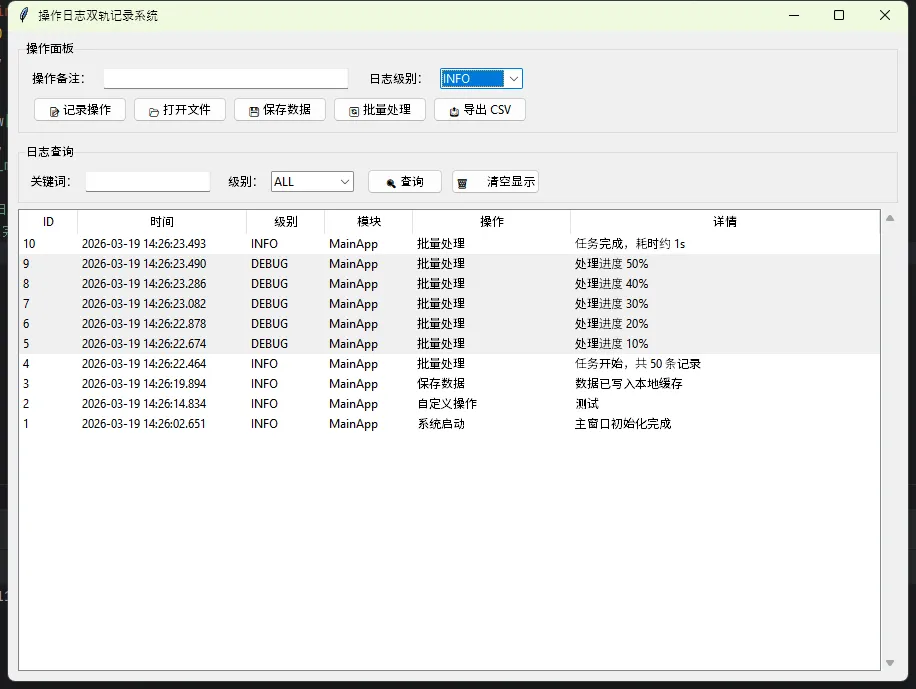
现在把界面搭起来。主窗口分两个区域:上方是操作面板(模拟用户的各种操作),下方是实时日志流。

classMainApp(tk.Tk):

def__init__(self):
super().__init__()
self.title("操作日志双轨记录系统")
self.geometry("900x650")
self.resizable(TrueTrue)

# 初始化日志管理器
self.log = LogManager()
self.log.set_module("MainApp")

self._build_ui()
self.log.info("系统启动""主窗口初始化完成")

def_build_ui(self):
# ── 顶部操作面板 ──
        op_frame = ttk.LabelFrame(self, text="操作面板", padding=10)
        op_frame.pack(fill="x", padx=10, pady=(105))

# 输入框 + 标签
        ttk.Label(op_frame, text="操作备注:").grid(row=0, column=0, sticky="w")
self.note_var = tk.StringVar()
self.note_entry = ttk.Entry(op_frame, textvariable=self.note_var, width=40)
self.note_entry.grid(row=0, column=1, padx=5)

# 级别选择
        ttk.Label(op_frame, text="日志级别:").grid(row=0, column=2, padx=(100))
self.level_var = tk.StringVar(value="INFO")
        level_combo = ttk.Combobox(
            op_frame, textvariable=self.level_var,
            values=["DEBUG""INFO""WARNING""ERROR"],
            width=10, state="readonly"
        )
        level_combo.grid(row=0, column=3, padx=5)

# 操作按钮行
        btn_frame = ttk.Frame(op_frame)
        btn_frame.grid(row=1, column=0, columnspan=4, pady=(80), sticky="w")

        buttons = [
            ("📝 记录操作"self._log_custom),
            ("📂 打开文件"self._simulate_open_file),
            ("💾 保存数据"self._simulate_save),
            ("🔄 批量处理"self._simulate_batch),
            ("📤 导出 CSV"self._export_csv),
        ]
for text, cmd in buttons:
            ttk.Button(btn_frame, text=text, command=cmd, width=14).pack(
                side="left", padx=3
            )

# ── 中部:日志查询区 ──
        query_frame = ttk.LabelFrame(self, text="日志查询", padding=8)
        query_frame.pack(fill="x", padx=10, pady=5)

        ttk.Label(query_frame, text="关键词:").pack(side="left")
self.kw_var = tk.StringVar()
        ttk.Entry(query_frame, textvariable=self.kw_var, width=20).pack(
            side="left", padx=5
        )

        ttk.Label(query_frame, text="级别:").pack(side="left", padx=(100))
self.filter_level = tk.StringVar(value="ALL")
        ttk.Combobox(
            query_frame, textvariable=self.filter_level,
            values=["ALL""DEBUG""INFO""WARNING""ERROR"],
            width=10, state="readonly"
        ).pack(side="left", padx=5)

        ttk.Button(query_frame, text="🔍 查询", command=self._query_logs).pack(
            side="left", padx=8
        )
        ttk.Button(query_frame, text="🗑️ 清空显示", command=self._clear_table).pack(
            side="left"
        )

# ── 下部:Treeview 日志表格 ──
        table_frame = ttk.Frame(self)
        table_frame.pack(fill="both", expand=True, padx=10, pady=(010))

        columns = ("id""timestamp""level""module""action""detail")
self.tree = ttk.Treeview(
            table_frame, columns=columns, show="headings", height=18
        )

        col_config = {
"id":        ("ID",   50),
"timestamp": ("时间"160),
"level":     ("级别",  70),
"module":    ("模块",  80),
"action":    ("操作"150),
"detail":    ("详情"300),
        }
for col, (heading, width) in col_config.items():
self.tree.heading(col, text=heading)
self.tree.column(col, width=width, anchor="w")

# 滚动条
        vsb = ttk.Scrollbar(table_frame, orient="vertical", command=self.tree.yview)
self.tree.configure(yscrollcommand=vsb.set)
self.tree.pack(side="left", fill="both", expand=True)
        vsb.pack(side="right", fill="y")

# 行颜色区分级别
self.tree.tag_configure("ERROR",   background="
#ffe0e0")
self.tree.tag_configure("WARNING", background="#fff3cd")
self.tree.tag_configure("DEBUG",   background="#f0f0f0")

# 初始加载最近记录
self._query_logs()

⚙️ 操作模拟与日志触发

def_log_custom(self):
        note = self.note_var.get().strip()
ifnot note:
            messagebox.showwarning("提示""请先填写操作备注")
return
        level = self.level_var.get()
getattr(self.log, level.lower())("自定义操作", note)
self.note_var.set("")
self._query_logs()  # 刷新表格

def_simulate_open_file(self):
        path = filedialog.askopenfilename(title="选择文件")
if path:
            filename = os.path.basename(path)
self.log.info("打开文件"f"文件路径: {path}")
            messagebox.showinfo("成功"f"已打开:{filename}")
self._query_logs()

def_simulate_save(self):
import time
        start = time.time()
# 模拟耗时操作
self.after(100lambdaNone)
        elapsed = int((time.time() - start) * 1000)
self.log.info("保存数据""数据已写入本地缓存", duration_ms=elapsed)
self._query_logs()

def_simulate_batch(self):
"""在后台线程模拟批量处理,演示多线程安全写入"""
defworker():
import time
self.log.info("批量处理""任务开始,共 50 条记录")
for i inrange(16):
                time.sleep(0.2)
self.log.debug("批量处理"f"处理进度 {i*10}%")
self.log.info("批量处理""任务完成,耗时约 1s", duration_ms=1000)
# 注意:不能在子线程直接操作 Tkinter 控件!
# 用 after() 把 UI 刷新调度回主线程
self.after(0self._query_logs)

        threading.Thread(target=worker, daemon=True).start()

def_query_logs(self):
        rows = self.log.query(
            level=self.filter_level.get(),
            keyword=self.kw_var.get().strip() orNone
        )
self._clear_table()
for row in rows:
            tag = row["level"if row["level"in ("ERROR""WARNING""DEBUG"else""
self.tree.insert("""end", values=(
                row["id"], row["timestamp"], row["level"],
                row["module"], row["action"], row["detail"]
            ), tags=(tag,))

def_clear_table(self):
for item inself.tree.get_children():
self.tree.delete(item)

def_export_csv(self):
        path = filedialog.asksaveasfilename(
            defaultextension=".csv",
            filetypes=[("CSV 文件""*.csv")],
            title="导出日志"
        )
ifnot path:
return
        rows = self.log.query(
            level=self.filter_level.get(),
            keyword=self.kw_var.get().strip() orNone,
            limit=10000
        )
withopen(path, "w", newline="", encoding="utf-8-sig"as f:
            writer = csv.writer(f)
            writer.writerow(["ID""时间""级别""模块""操作""详情""耗时(ms)"])
for row in rows:
                writer.writerow([
                    row["id"], row["timestamp"], row["level"],
                    row["module"], row["action"], row["detail"],
                    row["duration_ms"]
                ])
self.log.info("导出日志"f"已导出至: {path}")
        messagebox.showinfo("完成"f"日志已导出\n{path}")
self._query_logs()


if __name__ == "__main__":
    app = MainApp()
    app.mainloop()
⚠️ 几个必须注意的坑

坑一:子线程操作 Tkinter 控件会崩。 Tkinter 不是线程安全的,所有 UI 更新必须在主线程执行。_simulate_batch 里用了 self.after(0, self._query_logs),这是把回调"投递"到主线程事件循环,是标准做法,别图省事直接在子线程调 tree.insert()

坑二:日志器重复初始化。setup_file_logger 里加了 if logger.handlers: return logger 这个检查。Tkinter 应用如果有"重启"或"重置"逻辑,会再次初始化日志器,不加这个检查的话,每条日志会被写两遍、四遍……越来越多。

坑三:SQLite 并发写入。 默认的 SQLite 连接不支持多线程共享,DBLogger 里每次写入都新建连接(with sqlite3.connect(...) as conn),配合 _lock 保证串行,这是最稳的方案。如果追求性能,可以用 check_same_thread=False + WAL 模式,但那是另一个话题了。

坑四:中文路径问题。TimedRotatingFileHandler 在 Windows 下用中文路径偶尔会有编码问题。建议日志目录统一用英文,encoding="utf-8" 加上,基本没问题。


🔍 运行效果说明

启动后你会看到:

  • • logs/ 目录下生成 app.log(文件日志)和 app_logs.db(SQLite 数据库)
  • • 点击任意操作按钮,Treeview 表格实时刷新,新记录出现在顶部
  • • "批量处理"按钮触发后台线程,5 条 DEBUG 日志会陆续出现,主界面不卡顿
  • • 查询框支持关键词 + 级别组合过滤
  • • 导出 CSV 会把当前筛选结果写成文件,用 Excel 打开直接能看

💡 三句话技术洞察

文件日志是给运维看的,数据库日志是给产品看的。 两者服务的受众不同,设计时就该分开对待。

after(0, callback) 是 Tkinter 多线程的救命稻草。 记住这个模式,80% 的线程安全问题迎刃而解。

日志系统的价值,在出问题的那一刻才真正体现。 平时多花一小时搭好,事后省掉三天排查。


🏷️ 技术标签

PythonTkinterSQLitelogging桌面开发Windows开发


完整项目结构建议按 ui/core/logs/ 三个目录组织,LogManager 单独放 core/log_manager.py,复用起来更方便。源码已整理为单文件版本,直接运行即可验证效果。欢迎在评论区聊聊你在项目里用过的日志方案,或者踩过哪些坑。

最新文章

随机文章

基本 文件 流程 错误 SQL 调试
  1. 请求信息 : 2026-03-29 16:36:20 HTTP/2.0 GET : https://f.mffb.com.cn/a/483766.html
  2. 运行时间 : 0.181749s [ 吞吐率:5.50req/s ] 内存消耗:4,790.94kb 文件加载:140
  3. 缓存信息 : 0 reads,0 writes
  4. 会话信息 : SESSION_ID=32344876f94cbbd710286cccbd070b44
  1. /yingpanguazai/ssd/ssd1/www/f.mffb.com.cn/public/index.php ( 0.79 KB )
  2. /yingpanguazai/ssd/ssd1/www/f.mffb.com.cn/vendor/autoload.php ( 0.17 KB )
  3. /yingpanguazai/ssd/ssd1/www/f.mffb.com.cn/vendor/composer/autoload_real.php ( 2.49 KB )
  4. /yingpanguazai/ssd/ssd1/www/f.mffb.com.cn/vendor/composer/platform_check.php ( 0.90 KB )
  5. /yingpanguazai/ssd/ssd1/www/f.mffb.com.cn/vendor/composer/ClassLoader.php ( 14.03 KB )
  6. /yingpanguazai/ssd/ssd1/www/f.mffb.com.cn/vendor/composer/autoload_static.php ( 4.90 KB )
  7. /yingpanguazai/ssd/ssd1/www/f.mffb.com.cn/vendor/topthink/think-helper/src/helper.php ( 8.34 KB )
  8. /yingpanguazai/ssd/ssd1/www/f.mffb.com.cn/vendor/topthink/think-validate/src/helper.php ( 2.19 KB )
  9. /yingpanguazai/ssd/ssd1/www/f.mffb.com.cn/vendor/topthink/think-orm/src/helper.php ( 1.47 KB )
  10. /yingpanguazai/ssd/ssd1/www/f.mffb.com.cn/vendor/topthink/think-orm/stubs/load_stubs.php ( 0.16 KB )
  11. /yingpanguazai/ssd/ssd1/www/f.mffb.com.cn/vendor/topthink/framework/src/think/Exception.php ( 1.69 KB )
  12. /yingpanguazai/ssd/ssd1/www/f.mffb.com.cn/vendor/topthink/think-container/src/Facade.php ( 2.71 KB )
  13. /yingpanguazai/ssd/ssd1/www/f.mffb.com.cn/vendor/symfony/deprecation-contracts/function.php ( 0.99 KB )
  14. /yingpanguazai/ssd/ssd1/www/f.mffb.com.cn/vendor/symfony/polyfill-mbstring/bootstrap.php ( 8.26 KB )
  15. /yingpanguazai/ssd/ssd1/www/f.mffb.com.cn/vendor/symfony/polyfill-mbstring/bootstrap80.php ( 9.78 KB )
  16. /yingpanguazai/ssd/ssd1/www/f.mffb.com.cn/vendor/symfony/var-dumper/Resources/functions/dump.php ( 1.49 KB )
  17. /yingpanguazai/ssd/ssd1/www/f.mffb.com.cn/vendor/topthink/think-dumper/src/helper.php ( 0.18 KB )
  18. /yingpanguazai/ssd/ssd1/www/f.mffb.com.cn/vendor/symfony/var-dumper/VarDumper.php ( 4.30 KB )
  19. /yingpanguazai/ssd/ssd1/www/f.mffb.com.cn/vendor/topthink/framework/src/think/App.php ( 15.30 KB )
  20. /yingpanguazai/ssd/ssd1/www/f.mffb.com.cn/vendor/topthink/think-container/src/Container.php ( 15.76 KB )
  21. /yingpanguazai/ssd/ssd1/www/f.mffb.com.cn/vendor/psr/container/src/ContainerInterface.php ( 1.02 KB )
  22. /yingpanguazai/ssd/ssd1/www/f.mffb.com.cn/app/provider.php ( 0.19 KB )
  23. /yingpanguazai/ssd/ssd1/www/f.mffb.com.cn/vendor/topthink/framework/src/think/Http.php ( 6.04 KB )
  24. /yingpanguazai/ssd/ssd1/www/f.mffb.com.cn/vendor/topthink/think-helper/src/helper/Str.php ( 7.29 KB )
  25. /yingpanguazai/ssd/ssd1/www/f.mffb.com.cn/vendor/topthink/framework/src/think/Env.php ( 4.68 KB )
  26. /yingpanguazai/ssd/ssd1/www/f.mffb.com.cn/app/common.php ( 0.03 KB )
  27. /yingpanguazai/ssd/ssd1/www/f.mffb.com.cn/vendor/topthink/framework/src/helper.php ( 18.78 KB )
  28. /yingpanguazai/ssd/ssd1/www/f.mffb.com.cn/vendor/topthink/framework/src/think/Config.php ( 5.54 KB )
  29. /yingpanguazai/ssd/ssd1/www/f.mffb.com.cn/config/app.php ( 0.95 KB )
  30. /yingpanguazai/ssd/ssd1/www/f.mffb.com.cn/config/cache.php ( 0.78 KB )
  31. /yingpanguazai/ssd/ssd1/www/f.mffb.com.cn/config/console.php ( 0.23 KB )
  32. /yingpanguazai/ssd/ssd1/www/f.mffb.com.cn/config/cookie.php ( 0.56 KB )
  33. /yingpanguazai/ssd/ssd1/www/f.mffb.com.cn/config/database.php ( 2.48 KB )
  34. /yingpanguazai/ssd/ssd1/www/f.mffb.com.cn/vendor/topthink/framework/src/think/facade/Env.php ( 1.67 KB )
  35. /yingpanguazai/ssd/ssd1/www/f.mffb.com.cn/config/filesystem.php ( 0.61 KB )
  36. /yingpanguazai/ssd/ssd1/www/f.mffb.com.cn/config/lang.php ( 0.91 KB )
  37. /yingpanguazai/ssd/ssd1/www/f.mffb.com.cn/config/log.php ( 1.35 KB )
  38. /yingpanguazai/ssd/ssd1/www/f.mffb.com.cn/config/middleware.php ( 0.19 KB )
  39. /yingpanguazai/ssd/ssd1/www/f.mffb.com.cn/config/route.php ( 1.89 KB )
  40. /yingpanguazai/ssd/ssd1/www/f.mffb.com.cn/config/session.php ( 0.57 KB )
  41. /yingpanguazai/ssd/ssd1/www/f.mffb.com.cn/config/trace.php ( 0.34 KB )
  42. /yingpanguazai/ssd/ssd1/www/f.mffb.com.cn/config/view.php ( 0.82 KB )
  43. /yingpanguazai/ssd/ssd1/www/f.mffb.com.cn/app/event.php ( 0.25 KB )
  44. /yingpanguazai/ssd/ssd1/www/f.mffb.com.cn/vendor/topthink/framework/src/think/Event.php ( 7.67 KB )
  45. /yingpanguazai/ssd/ssd1/www/f.mffb.com.cn/app/service.php ( 0.13 KB )
  46. /yingpanguazai/ssd/ssd1/www/f.mffb.com.cn/app/AppService.php ( 0.26 KB )
  47. /yingpanguazai/ssd/ssd1/www/f.mffb.com.cn/vendor/topthink/framework/src/think/Service.php ( 1.64 KB )
  48. /yingpanguazai/ssd/ssd1/www/f.mffb.com.cn/vendor/topthink/framework/src/think/Lang.php ( 7.35 KB )
  49. /yingpanguazai/ssd/ssd1/www/f.mffb.com.cn/vendor/topthink/framework/src/lang/zh-cn.php ( 13.70 KB )
  50. /yingpanguazai/ssd/ssd1/www/f.mffb.com.cn/vendor/topthink/framework/src/think/initializer/Error.php ( 3.31 KB )
  51. /yingpanguazai/ssd/ssd1/www/f.mffb.com.cn/vendor/topthink/framework/src/think/initializer/RegisterService.php ( 1.33 KB )
  52. /yingpanguazai/ssd/ssd1/www/f.mffb.com.cn/vendor/services.php ( 0.14 KB )
  53. /yingpanguazai/ssd/ssd1/www/f.mffb.com.cn/vendor/topthink/framework/src/think/service/PaginatorService.php ( 1.52 KB )
  54. /yingpanguazai/ssd/ssd1/www/f.mffb.com.cn/vendor/topthink/framework/src/think/service/ValidateService.php ( 0.99 KB )
  55. /yingpanguazai/ssd/ssd1/www/f.mffb.com.cn/vendor/topthink/framework/src/think/service/ModelService.php ( 2.04 KB )
  56. /yingpanguazai/ssd/ssd1/www/f.mffb.com.cn/vendor/topthink/think-trace/src/Service.php ( 0.77 KB )
  57. /yingpanguazai/ssd/ssd1/www/f.mffb.com.cn/vendor/topthink/framework/src/think/Middleware.php ( 6.72 KB )
  58. /yingpanguazai/ssd/ssd1/www/f.mffb.com.cn/vendor/topthink/framework/src/think/initializer/BootService.php ( 0.77 KB )
  59. /yingpanguazai/ssd/ssd1/www/f.mffb.com.cn/vendor/topthink/think-orm/src/Paginator.php ( 11.86 KB )
  60. /yingpanguazai/ssd/ssd1/www/f.mffb.com.cn/vendor/topthink/think-validate/src/Validate.php ( 63.20 KB )
  61. /yingpanguazai/ssd/ssd1/www/f.mffb.com.cn/vendor/topthink/think-orm/src/Model.php ( 23.55 KB )
  62. /yingpanguazai/ssd/ssd1/www/f.mffb.com.cn/vendor/topthink/think-orm/src/model/concern/Attribute.php ( 21.05 KB )
  63. /yingpanguazai/ssd/ssd1/www/f.mffb.com.cn/vendor/topthink/think-orm/src/model/concern/AutoWriteData.php ( 4.21 KB )
  64. /yingpanguazai/ssd/ssd1/www/f.mffb.com.cn/vendor/topthink/think-orm/src/model/concern/Conversion.php ( 6.44 KB )
  65. /yingpanguazai/ssd/ssd1/www/f.mffb.com.cn/vendor/topthink/think-orm/src/model/concern/DbConnect.php ( 5.16 KB )
  66. /yingpanguazai/ssd/ssd1/www/f.mffb.com.cn/vendor/topthink/think-orm/src/model/concern/ModelEvent.php ( 2.33 KB )
  67. /yingpanguazai/ssd/ssd1/www/f.mffb.com.cn/vendor/topthink/think-orm/src/model/concern/RelationShip.php ( 28.29 KB )
  68. /yingpanguazai/ssd/ssd1/www/f.mffb.com.cn/vendor/topthink/think-helper/src/contract/Arrayable.php ( 0.09 KB )
  69. /yingpanguazai/ssd/ssd1/www/f.mffb.com.cn/vendor/topthink/think-helper/src/contract/Jsonable.php ( 0.13 KB )
  70. /yingpanguazai/ssd/ssd1/www/f.mffb.com.cn/vendor/topthink/think-orm/src/model/contract/Modelable.php ( 0.09 KB )
  71. /yingpanguazai/ssd/ssd1/www/f.mffb.com.cn/vendor/topthink/framework/src/think/Db.php ( 2.88 KB )
  72. /yingpanguazai/ssd/ssd1/www/f.mffb.com.cn/vendor/topthink/think-orm/src/DbManager.php ( 8.52 KB )
  73. /yingpanguazai/ssd/ssd1/www/f.mffb.com.cn/vendor/topthink/framework/src/think/Log.php ( 6.28 KB )
  74. /yingpanguazai/ssd/ssd1/www/f.mffb.com.cn/vendor/topthink/framework/src/think/Manager.php ( 3.92 KB )
  75. /yingpanguazai/ssd/ssd1/www/f.mffb.com.cn/vendor/psr/log/src/LoggerTrait.php ( 2.69 KB )
  76. /yingpanguazai/ssd/ssd1/www/f.mffb.com.cn/vendor/psr/log/src/LoggerInterface.php ( 2.71 KB )
  77. /yingpanguazai/ssd/ssd1/www/f.mffb.com.cn/vendor/topthink/framework/src/think/Cache.php ( 4.92 KB )
  78. /yingpanguazai/ssd/ssd1/www/f.mffb.com.cn/vendor/psr/simple-cache/src/CacheInterface.php ( 4.71 KB )
  79. /yingpanguazai/ssd/ssd1/www/f.mffb.com.cn/vendor/topthink/think-helper/src/helper/Arr.php ( 16.63 KB )
  80. /yingpanguazai/ssd/ssd1/www/f.mffb.com.cn/vendor/topthink/framework/src/think/cache/driver/File.php ( 7.84 KB )
  81. /yingpanguazai/ssd/ssd1/www/f.mffb.com.cn/vendor/topthink/framework/src/think/cache/Driver.php ( 9.03 KB )
  82. /yingpanguazai/ssd/ssd1/www/f.mffb.com.cn/vendor/topthink/framework/src/think/contract/CacheHandlerInterface.php ( 1.99 KB )
  83. /yingpanguazai/ssd/ssd1/www/f.mffb.com.cn/app/Request.php ( 0.09 KB )
  84. /yingpanguazai/ssd/ssd1/www/f.mffb.com.cn/vendor/topthink/framework/src/think/Request.php ( 55.78 KB )
  85. /yingpanguazai/ssd/ssd1/www/f.mffb.com.cn/app/middleware.php ( 0.25 KB )
  86. /yingpanguazai/ssd/ssd1/www/f.mffb.com.cn/vendor/topthink/framework/src/think/Pipeline.php ( 2.61 KB )
  87. /yingpanguazai/ssd/ssd1/www/f.mffb.com.cn/vendor/topthink/think-trace/src/TraceDebug.php ( 3.40 KB )
  88. /yingpanguazai/ssd/ssd1/www/f.mffb.com.cn/vendor/topthink/framework/src/think/middleware/SessionInit.php ( 1.94 KB )
  89. /yingpanguazai/ssd/ssd1/www/f.mffb.com.cn/vendor/topthink/framework/src/think/Session.php ( 1.80 KB )
  90. /yingpanguazai/ssd/ssd1/www/f.mffb.com.cn/vendor/topthink/framework/src/think/session/driver/File.php ( 6.27 KB )
  91. /yingpanguazai/ssd/ssd1/www/f.mffb.com.cn/vendor/topthink/framework/src/think/contract/SessionHandlerInterface.php ( 0.87 KB )
  92. /yingpanguazai/ssd/ssd1/www/f.mffb.com.cn/vendor/topthink/framework/src/think/session/Store.php ( 7.12 KB )
  93. /yingpanguazai/ssd/ssd1/www/f.mffb.com.cn/vendor/topthink/framework/src/think/Route.php ( 23.73 KB )
  94. /yingpanguazai/ssd/ssd1/www/f.mffb.com.cn/vendor/topthink/framework/src/think/route/RuleName.php ( 5.75 KB )
  95. /yingpanguazai/ssd/ssd1/www/f.mffb.com.cn/vendor/topthink/framework/src/think/route/Domain.php ( 2.53 KB )
  96. /yingpanguazai/ssd/ssd1/www/f.mffb.com.cn/vendor/topthink/framework/src/think/route/RuleGroup.php ( 22.43 KB )
  97. /yingpanguazai/ssd/ssd1/www/f.mffb.com.cn/vendor/topthink/framework/src/think/route/Rule.php ( 26.95 KB )
  98. /yingpanguazai/ssd/ssd1/www/f.mffb.com.cn/vendor/topthink/framework/src/think/route/RuleItem.php ( 9.78 KB )
  99. /yingpanguazai/ssd/ssd1/www/f.mffb.com.cn/route/app.php ( 1.72 KB )
  100. /yingpanguazai/ssd/ssd1/www/f.mffb.com.cn/vendor/topthink/framework/src/think/facade/Route.php ( 4.70 KB )
  101. /yingpanguazai/ssd/ssd1/www/f.mffb.com.cn/vendor/topthink/framework/src/think/route/dispatch/Controller.php ( 4.74 KB )
  102. /yingpanguazai/ssd/ssd1/www/f.mffb.com.cn/vendor/topthink/framework/src/think/route/Dispatch.php ( 10.44 KB )
  103. /yingpanguazai/ssd/ssd1/www/f.mffb.com.cn/app/controller/Index.php ( 4.81 KB )
  104. /yingpanguazai/ssd/ssd1/www/f.mffb.com.cn/app/BaseController.php ( 2.05 KB )
  105. /yingpanguazai/ssd/ssd1/www/f.mffb.com.cn/vendor/topthink/think-orm/src/facade/Db.php ( 0.93 KB )
  106. /yingpanguazai/ssd/ssd1/www/f.mffb.com.cn/vendor/topthink/think-orm/src/db/connector/Mysql.php ( 5.44 KB )
  107. /yingpanguazai/ssd/ssd1/www/f.mffb.com.cn/vendor/topthink/think-orm/src/db/PDOConnection.php ( 52.47 KB )
  108. /yingpanguazai/ssd/ssd1/www/f.mffb.com.cn/vendor/topthink/think-orm/src/db/Connection.php ( 8.39 KB )
  109. /yingpanguazai/ssd/ssd1/www/f.mffb.com.cn/vendor/topthink/think-orm/src/db/ConnectionInterface.php ( 4.57 KB )
  110. /yingpanguazai/ssd/ssd1/www/f.mffb.com.cn/vendor/topthink/think-orm/src/db/builder/Mysql.php ( 16.58 KB )
  111. /yingpanguazai/ssd/ssd1/www/f.mffb.com.cn/vendor/topthink/think-orm/src/db/Builder.php ( 24.06 KB )
  112. /yingpanguazai/ssd/ssd1/www/f.mffb.com.cn/vendor/topthink/think-orm/src/db/BaseBuilder.php ( 27.50 KB )
  113. /yingpanguazai/ssd/ssd1/www/f.mffb.com.cn/vendor/topthink/think-orm/src/db/Query.php ( 15.71 KB )
  114. /yingpanguazai/ssd/ssd1/www/f.mffb.com.cn/vendor/topthink/think-orm/src/db/BaseQuery.php ( 45.13 KB )
  115. /yingpanguazai/ssd/ssd1/www/f.mffb.com.cn/vendor/topthink/think-orm/src/db/concern/TimeFieldQuery.php ( 7.43 KB )
  116. /yingpanguazai/ssd/ssd1/www/f.mffb.com.cn/vendor/topthink/think-orm/src/db/concern/AggregateQuery.php ( 3.26 KB )
  117. /yingpanguazai/ssd/ssd1/www/f.mffb.com.cn/vendor/topthink/think-orm/src/db/concern/ModelRelationQuery.php ( 20.07 KB )
  118. /yingpanguazai/ssd/ssd1/www/f.mffb.com.cn/vendor/topthink/think-orm/src/db/concern/ParamsBind.php ( 3.66 KB )
  119. /yingpanguazai/ssd/ssd1/www/f.mffb.com.cn/vendor/topthink/think-orm/src/db/concern/ResultOperation.php ( 7.01 KB )
  120. /yingpanguazai/ssd/ssd1/www/f.mffb.com.cn/vendor/topthink/think-orm/src/db/concern/WhereQuery.php ( 19.37 KB )
  121. /yingpanguazai/ssd/ssd1/www/f.mffb.com.cn/vendor/topthink/think-orm/src/db/concern/JoinAndViewQuery.php ( 7.11 KB )
  122. /yingpanguazai/ssd/ssd1/www/f.mffb.com.cn/vendor/topthink/think-orm/src/db/concern/TableFieldInfo.php ( 2.63 KB )
  123. /yingpanguazai/ssd/ssd1/www/f.mffb.com.cn/vendor/topthink/think-orm/src/db/concern/Transaction.php ( 2.77 KB )
  124. /yingpanguazai/ssd/ssd1/www/f.mffb.com.cn/vendor/topthink/framework/src/think/log/driver/File.php ( 5.96 KB )
  125. /yingpanguazai/ssd/ssd1/www/f.mffb.com.cn/vendor/topthink/framework/src/think/contract/LogHandlerInterface.php ( 0.86 KB )
  126. /yingpanguazai/ssd/ssd1/www/f.mffb.com.cn/vendor/topthink/framework/src/think/log/Channel.php ( 3.89 KB )
  127. /yingpanguazai/ssd/ssd1/www/f.mffb.com.cn/vendor/topthink/framework/src/think/event/LogRecord.php ( 1.02 KB )
  128. /yingpanguazai/ssd/ssd1/www/f.mffb.com.cn/vendor/topthink/think-helper/src/Collection.php ( 16.47 KB )
  129. /yingpanguazai/ssd/ssd1/www/f.mffb.com.cn/vendor/topthink/framework/src/think/facade/View.php ( 1.70 KB )
  130. /yingpanguazai/ssd/ssd1/www/f.mffb.com.cn/vendor/topthink/framework/src/think/View.php ( 4.39 KB )
  131. /yingpanguazai/ssd/ssd1/www/f.mffb.com.cn/vendor/topthink/framework/src/think/Response.php ( 8.81 KB )
  132. /yingpanguazai/ssd/ssd1/www/f.mffb.com.cn/vendor/topthink/framework/src/think/response/View.php ( 3.29 KB )
  133. /yingpanguazai/ssd/ssd1/www/f.mffb.com.cn/vendor/topthink/framework/src/think/Cookie.php ( 6.06 KB )
  134. /yingpanguazai/ssd/ssd1/www/f.mffb.com.cn/vendor/topthink/think-view/src/Think.php ( 8.38 KB )
  135. /yingpanguazai/ssd/ssd1/www/f.mffb.com.cn/vendor/topthink/framework/src/think/contract/TemplateHandlerInterface.php ( 1.60 KB )
  136. /yingpanguazai/ssd/ssd1/www/f.mffb.com.cn/vendor/topthink/think-template/src/Template.php ( 46.61 KB )
  137. /yingpanguazai/ssd/ssd1/www/f.mffb.com.cn/vendor/topthink/think-template/src/template/driver/File.php ( 2.41 KB )
  138. /yingpanguazai/ssd/ssd1/www/f.mffb.com.cn/vendor/topthink/think-template/src/template/contract/DriverInterface.php ( 0.86 KB )
  139. /yingpanguazai/ssd/ssd1/www/f.mffb.com.cn/runtime/temp/067d451b9a0c665040f3f1bdd3293d68.php ( 11.98 KB )
  140. /yingpanguazai/ssd/ssd1/www/f.mffb.com.cn/vendor/topthink/think-trace/src/Html.php ( 4.42 KB )
  1. CONNECT:[ UseTime:0.000818s ] mysql:host=127.0.0.1;port=3306;dbname=f_mffb;charset=utf8mb4
  2. SHOW FULL COLUMNS FROM `fenlei` [ RunTime:0.001267s ]
  3. SELECT * FROM `fenlei` WHERE `fid` = 0 [ RunTime:0.000553s ]
  4. SELECT * FROM `fenlei` WHERE `fid` = 63 [ RunTime:0.000541s ]
  5. SHOW FULL COLUMNS FROM `set` [ RunTime:0.001063s ]
  6. SELECT * FROM `set` [ RunTime:0.000494s ]
  7. SHOW FULL COLUMNS FROM `article` [ RunTime:0.001100s ]
  8. SELECT * FROM `article` WHERE `id` = 483766 LIMIT 1 [ RunTime:0.001283s ]
  9. UPDATE `article` SET `lasttime` = 1774773380 WHERE `id` = 483766 [ RunTime:0.007186s ]
  10. SELECT * FROM `fenlei` WHERE `id` = 66 LIMIT 1 [ RunTime:0.000458s ]
  11. SELECT * FROM `article` WHERE `id` < 483766 ORDER BY `id` DESC LIMIT 1 [ RunTime:0.001130s ]
  12. SELECT * FROM `article` WHERE `id` > 483766 ORDER BY `id` ASC LIMIT 1 [ RunTime:0.000890s ]
  13. SELECT * FROM `article` WHERE `id` < 483766 ORDER BY `id` DESC LIMIT 10 [ RunTime:0.004075s ]
  14. SELECT * FROM `article` WHERE `id` < 483766 ORDER BY `id` DESC LIMIT 10,10 [ RunTime:0.003126s ]
  15. SELECT * FROM `article` WHERE `id` < 483766 ORDER BY `id` DESC LIMIT 20,10 [ RunTime:0.003828s ]
0.184836s