当前位置:首页>python>告别Excel繁琐操作!Python打造高颜值双文件数据透视+智能对比工具,职场效率直接拉满

告别Excel繁琐操作!Python打造高颜值双文件数据透视+智能对比工具,职场效率直接拉满

  • 2026-04-18 21:29:22
告别Excel繁琐操作!Python打造高颜值双文件数据透视+智能对比工具,职场效率直接拉满

告别Excel繁琐操作! 

在日常办公、数据分析、财务对账、销售统计等工作中,你是否每天都在重复着枯燥又耗时的操作?打开两个Excel文件,手动筛选数据、制作数据透视表、逐行核对数值差异、调整格式导出报表……不仅效率低下,还极易出现人为错误,加班加点成了常态。尤其是面对多维度数据对比、批量聚合计算时,传统Excel的操作门槛高、灵活性差,稍不注意就会打乱数据结构,让前期的工作全部白费。

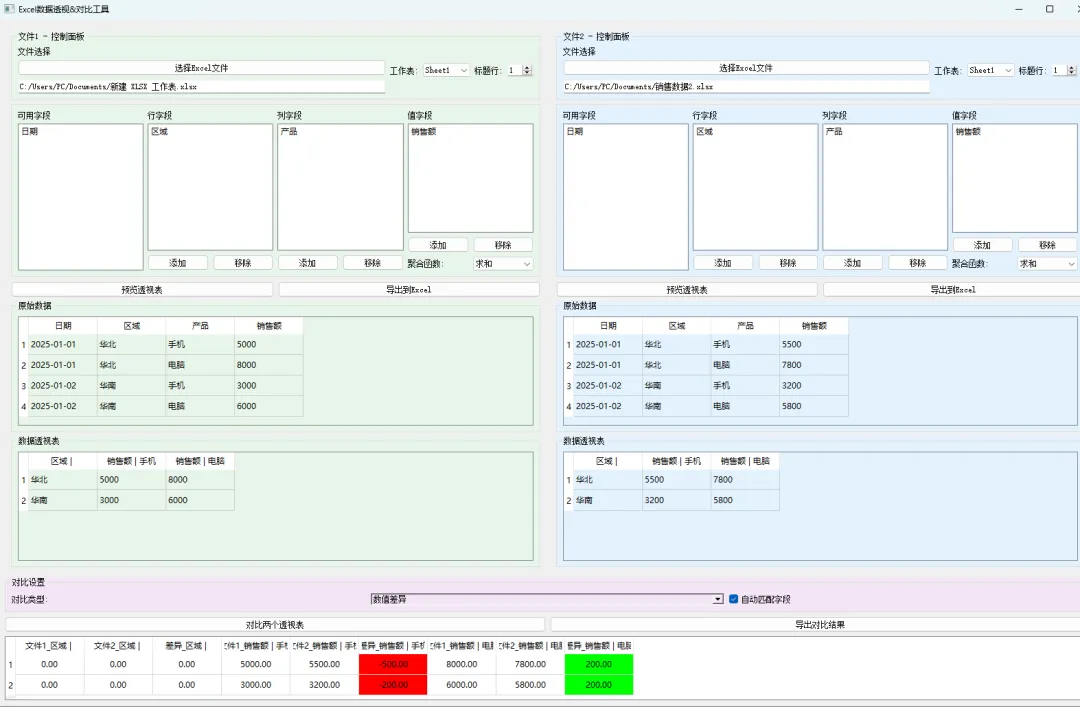
有没有一款工具,能一键读取Excel文件可视化配置数据透视表自动对比两份数据的差异,还能一键导出美观的Excel/PDF报表?不用复杂的函数公式,不用繁琐的拖拽设置,界面精致高级、操作简单易懂,哪怕是零基础的办公小白也能轻松上手?今天就给大家带来一款基于Python+PyQt5开发的双文件数据透视&智能对比工具

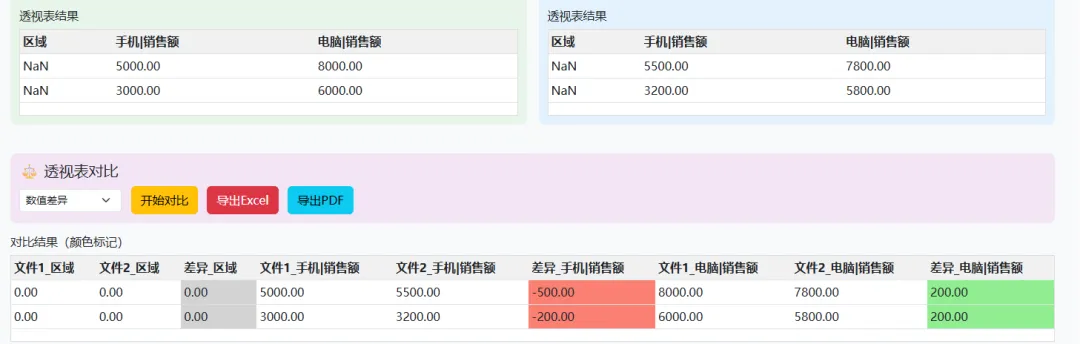
这款工具完美融合了数据处理的核心需求与高颜值UI设计,采用清新不透明的配色方案,左右分栏双面板独立操作,支持自定义行、列、值字段与六种聚合函数,自动计算数值差异/百分比差异,差异结果自动上色标注,还能一键导出带格式的专业报表。从数据导入、透视分析、智能对比到报表输出,全流程一站式搞定,彻底解放你的双手,让数据分析从繁琐加班变成高效轻松,职场竞争力直接翻倍!

一、核心功能模块详解

这款工具整体分为三大核心模块,每个模块各司其职,完美覆盖数据处理全流程,功能齐全且操作极简:

模块1:MiniDataFrame 轻量级数据处理核心

这是整个工具的数据心脏,我们没有依赖笨重的Pandas库,而是纯手写实现了轻量级数据框,完美适配Excel读写、数据透视表核心功能,轻量化无冗余,运行速度更快。

  1. 核心能力:实现Excel文件的读取与写入、数据深拷贝、自定义数据透视表算法;
  2. 聚合支持:内置求和、平均值、计数、最大值、最小值、标准差六种常用聚合函数,覆盖90%办公数据分析场景;
  3. 透视算法:自主实现多维度透视逻辑,支持自定义行字段、列字段、值字段,自动填充空值,数据计算精准无误差;
  4. 优势:纯原生Python实现,无需安装第三方大数据库,兼容性极强,任何电脑都能流畅运行。

模块2:PivotPanel 双面板可视化透视操作区

这是工具的操作核心,采用左右分栏设计,绿色+蓝色清新配色,不透明高级质感,支持两个Excel文件独立透视分析,互不干扰:

  1. 文件管理:一键选择Excel文件,自动识别工作表,自定义标题行,适配所有格式的Excel表格;
  2. 字段配置:可视化拖拽字段,将可用字段分配为行字段、列字段、值字段,操作比Excel更直观;
  3. 实时预览:配置完成后一键生成透视表,原始数据与透视结果同步展示,所见即所得;
  4. 独立导出:单个面板支持直接导出透视表到Excel,单文件分析也能独立使用。

模块3:MainWindow 主窗口+智能对比&报表导出

这是工具的总控中心,整合双面板数据,实现智能对比与专业报表导出,功能闭环:

  1. 智能对比:支持数值差异、百分比差异两种对比模式,自动匹配共同字段,差异数据自动红绿标注;
  2. 格式导出:一键导出带颜色格式的Excel报表,或生成专业PDF报表,文件名自动按时间戳命名;
  3. 界面优化:分割窗口自适应大小,分组面板清晰分区,按钮布局合理,整体美观大方、高级感拉满。

二、完整源码(可直接复制运行)

import sysimport randomfrom datetime import datetimefrom PyQt5.QtWidgets import (QApplication, QMainWindow, QWidget, QHBoxLayout, QVBoxLayout,                             QGroupBox, QPushButton, QComboBox, QLineEdit, QSpinBox,                             QListWidget, QTableWidget, QTableWidgetItem, QCheckBox,                             QFileDialog, QMessageBox, QSplitter, QLabel, QDialog)from PyQt5.QtCore import Qtfrom PyQt5.QtGui import QColorfrom fpdf import FPDF# 聚合函数映射AGG_FUNCTIONS = {"sum""求和","mean""平均值","count""计数","max""最大值","min""最小值","std""标准差"}# 轻量级数据框,实现Excel读写和透视表classMiniDataFrame:def__init__(self, columns=None, data=None):        self.columns = columns or []        self.data = data or []def_col_idx(self, col_name):return self.columns.index(col_name)# 核心:数据透视表实现defpivot_table(self, index, columns, values, aggfunc, fill_value=0):from collections import defaultdict        index_keys = []        col_keys = []        data_dict = defaultdict(lambda: defaultdict(list))for row in self.data:            idx_vals = tuple(row[self._col_idx(c)] for c in index)            col_vals = tuple(row[self._col_idx(c)] for c in columns)for v in values:try:                    num = float(row[self._col_idx(v)])except:                    num = 0                data_dict[idx_vals][col_vals].append(num)# 聚合函数映射        agg_map = {"sum": sum,"mean"lambda x: sum(x)/len(x) if x else0,"count": len,"max": max,"min": min,"std"lambda x: ((sum((i-sum(x)/len(x))**2for i in x)/len(x))**0.5if len(x)>=1else0        }        agg = agg_map[aggfunc]        all_idx = sorted(data_dict.keys())        all_col = sorted({c for vs in data_dict.values() for c in vs.keys()})# 构建新表头        new_cols = list(index)        val_headers = [f"{v}|{'|'.join(c)}"for v in values for c in all_col]        new_cols += val_headers# 构建新数据        new_data = []for idx in all_idx:            row = list(idx)for c in all_col:                vals = data_dict[idx].get(c, [])                row.append(agg(vals) if vals else fill_value)            new_data.append(row)return MiniDataFrame(new_cols, new_data)# 导出Exceldefto_excel(self, path, index=False):import xlwt        wb = xlwt.Workbook()        ws = wb.add_sheet("Sheet1")for i, col in enumerate(self.columns):            ws.write(0, i, col)for r, row in enumerate(self.data):for c, val in enumerate(row):                ws.write(r+1, c, val)        wb.save(path)# 读取Excel    @staticmethoddefread_excel(path, sheet_name=0, header=0):import xlrd        wb = xlrd.open_workbook(path)        ws = wb.sheet_by_name(sheet_name) if isinstance(sheet_name, str) else wb.sheet_by_index(sheet_name)        headers = [ws.cell_value(header, i) for i in range(ws.ncols)]        data = [[ws.cell_value(r, i) for i in range(ws.ncols)] for r in range(header+1, ws.nrows)]return MiniDataFrame(headers, data)# 数据拷贝defcopy(self):return MiniDataFrame(self.columns.copy(), [row.copy() for row in self.data])# 透视表操作面板(左右双面板)classPivotPanel(QWidget):def__init__(self, color="#e8f5e9"):        super().__init__()        self.df = None        self.pivot_df = None        self.init_ui(color)definit_ui(self, color):        main_layout = QVBoxLayout()# 文件控制面板        file_group = QGroupBox("文件1 - 控制面板"if color == "#e8f5e9"else"文件2 - 控制面板")        file_group.setStyleSheet(f"QGroupBox {{ background-color: {color}; }}")        file_layout = QHBoxLayout()        file_group.setLayout(file_layout)        self.btn_select_file = QPushButton("选择Excel文件")        self.file_path_edit = QLineEdit(readOnly=True)        self.combo_sheet = QComboBox()        self.spin_header = QSpinBox(minimum=1, value=1)        file_left = QVBoxLayout()        file_left.addWidget(QLabel("文件选择"))        file_left.addWidget(self.btn_select_file)        file_left.addWidget(self.file_path_edit)        file_right = QHBoxLayout()        file_right.addWidget(QLabel("工作表:"))        file_right.addWidget(self.combo_sheet)        file_right.addWidget(QLabel("标题行:"))        file_right.addWidget(self.spin_header)        file_layout.addLayout(file_left)        file_layout.addLayout(file_right)        main_layout.addWidget(file_group)# 字段配置区        field_group = QGroupBox()        field_group.setStyleSheet(f"QGroupBox {{ background-color: {color}; }}")        field_layout = QHBoxLayout()        field_group.setLayout(field_layout)        self.list_available = QListWidget(selectionMode=QListWidget.ExtendedSelection)        self.list_row = QListWidget(selectionMode=QListWidget.ExtendedSelection)        self.list_col = QListWidget(selectionMode=QListWidget.ExtendedSelection)        self.list_value = QListWidget(selectionMode=QListWidget.ExtendedSelection)# 可用字段        la = QVBoxLayout()        la.addWidget(QLabel("可用字段"))        la.addWidget(self.list_available)        field_layout.addLayout(la)# 行字段        lr = QVBoxLayout()        lr.addWidget(QLabel("行字段"))        lr.addWidget(self.list_row)        ar = QHBoxLayout()        btn_r_add = QPushButton("添加")        btn_r_del = QPushButton("移除")        ar.addWidget(btn_r_add)        ar.addWidget(btn_r_del)        lr.addLayout(ar)        field_layout.addLayout(lr)# 列字段        lc = QVBoxLayout()        lc.addWidget(QLabel("列字段"))        lc.addWidget(self.list_col)        ac = QHBoxLayout()        btn_c_add = QPushButton("添加")        btn_c_del = QPushButton("移除")        ac.addWidget(btn_c_add)        ac.addWidget(btn_c_del)        lc.addLayout(ac)        field_layout.addLayout(lc)# 值字段+聚合函数        lv = QVBoxLayout()        lv.addWidget(QLabel("值字段"))        lv.addWidget(self.list_value)        av = QHBoxLayout()        btn_v_add = QPushButton("添加")        btn_v_del = QPushButton("移除")        av.addWidget(btn_v_add)        av.addWidget(btn_v_del)        lv.addLayout(av)        agg_layout = QHBoxLayout()        agg_layout.addWidget(QLabel("聚合函数:"))        self.combo_agg = QComboBox()        self.combo_agg.addItems(AGG_FUNCTIONS.values())        agg_layout.addWidget(self.combo_agg)        lv.addLayout(agg_layout)        field_layout.addLayout(lv)        main_layout.addWidget(field_group)# 操作按钮        btn_layout = QHBoxLayout()        self.btn_preview = QPushButton("预览透视表")        self.btn_export = QPushButton("导出到Excel")        btn_layout.addWidget(self.btn_preview)        btn_layout.addWidget(self.btn_export)        main_layout.addLayout(btn_layout)# 原始数据表格        g1 = QGroupBox("原始数据")        g1.setStyleSheet(f"background-color: {color};")        t1 = QVBoxLayout()        self.table_raw = QTableWidget()        t1.addWidget(self.table_raw)        g1.setLayout(t1)        main_layout.addWidget(g1)# 透视表结果        g2 = QGroupBox("数据透视表")        g2.setStyleSheet(f"background-color: {color};")        t2 = QVBoxLayout()        self.table_pivot = QTableWidget()        t2.addWidget(self.table_pivot)        g2.setLayout(t2)        main_layout.addWidget(g2)        self.setLayout(main_layout)# 信号绑定        self.btn_select_file.clicked.connect(self.select_file)        self.combo_sheet.currentIndexChanged.connect(self.on_sheet_changed)        self.spin_header.valueChanged.connect(self.on_sheet_changed)        self.btn_preview.clicked.connect(self.preview_pivot)        self.btn_export.clicked.connect(self.export_pivot)# 字段移动按钮        btn_r_add.clicked.connect(lambda: self.move(self.list_available, self.list_row))        btn_r_del.clicked.connect(lambda: self.move(self.list_row, self.list_available))        btn_c_add.clicked.connect(lambda: self.move(self.list_available, self.list_col))        btn_c_del.clicked.connect(lambda: self.move(self.list_col, self.list_available))        btn_v_add.clicked.connect(lambda: self.move(self.list_available, self.list_value))        btn_v_del.clicked.connect(lambda: self.move(self.list_value, self.list_available))# 字段移动方法defmove(self, src, dst):for item in src.selectedItems():            dst.addItem(item.text())            src.takeItem(src.row(item))# 选择Excel文件defselect_file(self):        path, _ = QFileDialog.getOpenFileName(filter="Excel (*.xlsx *.xls)")ifnot path:return        self.file_path_edit.setText(path)try:import xlrd            xl = xlrd.open_workbook(path)            self.combo_sheet.clear()            self.combo_sheet.addItems(xl.sheet_names())except Exception as e:            QMessageBox.critical(self, "错误"f"读取失败:{str(e)}")# 工作表切换事件defon_sheet_changed(self):ifnot self.file_path_edit.text():returntry:            self.df = MiniDataFrame.read_excel(                self.file_path_edit.text(),                sheet_name=self.combo_sheet.currentText(),                header=self.spin_header.value() - 1            )            self.list_available.clear()            self.list_available.addItems(self.df.columns)            self.show_raw()except Exception as e:            QMessageBox.critical(self, "错误"f"加载失败:{str(e)}")# 显示原始数据defshow_raw(self):        self.table_raw.setRowCount(len(self.df.data))        self.table_raw.setColumnCount(len(self.df.columns))        self.table_raw.setHorizontalHeaderLabels(self.df.columns)for r, row in enumerate(self.df.data):for c, val in enumerate(row):                self.table_raw.setItem(r, c, QTableWidgetItem(str(val)))# 获取列表所有字段defget_list(self, lst):return [lst.item(i).text() for i in range(lst.count())]# 预览透视表defpreview_pivot(self):        rows = self.get_list(self.list_row)        cols = self.get_list(self.list_col)        vals = self.get_list(self.list_value)ifnot vals:            QMessageBox.warning(self, "提示""请选择值字段")returntry:            agg = next(k for k, v in AGG_FUNCTIONS.items() if v == self.combo_agg.currentText())            self.pivot_df = self.df.pivot_table(index=rows, columns=cols, values=vals, aggfunc=agg, fill_value=0)            self.show_pivot()except Exception as e:            QMessageBox.critical(self, "错误"f"透视表失败:{str(e)}")# 显示透视表结果defshow_pivot(self):        self.table_pivot.setRowCount(len(self.pivot_df.data))        self.table_pivot.setColumnCount(len(self.pivot_df.columns))        self.table_pivot.setHorizontalHeaderLabels(self.pivot_df.columns)for r, row in enumerate(self.pivot_df.data):for c, val in enumerate(row):                self.table_pivot.setItem(r, c, QTableWidgetItem(str(val)))# 导出透视表defexport_pivot(self):if self.pivot_df isNone:            QMessageBox.warning(self, "提示""请先生成透视表")return        path, _ = QFileDialog.getSaveFileName(filter="Excel (*.xlsx)")if path:            self.pivot_df.to_excel(path, index=False)            QMessageBox.information(self, "成功""导出完成")# 获取透视表数据defget_pivot_data(self):return self.pivot_df# 主窗口classMainWindow(QMainWindow):def__init__(self):        super().__init__()        self.setWindowTitle("Excel数据透视&对比工具")        self.setGeometry(1001001600900)        self.init_ui()definit_ui(self):        w = QWidget()        self.setCentralWidget(w)        main_layout = QVBoxLayout(w)# 左右双面板        splitter = QSplitter(Qt.Horizontal)        self.left = PivotPanel("#e8f5e9")        self.right = PivotPanel("#e3f2fd")        splitter.addWidget(self.left)        splitter.addWidget(self.right)        main_layout.addWidget(splitter)# 对比设置        g = QGroupBox("对比设置")        g.setStyleSheet("background-color: #f3e5f5;")        h = QHBoxLayout(g)        h.addWidget(QLabel("对比类型:"))        self.cb_type = QComboBox()        self.cb_type.addItems(["数值差异""百分比差异"])        h.addWidget(self.cb_type)        self.cb_auto = QCheckBox("自动匹配字段", checked=True)        h.addWidget(self.cb_auto)        main_layout.addWidget(g)# 对比&导出按钮        btn_layout = QHBoxLayout()        self.btn_cmp = QPushButton("对比两个透视表")        self.btn_exp = QPushButton("导出对比结果(Excel/PDF)")        btn_layout.addWidget(self.btn_cmp)        btn_layout.addWidget(self.btn_exp)        main_layout.addLayout(btn_layout)# 对比结果表格        self.table_cmp = QTableWidget()        main_layout.addWidget(self.table_cmp)        self.result = None# 信号绑定        self.btn_cmp.clicked.connect(self.do_compare)        self.btn_exp.clicked.connect(self.export_cmp_with_style)# 执行数据对比defdo_compare(self):        a = self.left.get_pivot_data()        b = self.right.get_pivot_data()if a isNoneor b isNone:            QMessageBox.warning(self, "提示""请先生成透视表")return        common = [c for c in a.columns if c in b.columns]ifnot common:            QMessageBox.warning(self, "提示""无共同字段")returntry:            res_cols = []            res_data = []for a_row, b_row in zip(a.data, b.data):                new_row = []for c in common:                    ai = a.columns.index(c)                    bi = b.columns.index(c)                    av = float(a_row[ai]) if str(a_row[ai]).replace('.','').replace('-','').isdigit() else0                    bv = float(b_row[bi]) if str(b_row[bi]).replace('.','').replace('-','').isdigit() else0                    new_row += [av, bv]# 计算差异if self.cb_type.currentText() == "数值差异":                        new_row.append(av - bv)else:                        new_row.append(((av - bv) / bv) * 100if bv != 0else0)                res_data.append(new_row)# 构建结果表头for c in common:                res_cols += [f"文件1_{c}"f"文件2_{c}"f"差异_{c}"]            self.result = MiniDataFrame(res_cols, res_data)            self.show_cmp()            QMessageBox.information(self, "成功""对比完成")except Exception as e:            QMessageBox.critical(self, "错误"f"对比失败:{str(e)}")# 显示对比结果(自动上色)defshow_cmp(self):        df = self.result        self.table_cmp.setRowCount(len(df.data))        self.table_cmp.setColumnCount(len(df.columns))        self.table_cmp.setHorizontalHeaderLabels(df.columns)for r, row in enumerate(df.data):for c, val in enumerate(row):try:                    txt = f"{float(val):.2f}"except:                    txt = str(val)                item = QTableWidgetItem(txt)                item.setTextAlignment(Qt.AlignCenter)# 差异列自动上色if"差异"in df.columns[c]:try:                        num = float(val)if num > 0:                            item.setBackground(QColor(144,238,144))  # 绿色elif num < 0:                            item.setBackground(QColor(250,128,114))  # 红色else:                            item.setBackground(QColor(211,211,211))  # 灰色except:pass                self.table_cmp.setItem(r, c, item)# 生成唯一文件名defgenerate_filename(self):        time_str = datetime.now().strftime("%Y%m%d%H%M%S")        rand_str = str(random.randint(10000,99999))returnf"对比结果_{time_str}_{rand_str}"# 导出选择弹窗defexport_cmp_with_style(self):if self.result isNoneor self.table_cmp.rowCount() == 0:            QMessageBox.warning(self, "提示""请先生成对比结果")return        dialog = QDialog(self)        dialog.setWindowTitle("选择导出格式")        dialog.setFixedSize(300,150)        layout = QVBoxLayout(dialog)        layout.addWidget(QLabel("请选择导出格式:"))        hbox = QHBoxLayout()        btn_xls = QPushButton("导出 Excel")        btn_pdf = QPushButton("导出 PDF")        hbox.addWidget(btn_xls)        hbox.addWidget(btn_pdf)        layout.addLayout(hbox)defexp_xls(): dialog.close(); self.export_to_excel()defexp_pdf(): dialog.close(); self.export_to_pdf()        btn_xls.clicked.connect(exp_xls)        btn_pdf.clicked.connect(exp_pdf)        dialog.exec_()# 导出Exceldefexport_to_excel(self):        folder = QFileDialog.getExistingDirectory()ifnot folder: return        path = f"{folder}/{self.generate_filename()}.xlsx"        self.result.to_excel(path)        QMessageBox.information(self, "成功"f"Excel已保存:\n{path}")# 导出PDF(带颜色格式)defexport_to_pdf(self):        folder = QFileDialog.getExistingDirectory()ifnot folder: return        path = f"{folder}/{self.generate_filename()}.pdf"        pdf = FPDF()        pdf.add_page()        pdf.set_font("Arial", size=10)        pdf.cell(20010, txt="数据对比报表", ln=True, align='C')        pdf.ln(5)        col_width = 28        headers = self.result.columns# 表头for h in headers:            pdf.cell(col_width, 10, h[:8], border=1, align='C')        pdf.ln()# 数据行for row in self.result.data:for i, val in enumerate(row):                txt = f"{val:.2f}"if isinstance(val, (int, float)) else str(val)if"差异"in headers[i]:try:                        num = float(val)if num > 0:                            pdf.set_fill_color(144,238,144)elif num < 0:                            pdf.set_fill_color(250,128,114)else:                            pdf.set_fill_color(211,211,211)                        pdf.cell(col_width, 10, txt, border=1, align='C', fill=True)except:                        pdf.cell(col_width, 10, txt, border=1, align='C')else:                    pdf.cell(col_width, 10, txt, border=1, align='C')            pdf.ln()        pdf.output(path)        QMessageBox.information(self, "成功"f"PDF已保存:\n{path}")if __name__ == "__main__":    app = QApplication(sys.argv)    win = MainWindow()    win.show()    sys.exit(app.exec_())

三、运行依赖安装

运行前需要安装第三方库,打开命令提示符执行以下命令:

pip install PyQt5 xlrd xlwt fpdf

四、知识点总结

  1. PyQt5 GUI编程:掌握主窗口、分割窗口、分组面板、表格、按钮等组件的使用,学会自定义界面样式、信号与槽绑定,实现可视化交互;
  2. 轻量级数据处理:纯手写实现MiniDataFrame数据框,替代Pandas完成Excel读写、数据透视、数据拷贝,理解数据结构与算法的核心逻辑;
  3. 数据透视表算法:基于字典嵌套实现多维度数据聚合,掌握六种常用聚合函数的实现原理,理解Excel透视表的底层逻辑;
  4. 文件操作与报表导出:实现Excel文件的读写、PDF报表生成,学会自动命名文件、格式化数据、为表格添加颜色样式;
  5. 异常处理:全流程添加异常捕获,避免程序崩溃,提升工具的稳定性和用户体验。

五、拓展场景与使用步骤

1. 适用拓展场景

  • 财务对账:对比两个月的财务报表,自动计算收支差异,生成对账报表;
  • 销售分析:透视分析不同区域、产品的销售数据,对比同期销售业绩;
  • 人事统计:统计员工考勤、绩效数据,多维度聚合分析,对比部门差异;
  • 库存管理:透视库存数据,对比前后盘点结果,快速定位异常库存;
  • 报表自动化:替代手动Excel操作,批量处理数据,一键生成标准化报表。

2. 工具使用步骤

  1. 安装依赖:执行上述pip命令,安装所需库;
  2. 运行代码:复制源码到Python文件中,直接运行启动工具;
  3. 导入文件:左右面板分别点击「选择Excel文件」,导入需要分析的两个文件;
  4. 配置透视表:拖拽字段到行、列、值区域,选择聚合函数,点击「预览透视表」;
  5. 数据对比:选择对比类型,点击「对比两个透视表」,查看自动上色的差异结果;
  6. 导出报表:点击导出按钮,选择Excel/PDF格式,保存专业报表。

这款工具将Python的强大数据处理能力与高颜值GUI完美结合,无需编程基础就能使用,彻底解决职场数据处理的痛点。不管是日常办公还是专业数据分析,都能大幅提升效率,让你从繁琐的重复劳动中解放出来!


总结

  1. 工具基于Python+PyQt5开发,高颜值、功能全、轻量化,适配所有Windows电脑;
  2. 核心包含双面板透视、智能对比、格式导出三大功能,覆盖全流程数据处理;
  3. 零基础可直接使用,支持Excel/PDF导出,适用于财务、销售、人事等多场景;
  4. 源码可二次开发,拓展更多聚合函数、自定义界面、批量处理等高级功能。

最新文章

随机文章

基本 文件 流程 错误 SQL 调试
  1. 请求信息 : 2026-04-20 10:58:33 HTTP/2.0 GET : https://f.mffb.com.cn/a/484838.html
  2. 运行时间 : 0.127899s [ 吞吐率:7.82req/s ] 内存消耗:4,974.62kb 文件加载:140
  3. 缓存信息 : 0 reads,0 writes
  4. 会话信息 : SESSION_ID=74a160cb0930e594590eab5926473b9e
  1. /yingpanguazai/ssd/ssd1/www/f.mffb.com.cn/public/index.php ( 0.79 KB )
  2. /yingpanguazai/ssd/ssd1/www/f.mffb.com.cn/vendor/autoload.php ( 0.17 KB )
  3. /yingpanguazai/ssd/ssd1/www/f.mffb.com.cn/vendor/composer/autoload_real.php ( 2.49 KB )
  4. /yingpanguazai/ssd/ssd1/www/f.mffb.com.cn/vendor/composer/platform_check.php ( 0.90 KB )
  5. /yingpanguazai/ssd/ssd1/www/f.mffb.com.cn/vendor/composer/ClassLoader.php ( 14.03 KB )
  6. /yingpanguazai/ssd/ssd1/www/f.mffb.com.cn/vendor/composer/autoload_static.php ( 4.90 KB )
  7. /yingpanguazai/ssd/ssd1/www/f.mffb.com.cn/vendor/topthink/think-helper/src/helper.php ( 8.34 KB )
  8. /yingpanguazai/ssd/ssd1/www/f.mffb.com.cn/vendor/topthink/think-validate/src/helper.php ( 2.19 KB )
  9. /yingpanguazai/ssd/ssd1/www/f.mffb.com.cn/vendor/topthink/think-orm/src/helper.php ( 1.47 KB )
  10. /yingpanguazai/ssd/ssd1/www/f.mffb.com.cn/vendor/topthink/think-orm/stubs/load_stubs.php ( 0.16 KB )
  11. /yingpanguazai/ssd/ssd1/www/f.mffb.com.cn/vendor/topthink/framework/src/think/Exception.php ( 1.69 KB )
  12. /yingpanguazai/ssd/ssd1/www/f.mffb.com.cn/vendor/topthink/think-container/src/Facade.php ( 2.71 KB )
  13. /yingpanguazai/ssd/ssd1/www/f.mffb.com.cn/vendor/symfony/deprecation-contracts/function.php ( 0.99 KB )
  14. /yingpanguazai/ssd/ssd1/www/f.mffb.com.cn/vendor/symfony/polyfill-mbstring/bootstrap.php ( 8.26 KB )
  15. /yingpanguazai/ssd/ssd1/www/f.mffb.com.cn/vendor/symfony/polyfill-mbstring/bootstrap80.php ( 9.78 KB )
  16. /yingpanguazai/ssd/ssd1/www/f.mffb.com.cn/vendor/symfony/var-dumper/Resources/functions/dump.php ( 1.49 KB )
  17. /yingpanguazai/ssd/ssd1/www/f.mffb.com.cn/vendor/topthink/think-dumper/src/helper.php ( 0.18 KB )
  18. /yingpanguazai/ssd/ssd1/www/f.mffb.com.cn/vendor/symfony/var-dumper/VarDumper.php ( 4.30 KB )
  19. /yingpanguazai/ssd/ssd1/www/f.mffb.com.cn/vendor/topthink/framework/src/think/App.php ( 15.30 KB )
  20. /yingpanguazai/ssd/ssd1/www/f.mffb.com.cn/vendor/topthink/think-container/src/Container.php ( 15.76 KB )
  21. /yingpanguazai/ssd/ssd1/www/f.mffb.com.cn/vendor/psr/container/src/ContainerInterface.php ( 1.02 KB )
  22. /yingpanguazai/ssd/ssd1/www/f.mffb.com.cn/app/provider.php ( 0.19 KB )
  23. /yingpanguazai/ssd/ssd1/www/f.mffb.com.cn/vendor/topthink/framework/src/think/Http.php ( 6.04 KB )
  24. /yingpanguazai/ssd/ssd1/www/f.mffb.com.cn/vendor/topthink/think-helper/src/helper/Str.php ( 7.29 KB )
  25. /yingpanguazai/ssd/ssd1/www/f.mffb.com.cn/vendor/topthink/framework/src/think/Env.php ( 4.68 KB )
  26. /yingpanguazai/ssd/ssd1/www/f.mffb.com.cn/app/common.php ( 0.03 KB )
  27. /yingpanguazai/ssd/ssd1/www/f.mffb.com.cn/vendor/topthink/framework/src/helper.php ( 18.78 KB )
  28. /yingpanguazai/ssd/ssd1/www/f.mffb.com.cn/vendor/topthink/framework/src/think/Config.php ( 5.54 KB )
  29. /yingpanguazai/ssd/ssd1/www/f.mffb.com.cn/config/app.php ( 0.95 KB )
  30. /yingpanguazai/ssd/ssd1/www/f.mffb.com.cn/config/cache.php ( 0.78 KB )
  31. /yingpanguazai/ssd/ssd1/www/f.mffb.com.cn/config/console.php ( 0.23 KB )
  32. /yingpanguazai/ssd/ssd1/www/f.mffb.com.cn/config/cookie.php ( 0.56 KB )
  33. /yingpanguazai/ssd/ssd1/www/f.mffb.com.cn/config/database.php ( 2.48 KB )
  34. /yingpanguazai/ssd/ssd1/www/f.mffb.com.cn/vendor/topthink/framework/src/think/facade/Env.php ( 1.67 KB )
  35. /yingpanguazai/ssd/ssd1/www/f.mffb.com.cn/config/filesystem.php ( 0.61 KB )
  36. /yingpanguazai/ssd/ssd1/www/f.mffb.com.cn/config/lang.php ( 0.91 KB )
  37. /yingpanguazai/ssd/ssd1/www/f.mffb.com.cn/config/log.php ( 1.35 KB )
  38. /yingpanguazai/ssd/ssd1/www/f.mffb.com.cn/config/middleware.php ( 0.19 KB )
  39. /yingpanguazai/ssd/ssd1/www/f.mffb.com.cn/config/route.php ( 1.89 KB )
  40. /yingpanguazai/ssd/ssd1/www/f.mffb.com.cn/config/session.php ( 0.57 KB )
  41. /yingpanguazai/ssd/ssd1/www/f.mffb.com.cn/config/trace.php ( 0.34 KB )
  42. /yingpanguazai/ssd/ssd1/www/f.mffb.com.cn/config/view.php ( 0.82 KB )
  43. /yingpanguazai/ssd/ssd1/www/f.mffb.com.cn/app/event.php ( 0.25 KB )
  44. /yingpanguazai/ssd/ssd1/www/f.mffb.com.cn/vendor/topthink/framework/src/think/Event.php ( 7.67 KB )
  45. /yingpanguazai/ssd/ssd1/www/f.mffb.com.cn/app/service.php ( 0.13 KB )
  46. /yingpanguazai/ssd/ssd1/www/f.mffb.com.cn/app/AppService.php ( 0.26 KB )
  47. /yingpanguazai/ssd/ssd1/www/f.mffb.com.cn/vendor/topthink/framework/src/think/Service.php ( 1.64 KB )
  48. /yingpanguazai/ssd/ssd1/www/f.mffb.com.cn/vendor/topthink/framework/src/think/Lang.php ( 7.35 KB )
  49. /yingpanguazai/ssd/ssd1/www/f.mffb.com.cn/vendor/topthink/framework/src/lang/zh-cn.php ( 13.70 KB )
  50. /yingpanguazai/ssd/ssd1/www/f.mffb.com.cn/vendor/topthink/framework/src/think/initializer/Error.php ( 3.31 KB )
  51. /yingpanguazai/ssd/ssd1/www/f.mffb.com.cn/vendor/topthink/framework/src/think/initializer/RegisterService.php ( 1.33 KB )
  52. /yingpanguazai/ssd/ssd1/www/f.mffb.com.cn/vendor/services.php ( 0.14 KB )
  53. /yingpanguazai/ssd/ssd1/www/f.mffb.com.cn/vendor/topthink/framework/src/think/service/PaginatorService.php ( 1.52 KB )
  54. /yingpanguazai/ssd/ssd1/www/f.mffb.com.cn/vendor/topthink/framework/src/think/service/ValidateService.php ( 0.99 KB )
  55. /yingpanguazai/ssd/ssd1/www/f.mffb.com.cn/vendor/topthink/framework/src/think/service/ModelService.php ( 2.04 KB )
  56. /yingpanguazai/ssd/ssd1/www/f.mffb.com.cn/vendor/topthink/think-trace/src/Service.php ( 0.77 KB )
  57. /yingpanguazai/ssd/ssd1/www/f.mffb.com.cn/vendor/topthink/framework/src/think/Middleware.php ( 6.72 KB )
  58. /yingpanguazai/ssd/ssd1/www/f.mffb.com.cn/vendor/topthink/framework/src/think/initializer/BootService.php ( 0.77 KB )
  59. /yingpanguazai/ssd/ssd1/www/f.mffb.com.cn/vendor/topthink/think-orm/src/Paginator.php ( 11.86 KB )
  60. /yingpanguazai/ssd/ssd1/www/f.mffb.com.cn/vendor/topthink/think-validate/src/Validate.php ( 63.20 KB )
  61. /yingpanguazai/ssd/ssd1/www/f.mffb.com.cn/vendor/topthink/think-orm/src/Model.php ( 23.55 KB )
  62. /yingpanguazai/ssd/ssd1/www/f.mffb.com.cn/vendor/topthink/think-orm/src/model/concern/Attribute.php ( 21.05 KB )
  63. /yingpanguazai/ssd/ssd1/www/f.mffb.com.cn/vendor/topthink/think-orm/src/model/concern/AutoWriteData.php ( 4.21 KB )
  64. /yingpanguazai/ssd/ssd1/www/f.mffb.com.cn/vendor/topthink/think-orm/src/model/concern/Conversion.php ( 6.44 KB )
  65. /yingpanguazai/ssd/ssd1/www/f.mffb.com.cn/vendor/topthink/think-orm/src/model/concern/DbConnect.php ( 5.16 KB )
  66. /yingpanguazai/ssd/ssd1/www/f.mffb.com.cn/vendor/topthink/think-orm/src/model/concern/ModelEvent.php ( 2.33 KB )
  67. /yingpanguazai/ssd/ssd1/www/f.mffb.com.cn/vendor/topthink/think-orm/src/model/concern/RelationShip.php ( 28.29 KB )
  68. /yingpanguazai/ssd/ssd1/www/f.mffb.com.cn/vendor/topthink/think-helper/src/contract/Arrayable.php ( 0.09 KB )
  69. /yingpanguazai/ssd/ssd1/www/f.mffb.com.cn/vendor/topthink/think-helper/src/contract/Jsonable.php ( 0.13 KB )
  70. /yingpanguazai/ssd/ssd1/www/f.mffb.com.cn/vendor/topthink/think-orm/src/model/contract/Modelable.php ( 0.09 KB )
  71. /yingpanguazai/ssd/ssd1/www/f.mffb.com.cn/vendor/topthink/framework/src/think/Db.php ( 2.88 KB )
  72. /yingpanguazai/ssd/ssd1/www/f.mffb.com.cn/vendor/topthink/think-orm/src/DbManager.php ( 8.52 KB )
  73. /yingpanguazai/ssd/ssd1/www/f.mffb.com.cn/vendor/topthink/framework/src/think/Log.php ( 6.28 KB )
  74. /yingpanguazai/ssd/ssd1/www/f.mffb.com.cn/vendor/topthink/framework/src/think/Manager.php ( 3.92 KB )
  75. /yingpanguazai/ssd/ssd1/www/f.mffb.com.cn/vendor/psr/log/src/LoggerTrait.php ( 2.69 KB )
  76. /yingpanguazai/ssd/ssd1/www/f.mffb.com.cn/vendor/psr/log/src/LoggerInterface.php ( 2.71 KB )
  77. /yingpanguazai/ssd/ssd1/www/f.mffb.com.cn/vendor/topthink/framework/src/think/Cache.php ( 4.92 KB )
  78. /yingpanguazai/ssd/ssd1/www/f.mffb.com.cn/vendor/psr/simple-cache/src/CacheInterface.php ( 4.71 KB )
  79. /yingpanguazai/ssd/ssd1/www/f.mffb.com.cn/vendor/topthink/think-helper/src/helper/Arr.php ( 16.63 KB )
  80. /yingpanguazai/ssd/ssd1/www/f.mffb.com.cn/vendor/topthink/framework/src/think/cache/driver/File.php ( 7.84 KB )
  81. /yingpanguazai/ssd/ssd1/www/f.mffb.com.cn/vendor/topthink/framework/src/think/cache/Driver.php ( 9.03 KB )
  82. /yingpanguazai/ssd/ssd1/www/f.mffb.com.cn/vendor/topthink/framework/src/think/contract/CacheHandlerInterface.php ( 1.99 KB )
  83. /yingpanguazai/ssd/ssd1/www/f.mffb.com.cn/app/Request.php ( 0.09 KB )
  84. /yingpanguazai/ssd/ssd1/www/f.mffb.com.cn/vendor/topthink/framework/src/think/Request.php ( 55.78 KB )
  85. /yingpanguazai/ssd/ssd1/www/f.mffb.com.cn/app/middleware.php ( 0.25 KB )
  86. /yingpanguazai/ssd/ssd1/www/f.mffb.com.cn/vendor/topthink/framework/src/think/Pipeline.php ( 2.61 KB )
  87. /yingpanguazai/ssd/ssd1/www/f.mffb.com.cn/vendor/topthink/think-trace/src/TraceDebug.php ( 3.40 KB )
  88. /yingpanguazai/ssd/ssd1/www/f.mffb.com.cn/vendor/topthink/framework/src/think/middleware/SessionInit.php ( 1.94 KB )
  89. /yingpanguazai/ssd/ssd1/www/f.mffb.com.cn/vendor/topthink/framework/src/think/Session.php ( 1.80 KB )
  90. /yingpanguazai/ssd/ssd1/www/f.mffb.com.cn/vendor/topthink/framework/src/think/session/driver/File.php ( 6.27 KB )
  91. /yingpanguazai/ssd/ssd1/www/f.mffb.com.cn/vendor/topthink/framework/src/think/contract/SessionHandlerInterface.php ( 0.87 KB )
  92. /yingpanguazai/ssd/ssd1/www/f.mffb.com.cn/vendor/topthink/framework/src/think/session/Store.php ( 7.12 KB )
  93. /yingpanguazai/ssd/ssd1/www/f.mffb.com.cn/vendor/topthink/framework/src/think/Route.php ( 23.73 KB )
  94. /yingpanguazai/ssd/ssd1/www/f.mffb.com.cn/vendor/topthink/framework/src/think/route/RuleName.php ( 5.75 KB )
  95. /yingpanguazai/ssd/ssd1/www/f.mffb.com.cn/vendor/topthink/framework/src/think/route/Domain.php ( 2.53 KB )
  96. /yingpanguazai/ssd/ssd1/www/f.mffb.com.cn/vendor/topthink/framework/src/think/route/RuleGroup.php ( 22.43 KB )
  97. /yingpanguazai/ssd/ssd1/www/f.mffb.com.cn/vendor/topthink/framework/src/think/route/Rule.php ( 26.95 KB )
  98. /yingpanguazai/ssd/ssd1/www/f.mffb.com.cn/vendor/topthink/framework/src/think/route/RuleItem.php ( 9.78 KB )
  99. /yingpanguazai/ssd/ssd1/www/f.mffb.com.cn/route/app.php ( 1.72 KB )
  100. /yingpanguazai/ssd/ssd1/www/f.mffb.com.cn/vendor/topthink/framework/src/think/facade/Route.php ( 4.70 KB )
  101. /yingpanguazai/ssd/ssd1/www/f.mffb.com.cn/vendor/topthink/framework/src/think/route/dispatch/Controller.php ( 4.74 KB )
  102. /yingpanguazai/ssd/ssd1/www/f.mffb.com.cn/vendor/topthink/framework/src/think/route/Dispatch.php ( 10.44 KB )
  103. /yingpanguazai/ssd/ssd1/www/f.mffb.com.cn/app/controller/Index.php ( 4.81 KB )
  104. /yingpanguazai/ssd/ssd1/www/f.mffb.com.cn/app/BaseController.php ( 2.05 KB )
  105. /yingpanguazai/ssd/ssd1/www/f.mffb.com.cn/vendor/topthink/think-orm/src/facade/Db.php ( 0.93 KB )
  106. /yingpanguazai/ssd/ssd1/www/f.mffb.com.cn/vendor/topthink/think-orm/src/db/connector/Mysql.php ( 5.44 KB )
  107. /yingpanguazai/ssd/ssd1/www/f.mffb.com.cn/vendor/topthink/think-orm/src/db/PDOConnection.php ( 52.47 KB )
  108. /yingpanguazai/ssd/ssd1/www/f.mffb.com.cn/vendor/topthink/think-orm/src/db/Connection.php ( 8.39 KB )
  109. /yingpanguazai/ssd/ssd1/www/f.mffb.com.cn/vendor/topthink/think-orm/src/db/ConnectionInterface.php ( 4.57 KB )
  110. /yingpanguazai/ssd/ssd1/www/f.mffb.com.cn/vendor/topthink/think-orm/src/db/builder/Mysql.php ( 16.58 KB )
  111. /yingpanguazai/ssd/ssd1/www/f.mffb.com.cn/vendor/topthink/think-orm/src/db/Builder.php ( 24.06 KB )
  112. /yingpanguazai/ssd/ssd1/www/f.mffb.com.cn/vendor/topthink/think-orm/src/db/BaseBuilder.php ( 27.50 KB )
  113. /yingpanguazai/ssd/ssd1/www/f.mffb.com.cn/vendor/topthink/think-orm/src/db/Query.php ( 15.71 KB )
  114. /yingpanguazai/ssd/ssd1/www/f.mffb.com.cn/vendor/topthink/think-orm/src/db/BaseQuery.php ( 45.13 KB )
  115. /yingpanguazai/ssd/ssd1/www/f.mffb.com.cn/vendor/topthink/think-orm/src/db/concern/TimeFieldQuery.php ( 7.43 KB )
  116. /yingpanguazai/ssd/ssd1/www/f.mffb.com.cn/vendor/topthink/think-orm/src/db/concern/AggregateQuery.php ( 3.26 KB )
  117. /yingpanguazai/ssd/ssd1/www/f.mffb.com.cn/vendor/topthink/think-orm/src/db/concern/ModelRelationQuery.php ( 20.07 KB )
  118. /yingpanguazai/ssd/ssd1/www/f.mffb.com.cn/vendor/topthink/think-orm/src/db/concern/ParamsBind.php ( 3.66 KB )
  119. /yingpanguazai/ssd/ssd1/www/f.mffb.com.cn/vendor/topthink/think-orm/src/db/concern/ResultOperation.php ( 7.01 KB )
  120. /yingpanguazai/ssd/ssd1/www/f.mffb.com.cn/vendor/topthink/think-orm/src/db/concern/WhereQuery.php ( 19.37 KB )
  121. /yingpanguazai/ssd/ssd1/www/f.mffb.com.cn/vendor/topthink/think-orm/src/db/concern/JoinAndViewQuery.php ( 7.11 KB )
  122. /yingpanguazai/ssd/ssd1/www/f.mffb.com.cn/vendor/topthink/think-orm/src/db/concern/TableFieldInfo.php ( 2.63 KB )
  123. /yingpanguazai/ssd/ssd1/www/f.mffb.com.cn/vendor/topthink/think-orm/src/db/concern/Transaction.php ( 2.77 KB )
  124. /yingpanguazai/ssd/ssd1/www/f.mffb.com.cn/vendor/topthink/framework/src/think/log/driver/File.php ( 5.96 KB )
  125. /yingpanguazai/ssd/ssd1/www/f.mffb.com.cn/vendor/topthink/framework/src/think/contract/LogHandlerInterface.php ( 0.86 KB )
  126. /yingpanguazai/ssd/ssd1/www/f.mffb.com.cn/vendor/topthink/framework/src/think/log/Channel.php ( 3.89 KB )
  127. /yingpanguazai/ssd/ssd1/www/f.mffb.com.cn/vendor/topthink/framework/src/think/event/LogRecord.php ( 1.02 KB )
  128. /yingpanguazai/ssd/ssd1/www/f.mffb.com.cn/vendor/topthink/think-helper/src/Collection.php ( 16.47 KB )
  129. /yingpanguazai/ssd/ssd1/www/f.mffb.com.cn/vendor/topthink/framework/src/think/facade/View.php ( 1.70 KB )
  130. /yingpanguazai/ssd/ssd1/www/f.mffb.com.cn/vendor/topthink/framework/src/think/View.php ( 4.39 KB )
  131. /yingpanguazai/ssd/ssd1/www/f.mffb.com.cn/vendor/topthink/framework/src/think/Response.php ( 8.81 KB )
  132. /yingpanguazai/ssd/ssd1/www/f.mffb.com.cn/vendor/topthink/framework/src/think/response/View.php ( 3.29 KB )
  133. /yingpanguazai/ssd/ssd1/www/f.mffb.com.cn/vendor/topthink/framework/src/think/Cookie.php ( 6.06 KB )
  134. /yingpanguazai/ssd/ssd1/www/f.mffb.com.cn/vendor/topthink/think-view/src/Think.php ( 8.38 KB )
  135. /yingpanguazai/ssd/ssd1/www/f.mffb.com.cn/vendor/topthink/framework/src/think/contract/TemplateHandlerInterface.php ( 1.60 KB )
  136. /yingpanguazai/ssd/ssd1/www/f.mffb.com.cn/vendor/topthink/think-template/src/Template.php ( 46.61 KB )
  137. /yingpanguazai/ssd/ssd1/www/f.mffb.com.cn/vendor/topthink/think-template/src/template/driver/File.php ( 2.41 KB )
  138. /yingpanguazai/ssd/ssd1/www/f.mffb.com.cn/vendor/topthink/think-template/src/template/contract/DriverInterface.php ( 0.86 KB )
  139. /yingpanguazai/ssd/ssd1/www/f.mffb.com.cn/runtime/temp/067d451b9a0c665040f3f1bdd3293d68.php ( 11.98 KB )
  140. /yingpanguazai/ssd/ssd1/www/f.mffb.com.cn/vendor/topthink/think-trace/src/Html.php ( 4.42 KB )
  1. CONNECT:[ UseTime:0.000858s ] mysql:host=127.0.0.1;port=3306;dbname=f_mffb;charset=utf8mb4
  2. SHOW FULL COLUMNS FROM `fenlei` [ RunTime:0.001398s ]
  3. SELECT * FROM `fenlei` WHERE `fid` = 0 [ RunTime:0.000727s ]
  4. SELECT * FROM `fenlei` WHERE `fid` = 63 [ RunTime:0.000800s ]
  5. SHOW FULL COLUMNS FROM `set` [ RunTime:0.001335s ]
  6. SELECT * FROM `set` [ RunTime:0.001483s ]
  7. SHOW FULL COLUMNS FROM `article` [ RunTime:0.001615s ]
  8. SELECT * FROM `article` WHERE `id` = 484838 LIMIT 1 [ RunTime:0.001373s ]
  9. UPDATE `article` SET `lasttime` = 1776653913 WHERE `id` = 484838 [ RunTime:0.007549s ]
  10. SELECT * FROM `fenlei` WHERE `id` = 66 LIMIT 1 [ RunTime:0.000986s ]
  11. SELECT * FROM `article` WHERE `id` < 484838 ORDER BY `id` DESC LIMIT 1 [ RunTime:0.001549s ]
  12. SELECT * FROM `article` WHERE `id` > 484838 ORDER BY `id` ASC LIMIT 1 [ RunTime:0.001290s ]
  13. SELECT * FROM `article` WHERE `id` < 484838 ORDER BY `id` DESC LIMIT 10 [ RunTime:0.003935s ]
  14. SELECT * FROM `article` WHERE `id` < 484838 ORDER BY `id` DESC LIMIT 10,10 [ RunTime:0.005503s ]
  15. SELECT * FROM `article` WHERE `id` < 484838 ORDER BY `id` DESC LIMIT 20,10 [ RunTime:0.006368s ]
0.133962s