Python Tkinter之生产数据周期统计界面
- 2026-09-02 19:03:18
做工厂上位机开发这些年,有个场景我见过太多次:车间主任每周一早上,对着一堆设备日志,手工往Excel里敲数字,统计上周的产量、良品率、各班次的完成情况。整个过程少则半小时,多则两个钟头。数据还不一定准——因为有些设备的日志格式不统一,复制粘贴出错是常事。
这件事,本来可以用一个界面解决。
周期统计界面,说白了就是:按时间维度(班次/日/周/月)聚合生产数据,用图表和表格同时呈现,让管理人员一眼看清楚产线状态。需求不复杂,但实现起来有几个绕不开的坑——数据聚合逻辑怎么写才不乱、Tkinter的Canvas图表性能够不够用、多周期切换时界面怎么刷新不闪烁。这篇文章把这些问题一次说清楚。
🧩 先把需求拆开看
周期统计界面,功能上大概分三块:
• 周期选择器:支持按班次、日、周、月切换,切换后数据自动刷新 • 汇总卡片区:显示总产量、良品率、设备稼动率等核心KPI • 趋势图 + 明细表:折线图展示趋势,下方表格展示每个周期的明细数据
这三块的刷新逻辑是联动的——切换周期时,三块同时更新。如果设计不好,每次切换都重建所有控件,界面会明显闪烁,用户体验很差。
正确的做法是:控件只建一次,切换周期时只更新数据和重绘图表。这个原则贯穿整个设计。
🏗️ 数据层:周期聚合逻辑
先把数据层写清楚,UI层才好对接。生产数据通常存在SQLite或者CSV里,咱们用一个DataAggregator类封装所有聚合操作。
import sqlite3
import pandas as pd
from datetime import datetime, timedelta
from typing importLiteral

PeriodType = Literal["shift", "day", "week", "month"]

classDataAggregator:
"""
    生产数据聚合器
    负责按不同时间粒度汇总产量、良品数、设备运行时长
    """
def__init__(self, db_path: str):
self.db_path = db_path

def_fetch_raw(self, start: datetime, end: datetime) -> pd.DataFrame:
        conn = sqlite3.connect(self.db_path)
        sql = """
            SELECT record_time, product_count, good_count,
                   machine_id, run_minutes
            FROM production_log
            WHERE record_time BETWEEN ? AND ?
            ORDER BY record_time
        """
        df = pd.read_sql_query(
            sql, conn,
            params=(start.strftime("%Y-%m-%d %H:%M:%S"),
                    end.strftime("%Y-%m-%d %H:%M:%S")),
            parse_dates=["record_time"]
        )
        conn.close()
return df

defget_period_data(self, period: PeriodType,
                        anchor: datetime) -> pd.DataFrame:
"""
        根据周期类型和锚点时间,返回聚合后的DataFrame
        列:period_label, total_count, good_count, yield_rate, run_hours
        """
        start, end, freq = self._calc_range(period, anchor)
        raw = self._fetch_raw(start, end)
if raw.empty:
return pd.DataFrame(columns=[
"period_label", "total_count",
"good_count", "yield_rate", "run_hours"
            ])

        raw.set_index("record_time", inplace=True)
        grouped = raw.resample(freq).agg(
            total_count=("product_count", "sum"),
            good_count=("good_count", "sum"),
            run_minutes=("run_minutes", "sum")
        ).reset_index()

        grouped["yield_rate"] = (
            grouped["good_count"] / grouped["total_count"]
            .replace(0, float("nan"))
        ).round(4)
        grouped["run_hours"] = (grouped["run_minutes"] / 60).round(2)
        grouped["period_label"] = grouped["record_time"].apply(
lambda t: self._format_label(t, period)
        )
return grouped[[
"period_label", "total_count",
"good_count", "yield_rate", "run_hours"
        ]]

def_calc_range(self, period: PeriodType,
                    anchor: datetime) -> tuple:
if period == "shift":
# 按8小时班次,取当天三个班
            day_start = anchor.replace(hour=0, minute=0, second=0)
return day_start, day_start + timedelta(hours=24), "8h"
elif period == "day":
            week_start = anchor - timedelta(days=anchor.weekday())
            week_start = week_start.replace(hour=0, minute=0, second=0)
return week_start, week_start + timedelta(days=7), "D"
elif period == "week":
            month_start = anchor.replace(day=1, hour=0, minute=0, second=0)
if month_start.month == 12:
                month_end = month_start.replace(year=month_start.year + 1, month=1)
else:
                month_end = month_start.replace(month=month_start.month + 1)
return month_start, month_end, "W"
else:  # month
            year_start = anchor.replace(month=1, day=1, hour=0, minute=0, second=0)
            year_end = year_start.replace(year=year_start.year + 1)
return year_start, year_end, "ME"

def_format_label(self, t: datetime, period: PeriodType) -> str:
if period == "shift":
            hour = t.hour
if hour < 8:   return"夜班 (00-08)"
elif hour < 16: return"早班 (08-16)"
else:           return"中班 (16-24)"
elif period == "day":  return t.strftime("%m/%d")
elif period == "week": returnf"第{t.isocalendar()[1]}周"
else:                  return t.strftime("%Y-%m")

defget_summary(self, period: PeriodType,
                    anchor: datetime) -> dict:
"""返回当前周期的汇总KPI"""
        df = self.get_period_data(period, anchor)
if df.empty:
return {"total": 0, "good": 0,
"yield_rate": 0.0, "run_hours": 0.0}
return {
"total":      int(df["total_count"].sum()),
"good":       int(df["good_count"].sum()),
"yield_rate": round(df["good_count"].sum() /
max(df["total_count"].sum(), 1) * 100, 2),
"run_hours":  round(df["run_hours"].sum(), 1)
}get_period_data和get_summary是UI层唯一需要调用的两个接口。数据怎么聚合、时间范围怎么算——这些细节全封在里面,UI层不用操心。
🎨 界面层:周期选择器 + KPI卡片
界面整体用ttk.Notebook分Tab,或者直接用Frame堆叠都行。这里选更灵活的Frame方案,方便后续嵌入到更大的监控主界面里。
import tkinter as tk
from tkinter import ttk
from datetime import datetime

classPeriodSelector(tk.Frame):
"""
    周期切换器:班次 / 日 / 周 / 月
    切换时触发回调,通知父界面刷新数据
    """
    PERIODS = [
        ("班次", "shift"),
        ("按日",  "day"),
        ("按周",  "week"),
        ("按月",  "month"),
    ]

def__init__(self, parent, on_change_callback, **kwargs):
super().__init__(parent, bg="#ECEFF1", **kwargs)
self._callback = on_change_callback
self._var = tk.StringVar(value="day")
self._build()

def_build(self):
        tk.Label(self, text="统计周期:",
                 font=("微软雅黑", 10),
                 bg="#ECEFF1", fg="#546E7A").pack(side="left", padx=(10, 4))

for label, value inself.PERIODS:
            rb = tk.Radiobutton(
self, text=label, value=value,
                variable=self._var,
                font=("微软雅黑", 10),
                bg="#ECEFF1", fg="#37474F",
                activebackground="#CFD8DC",
                selectcolor="#B0BEC5",
                command=self._on_change
            )
            rb.pack(side="left", padx=6, pady=6)

def_on_change(self):
self._callback(self._var.get())

    @property
defcurrent(self) -> str:
returnself._var.get()
KPI卡片区,每张卡片显示一个指标。颜色用参数传入,方便根据数值动态变色(比如良品率低于95%时变红)。
classKpiCard(tk.Frame):
"""单个KPI卡片"""
def__init__(self, parent, title: str,
                 accent_color: str = "#1565C0", **kwargs):
super().__init__(parent, bg="white",
                         relief="flat", bd=1, **kwargs)
self._accent = accent_color
self._title = title

# 顶部色条
        bar = tk.Frame(self, bg=accent_color, height=4)
        bar.pack(fill="x")

        tk.Label(self, text=title,
                 font=("微软雅黑", 9), fg="#78909C",
                 bg="white").pack(pady=(10, 2))

self._value_label = tk.Label(
self, text="--",
            font=("微软雅黑", 22, "bold"),
            fg=accent_color, bg="white"
        )
self._value_label.pack()

self._unit_label = tk.Label(
self, text="",
            font=("微软雅黑", 9), fg="#90A4AE",
            bg="white"
        )
self._unit_label.pack(pady=(0, 10))

defupdate(self, value: str, unit: str = "",
               alert: bool = False):
        color = "#F44336"if alert elseself._accent
self._value_label.config(text=value, fg=color)
self._unit_label.config(text=unit)
📈 图表绘制:用Canvas画折线图
Tkinter没有内置图表控件。方案有两个:用matplotlib嵌入,或者自己用Canvas画。我更倾向于后者——matplotlib嵌入后启动慢、内存占用高,在工控现场那种配置不高的工控机上,明显感觉卡。自己用Canvas画,轻量,刷新也快。
classTrendChart(tk.Canvas):
"""
    轻量折线图,基于Canvas绘制
    支持多系列、坐标轴、网格线、数据点悬停提示
    """
    PADDING = {"left": 55, "right": 20, "top": 20, "bottom": 40}

def__init__(self, parent, **kwargs):
        kwargs.setdefault("bg", "#FAFAFA")
        kwargs.setdefault("highlightthickness", 0)
super().__init__(parent, **kwargs)
self._data: list[dict] = []   # [{"label":..., "values":..., "color":...}]
self._labels: list[str] = []
self._tooltip = None
self.bind("<Configure>", lambda e: self._redraw())
self.bind("<Motion>", self._on_mouse_move)
self.bind("<Leave>",  self._hide_tooltip)

defset_data(self, labels: list[str], series: list[dict]):
"""
        series格式:[{"name": "产量", "values": [100, 120, ...], "color": "#1565C0"}]
        """
self._labels = labels
self._data = series
self._redraw()

def_redraw(self):
self.delete("all")
ifnotself._data ornotself._labels:
self._draw_empty()
return

        w = self.winfo_width()
        h = self.winfo_height()
if w < 10or h < 10:
return

        p = self.PADDING
        chart_w = w - p["left"] - p["right"]
        chart_h = h - p["top"] - p["bottom"]

# 计算Y轴范围
        all_vals = [v for s inself._data for v in s["values"] if v isnotNone]
ifnot all_vals:
self._draw_empty()
return
        y_min, y_max = min(all_vals), max(all_vals)
        y_range = max(y_max - y_min, 1)
        y_min -= y_range * 0.1
        y_max += y_range * 0.1

        n = len(self._labels)
        x_step = chart_w / max(n - 1, 1)

defto_canvas(i, val):
            cx = p["left"] + i * x_step
            cy = p["top"] + chart_h * (1 - (val - y_min) / (y_max - y_min))
return cx, cy

# 网格线
for k inrange(5):
            y_val = y_min + (y_max - y_min) * k / 4
            _, cy = to_canvas(0, y_val)
self.create_line(p["left"], cy, w - p["right"], cy,
                             fill="#E0E0E0", dash=(4, 4))
self.create_text(p["left"] - 6, cy,
                             text=f"{y_val:.0f}",
                             anchor="e", font=("微软雅黑", 8),
                             fill="#90A4AE")

# X轴标签
for i, label inenumerate(self._labels):
            cx, _ = to_canvas(i, y_min)
self.create_text(cx, h - p["bottom"] + 12,
                             text=label, anchor="n",
                             font=("微软雅黑", 8), fill="#78909C")

# 坐标轴
self.create_line(p["left"], p["top"],
                         p["left"], h - p["bottom"],
                         fill="#B0BEC5", width=1)
self.create_line(p["left"], h - p["bottom"],
                         w - p["right"], h - p["bottom"],
                         fill="#B0BEC5", width=1)

# 折线 + 数据点
self._points_map = []   # 用于悬停检测
for series inself._data:
            color = series.get("color", "#1565C0")
            values = series["values"]
            coords = []
for i, val inenumerate(values):
if val isNone:
continue
                cx, cy = to_canvas(i, val)
                coords.extend([cx, cy])
self._points_map.append((cx, cy, val, series["name"]))

iflen(coords) >= 4:
self.create_line(*coords, fill=color,
                                 width=2, smooth=True)
for cx, cy, val, _ inself._points_map:
self.create_oval(cx-4, cy-4, cx+4, cy+4,
                                 fill=color, outline="white", width=1.5)

def_draw_empty(self):
        w, h = self.winfo_width(), self.winfo_height()
self.create_text(w // 2, h // 2, text="暂无数据",
                         font=("微软雅黑", 11), fill="#BDBDBD")

def_on_mouse_move(self, event):
ifnothasattr(self, "_points_map"):
return
for cx, cy, val, name inself._points_map:
ifabs(event.x - cx) < 10andabs(event.y - cy) < 10:
self._show_tooltip(event.x, event.y,
f"{name}: {val:.0f}")
return
self._hide_tooltip(None)

def_show_tooltip(self, x, y, text):
self._hide_tooltip(None)
self._tooltip = self.create_rectangle(
            x + 8, y - 18, x + 8 + len(text) * 7 + 10, y + 2,
            fill="#37474F", outline=""
        )
self._tooltip_text = self.create_text(
            x + 13, y - 8, text=text,
            anchor="w", font=("微软雅黑", 8), fill="white"
        )

def_hide_tooltip(self, _):
ifself._tooltip:
self.delete(self._tooltip)
self.delete(self._tooltip_text)
self._tooltip = None
鼠标悬停到数据点上会出现小提示框,这个细节做出来之后,用户反馈体验好了不少——毕竟看图的人不只是开发者,车间主任和品质工程师也要用,数值能直接看到比什么都强。
🔗 整合:主界面组装
把上面的模块拼起来,加上明细数据表格:
classProductionStatsPanel(tk.Frame):
"""
    生产数据周期统计主面板
    包含:周期选择器 / KPI卡片 / 趋势图 / 明细表格
    """
def__init__(self, parent, db_path: str, **kwargs):
super().__init__(parent, bg="#F5F5F5", **kwargs)
self.aggregator = DataAggregator(db_path)
self.anchor = datetime.now()
self._build_ui()
self._refresh("day")   # 默认按日视图

def_build_ui(self):
# ── 顶部:周期选择器 ────────────────────
self.selector = PeriodSelector(self, self._refresh)
self.selector.pack(fill="x", padx=10, pady=(10, 0))

# ── KPI卡片区 ────────────────────────────
        card_frame = tk.Frame(self, bg="#F5F5F5")
        card_frame.pack(fill="x", padx=10, pady=8)

        kpi_defs = [
            ("总产量",   "#1565C0"),
            ("良品数",   "#2E7D32"),
            ("综合良率", "#6A1B9A"),
            ("运行时长", "#E65100"),
        ]
self.kpi_cards = {}
for title, color in kpi_defs:
            card = KpiCard(card_frame, title, accent_color=color)
            card.pack(side="left", fill="both",
                      expand=True, padx=5)
self.kpi_cards[title] = card

# ── 图表 ─────────────────────────────────
        chart_frame = tk.LabelFrame(
self, text=" 产量趋势 ",
            font=("微软雅黑", 10),
            bg="#F5F5F5", fg="#546E7A"
        )
        chart_frame.pack(fill="both", expand=True,
                         padx=10, pady=(0, 6))

self.chart = TrendChart(chart_frame, height=200)
self.chart.pack(fill="both", expand=True, padx=8, pady=8)

# ── 明细表格 ─────────────────────────────
        table_frame = tk.LabelFrame(
self, text=" 分周期明细 ",
            font=("微软雅黑", 10),
            bg="#F5F5F5", fg="#546E7A"
        )
        table_frame.pack(fill="x", padx=10, pady=(0, 10))

        cols = ("周期", "总产量", "良品数", "良率(%)", "运行(h)")
self.tree = ttk.Treeview(
            table_frame, columns=cols,
            show="headings", height=6
        )
for col in cols:
self.tree.heading(col, text=col)
self.tree.column(col, width=110, anchor="center")

        scrollbar = ttk.Scrollbar(table_frame, orient="vertical",
                                  command=self.tree.yview)
self.tree.configure(yscrollcommand=scrollbar.set)
self.tree.pack(side="left", fill="x",
                       expand=True, padx=8, pady=8)
        scrollbar.pack(side="right", fill="y", pady=8)

# 隔行变色
self.tree.tag_configure("odd",  background="#FAFAFA")
self.tree.tag_configure("even", background="#E8F5E9")

def_refresh(self, period: str):
        summary = self.aggregator.get_summary(period, self.anchor)
        df      = self.aggregator.get_period_data(period, self.anchor)

# 更新KPI卡片
self.kpi_cards["总产量"].update(
f"{summary['total']:,}", "件")
self.kpi_cards["良品数"].update(
f"{summary['good']:,}", "件")
        yr = summary["yield_rate"]
self.kpi_cards["综合良率"].update(
f"{yr}", "%", alert=(yr < 95.0))
self.kpi_cards["运行时长"].update(
f"{summary['run_hours']}", "h")

# 更新图表
ifnot df.empty:
self.chart.set_data(
                labels=df["period_label"].tolist(),
                series=[
                    {"name": "总产量", "color": "#1565C0",
"values": df["total_count"].tolist()},
                    {"name": "良品数", "color": "#2E7D32",
"values": df["good_count"].tolist()},
                ]
            )

# 更新表格(清空后重填,不重建控件)
for row inself.tree.get_children():
self.tree.delete(row)
for i, row in df.iterrows():
            yr_val = f"{row['yield_rate'] * 100:.2f}" \
if pd.notna(row["yield_rate"]) else"--"
            tag = "even"if i % 2 == 0else"odd"
self.tree.insert("", "end", values=(
                row["period_label"],
f"{int(row['total_count']):,}",
f"{int(row['good_count']):,}",
                yr_val,
f"{row['run_hours']:.1f}"
            ), tags=(tag,))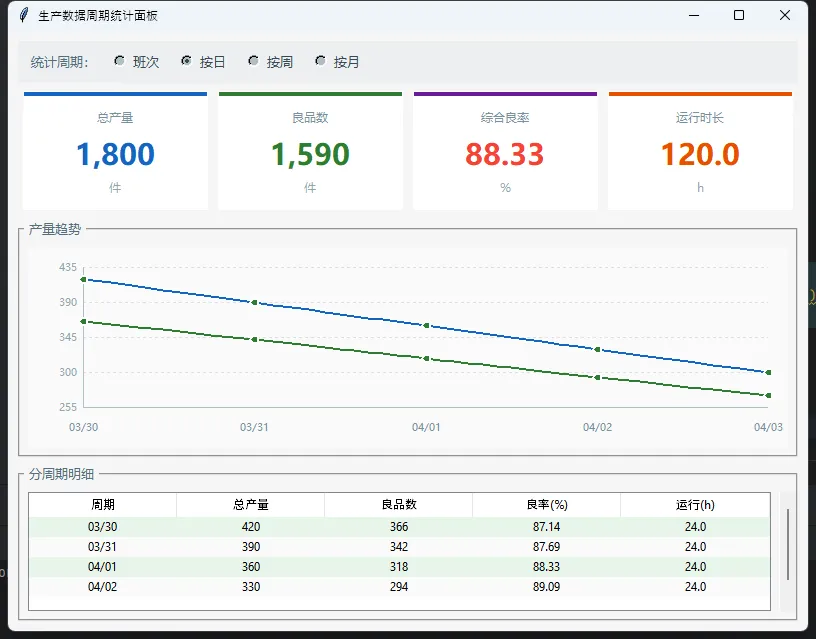
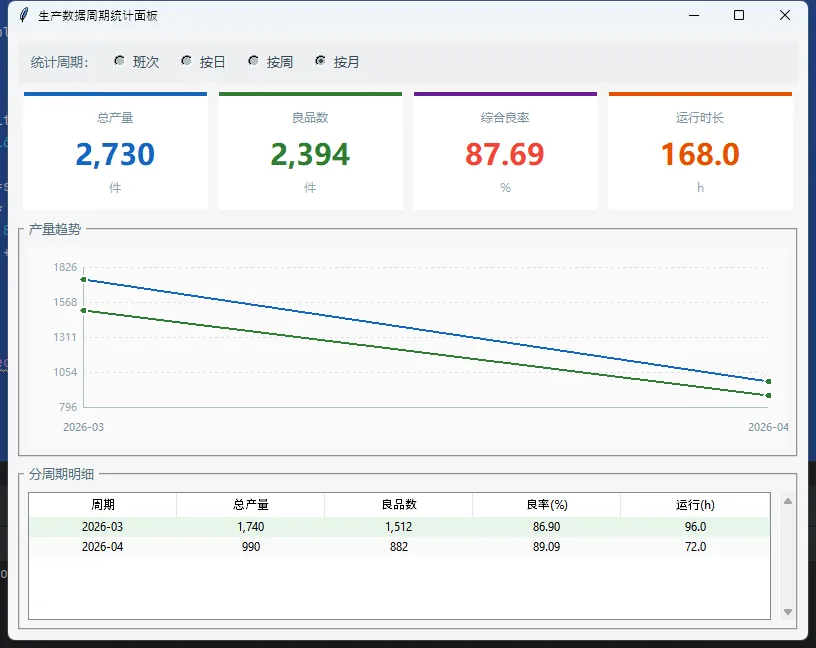
注意_refresh里的表格更新——用delete清空再重填,而不是销毁Treeview重建。这个区别在数据量大的时候非常明显,重建控件会有明显的闪烁感,清空重填则几乎感觉不到刷新。
需要初使化db
import sqlite3
from datetime import datetime, timedelta

db_path = "production.db"
conn = sqlite3.connect(db_path)
cursor = conn.cursor()

# 创建表
cursor.execute("""
CREATE TABLE IF NOT EXISTS production_log (
    record_time DATETIME NOT NULL,    product_count INTEGER NOT NULL,    good_count INTEGER NOT NULL,    machine_id TEXT NOT NULL,    run_minutes INTEGER NOT NULL)
""")

# 清空旧数据
cursor.execute("DELETE FROM production_log")

# 使用当前日期及前7天的测试数据
base_date = datetime.now().replace(hour=0, minute=0, second=0)
test_data = []

for day_offset inrange(7):
    date = base_date - timedelta(days=day_offset)
for shift_hour in [0, 8, 16]:
        test_data.append((
            date.replace(hour=shift_hour).strftime("%Y-%m-%d %H:%M:%S"),
100 + day_offset * 10,
90 + day_offset * 8,
f"M{shift_hour//8 + 1}",
480
        ))

cursor.executemany("""
INSERT INTO production_log (record_time, product_count, good_count, machine_id, run_minutes)
VALUES (?, ?, ?, ?, ?)
""", test_data)

conn.commit()
conn.close()
print("✓ 测试数据已插入(最近7天)")
⚠️ 三个容易踩的坑
坑一:Canvas尺寸在pack之后才确定。 刚pack完就调winfo_width(),拿到的是1(或者0)。正确做法是绑定<Configure>事件,在事件触发后再绘图——上面的TrendChart已经这样处理了。
坑二:pandas的resample对时区敏感。 如果数据库里存的时间戳带时区信息,resample可能报错或者结果不对。统一在读取时用pd.to_datetime(..., utc=False),或者在存入时就去掉时区信息,保持一致。
坑三:ttk.Treeview的隔行变色在Windows上默认主题下不生效。 需要先用ttk.Style().theme_use("clam")切换主题,tag_configure才能正常渲染背景色。加一行ttk.Style().theme_use("clam")在程序初始化时调用即可。
📌 小结
这套周期统计界面的核心设计思路,可以用三句话概括:
数据层和UI层彻底分离,DataAggregator只管聚合逻辑,界面控件只管渲染——这让后续替换数据源(从SQLite换成MySQL,或者接实时OPC-UA数据)变得非常简单。Canvas自绘图表在工控场景下比嵌入matplotlib更实用,轻量、启动快、刷新流畅。控件复用而非重建,是解决界面闪烁问题最直接的手段。
完整源码已开源,供学习参考。如果你在实际项目中遇到过多周期切换的性能问题,或者有更好的Canvas图表绘制思路,欢迎在评论区交流。
