当前位置:首页>python>图像识别:用Python手搓一个极简截图OCR,开源免费

图像识别:用Python手搓一个极简截图OCR,开源免费

  • 2026-06-21 22:27:03
图像识别:用Python手搓一个极简截图OCR,开源免费

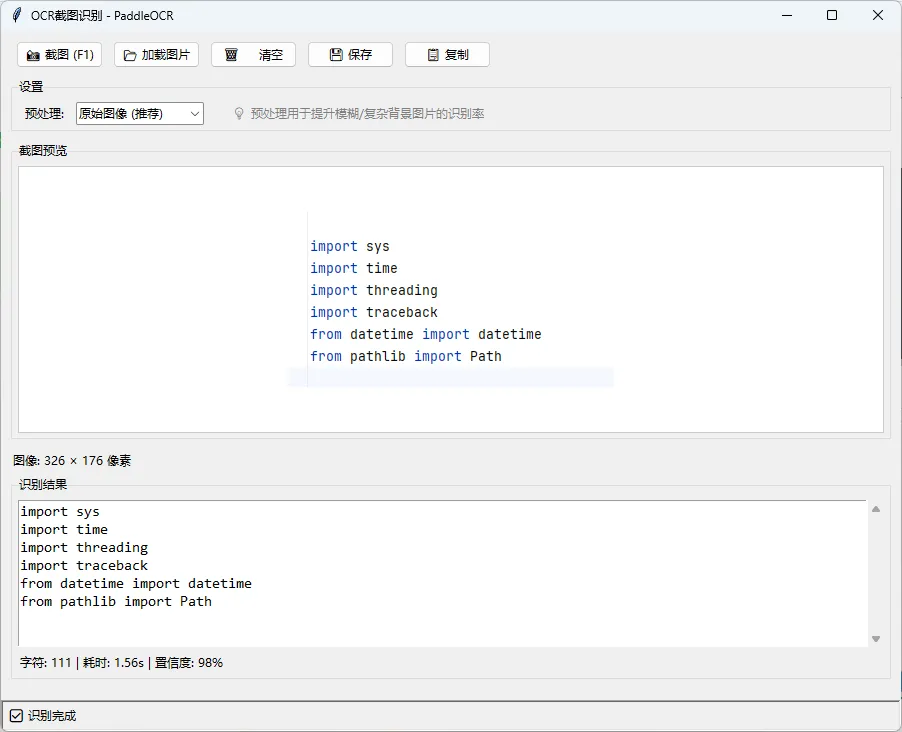
今天用Python的PaddleOCR和mss库,手搓一个基于OCR模型的极简、高效截图识别工具。核心代码不到200行,识别率基于百度开源的PP-OCRv4模型。

为什么我们要自己写?

市面上的工具虽然好用,但有三个痛点:

  1. 隐私顾虑:截图上传到云端,敏感信息不安全。

  2. 环境依赖:很多需要联网,断网就废。

工具优势:

  1. 本地运行:完全离线,保护隐私。

  2. 极速启动:基于tkinter的极简GUI,秒开。

  3. 高识别率:基于PaddleOCR,支持中文、英文、数字混合识别。


核心代码拆解

这个项目主要由两部分组成:截图逻辑和图像预处理

核心优化:图像预处理

这是提升识别率的关键。很多人识别不准,是因为直接把原始图片丢给了OCR引擎。我在代码中加入了一个图像预处理模块,特别是针对模糊截图和复杂背景。

from enum import Enumimport cv2import numpy as npclassPreprocessMode(Enum):"""图像预处理模式"""    ORIGINAL = "original"# 原始图像    GRAYSCALE = "grayscale"# 灰度化    BINARY = "binary"# 自适应二值化defpreprocess_image(image: np.ndarray, mode: PreprocessMode) -> np.ndarray:"""    **独家优化:图像预处理**    这里提供了二值化处理,能极大提升复杂背景下的识别率。    """if mode == PreprocessMode.ORIGINAL:return imageelif mode == PreprocessMode.GRAYSCALE:if len(image.shape) == 3:return cv2.cvtColor(image, cv2.COLOR_BGR2GRAY)elif mode == PreprocessMode.BINARY:# 自适应二值化,解决背景杂乱问题if len(image.shape) == 3:            gray = cv2.cvtColor(image, cv2.COLOR_BGR2GRAY)else:            gray = imagereturn cv2.adaptiveThreshold(            gray, 255, cv2.ADAPTIVE_THRESH_GAUSSIAN_C,             cv2.THRESH_BINARY, 112        )return image

重点解析:

  • PreprocessMode.BINARY:

    这段代码使用了cv2.adaptiveThreshold。当你面对的是发票、模糊文档或深色背景时,这个功能能把图片变成“白纸黑字”,OCR引擎读起来会轻松很多。


界面交互:F1截图

界面部分我选择了Python自带的tkinter,虽然丑了点,但零依赖。核心体验在于“F1截图”这个交互逻辑。

import tkinter as tkfrom tkinter import ttkclassOCRApp:definit_ui(self):# ... 省略部分UI初始化代码 ...# **绑定快捷键**# 这才是效率工具的灵魂:F1截图        self.root.bind('<F1>'lambda e: self.capture_screen())defcapture_screen(self):"""        核心功能:F1触发截图        逻辑:隐藏主窗口 -> 全屏蒙层 -> 鼠标绘制矩形 -> 获取坐标 -> 识别        """        self.root.withdraw() # 隐藏主窗口,避免遮挡try:# 调用全屏蒙层选择区域            region = self.select_region()            self.root.deiconify() # 恢复主窗口if region isNone:return            x, y, w, h = region# 获取截图并开始识别            self.current_image = self.screenshot.capture_region(x, y, w, h)            self.process_image_async(self.current_image)except Exception as e:            self.root.deiconify()            print(f"截图失败: {e}")defselect_region(self):"""        透明蒙层选择区域        这段代码实现了类似 Snipaste 的截图体验。        """        win = tk.Toplevel()        win.attributes('-fullscreen'True)        win.attributes('-alpha'0.3# 设置透明度        win.configure(bg='black')# ... 绘制矩形逻辑 ...return result

重点解析:

  • self.root.withdraw():按下F1时,主窗口瞬间隐藏,避免截到工具自己。

  • win.attributes('-alpha', 0.3):创建了一个半透明的黑色蒙层,这是实现专业截图体验的关键。


如何运行?

  • 安装依赖:

pip install paddleocr opencv-python pillow mss

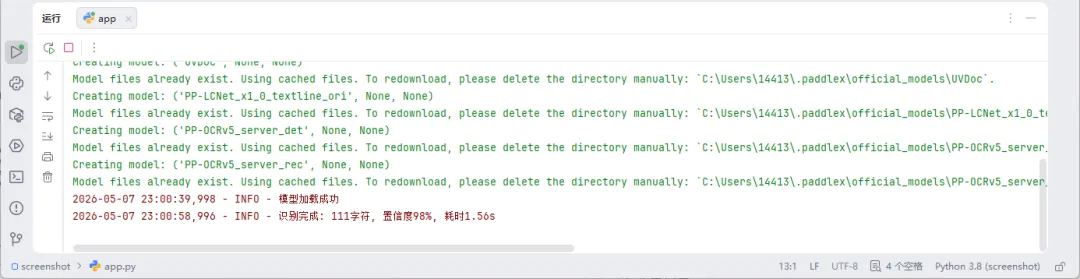
(注意:PaddleOCR首次运行会自动下载模型文件,大概100MB左右)

  • 启动:

两个文件:直接运行 python app.py。


完整代码:

py.py

# -*- coding: utf-8 -*-"""OCR截图识别核心模块 - PaddleOCR PP-OCRv4"""import osimport timeimport loggingfrom typing import Optional, Tuple, Listfrom dataclasses import dataclassfrom enum import Enumimport cv2import numpy as npfrom PIL import Imageimport mss# 日志配置logging.basicConfig(    level=logging.INFO,    format='%(asctime)s - %(levelname)s - %(message)s')logger = logging.getLogger(__name__)classPreprocessMode(Enum):"""图像预处理模式"""    ORIGINAL = "original"# 原始图像(推荐)    GRAYSCALE = "grayscale"# 灰度化    BINARY = "binary"# 自适应二值化@dataclassclassOCRResult:"""OCR识别结果"""    text: str    confidence: float    processing_time: float    preprocess_mode: PreprocessMode    image_size: Tuple[int, int]    detections: ListclassScreenshot:"""截图功能"""def__init__(self):        self.sct = mss.mss()        logger.info("截图器初始化完成")defcapture_full_screen(self) -> np.ndarray:"""截取全屏"""        monitor = self.sct.monitors[1]        screenshot = self.sct.grab(monitor)        img = np.array(screenshot)return cv2.cvtColor(img, cv2.COLOR_BGRA2BGR)defcapture_region(self, x: int, y: int, w: int, h: int) -> np.ndarray:"""截取指定区域"""        monitor = {"left": x, "top": y, "width": w, "height": h}        screenshot = self.sct.grab(monitor)        img = np.array(screenshot)return cv2.cvtColor(img, cv2.COLOR_BGRA2BGR)defpreprocess_image(image: np.ndarray, mode: PreprocessMode) -> np.ndarray:"""    图像预处理    Args:        image: BGR 图像        mode: 预处理模式    Returns:        预处理后的图像(BGR 或灰度)    """if mode == PreprocessMode.ORIGINAL:return imageelif mode == PreprocessMode.GRAYSCALE:if len(image.shape) == 3:return cv2.cvtColor(image, cv2.COLOR_BGR2GRAY)return imageelif mode == PreprocessMode.BINARY:# 自适应二值化if len(image.shape) == 3:            gray = cv2.cvtColor(image, cv2.COLOR_BGR2GRAY)else:            gray = imagereturn cv2.adaptiveThreshold(            gray, 255, cv2.ADAPTIVE_THRESH_GAUSSIAN_C,            cv2.THRESH_BINARY, 112        )return imageclassPaddleOCREngine:"""PaddleOCR 引擎"""def__init__(self, lang: str = 'ch'):        self.lang = lang        self._ocr = None        self._is_loaded = False        logger.info(f"PaddleOCR 配置: lang={lang}")defload(self) -> bool:"""加载模型"""if self._is_loaded:returnTruetry:from paddleocr import PaddleOCR            logger.info("正在加载 PaddleOCR 模型...")            self._ocr = PaddleOCR(use_angle_cls=True, lang=self.lang)            self._is_loaded = True            logger.info("模型加载成功")returnTrueexcept Exception as e:            logger.error(f"模型加载失败: {e}")returnFalsedefrecognize(self, image: np.ndarray,                   preprocess_mode: PreprocessMode = PreprocessMode.ORIGINAL) -> OCRResult:"""识别图像中的文字"""        start_time = time.time()ifnot self._is_loaded:ifnot self.load():return OCRResult(                    text="[错误] 模型加载失败",                    confidence=0.0, processing_time=0.0,                    preprocess_mode=preprocess_mode, image_size=(00), detections=[]                )try:# 预处理            processed = preprocess_image(image, preprocess_mode)# 转为 RGBif len(processed.shape) == 2:                rgb_image = cv2.cvtColor(processed, cv2.COLOR_GRAY2RGB)else:                rgb_image = cv2.cvtColor(processed, cv2.COLOR_BGR2RGB)            image_size = (rgb_image.shape[1], rgb_image.shape[0])# 保存临时文件            temp_path = os.path.join(os.path.expanduser("~"), ".ocr_temp.png")            cv2.imwrite(temp_path, cv2.cvtColor(rgb_image, cv2.COLOR_RGB2BGR))# OCR 识别            results = self._ocr.ocr(temp_path)# 清理临时文件try:                os.remove(temp_path)except:pass# 解析结果            text_parts = []            confidences = []            detections = []if results:                result = results[0if isinstance(results, list) else resultsif'rec_texts'in result:                    texts = result['rec_texts']                    scores = result.get('rec_scores', [0.0] * len(texts))                    polys = result.get('rec_polys', [])for i, text in enumerate(texts):                        text = str(text).strip()if text:                            conf = scores[i] if i < len(scores) else0.0                            text_parts.append(text)                            confidences.append(conf)if i < len(polys):                                detections.append({'bbox': polys[i], 'text': text, 'confidence': conf})            text = "\n".join(text_parts)            avg_conf = sum(confidences) / len(confidences) if confidences else0.0            proc_time = time.time() - start_time            logger.info(f"识别完成: {len(text)}字符, 置信度{avg_conf:.0%}, 耗时{proc_time:.2f}s")return OCRResult(                text=text, confidence=avg_conf, processing_time=proc_time,                preprocess_mode=preprocess_mode, image_size=image_size, detections=detections            )except Exception as e:            logger.error(f"OCR失败: {e}")return OCRResult(                text=f"[错误: {e}]", confidence=0.0,                processing_time=time.time() - start_time,                preprocess_mode=preprocess_mode, image_size=(00), detections=[]            )defunload(self):"""卸载模型"""if self._ocr:del self._ocr            self._ocr = None            self._is_loaded = FalseclassOCREngine:"""OCR引擎整合类"""def__init__(self, preprocess_mode: PreprocessMode = PreprocessMode.ORIGINAL):        self.screenshot = Screenshot()        self.ocr = PaddleOCREngine()        self.preprocess_mode = preprocess_mode        logger.info("OCR引擎初始化完成")defload(self) -> bool:return self.ocr.load()defunload(self):        self.ocr.unload()defrecognize_image(self, image: np.ndarray,                       preprocess_mode: Optional[PreprocessMode] = None) -> OCRResult:"""识别图像"""if preprocess_mode isNone:            preprocess_mode = self.preprocess_modereturn self.ocr.recognize(image, preprocess_mode)defquick_ocr(image, lang: str = 'ch') -> str:"""快速OCR"""    engine = OCREngine()    engine.load()    result = engine.recognize_image(image)    engine.unload()return result.text

app.py

# -*- coding: utf-8 -*-"""OCR截图识别工具 - tkinter GUI"""import sysimport timeimport threadingimport tracebackfrom datetime import datetimefrom pathlib import Pathimport cv2import numpy as npfrom PIL import Image, ImageTkimport tkinter as tkfrom tkinter import ttk, filedialog, messagebox, scrolledtextfrom py import OCREngine, Screenshot, PreprocessMode, OCRResultclassOCRApp:"""OCR截图工具主类"""def__init__(self):        self.app_dir = Path(__file__).parent        self.screenshot = Screenshot()        self.ocr_engine = None        self.model_loaded = False        self.current_image = None        self.last_result = None        self.preprocess_mode = PreprocessMode.ORIGINAL        self.photo_image = None        self.init_ui()definit_ui(self):"""初始化界面"""        self.root = tk.Tk()        self.root.title("OCR截图识别 - PaddleOCR")        self.root.geometry("900x700")        self.root.minsize(800600)# 配置网格权重,让窗口可缩放        self.root.columnconfigure(0, weight=1)        self.root.rowconfigure(0, weight=1)# 主框架        main_frame = ttk.Frame(self.root, padding=10)        main_frame.grid(row=0, column=0, sticky='nsew')        main_frame.columnconfigure(0, weight=1)        main_frame.rowconfigure(2, weight=1# 图像预览可扩展        main_frame.rowconfigure(4, weight=1# 识别结果可扩展# ========== 工具栏 ==========        toolbar = ttk.Frame(main_frame)        toolbar.grid(row=0, column=0, sticky='ew', pady=(010))        ttk.Button(toolbar, text="截图 (F1)", command=self.capture_screen).pack(side=tk.LEFT, padx=5)        ttk.Button(toolbar, text="加载图片", command=self.load_image).pack(side=tk.LEFT, padx=5)        ttk.Button(toolbar, text="清空", command=self.clear_all).pack(side=tk.LEFT, padx=5)        self.btn_save = ttk.Button(toolbar, text="保存", command=self.save_result, state='disabled')        self.btn_save.pack(side=tk.LEFT, padx=5)        self.btn_copy = ttk.Button(toolbar, text="复制", command=self.copy_text, state='disabled')        self.btn_copy.pack(side=tk.LEFT, padx=5)# ========== 设置 ==========        settings = ttk.LabelFrame(main_frame, text="设置", padding=5)        settings.grid(row=1, column=0, sticky='ew', pady=(010))        ttk.Label(settings, text="预处理:").pack(side=tk.LEFT, padx=5)        self.preprocess_var = tk.StringVar(value="原始图像 (推荐)")        preprocess_combo = ttk.Combobox(            settings, textvariable=self.preprocess_var,            values=["原始图像 (推荐)""灰度化""二值化"],            state='readonly', width=15        )        preprocess_combo.pack(side=tk.LEFT, padx=5)        preprocess_combo.bind('<<ComboboxSelected>>', self.on_preprocess_changed)        ttk.Label(settings, text="预处理用于提升模糊/复杂背景图片的识别率"                  foreground='gray').pack(side=tk.LEFT, padx=20)# ========== 图像预览 ==========        image_frame = ttk.LabelFrame(main_frame, text="截图预览", padding=5)        image_frame.grid(row=2, column=0, sticky='nsew', pady=(010))        image_frame.columnconfigure(0, weight=1)        image_frame.rowconfigure(0, weight=1)        self.canvas = tk.Canvas(image_frame, bg='white', highlightthickness=1,                               highlightbackground='#ccc')        self.canvas.grid(row=0, column=0, sticky='nsew')        self.placeholder_id = self.canvas.create_text(400200, text="按 F1 或点击「截图」开始",                               font=('Microsoft YaHei'12), fill='#999', justify='center')        self.info_label = ttk.Label(main_frame, text="图像: 未加载")        self.info_label.grid(row=3, column=0, sticky='ew', pady=(05))# ========== 识别结果 ==========        result_frame = ttk.LabelFrame(main_frame, text="识别结果", padding=5)        result_frame.grid(row=4, column=0, sticky='nsew', pady=(010))        result_frame.columnconfigure(0, weight=1)        result_frame.rowconfigure(0, weight=1)        self.text_widget = scrolledtext.ScrolledText(            result_frame, height=8, font=('Consolas'11),            wrap=tk.WORD, relief=tk.SUNKEN        )        self.text_widget.grid(row=0, column=0, sticky='nsew')        self.text_widget.insert('1.0'"识别结果将显示在这里...")        self.text_widget.config(state='disabled')        self.stats_label = ttk.Label(result_frame, text="字符: 0 | 耗时: 0.00s | 置信度: 0%")        self.stats_label.grid(row=1, column=0, sticky='ew', pady=(50))# ========== 状态栏 ==========        self.status_label = ttk.Label(self.root, text="就绪 | 正在加载模型...",                                     relief=tk.SUNKEN, anchor=tk.W, padding=5)        self.status_label.grid(row=1, column=0, sticky='ew')# 绑定窗口大小变化事件        self.canvas.bind('<Configure>', self.on_canvas_resize)# 绑定快捷键        self.root.bind('<F1>'lambda e: self.capture_screen())        self.root.bind('<Escape>'lambda e: self.root.destroy())# 延迟加载模型        self.root.after(500, self.load_model_async)        self.root.protocol("WM_DELETE_WINDOW", self.on_closing)        self.root.mainloop()defload_model_async(self):"""异步加载模型"""defload():try:                self.ocr_engine = OCREngine()if self.ocr_engine.load():                    self.model_loaded = True                    self.root.after(0lambda: self.status_label.config(text="就绪 | 模型已加载"))else:                    self.root.after(0lambda: self.status_label.config(text="模型加载失败"))except Exception as e:                self.root.after(0lambda: self.status_label.config(text=f"错误: {e}"))        threading.Thread(target=load, daemon=True).start()defcapture_screen(self):"""截图并识别"""        self.root.withdraw()        time.sleep(0.2)try:            region = self.select_region()            self.root.deiconify()if region isNone:                self.status_label.config(text="已取消截图")return            x, y, w, h = regionif w > 0and h > 0:                self.current_image = self.screenshot.capture_region(x, y, w, h)else:                self.current_image = self.screenshot.capture_full_screen()            self.display_image(self.current_image)            self.status_label.config(text="正在识别...")            self.process_image_async(self.current_image)except Exception as e:            self.root.deiconify()            messagebox.showerror("错误"f"截图失败: {e}")defselect_region(self):"""选择截图区域"""        win = tk.Toplevel()        win.attributes('-fullscreen'True)        win.attributes('-alpha'0.3)        win.configure(bg='black')        win.grab_set()        canvas = tk.Canvas(win, bg='gray20', cursor='crosshair')        canvas.pack(fill=tk.BOTH, expand=True)# 提示        tk.Label(win, text="拖动选择区域 | Enter确认 | Esc取消",                font=('Microsoft YaHei'14), bg='black', fg='white').pack(side=tk.TOP, fill=tk.X)        start_x, start_y, rect_id, result = [0], [0], [None], [None]defon_down(e):            start_x[0], start_y[0] = e.x, e.yif rect_id[0]:                canvas.delete(rect_id[0])            rect_id[0] = canvas.create_rectangle(e.x, e.y, e.x, e.y, outline='red', width=3)defon_drag(e):if rect_id[0]:                canvas.coords(rect_id[0], start_x[0], start_y[0], e.x, e.y)defon_up(e):            x1, y1 = min(start_x[0], e.x), min(start_y[0], e.y)            x2, y2 = max(start_x[0], e.x), max(start_y[0], e.y)            result[0] = (x1, y1, x2 - x1, y2 - y1)defon_key(e):if e.keysym == 'Escape':                result[0] = None                win.destroy()elif e.keysym == 'Return':                win.destroy()        canvas.bind('<Button-1>', on_down)        canvas.bind('<B1-Motion>', on_drag)        canvas.bind('<ButtonRelease-1>', on_up)        win.bind('<Key>', on_key)        win.wait_window()return result[0]defload_image(self):"""加载本地图片"""        file_path = filedialog.askopenfilename(            title="选择图片",            filetypes=[("图片""*.png *.jpg *.jpeg *.bmp"), ("所有文件""*.*")]        )ifnot file_path:returntry:            self.current_image = cv2.imread(file_path)if self.current_image isNone:raise ValueError("无法读取图片")            self.display_image(self.current_image)            self.process_image_async(self.current_image)except Exception as e:            messagebox.showerror("错误"f"加载失败: {e}")defon_canvas_resize(self, event=None):"""画布大小变化时重新显示图片"""if self.current_image isnotNone:            self.display_image(self.current_image)defdisplay_image(self, image: np.ndarray):"""显示图片"""        rgb = cv2.cvtColor(image, cv2.COLOR_BGR2RGB) if len(image.shape) == 3else image# 获取当前画布大小        self.canvas.update_idletasks()        canvas_w = self.canvas.winfo_width()        canvas_h = self.canvas.winfo_height()if canvas_w < 50:            canvas_w = 800if canvas_h < 50:            canvas_h = 400        h, w = rgb.shape[:2]        scale = min(canvas_w / w, canvas_h / h, 1.0)        pil_img = Image.fromarray(rgb).resize((int(w * scale), int(h * scale)), Image.Resampling.LANCZOS)        self.photo_image = ImageTk.PhotoImage(pil_img)        self.canvas.delete('all')        self.canvas.create_image(canvas_w // 2, canvas_h // 2, image=self.photo_image, anchor=tk.CENTER)        self.info_label.config(text=f"图像: {w} × {h} 像素")defprocess_image_async(self, image: np.ndarray):"""异步处理图像"""defprocess():try:if self.ocr_engine isNone:                    self.ocr_engine = OCREngine()                    self.ocr_engine.load()                result = self.ocr_engine.recognize_image(image, self.preprocess_mode)                self.last_result = result                self.root.after(0lambda: self.update_result(result))except Exception as e:                self.root.after(0lambda: messagebox.showerror("错误", str(e)))        threading.Thread(target=process, daemon=True).start()defupdate_result(self, result: OCRResult):"""更新结果"""        self.text_widget.config(state='normal')        self.text_widget.delete('1.0', tk.END)        self.text_widget.insert('1.0', result.text or"[未识别到文字]")        self.text_widget.config(state='disabled')        self.stats_label.config(            text=f"字符: {len(result.text)} | 耗时: {result.processing_time:.2f}s | 置信度: {result.confidence:.0%}"        )        self.status_label.config(text="识别完成")# 启用按钮        self.btn_save.config(state='normal')        self.btn_copy.config(state='normal')defon_preprocess_changed(self, event=None):"""预处理模式改变"""        mode_map = {"原始图像 (推荐)": PreprocessMode.ORIGINAL,"灰度化": PreprocessMode.GRAYSCALE,"二值化": PreprocessMode.BINARY        }        self.preprocess_mode = mode_map.get(self.preprocess_var.get(), PreprocessMode.ORIGINAL)defclear_all(self):"""清空"""        self.current_image = None        self.last_result = None        self.canvas.delete('all')        self.canvas.update_idletasks()        canvas_w = self.canvas.winfo_width()        canvas_h = self.canvas.winfo_height()        self.canvas.create_text(canvas_w // 2, canvas_h // 2, text="按 F1 或点击「截图」开始",                               font=('Microsoft YaHei'12), fill='#999', justify='center')        self.text_widget.config(state='normal')        self.text_widget.delete('1.0', tk.END)        self.text_widget.insert('1.0'"识别结果将显示在这里...")        self.text_widget.config(state='disabled')        self.info_label.config(text="图像: 未加载")        self.stats_label.config(text="字符: 0 | 耗时: 0.00s | 置信度: 0%")        self.status_label.config(text="已清空")        self.btn_save.config(state='disabled')        self.btn_copy.config(state='disabled')defsave_result(self):"""保存结果"""ifnot self.last_result ornot self.last_result.text:return        timestamp = datetime.now().strftime("%Y%m%d_%H%M%S")        file_path = filedialog.asksaveasfilename(            title="保存", defaultextension=".txt",            filetypes=[("文本""*.txt")], initialfile=f"ocr_{timestamp}.txt"        )if file_path:with open(file_path, 'w', encoding='utf-8'as f:                f.write(self.last_result.text)            messagebox.showinfo("成功"f"已保存: {file_path}")defcopy_text(self):"""复制文本"""if self.last_result and self.last_result.text:            self.root.clipboard_clear()            self.root.clipboard_append(self.last_result.text)            self.status_label.config(text="已复制到剪贴板")defon_closing(self):"""关闭"""if self.ocr_engine:            self.ocr_engine.unload()        self.root.destroy()if __name__ == '__main__':try:        OCRApp()except Exception as e:        print(f"启动失败: {e}")        traceback.print_exc()        input("按回车退出...")        sys.exit(1)

这就是我日常使用的截图OCR工具核心。它没有花里胡哨的特效,但稳定、快速、安全。

#Python实战#PaddleOCR#截图识别#开源工具#效率神器#代码教学#本地OCR#图像预处理

如果你觉得这篇文章对你有帮助,或者想看更多Python实战项目,关注我获取更多 Python 实战干货。

点个【赞】和【在看】让我知道你来过。

工具获取:公众号回复「OCR」即可

💬评论区聊聊:你还想用Python实现什么黑科技?


Apache Superset 从零搭建指南:手把手搭建个人开源 BI,实现办公自动化可视化分析

用LLMFit+Ollama一键榨干电脑性能,搭建最强本地AI,告别盲目试错!

最新文章

随机文章

基本 文件 流程 错误 SQL 调试
  1. 请求信息 : 2026-07-03 21:57:57 HTTP/2.0 GET : https://f.mffb.com.cn/a/492688.html
  2. 运行时间 : 0.458356s [ 吞吐率:2.18req/s ] 内存消耗:4,673.60kb 文件加载:140
  3. 缓存信息 : 0 reads,0 writes
  4. 会话信息 : SESSION_ID=24ceec1afa50438db00175c89c9f7c37
  1. /yingpanguazai/ssd/ssd1/www/f.mffb.com.cn/public/index.php ( 0.79 KB )
  2. /yingpanguazai/ssd/ssd1/www/f.mffb.com.cn/vendor/autoload.php ( 0.17 KB )
  3. /yingpanguazai/ssd/ssd1/www/f.mffb.com.cn/vendor/composer/autoload_real.php ( 2.49 KB )
  4. /yingpanguazai/ssd/ssd1/www/f.mffb.com.cn/vendor/composer/platform_check.php ( 0.90 KB )
  5. /yingpanguazai/ssd/ssd1/www/f.mffb.com.cn/vendor/composer/ClassLoader.php ( 14.03 KB )
  6. /yingpanguazai/ssd/ssd1/www/f.mffb.com.cn/vendor/composer/autoload_static.php ( 4.90 KB )
  7. /yingpanguazai/ssd/ssd1/www/f.mffb.com.cn/vendor/topthink/think-helper/src/helper.php ( 8.34 KB )
  8. /yingpanguazai/ssd/ssd1/www/f.mffb.com.cn/vendor/topthink/think-validate/src/helper.php ( 2.19 KB )
  9. /yingpanguazai/ssd/ssd1/www/f.mffb.com.cn/vendor/topthink/think-orm/src/helper.php ( 1.47 KB )
  10. /yingpanguazai/ssd/ssd1/www/f.mffb.com.cn/vendor/topthink/think-orm/stubs/load_stubs.php ( 0.16 KB )
  11. /yingpanguazai/ssd/ssd1/www/f.mffb.com.cn/vendor/topthink/framework/src/think/Exception.php ( 1.69 KB )
  12. /yingpanguazai/ssd/ssd1/www/f.mffb.com.cn/vendor/topthink/think-container/src/Facade.php ( 2.71 KB )
  13. /yingpanguazai/ssd/ssd1/www/f.mffb.com.cn/vendor/symfony/deprecation-contracts/function.php ( 0.99 KB )
  14. /yingpanguazai/ssd/ssd1/www/f.mffb.com.cn/vendor/symfony/polyfill-mbstring/bootstrap.php ( 8.26 KB )
  15. /yingpanguazai/ssd/ssd1/www/f.mffb.com.cn/vendor/symfony/polyfill-mbstring/bootstrap80.php ( 9.78 KB )
  16. /yingpanguazai/ssd/ssd1/www/f.mffb.com.cn/vendor/symfony/var-dumper/Resources/functions/dump.php ( 1.49 KB )
  17. /yingpanguazai/ssd/ssd1/www/f.mffb.com.cn/vendor/topthink/think-dumper/src/helper.php ( 0.18 KB )
  18. /yingpanguazai/ssd/ssd1/www/f.mffb.com.cn/vendor/symfony/var-dumper/VarDumper.php ( 4.30 KB )
  19. /yingpanguazai/ssd/ssd1/www/f.mffb.com.cn/vendor/topthink/framework/src/think/App.php ( 15.30 KB )
  20. /yingpanguazai/ssd/ssd1/www/f.mffb.com.cn/vendor/topthink/think-container/src/Container.php ( 15.76 KB )
  21. /yingpanguazai/ssd/ssd1/www/f.mffb.com.cn/vendor/psr/container/src/ContainerInterface.php ( 1.02 KB )
  22. /yingpanguazai/ssd/ssd1/www/f.mffb.com.cn/app/provider.php ( 0.19 KB )
  23. /yingpanguazai/ssd/ssd1/www/f.mffb.com.cn/vendor/topthink/framework/src/think/Http.php ( 6.04 KB )
  24. /yingpanguazai/ssd/ssd1/www/f.mffb.com.cn/vendor/topthink/think-helper/src/helper/Str.php ( 7.29 KB )
  25. /yingpanguazai/ssd/ssd1/www/f.mffb.com.cn/vendor/topthink/framework/src/think/Env.php ( 4.68 KB )
  26. /yingpanguazai/ssd/ssd1/www/f.mffb.com.cn/app/common.php ( 0.03 KB )
  27. /yingpanguazai/ssd/ssd1/www/f.mffb.com.cn/vendor/topthink/framework/src/helper.php ( 18.78 KB )
  28. /yingpanguazai/ssd/ssd1/www/f.mffb.com.cn/vendor/topthink/framework/src/think/Config.php ( 5.54 KB )
  29. /yingpanguazai/ssd/ssd1/www/f.mffb.com.cn/config/app.php ( 0.95 KB )
  30. /yingpanguazai/ssd/ssd1/www/f.mffb.com.cn/config/cache.php ( 0.78 KB )
  31. /yingpanguazai/ssd/ssd1/www/f.mffb.com.cn/config/console.php ( 0.23 KB )
  32. /yingpanguazai/ssd/ssd1/www/f.mffb.com.cn/config/cookie.php ( 0.56 KB )
  33. /yingpanguazai/ssd/ssd1/www/f.mffb.com.cn/config/database.php ( 2.48 KB )
  34. /yingpanguazai/ssd/ssd1/www/f.mffb.com.cn/vendor/topthink/framework/src/think/facade/Env.php ( 1.67 KB )
  35. /yingpanguazai/ssd/ssd1/www/f.mffb.com.cn/config/filesystem.php ( 0.61 KB )
  36. /yingpanguazai/ssd/ssd1/www/f.mffb.com.cn/config/lang.php ( 0.91 KB )
  37. /yingpanguazai/ssd/ssd1/www/f.mffb.com.cn/config/log.php ( 1.35 KB )
  38. /yingpanguazai/ssd/ssd1/www/f.mffb.com.cn/config/middleware.php ( 0.19 KB )
  39. /yingpanguazai/ssd/ssd1/www/f.mffb.com.cn/config/route.php ( 1.89 KB )
  40. /yingpanguazai/ssd/ssd1/www/f.mffb.com.cn/config/session.php ( 0.57 KB )
  41. /yingpanguazai/ssd/ssd1/www/f.mffb.com.cn/config/trace.php ( 0.34 KB )
  42. /yingpanguazai/ssd/ssd1/www/f.mffb.com.cn/config/view.php ( 0.82 KB )
  43. /yingpanguazai/ssd/ssd1/www/f.mffb.com.cn/app/event.php ( 0.25 KB )
  44. /yingpanguazai/ssd/ssd1/www/f.mffb.com.cn/vendor/topthink/framework/src/think/Event.php ( 7.67 KB )
  45. /yingpanguazai/ssd/ssd1/www/f.mffb.com.cn/app/service.php ( 0.13 KB )
  46. /yingpanguazai/ssd/ssd1/www/f.mffb.com.cn/app/AppService.php ( 0.26 KB )
  47. /yingpanguazai/ssd/ssd1/www/f.mffb.com.cn/vendor/topthink/framework/src/think/Service.php ( 1.64 KB )
  48. /yingpanguazai/ssd/ssd1/www/f.mffb.com.cn/vendor/topthink/framework/src/think/Lang.php ( 7.35 KB )
  49. /yingpanguazai/ssd/ssd1/www/f.mffb.com.cn/vendor/topthink/framework/src/lang/zh-cn.php ( 13.70 KB )
  50. /yingpanguazai/ssd/ssd1/www/f.mffb.com.cn/vendor/topthink/framework/src/think/initializer/Error.php ( 3.31 KB )
  51. /yingpanguazai/ssd/ssd1/www/f.mffb.com.cn/vendor/topthink/framework/src/think/initializer/RegisterService.php ( 1.33 KB )
  52. /yingpanguazai/ssd/ssd1/www/f.mffb.com.cn/vendor/services.php ( 0.14 KB )
  53. /yingpanguazai/ssd/ssd1/www/f.mffb.com.cn/vendor/topthink/framework/src/think/service/PaginatorService.php ( 1.52 KB )
  54. /yingpanguazai/ssd/ssd1/www/f.mffb.com.cn/vendor/topthink/framework/src/think/service/ValidateService.php ( 0.99 KB )
  55. /yingpanguazai/ssd/ssd1/www/f.mffb.com.cn/vendor/topthink/framework/src/think/service/ModelService.php ( 2.04 KB )
  56. /yingpanguazai/ssd/ssd1/www/f.mffb.com.cn/vendor/topthink/think-trace/src/Service.php ( 0.77 KB )
  57. /yingpanguazai/ssd/ssd1/www/f.mffb.com.cn/vendor/topthink/framework/src/think/Middleware.php ( 6.72 KB )
  58. /yingpanguazai/ssd/ssd1/www/f.mffb.com.cn/vendor/topthink/framework/src/think/initializer/BootService.php ( 0.77 KB )
  59. /yingpanguazai/ssd/ssd1/www/f.mffb.com.cn/vendor/topthink/think-orm/src/Paginator.php ( 11.86 KB )
  60. /yingpanguazai/ssd/ssd1/www/f.mffb.com.cn/vendor/topthink/think-validate/src/Validate.php ( 63.20 KB )
  61. /yingpanguazai/ssd/ssd1/www/f.mffb.com.cn/vendor/topthink/think-orm/src/Model.php ( 23.55 KB )
  62. /yingpanguazai/ssd/ssd1/www/f.mffb.com.cn/vendor/topthink/think-orm/src/model/concern/Attribute.php ( 21.05 KB )
  63. /yingpanguazai/ssd/ssd1/www/f.mffb.com.cn/vendor/topthink/think-orm/src/model/concern/AutoWriteData.php ( 4.21 KB )
  64. /yingpanguazai/ssd/ssd1/www/f.mffb.com.cn/vendor/topthink/think-orm/src/model/concern/Conversion.php ( 6.44 KB )
  65. /yingpanguazai/ssd/ssd1/www/f.mffb.com.cn/vendor/topthink/think-orm/src/model/concern/DbConnect.php ( 5.16 KB )
  66. /yingpanguazai/ssd/ssd1/www/f.mffb.com.cn/vendor/topthink/think-orm/src/model/concern/ModelEvent.php ( 2.33 KB )
  67. /yingpanguazai/ssd/ssd1/www/f.mffb.com.cn/vendor/topthink/think-orm/src/model/concern/RelationShip.php ( 28.29 KB )
  68. /yingpanguazai/ssd/ssd1/www/f.mffb.com.cn/vendor/topthink/think-helper/src/contract/Arrayable.php ( 0.09 KB )
  69. /yingpanguazai/ssd/ssd1/www/f.mffb.com.cn/vendor/topthink/think-helper/src/contract/Jsonable.php ( 0.13 KB )
  70. /yingpanguazai/ssd/ssd1/www/f.mffb.com.cn/vendor/topthink/think-orm/src/model/contract/Modelable.php ( 0.09 KB )
  71. /yingpanguazai/ssd/ssd1/www/f.mffb.com.cn/vendor/topthink/framework/src/think/Db.php ( 2.88 KB )
  72. /yingpanguazai/ssd/ssd1/www/f.mffb.com.cn/vendor/topthink/think-orm/src/DbManager.php ( 8.52 KB )
  73. /yingpanguazai/ssd/ssd1/www/f.mffb.com.cn/vendor/topthink/framework/src/think/Log.php ( 6.28 KB )
  74. /yingpanguazai/ssd/ssd1/www/f.mffb.com.cn/vendor/topthink/framework/src/think/Manager.php ( 3.92 KB )
  75. /yingpanguazai/ssd/ssd1/www/f.mffb.com.cn/vendor/psr/log/src/LoggerTrait.php ( 2.69 KB )
  76. /yingpanguazai/ssd/ssd1/www/f.mffb.com.cn/vendor/psr/log/src/LoggerInterface.php ( 2.71 KB )
  77. /yingpanguazai/ssd/ssd1/www/f.mffb.com.cn/vendor/topthink/framework/src/think/Cache.php ( 4.92 KB )
  78. /yingpanguazai/ssd/ssd1/www/f.mffb.com.cn/vendor/psr/simple-cache/src/CacheInterface.php ( 4.71 KB )
  79. /yingpanguazai/ssd/ssd1/www/f.mffb.com.cn/vendor/topthink/think-helper/src/helper/Arr.php ( 16.63 KB )
  80. /yingpanguazai/ssd/ssd1/www/f.mffb.com.cn/vendor/topthink/framework/src/think/cache/driver/File.php ( 7.84 KB )
  81. /yingpanguazai/ssd/ssd1/www/f.mffb.com.cn/vendor/topthink/framework/src/think/cache/Driver.php ( 9.03 KB )
  82. /yingpanguazai/ssd/ssd1/www/f.mffb.com.cn/vendor/topthink/framework/src/think/contract/CacheHandlerInterface.php ( 1.99 KB )
  83. /yingpanguazai/ssd/ssd1/www/f.mffb.com.cn/app/Request.php ( 0.09 KB )
  84. /yingpanguazai/ssd/ssd1/www/f.mffb.com.cn/vendor/topthink/framework/src/think/Request.php ( 55.78 KB )
  85. /yingpanguazai/ssd/ssd1/www/f.mffb.com.cn/app/middleware.php ( 0.25 KB )
  86. /yingpanguazai/ssd/ssd1/www/f.mffb.com.cn/vendor/topthink/framework/src/think/Pipeline.php ( 2.61 KB )
  87. /yingpanguazai/ssd/ssd1/www/f.mffb.com.cn/vendor/topthink/think-trace/src/TraceDebug.php ( 3.40 KB )
  88. /yingpanguazai/ssd/ssd1/www/f.mffb.com.cn/vendor/topthink/framework/src/think/middleware/SessionInit.php ( 1.94 KB )
  89. /yingpanguazai/ssd/ssd1/www/f.mffb.com.cn/vendor/topthink/framework/src/think/Session.php ( 1.80 KB )
  90. /yingpanguazai/ssd/ssd1/www/f.mffb.com.cn/vendor/topthink/framework/src/think/session/driver/File.php ( 6.27 KB )
  91. /yingpanguazai/ssd/ssd1/www/f.mffb.com.cn/vendor/topthink/framework/src/think/contract/SessionHandlerInterface.php ( 0.87 KB )
  92. /yingpanguazai/ssd/ssd1/www/f.mffb.com.cn/vendor/topthink/framework/src/think/session/Store.php ( 7.12 KB )
  93. /yingpanguazai/ssd/ssd1/www/f.mffb.com.cn/vendor/topthink/framework/src/think/Route.php ( 23.73 KB )
  94. /yingpanguazai/ssd/ssd1/www/f.mffb.com.cn/vendor/topthink/framework/src/think/route/RuleName.php ( 5.75 KB )
  95. /yingpanguazai/ssd/ssd1/www/f.mffb.com.cn/vendor/topthink/framework/src/think/route/Domain.php ( 2.53 KB )
  96. /yingpanguazai/ssd/ssd1/www/f.mffb.com.cn/vendor/topthink/framework/src/think/route/RuleGroup.php ( 22.43 KB )
  97. /yingpanguazai/ssd/ssd1/www/f.mffb.com.cn/vendor/topthink/framework/src/think/route/Rule.php ( 26.95 KB )
  98. /yingpanguazai/ssd/ssd1/www/f.mffb.com.cn/vendor/topthink/framework/src/think/route/RuleItem.php ( 9.78 KB )
  99. /yingpanguazai/ssd/ssd1/www/f.mffb.com.cn/route/app.php ( 1.72 KB )
  100. /yingpanguazai/ssd/ssd1/www/f.mffb.com.cn/vendor/topthink/framework/src/think/facade/Route.php ( 4.70 KB )
  101. /yingpanguazai/ssd/ssd1/www/f.mffb.com.cn/vendor/topthink/framework/src/think/route/dispatch/Controller.php ( 4.74 KB )
  102. /yingpanguazai/ssd/ssd1/www/f.mffb.com.cn/vendor/topthink/framework/src/think/route/Dispatch.php ( 10.44 KB )
  103. /yingpanguazai/ssd/ssd1/www/f.mffb.com.cn/app/controller/Index.php ( 4.81 KB )
  104. /yingpanguazai/ssd/ssd1/www/f.mffb.com.cn/app/BaseController.php ( 2.05 KB )
  105. /yingpanguazai/ssd/ssd1/www/f.mffb.com.cn/vendor/topthink/think-orm/src/facade/Db.php ( 0.93 KB )
  106. /yingpanguazai/ssd/ssd1/www/f.mffb.com.cn/vendor/topthink/think-orm/src/db/connector/Mysql.php ( 5.44 KB )
  107. /yingpanguazai/ssd/ssd1/www/f.mffb.com.cn/vendor/topthink/think-orm/src/db/PDOConnection.php ( 52.47 KB )
  108. /yingpanguazai/ssd/ssd1/www/f.mffb.com.cn/vendor/topthink/think-orm/src/db/Connection.php ( 8.39 KB )
  109. /yingpanguazai/ssd/ssd1/www/f.mffb.com.cn/vendor/topthink/think-orm/src/db/ConnectionInterface.php ( 4.57 KB )
  110. /yingpanguazai/ssd/ssd1/www/f.mffb.com.cn/vendor/topthink/think-orm/src/db/builder/Mysql.php ( 16.58 KB )
  111. /yingpanguazai/ssd/ssd1/www/f.mffb.com.cn/vendor/topthink/think-orm/src/db/Builder.php ( 24.06 KB )
  112. /yingpanguazai/ssd/ssd1/www/f.mffb.com.cn/vendor/topthink/think-orm/src/db/BaseBuilder.php ( 27.50 KB )
  113. /yingpanguazai/ssd/ssd1/www/f.mffb.com.cn/vendor/topthink/think-orm/src/db/Query.php ( 15.71 KB )
  114. /yingpanguazai/ssd/ssd1/www/f.mffb.com.cn/vendor/topthink/think-orm/src/db/BaseQuery.php ( 45.13 KB )
  115. /yingpanguazai/ssd/ssd1/www/f.mffb.com.cn/vendor/topthink/think-orm/src/db/concern/TimeFieldQuery.php ( 7.43 KB )
  116. /yingpanguazai/ssd/ssd1/www/f.mffb.com.cn/vendor/topthink/think-orm/src/db/concern/AggregateQuery.php ( 3.26 KB )
  117. /yingpanguazai/ssd/ssd1/www/f.mffb.com.cn/vendor/topthink/think-orm/src/db/concern/ModelRelationQuery.php ( 20.07 KB )
  118. /yingpanguazai/ssd/ssd1/www/f.mffb.com.cn/vendor/topthink/think-orm/src/db/concern/ParamsBind.php ( 3.66 KB )
  119. /yingpanguazai/ssd/ssd1/www/f.mffb.com.cn/vendor/topthink/think-orm/src/db/concern/ResultOperation.php ( 7.01 KB )
  120. /yingpanguazai/ssd/ssd1/www/f.mffb.com.cn/vendor/topthink/think-orm/src/db/concern/WhereQuery.php ( 19.37 KB )
  121. /yingpanguazai/ssd/ssd1/www/f.mffb.com.cn/vendor/topthink/think-orm/src/db/concern/JoinAndViewQuery.php ( 7.11 KB )
  122. /yingpanguazai/ssd/ssd1/www/f.mffb.com.cn/vendor/topthink/think-orm/src/db/concern/TableFieldInfo.php ( 2.63 KB )
  123. /yingpanguazai/ssd/ssd1/www/f.mffb.com.cn/vendor/topthink/think-orm/src/db/concern/Transaction.php ( 2.77 KB )
  124. /yingpanguazai/ssd/ssd1/www/f.mffb.com.cn/vendor/topthink/framework/src/think/log/driver/File.php ( 5.96 KB )
  125. /yingpanguazai/ssd/ssd1/www/f.mffb.com.cn/vendor/topthink/framework/src/think/contract/LogHandlerInterface.php ( 0.86 KB )
  126. /yingpanguazai/ssd/ssd1/www/f.mffb.com.cn/vendor/topthink/framework/src/think/log/Channel.php ( 3.89 KB )
  127. /yingpanguazai/ssd/ssd1/www/f.mffb.com.cn/vendor/topthink/framework/src/think/event/LogRecord.php ( 1.02 KB )
  128. /yingpanguazai/ssd/ssd1/www/f.mffb.com.cn/vendor/topthink/think-helper/src/Collection.php ( 16.47 KB )
  129. /yingpanguazai/ssd/ssd1/www/f.mffb.com.cn/vendor/topthink/framework/src/think/facade/View.php ( 1.70 KB )
  130. /yingpanguazai/ssd/ssd1/www/f.mffb.com.cn/vendor/topthink/framework/src/think/View.php ( 4.39 KB )
  131. /yingpanguazai/ssd/ssd1/www/f.mffb.com.cn/vendor/topthink/framework/src/think/Response.php ( 8.81 KB )
  132. /yingpanguazai/ssd/ssd1/www/f.mffb.com.cn/vendor/topthink/framework/src/think/response/View.php ( 3.29 KB )
  133. /yingpanguazai/ssd/ssd1/www/f.mffb.com.cn/vendor/topthink/framework/src/think/Cookie.php ( 6.06 KB )
  134. /yingpanguazai/ssd/ssd1/www/f.mffb.com.cn/vendor/topthink/think-view/src/Think.php ( 8.38 KB )
  135. /yingpanguazai/ssd/ssd1/www/f.mffb.com.cn/vendor/topthink/framework/src/think/contract/TemplateHandlerInterface.php ( 1.60 KB )
  136. /yingpanguazai/ssd/ssd1/www/f.mffb.com.cn/vendor/topthink/think-template/src/Template.php ( 46.61 KB )
  137. /yingpanguazai/ssd/ssd1/www/f.mffb.com.cn/vendor/topthink/think-template/src/template/driver/File.php ( 2.41 KB )
  138. /yingpanguazai/ssd/ssd1/www/f.mffb.com.cn/vendor/topthink/think-template/src/template/contract/DriverInterface.php ( 0.86 KB )
  139. /yingpanguazai/ssd/ssd1/www/f.mffb.com.cn/runtime/temp/067d451b9a0c665040f3f1bdd3293d68.php ( 11.98 KB )
  140. /yingpanguazai/ssd/ssd1/www/f.mffb.com.cn/vendor/topthink/think-trace/src/Html.php ( 4.42 KB )
  1. CONNECT:[ UseTime:0.001292s ] mysql:host=127.0.0.1;port=3306;dbname=f_mffb;charset=utf8mb4
  2. SHOW FULL COLUMNS FROM `fenlei` [ RunTime:0.001907s ]
  3. SELECT * FROM `fenlei` WHERE `fid` = 0 [ RunTime:0.008901s ]
  4. SELECT * FROM `fenlei` WHERE `fid` = 63 [ RunTime:0.001516s ]
  5. SHOW FULL COLUMNS FROM `set` [ RunTime:0.001682s ]
  6. SELECT * FROM `set` [ RunTime:0.000610s ]
  7. SHOW FULL COLUMNS FROM `article` [ RunTime:0.001804s ]
  8. SELECT * FROM `article` WHERE `id` = 492688 LIMIT 1 [ RunTime:0.008138s ]
  9. UPDATE `article` SET `lasttime` = 1783087078 WHERE `id` = 492688 [ RunTime:0.021099s ]
  10. SELECT * FROM `fenlei` WHERE `id` = 66 LIMIT 1 [ RunTime:0.008462s ]
  11. SELECT * FROM `article` WHERE `id` < 492688 ORDER BY `id` DESC LIMIT 1 [ RunTime:0.019580s ]
  12. SELECT * FROM `article` WHERE `id` > 492688 ORDER BY `id` ASC LIMIT 1 [ RunTime:0.039154s ]
  13. SELECT * FROM `article` WHERE `id` < 492688 ORDER BY `id` DESC LIMIT 10 [ RunTime:0.065102s ]
  14. SELECT * FROM `article` WHERE `id` < 492688 ORDER BY `id` DESC LIMIT 10,10 [ RunTime:0.042869s ]
  15. SELECT * FROM `article` WHERE `id` < 492688 ORDER BY `id` DESC LIMIT 20,10 [ RunTime:0.014994s ]
0.462203s