我用 5 个 Python 脚本让 Notion 自己跑起来,代码全部拿走
 cover
cover💡 TL;DR:本文包含 5 个可以直接运行的 Python 脚本——站会报告生成、内容发布提醒、数据库自动清洗、GitHub Issues 同步、数据库导出 Excel。每个脚本都经过实际项目验证,复制粘贴改个 Token 就能用。
你大概也有过这种经历:每天早上打开 Notion,手动把昨天做完的任务整理成站会报告,复制粘贴到群里。或者每周五下午,花半小时从数据库里导出数据做周报。
这些事情每一件都不难,但加在一起,一周能吃掉你 3-4 个小时。
Notion API 开放快五年了,2026 年又加了 Webhooks、Views API、批量操作这些重磅能力。但大部分人还是停留在"知道有 API"的阶段——缺的不是文档,是一个能直接跑起来的脚本。
这篇文章就是那个脚本集。
开始之前:3 分钟搞定 API 连接
创建 Integration
打开 notion.so/my-integrations,点击「New integration」,给它起个名字(比如 python-automation),选择你的 Workspace,拿到 API Token。
这个 Token 以 ntn_ 开头,保存好,后面每个脚本都要用。
授权数据库
关键一步很多人会忘:回到 Notion,打开你要操作的数据库页面,点右上角 ... → Connections → 找到你刚创建的 Integration,点击 Connect。
没有这一步,API 调用会返回 404——不是找不到,是没权限。
安装 Python SDK
pip install notion-client python-dotenv
notion-client 是官方维护的 Python SDK(目前版本 3.0.0),支持同步和异步两种模式,自带 429 限流重试。
基础连接代码
每个脚本都会用到这段初始化代码:
import osfrom notion_client import Clientfrom dotenv import load_dotenvload_dotenv()notion = Client(auth=os.environ["NOTION_TOKEN"])# 验证连接me = notion.users.me()print(f"已连接:{me['name']}")
在项目根目录创建 .env 文件:
NOTION_TOKEN=ntn_your_token_here
确认能打印出你的用户名,就可以开始了。
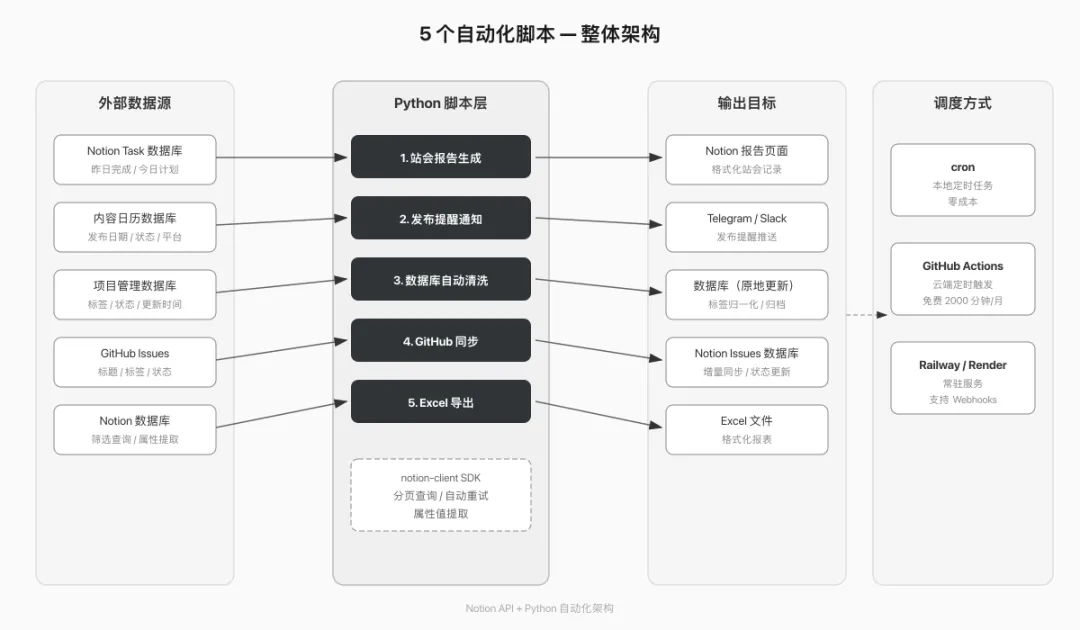
脚本 1:每日站会报告自动生成
痛点:每天早上花 10 分钟翻 Task 数据库,把昨天完成的和今天计划的任务整理成文字发到群里。
解法:脚本自动查询数据库,生成格式化的站会报告页面。
数据库结构要求
你的 Task 数据库需要这几个属性:
完整代码
"""脚本 1:每日站会报告自动生成从 Task 数据库查询昨天完成 + 今天计划的任务,生成站会报告页面"""import osfrom datetime import datetime, timedeltafrom notion_client import Clientfrom dotenv import load_dotenvload_dotenv()notion = Client(auth=os.environ["NOTION_TOKEN"])TASK_DB_ID = os.environ["TASK_DATABASE_ID"]REPORT_PARENT_PAGE_ID = os.environ["REPORT_PARENT_PAGE_ID"]def get_yesterday_completed(): """查询昨天完成的任务""" yesterday = (datetime.now() - timedelta(days=1)).strftime("%Y-%m-%d") response = notion.databases.query( database_id=TASK_DB_ID, filter={ "and": [ { "property": "Status", "select": {"equals": "Done"} }, { "property": "Last Edited", "last_edited_time": { "on_or_after": f"{yesterday}T00:00:00+08:00" } }, { "property": "Last Edited", "last_edited_time": { "before": f"{yesterday}T23:59:59+08:00" } } ] } ) return response["results"]def get_today_planned(): """查询今天计划中的任务""" today = datetime.now().strftime("%Y-%m-%d") response = notion.databases.query( database_id=TASK_DB_ID, filter={ "or": [ { "property": "Status", "select": {"equals": "In Progress"} }, { "and": [ { "property": "Due Date", "date": {"equals": today} }, { "property": "Status", "select": {"does_not_equal": "Done"} } ] } ] } ) return response["results"]def extract_title(page): """从页面对象中提取标题文本""" title_prop = page["properties"]["Name"]["title"] return title_prop[0]["plain_text"] if title_prop else "(无标题)"def extract_assignee(page): """提取负责人姓名""" people = page["properties"]["Assignee"]["people"] return people[0]["name"] if people else "未分配"def build_report_blocks(completed, planned): """构建站会报告的 Block 内容""" today_str = datetime.now().strftime("%Y-%m-%d") blocks = [ { "object": "block", "type": "heading_2", "heading_2": { "rich_text": [{"type": "text", "text": {"content": "昨日完成"}}] } } ] if completed: for task in completed: name = extract_title(task) assignee = extract_assignee(task) blocks.append({ "object": "block", "type": "bulleted_list_item", "bulleted_list_item": { "rich_text": [ {"type": "text", "text": {"content": f"{name}"}}, {"type": "text", "text": {"content": f" — {assignee}"}, "annotations": {"color": "gray"}} ] } }) else: blocks.append({ "object": "block", "type": "paragraph", "paragraph": { "rich_text": [{"type": "text", "text": {"content": "昨日无已完成任务"}}] } }) blocks.append({ "object": "block", "type": "heading_2", "heading_2": { "rich_text": [{"type": "text", "text": {"content": "今日计划"}}] } }) if planned: for task in planned: name = extract_title(task) assignee = extract_assignee(task) blocks.append({ "object": "block", "type": "bulleted_list_item", "bulleted_list_item": { "rich_text": [ {"type": "text", "text": {"content": f"{name}"}}, {"type": "text", "text": {"content": f" — {assignee}"}, "annotations": {"color": "gray"}} ] } }) else: blocks.append({ "object": "block", "type": "paragraph", "paragraph": { "rich_text": [{"type": "text", "text": {"content": "今日暂无计划任务"}}] } }) return blocksdef create_standup_report(): """创建站会报告页面""" today_str = datetime.now().strftime("%Y-%m-%d %A") completed = get_yesterday_completed() planned = get_today_planned() blocks = build_report_blocks(completed, planned) new_page = notion.pages.create( parent={"page_id": REPORT_PARENT_PAGE_ID}, properties={ "title": [ { "type": "text", "text": {"content": f"站会报告 {today_str}"} } ] }, children=blocks ) print(f"站会报告已生成:{new_page['url']}") print(f" 昨日完成:{len(completed)} 项") print(f" 今日计划:{len(planned)} 项") return new_pageif __name__ == "__main__": create_standup_report()
配置 .env
NOTION_TOKEN=ntn_xxxTASK_DATABASE_ID=你的任务数据库IDREPORT_PARENT_PAGE_ID=存放报告的父页面ID
数据库 ID 从哪来?打开数据库的完整页面视图,URL 里 notion.so/ 后面、?v= 前面的那串就是。
 architecture
脚本 2:内容日历自动发布提醒
痛点:自媒体团队用 Notion 管理内容日历,但经常忘了某篇文章到了发布日期。
解法:每天定时查询"发布日期=今天"的条目,通过 Telegram 推送提醒。
完整代码
"""脚本 2:内容日历自动发布提醒查询发布日期为今天的内容,通过 Telegram 发送提醒"""import osimport requestsfrom datetime import datetimefrom notion_client import Clientfrom dotenv import load_dotenvload_dotenv()notion = Client(auth=os.environ["NOTION_TOKEN"])CONTENT_DB_ID = os.environ["CONTENT_DATABASE_ID"]TG_BOT_TOKEN = os.environ["TG_BOT_TOKEN"]TG_CHAT_ID = os.environ["TG_CHAT_ID"]def query_today_content(): """查询今天需要发布的内容""" today = datetime.now().strftime("%Y-%m-%d") response = notion.databases.query( database_id=CONTENT_DB_ID, filter={ "and": [ { "property": "Publish Date", "date": {"equals": today} }, { "property": "Status", "select": {"does_not_equal": "Published"} } ] }, sorts=[ { "property": "Publish Date", "direction": "ascending" } ] ) return response["results"]def format_content_item(page): """格式化单条内容信息""" title_prop = page["properties"]["Name"]["title"] title = title_prop[0]["plain_text"] if title_prop else "(无标题)" # 提取平台(多选属性) platform_prop = page["properties"].get("Platform", {}) platforms = [] if platform_prop.get("multi_select"): platforms = [p["name"] for p in platform_prop["multi_select"]] platform_str = "、".join(platforms) if platforms else "未指定平台" # 提取负责人 author_prop = page["properties"].get("Author", {}) author = "未分配" if author_prop.get("people") and author_prop["people"]: author = author_prop["people"][0]["name"] return f" - 《{title}》\n 平台:{platform_str} | 负责:{author}"def send_telegram_message(text): """发送 Telegram 消息""" url = f"https://api.telegram.org/bot{TG_BOT_TOKEN}/sendMessage" payload = { "chat_id": TG_CHAT_ID, "text": text, "parse_mode": "Markdown" } resp = requests.post(url, json=payload, timeout=10) resp.raise_for_status() return resp.json()def check_and_notify(): """检查今天的发布计划并发送通知""" content_items = query_today_content() if not content_items: print("今天没有待发布内容") return today_str = datetime.now().strftime("%m月%d日") lines = [f"📋 *{today_str} 待发布内容*(共 {len(content_items)} 篇)\n"] for item in content_items: lines.append(format_content_item(item)) message = "\n".join(lines) send_telegram_message(message) print(f"已发送提醒:{len(content_items)} 篇待发布内容")if __name__ == "__main__": check_and_notify()
这个脚本同样适用于 Slack 或邮件通知——把 send_telegram_message 替换成对应的发送函数即可。Telegram 只是因为它的 Bot API 最简单,三行代码就能发消息。
脚本 3:数据库自动清洗
痛点:数据库用久了,标签名称不统一(design、Design、设计 混用),过期条目堆积。
解法:批量标准化标签 + 自动归档过期页面。
完整代码
"""脚本 3:数据库自动清洗- 标准化多选标签(统一大小写、合并同义标签)- 归档超过 30 天未更新的已完成页面"""import osfrom datetime import datetime, timedeltafrom notion_client import Clientfrom dotenv import load_dotenvload_dotenv()notion = Client(auth=os.environ["NOTION_TOKEN"])DATABASE_ID = os.environ["CLEAN_DATABASE_ID"]# 标签映射规则:把左边的标签统一替换成右边的TAG_MAPPING = { "design": "Design", "设计": "Design", "DESIGN": "Design", "dev": "Development", "开发": "Development", "DEV": "Development", "mkt": "Marketing", "marketing": "Marketing", "市场": "Marketing",}TAG_PROPERTY_NAME = "Tags" # 你的多选属性名def fetch_all_pages(database_id): """分页查询,获取数据库全部页面""" pages = [] has_more = True start_cursor = None while has_more: kwargs = {"database_id": database_id, "page_size": 100} if start_cursor: kwargs["start_cursor"] = start_cursor response = notion.databases.query(**kwargs) pages.extend(response["results"]) has_more = response["has_more"] start_cursor = response.get("next_cursor") return pagesdef normalize_tags(pages): """标准化标签名称""" updated_count = 0 for page in pages: tag_prop = page["properties"].get(TAG_PROPERTY_NAME, {}) if not tag_prop.get("multi_select"): continue current_tags = [t["name"] for t in tag_prop["multi_select"]] normalized = [] changed = False for tag in current_tags: mapped = TAG_MAPPING.get(tag, tag) if mapped != tag: changed = True # 去重 if mapped not in normalized: normalized.append(mapped) if changed or len(normalized) != len(current_tags): notion.pages.update( page_id=page["id"], properties={ TAG_PROPERTY_NAME: { "multi_select": [{"name": t} for t in normalized] } } ) updated_count += 1 print(f" 标签更新:{current_tags} → {normalized}") return updated_countdef archive_stale_pages(pages, days_threshold=30): """归档超过指定天数未更新的已完成页面""" cutoff = datetime.now() - timedelta(days=days_threshold) cutoff_str = cutoff.isoformat() archived_count = 0 for page in pages: # 只处理已完成的任务 status = page["properties"].get("Status", {}) if status.get("select") and status["select"]["name"] != "Done": continue last_edited = page["last_edited_time"] if last_edited < cutoff_str: notion.pages.update( page_id=page["id"], in_trash=True ) title_prop = page["properties"].get("Name", {}).get("title", []) title = title_prop[0]["plain_text"] if title_prop else "(无标题)" archived_count += 1 print(f" 已归档:{title}(最后编辑:{last_edited[:10]})") return archived_countdef run_cleanup(): """执行数据库清洗""" print(f"开始清洗数据库 {DATABASE_ID[:8]}...") pages = fetch_all_pages(DATABASE_ID) print(f"共 {len(pages)} 条记录\n") print("=== 标签标准化 ===") tag_count = normalize_tags(pages) print(f"更新了 {tag_count} 条记录的标签\n") print("=== 归档过期页面 ===") archive_count = archive_stale_pages(pages) print(f"归档了 {archive_count} 条过期记录\n") print("清洗完成。")if __name__ == "__main__": run_cleanup()
⚠️ in_trash=True 是 2026 年 API 的写法。如果你用的是 2024 年之前的 API 版本,对应的字段是 archived=True。2026-03-11 版本已经彻底移除了 archived 字段。
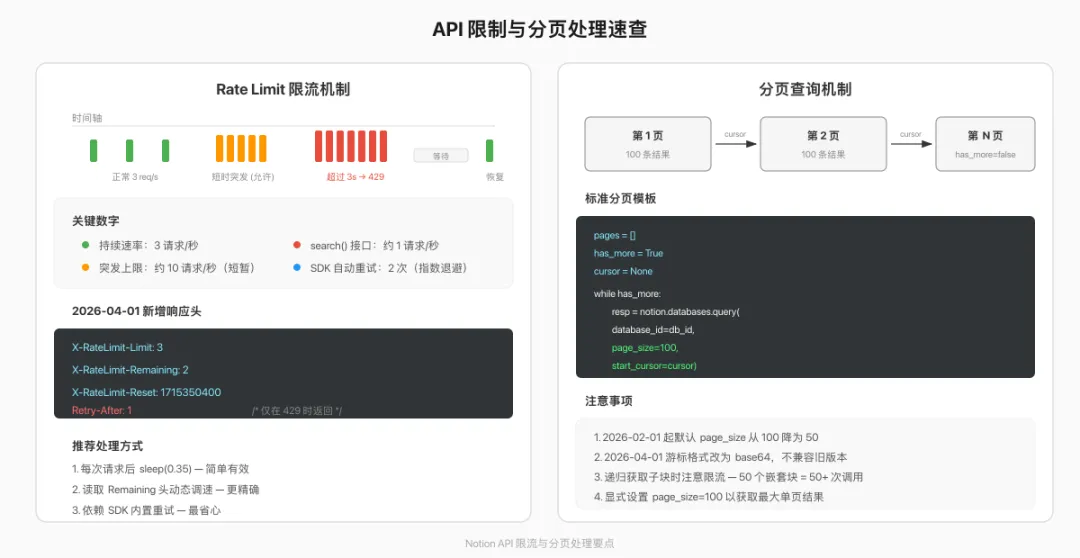
这个脚本里的 fetch_all_pages 函数是标准的分页查询模板。Notion 每次最多返回 100 条,超过就必须用 start_cursor 翻页。后面几个脚本也会复用这个模式。
 workflow
脚本 4:GitHub Issues 同步到 Notion
痛点:开发团队用 GitHub 管理 Issues,但产品经理和设计师只看 Notion。两边信息不同步。
解法:定时从 GitHub 拉取 Issues,增量同步到 Notion 数据库。
Notion 数据库结构
完整代码
"""脚本 4:GitHub Issues → Notion 同步增量同步 GitHub Issues 到 Notion 数据库(不重复创建)"""import osimport timeimport requestsfrom datetime import datetimefrom notion_client import Clientfrom dotenv import load_dotenvload_dotenv()notion = Client(auth=os.environ["NOTION_TOKEN"])GITHUB_TOKEN = os.environ["GITHUB_TOKEN"]GITHUB_REPO = os.environ["GITHUB_REPO"] # 格式: "owner/repo"ISSUES_DB_ID = os.environ["ISSUES_DATABASE_ID"]GITHUB_API = "https://api.github.com"GITHUB_HEADERS = { "Authorization": f"Bearer {GITHUB_TOKEN}", "Accept": "application/vnd.github.v3+json"}def fetch_github_issues(state="all", since=None): """从 GitHub 获取 Issues(分页)""" issues = [] page = 1 while True: params = {"state": state, "per_page": 100, "page": page} if since: params["since"] = since resp = requests.get( f"{GITHUB_API}/repos/{GITHUB_REPO}/issues", headers=GITHUB_HEADERS, params=params, timeout=30 ) resp.raise_for_status() batch = resp.json() if not batch: break # 过滤掉 Pull Requests(GitHub API 把 PR 也算 Issues) real_issues = [i for i in batch if "pull_request" not in i] issues.extend(real_issues) page += 1 return issuesdef get_existing_issue_numbers(): """查询 Notion 数据库中已有的 Issue 编号""" existing = {} has_more = True start_cursor = None while has_more: kwargs = {"database_id": ISSUES_DB_ID, "page_size": 100} if start_cursor: kwargs["start_cursor"] = start_cursor response = notion.databases.query(**kwargs) for page in response["results"]: num_prop = page["properties"].get("Issue Number", {}) if num_prop.get("number") is not None: existing[num_prop["number"]] = page["id"] has_more = response["has_more"] start_cursor = response.get("next_cursor") return existingdef create_notion_page(issue): """在 Notion 中创建一条 Issue 记录""" labels = [{"name": l["name"]} for l in issue.get("labels", [])] assignee = issue["assignee"]["login"] if issue.get("assignee") else "" properties = { "Name": { "title": [{"text": {"content": issue["title"][:2000]}}] }, "Issue Number": {"number": issue["number"]}, "State": {"select": {"name": issue["state"]}}, "Labels": {"multi_select": labels[:100]}, "Assignee": { "rich_text": [{"text": {"content": assignee}}] if assignee else [] }, "URL": {"url": issue["html_url"]}, "Created": {"date": {"start": issue["created_at"]}}, "Updated": {"date": {"start": issue["updated_at"]}} } notion.pages.create( parent={"database_id": ISSUES_DB_ID}, properties=properties )def update_notion_page(page_id, issue): """更新已有的 Notion 页面""" labels = [{"name": l["name"]} for l in issue.get("labels", [])] assignee = issue["assignee"]["login"] if issue.get("assignee") else "" properties = { "Name": { "title": [{"text": {"content": issue["title"][:2000]}}] }, "State": {"select": {"name": issue["state"]}}, "Labels": {"multi_select": labels[:100]}, "Assignee": { "rich_text": [{"text": {"content": assignee}}] if assignee else [] }, "Updated": {"date": {"start": issue["updated_at"]}} } notion.pages.update(page_id=page_id, properties=properties)def sync_issues(): """执行 GitHub → Notion 同步""" print(f"同步仓库:{GITHUB_REPO}") github_issues = fetch_github_issues() print(f"GitHub Issues:{len(github_issues)} 条") existing = get_existing_issue_numbers() print(f"Notion 已有:{len(existing)} 条\n") created, updated = 0, 0 for issue in github_issues: num = issue["number"] if num in existing: update_notion_page(existing[num], issue) updated += 1 else: create_notion_page(issue) created += 1 # 控制请求频率,不超过 3 req/s time.sleep(0.35) print(f"\n同步完成:新建 {created} 条,更新 {updated} 条")if __name__ == "__main__": sync_issues()
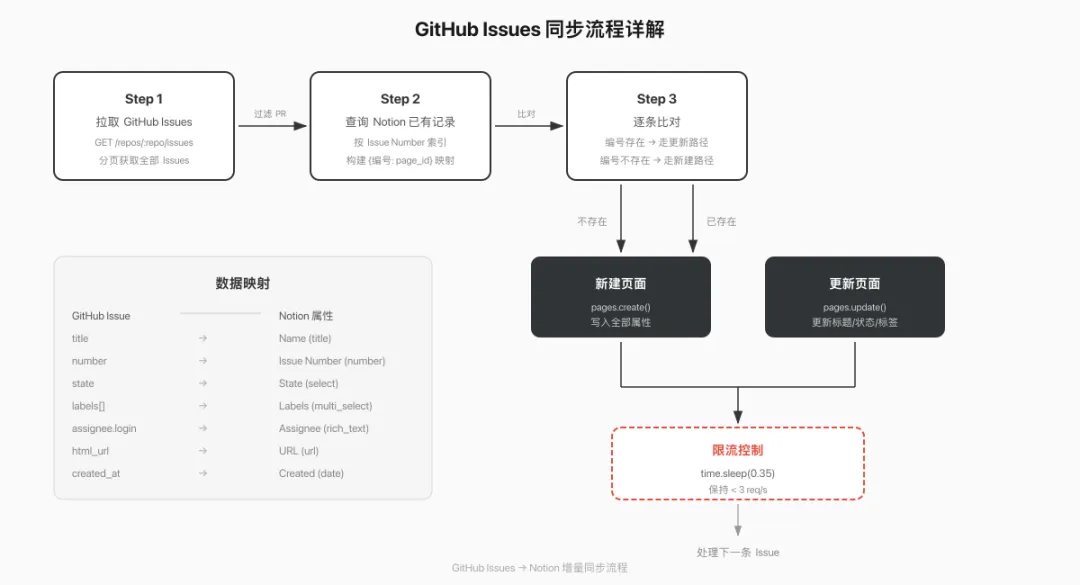
增量同步的关键逻辑
脚本用 Issue Number 做去重——先查 Notion 里已有哪些编号,GitHub 那边拉回来后比对,有就更新,没有才创建。
如果你的仓库 Issues 很多(几千条),首次同步时注意 time.sleep(0.35) 这行——Notion API 限制每秒 3 个请求,0.35 秒一次刚好不会触发限流。
脚本 5:Notion 数据库导出 Excel
痛点:每周要从 Notion 导出数据做报表,Notion 自带的 CSV 导出不支持筛选,多选属性导出后格式也不好处理。
解法:用 API 查询 + openpyxl 生成格式化的 Excel 文件。
完整代码
"""脚本 5:Notion 数据库 → Excel 导出支持筛选条件、多选属性处理、格式化输出"""import osfrom datetime import datetimefrom notion_client import Clientfrom dotenv import load_dotenvload_dotenv()notion = Client(auth=os.environ["NOTION_TOKEN"])DATABASE_ID = os.environ["EXPORT_DATABASE_ID"]def fetch_filtered_pages(database_id, status_filter=None): """带筛选条件的分页查询""" pages = [] has_more = True start_cursor = None filter_obj = None if status_filter: filter_obj = { "property": "Status", "select": {"equals": status_filter} } while has_more: kwargs = {"database_id": database_id, "page_size": 100} if start_cursor: kwargs["start_cursor"] = start_cursor if filter_obj: kwargs["filter"] = filter_obj response = notion.databases.query(**kwargs) pages.extend(response["results"]) has_more = response["has_more"] start_cursor = response.get("next_cursor") return pagesdef extract_property_value(prop): """通用属性值提取 — 处理 Notion API 各种属性类型""" prop_type = prop["type"] if prop_type == "title": return prop["title"][0]["plain_text"] if prop["title"] else "" elif prop_type == "rich_text": return prop["rich_text"][0]["plain_text"] if prop["rich_text"] else "" elif prop_type == "number": return prop["number"] if prop["number"] is not None else "" elif prop_type == "select": return prop["select"]["name"] if prop["select"] else "" elif prop_type == "multi_select": return ", ".join([o["name"] for o in prop["multi_select"]]) elif prop_type == "date": if prop["date"]: start = prop["date"]["start"] end = prop["date"].get("end") return f"{start} → {end}" if end else start return "" elif prop_type == "checkbox": return "Yes" if prop["checkbox"] else "No" elif prop_type == "url": return prop["url"] or "" elif prop_type == "email": return prop["email"] or "" elif prop_type == "phone_number": return prop["phone_number"] or "" elif prop_type == "people": return ", ".join([p.get("name", "") for p in prop["people"]]) elif prop_type == "formula": formula = prop["formula"] return formula.get(formula["type"], "") elif prop_type in ("created_time", "last_edited_time"): return prop[prop_type][:10] if prop[prop_type] else "" elif prop_type in ("created_by", "last_edited_by"): return prop[prop_type].get("name", "") elif prop_type == "relation": return f"{len(prop['relation'])} 条关联" elif prop_type == "rollup": rollup = prop["rollup"] if rollup["type"] == "array": return str(len(rollup["array"])) return str(rollup.get(rollup["type"], "")) elif prop_type == "status": return prop["status"]["name"] if prop["status"] else "" return str(prop.get(prop_type, ""))def export_to_excel(pages, output_path, sheet_name="Export"): """将 Notion 页面列表导出为 Excel""" try: from openpyxl import Workbook from openpyxl.styles import Font, PatternFill, Alignment, Border, Side except ImportError: print("需要安装 openpyxl: pip install openpyxl") return if not pages: print("没有数据可导出") return # 获取所有属性名(保持顺序) first_page = pages[0] columns = list(first_page["properties"].keys()) wb = Workbook() ws = wb.active ws.title = sheet_name # 表头样式 header_font = Font(name="PingFang SC", bold=True, size=11, color="FFFFFF") header_fill = PatternFill(start_color="2F3437", end_color="2F3437", fill_type="solid") header_alignment = Alignment(horizontal="center", vertical="center") thin_border = Border( left=Side(style="thin", color="E0E0E0"), right=Side(style="thin", color="E0E0E0"), top=Side(style="thin", color="E0E0E0"), bottom=Side(style="thin", color="E0E0E0") ) # 写表头 for col_idx, col_name in enumerate(columns, 1): cell = ws.cell(row=1, column=col_idx, value=col_name) cell.font = header_font cell.fill = header_fill cell.alignment = header_alignment cell.border = thin_border # 写数据 data_font = Font(name="PingFang SC", size=10) for row_idx, page in enumerate(pages, 2): for col_idx, col_name in enumerate(columns, 1): prop = page["properties"][col_name] value = extract_property_value(prop) cell = ws.cell(row=row_idx, column=col_idx, value=value) cell.font = data_font cell.border = thin_border # 自动列宽 for col_idx, col_name in enumerate(columns, 1): max_len = len(col_name) for row_idx in range(2, len(pages) + 2): cell_val = str(ws.cell(row=row_idx, column=col_idx).value or "") max_len = max(max_len, len(cell_val)) ws.column_dimensions[ws.cell(row=1, column=col_idx).column_letter].width = \ min(max_len + 4, 50) # 冻结首行 ws.freeze_panes = "A2" wb.save(output_path) print(f"已导出 {len(pages)} 条记录到 {output_path}")def run_export(): """执行导出""" timestamp = datetime.now().strftime("%Y%m%d_%H%M") output_file = f"notion_export_{timestamp}.xlsx" # 可以传入筛选条件,比如只导出 "Done" 状态的 pages = fetch_filtered_pages(DATABASE_ID, status_filter=None) export_to_excel(pages, output_file, sheet_name="Notion 数据库导出")if __name__ == "__main__": run_export()
extract_property_value 这个函数值得单独说一下。Notion API 的属性值结构嵌套很深,不同类型的读取方式完全不同——Title 要读 title[0].plain_text,Select 要读 select.name,Multi-select 是数组套对象。这个函数覆盖了所有常见类型,可以直接复用到你的其他项目里。
 deploy
让脚本自动跑起来
代码写好了,最后一个问题:怎么让它定时执行?
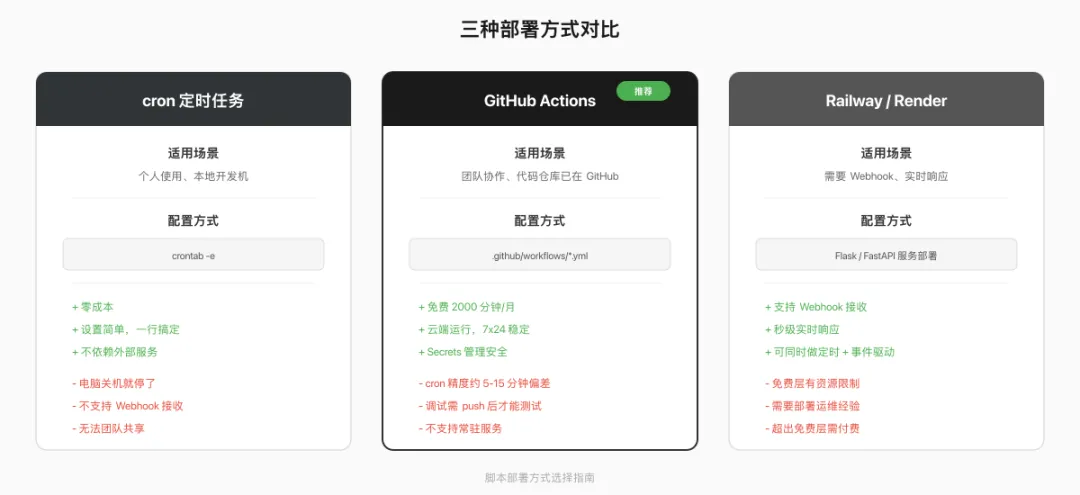
方案 1:本地 cron(最简单)
# 编辑 crontabcrontab -e# 每天早上 9:00 跑站会报告0 9 * * 1-5 cd /path/to/project && python standup_report.py# 每天早上 8:00 跑发布提醒0 8 * * * cd /path/to/project && python content_reminder.py# 每周一凌晨 3:00 跑数据库清洗0 3 * * 1 cd /path/to/project && python db_cleanup.py# 每小时跑一次 GitHub 同步0 * * * * cd /path/to/project && python github_sync.py
优点:零成本,电脑开着就行。缺点:电脑关了就不跑了。
方案 2:GitHub Actions(免费,推荐)
# .github/workflows/notion-automation.ymlname: Notion Automationon: schedule: # 每天 UTC 1:00(北京时间 9:00) - cron: '0 1 * * 1-5' workflow_dispatch: # 手动触发jobs: standup-report: runs-on: ubuntu-latest steps: - uses: actions/checkout@v4 - uses: actions/setup-python@v5 with: python-version: '3.12' - run: pip install notion-client python-dotenv - run: python standup_report.py env: NOTION_TOKEN: ${{ secrets.NOTION_TOKEN }} TASK_DATABASE_ID: ${{ secrets.TASK_DATABASE_ID }} REPORT_PARENT_PAGE_ID: ${{ secrets.REPORT_PARENT_PAGE_ID }}
把 Token 和数据库 ID 存到 GitHub 仓库的 Settings → Secrets 里。免费账户每月有 2000 分钟的 Actions 额度,跑这些脚本绰绰有余。
方案 3:Railway / Render(适合 Webhook 场景)
如果你需要接收 Notion Webhooks(2026 年新增的推送通知能力),就需要一个常驻运行的服务器来接收请求。Railway 和 Render 都提供免费层,配合 Flask 或 FastAPI 部署一个 Webhook 接收服务:
from flask import Flask, requestimport hmac, hashlibapp = Flask(__name__)WEBHOOK_SECRET = os.environ["NOTION_WEBHOOK_SECRET"]@app.route("/webhook", methods=["POST"])def handle_webhook(): # 验证签名 signature = request.headers.get("X-Notion-Signature") body = request.get_data() expected = hmac.new( WEBHOOK_SECRET.encode(), body, hashlib.sha256 ).hexdigest() if not hmac.compare_digest(signature, f"sha256={expected}"): return "Invalid signature", 401 event = request.json # 根据事件类型触发对应的自动化逻辑 print(f"收到事件:{event['type']}") return "OK", 200
三种方案对比:
 api-tips
API 使用避坑清单
写了这么多脚本,踩过的坑也不少。几个高频问题:
1. Rate Limit 不是"每秒 3 次"这么简单
官方说法是"平均每秒 3 次,允许短时突发"。实测下来,短时间内打到 10 req/s 不会立刻 429,但持续超过 3 秒就会被限流。2026-04-01 版本开始,每个响应都会带 X-RateLimit-Remaining 头,可以据此动态调节请求频率。
notion-client 3.0.0 内置了自动重试(默认重试 2 次,指数退避),大部分场景不需要自己处理 429。
2. 分页游标不能跨 API 版本
2026-04-01 版本换了 base64 格式的分页游标。如果你在一次分页查询中途升级了 Notion-Version,之前拿到的 next_cursor 就废了。要么在同步开始前锁定版本,要么同步完再升级。
3. Rich Text 属性的正确读法
# 错误写法 — 数组可能为空title = page["properties"]["Name"]["title"][0]["plain_text"]# 正确写法 — 先检查数组长度title_arr = page["properties"]["Name"]["title"]title = title_arr[0]["plain_text"] if title_arr else ""
每个 Rich Text 类型(title、rich_text)的值都是数组。空页面的标题数组是 [],直接取 [0] 会 IndexError。
4. 多选属性的写入格式
# 错误 — 直接传字符串{"multi_select": ["tag1", "tag2"]}# 正确 — 必须是对象数组{"multi_select": [{"name": "tag1"}, {"name": "tag2"}]}
如果标签名不存在,Notion 会自动创建(随机分配颜色)。但标签总数上限是 100 个。
5. 搜索接口有独立的限流
notion.search() 的有效请求频率大约是每秒 1 次,比普通接口更严格。如果需要频繁查找页面,优先用 databases.query() 配合筛选条件,而不是全局搜索。
2026 年 API 新能力速查
写这些脚本时用到的都是基础 API。2026 年 Notion 还推出了几个值得关注的新能力:
其中 Webhooks 和批量操作对自动化脚本的影响最大。Webhooks 让你可以从"每 5 分钟轮询一次"变成"变化发生时立刻响应"。批量操作则把原来需要 100 次 API 调用的事情压缩成 1 次。
这 5 个脚本覆盖了 Notion API 自动化最常见的场景。代码都是可以直接运行的——创建 Integration、填好数据库 ID、配置 .env,三步就能跑起来。如果你的团队有更复杂的需求,这些脚本也是很好的起点,往上加业务逻辑就行。
 10个月宝宝每天需要喝多少奶粉?