Python项目开发完成后,如何将其分发给没有 Python 环境的用户呢?Nuitka 是一个优秀的 Python 到 C++ 的编译器,能够将 Python 代码编译成独立的可执行文件,既保护了源代码,又提升了运行效率。
什么是 Nuitka
Nuitka 是一个将 Python 代码翻译成 C/C++ 代码,并编译成独立可执行文件的工具。与 PyInstaller 等打包工具不同,Nuitka 真正进行了编译优化,具有以下优势:
- 真正的编译:将 Python 代码转换为 C/C++ 代码后编译,而非简单的打包
- 兼容性好:支持几乎所有 Python 特性和第三方库
- 跨平台:支持 Windows、Linux、macOS 等主流操作系统
环境准备
1. Python 环境
确保已安装 Python (推荐 3.8+):
python --version
2. C 编译器
Nuitka 需要 C 编译器来编译生成的 C/C++ 代码。在 Windows 上有以下选择:
选项一:MinGW64
Nuitka 可以自动下载并配置 MinGW64,无需手动安装。首次运行时会提示下载,选择 Yes 即可。
选项二:Microsoft Visual Studio
如果已安装 Visual Studio 2022 或更高版本,Nuitka 会自动检测并使用 MSVC 编译器。
★ 注意:MinGW64 目前不支持 Python 3.13+,如使用新版 Python 请选择 MSVC。
”
Nuitka 安装
使用 pip 安装
python -m pip install nuitka
验证安装
python -m nuitka --version
安装成功后会显示版本号,例如:
4.0.8Commercial: NonePython: 3.12.13 | packaged by conda-forge | (main, Mar 5 2026, 16:36:12) [MSC v.1944 64 bit (AMD64)]Flavor: Anaconda PythonExecutable: ~\miniconda3\envs\llm_a\python.exeOS: WindowsArch: x86_64WindowsRelease: 11
Nuitka 基本使用
最简单的编译
python -m nuitka hello.py
这会生成一个 hello.exe 文件,但依赖本地 Python 环境。
独立模式
python -m nuitka --standalone hello.py
--standalone 模式会生成一个包含所有依赖的文件夹,可以在没有 Python 环境的机器上运行。
单文件模式
python -m nuitka --onefile hello.py
--onefile 模式将所有内容打包成单个可执行文件,便于分发,但启动速度稍慢。
构建流程详解
以下以EmailExtractor 为例,基于 build.ps1 脚本进行整构建流程解析。
项目结构
EmailExtractor/├── main.py # 程序入口├── src/ # 源代码目录│ ├── fetcher.py│ ├── parser.py│ ├── analyzer.py│ └── ...├── configures/ # 配置文件目录│ ├── config.toml│ ├── analyze_prompt.md│ └── .env├── scripts/│ └── build.ps1 # 构建脚本└── environment.yml # 依赖管理
构建命令详解
python -m nuitka ` --standalone ` --output-filename=EmailExtractor.exe ` --enable-plugin=tk-inter ` --include-package=src ` --windows-console-mode=force ` --assume-yes-for-downloads ` main.py
参数说明
| |
|---|
--standalone | |
--output-filename=EmailExtractor.exe | |
--enable-plugin=tk-inter | |
--include-package=src | |
--windows-console-mode=force | |
--assume-yes-for-downloads | |
main.py | |
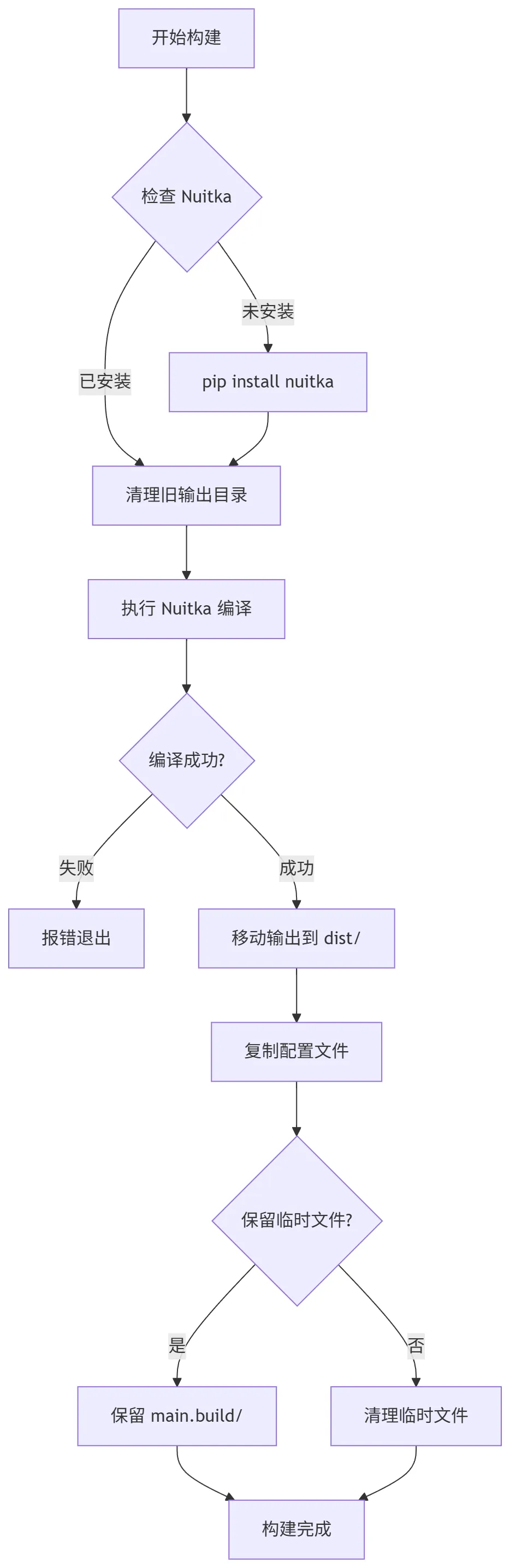
完整构建脚本流程
构建步骤详解
步骤 1:环境检查
$nuitkaCheck = python -m nuitka --version 2>&1if ($LASTEXITCODE -ne 0) { pip install nuitka}
检查 Nuitka 是否已安装,未安装则自动安装。
步骤 2:清理旧输出
if (Test-Path $finalOutputDir) { Remove-Item -Path $finalOutputDir -Recurse -Force}
删除旧的 dist/ 目录,确保干净的构建环境。
步骤 3:执行编译
& python $nuitkaArgs
运行 Nuitka 编译命令,此过程可能需要几分钟。
步骤 4:移动输出
Move-Item -Path $tempDistDir -Destination $finalOutputDir -Force
Nuitka 默认输出到 main.dist/,将其移动到 dist/ 目录。
步骤 5:复制配置文件
Copy-Item -Path "$ProjectDir\configures\config.toml" -Destination $distConfigDir -ForceCopy-Item -Path "$ProjectDir\configures\analyze_prompt.md" -Destination $distConfigDir -ForceCopy-Item -Path "$ProjectDir\configures\.env.example" -Destination $distConfigDir -Force
将配置文件复制到输出目录,保持外部可配置性。
步骤 6:清理临时文件
if (Test-Path $tempBuildDir) { Remove-Item -Path $tempBuildDir -Recurse -Force }
删除 main.build/ 临时目录,节省磁盘空间。
输出结构说明
构建完成后,dist/ 目录结构如下:
dist/├── EmailExtractor.exe # 主程序入口├── _internal/ # 运行时依赖(DLL、Python库等)│ ├── python311.dll│ ├── src/│ └── ...└── configures/ # 配置文件目录 ├── config.toml # 主配置文件 ├── .env # 环境变量(敏感数据) ├── .env.example # 环境变量模板 └── analyze_prompt.md # AI 分析提示词
重要说明
_internal/ 目录:包含所有运行时依赖,不可删除configures/ 目录:配置文件,可根据需要修改- `.env 文件:包含敏感信息(API Key 等),切勿分发给他
常用 Nuitka 参数速查
模式相关
| |
|---|
--standalone | |
--onefile | |
--module | |
输出控制
| |
|---|
--output-filename=NAME | |
--output-dir=DIR | |
包含资源
| |
|---|
--include-package=PACKAGE | |
--include-module=MODULE | |
--include-data-files=SRC=DST | |
--include-data-dir=SRC=DST | |
Windows 特定
| |
|---|
--windows-console-mode=force | |
--windows-console-mode=disable | |
--windows-icon-from-ico=FILE.ico | |
--windows-company-name=NAME | |
--windows-product-name=NAME | |
--windows-file-version=VER | |
插件支持
| |
|---|
--enable-plugin=tk-inter | |
--enable-plugin=pylint-warnings | |
--enable-plugin=numpy | |
--enable-plugin=pandas | |
常见问题与解决方案
1. 编译时提示缺少 C 编译器
问题:Error, cannot find C compiler.
解决:
- 首次运行时选择
Yes 让 Nuitka 自动下载 MinGW64 - 或手动安装 Visual Studio Build Tools
2. 运行时找不到模块
问题:ModuleNotFoundError: No module named 'xxx'
解决:
--include-package=xxx# 或--include-module=xxx.submodule
3. 找不到数据文件
问题:程序运行时找不到配置文件或资源文件
解决:
--include-data-files=config.toml=config.toml--include-data-dir=data=data
与 PyInstaller 对比
总结
Nuitka 是一个强大且专业的 Python 编译工具,特别适合:
源码 URL:https://github.com/alwaysrun/EmailExtractor
 10个月宝宝每天需要喝多少奶粉?