当前位置:首页>python>有关Python和R语言谁更好回答

有关Python和R语言谁更好回答

  • 2026-07-01 08:45:57
有关Python和R语言谁更好回答
    这个问题太大,我今天以实例带着大家感受一下这个令人两难的问题。
案例:探究不同浓度下的测量值与浓度、测量试剂、稀释方法的关系(篇幅所限,本篇仅在全部浓度下进行曲线模型拟合,后续如有时间将会进行更深入更详细的拆解)。
1.导入数据:
R: 
library(readxl)#导入数据shiji <- read_excel("shiji1.xls",sheet = "1207")library(tidyverse)#转化变量类型data <- shiji%>%  mutate(    id = factor(id),    salt_water    = factor(salt_water,                            levels = c(1, 2),                            labels = c("稀释方法1""稀释方法2")),    repeatation        = factor(repeatation),          # 重复次数    shiji         = factor(shiji,                            levels = c(1, 2),                            labels = c("试剂1""试剂2"))  )str(data)
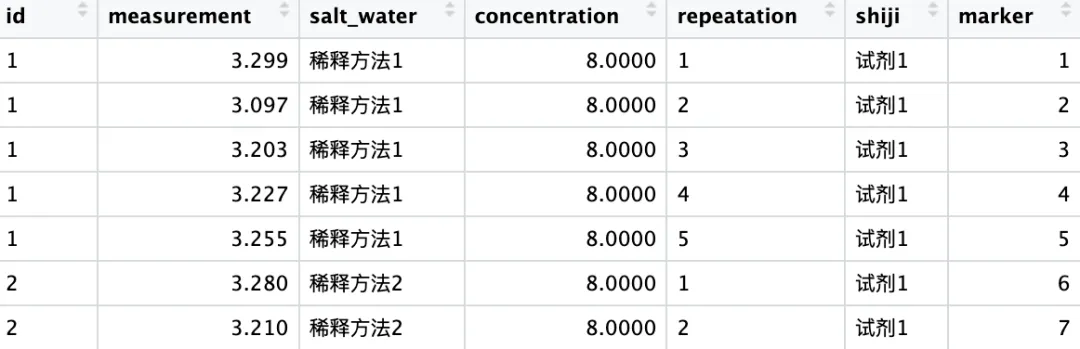
data数据结构:
python:
import pandas as pd import numpy as np import seaborn as sns import matplotlib.pyplot as plt plt.rcParams['font.family'] = 'sans-serif' plt.rcParams['font.sans-serif'] = ['STHeiti Medium'plt.rcParams['axes.unicode_minus'] = False   shiji = pd.read_excel("shiji1.xls", sheet_name="1207") print(shiji)data = (    shiji    .assign(        id = lambda x: x["id"].astype("category"),        salt_water = lambda x: x["salt_water"].map({1:"稀释方法1",2:"稀释方法2"}).astype("category"),        repeatation = lambda x: x["repeatation"].astype("category"),        shiji = lambda x: x["shiji"].map({1:"shiji1",2:"shiji2"}).astype("category")    ))
2、数据初步探索
2.1 R: 
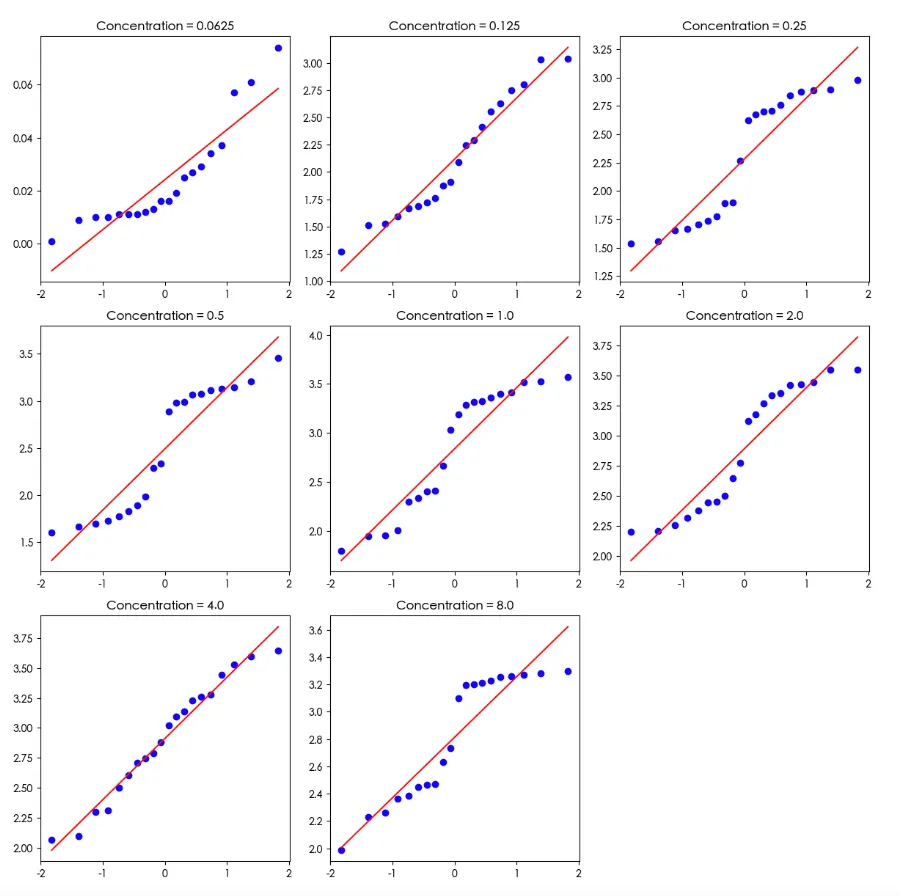
#不同浓度下分组stats <- data %>%  group_by(concentration) %>%  summarise(    n = n(),    mean = mean(measurement),    sd = sd(measurement),    se = sd/sqrt(n),    .groups = "drop"  )print(stats, n=100)library(rstatix)library(ggpubr)#箱图查看bxp <- ggboxplot(data, x = "concentration", y = "measurement", add = "point")bxp#异常值data %>%  group_by(concentration) %>%  identify_outliers(measurement)#正态性检验,大部分非正态data %>%  group_by(concentration) %>%  shapiro_test(measurement)#QQ图图,看起来还行ggqqplot(data"measurement", facet.by = "concentration")
R boxplot箱图:
R QQ图:
2.2 python:
stats = (    data    .groupby('concentration')    .agg(        n=('measurement''count'),          # 数量        mean=('measurement''mean'),        # 均值        sd=('measurement''std')            # 标准差    )    .assign(se=lambda x: x['sd'] / np.sqrt(x['n']))  # 标准误    .reset_index())print(stats)# 设置图片风格sns.set_style("white")# 绘制:箱线图 + 散点(完全等价 ggboxplot + add="point")plt.figure(figsize=(106))# 箱线图ax = sns.boxplot(x="concentration", y="measurement", data=data, color="white", width=0.6)# 叠加散点(jitter 抖动)sns.stripplot(x="concentration", y="measurement", data=data, color="black", size=3, alpha=0.6)# 设置标签ax.set_xlabel("concentration", fontsize=12)ax.set_ylabel("measurement", fontsize=12)# 显示图片plt.tight_layout()plt.show()#异常值检测def identify_outliers(df, group_col, value_col):    outlier_list = []    for name, group in df.groupby(group_col):        x = group[value_col]        q1 = x.quantile(0.25)        q3 = x.quantile(0.75)        iqr = q3 - q1        low = q1 - 1.5 * iqr        high = q3 + 1.5 * iqr        out = group[(x < low) | (x > high)]        outlier_list.append(out)    return pd.concat(outlier_list) if outlier_list else pd.DataFrame()# 检测异常值outliers = identify_outliers(data, "concentration""measurement")print("异常值:")print(outliers)from scipy.stats import shapiro# 定义:分组 Shapiro 正态性检验def shapiro_test_grouped(df, group_col, val_col):    results = []    for group, data_group in df.groupby(group_col):        values = data_group[val_col].dropna()          stat, p = shapiro(values)        results.append({            group_col: group,            "variable": val_col,            "statistic"round(stat, 4),            "p"round(p, 4),            "p_signif""< 0.05" if p < 0.05 else "ns"        })    return pd.DataFrame(results)normality_results = shapiro_test_grouped(data, "concentration""measurement")# 输出print(normality_results)# QQ 图 concentrations = sorted(data['concentration'].unique())n = len(concentrations)# 自动计算画布行列cols = 3rows = (n + cols - 1) // colsfig, axes = plt.subplots(rows, cols, figsize=(cols*4, rows*4))axes = axes.flatten()for i, conc in enumerate(concentrations):    sub = data[data['concentration'] == conc]['measurement'].dropna()    # QQ 图(正态概率图)    probplot(sub, plot=axes[i])    axes[i].set_title(f"Concentration = {conc}")    axes[i].set_xlabel("")    axes[i].set_ylabel("")for j in range(i+1len(axes)):    axes[j].set_visible(False)plt.tight_layout()
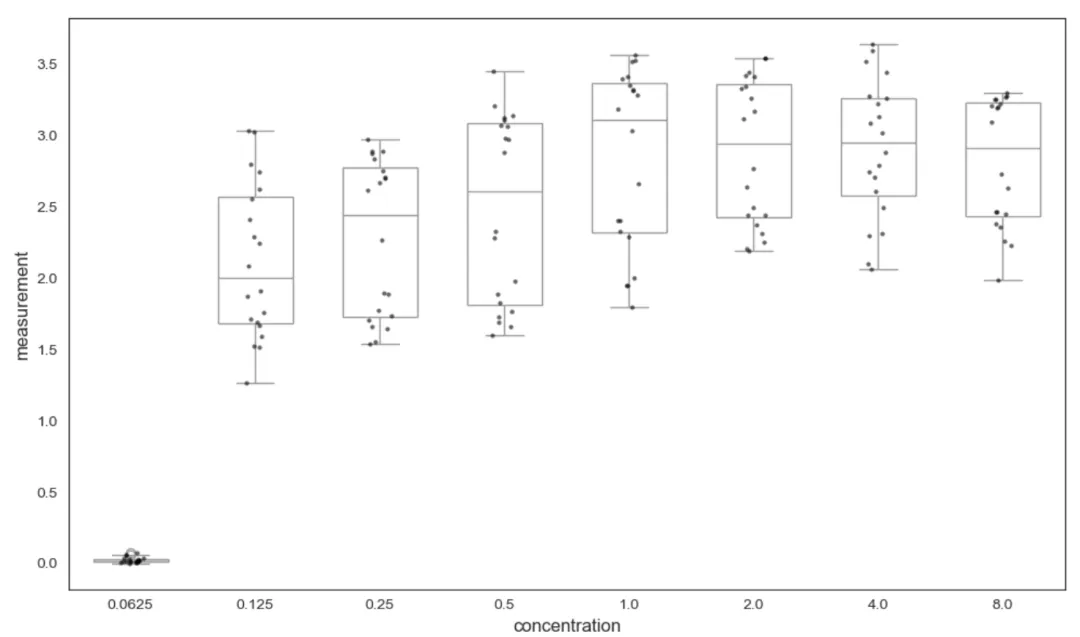
 python boxpolt箱图:
python QQ图:
3. 方差分析及交互作用探索
3.1 R实现方差分析及交互作用
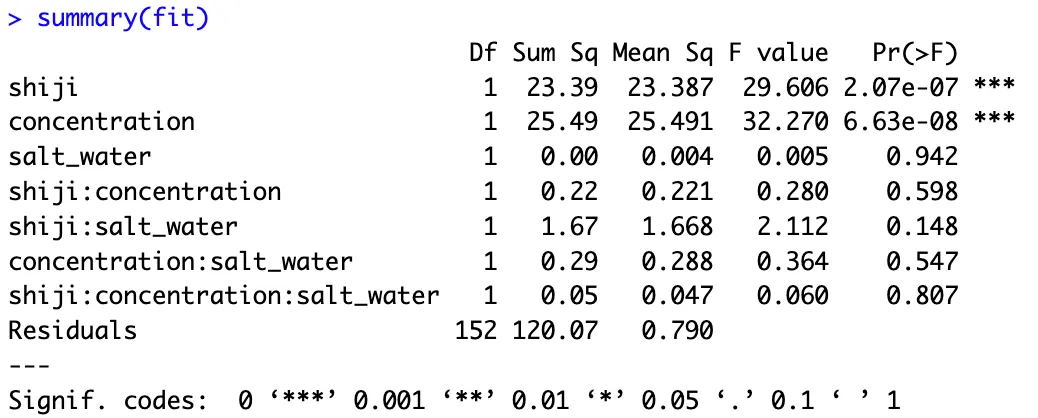
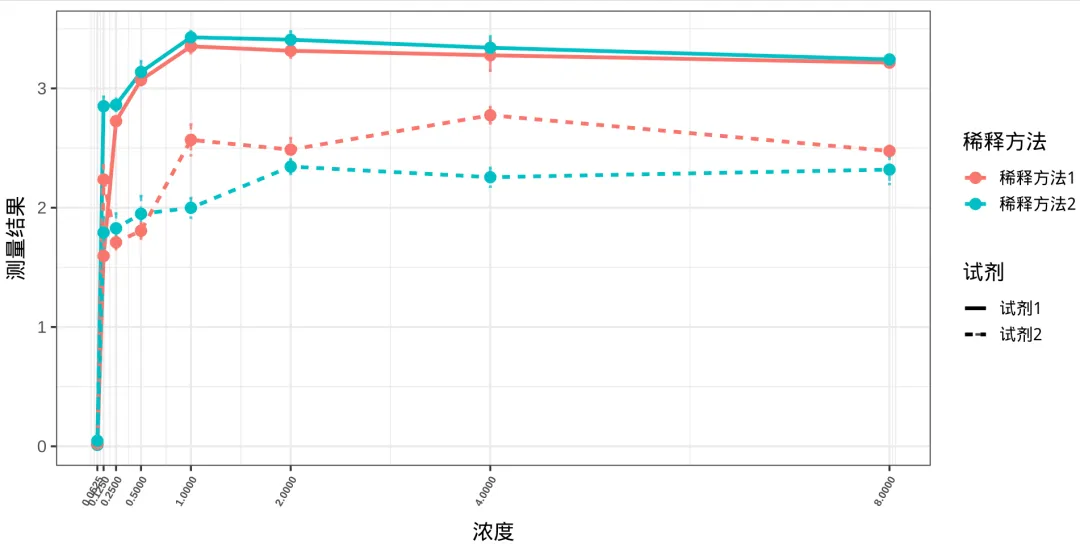
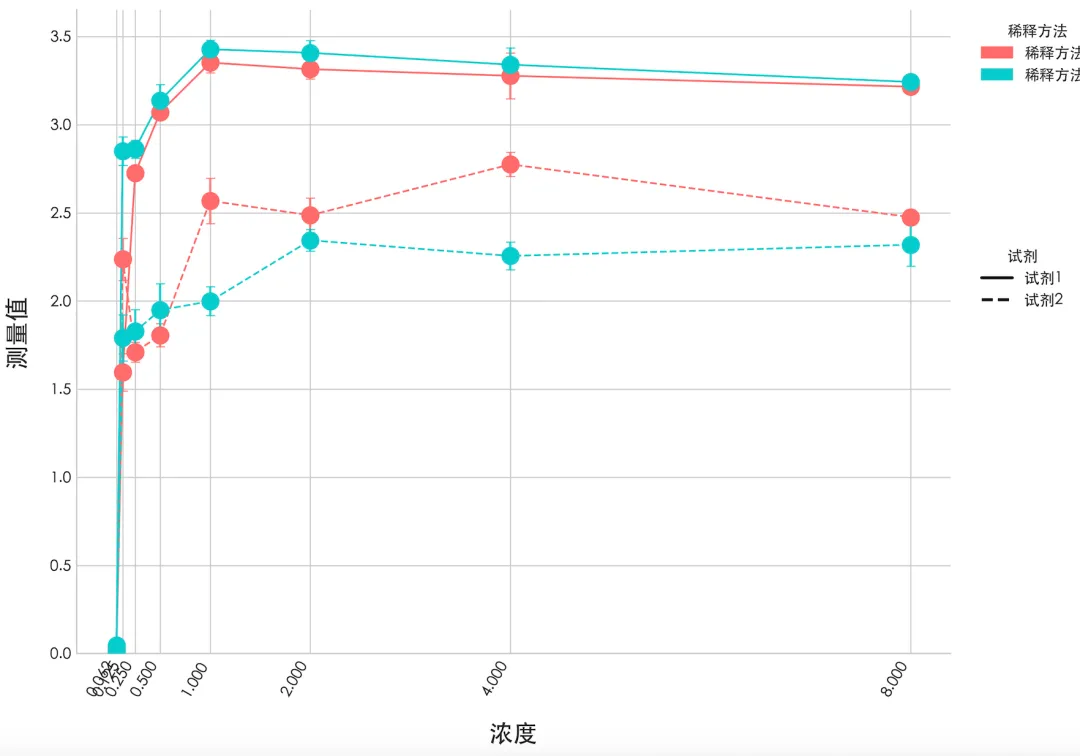
##1.测量值转秩进行多因素及交互作用分析-------table(data$concentration)data$rank_meas <- rank(data$measurement)#拟合三因素全模型:主效应 + 两两交互 + 三阶交互fit <- lm(rank_meas ~ concentration * salt_water * shiji, data = data)#输出所有主效应、交互作用P值anova(fit)##2.根据QQ图基本符合方差分析条件,多因素方差分析-----# 公式:measurement ~ 试剂 * 浓度 * 稀释方法 (所有主效应+交互作用)fit <- aov(measurement ~ shiji * concentration * salt_water, data = data)# 查看详细均值结果summary(fit)# 均值统计plot_data <- data %>%  group_by(shiji, concentration, salt_water) %>%  summarise(mean = mean(measurement), se = sd(measurement)/sqrt(n()), .groups = "drop")#交互作用绘图-----library(showtext)showtext_auto()ggplot(plot_data, aes(x = concentration, y = mean,                      color = salt_water, linetype = shiji,                      group = interaction(salt_water, shiji))) +  geom_line(linewidth = 1.2) +  geom_errorbar(    aes(ymin = mean - se, ymax = mean + se),    width = 0.03,   # 误差线小横线宽度    linewidth = 0.8,    alpha = 0.8  ) +  geom_point(size = 3) +   scale_x_continuous(breaks = unique(plot_data$concentration)) +  labs(x = "浓度", y = "测量值", color = "稀释方法", linetype = "试剂") +  theme_bw(base_size = 14) +  theme(axis.text.x = element_text(    angle = 60,       # 旋转60度    hjust = 1,        # 靠右对齐(不重叠)    vjust = 1,         # 垂直微调    size = 7,    face = "bold"  ))
R方差分析结果:
R: 绘制折线图
3.2 python实现方差分析及交互作用
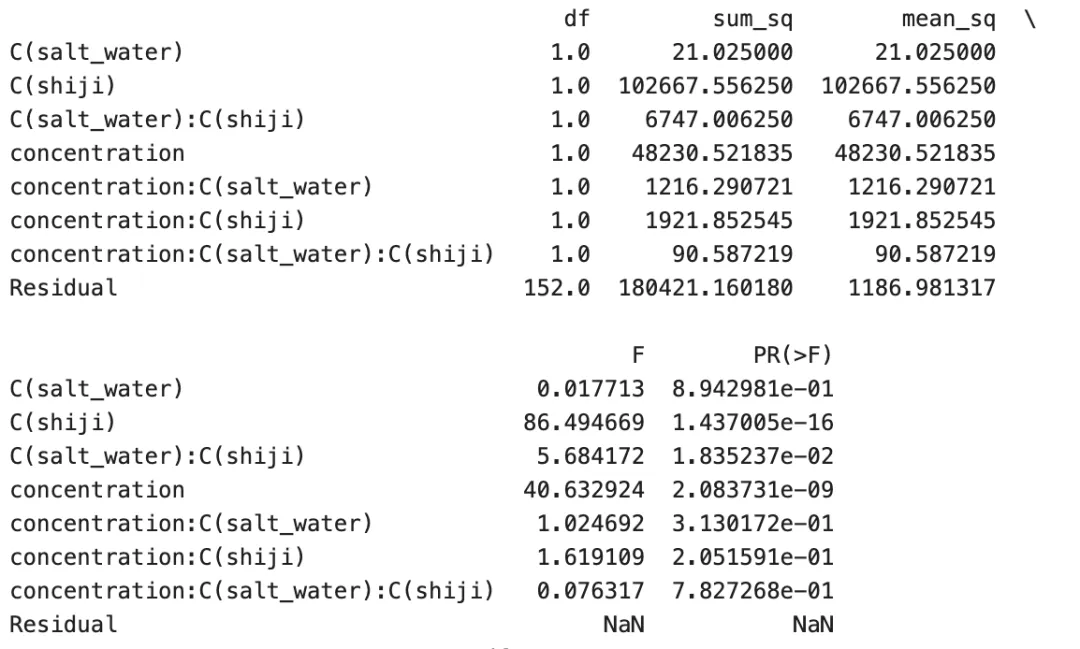
import statsmodels.api as smfrom statsmodels.formula.api import olsfrom scipy.stats import rankdatadata['rank_meas'] = rankdata(data['measurement'])# 2. 拟合三因素全交互模型model = ols(    'rank_meas ~ concentration * C(salt_water) * C(shiji)',    data=data).fit()# 3. 方差分析(等价 R anova(fit))anova_table = sm.stats.anova_lm(model, typ=1)  # 输出结果print("="*50)print(" 秩变换三因素方差分析结果 (等价 R anova(fit))")print("="*50)print(anova_table) #直接方差分析--------model1 = ols(    "measurement ~ shiji * concentration * salt_water",    data=data).fit()# 等价 R anova(fit) anova_table2 = sm.stats.anova_lm(model1, type=1)# 打印结果print(anova_table2)import matplotlib.pyplot as pltimport numpy as npfrom matplotlib.lines import Line2Dfrom matplotlib.patches import Patchimport matplotlib as mplfrom matplotlib import font_manager# 数据处理plot_data = (    data    .groupby(['shiji''concentration''salt_water'])['measurement']    .agg(        mean='mean',        sd='std',        n='count'    )    .assign(se=lambda x: x['sd'] / np.sqrt(x['n']))    .reset_index()    [['shiji''concentration''salt_water''mean''se']])# 绘图设置fig, ax = plt.subplots(figsize=(107))color_map = { "稀释方法1""#ff6b6b""稀释方法2""#00cccc"}linestyle_map = {"试剂1""-""试剂2""--"}for (salt_water, shiji), group in plot_data.groupby(["salt_water""shiji"]):    group = group.sort_values("concentration")    x = group["concentration"]    y = group["mean"]    se = group["se"]    color = color_map[salt_water]    ls = linestyle_map[shiji]    ax.plot(x, y, color=color, linestyle=ls, linewidth=1.2)    ax.scatter(x, y, color=color, s=120, zorder=3)    ax.errorbar(x, y, yerr=se, fmt='none', ecolor=color, capsize=3, capthick=0.8, alpha=0.8)ax.set_xlabel("浓度", fontsize=16, labelpad=15)ax.set_ylabel("测量值", fontsize=16, labelpad=15)ax.set_xticks(plot_data["concentration"].unique())plt.xticks(rotation=60, ha="right", fontsize=10, weight="bold")ax.set_ylim(bottom=0)legend1 = [    Patch(color=color_map["稀释方法1"], label="稀释方法1"),    Patch(color=color_map["稀释方法2"], label="稀释方法2")]legend2 = [    Line2D([0], [0], color='black', linestyle=linestyle_map["试剂1"], lw=2, label="试剂1"),    Line2D([0], [0], color='black', linestyle=linestyle_map["试剂2"], lw=2, label="试剂2")]leg1 = ax.legend(handles=legend1, title="稀释方法", loc="upper left", bbox_to_anchor=(1.021), frameon=False)ax.add_artist(leg1)ax.legend(handles=legend2, title="试剂", loc="upper left", bbox_to_anchor=(1.020.65), frameon=False)ax.spines['top'].set_visible(False)ax.spines['right'].set_visible(False)plt.tight_layout()plt.show()
python方差分析交互作用结果:
python: 折线图
4、 寻找拟合曲线
4.1.1 R寻找拟合lambda:
library(car)boxTidwell(mean ~ concentration, data = plot_data)# lambda = -1.6278plot_data <- plot_data %>%   mutate(change_log = -1.6278 * concentration)
4.1.2 python寻找拟合的lambda:
import pandas as pdimport numpy as npfrom scipy.optimize import minimize_scalarimport statsmodels.api as sm#定义函数实现lambda寻找def box_tidwell(y, x):    def negloglik(lam):        if lam == 0:            x_trans = np.log(x)        else:            x_trans = x ** lam        # 拟合线性模型        model = sm.OLS(y, sm.add_constant(x_trans)).fit()        return -model.llf      res = minimize_scalar(negloglik, bracket=(-22))    return res.x[0if isinstance(res.x, np.ndarray) else res.x#计算 lambdalambda_val = box_tidwell(plot_data['mean'], plot_data['concentration'])print(f"Box-Tidwell lambda = {lambda_val:.4f}")#lambda对原数据进行转化plot_data['change_log'] = lambda_val * plot_data['concentration']
4.2.1 R实现拟合曲线
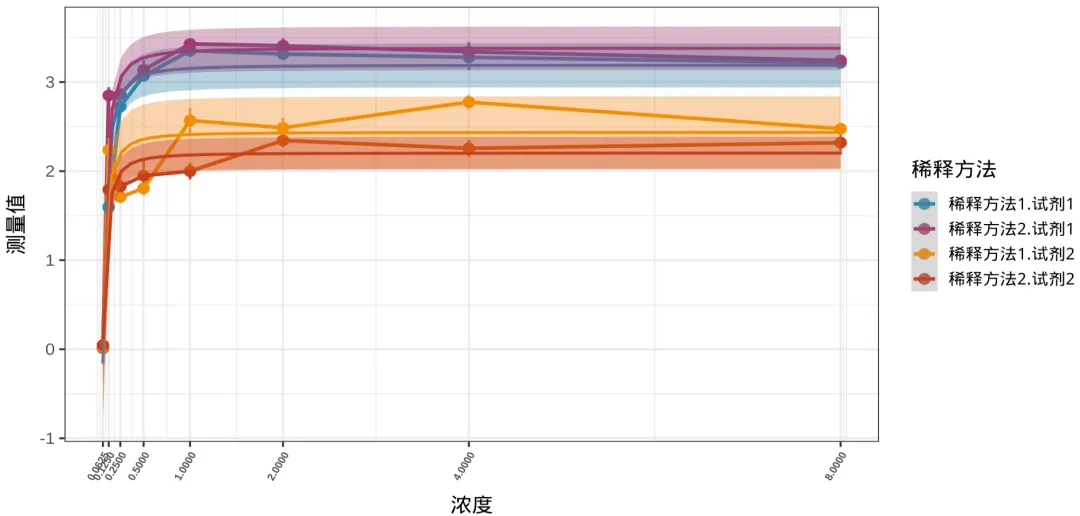
#拟合并上色ggplot(plot_data, aes(x = concentration, y = mean,                      color = interaction(salt_water, shiji),  # 4组区分颜色                      fill = interaction(salt_water, shiji),   # 4组区分置信区间                      group = interaction(salt_water, shiji))) +  geom_line(linewidth = 1.2) +  geom_errorbar(    aes(ymin = mean - se, ymax = mean + se),    width = 0.03,   # 误差线小横线宽度    linewidth = 0.8,    alpha = 0.8  ) +  geom_point(size = 3) +   geom_smooth(    formula = y ~ I(x^(-1.6278)),  # 使用你检验得到的最佳幂次    method = lm,    se = TRUE,        # 显示95%置信区间    linewidth = 1.0  ) +  scale_color_manual(    values = c("#2E86AB""#A23B72""#F18F01""#C73E1D")  ) +  scale_fill_manual(    values = c("#2E86AB""#A23B72""#F18F01""#C73E1D")  ) +  scale_x_continuous(breaks = unique(plot_data$concentration)) +  labs(x = "浓度", y = "测量值", color = "稀释方法", linetype = "试剂") +  theme_bw(base_size = 14) +  theme(axis.text.x = element_text(    angle = 60,       # 旋转60度    hjust = 1,        # 靠右对齐(不重叠)    vjust = 1,         # 垂直微调    size = 7,    face = "bold"  )) +  guides(fill = "none")
4.2.2 python实现曲线拟合
import numpy as npimport pandas as pdimport matplotlib.pyplot as pltimport matplotlib as mplfrom scipy.optimize import curve_fit# 分组plot_data = plot_data.copy()plot_data["group"] = (    plot_data["salt_water"].astype(str)    + "."    + plot_data["shiji"].astype(str))# 颜色group_colors = {    "稀释方法1.试剂1""#2E86AB",    "稀释方法2.试剂1""#A23B72",    "稀释方法1.试剂2""#F18F01",    "稀释方法2.试剂2""#C73E1D"}# 幂函数模型def power_model(x, a, b):    return a * (x ** (-1.6278)) + b# 绘图fig, ax = plt.subplots(figsize=(138))for group_name, group in plot_data.groupby("group"):    group = group.sort_values("concentration")    x = group["concentration"].values    y = group["mean"].values    se = group["se"].values    color = group_colors[group_name]        # 原始折线      ax.plot(        x,        y,        linewidth=3,        color=color,        alpha=0.9    )      # 点      ax.scatter(        x,        y,        s=120,        color=color,        zorder=5    )        # 误差线       ax.errorbar(        x,        y,        yerr=se,        fmt='none',        ecolor=color,        capsize=2,        linewidth=1.5,        alpha=0.8    )    # 拟合        popt, pcov = curve_fit(        power_model,        x,        y,        maxfev=5000    )    x_fit = np.logspace(        np.log10(x.min()),        np.log10(x.max()),        300    )    y_fit = power_model(x_fit, *popt)        # 拟合线        label_map = {    "稀释方法1.试剂1":"稀释方法1.试剂1",    "稀释方法2.试剂1":"稀释方法2.试剂1",    "稀释方法1.试剂2":"稀释方法1.试剂2",    "稀释方法2.试剂2":"稀释方法2.试剂2"    }    ax.plot(    x_fit,    y_fit,    linewidth=3,    color=color,    alpha=0.9,    label=label_map[group_name]    )       residuals = y - power_model(x, *popt)    ci = 1.96 * np.std(residuals)    ax.fill_between(        x_fit,        y_fit - ci,        y_fit + ci,        color=color,        alpha=0.20    )# x轴使用log2,将x轴对数转化ax.set_xscale("log", base=2)# 保持原始刻度xticks = sorted(plot_data["concentration"].unique())ax.set_xticks(xticks)ax.set_xticklabels(    [str(v) for v in xticks],    rotation=60,    ha='right',    fontsize=11,    fontweight='bold')# 标签ax.set_xlabel("浓度", fontsize=26, labelpad=20)ax.set_ylabel("测量值", fontsize=26, labelpad=20)# 图例legend = ax.legend(    title="稀释方法",    fontsize=18,    title_fontsize=24,    frameon=False,    bbox_to_anchor=(1.020.5),    loc='center left')ax.grid(True, which='major', linewidth=1.2, alpha=0.4)ax.grid(True, which='minor', linewidth=0.5, alpha=0.2)ax.spines['top'].set_visible(False)ax.spines['right'].set_visible(False)plt.tight_layout()
x轴转化图:
x轴不进行对数转化图:
可见还是对x轴的数值进行对数转化之后,x轴的标签不会那么拥挤。
4.3 单独绘制每一条曲线
4.3.1 R 实现
#基础绘图函数(给每个分组单独画图)------plot_single <- function(sub_data, title_name, show_y_label = TRUE{  p <- ggplot(sub_data, aes(x = concentration, y = mean)) +        geom_errorbar(aes(ymin = mean - se, ymax = mean + se),width = 0.03,                      linewidth = 0.8, color = "black" )+        geom_line(linewidth = 1.2, color = "#2E86AB") +        geom_point(size = 3, color = "#2E86AB") +         geom_smooth(formula = y ~ I(x^(-1.6278)), method = lm,                     se = TRUE, fill = "#2E86AB", alpha = 0.2,                    color = "#C73E1D", linewidth = 1.0)+        scale_x_continuous(breaks = unique(sub_data$concentration))+        labs(x = "浓度", y = "测量值",title = title_name)+        theme_bw(base_size = 12) +        theme(axis.text.x = element_text(angle = 90, hjust = 1, size = 6, face = "bold"),              plot.title = element_text(hjust = 0.5, face = "bold", size = 14)+        if(show_y_label) {                p <- p + labs(y = "测量值")                } else {                p <- p + labs(y = "") # 去掉Y轴标签                }                return(p)         } p1 <- plot_single(filter(plot_data, shiji == "试剂1", salt_water == "稀释1"), "试剂1 - 稀释1", show_y_label = TRUE p2 <- plot_single(filter(plot_data, shiji == "试剂1", salt_water == "稀释2"), "试剂1 - 稀释2", show_y_label = FALSE) p3 <- plot_single(filter(plot_data, shiji == "试剂2", salt_water == "稀释1"), "试剂2 - 稀释1", show_y_label = TRUE) p4 <- plot_single(filter(plot_data, shiji == "试剂2", salt_water == "稀释2"), "试剂2 - 稀释2", show_y_label = FALSE)   library(patchwork)  final_plot <- wrap_plots(p1, p2, p3, p4, ncol = 2) +         plot_annotation                         title = "四组浓度下对数拟合曲线",                         theme = theme(                                       plot.title = element_text(size=16, face="bold", hjust=0.5                                 )                          )
4.3.2 python实现
import numpy as npimport matplotlib.pyplot as pltimport matplotlib as mplfrom scipy.optimize import curve_fit# 分组plot_data = plot_data.copy()plot_data["group"] = (    plot_data["salt_water"].astype(str)    + "."    + plot_data["shiji"].astype(str))# 中文标签label_map = {    "稀释方法1.试剂1""稀释方法1-试剂1",    "稀释方法2.试剂1""稀释方法2-试剂1",    "稀释方法1.试剂2""稀释方法1-试剂2",    "稀释方法2.试剂2""稀释方法2-试剂2"}# 颜色group_colors = {    "稀释方法1.试剂1""#2E86AB",    "稀释方法2.试剂1""#A23B72",    "稀释方法1.试剂2""#F18F01",    "稀释方法2.试剂2""#C73E1D"}# 幂函数模型def power_model(x, a, b):    return a * (x ** (-1.6278)) + b# 创建2×2子图fig, axes = plt.subplots(    2,    2,    figsize=(1410),    sharex=True,    sharey=True)axes = axes.flatten()print(plot_data)# 循环绘图for ax, (group_name, group) in zip(    axes,    plot_data.groupby("group")):    group = group.sort_values("concentration")    x = group["concentration"].values    y = group["mean"].values    se = group["se"].values    color = group_colors[group_name]    # 点    ax.scatter(        x,        y,        s=100,        color=color,        zorder=5    )    # 误差线    ax.errorbar(        x,        y,        yerr=se,        fmt='none',        ecolor=color,        capsize=3,        linewidth=1.2,        alpha=0.8    )    # 拟合    popt, pcov = curve_fit(        power_model,        x,        y,        maxfev=5000    )    x_fit = np.logspace(        np.log10(x.min()),        np.log10(x.max()),        300    )    y_fit = power_model(x_fit, *popt)    # 拟合曲线    ax.plot(        x_fit,        y_fit,        color=color,        linewidth=4    )    # ribbon    residuals = y - power_model(x, *popt)    ci = 1.96 * np.std(residuals)    ax.fill_between(        x_fit,        y_fit - ci,        y_fit + ci,        color=color,        alpha=0.20    )    # log2 x轴    xticks = sorted(plot_data["concentration"].unique())    ax.set_xticks(xticks)    ax.set_xticklabels(        [str(v) for v in xticks],        rotation=90,        fontsize=9    )    # 标题    ax.set_title(        label_map[group_name],        fontsize=18,        fontweight='bold'    )    # 网格    ax.grid(True, alpha=0.3)# 总标题fig.suptitle(    "不同稀释方法的拟合曲线",    fontsize=24,    fontweight='bold')# 公共坐标轴fig.supxlabel(    "浓度",    fontsize=20)fig.supylabel(    "测量值",    fontsize=20)plt.tight_layout()
用python给四副子图绘制了共同的xy轴。
结论:
1、使用R和python分别实现了对数据的初步探索,查看其异常值,正态性检测、QQ图;
2、使用R和python实现了方差分析和交互作用,同时使用转秩,并进行方差分析和交互作用,发现不同的浓度和不同的试剂之间的测量值存在显著差异,具有统计学意义(p<0.001),稀释方法与试剂存在交互作用(p<0.05)
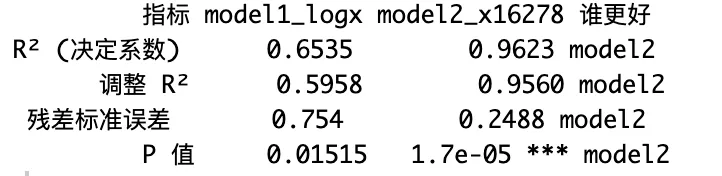
3、使用R和python发现曲线在高浓度下,测量值呈现出饱和,并进行曲线拟合,在使用lambda= -1.6278,对数转换后,可以解释96%的变异(model2),而普通的曲线拟合只能解释65%(model1)。
结语:
本人感受,R就像一位纤细精致的少女,富有含蓄美,美得含苞欲放,如同月光下伊豆的舞女;
而Python更像一位元气满满的帅哥,丰神俊朗,美得富有力量感,但又不因有力而显得迟缓笨拙;
如果让我做出选择,我会说两者各有所长(成年人做什么选择,当然全部拿下啦),事实上我偶尔会喜欢R,偶尔也又会换换口味,尝试一下Python ~ 
最后奉上我对于R和Python的热爱,给他们制作了一张图,置于封面之上。
有空我会持续更新~~

最新文章

随机文章

基本 文件 流程 错误 SQL 调试
  1. 请求信息 : 2026-07-03 20:46:59 HTTP/2.0 GET : https://f.mffb.com.cn/a/494214.html
  2. 运行时间 : 0.145921s [ 吞吐率:6.85req/s ] 内存消耗:4,495.74kb 文件加载:140
  3. 缓存信息 : 0 reads,0 writes
  4. 会话信息 : SESSION_ID=20e941bda6d4e6ace0856161dbebec30
  1. /yingpanguazai/ssd/ssd1/www/f.mffb.com.cn/public/index.php ( 0.79 KB )
  2. /yingpanguazai/ssd/ssd1/www/f.mffb.com.cn/vendor/autoload.php ( 0.17 KB )
  3. /yingpanguazai/ssd/ssd1/www/f.mffb.com.cn/vendor/composer/autoload_real.php ( 2.49 KB )
  4. /yingpanguazai/ssd/ssd1/www/f.mffb.com.cn/vendor/composer/platform_check.php ( 0.90 KB )
  5. /yingpanguazai/ssd/ssd1/www/f.mffb.com.cn/vendor/composer/ClassLoader.php ( 14.03 KB )
  6. /yingpanguazai/ssd/ssd1/www/f.mffb.com.cn/vendor/composer/autoload_static.php ( 4.90 KB )
  7. /yingpanguazai/ssd/ssd1/www/f.mffb.com.cn/vendor/topthink/think-helper/src/helper.php ( 8.34 KB )
  8. /yingpanguazai/ssd/ssd1/www/f.mffb.com.cn/vendor/topthink/think-validate/src/helper.php ( 2.19 KB )
  9. /yingpanguazai/ssd/ssd1/www/f.mffb.com.cn/vendor/topthink/think-orm/src/helper.php ( 1.47 KB )
  10. /yingpanguazai/ssd/ssd1/www/f.mffb.com.cn/vendor/topthink/think-orm/stubs/load_stubs.php ( 0.16 KB )
  11. /yingpanguazai/ssd/ssd1/www/f.mffb.com.cn/vendor/topthink/framework/src/think/Exception.php ( 1.69 KB )
  12. /yingpanguazai/ssd/ssd1/www/f.mffb.com.cn/vendor/topthink/think-container/src/Facade.php ( 2.71 KB )
  13. /yingpanguazai/ssd/ssd1/www/f.mffb.com.cn/vendor/symfony/deprecation-contracts/function.php ( 0.99 KB )
  14. /yingpanguazai/ssd/ssd1/www/f.mffb.com.cn/vendor/symfony/polyfill-mbstring/bootstrap.php ( 8.26 KB )
  15. /yingpanguazai/ssd/ssd1/www/f.mffb.com.cn/vendor/symfony/polyfill-mbstring/bootstrap80.php ( 9.78 KB )
  16. /yingpanguazai/ssd/ssd1/www/f.mffb.com.cn/vendor/symfony/var-dumper/Resources/functions/dump.php ( 1.49 KB )
  17. /yingpanguazai/ssd/ssd1/www/f.mffb.com.cn/vendor/topthink/think-dumper/src/helper.php ( 0.18 KB )
  18. /yingpanguazai/ssd/ssd1/www/f.mffb.com.cn/vendor/symfony/var-dumper/VarDumper.php ( 4.30 KB )
  19. /yingpanguazai/ssd/ssd1/www/f.mffb.com.cn/vendor/topthink/framework/src/think/App.php ( 15.30 KB )
  20. /yingpanguazai/ssd/ssd1/www/f.mffb.com.cn/vendor/topthink/think-container/src/Container.php ( 15.76 KB )
  21. /yingpanguazai/ssd/ssd1/www/f.mffb.com.cn/vendor/psr/container/src/ContainerInterface.php ( 1.02 KB )
  22. /yingpanguazai/ssd/ssd1/www/f.mffb.com.cn/app/provider.php ( 0.19 KB )
  23. /yingpanguazai/ssd/ssd1/www/f.mffb.com.cn/vendor/topthink/framework/src/think/Http.php ( 6.04 KB )
  24. /yingpanguazai/ssd/ssd1/www/f.mffb.com.cn/vendor/topthink/think-helper/src/helper/Str.php ( 7.29 KB )
  25. /yingpanguazai/ssd/ssd1/www/f.mffb.com.cn/vendor/topthink/framework/src/think/Env.php ( 4.68 KB )
  26. /yingpanguazai/ssd/ssd1/www/f.mffb.com.cn/app/common.php ( 0.03 KB )
  27. /yingpanguazai/ssd/ssd1/www/f.mffb.com.cn/vendor/topthink/framework/src/helper.php ( 18.78 KB )
  28. /yingpanguazai/ssd/ssd1/www/f.mffb.com.cn/vendor/topthink/framework/src/think/Config.php ( 5.54 KB )
  29. /yingpanguazai/ssd/ssd1/www/f.mffb.com.cn/config/app.php ( 0.95 KB )
  30. /yingpanguazai/ssd/ssd1/www/f.mffb.com.cn/config/cache.php ( 0.78 KB )
  31. /yingpanguazai/ssd/ssd1/www/f.mffb.com.cn/config/console.php ( 0.23 KB )
  32. /yingpanguazai/ssd/ssd1/www/f.mffb.com.cn/config/cookie.php ( 0.56 KB )
  33. /yingpanguazai/ssd/ssd1/www/f.mffb.com.cn/config/database.php ( 2.48 KB )
  34. /yingpanguazai/ssd/ssd1/www/f.mffb.com.cn/vendor/topthink/framework/src/think/facade/Env.php ( 1.67 KB )
  35. /yingpanguazai/ssd/ssd1/www/f.mffb.com.cn/config/filesystem.php ( 0.61 KB )
  36. /yingpanguazai/ssd/ssd1/www/f.mffb.com.cn/config/lang.php ( 0.91 KB )
  37. /yingpanguazai/ssd/ssd1/www/f.mffb.com.cn/config/log.php ( 1.35 KB )
  38. /yingpanguazai/ssd/ssd1/www/f.mffb.com.cn/config/middleware.php ( 0.19 KB )
  39. /yingpanguazai/ssd/ssd1/www/f.mffb.com.cn/config/route.php ( 1.89 KB )
  40. /yingpanguazai/ssd/ssd1/www/f.mffb.com.cn/config/session.php ( 0.57 KB )
  41. /yingpanguazai/ssd/ssd1/www/f.mffb.com.cn/config/trace.php ( 0.34 KB )
  42. /yingpanguazai/ssd/ssd1/www/f.mffb.com.cn/config/view.php ( 0.82 KB )
  43. /yingpanguazai/ssd/ssd1/www/f.mffb.com.cn/app/event.php ( 0.25 KB )
  44. /yingpanguazai/ssd/ssd1/www/f.mffb.com.cn/vendor/topthink/framework/src/think/Event.php ( 7.67 KB )
  45. /yingpanguazai/ssd/ssd1/www/f.mffb.com.cn/app/service.php ( 0.13 KB )
  46. /yingpanguazai/ssd/ssd1/www/f.mffb.com.cn/app/AppService.php ( 0.26 KB )
  47. /yingpanguazai/ssd/ssd1/www/f.mffb.com.cn/vendor/topthink/framework/src/think/Service.php ( 1.64 KB )
  48. /yingpanguazai/ssd/ssd1/www/f.mffb.com.cn/vendor/topthink/framework/src/think/Lang.php ( 7.35 KB )
  49. /yingpanguazai/ssd/ssd1/www/f.mffb.com.cn/vendor/topthink/framework/src/lang/zh-cn.php ( 13.70 KB )
  50. /yingpanguazai/ssd/ssd1/www/f.mffb.com.cn/vendor/topthink/framework/src/think/initializer/Error.php ( 3.31 KB )
  51. /yingpanguazai/ssd/ssd1/www/f.mffb.com.cn/vendor/topthink/framework/src/think/initializer/RegisterService.php ( 1.33 KB )
  52. /yingpanguazai/ssd/ssd1/www/f.mffb.com.cn/vendor/services.php ( 0.14 KB )
  53. /yingpanguazai/ssd/ssd1/www/f.mffb.com.cn/vendor/topthink/framework/src/think/service/PaginatorService.php ( 1.52 KB )
  54. /yingpanguazai/ssd/ssd1/www/f.mffb.com.cn/vendor/topthink/framework/src/think/service/ValidateService.php ( 0.99 KB )
  55. /yingpanguazai/ssd/ssd1/www/f.mffb.com.cn/vendor/topthink/framework/src/think/service/ModelService.php ( 2.04 KB )
  56. /yingpanguazai/ssd/ssd1/www/f.mffb.com.cn/vendor/topthink/think-trace/src/Service.php ( 0.77 KB )
  57. /yingpanguazai/ssd/ssd1/www/f.mffb.com.cn/vendor/topthink/framework/src/think/Middleware.php ( 6.72 KB )
  58. /yingpanguazai/ssd/ssd1/www/f.mffb.com.cn/vendor/topthink/framework/src/think/initializer/BootService.php ( 0.77 KB )
  59. /yingpanguazai/ssd/ssd1/www/f.mffb.com.cn/vendor/topthink/think-orm/src/Paginator.php ( 11.86 KB )
  60. /yingpanguazai/ssd/ssd1/www/f.mffb.com.cn/vendor/topthink/think-validate/src/Validate.php ( 63.20 KB )
  61. /yingpanguazai/ssd/ssd1/www/f.mffb.com.cn/vendor/topthink/think-orm/src/Model.php ( 23.55 KB )
  62. /yingpanguazai/ssd/ssd1/www/f.mffb.com.cn/vendor/topthink/think-orm/src/model/concern/Attribute.php ( 21.05 KB )
  63. /yingpanguazai/ssd/ssd1/www/f.mffb.com.cn/vendor/topthink/think-orm/src/model/concern/AutoWriteData.php ( 4.21 KB )
  64. /yingpanguazai/ssd/ssd1/www/f.mffb.com.cn/vendor/topthink/think-orm/src/model/concern/Conversion.php ( 6.44 KB )
  65. /yingpanguazai/ssd/ssd1/www/f.mffb.com.cn/vendor/topthink/think-orm/src/model/concern/DbConnect.php ( 5.16 KB )
  66. /yingpanguazai/ssd/ssd1/www/f.mffb.com.cn/vendor/topthink/think-orm/src/model/concern/ModelEvent.php ( 2.33 KB )
  67. /yingpanguazai/ssd/ssd1/www/f.mffb.com.cn/vendor/topthink/think-orm/src/model/concern/RelationShip.php ( 28.29 KB )
  68. /yingpanguazai/ssd/ssd1/www/f.mffb.com.cn/vendor/topthink/think-helper/src/contract/Arrayable.php ( 0.09 KB )
  69. /yingpanguazai/ssd/ssd1/www/f.mffb.com.cn/vendor/topthink/think-helper/src/contract/Jsonable.php ( 0.13 KB )
  70. /yingpanguazai/ssd/ssd1/www/f.mffb.com.cn/vendor/topthink/think-orm/src/model/contract/Modelable.php ( 0.09 KB )
  71. /yingpanguazai/ssd/ssd1/www/f.mffb.com.cn/vendor/topthink/framework/src/think/Db.php ( 2.88 KB )
  72. /yingpanguazai/ssd/ssd1/www/f.mffb.com.cn/vendor/topthink/think-orm/src/DbManager.php ( 8.52 KB )
  73. /yingpanguazai/ssd/ssd1/www/f.mffb.com.cn/vendor/topthink/framework/src/think/Log.php ( 6.28 KB )
  74. /yingpanguazai/ssd/ssd1/www/f.mffb.com.cn/vendor/topthink/framework/src/think/Manager.php ( 3.92 KB )
  75. /yingpanguazai/ssd/ssd1/www/f.mffb.com.cn/vendor/psr/log/src/LoggerTrait.php ( 2.69 KB )
  76. /yingpanguazai/ssd/ssd1/www/f.mffb.com.cn/vendor/psr/log/src/LoggerInterface.php ( 2.71 KB )
  77. /yingpanguazai/ssd/ssd1/www/f.mffb.com.cn/vendor/topthink/framework/src/think/Cache.php ( 4.92 KB )
  78. /yingpanguazai/ssd/ssd1/www/f.mffb.com.cn/vendor/psr/simple-cache/src/CacheInterface.php ( 4.71 KB )
  79. /yingpanguazai/ssd/ssd1/www/f.mffb.com.cn/vendor/topthink/think-helper/src/helper/Arr.php ( 16.63 KB )
  80. /yingpanguazai/ssd/ssd1/www/f.mffb.com.cn/vendor/topthink/framework/src/think/cache/driver/File.php ( 7.84 KB )
  81. /yingpanguazai/ssd/ssd1/www/f.mffb.com.cn/vendor/topthink/framework/src/think/cache/Driver.php ( 9.03 KB )
  82. /yingpanguazai/ssd/ssd1/www/f.mffb.com.cn/vendor/topthink/framework/src/think/contract/CacheHandlerInterface.php ( 1.99 KB )
  83. /yingpanguazai/ssd/ssd1/www/f.mffb.com.cn/app/Request.php ( 0.09 KB )
  84. /yingpanguazai/ssd/ssd1/www/f.mffb.com.cn/vendor/topthink/framework/src/think/Request.php ( 55.78 KB )
  85. /yingpanguazai/ssd/ssd1/www/f.mffb.com.cn/app/middleware.php ( 0.25 KB )
  86. /yingpanguazai/ssd/ssd1/www/f.mffb.com.cn/vendor/topthink/framework/src/think/Pipeline.php ( 2.61 KB )
  87. /yingpanguazai/ssd/ssd1/www/f.mffb.com.cn/vendor/topthink/think-trace/src/TraceDebug.php ( 3.40 KB )
  88. /yingpanguazai/ssd/ssd1/www/f.mffb.com.cn/vendor/topthink/framework/src/think/middleware/SessionInit.php ( 1.94 KB )
  89. /yingpanguazai/ssd/ssd1/www/f.mffb.com.cn/vendor/topthink/framework/src/think/Session.php ( 1.80 KB )
  90. /yingpanguazai/ssd/ssd1/www/f.mffb.com.cn/vendor/topthink/framework/src/think/session/driver/File.php ( 6.27 KB )
  91. /yingpanguazai/ssd/ssd1/www/f.mffb.com.cn/vendor/topthink/framework/src/think/contract/SessionHandlerInterface.php ( 0.87 KB )
  92. /yingpanguazai/ssd/ssd1/www/f.mffb.com.cn/vendor/topthink/framework/src/think/session/Store.php ( 7.12 KB )
  93. /yingpanguazai/ssd/ssd1/www/f.mffb.com.cn/vendor/topthink/framework/src/think/Route.php ( 23.73 KB )
  94. /yingpanguazai/ssd/ssd1/www/f.mffb.com.cn/vendor/topthink/framework/src/think/route/RuleName.php ( 5.75 KB )
  95. /yingpanguazai/ssd/ssd1/www/f.mffb.com.cn/vendor/topthink/framework/src/think/route/Domain.php ( 2.53 KB )
  96. /yingpanguazai/ssd/ssd1/www/f.mffb.com.cn/vendor/topthink/framework/src/think/route/RuleGroup.php ( 22.43 KB )
  97. /yingpanguazai/ssd/ssd1/www/f.mffb.com.cn/vendor/topthink/framework/src/think/route/Rule.php ( 26.95 KB )
  98. /yingpanguazai/ssd/ssd1/www/f.mffb.com.cn/vendor/topthink/framework/src/think/route/RuleItem.php ( 9.78 KB )
  99. /yingpanguazai/ssd/ssd1/www/f.mffb.com.cn/route/app.php ( 1.72 KB )
  100. /yingpanguazai/ssd/ssd1/www/f.mffb.com.cn/vendor/topthink/framework/src/think/facade/Route.php ( 4.70 KB )
  101. /yingpanguazai/ssd/ssd1/www/f.mffb.com.cn/vendor/topthink/framework/src/think/route/dispatch/Controller.php ( 4.74 KB )
  102. /yingpanguazai/ssd/ssd1/www/f.mffb.com.cn/vendor/topthink/framework/src/think/route/Dispatch.php ( 10.44 KB )
  103. /yingpanguazai/ssd/ssd1/www/f.mffb.com.cn/app/controller/Index.php ( 4.81 KB )
  104. /yingpanguazai/ssd/ssd1/www/f.mffb.com.cn/app/BaseController.php ( 2.05 KB )
  105. /yingpanguazai/ssd/ssd1/www/f.mffb.com.cn/vendor/topthink/think-orm/src/facade/Db.php ( 0.93 KB )
  106. /yingpanguazai/ssd/ssd1/www/f.mffb.com.cn/vendor/topthink/think-orm/src/db/connector/Mysql.php ( 5.44 KB )
  107. /yingpanguazai/ssd/ssd1/www/f.mffb.com.cn/vendor/topthink/think-orm/src/db/PDOConnection.php ( 52.47 KB )
  108. /yingpanguazai/ssd/ssd1/www/f.mffb.com.cn/vendor/topthink/think-orm/src/db/Connection.php ( 8.39 KB )
  109. /yingpanguazai/ssd/ssd1/www/f.mffb.com.cn/vendor/topthink/think-orm/src/db/ConnectionInterface.php ( 4.57 KB )
  110. /yingpanguazai/ssd/ssd1/www/f.mffb.com.cn/vendor/topthink/think-orm/src/db/builder/Mysql.php ( 16.58 KB )
  111. /yingpanguazai/ssd/ssd1/www/f.mffb.com.cn/vendor/topthink/think-orm/src/db/Builder.php ( 24.06 KB )
  112. /yingpanguazai/ssd/ssd1/www/f.mffb.com.cn/vendor/topthink/think-orm/src/db/BaseBuilder.php ( 27.50 KB )
  113. /yingpanguazai/ssd/ssd1/www/f.mffb.com.cn/vendor/topthink/think-orm/src/db/Query.php ( 15.71 KB )
  114. /yingpanguazai/ssd/ssd1/www/f.mffb.com.cn/vendor/topthink/think-orm/src/db/BaseQuery.php ( 45.13 KB )
  115. /yingpanguazai/ssd/ssd1/www/f.mffb.com.cn/vendor/topthink/think-orm/src/db/concern/TimeFieldQuery.php ( 7.43 KB )
  116. /yingpanguazai/ssd/ssd1/www/f.mffb.com.cn/vendor/topthink/think-orm/src/db/concern/AggregateQuery.php ( 3.26 KB )
  117. /yingpanguazai/ssd/ssd1/www/f.mffb.com.cn/vendor/topthink/think-orm/src/db/concern/ModelRelationQuery.php ( 20.07 KB )
  118. /yingpanguazai/ssd/ssd1/www/f.mffb.com.cn/vendor/topthink/think-orm/src/db/concern/ParamsBind.php ( 3.66 KB )
  119. /yingpanguazai/ssd/ssd1/www/f.mffb.com.cn/vendor/topthink/think-orm/src/db/concern/ResultOperation.php ( 7.01 KB )
  120. /yingpanguazai/ssd/ssd1/www/f.mffb.com.cn/vendor/topthink/think-orm/src/db/concern/WhereQuery.php ( 19.37 KB )
  121. /yingpanguazai/ssd/ssd1/www/f.mffb.com.cn/vendor/topthink/think-orm/src/db/concern/JoinAndViewQuery.php ( 7.11 KB )
  122. /yingpanguazai/ssd/ssd1/www/f.mffb.com.cn/vendor/topthink/think-orm/src/db/concern/TableFieldInfo.php ( 2.63 KB )
  123. /yingpanguazai/ssd/ssd1/www/f.mffb.com.cn/vendor/topthink/think-orm/src/db/concern/Transaction.php ( 2.77 KB )
  124. /yingpanguazai/ssd/ssd1/www/f.mffb.com.cn/vendor/topthink/framework/src/think/log/driver/File.php ( 5.96 KB )
  125. /yingpanguazai/ssd/ssd1/www/f.mffb.com.cn/vendor/topthink/framework/src/think/contract/LogHandlerInterface.php ( 0.86 KB )
  126. /yingpanguazai/ssd/ssd1/www/f.mffb.com.cn/vendor/topthink/framework/src/think/log/Channel.php ( 3.89 KB )
  127. /yingpanguazai/ssd/ssd1/www/f.mffb.com.cn/vendor/topthink/framework/src/think/event/LogRecord.php ( 1.02 KB )
  128. /yingpanguazai/ssd/ssd1/www/f.mffb.com.cn/vendor/topthink/think-helper/src/Collection.php ( 16.47 KB )
  129. /yingpanguazai/ssd/ssd1/www/f.mffb.com.cn/vendor/topthink/framework/src/think/facade/View.php ( 1.70 KB )
  130. /yingpanguazai/ssd/ssd1/www/f.mffb.com.cn/vendor/topthink/framework/src/think/View.php ( 4.39 KB )
  131. /yingpanguazai/ssd/ssd1/www/f.mffb.com.cn/vendor/topthink/framework/src/think/Response.php ( 8.81 KB )
  132. /yingpanguazai/ssd/ssd1/www/f.mffb.com.cn/vendor/topthink/framework/src/think/response/View.php ( 3.29 KB )
  133. /yingpanguazai/ssd/ssd1/www/f.mffb.com.cn/vendor/topthink/framework/src/think/Cookie.php ( 6.06 KB )
  134. /yingpanguazai/ssd/ssd1/www/f.mffb.com.cn/vendor/topthink/think-view/src/Think.php ( 8.38 KB )
  135. /yingpanguazai/ssd/ssd1/www/f.mffb.com.cn/vendor/topthink/framework/src/think/contract/TemplateHandlerInterface.php ( 1.60 KB )
  136. /yingpanguazai/ssd/ssd1/www/f.mffb.com.cn/vendor/topthink/think-template/src/Template.php ( 46.61 KB )
  137. /yingpanguazai/ssd/ssd1/www/f.mffb.com.cn/vendor/topthink/think-template/src/template/driver/File.php ( 2.41 KB )
  138. /yingpanguazai/ssd/ssd1/www/f.mffb.com.cn/vendor/topthink/think-template/src/template/contract/DriverInterface.php ( 0.86 KB )
  139. /yingpanguazai/ssd/ssd1/www/f.mffb.com.cn/runtime/temp/067d451b9a0c665040f3f1bdd3293d68.php ( 11.98 KB )
  140. /yingpanguazai/ssd/ssd1/www/f.mffb.com.cn/vendor/topthink/think-trace/src/Html.php ( 4.42 KB )
  1. CONNECT:[ UseTime:0.000999s ] mysql:host=127.0.0.1;port=3306;dbname=f_mffb;charset=utf8mb4
  2. SHOW FULL COLUMNS FROM `fenlei` [ RunTime:0.001575s ]
  3. SELECT * FROM `fenlei` WHERE `fid` = 0 [ RunTime:0.000645s ]
  4. SELECT * FROM `fenlei` WHERE `fid` = 63 [ RunTime:0.000692s ]
  5. SHOW FULL COLUMNS FROM `set` [ RunTime:0.001428s ]
  6. SELECT * FROM `set` [ RunTime:0.000619s ]
  7. SHOW FULL COLUMNS FROM `article` [ RunTime:0.001474s ]
  8. SELECT * FROM `article` WHERE `id` = 494214 LIMIT 1 [ RunTime:0.001855s ]
  9. UPDATE `article` SET `lasttime` = 1783082819 WHERE `id` = 494214 [ RunTime:0.031535s ]
  10. SELECT * FROM `fenlei` WHERE `id` = 66 LIMIT 1 [ RunTime:0.000785s ]
  11. SELECT * FROM `article` WHERE `id` < 494214 ORDER BY `id` DESC LIMIT 1 [ RunTime:0.001386s ]
  12. SELECT * FROM `article` WHERE `id` > 494214 ORDER BY `id` ASC LIMIT 1 [ RunTime:0.003193s ]
  13. SELECT * FROM `article` WHERE `id` < 494214 ORDER BY `id` DESC LIMIT 10 [ RunTime:0.005978s ]
  14. SELECT * FROM `article` WHERE `id` < 494214 ORDER BY `id` DESC LIMIT 10,10 [ RunTime:0.003033s ]
  15. SELECT * FROM `article` WHERE `id` < 494214 ORDER BY `id` DESC LIMIT 20,10 [ RunTime:0.005542s ]
0.149710s