当前位置:首页>python>名师讲堂|使用 Python 基于 LandScan 数据测算城市多中心指标(王峤版本)

名师讲堂|使用 Python 基于 LandScan 数据测算城市多中心指标(王峤版本)

  • 2026-07-02 03:51:52
名师讲堂|使用 Python 基于 LandScan 数据测算城市多中心指标(王峤版本)

由于借助 AI 工具学习编程已经变得非常容易了,因此之后的课程就不再默认进行视频讲解了,如果特别需要视频讲解也可以联系李老师预约讲解~讲义材料学习过程中遇到的问题也可以及时与李老师联系。

购买 RStata 名师讲堂会员即可参加该课程啦(之前的和未来的都可以参加)!

价格:2800/年 或者 4800/长期

购买会员可以从这里下单:https://rstata.duanshu.com/#/card/list/

名师讲堂会员权益:

  1. 参加每个月 3~4 次的名师讲堂课程;
  2. 参加平台上的其他 R 语言和 Stata 的课程;
  3. 以会员折扣价购买我们分享的数据资料(10 元/份);
  4. 课程内外的提问解答服务(课程外的尽量帮忙解决)。

* 如果发票可添加小编微信 r_stata2 (RStata 李老师)开具。如需数据资料,购买后可添加小编微信免费领取数据折扣卡。

更多关于 RStata 会员的更多信息可添加微信号 r_stata2 咨询:

课程主页(点击文末的阅读原文即可跳转):https://rstata.duanshu.com/#/brief/course/e2c59b4087b14b2fbf6958c020fbb9a5


今天给大家介绍如何使用 Python 基于 LandScan 全球人口栅格数据,按照王峤(2024)论文中的方法测算各城市多中心指标。

一、指标来源与计算原理

1.1 数据来源

本方法使用的人口数据为美国能源部橡树岭国家实验室提供的 LandScan 全球人口密度栅格数据,空间分辨率约为 1 km × 1 km(坐标参考系转换后约 820 m)。

1.2 指标定义

多中心指数(Polycentric Index)源自论文:

王峤. 空间结构、城市规模与中国城市的创新绩效 [J]. 中国工业经济, 2024.

其核心定义为:

  • 指数 = 0:城市完全单中心,仅识别出一个中心;
  • 指数越大(趋近于 1):城市多中心特征越明显,次中心与主中心旗鼓相当。

1.3 计算流程

整个计算分为以下步骤:

  1. 坐标系转换:将 LandScan 栅格数据投影到等面积坐标系(Albers 投影),确保距离计算准确;
  2. 裁剪与掩膜:按城市行政边界裁剪栅格,获取该城市范围内的人口格点;
  3. 栅格转点:将栅格像元转为空间点数据;
  4. 构建点邻接:使用距离阈值(1000 m)构建邻接关系(边邻接规则,仅选取上下左右相邻格点),生成空间权重矩阵;
  5. 局部 Moran's I 检验:使用 R spdep::localmoran(conditional=TRUE) 的条件正态近似法(Sokal 1998)计算每个格点的局部莫兰指数和 p 值,识别统计显著的高-高聚类区域(HH 格点);
  6. 聚类成中心:将 HH 格点按空间邻接分组,形成连续的"高密度区块";
  7. 筛选有效中心:要求每个区块格点数 ≥ 3、总人口 ≥ 100,000;
  8. 计算多中心指数:按主中心(最大人口区块)与次中心之比计算。

1.4 参数设定说明

ANALYSIS_PARAMS = {
"sig_level"0.05,   # 局部莫兰指数显著性阈值
"min_cells"3,      # 中心最小格点数(过滤噪点)
"min_pop":   100000# 中心最小人口(单位:人)
"dist_nb":   1000# 邻接距离阈值(米)
}
for k, v in ANALYSIS_PARAMS.items():
print(f"  {k}{v}")

关于 dist_nb = 1000 的设定:LandScan 数据经 Albers 投影后分辨率约为 820 m。相邻格点(上下左右)的距离约为 820 m,对角线方向约为 820 × √2 ≈ 1159 m。因此将阈值设为 1000 m,可精确选取边邻接格点,不会错误地把对角线邻居算进来。


二、使用 reticulate 创建与管理 Python 虚拟环境

在 R 中通过 reticulate 包来调用 Python,最好的实践是为项目创建一个专属的 Python 虚拟环境,将所需依赖隔离到独立空间,避免与系统 Python(如 Anaconda)发生版本冲突。

重要说明(避免"已初始化"报错):reticulate 在 R 会话中只能绑定一次 Python——一旦某个 {python} 代码块运行,Python 解释器就被锁定,之后再调用 use_virtualenv() 会报错:

ERROR: The requested version of Python cannot be used, as another version has already been initialized.

因此,虚拟环境的激活必须在所有 {python} 代码块之前完成。本文档的解决方案是在 setup chunk 中通过 Sys.setenv(RETICULATE_PYTHON = ...) 提前锁定 Python 路径,这是 reticulate 选取 Python 的最高优先级入口。

2.1 安装 reticulate(仅首次)

# 设置 CRAN 镜像(knit 时 R 处于非交互模式,不会自动选择镜像)
options(repos = c(CRAN = "https://mirrors.tuna.tsinghua.edu.cn/CRAN/"))
# 仅在尚未安装时才安装,避免每次 knit 都重装
if (!requireNamespace("reticulate", quietly = TRUE)) {
  install.packages("reticulate")
  message("reticulate 安装完成!")
else {
  message("reticulate 已安装,版本:", packageVersion("reticulate"))
}

2.2 虚拟环境初始化原理(已在 setup chunk 中完成)

本文档的 setup chunk(隐藏运行)包含如下逻辑:

library(reticulate)
.venv_name   <-".venv"
.venv_python <- virtualenv_python(.venv_name)
# 虚拟环境不存在时自动创建
if(!file.exists(.venv_python)){
  virtualenv_create(.venv_name)
  .venv_python <- virtualenv_python(.venv_name)
}
# 通过环境变量抢先锁定 Python(优先级最高,早于任何 {python} chunk)
Sys.setenv(RETICULATE_PYTHON = .venv_python)
use_virtualenv(.venv_name, required =TRUE)

这样做的关键在于:knitr 在处理第一个 {python} chunk 时,reticulate 已经通过 RETICULATE_PYTHON 环境变量知道要使用 .venv,不会再去碰 Anaconda。

2.3 在虚拟环境中安装 Python 包(仅首次)

# 检查关键包是否已安装,缺失的才安装
py_pkgs <- c(
"numpy""pandas""geopandas""rasterio",
"libpysal""scipy""matplotlib""pyproj""shapely"
)
installed <- py_list_packages(".venv")$package
need_install <- setdiff(py_pkgs, installed)
if (length(need_install) > 0) {
  virtualenv_install(".venv", packages = need_install)
  message("已安装缺失的包:"paste(need_install, collapse = ", "))
else {
  message("所有 Python 包已就绪,无需安装")
}

2.4 验证激活状态

# 验证当前绑定的 Python 路径(应指向 .venv 目录)
py_config()

2.5 查看已安装的包

# 列出虚拟环境中已安装的包
pkgs <- py_list_packages(".venv")
# 只显示我们关心的包
key_pkgs <- c("numpy""pandas""geopandas""rasterio""libpysal""scipy")
pkgs[pkgs$package %in% key_pkgs, c("package""version")]

2.6 虚拟环境管理常用命令

查看所有已创建的虚拟环境
virtualenv_list()
删除虚拟环境(当不再需要时)
virtualenv_remove(".venv")
升级某个包
virtualenv_install(".venv", packages = "geopandas", ignore_installed = TRUE)

三、环境配置与数据准备

3.1 加载 Python 包

import os
import re
import numpy as np
import pandas as pd
import geopandas as gpd
import rasterio
from rasterio.mask import mask
from shapely.geometry import Point
from scipy.spatial import KDTree
from scipy.stats import norm
from libpysal.weights import DistanceBand, lag_spatial
import matplotlib.pyplot as plt
import warnings
import matplotlib.font_manager as fm
warnings.filterwarnings("ignore")
# 设置中文字体(LXGW WenKai)
font_path = os.path.expanduser("~/Library/Fonts/LXGWWenKai-Regular.ttf")
fm.fontManager.addfont(font_path)
prop = fm.FontProperties(fname=font_path)
plt.rcParams["font.family"] = prop.get_name()
plt.rcParams["axes.unicode_minus"] = False

3.2 全局路径与参数配置

# 等面积投影(Albers,适合中国范围计算)
MY_CRS = (
"+proj=aea +lat_0=0 +lon_0=105 +lat_1=25 +lat_2=47"
" +x_0=0 +y_0=0 +ellps=krass +units=m +no_defs"
)
from pathlib import Path
BASE_DIR = Path(".")
PATH = {
"pop_tif": BASE_DIR / "pop-tif2",
"city_shp": BASE_DIR / "2021行政区划" / "市.shp",
}
ANALYSIS_PARAMS = {
"sig_level"0.05,
"min_cells"3,
"min_pop":   100000,
"dist_nb":   1000
}

数据预处理提示:如果你的 LandScan tif 文件还是 WGS84 坐标系,需要先转换到 MY_CRS

import rasterio
from rasterio.warp import calculate_default_transform, reproject, Resampling
import glob
os.makedirs("pop-tif2", exist_ok=True)
for src_path insorted(glob.glob("pop-tif/*.tif")):
    dst_path = src_path.replace("pop-tif""pop-tif2")
with rasterio.open(src_path) as src:
        transform, width, height = calculate_default_transform(
            src.crs, MY_CRS, src.width, src.height, *src.bounds
        )
        kwargs = src.meta.copy()
        kwargs.update({
"crs": MY_CRS,
"transform": transform,
"width": width,
"height": height,
        })
with rasterio.open(dst_path, "w", **kwargs) as dst:
for band inrange(1, src.count + 1):
                reproject(
                    source=rasterio.band(src, band),
                    destination=rasterio.band(dst, band),
                    src_transform=src.transform,
                    src_crs=src.crs,
                    dst_transform=transform,
                    dst_crs=MY_CRS,
                    resampling=Resampling.nearest,
                )

四、单城市演示计算(北京市,2020 年)

4.1 读取城市边界与人口栅格

# 读取北京市行政边界
city_demo = gpd.read_file(PATH["city_shp"])
city_demo["geometry"] = city_demo["geometry"].buffer(0)
city_demo = city_demo[~city_demo.is_empty]
city_demo = city_demo.to_crs(MY_CRS)
city_demo = city_demo[city_demo["市"] == "北京市"]
city_demo

4.2 裁剪与栅格转点

此处代码需下载讲义材料查看~

4.3 构建空间权重矩阵

# 提取坐标
coords = np.array([(p.x, p.y) for p in pop_points.geometry])
# 构建距离邻接关系(边邻接,1000 m)
w = DistanceBand(coords, threshold=ANALYSIS_PARAMS["dist_nb"], binary=True, alpha=-1.0)
w.transform = "r"# 行标准化
print(f"格点数量: {w.n}")
print(f"平均邻居数: {w.mean_neighbors:.2f}")

参数说明

  • binary=True:二元权重,邻居权重为 1,非邻居为 0;
  • alpha=-1.0:距离衰减参数,-1 表示使用 1/距离作为权重(当 binary=False 时生效);
  • transform = "r":行标准化权重,与 R 中 style = "W" 等价。

4.4 局部 Moran's I 检验

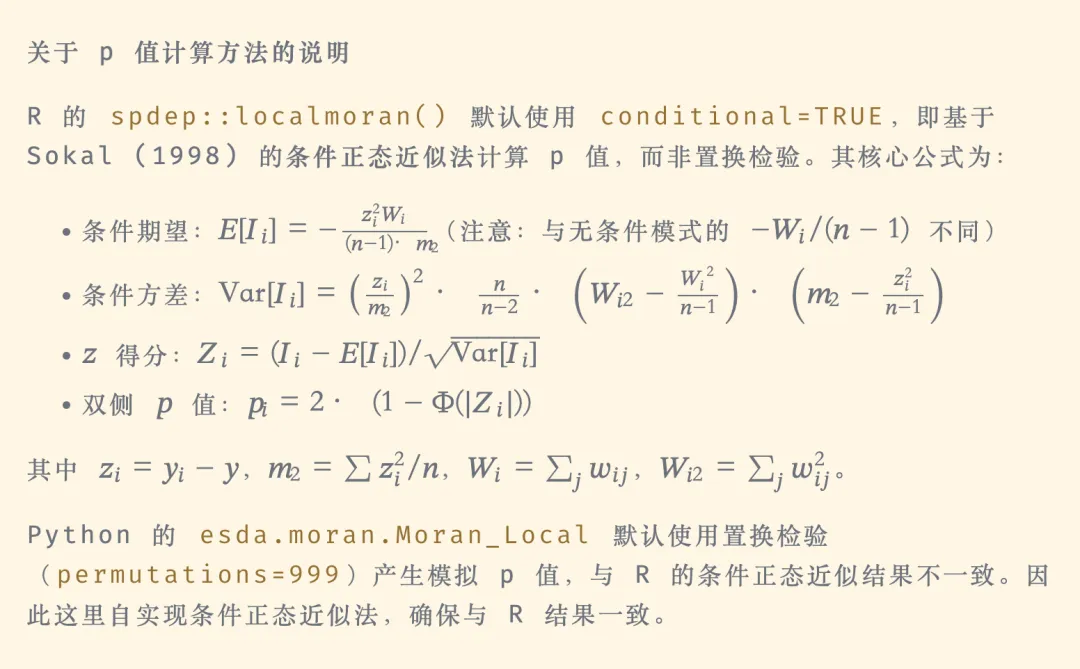
局部 Moran's I 是用来找 "高值围着高值、低值围着低值" 的空间集聚热点的工具。在这里,它的唯一作用就是:找出人口高密度、且周围也是高密度的区域 → 也就是城市中心(HH 集聚区)。

# 自实现条件正态近似法(完全复现 R spdep::localmoran(conditional=TRUE) 源码)
deflocal_moran_conditional_p(y, w):
"""
    使用 R spdep::localmoran(conditional=TRUE) 的条件正态近似法计算 LISA p 值。
    """
    y = np.asarray(y, dtype=np.float64)
    n = len(y)
    z = y - y.mean()  # 中心化变量
    m2 = np.sum(z ** 2) / n  # mlvar=TRUE 时的方差
# Ii = (z / m2) * lag(z)
    z_lag = lag_spatial(w, z)
    Ii = (z / m2) * z_lag
# 计算每个点的邻居权重之和 Wi 和 Wi2
    Wi = np.zeros(n)
    Wi2 = np.zeros(n)
for i inrange(n):
iflen(w.neighbors[i]) > 0:
            weights_i = np.array(w.weights[i])
            Wi[i] = np.sum(weights_i)
            Wi2[i] = np.sum(weights_i ** 2)
# 条件期望:E[Ii] = -(z_i^2 * Wi) / ((n-1) * m2)
    E_Ii = -(z ** 2 * Wi) / ((n - 1) * m2)
# 条件方差(Sokal 1998,R 源码 conditional=TRUE 分支)
    zi_over_m2 = z / m2
    var_Ii = (zi_over_m2 ** 2) * (n / (n - 2)) * (Wi2 - Wi ** 2 / (n - 1)) * (m2 - z ** 2 / (n - 1))
    var_Ii = np.maximum(var_Ii, 0.0)
# z 得分与双侧 p 值
    z_score = np.where(var_Ii > 0, (Ii - E_Ii) / np.sqrt(var_Ii), 0.0)
    p_val = 2.0 * norm.sf(np.abs(z_score))
return p_val, Ii
# 计算局部莫兰指数(条件正态近似法)
p_val, Ii = local_moran_conditional_p(pop_points["pop"].values, w)
# 结果包含:Ii(局部莫兰指数)、p_val(条件正态近似 p 值)
result_df = pd.DataFrame({
"Ii": Ii,
"p_value": p_val,
})
result_df.head(10)

4.5 空间类型分类(LISA 象限)

# 人口中位数
pop_med = pop_points["pop"].median()
# 计算空间滞后
pop_lag = lag_spatial(w, pop_points["pop"].values)
# 分类(使用条件正态近似法的 p 值)
sig = p_val < ANALYSIS_PARAMS["sig_level"]
self_type = np.where(pop_points["pop"].values > pop_med, "H""L")
nb_type = np.where(pop_lag > pop_med, "H""L")
cluster_type = np.where(
    sig & (self_type == "H") & (nb_type == "H"), "HH""其他"
)
pop_points = pop_points.copy()
pop_points["p_value"] = p_val
pop_points["sig"] = sig
pop_points["pop_med"] = pop_med
pop_points["pop_lag"] = pop_lag
pop_points["self_type"] = self_type
pop_points["nb_type"] = nb_type
pop_points["cluster_type"] = cluster_type
pop_points["cluster_type"].value_counts()

这里只关心 HH 类型(自身人口高 + 邻居人口高 + 统计显著),这类格点代表真正的人口密集聚集区,是城市中心的候选位置。

4.6 提取 HH 格点并聚类成中心

# 筛选 HH 格点
hh_points = pop_points[pop_points["cluster_type"] == "HH"].reset_index(drop=True)
print(f"HH 格点数量: {len(hh_points)}")
# 对 HH 格点聚类(使用 Union-Find 算法识别连通分量)
iflen(hh_points) >= ANALYSIS_PARAMS["min_cells"]:
    coords_hh = np.array([(p.x, p.y) for p in hh_points.geometry])
    n = len(coords_hh)
    parent = list(range(n))
deffind(x):
while parent[x] != x:
            parent[x] = parent[parent[x]]
            x = parent[x]
return x
defunion(x, y):
        rx, ry = find(x), find(y)
if rx != ry:
            parent[rx] = ry
    tree = KDTree(coords_hh)
    pairs = tree.query_pairs(r=ANALYSIS_PARAMS["dist_nb"])
for i, j in pairs:
        union(i, j)
    clusters = [find(i) for i inrange(n)]
    unique_clusters = sorted(set(clusters))
    cluster_map = {c: idx + 1for idx, c inenumerate(unique_clusters)}
    hh_points["cluster_id"] = [cluster_map[c] for c in clusters]
print(f"聚类数量: {hh_points['cluster_id'].nunique()}")

4.7 筛选有效中心并计算多中心指数

此处代码需下载讲义材料查看~

4.8 可视化

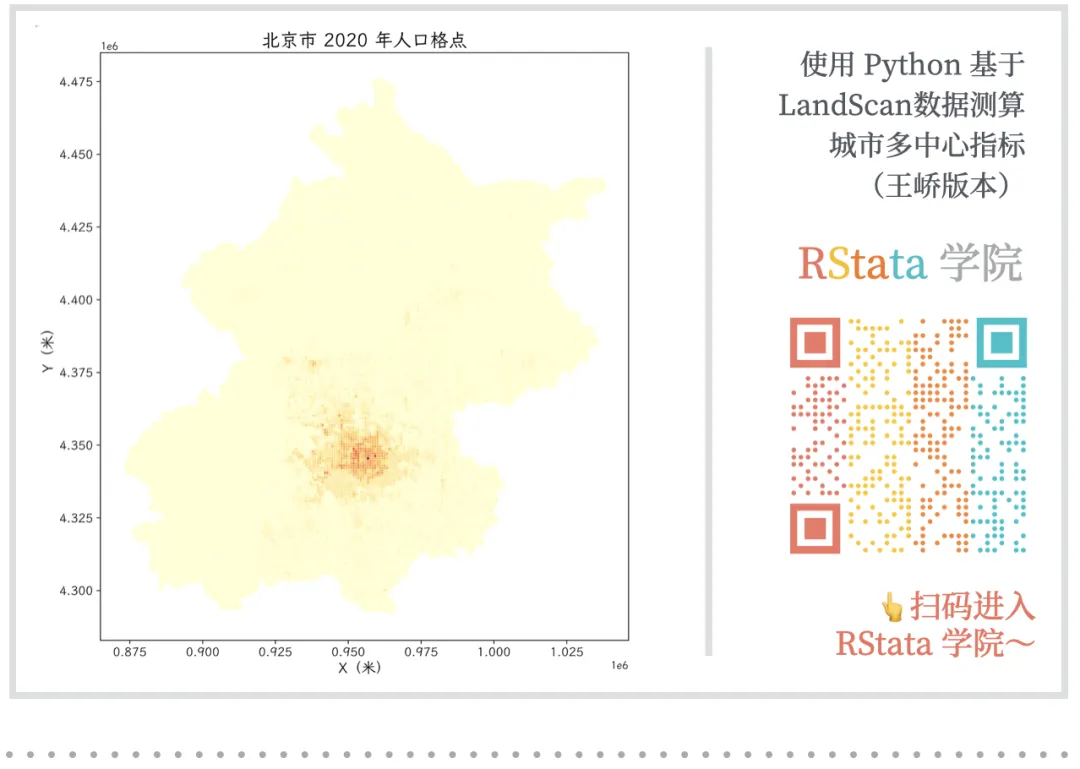
将上述分析结果绘制为双面板地图:左图展示城市人口格点分布,右图展示 LISA 识别出的 HH 集聚区与中心。

fig, axes = plt.subplots(12, figsize=(209))
# 左图:人口密度
pop_points.plot(
    column="pop",
    cmap="YlOrRd",
    legend=False,
    ax=axes[0],
    markersize=2,
)
axes[0].set_title("北京市 2020 年人口格点", fontsize=18)
axes[0].set_xlabel("X(米)", fontsize=14)
axes[0].set_ylabel("Y(米)", fontsize=14)
axes[0].tick_params(labelsize=12)
# 右图:LISA 分类
iflen(hh_points) > 0and"cluster_id"in hh_points.columns:
# 非 HH 点
    other_points = pop_points[pop_points["cluster_type"] != "HH"]
iflen(other_points) > 0:
        other_points.plot(ax=axes[1], color="lightgray", markersize=1)
# HH 点按聚类着色
    hh_points.plot(
        column="cluster_id",
        categorical=True,
        cmap="Set1",
        legend=False,
        ax=axes[1],
        markersize=5,
    )
    axes[1].set_title("北京市 2020 年 HH 集聚区与中心识别", fontsize=18)
else:
    pop_points.plot(
        column="cluster_type",
        categorical=True,
        cmap="Set2",
        legend=False,
        ax=axes[1],
        markersize=2,
    )
    axes[1].set_title("北京市 2020 年 LISA 分类", fontsize=18)
axes[1].set_xlabel("X(米)", fontsize=14)
axes[1].set_ylabel("Y(米)", fontsize=14)
axes[1].tick_params(labelsize=12)
plt.tight_layout()
plt.show()

插图


五、批量并行计算(全国所有城市 × 所有年份)

5.1 封装核心计算函数

此处代码需下载讲义材料查看~

5.2 索引年份文件与批量计算

# 串行遍历所有城市(并行计算请使用独立的 batch_calculate.py 脚本)
os.makedirs("res", exist_ok=True)
# 遍历所有城市
for _, row in city_all.iterrows():
    code = row["市代码"]
    city_name = row["市"]
    output_file = f"res/{code}.csv"
# 断点续算
if os.path.exists(output_file):
print(f"  跳过 {city_name}{code},已计算)")
continue
print(f"正在计算:{city_name}{code})")
    results = []
    city_geom = city_all[city_all["市代码"] == code].iloc[[0]]
for year, pop_file in pop_files.items():
        res = calculate_polycentric(city_geom, pop_file)
if res isnotNone:
            results.append(res)
else:
print(f"  {year} 年返回 None")
if results:
        pd.DataFrame(results).to_csv(output_file, index=False)
print(f"  {city_name} 完成,保存 {len(results)} 条记录")
else:
print(f"  {city_name} 全部年份均无有效结果")
print("======== 全部计算完成!结果保存在 res/ 文件夹 ========")

六、改进算法:预计算空间权重矩阵

6.1 为什么可以改进?

在上面的批量计算中,对同一个城市,每个年份都重新计算了一次空间权重矩阵。但实际上,空间权重矩阵只取决于城市边界的形状——它与年份无关,只要城市行政边界不变(本项目使用 2021 年固定边界),同一城市所有年份的空间权重矩阵完全相同。

因此,可以先把所有城市的权重矩阵计算并保存好,然后在计算各年数据时直接读取,显著减少重复计算。

对于一个有 NNN 个城市、TTT 个年份的数据集:

方法
权重矩阵计算次数
原始方法
N×TN \times TN×T
改进方法
NNN
(预计算一次)

当 T=25T = 25T=25(2000~2024 年)时,改进方法可将权重矩阵的计算量缩减为原来的 1/25

6.2 预计算并保存所有城市的权重矩阵

import pickle
# 创建权重矩阵保存目录
os.makedirs("lwres", exist_ok=True)
# 串行计算所有城市的权重矩阵
# (ProcessPoolExecutor 在 reticulate 环境下无法序列化 __main__ 中定义的函数,
#   因此 Rmd 中使用串行循环;如需并行请使用独立的 batch_calculate.py 脚本)
for _, row in city_all.iterrows():
    code = row["市代码"]
    city_name = row["市"]
    lw_path = f"lwres/{code}.pkl"
if os.path.exists(lw_path):
print(f"  跳过 {city_name}{code},权重矩阵已存在)")
continue
# 直接使用已加载的 city_all,不重复读取 shp
    city_geom = city_all[city_all["市代码"] == code].iloc[[0]]
# 使用任意一年(如 2020 年)的栅格确定格点位置
    points = clip_raster_to_city(
str(PATH["pop_tif"] / "2020.tif"),
        city_geom
    )
iflen(points) == 0:
print(f"  {city_name}{code})无有效格点,跳过")
continue
    w = build_spatial_weights(points)
# 保存权重矩阵为 pickle 文件
withopen(lw_path, "wb"as f:
        pickle.dump(w, f)
print(f"  {city_name}{code})权重矩阵已保存")
print("======== 所有城市权重矩阵计算完成,保存在 lwres/ ========")

6.3 使用预计算权重矩阵的改进版计算函数

# 改进版核心函数:接受外部传入的 lw,不在函数内部重新计算
# 见 calculate_polycentric.py 中的 calculate_polycentric(city_geom, pop_file, lw=...)
# 传入 lw 参数后,函数内部将跳过权重矩阵构建步骤

6.4 使用改进算法批量计算全部数据

此处代码需下载讲义材料查看~

6.5 合并所有结果并保存

# 合并所有 CSV 结果
dfs = []
for f insorted(glob.glob("resa/*.csv")):
try:
        dfs.append(pd.read_csv(f))
except Exception as e:
print(f"  读取 {f} 出错: {e}")
iflen(dfs) == 0:
print("⚠️ 没有找到任何结果文件,请先运行上面的计算步骤")
else:
    df1 = pd.concat(dfs, ignore_index=True)
    df1 = df1.sort_values(["city_code""year"]).reset_index(drop=True)
# 保存为 dta 格式
# version=118(Stata 15+)支持 UTF-8 编码,可正确写入中文字符
# 变量标签也使用中文
    variable_labels = {
"year""年份",
"city_name""城市名称",
"city_code""行政区划代码",
"center_count""有效中心数量",
"main_pop""主中心人口",
"sub_pop""次中心总人口",
"polycentric_index""多中心指数",
    }
    df1.to_stata(
"sample_polycentric_index_wangqiao.dta",
        write_index=False,
        version=118,
        variable_labels=variable_labels,
    )
print(f"最终数据已保存:{len(df1)} 条记录")
print(df1.head(10))

最终结果数据集包含如下变量:

变量名
说明
year
年份(2000~2024)
city_name
城市名称
city_code
行政区划代码(2021 年版)
center_count
有效城市中心数量
main_pop
主中心人口数量(人)
sub_pop
次中心总人口数量(人)
polycentric_index
多中心指数 = 次中心人口 / (主中心人口 + 次中心人口)

如何参加课程?

购买 RStata 名师讲堂会员即可参加该课程啦(之前的和未来的都可以参加)!

价格:2800/年 或者 4800/长期

购买会员可以从这里下单:https://rstata.duanshu.com/#/card/list/

名师讲堂会员权益:

  1. 参加每个月 3~4 次的名师讲堂课程;
  2. 参加平台上的其他 R 语言和 Stata 的课程;
  3. 以会员折扣价购买我们分享的数据资料(10 元/份);
  4. 课程内外的提问解答服务(课程外的尽量帮忙解决)。

* 如果发票可添加小编微信 r_stata2 (RStata 李老师)开具。如需数据资料,购买后可添加小编微信免费领取数据折扣卡。

更多关于 RStata 会员的更多信息可添加微信号 r_stata2 咨询:

课程主页(点击文末的阅读原文即可跳转):https://rstata.duanshu.com/#/brief/course/e2c59b4087b14b2fbf6958c020fbb9a5

最新文章

随机文章

基本 文件 流程 错误 SQL 调试
  1. 请求信息 : 2026-07-03 14:00:20 HTTP/2.0 GET : https://f.mffb.com.cn/a/496548.html
  2. 运行时间 : 0.120707s [ 吞吐率:8.28req/s ] 内存消耗:4,922.66kb 文件加载:140
  3. 缓存信息 : 0 reads,0 writes
  4. 会话信息 : SESSION_ID=8b50f0f2c1a133e3c573a321b7b82376
  1. /yingpanguazai/ssd/ssd1/www/f.mffb.com.cn/public/index.php ( 0.79 KB )
  2. /yingpanguazai/ssd/ssd1/www/f.mffb.com.cn/vendor/autoload.php ( 0.17 KB )
  3. /yingpanguazai/ssd/ssd1/www/f.mffb.com.cn/vendor/composer/autoload_real.php ( 2.49 KB )
  4. /yingpanguazai/ssd/ssd1/www/f.mffb.com.cn/vendor/composer/platform_check.php ( 0.90 KB )
  5. /yingpanguazai/ssd/ssd1/www/f.mffb.com.cn/vendor/composer/ClassLoader.php ( 14.03 KB )
  6. /yingpanguazai/ssd/ssd1/www/f.mffb.com.cn/vendor/composer/autoload_static.php ( 4.90 KB )
  7. /yingpanguazai/ssd/ssd1/www/f.mffb.com.cn/vendor/topthink/think-helper/src/helper.php ( 8.34 KB )
  8. /yingpanguazai/ssd/ssd1/www/f.mffb.com.cn/vendor/topthink/think-validate/src/helper.php ( 2.19 KB )
  9. /yingpanguazai/ssd/ssd1/www/f.mffb.com.cn/vendor/topthink/think-orm/src/helper.php ( 1.47 KB )
  10. /yingpanguazai/ssd/ssd1/www/f.mffb.com.cn/vendor/topthink/think-orm/stubs/load_stubs.php ( 0.16 KB )
  11. /yingpanguazai/ssd/ssd1/www/f.mffb.com.cn/vendor/topthink/framework/src/think/Exception.php ( 1.69 KB )
  12. /yingpanguazai/ssd/ssd1/www/f.mffb.com.cn/vendor/topthink/think-container/src/Facade.php ( 2.71 KB )
  13. /yingpanguazai/ssd/ssd1/www/f.mffb.com.cn/vendor/symfony/deprecation-contracts/function.php ( 0.99 KB )
  14. /yingpanguazai/ssd/ssd1/www/f.mffb.com.cn/vendor/symfony/polyfill-mbstring/bootstrap.php ( 8.26 KB )
  15. /yingpanguazai/ssd/ssd1/www/f.mffb.com.cn/vendor/symfony/polyfill-mbstring/bootstrap80.php ( 9.78 KB )
  16. /yingpanguazai/ssd/ssd1/www/f.mffb.com.cn/vendor/symfony/var-dumper/Resources/functions/dump.php ( 1.49 KB )
  17. /yingpanguazai/ssd/ssd1/www/f.mffb.com.cn/vendor/topthink/think-dumper/src/helper.php ( 0.18 KB )
  18. /yingpanguazai/ssd/ssd1/www/f.mffb.com.cn/vendor/symfony/var-dumper/VarDumper.php ( 4.30 KB )
  19. /yingpanguazai/ssd/ssd1/www/f.mffb.com.cn/vendor/topthink/framework/src/think/App.php ( 15.30 KB )
  20. /yingpanguazai/ssd/ssd1/www/f.mffb.com.cn/vendor/topthink/think-container/src/Container.php ( 15.76 KB )
  21. /yingpanguazai/ssd/ssd1/www/f.mffb.com.cn/vendor/psr/container/src/ContainerInterface.php ( 1.02 KB )
  22. /yingpanguazai/ssd/ssd1/www/f.mffb.com.cn/app/provider.php ( 0.19 KB )
  23. /yingpanguazai/ssd/ssd1/www/f.mffb.com.cn/vendor/topthink/framework/src/think/Http.php ( 6.04 KB )
  24. /yingpanguazai/ssd/ssd1/www/f.mffb.com.cn/vendor/topthink/think-helper/src/helper/Str.php ( 7.29 KB )
  25. /yingpanguazai/ssd/ssd1/www/f.mffb.com.cn/vendor/topthink/framework/src/think/Env.php ( 4.68 KB )
  26. /yingpanguazai/ssd/ssd1/www/f.mffb.com.cn/app/common.php ( 0.03 KB )
  27. /yingpanguazai/ssd/ssd1/www/f.mffb.com.cn/vendor/topthink/framework/src/helper.php ( 18.78 KB )
  28. /yingpanguazai/ssd/ssd1/www/f.mffb.com.cn/vendor/topthink/framework/src/think/Config.php ( 5.54 KB )
  29. /yingpanguazai/ssd/ssd1/www/f.mffb.com.cn/config/app.php ( 0.95 KB )
  30. /yingpanguazai/ssd/ssd1/www/f.mffb.com.cn/config/cache.php ( 0.78 KB )
  31. /yingpanguazai/ssd/ssd1/www/f.mffb.com.cn/config/console.php ( 0.23 KB )
  32. /yingpanguazai/ssd/ssd1/www/f.mffb.com.cn/config/cookie.php ( 0.56 KB )
  33. /yingpanguazai/ssd/ssd1/www/f.mffb.com.cn/config/database.php ( 2.48 KB )
  34. /yingpanguazai/ssd/ssd1/www/f.mffb.com.cn/vendor/topthink/framework/src/think/facade/Env.php ( 1.67 KB )
  35. /yingpanguazai/ssd/ssd1/www/f.mffb.com.cn/config/filesystem.php ( 0.61 KB )
  36. /yingpanguazai/ssd/ssd1/www/f.mffb.com.cn/config/lang.php ( 0.91 KB )
  37. /yingpanguazai/ssd/ssd1/www/f.mffb.com.cn/config/log.php ( 1.35 KB )
  38. /yingpanguazai/ssd/ssd1/www/f.mffb.com.cn/config/middleware.php ( 0.19 KB )
  39. /yingpanguazai/ssd/ssd1/www/f.mffb.com.cn/config/route.php ( 1.89 KB )
  40. /yingpanguazai/ssd/ssd1/www/f.mffb.com.cn/config/session.php ( 0.57 KB )
  41. /yingpanguazai/ssd/ssd1/www/f.mffb.com.cn/config/trace.php ( 0.34 KB )
  42. /yingpanguazai/ssd/ssd1/www/f.mffb.com.cn/config/view.php ( 0.82 KB )
  43. /yingpanguazai/ssd/ssd1/www/f.mffb.com.cn/app/event.php ( 0.25 KB )
  44. /yingpanguazai/ssd/ssd1/www/f.mffb.com.cn/vendor/topthink/framework/src/think/Event.php ( 7.67 KB )
  45. /yingpanguazai/ssd/ssd1/www/f.mffb.com.cn/app/service.php ( 0.13 KB )
  46. /yingpanguazai/ssd/ssd1/www/f.mffb.com.cn/app/AppService.php ( 0.26 KB )
  47. /yingpanguazai/ssd/ssd1/www/f.mffb.com.cn/vendor/topthink/framework/src/think/Service.php ( 1.64 KB )
  48. /yingpanguazai/ssd/ssd1/www/f.mffb.com.cn/vendor/topthink/framework/src/think/Lang.php ( 7.35 KB )
  49. /yingpanguazai/ssd/ssd1/www/f.mffb.com.cn/vendor/topthink/framework/src/lang/zh-cn.php ( 13.70 KB )
  50. /yingpanguazai/ssd/ssd1/www/f.mffb.com.cn/vendor/topthink/framework/src/think/initializer/Error.php ( 3.31 KB )
  51. /yingpanguazai/ssd/ssd1/www/f.mffb.com.cn/vendor/topthink/framework/src/think/initializer/RegisterService.php ( 1.33 KB )
  52. /yingpanguazai/ssd/ssd1/www/f.mffb.com.cn/vendor/services.php ( 0.14 KB )
  53. /yingpanguazai/ssd/ssd1/www/f.mffb.com.cn/vendor/topthink/framework/src/think/service/PaginatorService.php ( 1.52 KB )
  54. /yingpanguazai/ssd/ssd1/www/f.mffb.com.cn/vendor/topthink/framework/src/think/service/ValidateService.php ( 0.99 KB )
  55. /yingpanguazai/ssd/ssd1/www/f.mffb.com.cn/vendor/topthink/framework/src/think/service/ModelService.php ( 2.04 KB )
  56. /yingpanguazai/ssd/ssd1/www/f.mffb.com.cn/vendor/topthink/think-trace/src/Service.php ( 0.77 KB )
  57. /yingpanguazai/ssd/ssd1/www/f.mffb.com.cn/vendor/topthink/framework/src/think/Middleware.php ( 6.72 KB )
  58. /yingpanguazai/ssd/ssd1/www/f.mffb.com.cn/vendor/topthink/framework/src/think/initializer/BootService.php ( 0.77 KB )
  59. /yingpanguazai/ssd/ssd1/www/f.mffb.com.cn/vendor/topthink/think-orm/src/Paginator.php ( 11.86 KB )
  60. /yingpanguazai/ssd/ssd1/www/f.mffb.com.cn/vendor/topthink/think-validate/src/Validate.php ( 63.20 KB )
  61. /yingpanguazai/ssd/ssd1/www/f.mffb.com.cn/vendor/topthink/think-orm/src/Model.php ( 23.55 KB )
  62. /yingpanguazai/ssd/ssd1/www/f.mffb.com.cn/vendor/topthink/think-orm/src/model/concern/Attribute.php ( 21.05 KB )
  63. /yingpanguazai/ssd/ssd1/www/f.mffb.com.cn/vendor/topthink/think-orm/src/model/concern/AutoWriteData.php ( 4.21 KB )
  64. /yingpanguazai/ssd/ssd1/www/f.mffb.com.cn/vendor/topthink/think-orm/src/model/concern/Conversion.php ( 6.44 KB )
  65. /yingpanguazai/ssd/ssd1/www/f.mffb.com.cn/vendor/topthink/think-orm/src/model/concern/DbConnect.php ( 5.16 KB )
  66. /yingpanguazai/ssd/ssd1/www/f.mffb.com.cn/vendor/topthink/think-orm/src/model/concern/ModelEvent.php ( 2.33 KB )
  67. /yingpanguazai/ssd/ssd1/www/f.mffb.com.cn/vendor/topthink/think-orm/src/model/concern/RelationShip.php ( 28.29 KB )
  68. /yingpanguazai/ssd/ssd1/www/f.mffb.com.cn/vendor/topthink/think-helper/src/contract/Arrayable.php ( 0.09 KB )
  69. /yingpanguazai/ssd/ssd1/www/f.mffb.com.cn/vendor/topthink/think-helper/src/contract/Jsonable.php ( 0.13 KB )
  70. /yingpanguazai/ssd/ssd1/www/f.mffb.com.cn/vendor/topthink/think-orm/src/model/contract/Modelable.php ( 0.09 KB )
  71. /yingpanguazai/ssd/ssd1/www/f.mffb.com.cn/vendor/topthink/framework/src/think/Db.php ( 2.88 KB )
  72. /yingpanguazai/ssd/ssd1/www/f.mffb.com.cn/vendor/topthink/think-orm/src/DbManager.php ( 8.52 KB )
  73. /yingpanguazai/ssd/ssd1/www/f.mffb.com.cn/vendor/topthink/framework/src/think/Log.php ( 6.28 KB )
  74. /yingpanguazai/ssd/ssd1/www/f.mffb.com.cn/vendor/topthink/framework/src/think/Manager.php ( 3.92 KB )
  75. /yingpanguazai/ssd/ssd1/www/f.mffb.com.cn/vendor/psr/log/src/LoggerTrait.php ( 2.69 KB )
  76. /yingpanguazai/ssd/ssd1/www/f.mffb.com.cn/vendor/psr/log/src/LoggerInterface.php ( 2.71 KB )
  77. /yingpanguazai/ssd/ssd1/www/f.mffb.com.cn/vendor/topthink/framework/src/think/Cache.php ( 4.92 KB )
  78. /yingpanguazai/ssd/ssd1/www/f.mffb.com.cn/vendor/psr/simple-cache/src/CacheInterface.php ( 4.71 KB )
  79. /yingpanguazai/ssd/ssd1/www/f.mffb.com.cn/vendor/topthink/think-helper/src/helper/Arr.php ( 16.63 KB )
  80. /yingpanguazai/ssd/ssd1/www/f.mffb.com.cn/vendor/topthink/framework/src/think/cache/driver/File.php ( 7.84 KB )
  81. /yingpanguazai/ssd/ssd1/www/f.mffb.com.cn/vendor/topthink/framework/src/think/cache/Driver.php ( 9.03 KB )
  82. /yingpanguazai/ssd/ssd1/www/f.mffb.com.cn/vendor/topthink/framework/src/think/contract/CacheHandlerInterface.php ( 1.99 KB )
  83. /yingpanguazai/ssd/ssd1/www/f.mffb.com.cn/app/Request.php ( 0.09 KB )
  84. /yingpanguazai/ssd/ssd1/www/f.mffb.com.cn/vendor/topthink/framework/src/think/Request.php ( 55.78 KB )
  85. /yingpanguazai/ssd/ssd1/www/f.mffb.com.cn/app/middleware.php ( 0.25 KB )
  86. /yingpanguazai/ssd/ssd1/www/f.mffb.com.cn/vendor/topthink/framework/src/think/Pipeline.php ( 2.61 KB )
  87. /yingpanguazai/ssd/ssd1/www/f.mffb.com.cn/vendor/topthink/think-trace/src/TraceDebug.php ( 3.40 KB )
  88. /yingpanguazai/ssd/ssd1/www/f.mffb.com.cn/vendor/topthink/framework/src/think/middleware/SessionInit.php ( 1.94 KB )
  89. /yingpanguazai/ssd/ssd1/www/f.mffb.com.cn/vendor/topthink/framework/src/think/Session.php ( 1.80 KB )
  90. /yingpanguazai/ssd/ssd1/www/f.mffb.com.cn/vendor/topthink/framework/src/think/session/driver/File.php ( 6.27 KB )
  91. /yingpanguazai/ssd/ssd1/www/f.mffb.com.cn/vendor/topthink/framework/src/think/contract/SessionHandlerInterface.php ( 0.87 KB )
  92. /yingpanguazai/ssd/ssd1/www/f.mffb.com.cn/vendor/topthink/framework/src/think/session/Store.php ( 7.12 KB )
  93. /yingpanguazai/ssd/ssd1/www/f.mffb.com.cn/vendor/topthink/framework/src/think/Route.php ( 23.73 KB )
  94. /yingpanguazai/ssd/ssd1/www/f.mffb.com.cn/vendor/topthink/framework/src/think/route/RuleName.php ( 5.75 KB )
  95. /yingpanguazai/ssd/ssd1/www/f.mffb.com.cn/vendor/topthink/framework/src/think/route/Domain.php ( 2.53 KB )
  96. /yingpanguazai/ssd/ssd1/www/f.mffb.com.cn/vendor/topthink/framework/src/think/route/RuleGroup.php ( 22.43 KB )
  97. /yingpanguazai/ssd/ssd1/www/f.mffb.com.cn/vendor/topthink/framework/src/think/route/Rule.php ( 26.95 KB )
  98. /yingpanguazai/ssd/ssd1/www/f.mffb.com.cn/vendor/topthink/framework/src/think/route/RuleItem.php ( 9.78 KB )
  99. /yingpanguazai/ssd/ssd1/www/f.mffb.com.cn/route/app.php ( 1.72 KB )
  100. /yingpanguazai/ssd/ssd1/www/f.mffb.com.cn/vendor/topthink/framework/src/think/facade/Route.php ( 4.70 KB )
  101. /yingpanguazai/ssd/ssd1/www/f.mffb.com.cn/vendor/topthink/framework/src/think/route/dispatch/Controller.php ( 4.74 KB )
  102. /yingpanguazai/ssd/ssd1/www/f.mffb.com.cn/vendor/topthink/framework/src/think/route/Dispatch.php ( 10.44 KB )
  103. /yingpanguazai/ssd/ssd1/www/f.mffb.com.cn/app/controller/Index.php ( 4.81 KB )
  104. /yingpanguazai/ssd/ssd1/www/f.mffb.com.cn/app/BaseController.php ( 2.05 KB )
  105. /yingpanguazai/ssd/ssd1/www/f.mffb.com.cn/vendor/topthink/think-orm/src/facade/Db.php ( 0.93 KB )
  106. /yingpanguazai/ssd/ssd1/www/f.mffb.com.cn/vendor/topthink/think-orm/src/db/connector/Mysql.php ( 5.44 KB )
  107. /yingpanguazai/ssd/ssd1/www/f.mffb.com.cn/vendor/topthink/think-orm/src/db/PDOConnection.php ( 52.47 KB )
  108. /yingpanguazai/ssd/ssd1/www/f.mffb.com.cn/vendor/topthink/think-orm/src/db/Connection.php ( 8.39 KB )
  109. /yingpanguazai/ssd/ssd1/www/f.mffb.com.cn/vendor/topthink/think-orm/src/db/ConnectionInterface.php ( 4.57 KB )
  110. /yingpanguazai/ssd/ssd1/www/f.mffb.com.cn/vendor/topthink/think-orm/src/db/builder/Mysql.php ( 16.58 KB )
  111. /yingpanguazai/ssd/ssd1/www/f.mffb.com.cn/vendor/topthink/think-orm/src/db/Builder.php ( 24.06 KB )
  112. /yingpanguazai/ssd/ssd1/www/f.mffb.com.cn/vendor/topthink/think-orm/src/db/BaseBuilder.php ( 27.50 KB )
  113. /yingpanguazai/ssd/ssd1/www/f.mffb.com.cn/vendor/topthink/think-orm/src/db/Query.php ( 15.71 KB )
  114. /yingpanguazai/ssd/ssd1/www/f.mffb.com.cn/vendor/topthink/think-orm/src/db/BaseQuery.php ( 45.13 KB )
  115. /yingpanguazai/ssd/ssd1/www/f.mffb.com.cn/vendor/topthink/think-orm/src/db/concern/TimeFieldQuery.php ( 7.43 KB )
  116. /yingpanguazai/ssd/ssd1/www/f.mffb.com.cn/vendor/topthink/think-orm/src/db/concern/AggregateQuery.php ( 3.26 KB )
  117. /yingpanguazai/ssd/ssd1/www/f.mffb.com.cn/vendor/topthink/think-orm/src/db/concern/ModelRelationQuery.php ( 20.07 KB )
  118. /yingpanguazai/ssd/ssd1/www/f.mffb.com.cn/vendor/topthink/think-orm/src/db/concern/ParamsBind.php ( 3.66 KB )
  119. /yingpanguazai/ssd/ssd1/www/f.mffb.com.cn/vendor/topthink/think-orm/src/db/concern/ResultOperation.php ( 7.01 KB )
  120. /yingpanguazai/ssd/ssd1/www/f.mffb.com.cn/vendor/topthink/think-orm/src/db/concern/WhereQuery.php ( 19.37 KB )
  121. /yingpanguazai/ssd/ssd1/www/f.mffb.com.cn/vendor/topthink/think-orm/src/db/concern/JoinAndViewQuery.php ( 7.11 KB )
  122. /yingpanguazai/ssd/ssd1/www/f.mffb.com.cn/vendor/topthink/think-orm/src/db/concern/TableFieldInfo.php ( 2.63 KB )
  123. /yingpanguazai/ssd/ssd1/www/f.mffb.com.cn/vendor/topthink/think-orm/src/db/concern/Transaction.php ( 2.77 KB )
  124. /yingpanguazai/ssd/ssd1/www/f.mffb.com.cn/vendor/topthink/framework/src/think/log/driver/File.php ( 5.96 KB )
  125. /yingpanguazai/ssd/ssd1/www/f.mffb.com.cn/vendor/topthink/framework/src/think/contract/LogHandlerInterface.php ( 0.86 KB )
  126. /yingpanguazai/ssd/ssd1/www/f.mffb.com.cn/vendor/topthink/framework/src/think/log/Channel.php ( 3.89 KB )
  127. /yingpanguazai/ssd/ssd1/www/f.mffb.com.cn/vendor/topthink/framework/src/think/event/LogRecord.php ( 1.02 KB )
  128. /yingpanguazai/ssd/ssd1/www/f.mffb.com.cn/vendor/topthink/think-helper/src/Collection.php ( 16.47 KB )
  129. /yingpanguazai/ssd/ssd1/www/f.mffb.com.cn/vendor/topthink/framework/src/think/facade/View.php ( 1.70 KB )
  130. /yingpanguazai/ssd/ssd1/www/f.mffb.com.cn/vendor/topthink/framework/src/think/View.php ( 4.39 KB )
  131. /yingpanguazai/ssd/ssd1/www/f.mffb.com.cn/vendor/topthink/framework/src/think/Response.php ( 8.81 KB )
  132. /yingpanguazai/ssd/ssd1/www/f.mffb.com.cn/vendor/topthink/framework/src/think/response/View.php ( 3.29 KB )
  133. /yingpanguazai/ssd/ssd1/www/f.mffb.com.cn/vendor/topthink/framework/src/think/Cookie.php ( 6.06 KB )
  134. /yingpanguazai/ssd/ssd1/www/f.mffb.com.cn/vendor/topthink/think-view/src/Think.php ( 8.38 KB )
  135. /yingpanguazai/ssd/ssd1/www/f.mffb.com.cn/vendor/topthink/framework/src/think/contract/TemplateHandlerInterface.php ( 1.60 KB )
  136. /yingpanguazai/ssd/ssd1/www/f.mffb.com.cn/vendor/topthink/think-template/src/Template.php ( 46.61 KB )
  137. /yingpanguazai/ssd/ssd1/www/f.mffb.com.cn/vendor/topthink/think-template/src/template/driver/File.php ( 2.41 KB )
  138. /yingpanguazai/ssd/ssd1/www/f.mffb.com.cn/vendor/topthink/think-template/src/template/contract/DriverInterface.php ( 0.86 KB )
  139. /yingpanguazai/ssd/ssd1/www/f.mffb.com.cn/runtime/temp/067d451b9a0c665040f3f1bdd3293d68.php ( 11.98 KB )
  140. /yingpanguazai/ssd/ssd1/www/f.mffb.com.cn/vendor/topthink/think-trace/src/Html.php ( 4.42 KB )
  1. CONNECT:[ UseTime:0.000582s ] mysql:host=127.0.0.1;port=3306;dbname=f_mffb;charset=utf8mb4
  2. SHOW FULL COLUMNS FROM `fenlei` [ RunTime:0.000754s ]
  3. SELECT * FROM `fenlei` WHERE `fid` = 0 [ RunTime:0.000302s ]
  4. SELECT * FROM `fenlei` WHERE `fid` = 63 [ RunTime:0.000282s ]
  5. SHOW FULL COLUMNS FROM `set` [ RunTime:0.000490s ]
  6. SELECT * FROM `set` [ RunTime:0.000191s ]
  7. SHOW FULL COLUMNS FROM `article` [ RunTime:0.000528s ]
  8. SELECT * FROM `article` WHERE `id` = 496548 LIMIT 1 [ RunTime:0.000545s ]
  9. UPDATE `article` SET `lasttime` = 1783058421 WHERE `id` = 496548 [ RunTime:0.038082s ]
  10. SELECT * FROM `fenlei` WHERE `id` = 66 LIMIT 1 [ RunTime:0.000360s ]
  11. SELECT * FROM `article` WHERE `id` < 496548 ORDER BY `id` DESC LIMIT 1 [ RunTime:0.000991s ]
  12. SELECT * FROM `article` WHERE `id` > 496548 ORDER BY `id` ASC LIMIT 1 [ RunTime:0.000376s ]
  13. SELECT * FROM `article` WHERE `id` < 496548 ORDER BY `id` DESC LIMIT 10 [ RunTime:0.006730s ]
  14. SELECT * FROM `article` WHERE `id` < 496548 ORDER BY `id` DESC LIMIT 10,10 [ RunTime:0.000929s ]
  15. SELECT * FROM `article` WHERE `id` < 496548 ORDER BY `id` DESC LIMIT 20,10 [ RunTime:0.001954s ]
0.122270s