当前位置:首页>python>Python实现多模型对比与SHAP解析的多分类模型性能评估与可解释性分析全流程框架


Python实现多模型对比与SHAP解析的多分类模型性能评估与可解释性分析全流程框架

  • 2026-07-02 12:01:00
Python实现多模型对比与SHAP解析的多分类模型性能评估与可解释性分析全流程框架

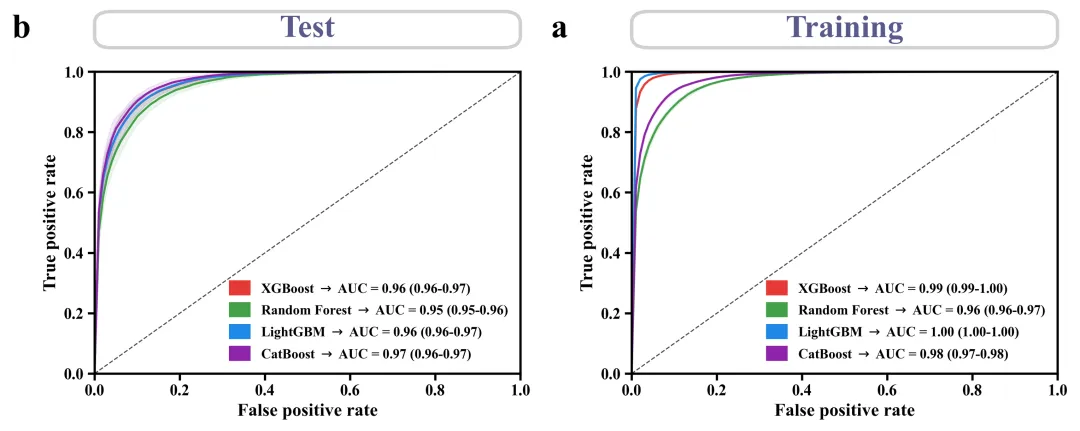
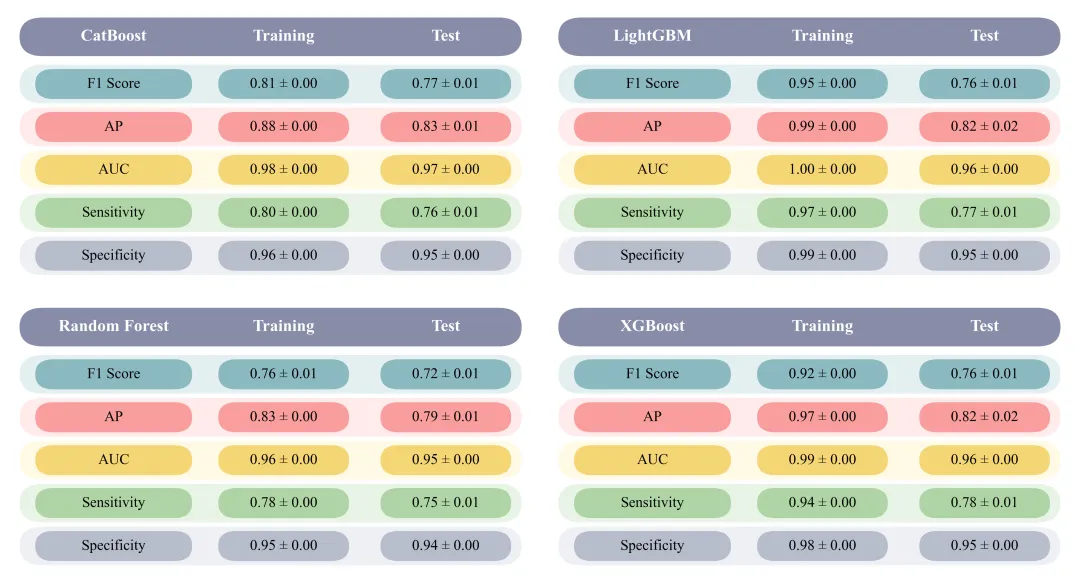
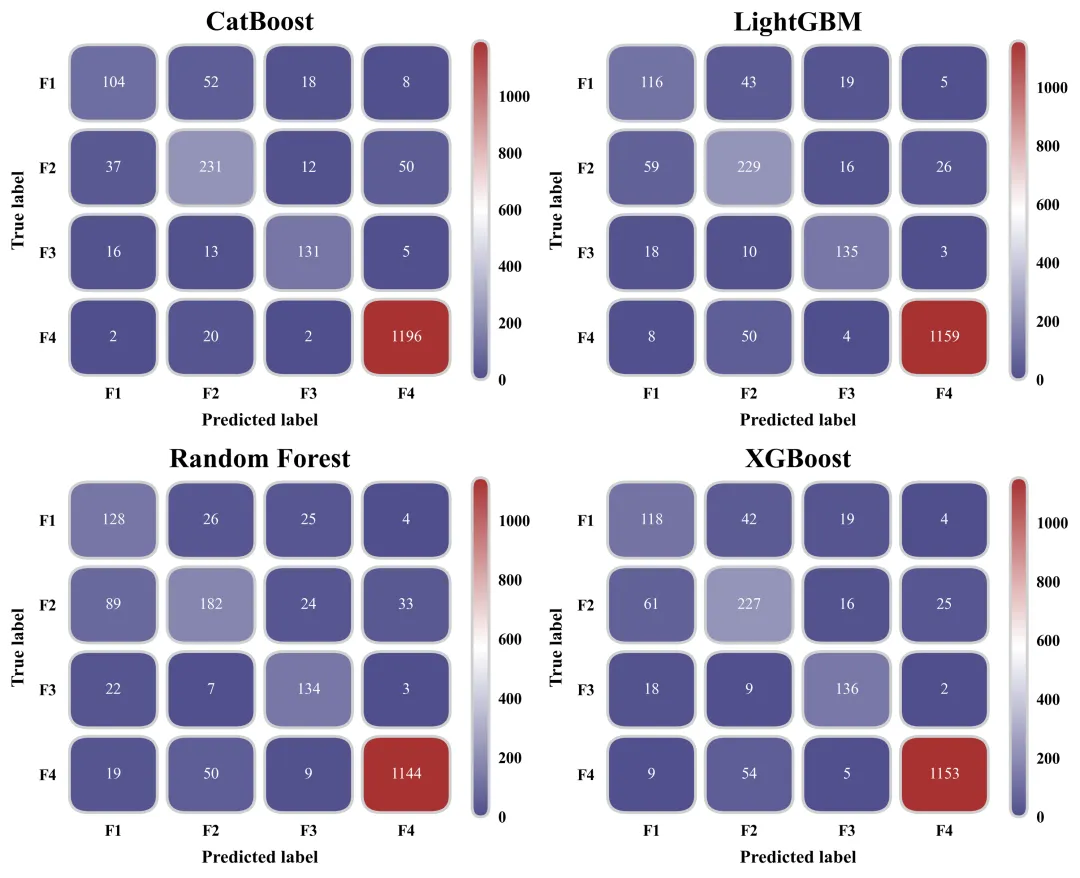
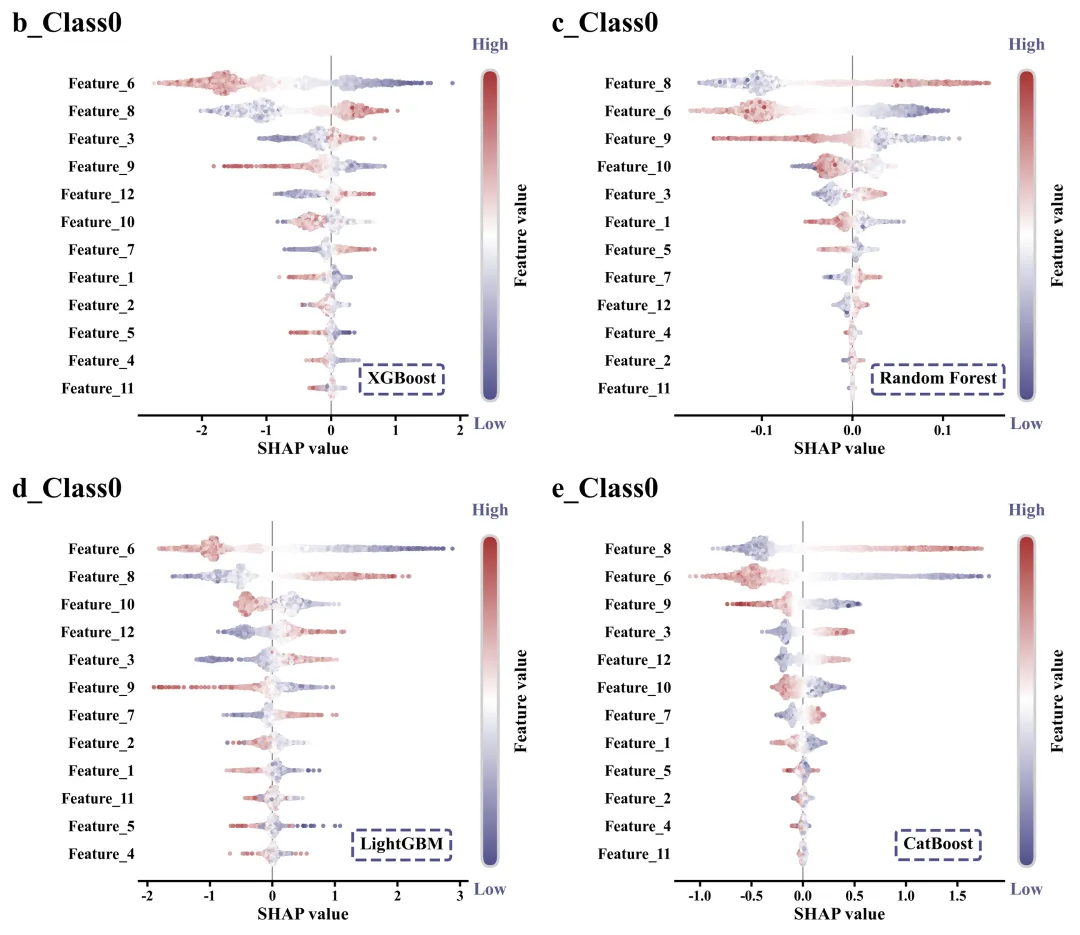
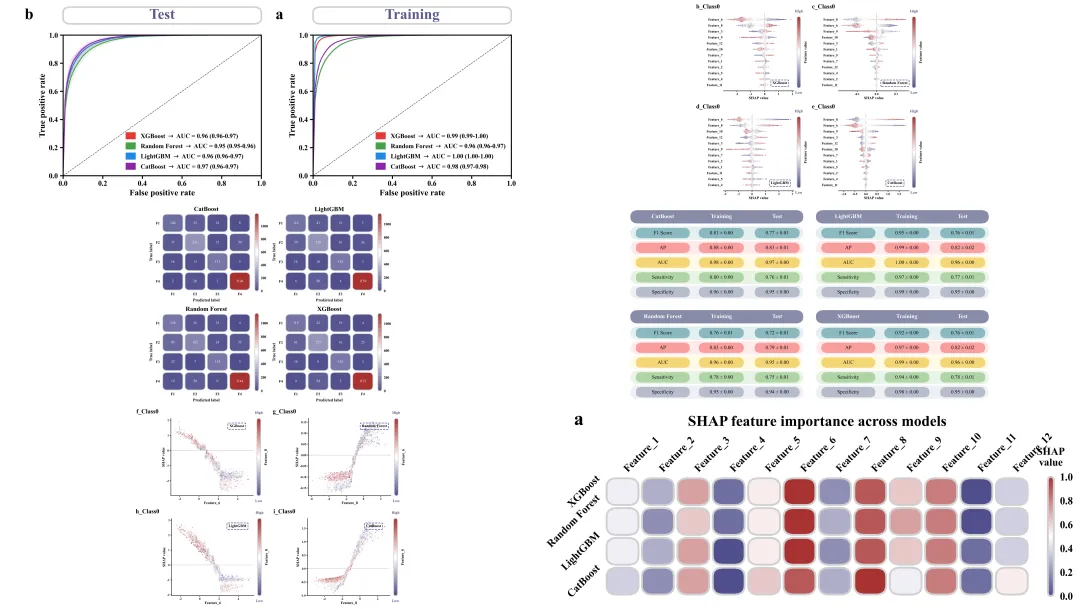
代码绘制成果展示

论文:Machine learning uncovers dominant fractions of heavy metal(loid)s in global soils
代码解释

第一部分

库的导入以及字体设置
# =========================================================================================# ====================================== 1. 环境设置 =======================================# =========================================================================================import numpy as npimport pandas as pdimport matplotlib.pyplot as pltfrom matplotlib.patches import FancyBboxPatch, Patchfrom matplotlib.colors import LinearSegmentedColormap, Normalizefrom sklearn.model_selection import train_test_split, GridSearchCV

第二部分

颜色库设置
# =========================================================================================# ======================================2.颜色库============================================# =========================================================================================COLOR_SCHEMES = {    1: {'cmap': ['#4f4f8c''#ffffff''#a83232'], 'roc': ['#E53935''#43A047''#1E88E5''#8E24AA'],        'table_header''#878ca8','table_rows': [('#e4f0f0''#8bb9c0'), ('#ffeaeb''#f89e9d'), ('#fff9e5''#f5d676'), ('#e9f4e6''#aed4a4'),                       ('#eef0f3''#b5bdcb')]},}SCHEME_ID = 1 # 设置当前使用的配色方案global_scheme = COLOR_SCHEMES[SCHEME_ID]  # 获取对应的配色方案

第三部分

蜂巢图抖动计算函数
# =========================================================================================# ======================================3.蜂巢图抖动计算函数===================================# =========================================================================================def simple_beeswarm(x_values, nbins=40, width=0.1):    hist_range = (np.min(x_values), np.max(x_values))  # 数据的最小值和最大值范围    if hist_range[0] == hist_range[1]:  # 如果最大值等于最小值    bin_indices = np.clip(bin_indices, 0, nbins - 1)  # 索引范围    y_values = np.zeros_like(x_values)  # 初始化Y轴抖动值    max_count = counts.max()  # 获取直方图中的最大计数值        current_width = (counts[i] / max_count) * width  # 根据当前箱子的密度计算抖动宽度    return y_values  # 返回计算好的Y轴抖动坐标

第四部分

ROC 曲线绘制函数:绘制四种模型基于多次交叉验证/迭代后平均 ROC 曲线和阴影置信区间的函数
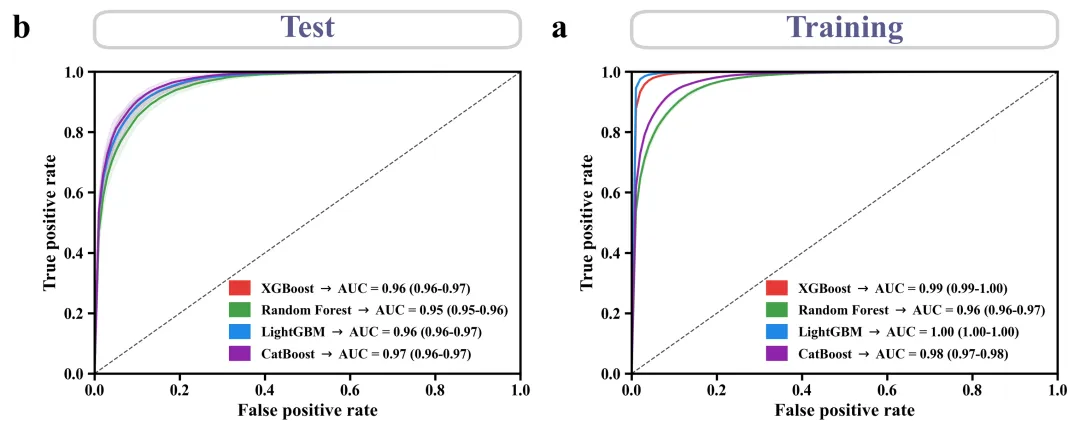
# =========================================================================================# ======================================4.ROC 曲线==========================================# =========================================================================================def plot_single_roc(tprs, aucs, title_text, letter):    # 创建画布    fig, ax = plt.subplots(figsize=(6.55.5))    custom_legend_handles = []  # 用于存储自定义图例句柄    roc_colors = global_scheme['roc']  # 获取颜色    ax.set_xlabel('False positive rate', fontsize=16, fontweight='bold')  # x轴标题    ax.set_ylabel('True positive rate', fontsize=16, fontweight='bold')  # y轴标题    # 设置主刻度线    ax.tick_params(axis='both', which='major', length=6, width=2, labelsize=14)    # 设置x、y轴数值标注粗细    for label in ax.get_xticklabels() + ax.get_yticklabels():        label.set_fontweight('bold')    box_y0 = 1.08  # 顶部标题背景框的起始Y坐标    box_height = 0.12  # 顶部标题背景框的高度    # 创建圆角矩形背景框对象    box = FancyBboxPatch((0, box_y0),  # 起始位置                         1.0,  # 背景框宽度                         box_height,  # 高度                         boxstyle="round,pad=0.0,rounding_size=0.04",  # 样式                         ec="#d0d0d0",  # 边框颜色                         fc="white",  # 填充颜色                         lw=3.0,  # 边框线宽                         transform=ax.transAxes,  # 坐标轴                         clip_on=False)  # 允许在坐标轴之外绘制    ax.add_patch(box)  # 将背景框添加到图形中    # 遍历边框    for spine in ax.spines.values():        spine.set_linewidth(2)  # 线宽

第五部分

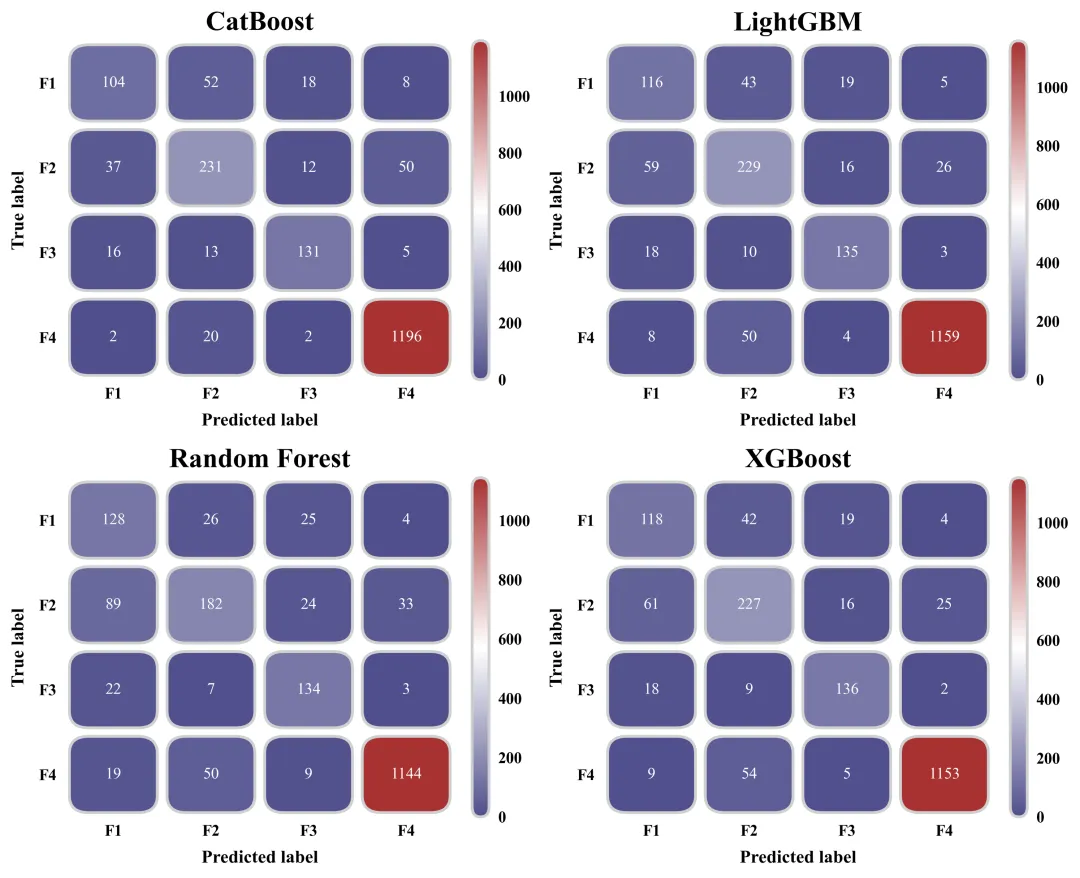
混淆矩阵绘制函数
# =========================================================================================# ======================================5.混淆矩阵绘制函数==========================================# =========================================================================================def plot_custom_confusion_matrix(cm, letter, is_train=True):    # 创建画布和坐标轴    fig, ax = plt.subplots(figsize=(6.55.5))    ax.tick_params(top=False, bottom=False, left=False, right=False)    ax.set_xticks(range(4))  # 设置x轴的刻度位置    ax.set_yticks(range(4))  # 设置y轴的刻度位置    labels = ['F1''F2''F3''F4']  #类别    sm = plt.cm.ScalarMappable(cmap=cmap, norm=norm)  # 创建用于颜色条对象    sm.set_array([])  # 初始化空数组,以便生成颜色条    # 添加颜色条    cbar = fig.colorbar(sm, ax=ax, fraction=0.046, pad=0.04)    cbar.outline.set_visible(False)  # 隐藏颜色条外边框    cbar.ax.tick_params(size=0, labelsize=14, pad=8)  # 隐藏颜色条的刻度线    # 为颜色条创建一个圆角裁剪框    clip_box = FancyBboxPatch((00),                              1.0,  # 裁剪框的宽度比例                              1.0,  # 裁剪框的高度比例                              boxstyle="round,pad=0.0,rounding_size=0.5",  # 圆角样式                              mutation_aspect=0.06,  # 控制圆角在宽高比下的变形程度                              transform=cbar.ax.transAxes,  # 基于颜色条轴坐标进行变换                              ec="#d0d0d0",  # 边界颜色                              fc="none",  # 无填充                              lw=2.5,  # 裁剪框线宽                              clip_on=False)  # 允许超越边界绘制    cbar.ax.add_patch(clip_box)  # 将圆角裁剪框加入到颜色条轴上

第六部分

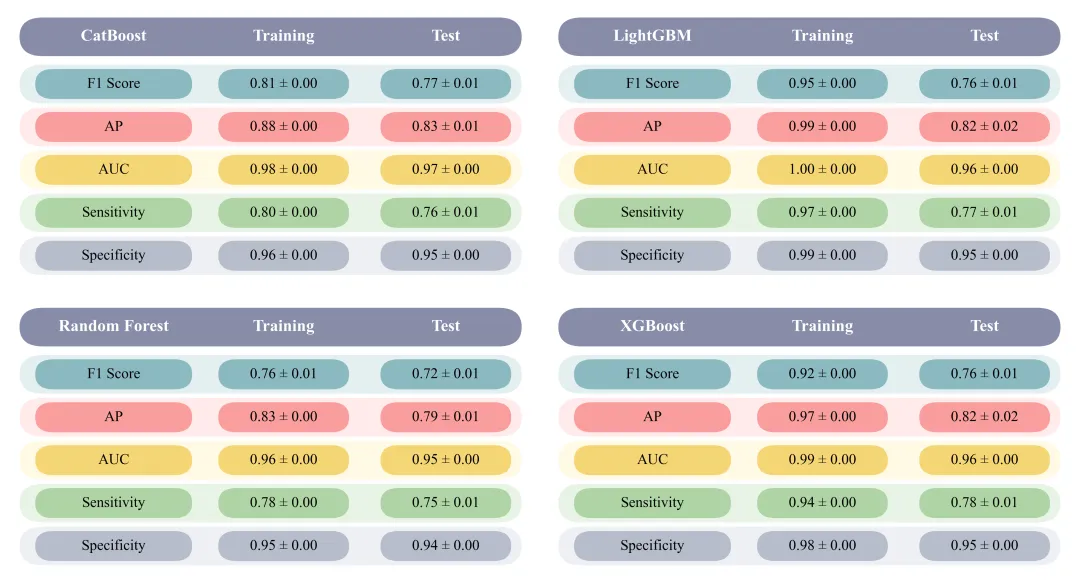
性能指标可视化表格
# =========================================================================================# ======================================6.绘制性能指标可视化表格=========================================# =========================================================================================def plot_metrics_table(train_vals, test_vals, letter):    # 创建画布    fig, ax = plt.subplots(figsize=(84.2))    ax.set_xlim(010)  # x轴范围    ax.set_ylim(-0.26.2)  # y轴范围    ax.add_patch(FancyBboxPatch((0.25.1),  # 起始位置                                9.6,  # 宽度                                0.9,  # 高度                                boxstyle="round,pad=0,rounding_size=0.45",  # 样式                                fc=bg_header,  # 填充色                                ec='none'))  # 隐藏边缘线    # 添加表头文本    ax.text(2.05.55, letter, fontsize=18, fontweight='bold', color='white', va='center', ha='center')    ax.text(5.255.55'Training', fontsize=18, fontweight='bold', color='white', va='center', ha='center')    ax.text(8.355.55'Test', fontsize=18, fontweight='bold', color='white', va='center', ha='center')        ax.add_patch(FancyBboxPatch((4.0, y_base + 0.1),  # 坐标                                    2.5,  # 宽度                                    0.7,  # 高度                                    boxstyle="round,pad=0,rounding_size=0.35",  # 样式                                    fc=dark_c,  # 填充色                                    ec='none'))  # 无边框线        m_tr, s_tr = train_vals[i]  # 拆分为均值和标准差        # 训练集        ax.text(5.25,  # x                y_base + 0.45,  # Y                f"{m_tr:.2f} ± {s_tr:.2f}",  # 数值                fontsize=16,  # 大小                color='black',  # 字体颜色                va='center',  # 垂直对齐                ha='center')  # 水平对齐        # 添加高亮小框        ax.add_patch(FancyBboxPatch((7.1, y_base + 0.1),  # 坐标                                    2.5,  # 宽                                    0.7,  # 高度                                    boxstyle="round,pad=0,rounding_size=0.35",  # 样式                                    fc=dark_c,  # 填充色                                    ec='none'))  # 无边框线

第七部分

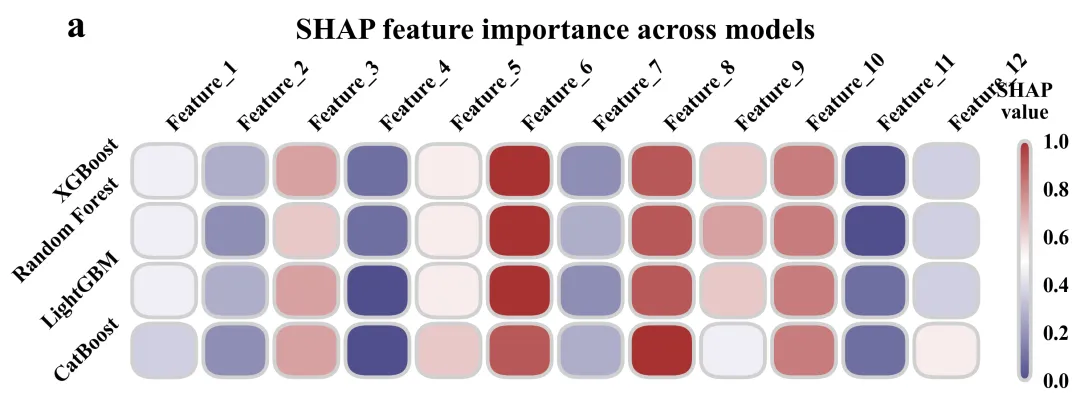
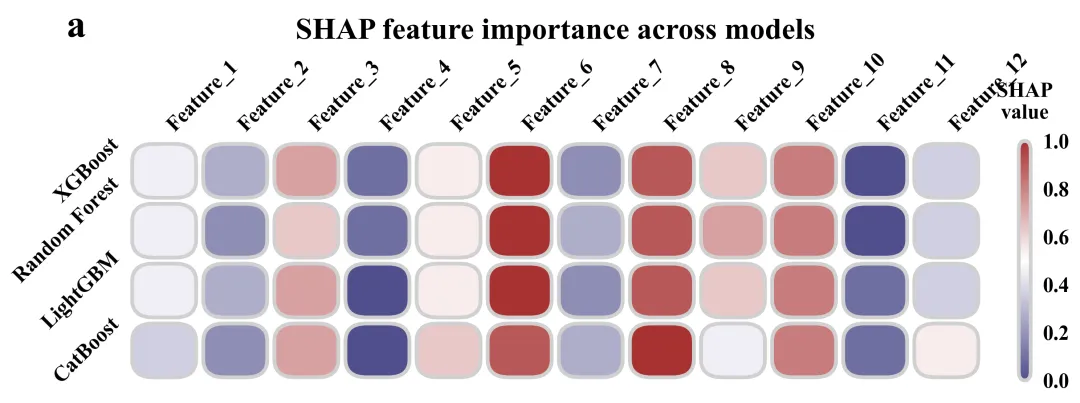
SHAP 特征重要性热图
# =========================================================================================# ======================================7.SHAP 特征重要性热图=========================================# =========================================================================================def plot_shap_feature_importance(shap_data, features, letter):    # 创建画布    fig, ax = plt.subplots(figsize=(114))    # 配置轴刻度参数    ax.tick_params(axis='both',  # 两个轴                   which='both',  # 应用于主刻度及副刻度                   length=0,  # 长度                   top=False,  # 关闭顶部刻度线                   bottom=False,  # 关闭底部刻度线                   left=False,  # 关闭左侧刻度线                   right=False)  # 关闭右侧刻度线    ax.set_xticks(range(n_features))  # 设置x轴的标签位置    ax.xaxis.tick_top()  # x轴的特征名称转移到图表正上方显示    # 设置x轴顶部的文本    ax.set_xticklabels(features,  # 特征名                       rotation=45,  # 旋转                       ha='left',  # 水平对齐                       va='bottom',  # 垂直对齐                       fontsize=14,  # 字体大小                       fontweight='bold')  # 加粗    clip_box = FancyBboxPatch((00),                              1.0,  # 宽度                              1.0,  # 高度                              boxstyle="round,pad=0.0,rounding_size=0.5",  # 用圆角裁切                              mutation_aspect=0.08,  # 调节长条状态下圆角不变形                              transform=cbar.ax.transAxes,  # 相对坐标系                              ec="#d0d0d0",  # 边框色                              fc="none",  # 内部留白                              lw=2.5,  # 线宽                              clip_on=False)  # 允许跨界

第八部分

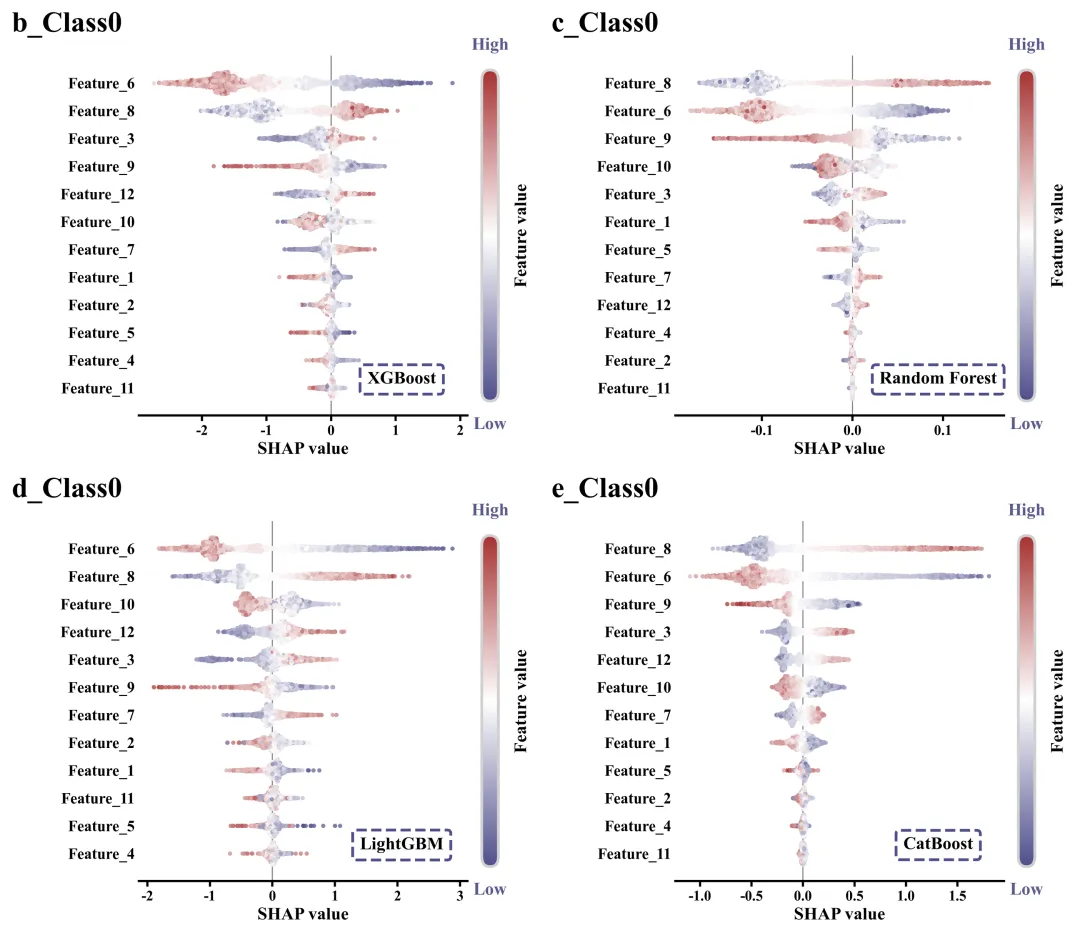
SHAP 特征重要性蜂巢图
# =========================================================================================# ======================================8.SHAP 特征重要性蜂巢图=========================================# =========================================================================================def plot_single_shap_summary(sv, features_data, feature_names, fraction_idx, letter):    # 画布    fig, ax = plt.subplots(figsize=(7.56))    cmap = LinearSegmentedColormap.from_list('custom_cm', global_scheme['cmap'], N=256)  # 创建渐变色    mean_abs = np.abs(sv).mean(axis=0)  # 对每一特征的SHAP值求绝对值后算平均数    for label in ax.get_xticklabels():        label.set_fontweight('bold')    # 设置边框线    ax.spines['top'].set_visible(False)    ax.spines['right'].set_visible(False)    ax.spines['left'].set_visible(False)    ax.spines['bottom'].set_linewidth(2)    # 子图编号    ax.text(-0.05,  # x            1.05,  # y            letter,  # 子图编号            transform=ax.transAxes,  # 坐标系            fontsize=26,  # 大小            fontweight='bold',  # 加粗            va='bottom',  # 垂直            ha='right')  # 水平    # 图名框属性    bbox_props = dict(boxstyle="round,pad=0.4,rounding_size=0.2",  # 框体属性                      ec="#4f4f8c",  # 边颜色                      fc="none",  # 填充色                      lw=2.5,  # 边线粗细                      linestyle="--")  # 线条样式    # 图名    ax.text(0.8,  # x            0.1,  # y            f"{class_names[fraction_idx]}",  # 内容            transform=ax.transAxes,  # 坐标系            fontsize=16,  # 字体大小            fontweight='bold',  # 加粗            ha='center',  # 水平            va='center',  # 垂直            bbox=bbox_props)  # 应用属性

第九部分

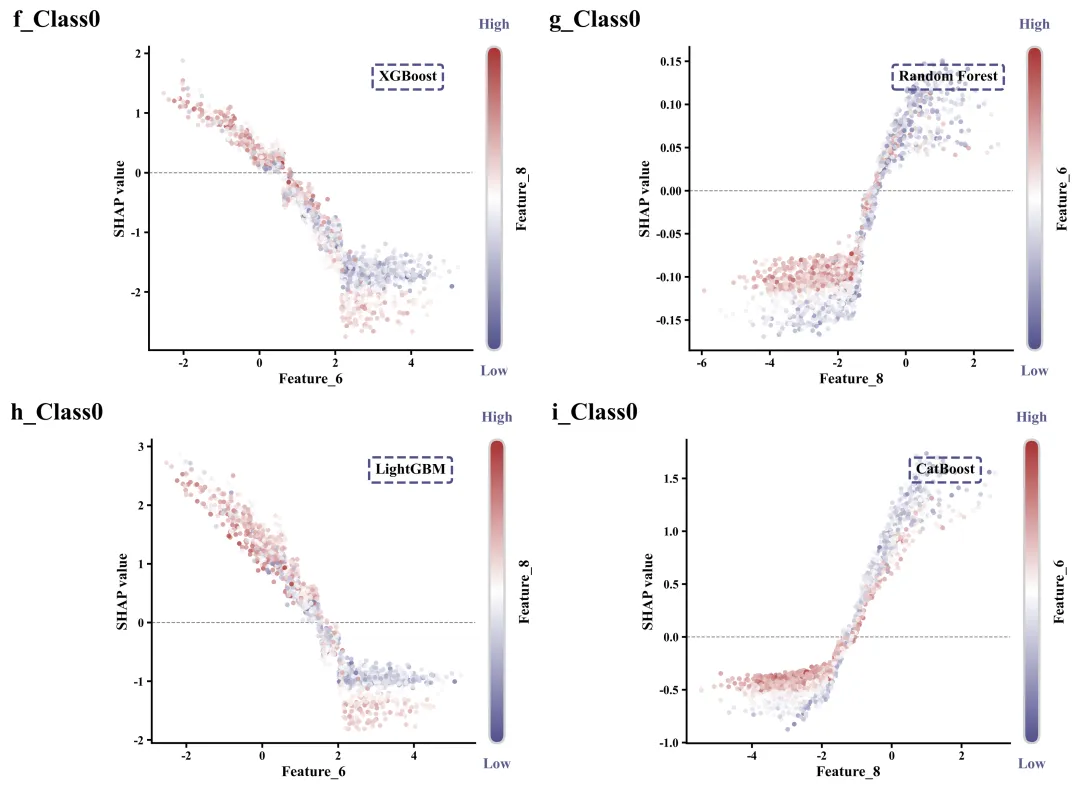
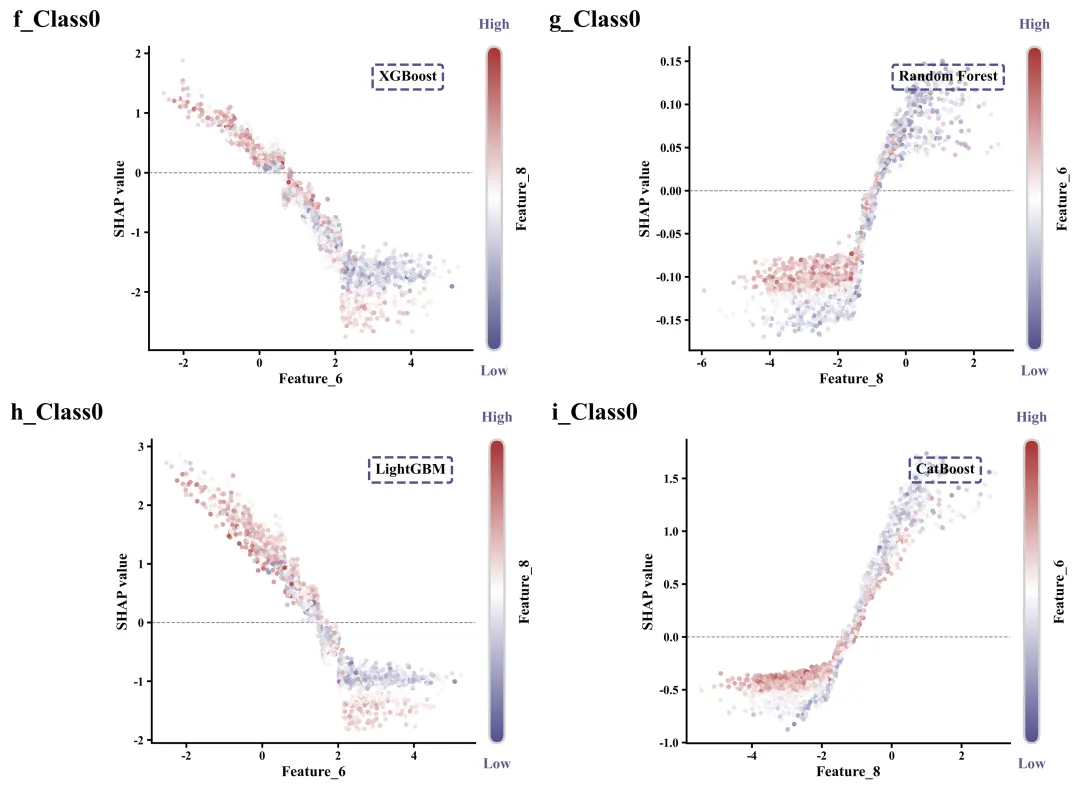
单特征依赖图绘制函数
# =================================================================================================# ======================================9.单特征依赖图绘制函数=========================================# =================================================================================================def plot_single_shap_dependence(sv, features_data, feature_names, feature_idx, interaction_idx, fraction_idx, letter):    # 创建画布    fig, ax = plt.subplots(figsize=(7.56))    cmap = LinearSegmentedColormap.from_list('custom_cm', global_scheme['cmap'], N=256)  # 自定义线性颜色映射对象    # 绘制散点图    ax.scatter(x_vals,  # X               y_vals,  # Y               c=color_vals,  # 散点的颜色               s=25,  # 大小               alpha=0.8,  # 透明度               edgecolors='none',  # 边缘颜色               zorder=2)  # 层级    # 添加文本    ax.text(-0.15,  # x            1.05,  # y            letter,  # 子图编号            transform=ax.transAxes,  # 坐标系            fontsize=26,  # 字体大小            fontweight='bold',  # 粗细            va='bottom',  # 垂直            ha='right')  # 水平    clip_box = FancyBboxPatch((00),                              1.0,  # 裁剪框的宽度比例                              1.0,  # 裁剪框的高度比例                              boxstyle="round,pad=0.0,rounding_size=0.5",  # 圆角样式                              mutation_aspect=0.06,  # 控制圆角在宽高比下的变形程度                              transform=cbar.ax.transAxes,  # 基于颜色条轴坐标进行变换                              ec="#d0d0d0",  # 边界颜色                              fc="none",  # 无填充                              lw=2.5,  # 裁剪框线宽                              clip_on=False)  # 允许超越边界绘制    cbar.ax.add_patch(clip_box)  # 将圆角裁剪框加入到颜色条轴上    # 将颜色条实体按照圆角框进行裁剪    if hasattr(cbar, 'solids'and cbar.solids is not None:        cbar.solids.set_clip_path(clip_box)    else:        for coll in cbar.ax.collections:  # 遍历颜色条轴内的集合            coll.set_clip_path(clip_box)  # 将集合按照圆角框进行裁剪

第十部分

执行部分:读取Excel数据并分离特征与目标标签,初始化各类用于存放指标记录、ROC曲线数据和混淆矩阵的字典以及设定好四大模型的超参数网格后,进入外层大循环开始迭代,在每次迭代中采用分层抽样划分训练集与测试集,执行特征标准化处理,并计算平衡样本权重以缓解类别不平衡问题;随后内部循环遍历4个模型,利用交叉验证网格搜索拟合数据并寻找当前轮次的最优参数,得出预测概率与分类标签后,计算各类别TPR、宏平均AUC、混淆矩阵以及F1、AP等综合评价指标,同时实时对比并将其测试集F1得分最高的那一次模型及对应的测试集数据作为“全局最优”保存下来备用;训练全部结束后,依次调用可视化函数,绘制并保存ROC曲线、各模型平均混淆矩阵以及性能统计表格;接着利用SHAP分析对各个“最优模型”进行解析,计算出各个特征在多分类任务中的全局平均重要性,将其进行名次百分比的线性归一化后绘制出直观的特征重要性对比热图,最后遍历所有的类别和模型,提取每种情况下绝对影响力排名前两位的核心特征,绘制SHAP蜂巢图与特征依赖图。

# =================================================================================================# ======================================11.执行部分=====================================================# =================================================================================================if __name__ == '__main__':    df = pd.read_excel(r"data.xlsx"#读取原始数据    target_col = 'Label' # 目标变量    X = df.drop(columns=[target_col]).values  # 特征数据    y = df[target_col].values # 提取目标变量数据    feature_cols = df.drop(columns=[target_col]).columns.tolist() # 获取特征名称    tprs_train = {i: [] for i in range(n_models)} #用于存储各个模型在每一轮训练集上的TPR    aucs_train = {i: [] for i in range(n_models)} #用于存储各个模型在每一轮训练集上的AUC    tprs_test = {i: [] for i in range(n_models)} #用于存储各个模型在每一轮测试集上的TPR    aucs_test = {i: [] for i in range(n_models)} #用于存储各个模型在每一轮测试集上的AUC        y_train_bin = label_binarize(y_train, classes=[0123])  # 将训练集的原始离散标签二值化为多个 0/1 组成的独热矩阵,为后续绘制各类别的 ROC 曲线做准备        y_test_bin = label_binarize(y_test, classes=[0123])        #实例化模型        models_dict = [            XGBClassifier(objective='multi:softprob',                          num_class=n_classes,                          eval_metric='mlogloss',                          random_state=iteration, n_jobs=1),            RandomForestClassifier(random_state=iteration, n_jobs=1),            LGBMClassifier(objective='multiclass',                           num_class=n_classes,                           random_state=iteration,                           n_jobs=1,                           verbose=-1),            CatBoostClassifier(loss_function='MultiClass',                               classes_count=n_classes,                               random_seed=iteration,                               verbose=False,                               thread_count=1)        ]    print("\n训练完成,开始绘制并保存图像")    print("\n开始绘制ROC曲线")    plot_single_roc(tprs_train, #TPR数据                    aucs_train, #AUC数据                    "Training"#标题                    "a"#编号    plot_single_roc(tprs_test,                    aucs_test,                    "Test",                    "b")    print("\n开始绘制混淆矩阵和指标图")    print("\n正在计算各个模型的 SHAP 特征重要性")    shap_data_models = np.zeros((n_models, X.shape[1])) #用于存放模型针对数据每个维度的全局平均特征重要性SHAP值    sv_models_dict = {i: {} for i in range(n_models)}  #SHAP原始数据    feature_names = df.drop(columns=[target_col]).columns.tolist() #提取特征名称    print("\n开始绘制SHAP特征重要性热图")    #SHAP重要性热图    plot_shap_feature_importance(normalized_shap, feature_names, "a")        for m_idx in range(n_models):            mean_abs_feat = np.abs(sv_models_dict[m_idx][c]).mean(axis=0#重要性            order = np.argsort(mean_abs_feat)[::-1#排序            top1_idx, top2_idx = order[0], order[1# 两个最重要特征            letter_dependence = f"{chr(102 + m_idx)}_Class{c}"  #标题            # 绘制依赖图            plot_single_shap_dependence(sv_models_dict[m_idx][c],#SHAP原始数据                                        X_test_best[m_idx], #特征数据                                        feature_names, #特征名称                                        feature_idx=top1_idx, #主特征                                        interaction_idx=top2_idx, #次特征                                        fraction_idx=m_idx, #模型名                                        letter=letter_dependence) #标题

如何应用到你自己的数据

1.类别数量,第二部分:

n_classes = 4  #类别总数量

2.模型数量,第二部分:

n_models = 4  #本次对比的模型数量

3.配色方案,第二部分:

SCHEME_ID = 1 # 设置当前使用的配色方案

4.设置绘图结果的保存地址,所有绘图函数部分:

plt.savefig(fr"{title_text}_{SCHEME_ID}ROC.png",dpi=300, bbox_inches='tight')

5.设置原始数据的路径,执行部分:

df = pd.read_excel(r"data.xlsx"#读取原始数据

6.设置目标变量,执行部分:

target_col = 'Label' # 目标变量

7.设置迭代次数,执行部分:

n_iterations = 15

8.设置模型超参数网格,执行部分:

param_grids = {    'XGBoost': {'max_depth': [35],                'learning_rate': [0.050.1],                'n_estimators': [50100]},    'Random Forest': {'max_depth': [35],                      'n_estimators': [50100]},    'LightGBM': {'max_depth': [35],                 'learning_rate': [0.050.1],                 'n_estimators': [50100]},    'CatBoost': {'depth': [35],                 'learning_rate': [0.050.1],                 'iterations': [50100]}}

推荐

期刊图片复现|Python绘制二维偏依赖PDP图
期刊复现|python绘制基于SHAP分析和GAM模型拟合的单特征依赖图
期刊图片复现|python绘制带有渐变颜色shap特征重要性组合图(条形图+蜂巢图)
期刊复现|用Python绘制SHAP特征重要性总览图、依赖图、双特征交互效应SHAP图,解锁XGBoost模型的终极奥秘
期刊图片复现|Python绘制shap重要性蜂巢图+单特征依赖图+交互效应强度气泡图+交互效应依赖图(回归+二分类+分类)

获取方式

公众号中的所有所有的免费代码都已经下架了,都并入到付费部分里了,付费合集代码和数据的购买通道已经开通,全部合集100元,后续将会持续更新,决定购买请后台私信我,注意只会分享练习数据和代码文件,不会提供答疑服务,代码文件中已经包含了每行代码的完整注释,购买前请确保真的需要!!!

最新文章

随机文章

基本 文件 流程 错误 SQL 调试
  1. 请求信息 : 2026-07-02 23:30:24 HTTP/2.0 GET : https://f.mffb.com.cn/a/496893.html
  2. 运行时间 : 0.233017s [ 吞吐率:4.29req/s ] 内存消耗:4,778.14kb 文件加载:140
  3. 缓存信息 : 0 reads,0 writes
  4. 会话信息 : SESSION_ID=fb49cc51412b6cc936babd00959831df
  1. /yingpanguazai/ssd/ssd1/www/f.mffb.com.cn/public/index.php ( 0.79 KB )
  2. /yingpanguazai/ssd/ssd1/www/f.mffb.com.cn/vendor/autoload.php ( 0.17 KB )
  3. /yingpanguazai/ssd/ssd1/www/f.mffb.com.cn/vendor/composer/autoload_real.php ( 2.49 KB )
  4. /yingpanguazai/ssd/ssd1/www/f.mffb.com.cn/vendor/composer/platform_check.php ( 0.90 KB )
  5. /yingpanguazai/ssd/ssd1/www/f.mffb.com.cn/vendor/composer/ClassLoader.php ( 14.03 KB )
  6. /yingpanguazai/ssd/ssd1/www/f.mffb.com.cn/vendor/composer/autoload_static.php ( 4.90 KB )
  7. /yingpanguazai/ssd/ssd1/www/f.mffb.com.cn/vendor/topthink/think-helper/src/helper.php ( 8.34 KB )
  8. /yingpanguazai/ssd/ssd1/www/f.mffb.com.cn/vendor/topthink/think-validate/src/helper.php ( 2.19 KB )
  9. /yingpanguazai/ssd/ssd1/www/f.mffb.com.cn/vendor/topthink/think-orm/src/helper.php ( 1.47 KB )
  10. /yingpanguazai/ssd/ssd1/www/f.mffb.com.cn/vendor/topthink/think-orm/stubs/load_stubs.php ( 0.16 KB )
  11. /yingpanguazai/ssd/ssd1/www/f.mffb.com.cn/vendor/topthink/framework/src/think/Exception.php ( 1.69 KB )
  12. /yingpanguazai/ssd/ssd1/www/f.mffb.com.cn/vendor/topthink/think-container/src/Facade.php ( 2.71 KB )
  13. /yingpanguazai/ssd/ssd1/www/f.mffb.com.cn/vendor/symfony/deprecation-contracts/function.php ( 0.99 KB )
  14. /yingpanguazai/ssd/ssd1/www/f.mffb.com.cn/vendor/symfony/polyfill-mbstring/bootstrap.php ( 8.26 KB )
  15. /yingpanguazai/ssd/ssd1/www/f.mffb.com.cn/vendor/symfony/polyfill-mbstring/bootstrap80.php ( 9.78 KB )
  16. /yingpanguazai/ssd/ssd1/www/f.mffb.com.cn/vendor/symfony/var-dumper/Resources/functions/dump.php ( 1.49 KB )
  17. /yingpanguazai/ssd/ssd1/www/f.mffb.com.cn/vendor/topthink/think-dumper/src/helper.php ( 0.18 KB )
  18. /yingpanguazai/ssd/ssd1/www/f.mffb.com.cn/vendor/symfony/var-dumper/VarDumper.php ( 4.30 KB )
  19. /yingpanguazai/ssd/ssd1/www/f.mffb.com.cn/vendor/topthink/framework/src/think/App.php ( 15.30 KB )
  20. /yingpanguazai/ssd/ssd1/www/f.mffb.com.cn/vendor/topthink/think-container/src/Container.php ( 15.76 KB )
  21. /yingpanguazai/ssd/ssd1/www/f.mffb.com.cn/vendor/psr/container/src/ContainerInterface.php ( 1.02 KB )
  22. /yingpanguazai/ssd/ssd1/www/f.mffb.com.cn/app/provider.php ( 0.19 KB )
  23. /yingpanguazai/ssd/ssd1/www/f.mffb.com.cn/vendor/topthink/framework/src/think/Http.php ( 6.04 KB )
  24. /yingpanguazai/ssd/ssd1/www/f.mffb.com.cn/vendor/topthink/think-helper/src/helper/Str.php ( 7.29 KB )
  25. /yingpanguazai/ssd/ssd1/www/f.mffb.com.cn/vendor/topthink/framework/src/think/Env.php ( 4.68 KB )
  26. /yingpanguazai/ssd/ssd1/www/f.mffb.com.cn/app/common.php ( 0.03 KB )
  27. /yingpanguazai/ssd/ssd1/www/f.mffb.com.cn/vendor/topthink/framework/src/helper.php ( 18.78 KB )
  28. /yingpanguazai/ssd/ssd1/www/f.mffb.com.cn/vendor/topthink/framework/src/think/Config.php ( 5.54 KB )
  29. /yingpanguazai/ssd/ssd1/www/f.mffb.com.cn/config/app.php ( 0.95 KB )
  30. /yingpanguazai/ssd/ssd1/www/f.mffb.com.cn/config/cache.php ( 0.78 KB )
  31. /yingpanguazai/ssd/ssd1/www/f.mffb.com.cn/config/console.php ( 0.23 KB )
  32. /yingpanguazai/ssd/ssd1/www/f.mffb.com.cn/config/cookie.php ( 0.56 KB )
  33. /yingpanguazai/ssd/ssd1/www/f.mffb.com.cn/config/database.php ( 2.48 KB )
  34. /yingpanguazai/ssd/ssd1/www/f.mffb.com.cn/vendor/topthink/framework/src/think/facade/Env.php ( 1.67 KB )
  35. /yingpanguazai/ssd/ssd1/www/f.mffb.com.cn/config/filesystem.php ( 0.61 KB )
  36. /yingpanguazai/ssd/ssd1/www/f.mffb.com.cn/config/lang.php ( 0.91 KB )
  37. /yingpanguazai/ssd/ssd1/www/f.mffb.com.cn/config/log.php ( 1.35 KB )
  38. /yingpanguazai/ssd/ssd1/www/f.mffb.com.cn/config/middleware.php ( 0.19 KB )
  39. /yingpanguazai/ssd/ssd1/www/f.mffb.com.cn/config/route.php ( 1.89 KB )
  40. /yingpanguazai/ssd/ssd1/www/f.mffb.com.cn/config/session.php ( 0.57 KB )
  41. /yingpanguazai/ssd/ssd1/www/f.mffb.com.cn/config/trace.php ( 0.34 KB )
  42. /yingpanguazai/ssd/ssd1/www/f.mffb.com.cn/config/view.php ( 0.82 KB )
  43. /yingpanguazai/ssd/ssd1/www/f.mffb.com.cn/app/event.php ( 0.25 KB )
  44. /yingpanguazai/ssd/ssd1/www/f.mffb.com.cn/vendor/topthink/framework/src/think/Event.php ( 7.67 KB )
  45. /yingpanguazai/ssd/ssd1/www/f.mffb.com.cn/app/service.php ( 0.13 KB )
  46. /yingpanguazai/ssd/ssd1/www/f.mffb.com.cn/app/AppService.php ( 0.26 KB )
  47. /yingpanguazai/ssd/ssd1/www/f.mffb.com.cn/vendor/topthink/framework/src/think/Service.php ( 1.64 KB )
  48. /yingpanguazai/ssd/ssd1/www/f.mffb.com.cn/vendor/topthink/framework/src/think/Lang.php ( 7.35 KB )
  49. /yingpanguazai/ssd/ssd1/www/f.mffb.com.cn/vendor/topthink/framework/src/lang/zh-cn.php ( 13.70 KB )
  50. /yingpanguazai/ssd/ssd1/www/f.mffb.com.cn/vendor/topthink/framework/src/think/initializer/Error.php ( 3.31 KB )
  51. /yingpanguazai/ssd/ssd1/www/f.mffb.com.cn/vendor/topthink/framework/src/think/initializer/RegisterService.php ( 1.33 KB )
  52. /yingpanguazai/ssd/ssd1/www/f.mffb.com.cn/vendor/services.php ( 0.14 KB )
  53. /yingpanguazai/ssd/ssd1/www/f.mffb.com.cn/vendor/topthink/framework/src/think/service/PaginatorService.php ( 1.52 KB )
  54. /yingpanguazai/ssd/ssd1/www/f.mffb.com.cn/vendor/topthink/framework/src/think/service/ValidateService.php ( 0.99 KB )
  55. /yingpanguazai/ssd/ssd1/www/f.mffb.com.cn/vendor/topthink/framework/src/think/service/ModelService.php ( 2.04 KB )
  56. /yingpanguazai/ssd/ssd1/www/f.mffb.com.cn/vendor/topthink/think-trace/src/Service.php ( 0.77 KB )
  57. /yingpanguazai/ssd/ssd1/www/f.mffb.com.cn/vendor/topthink/framework/src/think/Middleware.php ( 6.72 KB )
  58. /yingpanguazai/ssd/ssd1/www/f.mffb.com.cn/vendor/topthink/framework/src/think/initializer/BootService.php ( 0.77 KB )
  59. /yingpanguazai/ssd/ssd1/www/f.mffb.com.cn/vendor/topthink/think-orm/src/Paginator.php ( 11.86 KB )
  60. /yingpanguazai/ssd/ssd1/www/f.mffb.com.cn/vendor/topthink/think-validate/src/Validate.php ( 63.20 KB )
  61. /yingpanguazai/ssd/ssd1/www/f.mffb.com.cn/vendor/topthink/think-orm/src/Model.php ( 23.55 KB )
  62. /yingpanguazai/ssd/ssd1/www/f.mffb.com.cn/vendor/topthink/think-orm/src/model/concern/Attribute.php ( 21.05 KB )
  63. /yingpanguazai/ssd/ssd1/www/f.mffb.com.cn/vendor/topthink/think-orm/src/model/concern/AutoWriteData.php ( 4.21 KB )
  64. /yingpanguazai/ssd/ssd1/www/f.mffb.com.cn/vendor/topthink/think-orm/src/model/concern/Conversion.php ( 6.44 KB )
  65. /yingpanguazai/ssd/ssd1/www/f.mffb.com.cn/vendor/topthink/think-orm/src/model/concern/DbConnect.php ( 5.16 KB )
  66. /yingpanguazai/ssd/ssd1/www/f.mffb.com.cn/vendor/topthink/think-orm/src/model/concern/ModelEvent.php ( 2.33 KB )
  67. /yingpanguazai/ssd/ssd1/www/f.mffb.com.cn/vendor/topthink/think-orm/src/model/concern/RelationShip.php ( 28.29 KB )
  68. /yingpanguazai/ssd/ssd1/www/f.mffb.com.cn/vendor/topthink/think-helper/src/contract/Arrayable.php ( 0.09 KB )
  69. /yingpanguazai/ssd/ssd1/www/f.mffb.com.cn/vendor/topthink/think-helper/src/contract/Jsonable.php ( 0.13 KB )
  70. /yingpanguazai/ssd/ssd1/www/f.mffb.com.cn/vendor/topthink/think-orm/src/model/contract/Modelable.php ( 0.09 KB )
  71. /yingpanguazai/ssd/ssd1/www/f.mffb.com.cn/vendor/topthink/framework/src/think/Db.php ( 2.88 KB )
  72. /yingpanguazai/ssd/ssd1/www/f.mffb.com.cn/vendor/topthink/think-orm/src/DbManager.php ( 8.52 KB )
  73. /yingpanguazai/ssd/ssd1/www/f.mffb.com.cn/vendor/topthink/framework/src/think/Log.php ( 6.28 KB )
  74. /yingpanguazai/ssd/ssd1/www/f.mffb.com.cn/vendor/topthink/framework/src/think/Manager.php ( 3.92 KB )
  75. /yingpanguazai/ssd/ssd1/www/f.mffb.com.cn/vendor/psr/log/src/LoggerTrait.php ( 2.69 KB )
  76. /yingpanguazai/ssd/ssd1/www/f.mffb.com.cn/vendor/psr/log/src/LoggerInterface.php ( 2.71 KB )
  77. /yingpanguazai/ssd/ssd1/www/f.mffb.com.cn/vendor/topthink/framework/src/think/Cache.php ( 4.92 KB )
  78. /yingpanguazai/ssd/ssd1/www/f.mffb.com.cn/vendor/psr/simple-cache/src/CacheInterface.php ( 4.71 KB )
  79. /yingpanguazai/ssd/ssd1/www/f.mffb.com.cn/vendor/topthink/think-helper/src/helper/Arr.php ( 16.63 KB )
  80. /yingpanguazai/ssd/ssd1/www/f.mffb.com.cn/vendor/topthink/framework/src/think/cache/driver/File.php ( 7.84 KB )
  81. /yingpanguazai/ssd/ssd1/www/f.mffb.com.cn/vendor/topthink/framework/src/think/cache/Driver.php ( 9.03 KB )
  82. /yingpanguazai/ssd/ssd1/www/f.mffb.com.cn/vendor/topthink/framework/src/think/contract/CacheHandlerInterface.php ( 1.99 KB )
  83. /yingpanguazai/ssd/ssd1/www/f.mffb.com.cn/app/Request.php ( 0.09 KB )
  84. /yingpanguazai/ssd/ssd1/www/f.mffb.com.cn/vendor/topthink/framework/src/think/Request.php ( 55.78 KB )
  85. /yingpanguazai/ssd/ssd1/www/f.mffb.com.cn/app/middleware.php ( 0.25 KB )
  86. /yingpanguazai/ssd/ssd1/www/f.mffb.com.cn/vendor/topthink/framework/src/think/Pipeline.php ( 2.61 KB )
  87. /yingpanguazai/ssd/ssd1/www/f.mffb.com.cn/vendor/topthink/think-trace/src/TraceDebug.php ( 3.40 KB )
  88. /yingpanguazai/ssd/ssd1/www/f.mffb.com.cn/vendor/topthink/framework/src/think/middleware/SessionInit.php ( 1.94 KB )
  89. /yingpanguazai/ssd/ssd1/www/f.mffb.com.cn/vendor/topthink/framework/src/think/Session.php ( 1.80 KB )
  90. /yingpanguazai/ssd/ssd1/www/f.mffb.com.cn/vendor/topthink/framework/src/think/session/driver/File.php ( 6.27 KB )
  91. /yingpanguazai/ssd/ssd1/www/f.mffb.com.cn/vendor/topthink/framework/src/think/contract/SessionHandlerInterface.php ( 0.87 KB )
  92. /yingpanguazai/ssd/ssd1/www/f.mffb.com.cn/vendor/topthink/framework/src/think/session/Store.php ( 7.12 KB )
  93. /yingpanguazai/ssd/ssd1/www/f.mffb.com.cn/vendor/topthink/framework/src/think/Route.php ( 23.73 KB )
  94. /yingpanguazai/ssd/ssd1/www/f.mffb.com.cn/vendor/topthink/framework/src/think/route/RuleName.php ( 5.75 KB )
  95. /yingpanguazai/ssd/ssd1/www/f.mffb.com.cn/vendor/topthink/framework/src/think/route/Domain.php ( 2.53 KB )
  96. /yingpanguazai/ssd/ssd1/www/f.mffb.com.cn/vendor/topthink/framework/src/think/route/RuleGroup.php ( 22.43 KB )
  97. /yingpanguazai/ssd/ssd1/www/f.mffb.com.cn/vendor/topthink/framework/src/think/route/Rule.php ( 26.95 KB )
  98. /yingpanguazai/ssd/ssd1/www/f.mffb.com.cn/vendor/topthink/framework/src/think/route/RuleItem.php ( 9.78 KB )
  99. /yingpanguazai/ssd/ssd1/www/f.mffb.com.cn/route/app.php ( 1.72 KB )
  100. /yingpanguazai/ssd/ssd1/www/f.mffb.com.cn/vendor/topthink/framework/src/think/facade/Route.php ( 4.70 KB )
  101. /yingpanguazai/ssd/ssd1/www/f.mffb.com.cn/vendor/topthink/framework/src/think/route/dispatch/Controller.php ( 4.74 KB )
  102. /yingpanguazai/ssd/ssd1/www/f.mffb.com.cn/vendor/topthink/framework/src/think/route/Dispatch.php ( 10.44 KB )
  103. /yingpanguazai/ssd/ssd1/www/f.mffb.com.cn/app/controller/Index.php ( 4.81 KB )
  104. /yingpanguazai/ssd/ssd1/www/f.mffb.com.cn/app/BaseController.php ( 2.05 KB )
  105. /yingpanguazai/ssd/ssd1/www/f.mffb.com.cn/vendor/topthink/think-orm/src/facade/Db.php ( 0.93 KB )
  106. /yingpanguazai/ssd/ssd1/www/f.mffb.com.cn/vendor/topthink/think-orm/src/db/connector/Mysql.php ( 5.44 KB )
  107. /yingpanguazai/ssd/ssd1/www/f.mffb.com.cn/vendor/topthink/think-orm/src/db/PDOConnection.php ( 52.47 KB )
  108. /yingpanguazai/ssd/ssd1/www/f.mffb.com.cn/vendor/topthink/think-orm/src/db/Connection.php ( 8.39 KB )
  109. /yingpanguazai/ssd/ssd1/www/f.mffb.com.cn/vendor/topthink/think-orm/src/db/ConnectionInterface.php ( 4.57 KB )
  110. /yingpanguazai/ssd/ssd1/www/f.mffb.com.cn/vendor/topthink/think-orm/src/db/builder/Mysql.php ( 16.58 KB )
  111. /yingpanguazai/ssd/ssd1/www/f.mffb.com.cn/vendor/topthink/think-orm/src/db/Builder.php ( 24.06 KB )
  112. /yingpanguazai/ssd/ssd1/www/f.mffb.com.cn/vendor/topthink/think-orm/src/db/BaseBuilder.php ( 27.50 KB )
  113. /yingpanguazai/ssd/ssd1/www/f.mffb.com.cn/vendor/topthink/think-orm/src/db/Query.php ( 15.71 KB )
  114. /yingpanguazai/ssd/ssd1/www/f.mffb.com.cn/vendor/topthink/think-orm/src/db/BaseQuery.php ( 45.13 KB )
  115. /yingpanguazai/ssd/ssd1/www/f.mffb.com.cn/vendor/topthink/think-orm/src/db/concern/TimeFieldQuery.php ( 7.43 KB )
  116. /yingpanguazai/ssd/ssd1/www/f.mffb.com.cn/vendor/topthink/think-orm/src/db/concern/AggregateQuery.php ( 3.26 KB )
  117. /yingpanguazai/ssd/ssd1/www/f.mffb.com.cn/vendor/topthink/think-orm/src/db/concern/ModelRelationQuery.php ( 20.07 KB )
  118. /yingpanguazai/ssd/ssd1/www/f.mffb.com.cn/vendor/topthink/think-orm/src/db/concern/ParamsBind.php ( 3.66 KB )
  119. /yingpanguazai/ssd/ssd1/www/f.mffb.com.cn/vendor/topthink/think-orm/src/db/concern/ResultOperation.php ( 7.01 KB )
  120. /yingpanguazai/ssd/ssd1/www/f.mffb.com.cn/vendor/topthink/think-orm/src/db/concern/WhereQuery.php ( 19.37 KB )
  121. /yingpanguazai/ssd/ssd1/www/f.mffb.com.cn/vendor/topthink/think-orm/src/db/concern/JoinAndViewQuery.php ( 7.11 KB )
  122. /yingpanguazai/ssd/ssd1/www/f.mffb.com.cn/vendor/topthink/think-orm/src/db/concern/TableFieldInfo.php ( 2.63 KB )
  123. /yingpanguazai/ssd/ssd1/www/f.mffb.com.cn/vendor/topthink/think-orm/src/db/concern/Transaction.php ( 2.77 KB )
  124. /yingpanguazai/ssd/ssd1/www/f.mffb.com.cn/vendor/topthink/framework/src/think/log/driver/File.php ( 5.96 KB )
  125. /yingpanguazai/ssd/ssd1/www/f.mffb.com.cn/vendor/topthink/framework/src/think/contract/LogHandlerInterface.php ( 0.86 KB )
  126. /yingpanguazai/ssd/ssd1/www/f.mffb.com.cn/vendor/topthink/framework/src/think/log/Channel.php ( 3.89 KB )
  127. /yingpanguazai/ssd/ssd1/www/f.mffb.com.cn/vendor/topthink/framework/src/think/event/LogRecord.php ( 1.02 KB )
  128. /yingpanguazai/ssd/ssd1/www/f.mffb.com.cn/vendor/topthink/think-helper/src/Collection.php ( 16.47 KB )
  129. /yingpanguazai/ssd/ssd1/www/f.mffb.com.cn/vendor/topthink/framework/src/think/facade/View.php ( 1.70 KB )
  130. /yingpanguazai/ssd/ssd1/www/f.mffb.com.cn/vendor/topthink/framework/src/think/View.php ( 4.39 KB )
  131. /yingpanguazai/ssd/ssd1/www/f.mffb.com.cn/vendor/topthink/framework/src/think/Response.php ( 8.81 KB )
  132. /yingpanguazai/ssd/ssd1/www/f.mffb.com.cn/vendor/topthink/framework/src/think/response/View.php ( 3.29 KB )
  133. /yingpanguazai/ssd/ssd1/www/f.mffb.com.cn/vendor/topthink/framework/src/think/Cookie.php ( 6.06 KB )
  134. /yingpanguazai/ssd/ssd1/www/f.mffb.com.cn/vendor/topthink/think-view/src/Think.php ( 8.38 KB )
  135. /yingpanguazai/ssd/ssd1/www/f.mffb.com.cn/vendor/topthink/framework/src/think/contract/TemplateHandlerInterface.php ( 1.60 KB )
  136. /yingpanguazai/ssd/ssd1/www/f.mffb.com.cn/vendor/topthink/think-template/src/Template.php ( 46.61 KB )
  137. /yingpanguazai/ssd/ssd1/www/f.mffb.com.cn/vendor/topthink/think-template/src/template/driver/File.php ( 2.41 KB )
  138. /yingpanguazai/ssd/ssd1/www/f.mffb.com.cn/vendor/topthink/think-template/src/template/contract/DriverInterface.php ( 0.86 KB )
  139. /yingpanguazai/ssd/ssd1/www/f.mffb.com.cn/runtime/temp/067d451b9a0c665040f3f1bdd3293d68.php ( 11.98 KB )
  140. /yingpanguazai/ssd/ssd1/www/f.mffb.com.cn/vendor/topthink/think-trace/src/Html.php ( 4.42 KB )
  1. CONNECT:[ UseTime:0.000717s ] mysql:host=127.0.0.1;port=3306;dbname=f_mffb;charset=utf8mb4
  2. SHOW FULL COLUMNS FROM `fenlei` [ RunTime:0.000545s ]
  3. SELECT * FROM `fenlei` WHERE `fid` = 0 [ RunTime:0.001166s ]
  4. SELECT * FROM `fenlei` WHERE `fid` = 63 [ RunTime:0.001538s ]
  5. SHOW FULL COLUMNS FROM `set` [ RunTime:0.000549s ]
  6. SELECT * FROM `set` [ RunTime:0.008841s ]
  7. SHOW FULL COLUMNS FROM `article` [ RunTime:0.000626s ]
  8. SELECT * FROM `article` WHERE `id` = 496893 LIMIT 1 [ RunTime:0.026496s ]
  9. UPDATE `article` SET `lasttime` = 1783006224 WHERE `id` = 496893 [ RunTime:0.014031s ]
  10. SELECT * FROM `fenlei` WHERE `id` = 66 LIMIT 1 [ RunTime:0.000271s ]
  11. SELECT * FROM `article` WHERE `id` < 496893 ORDER BY `id` DESC LIMIT 1 [ RunTime:0.005621s ]
  12. SELECT * FROM `article` WHERE `id` > 496893 ORDER BY `id` ASC LIMIT 1 [ RunTime:0.000430s ]
  13. SELECT * FROM `article` WHERE `id` < 496893 ORDER BY `id` DESC LIMIT 10 [ RunTime:0.009555s ]
  14. SELECT * FROM `article` WHERE `id` < 496893 ORDER BY `id` DESC LIMIT 10,10 [ RunTime:0.013576s ]
  15. SELECT * FROM `article` WHERE `id` < 496893 ORDER BY `id` DESC LIMIT 20,10 [ RunTime:0.003953s ]
0.234618s