将 Camofox-browser、MCP 与 Ollama 串联起来——支持服务端结构化抽取,以及 search-plus-browse 组合流程。
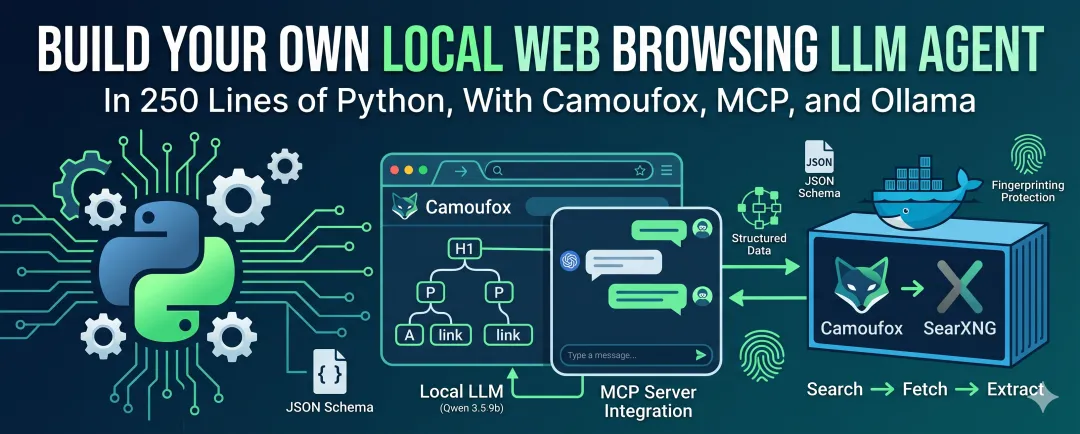
在本文中,我会向你展示如何为本地 LLM Agent 配备一个真正的 Web 浏览器。到最后,这个 Agent 将能够接收一个问题,在 Web 上搜索相关页面,用 stealth browser 打开该页面,读取其内容,并基于它实际找到的信息作答。
本文全程使用 qwen3.5:9b 模型。因此,请确保你已经安装 Ollama 并拉取该模型,或者修改配置指向另一个支持 tool calling 的模型。你还需要 Docker,因为 camofox-browser 和 SearXNG 都运行在容器中。
我们将经历以下五个阶段:
- Stage 1:在 Docker 中运行 camofox-browser 和 SearXNG。
- Stage 2:用一个带有
fetch tool 的 MCP server 封装 browser。 - Stage 3:将 browser server 连接到 Agent。
- Stage 4:将 search 和 browse 组合成一个 pipeline。
- Stage 5:添加结构化
extract tool。
那么,我们开始吧。
Installation
完整代码在 GitHub:https://github.com/jfjensen/local-LLM-agent-mcp-search-n-browse 。每个 stage 都位于自己的子目录中,并通过 pyproject.toml 暴露为 console script,因此你可以安装一次,然后按名称运行任意 stage。
首先,clone repo 并以 editable mode 安装:
git clone https://github.com/jfjensen/local-LLM-agent-mcp-search-n-browse.git
cd local-LLM-agent-mcp-search-n-browse
python -m venv .venv
# Linux / macOS:
source .venv/bin/activate
# Windows PowerShell:
.\.venv\Scripts\Activate.ps1
pip install -e .
这会安装 mcp、ollama 和 httpx,并注册若干 console script:mcp-browser-stage2 到 mcp-browser-stage5,Agent mcp-agent-stage3 到 mcp-agent-stage5,search server mcp-search-part3,以及一个小工具 mcp-config-show。每个脚本都会从当前工作目录启动对应 stage。
关于 Windows 的一个说明:如果你在 Windows 上看到 FileNotFoundError: [WinError 2],并且它发生在 Agent 尝试启动 MCP server 时,那通常说明你的 virtual environment 没有激活。Agent 会通过 console-script 名称将 MCP server 作为 subprocess 启动,而这些名称只有在 venv 激活后才会出现在 PATH 中。因此,请先激活 venv。
Configuration
所有可调设置都集中在 repo 根目录的 config.toml 中。因此,当你想替换模型、指向不同端口上的服务,或修改 snapshot 大小时,只需要编辑这个文件。查看当前生效配置:
mcp-config-show
Config source: /path/to/local-LLM-agent-mcp-search-n-browse/config.toml
  model:                   qwen3.5:9b
  model.temperature:       0.1
  model.thinking:          False
  searxng.url:             http://localhost:8090
  camofox.url:             http://localhost:9500
  browser.max_snapshot:    30000
  browser.settle_seconds:  1.5
  agent.history_dir:       history
  agent.max_tool_result:   30000
  logging.level:           DEBUG
一个小型 loader,即 mcp_browser_config package,会在 import 时读取该文件一次,并以普通常量的形式暴露配置值。每个 stage 都从它导入配置,而不是硬编码自己的模型名称或 URL。loader 会首先在当前工作目录查找 config.toml,如果找不到,则回退到 repo 自带的配置文件。因此,如果你想在一个新文件夹里用自己的设置运行某个 stage,只需把 config.toml 放在旁边即可。
导入配置也会设置 logging。这里值得说一句,因为你会通过它观察 Agent 的“思考”过程。repo 默认日志级别为 DEBUG,它会在每一轮打印模型调用了哪个 tool、传入了什么参数,以及返回内容的预览。该设置只应用到我们自己的 package。像 httpcore 和 httpx 这样的第三方库会保持在 WARNING,否则一打开 DEBUG,终端就会被 HTTP transport 日志刷屏,而这些信息通常没有什么用。这样,你能看到 Agent 的决策过程,同时避免噪音。
安装完成后,我们逐个 stage 看一下。
Stage 1:在 Docker 中运行 camofox-browser 和 SearXNG
这个 stage 不需要写 Python。我们只需要启动 Agent 要通信的两个服务:用于抓取页面的 camofox-browser,以及用于搜索的 SearXNG。二者都运行在 Docker 中,一个 docker compose 就可以全部启动。
camofox-browser image 是稍微麻烦的部分。该项目没有把 image 发布到 Docker Hub,而默认 Dockerfile 期望 Camoufox binary 已经预先下载到 dist/ 文件夹中,但 repo 中并没有这个文件夹。幸运的是,项目提供了一个 Dockerfile.ci,它会在 build 时下载所有内容。因此我们使用这个:
git clone https://github.com/jo-inc/camofox-browser
cd camofox-browser
docker build -f Dockerfile.ci -t camofox-browser:latest .
cd ..
第一次 build 会花一些时间,大约五到十分钟,因为 Camoufox binary 约 300 MB,并且会被打包进 image。之后就会走缓存。
stage1/ 中的 docker-compose.yml 会启动两个服务:
services:
camofox:
image:camofox-browser:latest
container_name:camofox
ports:
-"9500:9500"
environment:
-NODE_ENV=production
-CAMOFOX_PORT=9500
restart:unless-stopped
healthcheck:
test: ["CMD-SHELL", "curl -f http://localhost:9500/health || exit 1"]
interval:30s
timeout:10s
start_period:15s
retries:3

searxng:
image:searxng/searxng:latest
container_name:searxng-mcp
ports:
-"8090:8080"
volumes:
-./searxng/settings.yml:/etc/searxng/settings.yml:ro
environment:
-SEARXNG_BASE_URL=http://localhost:8090/
restart:unless-stopped
这里有几点需要注意:
camofox service 映射端口 9500,这是 REST API 端口。healthcheck 会访问 /health,因此 Docker 可以判断 browser 是否真正启动,而不仅仅是 container 是否在运行。
searxng service 将宿主机端口 8090 映射到容器的 8080。我本地使用 8090 运行 SearXNG,配置也指向这里。如果你想使用其他端口,需要同时修改这个映射和 config.toml 中的 searxng.url。
bind-mount 会把我们自己的 settings.yml 放入 SearXNG 容器。这使 JSON API 在第一次运行时就可用。默认情况下,SearXNG 只返回 HTML,这意味着像我们的 MCP server 这样请求 JSON 的 client 会得到 403。我们的 settings 文件启用了 JSON,并关闭 request limiter,这样就不需要先启动容器、编辑生成的配置再重启。
searxng/settings.yml 很短,因为我们继承 SearXNG 默认设置,只覆盖必要项:
use_default_settings:true

general:
instance_name:"SearXNG (Part 4 local)"

search:
formats:
-html
-json
safe_search:0
autocomplete:""

server:
limiter:false
secret_key:"change-me-for-anything-public-facing-this-is-only-local"
两个关键行是:formats,它添加了 json,使 API 能响应我们的 client;以及 limiter: false,它关闭了 per-client rate limiter。limiter 的作用是阻止频繁轰炸 API 的 client,而这恰好正是 LLM 会做的事情。因此,对于我们的用例,它必须关闭。
从 stage1/ 目录启动两个服务:
cd stage1
docker compose up -d
docker compose logs -f
等待 camofox 打印 server started 和 browser pre-warmed 的日志,以及 SearXNG 启动日志。然后你可以退出日志视图。
我们可以在 Docker Desktop 中确认 SearXNG 和 Camofox 正在运行:
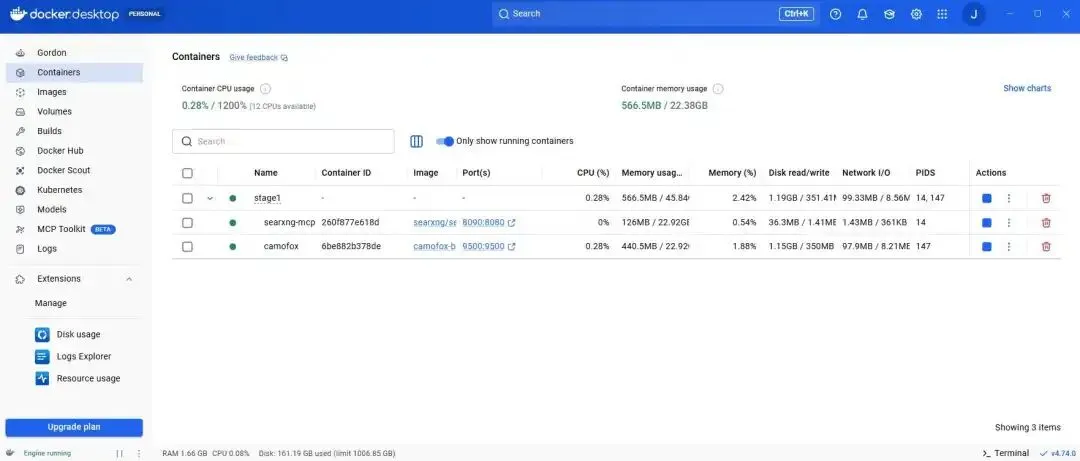 Screenshot of Docker Desktop on Windows, showing that SearXNG and Camofox are running
确认两个服务都在响应:
curl "http://localhost:9500/health"
curl "http://localhost:8090/search?q=ollama&format=json"
第一个命令会返回一个小的 JSON health object。
 Screenshot of the JSON health object in the Windows command prompt
第二个命令会返回 JSON search result。
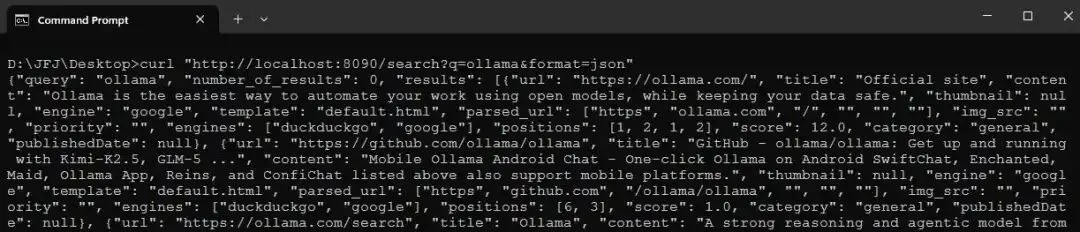 Screenshot of the first 10 lines of the JSON SearXNG response in the Windows command prompt
如果 SearXNG 返回的是 HTML 而不是 JSON,说明 settings bind-mount 没有生效,请检查 ./searxng/settings.yml 是否存在。
为了感受 camofox 返回的内容,stage 中包含一个小型 probe script:test_camofox.py。它会打开 example.com 的一个 tab,获取 accessibility snapshot,并打印出来。example.com 的 snapshot 如下:
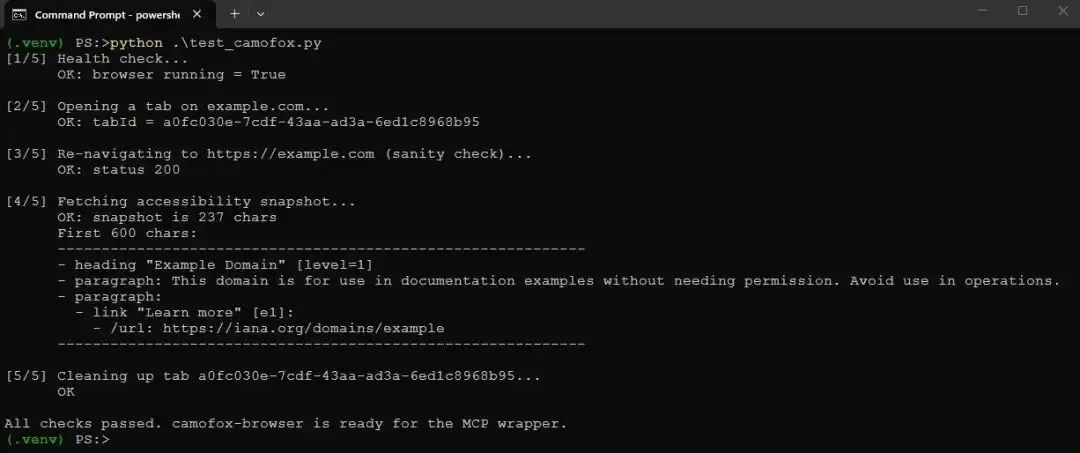 Screenshot of running test_camofox.py in the Windows command prompt
这是整篇文章依赖的格式,因此值得理解。它是一个类似 YAML 的 accessibility tree。Heading 会带有 level,paragraph 会包含文本,link 会同时带有 label 和 target URL。[e1] 是 element reference,是 camofox 分配给每个可交互元素的稳定 handle。本文不会使用这些 refs,但如果你以后扩展 browser server,用于 click 或 type 的就是它们。对我们来说,关键属性是这种表示非常紧凑。这里 example.com 整页只有 237 个字符,而原始 HTML 大约有 1300 个字符。
还有一个 test_camofox_multi.py,它会对多个真实站点运行同样的 probe。我运行时,它成功 snapshot 了八个站点,包括一个受 Cloudflare 保护的网站,这类页面通常会拦截普通 HTTP client。因此,camofox 的 stealth 能力确实发挥了作用。
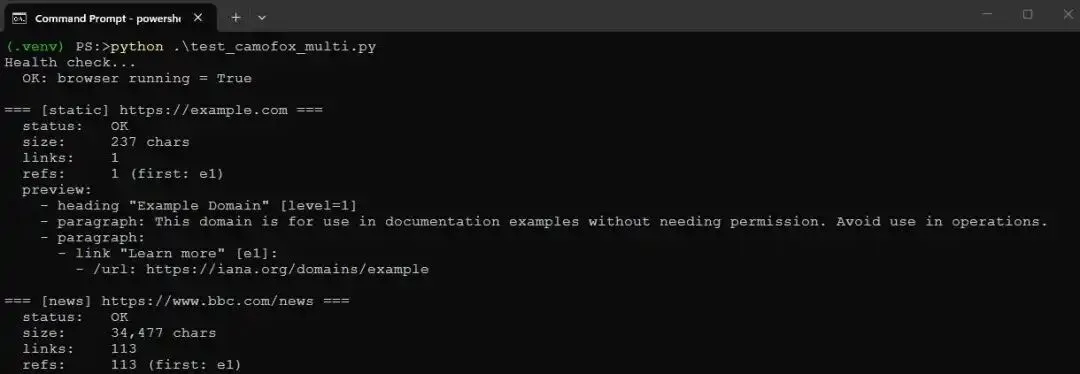 Screenshot of the first 20 lines when running test_camofox_multi.py in the Windows command prompt
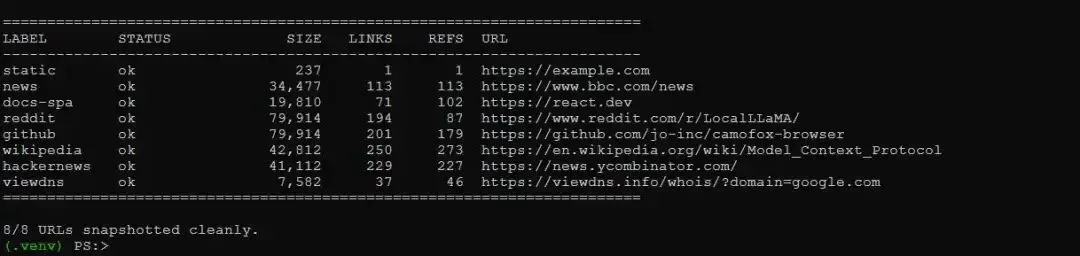 Screenshot of the final lines when running test_camofox_multi.py in the Windows command prompt
现在两个服务都在运行,我们已经有了可以封装的对象。接下来写 MCP server。
Stage 2:用带有 fetch tool 的 MCP server 封装 browser
Agent 不会直接和 camofox 通信。它会和 MCP server 通信,而 MCP server 通过 REST 与 camofox 通信。这和第 3 部分中的 SearXNG server 结构相同,因此 FastMCP 的 plumbing 应该很熟悉。新的内容都在 tool body 中,而不是 protocol 本身。
server 暴露一个 tool:fetch。它接收一个 URL,在 camofox 中打开一个 tab,对页面做 snapshot,关闭 tab,并返回 snapshot。下面是与 camofox 通信的 helper:
import uuid
import time
import logging
import httpx
from mcp.server.fastmcp import FastMCP

from mcp_browser_config import CAMOFOX_URL, MAX_SNAPSHOT_CHARS, SETTLE_SECONDS

log = logging.getLogger(__name__)

mcp = FastMCP("browser-server")


def_open_tab(client: httpx.Client, user_id: str, url: str) -> str:
"""Open a new tab on the camofox server. Returns the tabId."""
    r = client.post(
f"{CAMOFOX_URL}/tabs/open",
        json={"userId": user_id, "url": url},
        timeout=60.0,
    )
    r.raise_for_status()
    body = r.json()
    tab_id = body.get("tabId") or body.get("id")
ifnot tab_id:
raise RuntimeError(f"camofox returned no tabId: {body}")
return tab_id
以上代码要点如下:
_open_tab helper 会向 camofox 的 /tabs/open endpoint 发送 POST,请求体包含 user ID 和要打开的 URL。它返回 tab ID,后续 snapshot 和 cleanup 都需要这个 ID。60 秒 timeout 是故意设置得比较宽松,因为第一次打开 tab 会启动 browser,比较慢。
_get_snapshot helper 会获取某个 tab 的 accessibility snapshot。根据 camofox 版本不同,snapshot 可能以纯文本返回,也可能包在 JSON object 中,因此代码会同时处理两种情况。
_close_tab helper 会删除 tab。它是 best-effort 的,不会抛异常,因为 cleanup 失败不应该破坏一次本来成功的 fetch。camofox 也会在几分钟后自动关闭空闲 browser,因此漏掉一次 cleanup 并不致命。
长页面需要在交给模型之前截断,因此有一个 truncation helper:
def_truncate(snapshot: str) -> str:
"""If the snapshot is too long, keep the first and last halves of the
    budget and drop the middle ..."""
iflen(snapshot) <= MAX_SNAPSHOT_CHARS:
return snapshot
    half = MAX_SNAPSHOT_CHARS // 2 - 100
    head = snapshot[:half]
    tail = snapshot[-half:]
    marker = f"\n\n...[TRUNCATED {len(snapshot) - len(head) - len(tail)} chars]...\n\n"
return head + marker + tail
预算由 MAX_SNAPSHOT_CHARS 控制,默认是 30000。当 snapshot 超出预算时,我们保留预算的前半和后半,丢弃中间部分,并留下 marker,让模型知道有内容被截断。这样做的理由是:页面开头和结尾通常包含标题、导航和页脚,有助于模型理解页面类型。不过这只是一个粗略 heuristic,足够满足当前目的,我会在 Stage 5 回到它的局限性。
tool 本身如下:
@mcp.tool()
deffetch(url: str, user_id: str = "") -> str:
"""
    Fetch a webpage and return its accessibility-tree snapshot.
    """
ifnot url.startswith(("http://", "https://")):
returnf"Error: URL must start with http:// or https://; got {url!r}"

    log.info("fetch %s", url)

    one_shot = not user_id
if one_shot:
        user_id = f"oneshot-{uuid.uuid4().hex[:8]}"

with httpx.Client() as client:
try:
            tab_id = _open_tab(client, user_id, url)
except httpx.HTTPError as e:
            log.warning("opening tab failed: %s", e)
returnf"Error opening tab on camofox: {e}"
except Exception as e:
            log.warning("opening tab failed: %s", e)
returnf"Error opening tab: {e}"

        time.sleep(SETTLE_SECONDS)

try:
            snapshot = _get_snapshot(client, user_id, tab_id)
except httpx.HTTPError as e:
            _close_tab(client, user_id, tab_id)
            log.warning("snapshot fetch failed: %s", e)
returnf"Error fetching snapshot from camofox: {e}"

if one_shot:
            _close_tab(client, user_id, tab_id)

    log.debug("snapshot is %d chars (before truncation)", len(snapshot))
return _truncate(snapshot)


defchat():
"""Entry-point for the console script."""
    mcp.run(transport="stdio")
几点说明:
tool 的 docstring 就是它面向模型的接口。 MCP server 会把 docstring 作为 tool description 交给 Agent,Agent 会根据它决定何时调用 fetch。因此 docstring 明确说明了何时使用该 tool:搜索返回链接后,或用户指定某个页面时。
存在两种 lifecycle mode。 默认没有 user_id 时,每次 fetch 会创建一个带随机 ID 的 one-shot tab,并在 snapshot 完成后立即关闭。这很简单,也不会泄漏状态。如果 caller 传入稳定的 user_id,camofox 会在多次调用之间复用 browser context,对连续抓取相关页面更快,但 cleanup 就由 caller 负责。对 LLM Agent 来说,one-shot mode 是合理默认值。
打开 tab 和 snapshot 之间有 settle delay,由 SETTLE_SECONDS 控制,默认 1.5 秒。JavaScript-heavy 页面需要一点时间渲染,snapshot 才有意义。静态页面不需要,但代价很小,安全性值得。
错误以字符串返回,而不是抛出。 tool 失败时,Agent 应该看到可读信息并据此推理,而不是收到导致本轮崩溃的 stack trace。因此所有失败路径都会返回简短描述。
你可以使用 repo 自带的 inspect_any.py 直接 probe server,而不经过 Agent。它是一个小型 MCP Inspector 替代品,因为我发现基于 npx 的 MCP Inspector 在 Windows 上不太可靠。列出 server 的 tools:
python inspect_any.py mcp_browser_02.main
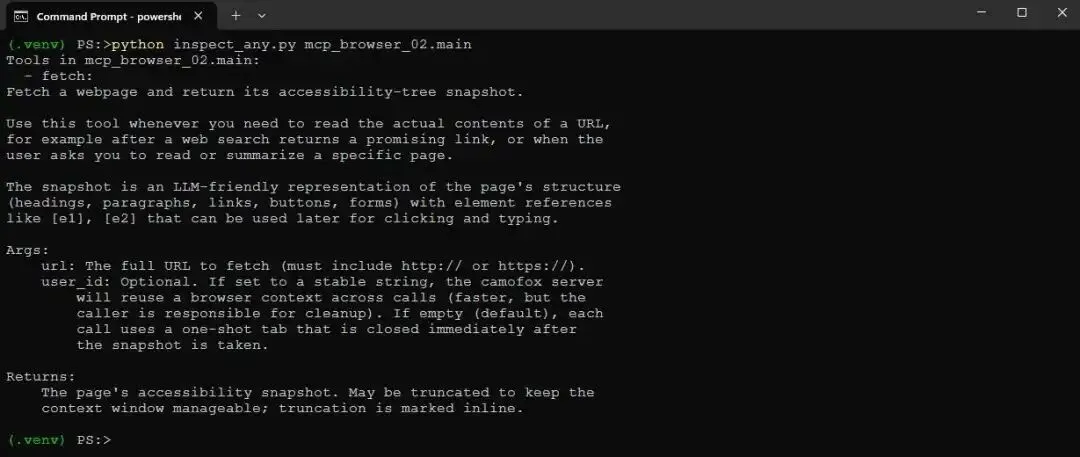 Screenshot of running inspect_any.py with the Camofox browser MCP in the Windows command prompt
调用 fetch:
python inspect_any.py mcp_browser_02.main fetch --kv url=https://example.com
它应该会打印 Stage 1 中看到的同一个 example.com snapshot,只不过这次是通过 MCP layer 返回的。因此 server 已经工作了。接下来把它连接到 Agent。
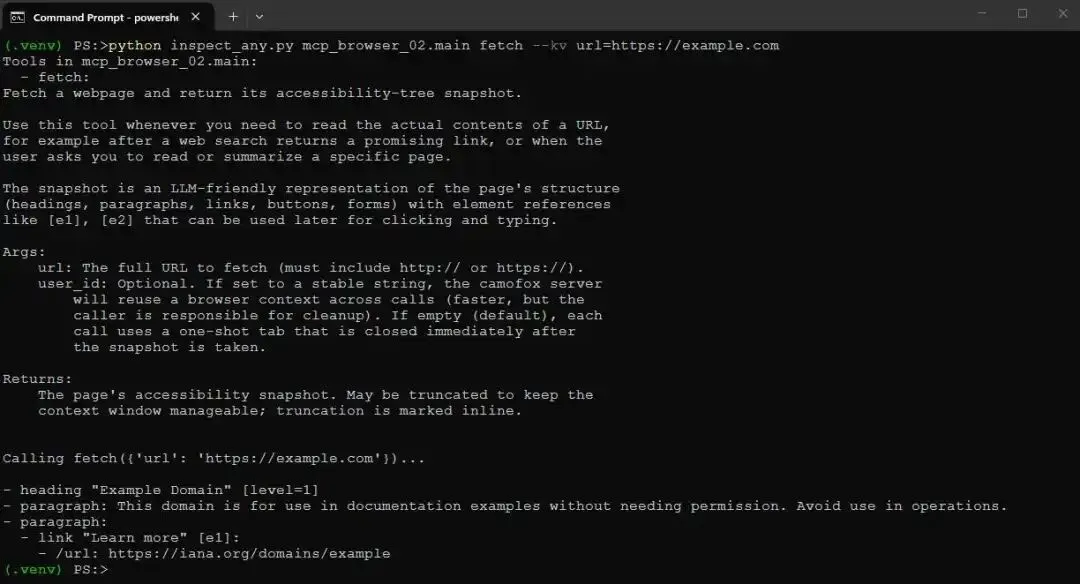 Screenshot of running inspect_any.py with the Camofox browser MCP and a URL in the Windows command prompt
Stage 3:将 browser server 连接到 Agent
这是第一个 end-to-end stage。我们拿第 3 部分中的 multi-server agent,以及其中的可靠性改进,把它指向 browser server。Agent 得到一个 tool:fetch。你可以粘贴一个 URL,让它读取页面。
Agent class 沿用第 3 部分,因此这里不会完整重复。值得看的部分是 system prompt,它告诉模型什么时候使用 tool;以及 handle_tools 方法,即 tool-calling loop 所在位置。
system prompt 很短且直接:
SYSTEM_PROMPT = """You are an assistant with access to a web browser via an MCP server.

You have one tool available:
- `browser-server_fetch`: given a URL, returns the accessibility-tree
  snapshot of the page. Use this to read or summarize specific URLs.

You MUST use `fetch` whenever the user gives you a URL to read, asks you
to look at a specific page, or asks about the contents of a website you
have not yet fetched in this conversation. Do not answer from memory
when the user has pointed you at a URL.

For purely timeless questions (math, definitions, syntax, well-established
historical facts), answer directly without using a tool.
"""
注意 prompt 中的 tool name 是 browser-server_fetch,而不只是 fetch。Agent 会以某个名称连接 MCP server,这里是 browser-server,并给每个 tool 加上该前缀,避免不同 server 的 tool 名称冲突。这在 Stage 4 中有两个 server 时更重要,但从一开始保持一致是好习惯。
Agent 的核心是 handle_tools。它运行模型请求的 tool call,把结果传回模型,然后询问模型下一步做什么:
asyncdefhandle_tools(self, tool_calls) -> dict:
for tool in tool_calls:
        prefixed_name = tool.function.name
        args = tool.function.arguments or {}

        server_name = self._tool_to_server.get(prefixed_name)
ifnot server_name:
            text = f"Unknown tool: {prefixed_name}"
else:
            real_name = prefixed_name[len(server_name) + 1:]
            session = self.mcp_sessions[server_name]
try:
                result = await session.call_tool(real_name, args)
                text = ""
for block in result.content:
ifhasattr(block, "text"):
                        text += block.text
except Exception as e:
                text = f"Tool error on {server_name}: {e}"

iflen(text) > MAX_TOOL_RESULT_CHARS:
            head = MAX_TOOL_RESULT_CHARS // 2 - 100
            text = text[:head] + "\n...[TRUNCATED]...\n" + text[-head:]
self.messages.append({"role": "tool", "content": text})

    resp = ollama.chat(
        model=MODEL_NAME,
        messages=self.build_messages_for_model(),
        tools=self.ollama_tools,
        options={"temperature": MODEL_TEMPERATURE},
        think=MODEL_THINKING,
    )
    msg = resp["message"]

ifhasattr(msg, "tool_calls") and msg.tool_calls:
self.messages.append({"role": "assistant", "tool_calls": msg.tool_calls})
returnawaitself.handle_tools(msg.tool_calls)

    content = msg.get("content", "") ifisinstance(msg, dict) elsegetattr(msg, "content", "")

ifnot content.strip():
self.messages.append({
"role": "user",
"content": "Based on the tool result above, either call another tool to continue, or give the user a final answer. Do not respond with empty text.",
        })
        resp = ollama.chat(
            model=MODEL_NAME,
            messages=self.build_messages_for_model(),
            tools=self.ollama_tools,
            options={"temperature": MODEL_TEMPERATURE},
            think=MODEL_THINKING,
        )
        msg = resp["message"]
ifhasattr(msg, "tool_calls") and msg.tool_calls:
self.messages.append({"role": "assistant", "tool_calls": msg.tool_calls})
returnawaitself.handle_tools(msg.tool_calls)
        content = msg.get("content", "") ifisinstance(msg, dict) elsegetattr(msg, "content", "")

return {"role": "assistant", "content": content}
代码逻辑如下:
顶部的 tool-running loop 会把带前缀的 tool name 映射回其所属 server,去掉前缀得到真实 tool name,通过 MCP 调用它,并收集返回文本。任何异常都会转为可读字符串,而不是让本轮崩溃。
结果会被截断 到 MAX_TOOL_RESULT_CHARS 并记录日志。这里的 DEBUG log line 能让你看到每个 tool 返回了什么,预览长度为 300 字符。
递归是关键。 tool 执行后,我们询问模型下一步怎么做。如果模型返回更多 tool call,就再次递归进入 handle_tools。这使 Agent 能够 chain tools:search,然后 fetch,也许再 fetch 一次。没有递归,Agent 每个用户问题最多只能调用一次 tool,而下一 stage 的 search-then-fetch pipeline 就不可能实现。
nudge 用来处理小模型的一个 quirks。 有时模型在 tool result 后会返回完全空的一轮,没有 content,也没有后续 tool call。此时我们添加一条简短 user message,提示它要么继续,要么给出最终回答,然后再问一次。这不优雅,但能可靠地让 9B model 从卡住状态恢复。
Agent 在 setup 中连接单个 browser server:
await agent.connect("browser-server", "mcp-browser-stage3", [])
agent.rebuild_ollama_tools()
运行该 stage:
mcp-agent-stage3
然后让它读取页面:
Read https://example.com and tell me what it says.
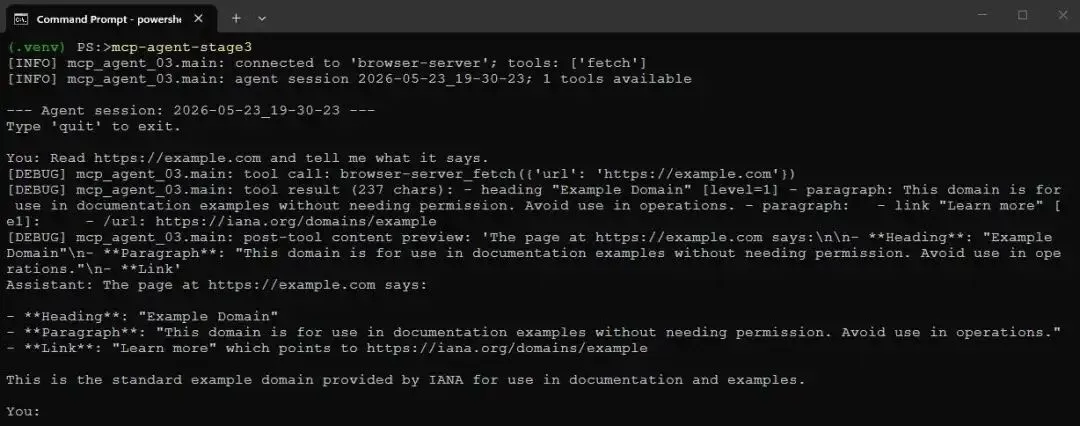 Screenshot of mcp-agent-stage3 running with DEBUG log statements turned on
模型调用了 fetch,获得 snapshot,并进行了总结。它工作了,而且这是一个很令人满意的小瞬间:Agent 现在是在阅读实时 Web,而不是复述训练数据。不过它还不能自己找到页面。你必须把 URL 交给它。接下来解决这个问题。
Stage 4:将 search 和 browse 组合成一个 pipeline
现在我们同时把 Agent 连接到两个 MCP server:第 3 部分的 SearXNG search server,以及 Stage 2 的 camofox browser server。这样 Agent 同时拥有 search 和 fetch。有趣之处在于,它会自行组合它们。你提出一个问题,模型搜索、从结果中选择 URL、fetch 页面,并基于页面作答。
search server 就是第 3 部分中的那个,这里复制到 repo 中以保持自包含。它字节级相同:一个 SearXNG wrapper,暴露单个 search tool,用于查询本地 SearXNG 实例,并以标题、URL、snippet 的形式返回 top results。第 3 部分已经详细介绍过,这里不再重复。
这个 stage 变化的是 Agent 的 system prompt。有两个需要协作的 tool 时,prompt 必须明确教模型 pipeline,因为 9B model 如果完全靠自己,有时会在 search 后就停止,并试图直接基于 snippet 作答:
SYSTEM_PROMPT = """You are an assistant with access to two MCP servers:

  - search-server provides `search-server_search(query, max_results)`: a
    web search via a local SearXNG instance. Returns a list of URLs with
    titles and snippets, but NOT the actual page contents.
  - browser-server provides `browser-server_fetch(url)`: opens a URL in
    a real browser and returns the page's accessibility-tree snapshot,
    which IS the actual page contents.

CRITICAL RULES:

  1. NEVER describe a tool call in words. If you decide to use a tool,
     emit the tool_call. Saying "let me use the tool" without actually
     calling it is wrong and you must not do it.

  2. When you receive search results, your next action MUST be a
     `browser-server_fetch` call on the most promising URL. Do not stop
     after a search. Do not summarize the snippets and call it done.
     The snippets are short and often misleading; you must fetch the
     page to get the truth.

  3. When the user gives you a fresh question that requires looking
     something up, the very first action is `search-server_search`. Not
     prose. Not a plan. The tool call.

  4. After the fetch returns, THEN answer the user's question from the
     fetched content. Cite the URL you fetched in your answer.

The two tools compose into this pipeline:
  user question -> search -> pick best URL -> fetch -> answer.

For purely timeless questions (math, definitions, syntax, well-established
historical facts), answer directly without using any tool.
"""
关于这个 system prompt,有几点值得注意:
CRITICAL RULES 的写法是有意为之。 小模型会把“you should use the tool when appropriate”这类软性表述当作可选建议,然后忽略它。强硬的 “you MUST”,并明确列出规则,确实能改善模型行为。这花了我不少时间调好。
Rule 1 点名了一个具体失败模式。 早期模型经常会用文字写“Let me search for that...”,然后停住,却没有真正发出 tool call。因此规则明确指出这种行为并禁止它。
Rule 2 强制 fetch。 这个 stage 的重点就是 Agent 不停留在 search snippet。因此 prompt 明确要求 search 之后下一步必须 fetch。
tool name 使用完全限定名:search-server_search 和 browser-server_fetch,与 Agent 注册时加的前缀一致。如果 prompt 里只写裸的 search,就无法匹配模型看到的 tool list,这会让小模型困惑。
Agent 连接两个 server:
await agent.connect("search-server", "mcp-search-part3", [])
await agent.connect("browser-server", "mcp-browser-stage4", [])
agent.rebuild_ollama_tools()
运行:
mcp-agent-stage4
下面是一次真实运行。我询问 Ollama Python library 的最新版本,这正是模型无法从训练中知道的问题,因为它发生在 cutoff 之后。日志级别为 DEBUG 时,你能看到 pipeline 的执行过程:
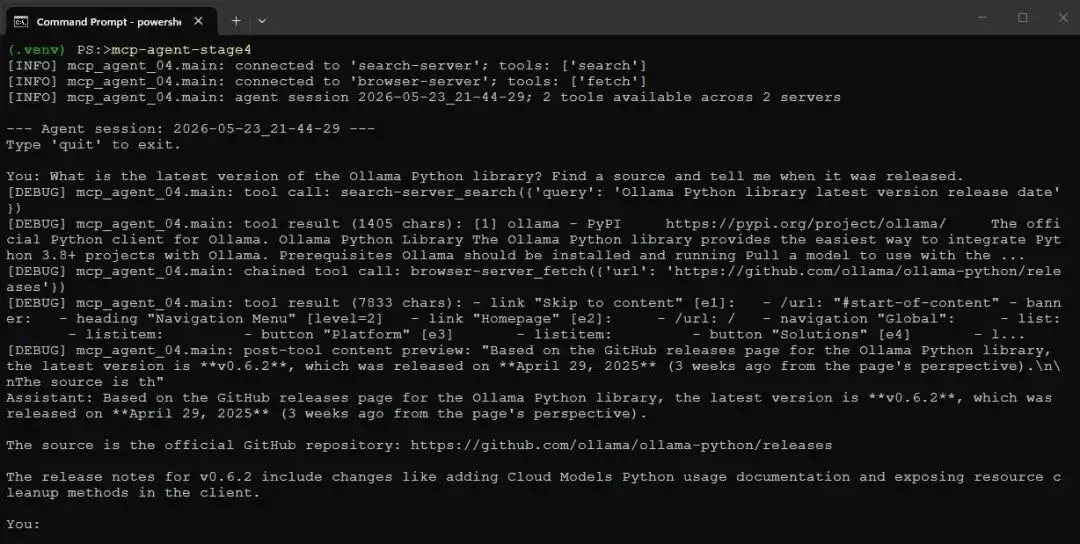 Screenshot of mcp-agent-stage4 running with DEBUG log statements turned on
模型进行了搜索,在结果中看到了 GitHub releases page,fetch 该页面,从页面读出版本号和日期,然后带 citation 作答。需要注意的是,这里给出的日期不正确,因为 Agent 并不知道当前日期。不过版本号是正确的。
因此,search 和 browse 已经组合成了一个答案,而且整个过程中我没有告诉模型应该访问哪个网站。它自己选择了。
这种组合在更难的问题上也能成立。当我问“who is the current CEO of Anthropic and when did they join?”时,模型搜索、找到相关 Wikipedia article、fetch 页面,并基于页面作答。pipeline 每次都一样:search、pick、fetch、answer。
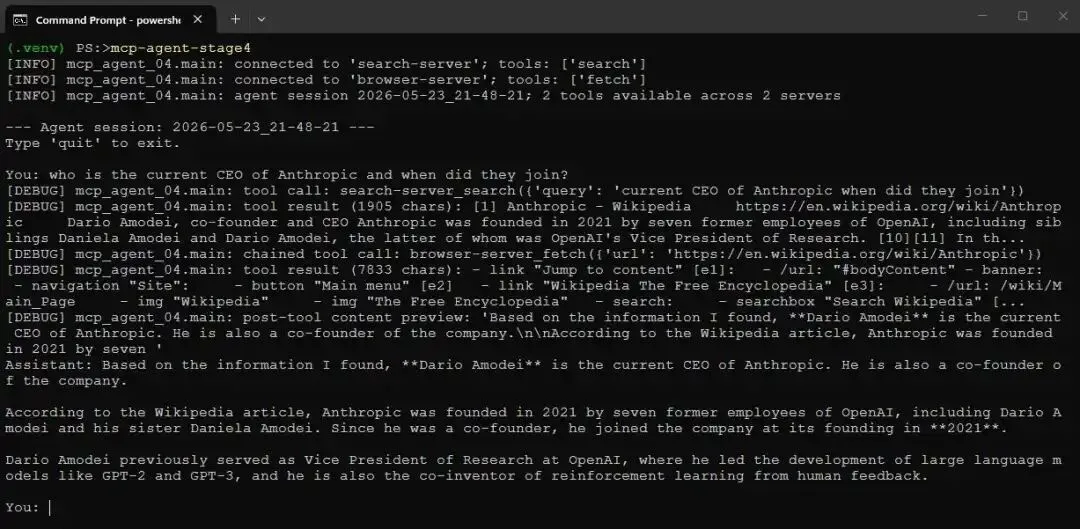 Another screenshot of mcp-agent-stage4 running with DEBUG log statements turned on
现在 Agent 已经能自己查找并阅读页面。最后一个 stage 会添加另一种从页面获取信息的方式。
Stage 5:添加结构化 extract tool
有时你不想要 prose summary,而是想要特定命名字段。比如一个 domain 的 registrar 和 expiration date,一个 package 的 version 和 license,一个 model 的 developer 和 release date。对于这些任务,fetch 可以工作,但模型必须阅读整个 snapshot,并在“脑子里”提取字段,这会消耗 token,也更容易出错。
因此,这个 stage 会给 browser server 添加第二个 tool:extract。你给它一个 URL 和一个 JSON Schema,描述想要的字段,它会返回干净的 JSON。真正有趣的是它的内部工作方式,值得稍微展开,因为这代表了 MCP server 的另一种思路。
我的第一个想法是使用 camofox 自带的 /extract endpoint。它接收 schema,并在服务端进行抽取。但事实证明,该 endpoint 不支持 array properties,只支持 scalar。因此,如果 schema 要求 nameserver 列表,就会失败并返回 400。这条路走不通。
可行的方法是让 MCP server 自己调用 LLM。extract tool 会先 fetch 页面 snapshot,然后自己发起一次 Ollama 调用,并使用严格 prompt:这是 schema,这是页面,请填充 schema,只返回 JSON。因此 MCP server 不再只是 API wrapper。它本身也是一个小型 specialized agent,使用模型完成调用方 Agent 原本需要做的工作。
tool 如下:
@mcp.tool()
defextract(url: str, schema: dict, user_id: str = "") -> str:
"""
    Fetch a webpage and extract structured data from it according to a
    JSON Schema.
    """
ifnot url.startswith(("http://", "https://")):
returnf"Error: URL must start with http:// or https://; got {url!r}"
    one_shot = not user_id
if one_shot:
        user_id = f"oneshot-{uuid.uuid4().hex[:8]}"

with httpx.Client() as client:
try:
            tab_id = _open_tab(client, user_id, url)
except Exception as e:
returnf"Error opening tab: {e}"
        time.sleep(SETTLE_SECONDS)
try:
            snapshot = _get_snapshot(client, user_id, tab_id)
except Exception as e:
            _close_tab(client, user_id, tab_id)
returnf"Error fetching snapshot: {e}"
if one_shot:
            _close_tab(client, user_id, tab_id)

    snapshot = _truncate(snapshot)

    extraction_prompt = (
"You are a precise data extraction tool. Read the page snapshot "
"below and return a JSON object that matches the schema. Use the "
"property descriptions to find the right values on the page. If a "
"field is not present, set it to null. Do not invent values. Do "
"not explain. Respond with ONLY the JSON object, no markdown, no "
"preamble.\n\n"
f"SCHEMA:\n{json.dumps(schema, indent=2)}\n\n"
f"PAGE SNAPSHOT (from {url}):\n{snapshot}"
    )

try:
        resp = ollama.chat(
            model=MODEL_NAME,
            messages=[{"role": "user", "content": extraction_prompt}],
            options={"temperature": MODEL_TEMPERATURE},
format="json",
            think=False,
        )
        raw = resp["message"]["content"]
except Exception as e:
returnf"Extraction failed: {type(e).__name__}: {e}"

try:
        parsed = json.loads(raw)
return json.dumps(parsed, indent=2)
except json.JSONDecodeError:
return raw
代码步骤如下:
Step 1 fetch 页面,路径与 fetch tool 完全相同,复用 _open_tab、_get_snapshot、_close_tab 和 _truncate helper。因此 extraction 所见的 snapshot 与 fetch 返回的是同一个表示。
Step 2 构造严格 prompt。 它包含 schema 和 snapshot,并要求模型填充 schema、缺失字段设为 null、不要编造、只返回 JSON。要求缺失字段为 null 而不是猜测,是保证 tool 诚实性的关键。
Ollama 调用使用 format="json",这会约束模型输出为有效 JSON。因此在正常路径中,响应可以直接 parse。
这里硬编码了 think=False,而不是从 config 读取。即便你为 Agent 主循环打开了 thinking,这里也应该关闭,因为 thinking pass 会干扰受约束的 JSON 输出。
结果会 parse 后重新序列化,以获得干净格式。如果模型 somehow 产生无法 parse 的内容,就返回 raw text,让 caller 至少能看到它。
这个 stage 中 Agent 的 system prompt 描述了两个 browser tools,并且重点说明什么时候使用哪一个。当用户要求可枚举的特定字段时使用 extract;对于开放式问题或自由形式总结,则使用 fetch。Agent 会根据问题形态自行决定。
Agent 连接 search server 和 Stage 5 browser server:
await agent.connect("search-server", "mcp-search-part3", [])
await agent.connect("browser-server", "mcp-browser-stage5", [])
agent.rebuild_ollama_tools()
运行:
mcp-agent-stage5
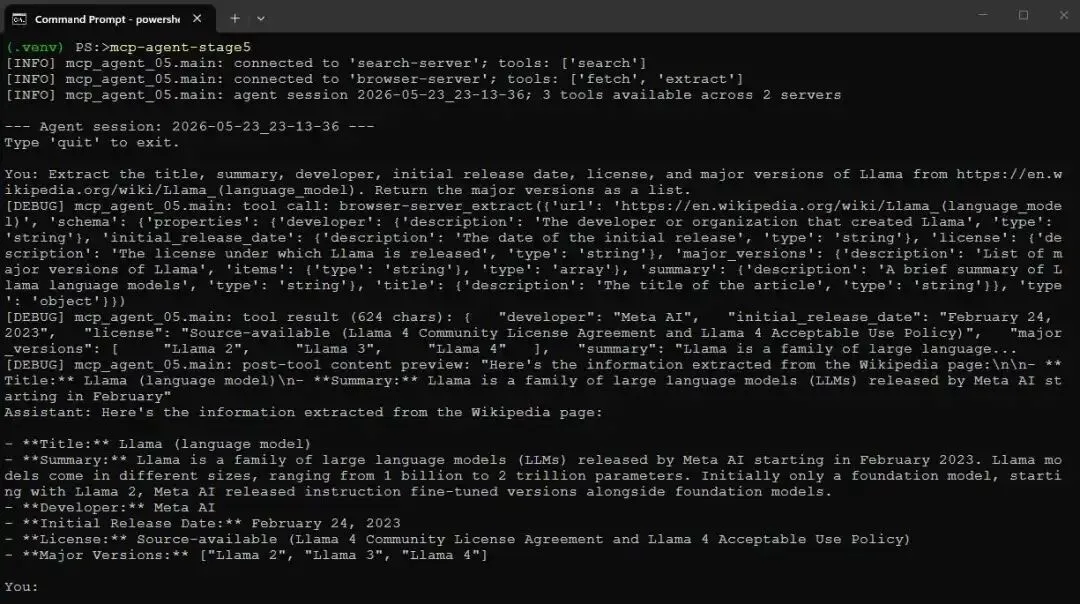
下面是 tool 在 Wikipedia article 上工作的例子。我要求它提取关于 Llama 的多个字段,包括版本列表,而这正是 camofox 自带 extractor 无法处理的 array case:
Extract the title, summary, developer, initial release date, license, and major versions of Llama from https://en.wikipedia.org/wiki/Llama_(language_model). Return the major versions as a list.
结果如下:
 Screenshot of mcp-agent-stage5 running with DEBUG log statements turned on
模型选择了 extract 而不是 fetch,根据我列出的字段构造了 JSON Schema,并返回了干净的结构化记录,其中版本也是 proper list。schema shape 没有任何问题,因为 extraction 是由模型完成的,而不是由受限的服务端 parser 完成的。
关于 major_versions list 需要一个小 caveat。哪些 release 算作“major version”是一种判断,而不是页面上明确盖章的事实;不同运行中模型可能会略有不同。因此,对于这类模糊类别的 array,应把它视为模型的合理解读,而不是精确且可重复的 scrape。对于下一例中那种无歧义的单值字段,它会稳定得多。
如何确认它是在阅读页面,而不是调用记忆?
这是任何声称“读取”Web 的 Agent 都必须面对的公平问题。Llama 是一个知名模型,所以当 Agent 返回关于它的事实时,你无法判断它到底是从页面读到的,还是从训练中回忆出来的。解决方法是问一些模型不可能记住的内容。
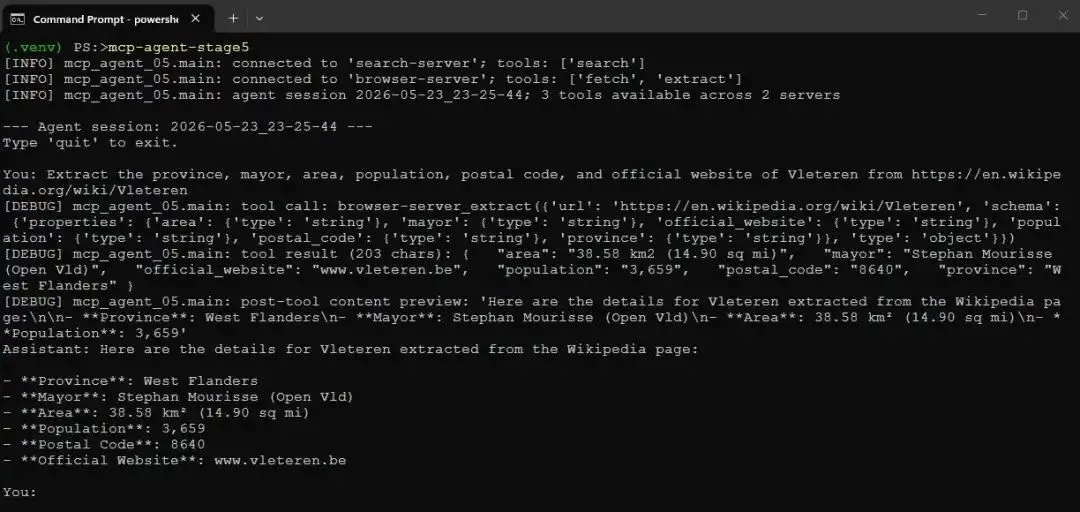
因此,这里把同一个 tool 指向 Vleteren 的 Wikipedia article。Vleteren 是西弗兰德一个约 3600 人的市镇:
 Another screenshot of mcp-agent-stage5 running with DEBUG log statements turned on
没有任何 9B model 会把一个 3600 人小镇的市长姓名存在 weights 里。因此,当 “Stephan Mourisse” 和准确 postal code、area 一起正确返回时,只有一个解释:模型是从 extract fetch 的页面中读到的。你可以自己打开 Wikipedia article 验证每个值。这是我能给出的最干净证明:Agent 基于实时页面,而不是从记忆中即兴编造。
不过它并不是第一次就成功了,原因正是 Stage 2 中提到的 truncation edge。Vleteren 的 snapshot 大约 22000 字符,而包含 mayor 和 postal code 的 infobox 位于中间,大约在字符 12000 附近。
旧默认预算为 8000 时,truncation 会保留前后几千字符,丢弃中间部分,因此所有 infobox 字段都返回 null,只有开头句子中的 province 被保留下来。把 config.toml 中的 max_snapshot_chars 提高到 30000,让完整 snapshot 进入 extraction model,才使上面的运行成功。
这正是 Stage 2 中 trade-off 的现实体现:我想要的数据是正文中的结构化内容,而“丢弃中间”的截断策略恰好最不适合它。因此,如果 extract 在你确认页面包含数据的情况下返回 null,首先应检查 snapshot budget 是否太小。
还有一个实践注意点:snapshot budget 和 Agent 侧 tool-result budget 是两个独立 knob:browser.max_snapshot_chars 和 agent.max_tool_result_chars。通过 fetch 返回的 snapshot 会经过两者,因此请确保 tool-result budget 至少和 snapshot budget 一样大,否则第二次截断会抵消第一次设置。repo 自带配置中二者都是 30000,因此不会互相干扰。
你也可以用 inspect_any.py 和 JSON 文件中的 schema 直接调用 tool。这对于在把 schema 接入自然语言问题之前测试它很方便。repo 中提供了 extract_args.json 和 wikipedia_extract_args.json 作为起点。
Failure Modes
需要诚实地谈谈 failure modes。刚才讲过的 truncation 就是其中之一,现在你已经知道它的形态:当 snapshot 大于预算时,中间部分会被丢弃,位于中间的结构化内容也会随之消失。
解决方法是提高 max_snapshot_chars,代价是每次 fetch 消耗更多 token。但还有其他问题,它们来自同一个根源:Agent 每一轮都在做真实决策,包括调用哪个 tool、fetch 哪个 URL、构造什么 schema,而 9B model 会把其中一些做错。有时它会猜一个 URL pattern,但该 pattern 与网站实际不符,于是 fetch 一个不存在的页面。
有时 search 会因为上游引擎 rate-limiting 而没有结果,这时 Agent 必须决定面对空结果该做什么。因此 system prompt 会进行 nudging,递归式 handle_tools 允许 retry,tool message 也尽量可读。但这些并不会把 Agent 变成 deterministic pipeline。如果你需要确定性,那就写 script。Agent 的价值在于它能适应,代价是它有时会适应得很糟。这大致就是当前本地 Agent 的状态,值得清楚看见,而不是粉饰过去。
Putting it all together
把这些组合起来,我们得到一个包含五个 stage 的小项目:一个用于 Docker setup,一个用于 browser MCP server,另外三个用于 Agent 与它的集成。最终 Agent 大约 250 行 Python,browser MCP server 另外约 250 行,此外复用了第 3 部分的 search server。
我们已经拥有:
两个 Docker 服务:camofox-browser 和 SearXNG,通过单个 compose file 启动,并预配置为首次运行即可使用 JSON API。
一个 browser MCP server,包含 fetch tool,返回紧凑的 accessibility-tree snapshot,并具备合理的 truncation 和 tab lifecycle handling。
一个 MCP-aware Agent,可以连接 browser server,并按需读取页面。
同一个 Agent 同时连接 search server 和 browser server,将它们组合成 search-then-fetch pipeline,并由它自己驱动。
一个结构化 extract tool:通过让 MCP server 内部调用 LLM,把页面和 JSON Schema 转换成干净 JSON。
一个集中式 config.toml,用于配置模型、服务 URL、snapshot budget 和 log level;同时还有 scoped logging,让你无需 HTTP 噪音即可观察 Agent 的 tool call。
还有很多扩展空间。camofox 在每个 snapshot 中都暴露 element reference,因此自然的下一个 tool 是 click,这样 Agent 就可以与页面交互,而不仅仅是读取页面。camofox 还提供 YouTube transcript endpoint,可以做成一个很好的 transcript tool。browser server 也可以接入第 2 部分中的 Web UI,让整个系统运行在 browser tab 中,而不是 terminal 中。这些都只是基于现有内容的小扩展。
和前几部分一样,从头构建这个系统的目的,并不是说你应该永远避免使用框架。而是当你亲手连接过 MCP server、tool-calling loop,以及两个 server 的组合之后,更重的 Agent framework 就不再神秘了。你知道它们在做什么,因为你已经用几百行代码自己实现过。
References
本文代码:
- https://github.com/jfjensen/local-LLM-agent-mcp-search-n-browse
camofox-browser
- https://github.com/jo-inc/camofox-browser
Camoufox,其底层基于的 Firefox fork
- https://github.com/daijro/camoufox
SearXNG 及其 settings documentation
- https://github.com/searxng/searxng
- https://docs.searxng.org/admin/settings/index.html
Model Context Protocol 和 Python SDK
- https://modelcontextprotocol.io/
- https://github.com/modelcontextprotocol/python-sdk
Ollama 和 Ollama Python library
- https://ollama.com/
- https://github.com/ollama/ollama-python
 10个月宝宝每天需要喝多少奶粉?