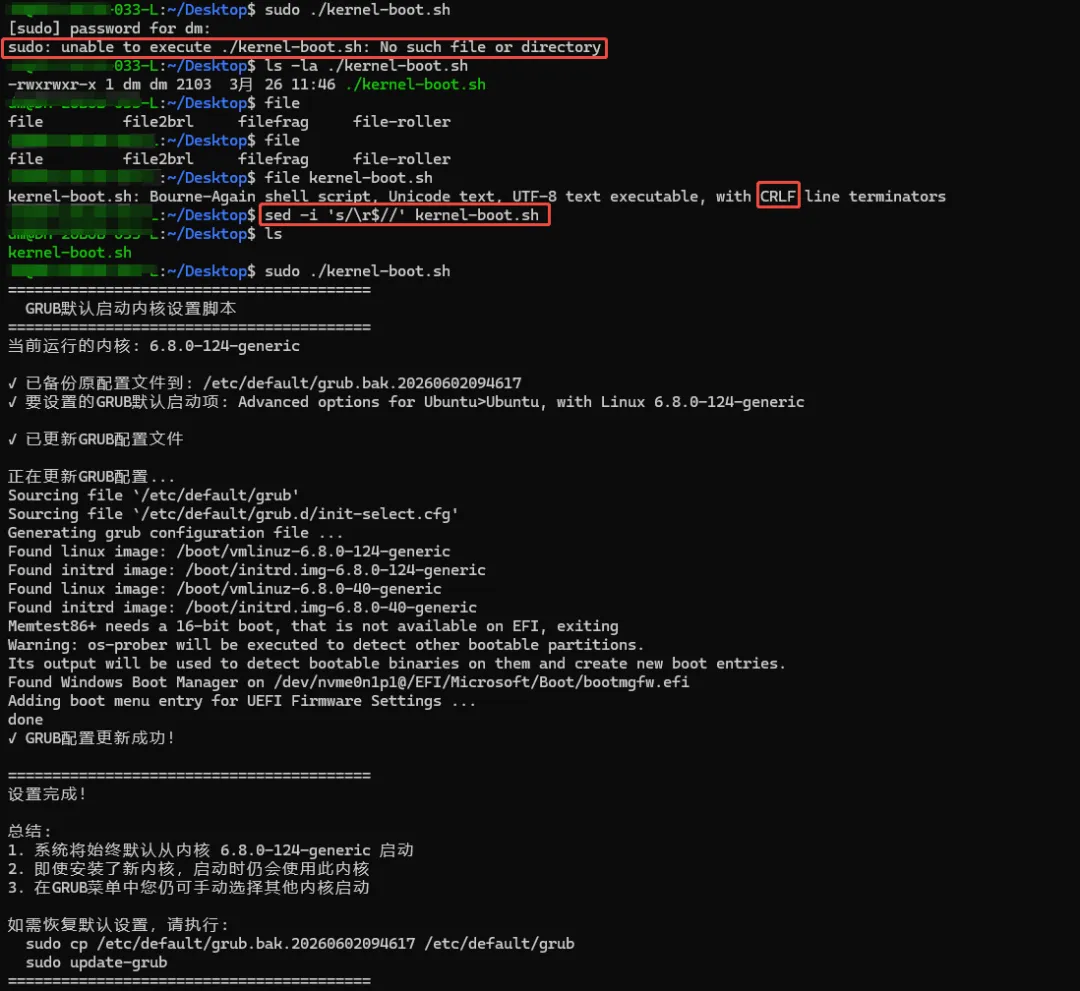
Windows下编辑的bash脚本在Linux运行报错解决方案
Windows下编辑的bash脚本在Linux运行报错sudo: unable to execute ./xxx.sh: No such file or directory解决方案:
立即修复命令
# 方法1:使用sed(最简单)sed -i 's/\r$//' kernel-boot.sh# 方法2:使用trtr -d '\r' < kernel-boot.sh > kernel-boot-unix.sh && mv kernel-boot-unix.sh kernel-boot.sh# 然后添加执行权限chmod +x kernel-boot.sh# 再次尝试执行sudo ./kernel-boot.sh
一步到位的完整修复
# 这条命令可以一次性解决所有问题sed -i 's/\r$//' kernel-boot.sh && chmod +x kernel-boot.sh && sudo ./kernel-boot.sh
为什么会出现这个问题?
根本原因: Windows和Linux使用不同的换行符:
- • Windows:
CR+LF (回车+换行) → \r\n - • Linux/Unix:
LF (换行) → \n
当你从Windows拷贝到Linux时,Bash解释器看到\r字符,导致它无法正确解析脚本。
预防措施
1. 在Windows上编辑时设置正确的换行符
- • VS Code:右下角点击"CRLF",选择"LF"
- • Notepad++:编辑 → 文档格式转换 → 转换为Unix (LF)
- • Sublime Text:View → Line Endings → Unix
2. **在Linux上创建.sh文件
# 正确创建脚本的方法cat > new-script.sh << 'EOF'#!/bin/bash# 你的代码echo"Hello from Linux"EOFchmod +x new-script.sh
3. 使用git时自动转换
如果你用git管理代码,在.gitattributes中添加:
*.sh text eol=lf*.bash text eol=lf
或者在git配置中设置:
git config --global core.autocrlf input
验证修复结果
# 检查转换后的格式file kernel-boot.sh# 现在应该显示:"Bourne-Again shell script, UTF-8 Unicode text executable"# 或者查看换行符cat -A kernel-boot.sh# 行尾应该是"$"而不是"^M$"
如果脚本包含特殊字符(如中文)
如果脚本里有中文注释或变量,还需要处理编码:
# 先转换格式,再转换编码sed -i 's/\r$//' kernel-boot.sh# 如果有乱码,尝试转换编码iconv -f gb2312 -t utf-8 kernel-boot.sh -o kernel-boot-utf8.shmv kernel-boot-utf8.sh kernel-boot.sh
现在执行上面的修复命令,应该就能正常执行脚本了!