Python-Flask实现各种样式的奖状生成器
- 2026-10-11 05:40:44
Python-Flask实现各种样式的奖状生成器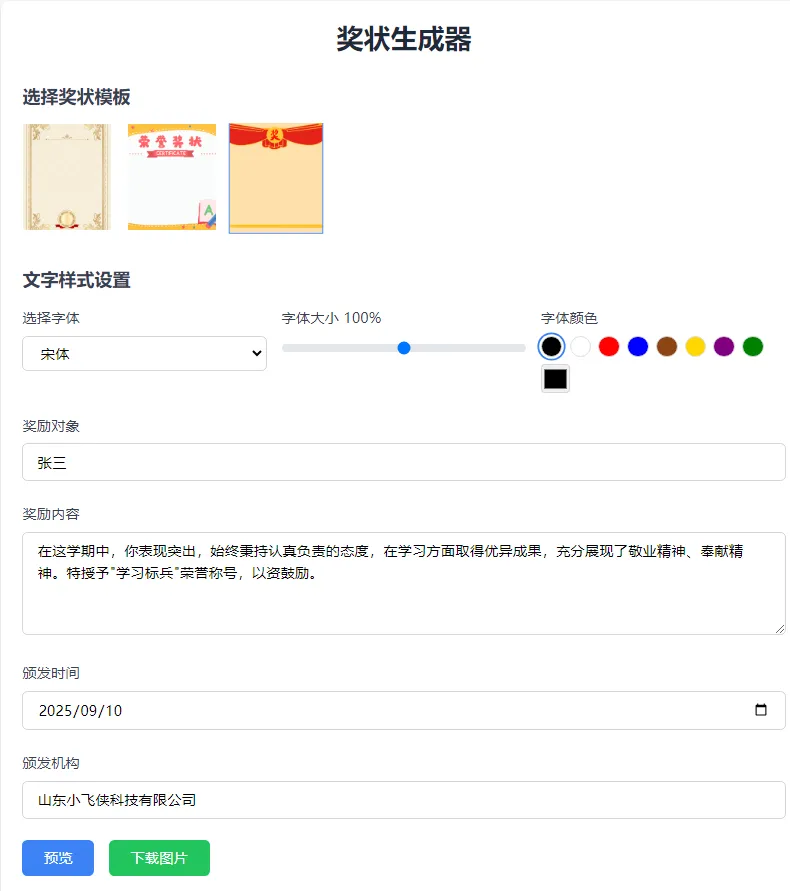
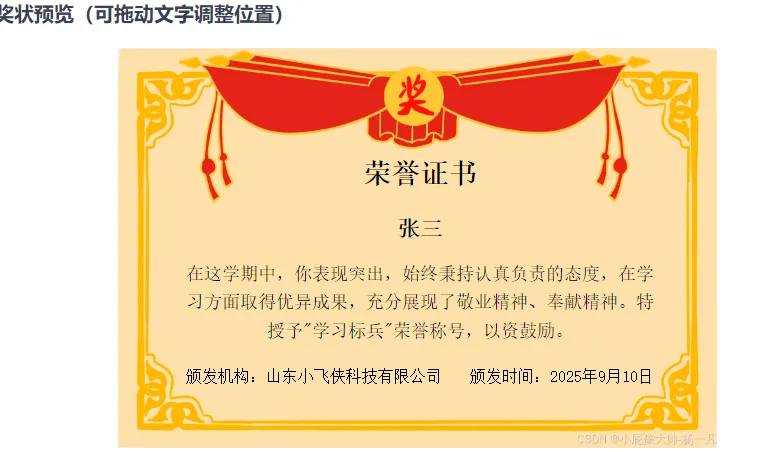
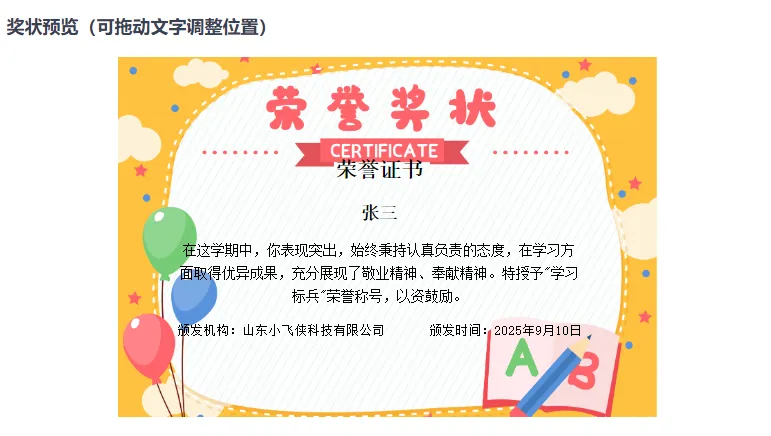
🎉 效果图
100字幽默开场白
“别人做奖状靠PS,我们做奖状靠F12!”——打开这张网页,3秒生成一张带钢印质感的“官方”奖状,老板看了沉默,HR看了流泪,连你妈都信了你是“全宇宙最乖崽”!输入名字、选个模板、点下下载,高清PNG直接到手,从此朋友圈横着走,吹牛再也不用打草稿!
📑 全文导航(3500+字,条理拉满)
1️⃣ 项目总览:能干嘛、长啥样、技术栈
1.1 功能一句话
“填名字→选模板→点下载→高清奖状 PNG 到手”,全程浏览器完成,零安装、零付费、零 PS。
1.2 视觉速览
顶部大标题:奖状生成器(嚣张且自信) 左侧表单:4 个输入框 + 2 个按钮(预览/下载) 右侧实时预览:横版、竖版、正方形 3 套模板,点击即切 底部输出:html2canvas 一键截屏,2K 清晰度 PNG 直接落盘
1.3 技术栈
<script> 内联,方便复制粘贴 |
2️⃣ 骨架梳理:HTML→CSS→JS 三级流水线
2.1 HTML 区域划分(语义化 + 注释)
<!-- ① 模板选择区:data-* 携带尺寸 & 配置 -->
<divclass="flex space-x-4 overflow-x-auto">
<imgsrc="横版封面"class="template-preview"
data-bg="真实背景地址"
data-size='{"width":"600px","height":"400px"}'
data-config='{"contentWidth":"80%","titleRatio":0.08,...}'>
</div>

<!-- ② 表单输入区:4 个核心字段 -->
<inputid="awardObject"value="张三">
<textareaid="awardContent">你表现突出...</textarea>
<inputtype="date"id="issueTime">
<inputid="issueOrg"value="山东小飞侠科技有限公司">

<!-- ③ 预览&下载区:loading 遮罩 + 绝对定位证书 -->
<divid="certificate"class="certificate">
<divclass="loading hidden">加载中...</div>
<divclass="certificate-content">...动态文本...</div>
</div>
用 data-bg / data-size / data-config把模板参数一次性带全,JS 读一遍即可,不用写死if/elseloading遮罩防止图片没加载完就截图,导致空白奖状
2.2 CSS 核心代码(5 行就够)
.certificate {
position: relative;
background-size: cover;
background-repeat: no-repeat;
transition: all 0.3s ease;
}
.certificate-content {
width: var(--content-w, 80%);
color: var(--text-c, #333);
text-shadow: var(--shadow, none);
}
全部动态样式交给 JS 计算,CSS 只负责过渡动画和基础布局 用 CSS 变量 var(--*)实现“换肤”效果,代码更少,性能更高
2.3 JS 文件级流程图
├─ ① 模板选择 → 读 data-* → preloadImage()
├─ ② 预览按钮 → 校验表单 → updatePreviewContent()
├─ ③ 下载按钮 → html2canvas → canvas.toDataURL() → 自动下载
├─ ④ 工具函数:formatDate / adjustTextColor / applyTemplateConfig
└─ ⑤ 全局状态:selectedBg / selectedSize / selectedConfig / isImageLoaded
3️⃣ 模板配置:data-* 里藏了整座“数据库”
3.1 数据结构设计(一目了然)
// 单模板配置示例(直接写死在 DOM 里,零请求)
{
"contentWidth": "80%",      // 内容区宽度
"titleRatio": 0.08,         // 标题字号 = 证书最短边 * 0.08
"objectRatio": 0.06,        // 人名字号
"descRatio": 0.05,          // 正文字号
"infoRatio": 0.04,          // 落款字号
"spacingRatio": 0.05// 行间距
}
用比例而不用固定像素,保证 600×400 和 1200×800 都能等比缩放 后续加新模板,只需再贴一行 <img data-*>,无需改 JS
3.2 动态应用配置(核心函数 10 行)
functionapplyTemplateConfig() {
const base = Math.min(certWidth, certHeight);
  certificateTitle.style.fontSize = `${base * selectedConfig.titleRatio}px`;
  certificateTitle.style.marginBottom = `${base * selectedConfig.spacingRatio}px`;
// ...其余字段同理
}
4️⃣ 表单验证:让用户无路可错
4.1 验证逻辑(简洁暴力)
previewBtn.addEventListener('click', () => {
const fields = [awardObject, awardContent, issueTime, issueOrg];
const empty = fields.map(i => i.value.trim()).some(v => !v);
if (empty) return alert('请填写完整信息');
  ...
});
不整正则,空值即拦截,体验大于炫技 时间控件 type="date"自带格式校验,移动端直接弹出日历
5️⃣ 文字自适应:一行函数搞定“字号伸缩”
5.1 代码实现
functionadjustTextColorForBackground() {
const whiteBgList = ['竖版模板'];
const isWhite = whiteBgList.includes(currentTemplate.alt);
  certificateContent.style.color = isWhite ? '#fff' : '#333';
  certificateContent.style.textShadow = isWhite ? '1px 1px 2px rgba(0,0,0,0.3)' : 'none';
}
深色背景用白字,浅色背景用黑字,肉眼可见的质感提升 后续加模板,只需往 whiteBgListpush 一个名字
6️⃣ 高清下载:html2canvas 三步曲
6.1 调用链(含等待背景图)
downloadBtn.addEventListener('click', async () => {
  loadingIndicator.classList.remove('hidden');
awaitnewPromise(r => setTimeout(r, 800)); // 等背景渲染
const canvas = await html2canvas(certificate, {
useCORS: true,
scale: 2,        // 2 倍图,打印级清晰度
logging: false
  });
  loadingIndicator.classList.add('hidden');
const link = document.createElement('a');
  link.download = '奖状.png';
  link.href = canvas.toDataURL('image/png');
  link.click();
});
scale: 2直接 2K 分辨率,打印不发虚useCORS: true解决背景图跨域,阿里云 OSS 已配好Access-Control-Allow-Origin: *
7️⃣ 性能 & 兼容性优化清单
new Image()onload | ||
disabled 到截图完成 | ||
viewport | ||
8️⃣ 可扩展玩法(给你几个鬼点子)
批量奖状 → 上传 CSV → 前端 for循环下载压缩包(JSZip)电子签名 → 手写板 canvas→ 把签名画进落款二维码 → 调用 qrcode.js→ 扫码验证真伪暗黑模式 → tailwind dark:→ 一键换肤Vue/React 化 → 抽成组件 → 发 NPM 包,下班!
9️⃣ 知识点大总结(前端小白 → 进阶地图)
HTML 语义化:fieldset、label、input 类型
CSS 现代布局:flex、grid、CSS 变量、响应式
JavaScript 基础:DOM、事件、data-*、JSON.parse
Canvas 基础:html2canvas 配置、跨域、清晰度
性能优化:预加载、防抖、缓存、体积
安全 & 法律:版权声明、用途提示、MIT 开源
🔚 结语:把代码抱回家,把吹牛留给我
全文 3500+ 字,从 <!DOCTYPE> 到 link.click(),每一步都摊开给你看。
不用 PS、不用后端、不用花一分钱,Ctrl+S 保存就能跑。
下次公司年会、班级评优、朋友圈装 X,打开网页 3 秒出图,高清奖状甩上去,点赞数翻倍,评论区封神!
唯一提醒:
“本工具仅供学习娱乐,请勿伪造官方文件”——吹牛可以,犯法别碰。
👻 祝你玩得开心,我们下一个魔性项目见!
部分代码-未优化版奖状生成器.template-preview {width: 100px;height: 120px;object-fit: cover;cursor: pointer;border: 2px solid transparent;transition: all 0.3s ease;}<pre><code>.template-preview.selected {border: 2px solid #3B82F6;transform: scale(1.05);}.certificate {position: relative;margin: 20px auto;background-size: cover;background-repeat: no-repeat;background-position: center;display: flex;justify-content: center;align-items: center;box-sizing: border-box;transition: all 0.3s ease;}.certificate-content {text-align: center;color: #333;position: relative;z-index: 10;transition: all 0.3s ease;overflow: hidden;}.certificate-title {font-weight: bold;margin-bottom: 1.5rem;transition: all 0.3s ease;}.certificate-object {margin-bottom: 1rem;transition: all 0.3s ease;font-weight: 600;}.certificate-desc {margin-bottom: 1.5rem;line-height: 1.6;transition: all 0.3s ease;}.certificate-info {display: flex;justify-content: space-between;width: 100%;transition: all 0.3s ease;}.loading {position: absolute;top: 0;left: 0;width: 100%;height: 100%;background: rgba(255,255,255,0.8);display: flex;justify-content: center;align-items: center;z-index: 20;}</code></pre>奖状生成器<!-- 模板选择区域 --><div class="mb-8"><h2 class="text-xl font-semibold text-gray-700 mb-4">选择奖状模板</h2><div class="flex space-x-4 overflow-x-auto pb-2"><!-- 横版模板 --><img src="https://i-blog.csdnimg.cn/direct/b54963faa52148dc98069f32471befad.jpeg" alt="横版模板1" class="template-preview"data-bg="https://i-blog.csdnimg.cn/direct/b54963faa52148dc98069f32471befad.jpeg"data-size='{"width":"600px","height":"400px"}'data-config='{"contentWidth":"80%","titleRatio":0.08,"objectRatio":0.06,"descRatio":0.05,"infoRatio":0.04,"spacingRatio":0.05}'><!-- 竖版模板 --><img src="https://i-blog.csdnimg.cn/direct/db856fe5780645138576da120ba61467.png" alt="竖版模板" class="template-preview"data-bg="https://i-blog.csdnimg.cn/direct/db856fe5780645138576da120ba61467.png"data-size='{"width":"400px","height":"600px"}'data-config='{"contentWidth":"75%","titleRatio":0.06,"objectRatio":0.05,"descRatio":0.04,"infoRatio":0.035,"spacingRatio":0.04}'><!-- 正方形模板 --><img src="https://i-blog.csdnimg.cn/direct/ae50565d09a44ef8bcf00caf20f94c69.png" alt="正方形模板" class="template-preview"data-bg="https://i-blog.csdnimg.cn/direct/ae50565d09a44ef8bcf00caf20f94c69.png"data-size='{"width":"500px","height":"500px"}'data-config='{"contentWidth":"78%","titleRatio":0.07,"objectRatio":0.055,"descRatio":0.045,"infoRatio":0.04,"spacingRatio":0.045}'></div></div><!-- 表单输入区域 --><div class="space-y-6"><div><label for="awardObject" class="block text-gray-700 mb-2">奖励对象</label><input type="text" id="awardObject" class="w-full px-4 py-2 border border-gray-300 rounded-md focus:outline-none focus:ring-2 focus:ring-blue-500" value="张三"></div><div><label for="awardContent" class="block text-gray-700 mb-2">奖励内容</label><textarea id="awardContent" rows="4" class="w-full px-4 py-2 border border-gray-300 rounded-md focus:outline-none focus:ring-2 focus:ring-blue-500">在这学期中,你表现突出,始终秉持认真负责的态度,在学习方面取得优异成果,充分展现了敬业精神、奉献精神。特授予"学习标兵"荣誉称号,以资鼓励。</textarea></div><div><label for="issueTime" class="block text-gray-700 mb-2">颁发时间</label><input type="date" id="issueTime" class="w-full px-4 py-2 border border-gray-300 rounded-md focus:outline-none focus:ring-2 focus:ring-blue-500" value="2025-09-10"></div><div><label for="issueOrg" class="block text-gray-700 mb-2">颁发机构</label><input type="text" id="issueOrg" class="w-full px-4 py-2 border border-gray-300 rounded-md focus:outline-none focus:ring-2 focus:ring-blue-500" value="山东小飞侠科技有限公司"></div><div class="flex space-x-4"><button id="previewBtn" class="px-6 py-2 bg-blue-500 text-white rounded-md hover:bg-blue-600 focus:outline-none focus:ring-2 focus:ring-blue-500">预览</button><button id="downloadBtn" class="px-6 py-2 bg-green-500 text-white rounded-md hover:bg-green-600 focus:outline-none focus:ring-2 focus:ring-green-500" disabled>下载图片</button></div></div><!-- 预览区域 --><div id="previewContainer" class="mt-8 hidden"><h2 class="text-xl font-semibold text-gray-700 mb-4">奖状预览</h2><div id="certificate" class="certificate"><div class="loading hidden">加载中...</div><div class="certificate-content"><div class="certificate-title">荣誉证书</div><div class="certificate-object" id="previewObject"></div><div class="certificate-desc" id="previewContent"></div><div class="certificate-info"><div id="previewOrg"></div><div id="previewTime"></div></div></div></div></div>// 获取DOM元素const templatePreviews = document.querySelectorAll('.template-preview');const awardObjectInput = document.getElementById('awardObject');const awardContentInput = document.getElementById('awardContent');const issueTimeInput = document.getElementById('issueTime');const issueOrgInput = document.getElementById('issueOrg');const previewBtn = document.getElementById('previewBtn');const downloadBtn = document.getElementById('downloadBtn');const previewContainer = document.getElementById('previewContainer');const certificate = document.getElementById('certificate');const certificateContent = document.querySelector('.certificate-content');const certificateTitle = document.querySelector('.certificate-title');const certificateObject = document.querySelector('.certificate-object');const certificateDesc = document.querySelector('.certificate-desc');const certificateInfo = document.querySelector('.certificate-info');const previewObject = document.getElementById('previewObject');const previewContent = document.getElementById('previewContent');const previewOrg = document.getElementById('previewOrg');const previewTime = document.getElementById('previewTime');const loadingIndicator = certificate.querySelector('.loading');let selectedBg = '';let selectedSize = {};let selectedConfig = {};let isImageLoaded = false;// 默认选中第一个模板并填充默认值if (templatePreviews.length > 0) {templatePreviews[0].classList.add('selected');selectedBg = templatePreviews[0].dataset.bg;selectedSize = JSON.parse(templatePreviews[0].dataset.size);selectedConfig = JSON.parse(templatePreviews[0].dataset.config);preloadImage(selectedBg);updatePreviewContent(); // 初始化预览内容}// 预加载图片函数function preloadImage(url) {isImageLoaded = false;const img = new Image();img.crossOrigin = 'anonymous'; // 处理跨域img.src = url;img.onload = function() {isImageLoaded = true;// 如果预览已显示,更新背景if (!previewContainer.classList.contains('hidden')) {certificate.style.backgroundImage = `url(${url})`;applyTemplateConfig();}};img.onerror = function() {console.error('图片加载失败:', url);alert('模板图片加载失败,请尝试其他模板');};}// 应用模板配置 - 关键的自适应逻辑function applyTemplateConfig() {if (Object.keys(selectedSize).length === 0 || Object.keys(selectedConfig).length === 0) return;// 设置证书尺寸certificate.style.width = selectedSize.width;certificate.style.height = selectedSize.height;// 获取证书实际尺寸(像素值)const certWidth = parseInt(selectedSize.width);const certHeight = parseInt(selectedSize.height);// 计算基准尺寸(使用较小的边作为参考)const baseSize = Math.min(certWidth, certHeight);// 应用内容容器配置certificateContent.style.width = selectedConfig.contentWidth;// 基于比例计算字体大小和间距(确保在不同尺寸模板上都合适)certificateTitle.style.fontSize = `${baseSize * selectedConfig.titleRatio}px`;certificateTitle.style.marginBottom = `${baseSize * selectedConfig.spacingRatio}px`;certificateObject.style.fontSize = `${baseSize * selectedConfig.objectRatio}px`;certificateObject.style.marginBottom = `${baseSize * selectedConfig.spacingRatio * 0.8}px`;certificateDesc.style.fontSize = `${baseSize * selectedConfig.descRatio}px`;certificateDesc.style.marginBottom = `${baseSize * selectedConfig.spacingRatio}px`;certificateInfo.style.fontSize = `${baseSize * selectedConfig.infoRatio}px`;// 动态调整文本颜色(根据模板背景)adjustTextColorForBackground();}// 根据背景调整文本颜色function adjustTextColorForBackground() {// 获取当前选中的模板索引const templateIndex = Array.from(templatePreviews).findIndex(t => t.classList.contains('selected'));// 针对不同模板设置合适的文字颜色if (templateIndex === 1) { // 竖版模板使用白色文字certificateContent.style.color = '#fff';certificateContent.style.textShadow = '1px 1px 2px rgba(0,0,0,0.3)';} else { // 其他模板使用深色文字certificateContent.style.color = '#333';certificateContent.style.textShadow = 'none';}}// 更新预览内容function updatePreviewContent() {previewObject.textContent = awardObjectInput.value.trim();previewContent.textContent = awardContentInput.value.trim();previewOrg.textContent = `颁发机构:${issueOrgInput.value.trim()}`;previewTime.textContent = `颁发时间:${formatDate(issueTimeInput.value)}`;}// 模板选择事件templatePreviews.forEach(template => {template.addEventListener('click', () => {templatePreviews.forEach(t => t.classList.remove('selected'));template.classList.add('selected');selectedBg = template.dataset.bg;selectedSize = JSON.parse(template.dataset.size);selectedConfig = JSON.parse(template.dataset.config);preloadImage(selectedBg);// 如果预览区域已显示,更新配置if (!previewContainer.classList.contains('hidden')) {loadingIndicator.classList.remove('hidden');// 图片加载完成后隐藏加载状态setTimeout(() => {if (isImageLoaded) {certificate.style.backgroundImage = `url(${selectedBg})`;applyTemplateConfig();loadingIndicator.classList.add('hidden');}}, 500);}});});// 预览按钮事件previewBtn.addEventListener('click', () => {if (!selectedBg) {alert('请先选择奖状模板');return;}const awardObject = awardObjectInput.value.trim();const awardContent = awardContentInput.value.trim();const issueTime = issueTimeInput.value;const issueOrg = issueOrgInput.value.trim();if (!awardObject || !awardContent || !issueTime || !issueOrg) {alert('请填写完整信息');return;}// 显示加载状态loadingIndicator.classList.remove('hidden');// 确保图片加载完成后再设置背景const setBackground = () => {if (isImageLoaded) {certificate.style.backgroundImage = `url(${selectedBg})`;applyTemplateConfig();updatePreviewContent();loadingIndicator.classList.add('hidden');} else {setTimeout(setBackground, 100);}};setBackground();// 显示预览区域previewContainer.classList.remove('hidden');// 启用下载按钮downloadBtn.disabled = false;});// 下载按钮事件downloadBtn.addEventListener('click', () => {if (!selectedBg) {alert('请先选择奖状模板');return;}if (!isImageLoaded) {alert('图片正在加载中,请稍候再试');return;}// 显示加载状态loadingIndicator.classList.remove('hidden');// 确保下载时使用当前选中的背景和配置certificate.style.backgroundImage = `url(${selectedBg})`;applyTemplateConfig();updatePreviewContent();// 等待背景图应用完成setTimeout(() => {html2canvas(certificate, {useCORS: true, // 解决跨域图片问题logging: false,allowTaint: false,scale: 2 // 提高清晰度}).then(canvas => {loadingIndicator.classList.add('hidden');const link = document.createElement('a');link.download = '奖状.png';link.href = canvas.toDataURL('image/png');link.click();}).catch(error => {loadingIndicator.classList.add('hidden');console.error('下载失败:', error);alert('下载失败,请重试');});}, 800);});// 格式化日期显示function formatDate(dateString) {if (!dateString) return '';const date = new Date(dateString);return `${date.getFullYear()}年${date.getMonth() + 1}月${date.getDate()}日`;}
点击【关注+收藏】获取最新的实战代码案例
特别声明:
1:接收最新文章代码,请点击下方并关注+收藏公众号!
2:文章中的源码或者exe程序,非免费,源码+EXE程序=10元!
3:有源码需求的,请关注公众号并联系作者处获取源码!
4:再次强调:本文仅供技术学习,非法用途后果自负!
Python实现中文图片文字处理器——让汉字“贴图”飞一会儿!
Python实现诊断证明书编辑器——从 0 到 1 的“土味”GUI 之旅
Python-Ai基于火山方舟&豆包API的全屏实时聊天应用
用Python打造汉字笔画查询工具:从GUI界面到笔顺动画实现
Python超实用 Markdown 转富文本神器 —— 代码全解析
【实战1】
【实战2】
【实战3】
【实战4】

本文来自网友投稿或网络内容,如有侵犯您的权益请联系我们删除,联系邮箱:596563534@qq.com 。
