当前位置:首页>python>Python CustomTkinter Modbus TCP客户端开发实战

Python CustomTkinter Modbus TCP客户端开发实战

  • 2026-07-03 06:30:54
Python CustomTkinter Modbus TCP客户端开发实战

工控项目里最让人头疼的,往往不是算法,而是"怎么把数据显示出来"。

我见过太多工程师,花了三天时间搞定Modbus协议,结果在GUI层卡壳——要么用tkinter写出来的界面像上世纪的DOS程序,要么用PyQt5搞得项目依赖一堆,部署到现场机器上各种报错。直到我在一个点胶机项目里第一次用上CustomTkinter,才算找到了那种"刚刚好"的感觉:现代、轻量、和pymodbus配合起来毫无违和感。

这篇文章,咱们就从实际项目出发,一步步搭一个能用的Modbus TCP客户端——不是玩具demo,是真正能跑在Windows工控机上的那种。


🔌 先搞清楚:Modbus TCP到底在通信什么

很多人上来就装库、写代码,结果连寄存器地址都没搞明白就开始调试,然后一脸懵。

Modbus TCP本质上是把经典的Modbus RTU协议套了一层TCP/IP的壳。PLC或者仪表作为Server端(从站),上位机作为Client端(主站)发起请求。常用的功能码就那么几个:

  • ▸ FC03:读保持寄存器(Read Holding Registers)——最常用,读传感器数值、设备状态
  • ▸ FC06:写单个寄存器(Write Single Register)——发控制指令
  • ▸ FC16:写多个寄存器(Write Multiple Registers)——批量下发参数

寄存器地址这块要注意——不同厂家的PLC,地址偏移量可能不一样。有的从0开始,有的从1开始。我在对接某国产PLC时就踩过这个坑,文档写的是40001,实际pymodbus里要写0,差了整整一位。调了半天,最后靠抓包才发现问题所在。


🛠️ 环境准备:别在这里浪费时间

Windows环境,直接上:

bash1pip install customtkinter pymodbus pillow

pymodbus推荐用3.x版本,API变化挺大的,网上很多老教程还在用2.x的写法,直接照抄会报错。确认版本:

bash1pip show pymodbus

CustomTkinter对Python 3.8+都支持,Windows 10/11没问题。


🏗️ 整体架构:别把所有东西塞进一个文件

这是新手最容易犯的错——一个main.py写到一千行,Modbus通信、界面逻辑、数据处理全混在一起。后来改个寄存器地址,整个文件翻来翻去。

咱们用三层结构来组织:

1modbus_client/2├── main.py              # 程序入口3├── modbus_core.py       # 通信层:只管连接和读写4├── data_model.py        # 数据层:寄存器映射和数据处理5└── ui/6    ├── main_window.py   # 主窗口7    ├── connect_panel.py # 连接配置面板8    └── data_panel.py    # 数据显示面板

通信层不知道界面长什么样,界面层不关心数据怎么来的。这个分离,在项目后期加功能时会感谢自己。


💻 核心代码实现

第一步:Modbus通信核心层

python1from pymodbus.client import ModbusTcpClient2from pymodbus.exceptions import ModbusException3import threading4import logging56logger = logging.getLogger(__name__)789class ModbusCore:10"""11    Modbus TCP通信核心12    职责单一:只负责连接管理和寄存器读写13    """14def __init__(self):15        self._client = None16        self._lock = threading.Lock()  # 多线程环境必须加锁17        self.is_connected = False1819def connect(self, host: str, port: int = 502, timeout: int = 3) -> tuple[boolstr]:20"""21        建立连接,返回(成功标志, 错误信息)22        timeout建议3秒,太长了界面会卡住23        """        try:24            self._client = ModbusTcpClient(25                host=host,26                port=port,27                timeout=timeout28            )29            result = self._client.connect()30            self.is_connected = result31if result:32return True""33return Falsef"无法连接到 {host}:{port}"34except Exception as e:35            self.is_connected = False36return Falsestr(e)3738def disconnect(self):39if self._client:40            self._client.close()41        self.is_connected = False4243def read_holding_registers(44            self,45            address: int,46            count: int,47            slave_id: int = 148    ) -> tuple[list | Nonestr]:49"""50        读保持寄存器(FC03)51        注意:address是0-based,对应PLC文档中的4xxxx地址要减152        """        if not self.is_connected:53return None"未连接"5455with self._lock:56try:57                response = self._client.read_holding_registers(58                    address=address,59                    count=count,60                    device_id=slave_id61                )62if response.isError():63return Nonef"读取错误: {response}"64return response.registers, ""65except ModbusException as e:66                self.is_connected = False67return Nonef"通信异常: {e}"6869def write_register(70            self,71            address: int,72            value: int,73            slave_id: int = 174    ) -> tuple[boolstr]:75"""写单个寄存器(FC06)"""76if not self.is_connected:77return False"未连接"7879with self._lock:80try:81                response = self._client.write_register(82                    address=address,83                    value=value,84                    device_id=slave_id85                )86if response.isError():87return Falsef"写入错误: {response}"88return True""89except ModbusException as e:90                self.is_connected = False91return Falsef"通信异常: {e}"

这里有个细节值得说——threading.Lock()。GUI程序里,定时轮询数据的线程和用户手动点击写入按钮的操作,会同时访问同一个Modbus连接。不加锁,偶发性的通信错误会让你抓狂,因为复现概率极低,但现场真的会出。


第二步:数据模型层

python1from dataclasses import dataclass, field2from typing import Callable345@dataclass6class RegisterMap:7"""寄存器映射表——把地址和业务含义绑定在一起"""8    name: str  # 显示名称9    address: int  # 寄存器地址(0-based)10    scale: float = 1.0  # 缩放系数(如温度值/10)11    unit: str = ""  # 单位12    writable: bool = False  # 是否可写131415# 项目寄存器配置——集中管理,修改方便16REGISTER_CONFIG = [17RegisterMap("设备温度", address=0, scale=0.1, unit="℃"),18RegisterMap("运行速度", address=1, scale=1.0, unit="rpm"),19RegisterMap("压力值", address=2, scale=0.01, unit="MPa"),20RegisterMap("目标速度", address=10, scale=1.0, unit="rpm", writable=True),21RegisterMap("启停控制", address=20, scale=1.0, unit="", writable=True),22]232425class DataModel:26"""数据处理层:原始寄存器值 → 工程量转换"""2728def process_raw_value(self, reg: RegisterMap, raw: int) -> float:29"""16位无符号整数转工程量"""30# 处理有符号数(某些传感器会返回负值)31if raw > 32767:32            raw -= 6553633return round(raw * reg.scale, 3)3435def engineering_to_raw(self, reg: RegisterMap, value: float) -> int:36"""工程量转寄存器原始值(写入时使用)"""37        raw = int(value / reg.scale)38# 限制在16位范围内39return max(0min(65535, raw))

把寄存器配置做成数据驱动的方式,好处立竿见影——新增一个显示点,只需要在REGISTER_CONFIG里加一行,界面会自动生成对应的显示控件。


第三步:CustomTkinter主界面

python1import customtkinter as ctk2import threading3import time4from modbustcpDemo.modbus_core import ModbusCore5from modbustcpDemo.data_model import DataModelREGISTER_CONFIG67# 全局主题设置8ctk.set_appearance_mode("dark")9ctk.set_default_color_theme("blue")101112class MainWindow(ctk.CTk):1314def __init__(self, settings):15super().__init__()16        self._settings = settings17        self.title("Modbus TCP 客户端  v1.0")18        self.geometry("900x650")19        self.resizable(TrueTrue)2021# 核心对象22        self._modbus = ModbusCore()23        self._data_model = DataModel()2425# 轮询控制26        self._polling = False27        self._poll_thread = None28        self._slave_id = int(self._get_setting("slave_id"1))2930        self._build_ui()3132def _get_setting(self, name: str, default):33if isinstance(self._settings, dict):34return self._settings.get(name, default)35return getattr(self._settings, name, default)3637def _build_ui(self):38"""构建界面布局"""39# 顶部连接区域40        self._build_connection_bar()4142# 主内容区:左侧数据显示,右侧控制面板43        content_frame = ctk.CTkFrame(self, fg_color="transparent")44        content_frame.pack(fill="both", expand=True, padx=15, pady=(015))45        content_frame.columnconfigure(0, weight=3)46        content_frame.columnconfigure(1, weight=2)47        content_frame.rowconfigure(0, weight=1)4849        self._build_data_panel(content_frame)50        self._build_control_panel(content_frame)5152def _build_connection_bar(self):53"""连接配置栏"""54        bar = ctk.CTkFrame(self, height=70)55        bar.pack(fill="x", padx=15, pady=(1510))56        bar.pack_propagate(False)5758# IP地址输入59        ctk.CTkLabel(bar, text="设备IP:", width=60).pack(side="left", padx=(155), pady=15)60        self._ip_entry = ctk.CTkEntry(bar, width=140, placeholder_text="192.168.1.100")61        self._ip_entry.pack(side="left", pady=15)62        self._ip_entry.insert(0str(self._get_setting("default_ip""127.0.0.1")))6364# 端口65        ctk.CTkLabel(bar, text="端口:", width=45).pack(side="left", padx=(155))66        self._port_entry = ctk.CTkEntry(bar, width=70)67        self._port_entry.pack(side="left", pady=15)68        self._port_entry.insert(0str(self._get_setting("default_port"502)))6970# 从站ID71        ctk.CTkLabel(bar, text="从站ID:", width=60).pack(side="left", padx=(155))72        self._slave_entry = ctk.CTkEntry(bar, width=50)73        self._slave_entry.pack(side="left", pady=15)74        self._slave_entry.insert(0str(self._get_setting("slave_id"1)))7576# 连接按钮77        self._conn_btn = ctk.CTkButton(78            bar, text="连接", width=90,79            command=self._toggle_connection,80            fg_color="#2d7a2d", hover_color="#1f5c1f"81        )82        self._conn_btn.pack(side="left", padx=20, pady=15)8384# 状态指示85        self._status_label = ctk.CTkLabel(86            bar, text="● 未连接",87            text_color="#888888", font=("微软雅黑"13)88        )89        self._status_label.pack(side="left", padx=10)9091# 轮询间隔92        ctk.CTkLabel(bar, text="轮询(ms):").pack(side="right", padx=(05))93        self._interval_var = ctk.StringVar(value="500")94        self._interval_entry = ctk.CTkEntry(95            bar, width=60, textvariable=self._interval_var96        )97        self._interval_entry.pack(side="right", padx=(015))9899def _build_data_panel(self, parent):100"""数据显示面板——根据寄存器配置自动生成"""101        panel = ctk.CTkScrollableFrame(parent, label_text="实时数据监控")102        panel.grid(row=0, column=0, sticky="nsew", padx=(08))103104        self._value_labels = {}  # 存储各寄存器的显示Label105106for i, reg in enumerate(REGISTER_CONFIG):107            row_frame = ctk.CTkFrame(panel, height=45)108            row_frame.pack(fill="x", pady=3, padx=5)109            row_frame.pack_propagate(False)110111# 寄存器名称112            ctk.CTkLabel(113                row_frame,114                text=f"{reg.name}  [addr: {reg.address}]",115                anchor="w", width=200,116                font=("微软雅黑"12)117            ).pack(side="left", padx=15)118119# 数值显示120            val_label = ctk.CTkLabel(121                row_frame,122                text="---",123                font=("Consolas"16"bold"),124                text_color="#4fc3f7",125                width=100126            )127            val_label.pack(side="left", padx=10)128            self._value_labels[reg.address] = val_label129130# 单位131            ctk.CTkLabel(132                row_frame,133                text=reg.unit,134                text_color="#aaaaaa",135                width=40136            ).pack(side="left")137138def _build_control_panel(self, parent):139"""控制写入面板"""140        panel = ctk.CTkFrame(parent)141        panel.grid(row=0, column=1, sticky="nsew")142143        ctk.CTkLabel(144            panel, text="参数控制",145            font=("微软雅黑"14"bold")146        ).pack(pady=(1510))147148# 只显示可写寄存器149        writable_regs = [r for r in REGISTER_CONFIG if r.writable]150151        self._write_entries = {}152153for reg in writable_regs:154            frame = ctk.CTkFrame(panel, fg_color="transparent")155            frame.pack(fill="x", padx=15, pady=5)156157            ctk.CTkLabel(frame, text=reg.name, anchor="w").pack(fill="x")158159            entry_row = ctk.CTkFrame(frame, fg_color="transparent")160            entry_row.pack(fill="x")161162            entry = ctk.CTkEntry(entry_row, placeholder_text=f"输入{reg.unit}")163            entry.pack(side="left", fill="x", expand=True, padx=(08))164            self._write_entries[reg.address] = entry165166# 用lambda捕获当前reg,避免闭包陷阱167            ctk.CTkButton(168                entry_row, text="写入", width=60,169                command=lambda r=reg: self._write_value(r)170            ).pack(side="right")171172# 日志区域173        ctk.CTkLabel(panel, text="操作日志", anchor="w").pack(174            fill="x", padx=15, pady=(205)175        )176        self._log_box = ctk.CTkTextbox(panel, height=180, font=("Consolas"11))177        self._log_box.pack(fill="both", expand=True, padx=15, pady=(015))178179180def _toggle_connection(self):181if not self._modbus.is_connected:182            self._do_connect()183else:184            self._do_disconnect()185186def _do_connect(self):187        host = self._ip_entry.get().strip()188try:189            port = int(self._port_entry.get())190            self._slave_id = int(self._slave_entry.get())191except ValueError:192            self._log("端口或从站ID格式错误")193return194195        self._log(f"正在连接 {host}:{port}...")196        self._conn_btn.configure(state="disabled", text="连接中...")197198# 连接操作放到线程里,避免界面卡死199def do_connect_thread():200            ok, err = self._modbus.connect(host, port)201            self.after(0, self._on_connect_result, ok, err)202203        threading.Thread(target=do_connect_thread, daemon=True).start()204205def _on_connect_result(self, ok: bool, err: str):206if ok:207            self._status_label.configure(text="● 已连接", text_color="#4caf50")208            self._conn_btn.configure(209                state="normal", text="断开",210                fg_color="#8b2020", hover_color="#6b1515"211            )212            self._log("连接成功,开始轮询数据")213            self._start_polling()214else:215            self._status_label.configure(text="● 连接失败", text_color="#f44336")216            self._conn_btn.configure(state="normal", text="连接",217                                     fg_color="#2d7a2d", hover_color="#1f5c1f")218            self._log(f"连接失败:{err}")219220def _do_disconnect(self):221        self._stop_polling()222        self._modbus.disconnect()223        self._status_label.configure(text="● 未连接", text_color="#888888")224        self._conn_btn.configure(state="normal", text="连接",225                                 fg_color="#2d7a2d", hover_color="#1f5c1f")226# 清空显示227for label in self._value_labels.values():228            label.configure(text="---")229        self._log("已断开连接")230231def _start_polling(self):232        self._polling = True233        self._poll_thread = threading.Thread(234            target=self._poll_loop, daemon=True235        )236        self._poll_thread.start()237238def _stop_polling(self):239        self._polling = False240241def _poll_loop(self):242"""后台轮询线程——持续读取寄存器数据"""243while self._polling and self._modbus.is_connected:244try:245                interval_ms = int(self._interval_var.get())246except ValueError:247                interval_ms = 500248249for reg in REGISTER_CONFIG:250if not self._polling:251break252                values, err = self._modbus.read_holding_registers(253                    address=reg.address, count=1, slave_id=self._slave_id254                )255if values:256                    eng_val = self._data_model.process_raw_value(reg, values[0])257                    display = f"{eng_val} {reg.unit}"258                    label = self._value_labels[reg.address]259                    self.after(0lambda lbl=label, d=display: lbl.configure(text=d))260elif err:261                    self.after(0, self._log, f"读取[{reg.name}]失败: {err}")262263            time.sleep(interval_ms / 1000.0)264265if not self._modbus.is_connected and self._polling:266            self.after(0, self._on_connection_lost)267268def _on_connection_lost(self):269"""连接意外断开的处理"""270        self._polling = False271        self._status_label.configure(text="● 连接断开", text_color="#ff9800")272        self._conn_btn.configure(state="normal", text="连接",273                                 fg_color="#2d7a2d", hover_color="#1f5c1f")274        self._log("连接意外断开,请检查设备")275276def _write_value(self, reg):277        entry = self._write_entries.get(reg.address)278if not entry:279return280281        raw_text = entry.get().strip()282if not raw_text:283            self._log(f"请输入{reg.name}的值")284return285286try:287            eng_val = float(raw_text)288except ValueError:289            self._log("输入值格式错误,请输入数字")290return291292        raw_val = self._data_model.engineering_to_raw(reg, eng_val)293294def do_write():295            ok, err = self._modbus.write_register(296                address=reg.address, value=raw_val, slave_id=self._slave_id297            )298            msg = f"写入[{reg.name}]={eng_val}{reg.unit} {'成功' if ok else '失败: ' + err}"299            self.after(0, self._log, msg)300301        threading.Thread(target=do_write, daemon=True).start()302303def _log(self, msg: str):304"""向日志框追加消息"""305import datetime306        ts = datetime.datetime.now().strftime("%H:%M:%S")307        self._log_box.insert("end"f"[{ts}] {msg}\n")308        self._log_box.see("end")  # 自动滚动到底部

第四步:程序入口

python1import logging2import sys3from pathlib import Path45PROJECT_ROOT = Path(__file__).resolve().parents[1]6if str(PROJECT_ROOTnot in sys.path:7    sys.path.insert(0str(PROJECT_ROOT))89from modbustcpDemo.ui.main_window import MainWindow1011# 配置日志,方便调试时查问题12logging.basicConfig(13    level=logging.WARNING,14    format="%(asctime)s [%(levelname)s] %(name)s: %(message)s"15)16settings = {17"default_ip""127.0.0.1",18"default_port"502,19"slave_id"1,20"window_width":800,21"window_height":60022}23if __name__ == "__main__":24    app = MainWindow(settings)25    app.mainloop()
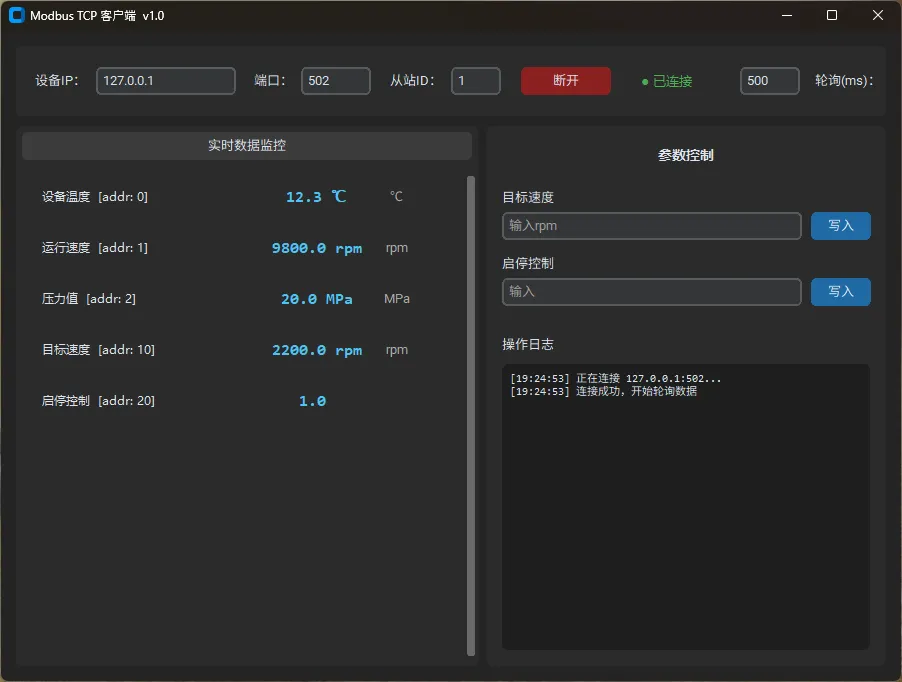
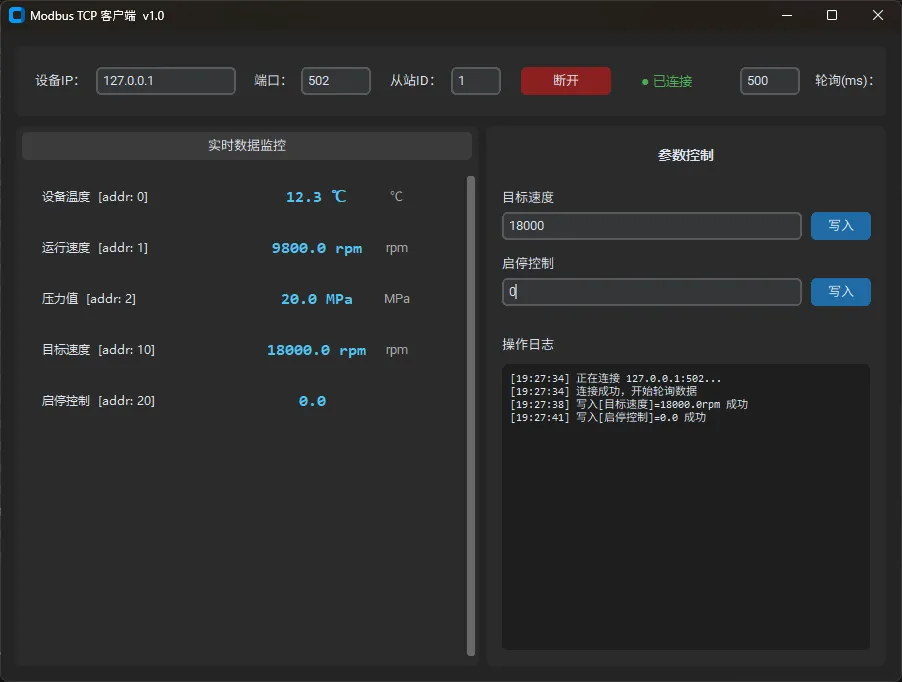
⚠️ 几个必须知道的坑

线程安全是重中之重。 CustomTkinter和tkinter一样,所有UI更新必须在主线程执行。轮询线程里用self.after(0, callback)把更新任务丢回主线程,这个模式要形成肌肉记忆。直接在子线程里改Label的text,有时候能跑,有时候会莫名崩溃,而且复现困难。

批量读比逐个读快得多。 上面的代码为了清晰,是逐个寄存器读的。实际项目里,如果监控点多,建议把地址连续的寄存器合并成一次批量读——一次读20个寄存器,比发20次请求快一个数量级,也减少了设备侧的负载。

连接超时要设合理值。 timeout设太大,连接失败时界面会卡住很久,用户体验很差。我通常设3秒,配合把连接操作放到线程里,界面始终保持响应。

寄存器地址的0-based和1-based问题。 pymodbus使用0-based地址,但很多PLC文档和组态软件使用1-based(40001对应地址0)。对接新设备前,先用Modbus Poll这类工具验证地址,别上来就在代码里试。


🚀 进阶:让它更接近生产级

目前这个版本已经能用了,但距离真正的生产环境还有几步路:

断线重连机制——工控现场网络不稳定是常态。可以在_on_connection_lost里加一个自动重连的逻辑,比如每5秒尝试一次,重连成功后自动恢复轮询。

数据持久化——把采集到的数据写入SQLite或CSV,方便后续分析和追溯。pymodbus读到的数据加一个时间戳,存起来,现场排查问题时价值巨大。

报警阈值设置——当某个寄存器值超出范围时,在界面上变色提示,甚至触发声音报警。CustomTkinter的Label可以动态改text_color,实现起来很直接。

配置文件化——把IP、端口、寄存器映射表存到JSON或YAML文件里,不同设备切换时不用改代码,直接换配置文件。


完整项目已开源,包含模拟器测试脚本(不需要真实PLC也能跑起来验证界面)。欢迎在评论区分享你在工控项目里踩过的Modbus坑,或者你对这套架构的改进思路——这类经验,往往比文档更值钱。

#Python #工控开发 #Modbus #CustomTkinter #上位机开发

最新文章

随机文章

基本 文件 流程 错误 SQL 调试
  1. 请求信息 : 2026-07-03 08:27:39 HTTP/2.0 GET : https://f.mffb.com.cn/a/503151.html
  2. 运行时间 : 0.125176s [ 吞吐率:7.99req/s ] 内存消耗:4,681.13kb 文件加载:140
  3. 缓存信息 : 0 reads,0 writes
  4. 会话信息 : SESSION_ID=e5335268cb3ea4eb83c28a5ba2093fa5
  1. /yingpanguazai/ssd/ssd1/www/f.mffb.com.cn/public/index.php ( 0.79 KB )
  2. /yingpanguazai/ssd/ssd1/www/f.mffb.com.cn/vendor/autoload.php ( 0.17 KB )
  3. /yingpanguazai/ssd/ssd1/www/f.mffb.com.cn/vendor/composer/autoload_real.php ( 2.49 KB )
  4. /yingpanguazai/ssd/ssd1/www/f.mffb.com.cn/vendor/composer/platform_check.php ( 0.90 KB )
  5. /yingpanguazai/ssd/ssd1/www/f.mffb.com.cn/vendor/composer/ClassLoader.php ( 14.03 KB )
  6. /yingpanguazai/ssd/ssd1/www/f.mffb.com.cn/vendor/composer/autoload_static.php ( 4.90 KB )
  7. /yingpanguazai/ssd/ssd1/www/f.mffb.com.cn/vendor/topthink/think-helper/src/helper.php ( 8.34 KB )
  8. /yingpanguazai/ssd/ssd1/www/f.mffb.com.cn/vendor/topthink/think-validate/src/helper.php ( 2.19 KB )
  9. /yingpanguazai/ssd/ssd1/www/f.mffb.com.cn/vendor/topthink/think-orm/src/helper.php ( 1.47 KB )
  10. /yingpanguazai/ssd/ssd1/www/f.mffb.com.cn/vendor/topthink/think-orm/stubs/load_stubs.php ( 0.16 KB )
  11. /yingpanguazai/ssd/ssd1/www/f.mffb.com.cn/vendor/topthink/framework/src/think/Exception.php ( 1.69 KB )
  12. /yingpanguazai/ssd/ssd1/www/f.mffb.com.cn/vendor/topthink/think-container/src/Facade.php ( 2.71 KB )
  13. /yingpanguazai/ssd/ssd1/www/f.mffb.com.cn/vendor/symfony/deprecation-contracts/function.php ( 0.99 KB )
  14. /yingpanguazai/ssd/ssd1/www/f.mffb.com.cn/vendor/symfony/polyfill-mbstring/bootstrap.php ( 8.26 KB )
  15. /yingpanguazai/ssd/ssd1/www/f.mffb.com.cn/vendor/symfony/polyfill-mbstring/bootstrap80.php ( 9.78 KB )
  16. /yingpanguazai/ssd/ssd1/www/f.mffb.com.cn/vendor/symfony/var-dumper/Resources/functions/dump.php ( 1.49 KB )
  17. /yingpanguazai/ssd/ssd1/www/f.mffb.com.cn/vendor/topthink/think-dumper/src/helper.php ( 0.18 KB )
  18. /yingpanguazai/ssd/ssd1/www/f.mffb.com.cn/vendor/symfony/var-dumper/VarDumper.php ( 4.30 KB )
  19. /yingpanguazai/ssd/ssd1/www/f.mffb.com.cn/vendor/topthink/framework/src/think/App.php ( 15.30 KB )
  20. /yingpanguazai/ssd/ssd1/www/f.mffb.com.cn/vendor/topthink/think-container/src/Container.php ( 15.76 KB )
  21. /yingpanguazai/ssd/ssd1/www/f.mffb.com.cn/vendor/psr/container/src/ContainerInterface.php ( 1.02 KB )
  22. /yingpanguazai/ssd/ssd1/www/f.mffb.com.cn/app/provider.php ( 0.19 KB )
  23. /yingpanguazai/ssd/ssd1/www/f.mffb.com.cn/vendor/topthink/framework/src/think/Http.php ( 6.04 KB )
  24. /yingpanguazai/ssd/ssd1/www/f.mffb.com.cn/vendor/topthink/think-helper/src/helper/Str.php ( 7.29 KB )
  25. /yingpanguazai/ssd/ssd1/www/f.mffb.com.cn/vendor/topthink/framework/src/think/Env.php ( 4.68 KB )
  26. /yingpanguazai/ssd/ssd1/www/f.mffb.com.cn/app/common.php ( 0.03 KB )
  27. /yingpanguazai/ssd/ssd1/www/f.mffb.com.cn/vendor/topthink/framework/src/helper.php ( 18.78 KB )
  28. /yingpanguazai/ssd/ssd1/www/f.mffb.com.cn/vendor/topthink/framework/src/think/Config.php ( 5.54 KB )
  29. /yingpanguazai/ssd/ssd1/www/f.mffb.com.cn/config/app.php ( 0.95 KB )
  30. /yingpanguazai/ssd/ssd1/www/f.mffb.com.cn/config/cache.php ( 0.78 KB )
  31. /yingpanguazai/ssd/ssd1/www/f.mffb.com.cn/config/console.php ( 0.23 KB )
  32. /yingpanguazai/ssd/ssd1/www/f.mffb.com.cn/config/cookie.php ( 0.56 KB )
  33. /yingpanguazai/ssd/ssd1/www/f.mffb.com.cn/config/database.php ( 2.48 KB )
  34. /yingpanguazai/ssd/ssd1/www/f.mffb.com.cn/vendor/topthink/framework/src/think/facade/Env.php ( 1.67 KB )
  35. /yingpanguazai/ssd/ssd1/www/f.mffb.com.cn/config/filesystem.php ( 0.61 KB )
  36. /yingpanguazai/ssd/ssd1/www/f.mffb.com.cn/config/lang.php ( 0.91 KB )
  37. /yingpanguazai/ssd/ssd1/www/f.mffb.com.cn/config/log.php ( 1.35 KB )
  38. /yingpanguazai/ssd/ssd1/www/f.mffb.com.cn/config/middleware.php ( 0.19 KB )
  39. /yingpanguazai/ssd/ssd1/www/f.mffb.com.cn/config/route.php ( 1.89 KB )
  40. /yingpanguazai/ssd/ssd1/www/f.mffb.com.cn/config/session.php ( 0.57 KB )
  41. /yingpanguazai/ssd/ssd1/www/f.mffb.com.cn/config/trace.php ( 0.34 KB )
  42. /yingpanguazai/ssd/ssd1/www/f.mffb.com.cn/config/view.php ( 0.82 KB )
  43. /yingpanguazai/ssd/ssd1/www/f.mffb.com.cn/app/event.php ( 0.25 KB )
  44. /yingpanguazai/ssd/ssd1/www/f.mffb.com.cn/vendor/topthink/framework/src/think/Event.php ( 7.67 KB )
  45. /yingpanguazai/ssd/ssd1/www/f.mffb.com.cn/app/service.php ( 0.13 KB )
  46. /yingpanguazai/ssd/ssd1/www/f.mffb.com.cn/app/AppService.php ( 0.26 KB )
  47. /yingpanguazai/ssd/ssd1/www/f.mffb.com.cn/vendor/topthink/framework/src/think/Service.php ( 1.64 KB )
  48. /yingpanguazai/ssd/ssd1/www/f.mffb.com.cn/vendor/topthink/framework/src/think/Lang.php ( 7.35 KB )
  49. /yingpanguazai/ssd/ssd1/www/f.mffb.com.cn/vendor/topthink/framework/src/lang/zh-cn.php ( 13.70 KB )
  50. /yingpanguazai/ssd/ssd1/www/f.mffb.com.cn/vendor/topthink/framework/src/think/initializer/Error.php ( 3.31 KB )
  51. /yingpanguazai/ssd/ssd1/www/f.mffb.com.cn/vendor/topthink/framework/src/think/initializer/RegisterService.php ( 1.33 KB )
  52. /yingpanguazai/ssd/ssd1/www/f.mffb.com.cn/vendor/services.php ( 0.14 KB )
  53. /yingpanguazai/ssd/ssd1/www/f.mffb.com.cn/vendor/topthink/framework/src/think/service/PaginatorService.php ( 1.52 KB )
  54. /yingpanguazai/ssd/ssd1/www/f.mffb.com.cn/vendor/topthink/framework/src/think/service/ValidateService.php ( 0.99 KB )
  55. /yingpanguazai/ssd/ssd1/www/f.mffb.com.cn/vendor/topthink/framework/src/think/service/ModelService.php ( 2.04 KB )
  56. /yingpanguazai/ssd/ssd1/www/f.mffb.com.cn/vendor/topthink/think-trace/src/Service.php ( 0.77 KB )
  57. /yingpanguazai/ssd/ssd1/www/f.mffb.com.cn/vendor/topthink/framework/src/think/Middleware.php ( 6.72 KB )
  58. /yingpanguazai/ssd/ssd1/www/f.mffb.com.cn/vendor/topthink/framework/src/think/initializer/BootService.php ( 0.77 KB )
  59. /yingpanguazai/ssd/ssd1/www/f.mffb.com.cn/vendor/topthink/think-orm/src/Paginator.php ( 11.86 KB )
  60. /yingpanguazai/ssd/ssd1/www/f.mffb.com.cn/vendor/topthink/think-validate/src/Validate.php ( 63.20 KB )
  61. /yingpanguazai/ssd/ssd1/www/f.mffb.com.cn/vendor/topthink/think-orm/src/Model.php ( 23.55 KB )
  62. /yingpanguazai/ssd/ssd1/www/f.mffb.com.cn/vendor/topthink/think-orm/src/model/concern/Attribute.php ( 21.05 KB )
  63. /yingpanguazai/ssd/ssd1/www/f.mffb.com.cn/vendor/topthink/think-orm/src/model/concern/AutoWriteData.php ( 4.21 KB )
  64. /yingpanguazai/ssd/ssd1/www/f.mffb.com.cn/vendor/topthink/think-orm/src/model/concern/Conversion.php ( 6.44 KB )
  65. /yingpanguazai/ssd/ssd1/www/f.mffb.com.cn/vendor/topthink/think-orm/src/model/concern/DbConnect.php ( 5.16 KB )
  66. /yingpanguazai/ssd/ssd1/www/f.mffb.com.cn/vendor/topthink/think-orm/src/model/concern/ModelEvent.php ( 2.33 KB )
  67. /yingpanguazai/ssd/ssd1/www/f.mffb.com.cn/vendor/topthink/think-orm/src/model/concern/RelationShip.php ( 28.29 KB )
  68. /yingpanguazai/ssd/ssd1/www/f.mffb.com.cn/vendor/topthink/think-helper/src/contract/Arrayable.php ( 0.09 KB )
  69. /yingpanguazai/ssd/ssd1/www/f.mffb.com.cn/vendor/topthink/think-helper/src/contract/Jsonable.php ( 0.13 KB )
  70. /yingpanguazai/ssd/ssd1/www/f.mffb.com.cn/vendor/topthink/think-orm/src/model/contract/Modelable.php ( 0.09 KB )
  71. /yingpanguazai/ssd/ssd1/www/f.mffb.com.cn/vendor/topthink/framework/src/think/Db.php ( 2.88 KB )
  72. /yingpanguazai/ssd/ssd1/www/f.mffb.com.cn/vendor/topthink/think-orm/src/DbManager.php ( 8.52 KB )
  73. /yingpanguazai/ssd/ssd1/www/f.mffb.com.cn/vendor/topthink/framework/src/think/Log.php ( 6.28 KB )
  74. /yingpanguazai/ssd/ssd1/www/f.mffb.com.cn/vendor/topthink/framework/src/think/Manager.php ( 3.92 KB )
  75. /yingpanguazai/ssd/ssd1/www/f.mffb.com.cn/vendor/psr/log/src/LoggerTrait.php ( 2.69 KB )
  76. /yingpanguazai/ssd/ssd1/www/f.mffb.com.cn/vendor/psr/log/src/LoggerInterface.php ( 2.71 KB )
  77. /yingpanguazai/ssd/ssd1/www/f.mffb.com.cn/vendor/topthink/framework/src/think/Cache.php ( 4.92 KB )
  78. /yingpanguazai/ssd/ssd1/www/f.mffb.com.cn/vendor/psr/simple-cache/src/CacheInterface.php ( 4.71 KB )
  79. /yingpanguazai/ssd/ssd1/www/f.mffb.com.cn/vendor/topthink/think-helper/src/helper/Arr.php ( 16.63 KB )
  80. /yingpanguazai/ssd/ssd1/www/f.mffb.com.cn/vendor/topthink/framework/src/think/cache/driver/File.php ( 7.84 KB )
  81. /yingpanguazai/ssd/ssd1/www/f.mffb.com.cn/vendor/topthink/framework/src/think/cache/Driver.php ( 9.03 KB )
  82. /yingpanguazai/ssd/ssd1/www/f.mffb.com.cn/vendor/topthink/framework/src/think/contract/CacheHandlerInterface.php ( 1.99 KB )
  83. /yingpanguazai/ssd/ssd1/www/f.mffb.com.cn/app/Request.php ( 0.09 KB )
  84. /yingpanguazai/ssd/ssd1/www/f.mffb.com.cn/vendor/topthink/framework/src/think/Request.php ( 55.78 KB )
  85. /yingpanguazai/ssd/ssd1/www/f.mffb.com.cn/app/middleware.php ( 0.25 KB )
  86. /yingpanguazai/ssd/ssd1/www/f.mffb.com.cn/vendor/topthink/framework/src/think/Pipeline.php ( 2.61 KB )
  87. /yingpanguazai/ssd/ssd1/www/f.mffb.com.cn/vendor/topthink/think-trace/src/TraceDebug.php ( 3.40 KB )
  88. /yingpanguazai/ssd/ssd1/www/f.mffb.com.cn/vendor/topthink/framework/src/think/middleware/SessionInit.php ( 1.94 KB )
  89. /yingpanguazai/ssd/ssd1/www/f.mffb.com.cn/vendor/topthink/framework/src/think/Session.php ( 1.80 KB )
  90. /yingpanguazai/ssd/ssd1/www/f.mffb.com.cn/vendor/topthink/framework/src/think/session/driver/File.php ( 6.27 KB )
  91. /yingpanguazai/ssd/ssd1/www/f.mffb.com.cn/vendor/topthink/framework/src/think/contract/SessionHandlerInterface.php ( 0.87 KB )
  92. /yingpanguazai/ssd/ssd1/www/f.mffb.com.cn/vendor/topthink/framework/src/think/session/Store.php ( 7.12 KB )
  93. /yingpanguazai/ssd/ssd1/www/f.mffb.com.cn/vendor/topthink/framework/src/think/Route.php ( 23.73 KB )
  94. /yingpanguazai/ssd/ssd1/www/f.mffb.com.cn/vendor/topthink/framework/src/think/route/RuleName.php ( 5.75 KB )
  95. /yingpanguazai/ssd/ssd1/www/f.mffb.com.cn/vendor/topthink/framework/src/think/route/Domain.php ( 2.53 KB )
  96. /yingpanguazai/ssd/ssd1/www/f.mffb.com.cn/vendor/topthink/framework/src/think/route/RuleGroup.php ( 22.43 KB )
  97. /yingpanguazai/ssd/ssd1/www/f.mffb.com.cn/vendor/topthink/framework/src/think/route/Rule.php ( 26.95 KB )
  98. /yingpanguazai/ssd/ssd1/www/f.mffb.com.cn/vendor/topthink/framework/src/think/route/RuleItem.php ( 9.78 KB )
  99. /yingpanguazai/ssd/ssd1/www/f.mffb.com.cn/route/app.php ( 1.72 KB )
  100. /yingpanguazai/ssd/ssd1/www/f.mffb.com.cn/vendor/topthink/framework/src/think/facade/Route.php ( 4.70 KB )
  101. /yingpanguazai/ssd/ssd1/www/f.mffb.com.cn/vendor/topthink/framework/src/think/route/dispatch/Controller.php ( 4.74 KB )
  102. /yingpanguazai/ssd/ssd1/www/f.mffb.com.cn/vendor/topthink/framework/src/think/route/Dispatch.php ( 10.44 KB )
  103. /yingpanguazai/ssd/ssd1/www/f.mffb.com.cn/app/controller/Index.php ( 4.81 KB )
  104. /yingpanguazai/ssd/ssd1/www/f.mffb.com.cn/app/BaseController.php ( 2.05 KB )
  105. /yingpanguazai/ssd/ssd1/www/f.mffb.com.cn/vendor/topthink/think-orm/src/facade/Db.php ( 0.93 KB )
  106. /yingpanguazai/ssd/ssd1/www/f.mffb.com.cn/vendor/topthink/think-orm/src/db/connector/Mysql.php ( 5.44 KB )
  107. /yingpanguazai/ssd/ssd1/www/f.mffb.com.cn/vendor/topthink/think-orm/src/db/PDOConnection.php ( 52.47 KB )
  108. /yingpanguazai/ssd/ssd1/www/f.mffb.com.cn/vendor/topthink/think-orm/src/db/Connection.php ( 8.39 KB )
  109. /yingpanguazai/ssd/ssd1/www/f.mffb.com.cn/vendor/topthink/think-orm/src/db/ConnectionInterface.php ( 4.57 KB )
  110. /yingpanguazai/ssd/ssd1/www/f.mffb.com.cn/vendor/topthink/think-orm/src/db/builder/Mysql.php ( 16.58 KB )
  111. /yingpanguazai/ssd/ssd1/www/f.mffb.com.cn/vendor/topthink/think-orm/src/db/Builder.php ( 24.06 KB )
  112. /yingpanguazai/ssd/ssd1/www/f.mffb.com.cn/vendor/topthink/think-orm/src/db/BaseBuilder.php ( 27.50 KB )
  113. /yingpanguazai/ssd/ssd1/www/f.mffb.com.cn/vendor/topthink/think-orm/src/db/Query.php ( 15.71 KB )
  114. /yingpanguazai/ssd/ssd1/www/f.mffb.com.cn/vendor/topthink/think-orm/src/db/BaseQuery.php ( 45.13 KB )
  115. /yingpanguazai/ssd/ssd1/www/f.mffb.com.cn/vendor/topthink/think-orm/src/db/concern/TimeFieldQuery.php ( 7.43 KB )
  116. /yingpanguazai/ssd/ssd1/www/f.mffb.com.cn/vendor/topthink/think-orm/src/db/concern/AggregateQuery.php ( 3.26 KB )
  117. /yingpanguazai/ssd/ssd1/www/f.mffb.com.cn/vendor/topthink/think-orm/src/db/concern/ModelRelationQuery.php ( 20.07 KB )
  118. /yingpanguazai/ssd/ssd1/www/f.mffb.com.cn/vendor/topthink/think-orm/src/db/concern/ParamsBind.php ( 3.66 KB )
  119. /yingpanguazai/ssd/ssd1/www/f.mffb.com.cn/vendor/topthink/think-orm/src/db/concern/ResultOperation.php ( 7.01 KB )
  120. /yingpanguazai/ssd/ssd1/www/f.mffb.com.cn/vendor/topthink/think-orm/src/db/concern/WhereQuery.php ( 19.37 KB )
  121. /yingpanguazai/ssd/ssd1/www/f.mffb.com.cn/vendor/topthink/think-orm/src/db/concern/JoinAndViewQuery.php ( 7.11 KB )
  122. /yingpanguazai/ssd/ssd1/www/f.mffb.com.cn/vendor/topthink/think-orm/src/db/concern/TableFieldInfo.php ( 2.63 KB )
  123. /yingpanguazai/ssd/ssd1/www/f.mffb.com.cn/vendor/topthink/think-orm/src/db/concern/Transaction.php ( 2.77 KB )
  124. /yingpanguazai/ssd/ssd1/www/f.mffb.com.cn/vendor/topthink/framework/src/think/log/driver/File.php ( 5.96 KB )
  125. /yingpanguazai/ssd/ssd1/www/f.mffb.com.cn/vendor/topthink/framework/src/think/contract/LogHandlerInterface.php ( 0.86 KB )
  126. /yingpanguazai/ssd/ssd1/www/f.mffb.com.cn/vendor/topthink/framework/src/think/log/Channel.php ( 3.89 KB )
  127. /yingpanguazai/ssd/ssd1/www/f.mffb.com.cn/vendor/topthink/framework/src/think/event/LogRecord.php ( 1.02 KB )
  128. /yingpanguazai/ssd/ssd1/www/f.mffb.com.cn/vendor/topthink/think-helper/src/Collection.php ( 16.47 KB )
  129. /yingpanguazai/ssd/ssd1/www/f.mffb.com.cn/vendor/topthink/framework/src/think/facade/View.php ( 1.70 KB )
  130. /yingpanguazai/ssd/ssd1/www/f.mffb.com.cn/vendor/topthink/framework/src/think/View.php ( 4.39 KB )
  131. /yingpanguazai/ssd/ssd1/www/f.mffb.com.cn/vendor/topthink/framework/src/think/Response.php ( 8.81 KB )
  132. /yingpanguazai/ssd/ssd1/www/f.mffb.com.cn/vendor/topthink/framework/src/think/response/View.php ( 3.29 KB )
  133. /yingpanguazai/ssd/ssd1/www/f.mffb.com.cn/vendor/topthink/framework/src/think/Cookie.php ( 6.06 KB )
  134. /yingpanguazai/ssd/ssd1/www/f.mffb.com.cn/vendor/topthink/think-view/src/Think.php ( 8.38 KB )
  135. /yingpanguazai/ssd/ssd1/www/f.mffb.com.cn/vendor/topthink/framework/src/think/contract/TemplateHandlerInterface.php ( 1.60 KB )
  136. /yingpanguazai/ssd/ssd1/www/f.mffb.com.cn/vendor/topthink/think-template/src/Template.php ( 46.61 KB )
  137. /yingpanguazai/ssd/ssd1/www/f.mffb.com.cn/vendor/topthink/think-template/src/template/driver/File.php ( 2.41 KB )
  138. /yingpanguazai/ssd/ssd1/www/f.mffb.com.cn/vendor/topthink/think-template/src/template/contract/DriverInterface.php ( 0.86 KB )
  139. /yingpanguazai/ssd/ssd1/www/f.mffb.com.cn/runtime/temp/067d451b9a0c665040f3f1bdd3293d68.php ( 11.98 KB )
  140. /yingpanguazai/ssd/ssd1/www/f.mffb.com.cn/vendor/topthink/think-trace/src/Html.php ( 4.42 KB )
  1. CONNECT:[ UseTime:0.000675s ] mysql:host=127.0.0.1;port=3306;dbname=f_mffb;charset=utf8mb4
  2. SHOW FULL COLUMNS FROM `fenlei` [ RunTime:0.000990s ]
  3. SELECT * FROM `fenlei` WHERE `fid` = 0 [ RunTime:0.000361s ]
  4. SELECT * FROM `fenlei` WHERE `fid` = 63 [ RunTime:0.000291s ]
  5. SHOW FULL COLUMNS FROM `set` [ RunTime:0.000518s ]
  6. SELECT * FROM `set` [ RunTime:0.000213s ]
  7. SHOW FULL COLUMNS FROM `article` [ RunTime:0.000565s ]
  8. SELECT * FROM `article` WHERE `id` = 503151 LIMIT 1 [ RunTime:0.014737s ]
  9. UPDATE `article` SET `lasttime` = 1783038459 WHERE `id` = 503151 [ RunTime:0.002144s ]
  10. SELECT * FROM `fenlei` WHERE `id` = 66 LIMIT 1 [ RunTime:0.000253s ]
  11. SELECT * FROM `article` WHERE `id` < 503151 ORDER BY `id` DESC LIMIT 1 [ RunTime:0.000532s ]
  12. SELECT * FROM `article` WHERE `id` > 503151 ORDER BY `id` ASC LIMIT 1 [ RunTime:0.001186s ]
  13. SELECT * FROM `article` WHERE `id` < 503151 ORDER BY `id` DESC LIMIT 10 [ RunTime:0.010301s ]
  14. SELECT * FROM `article` WHERE `id` < 503151 ORDER BY `id` DESC LIMIT 10,10 [ RunTime:0.006843s ]
  15. SELECT * FROM `article` WHERE `id` < 503151 ORDER BY `id` DESC LIMIT 20,10 [ RunTime:0.010011s ]
0.126759s