当前位置:首页>Linux>用QEMU启动树莓派Linux系统

用QEMU启动树莓派Linux系统

  • 2026-07-06 19:59:42
用QEMU启动树莓派Linux系统
一个运行在物理机器上的x86的系统,比如Ubuntu,通过qemu的方式可以不加修改的运行在虚拟机中,这得益于x86上面PCI系统对设备的自动探测。那么如果是一个运行在物理机器上的ARM的系统,是否也能够不加修改的在qemu的环境下面运行?
在qemu的mailinglist里面,2025年底提到了相关的问题,有人想在qemu里面启动Raspberry的image。下面的回复列出了比较关注的点:
//https://lists.gnu.org/archive/html/qemu-discuss/2025-12/msg00003.htmlFrom:Jakob BohmSubject: Re: Booting Debian Raspberry Pi image under QEMU, first resultsDate: Thu, 4 Dec 2025 10:29:50 +0100Given that the Raspberry Pi is one of the well known hardware designsthat are mostly built around running Debian, it would be sad for theecosystem if Debian support went away.Since the modern Pi hardware versions (such as Pi 4) are well knownentities with more detailed hardware specs than the partiallyproprietary original Pi hardware, it would make more sense for Qemuto grow the missing hardware emulation than for the OS images to bechanged to run on incompatible qemu hardware as well as real Pihardware.In practice Qemu doesn't need to emulate the full "machine", justenough to make previously published OS images boot to a shell and runbasic tests and image management tasks.Key hardware elements:* Emulate the USB port hardware if not already one of the Qemu-emulatedUSB host controllers.* Emulate the (allegedly USB-attached) ethernet NIC, probably a genericUSB-Networking device (check the Pi specs).* Emulate the SDCard interface from the PI as a disk controller andemulate generic SD cards as disk devices (The latter would also beuseful for other architectures with SD card interfaces).* Emulate just enough of the Pi timer hardware to make the Linux schedulerconfigured for Pi work.* Etc.Screen, audio and GPIO support are probably less critical to create basicimages
而最后的回复给出了答案:
//https://lists.gnu.org/archive/html/qemu-discuss/2025-12/msg00011.htmlFrom: trinitronxSubjectReBooting Debian Raspberry Pi image under QEMU, first resultsDateThu11 Dec 2025 18:10:41 -0600It is possible to boot recent Raspbian images, with a couple smallfixes for things that are rough around the edges.You might be interested in this project I've been working on whichhelps to get a working QEMU-bootable baseline for Raspbianfor bothraspi3b and raspi4 virtualized machines.  It should be transferrableto Debian aarch64, with caveats that the kernel config + patches maydiffer between vanilla Raspbian and Debian.https://github.com/trinitronx/qemu-raspbianThe project is a simple Makefile and helper shell scripts.  Simple use:1Install QEMU + dependencies (listed in README)2Run: make prep-image3Run: make raspi3   OR   make raspi4It's setup to make the process of QEMU qcow2 image creation, kernel +dtb extraction, and devicetree patching (to re-enable the USBcontroller on raspi4) easier.For networking support, use the provided "default" QEMU / libvirtnetwork XML (or modify to make your own).  To start the network forthe VMs, you'll likely first need to run: virsh net-define  / virshnet-startKnown issues are:- - QEMU raspi* machines do not support PCI bus -> no PCI devicesallowed (use USB as workaround)- - QEMU raspi* machines do not have a virtio / MMIO bus -> no MMIO"virtio-*-device" supportSowhile it's possible to build a Linux kernel with VIRTIO_* kernelbuild config options, unfortunately QEMU needs patches to enable theraspi* machines to be able to use the virtio-* devices.  Likewise forPCI devices, as mentioned before in this mailing list thread.
在提到的github的项目中,有详细的步骤。大致如下:
一、下载官方树莓派OS版本
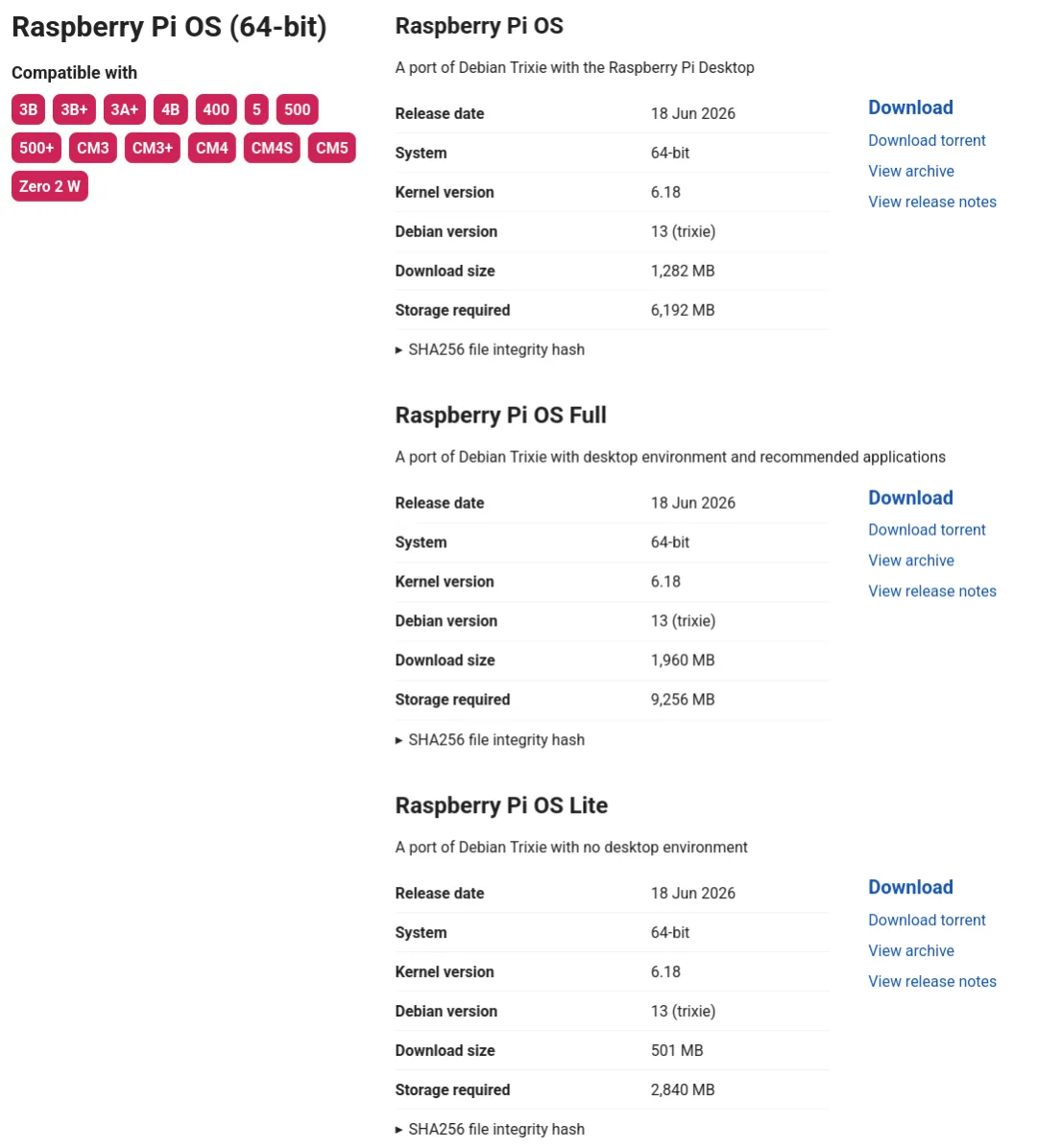
首先下载一个Raspberry Pi Os Lite版本:
https://downloads.raspberrypi.org/raspios_lite_arm64/images/raspios_lite_arm64-2025-05-13/2025-05-13-raspios-bookworm-arm64-lite.img.xz
这个版本可以从官网Raspberry Pi Os Lite的"View Archive"里面找到:
https://www.raspberrypi.com/software/operating-systems/
二、转换OS的磁盘文件
../qemu/build/qemu-img convert -f raw -O qcow2 -o compression_type=zstd "${IMG}"  "${IMG_QCOW2}"../qemu/build/qemu-img resize "${IMG_QCOW2}" $(qcow2Pow2RoundUp)Gsudo ../qemu/build/qemu-nbd -c /dev/nbd0  "${IMG_QCOW2}"echo  ',+' | sudo sfdisk  -N2  /dev/nbd0sudo resize2fs /dev/nbd0p2sudo mount -t vfat /dev/nbd0p1  "${MNT_DIR}"/bootsudo mount -t ext4 /dev/nbd0p2  "${MNT_DIR}"/rootecho "${USER_PASSWD}" | sudo tee "${MNT_DIR}"/boot/userconf 2>/dev/null 1>&2echo -e 'otg_mode=0\ndtoverlay=dwc2' | sudo tee -a "${MNT_DIR}"/boot/config.txt 2>/dev/null 1>&2sync --file-system "${MNT_DIR}"/boot && sleep 0.5sudo ln -sf /lib/systemd/system/ssh.service "${MNT_DIR}"/root/etc/systemd/system/multi-user.target.wants/ssh.serviceif [ -e "$HOME/.ssh/authorized_keys" ]; then  mkdir -p "${MNT_DIR}"/root/home/pi/.ssh/  cp "$HOME/.ssh/authorized_keys" "${MNT_DIR}"/root/home/pi/.ssh/  chown -R 1000:1000 "${MNT_DIR}"/root/home/pi/.ssh/  chmod 0700 "${MNT_DIR}"/root/home/pi/.ssh/  chmod 0600 "${MNT_DIR}"/root/home/pi/.ssh/authorized_keysfisync --file-system "${MNT_DIR}"/root && sleep 0.5sudo umount "${MNT_DIR}"/bootsudo umount "${MNT_DIR}"/rootsync "${IMG_QCOW2}" && sleep 0.5sudo ../qemu/build/qemu-nbd --disconnect /dev/nbd0
这个主要过程如下:
  • 使用qemu-img将下载的raw格式的磁盘文件转换为qcow2格式的虚拟磁盘,使用zstd方式压缩。zstd的支持在qemu编译configure的时候需要加入--enable-zstd
  • 使用qemu-img对qcow2虚拟磁盘扩容
  • 使用qemu-nbd挂载镜像为块设备,使用sfdisk扩容root分区表,使用resize2fs扩容ext4文件系统
  • 挂载boot+root分区,从而修改boot相关配置:用户密码、USB仿真适配
  • 系统配置:开机自启SSH、注入宿主机ssh公钥免密登录
  • 使用sync同步所有修改,卸载分区、断开nbd设备,得到可直接QEMU启动的定制仿真镜像
三、提取Linux内核文件和设备树文件
TOP_BUILDDIR := $(abspath $(dir $(lastword $(MAKEFILE_LIST))))MNT_DIR := $(TOP_BUILDDIR)/mntQEMU_BOOT_FILES := kernel8.img bcm2710-rpi-3-b.dtb bcm2711-rpi-4-b.dtb$(QEMU_BOOT_FILES): | $(IMG_QCOW2)        sudo ../qemu/build/qemu-nbd -c /dev/nbd0  "$(IMG_QCOW2)"        sudo mount -t vfat /dev/nbd0p1  "$(MNT_DIR)"/boot        cp $(addprefix '$(MNT_DIR)'/boot/,$(QEMU_BOOT_FILES))  "$(TOP_BUILDDIR)/"        sync --file-system "$(MNT_DIR)"/boot && sleep 0.5        sudo umount "$(MNT_DIR)"/boot        sync $(IMG_QCOW2) && sleep 0.5        sudo ../qemu/build/qemu-nbd --disconnect /dev/nbd0        touch $(QEMU_BOOT_FILES)
主要步骤如下:
  • qemu-nbd挂载镜像到/dev/nbd0;
  • 挂载boot vfat分区;批量复制内核、dtb到本地工程目录;
  • sync同步缓存、卸载分区;断开nbd设备;touch更新文件时间戳,标记产物为最新
经过这些步骤,最终产出本地可用的kernel8.img、rpi3/rpi4 dtb,供 后续步骤操作。
四、修改设备树文件
调用如下脚本:
#!/bin/bash# Source: https://gitlab.com/qemu-project/qemu/-/issues/2969#note_2586988981dtc -I dtb -O dts -o bcm2711-rpi-4-b.dts bcm2711-rpi-4-b.dtbpatch -p1 < bcm2711-rpi-4-b.dts.patchdtc -I dts -O dtb -o bcm2711-rpi-4-b-mod.dtb bcm2711-rpi-4-b.dtschmod +x bcm2711-rpi-4-b-mod.dtb
对设备树的补丁如下,仅仅一行的改动:
less bcm2711-rpi-4-b.dts.patch--- a/bcm2711-rpi-4-b.dts       2025-07-19 12:45:55.474766594 -0600+++ b/bcm2711-rpi-4-b.dts       2025-07-19 12:46:18.567997783 -0600@@ -1482,7 +1482,7 @@                        phy-names = "usb2-phy";                        power-domains = <0x10 0x06>;                        interrupt-names = "usb", "soft";-                       status = "disabled";+                       status = "okay";                        phandle = <0xc5>;                };
这是对USB控制器部分的修改:
usb@7e980000 {    compatible = "brcm,bcm2708-usb";    reg = <0x7e980000 0x10000 0x7e00b200 0x200>;    interrupts = <0x00 0x49 0x04 0x00 0x28 0x04>;    #address-cells = <0x01>;    #size-cells = <0x00>;    clocks = <0x16>;    clock-names = "otg";    phys = <0x17>;    phy-names = "usb2-phy";    power-domains = <0x10 0x06>;    interrupt-names = "usb\0soft";    status = "okay";    phandle = <0xc5>;};
总结起来,过程如下:
qcow2镜像    ↓ nbd挂载提取原生dtb (bcm2711-rpi-4-b.dtb)    ↓ dtc反编译原始dts (bcm2711-rpi-4-b.dts)    ↓ 手动编辑 / patch补丁patched dts (bcm2711-rpi-4-b.dts.patched)    ↓ dtc重编译定制mod.dtb (bcm2711-rpi-4-b.mod.dtb)    ↓ run-raspi4依赖该文件执行run-raspi4.sh,QEMU加载mod.dtb仿真RPi4
五、启动虚拟机
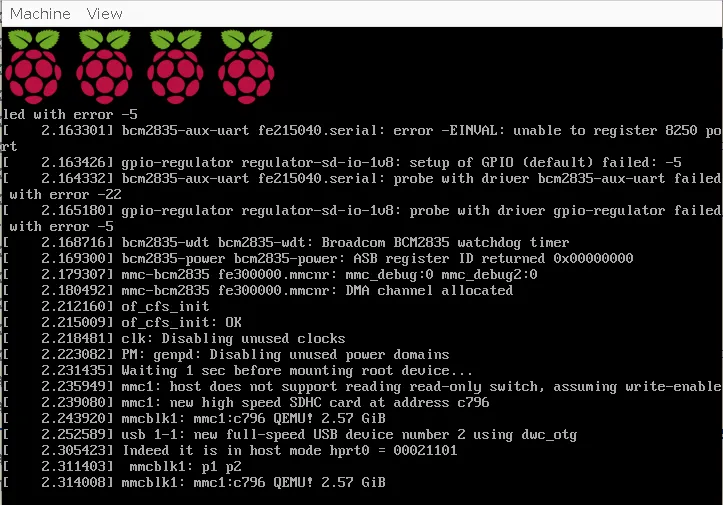
启动后的运行效果如下:
启动的完整命令如下:
../qemu/build/qemu-system-aarch64 \    # CPU、内存基础配置    -smp 4 \    -m 2G \    # 串口日志输出    -chardev pty,id=char0,logfile=/tmp/qemu-serial.log,signal=off \    -serial chardev:char0 \    # QEMU 交互控制台    -monitor stdio \    # 虚拟机标识    -name guest=raspbian-bookworm-2025 \    -uuid db5a91ef-fc42-4954-a9e4-bd9c9c24b502 \    # 机器平台:树莓派4B    -machine raspi4b \    # 内核 + 定制补丁设备树    -kernel kernel8.img \    -dtb bcm2711-rpi-4-b.mod.dtb \    # 内核启动参数 cmdline    -append "rw earlyprintk loglevel=8 console=ttyAMA1,115200 console=tty1 \        earlycon=pl011,0xfe201000 \        coherent_pool=1M 8250.nr_uarts=0 \        snd_bcm2835.enable_headphones=1 snd_bcm2835.enable_hdmi=1 \        bcm2708_fb.fbwidth=720 bcm2708_fb.fbheight=480 \        bcm2708_fb.fbdepth=16 bcm2708_fb.fbswap=1 \        vc_mem.mem_base=0x3f000000 vc_mem.mem_size=0x3f600000 \        dwc_otg.lpm_enable=0 \        root=/dev/mmcblk1p2 rootfstype=ext4 rootdelay=1 fsck.repair=yes \        verbosity=2 net.ifnames=0" \    # USB 外设:鼠标、键盘、声卡    -usb \    -device usb-mouse \    -device usb-kbd \    -device usb-audio,id=sound0 \    # 磁盘块设备层1:底层文件后端    -blockdev '{"driver":"file","filename":"2025-05-13-raspios-bookworm-arm64-lite.qcow2","node-name":"libvirt-2-storage","auto-read-only":true,"discard":"unmap"}' \    # 磁盘块设备层2:qcow2 格式层    -blockdev '{"node-name":"libvirt-2-format","read-only":false,"discard":"unmap","driver":"qcow2","file":"libvirt-2-storage","backing":null,"detect-zeroes":"unmap"}' \    # SD 卡存储设备挂载    -device '{"driver":"sd-card","drive":"libvirt-2-format","id":"virtio-disk0"}'
可以看到,内核使用从磁盘文件里面提取出来的kernel8.img,dtb使用修改过的bcm2711-rpi-4-b.mod.dtb,rootfs使用仿真出来的/dev/mmcblk1p2,当然虚拟机看到的以为是真实的sd/mmc控制器,而qemu在其实现中其背后的存储是下载的Raspberry Pi Os Lite磁盘文件,只是通过qemu-img转换为2025-05-13-raspios-bookworm-arm64-lite.qcow2。

最新文章

随机文章

基本 文件 流程 错误 SQL 调试
  1. 请求信息 : 2026-07-06 23:17:27 HTTP/2.0 GET : https://f.mffb.com.cn/a/503777.html
  2. 运行时间 : 0.102998s [ 吞吐率:9.71req/s ] 内存消耗:4,576.07kb 文件加载:140
  3. 缓存信息 : 0 reads,0 writes
  4. 会话信息 : SESSION_ID=b2187a3d8d8555905c3256e8eee52f9c
  1. /yingpanguazai/ssd/ssd1/www/f.mffb.com.cn/public/index.php ( 0.79 KB )
  2. /yingpanguazai/ssd/ssd1/www/f.mffb.com.cn/vendor/autoload.php ( 0.17 KB )
  3. /yingpanguazai/ssd/ssd1/www/f.mffb.com.cn/vendor/composer/autoload_real.php ( 2.49 KB )
  4. /yingpanguazai/ssd/ssd1/www/f.mffb.com.cn/vendor/composer/platform_check.php ( 0.90 KB )
  5. /yingpanguazai/ssd/ssd1/www/f.mffb.com.cn/vendor/composer/ClassLoader.php ( 14.03 KB )
  6. /yingpanguazai/ssd/ssd1/www/f.mffb.com.cn/vendor/composer/autoload_static.php ( 4.90 KB )
  7. /yingpanguazai/ssd/ssd1/www/f.mffb.com.cn/vendor/topthink/think-helper/src/helper.php ( 8.34 KB )
  8. /yingpanguazai/ssd/ssd1/www/f.mffb.com.cn/vendor/topthink/think-validate/src/helper.php ( 2.19 KB )
  9. /yingpanguazai/ssd/ssd1/www/f.mffb.com.cn/vendor/topthink/think-orm/src/helper.php ( 1.47 KB )
  10. /yingpanguazai/ssd/ssd1/www/f.mffb.com.cn/vendor/topthink/think-orm/stubs/load_stubs.php ( 0.16 KB )
  11. /yingpanguazai/ssd/ssd1/www/f.mffb.com.cn/vendor/topthink/framework/src/think/Exception.php ( 1.69 KB )
  12. /yingpanguazai/ssd/ssd1/www/f.mffb.com.cn/vendor/topthink/think-container/src/Facade.php ( 2.71 KB )
  13. /yingpanguazai/ssd/ssd1/www/f.mffb.com.cn/vendor/symfony/deprecation-contracts/function.php ( 0.99 KB )
  14. /yingpanguazai/ssd/ssd1/www/f.mffb.com.cn/vendor/symfony/polyfill-mbstring/bootstrap.php ( 8.26 KB )
  15. /yingpanguazai/ssd/ssd1/www/f.mffb.com.cn/vendor/symfony/polyfill-mbstring/bootstrap80.php ( 9.78 KB )
  16. /yingpanguazai/ssd/ssd1/www/f.mffb.com.cn/vendor/symfony/var-dumper/Resources/functions/dump.php ( 1.49 KB )
  17. /yingpanguazai/ssd/ssd1/www/f.mffb.com.cn/vendor/topthink/think-dumper/src/helper.php ( 0.18 KB )
  18. /yingpanguazai/ssd/ssd1/www/f.mffb.com.cn/vendor/symfony/var-dumper/VarDumper.php ( 4.30 KB )
  19. /yingpanguazai/ssd/ssd1/www/f.mffb.com.cn/vendor/topthink/framework/src/think/App.php ( 15.30 KB )
  20. /yingpanguazai/ssd/ssd1/www/f.mffb.com.cn/vendor/topthink/think-container/src/Container.php ( 15.76 KB )
  21. /yingpanguazai/ssd/ssd1/www/f.mffb.com.cn/vendor/psr/container/src/ContainerInterface.php ( 1.02 KB )
  22. /yingpanguazai/ssd/ssd1/www/f.mffb.com.cn/app/provider.php ( 0.19 KB )
  23. /yingpanguazai/ssd/ssd1/www/f.mffb.com.cn/vendor/topthink/framework/src/think/Http.php ( 6.04 KB )
  24. /yingpanguazai/ssd/ssd1/www/f.mffb.com.cn/vendor/topthink/think-helper/src/helper/Str.php ( 7.29 KB )
  25. /yingpanguazai/ssd/ssd1/www/f.mffb.com.cn/vendor/topthink/framework/src/think/Env.php ( 4.68 KB )
  26. /yingpanguazai/ssd/ssd1/www/f.mffb.com.cn/app/common.php ( 0.03 KB )
  27. /yingpanguazai/ssd/ssd1/www/f.mffb.com.cn/vendor/topthink/framework/src/helper.php ( 18.78 KB )
  28. /yingpanguazai/ssd/ssd1/www/f.mffb.com.cn/vendor/topthink/framework/src/think/Config.php ( 5.54 KB )
  29. /yingpanguazai/ssd/ssd1/www/f.mffb.com.cn/config/app.php ( 0.95 KB )
  30. /yingpanguazai/ssd/ssd1/www/f.mffb.com.cn/config/cache.php ( 0.78 KB )
  31. /yingpanguazai/ssd/ssd1/www/f.mffb.com.cn/config/console.php ( 0.23 KB )
  32. /yingpanguazai/ssd/ssd1/www/f.mffb.com.cn/config/cookie.php ( 0.56 KB )
  33. /yingpanguazai/ssd/ssd1/www/f.mffb.com.cn/config/database.php ( 2.48 KB )
  34. /yingpanguazai/ssd/ssd1/www/f.mffb.com.cn/vendor/topthink/framework/src/think/facade/Env.php ( 1.67 KB )
  35. /yingpanguazai/ssd/ssd1/www/f.mffb.com.cn/config/filesystem.php ( 0.61 KB )
  36. /yingpanguazai/ssd/ssd1/www/f.mffb.com.cn/config/lang.php ( 0.91 KB )
  37. /yingpanguazai/ssd/ssd1/www/f.mffb.com.cn/config/log.php ( 1.35 KB )
  38. /yingpanguazai/ssd/ssd1/www/f.mffb.com.cn/config/middleware.php ( 0.19 KB )
  39. /yingpanguazai/ssd/ssd1/www/f.mffb.com.cn/config/route.php ( 1.89 KB )
  40. /yingpanguazai/ssd/ssd1/www/f.mffb.com.cn/config/session.php ( 0.57 KB )
  41. /yingpanguazai/ssd/ssd1/www/f.mffb.com.cn/config/trace.php ( 0.34 KB )
  42. /yingpanguazai/ssd/ssd1/www/f.mffb.com.cn/config/view.php ( 0.82 KB )
  43. /yingpanguazai/ssd/ssd1/www/f.mffb.com.cn/app/event.php ( 0.25 KB )
  44. /yingpanguazai/ssd/ssd1/www/f.mffb.com.cn/vendor/topthink/framework/src/think/Event.php ( 7.67 KB )
  45. /yingpanguazai/ssd/ssd1/www/f.mffb.com.cn/app/service.php ( 0.13 KB )
  46. /yingpanguazai/ssd/ssd1/www/f.mffb.com.cn/app/AppService.php ( 0.26 KB )
  47. /yingpanguazai/ssd/ssd1/www/f.mffb.com.cn/vendor/topthink/framework/src/think/Service.php ( 1.64 KB )
  48. /yingpanguazai/ssd/ssd1/www/f.mffb.com.cn/vendor/topthink/framework/src/think/Lang.php ( 7.35 KB )
  49. /yingpanguazai/ssd/ssd1/www/f.mffb.com.cn/vendor/topthink/framework/src/lang/zh-cn.php ( 13.70 KB )
  50. /yingpanguazai/ssd/ssd1/www/f.mffb.com.cn/vendor/topthink/framework/src/think/initializer/Error.php ( 3.31 KB )
  51. /yingpanguazai/ssd/ssd1/www/f.mffb.com.cn/vendor/topthink/framework/src/think/initializer/RegisterService.php ( 1.33 KB )
  52. /yingpanguazai/ssd/ssd1/www/f.mffb.com.cn/vendor/services.php ( 0.14 KB )
  53. /yingpanguazai/ssd/ssd1/www/f.mffb.com.cn/vendor/topthink/framework/src/think/service/PaginatorService.php ( 1.52 KB )
  54. /yingpanguazai/ssd/ssd1/www/f.mffb.com.cn/vendor/topthink/framework/src/think/service/ValidateService.php ( 0.99 KB )
  55. /yingpanguazai/ssd/ssd1/www/f.mffb.com.cn/vendor/topthink/framework/src/think/service/ModelService.php ( 2.04 KB )
  56. /yingpanguazai/ssd/ssd1/www/f.mffb.com.cn/vendor/topthink/think-trace/src/Service.php ( 0.77 KB )
  57. /yingpanguazai/ssd/ssd1/www/f.mffb.com.cn/vendor/topthink/framework/src/think/Middleware.php ( 6.72 KB )
  58. /yingpanguazai/ssd/ssd1/www/f.mffb.com.cn/vendor/topthink/framework/src/think/initializer/BootService.php ( 0.77 KB )
  59. /yingpanguazai/ssd/ssd1/www/f.mffb.com.cn/vendor/topthink/think-orm/src/Paginator.php ( 11.86 KB )
  60. /yingpanguazai/ssd/ssd1/www/f.mffb.com.cn/vendor/topthink/think-validate/src/Validate.php ( 63.20 KB )
  61. /yingpanguazai/ssd/ssd1/www/f.mffb.com.cn/vendor/topthink/think-orm/src/Model.php ( 23.55 KB )
  62. /yingpanguazai/ssd/ssd1/www/f.mffb.com.cn/vendor/topthink/think-orm/src/model/concern/Attribute.php ( 21.05 KB )
  63. /yingpanguazai/ssd/ssd1/www/f.mffb.com.cn/vendor/topthink/think-orm/src/model/concern/AutoWriteData.php ( 4.21 KB )
  64. /yingpanguazai/ssd/ssd1/www/f.mffb.com.cn/vendor/topthink/think-orm/src/model/concern/Conversion.php ( 6.44 KB )
  65. /yingpanguazai/ssd/ssd1/www/f.mffb.com.cn/vendor/topthink/think-orm/src/model/concern/DbConnect.php ( 5.16 KB )
  66. /yingpanguazai/ssd/ssd1/www/f.mffb.com.cn/vendor/topthink/think-orm/src/model/concern/ModelEvent.php ( 2.33 KB )
  67. /yingpanguazai/ssd/ssd1/www/f.mffb.com.cn/vendor/topthink/think-orm/src/model/concern/RelationShip.php ( 28.29 KB )
  68. /yingpanguazai/ssd/ssd1/www/f.mffb.com.cn/vendor/topthink/think-helper/src/contract/Arrayable.php ( 0.09 KB )
  69. /yingpanguazai/ssd/ssd1/www/f.mffb.com.cn/vendor/topthink/think-helper/src/contract/Jsonable.php ( 0.13 KB )
  70. /yingpanguazai/ssd/ssd1/www/f.mffb.com.cn/vendor/topthink/think-orm/src/model/contract/Modelable.php ( 0.09 KB )
  71. /yingpanguazai/ssd/ssd1/www/f.mffb.com.cn/vendor/topthink/framework/src/think/Db.php ( 2.88 KB )
  72. /yingpanguazai/ssd/ssd1/www/f.mffb.com.cn/vendor/topthink/think-orm/src/DbManager.php ( 8.52 KB )
  73. /yingpanguazai/ssd/ssd1/www/f.mffb.com.cn/vendor/topthink/framework/src/think/Log.php ( 6.28 KB )
  74. /yingpanguazai/ssd/ssd1/www/f.mffb.com.cn/vendor/topthink/framework/src/think/Manager.php ( 3.92 KB )
  75. /yingpanguazai/ssd/ssd1/www/f.mffb.com.cn/vendor/psr/log/src/LoggerTrait.php ( 2.69 KB )
  76. /yingpanguazai/ssd/ssd1/www/f.mffb.com.cn/vendor/psr/log/src/LoggerInterface.php ( 2.71 KB )
  77. /yingpanguazai/ssd/ssd1/www/f.mffb.com.cn/vendor/topthink/framework/src/think/Cache.php ( 4.92 KB )
  78. /yingpanguazai/ssd/ssd1/www/f.mffb.com.cn/vendor/psr/simple-cache/src/CacheInterface.php ( 4.71 KB )
  79. /yingpanguazai/ssd/ssd1/www/f.mffb.com.cn/vendor/topthink/think-helper/src/helper/Arr.php ( 16.63 KB )
  80. /yingpanguazai/ssd/ssd1/www/f.mffb.com.cn/vendor/topthink/framework/src/think/cache/driver/File.php ( 7.84 KB )
  81. /yingpanguazai/ssd/ssd1/www/f.mffb.com.cn/vendor/topthink/framework/src/think/cache/Driver.php ( 9.03 KB )
  82. /yingpanguazai/ssd/ssd1/www/f.mffb.com.cn/vendor/topthink/framework/src/think/contract/CacheHandlerInterface.php ( 1.99 KB )
  83. /yingpanguazai/ssd/ssd1/www/f.mffb.com.cn/app/Request.php ( 0.09 KB )
  84. /yingpanguazai/ssd/ssd1/www/f.mffb.com.cn/vendor/topthink/framework/src/think/Request.php ( 55.78 KB )
  85. /yingpanguazai/ssd/ssd1/www/f.mffb.com.cn/app/middleware.php ( 0.25 KB )
  86. /yingpanguazai/ssd/ssd1/www/f.mffb.com.cn/vendor/topthink/framework/src/think/Pipeline.php ( 2.61 KB )
  87. /yingpanguazai/ssd/ssd1/www/f.mffb.com.cn/vendor/topthink/think-trace/src/TraceDebug.php ( 3.40 KB )
  88. /yingpanguazai/ssd/ssd1/www/f.mffb.com.cn/vendor/topthink/framework/src/think/middleware/SessionInit.php ( 1.94 KB )
  89. /yingpanguazai/ssd/ssd1/www/f.mffb.com.cn/vendor/topthink/framework/src/think/Session.php ( 1.80 KB )
  90. /yingpanguazai/ssd/ssd1/www/f.mffb.com.cn/vendor/topthink/framework/src/think/session/driver/File.php ( 6.27 KB )
  91. /yingpanguazai/ssd/ssd1/www/f.mffb.com.cn/vendor/topthink/framework/src/think/contract/SessionHandlerInterface.php ( 0.87 KB )
  92. /yingpanguazai/ssd/ssd1/www/f.mffb.com.cn/vendor/topthink/framework/src/think/session/Store.php ( 7.12 KB )
  93. /yingpanguazai/ssd/ssd1/www/f.mffb.com.cn/vendor/topthink/framework/src/think/Route.php ( 23.73 KB )
  94. /yingpanguazai/ssd/ssd1/www/f.mffb.com.cn/vendor/topthink/framework/src/think/route/RuleName.php ( 5.75 KB )
  95. /yingpanguazai/ssd/ssd1/www/f.mffb.com.cn/vendor/topthink/framework/src/think/route/Domain.php ( 2.53 KB )
  96. /yingpanguazai/ssd/ssd1/www/f.mffb.com.cn/vendor/topthink/framework/src/think/route/RuleGroup.php ( 22.43 KB )
  97. /yingpanguazai/ssd/ssd1/www/f.mffb.com.cn/vendor/topthink/framework/src/think/route/Rule.php ( 26.95 KB )
  98. /yingpanguazai/ssd/ssd1/www/f.mffb.com.cn/vendor/topthink/framework/src/think/route/RuleItem.php ( 9.78 KB )
  99. /yingpanguazai/ssd/ssd1/www/f.mffb.com.cn/route/app.php ( 1.72 KB )
  100. /yingpanguazai/ssd/ssd1/www/f.mffb.com.cn/vendor/topthink/framework/src/think/facade/Route.php ( 4.70 KB )
  101. /yingpanguazai/ssd/ssd1/www/f.mffb.com.cn/vendor/topthink/framework/src/think/route/dispatch/Controller.php ( 4.74 KB )
  102. /yingpanguazai/ssd/ssd1/www/f.mffb.com.cn/vendor/topthink/framework/src/think/route/Dispatch.php ( 10.44 KB )
  103. /yingpanguazai/ssd/ssd1/www/f.mffb.com.cn/app/controller/Index.php ( 4.81 KB )
  104. /yingpanguazai/ssd/ssd1/www/f.mffb.com.cn/app/BaseController.php ( 2.05 KB )
  105. /yingpanguazai/ssd/ssd1/www/f.mffb.com.cn/vendor/topthink/think-orm/src/facade/Db.php ( 0.93 KB )
  106. /yingpanguazai/ssd/ssd1/www/f.mffb.com.cn/vendor/topthink/think-orm/src/db/connector/Mysql.php ( 5.44 KB )
  107. /yingpanguazai/ssd/ssd1/www/f.mffb.com.cn/vendor/topthink/think-orm/src/db/PDOConnection.php ( 52.47 KB )
  108. /yingpanguazai/ssd/ssd1/www/f.mffb.com.cn/vendor/topthink/think-orm/src/db/Connection.php ( 8.39 KB )
  109. /yingpanguazai/ssd/ssd1/www/f.mffb.com.cn/vendor/topthink/think-orm/src/db/ConnectionInterface.php ( 4.57 KB )
  110. /yingpanguazai/ssd/ssd1/www/f.mffb.com.cn/vendor/topthink/think-orm/src/db/builder/Mysql.php ( 16.58 KB )
  111. /yingpanguazai/ssd/ssd1/www/f.mffb.com.cn/vendor/topthink/think-orm/src/db/Builder.php ( 24.06 KB )
  112. /yingpanguazai/ssd/ssd1/www/f.mffb.com.cn/vendor/topthink/think-orm/src/db/BaseBuilder.php ( 27.50 KB )
  113. /yingpanguazai/ssd/ssd1/www/f.mffb.com.cn/vendor/topthink/think-orm/src/db/Query.php ( 15.71 KB )
  114. /yingpanguazai/ssd/ssd1/www/f.mffb.com.cn/vendor/topthink/think-orm/src/db/BaseQuery.php ( 45.13 KB )
  115. /yingpanguazai/ssd/ssd1/www/f.mffb.com.cn/vendor/topthink/think-orm/src/db/concern/TimeFieldQuery.php ( 7.43 KB )
  116. /yingpanguazai/ssd/ssd1/www/f.mffb.com.cn/vendor/topthink/think-orm/src/db/concern/AggregateQuery.php ( 3.26 KB )
  117. /yingpanguazai/ssd/ssd1/www/f.mffb.com.cn/vendor/topthink/think-orm/src/db/concern/ModelRelationQuery.php ( 20.07 KB )
  118. /yingpanguazai/ssd/ssd1/www/f.mffb.com.cn/vendor/topthink/think-orm/src/db/concern/ParamsBind.php ( 3.66 KB )
  119. /yingpanguazai/ssd/ssd1/www/f.mffb.com.cn/vendor/topthink/think-orm/src/db/concern/ResultOperation.php ( 7.01 KB )
  120. /yingpanguazai/ssd/ssd1/www/f.mffb.com.cn/vendor/topthink/think-orm/src/db/concern/WhereQuery.php ( 19.37 KB )
  121. /yingpanguazai/ssd/ssd1/www/f.mffb.com.cn/vendor/topthink/think-orm/src/db/concern/JoinAndViewQuery.php ( 7.11 KB )
  122. /yingpanguazai/ssd/ssd1/www/f.mffb.com.cn/vendor/topthink/think-orm/src/db/concern/TableFieldInfo.php ( 2.63 KB )
  123. /yingpanguazai/ssd/ssd1/www/f.mffb.com.cn/vendor/topthink/think-orm/src/db/concern/Transaction.php ( 2.77 KB )
  124. /yingpanguazai/ssd/ssd1/www/f.mffb.com.cn/vendor/topthink/framework/src/think/log/driver/File.php ( 5.96 KB )
  125. /yingpanguazai/ssd/ssd1/www/f.mffb.com.cn/vendor/topthink/framework/src/think/contract/LogHandlerInterface.php ( 0.86 KB )
  126. /yingpanguazai/ssd/ssd1/www/f.mffb.com.cn/vendor/topthink/framework/src/think/log/Channel.php ( 3.89 KB )
  127. /yingpanguazai/ssd/ssd1/www/f.mffb.com.cn/vendor/topthink/framework/src/think/event/LogRecord.php ( 1.02 KB )
  128. /yingpanguazai/ssd/ssd1/www/f.mffb.com.cn/vendor/topthink/think-helper/src/Collection.php ( 16.47 KB )
  129. /yingpanguazai/ssd/ssd1/www/f.mffb.com.cn/vendor/topthink/framework/src/think/facade/View.php ( 1.70 KB )
  130. /yingpanguazai/ssd/ssd1/www/f.mffb.com.cn/vendor/topthink/framework/src/think/View.php ( 4.39 KB )
  131. /yingpanguazai/ssd/ssd1/www/f.mffb.com.cn/vendor/topthink/framework/src/think/Response.php ( 8.81 KB )
  132. /yingpanguazai/ssd/ssd1/www/f.mffb.com.cn/vendor/topthink/framework/src/think/response/View.php ( 3.29 KB )
  133. /yingpanguazai/ssd/ssd1/www/f.mffb.com.cn/vendor/topthink/framework/src/think/Cookie.php ( 6.06 KB )
  134. /yingpanguazai/ssd/ssd1/www/f.mffb.com.cn/vendor/topthink/think-view/src/Think.php ( 8.38 KB )
  135. /yingpanguazai/ssd/ssd1/www/f.mffb.com.cn/vendor/topthink/framework/src/think/contract/TemplateHandlerInterface.php ( 1.60 KB )
  136. /yingpanguazai/ssd/ssd1/www/f.mffb.com.cn/vendor/topthink/think-template/src/Template.php ( 46.61 KB )
  137. /yingpanguazai/ssd/ssd1/www/f.mffb.com.cn/vendor/topthink/think-template/src/template/driver/File.php ( 2.41 KB )
  138. /yingpanguazai/ssd/ssd1/www/f.mffb.com.cn/vendor/topthink/think-template/src/template/contract/DriverInterface.php ( 0.86 KB )
  139. /yingpanguazai/ssd/ssd1/www/f.mffb.com.cn/runtime/temp/067d451b9a0c665040f3f1bdd3293d68.php ( 11.98 KB )
  140. /yingpanguazai/ssd/ssd1/www/f.mffb.com.cn/vendor/topthink/think-trace/src/Html.php ( 4.42 KB )
  1. CONNECT:[ UseTime:0.000483s ] mysql:host=127.0.0.1;port=3306;dbname=f_mffb;charset=utf8mb4
  2. SHOW FULL COLUMNS FROM `fenlei` [ RunTime:0.000750s ]
  3. SELECT * FROM `fenlei` WHERE `fid` = 0 [ RunTime:0.000298s ]
  4. SELECT * FROM `fenlei` WHERE `fid` = 63 [ RunTime:0.000276s ]
  5. SHOW FULL COLUMNS FROM `set` [ RunTime:0.000595s ]
  6. SELECT * FROM `set` [ RunTime:0.000677s ]
  7. SHOW FULL COLUMNS FROM `article` [ RunTime:0.000791s ]
  8. SELECT * FROM `article` WHERE `id` = 503777 LIMIT 1 [ RunTime:0.000513s ]
  9. UPDATE `article` SET `lasttime` = 1783351047 WHERE `id` = 503777 [ RunTime:0.000718s ]
  10. SELECT * FROM `fenlei` WHERE `id` = 67 LIMIT 1 [ RunTime:0.000243s ]
  11. SELECT * FROM `article` WHERE `id` < 503777 ORDER BY `id` DESC LIMIT 1 [ RunTime:0.000693s ]
  12. SELECT * FROM `article` WHERE `id` > 503777 ORDER BY `id` ASC LIMIT 1 [ RunTime:0.004758s ]
  13. SELECT * FROM `article` WHERE `id` < 503777 ORDER BY `id` DESC LIMIT 10 [ RunTime:0.018875s ]
  14. SELECT * FROM `article` WHERE `id` < 503777 ORDER BY `id` DESC LIMIT 10,10 [ RunTime:0.001478s ]
  15. SELECT * FROM `article` WHERE `id` < 503777 ORDER BY `id` DESC LIMIT 20,10 [ RunTime:0.006668s ]
0.104619s