当前位置:首页>python>Python图片转格子画工具

Python图片转格子画工具

  • 2026-08-19 08:09:39
Python图片转格子画工具

图片转格子画工具 - 完整文档

一、项目概述

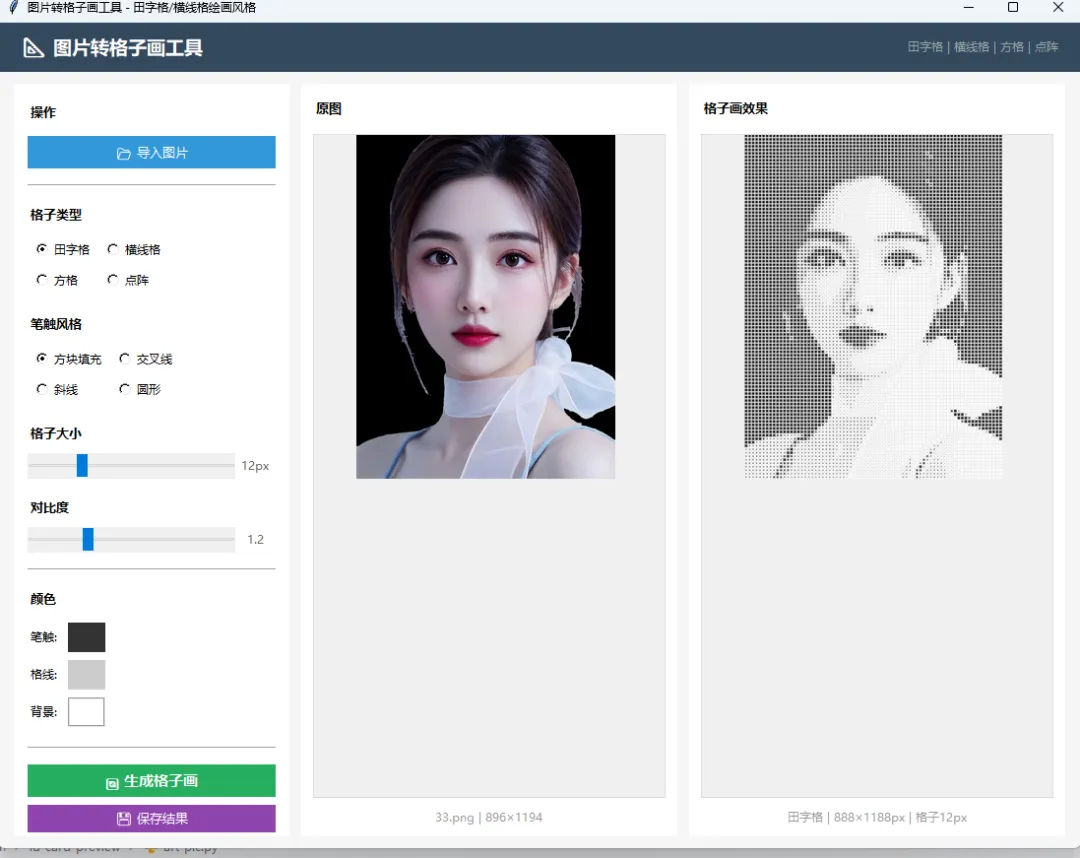
本工具将普通图片自动转换为"在格子纸上用铅笔绘画"的艺术效果。支持田字格、横线格、方格、点阵四种格纸风格,配合多种笔触样式,生成类似手绘格子画的图片。

适用场景:

  • 社交媒体创意图片
  • 教学演示(像素化/网格化概念)
  • 手账/笔记风格头像生成
  • 艺术风格化处理
  • 打印后在真实格子纸上临摹的参考图

二、技术原理

原始图片 → 灰度转换 → 网格划分 → 灰度采样 → 格纸底纹绘制 → 笔触填充 → 输出

详细步骤:

  1. 灰度转换:将彩色图片转为灰度图(0-255)
  2. 网格划分:按设定格子大小将图片划分为 N×M 个小格
  3. 灰度采样:缩放图片到 N×M 像素,每个像素代表一格的平均灰度
  4. 对比度增强:根据设定的对比度系数增强明暗差异
  5. 底纹绘制:在输出画布上绘制格子底纹(田字格/横线等)
  6. 笔触填充:根据每格灰度值(反转后=强度),用选定笔触风格填充
    • 越暗的区域 → 笔触越重/越大/越密
    • 越亮的区域 → 笔触越轻/越小/留白
  7. 输出:生成最终格子画效果图

三、环境要求

依赖
版本
用途
Python
3.8+
运行环境
Pillow
9.0+
图片处理/绘制
numpy
1.20+
灰度矩阵运算
tkinter
内置
GUI界面

四、安装与启动

4.1 安装依赖

pip install Pillow numpy

4.2 启动程序

cd grid-art-converterpython grid_art.py

启动后显示 1100×720 像素的GUI窗口。

五、界面说明

5.1 整体布局

┌─────────────────────────────────────────────────────────┐│  📐 图片转格子画工具          田字格|横线格|方格|点阵    │├──────────┬───────────────────┬───────────────────────────┤│ 控制面板  │    原图预览       │     格子画效果预览         ││          │                   │                           ││ 导入图片  │                   │                           ││ ──────── │                   │                           ││ 格子类型  │   [原始图片]      │   [转换结果]              ││ ○田字格   │                   │                           ││ ○横线格   │                   │                           ││ ○方格     │                   │                           ││ ○点阵     │                   │                           ││ ──────── │                   │                           ││ 笔触风格  │                   │                           ││ ○方块填充 │                   │                           ││ ○交叉线   │                   │                           ││ ○斜线     │                   │                           ││ ○圆形     │                   │                           ││ ──────── │                   │                           ││ 格子大小  │                   │                           ││ [===●==] │                   │                           ││ 对比度    │                   │                           ││ [===●==] │                   │                           ││ ──────── │                   │                           ││ 颜色      │ filename.jpg      │  田字格|800×600|12px      ││ 笔触 [■]  │ 1200×900          │                           ││ 格线 [■]  │                   │                           ││ 背景 [□]  │                   │                           ││ ──────── │                   │                           ││ [生成格子画]│                  │                           ││ [保存结果] │                   │                           │└──────────┴───────────────────┴───────────────────────────┘

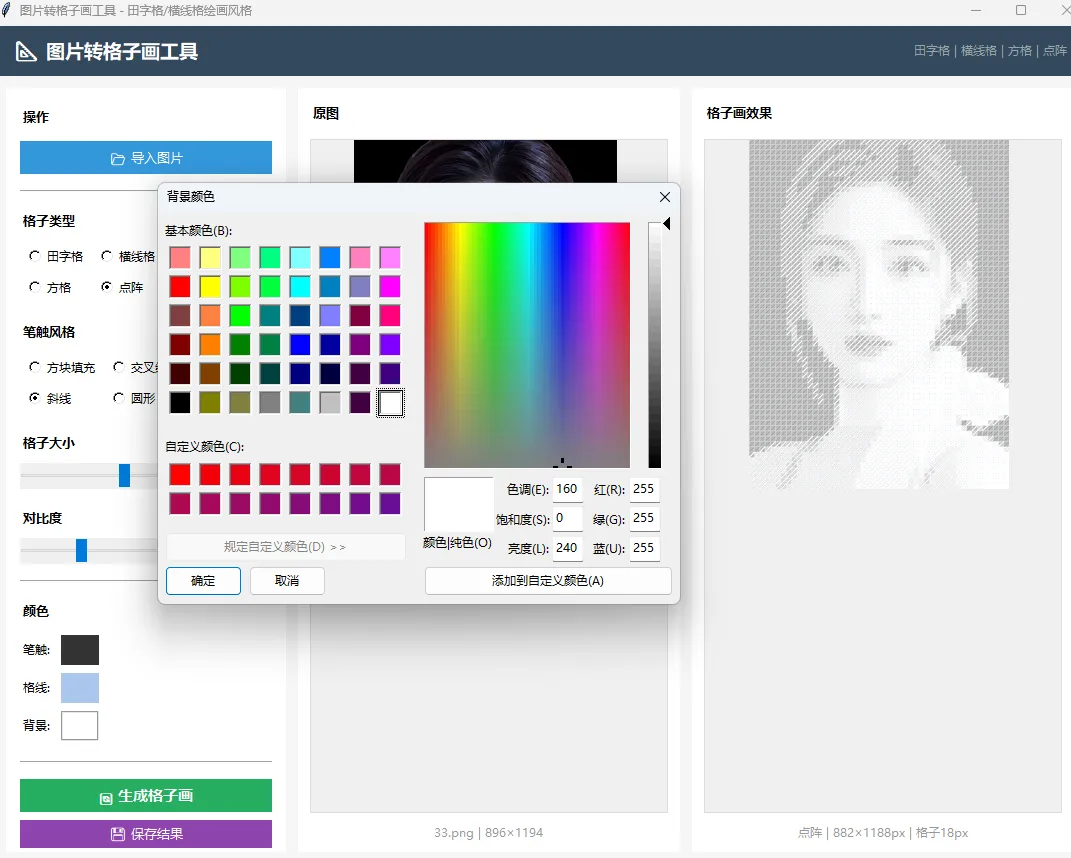
5.2 控制面板详解

导入图片

  • 支持格式:PNG、JPG、JPEG、BMP、WEBP、GIF
  • 点击后打开文件选择器
  • 导入后自动在中栏显示预览

格子类型(4选1)

类型
效果
说明
田字格
方格+中心虚线十字
类似小学写字本,格子内有辅助虚线
横线格
仅水平线
类似信纸/笔记本,只有横向线条
方格
纯正方格
类似数学草稿纸,横竖实线
点阵
格子交叉点为小圆点
类似点阵笔记本(Bullet Journal)

笔触风格(4选1)

风格
效果
适合
方块填充
格子内填充不同大小的方块
像素画/马赛克风格
交叉线
在格子内画交叉线,暗处线条更多
素描排线风格
斜线
格子内画平行斜线,暗处更密
版画/雕刻风格
圆形
格子内画不同大小的圆
波点/半调风格

格子大小(滑块 6~30px)

效果
6px
格子极小,细节丰富,接近原图
12px
默认值,平衡细节和格子感
20px
格子较大,明显的像素化/粗犷感
30px
格子极大,极简抽象风格

对比度(滑块 0.5~3.0)

效果
0.5
对比度低,画面平淡柔和
1.0
原始对比度
1.2
默认值,轻微增强
2.0+
高对比度,黑白分明

颜色设置

颜色项
默认值
说明
笔触颜色
#333333 (深灰)
格子内填充的颜色
格线颜色
#CCCCCC (浅灰)
格子边框线颜色
背景颜色
#FFFFFF (白色)
画布底色

点击色块可打开取色器选择任意颜色。

六、使用步骤

6.1 基本流程

  1. 点击「📂 导入图片」选择本地图片
  2. 在中栏确认原图预览
  3. 选择格子类型(田字格/横线格/方格/点阵)
  4. 选择笔触风格(方块/交叉线/斜线/圆形)
  5. 调节格子大小和对比度
  6. 点击「🔄 生成格子画」
  7. 在右栏查看效果
  8. 满意后点击「💾 保存结果」导出

6.2 参数调优建议

人像照片:

  • 格子类型:田字格或方格
  • 笔触风格:方块填充或圆形
  • 格子大小:10-14px
  • 对比度:1.3-1.5

风景照:

  • 格子类型:横线格
  • 笔触风格:斜线
  • 格子大小:8-12px
  • 对比度:1.0-1.2

简笔画/线稿:

  • 格子类型:方格
  • 笔触风格:交叉线
  • 格子大小:6-10px
  • 对比度:2.0+

抽象/像素风:

  • 格子类型:点阵
  • 笔触风格:圆形
  • 格子大小:20-30px
  • 对比度:1.5

6.3 颜色搭配建议

风格
笔触
格线
背景
铅笔素描
#333333
#CCCCCC
#FFFFFF
蓝色钢笔
#1a5276
#aed6f1
#fdfefe
红色批注
#922b21
#f5b7b1
#fdf2f2
复古牛皮纸
#4a3728
#c4a882
#f5e6d3
黑板粉笔
#FFFFFF
#555555
#2d3436
绿格作业本
#333333
#82c882
#f0fff0

七、输出说明

输出尺寸

输出图片尺寸 = (原图宽 ÷ 格子大小) × 格子大小 × (原图高 ÷ 格子大小) × 格子大小

例如:原图1200×900,格子12px → 输出 1200×900(100×75格)

文件格式

  • PNG:无损,保留所有细节(推荐)
  • JPG:有损压缩,文件更小

八、项目结构

grid-art-converter/├── grid_art.py         # 主程序(转换引擎 + GUI界面)├── README.md           # 快速说明└── DOCUMENTATION.md    # 本文档

代码结构

职责
GridArtConverter
核心转换引擎:灰度处理、网格绘制、笔触填充
GridArtApp
GUI界面:控件布局、事件处理、预览显示

九、常见问题

Q: 运行报错 No module named 'numpy'

pip install numpy

Q: 生成速度慢

  • 原图越大+格子越小 → 计算量越大
  • 建议先用较大格子(20px)快速预览效果
  • 确认满意后再用小格子(8-12px)生成最终版

Q: 效果太暗/太亮

  • 调节对比度滑块
  • 太暗 → 降低对比度到0.8-1.0
  • 太亮 → 提高对比度到1.5-2.0

Q: 格子线太明显/不明显

Q: 想要彩色效果而非灰度

当前版本为灰度笔触。如需彩色效果可修改 _draw_stroke 方法,从原图采样颜色值作为笔触颜色。

十、扩展开发

添加新格子类型

在 _draw_grid 方法中添加新的 elif 分支:

elif self.grid_type == "your_type":# 你的格子绘制逻辑pass

添加新笔触风格

在 _draw_stroke 方法中添加新的 elif 分支:

elif self.stroke_style == "your_style":# 你的笔触绘制逻辑pass

支持彩色输出

修改 convert 方法,保留原图RGB信息,在 _draw_stroke 中使用原图对应区域的主色调作为笔触颜色。

"""图片转格子画工具 - Python GUI将普通图片转换为铅笔田字格/横线格风格的手绘效果。原理:将图片划分为网格(每格对应一个像素块)根据该区域的灰度值,在格子里用不同"笔触"填充叠加田字格/横线格底纹,模拟在格子纸上绘画的效果支持模式:田字格模式:方格子+对角虚线,像小学写字本横线格模式:横向线条,像信纸/笔记本方格模式:纯正方格子点阵模式:格子交叉点用点标记依赖: pip install Pillow numpy"""import tkinter as tkfrom tkinter import ttk, filedialog, messagebox, colorchooserfrom PIL import Image, ImageDraw, ImageFont, ImageTk, ImageFilterimport numpy as npimport osclass GridArtConverter:"""图片转格子画核心转换器"""def __init__(self):    self.grid_size = 12       # 每格像素大小    self.grid_type = "tian"   # tian/hline/square/dot    self.line_color = "#CCCCCC"  # 格子线颜色    self.stroke_color = "#333333"  # 笔触颜色    self.bg_color = "#FFFFFF"     # 背景色    self.contrast = 1.2       # 对比度增强    self.threshold_levels = 5  # 灰度分级数    self.stroke_style = "fill"  # fill/cross/diagonal/circledef convert(self, img, output_size=None):    """    将图片转换为格子画风格    img: PIL Image对象    output_size: 输出尺寸 (w, h),None则自动计算    """    # 转灰度    gray = img.convert('L')    # 计算网格数量    w, h = gray.size    cols = w // self.grid_size    rows = h // self.grid_size    if cols < 5 or rows < 5:        cols = max(cols, 20)        rows = max(rows, 20)    # 缩小图片到网格数量大小(每像素=一格)    small = gray.resize((cols, rows), Image.LANCZOS)    pixels = np.array(small, dtype=np.float32)    # 对比度增强    mean_val = pixels.mean()    pixels = (pixels - mean_val) * self.contrast + mean_val    pixels = np.clip(pixels, 0255)    # 输出画布    out_w = cols * self.grid_size    out_h = rows * self.grid_size    canvas = Image.new('RGB', (out_w, out_h), self.bg_color)    draw = ImageDraw.Draw(canvas)    # 绘制格子底纹    self._draw_grid(draw, out_w, out_h, cols, rows)    # 根据灰度值在每格填充笔触    for row in range(rows):        for col in range(cols):            val = pixels[row, col]            # 反转:越暗的地方笔触越重            intensity = 1.0 - (val / 255.0)            self._draw_stroke(draw, col, row, intensity)    # 缩放到目标尺寸    if output_size:        canvas = canvas.resize(output_size, Image.LANCZOS)    return canvasdef _draw_grid(self, draw, w, h, cols, rows):    """绘制格子底纹"""    gs = self.grid_size    lc = self.line_color    if self.grid_type == "tian":        # 田字格:外框+中间十字虚线        for r in range(rows + 1):            y = r * gs            draw.line([0, y, w, y], fill=lc, width=1)        for c in range(cols + 1):            x = c * gs            draw.line([x, 0, x, h], fill=lc, width=1)        # 中间虚线(每格内中心十字)        dash_color = self._lighten_color(lc, 0.5)        for r in range(rows):            y_mid = r * gs + gs // 2            # 横向虚线            for x in range(0, w, 6):                draw.line([x, y_mid, min(x+3, w), y_mid], fill=dash_color, width=1)        for c in range(cols):            x_mid = c * gs + gs // 2            for y in range(0, h, 6):                draw.line([x_mid, y, x_mid, min(y+3, h)], fill=dash_color, width=1)    elif self.grid_type == "hline":        # 横线格        for r in range(rows + 1):            y = r * gs            draw.line([0, y, w, y], fill=lc, width=1)    elif self.grid_type == "square":        # 纯方格        for r in range(rows + 1):            y = r * gs            draw.line([0, y, w, y], fill=lc, width=1)        for c in range(cols + 1):            x = c * gs            draw.line([x, 0, x, h], fill=lc, width=1)    elif self.grid_type == "dot":        # 点阵格        for r in range(rows + 1):            for c in range(cols + 1):                x = c * gs                y = r * gs                draw.ellipse([x-1, y-1, x+1, y+1], fill=lc)def _draw_stroke(self, draw, col, row, intensity):    """在格子里画笔触"""    if intensity < 0.05:        return  # 太浅跳过    gs = self.grid_size    x1 = col * gs + 1    y1 = row * gs + 1    x2 = x1 + gs - 2    y2 = y1 + gs - 2    cx = (x1 + x2) // 2    cy = (y1 + y2) // 2    # 根据强度调整颜色深浅    alpha = min(intensity * 1.31.0)    color = self._color_with_alpha(self.stroke_color, alpha)    if self.stroke_style == "fill":        # 填充式:根据强度填充不同大小的方块        margin = int((1 - intensity) * gs // 2)        margin = max(margin, 1)        draw.rectangle([x1 + margin, y1 + margin, x2 - margin, y2 - margin], fill=color)    elif self.stroke_style == "cross":        # 交叉线:根据强度画1~3条线        lw = max(1int(intensity * 3))        if intensity > 0.2:            draw.line([x1, y1, x2, y2], fill=color, width=lw)        if intensity > 0.5:            draw.line([x2, y1, x1, y2], fill=color, width=lw)        if intensity > 0.8:            draw.line([cx, y1, cx, y2], fill=color, width=lw)    elif self.stroke_style == "diagonal":        # 斜线排列:根据强度增加斜线密度        lw = 1        count = int(intensity * 4) + 1        step = gs // (count + 1)        for i in range(1, count + 1):            offset = i * step            draw.line([x1, y1 + offset, x1 + offset, y1], fill=color, width=lw)            draw.line([x2 - offset, y2, x2, y2 - offset], fill=color, width=lw)    elif self.stroke_style == "circle":        # 圆形:根据强度画不同大小的圆        r = int(intensity * (gs // 2 - 1))        r = max(r, 1)        draw.ellipse([cx - r, cy - r, cx + r, cy + r], fill=color)def _color_with_alpha(self, hex_color, alpha):    """根据alpha混合颜色和背景"""    r = int(hex_color[1:3], 16)    g = int(hex_color[3:5], 16)    b = int(hex_color[5:7], 16)    bg_r = int(self.bg_color[1:3], 16)    bg_g = int(self.bg_color[3:5], 16)    bg_b = int(self.bg_color[5:7], 16)    out_r = int(r * alpha + bg_r * (1 - alpha))    out_g = int(g * alpha + bg_g * (1 - alpha))    out_b = int(b * alpha + bg_b * (1 - alpha))    return f"#{out_r:02x}{out_g:02x}{out_b:02x}"def _lighten_color(self, hex_color, factor):    """颜色变浅"""    r = int(hex_color[1:3], 16)    g = int(hex_color[3:5], 16)    b = int(hex_color[5:7], 16)    r = int(r + (255 - r) * factor)    g = int(g + (255 - g) * factor)    b = int(b + (255 - b) * factor)    return f"#{r:02x}{g:02x}{b:02x}"============ GUI 主界面 ============class GridArtApp:def init(self, root):self.root = rootself.root.title("图片转格子画工具 - 田字格/横线格绘画风格")self.root.geometry("1100x720")self.root.configure(bg="#f5f5f5")    self.converter = GridArtConverter()    self.source_img = None    self.result_img = None    self.tk_source = None    self.tk_result = None    self._build_ui()def _build_ui(self):    # 顶部标题栏    header = tk.Frame(self.root, bg="#34495e", height=50)    header.pack(fill=tk.X)    header.pack_propagate(False)    tk.Label(header, text="📐 图片转格子画工具", font=("Microsoft YaHei"14"bold"),             bg="#34495e", fg="white").pack(side=tk.LEFT, padx=20, pady=12)    tk.Label(header, text="田字格 | 横线格 | 方格 | 点阵", font=("Microsoft YaHei"9),             bg="#34495e", fg="#95a5a6").pack(side=tk.RIGHT, padx=20)    # 主体:三栏布局    body = tk.Frame(self.root, bg="#f5f5f5")    body.pack(fill=tk.BOTH, expand=True, padx=16, pady=12)    # 左栏:控制面板    ctrl_panel = tk.Frame(body, bg="#ffffff", width=280, relief=tk.FLAT)    ctrl_panel.pack(side=tk.LEFT, fill=tk.Y, padx=(012))    ctrl_panel.pack_propagate(False)    self._build_controls(ctrl_panel)    # 中栏:原图预览    mid_panel = tk.Frame(body, bg="#ffffff")    mid_panel.pack(side=tk.LEFT, fill=tk.BOTH, expand=True, padx=(012))    self._build_source_preview(mid_panel)    # 右栏:结果预览    right_panel = tk.Frame(body, bg="#ffffff")    right_panel.pack(side=tk.LEFT, fill=tk.BOTH, expand=True)    self._build_result_preview(right_panel)def _build_controls(self, parent):    """控制面板"""    pad = {"padx"14"pady"4}    # 导入图片    tk.Label(parent, text="操作", font=("Microsoft YaHei"10"bold"),             bg="#ffffff").pack(anchor="w", padx=14, pady=(168))    tk.Button(parent, text="📂 导入图片", font=("Microsoft YaHei"10),             bg="#3498db", fg="white", relief=tk.FLAT, cursor="hand2",             command=self._load_image).pack(fill=tk.X, **pad)    ttk.Separator(parent).pack(fill=tk.X, padx=14, pady=12)    # 格子类型    tk.Label(parent, text="格子类型", font=("Microsoft YaHei"10"bold"),             bg="#ffffff").pack(anchor="w", **pad)    self.grid_type_var = tk.StringVar(value="tian")    types = [("田字格""tian"), ("横线格""hline"), ("方格""square"), ("点阵""dot")]    type_frame = tk.Frame(parent, bg="#ffffff")    type_frame.pack(fill=tk.X, **pad)    for i, (label, val) in enumerate(types):        rb = tk.Radiobutton(type_frame, text=label, variable=self.grid_type_var,                           value=val, bg="#ffffff", font=("Microsoft YaHei"9),                           command=self._on_param_change)        rb.grid(row=i // 2, column=i % 2, sticky="w", padx=4, pady=2)    # 笔触风格    tk.Label(parent, text="笔触风格", font=("Microsoft YaHei"10"bold"),             bg="#ffffff").pack(anchor="w", padx=14, pady=(124))    self.stroke_var = tk.StringVar(value="fill")    strokes = [("方块填充""fill"), ("交叉线""cross"), ("斜线""diagonal"), ("圆形""circle")]    stroke_frame = tk.Frame(parent, bg="#ffffff")    stroke_frame.pack(fill=tk.X, **pad)    for i, (label, val) in enumerate(strokes):        rb = tk.Radiobutton(stroke_frame, text=label, variable=self.stroke_var,                           value=val, bg="#ffffff", font=("Microsoft YaHei"9),                           command=self._on_param_change)        rb.grid(row=i // 2, column=i % 2, sticky="w", padx=4, pady=2)    # 格子大小    tk.Label(parent, text="格子大小", font=("Microsoft YaHei"10"bold"),             bg="#ffffff").pack(anchor="w", padx=14, pady=(124))    self.grid_size_var = tk.IntVar(value=12)    size_frame = tk.Frame(parent, bg="#ffffff")    size_frame.pack(fill=tk.X, **pad)    self.size_label = tk.Label(size_frame, text="12px", font=("Microsoft YaHei"9),                                bg="#ffffff", fg="#666", width=5)    self.size_label.pack(side=tk.RIGHT)    ttk.Scale(size_frame, from_=6, to=30, variable=self.grid_size_var,             orient=tk.HORIZONTAL, command=self._on_size_change).pack(side=tk.LEFT, fill=tk.X, expand=True)    # 对比度    tk.Label(parent, text="对比度", font=("Microsoft YaHei"10"bold"),             bg="#ffffff").pack(anchor="w", padx=14, pady=(124))    self.contrast_var = tk.DoubleVar(value=1.2)    contrast_frame = tk.Frame(parent, bg="#ffffff")    contrast_frame.pack(fill=tk.X, **pad)    self.contrast_label = tk.Label(contrast_frame, text="1.2", font=("Microsoft YaHei"9),                                    bg="#ffffff", fg="#666", width=5)    self.contrast_label.pack(side=tk.RIGHT)    ttk.Scale(contrast_frame, from_=0.5, to=3.0, variable=self.contrast_var,             orient=tk.HORIZONTAL, command=self._on_contrast_change).pack(side=tk.LEFT, fill=tk.X, expand=True)    # 颜色设置    ttk.Separator(parent).pack(fill=tk.X, padx=14, pady=12)    tk.Label(parent, text="颜色", font=("Microsoft YaHei"10"bold"),             bg="#ffffff").pack(anchor="w", **pad)    color_frame = tk.Frame(parent, bg="#ffffff")    color_frame.pack(fill=tk.X, **pad)    tk.Label(color_frame, text="笔触:", bg="#ffffff", font=("Microsoft YaHei"9)).grid(row=0, column=0, sticky="w")    self.stroke_color_btn = tk.Button(color_frame, bg="#333333", width=4, height=1,                                       relief=tk.FLAT, cursor="hand2", command=self._pick_stroke_color)    self.stroke_color_btn.grid(row=0, column=1, padx=8, pady=4)    tk.Label(color_frame, text="格线:", bg="#ffffff", font=("Microsoft YaHei"9)).grid(row=1, column=0, sticky="w")    self.line_color_btn = tk.Button(color_frame, bg="#CCCCCC", width=4, height=1,                                     relief=tk.FLAT, cursor="hand2", command=self._pick_line_color)    self.line_color_btn.grid(row=1, column=1, padx=8, pady=4)    tk.Label(color_frame, text="背景:", bg="#ffffff", font=("Microsoft YaHei"9)).grid(row=2, column=0, sticky="w")    self.bg_color_btn = tk.Button(color_frame, bg="#FFFFFF", width=4, height=1,                                   relief=tk.GROOVE, cursor="hand2", command=self._pick_bg_color)    self.bg_color_btn.grid(row=2, column=1, padx=8, pady=4)    # 转换 & 保存按钮    ttk.Separator(parent).pack(fill=tk.X, padx=14, pady=12)    tk.Button(parent, text="🔄 生成格子画", font=("Microsoft YaHei"11"bold"),             bg="#27ae60", fg="white", relief=tk.FLAT, cursor="hand2",             command=self._convert).pack(fill=tk.X, padx=14, pady=4)    tk.Button(parent, text="💾 保存结果", font=("Microsoft YaHei"10),             bg="#8e44ad", fg="white", relief=tk.FLAT, cursor="hand2",             command=self._save_result).pack(fill=tk.X, padx=14, pady=4)def _build_source_preview(self, parent):    """原图预览"""    tk.Label(parent, text="原图", font=("Microsoft YaHei"10"bold"),             bg="#ffffff").pack(anchor="w", padx=12, pady=(126))    self.source_canvas = tk.Canvas(parent, width=350, height=350, bg="#f0f0f0",                                    highlightthickness=1, highlightbackground="#ddd")    self.source_canvas.pack(padx=12, pady=8, fill=tk.BOTH, expand=True)    self.source_info = tk.Label(parent, text="请导入图片", font=("Microsoft YaHei"9),                                 bg="#ffffff", fg="#999")    self.source_info.pack(pady=(08))def _build_result_preview(self, parent):    """结果预览"""    tk.Label(parent, text="格子画效果", font=("Microsoft YaHei"10"bold"),             bg="#ffffff").pack(anchor="w", padx=12, pady=(126))    self.result_canvas = tk.Canvas(parent, width=350, height=350, bg="#f0f0f0",                                    highlightthickness=1, highlightbackground="#ddd")    self.result_canvas.pack(padx=12, pady=8, fill=tk.BOTH, expand=True)    self.result_info = tk.Label(parent, text="点击「生成格子画」查看效果",                                 font=("Microsoft YaHei"9), bg="#ffffff", fg="#999")    self.result_info.pack(pady=(08))# ============ 事件处理 ============def _load_image(self):    """导入图片"""    filepath = filedialog.askopenfilename(        filetypes=[("图片文件""*.png *.jpg *.jpeg *.bmp *.webp *.gif")])    if not filepath:        return    self.source_img = Image.open(filepath).convert('RGB')    self._show_source_preview()    self.source_info.config(text=f"{os.path.basename(filepath)} | "                                 f"{self.source_img.size[0]}×{self.source_img.size[1]}")def _show_source_preview(self):    """显示原图预览"""    if not self.source_img:        return    # 缩放到预览区    display = self.source_img.copy()    display.thumbnail((350350), Image.LANCZOS)    self.tk_source = ImageTk.PhotoImage(display)    self.source_canvas.delete("all")    self.source_canvas.create_image(175175, image=self.tk_source)def _on_param_change(self, *args):    """参数变更 → 自动重新生成"""    if self.source_img:        self._convert()def _on_size_change(self, val):    """格子大小变更"""    v = int(float(val))    self.size_label.config(text=f"{v}px")    self.grid_size_var.set(v)def _on_contrast_change(self, val):    """对比度变更"""    v = round(float(val), 1)    self.contrast_label.config(text=str(v))    self.contrast_var.set(v)def _pick_stroke_color(self):    """选择笔触颜色"""    color = colorchooser.askcolor(title="笔触颜色", initialcolor=self.converter.stroke_color)    if color[1]:        self.converter.stroke_color = color[1]        self.stroke_color_btn.config(bg=color[1])        if self.source_img:            self._convert()def _pick_line_color(self):    """选择格线颜色"""    color = colorchooser.askcolor(title="格线颜色", initialcolor=self.converter.line_color)    if color[1]:        self.converter.line_color = color[1]        self.line_color_btn.config(bg=color[1])        if self.source_img:            self._convert()def _pick_bg_color(self):    """选择背景颜色"""    color = colorchooser.askcolor(title="背景颜色", initialcolor=self.converter.bg_color)    if color[1]:        self.converter.bg_color = color[1]        self.bg_color_btn.config(bg=color[1])        if self.source_img:            self._convert()def _convert(self):    """执行转换"""    if not self.source_img:        messagebox.showwarning("提示""请先导入图片")        return    # 更新转换器参数    self.converter.grid_size = self.grid_size_var.get()    self.converter.grid_type = self.grid_type_var.get()    self.converter.stroke_style = self.stroke_var.get()    self.converter.contrast = self.contrast_var.get()    # 执行转换    self.result_img = self.converter.convert(self.source_img)    # 显示结果预览    display = self.result_img.copy()    display.thumbnail((350350), Image.LANCZOS)    self.tk_result = ImageTk.PhotoImage(display)    self.result_canvas.delete("all")    self.result_canvas.create_image(175175, image=self.tk_result)    w, h = self.result_img.size    grid_type_names = {"tian""田字格""hline""横线格""square""方格""dot""点阵"}    self.result_info.config(        text=f"{grid_type_names.get(self.converter.grid_type)} | "             f"{w}×{h}px | 格子{self.converter.grid_size}px")def _save_result(self):    """保存结果"""    if not self.result_img:        messagebox.showwarning("提示""请先生成格子画")        return    filepath = filedialog.asksaveasfilename(        defaultextension=".png",        filetypes=[("PNG图片""*.png"), ("JPEG图片""*.jpg")],        initialfile="grid_art_output.png",        title="保存格子画"    )    if filepath:        if filepath.lower().endswith('.jpg'):            self.result_img.convert('RGB').save(filepath, "JPEG", quality=95)        else:            self.result_img.save(filepath, "PNG")        messagebox.showinfo("成功"f"已保存到:\n{filepath}")def main():root = tk.Tk()app = GridArtApp(root)root.mainloop()if name == 'main':main()

最新文章

随机文章

基本 文件 流程 错误 SQL 调试
  1. 请求信息 : 2026-08-21 22:52:45 HTTP/2.0 GET : https://f.mffb.com.cn/a/504592.html
  2. 运行时间 : 0.212693s [ 吞吐率:4.70req/s ] 内存消耗:4,900.76kb 文件加载:140
  3. 缓存信息 : 0 reads,0 writes
  4. 会话信息 : SESSION_ID=813c2419d3da5ccf1837152c8604da6a
  1. /yingpanguazai/ssd/ssd1/www/f.mffb.com.cn/public/index.php ( 0.79 KB )
  2. /yingpanguazai/ssd/ssd1/www/f.mffb.com.cn/vendor/autoload.php ( 0.17 KB )
  3. /yingpanguazai/ssd/ssd1/www/f.mffb.com.cn/vendor/composer/autoload_real.php ( 2.49 KB )
  4. /yingpanguazai/ssd/ssd1/www/f.mffb.com.cn/vendor/composer/platform_check.php ( 0.90 KB )
  5. /yingpanguazai/ssd/ssd1/www/f.mffb.com.cn/vendor/composer/ClassLoader.php ( 14.03 KB )
  6. /yingpanguazai/ssd/ssd1/www/f.mffb.com.cn/vendor/composer/autoload_static.php ( 4.90 KB )
  7. /yingpanguazai/ssd/ssd1/www/f.mffb.com.cn/vendor/topthink/think-helper/src/helper.php ( 8.34 KB )
  8. /yingpanguazai/ssd/ssd1/www/f.mffb.com.cn/vendor/topthink/think-validate/src/helper.php ( 2.19 KB )
  9. /yingpanguazai/ssd/ssd1/www/f.mffb.com.cn/vendor/topthink/think-orm/src/helper.php ( 1.47 KB )
  10. /yingpanguazai/ssd/ssd1/www/f.mffb.com.cn/vendor/topthink/think-orm/stubs/load_stubs.php ( 0.16 KB )
  11. /yingpanguazai/ssd/ssd1/www/f.mffb.com.cn/vendor/topthink/framework/src/think/Exception.php ( 1.69 KB )
  12. /yingpanguazai/ssd/ssd1/www/f.mffb.com.cn/vendor/topthink/think-container/src/Facade.php ( 2.71 KB )
  13. /yingpanguazai/ssd/ssd1/www/f.mffb.com.cn/vendor/symfony/deprecation-contracts/function.php ( 0.99 KB )
  14. /yingpanguazai/ssd/ssd1/www/f.mffb.com.cn/vendor/symfony/polyfill-mbstring/bootstrap.php ( 8.26 KB )
  15. /yingpanguazai/ssd/ssd1/www/f.mffb.com.cn/vendor/symfony/polyfill-mbstring/bootstrap80.php ( 9.78 KB )
  16. /yingpanguazai/ssd/ssd1/www/f.mffb.com.cn/vendor/symfony/var-dumper/Resources/functions/dump.php ( 1.49 KB )
  17. /yingpanguazai/ssd/ssd1/www/f.mffb.com.cn/vendor/topthink/think-dumper/src/helper.php ( 0.18 KB )
  18. /yingpanguazai/ssd/ssd1/www/f.mffb.com.cn/vendor/symfony/var-dumper/VarDumper.php ( 4.30 KB )
  19. /yingpanguazai/ssd/ssd1/www/f.mffb.com.cn/vendor/topthink/framework/src/think/App.php ( 15.30 KB )
  20. /yingpanguazai/ssd/ssd1/www/f.mffb.com.cn/vendor/topthink/think-container/src/Container.php ( 15.76 KB )
  21. /yingpanguazai/ssd/ssd1/www/f.mffb.com.cn/vendor/psr/container/src/ContainerInterface.php ( 1.02 KB )
  22. /yingpanguazai/ssd/ssd1/www/f.mffb.com.cn/app/provider.php ( 0.19 KB )
  23. /yingpanguazai/ssd/ssd1/www/f.mffb.com.cn/vendor/topthink/framework/src/think/Http.php ( 6.04 KB )
  24. /yingpanguazai/ssd/ssd1/www/f.mffb.com.cn/vendor/topthink/think-helper/src/helper/Str.php ( 7.29 KB )
  25. /yingpanguazai/ssd/ssd1/www/f.mffb.com.cn/vendor/topthink/framework/src/think/Env.php ( 4.68 KB )
  26. /yingpanguazai/ssd/ssd1/www/f.mffb.com.cn/app/common.php ( 0.03 KB )
  27. /yingpanguazai/ssd/ssd1/www/f.mffb.com.cn/vendor/topthink/framework/src/helper.php ( 18.78 KB )
  28. /yingpanguazai/ssd/ssd1/www/f.mffb.com.cn/vendor/topthink/framework/src/think/Config.php ( 5.54 KB )
  29. /yingpanguazai/ssd/ssd1/www/f.mffb.com.cn/config/app.php ( 0.95 KB )
  30. /yingpanguazai/ssd/ssd1/www/f.mffb.com.cn/config/cache.php ( 0.78 KB )
  31. /yingpanguazai/ssd/ssd1/www/f.mffb.com.cn/config/console.php ( 0.23 KB )
  32. /yingpanguazai/ssd/ssd1/www/f.mffb.com.cn/config/cookie.php ( 0.56 KB )
  33. /yingpanguazai/ssd/ssd1/www/f.mffb.com.cn/config/database.php ( 2.48 KB )
  34. /yingpanguazai/ssd/ssd1/www/f.mffb.com.cn/vendor/topthink/framework/src/think/facade/Env.php ( 1.67 KB )
  35. /yingpanguazai/ssd/ssd1/www/f.mffb.com.cn/config/filesystem.php ( 0.61 KB )
  36. /yingpanguazai/ssd/ssd1/www/f.mffb.com.cn/config/lang.php ( 0.91 KB )
  37. /yingpanguazai/ssd/ssd1/www/f.mffb.com.cn/config/log.php ( 1.35 KB )
  38. /yingpanguazai/ssd/ssd1/www/f.mffb.com.cn/config/middleware.php ( 0.19 KB )
  39. /yingpanguazai/ssd/ssd1/www/f.mffb.com.cn/config/route.php ( 1.89 KB )
  40. /yingpanguazai/ssd/ssd1/www/f.mffb.com.cn/config/session.php ( 0.57 KB )
  41. /yingpanguazai/ssd/ssd1/www/f.mffb.com.cn/config/trace.php ( 0.34 KB )
  42. /yingpanguazai/ssd/ssd1/www/f.mffb.com.cn/config/view.php ( 0.82 KB )
  43. /yingpanguazai/ssd/ssd1/www/f.mffb.com.cn/app/event.php ( 0.25 KB )
  44. /yingpanguazai/ssd/ssd1/www/f.mffb.com.cn/vendor/topthink/framework/src/think/Event.php ( 7.67 KB )
  45. /yingpanguazai/ssd/ssd1/www/f.mffb.com.cn/app/service.php ( 0.13 KB )
  46. /yingpanguazai/ssd/ssd1/www/f.mffb.com.cn/app/AppService.php ( 0.26 KB )
  47. /yingpanguazai/ssd/ssd1/www/f.mffb.com.cn/vendor/topthink/framework/src/think/Service.php ( 1.64 KB )
  48. /yingpanguazai/ssd/ssd1/www/f.mffb.com.cn/vendor/topthink/framework/src/think/Lang.php ( 7.35 KB )
  49. /yingpanguazai/ssd/ssd1/www/f.mffb.com.cn/vendor/topthink/framework/src/lang/zh-cn.php ( 13.70 KB )
  50. /yingpanguazai/ssd/ssd1/www/f.mffb.com.cn/vendor/topthink/framework/src/think/initializer/Error.php ( 3.31 KB )
  51. /yingpanguazai/ssd/ssd1/www/f.mffb.com.cn/vendor/topthink/framework/src/think/initializer/RegisterService.php ( 1.33 KB )
  52. /yingpanguazai/ssd/ssd1/www/f.mffb.com.cn/vendor/services.php ( 0.14 KB )
  53. /yingpanguazai/ssd/ssd1/www/f.mffb.com.cn/vendor/topthink/framework/src/think/service/PaginatorService.php ( 1.52 KB )
  54. /yingpanguazai/ssd/ssd1/www/f.mffb.com.cn/vendor/topthink/framework/src/think/service/ValidateService.php ( 0.99 KB )
  55. /yingpanguazai/ssd/ssd1/www/f.mffb.com.cn/vendor/topthink/framework/src/think/service/ModelService.php ( 2.04 KB )
  56. /yingpanguazai/ssd/ssd1/www/f.mffb.com.cn/vendor/topthink/think-trace/src/Service.php ( 0.77 KB )
  57. /yingpanguazai/ssd/ssd1/www/f.mffb.com.cn/vendor/topthink/framework/src/think/Middleware.php ( 6.72 KB )
  58. /yingpanguazai/ssd/ssd1/www/f.mffb.com.cn/vendor/topthink/framework/src/think/initializer/BootService.php ( 0.77 KB )
  59. /yingpanguazai/ssd/ssd1/www/f.mffb.com.cn/vendor/topthink/think-orm/src/Paginator.php ( 11.86 KB )
  60. /yingpanguazai/ssd/ssd1/www/f.mffb.com.cn/vendor/topthink/think-validate/src/Validate.php ( 63.20 KB )
  61. /yingpanguazai/ssd/ssd1/www/f.mffb.com.cn/vendor/topthink/think-orm/src/Model.php ( 23.55 KB )
  62. /yingpanguazai/ssd/ssd1/www/f.mffb.com.cn/vendor/topthink/think-orm/src/model/concern/Attribute.php ( 21.05 KB )
  63. /yingpanguazai/ssd/ssd1/www/f.mffb.com.cn/vendor/topthink/think-orm/src/model/concern/AutoWriteData.php ( 4.21 KB )
  64. /yingpanguazai/ssd/ssd1/www/f.mffb.com.cn/vendor/topthink/think-orm/src/model/concern/Conversion.php ( 6.44 KB )
  65. /yingpanguazai/ssd/ssd1/www/f.mffb.com.cn/vendor/topthink/think-orm/src/model/concern/DbConnect.php ( 5.16 KB )
  66. /yingpanguazai/ssd/ssd1/www/f.mffb.com.cn/vendor/topthink/think-orm/src/model/concern/ModelEvent.php ( 2.33 KB )
  67. /yingpanguazai/ssd/ssd1/www/f.mffb.com.cn/vendor/topthink/think-orm/src/model/concern/RelationShip.php ( 28.29 KB )
  68. /yingpanguazai/ssd/ssd1/www/f.mffb.com.cn/vendor/topthink/think-helper/src/contract/Arrayable.php ( 0.09 KB )
  69. /yingpanguazai/ssd/ssd1/www/f.mffb.com.cn/vendor/topthink/think-helper/src/contract/Jsonable.php ( 0.13 KB )
  70. /yingpanguazai/ssd/ssd1/www/f.mffb.com.cn/vendor/topthink/think-orm/src/model/contract/Modelable.php ( 0.09 KB )
  71. /yingpanguazai/ssd/ssd1/www/f.mffb.com.cn/vendor/topthink/framework/src/think/Db.php ( 2.88 KB )
  72. /yingpanguazai/ssd/ssd1/www/f.mffb.com.cn/vendor/topthink/think-orm/src/DbManager.php ( 8.52 KB )
  73. /yingpanguazai/ssd/ssd1/www/f.mffb.com.cn/vendor/topthink/framework/src/think/Log.php ( 6.28 KB )
  74. /yingpanguazai/ssd/ssd1/www/f.mffb.com.cn/vendor/topthink/framework/src/think/Manager.php ( 3.92 KB )
  75. /yingpanguazai/ssd/ssd1/www/f.mffb.com.cn/vendor/psr/log/src/LoggerTrait.php ( 2.69 KB )
  76. /yingpanguazai/ssd/ssd1/www/f.mffb.com.cn/vendor/psr/log/src/LoggerInterface.php ( 2.71 KB )
  77. /yingpanguazai/ssd/ssd1/www/f.mffb.com.cn/vendor/topthink/framework/src/think/Cache.php ( 4.92 KB )
  78. /yingpanguazai/ssd/ssd1/www/f.mffb.com.cn/vendor/psr/simple-cache/src/CacheInterface.php ( 4.71 KB )
  79. /yingpanguazai/ssd/ssd1/www/f.mffb.com.cn/vendor/topthink/think-helper/src/helper/Arr.php ( 16.63 KB )
  80. /yingpanguazai/ssd/ssd1/www/f.mffb.com.cn/vendor/topthink/framework/src/think/cache/driver/File.php ( 7.84 KB )
  81. /yingpanguazai/ssd/ssd1/www/f.mffb.com.cn/vendor/topthink/framework/src/think/cache/Driver.php ( 9.03 KB )
  82. /yingpanguazai/ssd/ssd1/www/f.mffb.com.cn/vendor/topthink/framework/src/think/contract/CacheHandlerInterface.php ( 1.99 KB )
  83. /yingpanguazai/ssd/ssd1/www/f.mffb.com.cn/app/Request.php ( 0.09 KB )
  84. /yingpanguazai/ssd/ssd1/www/f.mffb.com.cn/vendor/topthink/framework/src/think/Request.php ( 55.78 KB )
  85. /yingpanguazai/ssd/ssd1/www/f.mffb.com.cn/app/middleware.php ( 0.25 KB )
  86. /yingpanguazai/ssd/ssd1/www/f.mffb.com.cn/vendor/topthink/framework/src/think/Pipeline.php ( 2.61 KB )
  87. /yingpanguazai/ssd/ssd1/www/f.mffb.com.cn/vendor/topthink/think-trace/src/TraceDebug.php ( 3.40 KB )
  88. /yingpanguazai/ssd/ssd1/www/f.mffb.com.cn/vendor/topthink/framework/src/think/middleware/SessionInit.php ( 1.94 KB )
  89. /yingpanguazai/ssd/ssd1/www/f.mffb.com.cn/vendor/topthink/framework/src/think/Session.php ( 1.80 KB )
  90. /yingpanguazai/ssd/ssd1/www/f.mffb.com.cn/vendor/topthink/framework/src/think/session/driver/File.php ( 6.27 KB )
  91. /yingpanguazai/ssd/ssd1/www/f.mffb.com.cn/vendor/topthink/framework/src/think/contract/SessionHandlerInterface.php ( 0.87 KB )
  92. /yingpanguazai/ssd/ssd1/www/f.mffb.com.cn/vendor/topthink/framework/src/think/session/Store.php ( 7.12 KB )
  93. /yingpanguazai/ssd/ssd1/www/f.mffb.com.cn/vendor/topthink/framework/src/think/Route.php ( 23.73 KB )
  94. /yingpanguazai/ssd/ssd1/www/f.mffb.com.cn/vendor/topthink/framework/src/think/route/RuleName.php ( 5.75 KB )
  95. /yingpanguazai/ssd/ssd1/www/f.mffb.com.cn/vendor/topthink/framework/src/think/route/Domain.php ( 2.53 KB )
  96. /yingpanguazai/ssd/ssd1/www/f.mffb.com.cn/vendor/topthink/framework/src/think/route/RuleGroup.php ( 22.43 KB )
  97. /yingpanguazai/ssd/ssd1/www/f.mffb.com.cn/vendor/topthink/framework/src/think/route/Rule.php ( 26.95 KB )
  98. /yingpanguazai/ssd/ssd1/www/f.mffb.com.cn/vendor/topthink/framework/src/think/route/RuleItem.php ( 9.78 KB )
  99. /yingpanguazai/ssd/ssd1/www/f.mffb.com.cn/route/app.php ( 1.72 KB )
  100. /yingpanguazai/ssd/ssd1/www/f.mffb.com.cn/vendor/topthink/framework/src/think/facade/Route.php ( 4.70 KB )
  101. /yingpanguazai/ssd/ssd1/www/f.mffb.com.cn/vendor/topthink/framework/src/think/route/dispatch/Controller.php ( 4.74 KB )
  102. /yingpanguazai/ssd/ssd1/www/f.mffb.com.cn/vendor/topthink/framework/src/think/route/Dispatch.php ( 10.44 KB )
  103. /yingpanguazai/ssd/ssd1/www/f.mffb.com.cn/app/controller/Index.php ( 4.81 KB )
  104. /yingpanguazai/ssd/ssd1/www/f.mffb.com.cn/app/BaseController.php ( 2.05 KB )
  105. /yingpanguazai/ssd/ssd1/www/f.mffb.com.cn/vendor/topthink/think-orm/src/facade/Db.php ( 0.93 KB )
  106. /yingpanguazai/ssd/ssd1/www/f.mffb.com.cn/vendor/topthink/think-orm/src/db/connector/Mysql.php ( 5.44 KB )
  107. /yingpanguazai/ssd/ssd1/www/f.mffb.com.cn/vendor/topthink/think-orm/src/db/PDOConnection.php ( 52.47 KB )
  108. /yingpanguazai/ssd/ssd1/www/f.mffb.com.cn/vendor/topthink/think-orm/src/db/Connection.php ( 8.39 KB )
  109. /yingpanguazai/ssd/ssd1/www/f.mffb.com.cn/vendor/topthink/think-orm/src/db/ConnectionInterface.php ( 4.57 KB )
  110. /yingpanguazai/ssd/ssd1/www/f.mffb.com.cn/vendor/topthink/think-orm/src/db/builder/Mysql.php ( 16.58 KB )
  111. /yingpanguazai/ssd/ssd1/www/f.mffb.com.cn/vendor/topthink/think-orm/src/db/Builder.php ( 24.06 KB )
  112. /yingpanguazai/ssd/ssd1/www/f.mffb.com.cn/vendor/topthink/think-orm/src/db/BaseBuilder.php ( 27.50 KB )
  113. /yingpanguazai/ssd/ssd1/www/f.mffb.com.cn/vendor/topthink/think-orm/src/db/Query.php ( 15.71 KB )
  114. /yingpanguazai/ssd/ssd1/www/f.mffb.com.cn/vendor/topthink/think-orm/src/db/BaseQuery.php ( 45.13 KB )
  115. /yingpanguazai/ssd/ssd1/www/f.mffb.com.cn/vendor/topthink/think-orm/src/db/concern/TimeFieldQuery.php ( 7.43 KB )
  116. /yingpanguazai/ssd/ssd1/www/f.mffb.com.cn/vendor/topthink/think-orm/src/db/concern/AggregateQuery.php ( 3.26 KB )
  117. /yingpanguazai/ssd/ssd1/www/f.mffb.com.cn/vendor/topthink/think-orm/src/db/concern/ModelRelationQuery.php ( 20.07 KB )
  118. /yingpanguazai/ssd/ssd1/www/f.mffb.com.cn/vendor/topthink/think-orm/src/db/concern/ParamsBind.php ( 3.66 KB )
  119. /yingpanguazai/ssd/ssd1/www/f.mffb.com.cn/vendor/topthink/think-orm/src/db/concern/ResultOperation.php ( 7.01 KB )
  120. /yingpanguazai/ssd/ssd1/www/f.mffb.com.cn/vendor/topthink/think-orm/src/db/concern/WhereQuery.php ( 19.37 KB )
  121. /yingpanguazai/ssd/ssd1/www/f.mffb.com.cn/vendor/topthink/think-orm/src/db/concern/JoinAndViewQuery.php ( 7.11 KB )
  122. /yingpanguazai/ssd/ssd1/www/f.mffb.com.cn/vendor/topthink/think-orm/src/db/concern/TableFieldInfo.php ( 2.63 KB )
  123. /yingpanguazai/ssd/ssd1/www/f.mffb.com.cn/vendor/topthink/think-orm/src/db/concern/Transaction.php ( 2.77 KB )
  124. /yingpanguazai/ssd/ssd1/www/f.mffb.com.cn/vendor/topthink/framework/src/think/log/driver/File.php ( 5.96 KB )
  125. /yingpanguazai/ssd/ssd1/www/f.mffb.com.cn/vendor/topthink/framework/src/think/contract/LogHandlerInterface.php ( 0.86 KB )
  126. /yingpanguazai/ssd/ssd1/www/f.mffb.com.cn/vendor/topthink/framework/src/think/log/Channel.php ( 3.89 KB )
  127. /yingpanguazai/ssd/ssd1/www/f.mffb.com.cn/vendor/topthink/framework/src/think/event/LogRecord.php ( 1.02 KB )
  128. /yingpanguazai/ssd/ssd1/www/f.mffb.com.cn/vendor/topthink/think-helper/src/Collection.php ( 16.47 KB )
  129. /yingpanguazai/ssd/ssd1/www/f.mffb.com.cn/vendor/topthink/framework/src/think/facade/View.php ( 1.70 KB )
  130. /yingpanguazai/ssd/ssd1/www/f.mffb.com.cn/vendor/topthink/framework/src/think/View.php ( 4.39 KB )
  131. /yingpanguazai/ssd/ssd1/www/f.mffb.com.cn/vendor/topthink/framework/src/think/Response.php ( 8.81 KB )
  132. /yingpanguazai/ssd/ssd1/www/f.mffb.com.cn/vendor/topthink/framework/src/think/response/View.php ( 3.29 KB )
  133. /yingpanguazai/ssd/ssd1/www/f.mffb.com.cn/vendor/topthink/framework/src/think/Cookie.php ( 6.06 KB )
  134. /yingpanguazai/ssd/ssd1/www/f.mffb.com.cn/vendor/topthink/think-view/src/Think.php ( 8.38 KB )
  135. /yingpanguazai/ssd/ssd1/www/f.mffb.com.cn/vendor/topthink/framework/src/think/contract/TemplateHandlerInterface.php ( 1.60 KB )
  136. /yingpanguazai/ssd/ssd1/www/f.mffb.com.cn/vendor/topthink/think-template/src/Template.php ( 46.61 KB )
  137. /yingpanguazai/ssd/ssd1/www/f.mffb.com.cn/vendor/topthink/think-template/src/template/driver/File.php ( 2.41 KB )
  138. /yingpanguazai/ssd/ssd1/www/f.mffb.com.cn/vendor/topthink/think-template/src/template/contract/DriverInterface.php ( 0.86 KB )
  139. /yingpanguazai/ssd/ssd1/www/f.mffb.com.cn/runtime/temp/067d451b9a0c665040f3f1bdd3293d68.php ( 11.98 KB )
  140. /yingpanguazai/ssd/ssd1/www/f.mffb.com.cn/vendor/topthink/think-trace/src/Html.php ( 4.42 KB )
  1. CONNECT:[ UseTime:0.000907s ] mysql:host=127.0.0.1;port=3306;dbname=f_mffb;charset=utf8mb4
  2. SHOW FULL COLUMNS FROM `fenlei` [ RunTime:0.001434s ]
  3. SELECT * FROM `fenlei` WHERE `fid` = 0 [ RunTime:0.000707s ]
  4. SELECT * FROM `fenlei` WHERE `fid` = 63 [ RunTime:0.000646s ]
  5. SHOW FULL COLUMNS FROM `set` [ RunTime:0.001502s ]
  6. SELECT * FROM `set` [ RunTime:0.008475s ]
  7. SHOW FULL COLUMNS FROM `article` [ RunTime:0.001459s ]
  8. SELECT * FROM `article` WHERE `id` = 504592 LIMIT 1 [ RunTime:0.002484s ]
  9. UPDATE `article` SET `lasttime` = 1787323965 WHERE `id` = 504592 [ RunTime:0.028872s ]
  10. SELECT * FROM `fenlei` WHERE `id` = 66 LIMIT 1 [ RunTime:0.000733s ]
  11. SELECT * FROM `article` WHERE `id` < 504592 ORDER BY `id` DESC LIMIT 1 [ RunTime:0.001226s ]
  12. SELECT * FROM `article` WHERE `id` > 504592 ORDER BY `id` ASC LIMIT 1 [ RunTime:0.001126s ]
  13. SELECT * FROM `article` WHERE `id` < 504592 ORDER BY `id` DESC LIMIT 10 [ RunTime:0.002931s ]
  14. SELECT * FROM `article` WHERE `id` < 504592 ORDER BY `id` DESC LIMIT 10,10 [ RunTime:0.001874s ]
  15. SELECT * FROM `article` WHERE `id` < 504592 ORDER BY `id` DESC LIMIT 20,10 [ RunTime:0.002240s ]
0.216424s