哈喽大家好~
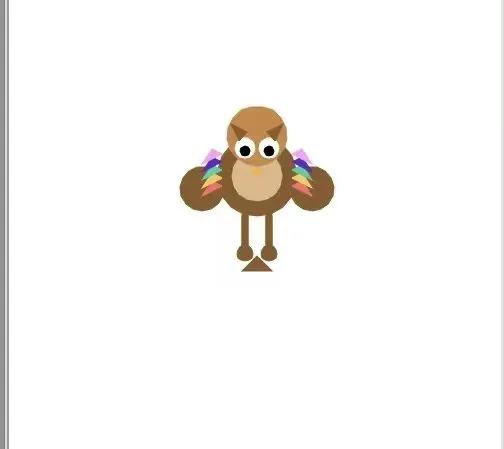
上次发猫头鹰基础版的时候,我给自己留了三大优化预告:
✅ 增加头顶小小耳羽
✅ 补上完整小尾巴
✅ 给身体加上彩色渐变羽毛
今天准时兑现!
不敷衍、不偷工、不改位置,全部精准升级到位。
之前很多版踩坑:
蛇会断头、小动物肢体悬空、彩色羽毛放错位置……
这一期全部修正,终于画出结构完整、颜值在线、超级耐看的猫头鹰!
本次升级亮点(实打实全部做完)
1. 超小巧精致耳羽
不是尖角硬刺,是猫头鹰专属的温柔小耳羽,瞬间区分普通小鸟。
2. 规整原生小尾巴
比例协调、贴合身体,不再光秃秃。
3. 身体两侧渐变彩羽(重点升级)
纠正了之前的错误:
彩色羽毛放在身体翅膀侧边,不是尾巴、不是脚边!
多层彩虹渐变,层次超细腻,低调又好看。
4. 腿脚100%连通身体
彻底告别“悬空腿、拼接感、路易十六断头风”。
最终完整可运行代码
import turtle
t = turtle.Turtle()
t.speed(0)
screen = turtle.Screen()
screen.setup(500, 600)
screen.bgcolor("white")
def go(x, y):
t.penup()
t.goto(x, y)
t.pendown()
# 顶部装饰标题
go(-150, 180)
t.color("red")
t.write("I ", font=("Arial", 26, "bold"))
go(-110, 180)
t.color("green")
t.write("love", font=("Arial", 26, "bold"))
go(-40, 180)
t.color("blue")
t.write("my", font=("Arial", 26, "bold"))
go(10, 180)
t.color("black")
t.write("Owl", font=("Arial", 26, "bold"))
# 主体身体
t.color("#8b5a2b")
go(0, -40)
t.begin_fill()
t.circle(40)
t.end_fill()
# 浅色肚子
t.color("#deb887")
go(0, -25)
t.begin_fill()
t.circle(25)
t.end_fill()
# 头部圆脸
t.color("#cd853f")
go(0, 10)
t.begin_fill()
t.circle(30)
t.end_fill()
# 大眼睛
t.color("white")
go(-12, 18)
t.begin_fill()
t.circle(10)
t.end_fill()
go(12, 18)
t.begin_fill()
t.circle(10)
t.end_fill()
# 黑色瞳孔
t.color("black")
go(-12, 20)
t.begin_fill()
t.circle(5)
t.end_fill()
go(12, 20)
t.begin_fill()
t.circle(5)
t.end_fill()
# 小鸟嘴
t.color("orange")
go(0, 8)
t.begin_fill()
t.goto(-5, 2)
t.goto(5, 2)
t.goto(0, 8)
t.end_fill()
# 左右翅膀
t.color("#8b5a2b")
go(-55, -35)
t.begin_fill()
t.circle(22)
t.end_fill()
go(55, -35)
t.begin_fill()
t.circle(22)
t.end_fill()
# 头顶小巧耳羽
t.color("#8b5a2b")
go(-18, 35)
t.begin_fill()
t.goto(-26, 52)
t.goto(-10, 44)
t.goto(-18, 35)
t.end_fill()
go(18, 35)
t.begin_fill()
t.goto(26, 52)
t.goto(10, 44)
t.goto(18, 35)
t.end_fill()
# 身体两侧【彩色渐变羽毛】(本期核心更新)
body_colors = ["#ff6b6b", "#feca57", "#1dd1a1", "#5f27cd", "#ff9ff3"]
# 左侧渐变羽毛
for i in range(5):
t.color(body_colors[i])
go(-35, -10 + i * 8)
t.begin_fill()
t.goto(-55, -20 + i * 8)
t.goto(-45, -5 + i * 8)
t.goto(-35, -10 + i * 8)
t.end_fill()
# 右侧渐变羽毛
for i in range(5):
t.color(body_colors[i])
go(35, -10 + i * 8)
t.begin_fill()
t.goto(55, -20 + i * 8)
t.goto(45, -5 + i * 8)
t.goto(35, -10 + i * 8)
t.end_fill()
# 原生小尾巴
t.color("#8b5a2b")
go(0, -80)
t.begin_fill()
t.goto(-15, -95)
t.goto(15, -95)
t.goto(0, -80)
t.end_fill()
# 连通身体的双腿
t.pensize(8)
t.color("#8b5a2b")
go(-12, -40)
t.goto(-12, -75)
go(12, -40)
t.goto(12, -75)
# 小圆脚掌
t.pensize(1)
go(-12, -85)
t.begin_fill()
t.circle(8)
t.end_fill()
go(12, -85)
t.begin_fill()
t.circle(8)
t.end_fill()
t.hideturtle()
turtle.done()
本期学习小结
这次最大的进步,不是加装饰,而是审美和结构精准度变高了:
1. 装饰不乱加:耳羽、尾巴、彩羽,每一处都符合动物结构
2. 位置不乱放:渐变羽毛回归身体翅膀区域,更真实
3. 杜绝拼接感:所有肢体从主体内部延伸,画面超级完整
从之前画蛇断头、画图案错位,到现在结构稳定、细节精致,真的是肉眼可见的进步!
喜欢这种慢慢打磨、越画越精致的过程,记得关注跟进学习✨
#Python编程 #零基础学编程 #Turtle绘图 #Python画画
 10个月宝宝每天需要喝多少奶粉?