Python Web 图形验证码实战项目
- 2026-10-11 12:00:23
Python Web 图形验证码实战项目
后端源码
前端源码
依赖文件
🔐 Python Web 图形验证码实战项目
项目概述
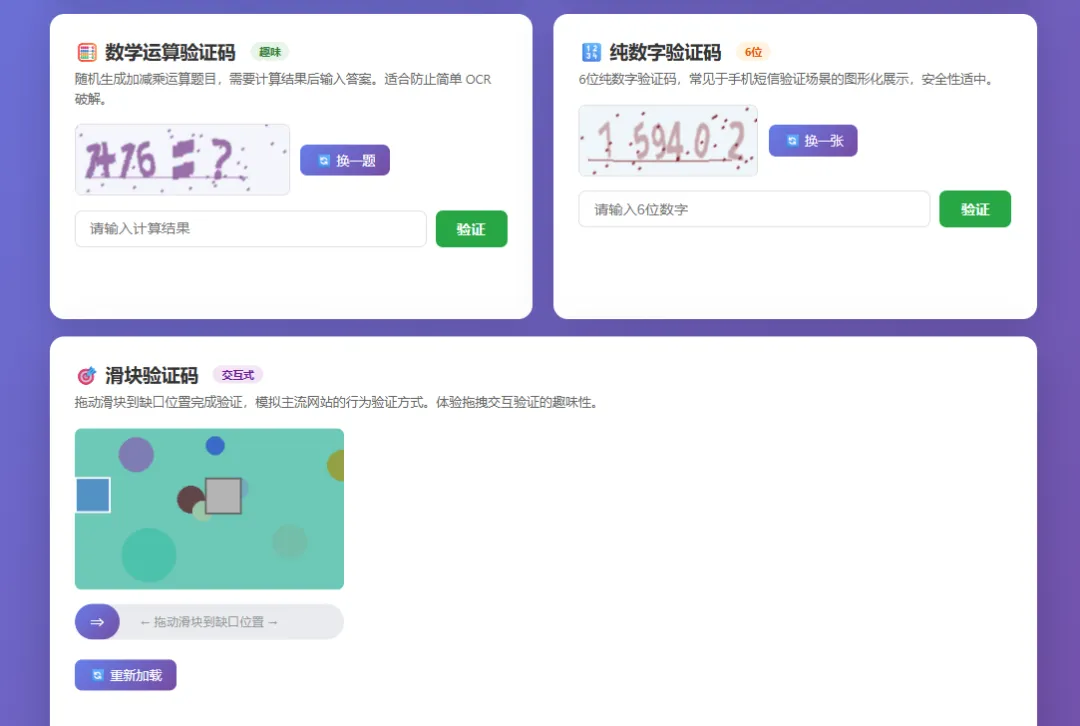
本项目是一个基于 Flask + captcha + Pillow 技术栈构建的完整图形验证码实战演示系统。项目涵盖了从最基础的字符验证码到交互式滑块验证码的多种实现方式,提供了丰富的可视化操作界面和实时交互体验。无论你是初学者想要理解验证码的工作原理,还是开发者需要在项目中集成验证码功能,本项目都能为你提供清晰的参考实现。
技术架构
功能特性
🎯 五种验证码类型
标准混合验证码 — 使用 captcha 库生成包含大写字母和数字的经典验证码 自定义风格验证码 — 基于 Pillow 手动绘制,支持实时调节干扰线和噪点参数 数学运算验证码 — 随机生成加减乘运算题目,有效抵御 OCR 攻击 纯数字验证码 — 6位纯数字,模拟短信验证场景 滑块验证码 — 交互式拖拽验证,支持鼠标和触屏
📊 实时统计面板
页面顶部展示生成总数、验证成功/失败次数、成功率。
🎨 交互体验
点击图片快速刷新、验证后即时视觉反馈 自定义验证码参数滑动条实时调节 滑块支持移动端触摸操作
项目结构
captcha_project/├── app.py # Flask 主应用(路由、验证码生成逻辑)├── requirements.txt # Python 依赖├── templates/│ └── index.html # 前端页面(完整的交互式演示界面)└── README.md # 项目文档快速开始
cd captcha_projectpython -m venv venvsource venv/bin/activate # Windows: venv\Scripts\activatepip install -r requirements.txtpython app.py浏览器打开 http://127.0.0.1:5000
API 接口
/api/captcha/standard | ||
/api/captcha/custom?lines=&noise= | ||
/api/captcha/math | ||
/api/captcha/digit | ||
/api/captcha/slide | ||
/api/verify | ||
/api/verify/slide |
核心实现原理
服务端存储答案 — 验证码答案保存在 Flask Session 中,客户端无法获取 一次性验证 — 验证成功后立即删除答案,防止重放攻击 干扰元素 — 随机干扰线、噪点、字符旋转增加 OCR 识别难度 滑块容差 — 允许 ±8 像素误差,兼顾安全性和用户体验
扩展方向
接入 Redis 支持分布式部署 添加验证码有效期(TTL) 集成音频验证码 增加点选验证码 前后端分离架构改造
完整源码
后端源码 app.py
"""Python Web 图形验证码实战项目基于 Flask + captcha 库实现完整的验证码生成、展示、验证流程"""from flask import Flask, render_template, session, request, jsonify, send_filefrom captcha.image import ImageCaptchafrom captcha.audio import AudioCaptchaimport randomimport stringimport ioimport osimport base64from PIL import Image, ImageDraw, ImageFont, ImageFilterapp = Flask(__name__)app.secret_key = 'captcha-demo-secret-key-2024'# ============ 验证码生成工具函数 ============defgenerate_random_text(length=4, mode='mixed'):"""生成随机验证码文本"""if mode == 'digit': chars = string.digitselif mode == 'letter': chars = string.ascii_uppercaseelif mode == 'math':return generate_math_captcha()else: chars = string.ascii_uppercase + string.digitsreturn''.join(random.choices(chars, k=length))defgenerate_math_captcha():"""生成数学运算验证码""" ops = ['+', '-', '×'] a = random.randint(1, 20) b = random.randint(1, 20) op = random.choice(ops)if op == '+': answer = a + belif op == '-':if a < b: a, b = b, a answer = a - belse: a = random.randint(1, 9) b = random.randint(1, 9) answer = a * b expression = f"{a}{op}{b}=?"return expression, str(answer)defgenerate_captcha_image(text, width=200, height=80, font_size=42):"""使用 captcha 库生成标准验证码图片""" image = ImageCaptcha(width=width, height=height, font_sizes=[font_size]) data = image.generate(text)return datadefgenerate_custom_captcha(text, width=240, height=80, bg_color=None, text_color=None, noise_level=3, line_count=5):"""自定义风格验证码 - 使用 Pillow 手动绘制"""if bg_color isNone: bg_color = (random.randint(200, 255), random.randint(200, 255), random.randint(200, 255))if text_color isNone: text_color = (random.randint(0, 100), random.randint(0, 100), random.randint(0, 100)) img = Image.new('RGB', (width, height), bg_color) draw = ImageDraw.Draw(img)# 绘制干扰线for _ in range(line_count): x1, y1 = random.randint(0, width), random.randint(0, height) x2, y2 = random.randint(0, width), random.randint(0, height) line_color = (random.randint(100, 200), random.randint(100, 200), random.randint(100, 200)) draw.line([(x1, y1), (x2, y2)], fill=line_color, width=random.randint(1, 3))# 绘制干扰点for _ in range(width * height // noise_level): x, y = random.randint(0, width - 1), random.randint(0, height - 1) dot_color = (random.randint(0, 255), random.randint(0, 255), random.randint(0, 255)) draw.point((x, y), fill=dot_color)# 绘制文字(每个字符随机偏移和旋转) char_width = width // (len(text) + 1)for i, char in enumerate(text):try: font = ImageFont.truetype("arial.ttf", random.randint(32, 44))except (IOError, OSError): font = ImageFont.load_default()# 创建单字符图像并旋转 char_img = Image.new('RGBA', (50, 60), (0, 0, 0, 0)) char_draw = ImageDraw.Draw(char_img) char_draw.text((5, 5), char, fill=text_color, font=font) char_img = char_img.rotate(random.randint(-25, 25), expand=True, fillcolor=(0, 0, 0, 0))# 粘贴到主图 x = 10 + i * char_width y = random.randint(5, 20) img.paste(char_img, (x, y), char_img)# 添加轻微模糊 img = img.filter(ImageFilter.SMOOTH) buf = io.BytesIO() img.save(buf, format='PNG') buf.seek(0)return bufdefgenerate_slide_captcha(width=300, height=180):"""生成滑块验证码数据"""# 创建背景图 bg_color = (random.randint(100, 200), random.randint(150, 220), random.randint(150, 220)) img = Image.new('RGB', (width, height), bg_color) draw = ImageDraw.Draw(img)# 绘制一些装饰图形for _ in range(8): x, y = random.randint(0, width), random.randint(0, height) r = random.randint(10, 40) color = (random.randint(50, 200), random.randint(50, 200), random.randint(50, 200)) draw.ellipse([x - r, y - r, x + r, y + r], fill=color, outline=color)# 滑块目标位置 block_size = 40 target_x = random.randint(100, width - block_size - 20) target_y = random.randint(20, height - block_size - 20)# 在目标位置画出缺口(灰色) draw.rectangle([target_x, target_y, target_x + block_size, target_y + block_size], fill=(180, 180, 180), outline=(100, 100, 100), width=2)# 生成滑块图片 block_img = Image.new('RGBA', (block_size, block_size), (80, 140, 200, 230)) block_draw = ImageDraw.Draw(block_img) block_draw.rectangle([0, 0, block_size - 1, block_size - 1], outline=(255, 255, 255), width=2)# 转为 base64 bg_buf = io.BytesIO() img.save(bg_buf, format='PNG') bg_base64 = base64.b64encode(bg_buf.getvalue()).decode() block_buf = io.BytesIO() block_img.save(block_buf, format='PNG') block_base64 = base64.b64encode(block_buf.getvalue()).decode()return {'bg_image': bg_base64,'block_image': block_base64,'target_x': target_x,'target_y': target_y,'block_size': block_size }# ============ Flask 路由 ============@app.route('/')defindex():"""主页 - 验证码演示面板"""return render_template('index.html')@app.route('/api/captcha/standard', methods=['GET'])defstandard_captcha():"""标准图形验证码接口""" text = generate_random_text(4, 'mixed') session['captcha_text'] = text data = generate_captcha_image(text)return send_file(data, mimetype='image/png')@app.route('/api/captcha/custom', methods=['GET'])defcustom_captcha():"""自定义风格验证码接口""" noise = int(request.args.get('noise', 3)) lines = int(request.args.get('lines', 5)) text = generate_random_text(4, 'mixed') session['captcha_text'] = text data = generate_custom_captcha(text, noise_level=noise, line_count=lines)return send_file(data, mimetype='image/png')@app.route('/api/captcha/math', methods=['GET'])defmath_captcha():"""数学运算验证码接口""" expression, answer = generate_math_captcha() session['captcha_text'] = answer data = generate_captcha_image(expression, width=240)return send_file(data, mimetype='image/png')@app.route('/api/captcha/digit', methods=['GET'])defdigit_captcha():"""纯数字验证码接口""" text = generate_random_text(6, 'digit') session['captcha_text'] = text data = generate_captcha_image(text)return send_file(data, mimetype='image/png')@app.route('/api/captcha/slide', methods=['GET'])defslide_captcha():"""滑块验证码接口""" slide_data = generate_slide_captcha() session['slide_target_x'] = slide_data['target_x']return jsonify({'bg_image': slide_data['bg_image'],'block_image': slide_data['block_image'],'target_y': slide_data['target_y'],'block_size': slide_data['block_size'] })@app.route('/api/verify', methods=['POST'])defverify_captcha():"""验证码校验接口""" data = request.get_json() user_input = data.get('captcha', '').strip().upper() correct = session.get('captcha_text', '').upper()ifnot correct:return jsonify({'success': False, 'message': '验证码已过期,请刷新'})if user_input == correct: session.pop('captcha_text', None)return jsonify({'success': True, 'message': '✅ 验证成功!'})else:return jsonify({'success': False, 'message': '❌ 验证码错误,请重试'})@app.route('/api/verify/slide', methods=['POST'])defverify_slide():"""滑块验证码校验接口""" data = request.get_json() user_x = data.get('x', 0) target_x = session.get('slide_target_x', 0) tolerance = 8# 容差像素if abs(user_x - target_x) <= tolerance: session.pop('slide_target_x', None)return jsonify({'success': True, 'message': '✅ 滑块验证成功!'})else:return jsonify({'success': False, 'message': '❌ 滑块位置不正确,请重试'})if __name__ == '__main__': app.run(debug=True, port=5000)前端源码 templates/index.html
<!DOCTYPE html><htmllang="zh-CN"><head><metacharset="UTF-8"><metaname="viewport"content="width=device-width, initial-scale=1.0"><title>Python 图形验证码实战演示</title><style> * {margin: 0;padding: 0;box-sizing: border-box; }body {font-family: 'Segoe UI', 'Microsoft YaHei', sans-serif;background: linear-gradient(135deg, #667eea 0%, #764ba2 100%);min-height: 100vh;padding: 20px; }.container {max-width: 1100px;margin: 0 auto; }h1 {text-align: center;color: #fff;font-size: 2.2rem;margin-bottom: 10px;text-shadow: 2px2px4pxrgba(0,0,0,0.3); }.subtitle {text-align: center;color: rgba(255,255,255,0.85);margin-bottom: 30px;font-size: 1.1rem; }.demo-grid {display: grid;grid-template-columns: repeat(auto-fit, minmax(480px, 1fr));gap: 24px; }.card {background: #fff;border-radius: 16px;padding: 28px;box-shadow: 010px40pxrgba(0,0,0,0.15);transition: transform 0.3s ease, box-shadow 0.3s ease; }.card:hover {transform: translateY(-4px);box-shadow: 014px50pxrgba(0,0,0,0.2); }.cardh2 {color: #333;font-size: 1.3rem;margin-bottom: 6px;display: flex;align-items: center;gap: 8px; }.card.desc {color: #666;font-size: 0.9rem;margin-bottom: 18px;line-height: 1.5; }.captcha-area {display: flex;align-items: center;gap: 12px;margin-bottom: 16px;flex-wrap: wrap; }.captcha-areaimg {border: 2px solid #e0e0e0;border-radius: 8px;cursor: pointer;transition: opacity 0.3s; }.captcha-areaimg:hover {opacity: 0.7; }.refresh-btn {padding: 8px16px;background: linear-gradient(135deg, #667eea, #764ba2);color: #fff;border: none;border-radius: 8px;cursor: pointer;font-size: 0.9rem;transition: all 0.3s; }.refresh-btn:hover {transform: scale(1.05);box-shadow: 04px12pxrgba(102, 126, 234, 0.4); }.input-group {display: flex;gap: 10px;margin-bottom: 12px; }.input-groupinput {flex: 1;padding: 10px16px;border: 2px solid #e0e0e0;border-radius: 8px;font-size: 1rem;outline: none;transition: border-color 0.3s; }.input-groupinput:focus {border-color: #667eea; }.verify-btn {padding: 10px24px;background: #28a745;color: #fff;border: none;border-radius: 8px;cursor: pointer;font-size: 1rem;font-weight: bold;transition: all 0.3s; }.verify-btn:hover {background: #218838;transform: scale(1.05); }.result {padding: 10px16px;border-radius: 8px;font-size: 0.95rem;font-weight: bold;min-height: 40px;display: flex;align-items: center; }.result.success {background: #d4edda;color: #155724; }.result.error {background: #f8d7da;color: #721c24; }.result.info {background: #e8f4fd;color: #0c5460; }/* 滑块验证码样式 */.slide-container {position: relative;margin-bottom: 16px; }.slide-bg {border-radius: 8px;display: block;width: 100%;max-width: 300px; }.slide-block {position: absolute;cursor: grab;user-select: none; }.slide-track {width: 100%;max-width: 300px;height: 40px;background: #e9ecef;border-radius: 20px;position: relative;margin-top: 12px;overflow: hidden; }.slide-thumb {width: 50px;height: 40px;background: linear-gradient(135deg, #667eea, #764ba2);border-radius: 20px;position: absolute;left: 0;top: 0;cursor: grab;display: flex;align-items: center;justify-content: center;color: #fff;font-size: 1.2rem;user-select: none;transition: box-shadow 0.3s; }.slide-thumb:hover {box-shadow: 04px12pxrgba(102, 126, 234, 0.5); }.slide-hint {position: absolute;width: 100%;text-align: center;line-height: 40px;color: #999;font-size: 0.85rem;pointer-events: none; }/* 参数控制面板 */.controls {display: flex;gap: 16px;margin-bottom: 16px;flex-wrap: wrap;align-items: center; }.controlslabel {font-size: 0.85rem;color: #555;display: flex;align-items: center;gap: 6px; }.controlsinput[type="range"] {width: 100px; }.controlsspan.val {font-weight: bold;color: #667eea;min-width: 20px; }/* 统计面板 */.stats {display: flex;gap: 20px;justify-content: center;margin-top: 30px;flex-wrap: wrap; }.stat-item {background: rgba(255,255,255,0.15);backdrop-filter: blur(10px);border-radius: 12px;padding: 16px28px;text-align: center;color: #fff; }.stat-item.num {font-size: 2rem;font-weight: bold; }.stat-item.label {font-size: 0.85rem;opacity: 0.8; }.badge {display: inline-block;padding: 2px10px;border-radius: 12px;font-size: 0.75rem;font-weight: bold;margin-left: 8px; }.badge-blue { background: #e3f2fd; color: #1565c0; }.badge-green { background: #e8f5e9; color: #2e7d32; }.badge-orange { background: #fff3e0; color: #e65100; }.badge-purple { background: #f3e5f5; color: #6a1b9a; }</style></head><body><divclass="container"><h1>🔐 Python 图形验证码实战</h1><pclass="subtitle">Flask + Captcha + Pillow | 多种验证码类型 | 实时交互验证</p><!-- 统计面板 --><divclass="stats"><divclass="stat-item"><divclass="num"id="stat-total">0</div><divclass="label">生成总数</div></div><divclass="stat-item"><divclass="num"id="stat-success">0</div><divclass="label">验证成功</div></div><divclass="stat-item"><divclass="num"id="stat-fail">0</div><divclass="label">验证失败</div></div><divclass="stat-item"><divclass="num"id="stat-rate">0%</div><divclass="label">成功率</div></div></div><br><divclass="demo-grid"><!-- 标准验证码 --><divclass="card"><h2>📝 标准混合验证码 <spanclass="badge badge-blue">经典</span></h2><pclass="desc">使用 captcha 库生成包含大写字母和数字的标准验证码,带干扰线和噪点。点击图片可刷新。</p><divclass="captcha-area"><imgid="standard-img"src="/api/captcha/standard"alt="验证码"width="200"height="80"onclick="refreshCaptcha('standard')"><buttonclass="refresh-btn"onclick="refreshCaptcha('standard')">🔄 换一张</button></div><divclass="input-group"><inputtype="text"id="standard-input"placeholder="请输入验证码(不区分大小写)"maxlength="4"onkeypress="if(event.key==='Enter') verifyCaptcha('standard')"><buttonclass="verify-btn"onclick="verifyCaptcha('standard')">验证</button></div><divclass="result"id="standard-result"></div></div><!-- 自定义风格验证码 --><divclass="card"><h2>🎨 自定义风格验证码 <spanclass="badge badge-purple">可调参</span></h2><pclass="desc">使用 Pillow 手动绘制,支持调节干扰线数量、噪点密度,每个字符随机旋转偏移。</p><divclass="controls"><label>干扰线: <inputtype="range"id="lines-range"min="1"max="15"value="5"oninput="document.getElementById('lines-val').textContent=this.value"><spanclass="val"id="lines-val">5</span></label><label>噪点密度: <inputtype="range"id="noise-range"min="1"max="10"value="3"oninput="document.getElementById('noise-val').textContent=this.value"><spanclass="val"id="noise-val">3</span></label></div><divclass="captcha-area"><imgid="custom-img"src="/api/captcha/custom"alt="验证码"width="240"height="80"onclick="refreshCaptcha('custom')"><buttonclass="refresh-btn"onclick="refreshCaptcha('custom')">🔄 换一张</button></div><divclass="input-group"><inputtype="text"id="custom-input"placeholder="请输入验证码"maxlength="4"onkeypress="if(event.key==='Enter') verifyCaptcha('custom')"><buttonclass="verify-btn"onclick="verifyCaptcha('custom')">验证</button></div><divclass="result"id="custom-result"></div></div><!-- 数学运算验证码 --><divclass="card"><h2>🧮 数学运算验证码 <spanclass="badge badge-green">趣味</span></h2><pclass="desc">随机生成加减乘运算题目,需要计算结果后输入答案。适合防止简单 OCR 破解。</p><divclass="captcha-area"><imgid="math-img"src="/api/captcha/math"alt="验证码"width="240"height="80"onclick="refreshCaptcha('math')"><buttonclass="refresh-btn"onclick="refreshCaptcha('math')">🔄 换一题</button></div><divclass="input-group"><inputtype="text"id="math-input"placeholder="请输入计算结果"maxlength="4"onkeypress="if(event.key==='Enter') verifyCaptcha('math')"><buttonclass="verify-btn"onclick="verifyCaptcha('math')">验证</button></div><divclass="result"id="math-result"></div></div><!-- 纯数字验证码 --><divclass="card"><h2>🔢 纯数字验证码 <spanclass="badge badge-orange">6位</span></h2><pclass="desc">6位纯数字验证码,常见于手机短信验证场景的图形化展示,安全性适中。</p><divclass="captcha-area"><imgid="digit-img"src="/api/captcha/digit"alt="验证码"width="200"height="80"onclick="refreshCaptcha('digit')"><buttonclass="refresh-btn"onclick="refreshCaptcha('digit')">🔄 换一张</button></div><divclass="input-group"><inputtype="text"id="digit-input"placeholder="请输入6位数字"maxlength="6"onkeypress="if(event.key==='Enter') verifyCaptcha('digit')"><buttonclass="verify-btn"onclick="verifyCaptcha('digit')">验证</button></div><divclass="result"id="digit-result"></div></div><!-- 滑块验证码 --><divclass="card"style="grid-column: 1 / -1;"><h2>🎯 滑块验证码 <spanclass="badge badge-purple">交互式</span></h2><pclass="desc">拖动滑块到缺口位置完成验证,模拟主流网站的行为验证方式。体验拖拽交互验证的趣味性。</p><divclass="slide-container"id="slide-container"><imgclass="slide-bg"id="slide-bg"alt="背景"><imgclass="slide-block"id="slide-block"alt="滑块"></div><divclass="slide-track"id="slide-track"><divclass="slide-hint">← 拖动滑块到缺口位置 →</div><divclass="slide-thumb"id="slide-thumb">⇒</div></div><br><buttonclass="refresh-btn"onclick="loadSlide()"style="margin-bottom: 12px;">🔄 重新加载</button><divclass="result"id="slide-result"></div></div></div></div><script>// ============ 统计数据 ============let stats = { total: 0, success: 0, fail: 0 };functionupdateStats() {document.getElementById('stat-total').textContent = stats.total;document.getElementById('stat-success').textContent = stats.success;document.getElementById('stat-fail').textContent = stats.fail;const rate = stats.total > 0 ? Math.round(stats.success / stats.total * 100) : 0;document.getElementById('stat-rate').textContent = rate + '%'; }// ============ 验证码刷新 ============functionrefreshCaptcha(type) {const img = document.getElementById(type + '-img');let url = '/api/captcha/' + type;if (type === 'custom') {const lines = document.getElementById('lines-range').value;const noise = document.getElementById('noise-range').value; url += `?lines=${lines}&noise=${noise}`; } img.src = url + (url.includes('?') ? '&' : '?') + 't=' + Date.now(); stats.total++; updateStats();// 清空输入和结果const input = document.getElementById(type + '-input');const result = document.getElementById(type + '-result');if (input) input.value = '';if (result) { result.textContent = ''; result.className = 'result'; } }// ============ 验证码校验 ============asyncfunctionverifyCaptcha(type) {const input = document.getElementById(type + '-input');const result = document.getElementById(type + '-result');const value = input.value.trim();if (!value) { result.textContent = '⚠️ 请先输入验证码'; result.className = 'result info';return; }try {const resp = await fetch('/api/verify', {method: 'POST',headers: { 'Content-Type': 'application/json' },body: JSON.stringify({ captcha: value }) });const data = await resp.json(); result.textContent = data.message;if (data.success) { result.className = 'result success'; stats.success++; setTimeout(() => refreshCaptcha(type), 1500); } else { result.className = 'result error'; stats.fail++; setTimeout(() => refreshCaptcha(type), 1000); } updateStats(); } catch (err) { result.textContent = '⚠️ 网络错误,请重试'; result.className = 'result error'; } }// ============ 滑块验证码 ============let slideData = null;asyncfunctionloadSlide() {const result = document.getElementById('slide-result'); result.textContent = ''; result.className = 'result';try {const resp = await fetch('/api/captcha/slide'); slideData = await resp.json();const bgImg = document.getElementById('slide-bg');const blockImg = document.getElementById('slide-block'); bgImg.src = 'data:image/png;base64,' + slideData.bg_image; blockImg.src = 'data:image/png;base64,' + slideData.block_image; blockImg.style.left = '0px'; blockImg.style.top = slideData.target_y + 'px';document.getElementById('slide-thumb').style.left = '0px'; stats.total++; updateStats(); } catch (err) {console.error('加载滑块验证码失败:', err); } }// 滑块拖拽逻辑 (function() {const thumb = document.getElementById('slide-thumb');const track = document.getElementById('slide-track');const block = document.getElementById('slide-block');let isDragging = false;let startX = 0;let thumbLeft = 0; thumb.addEventListener('mousedown', function(e) { isDragging = true; startX = e.clientX; thumbLeft = parseInt(thumb.style.left) || 0; thumb.style.cursor = 'grabbing'; e.preventDefault(); });document.addEventListener('mousemove', function(e) {if (!isDragging) return;const dx = e.clientX - startX;const trackWidth = track.offsetWidth - thumb.offsetWidth;let newLeft = Math.min(Math.max(0, thumbLeft + dx), trackWidth); thumb.style.left = newLeft + 'px';if (block && slideData) {const ratio = 260 / trackWidth; block.style.left = Math.round(newLeft * ratio) + 'px'; } });document.addEventListener('mouseup', asyncfunction(e) {if (!isDragging) return; isDragging = false; thumb.style.cursor = 'grab';const trackWidth = track.offsetWidth - thumb.offsetWidth;const currentLeft = parseInt(thumb.style.left) || 0;const ratio = 260 / trackWidth;const finalX = Math.round(currentLeft * ratio);if (currentLeft > 10) {try {const resp = await fetch('/api/verify/slide', {method: 'POST',headers: { 'Content-Type': 'application/json' },body: JSON.stringify({ x: finalX }) });const data = await resp.json();const result = document.getElementById('slide-result'); result.textContent = data.message;if (data.success) { result.className = 'result success'; stats.success++; setTimeout(loadSlide, 2000); } else { result.className = 'result error'; stats.fail++; setTimeout(loadSlide, 1000); } updateStats(); } catch (err) {console.error('验证失败:', err); } } });// 触摸事件支持(移动端) thumb.addEventListener('touchstart', function(e) { isDragging = true; startX = e.touches[0].clientX; thumbLeft = parseInt(thumb.style.left) || 0; e.preventDefault(); });document.addEventListener('touchmove', function(e) {if (!isDragging) return;const dx = e.touches[0].clientX - startX;const trackWidth = track.offsetWidth - thumb.offsetWidth;let newLeft = Math.min(Math.max(0, thumbLeft + dx), trackWidth); thumb.style.left = newLeft + 'px';if (block && slideData) {const ratio = 260 / trackWidth; block.style.left = Math.round(newLeft * ratio) + 'px'; } });document.addEventListener('touchend', function(e) {if (!isDragging) return; isDragging = false;const trackWidth = track.offsetWidth - thumb.offsetWidth;const currentLeft = parseInt(thumb.style.left) || 0;const ratio = 260 / trackWidth;const finalX = Math.round(currentLeft * ratio);if (currentLeft > 10) { fetch('/api/verify/slide', {method: 'POST',headers: { 'Content-Type': 'application/json' },body: JSON.stringify({ x: finalX }) }).then(r => r.json()).then(data => {const result = document.getElementById('slide-result'); result.textContent = data.message;if (data.success) { result.className = 'result success'; stats.success++; setTimeout(loadSlide, 2000); } else { result.className = 'result error'; stats.fail++; setTimeout(loadSlide, 1000); } updateStats(); }); } }); })();// 页面加载时初始化滑块window.addEventListener('load', loadSlide);</script></body></html>依赖文件 requirements.txt
flask==3.0.0captcha==0.5.0Pillow==10.2.0许可证
MIT License - 可自由使用、修改和分发。
本文来自网友投稿或网络内容,如有侵犯您的权益请联系我们删除,联系邮箱:596563534@qq.com 。
随机文章
-
 10个月宝宝每天需要喝多少奶粉?
- 别再用 Python 跑 AI 降噪了!手把手带你把 DeepFilterNet / FunASR 嵌入 C++,延迟直接压到 10ms
- Python高阶函数与Lambda匿名函数保姆级教程:map/filter/reduce极简实战,告别臃肿代码
- 定价119元《python深度学习》,Keras之父写Keras,深入浅出,附代码
- python数据可视化技巧的100个练习 -- 21. 网站流量数据的流图
- Python + YOLOv5 搭建火焰检测与预警系统
- Python环境搭建—安利Python小白的Python和Pycharm安装详细教程
- 计算机Python人带零基础,轻松上手学!!
- 背下来30页,你就是Python岗的天花板!(附超全文档)
- 多条件排名-Python版
- Python开发从零开始-49.21-数据库操作