1.Python缩进
2.不换行打印
3.全局变量
(3)global关键词
4.向多个变量赋值
5.一个值赋给多个变量
6.解包集合
7.输出多个变量
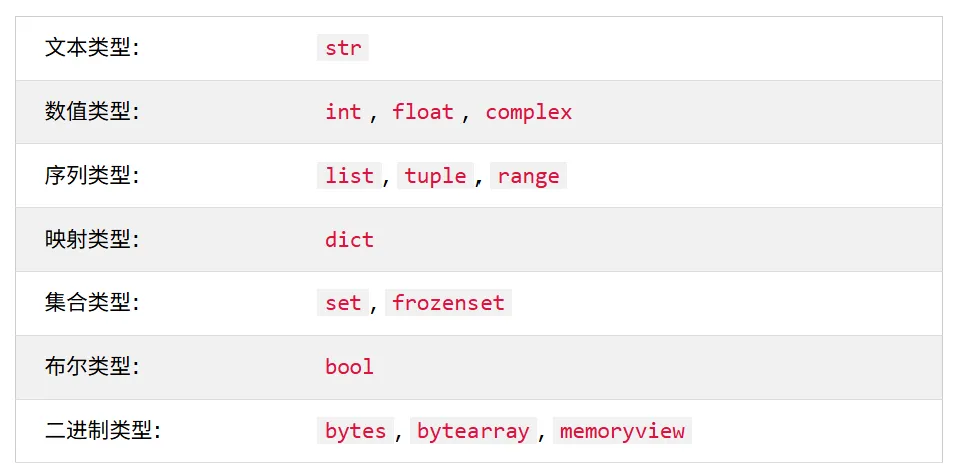
8.数据类型
9.随机数
10.字符串
(1)裁切
(2)负的索引
(3)字符串长度
(4)字符串方法
(5)检查字符串
(6)格式化字符串
1.Python缩进
在其他编程语言中,代码缩进仅出于可读性的考虑,而 Python 中的缩进非常重要
if5 > 2: print("Five is greater than two!")
如果省略缩进,Python 会出错,空格数取决于程序员,但至少需要一个,同时必须在同一代码块中使用相同数量的空格,否则 Python 会出错
2.不换行打印
默认情况下,print() 函数会在打印结束时换行。如果要在同一行打印多个单词,可以使用 end 参数:
print("Hello World!", end=" ")print("I will print on the same line.")#输出如下#Hello World! I will print on the same line.
在函数外部创建的变量称为全局变量,全局变量可以被函数内部和外部的每个人使用。
x = "awesome"defmyfunc(): print("Python is " + x)myfunc()#Python is awesome
(2)如果在函数内部创建具有相同名称的变量,则该变量将是局部变量,并且只能在函数内部使用。具有相同名称的全局变量将保留原样,并拥有原始值。
x = "awesome"defmyfunc(): x = "fantastic" print("Python is " + x)myfunc()#Python is fantasticprint("Python is " + x)#Python is awesome
通常,在函数内部创建变量时,该变量是局部变量,只能在该函数内部使用。要在函数内部创建全局变量,可以使用global关键字。
defmyfunc(): global x #虽然在函数内部,但global使其成为属于全局范围 x = "fantastic"myfunc()print("Python is " + x) #Python is fantastic
要在函数内部更改全局变量的值,可以使用 global 引用该变量:
x = "awesome"defmyfunc(): global x x = "fantastic"myfunc()print("Python is " + x) #Python is awesome
x, y, z = "Orange", "Banana", "Cherry"print(x)print(y)print(z)#输出如下:"""OrangeBananaCherry"""
x = y = z = "Orange"print(x)print(y)print(z)#输出如下:"""OrangeOrangeOrange"""
有一个包含值的集合,例如列表(list)、元组(tuple)等等, Python 允许将这些值提取到变量中,这称为解包。
fruits = ["apple", "banana", "cherry"]x, y, z = fruitsprint(x)print(y)print(z)#输出如下:"""applebananacherry"""
在 print() 函数中输出多个变量的最佳方法是用逗号分隔,这样甚至可以支持不同的数据类型:
x = 5y = "John"print(x, y) #5 John
(2)可以使用 type() 函数获取任何对象的数据类型
x = 5y = 12E4z = 1jprint(type(x)) #<class 'int'>print(type(y)) #<class 'float'>print(type(z)) #<class 'complex'>
Python 没有 random() 函数来创建随机数,但 Python 有一个名为 random 的内置模块,可用于生成随机数:
import randomprint(random.randrange(1, 10)) #显示 1 到 9 之间的随机数
b = "Hello, World!"#获取从位置 2 到位置 5(不包括)的字符print(b[2:5]) #llo#获取从开头到位置 5(不包括)的字符print(b[:5]) #Hello#省略 end 索引,范围将延伸到末尾print(b[2:]) #llo, World!
#获取从位置 5 到位置 1 的字符,从字符串末尾开始计数:b = "Hello, World!"print(b[-5:-2]) #orl
a = "Hello, World!"print(len(a)) #13
a = " Hello, World! "print(a.strip()) #Hello, World!
a = "Hello, World!"print(a.lower()) #hello, world!
a = "Hello, World!"print(a.upper()) #HELLO, WORLD!
4)replace() 用另一段字符串来替换字符串
a = "Hello, World!"print(a.replace("H", "J")) #Jello, World!
5)split() 方法在找到分隔符的实例时拆分字符串为子字符串
a = "Hello, World!"print(a.split(",")) # ['Hello', ' World!']
如需检查字符串中是否存在特定短语或字符,可以使用 in 或 not in关键字。
#检查以下文本中是否存在短语 "ain":txt = "The rain in Spain stays mainly in the plain"x = "ain"in txtprint(x) #True
只需在字符串字面量前面加上 f,并添加花括号 {} 作为变量和其他操作的占位符。
price = 59txt1 = f"The price is {price} dollars"#占位符可以包含修饰符来格式化值txt2 = f"The price is {price:.2f} dollars"#占位符可以包含 Python 代码,例如数学运算txt3 = f"The price is {20+39} dollars"print(txt1) # The price is 59 dollarsprint(txt2) # The price is 59.00 dollarsprint(txt3) # The price is 59 dollars


 10个月宝宝每天需要喝多少奶粉?