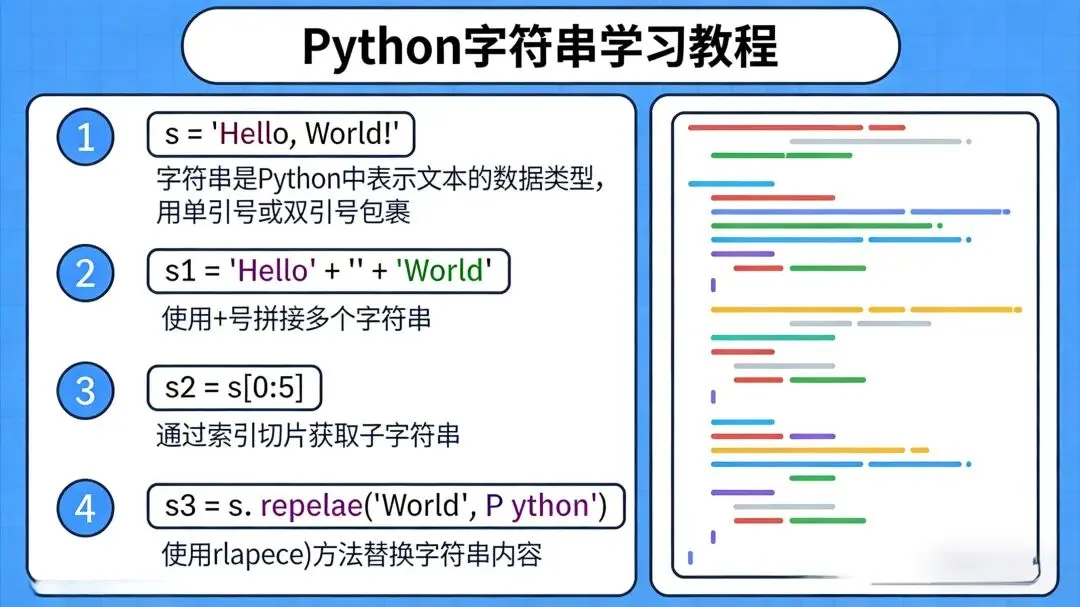
一、字符串的基本概念
1.1 什么是字符串?
字符串是 Python 中最常用的数据类型之一,用于表示文本数据。在 Python 中,字符串是由字符组成的不可变序列。
1.2 字符串的定义
# 单引号定义s1='Hello World'# 双引号定义s2="Hello World"# 三引号定义(支持多行)s3='''HelloWorld'''# 三双引号定义(支持多行)s4="""HelloWorld"""
1.3 字符串的特性
不可变性:字符串创建后不能修改
序列性:可以像列表一样通过索引访问
可迭代:可以使用 for 循环遍历
支持转义字符:如 \n(换行)、\t(制表符)等
二、字符串的访问和切片
2.1 索引访问
字符串中的每个字符都有一个索引,从 0 开始:
s="Hello World"print(s[0]) # 输出: Hprint(s[6]) # 输出: Wprint(s[-1]) # 输出: d (负索引从末尾开始)print(s[-2]) # 输出: l
2.2 切片操作
切片语法:s[start:end:step]
start:起始索引(包含)
end:结束索引(不包含)
step:步长(默认为 1)
s="Hello World"print(s[0:5]) # 输出: Helloprint(s[6:]) # 输出: Worldprint(s[:5]) # 输出: Helloprint(s[::2]) # 输出: HloWrd (步长为 2)print(s[::-1]) # 输出: dlroW olleH (反转字符串)
三、字符串的基本操作
3.1 字符串拼接
s1="Hello"s2="World"s3=s1+" "+s2# 输出: Hello Worlds4=s1*3# 输出: HelloHelloHello
3.2 字符串长度
s="Hello World"length=len(s) # 输出: 11
3.3 成员检查
s="Hello World"print("World"ins) # 输出: Trueprint("Python"ins) # 输出: Falseprint("World"notins) # 输出: False3.4 字符串比较
s1="apple"s2="banana"print(s1==s2) # 输出: Falseprint(s1<s2) # 输出: True (按字典序比较)print(s1>s2) # 输出: False
四、字符串方法
4.1 查找方法
s="Hello World Hello"print(s.find("Hello")) # 输出: 0 (第一次出现的位置)print(s.find("World")) # 输出: 6print(s.find("Python")) # 输出: -1 (未找到)print(s.rfind("Hello")) # 输出: 12 (最后一次出现的位置)print(s.index("Hello")) # 输出: 0 (与 find 类似,但未找到会抛出异常)print(s.count("Hello")) # 输出: 2 (出现的次数)4.2 大小写转换
s = "Hello World"print(s.upper()) # 输出: HELLO WORLDprint(s.lower()) # 输出: hello worldprint(s.title()) # 输出: Hello Worldprint(s.capitalize()) # 输出: Hello worldprint(s.swapcase()) # 输出: hELLO wORLD
4.3 去除空白字符
s = " Hello World "print(s.strip()) # 输出: Hello World (去除两端空白)print(s.lstrip()) # 输出: Hello World (去除左端空白)print(s.rstrip()) # 输出: Hello World (去除右端空白)print(s.strip(" H")) # 输出: ello World (去除两端指定字符)4.4 替换方法
s = "Hello World Hello"print(s.replace("Hello", "Hi")) # 输出: Hi World Hiprint(s.replace("Hello", "Hi", 1)) # 输出: Hi World Hello (只替换第一次)4.5 分割和连接
s = "Hello,World,Python"print(s.split(",")) # 输出: ['Hello', 'World', 'Python']print(s.split(",", 1)) # 输出: ['Hello', 'World,Python'] (只分割一次)print(s.rsplit(",", 1)) # 输出: ['Hello,World', 'Python'] (从右侧分割)# 连接lst = ['Hello', 'World', 'Python']print(" ".join(lst)) # 输出: Hello World Pythonprint("-".join(lst)) # 输出: Hello-World-Python4.6 前缀和后缀检查
s = "Hello World.txt"print(s.startswith("Hello")) # 输出: Trueprint(s.startswith("Hi")) # 输出: Falseprint(s.endswith(".txt")) # 输出: Trueprint(s.endswith(".py")) # 输出: Falseprint(s.endswith((".txt", ".py"))) # 输出: True (检查多个后缀)4.7 字符类型检查
s1 = "12345"s2 = "Hello"s3 = "Hello123"s4 = " "print(s1.isdigit()) # 输出: True (是否全为数字)print(s1.isnumeric()) # 输出: True (是否全为数字字符)print(s2.isalpha()) # 输出: True (是否全为字母)print(s3.isalnum()) # 输出: True (是否全为字母和数字)print(s4.isspace()) # 输出: True (是否全为空白字符)print(s2.islower()) # 输出: False (是否全为小写)print(s2.isupper()) # 输出: False (是否全为大写)print(s2.istitle()) # 输出: True (是否为标题格式)
4.8 填充方法
s = "Hello"print(s.ljust(10)) # 输出: Hello (左对齐,右侧填充空格)print(s.rjust(10)) # 输出: Hello (右对齐,左侧填充空格)print(s.center(10)) # 输出: Hello (居中,两侧填充空格)print(s.zfill(10)) # 输出: 00000Hello (左侧填充0)
五、字符串格式化
5.1 百分号格式化
name = "Alice"age = 25print("My name is %s and I am %d years old." % (name, age))# 输出: My name is Alice and I am 25 years old.# 格式化说明符# %s - 字符串# %d - 整数# %f - 浮点数# %x - 十六进制# %o - 八进制5.2 format 方法
name = "Alice"age = 25print("My name is {} and I am {} years old.".format(name, age))# 输出: My name is Alice and I am 25 years old.# 位置参数print("My name is {0} and I am {1} years old. {0} is awesome!".format(name, age))# 输出: My name is Alice and I am 25 years old. Alice is awesome!# 关键字参数print("My name is {name} and I am {age} years old.".format(name=name, age=age))# 输出: My name is Alice and I am 25 years old.# 格式化数字print("Pi is approximately {:.2f}".format(3.14159)) # 输出: Pi is approximately 3.14print("The number is {:,}".format(1000000)) # 输出: The number is 1,000,000print("The number is {:b}".format(42)) # 输出: The number is 101010 (二进制)5.3 f-字符串(Python 3.6+)
name = "Alice"age = 25print(f"My name is {name} and I am {age} years old.")# 输出: My name is Alice and I am 25 years old.# 表达式print(f"Next year, I will be {age + 1} years old.")# 输出: Next year, I will be 26 years old.# 格式化pi = 3.14159print(f"Pi is approximately {pi:.2f}")# 输出: Pi is approximately 3.14# 调用函数def greet(name): return f"Hello, {name}!"print(f"Greeting: {greet('Bob')}")# 输出: Greeting: Hello, Bob!六、字符串编码和解码
6.1 编码(字符串转字节)
s = "Hello World"# 默认编码为 UTF-8bytes_obj = s.encode()print(bytes_obj) # 输出: b'Hello World'# 指定编码bytes_obj_gbk = s.encode('gbk')print(bytes_obj_gbk) # 输出: b'Hello World' (GBK 编码)6.2 解码(字节转字符串)
bytes_obj = b'Hello World'# 默认解码为 UTF-8s = bytes_obj.decode()print(s) # 输出: Hello World# 指定解码bytes_obj_gbk = b'Hello World's_gbk = bytes_obj_gbk.decode('gbk')print(s_gbk) # 输出: Hello World6.3 处理编码错误
# 忽略错误s = b'\xff\xfeH\x00e\x00l\x00l\x00o\x00'.decode('utf-8', errors='ignore')print(s) # 输出: Hello# 替换错误s = b'\xff\xfeH\x00e\x00l\x00l\x00o\x00'.decode('utf-8', errors='replace')print(s) # 输出: ��Hello七、字符串的高级特性
7.1 原始字符串
原始字符串不解释转义字符:
s = r"C:\Users\Name\Desktop"print(s) # 输出: C:\Users\Name\Desktop
7.2 字节字符串
字节字符串以 b 开头,用于处理二进制数据:
b = b"Hello World"print(b) # 输出: b'Hello World'print(b[0]) # 输出: 72 (ASCII 值)
7.3 格式化字符串字面值(f-strings)
name = "Alice"age = 25# 多行 f-stringmessage = f"""Name: {name}Age: {age}Next year: {age + 1}"""print(message)# 输出:# Name: Alice# Age: 25# Next year: 267.4 字符串的不可变性
字符串是不可变的,修改操作会创建新字符串:
s = "Hello"s[0] = "h" # 会抛出 TypeError: 'str' object does not support item assignment# 正确的修改方式s = "h" + s[1:] # 输出: hello
7.5 字符串与其他类型的转换
# 数字转字符串num = 123s = str(num) # 输出: "123"# 字符串转数字s = "123"num = int(s) # 输出: 123s = "3.14"num = float(s) # 输出: 3.14# 列表转字符串lst = ["H", "e", "l", "l", "o"]s = "".join(lst) # 输出: "Hello"# 字符串转列表s = "Hello"lst = list(s) # 输出: ['H', 'e', 'l', 'l', 'o']
八、字符串的性能优化
8.1 字符串拼接
# 低效s = ""for i in range(1000): s += str(i)# 高效s = "".join(str(i) for i in range(1000))
8.2 字符串查找
8.3 字符串方法选择
九、字符串的实际应用
9.1 文本处理
# 读取文件内容with open("example.txt", "r", encoding="utf-8") as f: content = f.read()# 统计单词出现次数words = content.split()word_count = {}for word in words: word = word.lower().strip(".,!?") word_count[word] = word_count.get(word, 0) + 1print(word_count)9.2 数据验证
def validate_email(email): """验证邮箱格式""" if "@" not in email: return False parts = email.split("@") if len(parts) != 2: return False username, domain = parts if not username or not domain: return False if "." not in domain: return False return Trueprint(validate_email("user@example.com")) # 输出: Trueprint(validate_email("invalid-email")) # 输出: False9.3 字符串格式化输出
# 格式化表格data = [ ["Alice", 25, "Engineer"], ["Bob", 30, "Designer"], ["Charlie", 35, "Manager"]]print("{:<10} {:<5} {:<10}".format("Name", "Age", "Job"))print("-" * 25)for row in data: print("{:<10} {:<5} {:<10}".format(*row))# 输出:# Name Age Job# -------------------------# Alice 25 Engineer# Bob 30 Designer# Charlie 35 Manager9.4 正则表达式应用
import re# 提取电话号码text = "Contact me at 123-456-7890 or 987-654-3210"phone_numbers = re.findall(r"\d{3}-\d{3}-\d{4}", text)print(phone_numbers) # 输出: ['123-456-7890', '987-654-3210']# 替换文本text = "Hello, my name is John. John is a good name."new_text = re.sub(r"John", "Mike", text)print(new_text) # 输出: Hello, my name is Mike. Mike is a good name.十、总结
Python 字符串是一种强大而灵活的数据类型,提供了丰富的方法和功能。本教程涵盖了字符串的基本概念、操作、方法、格式化、编码解码、高级特性、性能优化和实际应用等方面。
通过学习本教程,你应该已经掌握了 Python 字符串的核心知识点,包括: