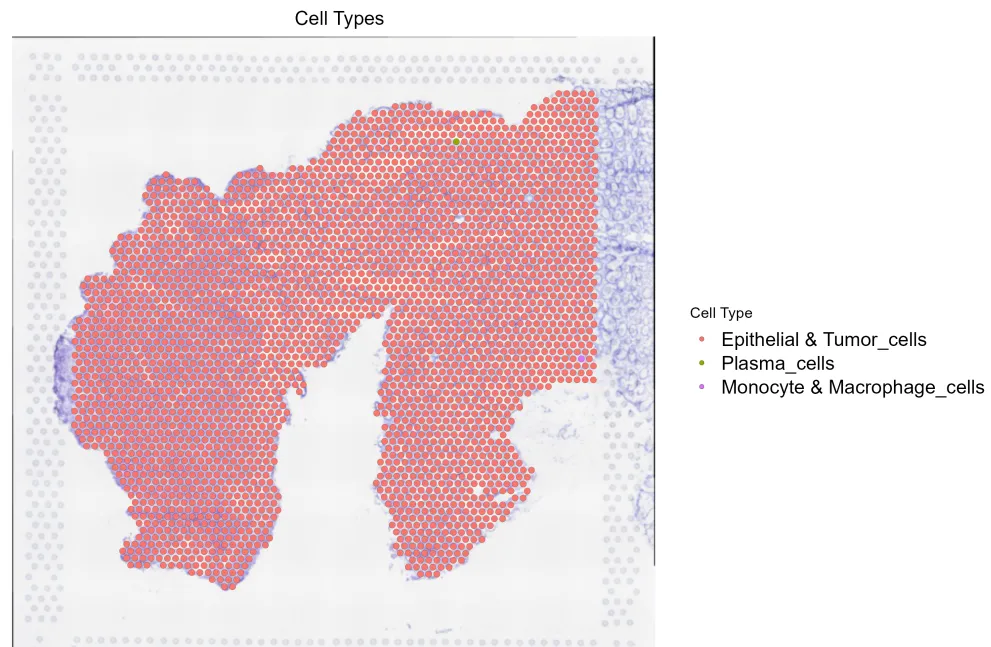
因为上一篇内容忘记分享空间转录组学的标准化方法了,所以这篇笔记给补上。同学们该抄代码的抄代码、该做笔记的做笔记!希望今后我的代码能助力大家多多发 paper ,文章都 accept。#第一种LogNormalize library(Seurat)library(ggplot2)library(patchwork)library(dplyr)library(ggplot2)#读入空间转录组数据st<-Load10X_Spatial(data.dir = "./放空转数据的位置/", filename = "filtered_feature_bc_matrix.h5", slice = "spatial")#检查数据VlnPlot(st,features = "nCount_Spatial",pt.size=0.1)VlnPlot(st,features = "nFeature_Spatial",pt.size=0.1)SpatialFeaturePlot(st, features = "nCount_Spatial", slot='data') + theme(legend.position = "right")SpatialFeaturePlot(st, features = "nFeature_Spatial", slot='data') + theme(legend.position = "right")#这里可以过滤数据,具体情况我们下一节课讲#合并多个层次st <- JoinLayers(st, assay = "Spatial")#标准化st <- NormalizeData(st, assay = "Spatial")#寻找3000个高突变的基因st <- FindVariableFeatures(st, assay = "Spatial", selection.method = "vst", nfeatures = 3000))#归一化处理st <- ScaleData(st, assay = "Spatial", features = VariableFeatures(st)))## 展示基因SpatialFeaturePlot(st, features = c("ENTPD1", "EPCAM")) + theme(legend.position = "right")p1 <- SpatialFeaturePlot(st, features = "ENTPD1", pt.size.factor = 3)p2 <- SpatialFeaturePlot(st, features = "ENTPD1", alpha = c(0.1, 1))p1 + p2SpatialFeaturePlot(st, features = c('ENTPD1'), pt.size.factor = 5, alpha =c(0.1, 1.0))## 降维、聚类st <- RunPCA(st, assay = "Spatial", verbose = FALSE)st <- FindNeighbors(st, reduction = "pca", dims = 1:30)st <- FindClusters(st, verbose = FALSE)st <- RunUMAP(st, reduction = "pca", dims = 1:30)p1 <- DimPlot(st, reduction = "umap", label = TRUE)p2 <- SpatialDimPlot(st, label = TRUE, label.size = 3, group.by = 'seurat_clusters')p1 + p2SpatialDimPlot(st, cells.highlight = CellsByIdentities(object = stRNA, idents = c( 1,2,3, 4, 5, 6)), facet.highlight = TRUE, ncol = 3)## 交互式操作SpatialDimPlot(st, interactive = TRUE)SpatialFeaturePlot(st, features = "ENTPD1", interactive = TRUE)LinkedDimPlot(stRNA)## 相对于交互式操作SpatialDimPlot(st_subset, crop = F)brain_subset = subset(x=st, subset=seurat_clusters==c(5, 11))SpatialDimPlot(st_subset, group.by = 'seurat_clusters', pt.size.factor = 2.0, crop = F)
#第二种 SCTransformlibrary(Seurat)library(ggplot2)library(patchwork)library(dplyr)library(ggplot2)library(sctransform)#读入空间转录组数据st<-Load10X_Spatial(data.dir = "./放空转数据的位置/", filename = "filtered_feature_bc_matrix.h5", slice = "spatial")#检查数据VlnPlot(st,features = "nCount_Spatial",pt.size=0.1)VlnPlot(st,features = "nFeature_Spatial",pt.size=0.1)SpatialFeaturePlot(st, features = "nCount_Spatial", slot='data') + theme(legend.position = "right")SpatialFeaturePlot(st, features = "nFeature_Spatial", slot='data') + theme(legend.position = "right")#这里可以过滤数据,具体情况我们下一节课讲#标准化st <- SCTransform(st, assay = "Spatial", verbose = FALSE)## 展示基因SpatialFeaturePlot(st, features = c("ENTPD1", "EPCAM")) + theme(legend.position = "right")p1 <- SpatialFeaturePlot(st, features = "ENTPD1", pt.size.factor = 3)p2 <- SpatialFeaturePlot(st, features = "ENTPD1", alpha = c(0.1, 1))p1 + p2SpatialFeaturePlot(st, features = c('ENTPD1'), pt.size.factor = 5, alpha =c(0.1, 1.0))## 降维、聚类st <- RunPCA(st, assay = "SCT", verbose = FALSE)st <- FindNeighbors(st, reduction = "pca", dims = 1:30)st <- FindClusters(st, verbose = FALSE)st <- RunUMAP(st, reduction = "pca", dims = 1:30)p1 <- DimPlot(st, reduction = "umap", label = TRUE)p2 <- SpatialDimPlot(st, label = TRUE, label.size = 3, group.by = 'seurat_clusters')p1 + p2SpatialDimPlot(st, cells.highlight = CellsByIdentities(object = stRNA, idents = c( 1,2,3, 4, 5, 6)), facet.highlight = TRUE, ncol = 3)## 交互式操作SpatialDimPlot(stRNA, interactive = TRUE)SpatialFeaturePlot(stRNA, features = "ENTPD1", interactive = TRUE)LinkedDimPlot(stRNA)## 相对于交互式操作,直接subset也许更快更方便SpatialDimPlot(st_subset, crop = F)brain_subset = subset(x=st, subset=seurat_clusters==c(5, 11))SpatialDimPlot(st_subset, group.by = 'seurat_clusters', pt.size.factor = 2.0, crop = F)
好了,这期就先分享到这里,欢迎大家关注、转发与点赞!点赞量和转发量越多,越能激起我给大家免费分享代码的欲望。如果转发和点赞量不多的话,可能得再思考一下了。 当然,空间转录组数据标准化方法比单细胞数据处理复杂得多。因为我们处理样本都是很多个样本,空间转录组占用电脑内存特别大,要是有服务器跑代码就更好、更快。下一步计划给大家讲一讲单细胞数据和空间转录组数据多样本的合并方法,包括两种主流去除批次效应的方法:CCA和harmony。 另外,本公众号欢迎来自全国各地的网友投稿,内容包括考研、考公经验分享、生活经验分享、个人人生感悟、参军入伍经历、感情分享等。在于分享、重在分享、敢于分享!投稿方式可以后台私信或者发送至邮箱:gangwangjin@163.cm
 10个月宝宝每天需要喝多少奶粉?

