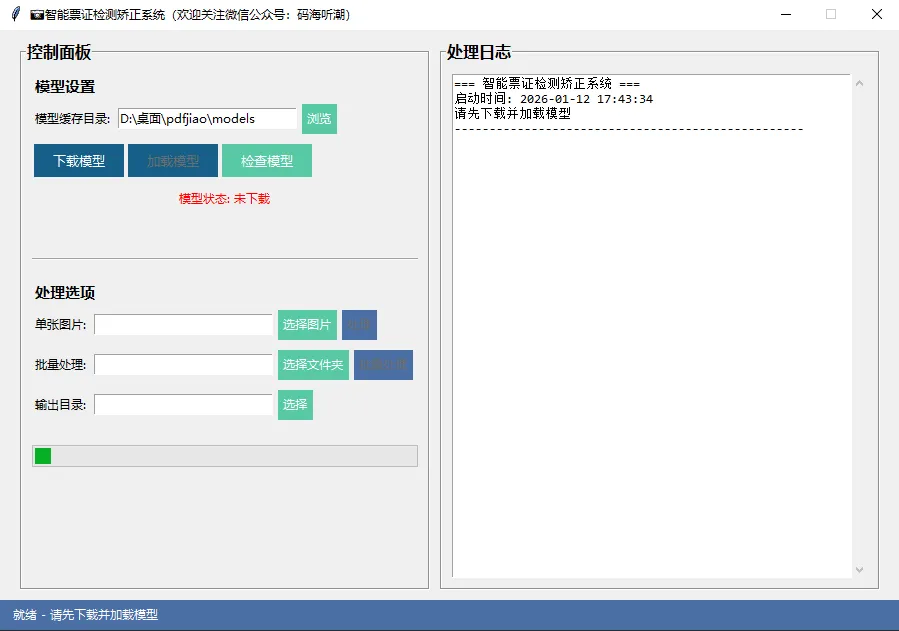
import tkinter as tkfrom tkinter import ttk, filedialog, messagebox, scrolledtextimport threadingimport queuefrom datetime import datetimeimport osclass CardCorrectionGUI: def __init__(self, root): self.root = root self.root.title("📷智能票证检测矫正系统(欢迎关注微信公众号:码海听潮)") self.root.geometry("900x600") self.root.resizable(False, False) # 设置主题颜色 self.bg_color = "#f0f0f0" self.primary_color = "#4a6fa5" self.secondary_color = "#166088" self.accent_color = "#59c9a5" # 创建处理器实例 self.processor = None self.model_loaded = False # 创建界面 self.setup_ui() # 消息队列用于线程通信 self.message_queue = queue.Queue() # 启动消息处理器 self.root.after(100, self.process_messages) def setup_ui(self): # 设置窗口样式 self.root.configure(bg=self.bg_color) # 创建主容器 main_container = tk.Frame(self.root, bg=self.bg_color) main_container.pack(fill="both", expand=True, padx=20, pady=10) # 左侧控制面板 control_frame = tk.LabelFrame( main_container, text="控制面板", font=("微软雅黑", 12, "bold"), bg=self.bg_color, relief="groove", bd=2 ) control_frame.pack(side="left", fill="y", padx=(0, 10)) # 模型设置 model_frame = tk.Frame(control_frame, bg=self.bg_color) model_frame.pack(fill="x", pady=10, padx=10) tk.Label( model_frame, text="模型设置", font=("微软雅黑", 11, "bold"), bg=self.bg_color ).pack(anchor="w") # 缓存目录选择 cache_frame = tk.Frame(model_frame, bg=self.bg_color) cache_frame.pack(fill="x", pady=5) tk.Label( cache_frame, text="模型缓存目录:", bg=self.bg_color ).pack(side="left") # 默认缓存目录 default_cache = os.path.join(os.path.dirname(os.path.abspath(__file__)), 'models') self.cache_var = tk.StringVar(value=default_cache) cache_entry = tk.Entry( cache_frame, textvariable=self.cache_var, width=25 ) cache_entry.pack(side="left", padx=5) tk.Button( cache_frame, text="浏览", command=self.browse_cache_dir, bg=self.accent_color, fg="white", relief="flat" ).pack(side="left") # 模型操作按钮框架 model_buttons_frame = tk.Frame(model_frame, bg=self.bg_color) model_buttons_frame.pack(fill="x", pady=5) # 下载模型按钮 self.download_model_btn = tk.Button( model_buttons_frame, text="下载模型", command=self.download_model, bg=self.secondary_color, fg="white", font=("微软雅黑", 10), relief="flat", width=10 ) self.download_model_btn.pack(side="left", padx=2) # 加载模型按钮 self.load_model_btn = tk.Button( model_buttons_frame, text="加载模型", command=self.load_model, bg=self.secondary_color, fg="white", font=("微软雅黑", 10), relief="flat", width=10, state="disabled" # 初始禁用,下载完成后启用 ) self.load_model_btn.pack(side="left", padx=2) # 检查模型按钮 self.check_model_btn = tk.Button( model_buttons_frame, text="检查模型", command=self.check_model, bg=self.accent_color, fg="white", font=("微软雅黑", 10), relief="flat", width=10 ) self.check_model_btn.pack(side="left", padx=2) self.model_status_label = tk.Label( model_frame, text="模型状态: 未下载", fg="red", bg=self.bg_color ) self.model_status_label.pack(pady=5) # 模型文件信息标签 self.model_info_label = tk.Label( model_frame, text="", fg="gray", bg=self.bg_color, font=("微软雅黑", 9) ) self.model_info_label.pack() # 分隔线 ttk.Separator(control_frame, orient="horizontal").pack(fill="x", pady=10, padx=10) # 处理选项 process_frame = tk.Frame(control_frame, bg=self.bg_color) process_frame.pack(fill="x", pady=10, padx=10) tk.Label( process_frame, text="处理选项", font=("微软雅黑", 11, "bold"), bg=self.bg_color ).pack(anchor="w") # 单张图片处理 single_frame = tk.Frame(process_frame, bg=self.bg_color) single_frame.pack(fill="x", pady=5) tk.Label( single_frame, text="单张图片:", bg=self.bg_color ).pack(side="left") self.single_input_var = tk.StringVar() tk.Entry( single_frame, textvariable=self.single_input_var, width=25 ).pack(side="left", padx=5) tk.Button( single_frame, text="选择图片", command=self.select_single_image, bg=self.accent_color, fg="white", relief="flat" ).pack(side="left") self.single_process_btn = tk.Button( single_frame, text="处理", command=self.process_single, bg=self.primary_color, fg="white", relief="flat", state="disabled" # 初始禁用 ) self.single_process_btn.pack(side="left", padx=5) # 批量处理 batch_frame = tk.Frame(process_frame, bg=self.bg_color) batch_frame.pack(fill="x", pady=5) tk.Label( batch_frame, text="批量处理:", bg=self.bg_color ).pack(side="left") self.batch_input_var = tk.StringVar() tk.Entry( batch_frame, textvariable=self.batch_input_var, width=25 ).pack(side="left", padx=5) tk.Button( batch_frame, text="选择文件夹", command=self.select_batch_folder, bg=self.accent_color, fg="white", relief="flat" ).pack(side="left") self.batch_process_btn = tk.Button( batch_frame, text="批量处理", command=self.process_batch, bg=self.primary_color, fg="white", relief="flat", state="disabled" # 初始禁用 ) self.batch_process_btn.pack(side="left", padx=5) # 输出目录 output_frame = tk.Frame(process_frame, bg=self.bg_color) output_frame.pack(fill="x", pady=5) tk.Label( output_frame, text="输出目录:", bg=self.bg_color ).pack(side="left") self.output_var = tk.StringVar() tk.Entry( output_frame, textvariable=self.output_var, width=25 ).pack(side="left", padx=5) tk.Button( output_frame, text="选择", command=self.select_output_folder, bg=self.accent_color, fg="white", relief="flat" ).pack(side="left") # 进度条 self.progress = ttk.Progressbar( control_frame, mode='indeterminate' ) self.progress.pack(fill="x", pady=10, padx=10) # 右侧日志显示区域 log_frame = tk.LabelFrame( main_container, text="处理日志", font=("微软雅黑", 12, "bold"), bg=self.bg_color, relief="groove", bd=2 ) log_frame.pack(side="right", fill="both", expand=True) self.log_text = scrolledtext.ScrolledText( log_frame, wrap=tk.WORD, width=60, height=30, font=("Consolas", 10) ) self.log_text.pack(fill="both", expand=True, padx=10, pady=10) self.log_text.config(state="normal") self.log_text.insert("end", "=== 智能票证检测矫正系统 ===\n") self.log_text.insert("end", f"启动时间: {datetime.now().strftime('%Y-%m-%d %H:%M:%S')}\n") self.log_text.insert("end", "请先下载并加载模型\n") self.log_text.insert("end", "-" * 50 + "\n") self.log_text.config(state="disabled") # 状态栏 status_frame = tk.Frame(self.root, bg=self.primary_color, height=30) status_frame.pack(fill="x", side="bottom") status_frame.pack_propagate(False) self.status_label = tk.Label( status_frame, text="就绪 - 请先下载并加载模型", bg=self.primary_color, fg="white" ) self.status_label.pack(side="left", padx=10) self.file_count_label = tk.Label( status_frame, text="", bg=self.primary_color, fg="white" ) self.file_count_label.pack(side="right", padx=10) def log_message(self, message, level="INFO"): """记录日志消息""" timestamp = datetime.now().strftime("%H:%M:%S") if level == "ERROR": color = "red" elif level == "WARNING": color = "orange" elif level == "SUCCESS": color = "green" else: color = "black" self.log_text.config(state="normal") self.log_text.insert("end", f"[{timestamp}] {message}\n", (level,)) self.log_text.tag_config(level, foreground=color) self.log_text.see("end") self.log_text.config(state="disabled") def update_status(self, message): """更新状态栏""" self.status_label.config(text=message) def update_model_status(self, status, color="black"): """更新模型状态""" self.model_status_label.config(text=f"模型状态: {status}", fg=color) def update_model_info(self, info): """更新模型信息""" self.model_info_label.config(text=info) def set_model_button_state(self, download_state="normal", load_state="normal", check_state="normal"): """设置模型按钮状态""" self.download_model_btn.config(state=download_state) self.load_model_btn.config(state=load_state) self.check_model_btn.config(state=check_state) def enable_process_buttons(self, enabled=True): """启用/禁用处理按钮""" state = "normal" if enabled else "disabled" self.single_process_btn.config(state=state) self.batch_process_btn.config(state=state) def browse_cache_dir(self): """浏览缓存目录""" folder = filedialog.askdirectory(title="选择模型缓存目录") if folder: self.cache_var.set(folder) self.log_message(f"设置模型缓存目录: {folder}", "INFO") def select_single_image(self): """选择单张图片""" filetypes = [ ("图片文件", "*.jpg *.jpeg *.png *.bmp"), ("所有文件", "*.*") ] filename = filedialog.askopenfilename(title="选择图片", filetypes=filetypes) if filename: self.single_input_var.set(filename) self.log_message(f"选择单张图片: {filename}", "INFO") def select_batch_folder(self): """选择批量处理文件夹""" folder = filedialog.askdirectory(title="选择图片文件夹") if folder: self.batch_input_var.set(folder) self.log_message(f"选择批量处理文件夹: {folder}", "INFO") def select_output_folder(self): """选择输出文件夹""" folder = filedialog.askdirectory(title="选择输出文件夹") if folder: self.output_var.set(folder) self.log_message(f"设置输出目录: {folder}", "INFO") def check_model(self): """检查模型是否存在""" cache_dir = self.cache_var.get() if not cache_dir or not os.path.exists(cache_dir): self.log_message(f"缓存目录不存在: {cache_dir}", "WARNING") self.update_model_status("缓存目录不存在", "red") return model_path = os.path.join(cache_dir, 'iic', 'cv_resnet18_card_correction') if os.path.exists(model_path): # 统计模型文件 model_files = [] total_size = 0 for root, dirs, files in os.walk(model_path): for file in files: file_path = os.path.join(root, file) model_files.append(file) total_size += os.path.getsize(file_path) size_mb = total_size / (1024 * 1024) self.log_message(f"模型已存在,位于: {model_path}", "SUCCESS") self.log_message(f"模型文件数: {len(model_files)},大小: {size_mb:.2f} MB", "INFO") self.update_model_status("已下载", "green") self.update_model_info(f"{len(model_files)}个文件,{size_mb:.1f}MB") self.set_model_button_state(download_state="disabled", load_state="normal") else: self.log_message(f"模型未下载,请先下载模型", "WARNING") self.update_model_status("未下载", "red") self.update_model_info("") self.set_model_button_state(download_state="normal", load_state="disabled") def download_model(self): """下载模型""" def download(): try: self.message_queue.put(("status", "正在下载模型...")) self.message_queue.put(("log", "开始下载模型,这可能需要一些时间...", "INFO")) self.message_queue.put(("progress_start",)) self.message_queue.put(("set_model_buttons", "disabled", "disabled", "disabled")) cache_dir = self.cache_var.get() if not cache_dir or cache_dir == "": cache_dir = None # 导入必要的库 from modelscope import snapshot_download # 下载模型 model_dir = snapshot_download( 'iic/cv_resnet18_card_correction', cache_dir=cache_dir ) self.message_queue.put(("log", f"模型下载完成!保存位置: {model_dir}", "SUCCESS")) self.message_queue.put(("update_model_status", "已下载", "green")) self.message_queue.put(("status", "模型下载完成")) self.message_queue.put(("progress_stop",)) self.message_queue.put(("set_model_buttons", "disabled", "normal", "normal")) # 显示模型信息 model_files = [] total_size = 0 for root, dirs, files in os.walk(model_dir): for file in files: file_path = os.path.join(root, file) model_files.append(file) total_size += os.path.getsize(file_path) size_mb = total_size / (1024 * 1024) self.message_queue.put(("update_model_info", f"{len(model_files)}个文件,{size_mb:.1f}MB")) self.message_queue.put(("log", f"模型包含 {len(model_files)} 个文件,总计 {size_mb:.2f} MB", "INFO")) except Exception as e: import traceback error_msg = f"模型下载失败: {str(e)}" self.message_queue.put(("log", error_msg, "ERROR")) self.message_queue.put(("log", traceback.format_exc(), "ERROR")) self.message_queue.put(("update_model_status", "下载失败", "red")) self.message_queue.put(("status", f"模型下载失败: {str(e)}")) self.message_queue.put(("progress_stop",)) self.message_queue.put(("set_model_buttons", "normal", "disabled", "normal")) # 启动下载线程 thread = threading.Thread(target=download) thread.daemon = True thread.start() def load_model(self): """加载模型""" def load(): try: self.message_queue.put(("status", "正在加载模型...")) self.message_queue.put(("log", "开始加载模型...", "INFO")) self.message_queue.put(("progress_start",)) self.message_queue.put(("set_model_buttons", "disabled", "disabled", "disabled")) self.message_queue.put(("enable_process_buttons", False)) cache_dir = self.cache_var.get() if not cache_dir or cache_dir == "": cache_dir = None # 导入必要的库 from modelscope.pipelines import pipeline from modelscope.utils.constant import Tasks # 初始化处理器(这里需要SimpleBatchCardCorrection类的定义) self.processor = SimpleBatchCardCorrection(cache_dir) self.model_loaded = True self.message_queue.put(("log", "模型加载完成!", "SUCCESS")) self.message_queue.put(("update_model_status", "已加载", "green")) self.message_queue.put(("status", "模型加载完成,可以开始处理")) self.message_queue.put(("progress_stop",)) self.message_queue.put(("enable_process_buttons", True)) self.message_queue.put(("set_model_buttons", "disabled", "disabled", "normal")) except Exception as e: import traceback error_msg = f"模型加载失败: {str(e)}" self.message_queue.put(("log", error_msg, "ERROR")) self.message_queue.put(("log", traceback.format_exc(), "ERROR")) self.message_queue.put(("update_model_status", "加载失败", "red")) self.message_queue.put(("status", f"模型加载失败: {str(e)}")) self.message_queue.put(("progress_stop",)) self.message_queue.put(("enable_process_buttons", False)) self.message_queue.put(("set_model_buttons", "disabled", "normal", "normal")) # 启动加载线程 thread = threading.Thread(target=load) thread.daemon = True thread.start() def process_single(self): """处理单张图片""" if not self.model_loaded or self.processor is None: messagebox.showwarning("警告", "请先加载模型") return input_path = self.single_input_var.get() if not input_path: messagebox.showwarning("警告", "请先选择图片") return if not os.path.exists(input_path): messagebox.showerror("错误", "图片文件不存在") return output_path = self.output_var.get() if output_path and output_path.strip(): filename = os.path.basename(input_path) name, ext = os.path.splitext(filename) output_path = os.path.join(output_path, f"{name}_corrected.jpg") else: output_path = None def process(): try: self.message_queue.put(("status", f"正在处理: {os.path.basename(input_path)}")) self.message_queue.put(("log", f"开始处理单张图片: {input_path}", "INFO")) self.message_queue.put(("progress_start",)) result = self.processor.process_single_image(input_path, output_path) if result: self.message_queue.put(("log", f"处理完成: {result}", "SUCCESS")) self.message_queue.put(("status", "处理完成")) self.message_queue.put(("log", "图片已保存", "INFO")) else: self.message_queue.put(("log", "处理失败,未检测到卡片或保存失败", "WARNING")) self.message_queue.put(("status", "处理失败,未检测到卡片")) self.message_queue.put(("progress_stop",)) except Exception as e: import traceback error_msg = f"处理失败: {str(e)}" self.message_queue.put(("log", error_msg, "ERROR")) self.message_queue.put(("log", traceback.format_exc(), "ERROR")) self.message_queue.put(("status", "处理失败")) self.message_queue.put(("progress_stop",)) # 在新线程中处理 thread = threading.Thread(target=process) thread.daemon = True thread.start() def process_batch(self): """批量处理""" if not self.model_loaded or self.processor is None: messagebox.showwarning("警告", "请先加载模型") return input_folder = self.batch_input_var.get() if not input_folder or not os.path.exists(input_folder): messagebox.showwarning("警告", "请选择有效的输入文件夹") return output_folder = self.output_var.get() if not output_folder or not output_folder.strip(): # 创建默认输出文件夹 output_folder = os.path.join(input_folder, 'corrected') def process_batch(): try: self.message_queue.put(("status", "正在批量处理...")) self.message_queue.put(("log", f"开始批量处理文件夹: {input_folder}", "INFO")) self.message_queue.put(("log", f"输出目录: {output_folder}", "INFO")) self.message_queue.put(("progress_start",)) # 查找图片文件 extensions = ['.jpg', '.jpeg', '.png', '.bmp'] image_files = [] for file in os.listdir(input_folder): file_path = os.path.join(input_folder, file) if os.path.isfile(file_path): if any(file.lower().endswith(ext.lower()) for ext in extensions): image_files.append(file_path) if not image_files: self.message_queue.put(("log", "文件夹中没有找到图片文件", "WARNING")) self.message_queue.put(("status", "没有找到图片")) self.message_queue.put(("progress_stop",)) return self.message_queue.put(("log", f"找到 {len(image_files)} 张图片", "INFO")) self.message_queue.put(("file_count", f"0/{len(image_files)}")) # 处理每张图片 success_count = 0 for i, image_path in enumerate(image_files, 1): self.message_queue.put(("status", f"正在处理第 {i}/{len(image_files)} 张图片")) self.message_queue.put(("log", f"处理第 {i}/{len(image_files)}: {os.path.basename(image_path)}", "INFO")) # 生成输出路径 file_name = os.path.basename(image_path) name, ext = os.path.splitext(file_name) output_path = os.path.join(output_folder, f"{name}_corrected.jpg") # 处理图片 result = self.processor.process_single_image(image_path, output_path) if result: success_count += 1 self.message_queue.put(("file_count", f"{i}/{len(image_files)}")) self.message_queue.put(("log", f"批量处理完成!成功处理 {success_count}/{len(image_files)} 张图片", "SUCCESS")) self.message_queue.put(("status", f"批量处理完成,成功 {success_count}/{len(image_files)}")) self.message_queue.put(("progress_stop",)) if success_count > 0: self.message_queue.put(("log", f"输出目录: {output_folder}", "INFO")) self.message_queue.put(("log", "可以在文件浏览器中查看处理结果", "INFO")) except Exception as e: import traceback error_msg = f"批量处理失败: {str(e)}" self.message_queue.put(("log", error_msg, "ERROR")) self.message_queue.put(("log", traceback.format_exc(), "ERROR")) self.message_queue.put(("status", "批量处理失败")) self.message_queue.put(("progress_stop",)) # 在新线程中处理 thread = threading.Thread(target=process_batch) thread.daemon = True thread.start() def process_messages(self): """处理消息队列""" try: while True: try: msg_type, *args = self.message_queue.get_nowait() if msg_type == "log": message, level = args self.log_message(message, level) elif msg_type == "status": self.update_status(args[0]) elif msg_type == "update_model_status": status, color = args self.update_model_status(status, color) elif msg_type == "update_model_info": self.update_model_info(args[0]) elif msg_type == "set_model_buttons": download_state, load_state, check_state = args self.set_model_button_state(download_state, load_state, check_state) elif msg_type == "enable_process_buttons": self.enable_process_buttons(args[0]) elif msg_type == "progress_start": self.progress.start() elif msg_type == "progress_stop": self.progress.stop() elif msg_type == "file_count": self.file_count_label.config(text=f"进度: {args[0]}") except queue.Empty: break except Exception as e: print(f"处理消息时出错: {e}") # 继续检查消息 self.root.after(100, self.process_messages)# 简单的处理器类定义(这是界面中需要的,但没有OpenCV等依赖)class SimpleBatchCardCorrection: def __init__(self, cache_dir=None): self.cache_dir = cache_dir def process_single_image(self, input_path, output_path=None): # 这里只是一个占位符,实际功能需要完整代码 print(f"处理图片: {input_path}") return output_pathdef main(): # 创建主窗口 root = tk.Tk() # 创建应用 app = CardCorrectionGUI(root) # 运行主循环 root.mainloop()if __name__ == "__main__": main()






 10个月宝宝每天需要喝多少奶粉?