0基础的Python对列表、向量、向量场和矩阵的操作
- 2026-10-21 22:35:24
0基础的Python对列表、向量、向量场和矩阵的操作以下这些视频都是用ManimGL制作出来的,本质就是Python代码,所以前提是需要掌握Python,然后很重要的操作就是安装编程环境,这个是有一定难度的,对于初学者,是需要花费几天时间才可能搞定,当然,按照这篇文章一步一步来,就会少走很多弯路:小白从搭建环境到制作ManimGL动画的精华(一篇文章就够了) 这里以向量为例,我们来了解了解Python的语法和一些基操。 向量(vector)是一种既有大小,又有方向的量。从几何上来看,向量是个有向线段(directed line segment)。 相比之下,标量(scalar)就像一个单纯的数值,只有大小,没有方向。 汽车仪表盘上显示的车速(速率),比如60千米/小时,是一个标量,因为它只表示速度的大小,如果讲的是速度,那么它是一个矢量或者说是向量。 在线性代数里面,常被提起的向量,一般指的是列向量,矩阵就是列向量的线性组合,当然这个看具体情况,也可能是行向量,这里我们看看行向量与列向量两者的转换 行向量指的是一行有n列,列向量是n行1列,这里介绍了三种转换的方法。 生活中向量无处不在,风、水流、重力场、电磁场等现象,都可以用向量场(vector field)来描述。向量场是一个数学描述,其空间中每个点都关联一个向量,用来表示该点的某种物理量的大小和方向。 比如,从某个具体位置来看,风不仅有速度的大小(如每秒10米),还有明确的方向(如从北向南吹) 河流中某一点处的水流也是如此,既有流速的大小,也有流动的方向。比如绘制这个逆时针旋转的向量场 F(x, y) = (-y, x) 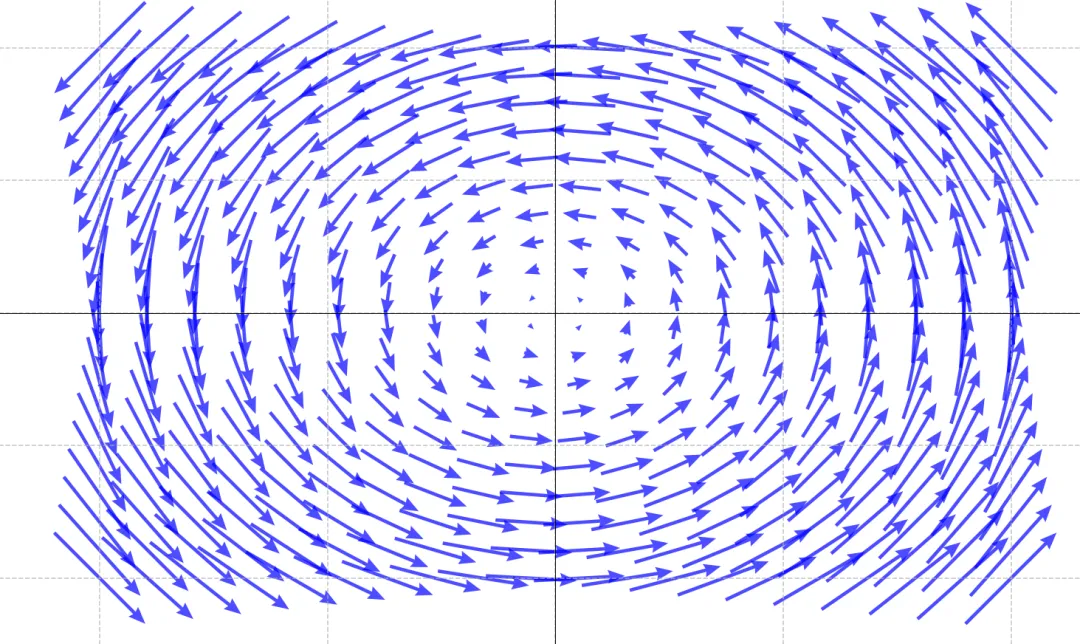
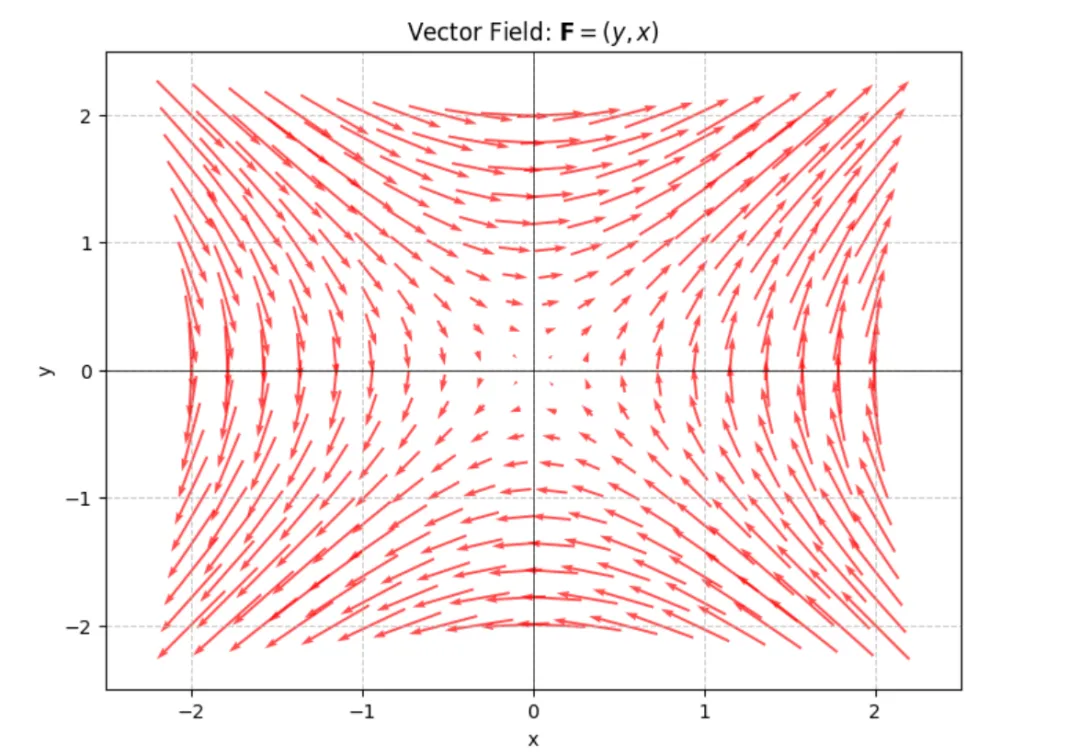
我们可以把向量想象成一支箭,它有两个重要的特征----大小:箭的长度;方向:箭的指向。这里的代码使用的是Python绘制的图片,比如上面的鞍形向量场代码如下: 1,2行代码就是导入所需要的库,常用的numpy,以及需要绘制图片的matplotlib 5,6行代码 np.linspace() 是NumPy库中用于创建等差数列的函数 参数说明: -2:序列的起始值 2:序列的结束值 20:要生成的样本数量 为了简单直观,这里比如我生成样本数量为4个,如下: 使用print函数就可以将其打印出来,这个方法是很实用的,经常用来输出一些变量的值,方便我们了解。中括号表示数组,这里表示的是一维数组。 绘制向量场,我们需要将一维数组转换为二维数组,也就是一维的坐标向量转换为二维的坐标网格。这里有请 meshgrid 这个函数 可以看到打印出来的形状X.shape是(4,4)也就是4行4列的矩阵,返回的(4,4)是一个元组类型,这个矩阵的每行和每列分别是x,y的复制。 13行到后面的代码属于使用plt来绘制图片,其中关键点是使用函数quiver来绘制箭头 其中箭头基点位置在中点,有三个可选参数 'tail', 'middle', 'tip' 如果你是有Python基础的,想要直接学习ManimGL动画绘制向量场,可以阅读:从向量场理解微分方程的本质(高阶微分方程) 创建列表,是一种有序、可变、可包含任意类型元素的数据结构 可以看到在Python里面,创建列表是一件非常简单的事情,中括号[]就表示列表,相当于一个桶子,里面可以装玩具、衣服、裤子、书本等各种东西。 访问列表,需要注意的是,都是从索引0开始访问 切片操作,可以灵活访问想要的片段 另外还有添加,删除等操作,其余的排序,统计等就不赘述了 相对列表,我们更多使用数组,比如一维数组,二维数组,三维数组等等 也可以将前面的列表转换成数组,比如 数组提供了更多的数学运算和操作功能,比如 arange就可以很方便地生成0到3(不包含3)的公差为0.2的等差数列。 也可以创建二维数组来代表向量 可以看到,二维数组的访问与切片操作跟一维数组其实差不多。另外转置成列向量的时候,这里由于是二维数组了,所以有一种更简单的方法来实现: 使用 .T 就可以轻松将行向量与列向量进行转换,非常方便。 这些都属于线性代数里面的基础且重要的概念,我们通过学习线性代数的知识从而也掌握了Python的基础知识,当Python编程也会了之后,我们就可以进入到制作动画的阶段了,那么这个过程,推荐阅读《线性代数不难》,整本书非常适合0基础,既可以掌握线性代数知识,又能掌握Python编程,因为针对的0基础,所以讲解特别详细,不用担心看不懂。 在每个小节后面配有精心挑选的习题,可以结合AI来辅助学习,这样可以快速的理解每个小节的知识点。
经常有人问起,如何制作出这些动画视频,制作难不难的问题?比如下面这样的物理和数学方面的直观演示,如果自己能够制作出来,那么对于学生了解概念和定义就变得简单易懂了。
向量与向量场
import numpy as np# 原始数据data = [1, 2, 3]# 创建行向量 (1×3)row_vec = np.array(data)print(row_vec)# 创建列向量 (3×1)col_vec = np.array(data).reshape(-1, 1)#col_vec = row_vec.reshape(3,1)#col_vec = row_vec[:, np.newaxis]print(col_vec)
[1 2 3][[1][2][3]]
鞍形向量场 F = (y, x)
import numpy as npimport matplotlib.pyplot as plt# 创建网格点x = np.linspace(-2, 2, 20)y = np.linspace(-2, 2, 20)X, Y = np.meshgrid(x, y)U = YV = X# 创建图形plt.figure(figsize=(8, 6))plt.quiver(X, Y, U, V, scale=25, pivot='middle', color='red', alpha=0.7)plt.title('Vector Field: $\mathbf{F} = (y, x)$')plt.xlabel('x')plt.ylabel('y')plt.grid(True, linestyle='--', alpha=0.7)plt.axhline(y=0, color='k', linewidth=0.5)plt.axvline(x=0, color='k', linewidth=0.5)plt.xlim(-2.5, 2.5)plt.ylim(-2.5, 2.5)plt.show()
print(x)[-2. -0.66666667 0.66666667 2. ]x:之前创建的一维数组 [-2. -0.66666667 0.66666667 2.]
y:同样的一维数组 [-2. -0.66666667 0.66666667 2.]
输出结果:
X:一个4×4的二维数组,每一行都是x数组的重复
Y:一个4×4的二维数组,每一列都是y数组的重复
print(X.shape,X)(4, 4) [[-2. -0.66666667 0.66666667 2. ][-2. -0.66666667 0.66666667 2. ][-2. -0.66666667 0.66666667 2. ][-2. -0.66666667 0.66666667 2. ]]
quiver函数的前四个参数分别控制箭头的起点和方向分量:
X, Y:箭头的起点坐标网格
U, V:箭头的向量分量(x方向和y方向的位移)
具体来说: 每个箭头的起点是 (X[i,j], Y[i,j])
每个箭头的方向由 (U[i,j], V[i,j])决定
每个箭头的终点是 (X[i,j] + U[i,j], Y[i,j] + V[i,j])
列表 list
empty_list = []# 包含不同类型元素的列表mixed_list = [1, "Hello", 3.14, True]# 使用 list() 构造函数numbers = list(range(5)) # [0, 1, 2, 3, 4]print(f"空列表: {empty_list}")print(f"混合列表: {mixed_list}")print(f"数字列表: {numbers}")
空列表: []混合列表: [1, 'Hello', 3.14, True]数字列表: [0, 1, 2, 3, 4]
fruits = ["apple", "banana", "cherry", "date", "elderberry"]print(f"\n2. 完整列表: {fruits}")print(f"第一个元素: {fruits[0]}")print(f"第二个元素: {fruits[1]}")print(f"最后一个元素: {fruits[-1]}")print(f"倒数第二个元素: {fruits[-2]}")
第一个元素: apple第二个元素: banana最后一个元素: elderberry倒数第二个元素: date
print(f"前三个: {fruits[:3]}")print(f"索引1到3: {fruits[1:4]}")print(f"最后两个: {fruits[-2:]}")print(f"每隔一个取一个: {fruits[::2]}")
前三个: ['apple', 'banana', 'cherry']索引1到3: ['banana', 'cherry', 'date']最后两个: ['date', 'elderberry']每隔一个取一个: ['apple', 'cherry', 'elderberry']
fruits.append("fig")fruits.insert(2, "cantaloupe")removed = fruits.pop() # 移除最后一个fruits.remove("cantaloupe")index = fruits.index("cherry")print(f" index('cherry'): {index}")#index('cherry'): 2
数组
fruits = ["apple", "banana", "cherry", "date", "elderberry"]print(fruits)arr_fruits = np.array(fruits)print(arr_fruits)
['apple', 'banana', 'cherry', 'date', 'elderberry']['apple''banana''cherry''date''elderberry']
a = np.arange(0, 3, 0.2)print(a)
[0. 0.2 0.4 0.6 0.8 1. 1.2 1.4 1.6 1.8 2. 2.2 2.4 2.6 2.8]import numpy as np# 二维行向量row_vector = np.array([[1,2,3,4,5,6,7,8,9,10]])# 索引print(row_vector[0, 1])print(row_vector[0, -1])# 切片print(row_vector[0, 1:])print(row_vector[0, :2])print(row_vector[0, :-1])
210[ 2 3 4 5 6 7 8 9 10][1 2][1 2 3 4 5 6 7 8 9]
col_vector = row_vector.Tprint(col_vector)# 索引print(col_vector[1, 0])print(col_vector[-1, 0])# 切片print(col_vector[1:, 0])print(col_vector[:2, 0])print(col_vector[:-1, 0])
[[ 1][ 2][ 3][ 4][ 5][ 6][ 7][ 8][ 9][10]]210[ 2 3 4 5 6 7 8 9 10][1 2][1 2 3 4 5 6 7 8 9]
本文来自网友投稿或网络内容,如有侵犯您的权益请联系我们删除,联系邮箱:596563534@qq.com 。
随机文章
-
 10个月宝宝每天需要喝多少奶粉?
- 【附安装包】2025最新版Python安装详细教程!一键安装,永久使用
- 数据分析封神之作!《Python+Excel—飞速搞定数据分析与处理》
- Python100个实战练手项目(附源码+素材),做完你的Python就牛了!
- 清华大佬72小时讲透的python你掌握了吗
- 期刊配图复现 | Python绘制机器学习“预测-实验”对比图
- 【Python AI实战】手把手带你从零打造“满血版”RAG:切片、混合检索与自动化评估
- 这是一份Python从入门到精通的教程!(附学习资料)
- Python学习【87】:Python 的 Web 开发框架Django与flask对比
- FDTD与Python联合仿真的超表面智能设计技术与应用
- 《Python3网络爬虫开发实战》:0基础小白的入门级别教科书!PDF电子书开放下载,建议收藏