Linux Shell脚本入门到实战详解
- 2026-10-21 13:28:09
一、shell 入门简介
1.1 什么是 shell
shell 脚本简介
什么是shell
网上有很多 shell 的概念介绍,其实都很官方化,如果你对 linux 命令很熟悉,那么编写 shell 就不是一个难事,shell 本质上是 linux 命令,一条一条命令组合在一起,实现某一个目的,就变成了 shell 脚本。它从一定程度上 减轻了工作量,提高了工作效率。
官方化的shell 介绍
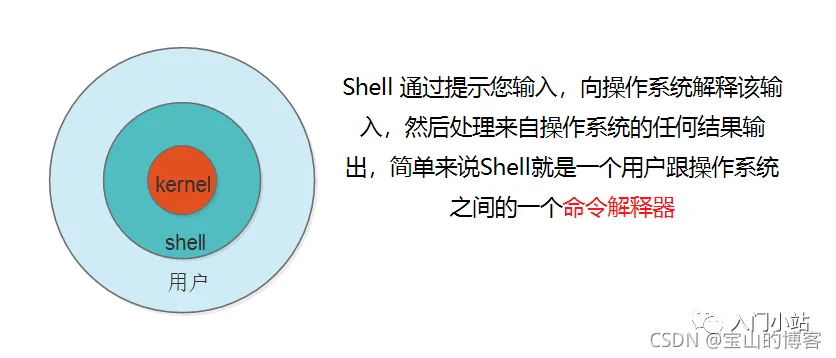
Shell 通过提示您输入,向操作系统解释该输入,然后处理来自操作系统的任何结果输出,简单来说Shell就是一个用户跟操作系统之间的一个命令解释器。
常见的 shell 有哪些
Bourne Shell(/usr/bin/sh或/bin/sh)
Bourne Again Shell(/bin/bash)
C Shell(/usr/bin/csh)
K Shell(/usr/bin/ksh)
Shell for Root(/sbin/sh)
最常用的shell是Bash,也就是Bourne Again Shell。Bash由于易用和免费,在日常工作中被广泛使用,也是大多数Linux操作系统默认的Shell环境。
1.2 shell 编程注意事项
shell 编程有哪些注意事项
shell 命名:Shell 脚本名称命名一般为英文、大写、小写,后缀以. sh 结尾
不能使用特殊符号、空格
见闻之意,名称要写的一眼可以看出功能
shell 编程 首行需要 #!/bin/bash 开头
shell 脚本 变量 不能以 数字、特殊符号开头,可以使用下划线—, 但不能 用破折号 -
1.3 第一个 shell 脚本 hello world
创建一个伟大编程项目 — Hello World
# 创建一个Helloword.sh 文件
[root@aly_server01~]# touch Helloword.sh

# 编辑Helloword.sh 文件
[root@aly_server01~]# vim Helloword.sh
[root@aly_server01~]# cat Helloword.sh
#!/bin/bash
# This is ower first shell
# by author rivers 2021.09
echo"hello world"
[root@aly_server01~]#
[root@aly_server01~]# ll Helloword.sh
-rw-r--r-- 1 root root 85 Sep 20 22:26 Helloword.sh

# 赋予执行权限
[root@aly_server01~]# chmod o+x Helloword.sh

# 运行helloword.sh 脚本
[root@aly_server01~]# ./Helloword.sh
hello world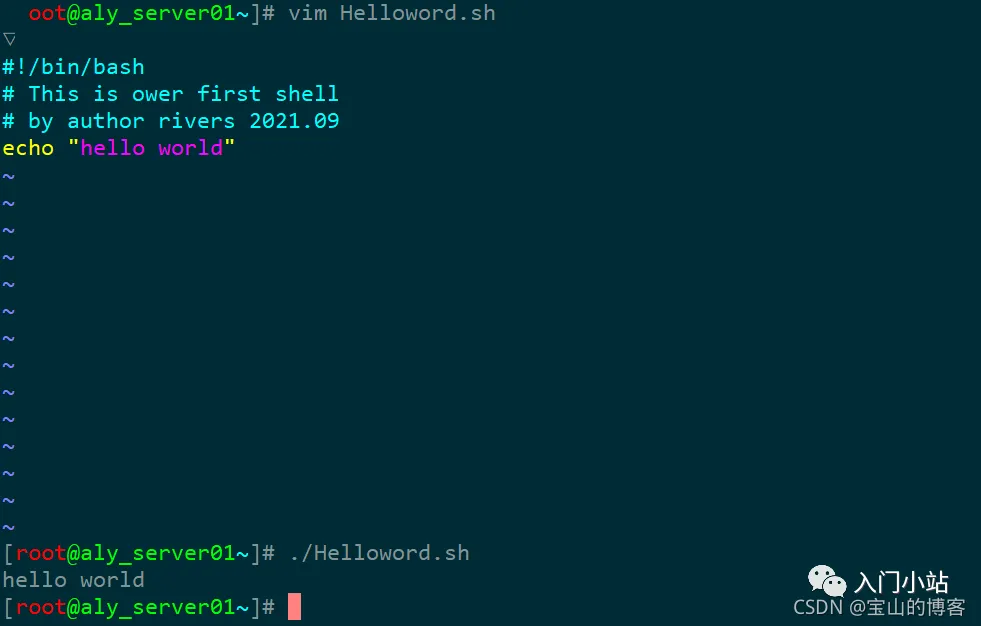
二、shell 环境变量讲解
2.1 shell 变量详解
环境变量介绍
什么是变量
很多人可能会说,可以变化的量就是变量。但是发现很多汉语意思很强大,你看的懂的字,却不一定可以理解它的意思。这里你可以理解为 a = 1,同时还可以 a =2、a = 3 ,不同的值都可以复制给同一个 变量 a 。
常见的3种变量
Shell编程中变量分为三种,分别是系统变量、环境变量和用户变量,Shell变量名在定义时,首个字符必须为字母(a-z,A-Z),不能以数字开头,中间不能有空格,可以使用下划线(_),不能使用(-),也不能使用标点符号等。
简单的变量介绍
[root@keeplived_server~]# a=18
[root@keeplived_server~]# echo $a
18
2.2 shell 系统变量 介绍
系统变量
# Shell常见的变量之一系统变量,主要是用于对参数判断和命令返回值判断时使用,系统变量详解如下:

$0   当前脚本的名称;
$n   当前脚本的第n个参数,n=1,2,…9;
$*   当前脚本的所有参数(不包括程序本身);
$#   当前脚本的参数个数(不包括程序本身);
$?   令或程序执行完后的状态,返回0表示执行成功;
$$   程序本身的PID号。
2.3 shell 环境变量 介绍
2.3.1 常见的系统环境变量
环境变量介绍
#Shell常见的变量之二环境变量,主要是在程序运行时需要设置,环境变量详解如下:

PATH    命令所示路径,以冒号为分割;
HOME    打印用户家目录;
SHELL   显示当前Shell类型;
USER    打印当前用户名;
ID      打印当前用户id信息;
PWD     显示当前所在路径;
TERM    打印当前终端类型;
HOSTNAME    显示当前主机名;
PS1         定义主机命令提示符的;
HISTSIZE    历史命令大小,可通过 HISTTIMEFORMAT 变量设置命令执行时间;
RANDOM      随机生成一个 0 至 32767 的整数;
HOSTNAME    主机名
2.4 shell 用户环境变量 介绍
2.4.1 自定义 shell 环境变量
用户自定义变量
# 常见的变量之三用户变量,用户变量又称为局部变量,主要用在Shell脚本内部或者临时局部使用,系统变量详解如下:
a=rivers                       自定义变量A;
Httpd_sort=httpd-2.4.6-97.tar  自定义变量N_SOFT;
BACK_DIR=/data/backup/         自定义变量BACK_DIR;
IPaddress=10.0.0.1             自定义变量IP1;
2.4.2 echo 打印菜单栏
使用 echo 打印菜单栏,显示 http-2.4 安装过程
# echo 打印httpd-2.4安装步骤
[root@web-server01~]# touch httpd_2.4_install.sh

# 赋予执行权限
[root@web-server01~]# chmod o+x httpd_2.4_install.sh
[root@web-server01~]# ./httpd_2.4_install.sh
2.4.3 shell 中彩色输出 helloworld
echo -e 扩展
#!/bin/bash
# This is echo color shell
# by author rivers 2021.09-23
# 字体颜色
for i in {31..37}; do
echo -e "\033[$i;40mHello world!\033[0m"
done
# 背景颜色
for i in {41..47}; do
echo -e "\033[47;${i}mHello world!\033[0m"
done
# 显示方式
for i in {1..8}; do
echo -e "\033[$i;31;40mHello world!\033[0m"
done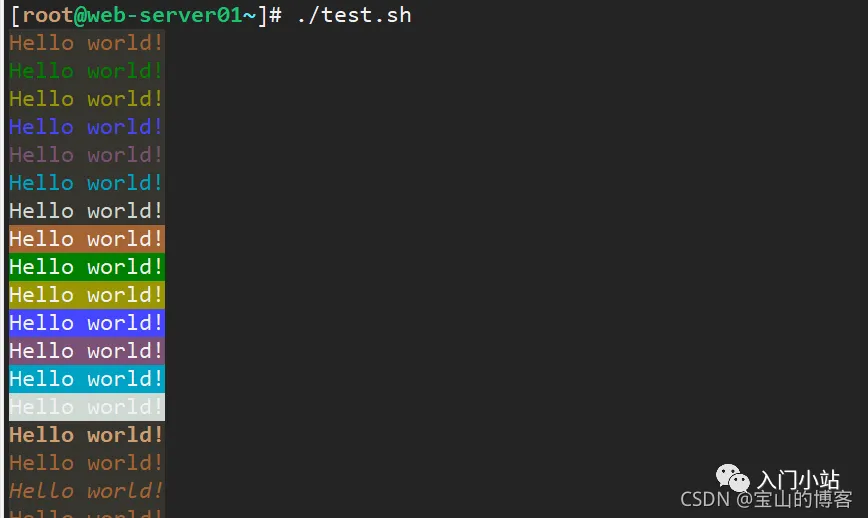
三、shell 编程流程控制语句
3.1 if 条件语句介绍
3.1.1 常用的单 / 双分支
if 条件语句
# If条件判断语句,通常以if开头,fi结尾。也可加入else或者elif进行多条件的判断

# 单分支语句 ---比较大小
if (条件表达式);then
  语句1
fi

# 双分支if 语句
if (表达式)
  语句1
else
  语句2
fi

# 多支条件语句 ---判断成绩
if (表达式)
  语句1
elif
  语句2
elif
  语句2
fi
3.1.2 if 常见判断逻辑运算符详解
常见逻辑判断运算符
-f   判断文件是否存在 eg: if [ -f filename ];
-d   判断目录是否存在 eg: if [ -d dir     ];
-eq  等于,应用于整型比较 equal;
-ne  不等于,应用于整型比较 not equal;
-lt  小于,应用于整型比较 letter;
-gt  大于,应用于整型比较 greater;
-le  小于或等于,应用于整型比较;
-ge  大于或等于,应用于整型比较;
-a  双方都成立(and) 逻辑表达式 –a 逻辑表达式;
-o  单方成立(or) 逻辑表达式 –o 逻辑表达式;
-z  空字符串;
-x      是否具有可执行权限
||      单方成立;
&&      双方都成立表达式。
3.1.3 使用单分支语句判断 crond 进程是否在运行—案例
判断 crond 服务是否运行
#!/bin/bash
# this is check crond
# by author rivers on 2021-9.23

# 定义一个变量名
name=crond
num=$(ps -ef|grep $name|grep -vc grep)
if [ $num -eq 1 ];then
echo"$num running!"
else
echo"$num is not running!"
fi
3.1.4 判断系统目录是否存在 —案例
判断系统目录是否存在
#!/bin/bash
# this is check directory
# by author rivers on 2021-9.27
if  [  !  -d  /data/rivers  -a  !  -d  /tmp/rivers  ];then
 mkdir  -p  /data/rivers  f
 i
3.1.5 多个条件判断学生分数等级 — 案例
判断学生成绩等级
# if 语句可以直接对命令状态进行判断,就省去了获取$?这一步!
# 如果第一个条件符合就不再向下匹配
#!/bin/bash
# this check grade shell
# by author rivers on 2021-09-27

  grade=$1
if [ $grade -gt 90 ];then
echo"Is's very good!"
elif [ $grade -gt 70 ];then
echo"Is's is good!"

elif [ $grade -ge 60 ];then
echo"pass"

else
echo"no pass"
fi
3.2 for 循环语句介绍for 循环语句
#格式:forname [ [ in [ word ... ] ] ; ] do list ; done
for 变量名 in 取值列表; do
    语句 1
  done
3.2.1 检查同一局域网 多台主机是否存活
检查多台主机存活情况
#!/bin/bash
# check hosts is on/Off
# by rivers on 20219-23

Network=$1
for Host in $(seq 1 254)
do
ping -c 1 $Network.$Host > /dev/null && result=0 || result=1

if [ "$result" == 0 ];then
echo -e "\033[32;1m$Network.$Host is up \033[0m"
echo"$Network.$Host" >> /tmp/up.txt

else
echo -e "\033[;31m$Network.$Host is down \033[0m"
echo"$Network.$Host" >> /tmp/down.txt
fi
done
3.3 while 循环语句介绍
while 循环语句
# While循环语句与for循环功能类似,主要用于对某个数据域进行循环读取、对文件进行遍历,通常用于需要循环某个文件或者列表,满足循环条件会一直循环,不满足则退出循环,其语法格式以while…do开头,done结尾与
#while 关联的还有一个 until 语句,它与 while 不同之处在于,是当条件表达式为 false 时才循环,实际使用中比较少,这里不再讲解。

while  (表达式)
do
  语句1
done
break 和 continue 语句
# break 和 continue 语句
break 是终止循环。
continue 是跳出当前循环。
#示例 1:在死循环中,满足条件终止循环
whiletrue; do
let N++
if [ $N -eq 5 ]; then
break
fi
echo$N
done
输出:1 2 3 4

#示例 2:举例子说明 continue 用法
N=0
while [ $N -lt 5 ]; do
let N++
if [ $N -eq 3 ]; then
continue
fi
echo$N
done

输出:1 2 4

# 打印 1-100 数字
i=0
while ((i<=100))
do
echo$i
        i=`expr $i + 1`
done
3.3.1 While 循环求 1-100 的总和 —案例
求 1-100 的总和
#!/bin/bash
# by author rivers on 2021-9-27
j=0
i=1
while ((i<=100))
do
     j=`expr $i + $j`
     ((i++))
done
echo$j
3.3.2 每 10 秒循环判断一次 hbs 用户是否登录系统 —案例
每 10 秒 循环判断系统登录
[root@web-server01~/script]# vim login.sh
#!/bin/bash
#Check File to change.
#By author rivers 2021-9-27
USERS="hbs"
whiletrue
do
echo"The Time is `date +%F-%T`"
        sleep 10
        NUM=`who|grep "$USERS"|wc -l`
if [[ $NUM -ge 1 ]];then
echo"The $USERS is login in system."
fi
done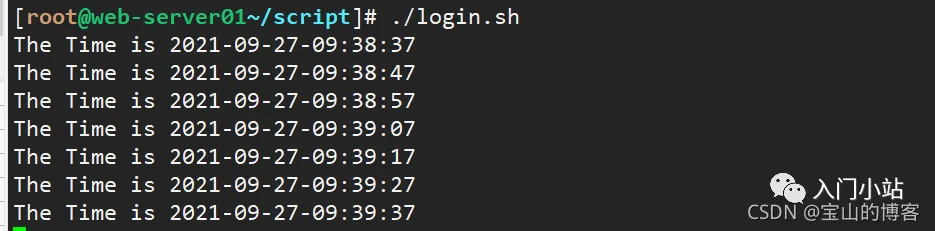
3.4 case 选择语句介绍
case 选择语句
#Case选择语句,主要用于对多个选择条件进行匹配输出,与ifelif语句结构类似,通常用于脚本传递输入参数,打印出输出结果及内容,其语法格式以Case…in开头,esac结尾。语法格式如下:
case 模式名  in
  模式 1)
    命令
    ;;
  模式 2)
    命令
    ;;
*)
不符合以上模式执行的命令
esac
# 每个模式必须以右括号结束,命令结尾以双分号结束。
3.4.1 使用 case 编写一个 httpd 服务启动脚本
编写 http 服务启动脚本
[root@web-server01~/script]# vim httpd_start.sh
# check http server start|stop|starus
# by author rivers on 2021-9-27
whiletrue
do
echo -e "
    \033[31m start \033[0m
    \033[32m stop \033[0m
    \033[33m status \033[0m
    \033[34m quit \033[0m
"
read -p "请输入你的选择start|stop|quit:" char
case$charin
start)
    systemctl start httpd && echo"httpd服务已经开启" || echo"开启失败"
;;
stop)
    systemctl stop httpd && echo"httpd服务已经关闭" || echo"关闭失败"
;;
restart)
    systemctl restart httpd && echo"httpd服务已经重启" || echo"重启失败
"
;;
status)
    systemctl status httpd && echo -e "
        httpd 的服务状态

;;
quit)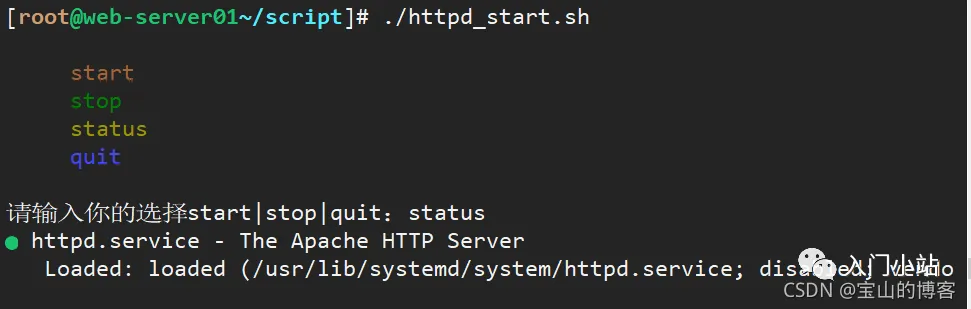
3.5 select 选择语句介绍
select 选择语句
#select 是一个类似于 for 循环的语句
#Select语句一般用于选择,常用于选择菜单的创建,可以配合PS3来做打印菜单的输出信息,其语法格式以select…in do开头,done结尾:

select i in (表达式)
do
语句
done

# 选择mysql 版本
#!/bin/bash
# by author rivers on 2021-9-27
PS3="Select a number: "
whiletrue; do
select mysql_version in 5.1 5.6 quit;
do
case$mysql_versionin
  5.1)
echo"mysql 5.1"
break
      ;;
  5.6)
echo"mysql 5.6"
break
       ;;
  quit)
exit
    ;;
  *)
echo"Input error, Please enter again!"
break
esac
done
done
3.5.1 使用 select 打印 lnmp 菜单栏 —案例
打印 lnmp 选择菜单
#!/bin/bash
#by author rivers on 2021-9-27
PS3="Please enter you select install menu:"
select i in http php mysql quit
do
case$iin
        http)
echo -e "
                \033[31m Test Httpd \033[0m"
        ;;
        php)
echo  -e "\033[32m Test PHP\033[0m"
        ;;
        mysql)
echo -e "\033[33m Test MySQL.\033[0m"
        ;;
        quit)
echo -e "\033[32m The System exit.\033[0m"
exit
esac
done
3.6 shell 函数、数组 编程 实战
函数
# Shell允许将一组命令集或语句形成一个可用块,这些块称为Shell函数,Shell函数的用于在于只需定义一次,后期随时使用即可,无需在Shell脚本中添加重复的语句块,其语法格式以function name(){开头,以}结尾。

# Shell编程函数默认不能将参数传入()内部,Shell函数参数传递在调用函数名称传递,例如name args1 args2。

# 函数语法
func() {
command1
command1
……
}
fun  # 直接调用函数名
# Shell 函数很简单,函数名后跟双括号,再跟双大括号。通过函数名直接调用,不加小括号。
#!/bin/bash
func() {
VAR=$((1+1))
return$VAR
echo"This is a function."
}
func
echo $?
# bash test.sh
2
数组
# 数组是相同类型的元素按一定顺序排列的集合。
格式:array=(元素 1 元素 2 元素 3 ...)
用小括号初始化数组,元素之间用空格分隔。
 定义方法 1:初始化数组 array=(a b c)
 定义方法 2:新建数组并添加元素 array[下标]=元素
 定义方法 3:将命令输出作为数组元素array=($(command))
3.6.1 定义一个 httpd 安装的函数 —案例
创建 apache 软件安装函数
[root@web-server01~/script]# vim xx.sh
#!/bin/bash
#auto install apache
#By author rivers 2021-09-27
#Httpd define path variable
FILES=httpd-2.2.31.tar.bz2
LES_DIR=httpd-2.2.31
URL=http://mirrors.cnnic.cn/apache/httpd/
PREFIX=/usr/local/apache2/
functionApache_install ()
{
#Install httpd web server
if [[ "$1" -eq "1" ]];then
        wget -c $URL/$FILES &&  tar -jxvf $FILES && cd$FILES_DIR &&./configure
if [ $? -eq 0 ];then
                make && make install
echo -e "\n\033[32m--------------------------------------------
                echo -e "\033[32mThe $FILES_DIR Server Install Success !\033[0m
else
echo -e "\033[32mThe $FILES_DIR Make or Make install ERROR,Plea
                exit 0
        fi
fi
}
Apache_install 1
# 调用函数,传参为1
3.6.2 遍历数组元素 — 案例
遍历数组元素
#方法 1:
#!/bin/bash
IP=(10.0.0.1 10.0.0.2 10.0.0.3)
for ((i=0;i<${#IP[*]};i++)); do
echo${IP[$i]}
done
# bash test.sh
10.0.0.1
10.0.0.2
10.0.0.3

#方法 2:
#!/bin/bash
IP=(10.0.0.1 10.0.0.2 10.0.0.3)
for   IP   in${IP[*]}; do
echo$IP
done
四、shell 编程实战 案例
4.1 shell 脚本实战之 系统备份脚本 —案例
Tar 工具全备、增量备份网站,Shell 脚本实现自动打包备份
#!/bin/bash
#Auto Backup Linux System Files
#by author rivers on 2021-09-28

SOURCE_DIR=(
    $*
)
TARGET_DIR=/data/backup/
YEAR=`date +%Y`
MONTH=`date +%m`
DAY=`date +%d`
WEEK=`date +%u`
A_NAME=`date +%H%M`
FILES=system_backup.tgz
CODE=$?
if
    [ -z "$*" ];then
echo -e "\033[32mUsage:\nPlease Enter Your Backup Files or Directories\n--------------------------------------------\n\nUsage: { $0 /boot /etc}\033[0m"
exit
fi
#Determine Whether the Target Directory Exists
if
    [ ! -d $TARGET_DIR/$YEAR/$MONTH/$DAY ];then
    mkdir -p $TARGET_DIR/$YEAR/$MONTH/$DAY
echo -e "\033[32mThe $TARGET_DIR Created Successfully !\033[0m"
fi
#EXEC Full_Backup Function Command
Full_Backup()
{
if
    [ "$WEEK" -eq "7" ];then
    rm -rf $TARGET_DIR/snapshot
cd$TARGET_DIR/$YEAR/$MONTH/$DAY ;tar -g $TARGET_DIR/snapshot -czvf $FILES${SOURCE_DIR[@]}
    [ "$CODE" == "0" ]&&echo -e  "--------------------------------------------\n\033[32mThese Full_Backup System Files Backup Successfully !\033[0m"
fi
}
#Perform incremental BACKUP Function Command
Add_Backup()
{
if
        [ $WEEK -ne "7" ];then
cd$TARGET_DIR/$YEAR/$MONTH/$DAY ;tar -g $TARGET_DIR/snapshot -czvf $A_NAME$FILES${SOURCE_DIR[@]}
        [ "$CODE" == "0" ]&&echo -e  "-----------------------------------------\n\033[32mThese Add_Backup System Files $TARGET_DIR/$YEAR/$MONTH/$DAY/${YEAR}_$A_NAME$FILES Backup Successfully !\033[0m"
fi
}
sleep 3
Full_Backup;Add_Backup
4.2 shell 脚本 实战 之收集系统信息 —案例
Shell 脚本实现服务器信息自动收集
cat <<EOF
++++++++++++++++++++++++++++++++++++++++++++++
++++++++Welcome to use system Collect+++++++++
++++++++++++++++++++++++++++++++++++++++++++++
EOF
ip_info=`ifconfig |grep "Bcast"|tail -1 |awk '{print $2}'|cut -d: -f 2`
cpu_info1=`cat /proc/cpuinfo |grep 'model name'|tail -1 |awk -F: '{print $2}'|sed 's/^ //g'|awk '{print $1,$3,$4,$NF}'`
cpu_info2=`cat /proc/cpuinfo |grep "physical id"|sort |uniq -c|wc -l`
serv_info=`hostname |tail -1`
disk_info=`fdisk -l|grep "Disk"|grep -v "identifier"|awk '{print $2,$3,$4}'|sed 's/,//g'`
mem_info=`free -m |grep "Mem"|awk '{print "Total",$1,$2"M"}'`
load_info=`uptime |awk '{print "Current Load: "$(NF-2)}'|sed 's/\,//g'`
mark_info='BeiJing_IDC'
echo -e "\033[32m-------------------------------------------\033[1m"
echo IPADDR:${ip_info}
echo HOSTNAME:$serv_info
echo CPU_INFO:${cpu_info1} X${cpu_info2}
echo DISK_INFO:$disk_info
echo MEM_INFO:$mem_info
echo LOAD_INFO:$load_info
echo -e "\033[32m-------------------------------------------\033[0m"
echo -e -n "\033[36mYou want to write the data to the databases? \033[1m" ;read ensure

if      [ "$ensure" == "yes" -o "$ensure" == "y" -o "$ensure" == "Y" ];then
echo"--------------------------------------------"
echo -e  '\033[31mmysql -uaudit -p123456 -D audit -e '''"insert into audit_system values('','${ip_info}','$serv_info','${
cpu_info1} X${cpu_info2}','$disk_info','$mem_info','$load_info','$mark_info')"''' \033[0m '
        mysql -uroot -p123456 -D test -e "insert into audit_system values('','${ip_info}','$serv_info','${cpu_info1} X${cpu_info2}
','$disk_info','$mem_info','$load_info','$mark_info')"
else
echo"Please wait,exit......"
exit
fi
4.3 shell 脚本实战 之 一键部署 lnmp 架构 — 案例
批量部署 lnmp 架构
[root@web-server01~/script]# vim lnmp.sh
#!/bin/bash
#install lnmp
#by author rivers on 2021-9-28

# nginx 环境准备
Nginx_url=https://nginx.org/download/nginx-1.20.1.tar.gz
Nginx_prefix=/usr/local/nginx

# mysql 环境准备
Mysql_version=mysql-5.5.20.tar.gz
Mysql_dir=mysql-5.5.20
Mysql_url=https://downloads.mysql.com/archives/get/p/23/file/mysql-5.5.20.tar.gz
Mysql_prefix=/usr/local/mysql/

# php 环境准备
Php_version=php-7.2.10.tar.gz
Php_prefix=/usr/local/php-7.2.10/


functionnginx_install(){

if [[ "$1" -eq "1" ]];then
if [ $? -eq 0 ];then
                make && make install
fi

fi
}


functionmysql_install(){
if [[ "$1" -eq "2" ]];then
-DMYSQL_UNIX_ADDR=/tmp/mysql.sock \
-DMYSQL_DATADIR=/data/mysql \
-DSYSCONFDIR=/etc \
-DMYSQL_USER=mysql \
-DMYSQL_TCP_PORT=3306 \
-DWITH_XTRADB_STORAGE_ENGINE=1 \
-DWITH_INNOBASE_STORAGE_ENGINE=1 \
-DWITH_PARTITION_STORAGE_ENGINE=1 \
-DWITH_BLACKHOLE_STORAGE_ENGINE=1 \
-DWITH_MYISAM_STORAGE_ENGINE=1 \
-DWITH_READLINE=1 \
-DENABLED_LOCAL_INFILE=1 \
-DWITH_EXTRA_CHARSETS=1 \
-DDEFAULT_CHARSET=utf8 \
-DDEFAULT_COLLATION=utf8_general_ci \
-DEXTRA_CHARSETS=all \
echo -e "\033[32mThe $Mysql_dir Server Install Success !\033[0m"
else
echo -e "\033[32mThe $Mysql_dir Make or Make install ERROR,Please Check......"
exit 0
fi
/bin/cp support-files/my-small.cnf  /etc/my.cnf
/bin/cp support-files/mysql.server /etc/init.d/mysqld
chmod +x /etc/init.d/mysqld
chkconfig --add mysqld
chkconfig mysqld on
fi
}


functionphp_install(){
if [[ "$1" -eq "3" ]];then
if [ $? -eq 0 ];then
                make ZEND_EXTRA_LIBS='-liconv' && make install
if [[ "$1" -eq "3" ]];then
 wget $Php_url && tar xf $Php_version && cd$Php_dir && yum install   bxml2* bzip2* libcurl*  libjpeg* libpng* freetype* gmp* libm
crypt* readline* libxslt* -y && ./configure --prefix=$Php_prefix --disable-fileinfo --enable-fpm --with-config-file-path=/etc --wi
  -config-file-scan-dir=/etc/php.d --with-openssl --with-zlib --with-curl --enable-ftp --with-gd --with-xmlrpc --with-jpeg-dir --w
ith-png-dir --with-freetype-dir --enable-gd-native-ttf --enable-mbstring --with-mcrypt=/usr/local/libmcrypt --enable-zip --enable-
mysqlnd --with-mysqli=mysqlnd --with-pdo-mysql=mysqlnd --with-mysql-sock=/var/lib/mysql/mysql.sock --without-pear --enable-bcmath
if [ $? -eq 0 ];then
                make ZEND_EXTRA_LIBS='-liconv' && make install
echo -e "\n\033[32m-----------------------------------------------\033[0m"
echo -e "\033[32mThe $Php_version Server Install Success !\033[0m"
else
echo -e "\033[32mThe $Php_version Make or Make install ERROR,Please Check......"
exit 0
fi
fi
}


PS3="Please enter you select install menu:"
select i in nginx mysql php quit
do
"lnmp.sh" 113L, 3516C written
[root@web-server01~/script]# vim lnmp.sh
chkconfig --add mysqld
chkconfig mysqld on
fi
}


functionphp_install(){
if [[ "$1" -eq "3" ]];then
if [ $? -eq 0 ];then
                make ZEND_EXTRA_LIBS='-liconv' && make install
echo -e "\n\033[32m-----------------------------------------------\033[0m"
echo -e "\033[32mThe $Php_version Server Install Success !\033[0m"
else
echo -e "\033[32mThe $Php_version Make or Make install ERROR,Please Check......"
exit 0
fi
fi
}


PS3="Please enter you select install menu:"
select i in nginx mysql php quit
do

case$iin
        nginx)
        nginx_install 1
        ;;
        mysql)
        mysql_install 2
        ;;
        php)
        php_install 3
        ;;
        quit)
exit
esac
done
-End- 读到这里说明你喜欢本公众号的文章,欢迎 置顶(标星)本公众号 Linux技术迷,这样就可以第一时间获取推送了~ 在本公众号 Linux技术迷,后台回复:Linux,领取2T学习资料 ! 推荐阅读 1. Linux 中 find 命令的 35 个实际例子 2. 运维必备的《网络端口大全》,看这一份就够了 3. Linux 学习指南 (收藏篇) 4. 2万字系统总结,带你实现Linux命令自由


随机文章
-
 10个月宝宝每天需要喝多少奶粉?
- 用Python中的递归实现汉诺塔
- GPT-5.2编程表现超Claude
- Cursor 7天AI编程极限测试,300万行代码造出Chrome级浏览器!AI日报 20260116
- 「编程虚拟生物」R包gganatogram绘制20+常见模式动植物
- 让开发像摸鱼一样轻松的低代码/无代码平台
- 中等生升学新路径!编程特长 = 名校少年班门票?
- 数学编程小游戏,20个游戏化数学小技巧,让孩子爱上数学(16)
- 手把手拆解:如何用700行代码打造一个Claude发布神器
- CNC加工中心中常用指令的区别及编程技巧
- R语言 4.5(开源编程语言)广泛应用于数据科学、统计分析和图形可视化的开源语言与软件环境安装教程(含安装包)