从串口到屏幕:在 ARM Linux + Qt 5.12 中将外部触摸坐标无缝注入为系统级事件的完整实战指南
- 2026-10-10 11:58:28
从串口到屏幕:在 ARM Linux + Qt 5.12 中将外部触摸坐标无缝注入为系统级事件的完整实战指南
在嵌入式开发中,常遇到这样的场景: 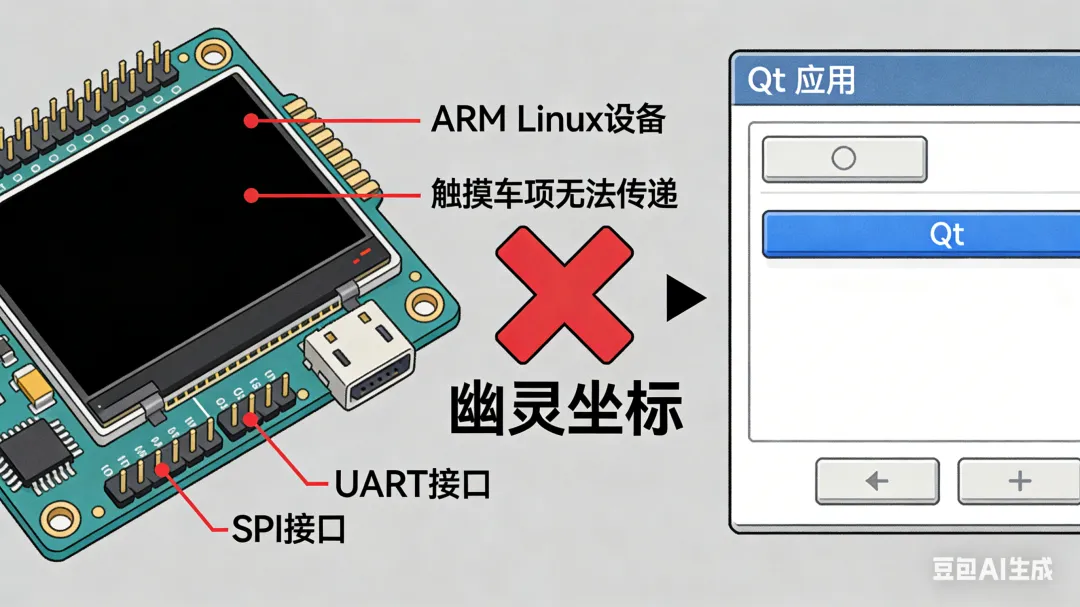
你的 ARM Linux 设备搭载一块非标准触摸屏(如通过 UART、SPI 或网络传输坐标的自定义触控模块),而主控运行的是基于Qt 5.12 的 QWidget 应用程序。你希望这些外部坐标能像真实触摸一样,触发按钮点击、滑动列表、绘制轨迹等交互行为。 然而,Linux 内核的输入子系统(/dev/input/eventX)并未识别该设备,Qt 也无法自动捕获这些“幽灵”坐标。怎么办? 本文将为你提供三种主流方案,从应用层事件注入到内核级 uinput 模拟,全面对比其适用场景、实现复杂度与系统兼容性,并附带可直接运行的代码示例。无论你使用的是 eglfs、linuxfb 还是 Wayland/X11,都能找到最优解。 Qt 支持两类输入事件:
在无窗口系统(如 eglfs/linuxfb)下,Qt 会将单点触摸自动转换为鼠标事件以兼容传统控件(如 QPushButton)。因此,模拟鼠标事件是实现“点击效果”最简单且兼容性最好的方式。 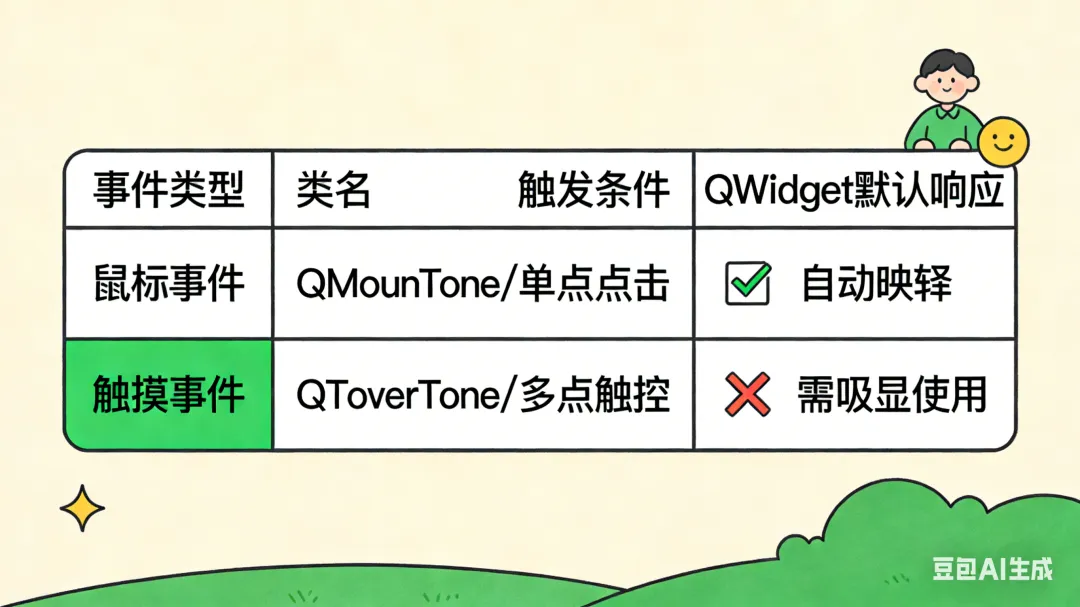
✅ 优点 ❌ 缺点 🔧 实现步骤 📄 示例代码
✅ 适用场景 ⚠️ 注意事项 QTouchEvent 📄 示例片段
✅ 优点 ❌ 缺点 📄 核心代码(需额外编译 uinput 支持) 🔒 强烈建议:仅在开发系统级输入驱动时使用此方案。 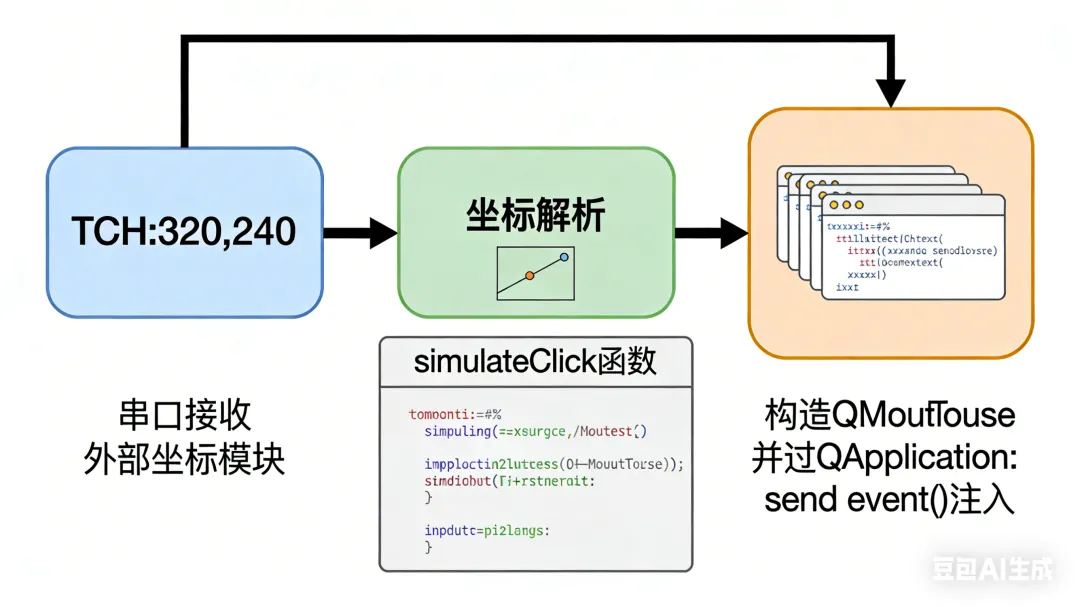
维度 QMouseEvent 模拟 QTouchEvent 模拟 uinput 注入 权限要求 普通用户 普通用户 root Qt 控件兼容性 ⭐⭐⭐⭐⭐(QPushButton 等直接响应) ⭐⭐(需自定义处理) ⭐⭐⭐⭐(系统级,Qt 自动捕获) 多点支持 ❌ ✅ ✅ 跨应用生效 ❌ ❌ ✅ eglfs/linuxfb 兼容 ✅ ✅ ⚠️(可能冲突) 开发复杂度 低 中 高 推荐指数 ⭐⭐⭐⭐⭐ ⭐⭐ ⭐⭐ 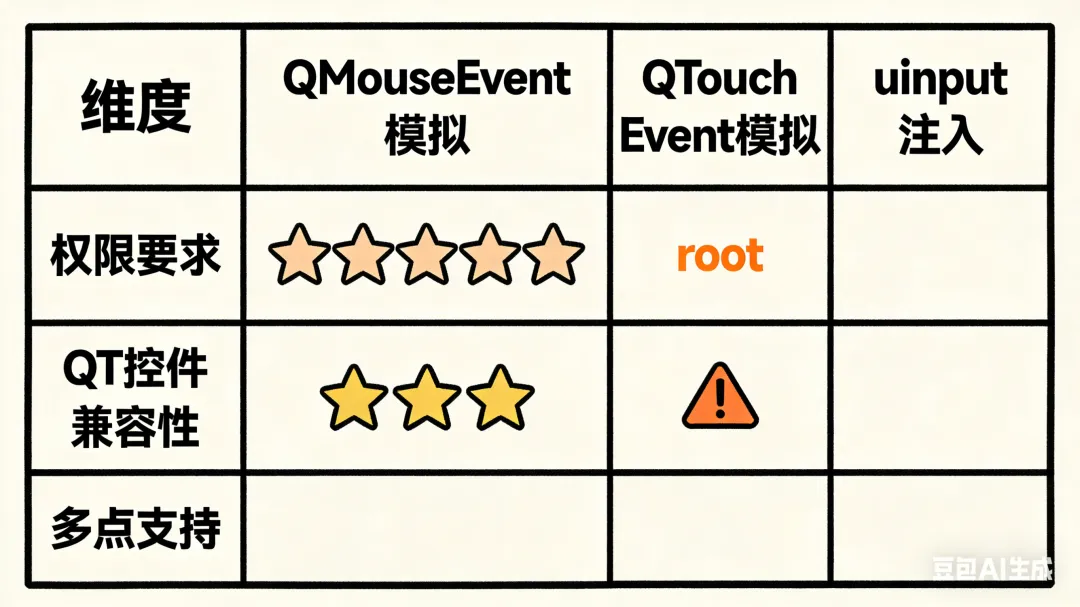
1、%90 场景选择方案 1(QMouseEvent) 它简单、可靠、无需特殊权限,完美适配按钮点击、菜单选择等常见交互。 2、坐标校准很重要 确保外部坐标范围(如 0~1024x600)与 Qt 窗口尺寸一致。可在 resizeEvent 中动态调整映射比例: 3、避免事件风暴 添加去抖逻辑,防止高频坐标导致 UI 卡顿: 4、调试技巧 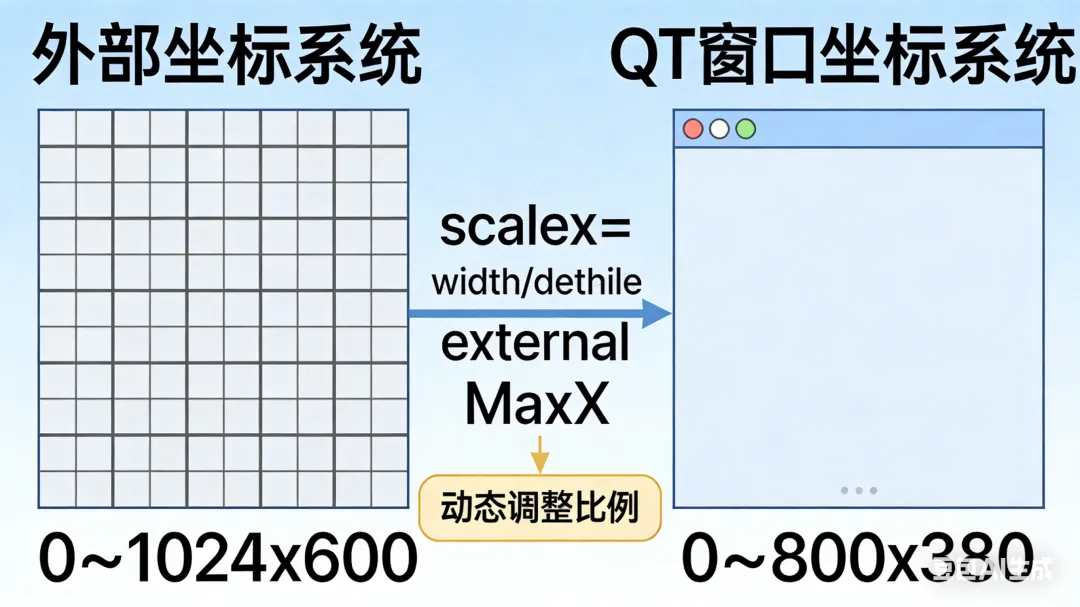
在 ARM Linux 嵌入式 Qt 开发中,将外部触摸数据转化为用户可感知的交互行为,是提升产品体验的关键一步。通过本文介绍的QMouseEvent 模拟方案,你可以在不修改系统、不获取 root 权限的前提下,快速实现“所触即所得”的流畅体验。
副标题:无需 root、不依赖窗口系统,纯 Qt 方案实现高兼容性触摸事件模拟
引言
一、问题本质:Qt 如何处理触摸事件?
| 事件类型 | 类名 | 触发条件 | QWidget 默认响应 |
|---|---|---|---|
| 鼠标事件 | QMouseEvent | 单点点击/移动 | ✅ 自动映射(推荐) |
| 触摸事件 | QTouchEvent | 多点触控设备 | ❌ 需显式启用 |
二、三大方案详解与对比
方案 1:Qt 应用内模拟 QMouseEvent(推荐)
无需 root 权限
跨平台兼容(eglfs / linuxfb / X11 / Wayland 均有效)
代码简洁,调试方便
自动触发 clicked()、pressed() 等信号
仅对当前 Qt 应用生效
不被其他进程感知(非系统级)
接收外部坐标(如通过QSerialPort)
构造 QMouseEvent
使用 QApplication::sendEvent() 注入
// touch_simulator.h#pragma once#include<QWidget>#include<QSerialPort>class TouchSimulator : public QWidget {Q_OBJECTpublic:explicitTouchSimulator(QWidget *parent = nullptr);private slots:voidonSerialDataReady();private:voidsimulateClick(int x, int y);QSerialPort m_serial;};
// touch_simulator.cpp#include"touch_simulator.h"#include<QApplication>#include<QMouseEvent>#include<QDebug>TouchSimulator::TouchSimulator(QWidget *parent): QWidget(parent){// 全屏显示(eglfs/linuxfb 常见配置)showFullScreen();// 初始化串口(根据实际设备修改)m_serial.setPortName("ttyS2");m_serial.setBaudRate(QSerialPort::Baud115200);if (m_serial.open(QIODevice::ReadOnly)) {connect(&m_serial, &QSerialPort::readyRead, this, &TouchSimulator::onSerialDataReady);}}voidTouchSimulator::onSerialDataReady(){QByteArray data = m_serial.readAll();qDebug() << "Raw data:" << data;// 协议示例: "TCH:320,240\n"if (data.startsWith("TCH:")) {QString line = QString::fromLatin1(data).trimmed();QStringList parts = line.mid(4).split(',');if (parts.size() == 2) {bool ok1, ok2;int x = parts[0].toInt(&ok1);int y = parts[1].toInt(&ok2);if (ok1 && ok2) {simulateClick(x, y);}}}}voidTouchSimulator::simulateClick(int x, int y){// 在 eglfs/linuxfb 全屏模式下,x/y 即为窗口局部坐标QPoint pos(x, y);// 鼠标按下QMouseEvent press(QEvent::MouseButtonPress, pos, Qt::LeftButton,Qt::LeftButton, Qt::NoModifier);QApplication::sendEvent(this, &press);// 鼠标释放(形成一次点击)QMouseEvent release(QEvent::MouseButtonRelease, pos, Qt::LeftButton,Qt::LeftButton, Qt::NoModifier);QApplication::sendEvent(this, &release);}
💡 关键提示:若你的应用不是全屏,或坐标是屏幕全局坐标,需调用
mapFromGlobal()转换。
方案 2:模拟 QTouchEvent(适用于多点/手势场景)
自定义绘图板、多指缩放
重写了touchEvent()的 QWidget
必须调用setAttribute(Qt::WA_AcceptTouchEvents)
QPushButton等标准控件不响应
// 启用触摸事件setFocusPolicy(Qt::StrongFocus);setAttribute(Qt::WA_AcceptTouchEvents);// 发送触摸事件voidsendTouchEvent(int x, int y){static int id = 0;QTouchEvent::TouchPoint point;point.setId(id++);point.setPos(QPointF(x, y));point.setPressure(1.0);QList<QTouchEvent::TouchPoint> points{point};QTouchEvent begin(QEvent::TouchBegin, nullptr, Qt::NoModifier, points);QTouchEvent end(QEvent::TouchEnd, nullptr, Qt::NoModifier, {});QApplication::sendEvent(this, &begin);QApplication::sendEvent(this, &end);}
📌 结论:除非你明确需要多点触控逻辑,否则优先使用方案 1。
方案 3:注入 Linux uinput 子系统(系统级模拟)
事件对整个系统可见(包括非 Qt 程序)
可被evtest、libinput等工具识别
需要 root 权限
配置复杂,易与 Qt 输入设备冲突
在 eglfs 下可能被 Qt 自身读取导致重复事件
#include<linux/uinput.h>#include<fcntl.h>#include<unistd.h>int fd = open("/dev/uinput", O_WRONLY | O_NONBLOCK);ioctl(fd, UI_SET_EVBIT, EV_KEY);ioctl(fd, UI_SET_KEYBIT, BTN_TOUCH);ioctl(fd, UI_SET_EVBIT, EV_ABS);ioctl(fd, UI_SET_ABSBIT, ABS_X);ioctl(fd, UI_SET_ABSBIT, ABS_Y);struct uinput_setup usetup = {};usetup.id.bustype = BUS_USB;strcpy(usetup.name, "Virtual Touchscreen");usetup.absinfo[0].maximum = 800; // 屏幕宽度usetup.absinfo[1].maximum = 480; // 屏幕高度ioctl(fd, UI_DEV_SETUP, &usetup);ioctl(fd, UI_DEV_CREATE);// 发送坐标write_event(fd, EV_ABS, ABS_X, x);write_event(fd, EV_ABS, ABS_Y, y);write_event(fd, EV_KEY, BTN_TOUCH, 1); // 按下write_event(fd, EV_SYN, SYN_REPORT, 0);// ... 释放
三、方案对比总表
四、最佳实践建议
float scaleX = static_cast<float>(width()) / externalMaxX;float scaleY = static_cast<float>(height()) / externalMaxY;int qtX = x * scaleX;int qtY = y * scaleY;
if (m_lastPos == pos && !m_hasReleased) return;- 使用
qDebug()打印接收到的坐标 - 临时添加一个
QLabel显示(x,y)位置 - 在
mousePressEvent中验证事件是否到达
五、结语
记住:Qt 的强大之处,在于它允许你在应用层优雅地解决系统级问题。善用
QApplication::sendEvent(),你就能让任何数据流变成指尖的魔法。
更多精彩推荐:


Android开发集
青衣霜华渡白鸽,公众号:清荷雅集-墨染优选从 AIDL 到 HIDL:跨语言 Binder 通信的自动化桥接与零拷贝回调优化全栈指南
C/C++编程精选
青衣霜华渡白鸽,公众号:清荷雅集-墨染优选宏之双刃剑:C/C++ 预处理器宏的威力、陷阱与现代化演进全解
开源工场与工具集
青衣霜华渡白鸽,公众号:清荷雅集-墨染优选nlohmann/json:现代 C++ 开发者的 JSON 神器
MCU内核工坊
青衣霜华渡白鸽,公众号:清荷雅集-墨染优选STM32:嵌入式世界的“瑞士军刀”——深度解析意法半导体32位MCU的架构演进、生态优势与全场景应用
拾光札记簿
青衣霜华渡白鸽,公众号:清荷雅集-墨染优选周末遛娃好去处!黄河之巅畅享亲子欢乐时光
数智星河集
青衣霜华渡白鸽,公众号:清荷雅集-墨染优选被算法盯上的岗位:人工智能优先取代的十大职业深度解析与人类突围路径
Docker 容器
青衣霜华渡白鸽,公众号:清荷雅集-墨染优选Docker 原理及使用注意事项(精要版)
linux开发集
青衣霜华渡白鸽,公众号:清荷雅集-墨染优选零拷贝之王:Linux splice() 全面深度解析与高性能实战指南
青衣染霜华
青衣霜华渡白鸽,公众号:清荷雅集-墨染优选脑机接口:从瘫痪患者的“意念行走”到人类智能的下一次跃迁
QT开发记录-专栏
青衣霜华渡白鸽,公众号:清荷雅集-墨染优选Qt 样式表(QSS)终极指南:打造媲美 Web 的精美原生界面
Web/webassembly技术情报局
青衣霜华渡白鸽,公众号:清荷雅集-墨染优选WebAssembly 全栈透视:从应用开发到底层执行的完整技术链路与核心原理深度解析
数据库开发
青衣霜华渡白鸽,公众号:清荷雅集-墨染优选ARM Linux 下 SQLite3 数据库使用全方位指南
本文来自网友投稿或网络内容,如有侵犯您的权益请联系我们删除,联系邮箱:596563534@qq.com 。
随机文章
-
 10个月宝宝每天需要喝多少奶粉?
- 当AI开始自己写论文和代码,我们该用什么思考?
- 【天津1月热招汇总】博士后30万+/Java工程师/行政/物流/金融/医疗等20+岗位!名企云集,速投!
- ROSA Linux —— 稳定与优雅并存的俄罗斯发行版
- 组织代码 - 方法/函数
- 【Java语言中的线程安全有哪几种?】从青铜到王者,一份让你彻底通透的实战指南
- 14 Linux下的网络管理-TCP/IP网络接口配置
- 那些被永远困在代码里的人(2025 年程序员极端加班案例汇总)
- Linux必会命令,总结版速存!
- 谁说不懂代码不能做AI编程?我用55条指令,手搓了一个“坦克大战”!
- Linux系统目录结构全解析