基于 Python 的屏幕防窥与自动锁屏工具
- 2026-09-17 14:23:06
基于 Python 的屏幕防窥与自动锁屏工具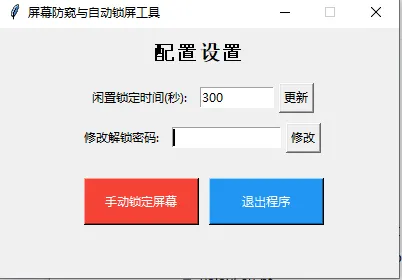
要开发一个基于 Python 的屏幕防窥与自动锁屏工具,这个工具应该能在闲置一段时间后自动锁定屏幕,同时可能还具备防窥相关的功能(比如模糊屏幕内容)。实现一个功能完整的工具,它包含以下核心特性:
检测用户键鼠闲置时间 闲置超时后自动模糊屏幕(防窥) 提供密码解锁功能 可自定义闲置超时时间 支持手动锁定/退出
完整实现代码
import tkinter as tkfrom tkinter import messagebox, simpledialogimport threadingimport timeimport sysfrom pynput import mouse, keyboard# 确保安装依赖:pip install pynputclassScreenPrivacyProtector:def__init__(self):# 初始化配置 self.idle_threshold = 300# 默认闲置5分钟(300秒)锁定 self.last_activity_time = time.time() self.is_locked = False self.unlock_password = "123456"# 默认解锁密码,建议修改 self.lock_window = None self.listener_thread = None# 创建键鼠监听器 self.mouse_listener = mouse.Listener(on_move=self.on_activity, on_click=self.on_activity, on_scroll=self.on_activity) self.keyboard_listener = keyboard.Listener(on_press=self.on_activity)defon_activity(self, *args):"""检测到用户活动时更新最后活动时间""" self.last_activity_time = time.time()defcheck_idle_time(self):"""循环检查闲置时间"""whileTrue:ifnot self.is_locked: current_time = time.time() idle_time = current_time - self.last_activity_time# 闲置时间超过阈值则锁定屏幕if idle_time >= self.idle_threshold: self.lock_screen() time.sleep(1) # 每秒检查一次deflock_screen(self):"""锁定屏幕(模糊显示+密码解锁)"""if self.is_locked:return self.is_locked = True# 创建全屏模糊窗口 self.lock_window = tk.Tk() self.lock_window.title("屏幕已锁定") self.lock_window.attributes('-fullscreen', True) self.lock_window.attributes('-topmost', True) self.lock_window.configure(bg='black')# 创建模糊遮罩(使用半透明黑色背景模拟模糊效果) mask = tk.Frame(self.lock_window, bg='black') mask.place(relx=0, rely=0, relwidth=1, relheight=1) mask.attributes('-alpha', 0.9) # 透明度,0.9为高模糊# 添加解锁提示 prompt_label = tk.Label( mask, text="屏幕已自动锁定\n请输入解锁密码", fg="white", bg="black", font=("Arial", 20, "bold") ) prompt_label.place(relx=0.5, rely=0.4, anchor='center')# 密码输入框 password_var = tk.StringVar() password_entry = tk.Entry( mask, textvariable=password_var, show="*", font=("Arial", 18), justify='center' ) password_entry.place(relx=0.5, rely=0.5, anchor='center', width=300, height=40) password_entry.focus()# 解锁按钮defunlock(): password = password_var.get()if password == self.unlock_password: self.is_locked = False self.last_activity_time = time.time() self.lock_window.destroy() self.lock_window = Noneelse: messagebox.showerror("错误", "密码错误,请重试!") password_var.set("")# 绑定回车解锁 self.lock_window.bind('<Return>', lambda e: unlock()) unlock_btn = tk.Button( mask, text="解锁", command=unlock, font=("Arial", 16), bg="#4CAF50", fg="white", width=10, height=1 ) unlock_btn.place(relx=0.5, rely=0.6, anchor='center') self.lock_window.mainloop()defmanual_lock(self):"""手动锁定屏幕""" self.lock_screen()defstart(self):"""启动监控"""# 启动键鼠监听 self.mouse_listener.start() self.keyboard_listener.start()# 启动闲置检查线程 self.listener_thread = threading.Thread(target=self.check_idle_time, daemon=True) self.listener_thread.start()# 创建主控制窗口 root = tk.Tk() root.title("屏幕防窥与自动锁屏工具") root.geometry("400x250") root.resizable(False, False)# 配置区域 tk.Label(root, text="配置设置", font=("Arial", 16, "bold")).pack(pady=10)# 闲置时间设置 time_frame = tk.Frame(root) time_frame.pack(pady=5) tk.Label(time_frame, text="闲置锁定时间(秒):").pack(side=tk.LEFT, padx=5) time_var = tk.StringVar(value=str(self.idle_threshold))defupdate_threshold():try: new_time = int(time_var.get())if new_time > 0: self.idle_threshold = new_time messagebox.showinfo("成功", "闲置时间已更新!")else: messagebox.showerror("错误", "请输入大于0的数字!")except ValueError: messagebox.showerror("错误", "请输入有效的数字!") time_entry = tk.Entry(time_frame, textvariable=time_var, width=10) time_entry.pack(side=tk.LEFT, padx=5) tk.Button(time_frame, text="更新", command=update_threshold).pack(side=tk.LEFT)# 密码修改 pwd_frame = tk.Frame(root) pwd_frame.pack(pady=5) tk.Label(pwd_frame, text="修改解锁密码:").pack(side=tk.LEFT, padx=5) new_pwd_var = tk.StringVar()defupdate_password(): new_pwd = new_pwd_var.get()if new_pwd: self.unlock_password = new_pwd messagebox.showinfo("成功", "密码已更新!") new_pwd_var.set("")else: messagebox.showerror("错误", "密码不能为空!") pwd_entry = tk.Entry(pwd_frame, textvariable=new_pwd_var, show="*", width=15) pwd_entry.pack(side=tk.LEFT, padx=5) tk.Button(pwd_frame, text="修改", command=update_password).pack(side=tk.LEFT)# 操作按钮 btn_frame = tk.Frame(root) btn_frame.pack(pady=20) tk.Button(btn_frame, text="手动锁定屏幕", command=self.manual_lock, bg="#f44336", fg="white", width=15, height=2).pack(side=tk.LEFT, padx=10)defexit_app():if messagebox.askyesno("确认", "确定要退出吗?"): root.quit() sys.exit() tk.Button(btn_frame, text="退出程序", command=exit_app, bg="#2196F3", fg="white", width=15, height=2).pack(side=tk.LEFT)# 运行主窗口 root.protocol("WM_DELETE_WINDOW", exit_app) root.mainloop()if __name__ == "__main__":# 初始化并启动工具 protector = ScreenPrivacyProtector() protector.start()代码解释与使用说明
1. 依赖安装
首先需要安装所需依赖:
pip install pynput2. 核心功能解释
键鼠监控:使用 pynput库监听鼠标和键盘活动,实时更新最后活动时间闲置检测:独立线程每秒检查一次闲置时间,超过阈值则自动锁定 屏幕锁定:创建全屏高透明度黑色遮罩模拟防窥模糊效果,需要密码解锁 配置管理:支持自定义闲置锁定时间、修改解锁密码 手动控制:提供手动锁定和程序退出功能
3. 使用方法
运行代码后会弹出控制窗口 默认闲置5分钟(300秒)自动锁定,默认解锁密码:123456 可以在控制窗口修改闲置时间和解锁密码 点击"手动锁定屏幕"可立即锁定 解锁时输入正确密码即可恢复正常屏幕
4. 自定义建议
修改默认密码:在 __init__方法中修改self.unlock_password的值调整模糊程度:修改 mask.attributes('-alpha', 0.9)中的数值(0-1,值越大越模糊)自定义锁定提示:修改 lock_screen方法中的提示文本
总结
该工具通过 pynput监听键鼠活动检测闲置状态,超时后自动用全屏模糊窗口锁定屏幕提供密码解锁机制,支持自定义闲置时间和解锁密码 包含手动锁定/退出功能,界面简洁易用,适合日常办公场景的屏幕防窥需求
如果需要更高级的防窥功能(比如动态模糊、屏幕内容隐藏等),可以基于这个基础版本进一步扩展,比如结合 PIL 库截取屏幕并添加模糊效果后显示。
本文来自网友投稿或网络内容,如有侵犯您的权益请联系我们删除,联系邮箱:596563534@qq.com 。
