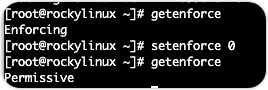
SElinux(Security-Enhanced Linux)是美国国家安全局(NSA)对于强制访问控制的实现,这个功能让系统管理员又爱又恨,建议把它关闭掉,再通过其他的手段来确保安全的问题。一般情况下,大多数生产环境也是采用这样的做法,当然,非要开启也是可以的。(SELinux出现在红帽一系的发行版本中,debian一系的发行版本则未见SELinux)。1)临时关闭SELinux,可在命令行中执行下面的命令:[root@rockylinux ~]# getenforceEnforcing[root@rockylinux ~]# setenforce 0[root@rockylinux ~]# getenforcePermissive
- setenforce:用于命令行管理SELinux的级别,后面的数字表示设置对应的级别。共两个级别:数字1表示Enforcing,即SELinux为开启状态;数字0表示Permissive,即会给出警告的提示,但是不会阻止操作,相当于在配置文件中配置disabled。setenforce的运行格式:
setenforce [Enforcing|Permissive|1|0]
- getenfore:查看SELinux当前的级别状态
SElinux的配置文件的绝对路径为/etc/selinux/config,文件的内容如下:# This file controls the state of SELinux on the system.# SELINUX= can take one of these three values:# enforcing - SELinux security policy is enforced.# permissive - SELinux prints warnings instead of enforcing.# disabled - No SELinux policy is loaded.# See also:# https://docs.fedoraproject.org/en-US/quick-docs/getting-started-with-selinux/#getting-started-with-selinux-selinux-states-and-modes## NOTE: In earlier Fedora kernel builds, SELINUX=disabled would also# fully disable SELinux during boot. If you need a system with SELinux# fully disabled instead of SELinux running with no policy loaded, you# need to pass selinux=0 to the kernel command line. You can use grubby# to persistently set the bootloader to boot with selinux=0:## grubby --update-kernel ALL --args selinux=0## To revert back to SELinux enabled:## grubby --update-kernel ALL --remove-args selinux#SELINUX=enforcing# SELINUXTYPE= can take one of these three values:# targeted - Targeted processes are protected,# minimum - Modification of targeted policy. Only selected processes are protected.# mls - Multi Level Security protection.SELINUXTYPE=targeted
可以通过vi/vim修改SELINUX=enforcing为SELINUX=disabled,然后保存后并重启系统使其生效。也可以通过sed -i命令来进行修改,下面的代码清单演示了使用sed命令替换内容的方式进行修改。[root@rockylinux ~]# sed -i 's/SELINUX=enforcing/SELINUX=disabled/' /etc/selinux/config[root@rockylinux ~]# grep 'SELINUX=disabled' /etc/selinux/config # NOTE: In earlier Fedora kernel builds, SELINUX=disabled would alsoSELINUX=disabled
在生产环境下Linux服务器是不能随意重启,而修改SELinux的配置文件后,要使其生效,重启是必须的动作。这时可以配合使用临时生效的setenforce 0命令立即且不用重启的方式关闭SELinux。直至生产的服务器可以重启时,另其永久生效。

 10个月宝宝每天需要喝多少奶粉?