摘要
目录
项目简介
环境与依赖
- Python 3.8+(示例中也可用 Python 3.13)
依赖见 requirements.txt:
python-docx==0.8.11
Flask==2.3.0
Flask-CORS==4.0.0
Werkzeug==2.3.0
python -m venv venv
source venv/bin/activate
pip install -r requirements.txt
项目结构(简要)
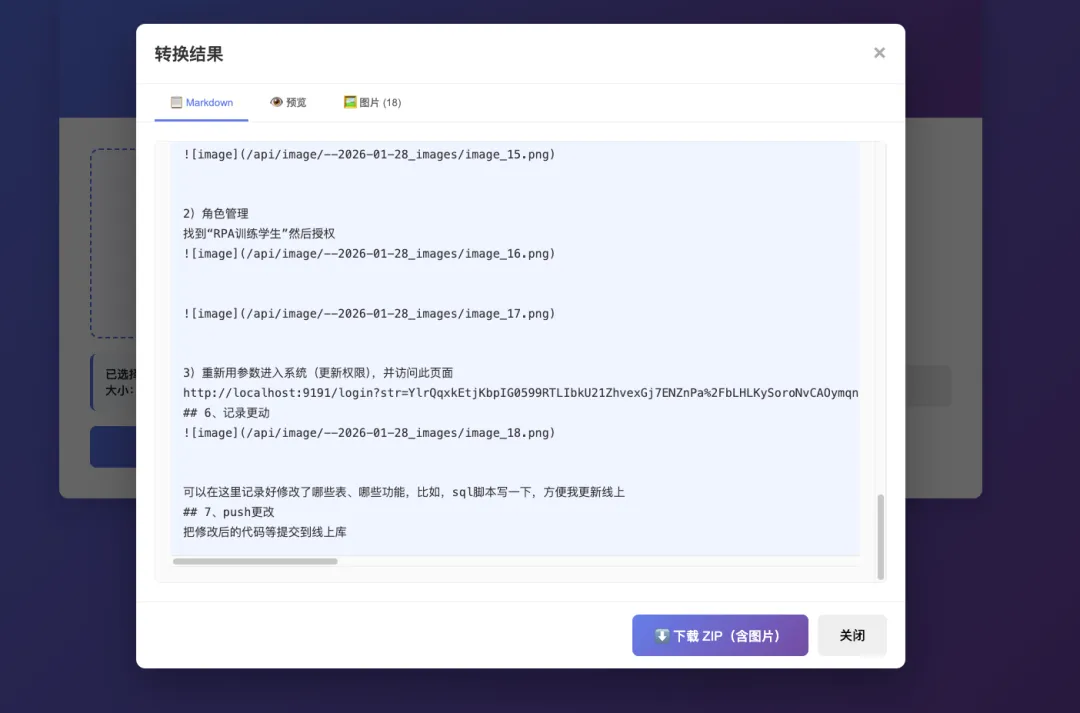
app.py — Flask 后端,负责接收上传、解析 DOCX、提取图片并返回 Markdown。
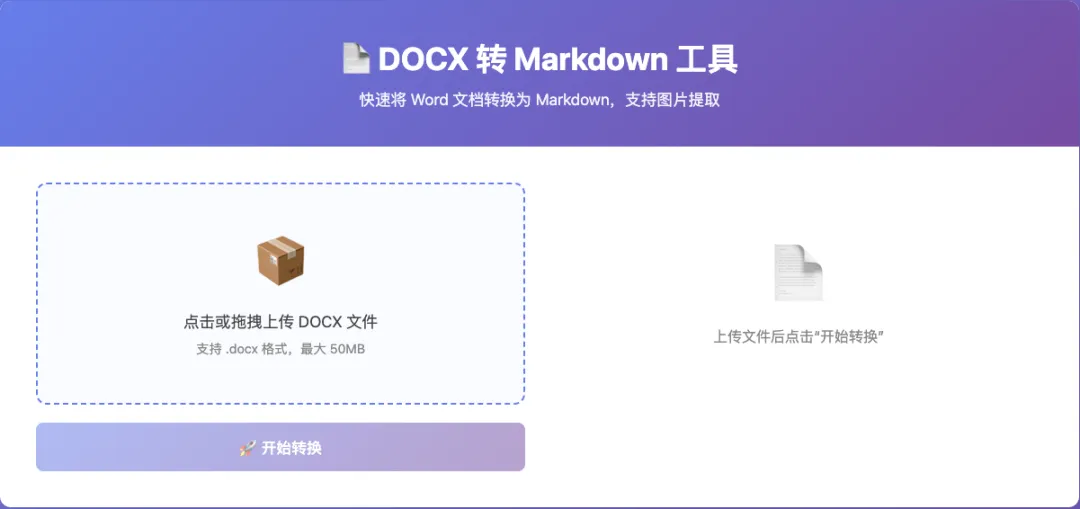
templates/index.html — 前端页面,基于 Vue 3,提供上传、展示与下载功能。
uploads/ — 存放上传的文件与提取的图片(运行时生成)。
完整代码
#!/usr/bin/env python3
"""
DOCX 转 Markdown 的 Flask API 后端
"""
from flask import Flask, request, jsonify, send_file, render_template
from flask_cors import CORS
from docx import Document
import os
import io
import json
from pathlib import Path
from werkzeug.utils import secure_filename
app = Flask(__name__, static_folder='templates', static_url_path='')
CORS(app)
# 配置上传文件夹
UPLOAD_FOLDER = 'uploads'
ALLOWED_EXTENSIONS = {'docx', 'doc'}
MAX_FILE_SIZE = 50 * 1024 * 1024 # 50MB
if not os.path.exists(UPLOAD_FOLDER):
os.makedirs(UPLOAD_FOLDER)
app.config['UPLOAD_FOLDER'] = UPLOAD_FOLDER
app.config['MAX_CONTENT_LENGTH'] = MAX_FILE_SIZE
def allowed_file(filename):
"""检查文件扩展名"""
return '.' in filename and filename.rsplit('.', 1)[1].lower() in ALLOWED_EXTENSIONS
def extract_images_from_run(run, image_dir, image_counter, doc_part=None):
"""从 run 元素中提取图片"""
images = []
for drawing in run.element.findall('.//{http://schemas.openxmlformats.org/wordprocessingml/2006/main}drawing'):
for blip in drawing.findall('.//{http://schemas.openxmlformats.org/drawingml/2006/main}blip'):
embed_id = blip.get('{http://schemas.openxmlformats.org/officeDocument/2006/relationships}embed')
if embed_id:
try:
# 从关系中获取图片
image_part = run.part.rels[embed_id].target_part
image_data = image_part.blob
# 确定图片扩展名
content_type = image_part.content_type
ext_map = {
'image/jpeg': 'jpg',
'image/png': 'png',
'image/gif': 'gif',
'image/bmp': 'bmp',
'image/tiff': 'tiff',
'image/webp': 'webp'
}
ext = ext_map.get(content_type, 'png')
image_counter += 1
image_filename = f"image_{image_counter}.{ext}"
image_path = os.path.join(image_dir, image_filename)
# 保存图片
with open(image_path, 'wb') as f:
f.write(image_data)
images.append({
'filename': image_filename,
'path': image_path,
'counter': image_counter
})
except Exception as e:
pass
return images, image_counter
def convert_docx_to_markdown(docx_path, image_dir=None):
"""转换 DOCX 文件为 Markdown"""
if image_dir is None:
image_dir = os.path.join(UPLOAD_FOLDER, 'images')
if not os.path.exists(image_dir):
os.makedirs(image_dir)
# 加载 DOCX 文档
doc = Document(docx_path)
markdown_content = []
image_counter = 0
# 处理段落和图片
for para in doc.paragraphs:
# 检查段落中的图片
for run in para.runs:
images, image_counter = extract_images_from_run(run, image_dir, image_counter)
for img in images:
rel_path = os.path.join('images', img['filename'])
markdown_content.append(f"")
markdown_content.append("")
text = para.text.strip()
if not text:
markdown_content.append("")
continue
# 检查段落样式
style = para.style.name if para.style else ""
# 处理标题
if "Heading 1" in style:
markdown_content.append(f"# {text}")
elif "Heading 2" in style:
markdown_content.append(f"## {text}")
elif "Heading 3" in style:
markdown_content.append(f"### {text}")
elif "Heading 4" in style:
markdown_content.append(f"#### {text}")
elif "Heading 5" in style:
markdown_content.append(f"##### {text}")
elif "Heading 6" in style:
markdown_content.append(f"###### {text}")
else:
# 处理文本格式
formatted_text = process_runs(para.runs)
if formatted_text:
markdown_content.append(formatted_text)
else:
markdown_content.append(text)
# 处理表格
for table in doc.tables:
markdown_content.append("")
markdown_table, image_counter = convert_table_to_markdown(table, image_dir, image_counter)
markdown_content.extend(markdown_table)
markdown_content.append("")
result = "\n".join(markdown_content)
return result, image_counter
def process_runs(runs):
"""处理文本 runs 以处理加粗、斜体等格式"""
result = []
for run in runs:
text = run.text
if not text:
continue
# 处理加粗
if run.bold:
text = f"**{text}**"
# 处理斜体
if run.italic:
text = f"*{text}*"
# 处理下划线
if run.underline:
text = f"__{text}__"
result.append(text)
return "".join(result).strip()
def convert_table_to_markdown(table, image_dir, image_counter):
"""将 DOCX 表格转换为 Markdown 表格格式"""
markdown_lines = []
# 处理每一行
for i, row in enumerate(table.rows):
cells = row.cells
row_content = []
for cell in cells:
# 从单元格中获取文本
cell_parts = []
for para in cell.paragraphs:
# 检查段落中的图片
for run in para.runs:
images, image_counter = extract_images_from_run(run, image_dir, image_counter)
for img in images:
rel_path = os.path.join('images', img['filename'])
cell_parts.append(f"")
para_text = para.text.strip()
if para_text:
cell_parts.append(para_text)
cell_text = " ".join(cell_parts).strip()
row_content.append(cell_text)
# 添加行到 markdown
markdown_lines.append("| " + " | ".join(row_content) + " |")
# 在表头行(第一行)后添加分隔符
if i == 0:
separator = "|" + "|".join([" --- " for _ in row_content]) + "|"
markdown_lines.append(separator)
return markdown_lines, image_counter
@app.route('/', methods=['GET'])
def index():
"""返回主页面"""
return send_file('templates/index.html', mimetype='text/html')
@app.route('/api/health', methods=['GET'])
def health():
"""健康检查"""
return jsonify({'status': 'ok'})
@app.route('/api/convert', methods=['POST'])
def convert():
"""转换 DOCX 文件为 Markdown 和图片"""
try:
# 检查是否有文件上传
if 'file' not in request.files:
return jsonify({'status': 'error', 'message': '没有上传文件'}), 400
file = request.files['file']
if file.filename == '':
return jsonify({'status': 'error', 'message': '文件名为空'}), 400
if not allowed_file(file.filename):
return jsonify({'status': 'error', 'message': '只支持 .docx 格式文件'}), 400
# 保存上传的文件
filename = secure_filename(file.filename)
filepath = os.path.join(app.config['UPLOAD_FOLDER'], filename)
file.save(filepath)
# 创建专门的图片目录
image_dir = os.path.join(app.config['UPLOAD_FOLDER'], Path(filename).stem + '_images')
# 转换 DOCX 到 Markdown
markdown_content, image_count = convert_docx_to_markdown(filepath, image_dir)
# 获取图片列表
images = []
if os.path.exists(image_dir):
for img_file in os.listdir(image_dir):
if os.path.isfile(os.path.join(image_dir, img_file)):
images.append({
'name': img_file,
'path': f"/api/image/{Path(filename).stem + '_images'}/{img_file}"
})
# 替换 markdown 中的图片路径
for img in images:
# 将相对路径替换为 API 路径
old_path = f"images/{img['name']}"
markdown_content = markdown_content.replace(old_path, img['path'])
# 清理上传的 docx 文件(可选)
try:
os.remove(filepath)
except:
pass
return jsonify({
'status': 'success',
'markdown': markdown_content,
'images': images,
'image_count': image_count
})
except Exception as e:
return jsonify({'status': 'error', 'message': str(e)}), 500
@app.route('/api/image/<path:filepath>', methods=['GET'])
def get_image(filepath):
"""获取提取的图片"""
try:
full_path = os.path.join(app.config['UPLOAD_FOLDER'], filepath)
# 安全检查
if not os.path.abspath(full_path).startswith(os.path.abspath(app.config['UPLOAD_FOLDER'])):
return jsonify({'status': 'error', 'message': '非法请求'}), 403
if not os.path.exists(full_path):
return jsonify({'status': 'error', 'message': '文件不存在'}), 404
return send_file(full_path)
except Exception as e:
return jsonify({'status': 'error', 'message': str(e)}), 500
if __name__ == '__main__':
app.run(debug=False, host='0.0.0.0', port=5000)
运行步骤
python app.py
# 或
python3 app.py
app.py 关键代码解析
应用与配置
创建 Flask 实例:app = Flask(__name__, static_folder='templates', static_url_path='')
配置上传目录与最大文件大小:UPLOAD_FOLDER = 'uploads'、MAX_FILE_SIZE = 50 * 1024 * 1024
允许的文件检查
图片提取:extract_images_from_run(run, image_dir, image_counter, doc_part=None)
DOCX 转 Markdown:convert_docx_to_markdown(docx_path, image_dir=None)
文本样式处理:process_runs(runs)
表格转换:convert_table_to_markdown(table, image_dir, image_counter)
- 逐行逐单元格处理,单元格内可能包含图片(同样提取),生成 Markdown 表格和表头分隔符。
API 路由
GET /:返回前端页面 templates/index.html。
GET /api/health:健康检查,返回 {'status': 'ok'}。
POST /api/convert:接收上传文件(字段 file),保存文件、创建图片目录 {stem}_images、调用转换并返回 JSON(包含 markdown、images 列表和 image_count)。
GET /api/image/<path:filepath>:从 uploads/ 安全返回图片文件(带路径校验)。
前端 templates/index.html 功能概览
基于 Vue 3(CDN)实现,交互包括:
前端渲染要点:
示例:用 curl 调用 API
curl -F "file=@/path/to/test.docx" http://localhost:5000/api/convert
响应后可直接访问图片:
http://localhost:5000/api/image/<yourfile_stem>_images/image_1.png
常见问题与注意事项