## Sonar家族框架
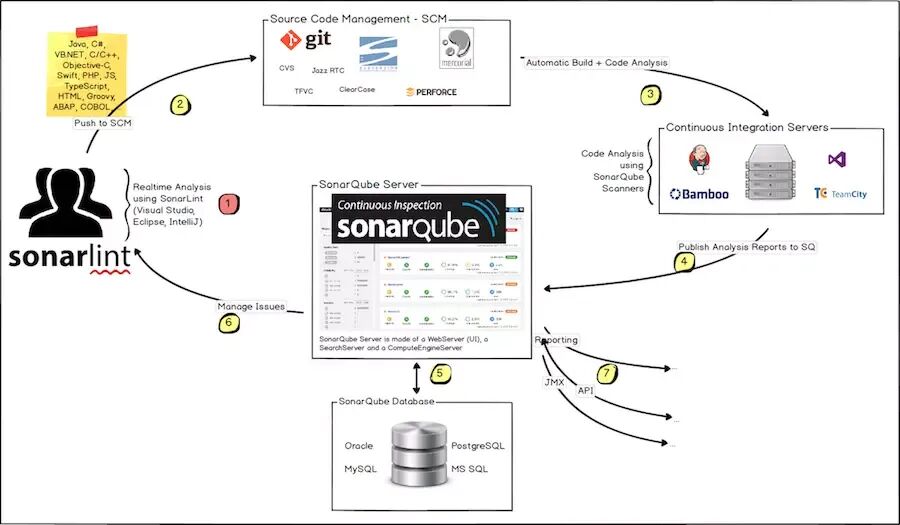
## 检测代码质量七个维度
- 复杂度分布(complexity):代码复杂度过高将难以理解
- 重复代码(duplications):程序中包含大量复制、粘贴的代码而导致代码臃肿,sonar可以展示源码中重复严重的地方
- 单元测试统计(unit tests):统计并展示单元测试覆盖率,开发或测试可以清楚测试代码的覆盖情况
- 代码规则检查(coding rules):通过Findbugs,PMD,CheckStyle等检查代码是否符合规
- 注释率(comments):若代码注释过少,特别是人员变动后,其他人接手比较难接手;若过多,又不利于阅读
- 潜在的Bug(potential bugs):通过Findbugs,PMD,CheckStyle等检测潜在的bug
- 结构与设计(architecture & design):找出循环,展示包与包、类与类之间的依赖、检查程序之间耦合度
## 支持语言
ABAP、C/C++、C#、CSS、COBOL、Flex、Go、HTML、Java、JavaScript、Kotlin、Objective-C、PL/SQL、PL/I、PHP、Python、RPG、Ruby、Swift、T-SQL、TypeScript、VB.NET、VB6、XML
## 环境部署
### SonarQube下载与安装
在SonarQube的下载页面:https://www.sonarqube.org/downloads/
JDK11下载:https://www.oracle.com/technetwork/java/javase/downloads/jdk11-downloads-5066655.html
### 启动SONARQUBE服务
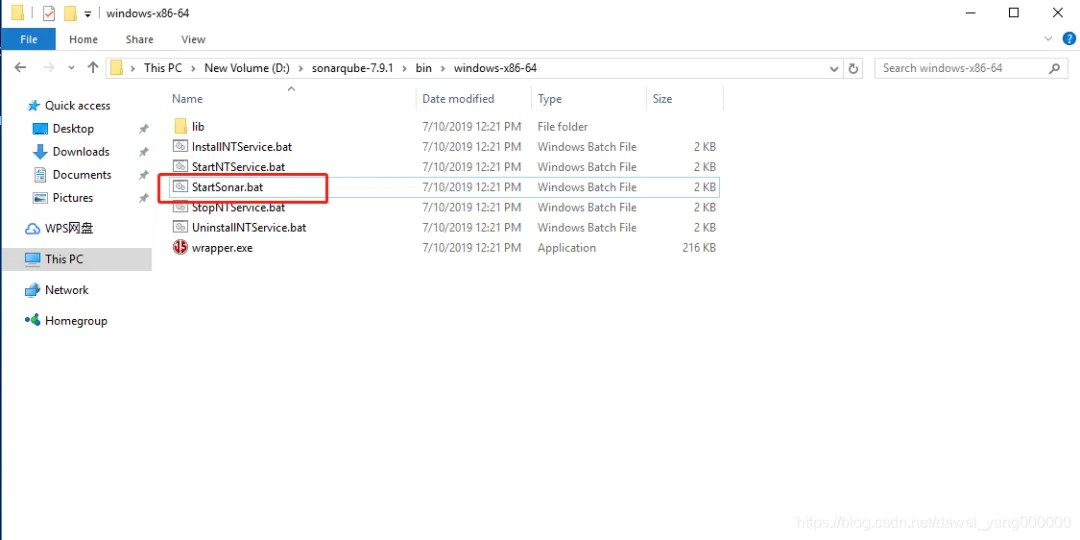
双击StartSonar.bat即可启动SonarQube服务
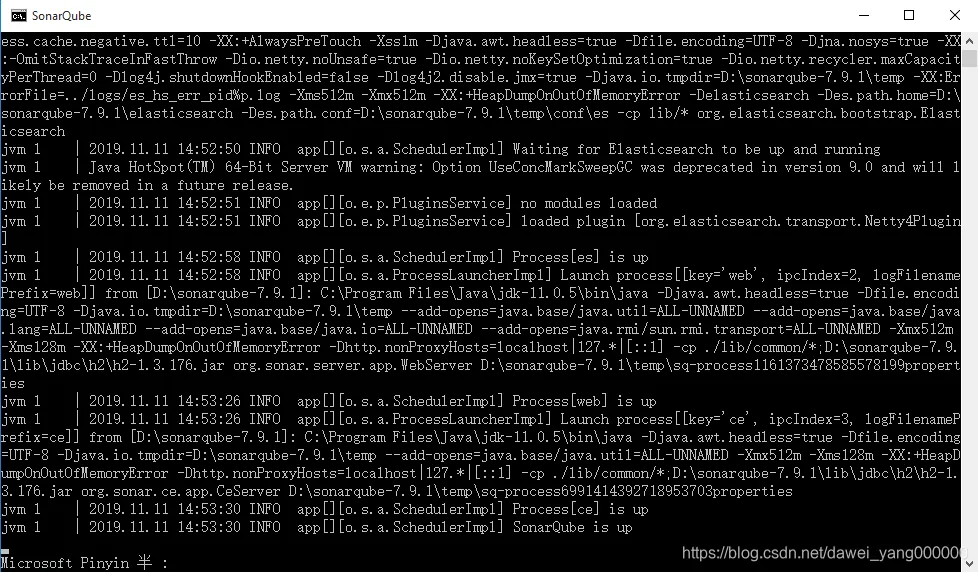
启动成功命令行如下图所示:
启动成功后,用浏览器打开http://localhost:9000
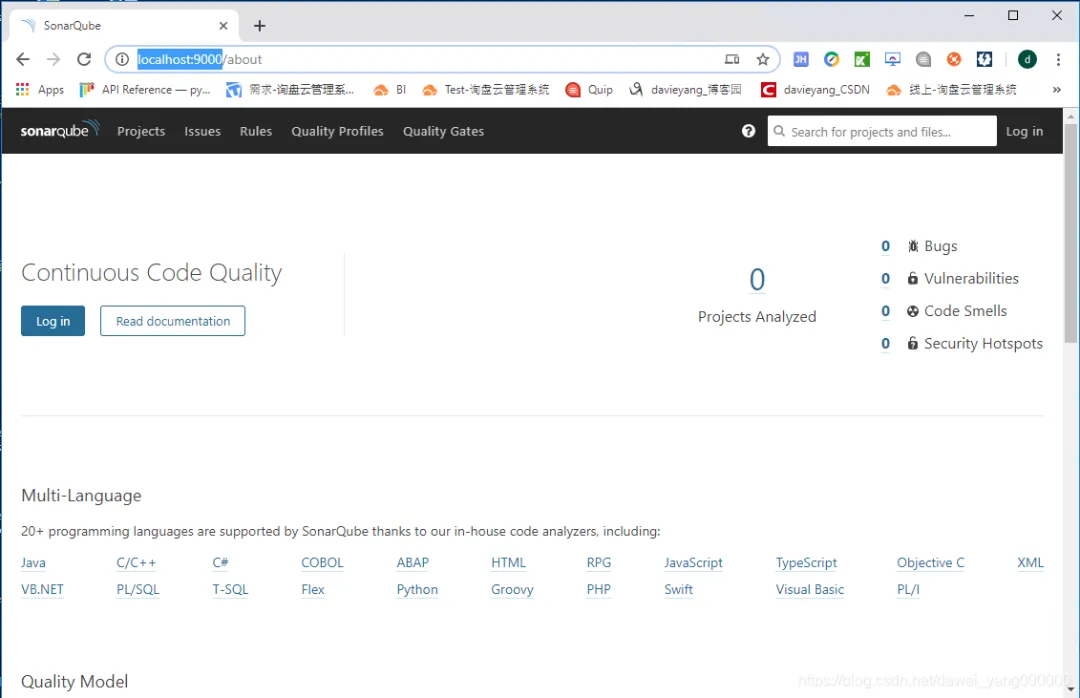
==到此为止,SonarQube的服务端实际上已经部署成功,然而它还是只是个测试用的环境不足以用于生产环境,因为SonarQube是一个需要数据存储的Web系统,它需要数据库才能成为一个完整的有数据存储和展示功能的Web系统==
==在SonarQube的目录中有个conf文件夹,该文件夹内是SonarQube的配置文件,数据库的配置即是在sonar.properties中配置的,在该配置文件中我们也能看到当前版本的SonarQube支持哪些数据库==
## 数据库配置
#--------------------------------------------------------------------------------------------------# DATABASE## IMPORTANT:# - The embedded H2 database is used by default. It is recommended for tests but not for# production use. Supported databases are MySQL, Oracle, PostgreSQL and Microsoft SQLServer.# - Changes to database connection URL (sonar.jdbc.url) can affect SonarSource licensed products.# User credentials.# Permissions to create tables, indices and triggers must be granted to JDBC user.# The schema must be created first.#sonar.jdbc.username=#sonar.jdbc.password=#----- Embedded Database (default)# H2 embedded database server listening port, defaults to 9092#sonar.embeddedDatabase.port=9092#----- DEPRECATED #----- MySQL >=5.6 && <8.0# Support of MySQL is dropped in Data Center Editions and deprecated in all other editions# Only InnoDB storage engine is supported (not myISAM).# Only the bundled driver is supported. It can not be changed.sonar.jdbc.url=jdbc:mysql://localhost:3306/sonar?useUnicode=true&characterEncoding=utf8&rewriteBatchedStatements=true&useConfigs=maxPerformance&&useSSL=falsesonar.jdbc.username=mysqlsonar.jdbc.password=alex005xsonar.sorceEncoding=UTF-8sonar.login=adminsonar.password=admin#----- Oracle 11g/12c# The Oracle JDBC driver must be copied into the directory extensions/jdbc-driver/oracle/.# Only the thin client is supported, and only the versions 11.2.x or 12.2.x must be used. See# https://jira.sonarsource.com/browse/SONAR-9758 for more details.# If you need to set the schema, please refer to http://jira.sonarsource.com/browse/SONAR-5000#sonar.jdbc.url=jdbc:oracle:thin:@localhost:1521/XE#----- PostgreSQL 9.3 or greater# By default the schema named "public" is used. It can be overridden with the parameter "currentSchema".#sonar.jdbc.url=jdbc:postgresql://localhost/sonarqube?currentSchema=my_schema#----- Microsoft SQLServer 2014/2016 and SQL Azure# A database named sonar must exist and its collation must be case-sensitive (CS) and accent-sensitive (AS)# Use the following connection string if you want to use integrated security with Microsoft Sql Server# Do not set sonar.jdbc.username or sonar.jdbc.password property if you are using Integrated Security# For Integrated Security to work, you have to download the Microsoft SQL JDBC driver package from# https://www.microsoft.com/en-us/download/details.aspx?id=55539# and copy sqljdbc_auth.dll to your path. You have to copy the 32 bit or 64 bit version of the dll# depending upon the architecture of your server machine.#sonar.jdbc.url=jdbc:sqlserver://localhost;databaseName=sonar;integratedSecurity=true# Use the following connection string if you want to use SQL Auth while connecting to MS Sql Server.# Set the sonar.jdbc.username and sonar.jdbc.password appropriately.#sonar.jdbc.url=jdbc:sqlserver://localhost;databaseName=sonar#----- Connection pool settings# The maximum number of active connections that can be allocated# at the same time, or negative for no limit.# The recommended value is 1.2 * max sizes of HTTP pools. For example if HTTP ports are# enabled with default sizes (50, see property sonar.web.http.maxThreads)# then sonar.jdbc.maxActive should be 1.2 * 50 = 60.#sonar.jdbc.maxActive=60# The maximum number of connections that can remain idle in the# pool, without extra ones being released, or negative for no limit.#sonar.jdbc.maxIdle=5# The minimum number of connections that can remain idle in the pool,# without extra ones being created, or zero to create none.#sonar.jdbc.minIdle=2# The maximum number of milliseconds that the pool will wait (when there# are no available connections) for a connection to be returned before# throwing an exception, or <= 0 to wait indefinitely.#sonar.jdbc.maxWait=5000#sonar.jdbc.minEvictableIdleTimeMillis=600000#sonar.jdbc.timeBetweenEvictionRunsMillis=30000
## Web Server配置
#--------------------------------------------------------------------------------------------------# WEB SERVER# Web server is executed in a dedicated Java process. By default heap size is 512Mb.# Use the following property to customize JVM options.# Recommendations:## The HotSpot Server VM is recommended. The property -server should be added if server mode# is not enabled by default on your environment:# http://docs.oracle.com/javase/8/docs/technotes/guides/vm/server-class.html## Startup can be long if entropy source is short of entropy. Adding# -Djava.security.egd=file:/dev/./urandom is an option to resolve the problem.# See https://wiki.apache.org/tomcat/HowTo/FasterStartUp#Entropy_Source##sonar.web.javaOpts=-Xmx512m -Xms128m -XX:+HeapDumpOnOutOfMemoryError# Same as previous property, but allows to not repeat all other settings like -Xmx#sonar.web.javaAdditionalOpts=# Binding IP address. For servers with more than one IP address, this property specifies which# address will be used for listening on the specified ports.# By default, ports will be used on all IP addresses associated with the server.#sonar.web.host=0.0.0.0# Web context. When set, it must start with forward slash (for example /sonarqube).# The default value is root context (empty value).#sonar.web.context=# TCP port for incoming HTTP connections. Default value is 9000.#sonar.web.port=9000# The maximum number of connections that the server will accept and process at any given time.# When this number has been reached, the server will not accept any more connections until# the number of connections falls below this value. The operating system may still accept connections# based on the sonar.web.connections.acceptCount property. The default value is 50.#sonar.web.http.maxThreads=50# The minimum number of threads always kept running. The default value is 5.#sonar.web.http.minThreads=5# The maximum queue length for incoming connection requests when all possible request processing# threads are in use. Any requests received when the queue is full will be refused.# The default value is 25.#sonar.web.http.acceptCount=25# By default users are logged out and sessions closed when server is restarted.# If you prefer keeping user sessions open, a secret should be defined. Value is# HS256 key encoded with base64. It must be unique for each installation of SonarQube.# Example of command-line:# echo -n "type_what_you_want" | openssl dgst -sha256 -hmac "key" -binary | base64#sonar.auth.jwtBase64Hs256Secret=# The inactivity timeout duration of user sessions, in minutes. After the configured# period of time, the user is logged out.# The default value is set to 3 days (4320 minutes)# and cannot be greater than 3 months. Value must be strictly positive.#sonar.web.sessionTimeoutInMinutes=4320# A passcode can be defined to access some web services from monitoring# tools without having to use the credentials of a system administrator.# Check the Web API documentation to know which web services are supporting this authentication mode.# The passcode should be provided in HTTP requests with the header "X-Sonar-Passcode".# By default feature is disabled.#sonar.web.systemPasscode=
==除了以上两类重要配置外,还有单点登录、LDAP、Java虚拟机配置等相关参数可配==
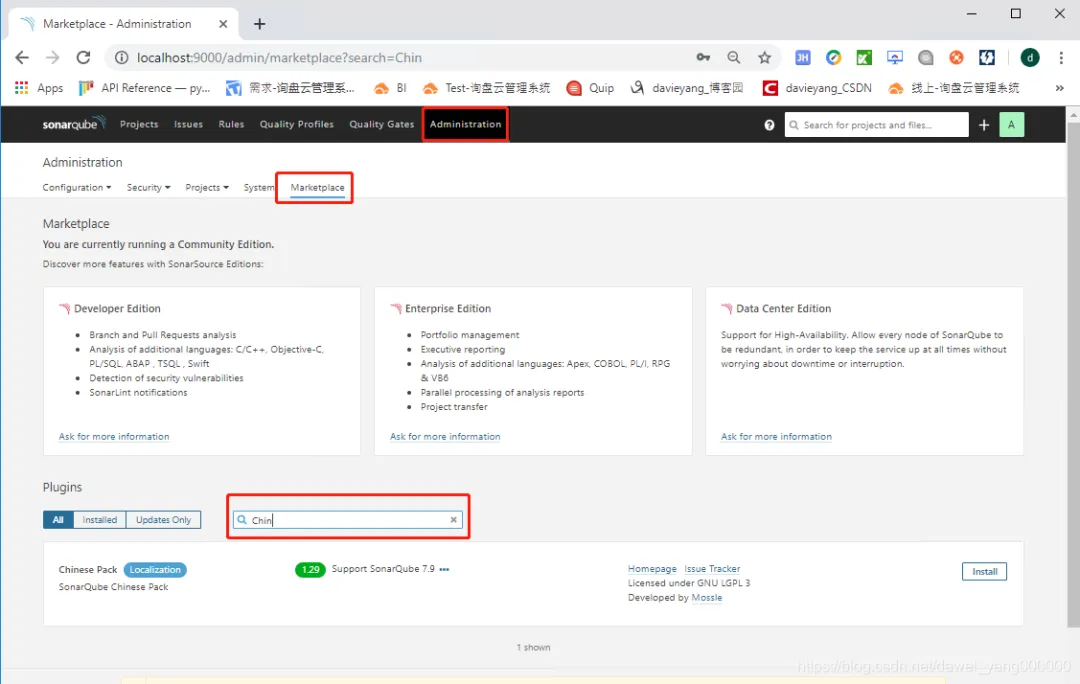
## 配置插件
## 配置SonarQube Scanner
下载地址:https://docs.sonarqube.org/display/SCAN/Analyzing+with+SonarQube+Scanner
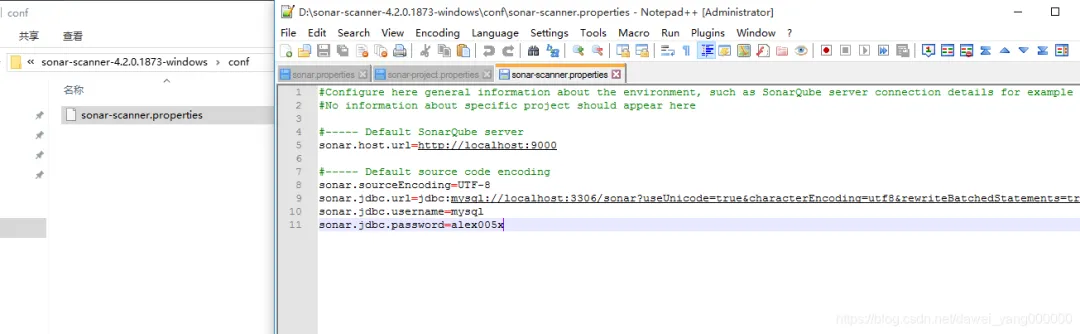
#Configure here general information about the environment, such as SonarQube server connection details for example#No information about specific project should appear here#----- Default SonarQube serversonar.host.url=http://localhost:9000#----- Default source code encodingsonar.sourceEncoding=UTF-8sonar.jdbc.url=jdbc:mysql://localhost:3306/sonar?useUnicode=true&characterEncoding=utf8&rewriteBatchedStatements=true&useConfigs=maxPerformance&&useSSL=falsesonar.jdbc.username=mysqlsonar.jdbc.password=alex005x
### 新增系统环境变量
SONAR_SCANNER_HOME:D:\sonar-scanner-4.2.0.1873-windows
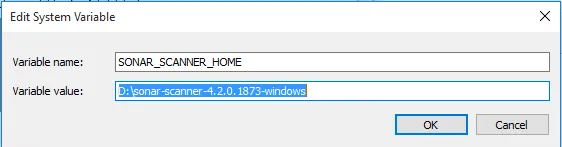
Path中新增%SONAR_SCANNER_HOME%\bin;
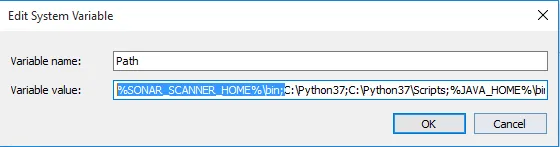
验证配置,在命令行输入```sonar-scanner -help```
D:\cuss-social-jscoco\target\classes\com\xhl\cuss\social>sonar-scanner -helpERROR: Unrecognized option: -helpINFO:INFO: usage: sonar-scanner [options]INFO:INFO: Options:INFO: -D,--define <arg> Define propertyINFO: -h,--help Display help informationINFO: -v,--version Display version informationINFO: -X,--debug Produce execution debug output
在工程目录下新建文件名为```sonar-project.properties```,在文件中写入如下项目信息,用于写入Sonar数据库
#项目的keysonar.projectKey=my:baseInfo#项目的名字sonar.projectName=BASIC_INFORMATION#项目的版本sonar.projectVersion=1.0.0#需要分析的源码的目录,多个目录用英文逗号隔开sonar.sources=D:/cuss-social-jscoco/src/main/java/com/xhl# Languagesonar.language=javasonar.java.binaries=.sonar.sourceEncoding=UTF-8
### 执行扫描
在工程目录下,执行命令```sonar-scanner```即可完成扫描,扫描结果会写入数据库,并可才Sonar平台上查看结果
D:\cuss-social-jscoco>sonar-scannerINFO: Scanner configuration file: D:\sonar-scanner-4.2.0.1873-windows\bin\..\conf\sonar-scanner.propertiesINFO: Project root configuration file: D:\cuss-social-jscoco\sonar-project.propertiesINFO: SonarQube Scanner 4.2.0.1873INFO: Java 11.0.3 AdoptOpenJDK (64-bit)INFO: Windows 10 10.0 amd64INFO: User cache: C:\Users\Administrator\.sonar\cacheINFO: SonarQube server 7.6.0INFO: Default locale: "zh_CN", source code encoding: "UTF-8"INFO: Load global settingsWARNING: An illegal reflective access operation has occurredWARNING: Illegal reflective access by com.google.protobuf.UnsafeUtil (file:/C:/Users/Administrator/.sonar/cache/993f707e3af7ba4f46f121039128516b/sonar-scanner-engine-shaded-7.6-all.jar) to field java.nio.Buffer.addressWARNING: Please consider reporting this to the maintainers of com.google.protobuf.UnsafeUtilWARNING: Use --illegal-access=warn to enable warnings of further illegal reflective access operationsWARNING: All illegal access operations will be denied in a future releaseINFO: Load global settings (done) | time=50msINFO: Server id: 49B321BC-AW5aoLlje3tu4A9kELXRINFO: User cache: C:\Users\Administrator\.sonar\cacheINFO: Load/download pluginsINFO: Load plugins indexINFO: Load plugins index (done) | time=70msINFO: Plugin [l10nzh] defines 'l10nen' as base plugin. This metadata can be removed from manifest of l10n plugins since version 5.2.INFO: Load/download plugins (done) | time=100msINFO: Process project propertiesINFO: Execute project buildersINFO: Execute project builders (done) | time=10msINFO: Project key: my:baseInfoINFO: Base dir: D:\cuss-social-jscocoINFO: Working dir: D:\cuss-social-jscoco\.scannerworkINFO: Load project settingsINFO: Load project settings (done) | time=20msINFO: Load project repositoriesINFO: Load project repositories (done) | time=50msINFO: Load quality profilesINFO: Load quality profiles (done) | time=40msINFO: Load active rulesINFO: Load active rules (done) | time=340msINFO: Load metrics repositoryINFO: Load metrics repository (done) | time=21msWARN: SCM provider autodetection failed. Please use "sonar.scm.provider" to define SCM of your project, or disable the SCM Sensor in the project settings.INFO: Language is forced to javaINFO: Indexing files...INFO: Project configuration:INFO: 132 files indexedINFO: Quality profile for java: Sonar wayINFO: ------------- Run sensors on module BASIC_INFORMATIONINFO: Sensor JavaSquidSensor [java]INFO: Configured Java source version (sonar.java.source): noneINFO: JavaClasspath initializationWARN: Bytecode of dependencies was not provided for analysis of source files, you might end up with less precise results. Bytecode can be provided using sonar.java.libraries property.INFO: JavaClasspath initialization (done) | time=20msINFO: JavaTestClasspath initializationINFO: JavaTestClasspath initialization (done) | time=10msINFO: Java Main Files AST scanINFO: 132 source files to be analyzedINFO: 132/132 source files have been analyzedINFO: Java Main Files AST scan (done) | time=9762msINFO: Java Test Files AST scanINFO: 0 source files to be analyzedINFO: Java Test Files AST scan (done) | time=0msINFO: 0/0 source files have been analyzedINFO: Sensor JavaSquidSensor [java] (done) | time=10202msINFO: Sensor JaCoCo XML Report Importer [jacoco]INFO: Sensor JaCoCo XML Report Importer [jacoco] (done) | time=10msINFO: Sensor SurefireSensor [java]INFO: parsing [D:\cuss-social-jscoco\target\surefire-reports]INFO: Sensor SurefireSensor [java] (done) | time=10msINFO: Sensor JaCoCoSensor [java]INFO: Sensor JaCoCoSensor [java] (done) | time=0msINFO: Sensor JavaXmlSensor [java]INFO: Sensor JavaXmlSensor [java] (done) | time=10msINFO: Sensor HTML [web]INFO: Sensor HTML [web] (done) | time=10msINFO: Sensor Zero Coverage SensorINFO: Sensor Zero Coverage Sensor (done) | time=80msINFO: ------------- Run sensors on projectINFO: Sensor Java CPD Block IndexerINFO: Sensor Java CPD Block Indexer (done) | time=271msINFO: No SCM system was detected. You can use the 'sonar.scm.provider' property to explicitly specify it.INFO: 32 files had no CPD blocksINFO: Calculating CPD for 100 filesINFO: CPD calculation finishedINFO: Analysis report generated in 270ms, dir size=1 MBINFO: Analysis report compressed in 370ms, zip size=472 KBINFO: Analysis report uploaded in 80msINFO: ANALYSIS SUCCESSFUL, you can browse http://localhost:9000/dashboard?id=my%3AbaseInfoINFO: Note that you will be able to access the updated dashboard once the server has processed the submitted analysis reportINFO: More about the report processing at http://localhost:9000/api/ce/task?id=AW5eRz6r4XbRoxI2cCRWINFO: Analysis total time: 13.842 sINFO: ------------------------------------------------------------------------INFO: EXECUTION SUCCESSINFO: ------------------------------------------------------------------------INFO: Total time: 14.893sINFO: Final Memory: 8M/34MINFO: ------------------------------------------------------------------------
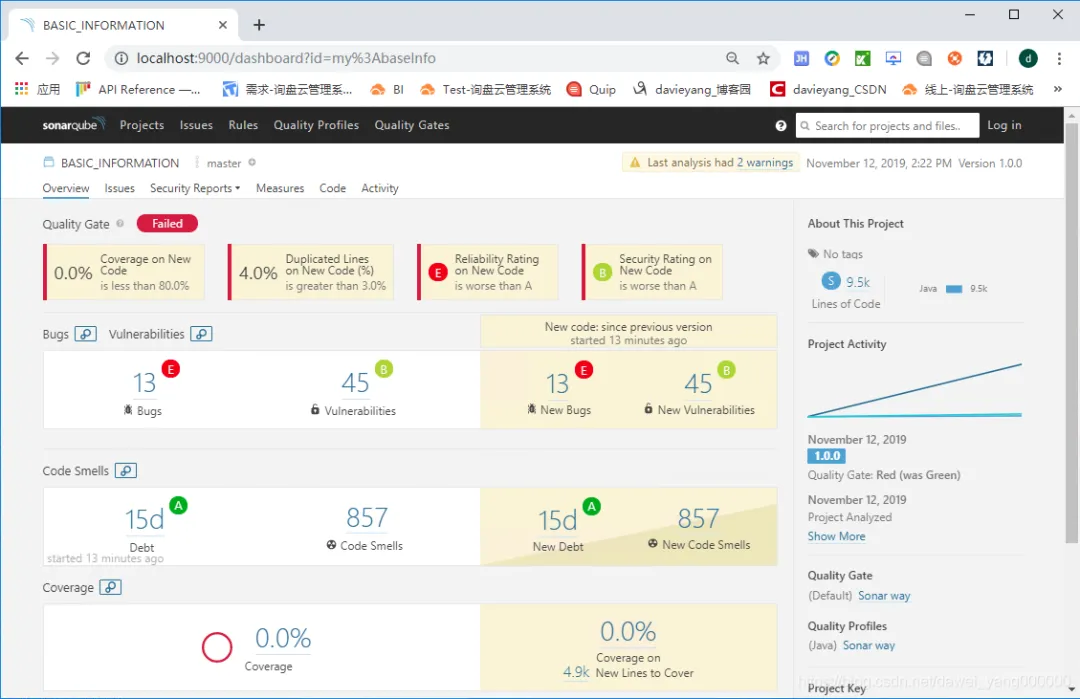
在结果中能够看到链接
http://localhost:9000/dashboard?id=my%3AbaseInfo
用浏览器打开该链接,即可查看结果
## 扫描Maven项目
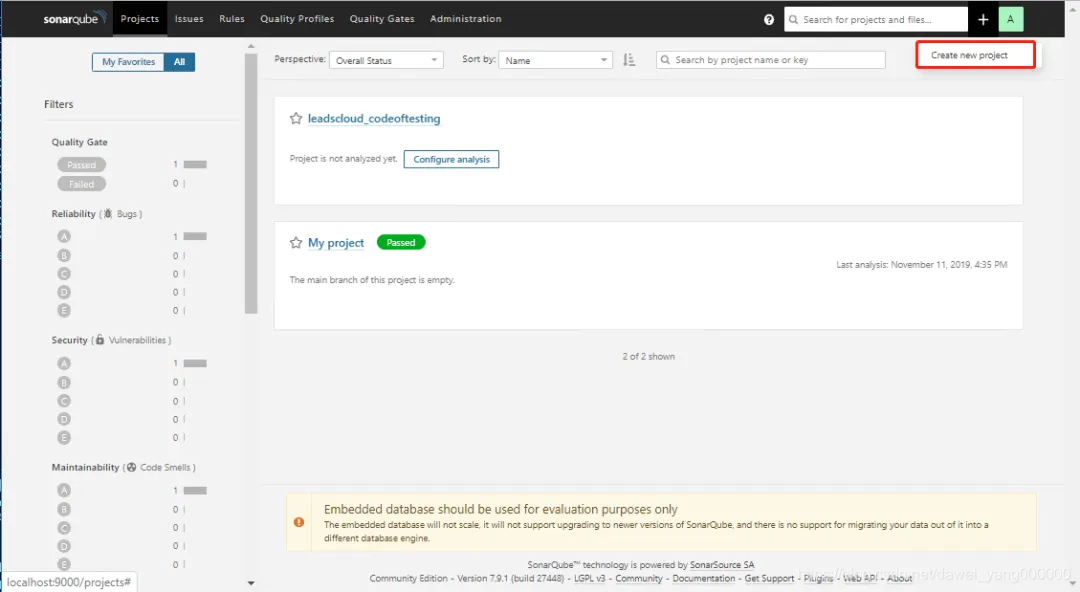
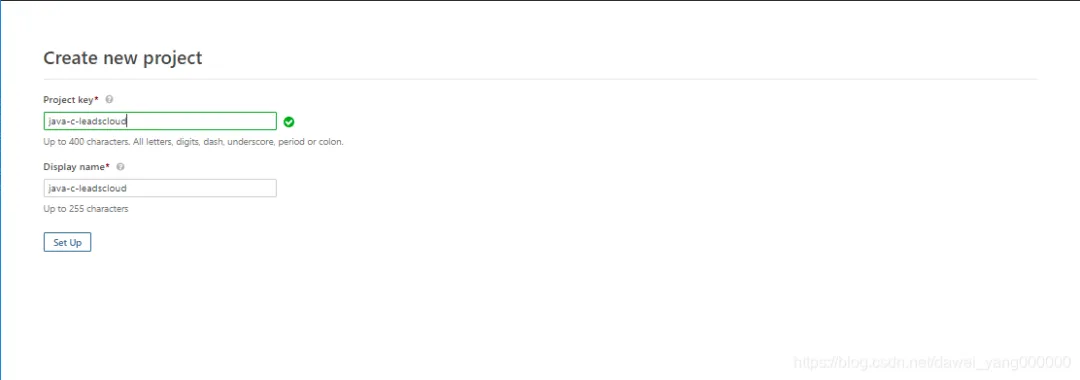
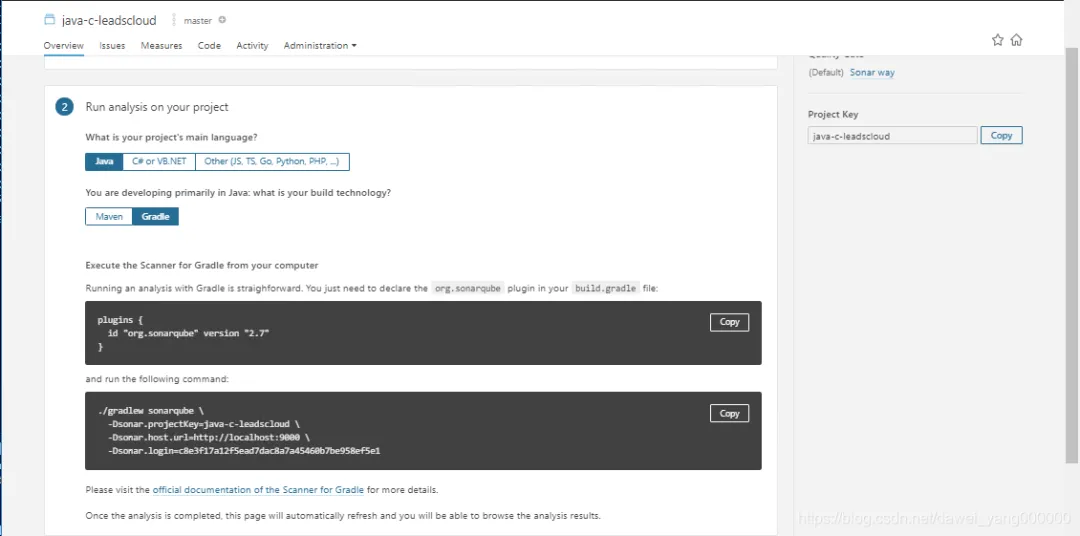
点击Setup,然后输入一个Name,并点击Generate按钮生成token
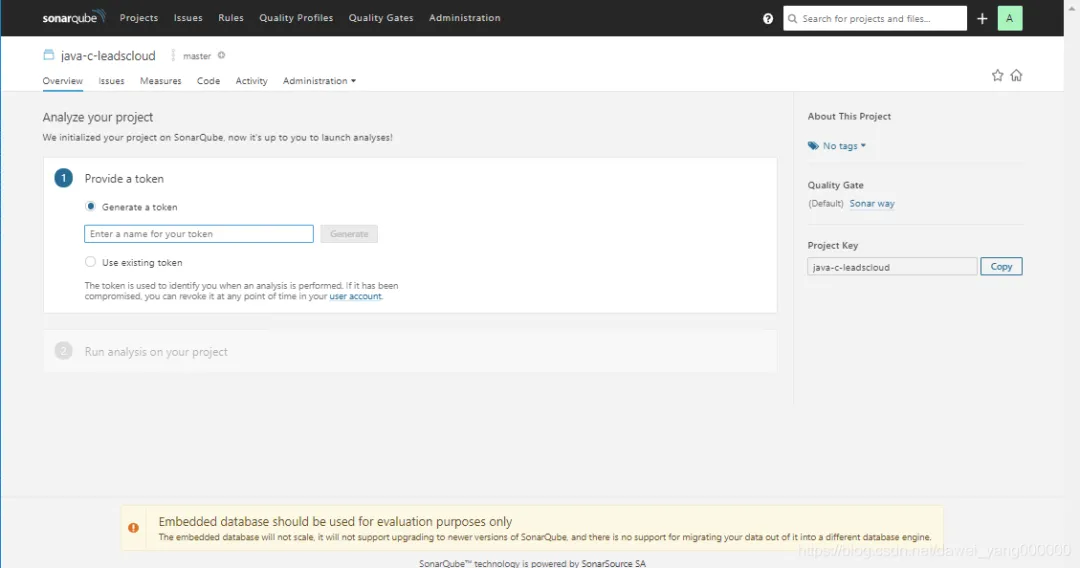
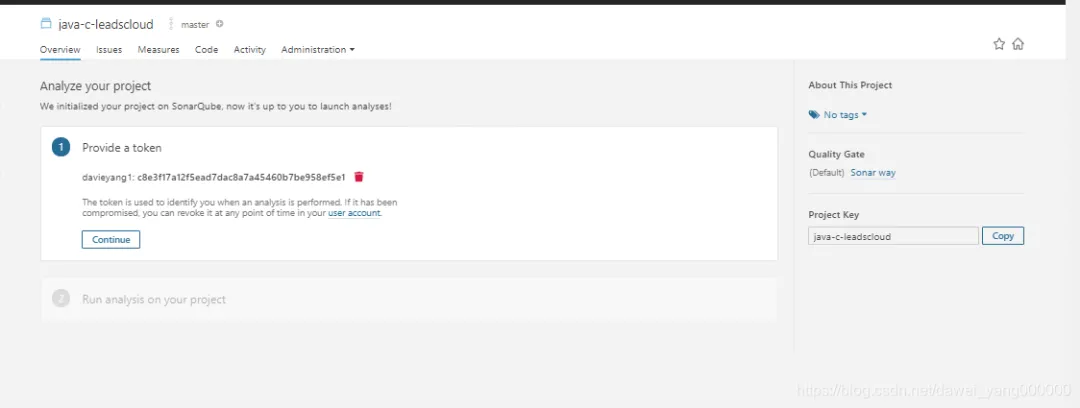
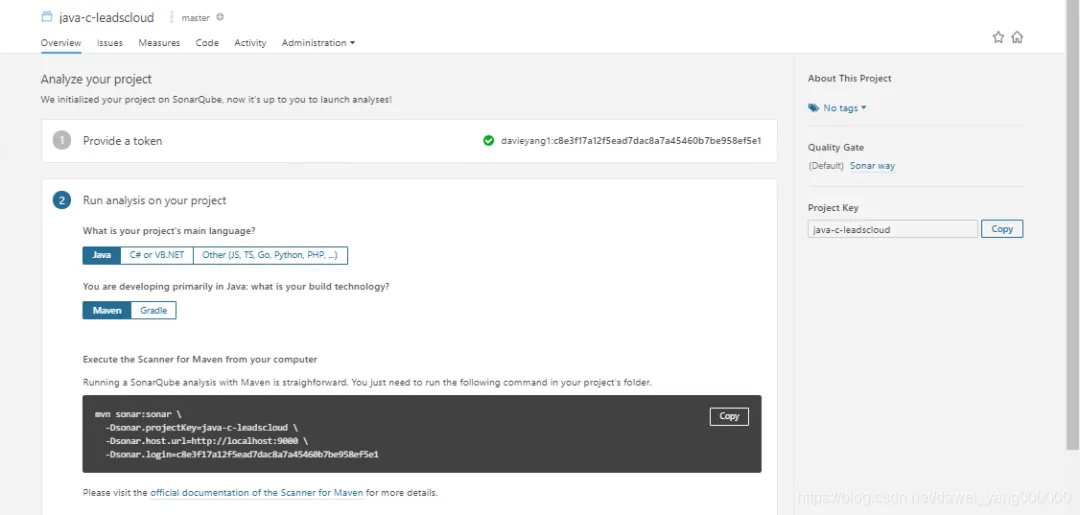
点击Continue,然后根据项目的语言选择要扫描什么类型的项目,例如Java语言的项目jiu选择Java然后,根据构建工具选择Maven还是Gradle,例如选择Maven
### 配置Maven
<pluginGroups> <pluginGroup>org.sonarsource.scanner.maven</pluginGroup> </pluginGroups>
<profile> <id>sonar</id> <activation> <activeByDefault>true</activeByDefault> </activation> <properties> <sonar.host.url> http://192.168.70.62:9000 </sonar.host.url> </properties> </profile>
如果Maven环境配置成功,则只需要在命令行执行如下命令即可完成扫描
mvn sonar:sonar \ -Dsonar.projectKey=java-c-leadscloud \ -Dsonar.host.url=http://localhost:9000 \ -Dsonar.login=c8e3f17a12f5ead7dac8a7a45460b7be958ef5e1
## 扫描Gradle项目
如果选择Gradle,则需要做如下配置