解读 PointNet:使用 Python 和 PyTorch 进行 3D 分割的实用指南
- 2026-10-01 13:03:04
这篇文章主要介绍 3D 分割。这篇文章主要带你深入了解 PointNet,这是一种理解 3D 形状的方法。PointNet 就像是计算机用来观察 3D 物体的智能工具,特别是空间中漂浮的点云数据。它与其他方法不同,因为它直接处理这些点,而不需要将它们强制转换成网格或图片。
语义分割:基于 TensorFlow 对 FCN 与迁移学习的探究
在本文中,我们将让 PointNet 变得通俗易懂。我们会从宏观概念讲起,一直深入到实际编写 Python 和 PyTorch 代码来进行 3D 分割。但在进入有趣的实操部分之前,让我们先弄清楚 PointNet 的核心内容——它是如何成为解决 3D 物体及其部件识别等难题的关键技术的。
因此,请随我们一起回顾 PointNet 论文的概要。我们将探讨其架构设计、背后的精妙理论,以及它在真实实验中展现出的强大能力。在探索随机点云、特殊函数以及 PointNet 如何处理各种 3D 任务的世界时,我们会尽量保持简单易懂。准备好发现 PointNet 在 3D 分割中的强大威力了吗?让我们开始吧。
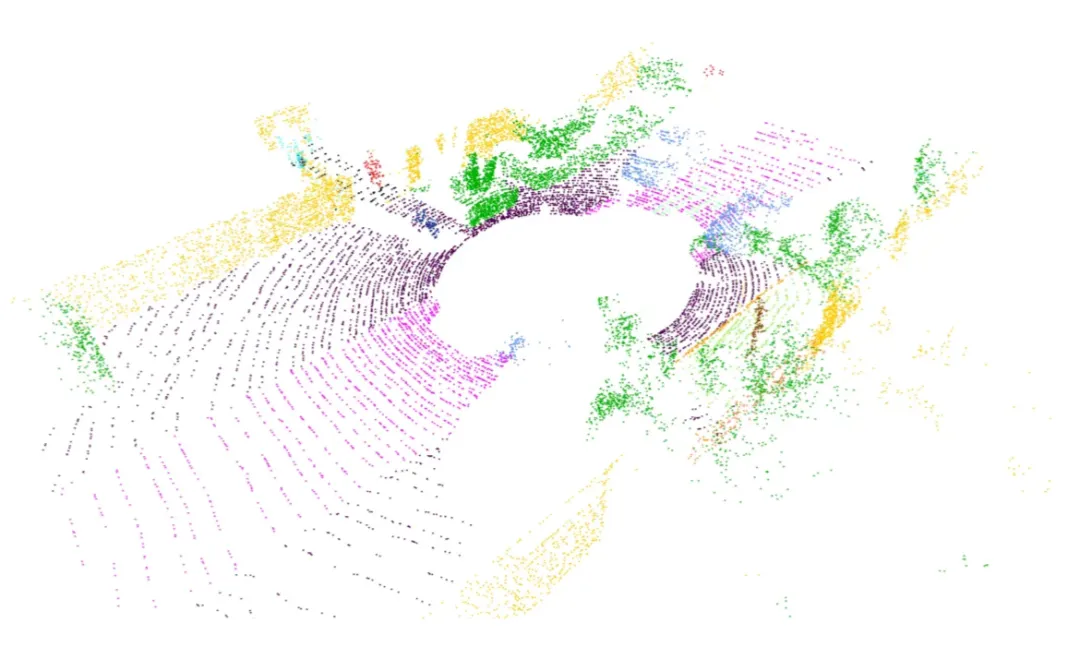
深入理解 PointNet:核心概念
现在我们已经铺平了道路,让我们将 PointNet 拆解成易于消化的小块。PointNet 就像一种特殊的工具,帮助计算机理解 3D 事物,特别是那些棘手的点云数据。但它到底酷在哪里呢?与其他将数据整齐归位的方法不同,PointNet 按照点的本来面目处理它们——不需要网格,也不需要图片。这让它在 3D 领域中脱颖而出。机器人学的第一部分——机器人如何理解空间:运动学与旋转矩阵
点集基础
想象一下,一群点漂浮在 3D 空间中。这些点没有特定的顺序,它们彼此交互。PointNet 通过适应旋转或移动等变化,来应对这种无序性。当点的位置互换时,它也不会感到困惑。
对称性魔法
PointNet 拥有一种特殊的能力,叫做对称性。想象你有一袋点,无论你怎么打乱它们,PointNet 依然能理解袋子里装的是什么。对于处理无序点云来说,这简直就像法术一样。
聚合局部与全局信息
PointNet 擅长收集信息。它既能看大局(全局),也能看细节(局部)。这有助于它完成诸如识别物体及其部件形状等任务。
对齐技巧
PointNet 也擅长处理变化。如果你旋转或移动点云,PointNet 也能调整过来,从容理解。这就像是一个机器人在自动对齐物体,以便能看清它们。
理论基石
现在,让我们谈谈 PointNet 背后的宏大理论。有两个特殊的定理表明,PointNet 不仅在实践中表现出色,在理论上也是一个明智的选择。解读openAI的文本图像模型-CLIP
- 通用近似性: PointNet 能够很好地学习和理解任何 3D 形状。这就好比说,PointNet 是一个超级英雄,无论你扔给它什么形状,它都能搞定。
- 瓶颈维度与稳定性: PointNet 非常坚韧。即使你添加了一些额外的点,或者干扰了它已有的点,它也不会感到困惑。它坚守岗位,保持稳定。
这些宏大的理论让 PointNet 成为了一个值得信赖的 3D 形状理解工具。下面,我们将从理论转向实践,亲自动手使用 Python 和 PyTorch 进行编码。
PointNet 架构概览
PointNet 架构由两个主要部分组成:分类网络和一个扩展的分割网络。
- 分类网络:接收
n个输入点,应用输入和特征变换,并通过最大池化(max pooling)聚合点特征,最终为k个类别生成分类得分。 - 分割网络:是分类网络的自然扩展,它结合了全局和局部特征,以生成每个点的得分。
术语“mlp”表示多层感知机(multi-layer perceptron),其层大小在方括号中指定。所有层都一致应用了批归一化(Batch normalization),并伴随 ReLU 激活函数。此外,在分类网络的最后 mlp 中,战略性地加入了 dropout 层。
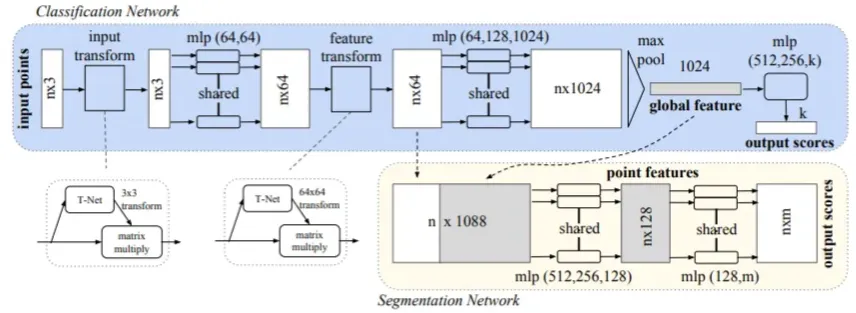
MLP_CONV 类封装了在批归一化卷积层输出结果上应用 ReLU 激活函数的操作。这与架构图中描述的卷积层和 mlp 层相对应。让我们仔细看一下这段代码:# 多层感知机(MLP)class MLP_CONV(nn.Module):def __init__(self, input_size, output_size):super().__init__()self.input_size = input_sizeself.output_size = output_sizeself.conv = nn.Conv1d(self.input_size, self.output_size, 1)self.bn = nn.BatchNorm1d(self.output_size)def forward(self, input):return F.relu(self.bn(self.conv(input)))
该类定义对应于架构的构建模块,其中卷积层、批归一化和 ReLU 激函数被组合在一起,以实现所需的特征变换。此外,下文所述的 FC_BN 类在使用全连接层时,对这一架构起到了补充作用。
# Fully Connected with Batch Normalizationclass FC_BN(nn.Module):def __init__(self, input_size, output_size):super().__init__()self.input_size = input_sizeself.output_size = output_sizeself.lin = nn.Linear(self.input_size, self.output_size)self.bn = nn.BatchNorm1d(self.output_size)def forward(self, input):return F.relu(self.bn(self.lin(input)))
该类进一步阐明了全连接层与批归一化及 ReLU 激活函数的集成,强调了这些技术在 PointNet 架构中的一致应用。
输入与特征变换
输入变换网络是一个被称为 TNet 的小型 PointNet,在处理原始点云数据方面起着关键作用。它旨在通过一系列操作回归出一个 3 × 3 的矩阵。该网络架构定义为:先对每个点应用共享的 MLP(64, 128, 1024),然后在点之间进行最大池化(max pooling),最后经过两个输出大小分别为 512 和 256 的全连接层。生成的矩阵被初始化为单位矩阵。每一层(最后一层除外)都包含了 ReLU 激活函数和批归一化。第二个变换网络的架构与第一个类似,但输出的是一个 64 × 64 的矩阵,并同样初始化为单位矩阵。此外,为了促进矩阵的正交性,向 softmax 分类损失中添加了一个权重为 0.001 的正则化损失。生成式AI vs 预测式AI:揭秘人工智能领域的两大技术
TNet 类被用于根据论文中提供的规范来创建变换网络:
# Transformation Network (TNet) classclass TNet(nn.Module):def __init__(self, k=3):super().__init__()self.k = kself.mlp1 = MLP_CONV(self.k, 64)self.mlp2 = MLP_CONV(64, 128)self.mlp3 = MLP_CONV(128, 1024)self.fc_bn1 = FC_BN(1024, 512)self.fc_bn2 = FC_BN(512, 256)self.fc3 = nn.Linear(256, k*k)def forward(self, input):# input.shape == (batch_size, n, 3)bs = input.size(0)xb = self.mlp1(input)xb = self.mlp2(xb)xb = self.mlp3(xb)pool = nn.MaxPool1d(xb.size(-1))(xb)flat = nn.Flatten(1)(pool)xb = self.fc_bn1(flat)xb = self.fc_bn2(xb)# initialize as identityinit = torch.eye(self.k, requires_grad=True).repeat(bs, 1, 1)if xb.is_cuda:init = init.cuda()matrix = self.fc3(xb).view(-1, self.k, self.k) + initreturn matrix
这个 TNet 类封装了将输入点云转换为 3 × 3 或 64 × 64 矩阵的过程,其内部利用了共享的多层感知机(MLP)、最大池化(max pooling)以及带有批归一化的全连接层。什么是无监督学习?理解人工智能中无监督学习的机制、各类算法的类型与应用
PointNet 网络:
PointNet 网络封装在 PointNet 类中,它遵循了 PointNet 架构图中所阐述的设计原则:
class PointNet(nn.Module):def __init__(self):super().__init__()self.input_transform = TNet(k=3)self.feature_transform = TNet(k=64)self.mlp1 = MLP_CONV(3, 64)self.mlp2 = MLP_CONV(64, 128)# 1D convolutional layer with kernel size 1self.conv = nn.Conv1d(128, 1024, 1)# Batch normalization for stability and faster trainingself.bn = nn.BatchNorm1d(1024)def forward(self, input):n_pts = input.size()[2]matrix3x3 = self.input_transform(input)input_transform_output = torch.bmm(torch.transpose(input, 1, 2), matrix3x3).transpose(1, 2)x = self.mlp1(input_transform_output)matrix64x64 = self.feature_transform(x)feature_transform_output = torch.bmm(torch.transpose(x, 1, 2), matrix64x64).transpose(1, 2)x = self.mlp2(feature_transform_output)x = self.bn(self.conv(x))global_feature = nn.MaxPool1d(x.size(-1))(x)global_feature_repeated = nn.Flatten(1)(global_feature).repeat(n_pts, 1, 1).transpose(0, 2).transpose(0, 1)return [feature_transform_output, global_feature_repeated], matrix3x3, matrix64x64
该 PointNet 实现无缝集成了 TNet 变换网络、多层感知机(MLP_CONV)以及带有批归一化的 1D 卷积层。前向传播过程处理输入和特征变换,随后提取全局特征。最终返回的结果张量以及变换矩阵作为输出。
PointNet 分割网络:
分割网络是分类版 PointNet 的扩展。它将来自第二个变换网络的局部点特征与来自最大池化(max pooling)的全局特征进行拼接,为每个点生成特征。分割网络中不使用 Dropout,且训练参数与分类网络保持一致。
对于形状部件分割(shape part segmentation),进行了以下修改:包括添加一个指示输入类别的独热编码(one-hot)向量,并将其与最大池化层的输出进行拼接;增加了某些层中的神经元数量;添加了跳跃连接(skip links)以收集不同层的局部点特征,并将它们拼接起来,形成分割网络的点特征输入。
class PointNetSeg(nn.Module):def __init__(self, classes=3):super().__init__()self.pointnet = PointNet()self.mlp1 = MLP_CONV(1088, 512)self.mlp2 = MLP_CONV(512, 256)self.mlp3 = MLP_CONV(256, 128)self.conv = nn.Conv1d(128, classes, 1)self.logsoftmax = nn.LogSoftmax(dim=1)def forward(self, input):inputs, matrix3x3, matrix64x64 = self.pointnet(input)stack = torch.cat(inputs, 1)x = self.mlp1(stack)x = self.mlp2(x)x = self.mlp3(x)output = self.conv(x)return self.logsoftmax(output), matrix3x3, matrix64x64
PointNetSeg 类
在 PointNetSeg 类中,前向传播过程整合了从 PointNet 获取的特征,将它们进行拼接,然后通过一系列多层感知机(MLP_CONV)和一个卷积层。最终在应用 LogSoftmax 激活函数后获得输出。
训练与测试 PointNet 模型
在我们的模型训练之旅中,我们利用了著名的 Semantic-Kitti 数据集中的点云数据,充分发挥了 PointNet 的威力。这个具有影响力的数据集捕捉了各种城市街景,最初包含大约 30 个标签。然而,为了我们的目的,我们明智地将它们重新映射为三个类别:
- 可通行:包括道路、停车位、人行道等。
- 不可通行:包括汽车、卡车、围栏、树木、行人及各种物体。
- 未知:保留给离群值(异常值)。
重新映射过程涉及使用键值(key-value)字典,将原始标签转换为其简化后的对应类别。为了可视化彩色点云,我们使用了 Open3D Python 包。左图展示了 Semantic-Kitti 的原始配色方案,而右图则揭示了重新映射后的配色方案。
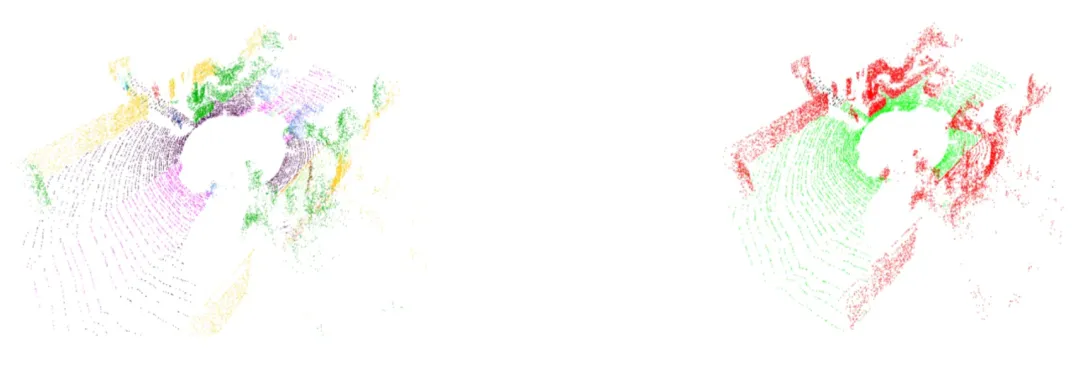
下面是用于加载和可视化数据的代码。
import numpy as npimport randomimport mathimport timeimport structimport os# pyTorch 相关导入import torchimport torch.nn as nnimport torch.nn.functional as Ffrom torch.utils.data import Dataset, DataLoaderfrom torchvision import transforms# 用于训练进度条的库from tqdm import tqdm# 可视化库import open3d as o3dimport plotly.graph_objects as gonumpoints = 20000 # [点云点数]max_dist = 15 # [米] 最大距离min_dist = 4 # [米] 最小距离# 将距离转换为平方(代码优化)max_dist *= max_distmin_dist *= min_distsize_float = 4 # 浮点数字节大小size_small_int = 2 # 短整型字节大小dataset_path = "dataset" # 数据集路径# Semantic-KITTI 颜色方案semantic_kitti_color_scheme = {0 : [0, 0, 0], # "未标记"1 : [0, 0, 255], # "异常点"10: [245, 150, 100], # "汽车"11: [245, 230, 100], # "自行车"13: [250, 80, 100], # "公交车"15: [150, 60, 30], # "摩托车"16: [255, 0, 0], # "轨道车辆"18: [180, 30, 80], # "卡车"20: [255, 0, 0], # "其他车辆"30: [30, 30, 255], # "行人"31: [200, 40, 255], # "骑行者"32: [90, 30, 150], # "摩托车骑行者"40: [255, 0, 255], # "道路"44: [255, 150, 255], # "停车区"48: [75, 0, 75], # "人行道"49: [75, 0, 175], # "其他地面"50: [0, 200, 255], # "建筑物"51: [50, 120, 255], # "围栏"52: [0, 150, 255], # "其他结构"60: [170, 255, 150], # "车道标线"70: [0, 175, 0], # "植被"71: [0, 60, 135], # "树干"72: [80, 240, 150], # "地形"80: [150, 240, 255], # "杆子"81: [0, 0, 255], # "交通标志"99: [255, 255, 50], # "其他物体"252: [245, 150, 100], # "移动汽车"253: [200, 40, 255], # "移动骑行者"254: [30, 30, 255], # "移动行人"255: [90, 30, 150], # "移动摩托车骑行者"256: [255, 0, 0], # "移动轨道车辆"257: [250, 80, 100], # "移动公交车"258: [180, 30, 80], # "移动卡车"259: [255, 0, 0], # "移动其他车辆"}# 标签重映射方案label_remap = {0 : 0, # "未标记"1 : 0, # "异常点"10: 2, # "汽车"11: 2, # "自行车"13: 2, # "公交车"15: 2, # "摩托车"16: 2, # "轨道车辆"18: 2, # "卡车"20: 2, # "其他车辆"30: 2, # "行人"31: 2, # "骑行者"32: 2, # "摩托车骑行者"40: 1, # "道路"44: 1, # "停车区"48: 1, # "人行道"49: 1, # "其他地面"50: 2, # "建筑物"51: 2, # "围栏"52: 2, # "其他结构"60: 1, # "车道标线"70: 2, # "植被"71: 2, # "树干"72: 2, # "地形"80: 2, # "杆子"81: 2, # "交通标志"99: 2, # "其他物体"252: 2, # "移动汽车"253: 2, # "移动骑行者"254: 2, # "移动行人"255: 2, # "移动摩托车骑行者"256: 2, # "移动轨道车辆"257: 2, # "移动公交车"258: 2, # "移动卡车"259: 2, # "移动其他车辆"}# 重映射后的颜色方案remap_color_scheme = [[0, 0, 0], # 类别0:黑色[0, 255, 0], # 类别1:绿色[0, 0, 255] # 类别2:蓝色]def sample(pointcloud, labels, numpoints_to_sample):"""输入:pointcloud : 3D点列表labels : 整数标签列表numpoints_to_sample : 采样点数"""tensor = np.concatenate((pointcloud, np.reshape(labels, (labels.shape[0], 1))), axis= 1)tensor = np.asarray(random.choices(tensor, weights=None, cum_weights=None, k=numpoints_to_sample))pointcloud_ = tensor[:, 0:3]labels_ = tensor[:, 3]labels_ = np.array(labels_, dtype=np.int_)return pointcloud_, labels_def readpc(pcpath, labelpath, reduced_labels=True):"""输入:pcpath : 点云".bin"文件路径labelpath : 标签".label"文件路径reduced_labels : 选择返回的标签编码类型的标志[True] -> 返回范围[0, 1, 2]的值 -- 默认[False] -> 返回原始Semantic-Kitti数据集所有标签"""pointcloud, labels = [], []with open(pcpath, "rb") as pc_file, open(labelpath, "rb") as label_file:byte = pc_file.read(size_float*4)label_byte = label_file.read(size_small_int)_ = label_file.read(size_small_int)while byte:x,y,z, _ = struct.unpack("ffff", byte) # 解包4个浮点值label = struct.unpack("H", label_byte)[0] # 解包1个无符号短整型值d = x*x + y*y + z*z # 欧几里得距离平方if min_dist<d<max_dist: # 距离筛选pointcloud.append([x, y, z])if reduced_labels: # 使用简化标签范围labels.append(label_remap[label])else: # 使用完整标签范围labels.append(label)byte = pc_file.read(size_float*4)label_byte = label_file.read(size_small_int)_ = label_file.read(size_small_int)pointcloud = np.array(pointcloud)labels = np.array(labels)# 返回固定数量的点/标签(固定数量:numpoints)return sample(pointcloud, labels, numpoints)def remap_to_bgr(integer_labels, color_scheme):"""将整数标签映射到BGR颜色"""bgr_labels = []for n in integer_labels:bgr_labels.append(color_scheme[int(n)][::-1]) # 反转RGB为BGRnp_bgr_labels = np.array(bgr_labels)return np_bgr_labelsdef draw_geometries(geometries):"""使用Plotly绘制Open3D几何对象"""graph_objects = []for geometry in geometries:geometry_type = geometry.get_geometry_type()if geometry_type == o3d.geometry.Geometry.Type.PointCloud:points = np.asarray(geometry.points)colors = Noneif geometry.has_colors():colors = np.asarray(geometry.colors)elif geometry.has_normals():colors = (0.5, 0.5, 0.5) + np.asarray(geometry.normals) * 0.5else:geometry.paint_uniform_color((1.0, 0.0, 0.0))colors = np.asarray(geometry.colors)scatter_3d = go.Scatter3d(x=points[:,0], y=points[:,1], z=points[:,2], mode='markers', marker=dict(size=1, color=colors))graph_objects.append(scatter_3d)if geometry_type == o3d.geometry.Geometry.Type.TriangleMesh:triangles = np.asarray(geometry.triangles)vertices = np.asarray(geometry.vertices)colors = Noneif geometry.has_triangle_normals():colors = (0.5, 0.5, 0.5) + np.asarray(geometry.triangle_normals) * 0.5colors = tuple(map(tuple, colors))else:colors = (1.0, 0.0, 0.0)mesh_3d = go.Mesh3d(x=vertices[:,0], y=vertices[:,1], z=vertices[:,2], i=triangles[:,0], j=triangles[:,1], k=triangles[:,2], facecolor=colors, opacity=0.50)graph_objects.append(mesh_3d)fig = go.Figure(data=graph_objects,layout=dict(scene=dict(xaxis=dict(visible=False),yaxis=dict(visible=False),zaxis=dict(visible=False),aspectmode='data')))fig.show()def visualize3DPointCloud(np_pointcloud, np_labels):"""输入:np_pointcloud : 3D点的numpy数组np_labels : 整数标签的numpy数组"""assert(len(np_pointcloud) == len(np_labels))pcd = o3d.geometry.PointCloud()v3d = o3d.utility.Vector3dVector# 设置点云几何点pcd.points = v3d(np_pointcloud)# 将颜色值缩放到[0:1]范围pcd.colors = o3d.utility.Vector3dVector(np_labels / 255.0)# 替换渲染函数o3d.visualization.draw_geometries = draw_geometries# 可视化彩色点云o3d.visualization.draw_geometries([pcd])class Normalize(object):"""归一化点云"""def __call__(self, pointcloud):assert len(pointcloud.shape)==2norm_pointcloud = pointcloud - np.mean(pointcloud, axis=0) # 中心化norm_pointcloud /= np.max(np.linalg.norm(norm_pointcloud, axis=1)) # 归一化return norm_pointcloudclass ToTensor(object):"""将点云转换为Tensor"""def __call__(self, pointcloud):assert len(pointcloud.shape)==2return torch.from_numpy(pointcloud)def default_transforms():"""默认数据转换组合"""return transforms.Compose([Normalize(),ToTensor()])class PointCloudData(Dataset):def __init__(self, dataset_path, transform=default_transforms(), start=0, end=1000):"""输入:dataset_path: 数据集文件夹路径transform : 应用于点云的转换函数start : 属于数据集的首个文件索引end : 不属于数据集的首个文件索引"""self.dataset_path = dataset_pathself.transforms = transformself.pc_path = os.path.join(self.dataset_path, "sequences", "00", "velodyne")self.lb_path = os.path.join(self.dataset_path, "sequences", "00", "labels")self.pc_paths = os.listdir(self.pc_path)self.lb_paths = os.listdir(self.lb_path)assert(len(self.pc_paths) == len(self.lb_paths))self.start = startself.end = end# 根据输入的起始和结束范围裁剪路径列表self.pc_paths = self.pc_paths[start: end]self.lb_paths = self.lb_paths[start: end]def __len__(self):"""返回数据集大小"""return len(self.pc_paths)def __getitem__(self, idx):"""获取指定索引的数据点"""item_name = str(idx + self.start).zfill(6)pcpath = os.path.join(self.pc_path, item_name + ".bin")lbpath = os.path.join(self.lb_path, item_name + ".label")# 加载点和标签pointcloud, labels = readpc(pcpath, lbpath)# 转换torch_pointcloud = torch.from_numpy(pointcloud)torch_labels = torch.from_numpy(labels)return torch_pointcloud, torch_labelsif __name__ == '__main__':# 定义点云示例索引和绝对路径pointcloud_index = 146pcpath = os.path.join(dataset_path, "sequences", "00", "velodyne", str(pointcloud_index).zfill(6) + ".bin" )labelpath = os.path.join(dataset_path, "sequences", "00", "labels", str(pointcloud_index).zfill(6) + ".label")# 使用原始Semantic-Kitti标签加载点云和标签pointcloud, labels = readpc(pcpath, labelpath, False)labels = remap_to_bgr(labels, semantic_kitti_color_scheme)print("Semantic-Kitti原始颜色方案")visualize3DPointCloud(pointcloud, labels)# 使用重映射后的标签加载点云和标签pointcloud, labels = readpc(pcpath, labelpath)labels = remap_to_bgr(labels, remap_color_scheme)print("重映射后的颜色方案")visualize3DPointCloud(pointcloud, labels)
数据转换
准备数据的一个关键步骤是通过自定义转换进行归一化和张量转换。我们采用了两种主要的转换方式:
Normalize:该操作通过减去点云的均值来将其居中,并进行缩放以确保最大范数为 1(单位化)。
class Normalize(object):def __call__(self, pointcloud):assert len(pointcloud.shape)==2norm_pointcloud = pointcloud - np.mean(pointcloud, axis=0)norm_pointcloud /= np.max(np.linalg.norm(norm_pointcloud, axis=1))return norm_pointcloud
ToTensor:该转换将点云数据转换为 PyTorch 张量。
class ToTensor(object):def __call__(self, pointcloud):assert len(pointcloud.shape)==2return torch.from_numpy(pointcloud)
这些转换的组合被封装在 default_transforms() 函数中。
PointCloud 数据集
接着,我们构建了一个自定义数据集 PointCloudData,它继承自 PyTorch 的 Dataset 类。该数据集代表了用于训练和测试的点云集合。其结构包括:
使用数据集详细信息进行初始化,并包含一个可选的转换函数。
定义数据集的长度。
检索数据项,并在指定时应用转换。
class PointCloudData(Dataset):def __init__(self, dataset_path, transform=default_transforms(), start=0, end=1000):"""输入:dataset_path: 数据集文件夹路径transform : 应用于点云的转换函数start : 属于数据集的首个文件索引end : 不属于数据集的首个文件索引"""self.dataset_path = dataset_pathself.transforms = transformself.pc_path = os.path.join(self.dataset_path, "sequences", "00", "velodyne")self.lb_path = os.path.join(self.dataset_path, "sequences", "00", "labels")self.pc_paths = os.listdir(self.pc_path)self.lb_paths = os.listdir(self.lb_path)assert(len(self.pc_paths) == len(self.lb_paths))self.start = startself.end = end# 根据输入的起始和结束范围裁剪路径列表self.pc_paths = self.pc_paths[start: end]self.lb_paths = self.lb_paths[start: end]def __len__(self):"""返回数据集大小"""return len(self.pc_paths)def __getitem__(self, idx):"""获取指定索引的数据点"""item_name = str(idx + self.start).zfill(6)pcpath = os.path.join(self.pc_path, item_name + ".bin")lbpath = os.path.join(self.lb_path, item_name + ".label")# 加载点和标签pointcloud, labels = readpc(pcpath, lbpath)# 转换torch_pointcloud = torch.from_numpy(pointcloud)torch_labels = torch.from_numpy(labels)return torch_pointcloud, torch_labels
数据集创建
有了数据集类后,我们实例化了训练集、验证集和测试集。这不仅提供了结构化的组织方式,也为高效使用 PyTorch 的 DataLoader 模块奠定了基础。
train_ds = PointCloudData(dataset_path, start=0, end=100)val_ds = PointCloudData(dataset_path, start=100, end=120)test_ds = PointCloudData(dataset_path, start=120, end=150)
DataLoader 利用
通过利用 PyTorch DataLoader 的功能,我们实现了批量处理(batching)、数据打乱(shuffling)以及并行加载等特性。
train_loader = DataLoader(dataset=train_ds, batch_size=5, shuffle=True)val_loader = DataLoader(dataset=val_ds, batch_size=5, shuffle=False)test_loader = DataLoader(dataset=test_ds, batch_size=1, shuffle=False)
这种对数据集创建和加载的细致处理方式,不仅对解决基础问题大有裨益,而且随着数据集和训练流程复杂性的增加,它变得不可或缺。它为训练和测试期间高效、可扩展且并行化的数据处理奠定了基础。
损失函数
在神经网络训练领域,损失函数在指导模型参数更新方面起着关键作用。我们的 PointNet 模型采用了一种精心设计的损失函数,其设计思路受到了论文中提供的见解的启发:
“向 softmax 分类损失中添加了一个正则化损失(权重为 0.001),以使矩阵接近正交。”
该损失函数在代码中表示如下:
def pointNetLoss(outputs, labels, m3x3, m64x64, alpha=0.0001):criterion = torch.nn.NLLLoss()bs = outputs.size(0)id3x3 = torch.eye(3, requires_grad=True).repeat(bs, 1, 1)id64x64 = torch.eye(64, requires_grad=True).repeat(bs, 1, 1)# Check if outputs are on CUDAif outputs.is_cuda:id3x3 = id3x3.cuda()id64x64 = id64x64.cuda()# Calculate matrix differencesdiff3x3 = id3x3 - torch.bmm(m3x3, m3x3.transpose(1, 2))diff64x64 = id64x64 - torch.bmm(m64x64, m64x64.transpose(1, 2))# Compute the lossreturn criterion(outputs, labels) + alpha * (torch.norm(diff3x3) + torch.norm(diff64x64)) / float(bs)
分解其各个组成部分:
outputs:模型的预测结果。
labels:真实标签(Ground truth)。
m3x3 和 m64x64:来自 PointNet 变换网络的矩阵。
alpha:正则化项的权重。
该损失函数将用于 softmax 分类的标准负对数似然(NLL)损失与正则化项结合在一起。正则化项会惩罚变换矩阵偏离正交性的行为,这与论文中强调实现正交性的观点保持一致。
这种细致的构建确保了我们的 PointNet 模型不仅在分类精度上表现出色,还能遵守结构约束,从而在训练过程中增强其鲁棒性和泛化能力。
训练循环
训练循环是一个程序化序列,用于迭代更新 PointNet 模型的权重。它由设定数量的轮次(epochs)组成,每一轮都包含一个训练阶段和一个可选的验证阶段。模型在这些阶段之间交替切换训练和评估状态。
def train(pointnet, optimizer, train_loader, val_loader=None, epochs=15, save=True):"""训练PointNet模型参数:pointnet: PointNet模型optimizer: 优化器train_loader: 训练数据加载器val_loader: 验证数据加载器(可选)epochs: 训练轮数,默认为15save: 是否保存最佳模型,默认为True"""best_val_acc = -1.0 # 最佳验证准确率for epoch in range(epochs):pointnet.train() # 设置为训练模式running_loss = 0.0 # 当前轮次的累计损失# 训练阶段for i, data in enumerate(train_loader, 0):inputs, labels = datainputs = inputs.to(device).float()labels = labels.to(device)optimizer.zero_grad() # 梯度清零# 前向传播outputs, m3x3, m64x64 = pointnet(inputs.transpose(1, 2))# 计算损失loss = pointNetLoss(outputs, labels, m3x3, m64x64)loss.backward() # 反向传播optimizer.step() # 参数更新running_loss += loss.item()# 每10个批次打印一次损失if i % 10 == 9 or True:print('[第%d轮, 第%5d个批次] 损失: %.3f' % (epoch + 1, i + 1, running_loss / 10))running_loss = 0.0# 验证阶段pointnet.eval() # 设置为评估模式correct = 0 # 正确预测的数量total = 0 # 总样本数量with torch.no_grad(): # 不计算梯度for data in val_loader:inputs, labels = datainputs = inputs.to(device).float()labels = labels.to(device)outputs, __, __ = pointnet(inputs.transpose(1, 2))_, predicted = torch.max(outputs.data, 1) # 获取预测类别total += labels.size(0) * labels.size(1) # 计算总点数correct += (predicted == labels).sum().item() # 计算正确点数print(f"正确预测: {correct} / {total}")val_acc = 100.0 * correct / totalprint('验证准确率: %.2f %%' % val_acc)# 如果当前验证准确率超过最佳准确率,则保存模型if save and val_acc > best_val_acc:best_val_acc = val_accpath = os.path.join('', "MyDrive", "pointnetmodel.yml")print(f"最佳验证准确率: {val_acc}, 正在保存模型到: {path}")torch.save(pointnet.state_dict(), path) # 保存模型权重# 初始化优化器optimizer = torch.optim.Adam(pointnet.parameters(), lr=0.005)# 开始训练train(pointnet, optimizer, train_loader, val_loader, save=True)
该循环作为一个系统性的框架,用于在多次迭代中更新模型参数、监控损失并评估性能。
测试
compute_stats 函数旨在分析模型在测试阶段的性能。它统计真实标签中不同类别(unk, trav, nontrav)的出现次数,计算预测总数,并统计正确预测的数量。结果以元组 (correct, total_predictions) 的形式返回。
def compute_stats(true_labels, pred_labels):unk = np.count_nonzero(true_labels == 0)trav = np.count_nonzero(true_labels == 1)nontrav = np.count_nonzero(true_labels == 2)total_predictions = labels.shape[1]*labels.shape[0]correct = (true_labels == pred_labels).sum().item()return correct, total_predictions
结论
PointNet 作为一种开创性的工具,在 3D 分割领域脱颖而出,成功克服了无序点集带来的挑战。其理论基础、架构设计及实际实现都展示了它的多功能性和可靠性。通过将理论实力与实践实施相结合,我们揭开了理解并利用 PointNet 进行 3D 分割的神秘面纱。PyTorch 与 Python 的集成提供了一个实用的框架,用于探索 PointNet 在实际应用中的潜力。如需查看全部代码,请私信我。基于深度学习的图像匹配与三维重建算法MASt3R和MASt3R-SfM详解
随机文章
-
 10个月宝宝每天需要喝多少奶粉?
- 从“死了么”,到“卡了么”|我用扣子编程开发了一个教材推理断层分析网站
- PHP 原生开发留言板:不用框架,300 行代码搞定数据存储与展示
- 另类AI编程测试:Trae VS Kimi Code,复活服务器Javascript鼻祖有什么用?Netscape LiveWire技术考古(2)
- 【项目实战】Linux共享库交叉编译选项引起的安全扫描问题与解决方法
- 【第36期】21天养成编程习惯:Scratch刷题第06天
- 2026【研究】具有可编程力-位移曲线的梯度刚度序列折叠折纸超结构
- AI编程 | 腾讯CodeBuddy Code CLI 常用命令完全指南
- 【第36期】21天养成编程习惯:C++刷题第06天
- 恰米菌报道 | Kimi K2.5视觉编程:一场“所见即所得”的创造力革命
- 在许多编程语言中,数组下标为何从 0 开始?